IMPROVING THE
EFFICIENCY AND
QUALITY OF HELP
SEEKING AND HELP
GIVING FOR
PROGRAMMING
TUTORIALS
H.M. Kok
HMI & ECB
1
Preface
The first person I would like to thank and give credit is Aron van Harten, the master mind behind TA-HelpMe. I am so grateful that you allowed me to tinker with you web application and that you spend all those hours working with and for me to finish the prototype on time. It was a real pleasure working with you and I think it is awesome that you are going to do more research to improve TA-HelpMe even further. Then I would like to express my gratitude to my advisors Angelika Mader and Ingrid Brey-mann, for all the feedback, patience and understanding. For all the times you were the rubber ducky with whom I could share my ideas. And especially thanks for the support and guidance. I would also like to thank Dennis Reidsma. First thank you for your guidance in the ethical committee debacle. But more importantly thank you for being the second committee member and taking an interest in this research. Then I would like to give credit to all the people who took the time to be interviewed and shared with me their experiences and struggles. Your contribution made the design solution a true human centered design.
Abstract
Background: Little research is done in the field of help seeking during tutorials by means of a Technology Enhanced Learning tool. There are a lot of studies that study help seeking in general. Likewise there are studies that researched the effect of online help seeking. However, the combination of face to face tutorials combined with a tool to improve help seeking is not yet explored.
The level of the question is a factor that influences the quality of help seeking [1]–[5]. Moreover, when the perceived threat to self-worth that is associated with asking questions in public is reduced it increases help seeking behavior [6]–[10]. Further, several studies found that sharing questions and strategies improve future help seeking of students [1], [11], [12].
Studies that researched the effect of online help seeking on discussion forms concluded that moderating a discussion form takes a lot of time from the teaching staff. Furthermore, providing a discussion board on it self does not improve the learning of students [13], [14]. For online help giving to be successful the teaching staff needs to play a big role moderating the discussions [14], [15].
Most educations use the technique of letting students raise their hand when they have a question. This technique is vastly out dated and even worse inefficient. While students wait for help, they stagnate their work and focus on getting the attention of the help provider. Especially during programming tutorials this is a problem. Typing with one hand is extremely inefficient and most students do not even try to proceed while they wait for help. Because the students are already programming on their own laptop this brings the opportunity to design a solution for the hand raising problem that involves high technology. When education is supported by technological tools, it is called technology enhanced learning (TEL).
Objective: This research’s objective is to find how technology enhanced learning can improve the quality and efficiency of help seeking and help giving for program-ming tutorials.
Design: At the University of Twente several programming courses already used a web-application called TA-HelpMe to solve the hand raising problem. During this research that tool was expanded to become a TEL tool.
3
prepare for the help request, this leads to a higher level of help. Also, by distributing the experience over the categories, the teaching staff can increase the self reported efficiency of help.
Secondly, the students had to enter their question, by writing their own or picking a previously asked question. By letting students type out their question an attempt was made to improve the quality of help seeking. Moreover, letting students read the questions other students asked at the same category was expected to help students formulate better questions themselves.
Lastly, a group-help feature was designed. With the feature the supporting staff could ask students who had the same question to come to the front to be helped simultaneously. This was expected to improve the efficiency of the help giving.
Methods: The tool was then evaluated using quantitative data to measure the quality of the help seeking and the acceptance of the tool. Qualitative interviews were used to evaluate if the tool improved the efficiency and quality of the help seeking and giving according to the Teaching Assistants (TAs) of programming tuto-rials.
Findings: By adding steps to the help seeking, the amount of improvident help seeking was reduced. The categories were perceived as useful. Adding categories to the questions and sign off entries, offered the TAs the opportunity to select what topics they would help. The TAs stated that the categories helped them to spread the attention of the TAs more effectively. When TAs lacked knowledge on a specific topic they could ask another TA to take on questions with that category. However, the typing out of the question did not increase the amount of specific questions that were asked. During the tutorials the TAs did not guide the students to ask better questions, the guidance of the question entry was not intuitively adapted by the TAs.
Interpretation: Adding categories does increase the efficiency of help seeking, especially of the help giving. Moreover, the categories helped improve the quality of the help giving. Typing out the question on itself does not improve the quality of the help seeking. The TA-HelpMe tool was seen as an improvement of the tutorials by the majority of the students and TAs. Using technology enhanced learning tools can improve the efficiency of help seeking and giving for programming tutorials.
Contents
1 Introduction 9
1.1 Hand raising problem . . . 10
1.1.1 Tutorials . . . 10
1.1.2 Technology Enhanced Learning . . . 12
1.1.3 Research questions . . . 12
1.2 Overview of the research questions . . . 14
2 Literature Review 15 2.1 Tutorials as learning activity . . . 15
2.1.1 The effect of a tutorial as learning activity . . . 18
2.2 Help seeking and help giving . . . 18
2.2.1 Help seeking . . . 19
2.2.2 Help giving . . . 22
2.2.3 Factors that influence help seeking and giving . . . 25
2.3 Technology Enhanced Learning. . . 25
2.3.1 TEL domains . . . 25
2.4 Human centered design . . . 28
2.4.1 Ideation phase . . . 29
2.4.2 Specification phase . . . 29
2.4.3 Realization phase . . . 31
2.4.4 Implementation phase . . . 31
2.5 Conclusions of this chapter . . . 31
3 Design 33 3.1 Context analysis . . . 34
3.1.1 Methods . . . 34
3.1.2 Results of the context analysis . . . 37
3.2 Ideation phase results . . . 37
3.2.1 Teacher Results . . . 37
3.2.2 Teaching Assistant results . . . 41
3.2.3 Students Results . . . 45
3.2.4 Students persona . . . 46
3.2.5 Supporting staff Results . . . 46
3.2.6 Supporting staff persona . . . 47
3.2.7 Context Analysis . . . 47
3.3 Requirements . . . 51
3.3.1 Help seeking . . . 51
3.3.2 User requirements . . . 51
3.3.3 Solve the hand raising problem . . . 51
3.3.4 Help giving . . . 52
3.4 State of the art . . . 52
3.4.1 Low tech solutions . . . 52
3.4.2 High tech educational solutions . . . 57
3.4.3 Do the solutions meet the requirements? . . . 63
3.5 Ideation . . . 67
3.6 Specification . . . 68
3.6.1 Specification phase methods . . . 68
3.6.2 Analysis of TA-HelpMe . . . 68
3.6.3 MoSCoW analysis for features for TAHelpMe . . . 71
3.6.4 MoSCoW . . . 72
3.7 Realization phase . . . 74
3.7.1 Realization phase methods . . . 74
3.7.2 Feature design . . . 75
3.7.3 Design choices . . . 78
3.8 Chapter conclusions . . . 80
4 Method 83 4.0.1 Subject selection . . . 83
4.0.2 Participation . . . 83
4.0.3 Anonymity. . . 84
4.0.4 Research time . . . 84
4.0.5 Study location . . . 84
4.0.6 Instructing the TAs . . . 84
4.0.7 Data collection . . . 85
4.0.8 Data manipulations. . . 87
5 Results 89 5.1 Quality of help seeking . . . 89
5.2 Acceptability and effectiveness of the prototype . . . 91
5.2.1 Acceptance . . . 91
CONTENTS 7
5.2.3 Acceptance . . . 94 5.2.4 Usability . . . 98
6 Conclusions 99
7 Discussion and Future work 101
7.1 Discussion . . . 101 7.2 Future work . . . 101
References 103
Appendices 111
A Interview questions 111
B Interview 01 115
C Interview 02 119
D Interview 03 125
E Interview 04 133
F Interview 05 139
G Interview 06 143
H Interview 07 149
I Interview 08 155
J TELT interview 161
K Moderator guide 165
L Coding of focus groups interviews with Teaching Assistants 169
M Focus group interview with TAs 1 171
N Focus group interview with TAs 2 201
O Coding of the focus group interview with students 247
P Focus group interview with Students 249
R Use scenarios 273
S Moderator guide TA-help.me TAs 281
T Focus group interview after testing with TAs 1 285
U Focus group interview after testing with TAs 2 313
Chapter 1
Introduction
There are several educational activities that universities use to teach students sub-jects. For instance lectures, lab sessions, and tutorials. This research focuses on the last educational activity, tutorials. Specifically programming tutorials, in these tutorials the students learn to apply a programming language to solve exercises or to build a project. Most programming courses provide a manual with the exercises, during the tutorials the students are expected to work on these exercises and ask for help when they are stuck or if they want to sign off exercises. The students signal the teaching assistant (TA) by raising their hand, the TA decides who will be helped next, and students wait until the TA has come to them. While waiting the students often keep an eye on the TAs to ensure that they will be helped when it is their turn. If the waiting takes a while, the students switch the hand they raise or ask their class-mate to take over the hand raising. During this waiting time the students are less productive, they are watching the TA in order to not miss their turn, they pause their work to wait for help, and some students attempt to continue working on their exer-cises with one hand raised. However, typing with one hand is inefficient and these students might miss their turn when the TA is done helping someone else. One time there was a student who made a cardboard hand to raise, so he did not have a sore arm at the end of the tutorial. The inefficiency and frustrations that students per-ceive while raising their hand to seek help is called the hand raising problem in this research. Tutorials are an important learn activity, that allows students to put theory to practice, while receiving guidance from supporting staff. Letting students raise their hand when they have a question is one of the oldest help seeking behaviors known. But doing something a certain way, because it was always done this way is not per definition the best option. In this research a way to improve tutorials is sought. Focusing on improving the efficiency and quality of help seeking and help giving behavior.
1.1
Hand raising problem
When a student raises their hand it is called help-seeking behavior [16]. Some students will become passive when they need help, others will become active and are determined to overcome the obstacle [16]. Seeking-help is a strong cognitive strategy that increases the resilience of a student [16]. Students that have more intrinsic motivation are more likely to seek help when they are stuck [16]. However, waiting for help with your hand raised creates two problems; the waiting agitates the students, and the students are unable to continue to work while their hand is raised.
Agitation
Letting pupils raise their hand when they have a question creates ”waiter behavior” for the supporting staff. Where the student is the guest and the teacher is the waiter [17]. When a student is waiting for help they get frustrated when they have to wait a long time or if someone else (who raised their hand later) is helped before them [17]. A way to get rid of raised hands is by walking a structured round through the room and letting the students know they get help when you have reached them, by giving clarity the students they will not ask for attention when they want it, but when the teacher is at their table.
Inability to continue
When a student is waiting with their hand raised, they miss a hand to work with and they are focused on getting help. These factors hinder the student to work on their assignments. The longer the students needs to wait the more frustrated they will get. Sometimes the student is unable to continue with their assignments, because they need help to complete the assignment they are doing at the moment and the next assignments are build upon the answer of this assignment. In that case the student can only wait until their help request is satisfied. Most of the time the student is able to work on other questions or try to solve the question while they wait for help.
The hand raising problem is is more visible in large classrooms with many stu-dents, and when students are all working on the same set of problems as can be seen during a lab session. In smaller classrooms the supporting staff is able to help all the raised hands on short notice and problems are less noticeable.
1.1.1
Tutorials
1.1. HAND RAISING PROBLEM 11
help seeking during self regulated learning. The dice contains several colors and a question mark, the pupils can roll the dice to the color of their preference and no-tify the people surrounding them; if they need help, if they want to help others, or if they do not want to be disturbed. This is a low technology (low tech) example of a solution to the hand raising problem. The dice is low tech because it is designed as simple as possible and does not contain any technology. Considering tutorials and the hand raising problem there are several methods that have been tried to solve it. For instance using the white board of the classroom, students could write down their name on the white board when they sought help. Another example is using online sheets where students could select a time slot to reserve time from the TA. During programming tutorials students all use their own laptop, this brings the op-portunity to use these laptops for high technology (high tech) solutions. Because this research was done for Human Media Interaction (HMI) the solution will be a high tech solution. However, to understand and learn from existing educational tools low tech solutions will be also taken into account. Existing high tech and low tech solutions are discussed in section3.4.
Programming tutorials
Programming tutorials involve students working on a laptop or computer in a soft-ware environment to solve assignments or work on a project. At the University of Twente the programming tutorials are always supervised by teaching assistants (TAs) and at some courses the teacher is also present to supervise the tutorials. Because the students use their laptop during the tutorials this learning activity lends itself for software that supports the learning activity.
Stakeholders of tutorials
During tutorials students make exercises and seek help when they get stuck. Sources for help are; other students, internet, the course theory, and teaching staff. Teachers and teaching assistants (TAs) are seen as the teaching staff of a tutorial. For these stakeholders a stakeholder analysis was done, the results can be found in chapter3.
Quality of help seeking
questions when the seek for help. Webb et al. [1], made three categories to distin-guish the levels of help seeking; specific questions, general questions and making errors. They also discovered that only the students who asked specific questions benefited from high level help. The teachers of the programming courses mentioned that they believed that the inexperience with the new programming vocabulary im-peded students to ask questions, because they simply did not know which words to use to ask the question. Several studies endorse this assumption and recommend the sharing of questions to resolve the language barrier [1], [12].
1.1.2
Technology Enhanced Learning
TEL tools are software tools that support educational activities. In the help-seeking and giving field there are a number of computer tutor systems that replace the hu-man TA by giving the advice and tips in a TEL tool. The replacement of a huhu-man tutor makes the students responsible for monitoring their own performance and in-fer to their own learning needs. These are skills that many students have not yet mastered, because they never learned how to be the owner of their own learning process. Furthermore, the computer tutors take a lot of time to be build and are not flexible when unexpected questions are asked. In this research the human tutor will be present, the flexibility of the TA to answer unexpected questions and to monitor if students who are shy meet their learning needs is a quality that cannot be replaced by a computer. A TEL solution could help the students and TAs improves the quality and efficiency of the help seeking and giving.
Designing a solution
Technology enhanced learning and theory about help seeking and help giving could be combined to design a solution for the hand raising problem. In order to provide a solution that fits the users best, this research will be human centered. In section2.4 the process of human centered design is discussed.
1.1.3
Research questions
Now that the problem is known and the type of solution is known the research ques-tion can be described:
How can technology enhanced learning improve the efficiency and quality of help seeking and giving for programming tutorials?
1.1. HAND RAISING PROBLEM 13
What are the pitfalls of programming tutorials for each user group?One of the expected issues is the hand raising problem, but to make sure that the solution fits all the user needs, the users will be interviewed. The method of interviewing will be discussed in3.1.1and the results in section 3.2.1.
Next to the user needs the influencing factors on help seeking and help giving need to be investigated. Especially the factors that influence the efficiency of help seeking and help giving. This leads to the second sub-question;
What factors influence the efficiency and quality help seeking? Educational research about help seeking is discussed in section 2.1, the results of expert inter-views are shown in3.2.1, and the design chooses that combine these insights can be found in section3.7.2.
As was mentioned before the existing solutions are discussed in section3.4. This section answers the sub-question;
What technologies are available? The available technologies are evaluated on criteria that combine educational foundations with the user needs. At the end of chapter3.4the tool for the design solution and the substantiation for that choice are explained.
1.2
Overview of the research questions
To give a quick overview of the research question and the sub-questions they will be summarized below. The enumeration of the sub-questions will be used to reference to the sub-questions throughout the rest of the report.
Main research question (MRQ):
MRQ: How can technology enhanced learning improve the efficiency and qual-ity of help seeking and giving for programming tutorials?
Sub-research-questions (RQs):
1. RQ1: What are the pitfalls of programming tutorials for each user group?
2. RQ2: What is the effect of a tutorial as learning activity?
3. RQ3: What factors influence the efficiency and quality help seeking?
4. RQ4: What technologies are available to improve tutorials?
5. RQ5: How can the available technologies be used to create a TEL solution that fits the user needs and the MRQ?
6. RQ6: What is the user acceptability of the design solution?
7. RQ7: Did the design solution improve the efficiency and quality of help seeking and giving for programming tutorials?
Chapter 2
Literature Review
This chapter contains related research and explains previous literature on the topics that influenced the design solution. The first section provides a broader perspective about tutorials as education activity. Discussing in the that section several visions on learning via practicing and experimenting. The second section offers information help seeking and help giving. What are the processes of help seeking and giving, and what factors influence the quality and efficiency. Followed by a section about Technology Enhanched Learning (TEL) and a section that discusses human cen-tered design. TEL design and HCD are the design techniques that were used in this research. Finally, the final section that summarizes the conclusions of this chapter.
Research questions This chapter answers RQ2 and RQ3. In section 2.1.1 the answer to RQ2 is given. Section2.2.3gives the aswer to RQ3.
RQ2: What is the effect of a tutorial as learning activity?
RQ3: What factors influence the efficiency and quality help seeking?
2.1
Tutorials as learning activity
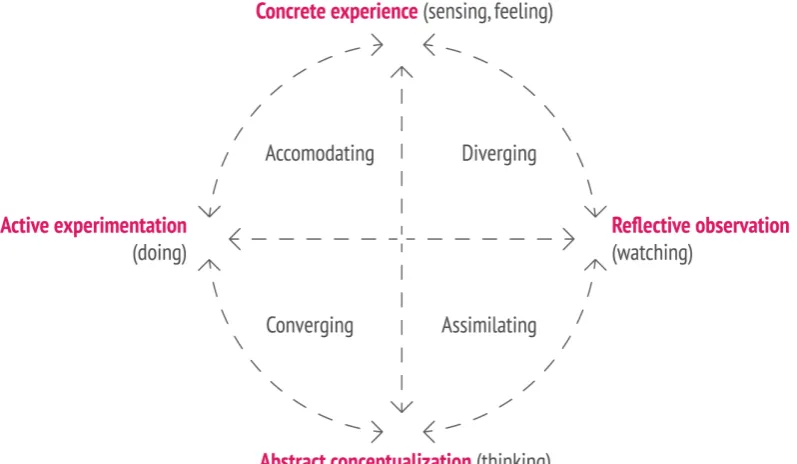
As was mentioned in the introduction a tutorial is a self regulated learning activity, where the students are responsible for their own work pace and learning experience. According to the Vrije Universiteit Amsterdam a tutorial is a meeting where students are actively working on the subject matter under supervision of one or more students [18]. Actively working matches the ”active experimentation phase” of the learning cycle of Kolb, it involves applying abstract principles and theories in reality [19]. The learning cycle can be found in figure2.1.
Kolb’s learning cycle Kolb views learning as a cycle of four phases. Ideally the learner goes through the cycle beginning in the concrete experience, they than
tinue to the reflective observation, from there they start the abstract conceptualiza-tion, and end in the active experimentation [20]. However, the arrows in the overview already show that the cycle can be walked in multiple ways. Kolb associated four learning styles with the cycle of learning. The learning styles of Kolb can be seen in the center of the circle. The learning styles can be matched to several character descriptions. Divergers are the dreamers, assimilators are the thinkers, converg-ers make the decisions, and accommodators are the doconverg-ers. Kolb adopted the as-similation and accommodation learning styles from Piaget, and the other two from Hudson [20].
Figure 2.1: The learning cycle of Kolb
Skilled learning During a tutorial several of the learning skills of ”skilled learning” are practiced. Sylvia Downs is the founder of skilled learning [20]. According to Downs skilled learners are able to estimate what needs to be learned and which learning style is suited to the available means and their own preferences [20]. Skills that are necessary for learners according to Downs are:
1. observing
2. listening
3. translating words and diagrams
4. asking questions
2.1. TUTORIALS AS LEARNING ACTIVITY 17
6. experimenting and practicing
7. criticize
8. identification and correction of mistakes
Depending on the exercises in the manual all of these skills can be practices during a tutorial. The goal of a tutorial is to experiment and practice with the material of the course.
Blooms taxonomy The experimenting and practicing of tutorials can also be found in the application category of cognitive thinking. Bloom developed a taxonomy that includes six main categories of cognitive thinking. The cognitive domain contains the skill to gather and apply information in a meaningful way [21]. In figure 2.2 the categories are represented as a staircase with the definition of each category to the right of each step.
After forty years the taxonomy was revised by Anderson and Sosniak [20]. Leslie Owen Wilson made a graphical representation of the main changes, see figure2.3. The evaluation changed in level and the new taxonomy uses verbs instead of nouns to represent the levels [22].
Figure 2.3: A visual representation and summary of the revised version of Blooms taxonomy [22]
2.1.1
The effect of a tutorial as learning activity
To answer RQ2. The effect of a tutorial as learning activity is the ability of students to practice and experiment with the subject matter under supervision. This learning activity allows the students to ask for help from meaningful resources, such as peers and teaching staff, when they are stuck or they want to learn something.
To answer the leading question of this section. What is learning? Learning is a cyclic process where the learner users several skills and resources to adopt new information or skills.
2.2
Help seeking and help giving
2.2. HELP SEEKING AND HELP GIVING 19
Help seeking is not just raising a hand and asking for help. Help seeking is a metacognitive skill [24]. Metacognition is often referred to as ”thinking about think-ing”, it is the skill to recognize if a cognitive goal was met [25]. During tutorials the students need to be able to use this metacognitive skill to evaluate if they are able to complete the exercises and when they need to seek help to meet their goals. In the next sections the help seeking and giving processes will be discussed in depth. In section2.2.3 the factors that influence the quality and efficiency of help seeking and giving are summarized.
2.2.1
Help seeking
Process of help seeking Help seeking is the skill where the learner turns to a teacher, classmate, friends, or parents for help [6]. It is the skill to seek help at the appropriate time from appropriate resources [24]. Karabenick mentions that al-though help seeking is an important learning strategy there are forms of help seeking that are less desirable [6]. For instance when students only ask general questions or ask help to solve an error [1]. Another less desirable form of help seeking can be seen when a student requests help, but does not know what they want to ask. Cultural believes and personal views on help seeking can have a negative effect on help seeking. A disadvantage of help seeking is that it can threaten the self-worth of the learner, because they think help seeking implies inadequacy [7] [8]. Another disadvantage is the public attention the help seeker gets, this is especially off-putting for the self-conscious learner [9]. Moreover, Shapiro mentioned that the feeling of being judged less capable by the person you asked for help could be embarrassing for the learner [10]. Students’ intention to seek needed help depends on how they perceive the classroom achievement goal structure and their personal achievement goal orientations [6]. The likelihood of seeking help can be increased by reducing the perceived costs that are induced when learners are concerned that they perform worse than others in the class [6].
Newman used the term adaptive help seeking in several papers [6]. Adaptive help seeking consists of three critical decisions [6]:
1. Necessity: is it necessary to ask someone for help?
2. Content: What question should I ask?
3. Target: Whom should I ask for help?
Aleven and Mercier made models that include the three critical decisions of New-man. In figure 2.4, the two models can be seen. The models describe the process of help seeking. Students start at the bottom, they become aware that they are at an impasse and that they need help. Mercier uses two steps for this necessity deci-sion, namely reconizing and diagnozing the impasse. The second step includes the cause of the impasse in terms of knowledge [27]. Then the students need to seek help. This can be done by asking a peer, searching online or in the subject theory, using an online tutor, or asking teaching staff for help. The Mercier model was made for a computer coach [27], while the Aleven model is focussed on traditional help seeking. With the step ”Establish a specific need for help” Mercier means to es-tablish in terms of topics and types of help, what help is needed from the computer coach [27]. A step that the Aleven model misses is the comprehension of the help. Mercier designed this step as the step where the help that was given is discussed, a mental model of the given information is made linking the given information to prior knowledge.
Figure 2.4: The models of Aleven and Mercier compared [27]
2.2. HELP SEEKING AND HELP GIVING 21
When students seek help there are a couple of categories for which they can ask help:
• specific questions (how to solve the problem),
• general questions (general statements of confusion),
• and making errors.
Webb et al., discovered that students asked on average more general questions and sought help when they had an error, than asking help with specific questions [1]. Asking specific questions however related positively to achieving the goal, and students who asked more specific questions obtained higher test results [1]–[5]. Asking general questions and seeking help with errors were not statistically related to higher test results [1]. Students who asked specific questions benefited more from high level help than students who asked general questions and received high level help [1]. Moreover, students who asked general questions received less high level help and carried out less high level follow up activities after receiving help [1]. Students who ask general questions usually show that they do not know how to start solving the problem or that they do not know what they should do and state that repeatedly [1]. General questions do not help the help giver define where the help seeker is stuck. For instance when a help seeker says ”I don’t get it.” or ”How do you do it” this does not provide clues for the help giver on what the help seeker does not understand [1]. While the specific questions generated targeted explanations [1]. Encouraging all students to explain their interpretations of problems and their problem-solving strategies, and to listen to each other, may help help seekers to clarify their own thinking to get targeted explanations from help givers [1], [12].
Van der Meij found that children with relatively poor vocabularies asked signifi-cantly more unnecessary questions than children with good vocabularies [11]. When students are new to programming they have to learn a new ”language”. In the begin-ning their lacking in vocabulary may lead to asking more general questions. Sharing questions and strategies may help the students who have trouble asking specific questions to learn how to formulate their question better and understand their prob-lem better. Eventually the students will become ready to receive a higher level of help that will help them grow.
Efficiency of help seeking In the disadvantages of help seeking that where men-tioned earlier the prejudices of seeking help were discussed. Students could think that seeking for help is a weakness. Also disliking the public attention of asking a question, can be a reason for students to putt off the asking for help. Karabenick stated that when the perceived costs of performing less than peers can be reduced that this would result in more help seeking behavior [6]. Kitsantas researched the perceived threats and preferences of students concerning help seeking strategies. In her research Kitsantas found that students prefer to ask for help via electronic means [31]. When Karabenick and Knapp split one tutorial session into two groups, where one group was supported by TAs and the other by computer-based help, the results showed that 86% of the group that had computer-based support sought help. Meanwhile, the human supported had a percentage of 36% that showed help seeking behavior [6]. The researchers concluded that the students who could ask for help on the computer had the ”freedom to fail” these students did not suffer the fair of preforming less than peers and sought more help [6]. Likewise, Kitsantas found that electronic asynchronous means of help seeking present less of a threat to the self-esteem of students than face-to face of other real time interaction [31]. Kitsantas further concluded that asynchronous help seeking provided the students the opportunity to ” take their time, reflect, and refine comments, questions, and answers.” [31]. Other studies corroborate the conclusion that seeking help by elec-tronic means provides privacy and is perceived as less threatening by students [6], [32], [33].
2.2.2
Help giving
Help giving can be done by teachers, parents, friends and strangers. It is the process of responding to a request from a help seeker or someone in need. Any respond to help seeking is considered as help giving. In this section the proceedings of help giving by a teaching staff for students are explained. Furthermore, the factors that influence the quality and efficiency are discussed. Finally, this section ends with the conclusion to RQ3 in subsection2.2.3.
Process of help giving Downs has the following tips for the supporting staff of learning [23]:
1. Do not give the easy way out by showing the student how to do it
2. Make sure students ask for help
2.2. HELP SEEKING AND HELP GIVING 23
4. Stimulate students to learn from their mistakes
5. Don’t make the learning process to easy by giving too small steps
6. Give them enough time
7. Give adequate feedback
8. Develop the curiosity to learn
9. Let the students reflect on their own work
10. Indicate that practice is an important part of learning
Especially practicing and feedback are key elements of a tutorial session. Students need to practice how to combine abstract theory and methods to get to the answers of the exercises. Other key elements of tutorials are discussed in section2.1.
Quality of help giving As discussed in the the section about the quality of help seeking, help can be divided in high level help and low level help. High level help is achieved when the help giver explains what steps need to be taken to solve the problem, then watches while the help seeker tries to solve the problem, helps with errors that may occur, asking follow-up questions to make sure the help seeker has understood the explanation, and lastly giving the help seeker praise [1]. Low level help, can be seen as unhelpful helping. The help giver gives the help seeker only the answer, without explaining the steps to get to that solution [1]. In order for high level help to be effective the help seeker needs to be mentally prepared for the high level help. When a student asks a specific question the brain creates space to store the solution to that impasse. Students who ask general questions or give a statement of confusion are not ready to receive high level help, because they first need to figure out what their level of knowledge is and where they need help. TAs mentioned in the interviews that are discussed in chapter 3, that students often give a general statement of confusion. The TAs explained how they would ask a lot of follow-up questions to get from the statement of confusion to an actual question. Several TAs mentioned that they advised students with errors to start an online search before asking for help, because the students had not bothered to look up the meaning of the error they got before asking for help.
The qualities of the teaching staff may influence the students willingness to seek help. Teachers who were available and affectionate, having a warm and caring character, stimulated students to ask more questions [29].
help they give. When a TA has more experience they are more likely to understand the subjects and give a higher level of help. However, more experienced TAs have a harder time empathizing with the students when they do not understand a step that seems logical to the TA. Next to more in depth subject knowledge experienced TAs have the benefit that they have more experience in explaining the concepts. When the students are at a certain topic an experienced TA is able to predict what type of questions will arise and how they can explain them best. The benefit of younger and inexperienced TAs is that they are more approachable and that lowers the threshold for help seeking. Another benefit the inexperienced TA has, is that they can remember what they thought en felt when they were making the same exercises. Having a mixed group of experienced and inexperienced TAs improves the quality of help giving.
Efficiency of help giving When students are working autonomously on assign-ments, delayed attention is a strategy that the teaching staff can use to stimulate the students self-reliance. Delayed attention implies that the teaching staff does not answer questions directly [34], [35]. The students are then forced to try to solve their problem on their own, before they ask for help. When student become more au-tonomous their study time becomes more effective [34]. Delayed attention has the pedagogical goal to stimulate self problem solving behavior and independent think-ing [35]. During delayed attention the student can pick up the following strategies to solve their problem [35]:
1. Read the assignment and the theory again
2. Ask a peer for help
3. Research online for a solution
4. If the previous steps do not help the student can start working on the next question while waiting for help
Delayed attention has the additional benefit that the teaching staff can create an approach to handle the help requests. When the teaching staff does not use an approach to handle help requests they display waiter behavior, when the students ask for help they will immediately receive help. Resulting in the student who is best at seeking attention to be helped first, and shy students not being noticed and not getting the attention they deserve. It is therefore important to communicate the help giving approach.
2.3. TECHNOLOGYENHANCEDLEARNING 25
TAs helping with the basics, the help will be given much quicker. TAs mentioned in the interviews that they would ask another TA to help if the topic was to advanced for them. The students who sought help now have to explain their specific need for help again to the experienced TA. If TAs could select who they are going to help based on the question they have or the subject of their help request, this could improve the efficiency of help giving.
2.2.3
Factors that influence help seeking and giving
The quality of help is influenced by the level of the help seeking [1]–[5]. When stu-dents ask specific questions they are better able to receive high level help [1]. Shar-ing questions and strategies can also improve the quality of help seekShar-ing [1], [12]. Asking questions online can reduce the perceived threats and increase the amount of questions that are asked [6], [31]–[33]. Factors that influence the efficiency of help are, delayed attention [34], [35] and smart distribution of expertise.
2.3
Technology Enhanced Learning
Teachers that support their educational activities with technology are practitioners of blended learning. In blended courses the traditional classroom and online learning methods are combined [36]. Blended learning has the advantages of online learning combined with the social and instructional benefits of face to face learning [36]. For instance when the lectures are available online, students can choose to watch the instructions at a time and place that is convenient for them. Next to that the students benefit for face to face help and instructions during a lab session. Blended learning can enhance and increase the engagement of students [36]–[39]. When traditional educational activities make use of technology to support their learning activity it is called technology enhanced learning.
2.3.1
TEL domains
of Bielaczyc are given, including the design questions that need to be answered to fulfill that domain [41].
Cultural beliefs
The mindset of the user groups determine how people interact and how they will use the tools that are designed for them [41]. The mindset is influenced by the social identity of a user. The social identity of a student is how the students view themselves as learners and how they perceive the roles of the people surrounding them in regard to their own learning. Another cultural belief that determines the interaction with the tool is the perceived purpose of the tool [41]. The folowing questions are design questions according to the Bielaczyc’s design method [41]:
1. How are learning and knowledge conceptualized?
2. What is the student’s social identity? According to:
(a) the student,
(b) and the teacher.
3. How is a teachers social identity understood? According to:
(a) the student,
(b) and the teacher.
4. How the purpose of the tool viewed?
Bielaczyc’s questions lead to answers for the three domains that need to be taken into account when designing a TEL system [41].
Practices in online and offline activities
What activities take place and how are the activities organized? Do the students work in groups or individually? What is the role of the teacher? These are design questions of the practices in online and offline activities domain. The questions help determine how the students and teacher interact and how they will interact with the tool. Other questions that involve this domain are:
1. What do the students need to produce?
2. How should the functionality of the tool be learned?
2.3. TECHNOLOGYENHANCEDLEARNING 27
Socio-techno-spatial relations
This dimension describes the organization of the physical and technological support that the student gets. It concerns the amount of technology in the classroom and how it is distributed, but also the physical aspects of the classroom that may support or constrict the design tool. The design questions that the designer should ask for this domain are:
1. Are the computers located in the classroom?
2. Do the user have handheld or wearable technologies?
3. Is there space next to the machines where the students can place their learning materials?
4. Where and what are the teachers doing when the students are working?
5. Do students work separately with the technology or do they share a device?
6. Is the work of the students private or accessible to all?
Interaction with the outside world
2.4
Human centered design
[image:30.595.110.457.220.456.2]To be able to design a solution that meets the user needs this research was con-ducted using human centered design methods. Human centered design (HCD) sets the people the design will serve at the center of the design process [42]. Accord-ing to International Organization for Standardization(IOS) the HCD process has five stages, see figure2.5.
Figure 2.5: The phases of Human Centered Design [43]
2.4. HUMAN CENTERED DESIGN 29
[image:31.595.133.492.168.310.2]of the CreaTe design phase. In this research the Creative Technology design pro-cess is used as the leading design propro-cess. In the next sections the phases of the Creative Technology design process will be discussed. The results of these design strategies are shown in chapter5.
Figure 2.6: The phases of Human Centered Design [44]
2.4.1
Ideation phase
During the ideation phase the context analysis is important. The phase begins with a stakeholder analysis, identifying who will use and who will be influenced by the design [46]. For each stakeholder a cost and benefit analysis will give an overview of how acceptable each user group will find the design [46]. By performing expert interviews, focus group interviews and making scenarios a deeper user understand-ing is created [44], [46]. To make a valuable representation of the user requirements persona’s are used. Persona’s are hypothetical representations of actual users [47]. During the ideation phase related work and research are analyzed as well, this will be discussed in the next section of this chapter, namely the state of the art section 3.4. The result of the ideation phase will be the persona’s, user requirements that are a summary of the interviews, and the first design ideas, see the pink section of figure2.7.
2.4.2
Specification phase
user and which functions the design has to fulfill. Use scenarios are a elaborated version of task allocation, it is a concise description of a persona using the design to achieve a goal [47]. After the specification phase the early prototypes are made and the specifications that the users need are clear. The result of this phase will be the design specifications, these will be traded-off using the MoSCoW analysis, the results of that analysis can be found in chapter5.
2.5. CONCLUSIONS OF THIS CHAPTER 31
2.4.3
Realization phase
Because the first prototypes are ready in this phase the users are brought back to evaluate the first designs. Lo-fi and hi-fi prototype testing help evaluate the design, the context and the interaction. After this phase the evaluation results will be pro-cessed and a working product prototype can be made and evaluated. The method of evaluation can be found in chapter4, the results of the evaluation are discussed in chapter5, and the final product prototype and future works are discussed in chapter 7.
2.4.4
Implementation phase
Next to the design phases it is important to figure out what will happen with the product after this research is done. In order to design for the future it is necessary that the product meets the needs of the people who will take over the responsibility of supporting the product. This phase will be used in the context analysis, and the recommendations for the future will be discussed in chapter7.
2.5
Conclusions of this chapter
Chapter 3
Design
For this chapter the design phases that are discusses in 2.4 will be used. The first section of this chapter gives the context analysis. In the context analysis the stakeholders and the observations of tutorials are discussed. The context analysis section begins with the methods used and then reveals the results of the analysis. After the context analysis the user requirements and the requirements that were found in chapter 2 are combined to give a requirement list for the design. Next, the state of the art section, explores the high tech en low tech solutions that are already available. At the end of the state of the art section all the available solutions are tested whether they meet the requirements of section3.3. The ideation section discusses the possible design solution. Further, the specification section uses a SWOT and MoSCoW analysis to further define what will be designed. Lastly the realization phase shows the design choices and hypotheses that the design of this research have. The methods for evaluating the design can be found in the next chapter:4.
Research questions This chapter answers RQ1, RQ4 and RQ5. In the context analysis RQ1 will be addressed. The state of the art gives and overview of the available technologies, answering RQ4. The available technologies are then tested if they meet the requirements. Lastly, the design solution is discussed in section3.5 to3.7.2.
RQ1: What are the pitfalls of programming tutorials for each user group? RQ4: What technologies are available to improve tutorials?
RQ5: How can the available technologies be used to create a TEL solution that fits the user needs and the MRQ?
3.1
Context analysis
3.1.1
Methods
In section 2.3.1 the design of a TEL system is discussed. The section describes the different design questions that need to be answered. Those questions and the ideation phase of the CreaTe design process together give the context analysis. In this section the methods used to create the context analysis are discussed. Then the results of the context analysis are given.
Stakeholder analysis
There are three types of user involved in a tutorial session. The teachers, the teach-ing assistants and the students. In order to make a human centered design, the characteristics, activities, attitudes and emotions of the target users need to be iden-tified. To understand what each group needs and wants interviews and focus group interviews were conducted. To get a clear description of each group persona’s were made, these can be found in chapter 5. Next to the users the other stakeholders that will be influenced by a innovation should be taken into account. The other stakeholders are the people who will be responsible for the technical support that the intervention might need.
Expert interviews
In order to describe the user needs and the stakeholder requirements interviews with experts were conducted. The interviews were semi structured, giving the experts the ability to elaborate on their experiences and to add personal insights to the interview. Experts are able to give a system-level view of the project area, they might be able to tell about recent innovations, successes, and failures [42]. Further, the experts can offer the perspectives of the involved organizations [42]. Teachers of programming tutorials of the University of Twente were considered experts on the user needs of a tutorial. The teachers were approached via email and the interviews were conducted in person.
For the interview an interview guide was made, which can be found in appendix A. An interview guide should include the purpose of the interview, the ways of record-ing the conversation, and a description of the anonymity disclosure and the feedback of the results.
3.1. CONTEXT ANALYSIS 35
Eight teachers were interviewed using the interview guide from appendixA. The interviews were audio recorded and transcribed, the full interviews can be found in appendixB-I.
Focus group interview
To get the opinion of the students and teaching assistants focus groups were made. According to Vaughn the goal of a focus groups interview is to discover why peo-ple act, think, and feel as they do [48]. The advantages of group interviews over individual interviews include; a wider bank of data, respondents comment on each other and initiate responses, respondents stimulate each other to discuss, and the respondents become more genuine because they are not required to answer ev-ery question [48]. In order for the focus group interview to be successful a couple of steps need to be taken. Firstly, the general purpose statement needs to be for-mulated. Then the moderator guide needs to be written. Thirdly, the focus group needs to be selected. Lastly, the setting of the location needs to be determined and guaranteed. Each step will be discussed below.
Purpose statement The purpose statement reflects an overall summary of the goal of the focus group interview [48]. In this case the purpose statement is: To get information from the participants to verify an refine the hypotheses. To help the moderator lead the discussions a list of information the researcher does en does not require is made. Does:
• How the participant feels about tutorial questions and answers
• What the participant finds important during tutorials
• Are there frustrations that the participant has encountered during tutorials
• How do the student assistants regulate the work flow during a tutorial
– What works well
– What could be improved
•
Does not:
• Need to know subject/course specific information
• No need for environmental information
Moderator guide In order to get a flowing discussion that stays on topic a moder-ators guide was made. The layout of the sections is based on chapter 3 of Vaughn’s book [48]. The moderators guide that was used during the focus group can be found in appendixK.
Group size of a focus group There are several contradictory opinions about the size of a focus group. Twinn used three to four participants in the focus group, while Kitzinger states that the ideal group size is between four and eight people, and Vaughn has found the ideal group size to be six to twelve persons [48]–[50]. Because there is no standard focus group size, the minimal size for the interviews will be four and the maximum eight. When there are more than eight participants the group will be split in two focus groups. The focus groups should be homogeneous in experience Further, the groups will be as equal as possible in gender distribution.
Interview setting and equipment The focus group interview were held in an invit-ing environment that had an informal ambiance. As a precaution to distractions the door of the room held a note informing outsiders that they could not disturb the ses-sion. Participants were aloud to leave and enter the room to go to the bathroom. In order to comfort the participants food and drink was available. For the recording of the interview a camera was set up and all the participants were asked permission before the recordings started, Next to the video recorder there were name tags to improve in the flow of the conversation and to help the moderator when she needed to address a participant.
Ethics Because the focus group interviews were video recorded, the participant need to be informed of what happens with the recordings and give informed consent that the recordings may be used.
Observation of tutorials
To gather information on the socio-techno-spatial relations several tutorials were observed. During the observations the following points were annotated:
1. how students could ask questions or request a sign off
2. the amount of raised hands were counted
3. how fast a student got help after requesting help
3.2. IDEATION PHASE RESULTS 37
5. events that took place
The last bullet point is intentionally vague, this was to prevent tunnel vision of the ob-server. In this way the observer would be susceptible for events that might influence the application that were not previously known.
3.1.2
Results of the context analysis
3.2
Ideation phase results
In this section the results of the stakeholder analysis are given. These results relate to research sub-questions 1 and 3 of section1.2.
Sub-question one: What are the pitfalls of programming tutorials for each user group?
Sub-question three: What factors influence the efficiency and quality help seeking? The stakeholders of this research were teachers, teaching assistants (TAs), stu-dents, and supporting staff. For each stakeholder the results of the user analysis are discussed in the subsections 3.2.1 to 3.2.5. For each stakeholder a persona was made, the persona gives a summary of the results of the user analysis of that stakeholder.
The ideation phase also included a context analysis. The results of the observa-tions can be found in3.2.7.
3.2.1
Teacher Results
Most of the teachers used Teaching Assistants (TAs) to help them support the tu-torials. Several teachers mentioned that the TAs were useful, because they had learned the topics quiet recently and were better able to understand the struggles of beginning students than an expert in the field. Of the eight teachers, three try to be present at all the tutorials, one mentioned that he would like to be present at at least a couple sessions, and two mentioned that they were not present at the tutorials. The teachers who are not present at tutorials, mentioned that the TAs are experienced enough to handle the tutorials on their own.
Teacher responsibilities
Two of the teachers mentioned that they held short lectures during the tutorial to instruct the students.
Student behavior
Desired behavior Students need to be prepared for the tutorial, this means having a laptop with the needed software on it. The courses that have a manual need the students to bring the manual as well. Most of the tutorials provide more assignments than the students need to complete. It is expected that the students show initiative in their own learning process. This can be done by asking questions, collaborating with fellow students and by actively working on the content. Teachers also mentioned that they wanted students to ask the more in depth questions. Most of the tutorials have deadlines for finishing assignments, some are just indication deadlines and others need to be signed off to complete the course. It is up to the students to schedule their work and make sure they finish on time. In all the tutorials it is allowed to work in pairs, however signing off should be done individually.
3.2. IDEATION PHASE RESULTS 39
TA behavior
Specifics The TA is usually the best student of last year. Teachers like to use TAs because they have a fresh view on the learning process and still know what it was like to learn the content last year. The teachers also mentioned that TAs can sometimes explain the content better because they are closer to the experience of learning it themselves. TAs are easier to approach for students.
Responsibilities
1. Help students with their questions
2. Give feedback to the teacher, on what subjects were hard for the students
3. Grade assignments
4. Test students on their knowledge by asking questions during the sign off
5. Signing off assignment
6. Keep students focused on the assignments
Mandatory lectures
There are three courses of the eight who use mandatory tutorials. The other courses use sign offs or a mandatory assignment to motivate students to come to the tutori-als. One teacher lets the students bring their assignments to the exam so they can solve the exam questions by using the assignments that they made in the tutorials.
Enabling factors
For the teachers a tutorial needs the following enabling factors:
1. Manual
2. TAs
3. Laptops with working software
4. Power outlets
5. Enough space to walk around, and sit next to the student
Main frustrations
A frustration that several teachers mentioned was that students were unprepared for the tutorials. The students had not downloaded the right software or had not brought their laptop at all. Other frustrations were about the attitude of students. Especially a passive attitude from the students was frustrating for the teacher. When the students did not ask for help or were lagging in the assignments.
Use of educational tools
One of the teachers did not use any educational tools outside the mandatory Learn-ing Management System (LMS) of the university. The other seven do have expe-rience with educational tools, varying from video recordings, to physical tools that were used in the tutorials. One teacher had a lot of experience in massive online open course teaching, and therefor a lot of experience with online educational tools.
Teacher persona
[image:42.595.109.462.491.747.2]In figure 3.1 and 3.2 two personas of teachers are shown. The personas differ in age, because the expert interviews showed different user needs for different age groups.
3.2. IDEATION PHASE RESULTS 41
Figure 3.2: Persona of a teacher
3.2.2
Teaching Assistant results
In appendixMandNthe full transcriptions of the two focus group interviews can be found. In total 12 TAs participated in the focus group interviews.
Student behavior
Students work on the assignments, when they get to a deadlock or they have a question they ask the TA.
Responsibilities of a TA
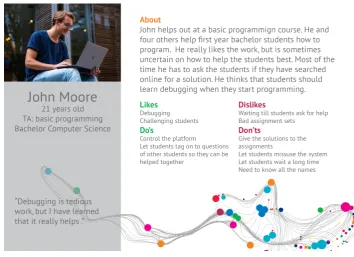
can give them some extra information and challenge them. Several TAs mentioned that they had to give the answer to the same question over and over again. Several TAs were also responsible for grading assignments, and one TA was responsible for controlling the online platform on which the students hand in their work. Almost all the TAs had experience in assisting tutorials and they mentioned that the experience was beneficial for their ability to help students. All the TAs mentioned that they had to take students step by step through the debugging of code, and mentioned that it should be taught to the students plenary. Two of the 12 TAs used the questions that were asked by the students to give the teacher feedback on the main struggles of the students and for tips in the manual. Out of the tutorial the TAs do not commu-nicate with the students, expect when they have asked the student to email them. With the teacher some TAs email, one also gathers checklists at the teachers office. During the first weeks and near the sign off deadlines the TAs noticed an increase in the demand for support from the students.
Do’s
1. If there would be a system to improve the tutorials it should be accessible on a mobile phone
2. If students would sign in for a queue, they should be able to sign out when they do not have a question anymore
3. The system should teach first year students how:
(a) they could search online to solve their question
(b) to debug code
4. TAs want to be able to focus on more difficult questions than the ”have you searched online?” question
5. When students sign in at an online queue the TAs want to be able to control who they want to help first
6. In order to be able to know who to help first TAs want to know:
(a) in what category the student has a question
(b) at what assignment the student is
(c) if the student has a question or wants to sign off
3.2. IDEATION PHASE RESULTS 43
8. Get students with the same question together so the TA can explain the theory once and help them figure out the solution together
9. If a system is build, it should safe time
10. TAs need to answer the questions in person to figure out what the student really want to know
11. Lower the bar for asking questions, especially for shy students
12. Give students as much time as possible to practice
13. Have enough TAs to be able to support the students
Don’ts
1. TAs don’t want to be a code reviewer, where they get 100 lines of code from a student and the comment that it does not work
2. Assignment sets that suck, because if the assignments are not clear it takes more time to help and that increases the waiting queue
3. Let students wait for half an hour till they get help, this is not productive
4. Communicate with students outside of the tutorials
5. Frustrations that TAs have with the behavior of students:
(a) Students with a bad attitude
(b) Students who don’t read the assignments frustrate the TAs
(c) Students who can’t communicate in English
(d) Lazy students who try to make the assignments the last minute
(e) Students who are afraid to ask questions
6. TAs don’t want to communicate with the students outside of the tutorials, ex-pect when they ask them to
7. TAs do not know all the names of the students and don’t want to be obligated to learn them
8. If there would be a system that puts students in an online queue the system should not:
(b) Show students that are advanced in programming how they should search online for the answer to their question
(c) Create extra work for the TAs
(d) Students should not be able to misuse the system by putting themselves in the queue in the first minute, when they are not yet need help or are not ready to sign off
(e) Obligate the TA to walk to the front of the classroom when they want to choose who they want to help next
TA persona
[image:46.595.108.463.488.747.2]For the TAs there are also two personas. The first in figure 3.3an experienced TA is shown. The second persona shows a TA that is still figuring out how to be a good TA (see figure 3.4.
3.2. IDEATION PHASE RESULTS 45
Figure 3.4: Persona of a Teaching Assistant
3.2.3
Students Results
of misuse were; students who would put their name on the board with the queue for the sign off before they were actually ready with the assignments, and students who would put their group in the time slot of another group in an online spread sheet for Q and A time slots. The students mentioned that students who cheat the system make it more chaotic and that they disliked students who would cut in line. The students had no problem with the option where teacher could view their progress in the assignments. If their is a queue for who is next in line for help the students did not mind if someone else would be helped first, as long as the question of the other student was short. The students also mentioned that if they had only one last question or the last sign off before they could go that they would mind people being helped before their turn.
3.2.4
Students persona
[image:48.595.109.461.383.639.2]The students persona shows a programming team in a beginners course (see figure 3.5).
Figure 3.5: Persona of a Students
3.2.5
Supporting staff Results
uni-3.2. IDEATION PHASE RESULTS 47
versity in general and the supporting staff became clear. The results can be found in the persona that is portrayed in figure3.6
[image:49.595.133.491.179.440.2]3.2.6
Supporting staff persona
Figure 3.6: Persona of a TELT-team member
3.2.7
Context Analysis
Because tutorials take place in different surroundings the context analysis was done by observing several tutorials from different studies. In total three tutorial sessions were observed, of which one was a master course tutorial. Some of the teachers mentioned the restrictions of certain rooms and their preferences for the room in the interviews.
Observations
There were three different rooms that were observed. A room in Carre, a room in the Oost Horst and the SmartXp in the Zilverling. These rooms all differ from each other.
white board when they were ready to sign off assignments. There were 42 students, 2 TAs and one teacher present at this tutorial. The queue on the board did solve the raising hands question but it wasn’t a fair system. When no one was looking students placed their names above other students, and students had put their name on the board before they were done estimating how many names were on the board and if they would be done when it was their turn if they would step into the queue at this point. The crossing off of the names went wrong a couple of times, resulting in the TA or teacher calling a name that was being helped at that moment by another TA. Also the students did not put their names below each other but made a garland within the predetermined column, this was confusing for the TAs and the teacher because they didn’t know who was first. Some students signed off their assignments individually and some as a group. The teacher needed 10 minutes on average to help students and the TAs 18 minutes. Most of the students that had to wait to be signed off were bored and doing something else on their phone or laptop. The room was too small for the teacher to walk around. The teacher had ordered extra power outlets so the students would all be able to plug in. If the TAs or the teacher wanted to help a student there were no chairs left next to the students, so they had to lean on a table or squat next to the students to be able to help. The teacher wanted the students to sign off after three to four assignments, but only 15 students did this, the other students all signed off all the assignments when they were done.
A lot of support per student The second observation session(see Q.2, was in the Oost Horst. This room was large with several projectors and five rows for the students to sit in. This session was not mandatory and started with 25 students and after two hours there were 32 students present. Next to the students there were two teachers and five TAs at the session. During the observation there were 35 raised hands of which 33 got attention. Almost all questions had a response time within half a minute. In the table inQ.2the front rows asked more questions than the rows behind them. On average students in the front asked 1.7 questions per student, in the middle 0.66 and in the back 0.86. However the TAs mentioned that it was less busy than the week before, so this is not a representation for all the tutorials of this course.
![Figure 2.3: A visual representation and summary of the revised version of Blooms taxonomy [22]](https://thumb-us.123doks.com/thumbv2/123dok_us/9627744.465304/20.595.68.503.164.406/figure-visual-representation-summary-revised-version-blooms-taxonomy.webp)
![Figure 2.4: The models of Aleven and Mercier compared [27]](https://thumb-us.123doks.com/thumbv2/123dok_us/9627744.465304/22.595.66.504.356.566/figure-models-aleven-mercier-compared.webp)
![Figure 2.5: The phases of Human Centered Design [43]](https://thumb-us.123doks.com/thumbv2/123dok_us/9627744.465304/30.595.110.457.220.456/figure-phases-human-centered-design.webp)
![Figure 2.6: The phases of Human Centered Design [44]](https://thumb-us.123doks.com/thumbv2/123dok_us/9627744.465304/31.595.133.492.168.310/figure-phases-human-centered-design.webp)
![Figure 2.7: Creative Technology design process [45]](https://thumb-us.123doks.com/thumbv2/123dok_us/9627744.465304/32.595.111.467.227.743/figure-creative-technology-design-process.webp)