Introduction to MATLAB
This book is an introduction to two subjects: Matlab and numerical computing. This first chapter introduces Matlab by presenting several programs that inves-tigate elementary, but interesting, mathematical problems. If you already have some experience programming in another language, we hope that you can see how Matlabworks by simply studying these programs.
If you want a more comprehensive introduction, there are many resources available. You can select the Help tab in the toolstrip atop the Matlab com-mand window, then select Documentation, MATLAB and Getting Started. A MathWorks Web site, MATLAB Tutorials and Learning Resources [11], offers a number of introductory videos and a PDF manual entitled Getting Started with MATLAB.
An introduction to MATLAB through a collection of mathematical and com-putational projects is provided by Moler’s free online Experiments with MATLAB [6].
A list of over 1500Matlab-based books by other authors and publishers, in several languages, is available at [12]. Three introductions to Matlab are of par-ticular interest here: a relatively short primer by Sigmon and Davis [9], a medium-sized, mathematically oriented text by Higham and Higham [3], and a large, com-prehensive manual by Hanselman and Littlefield [2].
You should have a copy of Matlabclose at hand so you can run our sample programs as you read about them. All of the programs used in this book have been collected in a directory (or folder) named
NCM
(The directory name is the initials of the book title.) You can either startMatlab in this directory or use
pathtool
to add the directory to theMatlabpath.
September 18, 2013
1.1
The Golden Ratio
What is the world’s most interesting number? Perhaps you like π, or e, or 17. Some people might vote forϕ, thegolden ratio, computed here by our firstMatlab statement.
phi = (1 + sqrt(5))/2
This produces
phi = 1.6180
Let’s see more digits.
format long phi
phi =
1.618033988749895
This didn’t recomputeϕ, it just displayed 16 significant digits instead of 5. The golden ratio shows up in many places in mathematics; we’ll see several in this book. The golden ratio gets its name from the golden rectangle, shown in Figure 1.1. The golden rectangle has the property that removing a square leaves a smaller rectangle with the same shape.
φ
φ − 1 1
1
Figure 1.1. The golden rectangle.
Equating the aspect ratios of the rectangles gives a defining equation forϕ: 1
ϕ = ϕ−1
1 .
This equation says that you can compute the reciprocal ofϕby simply subtracting one. How many numbers have that property?
Multiplying the aspect ratio equation byϕproduces the polynomial equation
The roots of this equation are given by the quadratic formula:
ϕ= 1±
√
5 2 . The positive root is the golden ratio.
If you have forgotten the quadratic formula, you can ask Matlab to find the roots of the polynomial. Matlab represents a polynomial by the vector of its coefficients, in descending order. So the vector
p = [1 -1 -1]
represents the polynomial
p(x) =x2−x−1.
The roots are computed by therootsfunction.
r = roots(p)
produces
r =
-0.618033988749895 1.618033988749895
These two numbers are the only numbers whose reciprocal can be computed by subtracting one.
You can use the Symbolic Toolbox, which connects Matlab to a computer algebra system, to solve the aspect ratio equation without converting it to a poly-nomial. The equation involves a symbolic variable and a double equals sign. The
solvefunction finds two solutions.
syms x r = solve(1/x == x-1) produces r = 5^(1/2)/2 + 1/2 1/2 - 5^(1/2)/2
The pretty function displays the results in a way that resembles typeset
mathe-matics. pretty(r) produces +- -+ | 1/2 | | 5 |
| ---- + 1/2 | | 2 | | | | 1/2 | | 5 | | 1/2 - ---- | | 2 | +- -+
The variableris a vector with two components, the symbolic forms of the two solutions. You can pick off the first component with
phi = r(1)
which produces
phi =
5^(1/2)/2 + 1/2
This expression can be converted to a numerical value in two different ways. It can be evaluated to any number of digits using variable-precision arithmetic with the
vpafunction.
vpa(phi,50)
produces 50 digits.
1.6180339887498948482045868343656381177203091798058
It can also be converted to double-precision floating point, which is the principal way thatMatlab represents numbers, with thedoublefunction.
phi = double(phi)
produces
phi =
1.618033988749895
The aspect ratio equation is simple enough to have closed-form symbolic so-lutions. More complicated equations have to be solved approximately. InMatlab ananonymous functionis a convenient way to define an object that can be used as an argument to other functions. The statement
f = @(x) 1./x-(x-1)
definesf(x) = 1/x−(x−1) and produces
f =
@(x) 1./x-(x-1)
The graph off(x) over the interval 0≤x≤4 shown in Figure 1.2 is obtained with
0 0.5 1 1.5 2 2.5 3 3.5 4 −3 −2 −1 0 1 2 3 4 5 6 7 x 1/x − (x−1) Figure 1.2. f(ϕ) = 0. ezplot(f,0,4)
The name ezplot stands for “easy plot,” although some of the English-speaking world would pronounce it “e-zed plot.” Even thoughf(x) becomes infinite asx→0,
ezplotautomatically picks a reasonable vertical scale.
The statement
phi = fzero(f,1)
looks for a zero of f(x) near x = 1. It produces an approximation to ϕ that is accurate to almost full precision. The result can be inserted in Figure 1.2 with
hold on
plot(phi,0,’o’)
The followingMatlabprogram produces the picture of the golden rectangle shown in Figure 1.1. The program is contained in an M-file namedgoldrect.m, so issuing the command
goldrect
runs the script and creates the picture.
% GOLDRECT Plot the golden rectangle
phi = (1+sqrt(5))/2; x = [0 phi phi 0 0]; y = [0 0 1 1 0]; u = [1 1]; v = [0 1];
plot(x,y,’b’,u,v,’b--’) text(phi/2,1.05,’\phi’) text((1+phi)/2,-.05,’\phi - 1’) text(-.05,.5,’1’) text(.5,-.05,’1’) axis equal axis off set(gcf,’color’,’white’)
The vectors x and y each contain five elements. Connecting consecutive (xk, yk) pairs with straight lines produces the outside rectangle. The vectors u
and veach contain two elements. The line connecting (u1, v1) with (u2, v2)
sepa-rates the rectangle into the square and the smaller rectangle. Theplot command draws these lines—thex−y lines in solid blue and the u−v line in dashed blue. The next four statements place text at various points; the string’\phi’denotes the Greek letter. The twoaxis statements cause the scaling in thexandy directions to be equal and then turn off the display of the axes. The last statement sets the background color ofgcf, which stands for get current figure, to white.
Acontinued fractionis an infinite expression of the form
a0+
1
a1+a 1 2+a3 +1···
.
If all theak’s are equal to 1, the continued fraction is another representation of the
golden ratio:
ϕ= 1 + 1 1 + 1+11
1+···
.
The followingMatlabfunction generates and evaluates truncated continued frac-tion approximafrac-tions toϕ. The code is stored in an M-file namedgoldfract.m.
function goldfract(n)
%GOLDFRACT Golden ratio continued fraction.
% GOLDFRACT(n) displays n terms.
p = ’1’; for k = 1:n p = [’1+1/(’ p ’)’]; end p p = 1; q = 1; for k = 1:n s = p; p = p + q; q = s;
end p = sprintf(’%d/%d’,p,q) format long p = eval(p) format short err = (1+sqrt(5))/2 - p The statement goldfract(6) produces p = 1+1/(1+1/(1+1/(1+1/(1+1/(1+1/(1)))))) p = 21/13 p = 1.61538461538462 err = 0.0026
The threep’s are all different representations of the same approximation toϕ. The first p is the continued fraction truncated to six terms. There are six right parentheses. This pis a string generated by starting with a single ‘1’ (that’s
goldfract(0)) and repeatedly inserting the string ‘1+1/(’ in front and the string ‘)’
in back. No matter how long this string becomes, it is a validMatlabexpression. The second p is an “ordinary” fraction with a single integer numerator and denominator obtained by collapsing the firstp. The basis for the reformulation is
1 + 1p
q
= p+q
p .
So the iteration starts with
1 1 and repeatedly replaces the fraction
p q with p+q p . The statement
p = sprintf(’%d/%d’,p,q)
prints the final fraction by formattingpandqas decimal integers and placing a ‘/’ between them.
The third p is the same number as the first two p’s, but is represented as a conventional decimal expansion, obtained by having theMatlabeval function actually do the division expressed in the secondp.
The final quantityerris the difference betweenpandϕ. With only 6 terms, the approximation is accurate to less than 3 digits. How many terms does it take to get 10 digits of accuracy?
As the number of termsnincreases, the truncated continued fraction generated
by goldfract(n) theoretically approaches ϕ. But limitations on the size of the
integers in the numerator and denominator, as well as roundoff error in the actual floating-point division, eventually intervene. Exercise 1.3 asks you to investigate the limiting accuracy ofgoldfract(n).
1.2
Fibonacci Numbers
Leonardo Pisano Fibonacci was born around 1170 and died around 1250 in Pisa in what is now Italy. He traveled extensively in Europe and Northern Africa. He wrote several mathematical texts that, among other things, introduced Europe to the Hindu-Arabic notation for numbers. Even though his books had to be tran-scribed by hand, they were widely circulated. In his best known book,Liber Abaci, published in 1202, he posed the following problem:
A man put a pair of rabbits in a place surrounded on all sides by a wall. How many pairs of rabbits can be produced from that pair in a year if it is supposed that every month each pair begets a new pair which from the second month on becomes productive?
Today the solution to this problem is known as the Fibonacci sequence, or Fibonacci numbers. There is a small mathematical industry based on Fibonacci numbers. A search of the Internet for “Fibonacci” will find dozens of Web sites and hundreds of pages of material. There is even a Fibonacci Association that publishes a scholarly journal, theFibonacci Quarterly.
If Fibonacci had not specified a month for the newborn pair to mature, he would not have a sequence named after him. The number of pairs would simply double each month. Aftern months there would be 2n pairs of rabbits. That’s a lot of rabbits, but not distinctive mathematics.
Letfn denote the number of pairs of rabbits afternmonths. The key fact is
that the number of rabbits at the end of a month is the number at the beginning of the month plus the number of births produced by the mature pairs:
fn =fn−1+fn−2.
The initial conditions are that in the first month there is one pair of rabbits and in the second there are two pairs:
The followingMatlabfunction, stored in the M-file fibonacci.m, produces a vector containing the firstnFibonacci numbers.
function f = fibonacci(n)
% FIBONACCI Fibonacci sequence
% f = FIBONACCI(n) generates the first n Fibonacci numbers. f = zeros(n,1); f(1) = 1; f(2) = 2; for k = 3:n f(k) = f(k-1) + f(k-2); end
With these initial conditions, the answer to Fibonacci’s original question about the size of the rabbit population after one year is given by
fibonacci(12) This produces 1 2 3 5 8 13 21 34 55 89 144 233
The answer is 233 pairs of rabbits. (It would be 4096 pairs if the number doubled every month for 12 months.)
Let’s look carefully atfibonacci.m. It’s a good example of how to create a Matlabfunction. The first line is
function f = fibonacci(n)
The first word on the first line says this is a function M-file, not a script. The remainder of the first line says this particular function produces one output result,
f, and takes one input argument,n. The name of the function specified on the first line is not actually used, becauseMatlablooks for the name of the M-file, but it is common practice to have the two match. The next two lines are comments that provide the text displayed when you ask forhelp.
help fibonacci
FIBONACCI Fibonacci sequence
f = FIBONACCI(n) generates the first n Fibonacci numbers.
The name of the function is in uppercase because historically Matlab was case insensitive and ran on terminals with only a single font. The use of capital letters may be confusing to some first-timeMatlabusers, but the convention persists. It is important to repeat the input and output arguments in these comments because the first line is not displayed when you ask forhelpon the function.
The next line
f = zeros(n,1);
creates an n-by-1 matrix containing all zeros and assigns it to f. In Matlab, a matrix with only one column is a column vector and a matrix with only one row is a row vector.
The next two lines,
f(1) = 1; f(2) = 2;
provide the initial conditions.
The last three lines are theforstatement that does all the work.
for k = 3:n
f(k) = f(k-1) + f(k-2); end
We like to use three spaces to indent the body offorandifstatements, but other people prefer two or four spaces, or a tab. You can also put the entire construction on one line if you provide a comma after the first clause.
This particular function looks a lot like functions in other programming lan-guages. It produces a vector, but it does not use any of the Matlab vector or matrix operations. We will see some of these operations soon.
Here is another Fibonacci function, fibnum.m. Its output is simply the nth Fibonacci number.
function f = fibnum(n)
% FIBNUM Fibonacci number.
% FIBNUM(n) generates the nth Fibonacci number. if n <= 1 f = 1; else f = fibnum(n-1) + fibnum(n-2); end The statement fibnum(12) produces
ans = 233
Thefibnumfunction isrecursive. In fact, the termrecursiveis used in both a
mathematical and a computer science sense. The relationshipfn=fn−1+fn−2 is
known as arecursion relationand a function that calls itself is arecursive function. A recursive program is elegant, but expensive. You can measure execution time withticandtoc. Try
tic, fibnum(24), toc
Donottry
tic, fibnum(50), toc
Now compare the results produced bygoldfract(6)andfibonacci(7). The first contains the fraction 21/13 while the second ends with 13 and 21. This is not just a coincidence. The continued fraction is collapsed by repeating the statement
p = p + q;
while the Fibonacci numbers are generated by
f(k) = f(k-1) + f(k-2);
In fact, if we letϕndenote the golden ratio continued fraction truncated atnterms,
then
fn+1
fn
=ϕn.
In the infinite limit, the ratio of successive Fibonacci numbers approaches the golden ratio: lim n→∞ fn+1 fn =ϕ.
To see this, compute 40 Fibonacci numbers.
n = 40;
f = fibonacci(n);
Then compute their ratios.
f(2:n)./f(1:n-1)
This takes the vector containing f(2) through f(n) and divides it, element by element, by the vector containingf(1) throughf(n-1). The output begins with
2.000000000000000 1.500000000000000 1.666666666666667 1.600000000000000 1.625000000000000 1.615384615384615 1.619047619047619 1.617647058823529 1.618181818181818
and ends with 1.618033988749897 1.618033988749894 1.618033988749895 1.618033988749895 1.618033988749895
Do you see why we chosen = 40? Use the up arrow key on your keyboard to bring back the previous expression. Change it to
f(2:n)./f(1:n-1) - phi
and then press the Enter key. What is the value of the last element?
The population of Fibonacci’s rabbit pen doesn’t double every month; it is multiplied by the golden ratio every month.
It is possible to find a closed-form solution to the Fibonacci number recurrence relation. The key is to look for solutions of the form
fn=cρn
for some constantsc andρ. The recurrence relation
fn =fn−1+fn−2
becomes
ρ2=ρ+ 1.
We’ve seen this equation before. There are two possible values ofρ, namely ϕand 1−ϕ. The general solution to the recurrence is
fn =c1ϕn+c2(1−ϕ)n.
The constantsc1 andc2 are determined by initial conditions, which are now
conveniently written
f0=c1+c2= 1,
f1=c1ϕ+c2(1−ϕ) = 1.
Exercise 1.4 asks you to use the Matlab backslash operator to solve this 2-by-2 system of simultaneous linear equations, but it is actually easier to solve the system by hand: c1= ϕ 2ϕ−1, c2=− (1−ϕ) 2ϕ−1. Inserting these in the general solution gives
fn=
1 2ϕ−1(ϕ
This is an amazing equation. The right-hand side involves powers and quo-tients of irrational numbers, but the result is a sequence of integers. You can check this withMatlab, displaying the results in scientific notation.
format long e n = (1:40)’;
f = (phi.^(n+1) - (1-phi).^(n+1))/(2*phi-1)
The .^operator is an element-by-element power operator. It is not necessary to use./for the final division because(2*phi-1)is a scalar quantity. The computed result starts with
f = 1.000000000000000e+000 2.000000000000000e+000 3.000000000000000e+000 5.000000000000001e+000 8.000000000000002e+000 1.300000000000000e+001 2.100000000000000e+001 3.400000000000001e+001
and ends with
5.702887000000007e+006 9.227465000000011e+006 1.493035200000002e+007 2.415781700000003e+007 3.908816900000005e+007 6.324598600000007e+007 1.023341550000001e+008 1.655801410000002e+008
Roundoff error prevents the results from being exact integers, but
f = round(f)
finishes the job.
1.3
Fractal Fern
The M-files fern.m and finitefern.m produce the “Fractal Fern” described by Michael Barnsley inFractals Everywhere[1]. They generate and plot a potentially infinite sequence of random, but carefully choreographed, points in the plane. The command
fern
Figure 1.3. Fractal fern.
finitefern(n)
generatesnpoints and a plot like Figure 1.3. The command
finitefern(n,’s’)
shows the generation of the points one at a time. The command
F = finitefern(n);
generates, but does not plot, n points and returns an array of zeros and ones for use with sparse matrix and image-processing functions.
The NCM collection also includesfern.png, a 768-by-1024 color image with half a million points that you can view with a browser or a paint program. You can
also view the file with
F = imread(’fern.png’); image(F)
If you like the image, you might even choose to make it your computer desktop background. However, you should really runfernon your own computer to see the dynamics of the emerging fern in high resolution.
The fern is generated by repeated transformations of a point in the plane. Let
xbe a vector with two components, x1 and x2, representing the point. There are
four different transformations, all of them of the form
x→Ax+b,
with different matricesAand vectorsb. These are known asaffine transformations. The most frequently used transformation has
A= ( 0.85 0.04 −0.04 0.85 ) , b= ( 0 1.6 ) .
This transformation shortens and rotatesxa little bit, then adds 1.6 to its second component. Repeated application of this transformation moves the point up and to the right, heading toward the upper tip of the fern. Every once in a while, one of the other three transformations is picked at random. These transformations move the point into the lower subfern on the right, the lower subfern on the left, or the stem.
Here is the complete fractal fern program.
function fern
%FERN MATLAB implementation of the Fractal Fern
%Michael Barnsley, Fractals Everywhere, Academic Press,1993 %This version runs forever, or until stop is toggled.
%See also: FINITEFERN. shg clf reset set(gcf,’color’,’white’,’menubar’,’none’, ... ’numbertitle’,’off’,’name’,’Fractal Fern’) x = [.5; .5]; h = plot(x(1),x(2),’.’); darkgreen = [0 2/3 0]; set(h,’markersize’,1,’color’,darkgreen,’erasemode’,’none’); axis([-3 3 0 10]) axis off stop = uicontrol(’style’,’toggle’,’string’,’stop’, ... ’background’,’white’); drawnow
p = [ .85 .92 .99 1.00]; A1 = [ .85 .04; -.04 .85]; b1 = [0; 1.6]; A2 = [ .20 -.26; .23 .22]; b2 = [0; 1.6]; A3 = [-.15 .28; .26 .24]; b3 = [0; .44]; A4 = [ 0 0 ; 0 .16]; cnt = 1; tic while ~get(stop,’value’) r = rand; if r < p(1) x = A1*x + b1; elseif r < p(2) x = A2*x + b2; elseif r < p(3) x = A3*x + b3; else x = A4*x; end set(h,’xdata’,x(1),’ydata’,x(2)); cnt = cnt + 1; drawnow end t = toc;
s = sprintf(’%8.0f points in %6.3f seconds’,cnt,t); text(-1.5,-0.5,s,’fontweight’,’bold’);
set(stop,’style’,’pushbutton’,’string’,’close’, ... ’callback’,’close(gcf)’)
Let’s examine this program a few statements at a time.
shg
stands for “show graph window.” It brings an existing graphics window forward, or creates a new one if necessary.
clf reset
resets most of the figure properties to their default values.
set(gcf,’color’,’white’,’menubar’,’none’, ... ’numbertitle’,’off’,’name’,’Fractal Fern’)
changes the background color of the figure window from the default gray to white and provides a customized title for the window.
x = [.5; .5];
h = plot(x(1),x(2),’.’);
plots a single dot in the plane and saves a handle, h, so that we can later modify the properties of the plot.
darkgreen = [0 2/3 0];
defines a color where the red and blue components are zero and the green component is two-thirds of its full intensity.
set(h,’markersize’,1,’color’,darkgreen,’erasemode’,’none’);
makes the dot referenced byhsmaller, changes its color, and specifies that the image of the dot on the screen should not be erased when its coordinates are changed. A record of these old points is kept by the computer’s graphics hardware (until the figure is reset), butMatlabitself does not remember them.
axis([-3 3 0 10]) axis off
specifies that the plot should cover the region
−3≤x1≤3, 0≤x2≤10,
but that the axes should not be drawn.
stop = uicontrol(’style’,’toggle’,’string’,’stop’, ... ’background’,’white’);
creates a toggle user interface control, labeled ’stop’ and colored white, in the default position near the lower left corner of the figure. The handle for the control is saved in the variablestop.
drawnow
causes the initial figure, including the initial point, to actually be plotted on the computer screen.
The statement
p = [ .85 .92 .99 1.00];
sets up a vector of probabilities. The statements
A1 = [ .85 .04; -.04 .85]; b1 = [0; 1.6];
A2 = [ .20 -.26; .23 .22]; b2 = [0; 1.6];
A3 = [-.15 .28; .26 .24]; b3 = [0; .44];
A4 = [ 0 0 ; 0 .16];
define the four affine transformations. The statement
cnt = 1;
tic
initializes a stopwatch timer. The statement
while ~get(stop,’value’)
begins awhileloop that runs as long as the’value’property of thestoptoggle is equal to 0. Clicking thestop toggle changes the value from 0 to 1 and terminates the loop.
r = rand;
generates apseudorandomvalue between 0 and 1. The compoundifstatement
if r < p(1) x = A1*x + b1; elseif r < p(2) x = A2*x + b2; elseif r < p(3) x = A3*x + b3; else x = A4*x; end
picks one of the four affine transformations. Becausep(1)is0.85, the first trans-formation is chosen 85% of the time. The other three transtrans-formations are chosen relatively infrequently.
set(h,’xdata’,x(1),’ydata’,x(2));
changes the coordinates of the pointhto the new (x1, x2) and plots this new point.
Butget(h,’erasemode’) is’none’, so the old point also remains on the screen.
cnt = cnt + 1;
counts one more point.
drawnow
tellsMatlab to take the time to redraw the figure, showing the new point along with all the old ones. Without this command, nothing would be plotted untilstop
is toggled.
end
matches thewhileat the beginning of the loop. Finally,
t = toc;
reads the timer.
s = sprintf(’%8.0f points in %6.3f seconds’,cnt,t); text(-1.5,-0.5,s,’fontweight’,’bold’);
displays the elapsed time sinceticwas called and the final count of the number of points plotted. Finally,
set(stop,’style’,’pushbutton’,’string’,’close’, ... ’callback’,’close(gcf)’)
changes the control to a push button that closes the window.
1.4
Magic Squares
Matlabstands forMatrix Laboratory. Over the years,Matlabhas evolved into a general-purpose technical computing environment, but operations involving vectors, matrices, and linear algebra continue to be its most distinguishing feature.
Magic squares provide an interesting set of sample matrices. The command
help magictells us the following:
MAGIC(N) is an N-by-N matrix constructed from the integers 1 through N^2 with equal row, column, and diagonal sums. Produces valid magic squares for all N > 0 except N = 2.
Magic squares were known in China over 2,000 years before the birth of Christ. The 3-by-3 magic square is known as Lo Shu. Legend has it that Lo Shu was discovered on the shell of a turtle that crawled out of the Lo River in the 23rd centuryb.c. Lo Shu provides a mathematical basis forfeng shui, the ancient Chinese philosophy of balance and harmony. Matlabcan generate Lo Shu with
A = magic(3) which produces A = 8 1 6 3 5 7 4 9 2 The command sum(A)
sums the elements in each column to produce
15 15 15
The command
sum(A’)’
transposes the matrix, sums the columns of the transpose, and then transposes the results to produce the row sums
15 15 15
The command
sum(diag(A))
sums the main diagonal of A, which runs from upper left to lower right, to produce
15
The opposite diagonal, which runs from upper right to lower left, is less important in linear algebra, so finding its sum is a little trickier. One way to do it makes use of the function that “flips” a matrix “upside-down.”
sum(diag(flipud(A)))
produces
15
This verifies thatAhas equal row, column, and diagonal sums. Why is the magic sum equal to 15? The command
sum(1:9)
tells us that the sum of the integers from1to9is45. If these integers are allocated to 3 columns with equal sums, that sum must be
sum(1:9)/3
which is15.
There are eight possible ways to place a transparency on an overhead projec-tor. Similarly, there are eight magic squares of order three that are rotations and reflections ofA. The statements
for k = 0:3 rot90(A,k) rot90(A’,k) end
display all eight of them.
8 1 6 8 3 4 3 5 7 1 5 9 4 9 2 6 7 2 6 7 2 4 9 2 1 5 9 3 5 7 8 3 4 8 1 6 2 9 4 2 7 6 7 5 3 9 5 1 6 1 8 4 3 8
4 3 8 6 1 8
9 5 1 7 5 3
2 7 6 2 9 4
These are all the magic squares of order three.
Now for some linear algebra. The determinant of our magic square,
det(A) is -360 The inverse, X = inv(A) is X = 0.1472 -0.1444 0.0639 -0.0611 0.0222 0.1056 -0.0194 0.1889 -0.1028
The inverse looks better if it is displayed with a rational format.
format rat X
shows that the elements ofXare fractions withdet(A)in the denominator.
X = 53/360 -13/90 23/360 -11/180 1/45 19/180 -7/360 17/90 -37/360 The statement format short
restores the output format to its default.
Three other important quantities in computational linear algebra arematrix norms,eigenvalues, andsingular values. The statements
r = norm(A) e = eig(A) s = svd(A)
r = 15 e = 15.0000 4.8990 -4.8990 s = 15.0000 6.9282 3.4641
The magic sum occurs in all three because the vector of all ones is an eigenvector and is also a left and right singular vector.
So far, all the computations in this section have been done using floating-point arithmetic. This is the arithmetic used for almost all scientific and engineering computation, especially for large matrices. But for a 3-by-3 matrix, it is easy to repeat the computations using symbolic arithmetic and the Symbolic Toolbox. The statement
A = sym(A)
changes the internal representation ofAto a symbolic form that is displayed as
A =
[ 8, 1, 6] [ 3, 5, 7] [ 4, 9, 2]
Now commands like
sum(A), sum(A’)’, det(A), inv(A), eig(A), svd(A)
produce symbolic results. In particular, the eigenvalue problem for this matrix can be solved exactly, and
e =
[ 15]
[ 2*6^(1/2)]
[ -2*6^(1/2)]
A 4-by-4 magic square is one of several mathematical objects on display in Melancolia, a Renaissance etching by Albrecht D¨urer. An electronic copy of the etching is available in aMatlabdata file.
load durer whos
X 648x509 2638656 double array
caption 2x28 112 char array
map 128x3 3072 double array
The elements of the matrixXare indices into the gray-scale color map namedmap. The image is displayed with
image(X) colormap(map) axis image
Click the magnifying glass with a “+” in the toolbar and use the mouse to zoom in on the magic square in the upper right-hand corner. The scanning resolution becomes evident as you zoom in. The commands
load detail image(X) colormap(map) axis image
display a higher resolution scan of the area around the magic square. The command
A = magic(4)
produces a 4-by-4 magic square.
A = 16 2 3 13 5 11 10 8 9 7 6 12 4 14 15 1 The commands
sum(A), sum(A’), sum(diag(A)), sum(diag(flipud(A)))
yield enough34’s to verify that Ais indeed a magic square.
The 4-by-4 magic square generated by Matlab is not the same as D¨urer’s magic square. We need to interchange the second and third columns.
A = A(:,[1 3 2 4]) changesAto A = 16 3 2 13 5 10 11 8 9 6 7 12 4 15 14 1
Interchanging columns does not change the column sums or the row sums. It usually changes the diagonal sums, but in this case both diagonal sums are still 34. So now our magic square matches the one in D¨urer’s etching. D¨urer probably chose this particular 4-by-4 square because the date he did the work, 1514, occurs in the middle of the bottom row.
We have seen two different 4-by-4 magic squares. It turns out that there are 880 different magic squares of order 4 and 275305224 different magic squares of order 5. Determining the number of different magic squares of order 6 or larger is an unsolved mathematical problem.
The determinant of our 4-by-4 magic square,det(A), is 0. If we try to compute its inverse
inv(A)
we get
Warning: Matrix is close to singular or badly scaled.
Results may be inaccurate. RCOND = 1.306145e-17.
So some magic squares represent singular matrices. Which ones? The rank of a square matrix is the number of linearly independent rows or columns. Ann-by-n
matrix is singular if and only if its rank is less thann. The statements
for n = 1:24, r(n) = rank(magic(n)); end [(1:24)’ r’]
produce a table of order versus rank.
1 1 2 2 3 3 4 3 5 5 6 5 7 7 8 3 9 9 10 7 11 11 12 3 13 13 14 9 15 15 16 3 17 17 18 11 19 19 20 3
21 21
22 13
23 23
24 3
Look carefully at this table. Ignoren= 2 becausemagic(2)is not really a magic square. What patterns do you see? A bar graph makes the patterns easier to see.
bar(r)
title(’Rank of magic squares’)
produces Figure 1.4. 0 5 10 15 20 25 0 5 10 15 20 25
Rank of magic squares
Figure 1.4. Rank of magic squares.
The rank considerations show that there are three different kinds of magic squares:
• Oddorder: nis odd.
• Singly evenorder: nis a multiple of 2, but not 4.
• Doubly evenorder: nis a multiple of 4.
Odd-ordered magic squares,n = 3,5,7, . . . ,have full rankn. They are nonsingular and have inverses. Doubly even magic squares,n= 4,8,12, . . . ,have rank three no matter how largenis. They might be calledvery singular. Singly even magic squares,
n= 6,10,14, . . . , have rank n/2 + 2. They are also singular, but have fewer row and column dependencies than the doubly even squares.
If you haveMatlabVersion 6 or later, you can look at the M-file that gener-ates magic squares with
edit magic.m
or
type magic.m
You will see the three different cases in the code.
The different kinds of magic squares also produce different three-dimensional surface plots. Try the following for various values ofn.
surf(magic(n)) axis off
set(gcf,’doublebuffer’,’on’) cameratoolbar
Double buffering prevents flicker when you use the various camera tools to move the viewpoint.
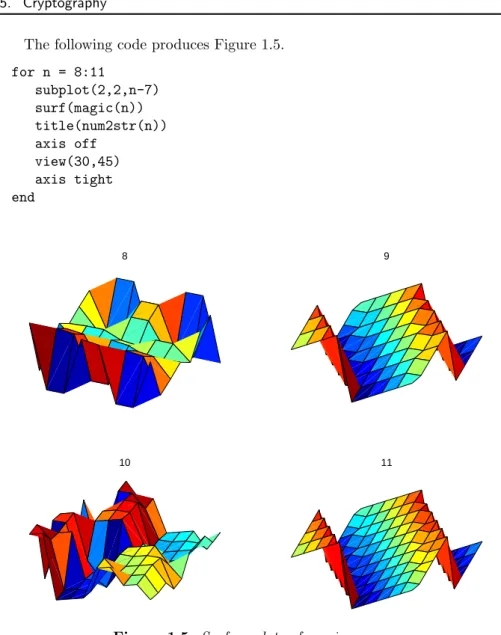
The following code produces Figure 1.5. for n = 8:11 subplot(2,2,n-7) surf(magic(n)) title(num2str(n)) axis off view(30,45) axis tight end 8 9 10 11
Figure 1.5. Surface plots of magic squares.
1.5
Cryptography
This section uses a cryptography example to show howMatlabdeals with text and character strings. The cryptographic technique, which is known as a Hill cipher, involves arithmetic in afinite field.
Almost all modern computers use the ASCII character set to store basic text. ASCII stands forAmerican Standard Code for Information Interchange. The char-acter set uses 7 of the 8 bits in a byte to encode 128 charchar-acters. The first 32 characters are nonprinting control characters, such as tab, backspace, and end-of-line. The 128th character is another nonprinting character that corresponds to the Delete key on your keyboard. In between these control characters are 95 printable
characters, including a space, 10 digits, 26 lowercase letters, 26 uppercase letters, and 32 punctuation marks.
Matlabcan easily display all the printable characters in the order determined by their ASCII encoding. Start with
x = reshape(32:127,32,3)’
This produces a 3-by-32 matrix.
x =
32 33 34 ... 61 62 63
64 65 66 ... 93 94 95
96 97 98 ... 125 126 127
Thechar function converts numbers to characters. The statement
c = char(x) produces c = !"#$%&’()*+,-./0123456789:;<=>? @ABCDEFGHIJKLMNOPQRSTUVWXYZ[\]^_ ‘abcdefghijklmnopqrstuvwxyz{|}~
We have cheated a little bit because the last element ofxis127, which corresponds to the nonprinting delete character, and we have not shown the last character inc. You can try this on your computer and see what is actually displayed.
The first character incis blank, indicating that
char(32)
is the same as
’ ’
The last printable character incis thetilde, indicating that
char(126)
is the same as
’~’
The characters representing digits are in the first line ofc. In fact,
d = char(48:57)
displays a 10-character string
d =
This string can be converted to the corresponding numerical values withdoubleor
real. The statement
double(d) - ’0’
produces
0 1 2 3 4 5 6 7 8 9
Comparing the second and third lines of c, we see that the ASCII encoding of the lowercase letters is obtained by adding 32 to the ASCII encoding of the uppercase letters. Understanding this encoding allows us to use vector and matrix operations inMatlabto manipulate text.
The ASCII standard is often extended to make use of all eight bits in a byte, but the characters that are displayed depend on the computer and operating system you are using, the font you have chosen, and even the country you live in. Try
char(reshape(160:255,32,3)’)
and see what happens on your machine.
Our encryption technique involvesmodular arithmetic. All the quantities in-volved are integers and the result of any arithmetic operation is reduced by tak-ing the remainder or modulus with respect to a prime number p. The functions
rem(x,y) and mod(x,y) both compute the remainder if x is divided by y. They
produce the same result ifxandyhave the same sign; the result also has that sign. But if x and y have opposite signs, then rem(x,y)has the same sign as x, while
mod(x,y)has the same sign asy. Here is a table:
x = [37 -37 37 -37]’; y = [10 10 -10 -10]’; r = [ x y rem(x,y) mod(x,y)] produces 37 10 7 7 -37 10 -7 3 37 -10 7 -3 -37 -10 -7 -7
We have chosen to encrypt text that uses the entire ASCII character set, not just the letters. There are 95 such characters. The next larger prime number is
p= 97, so we represent the pcharacters by the integers 0:p-1 and do arithmetic modp.
The characters are encoded two at a time. Each pair of characters is repre-sented by a 2-vector,x. For example, suppose the text contains the pair of letters
’TV’. The ASCII values for this pair of letters are 84 and 86. Subtracting 32 to make the representation start at 0 produces the column vector
x= ( 52 54 ) .
The encryption is done with a 2-by-2 matrix-vector multiplication over the integers modp. The symbol ≡is used to indicate that two integers have the same remainder, modulo the specified prime:
y ≡Ax, modp,
whereAis the matrix
A= ( 71 2 2 26 ) .
For our example, the productAxis
Ax= ( 3800 1508 ) .
If this is reduced modp, the result is
y= ( 17 53 ) .
Converting this back to characters by adding 32 produces’1U’.
Now comes the interesting part. Over the integers modulop, the matrixA is its own inverse. If
y ≡Ax, modp,
then
x≡Ay, modp.
In other words, in arithmetic modp,A2 is the identity matrix. You can check this
withMatlab. p = 97; A = [71 2; 2 26] I = mod(A^2,p) produces A = 71 2 2 26 I = 1 0 0 1
This means that the encryption process is its own inverse. The same function can be used to both encrypt and decrypt a message.
function y = crypto(x)
% CRYPTO Cryptography example.
% y = crypto(x) converts an ASCII text string into another
% coded string. The function is its own inverse, so
% crypto(crypto(x)) gives x back.
% See also: ENCRYPT.
A comment precedes the statement that assigns the primep.
% Use a two-character Hill cipher with arithmetic % modulo 97, a prime.
p = 97;
Choose two characters above ASCII 128 to expand the size of the character set from 95 to 97.
c1 = char(169); c2 = char(174); x(x==c1) = 127; x(x==c2) = 128;
The conversion from characters to numerical values is done by
x = mod(real(x-32),p);
Prepare for the matrix-vector product by forming a matrix with two rows and lots of columns.
n = 2*floor(length(x)/2); X = reshape(x(1:n),2,n/2);
All this preparation has been so that we can do the actual finite field arithmetic quickly and easily.
% Encode with matrix multiplication modulo p. A = [71 2; 2 26];
Y = mod(A*X,p);
Reshape into a single row.
y = reshape(Y,1,n);
Iflength(x)is odd, encode the last character
if length(x) > n
y(n+1) = mod((p-1)*x(n+1),p); end
Finally, convert the numbers back to characters.
y = char(y+32); y(y==127) = c1; y(y==128) = c2;
Let’s follow the computation ofy = crypto(’Hello world’). We begin with a character string.
x = ’Hello world’
This is converted to an integer vector.
x =
40 69 76 76 79 0 87 79 82 76 68
length(x)is odd, so the reshaping temporarily ignores the last element
X =
40 76 79 87 82
69 76 0 79 76
A conventional matrix-vector multiplicationA*Xproduces an intermediate matrix.
2978 5548 5609 6335 5974
1874 2128 158 2228 2140
Then themod(.,p)operation produces
Y =
68 19 80 30 57
31 91 61 94 6
This is rearranged to a row vector.
y =
68 31 19 91 80 61 30 94 57 6
Now the last element ofxis encoded by itself and attached to the end ofy.
y =
68 31 19 91 80 61 30 94 57 6 29
Finally,yis converted back to a character string to produce the encrypted result.
y =
d?3{p]>~Y&=
If we now computecrypto(y), we get back our original’Hello world’.
1.6
The 3
n
+1 Sequence
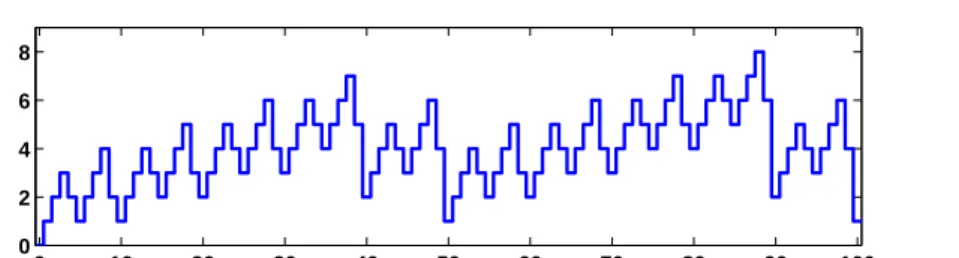
This section describes a famous unsolved problem in number theory. Start with any positive integern. Repeat the following steps:
• Ifn= 1, stop.
• Ifnis odd, replace it with 3n+ 1. For example, starting withn= 7 produces
7,22,11,34,17,52,26,13,40,20,10,5,16,8,4,2,1.
The sequence terminates after 17 steps. Note that whenevern reaches a power of 2, the sequence terminates in log2nmore steps.
The unanswered question is, does the process always terminate? Or is there some starting value that causes the process to go on forever, either because the numbers get larger and larger, or because some periodic cycle is generated?
This problem is known as the 3n+ 1 problem. It has been studied by many eminent mathematicians, including Collatz, Ulam, and Kakatani, and is discussed in a survey paper by Jeffrey Lagarias [5].
The following Matlab code fragment generates the sequence starting with any specifiedn. y = n; while n > 1 if rem(n,2)==0 n = n/2; else n = 3*n+1; end y = [y n]; end
We don’t know ahead of time how long the resulting vectory is going to be. But the statement
y = [y n];
automatically increaseslength(y)each time it is executed.
In principle, the unsolved mathematical problem is, Can this code fragment run forever? In actual fact, floating-point roundoff error causes the calculation to misbehave whenever 3n+ 1 becomes greater than 253, but it is still interesting to
investigate modest values ofn.
Let’s embed our code fragment in a GUI. The complete function is in the M-filethreenplus1.m. For example, the statement
threenplus1(7)
produces Figure 1.6.
The M-file begins with a preamble containing the function header and the
helpinformation.
function threenplus1(n) % ‘‘Three n plus 1’’. % Study the 3n+1 sequence.
2 4 6 8 10 12 14 16 1 2 4 8 16 32 52 n = 7 Figure 1.6. threenplus1.
% threenplus1(n) plots the sequence starting with n. % threenplus1 with no arguments starts with n = 1. % uicontrols decrement or increment the starting n. % Is it possible for this to run forever?
The next section of code brings the current graphics window forward and re-sets it. Two push buttons, which are the default uicontrols, are positioned near the bottom center of the figure at normalized coordinates[0.455,0.01] and
[0.525,0.01]. Their size is0.044 by0.054 units and they are labeled with’<’
and’>’. If either button is subsequently pushed, the’callback’string is executed,
calling the function recursively with a corresponding’<’or ’>’ string argument.
The’tag’ property of the current figure,gcf, is set to a characteristic string that
prevents this section of code from being reexecuted on subsequent calls.
if ~isequal(get(gcf,’tag’),’3n+1’) shg clf reset uicontrol( ... ’units’,’normalized’,... ’position’,[0.455, 0.01, 0.044, 0.054], ... ’string’,’<’,’fontunits’,’normalized’,’fontsize’,0.6,... ’callback’,’threenplus1(’’<’’)’); uicontrol( ... ’units’,’normalized’,... ’position’,[0.525, 0.01, 0.044, 0.054],... ’string’,’>’,’fontunits’,’normalized’,’fontsize’,0.6, ... ’callback’,’threenplus1(’’>’’)’); uicontrol( ...
’units’,’normalized’,... ’position’,[0.842, 0.01, 0.07, 0.054], ... ’string’,’close’,’fontunits’,’normalized’,’fontsize’,0.6, ... ’callback’,’close(gcf)’) set(gcf,’tag’,’3n+1’); end
The next section of code sets n. If nargin, the number of input arguments, is 0, then n is set to 2. If the input argument is either of the strings from the push button callbacks, thennis retrieved from the ’userdata’ field of thefigureand decremented or incremented. If the input argument is not a string, then it is the desiredn. In all situations,nis saved in’userdata’for use on subsequent calls.
if nargin == 0 n = 2; elseif isequal(n,’<’) n = get(gcf,’userdata’) - 1; elseif isequal(n,’>’) n = get(gcf,’userdata’) + 1; end if n < 1, n = 1; end set(gcf,’userdata’,n)
We’ve seen the next section of code before; it does the actual computation.
y = n; while n > 1 if rem(n,2)==0 n = n/2; else n = 3*n+1; end y = [y n]; end
The final section of code plots the generated sequence with dots connected by straight lines, using a logarithmic vertical scale and customized tick labels.
semilogy(y,’.-’) axis tight ymax = max(y);
ytick = [2.^(0:ceil(log2(ymax))-1) ymax]; if length(ytick) > 8, ytick(end-1) = []; end set(gca,’ytick’,ytick)
title([’n = ’ num2str(y(1))]);
1.7
Floating-Point Arithmetic
• numerical analysis is the study of floating-point arithmetic;
• floating-point arithmetic is unpredictable and hard to understand.
We intend to convince you that both of these assertions are false. Very little of this book is actually about floating-point arithmetic. But when the subject does arise, we hope you will find floating-point arithmetic is not only computationally powerful, but also mathematically elegant.
If you look carefully at the definitions of fundamental arithmetic operations like addition and multiplication, you soon encounter the mathematical abstraction known as real numbers. But actual computation with real numbers is not very practical because it involves limits and infinities. Instead,Matlaband most other technical computing environments use floating-point arithmetic, which involves a finite set of numbers with finite precision. This leads to the phenomena ofroundoff, underflow, andoverflow. Most of the time, it is possible to useMatlabeffectively without worrying about these details, but, every once in a while, it pays to know something about the properties and limitations of floating-point numbers.
Twenty years ago, the situation was far more complicated than it is today. Each computer had its own floating-point number system. Some were binary; some were decimal. There was even a Russian computer that used trinary arithmetic. Among the binary computers, some used 2 as the base; others used 8 or 16. And everybody had a different precision. In 1985, the IEEE Standards Board and the American National Standards Institute adopted the ANSI/IEEE Standard 754-1985 for Binary Floating-Point Arithmetic. This was the culmination of almost a decade of work by a 92-person working group of mathematicians, computer scientists, and engineers from universities, computer manufacturers, and microprocessor compa-nies.
All computers designed since 1985 use IEEE floating-point arithmetic. This doesn’t mean that they all get exactly the same results, because there is some flexibility within the standard. But it does mean that we now have a machine-independent model of how floating-point arithmetic behaves.
Matlab has traditionally used the IEEE double-precision format. There is a single-precision format that saves space, but that isn’t much faster on modern machines. Matlab 7 will have support for single-precision arithmetic, but we will deal exclusively with double precision in this book. There is also an extended-precision format, which is optional and therefore is one of the reasons for lack of uniformity among different machines.
Most nonzero floating-point numbers are normalized. This means they can be expressed as
x=±(1 +f)·2e.
The quantity f is the fraction or mantissa and e is the exponent. The fraction satisfies
0≤f <1
and must be representable in binary using at most 52 bits. In other words, 252f is
an integer in the interval
The exponenteis an integer in the interval
−1022≤e≤1023.
The finiteness of f is a limitation on precision. The finiteness of eis a limitation on range. Any numbers that don’t meet these limitations must be approximated by ones that do.
Double-precision floating-point numbers are stored in a 64-bit word, with 52 bits for f, 11 bits for e, and 1 bit for the sign of the number. The sign of e is accommodated by storinge+ 1023, which is between 1 and 211−2. The 2 extreme values for the exponent field, 0 and 211−1, are reserved for exceptional floating-point
numbers that we will describe later.
The entire fractional part of a floating-point number is notf, but 1 +f, which has 53 bits. However, the leading 1 doesn’t need to be stored. In effect, the IEEE format packs 65 bits of information into a 64-bit word.
The program floatgui shows the distribution of the positive numbers in a model floating-point system with variable parameters. The parametertspecifies the number of bits used to storef. In other words, 2tf is an integer. The parameters
emin and emax specify the range of the exponent, so emin ≤ e ≤emax. Initially,
floatguisetst= 3,emin=−4, andemax= 2 and produces the distribution shown
in Figure 1.7.
1/16 1/2 1 2 4 8−1/2
||||||||||||||||||||||||| | | | | | | | | | | | | | | | | | | | | | | | | | | | | | | |
Figure 1.7. floatgui.
Within each binary interval 2e ≤x≤2e+1, the numbers are equally spaced
with an increment of 2e−t. If e = 0 and t = 3, for example, the spacing of the
numbers between 1 and 2 is 1/8. Aseincreases, the spacing increases.
It is also instructive to display the floating-point numbers with a logarithmic scale. Figure 1.8 shows floatguiwith logscale checked andt = 5, emin =−4,
andemax= 3. With this logarithmic scale, it is more apparent that the distribution
in each binary interval is the same.
A very important quantity associated with floating-point arithmetic is high-lighted in red by floatgui. Matlab calls this quantity eps, which is short for machine epsilon.
epsis the distance from1 to the next larger floating-point number. For thefloatguimodel floating-point system,eps = 2^(-t).
Before the IEEE standard, different machines had different values of eps. Now, for IEEE double-precision,
1/16 1/8 1/4 1/2 1 2 4 8 16−1/4 ||||||||||||||||||||||||||||||||||||||||||||||||||||||||||||||||||||||||||||||||||||||||||||||||||||||||||||||||||||||||||||||||||||||||||||||||||||||||||||||||||||||||||||||||||||||||||||||||||||||||||||||||||||||||||||||||||||||||||||||||||||||||||||||||
Figure 1.8. floatgui(logscale).
The approximate decimal value ofepsis 2.2204·10−16. Eithereps/2orepscan be
called the roundoff level. The maximum relative error incurred when the result of an arithmetic operation is rounded to the nearest floating-point number iseps/2. The maximum relative spacing between numbers iseps. In either case, you can say that the roundoff level is about 16 decimal digits.
A frequent instance of roundoff occurs with the simpleMatlabstatement
t = 0.1
The mathematical value t stored in t is not exactly 0.1 because expressing the decimal fraction 1/10 in binary requires an infinite series. In fact,
1 10 = 1 24 + 1 25 + 0 26 + 0 27 + 1 28 + 1 29 + 0 210 + 0 211 + 1 212 +· · ·.
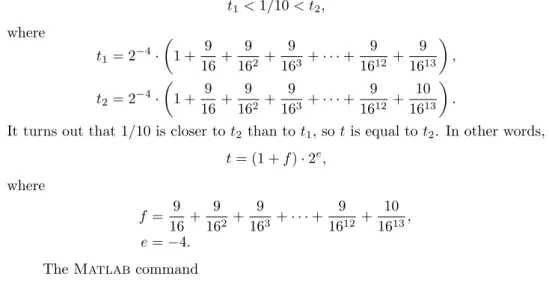
After the first term, the sequence of coefficients 1,0,0,1 is repeated infinitely often. Grouping the resulting terms together four at a time expresses 1/10 in a base 16, orhexadecimal, series. 1 10 = 2 −4· ( 1 + 9 16+ 9 162 + 9 163+ 9 164 +· · · )
Floating-point numbers on either side of 1/10 are obtained by terminating the fractional part of this series after 52 binary terms, or 13 hexadecimal terms, and rounding the last term up or down. Thus
t1<1/10< t2, where t1= 2−4· ( 1 + 9 16+ 9 162 + 9 163 +· · ·+ 9 1612+ 9 1613 ) , t2= 2−4· ( 1 + 9 16+ 9 162 + 9 163 +· · ·+ 9 1612+ 10 1613 ) .
It turns out that 1/10 is closer tot2 than tot1, so tis equal tot2. In other words,
t= (1 +f)·2e, where f = 9 16+ 9 162 + 9 163 +· · ·+ 9 1612 + 10 1613, e=−4.
format hex
causestto be displayed as
3fb999999999999a
The charactersathroughfrepresent the hexadecimal “digits” 10 through 15. The first three characters, 3fb, give the hexadecimal representation of decimal 1019, which is the value of the biased exponente+1023 ifeis−4. The other 13 characters are the hexadecimal representation of the fractionf.
In summary, the value stored int is very close to, but not exactly equal to, 0.1. The distinction is occasionally important. For example, the quantity
0.3/0.1
is not exactly equal to 3 because the actual numerator is a little less than 0.3 and the actual denominator is a little greater than 0.1.
Ten steps of length t are not precisely the same as one step of length 1. Matlabis careful to arrange that the last element of the vector
0:0.1:1
is exactly equal to 1, but if you form this vector yourself by repeated additions of 0.1, you will miss hitting the final 1 exactly.
What does the floating-point approximation to the golden ratio look like?
format hex
phi = (1 + sqrt(5))/2
produces
phi =
3ff9e3779b97f4a8
The first hex digit, 3, is 0011 in binary. The first bit is the sign of the floating-point number; 0 is positive, 1 is negative. So phiis positive. The remaining bits of the first three hex digits contain e+ 1023. In this example, 3ff in base 16 is 3·162+ 15·16 + 15 = 1023 in decimal. So
e= 0.
In fact, any floating-point number between 1.0 and 2.0 hase= 0, so itshexoutput begins with3ff. The other 13 hex digits containf. In this example,
f = 9 16+ 14 162 + 3 163 +· · ·+ 10 1612+ 8 1613.
With these values off ande,
(1 +f)2e≈ϕ.
format long a = 4/3 b = a - 1 c = 3*b e = 1 - c
With exact computation, e would be 0. But with floating-point, the output pro-duced is a = 1.33333333333333 b = 0.33333333333333 c = 1.00000000000000 e = 2.220446049250313e-016
It turns out that the only roundoff occurs in the division in the first statement. The quotient cannot be exactly 4/3, except on that Russian trinary computer. Consequently the value stored ina is close to, but not exactly equal to, 4/3. The subtraction b = a - 1 produces a b whose last bit is 0. This means that the multiplication 3*b can be done without any roundoff. The value stored in c is not exactly equal to 1, and so the value stored in e is not 0. Before the IEEE standard, this code was used as a quick way to estimate the roundoff level on various computers.
The roundoff levelepsis sometimes called “floating-point zero,” but that’s a misnomer. There are many floating-point numbers much smaller than eps. The smallest positive normalized floating-point number hasf = 0 ande=−1022. The largest floating-point number has f a little less than 1 and e = 1023. Matlab calls these numbers realmin and realmax. Together witheps, they characterize the standard system.
Binary Decimal
eps 2^(-52) 2.2204e-16
realmin 2^(-1022) 2.2251e-308
realmax (2-eps)*2^1023 1.7977e+308
If any computation tries to produce a value larger thanrealmax, it is said to overflow. The result is an exceptional floating-point value calledinfinityorInf. It is represented by takinge= 1024 and f = 0 and satisfies relations like1/Inf = 0
andInf+Inf = Inf.
If any computation tries to produce a value that is undefined even in the real number system, the result is an exceptional value known as Not-a-Number, orNaN. Examples include0/0and Inf-Inf. NaNis represented by takinge= 1024 and f
nonzero.
If any computation tries to produce a value smaller thanrealmin, it is said to underflow. This involves one of the optional, and controversial, aspects of the IEEE
standard. Many, but not all, machines allow exceptional denormal or subnormal floating-point numbers in the interval between realmin and eps*realmin. The smallest positive subnormal number is about0.494e-323. Any results smaller than this are set to 0. On machines without subnormals, any results less thanrealmin
are set to 0. The subnormal numbers fill in the gap you can see in thefloatgui
model system between 0 and the smallest positive number. They do provide an elegant way to handle underflow, but their practical importance forMatlab-style computation is very rare. Denormal numbers are represented by takinge=−1023, so the biased exponente+ 1023 is 0.
Matlab uses the floating-point system to handle integers. Mathematically, the numbers 3 and 3.0 are the same, but many programming languages would use different representations for the two. Matlabdoes not distinguish between them. We sometimes use the termflintto describe a floating-point number whose value is an integer. Floating-point operations on flints do not introduce any roundoff error, as long as the results are not too large. Addition, subtraction, and multiplication of flints produce the exact flint result if it is not larger than 253. Division and square
root involving flints also produce a flint if the result is an integer. For example,
sqrt(363/3)produces11, with no roundoff.
TwoMatlabfunctions that take apart and put together floating-point num-bers arelog2andpow2.
help log2 help pow2
produces
[F,E] = LOG2(X) for a real array X, returns an array F of real numbers, usually in the range 0.5 <= abs(F) < 1, and an array E of integers, so that X = F .* 2.^E. Any zeros in X produce F = 0 and E = 0.
X = POW2(F,E) for a real array F and an integer array E
computes X = F .* (2 .^ E). The result is computed quickly
by simply adding E to the floating-point exponent of F.
The quantities F and E used by log2 and pow2 predate the IEEE floating-point standard and so are slightly different from thef andewe are using in this section. In fact,f =2*F-1ande=E-1.
[F,E] = log2(phi) produces F = 0.809016994374947 E = 1 Then
phi = pow2(F,E)
gives back
phi =
1.618033988749895
As an example of how roundoff error affects matrix computations, consider the 2-by-2 set of linear equations
17x1+ 5x2= 22,
1.7x1+ 0.5x2= 2.2.
The obvious solution isx1= 1, x2= 1. But theMatlabstatements
A = [17 5; 1.7 0.5] b = [22; 2.2] x = A\b produce x = -1.0588 8.0000
Where did this come from? Well, the equations are singular, but consistent. The second equation is just 0.1 times the first. The computed x is one of infinitely many possible solutions. But the floating-point representation of the matrix A is not exactly singular becauseA(2,1)is not exactly 17/10.
The solution process subtracts a multiple of the first equation from the second. The multiplier is mu = 1.7/17, which turns out to be the floating-point number obtained by truncating, rather than rounding, the binary expansion of 1/10. The matrixAand the right-hand sidebare modified by
A(2,:) = A(2,:) - mu*A(1,:) b(2) = b(2) - mu*b(1)
With exact computation, both A(2,2) and b(2) would become zero, but with floating-point arithmetic, they both become nonzero multiples ofeps.
disp(A(2,2)/eps) 0.2500
disp(b(2)/eps) 2
Matlab notices the tiny value of the new A(2,2) and displays a message warning that the matrix is close to singular. It then computes the solution of the modified second equation by dividing one roundoff error by another.
x(2) = b(2)/A(2,2); disp(x(2))
This value is substituted back into the first equation to give
x(1) = (22 - 5*x(2))/17; disp(x(1))
-1.0588
The details of the roundoff error leadMatlab to pick out one particular solution from among the infinitely many possible solutions to the singular system.
Our final example plots a seventh-degree polynomial.
x = 0.988:.0001:1.012;
y = x.^7-7*x.^6+21*x.^5-35*x.^4+35*x.^3-21*x.^2+7*x-1; plot(x,y)
The resulting plot in Figure 1.9 doesn’t look anything like a polynomial. It isn’t smooth. You are seeing roundoff error in action. They-axis scale factor is tiny, 10−14. The tiny values of y are being computed by taking sums and differences of
0.985 0.99 0.995 1 1.005 1.01 1.015 −5 −4 −3 −2 −1 0 1 2 3 4 5x 10 −14
Figure 1.9. Is this a polynomial?
numbers as large as 35·1.0124. There is severe subtractive cancellation. The example was contrived by using the Symbolic Toolbox to expand (x−1)7 and carefully choosing the range for thex-axis to be nearx= 1. If the values of yare computed instead by
y = (x-1).^7;
1.8
Further Reading
Additional information about floating-point arithmetic and roundoff error can be found in Higham [4] and Overton [7].
Exercises
1.1. Which of these familiar rectangles is closest to a golden rectangle? Use Mat-labto do the calculations with an element-by-element vector division,w./h.
• 3-by-5 inch index card,
• 8.5-by-11 inch U.S. letter paper,
• 8.5-by-14 inch U.S. legal paper,
• 9-by-12 foot rug,
• 9:16 “letterbox” TV picture,
• 768-by-1024 pixel computer monitor.
1.2. ISO standard A4 paper is commonly used throughout most of the world, except in the United States and Canada. Its dimensions are 210 by 297 mm. This is not a golden rectangle, but the aspect ratio is close to another familiar irrational mathematical quantity. What is that quantity? If you fold a piece of A4 paper in half, what is the aspect ratio of each of the halves? Modify the M-filegoldrect.mto illustrate this property.
1.3. How many terms in the truncated continued fraction does it take to approx-imateϕ with an error less than 10−10? As the number of terms increases
beyond this roundoff, error eventually intervenes. What is the best accuracy you can hope to achieve with double-precision floating-point arithmetic and how many terms does it take?
1.4. Use theMatlabbackslashoperator to solve the 2-by-2 system of simultane-ous linear equations
c1+c2= 1,
c1ϕ+c2(1−ϕ) = 1
for c1 and c2. You can find out about the backslash operator by taking a
peek at the next chapter of this book, or with the commands
help \ help slash
1.5. The statement
semilogy(fibonacci(18),’-o’)
makes a logarithmic plot of Fibonacci numbers versus their index. The graph is close to a straight line. What is the slope of this line?
1.6. How does the execution time of fibnum(n) depend on the execution time
forfibnum(n-1) andfibnum(n-2)? Use this relationship to obtain an
ap-proximate formula for the execution time of fibnum(n) as a function of n. Estimate how long it would take your computer to compute fibnum(50). Warning: You probably do not want to actually runfibnum(50).
1.7. What is the index of the largest Fibonacci number that can be represented exactlyas aMatlabdouble-precision quantity without roundoff error? What is the index of the largest Fibonacci number that can be represented approx-imatelyas aMatlabdouble-precision quantity without overflowing? 1.8. Enter the statements
A = [1 1; 1 0] X = [1 0; 0 1]
Then enter the statement
X = A*X
Now repeatedly press the up arrow key, followed by the Enter key. What happens? Do you recognize the matrix elements being generated? How many times would you have to repeat this iteration before X overflows?
1.9. Change the fern color scheme to use pink on a black background. Don’t forget the stop button.
1.10. (a) What happens if you resize the figure window while the fern is being generated? Why?
(b) The M-filefinitefern.m can be used to produce printed output of the fern. Explain why printing is possible with finitefern.m but not with
fern.m.
1.11. Flip the fern by interchanging itsx- andy-coordinates.
1.12. What happens to the fern if you change the only nonzero element in the matrixA4?
1.13. What are the coordinates of the lower end of the fern’s stem?
1.14. The coordinates of the point at the upper tip end of the fern can be computed by solving a certain 2-by-2 system of simultaneous linear equations. What is that system and what are the coordinates of the tip?
1.15. The fern algorithm involves repeated random choices from four different for-mulas for advancing the point. If thekth formula is used repeatedly by itself, without random choices, it defines a deterministic trajectory in the (x, y) plane. Modifyfinitefern.m so that plots of each of these four trajectories are superimposed on the plot of the fern. Start each trajectory at the point (−1,5). Ploto’s connected with straight lines for the steps along each trajec-tory. Take as many steps as are needed to show each trajectory’s limit point. You can superimpose several plots with
plot(...) hold on
plot(...) plot(...) hold off
1.16. Use the following code to make your own Portable Network Graphics file from the fern. Then compare your image with one obtained fromncm/fern.png.
bg = [0 0 85]; % Dark blue background
fg = [255 255 255]; % White dots sz = get(0,’screensize’); rand(’state’,0) X = finitefern(500000,sz(4),sz(3)); d = fg - bg; R = uint8(bg(1) + d(1)*X); G = uint8(bg(2) + d(2)*X); B = uint8(bg(3) + d(3)*X); F = cat(3,R,G,B); imwrite(F,’myfern.png’,’png’,’bitdepth’,8)
1.17. Modify fern.m or finitefern.m so that it produces Sierpinski’s triangle. Start at x= ( 0 0 ) .
At each iterative step, the current pointxis replaced withAx+b, where the matrixAis always A= ( 1/2 0 0 1/2 )
and the vectorbis chosen at random with equal probability from among the three vectors b= ( 0 0 ) , b= ( 1/2 0 ) , and b= ( 1/4 √ 3/4 ) .
1.18. greetings(phi)generates a seasonal holiday fractal that depends upon the parameter phi. The default value of phi is the golden ratio. What hap-pens for other values of phi? Try both simple fractions and floating-point approximations to irrational values.
1.19. A = magic(4) is singular. Its columns are linearly dependent. What do
null(A),null(A,’r’), null(sym(A)), and rref(A)tell you about that
de-pendence?
1.20. LetA = magic(n)forn = 3, 4,or5. What does
p = randperm(n); q = randperm(n); A = A(p,q);
do to
sum(A) sum(A’)’