1
Validating Host Multipathing
with EMC
®VPLEX
™Technical Notes
P/N 300-012-789 REV A01 June 1, 2011This technical notes document contains information on these topics:
Introduction ... 2
EMC VPLEX overview ... 3
UNIX ... 4
HP-UX ... 6
Microsoft Windows ... 7
VMware ESX ... 9
Introduction
Validating Host Multipathing with EMC VPLEX Technical Notes
Introduction
EMC® VPLEX™ is a fault tolerant product from the ground up. To ensure hosts are able to access Virtual Volumes served from VPLEX, it is an EMC Best Practice to constantly ensure host-based multipathing software is installed on each host and is functioning properly. In this document, several host-based multipathing software applications are demonstrated to ensure hosts are protected.
Scope
These technical notes will demonstrate the commands and techniques needed to verify host-based software is properly protecting dual-pathed Virtual Volumes from VPLEX. This document does not cover all
scenarios of host-based multipathing. The EMC Simple Support Matrix for VPLEX (available on E-Lab™ Navigator,
supported multipathing software with VPLEX.
In addition, this document will not describe how to install nor remedy improperly configured host-based multipathing solutions. The
multipathing software vendor’s documentation provides additional information.
Audience
The primary audience of this document is any storage administrator responsible for host connectivity and multipathing software with VPLEX. This person should have familiarity with the host-based multipathing software they are working with.
3 EMC VPLEX overview
Validating Host Multipathing with EMC VPLEX Technical Notes
EMC VPLEX overview
The EMC VPLEX family removes physical barriers within and between data centers. VPLEX Local provides simplified management and non-disruptive data mobility across heterogeneous arrays. VPLEX Metro provides data access and mobility between two VPLEX clusters within synchronous distances. With a unique scale-up and scale-out
architecture, VPLEX's advanced data caching and distributed cache coherency provides workload resiliency, automatic sharing, and balancing and failover of storage domains, and enables both local and remote data access with predictable service levels.
UNIX
Validating Host Multipathing with EMC VPLEX Technical Notes
UNIX
EMC PowerPath
Note: The examples used in this section were taken from a Solaris 10 system,
but the commands to verify EMC PowerPath® functionality are similar across
most UNIX type operating systems. To validate PowerPath:
1. Log in to the host with root privileges.
2. Run the following command to display all PowerPath managed VPLEX devices:
# powermt display dev=all class=invista Pseudo name=emcpower40a
Invista ID=FNM00094900026
Logical device ID=6000144000000010A0019D6CFC53D321 state=alive; policy=ADaptive; priority=0; queued-IOs=0
============================================================================== --- Host --- - Stor - -- I/O Path - -- Stats --- ### HW Path I/O Paths Interf. Mode State Q-IOs Errors ============================================================================== 3072 pci@83,4000/…/fp@0,0 c2t5s0 00 active alive 0 0
3073 pci@83,4000/…/fp@0,0 c3t5s0 04 active alive 0 0 Validate paths to Virtual Volumes
3. By using the output from the previous step, verify each PowerPath protected Virtual Volume has two or more active/alive paths. 4. Items to verify:
a. In the I/O Path Mode column, ensure two or more paths are marked active.
b. In the I/O Path State column, ensure two or more paths are marked alive.
Validate PowerPath policy
5. The recommended PowerPath policy for VPLEX is Adaptive. This can be verified in the header section of each PowerPath controlled disk. It should read policy=ADaptive.
Note: It is critical to ensure all devices are using the Adaptive policy. Validate each disk separately.
5 UNIX
Validating Host Multipathing with EMC VPLEX Technical Notes Faulted path
In the event of a path down, the output to powermt display may look similar to the following example. Note the I/O Path State is marked dead: Pseudo name=emcpower40a
Invista ID=FNM00094900026
Logical device ID=6000144000000010A0019D6CFC53D321 state=alive; policy=ADaptive; priority=0; queued-IOs=0
============================================================================== --- Host --- - Stor - -- I/O Path - -- Stats --- ### HW Path I/O Paths Interf. Mode State Q-IOs Errors ============================================================================== 3072 pci@83,4000/…/fp@0,0 c2t5s0 00 active dead 0 2 3073 pci@83,4000/…/fp@0,0 c3t5s0 04 active alive 0 0
Veritas Storage Foundation Dynamic Multipathing
Note: The examples used in this section were taken from a Solaris 10 system, but the commands to verify PowerPath functionality are similar across most UNIX type operating systems.
To validate Veritas Dynamic Multipathing:
1. Log in to the host with root privileges. Validate the Array Policy Module
2. Run the following command to validate that the EMC Invista®/VPLEX Array Policy Module (APM) is installed:
# vxdmpadm listapm | grep dmpinv
dmpinv dmpinv 1 Inv-A/A Active dmpinv must be installed for Dynamic Multipathing (DMP) to
function properly with VPLEX. Validate the Array Support Library
3. Run the following command to determine that the Invista/VPLEX Array Support Library (ASL) is installed:
# vxddladm listsupport | grep Invista
libInv-ASL.so EMC Invista libInv-ASL.so must be installed for DMP to function properly with VPLEX.
Validate paths to Virtual Volumes
4. Run the following command to validate paths to Virtual Volumes: # vxdisk path
HP-UX
Validating Host Multipathing with EMC VPLEX Technical Notes
If DMP is configured correctly and all paths are alive, then the output should look similar to the following example:
SUBPATH DANAME DMNAME GROUP STATE c0t0d0s2 disk_0 - - ENABLED c3t5d1s2 emc_invista1_0 vplex017c vplexdg ENABLED c2t5d1s2 emc_invista1_0 vplex017c vplexdg ENABLED 5. Items to verify:
a. For each VPLEX disk, identified above in the DANAME column, identify the two or more entries with the same name. For example, emc_invista1_0 is visible twice in the vxdisk path output above.
b. For each disk identified in the previous step, ensure two or more paths are in the ENABLED state as noted in the STATE column.
Faulted path
In the event of a path down, the output to vxdisk path may look similar to the following example. Note the STATE is marked DISABLED:
SUBPATH DANAME DMNAME GROUP STATE c0t0d0s2 disk_0 - - ENABLED c3t5d1s2 emc_invista1_0 vplex017c vplexdg DISABLED c2t5d1s2 emc_invista1_0 vplex017c vplexdg ENABLED
HP-UX
EMC PowerPath
Note: EMC PowerPath for HP-UX uses the same CLI tools as described in the UNIX PowerPath section. Use the procedure on page 4 to validate PowerPath for HP-UX.
Native Multipathing/PV links
1. Log in to the host with root privileges. 2. Scan all disk devices in the system:
# ioscan -fnc disk
Class I H/W Path Driver S/W State H/W Type Description =======================================================================
disk 48 0/3/1/0.2.203.128.0.0.0 sdisk CLAIMED DEVICE EMC Invista /dev/dsk/c14t0d0 /dev/rdsk/c14t0d0
disk 57 0/3/1/1.2.235.128.0.0.0 sdisk CLAIMED DEVICE EMC Invista /dev/dsk/c16t0d0 /dev/rdsk/c16t0d0
7 Microsoft Windows
Validating Host Multipathing with EMC VPLEX Technical Notes 3. Verify the State of all EMC Invista devices is CLAIMED. 4. For each Volume Group that uses VPLEX volumes, run:
# vgdisplay –v <VolumeGroupName>
--- Physical volumes ---
PV Name /dev/dsk/c14t0d0
PV Name /dev/dsk/c16t0d0 Alternate Link PV Status available Total PE 255
Free PE 0 Autoswitch On Validate paths to Virtual Volumes
5. For each Physical Volume listed in the --Physical Volumes-- section, ensure there are two or more PV Names listed. At least one should be tagged as the Alternate Link.
6. Ensure these devices are also CLAIMED as indicated in step 3. Faulted path
In the event of a failed path, the disks listed in the ioscan output from step 2 will appear as follows. Note the disks are no longer CLAIMED but are now indicating NO_HW (No Hardware):
Class I H/W Path Driver S/W State H/W Type Description ======================================================================= disk 48 0/3/1/0.2.203.128.0.0.0 sdisk NO_HW DEVICE EMC Invista /dev/dsk/c14t0d0 /dev/rdsk/c14t0d0
disk 57 0/3/1/1.2.235.128.0.0.0 sdisk NO_HW DEVICE EMC Invista /dev/dsk/c16t0d0 /dev/rdsk/c16t0d0
Microsoft Windows
EMC PowerPath CLI
Note: EMC PowerPath for Windows uses the same CLI tools as described in the UNIX PowerPath section. Use the procedure on page 4 to validate PowerPath for Windows using the CLI.
EMC PowerPath GUI
To validate PowerPath on Windows by using the GUI: 1. Log in to the host.
Microsoft Windows
Validating Host Multipathing with EMC VPLEX Technical Notes Validate paths to Virtual Volumes
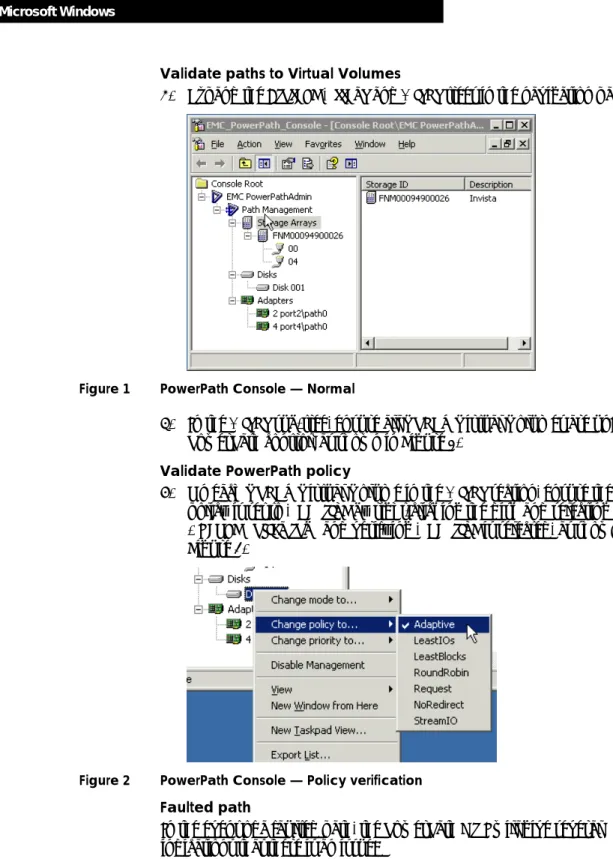
3. Expand the Storage Arrays and Disks trees in the navigation pane.
Figure 1 PowerPath Console — Normal
4. In the Disks sub-tree, ensure all VPLEX Virtual Volumes are under PowerPath control, as shown in Figure 1.
Validate PowerPath policy
5. On each VPLEX Virtual Volume in the Disks section, ensure the policy is set to Adaptive by right-clicking the disk and selecting Change policy to… and verifying Adaptive is selected, as shown in Figure 2.
Figure 2 PowerPath Console — Policy verification
Faulted path
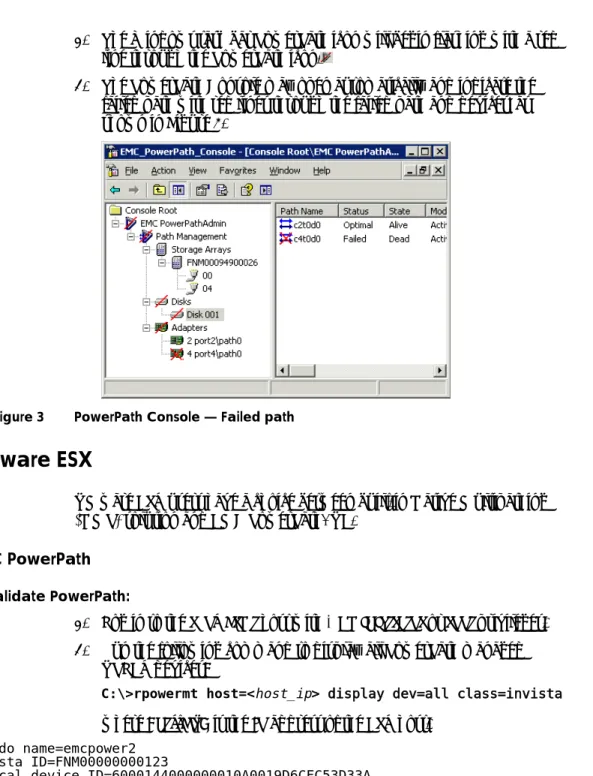
In the event of a faulted path, the PowerPath GUI will give several indications that there is an issue:
9 VMware ESX
Validating Host Multipathing with EMC VPLEX Technical Notes 1. The Windows task bar PowerPath icon will begin flashing with a red
line through the PowerPath icon.
2. The PowerPath Console may open automatically and indicate the failed path with red lines through the failed path and devices, as shown in Figure 3.
Figure 3 PowerPath Console — Failed path
VMware ESX
VMware ESX users have a choice between built-in Native Multipathing (NMP) solution and EMC PowerPath/VE.
EMC PowerPath
To validate PowerPath:
1. Log in to the rpowermt host with Administrator or root privileges. 2. Run the following command to display all PowerPath managed
VPLEX devices:
C:\>rpowermt host=<host_ip> display dev=all class=invista
where <host_ip> is the IP address of the ESX host. Pseudo name=emcpower2
Invista ID=FNM00000000123
Logical device ID=6000144000000010A0019D6CFC53D33A Standard UID=naa.6000144000000010a0019d6cfc53d33a state=alive; policy=ADaptive; queued-IOs=0
============================================================================== --- Host --- - Stor - -- I/O Path -- -- Stats --- ### HW Path I/O Paths Interf. Mode State Q-IOs Errors
VMware ESX
Validating Host Multipathing with EMC VPLEX Technical Notes
============================================================================== 1 vmhba2 C0:T0:L0 04 active alive 0 0 2 vmhba4 C0:T4:L0 00 active alive 0 0
Validate paths to Virtual Volumes
3. Using the output from the previous step, verify each PowerPath protected Virtual Volume has two or more active/alive paths. 4. Items to verify:
a. In the H/W Path column, ensure multiple vmhbas are in use. b. In the I/O Path Mode column, ensure two or more paths are
marked active.
c. In the I/O Path State column, ensure two or more paths are marked alive.
Validate PowerPath policy
5. The recommended PowerPath policy for VPLEX is Adaptive. This can be verified in the header section of each PowerPath controlled disk. It should read policy=ADaptive.
Note: It is critical to ensure all devices are using the Adaptive policy. Validate each disk separately.
Faulted path
In the event of a path down, the output to rpowermt display may look similar to the following example. Note the I/O Path State is marked dead: Pseudo name=emcpower2
Invista ID=FNM00000000123
Logical device ID=6000144000000010A0019D6CFC53D33A Standard UID=naa.6000144000000010a0019d6cfc53d33a state=alive; policy=ADaptive; queued-IOs=0
============================================================================== --- Host --- - Stor - -- I/O Path -- -- Stats --- ### HW Path I/O Paths Interf. Mode State Q-IOs Errors ============================================================================== 1 vmhba2 C0:T0:L0 04 active dead 0 0 2 vmhba4 C0:T4:L0 00 active alive 0 0
VMware Native Multipathing
Validate VMware NMP by using the vCenter GUI 1. Start the VMware vCenter Client.
2. Log in to the ESX host or vCenter server with Administrator privileges.
11 VMware ESX
Validating Host Multipathing with EMC VPLEX Technical Notes 3. In the left-hand navigation pane, select the ESX host that you want to
verify.
4. Click the Configuration tab.
5. In the Hardware menu, select Storage Adapters.
6. In the Storage Adapters window, select one of the vmhbas to which the VPLEX Virtual Volume is presented.
7. In the Details window, select the device that you want to validate. 8. Right-click the device and select Manage Paths.
Validate paths to Virtual Volumes
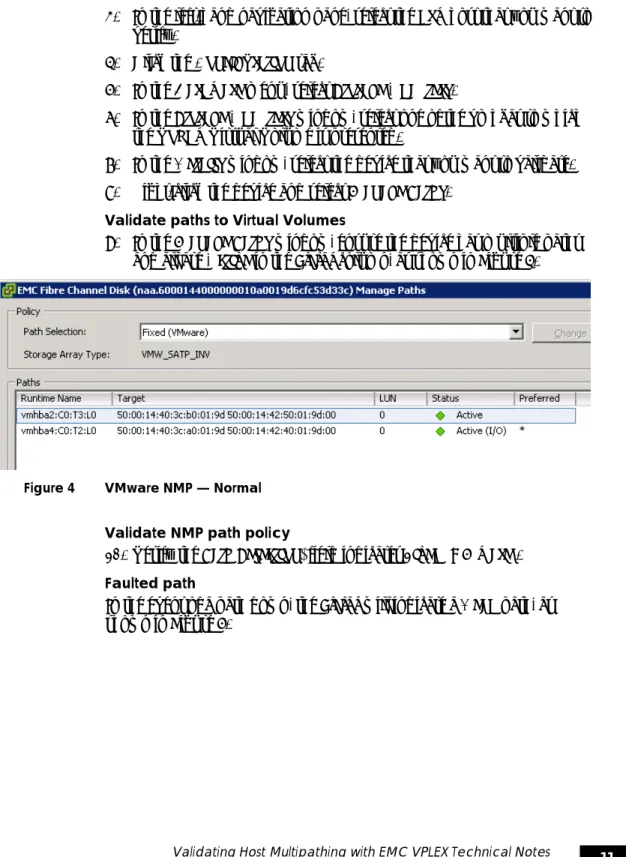
9. In the Manage Paths window, ensure the device has multiple paths and all are Active in the Status column, as shown in Figure 4.
Figure 4 VMware NMP — Normal
Validate NMP path policy
10. Verify the Path Selection: field indicates Fixed (VMware). Faulted path
In the event of a path down, the Status will indicate a Dead path, as shown in Figure 5.
VMware ESX
Validating Host Multipathing with EMC VPLEX Technical Notes
13 Appendix: Vendor documentation
Validating Host Multipathing with EMC VPLEX Technical Notes
Appendix: Vendor documentation
Use the following documents for additional, vendor-specific information:
EMC E-Lab Navigator
EMC Powerlink®
HP-UX System Adminstrator’s Guide: Logical Volume Management
http://bizsupport2.austin.hp.com/bc/docs/support/S
upportManual/c02023734/c02023734.pdf
Veritas Storage Foundation 5.0 Dynamic Multi-pathing – Optimizing
Availability and Performance in Multi-Vendor Environments
VMware Storage/SAN Compatibility Guide
http://partnerweb.vmware.com/comp_guide/pdf/vi_san
Appendix: Vendor documentation
Validating Host Multipathing with EMC VPLEX Technical Notes Copyright © 2011 EMC Corporation. All Rights Reserved.
EMC believes the information in this publication is accurate as of its publication date. The information is subject to change without notice.
THE INFORMATION IN THIS PUBLICATION IS PROVIDED "AS IS." EMC
CORPORATION MAKES NO REPRESENTATIONS OR WARRANTIES OF ANY KIND WITH RESPECT TO THE INFORMATION IN THIS PUBLICATION, AND SPECIFICALLY DISCLAIMS IMPLIED WARRANTIES OF MERCHANTABILITY OR FITNESS FOR A PARTICULAR PURPOSE.
Use, copying, and distribution of any EMC software described in this publication requires an applicable software license.
For the most up-to-date listing of EMC product names, see EMC Corporation Trademarks on EMC.com.