Two-factor Authentication in Smartphones:
Implementations and Attacks
Christofer Ericson
[email protected]
Department of Electrical and Information Technology
Lund University
Advisors:
Martin Hell, EIT
Albert Altman, IT Advisor
Printed in Sweden E-huset, Lund, 2015
Abstract
Two-factor authentication is the method of combining two so calledauthentication factors in order to enhance the security of user authentication. An authentication factor is defined as ”Something the userknows, hasoris”. Something the user knows is often the traditional username and password,something the user hasis something that the user is in physical possession of andsomething the user isis a physical trait of the user, such as biometrics. Two-factor authentication greatly enhances security attributes compared to traditional password-only methods. With the advent of the smartphone, new convenient authentication methods have been developed in order to take advantage of the versatility such devices provide. However, older two-factor authentication methods such as sending codes via SMS are still widely popular and in the case of the smartphone opens up new attack vectors for criminals to exploit by creating malware that is able to gain control over SMS functionality.
This thesis explores, discusses and compares three distinct two-factor authenti-cation methods used in smartphones today in the sense of security and usability. These are mTAN (mobile Transaction Authentication Number), TOTP (Time-based One Time Password Algorithm) and PKI (Public Key Infrastructre). Both practial and theoretical attacks against these methods are reviewed with a focus on malicious software and advantages and disadvantages of each method are presented. An in-depth analysis of an Android smartphone SMS-stealing trojan is done in order to gain a deeper understanding of how smartphone malware operates.
Contents
1 Introduction and Motivation 1
1.1 Related work . . . 2
2 Background and Prerequisites 3
2.1 Overview of two-factor authentication . . . 3
2.1.1 One-Time Passcode Generation 4
2.1.2 Hardware tokens 4
2.1.3 Software tokens 5
2.1.4 Out-of-band communication based 5
2.1.5 Biometrics 5
2.1.6 Others 6
2.2 Overview of Android Security . . . 6
2.2.1 Sandboxing 7
2.2.2 Permissions 7
2.2.3 Interprocess Communication 7
2.2.4 Applications 7
2.2.5 Credentials storage and account management 8
2.3 Overview of malware analysis . . . 9
2.3.1 Static analysis 10
2.3.2 Dynamic analysis 10
2.3.3 Malware analysis on Android 12
2.4 Tools for Android malware analysis . . . 12
2.4.1 Static analysis 13
2.4.2 Dynamic analysis 14
2.4.3 Other tools 14
3 Two-factor Authentication for Smartphones 15
3.1 mTAN. . . 15 3.2 TOTP. . . 16
3.2.1 Google Authenticator 16
3.3 PKI . . . 18
3.3.1 BankID 18
4 Attacks on Two-factor Authentication 23
4.1 General . . . 23
4.1.1 OTP Generation and Invalidation 23
4.1.2 2FA Deactivation and Recovery Codes 24
4.1.3 Cross-platform Malware Infection 25
4.2 mTAN. . . 26
4.2.1 SIM Card Cloning 26
4.2.2 Intercepting Wireless Traffic 27
4.2.3 SMS stealing 27 4.3 TOTP. . . 27 4.3.1 Initialisation 27 4.3.2 Replay 28 4.3.3 Stealing OTPs 28 4.4 PKI . . . 29 4.4.1 Key Compromise 29
5 Comparison of Two-factor Authentication Methods 31
5.1 Usability. . . 31 5.1.1 Availability 31 5.1.2 Ease of Use 34 5.2 Security . . . 35 5.2.1 Communication 35 5.2.2 Human Factor 36
5.2.3 Lost or Stolen Smartphone 36
6 Case Study: Analysis of iBanking Android Trojan 39
6.1 The Application. . . 39 6.2 Methodology . . . 39 6.3 Static Analysis . . . 40
6.3.1 Capabilities and permissions 40
6.3.2 Components and entry points 43
6.3.3 Signing information 45
6.3.4 Extracted strings and URLs 46
6.3.5 Summary 48
6.4 Dynamic Analysis . . . 49
6.4.1 Execution 49
6.4.2 Anti-emulation circumvention 49
6.4.3 Behaviour 52
6.4.4 Controlling the application 57
6.4.5 Discussion 59 6.4.6 Analysis Conclusions 61 7 Conclusion 63 Bibliography 65 A Glossary 69
iv
List of Figures
2.1 Android credentials storage setup . . . 9
2.2 Excerpt from a Radare2 session with the Windows application ”Calcu-lator” disassembled . . . 11
3.1 Mobile BankID setup process . . . 19
3.2 Mobile BankID logon process . . . 21
4.1 Google recovery codes . . . 25
6.1 Main activity screen . . . 40
6.2 The OTP generation screen. . . 43
6.3 The licence key generation screenj . . . 43
6.4 The about screen . . . 45
6.5 Web browser view of http://bxateca.net/iBanking/admin.php. 47 6.6 Communication with the C&C server via HTTP . . . 52
6.7 Application requesting device administrator privileges. . . 53
6.8 Simulated incoming call when call interception was activated . . . . 57
Chapter
1
Introduction and Motivation
Malware that targets mobile platforms has increased dramatically over the past few years [1]. Due to the rising popularity of the smartphone and the convenient ways of dealing with everything from sensitive personal data to banking errands, this technology does not only appeal to the general population but also to criminals. By creating applications that appears to be legitimate, malware developers are able to steal user credentials that could be used for financial gain.
To prevent an unwanted third party from logging into a service using stolen credentials, a second factor can be used to prove the user’s identity. The second factor could be some custom built hardware, a smartphone application or a text message received from the service provider; all containing some sort of one-time password. This password should then be provided along with the regular credentials of the user.
The presence of two-factor authentication makes it a more complex process for malware authors and hackers in general to gain unauthorised access to user accounts. Yet, the main part of malware present on the Android operating system is designed to defeat authentication schemes in order to gain access to users’ online banking services as is revealed in a recent report from Kaspersky Labs [2]. In order to stay ahead of the mobile malware wave, the current and possible future capabilities of malware that circumvents two-factor authentications needs to be continously mapped out.
The objective of this master’s thesis is to analyse and compare several two-factor authentication schemes against each other in the context of resistance to attacks. And more specifically in those that could be, or currently are, exploited by malware on mobile platforms. The mobile operating system of choice in the analysis will be Android, since it accounts for more than 95%1 of mobile malware detected [3]. An existing sample of Android malware which purpose is to defeat two-factor authentication will be reverse engineered and analysed to gain a deeper understanding of its capabilities and mechanics. The thesis will try to answer the following questions:
• What existing two-factor authentication schemes are in use today on the smartphone front?
• What kind of attacks against two-factor authentication are known? Both
1as of 2013
2 Introduction and Motivation
practical and theoretical.
• How resistant are these different authentication schemes against each kind of attack?
– Would, or is, a malicious application capable of executing or assisting in such an attack?
• What means are there to protect against attacks on two-factor authentica-tion?
– What would be, or are, the implied costs in terms of usability of doing this?
• Is the usability of these two-factor authentication schemes affected by security tradeoffs? If so, what are these tradeoffs?
This chapter describes the motivation for this thesis and presents related work. Chapter 2 will introduce two-factor authentication, Android security architecture and malware analysis. The tools that will be used later in the malware analysis case study will also be presented. Chapter 3 will choose and present three methods of two-factor authentication used in smartphones that will be analysed further. Chapter 4 will explore and discuss existing and theoretical attacks on the three chosen authentication methods and how to protect against them. Chapter 5 will compare the three chosen authentication methods against each other in the sense of usability and security. Chapter 6 will perform a malware analysis on an Android banking trojan in order to gain a deeper understanding of its functionality. The conclusions of this thesis will be presented in chapter 7.
1.1
Related work
Some research in the past few years haven been conducted on the subject of evolution of malware on mobile platforms and the strength of two-factor authentication. In [4], several implementations of mobile two-factor authentication are investigated and some are also bypassed. The main focus is on one-time passcode-based two-factor authentication and it is shown that current mobile two-two-factor authentication schemes have weaknesses. These results are also confirmed in this thesis where a trojan is analysed that exploits one-time passcode- and SMS-based authentication schemes. In [5], a systematic procedure of analysing Android malware and forensics is proposed. Ideas and results from this paper and other sources such as [6] are used in the malware analysis part of this thesis. Mobile malware evolution is explained in [7] and also provides insight in how specific static- and dynamic malware analysis steps could be carried out. Some of these insights are practiced in the analysis part of this thesis. SMS-based authentication in an e-bank setting is attacked in [8] with the use of a proof-of-concept built Android trojan that shares many similarities with the Android trojan analysed in this thesis. A usability study for two-factor authentication methods was done in [9], these results are used when comparing the chosen two-factor authentication methods against each other from a usability perspective.
Chapter
2
Background and Prerequisites
This chapter introduces the general areas of interest for this thesis; two-factor authentication (2FA), Android security architecture and malware analysis. It also lists the tools that will be used for the malware analysis case study.
2.1
Overview of two-factor authentication
The traditional means of authenticating someone is by verifying his or her preregis-tered username and password. This authentication scheme relies on something that the user has previous knowledge of in order to verify their identity - the password. In general, an authentication factor is something proving the identity of a user, and there are several ways of doing this.
• Something the user knows
• Something the user has
• Something the user is
Something the user knows is usually a password or PIN.Something the user has could be a physical token that somehow proves that the user is in possession of it, e.g. by it generating passcodes based on a preshared secret. Something the user is is a physical trait of the user that can be scanned by special hardware, such as biometrics. A fourth authentication factor has been suggested in [10] where the Somebody the user knows factor is introduced. The idea is that users are able to vouch for one another and thus certifying their identities by providing an additional factor.
By combining two or more of these factors a higher level of security when authenticating users can be achieved. Since something a user knows, such as a password, can be stolen in hacker attacks or simply found written down on a piece of paper, it should be considered a potential security risk to exclusively rely on. By adding a second factor, such as a hardware token generating one-time use passcodes, the risk of a user account being compromised is greatly reduced since it would require the attacker to also have physical access to the token. It is important to note that a true Something the user hasfactor is not prone to eavesdropping and actually requires the user to be in physical possession of the token (such as a smartcard). Therefore, it could be argued that a two-factor authenticating method
4 Background and Prerequisites
that relies on sending one-time passcodes via SMS to the user’s smartphone does not fulfill theSomething the user has factor completely, since the information is vulnerable to eavesdropping or malware attacks.
2.1.1
One-Time Passcode Generation
The one-time passcode (OTP) plays a central role in many 2FA schemes and there are several methods of generating them. The simplest method is to use a strong random number generator in order to produce unguessable OTPs. This is often used in authentication by SMS and is further discussed in section 4.1.1. A more advanced method that is used in hardware tokens1 is a form of challenge-response authentication.
Challenge-response authentication
The idea of challenge-response is that the service provider in some way sends a challenge to the user. The user must then use this challenge in combination with asecret that both parties are in possession of. The combination is often some cryptographic hash function that takes two inputs and produces one output. This output is the response, and the service provider can verify that the user is in possession of the secret by doing the same combination and thus authenticating him or her. In comparison, the simple method of just using a random generated number does not prove the identity of the user.
A modification of the challenge-response protocol is to replace the challenge with e.g. the current time or an incrementing counter. This is convenient since the challenge does not have to be kept secret in this way and the amount of communication between the service provider and the user can be reduced.
2.1.2
Hardware tokens
There are many different ways of augmenting an authentication scheme with a second factor. One way is to go with a hardware based solution, requiring all users to carry special designed hardware in order to be able to logon to a specific service. The general approach in designing this hardware token is to embed a preshared secret into the device which is then used in a challenge-response protocol to produce one-time passwords. Any single OTP is then only valid during a certain time interval [11].
One common approach is to use the current time as a challenge as this will guarantee that a new sequence is used in every calculation. An example is the RSA SecurID2. Another approach is to have a keypad present on the hardware token and to let the user enter one or more challenges during every authentication attempt. The token will then compute a valid OTP based on the provided challenge. The user then simply enters the OTP shown on the hardware token into the login service and the authentication servers, having already calculated the same OTP using the preshared secret, verifies the correctness of the entered sequence.
1
and software that emulates this
Background and Prerequisites 5
This is an example of adisconnected token, meaning that it requires no network communication with the outside world to function. The preshared secret is already built in to the device and the challenge is either available locally or entered manually by a person without any networking traffic involved. Since there is no in- or outgoing traffic from the device, it is not prone to eavesdropping attacks. The counterpart is the connected token, meaning that the challenge is provided directly by the authentication servers via some online communication channel (e.g. the Internet or GSM network). An example of a connected token would be smartcards used for banking errands that receives challenges in an online manner.
2.1.3
Software tokens
Using hardware tokens as the second factor in an authentication scheme can greatly enhance security, but it also introduces additional costs and puts pressure on users to always carry their hardware token on their person. A solution that does not include additional new hardware is to emulate the behaviour of a hardware token in a software setting.
Since a secret can not be preshared in the same way as with a hardware token where it is built in during manufacturing, it needs to be transferred upon registration with the authentication service over a secure channel. Because users should be able to login from anywhere, the emulator could advantageously be run on e.g. a smartphone as an app since people tend to carry their phones with them at all times. An example is the Google Authenticator3 that is used widely on the Internet and is implemented according to the TOTP standard [11].
2.1.4
Out-of-band communication based
Out-of-band (OOB) communication is when a separate communication channel from the main channel is used for transferring data. A common example would be using the telephone network as a OOB channel while the data traffic network acts as the main channel.
In a setting where a user has registered their telephone number with the service provider, SMS is often used as a way to receive OTPs from the authentication server. This is a widespread technique that is used by many banks for logging on to their Internet services [12].
There are also other, not so widespread, ways of delivering OTP via the telephone network. One is to have the service provider make a one-dial telephone call to the user, the user checks the last few digits of the telephone number of the missed call and that is used as the OTP. The last digits in the telephone number of the service provider is randomised. This is an approach used by Cognalys.4
2.1.5
Biometrics
Biometrics covers the Something the user is factor by scanning physical traits of the user such as fingerprints, voice, iris etc. Although this provides a unique
3
https://github.com/google/google-authenticator/ 4https://www.cognalys.com/two-factor-authentication/
6 Background and Prerequisites
identifier for a single user, there are some issues associated with this kind of second factor. The most prominent issue could be argued to be privacy since a unique identifier of a person is more or less impossible to change. Another issue is the risk of false positives, i.e. when someone with a similar fingerprint or other trait to another user is able to authenticate.
Fingerprint scanners has long been a feature of business laptops as an alternative to passwords for logging on to the device. Lately, this feature has also made its way to smartphones and has become more user friendly by being faster and more accurate. On newer smartphones such as the iPhone 6, it is used not just for gaining access to the device itself but also for authorising payments [13]. Even though the fingerprint sensors on devices such as the iPhone 6 has been successfully hacked by researchers [14] it is argued that the attack itself requires ”skill, patience, and a really good copy of someone’s fingerprint” and that it is ”highly unlikely to be a threat for anything other than a targeted attack by a sophisticated individual”. As sensors for fingerprint scanners continue to improve it is possible that it could soon be accepted as a general 2FA method for regular web services in the same way as e.g. authentication by SMS.
Further discussion of biometrics authentication and its applications see e.g. [15].
2.1.6
Others
Some authentication methods rely on their own or already established PKIs to ensure the identity of users. One example of a method that utilises an existing PKI without actually storing private keys on a user’s device is Mobile BankID [16]. Twitter is an example of a service that relies on a PKI of its own for two-factor au-thentication5. The user generates a 2048-bit RSA keypair on his or her smartphone via the Twitter app and the public key is uploaded to Twitter’s servers. Then on every consecutive login request, a 190-bit challenge is sent to the user’s smartphone along with information regarding the geographical position of the entity that is attempting a logon and what browser is being used. With the user’s permission, the challenge is signed with the private key and a reply is made. If the signature is valid, the user is logged in.
2.2
Overview of Android Security
The Android operating system is built on top of the Linux kernel and thus inherits many parts of its infrastructure, including hardware drivers, filesystem and process management, networking and similar operating system functionality. Some Android specific features have been added to the kernel to satisfy the requirements of that of a smartphone. Some of these features are related to memory sharing, alarms, networking and interprocess communication(IPC) [17].
The higher level parts of Android such as the system services, all apps, framework- and runtime libraries are implemented in Java. Therefore, these are running in a Java Virtual Machine(JVM) named Dalvik6 that is executing
5
http://www.wired.com/2013/08/twitter-new-two-facto/ 6Dalvik will be replaced in the near future by its successor; ART.
Background and Prerequisites 7
on top of the Linux kernel. Dalvik differs from other JVM’s, such as the one distributed by Oracle, in that it does not run Java bytecode .class files but instead has its own format in .dexfiles. These are packaged inside .apkarchives that is containing all relevant data and resources for an Android app.
2.2.1
Sandboxing
Android isolates all running apps from each other by having them run in a sand-boxed7 environment. This environment is enforced both at the process level and at the file system level by utilising Linux security features. Each app is given a unique user identity(UID), group identity(GID) and a private data directory where only it has the permissions to read and write to. The system itself has a UID of its own (UID 1000), as do the root user (UID 0). This implies that no app will be able to browse the private data directories of other apps.
2.2.2
Permissions
The sandboxed environment provided by the OS to each app does not, by default, allow for any actions that may have a negative impact on other apps, the user or the OS itself. If an app wants to access certain functionality that utilises specific resources or allows for communication with otherwise unreachable system components, a permission needs to be requested. Permissions are requested by an app at installation time and if these are granted, they are retained for the entire lifetime of the app. A complete list of permissions is found on http: //developer.android.com/reference/android/Manifest.permission.html.
2.2.3
Interprocess Communication
As previously mentioned, different processes sometimes wants to offer or access services provided by others. The access control of these actions are governed by permissions and the actual action by an interprocess communication (IPC) mechanism. Examples of IPCs already present on Linux and other operating systems are files, signals, sockets, pipes etc. Android has a mechanism of its own that handles IPC that is called Binder.
In short, Binder manages a specific part of each process’ address space and is able to transfer data between these sections. A process can then e.g. send a request to Binder to send a message to another process. If the request is granted, Binder will copy the message data and write it to the other process’ Binder-managed memory chunk. The message can then be read by the receiving process.
2.2.4
Applications
The Dalvik virtual machine runs.dex files that contains the executable code of an app. There are however several other files that are associated with an app that needs to be packaged along with the executable code. Such files are resources, the manifest file and several others. The resulting file is an .apk archive file. This
8 Background and Prerequisites
file type is a modification of the.jar format and is used when distributing and installing Android apps.
An app in itself have different components intended for different purposes. These are activities, services, content providers, broadcast receiversandintents.
• Anactivity consist of a user interface that is presented on a single screen on a device. One app can therefore have several activities if its user interface is split into several parts, these are often accessed by pushing buttons or swiping. Each activity, although possibly designed to be displayed in a certain order, is independent from each other and can, if allowed, be started by other apps.
• Aservice is a component that runs in the background, usually performing some long-running operation, and does not have a user interface. Services can be started from other components within the same app or from other apps if the service is made public.
• Content providers are used for sharing data between apps. An app can define what specific data (stored in e.g. files or a database) other apps may access. A music player may e.g. allow other apps to see what track is currently playing.
• Broadcast receiversis the component that listens for broadcasts issued by the system or other apps. A broadcast is often used to notify other apps of events that may be of interest, e.g. a change in network connectivity or a received SMS. The broadcast receiver can then react to specific broadcasts and may e.g. start a service. Like services, a broadcast receiver runs in the background with no user interface. Broadcasts can be non-ordered or ordered. Non-ordered broadcasts are simply sent out to all apps simultaneously. Ordered broadcasts are instead sent to receivers in a specific order that is determined by the receiver’s priority, defined in the app’s manifest file. A high priority receiver is able to prevent a broadcast from reaching low priority receivers once it has received it itself.
• The way to request actions from another component within the same app is by using messaging objects calledintents. Intents specifies the action that is to be taken and can also pass along data for the receiver to act upon. E.g. a viewintent can be sent to a web browser component within the same app to bring up a webpage and the URL can be attached in the additional data field. A broadcast that is read by broadcast receivers is an intent.
2.2.5
Credentials storage and account management
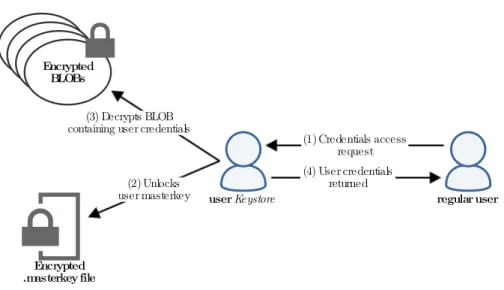
Android offers a way for app developers to store user credentials in a safe manner. A credential can e.g. be a keypair in an authentication scheme. The service that is responsible for keeping the credentials is run by the userkeystore and any requests for access to a credential has to go through this user. The credentials are stored as encrypted key blobs (binary large object) and the decryption key is stored as a.masterkey file, both files are owned by the userkeystore. The.masterkey file
Background and Prerequisites 9 BLOB BLOB BLOB Encrypted BLOBs userKeystore Encrypted .masterkey file regular user (1) Credentials access request (2) Unlocks user masterkey (3) Decrypts BLOB containing user credentials
(4) User credentials returned
Figure 2.1: Android credentials storage setup
is in itself encrypted using the PBKDF28 key derivation function with the screen unlock passcode as the password, meaning that there is one .masterkey file per user. The function is applied for 8192 iterations and a 128-bit random generated salt is used. This setup is illustrated in figure 2.1.
In addition to being able to store encrypted credentials, Android can also keep a registry of user accounts that can be used by apps to use e.g. web services without prompting the user to enter his or her credentials every time. Any app can implement a so called authenticator module for their particular type of user account to be able to utilise services such as storing credentials and issue authentication tokens for other apps.
The registry containing all credentials is stored in the fileaccounts.db. Password encryption in this file is left to the app using the service to perform, and thus makes it possible to store plaintext passwords. It is however only possible for apps that share the same UID as the app’s own authenticator to call the getPassword() method, which means that during runtime the password is inaccessible to other apps.
2.3
Overview of malware analysis
To be able to develop defences against malicious software such as viruses, worms and trojans, a deep understanding of how these kinds of programs operate needs to be obtained. These kinds of defences are e.g. antivirus programs, which are able to scan executable files for suspicious code patterns or react to how a program behaves by using knowledge of how malware operates. The way of obtaining this knowledge
10 Background and Prerequisites
is malware analysis and it is based on reverse engineering9techniques and the study of program behaviour; often referred to as static analysis and dynamic analysis.
2.3.1
Static analysis
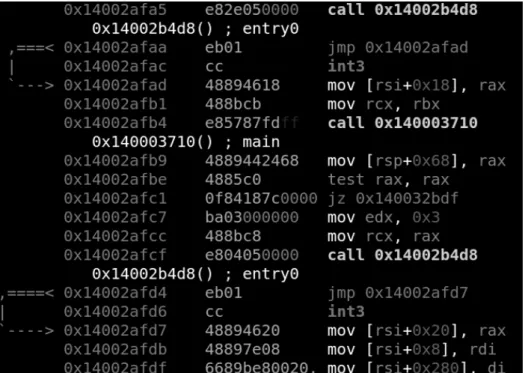
Static analysis is the method of extracting information about how a program operates without actually executing it. A quick and basic static analysis of a program would be to e.g. extract potential strings embedded inside the binary file by searching for specific byte patterns or examining what software libraries it tries to import at startup. A more advanced static analysis would be to e.g. use disassembler software such as IDA Pro10 or Radare211 in order to obtain the assembly code of the program. Although this will give an accurate12 and very detailed view of the binary, it often results in an overwhelmingly large amount of assembly code and it can be difficult to get an overview of the program’s intentions. Instead, this technique is often utilised after performing a dynamic analysis when trying to get an understanding of a single component or to locate the origin of a certain program action. A screen capture of a Radare2 session with the Windows application ”Calculator” disassembled is displayed in figure 2.2.
2.3.2
Dynamic analysis
Dynamic analysis is to execute the program and observe its behaviour. The exe-cution of malware samples are often performed in a controlled environment such as a virtual machine in order to prevent unintentional spreading. Observation of program behaviour can be aided by tools that logs e.g. file accesses, process be-haviour, network traffic etc. In the case of Windows, the registry is often something that malware modifies in order to e.g. run at startup. Network traffic is one of the most important part to observe since malware often communicate with the outside world to perhaps leak sensitive data or receive remote commands from a Command and Control (C&C) server. A more advanced approach to dynamic analysis is to run the malware sample in a debugger such as OllyDBG13 in order to gain full control over the execution flow of the program and be able to step through each assembly instruction individually. Though as with a disassembler, it can be difficult to get an overview of the program by only running it in a debugger. One of the disadvantages with dynamic analysis is the fact that only the currently executing code can be analysed. Since there may be a large amount of execution paths through a particular program it can be difficult to get a full coverage of all of the program’s actions since some of them might only be triggered under certain circumstances.
9
http://searchsoftwarequality.techtarget. com/definition/reverse-engineering
10
https://www.hex-rays.com/products/ida/ 11
http://www.radare.org/r/
12since a disassembler does not execute any code it can sometimes make mistakes in
interpreting the binary
Background and Prerequisites 11
Figure 2.2: Excerpt from a Radare2 session with the Windows application ”Calculator” disassembled
12 Background and Prerequisites
In combination, these two methods can provide insight in how a particular malware sample was written. The process of malware analysis is often iterative and the two methods are performed several times in any order. The most common methodology though is to run basic static analysis tools on the sample in order to anticipate what the purpose of the program may be, then run a simple dynamic analysis to confirm. After that, more specialised tools that provide detailed output may be used in order to get a deeper understanding of certain functionality [6].
2.3.3
Malware analysis on Android
Analysing malicious apps on Android is similar to analysing malware on e.g. Windows in that apps can be run through static analysis tools, be run in virtualised environments, be disassembled etc. There are however some key differences that needs to be considered:
• Apps on Android needs to request permission to use certain functionality, as mentioned in chapter 2.2. This gives a head start in anticipating the apps intentions since a requested permission is likely to be utilised in some way.
• Android apps are built using Java, a language which source code can be partially reconstructed easier than e.g. C/C++14 using decompilers. In comparison, most malware found on Windows machines are written in C/C++.
• There are other means of communicating with an infected Android device compared to a PC running Windows. If a malware requests permission to handle e.g. SMS or the phone, it could utilise those means to communicate with the outside world, such as a C&C server.
It should be noted that a static analysis can merely suggest what the true intent of a program is since the output of most tools can be interpreted in different ways and some output can also be misleading. An application may e.g. request a certain permission but actually not use it during execution, or have some embedded strings that the program authors planted there for misdirection purposes. A ”DestroyPhone” string does not necessarily mean that the application has that ability.
2.4
Tools for Android malware analysis
This section will present the set of tools that will be used in the malware analysis case study in chapter 6. The tools are split up in static analysis tools, dynamic analysis tools and other miscellaneous tools.
14Hex-rays, the creators of IDA Pro, has a decompiler that can be used with
pro-grams written in e.g. C/C++ (https://www.hex-rays.com/products/decompiler/). It is however not free.
Background and Prerequisites 13
2.4.1
Static analysis
VirusTotal15- A web service that scans potentially malicious binaries and URLs using a large selection of antivirus software. In addition to presenting the detection results from the AV vendors, it also performs an automated static analysis and a limited dynamic analysis. VirusTotal will be used in order to get a rather detailed report for the static analysis. For Android apps, the extracted information includes required permissions, permission-related API calls, existing activities, services and receivers, code observations, certificate-related information etc.
keytool- ”keytool is a key and certificate management utility. It allows users to administer their own public/private key pairs and associated certificates for use in self-authentication (where the user authenticates himself/herself to other user-s/services) or data integrity and authentication services, using digital signatures. It also allows users to cache the public keys (in the form of certificates) of their communicating peers.”16. This tool will be used to extract certificate data from the application, since all applications needs to be signed before they are able to be installed. It will also be used later in the analysis for generating a new keypair for signing purposes.
jarsigner17 - Utility for signing and verifying Java .jar archives with a key-pair. Will be used to sign a modified.apkfile with a new keypair in order to make it possible to install the app on a device.
strings - Used to extract potential strings from a binary by scanning for byte sequences that could be interpreted as an embedded string.18 Will be used to gain further information about the purpose of the app during the static analysis. dex2jar19 - Tool for converting Android executable classes.dex to Java .jar archive. Since Java decompiling tools like JD-GUI requires.jararchives in order to function, this tool will be used.
JD-GUI20- Tool for decompiling Java
.jararchives to into Java code. This code is reconstructed from bytecode and could contain errors. Also provides a graphical interface that can be used to browse the reconstructed code much like an IDE. APKTool21 - Tool for disassembling and rebuilding .apk archives. The tools will be used after modifying the .smali assembly code of the app in order to
15https://www.virustotal.com/ 16
https://docs.oracle.com/javase/6/docs/technotes/tools/solaris/ keytool.html
17
http://docs.oracle.com/javase/7/docs/technotes/tools/windows/ jarsigner.html
18
more specifically at least four printable characters and a terminating NULL character. (http://pubs.opengroup.org/onlinepubs/9699919799/utilities/strings.html)
19
https://github.com/pxb1988/dex2jar 20
http://jd.benow.ca/
14 Background and Prerequisites
rebuild it properly.
2.4.2
Dynamic analysis
Android Emulator22 - The Android SDK includes anAndroid Virtual Device Manager (AVD) for creating and running emulated devices on a computer in order to test applications. Application analysis could also be done on a physical device, but a virtual environment allows for quick and easy resets of OS images.
Wireshark23 - This tool is able to capture all network traffic on any specific network interface and also visualises it in an appealing manner. Will be used to monitor and to analyse in- and outgoing network traffic from the emulated device. Eclipse24 - Java IDE with the Android SDK plugin installed and which runs the Dalvik Debug Monitor Server (DDMS) perspective. This tools will be used to monitor the emulated Android device and to send dummy SMS and make spoofed phone calls to it.
ADB25 - Android Debug Bridge, used to install applications and execute com-mands on the emulated device. Will be used to generate logfiles and to install apps.
2.4.3
Other tools
7zip26 - Utility for extracting and adding files from and to.apkarchives.
SMS Tracker27- Service used for tracking in- and outgoing SMS to a Android device. Will be used to make sure that the malware does not try and send any SMS unnoticed.
APKDownloader28 - Service for downloading Android applications from the Google Play Store without having to supply a device ID. This tool needs to be used since an emulator does not have a valid device ID for downloading apps from the Google Play Store.
22
http://developer.android.com/tools/help/emulator.html 23
https://www.wireshark.org/ 24
https://eclipse.org/ 25
http://developer.android.com/tools/help/adb.html 26
http://www.7-zip.org/ 27
https://smstracker.com/
Chapter
3
Two-factor Authentication for Smartphones
In this chapter, three methods for smartphone 2FA will be chosen for further analysis and discussion throughout the remainder of this thesis. The choices are based on commonly used forms of 2FA used by public web services such as Facebook, Twitter, Google etc. and also a method that is often used by Swedish authority web services. A biometric authentication method has not been chosen since there has been no widespread use of it from a web service perspective but instead mostly for unlocking smartphones locally with e.g. fingerprint scanners.
The clearly most common [12] and also the oldest method chosen is authen-tication by receiving an SMS with a code, that will from now on be addressed as mTAN (mobile Transaction Authentication Number). The second method has gained much popularity recently and is a standardised authentication scheme of generating passcodes on a smartphone device. This is the TOTP method. The last method is Mobile BankID and is based on existing PKI and is used in Sweden by authorities, banks and other companies as a login method for their web services.
3.1
mTAN
Mobile Transaction Authentication Number is an authentication method relying on delivering OTPs via an OOB communication channel to the user. The OOB communication channel in the case of mTAN is the phone network1 in the form of SMS. When an authentication session start, e.g. by a user entering his or her credentials, the OTP is generated by the service provider and sent to the user’s preregistered phone number. The OTP will then be valid for a certain time that will depend on the service provider. Both OTP generation and invalidation will be discussed further in section 4.1.1. An SMS is able to contain 160 characters2, and since the number of characters of a OTP usually is kept to about 63, additional information regarding the login session or transaction could also be included in the message.
1
GSM or UMTS
2
http://latimesblogs.latimes. com/technology/2009/05/invented-text-messaging.html
3see section 5.1.2
16 Two-factor Authentication for Smartphones
3.2
TOTP
TOTP, or Time-based One-time Password Algorithm (RFC62384), is a standardised way of using a cryptographic hash function to compute a OTP based on a preshared secret and the current time. It is a modification of the HOTP, or HMAC-based One-Time Password Algorithm (RFC42265) standard that uses a counter based challenge instead of the current time. The benefit of using the current time instead of a counter is that it constantly changes and provides new values automatically. An OTP generally stays valid for a given time period. The authentication server performs the same computations as the user and since they share the same secret and current time, the codes will be identical.
A strength of TOTP is that it does not need any form of network connectivity to be able to generate new codes. As long as the clock of the device is somewhat in synchronisation with the rest of the world it will continue to generate valid OTPs.
TOTP is defined as an extension of HOTP which generates its values by using HMAC-SHA-16in the following way:
HOTP(K, C) =Truncate(HMAC-SHA-1(K, C))
where the function Truncate is a way of converting the HMAC-SHA-1 output into a HOTP value. KandC represents the secret and the counter respectively.
In TOTP, the same method as above is used but the counter is replaced by a valueT, derived from a time reference and a time step. TOTP is therefore defined as:
TOTP(K, T)=HOTP(K, T) where T in turn is defined as
T =(Current Unix time−T0) X
Where the time reference,T0, is by default defined as the Unix epoch, i.e. 0. The Current Unix time is the number of seconds elapsed since the Unix epoch, i.e. since January 1 1970. The time step,X, is by default defined as 30 seconds. Integer division is used when computingT, meaning that e.g. ifT0 = 0,X = 30and the current Unix time is 59 seconds,T = 1. If the current Unix time would instead be 60 seconds,T = 2.
3.2.1
Google Authenticator
The Google Authenticator is an implementation of TOTP that is widely used for user authentication on many websites and apps. The app is installed on a smartphone and can be used with Google’s own services or be registered with other platforms as well. For each registered platform, a secret needs to be transferred to the smartphone in order to generate the OTPs. This is achieved by using the built-in smartphone camera to scan the secret, which is represented in the
4
https://tools.ietf.org/html/rfc6238 5
https://tools.ietf.org/html/rfc4226
Two-factor Authentication for Smartphones 17
form of a QR-code displayed on the registration webpage. The contents of a Google Authenticator QR-code is displayed in listing 4.1. Pseudocode of the OTP generation on the Google Authenticator is shown in listing 3.17.
Listing 3.1: Pseudocode of the Google Authenticator OTP generation 1 function GoogleAuthenticatorCode(string secret)
2 key := base32decode(secret)
3 message := floor(current Unix time / 30) 4 hash := HMAC-SHA1(key, message)
5 offset := value of last nibble of hash
6 truncatedHash := hash[offset..offset+3] //4 bytes starting at the offset
7 Set the first bit of truncatedHash to zero //remove the most significant bit
8 code := truncatedHash mod 1000000
9 pad code with 0 until length of code is 6 10 return code
Since HMAC-SHA-1 outputs a 160-bit message, it would result in an OTP of length 498. Since this is an unfeasible amount of digits for a user to copy into an authentication form by hand every time, the output of the HMAC function is truncated to 31-bits using a technique called dynamic truncation. An example run of the HOTP algorithm using the Google Authenticator pseudocode in listing 3.1 is described in the next section.
Google Authenticator example run
1. Assuming a HMAC-SHA-1 output of
c412b37f8c0484e6db8bce177ae88c5443b26e92
2. As suggested by line 5 in listing 3.1, the last nibble (i.e. 4 bits) in the function output is the value of theoffset. In this case:
c412b37f8c0484e6db8bce177ae88c5443b26e9[2], i.e. 2
3. Next, thetruncatedHashis defined as the digits ranging from indexoffset to offset + 3. In this case:
c412[b37f8c04]84e6db8bce177ae88c5443b26e92, i.e. b37f8c04.
4. The first bit of truncatedHash is then to be set to 0. In this case the binary representation changes from10110011011111111000110000000100 to 00110011011111111000110000000100, and the new hexadecimal value becomes 337f8c04.
5. Finally, the new hexadecimal value is converted to a decimal value mod 1000000and if necessary is padded with zeros until the length is6. In this case the decimal representation mod1000000is996932. This is the resulting OTP.
7
http://en.wikipedia.org/wiki/Google_Authenticator#Pseudocode_for_Time_OTP 8since the largest number representable with 160-bits is 49 digits long
18 Two-factor Authentication for Smartphones
The official Google Authenticator app is proprietary since version 2.21 (current version as of writing is 2.49), prior to that, it was Open Source. As a result, the development of the Open Source version has been continued by the public9while the official version is maintained by Google. There are also forks of the Open Source version of the app, such as the OTP Authenticator10 and the FreeOTP Authenticator11published by Red Hat. On Windows Phone, the app Authentica-tor12 is compatible for use with Google Authenticator. Both the official Google Authenticator and its derivatives can be used on a wide range of web services13.
3.3
PKI
A Public Key Infrastructure is a system for maintaining a trustworthy networking environment by using public key encryption. The elements of PKI can be utilised to manage identities and these identities are certified by Certificate Authorities (CAs) which act as a trusted third party. Authentication schemes can be built upon existing PKIs and one method that does this is BankID. This is a more complex system compared to the other two schemes previously described.
3.3.1
BankID
BankID is an Electronic identity card for identification purposes online, currently used in Sweden by authorities, banks and other companies. It relies on the existing SSL PKI [18] with certificates signed by trusted CAs. The smartphone app version is called Mobile BankID which will be in focus in this thesis.
The parties included in the authentication system is:
• The user (U)
– Owns a smartphone with the Mobile BankID app installed – Is a customer of B
– Is able to logon to the Internet banking service of Bin another way
• The user’s bank (B)
– Is registered for use with the BankID service
– Is in possession of a valid SSL certificate signed by a trusted CA – Has an Internet banking service
• A web service requiring authentication of the user (S)
– Is registered for use with BankID by possessing a certificate signed by BankID CA
• The BankID authentication server (AS)
9 https://github.com/google/google-authenticator-android 10 https://github.com/kaie/otp-authenticator-android 11 https://fedorahosted.org/freeotp/ 12 http://www.windowsphone. com/en-us/store/app/authenticator/e7994dbc-2336-4950-91ba-ca22d653759b
Two-factor Authentication for Smartphones 19
User (U)
Bank (B)
Authentication Server (AS) (1) Logs in and requests new BankID
(2) Redirected by (B)
(2) Redirects (U)
(3) Is provided with a new BankID
User’s smartphone running Mobile BankID application (4) Enters BankID digits
Figure 3.1: Mobile BankID setup process
Setup phase
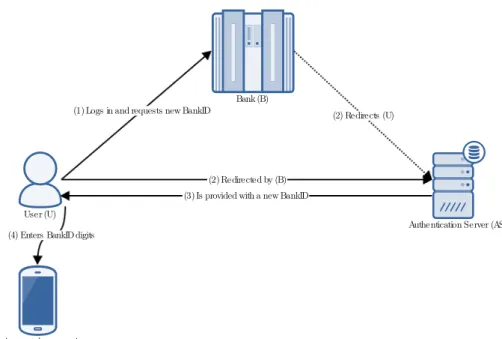
The setup phase consists of a user ”ordering a BankID” from his or her bank’s web service. A ”BankID” in this case is an 8 digit number that is to be entered into the user’s smartphone app. The process is described below and illustrated in figure 3.1.
1. Ulogs in to his or her bank Busing any other authentication method and orders a new BankID via the web interface.
2. BredirectsUto a webpage hosted byAS.ASimplicitly verifies the identity of Uby looking at the SSL certificate of BsinceUhas already been authenticated byB.
3. An 8 digit code is displayed for 10 minutes and in this timeUhas to enter this number sequence into his or her smartphone app.
4. The user selects a 6 digit PIN and enters the 8 digit code into the smartphone app. As soon as the 8 digit code is entered, it is invalidated for further use. Since Mobile BankID is closed source, it is not possible to know how the code is processed. But it is probably processed by some one-way function and stored securely by utilising some credential storage functionality discussed in section 2.2.5.
20 Two-factor Authentication for Smartphones
Authentication session
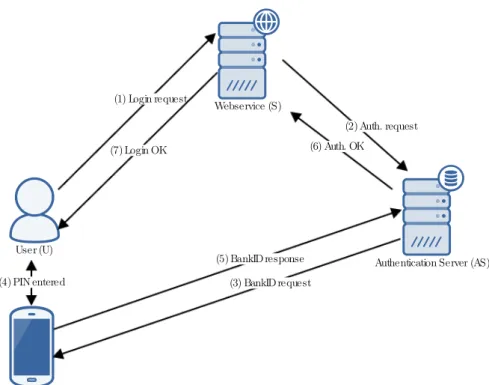
Once setup, Mobile BankID is ready for use. The authentication process of each session is described below and illustrated in figure 3.2.
1. Urequests to login toSby providing e.g. his or herpersonnummer14. 2. An authentication request is made fromStoASin order to verify the identity
of U. This request can only be performed if Sis in possession of a so called FP-certifikat15, which is provided by BankID duringS’s registration process for using BankID authentication.
3. ASmakes a request forU’s BankID by opening a new connection to his or her smartphone. This is probably done using some challenge-response method where the smartphone app utilises the processed code retrieved during the setup phase.
4. Uneeds to enter the previously chosen 6 digit PIN before a response can be produced.
5. A response is sent fromUtoASwhere it is verified.
6. ASin turn sends a response toSwhether the authentication was successful or not.
7. Saccepts the authentication andUis logged in.
As described, BankID utilises a PKI already in place with the banks already having valid SSL certificates available. Users does not have to generate keypairs of their own or having to deal with key transportation. The BankIDs, i.e. the processed secret digit sequence, can however expire which will force users to order a new BankID by repeating the registration process. Advantages and disadvantages of this method will be further discussed in chapter 5 as well as a comparison against the other methods.
14
Swedish personal identity number - a unique identifier for a person
Two-factor Authentication for Smartphones 21
User (U)
Authentication Server (AS)
User’s smartphone running Mobile BankID application
Webservice (S) (1) Login request (2) Auth. request (3) BankID request (4) PIN entered (5) BankID response (6) Auth. OK (7) Login OK
Chapter
4
Attacks on Two-factor Authentication
This chapter aims to explore both practial and theoretical attacks on the three chosen 2FA methods and their common attributes.
It will start with an overview of OTP security in general since these are utilised in two of the chosen methods. The web services of Facebook, Twitter, Google and LinkedIn will be subject to discussion when it comes to their handling of 2FA OTP generation, recovery and deactivation. Cross-platform malware infection will also be discussed as it plays a major role in how smartphone malware propagates.
Next, each chosen 2FA method will get their own section for exploring and discussing existing and theoretical attacks.
NOTE: All real-world attacks are referenced to. If an attacks is not referenced to, it is a theoretical attack proposed by the author.
4.1
General
4.1.1
OTP Generation and Invalidation
Consider a scenario where an attacker is able to capture an arbitrary amount of OTPs generated from a specific authentication service. An important requirement of the OTP generation algorithm is that it creates OTPs such that it is not possible to create a function F that is able to generate valid OTP values based on these observations.
In [4] a study was made analysing the OTPs1generated by Twitter, Dropbox and Google. And while they all passed basic randomness criteria it was observed that OTPs generated by Google never started with a 0 and thus reducing entropy by 10 percent.
Another aspect that was brought forth in [4] is the invalidation of OTPs. Ideally, a generated OTP only stays valid for a specific time period and does not repeat itself, even if the user does not complete the authentication attempt. In the study, Google reused the same OTP for one hour after the initial generation if the user did not complete the login process. This could be exploited, as mentioned in [4], by an attacker by capturing a generated OTP and then preventing the victim from
1sent by SMS
24 Attacks on Two-factor Authentication
submitting the original OTP and instead using the captured one himself. Other methods of stealing OTPs will be explored in sections 4.2.3 and 4.3.3.
4.1.2
2FA Deactivation and Recovery Codes
Deactivation
2FA is in many cases not mandatory for a service and usually needs to be activated manually by users. In the same way, it needs to be possible to deactivate 2FA in the event that a user is no longer interested due to e.g. it being to much of an annoyance to use.
Consider an attacker that has successfully recovered the login information from a victim by using e.g. malware with keylogging features. It would be in the attacker’s interest to deactivate any 2FA the victim may have enabled in order to gain access. If the service in question does not require any additional authorisation of a logged in user to deactivate the 2FA, a possible attack vector emerges. Malware could programmatically try to deactivate the 2FA feature without the user’s knowledge2.
Facebook, Google, Twitter and LinkedIn all offer 2FA as an optional feature. When trying to deactivate it, the following results were received:
• Facebook: does not require the user to re-enter any credentials or use a second factor. User is notified by email.
• Google: requires the user to re-enter his or her password to access the 2FA website. No further second factor authorisation required. User is notified by email.
• Twitter: does require the user to re-enter his or her password to turn off 2FA. No further second factor authorisation required. User is notified by email.
• LinkedIn: does not require the user to re-enter any credentials or use a second factor. User is notified by email.
Recovery
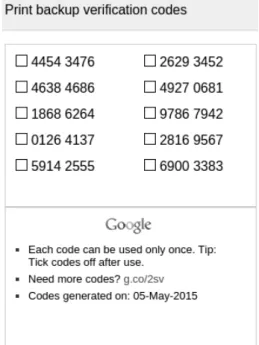
If the second factor used for authentication, in this case the smartphone, is lost or is unavailable there needs to be an account recovery option. A common way of doing this is to have special non-time sensitive OTPs that can be generated in advance via the service’s website. These are meant to be printed out and kept at a safe location. Google’s recovery code website is displayed in figure 4.1. This make it theoretically possible for PC-residing malware to implement the ability to take screenshots of the victim’s display and send the OTPs to a C&C server. This attack will also be explored in section 4.3.3 on the smartphone platform. One of the clear advantages of being able to take a screenshot of the recovery codes themselves and not a regular OTP is that they will be valid until they are replaced or used, which could potentially be a very long time.
Continuing with the same web services, they offer the following ways of account recovery:
2
to the best of the author’s knowledge there has been no successful attempt of this in literature
Attacks on Two-factor Authentication 25
• Facebook3: using pregenerated backup codes. Also contacting customer support.
• Google4: using the pregenerated backup codes. It is also possible to receive a valid OTP via voicemail, this could be useful if the user is able to access the phone’s voicemail remotely. Submitting an ”Account Recovery Form” is also an option.
• Twitter5: contacting customer support. If the ”login verification for iOS or Android”6 is used as opposed to SMS, a backup code can be generated in advance.
• LinkedIn: contacting customer support.
Figure 4.1: Google recovery codes
4.1.3
Cross-platform Malware Infection
One of the main purposes of 2FA is to separate the two factors so that they reside on different platforms - either physically or in a software sense.
Two common 2FA scenarios:
3
https://www.facebook.com/help/147926301947841 4
https://support.google.com/accounts/answer/185834?hl=en 5
https://support.twitter.com/articles/20170409 6
http://www.darkreading. com/attacks-and-breaches/twitter-overhauls-two-factor-authentication-system/d/d-id/1111076?
26 Attacks on Two-factor Authentication
• A PC and a smartphone. The user enters his or her login information, the first factor, on a website on the PC. The smartphone is utilised in some way to provide the second factor
• Only a smartphone. The user enters the login information in the browser of the smartphone and uses the same device to provide the second factor. In both scenarios, a potential attacker needs to split the malicious operation in two parts: one for capturing the first factor that is usually some static information that does not change often, such as a username and password. And one for the second factor which in most cases is of a more dynamic nature.
The first scenario suggests that both devices in question needs to be targeted, either by infecting with malware or by other means, in order to successfully circumvent a 2FA scheme. The way that the two platforms usually get infected are rather different; for a PC it could be by e.g. opening a malicious attachment, via autorun-features from removable storage, exploitation of software vulnerabilites etc. For a smartphone though, as discussed previously in chapter 2.2, the environment is usually more controlled and restrictive and does not allow arbitrary attachments or downloaded files to be executed. Because of this, malware on smartphones has to rely heavier on the human factor and the use of trojans that mimic benign and seemingly useful apps.
A common tactic used in attacking 2FA with the aid of malware is to utilise the fact that PCs are generally easier to infect. Once a PC is infected, it can aid the attackers in the next stage of the operation - namely to get the same user’s smartphone infected. Variants of the Android trojan familyiBanking [19], [20] has been shown to utilise a Windows trojan [21] in order to lure victim’s to install it on their smartphones. A webinjection using JavaScript was used to trick users into installing the smartphone trojan from an unknown source. This will be further explored and analysed in the case study in chapter 6.
In the second scenario, the attack does not have to be split up in the same way. Smartphone malware could be enhanced with keylogging functionality [22] in order to capture usernames and passwords. On the other hand, it would be difficult to get users to actively install the malicious app without any instructions as is provided in the first scenario. PC-residing malware could still be used for this purpose, but the keylogging features would have to be transferred to the smartphone app.
4.2
mTAN
4.2.1
SIM Card Cloning
Cloning a SIM card, i.e. extracting information off of the card such that it is possible to create an identical one, means that text messages will be sent to both the device with the original SIM card and the device with the cloned one.
However, SIM card cloning has only been achieved on the older COMP128v1 implementations of the A3 and A8 algorithms (see [23]) defined in the GSM standard. Since this implementation was discontinued after the discovery of the security flaw that made cloning possible around the year 2002 and no progress has been made to clone a SIM card using more recent implementations, the probability
Attacks on Two-factor Authentication 27
of this attack is deemed to be very low. The attack would also require physical access to the victim’s device and SIM card.
4.2.2
Intercepting Wireless Traffic
Cracking and eavesdropping on GSM traffic is possible with publicly available tools, although it presents with several difficulties for practical use [24]. The attacker needs to be connected to the same base station as the victim and thus has to be in the same geographical area. A MitM attack has been proposed by [25], although the difficulties in executing such an attack might make a real-world attack unlikely.
4.2.3
SMS stealing
2FA methods relying on SMS containing OTPs being sent to users has proven to be the unsafest method with regard to malware on mobile platforms [3]. With the Android OS, apps are able to register themselves as SMS receivers with a higher priority than the SMS managing app itself as previously mentioned in section 2.2.4. This permission will provide the ability to get a first peek at every text message received and then decide upon an action. The functionality exists because users should be able to replace their default SMS manager with another, third party developed, app if they want to.
Together with permissions such as being able to access the Internet, malware is able to e.g. receive remote commands from SMS sent from specific telephone numbers without the user knowing it - since the malware will simply filter out the actual message from displaying. The contents of a received text message can then be relayed to a C&C server by a simple HTTP POST request.
A scheme like this will be successful if the malware authors are able to lure the victim into installing a malicious app either from an unknown source or from an official channel like the Google Play Store7, and to accept the permissions requested by the app. By mimicing an app that actually would require SMS managing permissions in a legitimate settings, i.e. a trojan, even an aware user may be deceived. Getting the aware user to install the app itself from a non-official channel could be achieved by acting as well-known legitimate provider of services, e.g. Facebook. An Android trojan built for these purposes is analysed in the case study in chapter 6.
4.3
TOTP
4.3.1
Initialisation
HOTP/TOTP needs to initialised by a secret key in order to be able to generate valid OTPs. This secret key needs to be transported to the user’s smartphone since it is generated by the authentication service.
With the Google Authenticator as an example, the secret is displayed in the form of a QR-code in the user’s browser during the setup phase. The idea is that the
7
since uploaded apps to the Play Store are scanned and reviewed, the risk of malicious apps existing on the Play Store is reduced.
28 Attacks on Two-factor Authentication
smartphone’s camera should be used in conjuction with the Google Authenticator app to scan the code and thus retrieve the secret. The contents of a Google Authenticator QR-code are displayed in listing 4.1 with the e-mail address and actual secret replaced. Note that the contents are displayed in clear text.
Since the secret and the rest of the information is displayed in clear text, a PC residing malware could e.g. capture the QR-code from the setup page by taking a screenshot and send the contents to a C&C server. The attacker would however also have to know the username and password of the victim in order to exploit the QR-code contents. An augmentation of the malware to include keylogging functionality would make it possible to also capture keystrokes and retrieve passwords. If this scheme is successful, the attacker would have access to an infinite amount of valid OTPs since they are all based on the secret seed.
Listing 4.1: Google Authenticator QR-code contents otpauth://totp/Google
%3Auser_email%40gmail.com?
secret=12345678901234567890123456789012 &issuer=Google
4.3.2
Replay
A weak implementation of TOTP will not check whether a supplied OTP has already been used in an authentication session. An attacker that in some way has acquired a valid OTP could use it for logging in to a service, even if the victim had already done so by using the same OTP. This would however require that the attacker does so within the valid time period of the OTP, which is 30 seconds with the Google Authenticator app. However, since the Google Authenticator already provides protection against replay attacks by invalidating an OTP that has already been used, this vulnerability could only possibly exist in other implementations.
4.3.3
Stealing OTPs
With the release of Android 5.0, a new capability that allows for apps to take a screenshot of the current contents of the display has been introduced8. Previously it was not possible for apps to gain theREAD_FRAME_BUFFERpermission that was required for accessing the display and to save the results as an image file. For this, a rooted device was required. Now with theMediaProjectionAPI it is possible. While this functionality certainly has some practical usage, it also opens up for malware to use this functionality to steal sensitive information.
Consider a malware that runs as a service in the background, taking screenshots of the contents of the display with the aid of theMediaProjectionAPI at regular intervals. The purpose of this malware would be to steal OTPs from the Google Authenticator app and send them to a C&C server. To determine whether a given screenshot has been taken of the actual Google Authenticator app, an OCR
8
https://developer.android.com/reference/android/media/projection/ MediaProjection.html
Attacks on Two-factor Authentication 29
engine9 could be utilised to scan the specific area where the app title appears. If the results of the OCR scan matches ”Google Authenticator” the image could be compressed and sent over the network to the C&C server or be processed with the same OCR engine to extract the actual characters in order to save bandwidth when transmitting.10
However, there are some issues that would need to be considered with this approach:
• The actions of taking screenshots at a regular rate and also running an OCR scan of each screenshot could slow down the device significantly and thus notifying the user that something is wrong. The interval at which screenshots are taken could be reduced depending on the hardware it is run on to mitigate this.
• The whole process of taking screenshots, scanning and transmitting could take longer than a single OTP may be valid for use.
• The malware would be rather large and complex and require a lot of testing.
4.4
PKI
4.4.1
Key Compromise
A PKI relies on private keys being kept private, and thus the obvious attack against such a system based on PKI is key compromise. If an attacker would in some way manage to steal such a key, he or she would basically own the identity of the entity whose key was stolen. This makes it possible for the attacker to pose as the original owner and e.g. create phishing websites that would appear as legitimate to visiting users. In such an event, certificates can be revoked and no longer stay valid - but this requires that the incident is reported to the original owner so that action can be taken. If the process of reporting the incident is delayed due to the users or owner not noticing that something is wrong, attackers could have done significant damage by e.g. stealing sensitive user- or corporate information.
Thus, the problem with attacking a scheme such as Mobile BankID is that misbehaviour will probably be detected in a short amount of time by the other parties involved. Because of this it would be an ineffective way of gaining access to e.g. banking services of users. It would however be an effective way of ruining e.g. a bank’s reputation in a purely destructive manner by turning their web service into a phishing site.
Attacks against PKI is not in the scope of this thesis and will not be explored further.
9
such as Tesseract (https://code.google.com/p/tesseract-ocr/)
Chapter
5
Comparison of Two-factor Authentication
Methods
In this section the three 2FA methods for use in a smartphone environment will be compared against each other from several different aspects including usability and security. Both categories will be split into several parts and advantages and disadvantages will be discussed.
5.1
Usability
Usability and security are two attributes that often relates to each other when designing products and systems. If the security aspect of the system is being focused on, the usability of it usually suffers, and vice versa. Usability can be defined as suggested by [26]: "the extent to which a product can be used by specified users to achieve specified goals with effectiveness, efficiency and satisfaction in a specified context of use". The classic example when it comes to information security is the user password dilemma; a password should be long and complex enough in order to make it difficult for attackers to guess, but still short and simple enough for a user to remember. Similar reasoning could be applied to e.g. OTPs; an OTP with a higher number of characters will make it more secure, but will make it more tedious for a user to enter into a login form.
In this section, the three 2FA methods will be compared against each other from a usability perspective, which will in this case include availability and ease of use.
5.1.1
Availability
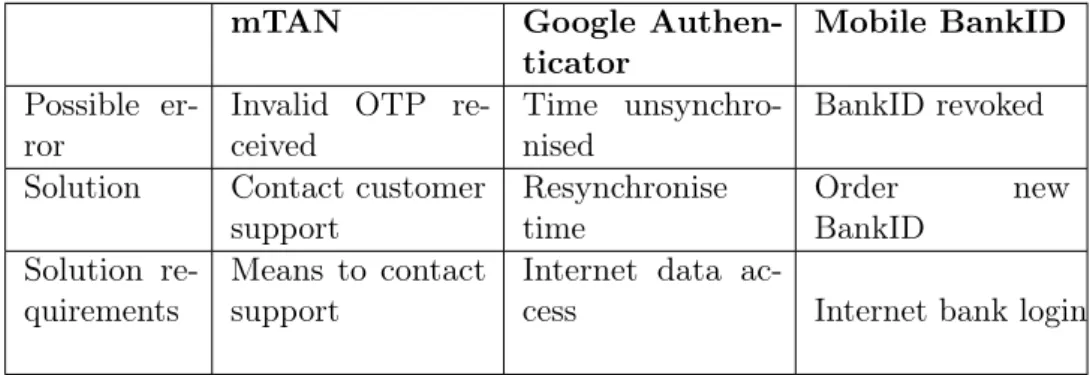
A 2FA scheme needs to be robust such that it is available to let users access requested services at all times. It is clear though that any authentication scheme will always rely on the authentication servers themselves being online and available -the three schemes evaluated in this -thesis included. Since this particular availability aspect is not tied to the 2FA method itself but rather the infrastructure and size of the company hosting the authentication servers, it will be left out of the comparison.