OpenBU http://open.bu.edu
Theses & Dissertations Boston University Theses & Dissertations
2013
DR BACA: dynamic role based
access control for Android
https://hdl.handle.net/2144/12203 Boston University
METROPOLITAN
COLLEGE
Thesis
DR BACA : DYNAMIC ROLE BASED ACCESS
CONTROL FOR ANDROID
by
FELIX ROHRER
B.S.,
Zurich
University of Applied Sciences, 2009
Submitted in partial fulfillment of the
requirements for the degree of
Master of Science
Felix Rohrer
2013
First Reader
Yuting Zhang, PhD ]
Second Reader
-StUJaC()b;,MSC
It is impossible to find words that express my gratitude to my advisor and mentor Yuting Zhang, Assistant Professor of Computer Science for her commitment and support during the entirety of this research. Her excitement and dedication towards performing valuable research sparked my own interest in academic research for which I will be forever grateful.
A special thanks goes to Lou Chitkushev, Associate Professor and Associate Dean for Academic Affairs and Tanya Zlateva, Associate Professor of Computer Science and Dean ad interim of Metropolitan College
& Extended Education
who not only supported this research by providing me with a Graduate Assistantship but also by taking time out of their busy schedule to actively participate and shape the direction of this research.I would like to express my deepest gratitude to Stu Jacobs, Lecturer in Computer Science and second reader of this master thesis for his invaluable comments and suggestions which helped to further improve this work.
Last but not least, I would like to thank my colleagues and classmates Nebiyu Feleke and Kenneth Nimley for the many interesting discussions we had during our numerous research meetings.
CONTROL FOR ANDROID
FELIX ROHRER
ABSTRACT
Android, as an open platform, dominates the booming mobile market. However, its permission mechanism is inflexible and often results in over-privileged applications. This in turn creates severe security issues. Aiming to support the Principle of Least Privilege, we propose a Dynamic Role Based Access Control for Android (DR BACA) model and implement the DR BACA system to address these problems. Our system offers multi-user management on Android mobile devices, comparable to traditional workstations, and provides fine-grained Role Based Access Control (RBAC) to en-hance Android security at both the application and permission level. Moreover, by leveraging context-aware capabilities of mobile devices and Near Field communication (NFC) technology, our solution supports dynamic RBAC that provides more flexible access control while still being able to mitigate some of the most serious security risks on mobile devices. The DR BACA system is highly scalable, suitable for both end-users and large business environments. It simplifies configuration and management of Android devices and can help enterprises to deal with security issues by implementing a uniform security policy. We show that our DR BACA system can be deployed and
used with eet:se. With a proper security policy, our evaluation shows that DR BACA
can effectively mitigate the security risks posed by both malicious and vulnerable non-malicious applications while incurring only a small overall system overhead.
1 Introduction 1
2 Android Operating System Overview 5
2.1
Android Architecture5
2.2
Android Applications 72.2.1
Components . 72.2
.
2
Life Cycle .. 72
.
3
System Applications and Services8
2.3
.
1
System Applications 92.3
.2
System Services 92.4
Android Sensors . . . . 92
.
5
Android Security Model10
2.5.1
Inter-Application Communication10
2.5.2
Permissions 112.6
Potential Attacks12
2.6.1
Permission Re-delegation (PRD)12
2.6.2
Activity Spoofing13
2.6.3
Rootkits . . . 14 3 DR BACA Model 163.1
Multi-User Enabled . • 0 • • 0 • •17
3.2
Static Role Based Access Control18
3
.
3
Dynamic Role Based Access Control20
4.1 Architecture . . . 23
4.1.1 User Manager 23
4.1.2 Permission/Execution Checker . 25
4.1.3 Context Monitor 27
4.1.4 Rule sharing Agent 28
4.1.5 Scalability Through Configuration Server . 30
4.2 Context Management . 32
4.2.1 Time context 32
4.2.2 Day context . 32
4.2.3 Location context 33
4.3 Security • • • • • • 0 0 • 34
4.3.1 Encrypted policy retrieval 34
4.3.2 NFC tag integrity protection . 35
5 DR BACA Implementation 37
5.1 Permission & Execution Checker 38
5.2 Context & User Manager . . . . . 40
5.3 Other DR BACA Service Components 42
5.4 DR BACA System Application 42
5.5 DR BACA Registration 44
5.6 User Authentication 45
5.7 Helper Applications . 46
5.7.1 PTest (Figure 5·9a) 46
5.7.2 DigiSign (Figure 5·9b) 47
5.8 Configuration Server . . . 47
7
8
6.2 Malicious Application Uses SEND_SMS .
Evaluation
7.1
Effectiveness .7.2
Efficiency7.2.1
Permission checking overhead7.
2.2
GPS Overhead7.2
.3
Long-term DR BACA Test.7.3
Usability .Related work 9 Future work
9.1 DR BACA API 9.2 Audit controls .
9.3 Third-party security vendor support .
10 Conclusion
A DR BACA File Locations
B Security Policy Used During Evaluation References Vita IX
50
52
54 54 5658
59
60
63 65 6969
69
70 71 72 73 81 853.1
DR BACA rule syntax18
3.2
Permission and application combinations in a rule19
3.3
Explicit or implicit rules21
3
.
4
Example DR BACA rules22
7.1
Recent Android malware 557.2
Long-term performance test applications61
8
.1
Comparison of security solutions . . .. .68
2·1 Android architecture . . . . 2·2 Contact application activities
2·3 Different permission request approaches . 2·4
2·5 3·1 4·1
Permission re--delegation attack Fake and real Skype application DR BACA model overview .
DR BACA architecture . . .
4·2 Permission & execution request flowchart 5·1 Permission
& Exe
cution Checker files .5·2 Context & User Manager components . 5·3 Request no longer fulfilled . .
5·4 Other DR BACA service files
5·5 DR BACA system application components 5·6 Date and time settings . . .
5· 7 DR BACA registration files
5·8 User authentication files
5·9 Helper applications . . .
5·10 DR BACA Configuration Server 5·11 Configuration Server database ER . 6·1 Execution request denied . . . . Xl 5 8 11 12 14 17 24 25 38
40
41 42 4244
44 45 4647
48 527·2 READ_SMS request time overhead
7·3 GPS performance cost comparison .
7·4 Battery life time test . . . . . . . .
Xll
58 60 62
AES 3NF API AIDL ER ICC JSON NFC NIST PRD RBAC RFID XML
Advanced Encryption Standard 3rd Normal Form
Application Programming Interface Android Interface Definition Language Entity Relationship
Inter-component communication
JavaScript Object Notation Near field communication
National Institute of Standards and Technology Permission re-delegation
Role Based Access Control Radio Frequency Identification Extensible Markup Language
Chapter
1
Introduction
Mobile devices are the emerging new platform in recent years. They are now bei.ng used in many different environments. Because of their pervasiveness, mobile devices
are changing the traditional IT environment in enterprises. Smartphones with the
open platform Android operating system are especially skyrocketing in numbers. A
report published by Gartner (Gartner, 2012) states that not only did Smartphone sales
increase by 47% compared to 2011, but that Android based smartphones now make up 72.4% of the entire mobile device sales in 2012. With the rise of Android's popularity, the malware community has also started paying attention and devised many different attacks to generate revenue from smartphones and putting end-users and businesses into danger. According to a report by McAfee (McAfee-Labs, 2012), mobile malware
increased by 700% with almost 85% attacks targeting Android smartphones since
2011. As mobile devices are being widely deployed in corporations, and BYOD (bring
your own device) is becoming a popular trend, this tremendous increase of Android
malware raises many concerns.
While the popularity and openness of the Android platform contribute to this mal-ware increase, the way Android handles security is another reason for the tremendous
increase in malware. In particular, Android's permission model has been addressed
by various research groups such as (Bugiel et al., 2011a), (Enck et al., 2009) and (Felt
et al., 2012). While the Android permission model's intention is to provide better
SMS), its "install-time all or nothing" mechanism leaves many applications vulnera-ble and over-privileged for most of their running time. Also, many developers handle these permissions with little care, thereby leaving applications even more vulnerable. Malicious applications can directly use dangerous permissions, such as sending an SMS to a premium number, or launch a permission re-delegation attack by ch eat-ing another application into performing this job. Over-privileged applications can therefore inadvertently be used to execute malicious code.
We argue that one of the fundamental problems of Android's permission model is, that it does not conform well to the Principle of Least Privilege (PLP). Role Based Access Control (RBAC) is a widely used approach to support PLP by restricting resource access to authorized users based on their roles. How this approach can be applied to mobile systems such as Android devices is still an open issue. We propose a Dynamic Role Based Access Control for Android (DR BACA) model and implement DR BACA to extend the current Android permission model with RBAC in order to enhance Android security. Though· DR BACA is not the first solution to apply RBAC on Android, it is done in a novel and better way that enhances the Android system with the following capabilities:
• Enable multi-user functionality. DR BACA offers multi-user management on Android mobile systems comparable to traditional workstations. It allows a single Android device to be used by different people without interference. At the same time, a single user can use different devices seamlessly.
• Provide static RBAC at both the application and permission level. DR BACA provides fine-grained access control at both the application and permission level for any user thereby enhancing Android security. Aiming to support PLP, DR BACA helps mitigate the risk of malicious applications exe-cuting sensitive functions in the background and reduces the risk of permission
re-delegation attacks.
• Offer dynamic RBAC with more flexibility. DR BACA offers finer-grained
and more flexible access control than standard Android controls by taking ad
-vantage of the unique context-aware capabilities of mobile devices, as well as
embracing the Near Field Communication (NFC) technology available to
An-droid.
• Highly Scalable. DR BACA can be used for both single-user environments
as well as large corporate environments by providing easy configuration and
management options, which allow one to easily distribute a uniform security
policy to all involved Android devices. This reduces management efforts for
environments with many mobile devices.
Thesis Statement: Due to the tremendous increase in Android malware,
finer-grained access control should be used to limit what mobile users are allowed to do and
to minimize potential malicious behavior. One solution to achieve this is to integrate the Android permission model with role-based access control while taking advantage
of the mobility feature of mobile systems to provide dynamic role based access control.
Thesis Outline: Chapter 2 provides an introduction to the Android Operating System as well as the security model employed by Android. It then talks about
potential attack vectors on Android devices. Chapter 3 introduces the model of our proposed security solution by explaining the different features provided by DR BACA. Chapter 4 talks in detail about DR BACA's architecture and its components. It covers
context management in a separate section because of its importance. The chapter
concludes with some of DR BACA's own security features. Chapter 5 examines the implementation of DR BACA and provides information as to what files had to
framework. After having explained the model, the system and the implementation of DR BACA, Chapter 6 provides two scenarios to show the usefulness of DR BACA in real world environments. Chapter 7 analyzes our solution and argues, that DR BACA incurs negligible performance overhead. In Chapter 8, we discuss related work and how our own solution differentiates itself. Chapter 9 briefly indicates some possible future work. Finally, we draw our conclusion in Chapter 10.
Chapter
2
Android Operating System Overview
This chapter provides a high-level overview of the Android operating system. We
cover the basics of Android's architecture, discuss the internal components and the
life cycle of Android applications. We then look at Android's own security features
and its potential shortcomings.
2.1
Android Architecture
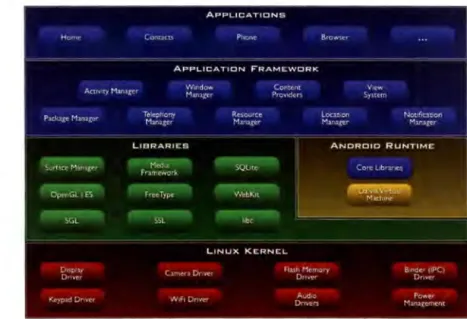
Any Android introduction would not be complete without the often cited illustration
shown in Figure 2·1 from (Android, 2013). It shows the main components of the
Android operating system.
The lowest layer consists of a modified Linux kernel. Two components unique to Android should be mentioned here: first, the Binder driver provides a way for ap-plications to safely communicate with each other. Second, the so-called OOM (out-of-memory) killer, which by the way has been adopted by the official Linux kernel development, that tries to prevent the system from running out of memory by killing selected processes ahead of time. The software in this layer is mainly written in C and C++.
In the next higher layer, one can find the native libraries and services as well as the Dalvik Virtual machine (DVM). The DVM runs compiled application code very similarly to how the Java Virtual machine runs Java byte-code. In Section 2.5, we
will discuss the DVM in more detail.
The application framework layer is where the majority of the Android OS is impl
e-mented. This layer provides applications with an API to lower-level sensors (i.e. CPS,
WiFi) and functions such as telephony and data storage. While the entire Android OS consists of about 13 million lines of code, the Android framework amounts for a massive 8 million lines of code spread out in about 11,000 files based on Android's
source code version 4.0.4 downloaded from (Coogle, 2013a).
The highest layer is the application layer and is home to all the applications that are downloaded from Coogle Play or third-party application markets (App-Markets). These applications are mainly written in Java, however there are conversion tools for different languages such as C#. This layer also includes certain system applications provided by Coogle and device manufacturers such as the standard browser, calendar and the phone application. However, these system applications often have higher privileges than standard applications and should therefore be seen as part of the application framework layer.
2.2
Android Applications
In order to understand the coming sections, it is important to have a general idea of the components and life cycle of Android applications.
2.2.1 Components
An Android application consists of different components, of which there are four
types:
• Activity is an interface in the form of a window or screen that allows users
to interact with an application. Normally, an application contains several Ac-tivities. Figures 2·2a and 2·2b show two Activities belonging to the Contacts application.
• Service is similar to an Activity but does not provide any screen with which the
user can interact with. A service is normally used for long-running background tasks such as playing music or periodically checking emails.
• Content provider provides developers an interface for storing data in a rela-tional database based on sqlite. If the database is exposed, other applications can also access that database.
• Broadcast receiver is listening for specific broadcasts. For example, an
ap-plication may format incoming SMS in a certain way. The Android OS sends a 'SMS_RECEIVED' broadcast whenever an SMS arrives. In order to receive
that notification, the application needs to create a Broadcast receiver listening for the 'SMS_RECEIVED' broadcast.
2.2.2 Life Cycle
Different than traditional desktop applications, an Android application is normally
No contacts.
Create a new contact
Sign in to an account
lmporVexport contacts
(a) Activity one
Phone-only. unsynced c ... Nanlt' Add organtzauon II~Nl Phone '~OBIL[ I AIL [mail 110M[ !. (:_..' ,\ddrcss
Add another field
(b) Activity two Figure 2·2: Contact application activities
...
...
it will be cached and is still running in the background. This mechanism makes the mobile device much more reactive because previously used applications do not need to go through a startup process again. There are two ways to terminate an Android application: first, the user can explicitly request to stop an application in the Settings application. Second, the in Section 2.1 mentioned out-of-memory component chooses to terminate a given application due to a shortage of memory.
We mention the Android life cycle here, because it has an effect on the overall security of Android devices. Primarily, this means that a vulnerable application can be exploited even if it is not actively used by the user, effectively increasing the duration of possible attack time for malicious applications.
2.3
System Applications and
Services
System applications and services refer to high privileged components of the Android operating system. They are considered to be part of the Android application
frame-work layer, because most of them perform system critical functions.
2.3.1 System Applications
System applications such as Phone, Contacts and Camera are different from standard applications. One important difference is that users are not allowed to uninstall
sys-tem applications. Also, they cannot be downloaded from an external App-Market but
are compiled together with the Android operating system. The DRBaca Application
discussed in Section 5.4 is implemented as a system application.
2.3.2 System Services
System services are started at boot time and run as long as the mobile device is
turned on. These services have important responsibilities such as managing power
consumption or providing a notification manager for Android applications. Because of
their importance to the Android system, most system services run with root privileges. The DRBacaService introduced in Section 5.2 is implemented as a system service and
is a central part of our proposed solution.
2.4
Android Sensors
The security solution we propose in this thesis makes use of several sensors that are part of most Android devices. In particular, we use the provided GPS sensor
to determine the mobile device's current location. Coogle's location service provides
another way to determine the devices current location by gathering data from different
sources such as WiFi and mobile networks. For our solution, a second important
sensor is the Near Field Communication (NFC) sensor which allows mobile devices
to either directly communicate with each other or retrieve information from so called
NFC tags. As the name implies, NFC works over very short distances (a maximum 1.6 inches). As opposed to wireless networks, the connection to another NFC device or
tag happens automatically without the user having to explicitly request connection establishment. In subsequent sections, we will explain in detail how our solution makes use of this technology.
2.5
Android Security Model
Android was designed with security in mind as each application has its own user id. Furthermore, each application runs in its own instance of the Dalvik Virtual machine, essentially creating a sandbox environment. This prevents applications from interacting with each other. However, since preventing communication between different applications would be too restrictive, Android offers controlled ways for inter-application communication via the Binder IPC component.
2.5.1 Inter-Application Communication
An application (or more precisely its components such as Activities or Services) can communicate with other installed applications by sending a message called an intent. An intent is simply a message containing information about what the receiver is sup-posed to do. The receiver will listen for particular intents. This is done through intent filters. These filters specify, what kind of messages (intents) an activity or a service accepts. Creating secure intents and intent filters can sometimes be challeng-ing and many developers do not spend enough time securing this potential attack surface, resulting in vulnerable applications. One of the major problems with intents is that intents sent to external applications are defined the same way as intents sent to another component in the same application. This leads to misconfigured intents and intent filters which allows external applications to gain unauthorized access to an applications internal data and functionality.
2.5.2 Permissions
When it comes to permission mechanisms, mobile device operating systems generally adopt one of two possibilities (or a combination of both): install-time permission mechanisms ask the user during the installation process, if a set of permissions should
-be granted or not. Whereas time-of-use permission mechanisms ask the user for a certain permission when the permission is required to fulfill a certain task. Figure
2·3a (ThreatSolutions, 2012) and Figure 2·3b (Apple, 2012) show examples of both mechanisms.
~
I
Don't Allow OK I- - - '
(a) Android: install-time (b) iOS: time-of-use
Figure 2·3: Different permission request approaches
The Android developers decided to go with the first option, while iOS (mostly) follows a time-of-use policy. The advantage of install-time permission requests is that the
user is not bothered with permission requests after the installation. However, because a user cannot selectively accept or reject requested permissions, and an application seldom requires all granted permissions at the same time, the majority of Android
applications are over-privileged for most of their running time. This is no problem
as long as the applications are secure. But if an application is vulnerable to attacks, then a malicious application might be able escalate its own permissions through that
vulnerable application.
2.6
Potential Attacks
This section introduces several attack vectors that have been and are still being used to gain unprivileged access to resources and functionality. Many of these attacks are
discussed in more detail in (Felt et al., 2011), (Felt and Wagner, 2011), (Wei et al.,
2012) and (Davi et al., 2011). In addition, most of the related research work discussed
in Chapter 8 aim to mitigate a subset of these attacks.
2.6.1 Permission Re-delegation (PRD)
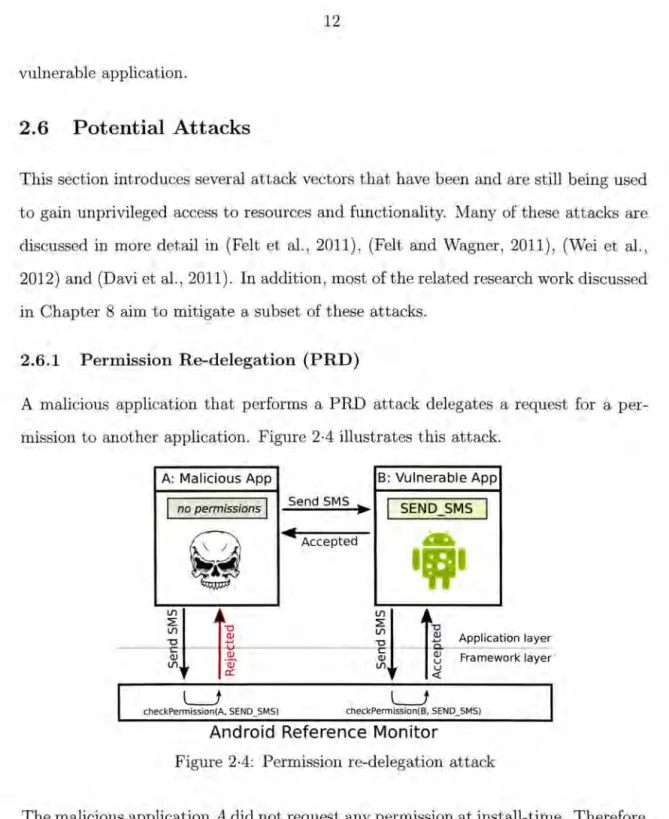
A malicious application that performs a PRD attack delegates a request for a pe r-mission to another application. Figure 2·4 illustrates this attack.
A: Malicious App B: Vulnerable App
I
no permissionsI
Send SMS )IaI
SEND_SMSI
~
~ Accepted&
•••
.~1
lfl Q)t
~
·-Q) a::~11!
Application layer a; ~ Framework layer lfl u <(L..J
L..J
checkPermission(A. SEND_SMS) checkPermission(B. SEND_SMS)
Android Reference Monitor
Figure 2·4: Permission re-delegation attack
The malicious application A did not request any permission at install-time. Therefore,
a direct request to send an SMS will result in a rejection because Android's reference
monitor (responsible for permission enforcement) will check if A has been granted the
However, A can send an intent to application B which happens to listen for these kind of intents. B does not appropriately check the permissions of A, accepting any
intent it receives. This is the actual vulnerability which A exploits. B then forwards
the request to the reference monitor which in turn verifies that B is allowed to send
SMS. Since this is true, the SMS will be successfully sent. Depending on how the intent was initially requested, B will notify A that the request has been fulfilled.
2.6.2 Activity Spoofing
The way Android handles applications makes it trivial for a malicious application to spoof another application's activity. In the process of researching Android security,
we created a proof of concept application that can spoof several applications such as
Bank of America, Skype, Facebook and others. The attack works as follows: The malicious application is essentially
a
trojan horse disguised as a game. It only re-quests the INTERNET permission. Since most games require this permission, this will not cause suspicion. Once the user starts this application, a background serviceis launched which repeatedly (i.e. every lOms) polls the currently running applica-tions. Surprisingly, this functionality is provided by the Android API and is not even
protected through a permission label. As previously discussed, services are invisible to the user and keep running in the background, even after the user closes the ap -plication. If the user now starts any of the applications targeted by the malicious
application (i.e. Skype), the malicious application will realize this almost immedi-ately and start its own activity that looks almost exactly like Skype. Because our
spoofed version of Skype started a little bit later than the genuine application, the spoofed version will be shown to the user first and the user will then enter his/her user credentials into the spoofing version of the application activity. After logging the user credentials, the malicious application will then popup an error message like "Use'rname or password incorrect" and terminate. At this point, the user will now see
the genuine Skype application and re-enter the credentials, believing to have mistyped the first time. The malicious application will then send the collected credentials over the Internet. Figure 2·5a shows the fake Skype activity, while Figure 2·5b shows the genume one. • ~~--· -r - - ·-S e Name Sign in Create an account
(a) Fake Skype (b) Real Skype Figure 2·5: Fake and real Skype application
The difference between the above two Figures is difficult to detect.
2.6.3 Rootkits
A rootkit allows a malicious entity to retain access to a system, while hiding its existence by modifying system utilities. For example, Linux rootkits often modify the ps and top commands (among others) in order to hide itself from users and administrators.
One of the most prominent rootkits for Android was a mal ware called DroidDream (Svajcer, 2011). This trojan horse obtained root privileges through two software bugs and sent personal information to a Command& Control ( C&C) server. DroidDream ef-fectively created a botnet using mobile devices. In order to stay stealthy, DroidDream
only communicated with the C&C server between llpm to Sam which explains the
name researchers gave that particular malware. It is likely that mobile device based
botnets will become a major problem, simply due to the fact that there are are now
Chapter 3
DR BACA Model
A natural way of mitigating over-privileged applications (or users) is to make use of an
access control model which adheres to the Principle of Least Privilege, as discussed in
(Sandhu and Samarati, 1994), (Provos et al., 2003) and (Chen and Crampton, 2007).
One very popular model that achieves this is the Role-Based Access Control (RBAC)
model as noted by the work of (Ferraiolo and Kuhn, 1992) and (Sandhu et al., 1996).
We propose a Dynamic Role Based Access Control for Android (DR BACA) model
to enhance Android security, with a particular focus on environments with a large number of mobile devices.
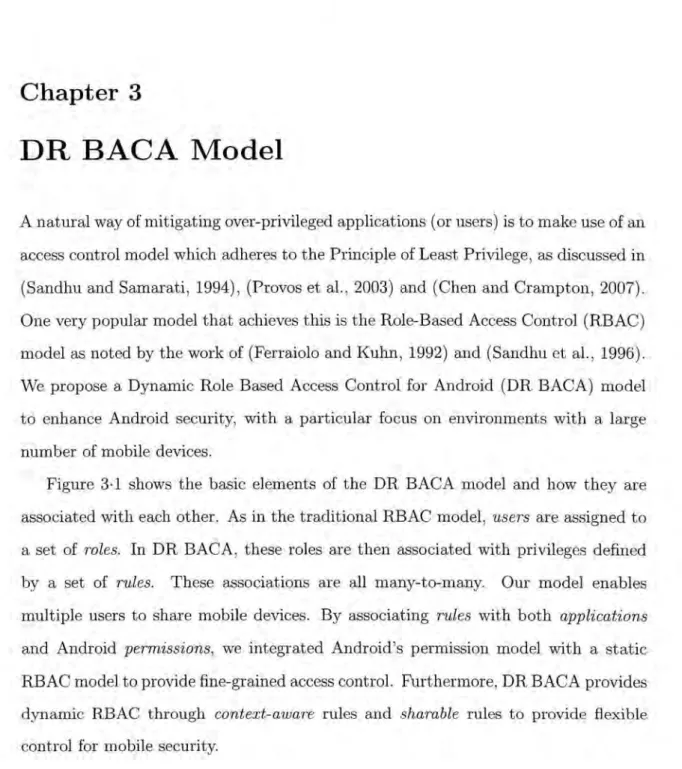
Figure 3·1 shows the basic elements of the DR BACA model and how they are
associated with each other. As in the traditional RBAC model, users are assigned to
a set of roles. In DR BACA, these roles are then associated with privileges defined by a set of rules. These associations are all many-to-many. Our model enables
multiple users to share mobile devices. By associating rules with both applications
and Android permissions, we integrated Android's permission model with a static
RBAC model to provide fine-grained access control. Furthermore, DR BACA provides
dynamic RBAC through context-aware rules and sharable rules to provide flexible
D
Static Access ControlD
Dynamic Access ControlFigure 3·1: DR BACA model overview
3.1
Multi-User Enabled
One may argue that current mobile devices are mostly designed as single user devices and there is no need for multi-user capable devices. However, as the computer power of mobile devices improves and their business uses widen, we predict that it is only a matter of time until smartphones are expected to offer user management comparable to computer desktops. Actually, Android version 4.2, called Jelly Bean, offers a feature to manage different users on the same device(Google, 2012). However, the access control mechanisms are more limited than what DR BACA is able to provide. We believe that user management on mobile devices can be particularly useful in a corporate environment. For example, a hospital may provide smartphones to its employees to support their daily interactions. A single device may be used by different people at various time periods. In addition, a user may want to be able to log into different devices. Our proposed DR BACA model can be used to implement an organization level security policy in order to provide uniform access control for all
users on any mobile devices.
3.2
Static Role Based Access Control
In a traditional RBAC system, roles are normally directly assigned to permissions.
DR BACA introduces an additional layer between roles and permissions, which we
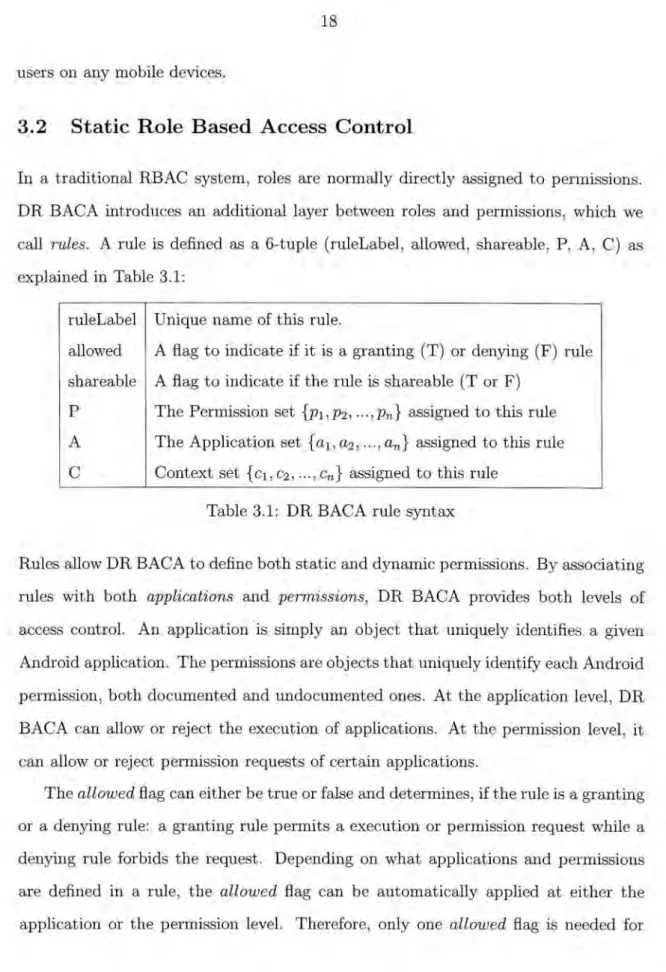
call rules. A rule is defined as a 6-tuple (ruleLabel, allowed, shareable, P, A, C) as explained in Table 3.1:
ruleLabel Unique name of this rule.
allowed A flag to indicate if it is a granting (T) or denying (F) rule shareable A flag to indicate if the rule is shareable (T or F)
P The Permission set {p1,p2 , ...
,pn}
assigned to this ruleA The Application set {a1,a2 , ... ,an} assigned to this rule
C Context set { c1 , c2 , ... , Cn} assigned to this rule
Table 3.1: DR BACA rule syntax
Rules allow DR BACA to define both static and dynamic permissions. By associating
rules with both applications and permissions, DR BACA provides both levels of access control. An application is simply an object that uniquely identifies a given Android application. The permissions are objects that uniquely identify each Android
permission, both documented and undocumented ones. At the application level, DR
BACA can allow or reject the execution of applications. At the permission level, it
can allow or reject permission requests of certain applications.
The allowed flag can either be true or false and determines, if the rule is a granting or a denying rule: a granting rule permits a execution or permission request while a
denying rule forbids the request. Depending on what applications and permissions
are defined in a rule, the allowed flag can be automatically applied at either the
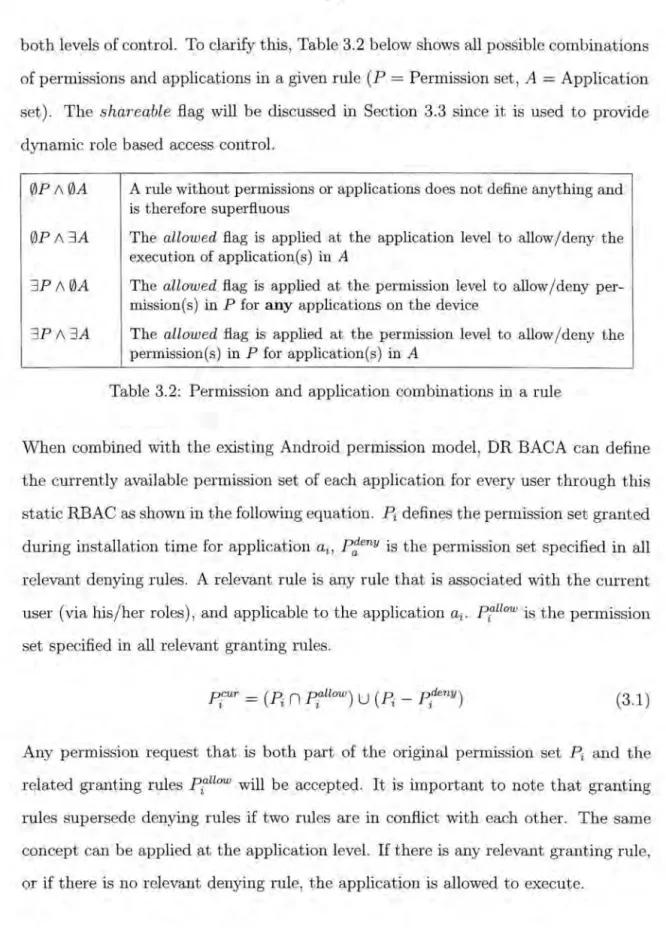
both levels of control. To clarify this, Table 3.2 below shows all possible combinations of permissions and applications in a given rule (P = Permission set, A
=
Application set). The shareable flag will be discussed in Section 3.3 since it is used to provide dynamic role based access control.0PA0A
0PA~A ~PA0A ~PA~A
A rule without permissions or applications does not define anything and is therefore superfluous
The allowed flag is applied at the application level to allow j deny the
execution of application(s) in A
The allowed flag is applied at the permission level to allow/ deny per-mission(s) in P for any applications on the device
The allowed flag is applied at the permission level to allow /deny the permission(s) in P for application(s) in A
Table 3.2: Permission and application combinations in a rule
When combined with the existing Android permission model,
DR
BACA can define the currently available permission set of each application for every user through this static RBAC as shown in the following equation. Pi defines the permission set granted during installation time for application ai, p~eny is the permission set specified in all relevant denying rules. A relevant rule is any rule that is associated with the current user (via his /her roles), and applicable to the application ai. piallow is the permissionset specified in all relevant granting rules.
(3.1)
Any permission request that is both part of the original permission set Pi and the related granting rules Ptllow will be accepted. It is important to note that granting rules supersede denying rules if two rules are in conflict with each other. The same concept can be applied at the application level. If there is any relevant granting rule, or if there is no relevant denying rule, the application is allowed to execute.
3.3
Dynamic Role Based Access Control
One drawback with a static RBAC system is that in a production environment,
users sometime need to promote or demote their privileges temporarily depending on
certain circumstances (i.e. emergencies). A static role-based access control system is
not ideal to handle such situations. Leveraging the unique ability of mobile devices to take environmental conditions into account, DR BACA provides dynamic role based
access control through context-awareness via shareable rules.
A context itself can consist of different environmental components such as the
current location of the device, the current day and time or even an event such as
receiving an Android intent. At any given moment, a context can either be fulfilled
or not. For a given context-aware rule, if the context is currently fulfilled, we call it an explicit rule. If the context is currently not fulfilled, we call it an implicit rule. Based on the current context, an application execution or permission request
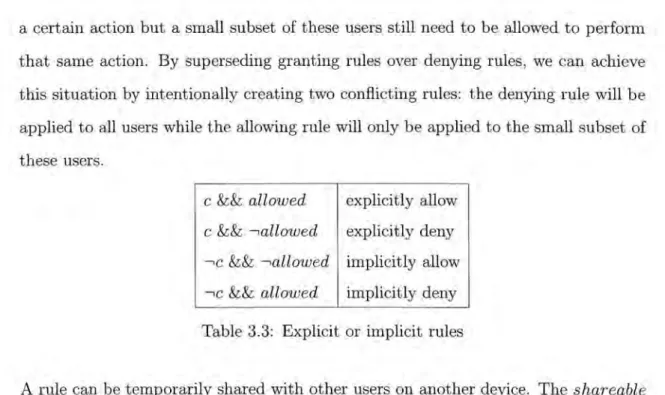
can be dynamically allowed or denied, either explicitly or implicitly as shown in
Table 3.3 (c is the context fulfilled flag). For example, suppose a rule defines that
gaming applications are not allowed during working hours (e.g. 9am to 5pm). If
the current time is lOam, then this rule explicitly denies the execution of gaming
application. However, if the current time is lam, this rule implicitly allows the
execution of gaming applications. If two rules conflict with each other, the explicit ·
rule supersedes any implicit rule. The justification for this approach is as follows: an
explicit rule is specifically created by a creator of a security policy. This creator will
expect that rule to be followed in any circumstance. If an implicit rule could supersede
that explicit rule, the creators expectations would not be met, causing confusion and
possibly introduce security issues. If two conflicting rules are both explicit or both
implicit, then the granting rule supersedes the denying rule. This approach allows
a certain action but a small subset of these users still need to be allowed to perform
that same action. By superseding granting rules over denying rules, we can achieve this situation by intentionally creating two conflicting rules: the denying rule will be
applied to all users while the allowing rule will only be applied to the small subset of
these users.
c && allowed explicitly allow c && -.,allowed explicitly deny --.,c && -.,allowed implicitly allow
--.,c && allowed implicitly deny Table 3.3: Explicit or implicit rules
A rule can be temporarily shared with other users on another device. The shareable
flag of any given rule defines if the rule can be shared or not. This can be very useful
for users to temporarily promote or demote their privileges depending on the current circumstances. For example, a doctor may temporarily grant his assisting nurse a rule
that allows the execution of a certain application which is normally only executable
by doctors. Another example would be to temporarily grant camera execution rights
to the check-in staff in order to register a new patient. Either way, a temporary role will be created for the receiving user which will contain this shared rule. DR BACA provides the sharing of rules through the use of Near Field Communication (NFC), which will be described in detail in the next section.
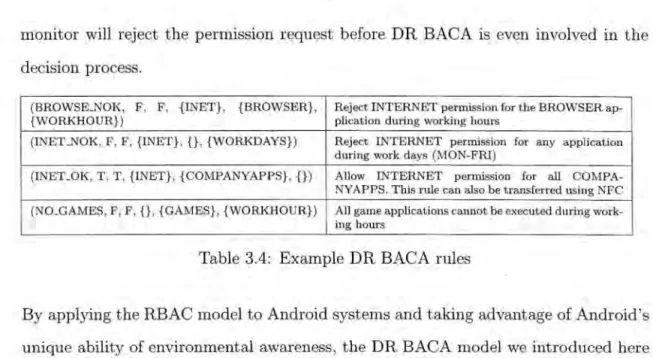
Table 3.4 gives a few examples of how DR BACA rules can be defined in practice. Note that applications can be grouped as well. Instead of having to individually add all applications that fall under a certain rule, one can simply group these applications and only add the group to the desired rule. It is also important to note here that while
a rule can grant a certain permission to an application, the application itself must still request that permission during installation. Otherwise, Android's own reference
monitor will reject the permission request before DR BACA is even involved in the decision process.
(BROWSK.NOK, F, F, {INET}, {BROWSER}, Reject INTERNET permission for the BROWSER
ap-{WORKHOUR}) plication during working hours
(INET _NOK, F, F, {INET}, {}, {WORKDAYS}) Reject INTERNET permission for any application
during work days (MON-FRI)
(INET_OK, T, T, {!NET}, {COMPANYAPPS}, {}) Allow INTERNET permission for all
COMPA-NYAPPS. This rule can also be transferred using NFC
(NO_GAMES, F, F, {}, {GAMES}, {WORKHOUR}) All game applications cannot be executed during
work-ing hours
Table 3.4: Example DR BACA rules
By applying the RBAC model to Android systems and taking advantage of Android's
unique ability of environmental awareness, the DR BACA model we introduced here
enhances the current Android permission model by providing a finer-grained access
control for mobile devices. The next section will focus on how we applied this model in our DR BACA system implementation.
Chapter 4
DR BACA System
In this section, we describe the architecture and design of our DR BACA system and its components. In particular, we discuss how sharable rules can be implemented through NFC technology. We show how DR BACA can provide enhanced security while providing scalability for large corporate environments. Furthermore, we discuss how DR BACA itself has been secured to avoid malicious users from tampering with it.
4.1
Architecture
Figure 4·1 illustrates DR BACA's architecture on a high level. The application layer consists of third-party applications that are installed on the mobile device. As shown in the legend, the full arrows show the execution flow when a permission or execution request occurs. The dotted lines indicate how information flows inside the system. The following subsections focus on different components and explain them in more detail.
4.1.1 User Manager
DR BACA offers multi-user management capabilities through the User Manager com-ponent, which allows different users to log into the same mobile device. Users will have different permissions, based on DR BACA's Security Policy. DR BACA assures, that no security sensitive information remains running between different user logins.
• • •
8
Application layer,
, , Admin~
,
r--j~;~~~-tEx;.~~~==============~ ,'r---~---~ DR BACA Service Android Middleware ( DR BACA Ul )••
~
I - Polley Provider Configuration Server _.- - - Information flow ~ Execution flowFigure 4·1: DR BACA architecture
For example, if a permission request was granted for an application, the permission will be revoked once that user logs out. This is necessary because the user who logs in next might not be granted the same permission.
On the other hand, DR BACA also allows a single user to log into different devices that fall under the same security policy. This works because the security policy contains all necessary information to authenticate any user that belongs to the same security domain (i.e. a company).
Allowing users to log into different devices can especially be beneficial for env1-ronments with many mobile devices, because a device does not necessarily have to be allocated to a specific employee thereby simplifying administration and distribution of mobile devices.
4.1.2 Permission/Execution Checker
This is the core component of the DR BACA system which decides if a permission
or execution request should be permitted or rejected. The major difference between
an execution request and a permission request is that the permission request first
consults the Android reference monitor, whereas an execution request immediately
invokes DR BACA's Permission 8 Execution Checker. In case of a permission request,
if Android rejects the request, DR BACA is not consulted and the permission request is immediately rejected. If the request is permitted by Android's reference monitor,
DR BACA is invoked and follows the steps shown in Figure 4·2.
Request accepted Request denied
Figure 4·2: Permission & execution request flowchart
DR BACA first checks if a user is currently logged in. It is important to note that ~
is logged out is when another user logs in. Because of this, the only time a DR BACA-enabled device will not find a currently logged in user is between device startup and the first user login. During that time frame, all permission and exe
-cution requests will be granted by default. This makes sense because the majority of these applications are essential for the mobile device to work properly. This a p-proach leaves one possible security issue: a malicious application that contains the
RECEIVE_BOOT _COMPLETED permission can start once the Android system is
booted and before a user logs in. While the current version of DR BACA does not
consider this particular security issue, a future version might tackle the problem by
means of white-listing applications that are allowed to auto start.
If a user is currently logged in, DR BACA will retrieve all applicable rules for
the given user based by consulting all of the current users roles. An applicable rule
is any rule that involves the requested application and permission and is owned by
the current user based on his/her role(s). If no such rule is found, the request is by
default permitted. Some might argue, that a deny-per-default mechanism would be
more secure. However, this would not only increase the configuration effort of DR BACA but would also very likely lead to a lot of false negatives where legitimate
requests would be rejected, in the worst case crippling the functionality of the mobile
device. If at least one applicable rule is found, DR BACA will grant the request if
and only if one of the rules explicitly or implicitly allows the request. As an example,
the rule in Listing 1 explicitly allows the INTERNET permission for the browser
{
}
"permissions": ["INTERNET"],
"apps" : ["BROWSER"],
"rulename": "INET_ALLOWED",
Listing 1: Allow INTERNET for Browser #1
The rule shown in Listing 2 implicitly allows the INTERNET perm1ss10n for the
browser application outside of office hours. Assuming that WORKHOUR is defined as 9am to 5pm, this rule will implicitly allow the INTERNET permission for the browser application from 5pm to 8.59am.
As mentioned in the DR BACA model section, an explicitly granted rule super-sedes an implicitly granted rule.
{ } "permissions": ["INTERNET"], "apps": ["BROWSER"], "rulename": "INET_DENIED", "contexts": ["WORKHOUR"], "allowed": false
Listing 2: Allow INTERNET for Browser #2
4.1.3 Context Monitor
If a rule is associated with some context, the Context Monitor will be consulted to check if the context is currently fulfilled or not. At this point, the Context Monitor can check the current location, time and day. Additional contexts have been con-sidered and will be added in a next release of DR BACA. For example, to further
permission could be implemented as an additional context.
As discussed in Section 3.3, each context-aware rule can either explicitly or im-plicitly grant or reject a request. By using context-aware security rules, the Context
Monitor component enables DR BACA to provide dynamic role-based access control (RBAC) for Android devices.
4.1.4 Rule sharing Agent
Through use of Near Field Communication (NFC) technology, DR BACA supports sharable rules between users to provide additional dynamic RBAC capability. Users can temporarily elevate or demote their privileges through NFC tags. Android sup-ports NFC since version 2.3 (Gingerbread). NFC allows for radio communication
be-tween NFC enabled devices. NFC builds on top of the older RFID (Radio-frequency
identification) technology that is still in widespread use today (tracking tags, access control applications, anti-theft, e-passports, etc). NFC allows for two-way communi-cation which, for example, allows two mobile devices to exchange information simply
through holding the devices close to each other. NFC tags are equipped with a radio
chip for communication. They can store small amounts of data, normally around one to four kilobytes. Once an NFC-enabled device gets within the proximity of an NFC
tag, the tag draws power from the device through magnetic induction. This allows
the tag to start communicating with the device. NFC tags can be rewritten sev-eral thousand times or they can be configured to be read-only. DR BACA currently utilizes NFC in two ways: sharing rules through Device--+Device and Tag--+Device.
Device-+ Device: In this scenario, a set of rules can be shared temporarily between
NFC-enabled DR BACA devices. The user initiating the process can select a subset of the sharable rules he/she currently owns and initiate the sharing process by moving his/her mobile device close to the receiving mobile device. As shown previously, each
rule contains a flag (shareable) which either allows or disallows the rule to be shared. This gives the security policy team more control over what kind of rules users are able to share with each other. The data transferred between the two devices contains the following:
• Rule name(s) contains the name of the rule(s) that should temporarily be
shared.
• Duration indicates in minutes how long the rule(s) are to be shared.
Since we do not protect the data transferred between two mobile devices, we need to
assure that this transfer cannot be forged by a malicious user. This can be achieved by only allowing this form of communication between two instances (one on each device) of the Rule sharing Agent. In DR BACA, this application is a system a p-plication which cannot be removed or overwritten by an unprivileged user. Every
application running on Android has to be digitally signed with a certificate of which the application developer owns the private key. This requirement is further explained
at (Coogle, 2013c). The rule sharing agent on the receiving device will first verify the other agent's certificate before adding the temporarily shared rules to the c ur-rent user. If the certificate verification fails, no rules will be shared. This prevents a
maliciously created agent from forging and sharing rules with other agents.
Tag---+ Device: Similar to the Device-+ Device mechanism, one can use the Tag---+ Device
mechanism to temporarily share rule(s) via NFC. This works by moving the mobile
device close to a NFC tag which will then initiate the communication. In addition to the information (rule names and duration time) sent during a Device---+Device
transaction, the following information is additionally transferred:
• TagiD is a unique ID consisting of 8 hexadecimal digits (i.e. 1280CDB6) which
• Role name(s) contains the role(s) that are allowed to make use of the rule(s)
stored on this tag; and
• Digital signature, which protects the integrity of the TagiD, rule name(s) and
duration.
Before the rule is granted, DR BACA verifies the following:
1. Verify that the currently logged in user is associated with at least one of the
roles defined on the tag. This is necessary, because sometimes a certain rule
should only be granted to a certain group of users. As an example: a doctor may
be allowed to temporarily receive a rule that allows receiving a given medical record. However, a different doctor who scans the same tag should not be
granted the same privileges.
2. Verify the digital signature which covers all data on the tag. Using a digital
signature provides integrity protection and prevents tags from being maliciously forged. If any of the information on the tag is modified after the fact, the digital
signature verification will fail and the rule(s) will not be granted. Furthermore,
if a malicious user tries to simply copy the entire information onto a new tag,
the signature on the new tag would not pass verification because the TagiD
is different. Only the owner of the private key (i.e. the IT department of a company) used to create the digital signature will be able to create NFC tags
that are accepted by DR BACA.
4.1.5 Scalability Through Configuration Server
DR BACA comes with its own stand-alone Configuration Server offering a simple-to-use user interface through which an administrator (or a privileged end-user) can create and alter a security policy. The policy is stored in a database on the server
Provider on the server. DR BACA-enabled mobile devices can either periodically
check for an updated security policy or manually initiate an update request. Under normal circumstances, the security policy of an organization will not change very frequently. It is therefore unlikely that mobile devices will constantly have to pull
an updated security policy from the server. The policy provider returns the entire security policy in the form of a JavaScript Object Notation (JSON) (JSON-Group,
2012) object. JSON is considered to be a light-weight alternative to the Extensible
Markup Language (XML) (W3C, 2013). Since JSON provides all the functionality required by DR BACA, it was chosen over XML. A JSON object consists of key-value pairs. The key-values can be other JSON objects, JSON arrays or primitive data types such as strings or integers. The next section will explain how this JSON data is protected from eavesdropping. This configuration server turns DR BACA into a
very scalable solution, easing management efforts when dozens or hundreds of mobile devices are involved.
While the Configuration Server is a very convenient way of creating a security
policy, it is an optional component of DR BACA. For this reason, a security policy
can be created or modified directly on the mobile device. In an environment with a configuration server, this option can be disabled to prevent users from modifying the security policy.
An additional scalability concern is how DR BACA can be installed on mobile devices. The DR BACA installation process (including rooting -and unrooting the
device) can for the most part be automated through installation scripts, resulting in an acceptable amount of installation time per device. In our tests, a DR BACA installation on a new mobile device took under five minutes with minimal manual
configuration. Once DR BACA is installed, it can be fully controlled through the
4. 2
Context Management
This section discusses in detail, how different contexts are managed and checked. Currently, DR BACA takes three contexts into account: time, day and location.
4.2.1 Time context
A time context consists of the tuple (begin, end). In order to check for the fulfillment of this context, DR BACA requires the current time. Android allows users to either automatically set the current date and time based on the mobile devices location or let the user set the time and date manually. As explained in the next chapter in Section 5.4, the DR BACA System Application allows administrators to prevent users from manually setting the mobile device's date and time. The checking mechanism of the time context is very simple as shown in the following pseudo-code:
Data: begin, end, currenLtime
Result: Context fulfilled or not fulfilled
if begin<= currenLtime
<
end thenI
return true; elseI return false; end
Algorithm 1: Time context fulfillment check
4.2.2 Day context
A day context consists of a fixed-length boolean array with 7 elements. This array indicates on which days the context is fulfilled. For example, the array (f,f,t,t,t,f,f) where f =false and t =true indicates, that this context is fulfilled on the third, fourth and fifth day of the week. We defined the value at index 0 to stand for Monday, at
index 1 for Tuesday, up until index 6 which stands for Sunday. Following this
con-vention, the here provided day context example is fulfilled on Wednesday, Thursday
and Friday. Again, Section 5.4 explains how the DR BACA System Application can
prevent users from manually setting the mobile device's date and time. Checking if
the day context is fulfilled can be achieved with the following (trivial) pseudo-code: Data: day Array, current_day
Result: Context fulfilled or not fulfilled return dayArray[currenLday];
Algorithm 2: Day context fulfillment check
4.2.3 Location context
A location is defined as the tuple (longitude, latitude, radius). In order to check this context for its fulfillment, we require the current longitude and latitude of the mobile device, which can be retrieved through the API provided by Android.
A location context is fulfilled, if the current location is within the area defined by the location tuple. A simple way of checking this would be by calculating the distance between the point (longitude,latitude) and the current location. If the distance is larger than the given radius, the current location is not within this specific location
context. Otherwise, the context is fulfilled.
Unfortunately, the above idea is imprecise for large areas because of the earths
curvature. Luckily, the haversine formula provides just what we need: a way of
finding the distance between two points on a sphere when given their longitudes and
latitudes. An explanation of the haversine formula can be found at (Veness, 2012).
Let R be the earth's radius in kilometers, <p the latitude, .A the longitude and d
the distance between two points in kilometers. A point is uniquely identified by its longitude and latitude. a and c are helper variables. The distance between two points
can be calculated as follows:
R
=
6371!:::.c.p !:::..A
a = sin2(
2
)
+ cos( c.p1) *cos( c.p2) * sin2(2
)
c
=
2*
atan2(JO,
,
~)( 4.1) (4.2)
(4.3)
(
4
.4)
If dis now smaller than the radius provided by the context (in kilometers), the current location is within the area of this contexts location. The following pseudo-code checks if a given location contexts is fulfilled:
Data: c.p1, .A1, radius
Result: Context fulfilled or not fulfilled dist
=
calculateDistance( c.p1 , .AI);if dist
<
=
radius thenI
return true;else
I return false; end
Algorithm 3: Location context fulfillment check
4.3
Security
4.3.1 Encrypted policy retrieval
When an Android device requests the security policy from the configuration server, that information is transferred over potentially insecure networks. The security policy itself contains some sensitive information such as user names, hashed passwords, roles and rules. In order to protect this information, DR BACA symmetrically encrypts
the transferred information using the Advanced Encryption Standard (AES) (with a 256 bit long secret key) (Daemen and Rijmen, 1998). The hashed value of the
current user's password is used as this secret key. This approach has one important
shortcoming: the entropy of the chosen secret key (the password's hash value) depends
on the current user's password. In information theory, the entropy as introduced by
(Shannon, 1948) measures the uncertainty of a random variable. The higher the
entropy, the less predictable the value is. Now, in order to generate a high 'entropy
256 bit secret key, the user's password needs to have a length of about 48 to 64
characters, depending on the actual randomness of the password. NIST's (National
Institute of Standards and Technology) Electronic Authentication Guideline (Burr
et al., 2011) contains more information on how to calculate the entropy ofrandom and
user-chosen passwords. Since it is unfeasible for users to enter such a long password
(more appropriately called a passphrase) during every log in, especially on a mobile
device, an attacker might be able to decrypt DR BACA's security policy while it is being transferred over an insecure network. However, the advantage of using this
approach is, that no secret key needs to be stored on the mobile devices. Since the
security policy does not contain highly sensitive data such as credit card information
or cleartext passwords, we decided that the here discussed approach provides a high enough level of confidentiality. If a future version of DR BACA transmits more sensitive information, this approach needs to be reevaluated.
4.3.2
NFC
tag integrity protectionAs previously discussed, the NFC tags are data integrity protected using public key
encryption. The private key is known to the DR BACA administrators only (i.e. the
IT department of a company) and is only required during the creation of the NFC
tags. The public key is stored on the system partition of the mobile device (as part
allows system applications to read or write from it. In order to prevent having to recompile the DR BACA application for each new organization, the stored public key
can be overwritten during the DR BACA installation process. This is possible because
during the installation, the mobile device is unlocked, allowing administrators read
and write access to the system partition. Once DR BACA is installed, the device is locked again to prevent any further system modification.
Chapter 5
DR BACA Implementation
This chapter offers a more detailed view of the actual implementation of our DR BACA system. In order to do so, we discuss the location of our code relative to the Android framework as well as what Android components needed to be modified for DR BACA to work. During this research, effort was spent in discovering how
the Android operating system works and, especially, how it makes security-related decisions. There are unfortunately not a lot of good online resources that explain the
Android framework in detail. For this reason, the additional benefit of this chapter
is to provide interested readers with a starting point for their own research related to
the Android operating system.
In the coming sections, Android components which we modified to incorporate
the DR BACA system are identified by a striped red/green background. Components
used exclusively by DR BACA are shown with a green background. The sections are loosely based on the DR BACA architecture Figure 4·1 from the previous chapter.
However, that figure offered a high-level overview of the general architecture and
some of the components mentioned here are not shown in that figure. For the exact
locations of the herein mentioned files, the reader is referred to Appendix A. DR BACA's entire source code is available in the research repository at:
PackageManagerServlce.java ActlvltyManagerServlce.java Applicatlon.java PolicyEnforcer.java DateTimeSettlngs.java Process.java
Figure 5·1: Permission & Execution Checker files
5.1
Permission
&
Execution Checker
PackageManagerService.java contains a hook in its checkPermission method. We added the hook after Android's own reference monitor. This way, DR BACA only gets involved, if the Android would allow the permission request. If Android rejects a request, no further overhead is introduced by our solution.
ActivityManagerService.java contains a hook in its checkComponentPermission
method which is similar to the checkPermission method in the PackageManagerSer
-vice class. The difference is, that the checkComponentPermission method is invoked when intents (with their own permissions) are sent between different applications. The PackageManagerService class does not handle these events.
Application.java contains a hook in the onCreate method which will be executed whenever an application starts. The DR BACA system will decide, if the application in question is indeed allowed to start or not. If not, DR BACA will show an error message to the user and terminate the application.
PolicyEnforcer.java serves as a proxy in front of the DRBacaService and handles the initialization and error handling of the DRBacaService. This additional layer also separates the caller from the actual policy-enforcement implementation.
DateTimeSettings.java prevents or allows to manual change of the mobile device's current time and date. Some users might try to change the device's current date or time in order to circumvent certain context-sensitive rules. Depending on DR BACA's configuration, this manual change of time and date can be restricted.
Process.java is a low-level Android class responsible for handling the creation of
processes. Most Android applications run in a separate process. Similar to the Ap-plication class above, the Process class is called when a new application requests to
be started. The reason we had to modify this class is worth noting. While most permission requests are requested by calling the checkPermission method mentioned
previously, the following Android permissions (among other Android internal permi s-sions) are an exception:
• android.permission.INTERNET; • android. permission. CAMERA;
• android.permission.WRITE_EXTERNALSTORAGE; and
• android.permission.BLUETOOTH.
The complete list of all permissions that do not call the checkPermission method are
stored in an XML file on the Android mobile device in the location:
jsystemjetcjpermissionsjplatform.xml
Instead of calling the checkPermission method of the PackageManagerService class, the above permissions are assigned to Android applications through different gro up-id's. Whenever an application is requesting one or more of the above permissions, the
Process class will add the corresponding group-id to the process that will hold the newly started application. Before a group-id is granted to a new process, DR BACA
will first check if the application in question is indeed allowed to use any of the above