Dissertations and Theses Dissertations and Theses
2-2009
Programmer Friendly Refactoring Tools
Emerson Murphy-Hill
Portland State University
Let us know how access to this document benefits you.
Follow this and additional works at:http://pdxscholar.library.pdx.edu/open_access_etds Part of theComputer Engineering Commons, and theComputer Sciences Commons
This Dissertation is brought to you for free and open access. It has been accepted for inclusion in Dissertations and Theses by an authorized administrator of PDXScholar. For more information, please [email protected].
Recommended Citation
Murphy-Hill, Emerson, "Programmer Friendly Refactoring Tools" (2009).Dissertations and Theses.Paper 2672.
dissertation committee and the doctoral program.
COMMITTEE APPROVALS:
Andrew P. Black, Chair
St´ephane Ducasse Mark Jones Susan Palmiter Suresh Singh Douglas Hall Representative of the Office of Graduate Studies
DOCTORAL PROGRAM APPROVAL:
Wu-chi Feng, Director
An abstract of the dissertation of Emerson Murphy-Hill for the Doctor of Philoso-phy in Computer Science presented February 26, 2009.
Title: Programmer Friendly Refactoring Tools
Tools that perform semi-automated refactoring are currently under-utilized by programmers. If more programmers adopted refactoring tools, software projects could make enormous productivity gains. However, as more advanced refactor-ing tools are designed, a great chasm widens between how the tools must be used and how programmers want to use them. This dissertation begins to bridge this chasm by exposing usability guidelines to direct the design of the next generation of programmer-friendly refactoring tools, so that refactoring tools fit the way program-mers behave, not vice-versa.
by
EMERSON MURPHY-HILL
A dissertation submitted in partial fulfillment of the requirements for the degree of
DOCTOR OF PHILOSOPHY in
COMPUTER SCIENCE
Portland State University 2009
This research could not have been accomplished without the help of countless others. First and foremost, thanks to my advisor, Andrew P. Black, for always providing en-lightening guidance and advice. Thanks to the members of my thesis committee, each of whom contributed to this work: St´ephane Ducasse, Doug Hall, Mark Jones, Susan Palmiter, and Suresh Singh. Thanks to the National Science Foundation for partially funding this research under grant CCF-0520346. Thanks to Ken Brown at the Port-land State Bookstore for donating gift cards as rewards for experiment participants. Thanks to the Computer Science department’s staff for the continuous support and encouragement: Shiva Gudeti, Beth Holmes, Kathi Lee, Rene Remillard, and Bar-bara Sabath. Thanks to my research colleagues Chris Parnin and Danny Dig for their hard work during parts of this research. Thanks to Gail Murphy, Mik Kersten, Leah Findlater, Markus Keller, and Peter Weißgerber for use of their data. Thanks for Ser-gio Antoy, Andrew Black, Mark Jones, and Len Shapiro for inviting their students to participate in my experiments. Thanks to Robert Bauer, Paul Berry, Dan Brown, Cynthia Brown, Christian Bird, Tim Chevalier, Rob DeLine, Iavor Diatchki, Akshay Dua, Rafael Fern´andez-Moctezuma, Shiva Gudeti, Tom Harke, Anthony Hornof, Brian Huffman, Ed Kaiser, Rashawn Knapp, Jim Larson, Chuan-kai Lin, Ralph Lon-don, Bart Massey, Kathryn Mohror, Andrew McCreight, David Novick, Nick Pilk-ington, Philip Quitslund, Claudia Rocha, Suresh Singh, Tim Sheard, Jeremy Stein-hauer, Aravind Subhash, Kal Toth, Eric Wheeler, Candy Yiu, and many anonymous reviewers for detailed, insightful criticism. Thanks to Barry Anderson, Robert
Bow-didge, Margaret Burnett, Jonathan Edwards, Joshua Kerievsky, Gregor Kiczales, Bill Opdyke, Bill Pugh, Jacek Ratzinger, and Vineet Sinha, Mathieu Verbaere, for their suggestions. Thanks to the participants of the Software Engineering seminar at UIUC for their suggestions. Special thanks to participants of my studies and interviews, without whom this research would have been impossible.
Acknowledgements ii
Contents iv
List of Tables xi
List of Figures xiv
1 A Roadmap 1
2 Refactoring Theory 3
2.1 Contributions . . . 3
2.2 What is Refactoring? . . . 3
2.3 When Should Programmers Refactor? . . . 6
2.4 Refactoring Tools . . . 7
2.5 A Model of How Programmers Use Refactoring Tools . . . 13
2.6 The Structure of this Dissertation . . . 15
3 Refactoring Practice 18 3.1 Introduction . . . 18
3.2 Contributions . . . 19
3.3 The Data that We Analyzed . . . 20
3.4.1 Toolsmiths and Users Differ . . . 22
3.4.2 Programmers Repeat Refactorings . . . 24
3.4.3 Programmers Often Do Not Configure Refactoring Tools . . 27
3.4.4 Commit Messages Do Not Predict Refactoring . . . 29
3.4.5 Floss Refactoring is Common . . . 33
3.4.6 Refactorings are Frequent. . . 35
3.4.7 Refactoring Tools are Underused . . . 36
3.4.8 Different Refactorings are Performed with and without Tools 40 3.5 Discussion . . . 41
3.5.1 Tool-Usage Behavior . . . 41
3.5.2 Detecting Refactoring. . . 42
3.5.3 Refactoring Practice . . . 43
3.5.4 Limitations of this Study . . . 44
3.5.5 Study Details . . . 45
3.6 Conclusions . . . 45
4 A Problem with Refactoring Tools 46 4.1 Contributions . . . 46
4.2 Usability, Guidelines, and the Value of Guidelines Specific to Refac-toring . . . 47
4.3 Why Usability is Important to Refactoring Tools . . . 48
4.4 Related Work . . . 49
4.5 An Exploratory Study of Refactoring . . . 50
4.5.1 The Extract Method Refactoring . . . 50
4.5.2 Methodology . . . 52
4.5.3 Results . . . 53
4.6 A Survey about Refactoring Behavior . . . 55
4.7.2 Tools for Floss Refactoring . . . 57
5 The Identification Step 60 5.1 Contributions . . . 62
5.2 Guidelines and Related Work . . . 63
5.2.1 Visualizations . . . 63 5.2.2 Editor Annotations . . . 67 5.3 Tool Description. . . 70 5.3.1 Ambient View. . . 70 5.3.2 Active View . . . 73 5.3.3 Explanation View . . . 74
5.3.4 Details of Stench Blossom . . . 75
5.4 Evaluation . . . 76
5.4.1 Subjects . . . 77
5.4.2 Methodology . . . 78
5.4.3 Results . . . 80
5.4.3.1 Quantitative Results . . . 80
5.4.3.2 How Smells were IdentifiedwithoutStench Blossom 83 5.4.3.3 How Smells were IdentifiedwithStench Blossom. 86 5.4.3.4 Suggestions for Tool Improvements . . . 87
5.4.4 Threats to Validity . . . 88
5.4.5 Discussion. . . 91
5.5 Future Work . . . 92
5.6 Conclusions . . . 92
6 The Selection Step 93 6.1 Contributions . . . 93
6.2 Tool Description. . . 94 6.2.1 Selection Assist . . . 94 6.2.2 Box View . . . 95 6.3 Evaluation . . . 96 6.3.1 Subjects . . . 96 6.3.2 Methodology . . . 97 6.3.3 Results . . . 97 6.3.4 Threats to Validity . . . 100 6.3.5 Discussion. . . 101 6.4 Guidelines . . . 102
6.5 Related Work: Alternative Selection Techniques . . . 103
6.6 Generalization to Other Refactorings . . . 104
6.6.1 A Running Example . . . 105
6.6.2 Two More Selection Guidelines . . . 105
6.6.3 Tool Description: Refactoring Cues . . . 106
6.7 Conclusions . . . 110
7 The Initiation Step 111 7.1 Contributions . . . 111
7.2 Guidelines . . . 111
7.3 Related Work: Alternative Tool Initiation Techniques . . . 114
7.4 Tool Description. . . 114
7.5 Evaluation . . . 117
7.5.1 Previous Studies: Pie Menusvs. Linear Menus . . . 117
7.5.2 Memorability Study: Pie Menus with and without Placement Rules . . . 119
7.5.2.1 Methodology . . . 119
7.5.2.4 Threats to Validity . . . 123
7.5.2.5 Discussion . . . 124
7.5.3 Summary: A Comparison . . . 124
7.6 Future Work . . . 125
7.7 Conclusions . . . 126
8 The Configuration Step 127 8.1 Contributions . . . 127
8.2 Guidelines . . . 128
8.3 Related Work: Alternative Configuration Techniques . . . 130
8.4 Tool Description. . . 130
8.5 Evaluations . . . 131
8.5.1 Analytical Study: Refactoring Cues vs. Traditional Tools . . 131
8.5.1.1 Analysis by Stepwise Comparison . . . 132
8.5.1.2 Threats to Validity . . . 135
8.5.1.3 Discussion . . . 136
8.5.2 Opinion Study: Pie Menus, Refactoring Cues, Hotkeys, and Linear Menus . . . 136 8.5.2.1 Methodology . . . 136 8.5.2.2 Subjects . . . 138 8.5.2.3 Results . . . 139 8.5.2.4 Threats to Validity . . . 140 8.5.2.5 Discussion . . . 140 8.5.3 Summary: A Comparison . . . 140 8.6 Future Work . . . 140 8.7 Conclusions . . . 142
9 The Error Interpretation Step 143 9.1 Contributions . . . 143 9.2 Tool Description. . . 144 9.3 Evaluation . . . 148 9.3.1 Subjects . . . 148 9.3.2 Methodology . . . 148 9.3.3 Results . . . 149 9.3.4 Threats to Validity . . . 151 9.3.5 Discussion. . . 151 9.4 Guidelines . . . 152
9.5 Related Work: Existing Research on Refactoring Errors . . . 154
9.6 Generalization to Other Refactorings . . . 155
9.6.1 A Taxonomy of Refactoring Preconditions . . . 155
9.6.1.1 Methodology for Deriving a Precondition Taxonomy156 9.6.1.2 Taxonomy Description . . . 157
9.6.1.3 Application of the Remaining Guidelines to the Taxonomy . . . 185
9.6.2 Evaluation . . . 187
9.6.2.1 Subjects . . . 188
9.6.2.2 Methodology . . . 188
9.6.2.3 Example Experiment Run . . . 192
9.6.2.4 Results . . . 194 9.6.2.5 Discussion . . . 198 9.6.2.6 Threats to Validity . . . 199 9.7 Future Work . . . 200 9.8 Conclusions . . . 201 10 Conclusion 202
10.2 Limitations . . . 203
10.3 Future Work . . . 204
10.4 The Thesis Statement . . . 205
3.1 Refactoring tool usage in Eclipse. Some tool logging began in the middle
of theToolsmithsdata collection (shown in light grey) and after theUsers
data collection (denoted with a *). . . 23
3.2 The number and percentage of explicitly batched refactorings, for all Eclipse tool-based refactorings that support explicit batches. Some tool logging began in the middle of theToolsmithsdata collection (shown in light grey). . . 26
3.3 Refactoring tool configuration in Eclipse fromToolsmiths. . . 28
3.4 Refactoring between commits inEclipse CVS. Plain numbers count com-mits in the given category; tuples contain the number of refactorings in each commit. . . 30
4.1 Preconditions to the EXTRACTMETHODrefactoring, based on Opdyke’s preconditions [58]. I have omitted preconditions that were not encoun-tered during the formative study. . . 51
5.1 Some smell names and descriptions . . . 61
5.2 Programming experience of subjects. . . 77
5.3 Post-experiment results regarding guidelines. . . 82
6.1 Total number of correctly selected and mis-selectedifstatements over all subjects for each tool. . . 98
6.3 The number of times subjects used each tool to selectif statements in
each code set. . . 101
7.1 How refactorings can be initiated using Eclipse 3.3 and my current
im-plementation of pie menus, in the order in which each refactoring ap-pears on the system menu (Figure 7.1 on page 112); for pie menus, the direction in which the menu item appears is shown in the third column.
I implemented the last three refactorings specifically for pie menus. . . 118
7.2 A comparison of initiation mechanisms for refactorings tools. . . 124
8.1 Advantages and disadvantages of pie menus and refactoring cues
enu-merated by the interviewer, labeled with + for advantage and – for
dis-advantage. . . 138
8.2 A comparison of selection and configuration mechanisms for refactoring
tools. . . 141
9.1 The number and type of mistakes when finding problems during the EX
-TRACT METHOD refactoring over all subjects, for each tool, and the
mean time to correctly identify all violated preconditions. Subjects diag-nosed errors in a total of 64 refactorings with each tool. Smaller numbers
indicate better performance. . . 149
9.2 A precondition taxonomy (left column), with counts of error messages
in each taxonomy category for each refactoring tool (right columns). . . 159
9.3 In which order the four different groups of subjects used the two
refac-toring tools over the two code sets. . . 189
9.5 The number and type of mistakes when diagnosing violations of refac-toring preconditions, for each tool. The right-most column lists the total mean amount of time subjects spent diagnosing preconditions for all 8 refactorings. The asterisk (*) indicates that a timing was not obtained for one subject, so I could not include it in the mean. Subjects diagnosed er-rors in a total of 80 refactorings with each tool. Smaller numbers indicate
better performance. . . 194
10.1 The guidelines postulated in this dissertation.Stepindicates a step in the
refactoring process (Section 2.5). Guideline states a postulated
guide-line and the page number where it was motivated. Tools lists my tools
that implement that guideline and the page number where the tool was
2.1 A stream class hierarchy injava.io(top, black) and a refactored ver-sion of the same hierarchy (bottom, black). In grey, an equivalent change
is made in each version. . . 5
2.2 Selected code to be refactored in Eclipse. . . 9
2.3 A context menu in Eclipse. The next step is to selectExtract Method. . .
in the menu. . . 10
2.4 A configuration dialog asks you to enter information. The next step is
to type “isSubnormal” into theMethod nametext box, after which the
Preview>andOKbuttons will become active. . . 11
2.5 A preview of the changes that will be made to the code. At the top,
you can see a summary of the changes. The original code is on the left,
and the refactored code on the right. You pressOKto have the changes
applied. . . 12
2.6 A model of how programmers use conventional refactoring tools. Steps
outlined in black are the focus of this dissertation. . . 14
3.1 Percentage of refactorings that appear in batches as a function of batch
threshold, in seconds. 60-seconds, the batch size used in Table 3.1 on
page 23, is drawn in green. . . 26
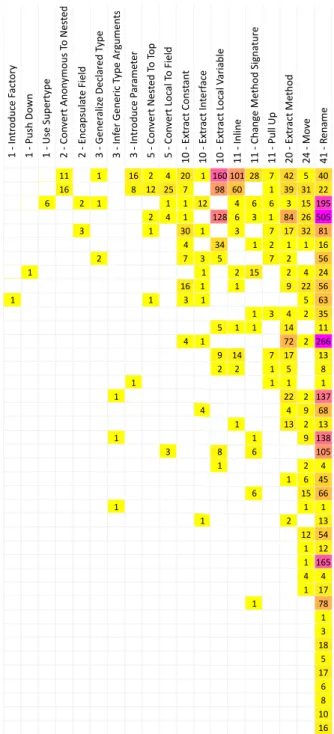
3.3 Uses of Eclipse refactoring tools by 41 developers. Each column is la-beled with the name of a refactorings performed using a tool in Eclipse, and the number of programmers that used that tool. Each row represents an individual programmer. Each box is labeled by how many times that programmer used the refactoring tool. The darker pink the interior of a box, the more times the programmer used that tool. Data provided
courtesy of Murphy and colleagues [47]. . . 39
4.1 A code selection (above, highlighted in blue) that a tool cannot extract
into a new method. . . 51
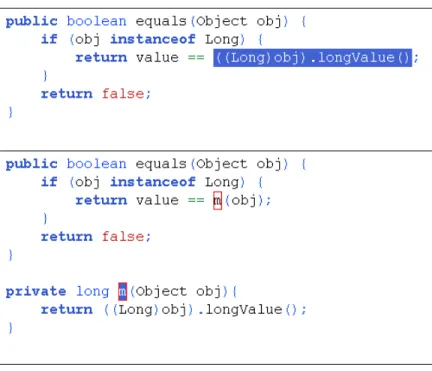
4.2 At the top, a method in java.lang.Long in an X-develop editor. At
the bottom, the code immediately after the completion of the EXTRACT
METHOD refactoring. The name of the new method ism, but the cursor
is positioned to facilitate an immediate RENAMErefactoring. . . 58
5.1 Examples of a smell visualization in Noseprints [62]. On the left,
infor-mation about LONGMETHODfor 3 classes, and on the right, information
about LARGE CLASSfor 3 other classes. This visualization appears
in-side of a window when the programmer asks the Visual Studio program-ming environment to find smells in a code base. Screenshots provided
courtesy of Chris Parnin. . . 64
5.2 A compilation warning in Eclipse, shown as a squiggly line underneath
program code. This line, for example, calls attention to the fact that this
expression is being TYPECAST. . . 64
5.3 Ambient View, displaying the severity of several smells at the right of the
petal representing FEATURE ENVYto reveal the name of the smell and a
clickable [+] to allow the programmer to transition toExplanation View. 73
5.5 Explanation View, showing details about the smell named in Figure 5.4
on page 73. . . 74
6.1 The Selection Assist tool in the Eclipse environment, shown covering the
entireifstatement, in green. The user’s selection is partially overlaid,
darker. . . 94
6.2 Box View tool in the Eclipse environment, to the left of the program code. 95
6.3 Mean time in seconds to selectifstatements using the mouse and
key-board versus Selection Assist (left) and Box View (right). Each subject
is represented as a whole or partial X. The distance between the
bot-tom legs represents the number of mis-selections using the mouse and keyboard. The distance between the top arms represents the number of mis-selections using Selection Assist (left) or Box View (right). Points without arms or legs represent subjects who did not make mistakes with
either tool. . . 99
6.4 The several-step process of using refactoring cues. . . 108
6.5 Targeting several cues (the pink rectangles) at once using a single
selec-tion; the programmer’s selection is shown by the grey overlay. . . 109
7.1 Initializing a refactoring from a system menu in Eclipse, with hotkeys
displayed for some refactorings. . . 112
7.2 Two pie menus for refactoring, showing applicable refactorings for a
7.3 A sample training page (top) and a sample recall page (bottom). The refactorings (left, as program code before-and-after refactoring) are the same on both pages. Subjects were instructed to put a check mark in the
appropriate direction on the recall page. . . 120
7.4 A histogram of the results of the pie menu experiment. Each subject is
overlaid as one stick figure. Subjects from the experimental group who correctly guessed the refactoring that they did not see during training are
denoted with a dashed oval. . . 123
7.5 A pie menu for refactoring with distance-from-center indicating what
kind of configuration to perform. . . 125
8.1 Configuration gets in the way: an Eclipse configuration wizard obscures
program code. . . 128
8.2 The user begins refactoring by selecting the 4 in X-develop, as usual
(top). After initiating EXTRACT LOCAL VARIABLE (middle), the user
types “ghostC” (bottom), using a linked in-line RENAME refactoring
tool. . . 130
8.3 NGOMSL methods for conventional refactoring tools (top) and
refactor-ing cues (bottom). . . 132
9.1 Refactoring Annotations overlaid on program code. The programmer
has selected two lines of code (between the dotted lines) to extract. Here,
Refactoring Annotations show how the variable will be used: frontand
rear will be parameters, as indicated by the arrows into the code to be
extracted, and truedwill be returned, as indicated by the arrow out of
precondition 1 (goOnVacation), precondition 2 (curbHop), and
pre-condition 3 (goForRide), described in Table 4.1 on page 51. . . 146
9.3 For each subject, mean time to identify precondition violations correctly
using error messages versus Refactoring Annotations. Each subject is
represented as an X, where the distance between the bottom legs
repre-sents the number of imperfect identifications using the error messages and the distance between the top arms represents the number of
imper-fect identifications using Refactoring Annotations. . . 150
9.4 Illegal name violations, displayed normally in Eclipse (at left), and
how such violations would be implemented following the guidelines (at right). The green violation indicators at right indicate that two invalid
characters were typed into the new name text field. . . 166
9.5 Eclipse offering a quick-assist of all available return types in a
refactor-ing dialog. . . 168
9.6 A mockup of how the guidelines inform the display of control unbinding
(top and bottom left) and data unbinding (bottom right) for an attempted
MOVE METHOD refactoring. The purple top annotation indicates that
isAttributeValueSupported(...) calls this method, which is a problem because this method would not be visible outside in the
desti-nation. The initMedia() annotations indicate that this method calls
the initMedia()method, which would not be visible from the
desti-nation. The mediaPrintables annotations indicate that this method
uses themediaPrintablesfield, which would not be visible from the
9.7 A mockup of how the guidelines inform the display of name unbinding
(in purple) and inheritance unbinding (in green) for an attempted MOVE
METHODrefactoring, where the destination class is the class ofthis mon.
The purpletranferQueueannotations indicate that this method relies
on a classtransferQueue, which will not be accessible in the
destina-tion. The greenlookupTransferQueue annotations indicate that the
current method overrides a superclass method (top) and some subclass
method (bottom), so the method cannot be moved. . . 175
9.8 A mockup of how the guidelines inform the display of control clash for
an attempted RENAME METHOD refactoring, where the method at
bot-tom has just been renamed toisValid()using Eclipse’s in-line rename
refactoring tool. At top, the existing method that the newly renamed method conflicts with, in a floating editor that can be used to perform
re-cursive refactorings, such as renaming the originalisValid()method.
. . . 177
9.9 A mockup of how the guidelines inform the display of context for an
attempted MOVE METHOD refactoring, pointing out that the method
modalityPopped(...) cannot be moved because interface meth-ods cannot be moved. The original Eclipse modal error message states
“Members in interfaces cannot be moved.” . . . 179
9.10 A mockup of how the guidelines inform the display of structure for an
attempted CONVERTLOCAL TOFIELDrefactoring, pointing out that the
selected variableoriginating contactis a parameter, which cannot
be inlined. The original Eclipse modal error message states “Cannot
attempted INLINECONSTANTrefactoring, pointing out that the selected
constanttheEnvironmentis blank, meaning that it is not assigned to at
its declaration. The original Eclipse modal error message states “Inline
Constant cannot inline blank finals.” . . . 182
9.12 A mockup of how the non-local violations can be displayed in the
pro-gram editor. Here, the variablesite prefix is referenced somewhere
further down the editor. . . 184
9.13 An example of an experiment run. The experiment participant (at left), considers where to place a sticky note on the code responsible for the violation. The experiment administrator (at right), records observations
A Roadmap
Refactoring — the process of changing the structure of software without changing the way that it behaves — has been practiced by programmers for many years. More recently, tools that semi-automate the process of refactoring have emerged in vari-ous programming environments. These tools have promised to increase the speed at which programmers can write and maintain code while decreasing the likelihood that programmers will introduce new bugs. However, this promise remains largely unfulfilled, because programmers do not use the tools as much as they could. In this dissertation, I argue that one reason for this underuse is poor usability, meaning that the user interface of existing refactoring tools is sometimes too slow, too error-prone, and too unpleasant. I also take several steps to address the usability problem, guided by the following thesis statement:
Applying a specified set of user-interface guidelines can help build more usable refactoring tools.
In this dissertation I explore the formation of those guidelines and the rationale be-hind them, as well as evaluate the effect that they have on refactoring tools’ usability. In Chapter2, I introduce the concept of refactoring. In Chapter3, I discuss how refactoring is actually practiced in the wild. In Chapter4, I introduce usability, make the case that poor usability a problem with refactoring tools, and break down the
these steps; I propose usability guidelines for each, reify those guidelines in the form of several novel user interfaces, and evaluate those user interfaces (and, indirectly, the guidelines that inspired them). Taken as a whole, I hope these new usability guidelines and tools will inform the next generation of refactoring tools, which will in turn more completely fulfill the tools’ original promise.
Refactoring Theory: Techniques and Tools1
In this chapter, I introduce previous work on the practice of refactoring and tools that perform refactoring semi-automatically. I also introduce my own distinction between two different tactics for refactoring —flossandroot canal refactoring. I then propose five principles that characterize successful floss refactoring tools, five principles that can help programmers to choose the most appropriate refactoring tools and also help toolsmiths to design tools that fit the programmer’s purpose.
2.1 Contributions
The major contributions of this chapter are:
• The distinction between, and description of, floss and root canal refactoring (Section2.3), and
• A model of how programmers use conventional refactoring tools (Section2.5).
2.2 What is Refactoring?
Refactoring is the process of changing the structure of software while preserving its external behavior, a practice described in early research by Opdyke and Johnson [59]
toring has been practiced for as long as programmers have been writing programs. Fowler’s book is largely a catalog of refactorings; each refactoring captures a struc-tural change that has been observed repeatedly in various programming languages and application domains.
Some refactorings make localized changes to a program, while others make more global changes. As an example of a localized change, when you perform Fowler’s
INLINETEMPrefactoring, you replace each occurrence of a temporary variable with
its value. Taking a method fromjava.lang.Long, public static Long valueOf(long l) {
final int offset = 128;
if (l >= -128 && l <= 127) { // will cache return LongCache.cache[(int)l + offset]; }
return new Long(l); }
you might apply the INLINETEMP refactoring to the variable offset. Here is the result:
public static Long valueOf(long l) {
if (l >= -128 && l <= 127) { // will cache return LongCache.cache[(int)l + 128]; }
return new Long(l); }
The inverse operation, in which you take the second of these methods and intro-duce a new temporary variable to represent 128, is also a refactoring, which Fowler calls INTRODUCE EXPLAINING VARIABLE. Whether the version of the code with or without the temporary variable is better depends on the context. The first version would be better if you were about to change the code so that offset appeared a second time; the second version might be better if you prefer more concise code.
ByteArray Input Stream
Input
Stream StreamOutput
File Input Stream File Output Stream ByteArray Output Stream Stream Input
Stream StreamOutput
Storage
File
Storage ByteArrayStorage
Video Input Stream Video Output Stream Video Storage
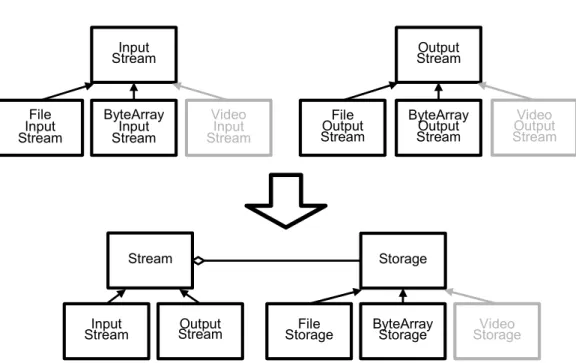
Figure 2.1: A stream class hierarchy injava.io(top, black) and a refactored version of the same hierarchy (bottom, black). In grey, an equivalent change is made in each version.
So, whether a refactoring improves your code depends on the context: you must still exercise good judgement.
Refactoring is an important technique because it helps you prepare to make se-mantic changes to your program. For example, to motivate a more global refactor-ing, suppose that you want to add the ability to read and write to a video stream to java.io. The relevant existing classes are shown in black at the top of Fig-ure2.1. Unfortunately, this top class hierarchy confounds two concerns: the direc-tion of the stream (input or output) and the kind of storage that the stream works over (file or byte array). It would be difficult to add video streaming to the original java.io because you would have to add two new classes, VideoInputStream andVideoOutputStream, as shown by the grey boxes at the top of Figure2.1. You would inevitably be forced to duplicate code between these two classes because their functionality would be similar.
INHERITANCErefactoring to produce the two separate stream and storage hierarchies shown in black at the bottom of Figure 2.1 on the preceding page. It is easier to add video streaming in the refactored version: all that you need do is add a class VideoStorageas a subclass ofStorage, as shown by the grey box at the bottom of Figure2.1 on the previous page. Because it enables software change, “Refactoring helps you develop code more quickly” [22, p. 57].
2.3 When Should Programmers Refactor?
On one hand, some experts have recommended refactoring in small steps, interleav-ing refactorinterleav-ing and writinterleav-ing code. For instance, Fowler states:
In almost all cases, I’m opposed to setting aside time for refactoring. In my view refactoring is not an activity you set aside time to do. Refactor-ing is somethRefactor-ing you do all the time in little bursts. [22, p. 58]
Agile consultant Jim Shore has given similar advice:
Avoid the temptation to stop work and refactor for several weeks. Even the most disciplined team inadvertently takes on design debt, so elimi-nating debt needs to be an ongoing activity. Have your team get used to refactoring as part of their daily work. [72]
On the other hand, the literature has also described a more heavyweight kind of refactoring, where programmers set aside specific time for refactoring planning and execution:
Here, we want to use refactoring to improve a code base that has gone astray for several man-years without any noticeable rework in be-tween!. . . This paper presented the results of a 5 months case study trying
to imrove [sic] the quality of a commercial, medium size code base by refactoring. [63]
I call the first tactic floss refactoring, because the intent is to maintain healthy software by frequent refactoring, intermingled with other kinds of program changes. In contrast, I call the second tactic root canal refactoring. This is characterized by infrequent, protracted periods of refactoring, during which programmers perform few if any other kinds of program changes. You perform floss refactoring to main-tain healthy code, and you perform root canal refactoring to correct unhealthy code. When I talk about refactoring tactics, I am referring to the choices that you make about how to mix refactoring with your other programing tasks, and about how fre-quently you choose to refactor.
I use the dental metaphor because, for many people, flossing one’s teeth every day is a practice they know that they should follow, but which they sometimes put off. Neglecting to floss can lead to tooth decay, which can be corrected with a painful and expensive trip to the dentist for a root canal procedure. Likewise, a program that is refactored frequently and dutifully may be healthier and less expensive in the long run than a program whose refactoring is deferred until the most recent bug cannot be fixed or the next feature cannot be added. Like delaying dental flossing, the decision to delay refactoring may initially save time, but eventually may have painful consequences.
2.4 Refactoring Tools
Refactoring tools automate refactorings that you would otherwise perform with an editor.2 Many popular development environments for a variety of languages — such as Eclipse [18], Microsoft Visual Studio [46], Xcode [31], and Squeak [21] — now include refactoring tools.
and want to use refactoring tools in Eclipse to refactor code in that class. First, you choose the code you want refactored, typically by selecting it in an editor. In this example, you will choose the conditional expression in anifstatement (Figure2.2
on the following page) that checks to make sure thatfis in subnormal form. Suppose
that you want to put this condition into its own method so that you can give it an intention-revealing name and so that you can reuse it elsewhere in theFloatclass. After selecting the expression, you choose the desired refactoring from a menu. The refactoring that you want is labeled EXTRACTMETHOD(Figure2.3 on page 10).
The menu selection starts the refactoring tool, which brings up a dialog asking you to supply configuration options (Figure2.4 on page 11). You have to provide a name for the new method: you will call itisSubnormal. You can also select some other options. You then have the choice of clickingOK, which would perform the refactoring immediately, orPreview>.
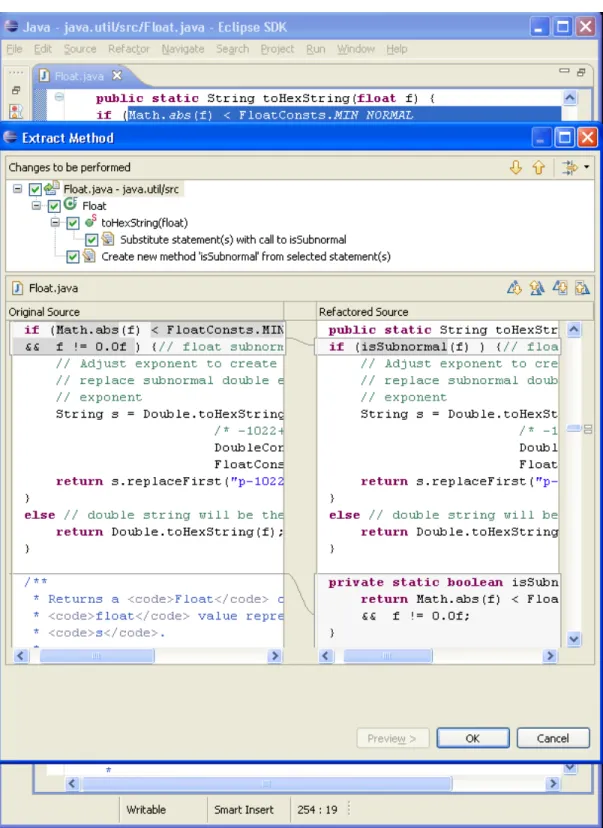
The preview page (Figure 2.5 on page 12) shows the differences between the original code and the refactored version. If you like what you see, you can clickOK
to have the tool apply the transformation. The tool then returns you to the editor, where you can resume your previous task.
Of course, you could have performed the same refactoring by hand: you could have used the editor to make a new method called isSubnormal, cutting-and-pasting the desired expression into the new method, and editing the if statement so that it uses the new method name. However, using a refactoring tool can have two advantages.
1. The tool is less likely to make a mistake than is a programmer refactoring by hand. In the example, the tool correctly inferred the necessary argument and return types for the newly created method, as well as deducing that the method should be static. When refactoring by hand, you can easily make mistakes on
Figure 2.3: A context menu in Eclipse. The next step is to selectExtract Method. . . in the menu.
Figure 2.4: A configuration dialog asks you to enter information. The next step is to type “isSubnormal” into theMethod nametext box, after which thePreview>andOKbuttons will become active.
Figure 2.5: A preview of the changes that will be made to the code. At the top, you can see a summary of the changes. The original code is on the left, and the refactored code on the right. You pressOKto have the changes applied.
such details.
2. The tool is faster than refactoring by hand. Doing it by hand, you would have to take time to make sure that you got the details right, whereas a tool can make the transformation almost instantly. Furthermore, refactorings that affect many locations throughout the source code, such as renaming a class, can be quite time-consuming to perform manually. They can be accomplished almost instantly by a refactoring tool.
In short, refactoring tools allow you to program faster and with fewer mistakes — but only if you choose to use them. Unfortunately, refactoring tools are not being used as much as they could be; the evidence for this claim is set out in Chapter3. My goal is to make tools that programmers will choose to use more often. As a first step towards that goal, I next describe a model that I will use throughout this dissertation to speak more generally about how programmers use refactoring tools, without having to refer to specific tools or specific refactorings.
2.5 A Model of How Programmers Use Refactoring Tools
Figure 2.6 on the following page shows my model of how programmers use con-ventional refactoring tools. I started by examining Mealy and colleagues’ 4-step model [45], Kataoka and colleagues’ 3-step model [35], Fowler’s description of small refactorings [22], and Lippert’s description of large refactorings [38]. I expanded these simpler models into my new model by adding finer-grained steps, and the pos-sibility of a recursive workflow, based my own observations of programmers refac-toring. I have found this model useful both for reasoning about how programmers use refactoring tools and for improving the usability of those tools. However, while the model is meant to cover the most common refactoring tools, new tools are not
com-Select Identify
Initiate Configure Execute
Interpret Results Clean Up Interpret Error Refactor (recursive) Error Unexpected Result OK End Start Undo
More Program Elements to Refactor
Figure 2.6: A model of how programmers use conventional refactoring tools. Steps outlined in black are the focus of this dissertation.
pelled to follow it; indeed, as I will show in Section8.5, reordering or eliminating some of the steps can be beneficial.
I will explain the model by applying it to a simple refactoring. You begin by find-ing code that should be refactored (theIdentifystep). Then, you tell the tool which program element to refactor (Select), often by selecting code in an editor. You ini-tiate the refactoring tool (Initiate), often by choosing the desired refactoring from a menu. You then give the tool some configuration information (Configure), such as by typing a new name into a dialog box. You signal the tool to actually transform the program (Execute), often by clicking an “OK” button in the dialog. You make sure that the tool performed the refactoring that you were expecting (Interpret Re-sults). Finally, you may choose to perform someClean Uprefactorings. While not explicitly shown, you may abandon using the tool at any point, which corresponds to transitioning to a failure state from any step in the model.
The model also captures more complicated refactorings. When a precondition is violated, you typically must interpret an error message and choose an appropriate course of action (Interpret Error). When an unexpected result is encountered, you
may revert the program to its original state (Undo). You may recursively perform a sub-refactoring (Refactor) in order to make the desired refactoring successful. When you want to refactor several program elements at once, such as renaming several re-lated variables, you must repeat theSelect,Initiate,Configure, andExecutesteps. This model is a generalization: it describes how refactoring tools are typically used, but some programmers and specific tools may diverge from it in at least three ways. First, different tools provide different levels of support at each step. For in-stance, only a few tools help identify candidates for refactoring. Second, although the model defines a recursive refactoring strategy, a linear refactoring strategy is also possible. In a linear strategy, you perform sub-refactorings first, and avoid errors be-fore they occur. I do not favor a strictly linear refactoring strategy because it requires foresight about what the tool will do, which I consider an unnecessary burden on programmers. In Section4.5.3, I observe that such foresight — guessing what error messages a tool might produce — can lead programmers to avoid using a refactoring tool altogether. Third, some steps can be reordered or skipped entirely; for example, some tools provide a refactoring preview so that you may interpret the results of a refactoring before it is executed.
2.6 The Structure of this Dissertation
I have introduced refactoring and refactoring tools in this chapter, providing the nec-essary background to understand the remainder of the dissertation.
In Chapter 3, I will describe how programmers refactor in practice, based on data from programmers using existing refactoring tools, and on inspection of a code base where refactoring took place. Chapter 3 will lay the foundation of data for later propositions on how to improve refactoring tools. A central finding is that refactoring tools are underused, which means that the potential of refactoring tools is as yet unfulfilled.
significant cause of underuse. This argument is based on existing research and on my own data on how programmers use — and do not use — refactoring tools.
Rather than finding and correcting a single usability problem with refactoring tools, I take a divide-and-conquer approach. Specifically, in each of the remaining chapters, I propose usability guidelines and new refactoring tool user interfaces for individual steps in my refactoring model (Section2.5):
• In Chapter5, I present how tools can more effectively help programmers iden-tifycode suitable for refactoring.
• In Chapter6, I present how program elements can be more easilyselectedfor refactoring.
• In Chapter7, I present how the programmer can more easilyinitiatethe refac-toring she wants to perform.
• In Chapter 8, I present how configuration of refactoring tools can be made optional for the programmer.
• In Chapter 9, I present how the representation of refactoring errors can be improved.
Each of these Chapters5–9has a common set of components:
• In each chapter, I discuss related approaches and user interfaces for that refac-toring step.
• I postulate new user interface guidelines to guide the construction of new refac-toring tools that align with how programmers typically refactor.
• I describe a new user interface designed either (a) to address specific usabil-ity problems, or (b) to fit the postulated usabilusabil-ity guidelines. Although my prototypes have been built for the Java programming language in the Eclipse environment, the techniques embodied in these interfaces should apply to other object-oriented and imperative programming languages and environments. • Finally, I describe an evaluation of the proposed user interface, which forms
an indirect evaluation of the guidelines embodied in the tool.
In Chapters6and9, I first describe the tools that I created and then describe the guidelines that make them different from previous tools, whereas in Chapters 5, 7, and 8, I first postulate guidelines and then discuss how I implemented tools based on those guidelines. Ideally, I have learned, the latter ordering is preferable from a scientific standpoint; you have a hypothesis about what makes tools good, and then you test that hypothesis. I learned this halfway through the research described in this dissertation, and thus I describe orderings because that is the way my research was conducted.
The goal of this dissertation is to improve usability of refactoring tools by propos-ing usability guidelines combined with novel refactorpropos-ing tool user interfaces, with the hope of increasing refactoring tool adoption and thus fulfilling the original produc-tivity promise of refactoring tools.
In the last chapter, I discussed how refactoring has been prescribed by experts. In this chapter, I describe how my colleague Chris Parnin and I examined four data sets spanning more than 13 000 developers, 240 000 tool-assisted refactorings, 2500 developer hours, and 3400 version control commits. Using these data, I cast doubt on several previously stated assumptions about how programmers refactor, while validating others. For example, I find that programmers frequentlydo not indicate refactoring activity in commit logs, which contradicts assumptions made by several previous researchers. In contrast, I was able to confirm the assumption that program-mers do frequently intersperse refactoring with other program changes.
3.1 Introduction
In his book on refactoring, Fowler claims that refactoring produces significant ben-efits based on his own experience: it can help programmers to prepare to add func-tionality, fix bugs, and understand software [22, pp. 55-57]. Indeed, case studies have demonstrated that refactoring is a common practice [85] and that it can improve code metrics [5].
However, conclusions drawn from a single case study may not hold in general. 1Parts of this chapter are scheduled to appear as part of theProceedings of the 2009 International
Studies that investigate a phenomenon using a single research method also may not hold. To see why, one particular example that uses a single research method is Weißgerber and Diehl’s study of three open source projects [84]. Their research method was to apply a tool to the version history of each project to detect high-level refactorings such as RENAME METHOD and MOVE CLASS. Low- and
medium-level refactorings, such as RENAME LOCAL VARIABLE and EXTRACT METHOD, were classified asnon-refactoring code changes. One of their findings was that, on every day on which refactoring took place, non-refactoring code changes also took place. What you can learn from this depends on the relative frequency of high-level and mid-to-low-level refactorings. If the latter are scarce, you can infer that refac-torings and changes to the projects’ functionality are usually interleaved at a fine granularity. However, if mid-to-low-level refactorings are common, then you cannot draw this inference from Weißgerber and Diehl’s data alone.
In general, validating conclusions drawn from an individual study involves both replicating the study in wider contexts and exploring factors that previous authors may not have explored. In this chapter, I use both of these methods to confirm — and disconfirm — several conclusions that have been published in the refactoring literature.
3.2 Contributions
In Section 3.3 I characterize the data that I used for this work. My experimental method takes data from four different sources (described in Section3.3) and applies several different refactoring-detection strategies to them. I use this data to test eight hypotheses about refactoring. The contributions of my work lie in both the exper-imental method used when testing these hypotheses, and in the observations that I make about refactoring:
toolsmiths (Section3.4.1).
• About 40% of refactorings performed using a tool occur in batches
(Sec-tion3.4.2).
• About 90% of configuration defaults of refactoring tools remain unchanged when programmers use the tools (Section3.4.3).
• Messages written by programmers in version histories are unreliable indicators of refactoring (Section3.4.4).
• Floss refactoring, in which refactoring is interleaved with other types of pro-gramming activity, is used frequently (Section3.4.5).
• Refactorings are performed frequently (Section3.4.6).
• Almost 90% of refactorings are performed manually, without the help of tools (Section3.4.7).
• The kind of refactoring performed with tools differs from the kind performed manually (Section3.4.8).
In Section 3.5 I discuss the interaction between these conclusions and the assump-tions and conclusions of other researchers.
3.3 The Data that We Analyzed
The work described in this chapter is based on four sets of data. The first set, which I will callUsers, was originally collected in the latter half of 2005 by Murphy and col-leagues [47], who used the Mylyn Monitor tool to capture and analyze fine-grained usage data from 41 volunteer programmers in the wild using the Eclipse develop-ment environdevelop-ment [18]. These data capture an average of 66 hours of development
time per programmer; about 95 percent of the programmers wrote in Java. The data include information on which Eclipse commands were executed, and at what time. Murphy and colleagues originally used these data to characterize the way program-mers used Eclipse, including a coarse-grained analysis of which refactoring tools were used most often.
The second set of data, which I will call Everyone, is publicly available from the Eclipse Usage Collector [78], and includes data requested from every user of the Eclipse Ganymede release who consented to an automated request to send the data back to the Eclipse Foundation. These data aggregate activity from over 13 000 Java developers between April 2008 and January 2009, but also include non-Java devel-opers. The data count how many programmers have used each Eclipse command, including refactoring commands, and how many times each command was executed. I know of no other research that has used these data for characterizing programmer behavior.
The third set of data, which I will callToolsmiths, includes refactoring histories from four developers who maintain Eclipse’s refactoring tools. These data include detailed histories of which refactorings were executed, when they were performed, and with what configuration parameters. These data include all the information nec-essary to recreate the usage of a refactoring tool, assuming that the original source code is also available. These data were collected between December 2005 and Au-gust 2007, although the date ranges are different for each developer. This data set is not publicly available and has not previously been described in the literature. The only study that I know of using similar data was published by Robbes [68]; it reports on refactoring tool usage by Robbes himself and one other developer.
The fourth set of data I will callEclipse CVS, because it is the version history of the Eclipse and JUnit (http://junit.org) code bases as extracted from their Concurrent Versioning System (CVS) repositories. Specifically, Chris Parnin and I randomly
same time period, the same projects, and the same developers represented in Tool-smiths. Using these data, we inferred which refactorings were performed by compar-ing adjacent commits manually. While many authors have mined software reposito-ries automatically for refactorings (for example, Weißgerber and Diehl [84]), I know of no other research that compares refactoring tool logs with code histories.
3.4 Findings on Refactoring Behavior
In each of the following subsections, I describe a hypothesis about refactoring be-havior; discuss why I suspect that the hypothesis is true; describe the results of an experiment that tests the hypothesis, using one or more of the data sets; and state the main limitations of the experiment. Each subsection heading briefly summarizes the subsection’s findings.
3.4.1 Toolsmiths and Users Differ
I hypothesize that the refactoring behavior of the programmers who develop the Eclipse refactoring tools differs from that of the programmers who use them. Tole-man and Welsh assume a variant of this hypothesis — that the designers of software tools erroneously consider themselves typical tool users — and argue that the usabil-ity of software tools should be evaluated objectively [81]. However, as far as I know, no previous research has tested this hypothesis, at least not in the context of refactor-ing tools. To do so, I compared the refactorrefactor-ing tool usage in theToolsmithsdata set against the tool usage in theUserandEveryonedata sets.
In Table 3.1 on the next page, the “Uses” columns indicate the total number of times each refactoring tool was invoked in that data set. The “Use %” column presents the same measure as a percentage of the total number of refactorings. No-tice that while the rank order of each tool is similar across the three data sets —
Ref actoring T ool T oolsmiths Users Ev eryone Uses Use % Batched Batc hed % Uses Use % Batched Batched % Uses Use % Rename 670 28.7% 283 42.2% 1862 61.5% 1009 54.2% 179871 74.8% Extract Local V ariable 568 24.4% 127 22.4% 322 10.6% 106 32.9% 13523 5.6% Inline 349 15.0% 132 37.8% 137 4.5% 52 38.0% 4102 1.7% Extract Method 280 12.0% 28 10.0% 259 8.6% 57 22.0% 10581 4.4% Mo v e 147 6.3% 50 34.0% 171 5.6% 98 57.3% 13208 5.5% Change Method Signature 93 4.0% 26 28.0% 55 1.8% 20 36.4% 4764 2.0% Con v ert Local T o Field 92 3.9% 12 13.0% 27 0.9% 10 37.0% 1603 0.7% Introduce P arameter 41 1.8% 20 48.8% 16 0.5% 11 68.8% 416 0.2% Extract Constant 22 0.9% 6 27.3% 81 2.7% 48 59.3% 3363 1.4% Con v ert Anon ymous T o Nested 18 0.8% 0 0.0% 19 0.6% 7 36.8% 269 0.1% Mo v e Member T ype to Ne w File 15 0.6% 0 0.0% 12 0.4% 5 41.7% 838 0.3% Pull Up 12 0.5% 0 0.0% 36 1.2% 4 11.1% 1134 0.5% Encapsulate Field 11 0.5% 8 72.7% 4 0.1% 2 50.0% 1739 0.7% Extract Interf ace 2 0.1% 0 0.0% 15 0.5% 0 0.0% 1612 0.7% Generalize Declared T ype 2 0.1% 0 0.0% 4 0.1% 2 50.0% 173 0.1% Push Do wn 1 0.0% 0 0.0% 1 0.0% 0 0.0% 279 0.1% Infer Generic T ype Ar guments 0 0.0% 0 -3 0.1% 0 0.0% 703 0.3% Use Supertype Where Possible 0 0.0% 0 -2 0.1% 0 0.0% 143 0.1% Introduce F actory 0 0.0% 0 -1 0.0% 0 0.0% 121 0.1% Extract Superclass 7 0.3% 0 0.0% * -* * 558 0.2% Extract Class 1 0.0% 0 0.0% * -* * 983 0.4% Introduce P arameter Object 0 0.0% 0 -* -* * 208 0.1% Introduce Indirection 0 0.0% 0 -* -* * 145 0.1% T otal 2331 100% 692 29.7% 3027 100% 1431 47.3% 240336 100% T able 3.1: Ref actoring tool us age in Eclipse. Some tool logging be g an in the middle of the T oolsmiths data collection (sho wn in light gre y) and after the User s data collection (denoted with a *).
individual refactorings varies widely between Toolsmiths and Users/Everyone. In
Toolsmiths, RENAMEaccounts for about 29% of all refactorings, whereas inUsersit accounts for about 62% and inEveryonefor about 75%. I suspect that this difference is not because Users and Everyone perform more RENAMES than Toolsmiths, but becauseToolsmithsare more frequent users of the other refactoring tools.
This analysis is limited in two ways. First, each data set was gathered over a different period of time, and the tools themselves may have changed between those periods. Second, theUsersdata include both Java and non-Java RENAMEand MOVE
refactorings, but theToolsmiths andEveryonedata report on just Java refactorings. This may inflate actual RENAME and MOVE percentages in Users relative to the other two data sets.
3.4.2 Programmers Repeat Refactorings
I hypothesize that when programmers perform a refactoring, they typically perform several refactorings of the same kind within a short time period. For instance, a programmer may perform several EXTRACT LOCALVARIABLESin preparation for a single EXTRACT METHOD, or may RENAMEseveral related instance variables at
once. Based on personal experience and anecdotes from programmers, I suspect that programmers often refactor several pieces of code because several related program elements may need to be refactored in order to perform a composite refactoring. In Section6.6.3, I describe a tool that allows the programmer to select several program elements at once, something that is not possible with traditional tools.
To determine how often programmers do repeat refactorings, I used the Tool-smithsand theUsersdata to measure the temporal proximity of refactorings to one another. I say that refactorings of the same kind that execute within 60 seconds of each another form abatch. From my personal experience, I think that 60 seconds is
long enough for a programmer to complete a typical Eclipse wizard-based refactor-ing, yet short enough to exclude refactorings that are not part of the same conceptual group. Additionally, a few refactoring tools, such as PULLUPin Eclipse, can refactor
multiple program elements, so a single application of such a tool can be an explicit batch of related refactorings. For such tools, I counted the total number of tool uses that refactored only one program element (not an explicit batch of refactorings) and the number of tool uses that refactored more than one program element (an explicit batch of refactorings) inToolsmiths.
In Table3.1 on page 23, each “Batched” column indicates the number of refactor-ings that appeared as part of a batch, while each “Batched %” column indicates the percentage of refactorings appearing as part of a batch. Overall, you can see that cer-tain refactorings, such as RENAME, INTRODUCEPARAMETER, and ENCAPSULATE
FIELD, are more likely to appear as part of a batch for bothToolsmiths andUsers, while others, such as EXTRACT METHOD and PULL UP, are less likely to appear in a batch. In total, you see that 30% ofToolsmiths refactorings and 47% of Users
refactorings appear as part of a batch.2 For comparison, Figure3.1 on the next page
displays the percentage of batched refactorings for several different batch thresholds. InToolsmiths, the number of explicit batches varied between tools (Table3.2 on
the following page). Although the total number of uses of these refactoring tools is
fairly small, Table3.2 suggests refactorings are batched about 25% of the time for tools that can refactor several program elements.
This analysis has two main limitations. First, while I wished to measure how often several related refactorings are performed in sequence, I instead used a 60-second heuristic. It is almost certain that some related refactorings occur outside my 60-second window, and that some unrelated refactorings occur inside the window. 2I suspect that the difference in percentages arises partially because theToolsmithsdata set counts
the number of completed refactorings while Users counts the number of initiated refactorings. I have observed that programmers occasionally initiate a refactoring tool on some code, cancel the refactoring, and then re-initiate the same refactoring shortly thereafter (Section4.5.3).
0 0.1 0.2 0.3 0.4 0.5 0.6 0 30 60 90 120 150 180 210 240
batch threshold, in seconds
%
batched
Users
Toolsmiths
Figure 3.1: Percentage of refactorings that appear in batches as a function of batch threshold, in seconds. 60-seconds, the batch size used in Table3.1 on page 23, is drawn in green.
Refactoring Tool Uses Explicitly Batched Explicitly Batched %
MOVE 147 22 15.0% PULLUP 12 11 91.6% EXTRACTSUPERCLASS 7 6 85.7% EXTRACTINTERFACE 2 1 50.0% PUSHDOWN 1 1 100.0% Total 169 42 24.8%
Table 3.2: The number and percentage of explicitly batched refactorings, for all Eclipse tool-based refactorings that support explicit batches. Some tool logging began in the middle of theToolsmithsdata collection (shown in light grey).
Other metrics for detecting batches should be investigated in the future. As a conse-quence, the percentage of refactorings that appear as part of a group is astatisticthat only estimates thepopulation parameter of interest: how often programmers repeat refactorings. Second, I could ascertain how often explicit batches are used in only theToolsmithsdata set: the other data sets are not sufficiently detailed.
3.4.3 Programmers Often Do Not Configure Refactoring Tools
Refactoring tools are typically of two kinds: either they force the programmer to pro-vide configuration information, such as whether a newly created method should be publicorprivate, or they perform a refactoring without allowing any configura-tion at all. Configurable refactoring tools are more common in some environments, such as Netbeans [53], whereas non-configurable tools are more common in others, such as X-develop [75]. Which interface is preferable depends on how often pro-grammers configure refactoring tools. I hypothesize that propro-grammers do not often configure refactoring tools. I suspect this because tweaking code manually after the refactoring may be easier than configuring the tool.
In the past, I have found some limited evidence that programmers perform only a small amount of configuration of refactoring tools. When I did a small survey in September 2007 at a Portland Java User’s Group meeting, 8 programmers estimated that, on average, they supply configuration information only 25% of the time.
To validate this hypothesis, I analyzed the 5 most popular refactorings performed byToolsmiths to see how often programmers used various configuration options. I skipped refactorings that did not have configuration options.
The results of the analysis are shown in Table3.3 on the next page. “Configura-tion Op“Configura-tion” refers to a configura“Configura-tion parameter that the user can change. “Default Value” refers to the default value that the tool assigns to that option. “Change %” refers to how often a user used a configuration option other than the default. The data suggest that refactoring tools are configured very little: the overall mean change percentage for these options is just under 10%. Although different configuration op-tions are changed from defaults with varying percentages, all configuration opop-tions that I inspected were below the average configuration percentage predicted by the Portland Java User’s Group survey.
infor-Ref actoring T ool Configuration Option Def ault V alue Change % Extract Local V ariable Declare the local v ariable as ‘final’ false 5% Extract Method Ne w method visibility pri v ate 6% Declare thro wn runtime exceptions false 24% Generate method comment false 9% Rename T ype Update references true 3% Update similarly named v ariables and meth-ods false 24% Update te xtual occurrences in comments and strings false 15% Update fully qualified names in non-Ja v a te xt files true 7% Rename Method Update references true 0% K eep original method as dele g ate to renamed method false 1% Inline Method Delete method declaration true 9% T able 3.3: Ref actoring tool configuration in Eclipse from T oolsmiths .
mation in the other data sets to cross-validate my results outsideToolsmiths. Second, I could not count how often certain configuration options were changed, such as how often parameters are reordered when EXTRACT METHOD is performed. Third, I
examined only the 5 most-common refactorings; configuration may be more or less common for less popular refactorings.
3.4.4 Commit Messages Do Not Predict Refactoring
Several researchers have used messages attached to commits in a version control sys-tem, such as CVS, as indicators of refactoring activity [28,66,67,76]. For example, if a programmer commits code to CVS and attaches the commit message “refactored class Foo,” you might assume that the committed code contains more refactoring activity than if a programmer commits with a message that does not contain the word stem “refactor.” However, I hypothesize that this assumption is false. I sus-pect this because refactoring may be an unconscious activity [9, p. 47], or because the programmer may consider it subordinate to some other activity, such as adding a feature [50].
In his dissertation, Ratzinger describes the most sophisticated strategy for finding refactoring messages of which I am aware [66]: searching for the occurrence of 13 keywords, such as “move” and “rename,” and excluding “needs refactoring.” Using two different project histories, the author randomly drew 100 file modifications from each project and classified each as either a refactoring or as some other change. He found that his keyword technique accurately classified modifications 95.5% of the time. Based on this technique, combined with a technique for finding bug fixes, Ratzinger and colleagues concluded that an increase in refactoring activity tends to be followed by a decrease in software defects [67].
Chris Parnin and I replicated Ratzinger’s experiment for the Eclipse code base. Using theEclipse CVSdata, I grouped individual file revisions into global commits:
No Refactoring 8 11
Some Refactoring 5 (1,4,11,15,17) 6 (2,9,11,23,30,37)
Pure Refactoring 6 (1,1,2,3,3,5) 0
Total 20(63) 20(112)
Table 3.4: Refactoring between commits inEclipse CVS. Plain numbers count commits in the given category; tuples contain the number of refactorings in each commit.
revisions were grouped if they were made by the same developer, had the same mes-sage, and were made within 60 seconds of each other. Henceforth, I use the word “revision” to refer to a particular version of a file, and the word “commit” to refer to one of these global commit groups. I then removed commits to CVS branches, which would have complicated my analysis, and commits that did not include a change to a Java file. Parnin and I also manually removed commits whose messages referred to changes to a refactoring tool (for example, “105654 [refactoring] CONVERT LO
-CAL VARIABLE TO FIELD has problems with arrays”), because such changes are
false positives that occur only because the project is itself a refactoring tool project. Next, using Ratzinger’s 13 keywords, I automatically classified the log messages for the remaining 2788 commits. 10% of these commits matched the keywords, which compares with Ratzinger’s reported 11% and 13% for two other projects [66]. Next, we randomly drew 20 commits from the set that matched the keywords (which I will call “Labeled”) and 20 from the set that did not match (“Unlabeled”). Without knowing whether a commit was in the Labeled or Unlabeled group, Parnin and I manually compared each committed version of Eclipse against the previous version, inferring how many and which refactorings were performed, and whether at least one non-refactoring change was made. Together, over about a 6 hour period, we did this comparison for the 40 commits using a single computer and the standard compare tool in Eclipse.
The results are shown in Table 3.4 on the preceding page. In the left column, the kind of Change is listed. “Pure Whitespace” means that the developer changed only whitespace or comments; “No Refactoring” means that the developer did not refactor but did change program behavior; “Some Refactoring” means that the devel-oper both refactored and changed program behavior, and “Pure Refactoring” means the programmer refactored but did not change program behavior. The center col-umn counts the number ofLabeledcommits with each kind of change, and the right column counts the number ofUnlabeledcommits. The parenthesized lists record the number of refactorings found in each commit. For instance, the Table shows that, in 5 out of 40 inspected commits, a programmer mentioned a refactoring keyword in the CVS commit message and made both functional and refactoring changes. The 5 commits contained 1, 4, 11, 15, and 17 refactorings.
These results suggest that classifying CVS commits by commit message does not provide a complete picture of refactoring activity. While all 6 pure-refactoring commits were identified by commit messages that contained one of the refactoring keywords, commits labeled with a refactoring keyword contained far fewer refactor-ings (63, or 36% of the total) than those not so labeled (112, or 64%). Figure 3.2
on the next pageshows the variety of refactorings in Labeled (dark blue and purple)
commits and Unlabeled (light blue and pink) commits.
There are several limitations to this analysis. First, while I tried to replicate Ratzinger’s experiment [66] as closely as was practicable, the original experiment was not completely specified, so I cannot say with certainty that the observed dif-ferences were not due to methodology. Likewise, observed difdif-ferences may be due to differences in the projects studied. Indeed, after I completed this analysis, a per-sonal communication with Ratzinger revealed that the original experiment included and excluded keywords specific to the projects being analyzed. Second, because the process of gathering and inspecting subsequent code revisions is labor intensive,
0 5 10 15 20 25 30 Rename Resource (H) Introduce Factory (H) Inline Constant (M) Extract Constant (M) Extract Class (H) Reorder Parameter (H) Introduce Parameter (M)
Increase Method Visibility (H)
Decrease Method Visibility (H)
Add Parameter (H) Rename Type (H) Rename Method (H) Rename Field (H) Rename Local (L) Inline Method (M) Extract Local (L) Inline Local (L) Remove Parameter (H) Move Member (H) Extract Method (M)
Generalize Declared Type (H)
Push Down (H) Rename Constant (H) Manual (Labeled) Manual (Unlabeled) Tool (Labeled) Tool (Unlabeled)
my sample size (40 commits in total) is smaller than would otherwise be desirable. Third, the classification of a code change as a refactoring is somewhat subjective. For example, if a developer removes code known to her to never be executed, then she may legitimately classify that activity as a refactoring, although to an outside observer it may appear to be the removal of a feature. Parnin and I tried to be con-servative, classifying changes as refactorings only when we were confident that they preserved behavior. Moreover, because the comparison was blind, any bias intro-duced in classification would have applied equally to both Labeled and Unlabeled commit sets.
3.4.5 Floss Refactoring is Common
In Chapter2.3, I introduced the distinction between floss and root canal refactoring. During floss refactoring, the programmer intersperses refactoring with other kinds of program changes to keep code healthy. Root-canal refactoring, in contrast, is used for correcting deteriorated code and involves a protracted process consisting of exclusive refactoring. A survey of the literature suggested that floss refactoring is therecommended tactic, but it did not provide evidence that it is the morecommon
tactic.
Why does this matter? Case studies in the literature, for example those reported by Pizka [63] and by Bourqun and Keller [5], describe root-canal refactoring. How-ever, inferences drawn from these studies will be generally applicable only if most refactorings are indeed root-canals.
I can estimate which refactoring tactic is used more frequently from theEclipse CVSdata. I first define behavioral indicators of floss and root-canal refactoring dur-ing programmdur-ing intervals, which (in contrast to the intentional definitions given above) I can hope to recognize in the data. For convenience, let a programming interval be the period of time between consecutive commits to CVS by a single
pro-mantic change, then I say that that the programmer is floss refactoring. If a program-mer refactors during an interval but does not change the semantics of the program, then I say that the programmer is root-canal refactoring. Note that a true root-canal refactoring must also last an extended period of time, or take place over several in-tervals. The above behavioral definitions relax this requirement and so will tend to over-estimate the number of root canals.
Returning to Table3.4 on page 30, you can see that “Some Refactoring”, indica-tive of floss refactoring, accounted for 28% of commits, while “Pure Refactoring”, indicative of root-canal refactoring, accounts for 15%. Normalizing for the relative frequency of commits labeled with refactoring keywords inEclipse CVS, commits indicating floss refactoring would account for 30% of commits while commits indi-cating root-canal would account for only 3% of commits.
Also notice in Table3.4 on page 30that the “Some Refactoring” (floss) row tends to show more refactorings per commit than the “Pure Refactoring” (root-canal) row. Again normalizing for labeled commits, 98% of individual refactorings would occur as part of a “Some Refactoring” (floss) commit, while only 2% would occur as part of a “Pure Refactoring” (root-canal) commit.
Pure refactoring with tools is infrequent in the Users data set, suggesting that very little root-canal refactoring occurred inUsersas well. I counted the number of refactorings performed using a tool during intervals in that data. In no more than 10 out of 2671 commits did programmers use a refactoring tool withoutalsomanually editing their program. In other words, in less that 0.4% of commits did I observe the possibility of root-canal refactoring using only refactoring tools.
My analysis of Table3.4 on page 30is subject to the same limitations described in Section3.4.4. The analysis of theUsersdata set (but not the analysis of Table3.4) is also limited in that I consider only those refactorings performed using tools. Some