S O F T W A R E
THE PROFESSIONAL SERVICES AUTOMATION MARKETPLACE
Many providers of professional services – whether they be externally focused Professional Services Organizations (PSOs), internal professional support organizations, or research and development organizations – use administratively-complex, non-integrated software combined with manual, semi-manual, or process intensive approaches to run their respective businesses. It is common in the professional services industry to find time and expense records being submitted in handwritten fashion on time cards and then input by an administrator into an accounting or invoicing system. It is also common to find little or no integration between time/billing systems and program/project management systems; or no linkage between human resource systems that track the availability and skill levels of individuals and project planning systems that utilize skilled resources. And finally, it is common to find professional services organizations that cannot provide line management and executive management with the reports they need to guide individual contributors or to run-the-company.To correct these situations, David Hofferberth of the Aberdeen Group – a Boston-based research and analysis organization -- strongly recommends that organizations should evaluate using Professional Services Automation (PSA) software solutions to automate errant and time-consuming manual processes. Mr. Hofferberth, most likely the industry’s leading PSA research analyst/director advises that “organizations should a choose a solution that meets most of the core processes of the organization, should have a timely deployment and not too much immediate customization up front, thus letting the users get a feel for the solution”.
In this article, ArcSpan takes a closer look at what else Dave Hofferberth has to say.
OVERCOMING PROFESSIO NAL SERVICES ORGANIZ ATIONAL
AND INFORMATION MANAGEMENT PROBLEMS
The biggest problems that professional service providers face as they seek to streamline their organizations are:
1) Streamlining time/expense reporting and related approval cycles such that expensive and billable professional consultants, lawyers, accountants, architects, engineers, and other professionals can spend their time doing consulting, design, and support tasks rather than being involved in non-billable “administrivial” tasks.
2) Finding ways to capture data in a consistent manner such that information can be easily shared across the enterprise and such that hereto for disjointed applications that should be able to work together can finally work together in an integrated fashion.
3) Creating management reports from the data that has been captured such that line managers can manage their individual contributors better, and such that executive managers can gain insights into their company’s performance and make needed adjustments to maximize profitability or efficiency.
To fix these problems, adjustments need to be made in the way that applications are integrated; and in the way processes and work flows through the organization.
WHAT IS PSA
Professional Services Automation (PSA) is all about capturing and exploiting professional services data in an organized, automated fashion in order to improve operating efficiency. PSA consists of a group of applications commonly used by professional services organizations that are linked together and integrated to provide vital information about project status, project cost, people resource utilization, skill sets, and other elements important to a professional services engagement. What is particularly important about PSA solutions is that these applications all use a common database – and the value of PSA has to do with using captured data to better manage a professional services organization, to better manage resources, to better manage customer/client engagements, to better manage projects, to better manage knowledge and collaboration, and to better manage the sales cycle. The goals of PSA are to enable professionals to spend more time in providing professional consulting/implementation services (and less time doing administrative work) while at the same time enabling line managers and executive managers to manage the sales pipeline, programs and projects, client relationships, and human resources more effectively.
Using PSA software, an organization can:
n Streamline Workflow and Accounting Systems – One of the biggest inefficiencies an
organization can create for itself is to put in place a highly manual, ad hoc time/expense reporting systems that wastes the time of valuable and expensive professional services personnel. In order to record professional time spent on projects as well as related expenses many professional services firms and internal support organizations use:
1) Difficult to support and integrate, home-grown, custom made, inefficient software; 2) Off-the-shelf spreadsheets coupled with manual internal processes; or
3) Ad hoc, bill-when-done invoice systems that poorly record professional time spent toward project completion.
PSA seeks to reduce the hours or man-years of wasted professional time spent doing administrative tracking tasks while also providing reporting tools such that executive management can analyze professional activity and make necessary adjustments to more efficiently run their organizations. Well written, easy-to-use, and flexible PSA software can enable professional service suppliers to reduce administrative chores and concentrate on providing billable, money-making professional services – or in the case of internal professional services organizations, PSA software can make it possible to track resource utilization and manage projects more efficiently;
n Track Project Status – Information regarding customer requirements, the scope of
work to be performed, the status of each project, human resources being used, time-to-completion, and more can be easily and logically organized and tracked by individual contributors, line managers, or executive managers. Most PSA software provides professionals with access to Project/Program management modules;
n Track Sales Pipeline Status – Information regarding the status of prospective services
engagements can be recorded, tracked and managed more efficiently using “Engagement Management” software. Some PSA suppliers provide engagement management modules as part of their integrated software offerings.
n Track Human Resource Skill Levels and Availability – Organizations need to be able to
schedule professionals efficiently in order to maximize income. Many PSA software suppliers offer “Resource Management” modules that enable line and executive managers to know which individuals are available for assignment, their respective skill levels, and other information pertinent to conducting a professional services engagement;
n Generate Reports – Different individuals within an organization have needs for
differing kinds of information. An individual contributor may wish to know how much vacation time he or she has left; a line manager may wish to know which individuals are available and what their skill level is in order to assign resources to a new assignment; an executive manager may wish to know how much business is in the pipeline or the up-to-the-minute status of a given project that is underway. All of these functions, and more, can be automated using Professional Services Automation software.
n Centralize Data – Also called “Knowledge Management”, some PSA suppliers
provide users with access to data placed in a centralized repository where it can be searched, updated, or utilized by various users within an organization. By so doing, vital information can be made easily available to those who are authorized to use it – frequently resulting in project efficiencies.
n Collaborate More Efficiently – Using PSA collaboration tools, professional service
providers can more efficiently gather and share information, conduct meetings, and disseminate data – with individuals within the organization or with external customers.
n Manage Client Relationships Better – PSA collaboration, project management, and
knowledge management tools enable professional services suppliers to communicate more efficiently and effectively with clients (also know as “Client Relationship Management” solutions) – helping to eliminate confusion, resolve billing matters, track project completion status, and communicating other elements of a professional service engagement that can keep a client “in-the-know”. And, as a result, customer satisfaction can be increased.
Dave Hofferberth also states that business intelligence, strategy management and portfolio management are now important elements in building Professional Services Automation solutions.
H O W P S A S O L U T I O N S A RE P A C K A G E D
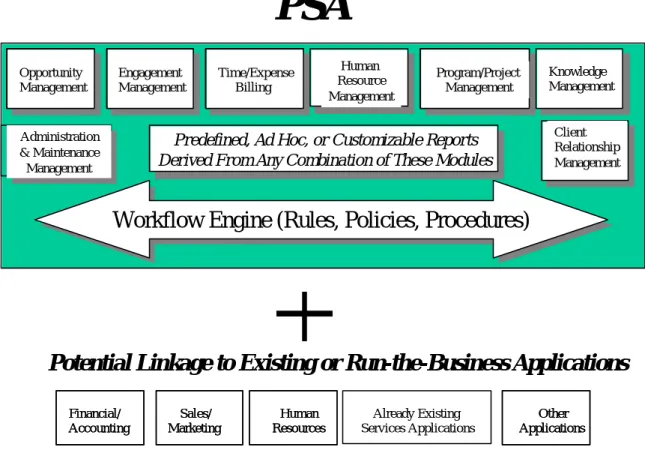
PSA solutions are often sold as integrated modules that enable users to pick-and-choose the modules they desire to run their respective businesses. Typically these modules include:
§ “Client” Relationship Management;
§ Opportunity Management;
§ Resource Management;
§ Engagement Management;
§ Project Management;
§ Time and Attendance Management;
§ Expense Management;
§ Collaboration;
§ Knowledge Management; and,
§ Administration and Maintenance Management.
Depending upon the PSA solutions supplier chosen, data from these modules has the potential to be used to create predefined, ad hoc, or customized reports that can be used by management to better forecast sales; to better understand human resource utilization; to gain a greater appreciation of the existing skill set within the company; to forecast growth or resource needs; to examine billing and account receivable information; or any of a number of other reporting activities.
Finally, PSA solutions can be linked to other existing business applications including existing financial and accounting systems, to human resource systems, or to other existing professional services applications that reside within the company’s information infrastructure.
All of these PSA modules, the reporting capability, and the linkage to existing business applications are illustrated in Figure 1 – The Professional Services Automation Product Structure.
Figure 1 – The Professional Services Automation Product Structure
Source: Aberdeen Group – October, 2001
WHICH ORGANIZATIONS ARE CANDIDATES FOR P URCHASING PSA SOFTWA RE Any organization that is interested in increasing organizational efficiency using an automated computer software approach should consider PSA software.
These organizations include:
n Professional Services Organizations (PSOs) – PSOs are organizations that provide
professional consulting services to their respective customers on a fee basis. These consulting services vary – ranging from legal to accounting, from Information Technology (IT) consulting services to business process reengineering services. Any organization that provides its clients with advice or human resources whose time can be billed on an hourly or on an engagement basis qualifies as a PSO.
Client Relationship Management Administration & Maintenance Management Administration & Maintenance Management
Workflow Engine (Rules, Policies, Procedures)
Workflow Engine (Rules, Policies, Procedures)
Financial/ Accounting Financial/ Accounting Human Resources Human Resources Sales/ Marketing Sales/ Marketing Already Existing Services Applications
Potential Linkage to Existing or Run-the-Business Applications
Predefined, Ad Hoc, or Customizable Reports Derived From Any Combination of These Modules
Predefined, Ad Hoc, or Customizable Reports Derived From Any Combination of These Modules
PSA
Other Applications Other Applications Opportunity Management Opportunity Management Time/Expense Billing Time/Expense Billing Engagement Management Engagement Management Human Resource Management Program/Project Management Program/Project Management Knowledge ManagementUsing this definition, dozens of distinctly different professional services organizations qualify as PSOs. These include:
n Accounting and Financial organizations;
n Architectural, Engineering, and Construction firms; n IT Advisory, Consulting, and Implementation firms; n Law and Advocacy firms;
n Management Consulting firms;
n Media/Publishing (Advertising, Media Services, Public Relations, etc.)
firms; and,
n Staffing organizations.
n Internal Professional Support Organizations (IPSOs) – Internal Professional Support
Organizations differ slightly from Professional Services Organizations in that internal professional services groups may or may not charge a fee for services rendered (known as a chargeback fee) to other internal within-the-enterprise organizations. ISGs that do charge a fee are usually run as a profit-and-loss (P&L) center with enterprise requirements to break-even or sometimes to show a profit for services rendered – these IPSOs are operated in a manner similar to PSOs and have requirements for software to accurately record time and expense data for accurate internal customer chargeback as well as other requirements related to workflow, knowledge management and collaboration. IPSOs that do not charge a fee for services rendered frequently use PSA software to track project status, human resource availability and utilization, and for other efficiency-related purposes. Typical IPSOs include:
n Information Technology/Information Systems administrative and
development organizations;
n Internal Media Services organizations; and, n Research and Development organizations.
n Independent Software Vendors (ISVs) – ISV’s may or may not require the time/expense
reporting systems, knowledge management, collaboration, or human resource management systems frequently offered as part of a PSA solution. But, many ISVs can benefit from one or more PSA modules in running everyday business operations. For instance, time and expense reporting can be particularly effective for ISVs that utilize external developers to help build software solutions. Time and expense management software can help ISVs track hours worked and ensure the timely payment of invoices to contractors, or salary to remote workers. Human Resource Management software can track the availability and skill sets of workers as new products are designed and implemented. For many ISVs the use of one or more PSA modules can yield swift improvements in operational efficiency resulting in real, bottom-line cost savings.
WHICH ORGANIZATIONS ARE CANDIDATES FOR PROVIDING PSA SOFTWA RE DESIGN, IMPLEMENTATI ON, AND MANAGEMENT SE R V I C E S
Most PSA solutions have been designed to use a common browser-based interface to back-end, on-site or off-site application/database servers. What this means is:
By using a browser approach, PSA software designers make it possible for users to send and receive data in a simple, “low -communications overhead” manner. A browser is a simple program that captures screen loads of data and sends that data to a back-end processors that run the lion’s share of the an application. Conversely, when data is sent to a user’s browser, that browser is primarily responsible for presenting the data on the end-user’s receiving device (such as personal computers, hand helds, palms, and other to-be-invented devices of the future). The key point is that browsers do not use a lot of communications or processing overhead. Ultimately, using a browser translates into an efficient means to communication data back-and-forth between servers and user devices Because the browser is primarily used for sending and receiving simple screen loads of data, the application and data processing responsibility falls to back-end servers (servers operated by an IT organization or by a hosted services supplier). Due to the emphasis on back-end processing with a simple browser front-end interface, most PSA solutions are ideally suited to be provided as hosted services by an Application Service Provider (ASP) or Value-added Reseller (VAR).
How do ASPs Fit Into This Picture?
An ASP is simply an organization that provides hosting services (and sometimes integration services) to end-user organizations that desire not to run the day-to-day computer operations of their respective businesses. ASPs provide network services, application/database hosting, and ongoing administrative management services to their clients. Examples of ASP organizations include: Aristasoft, Corio, Interliant, Jamcracker, Quest Cyber.Solutions, Storage Networks, and Upshot.com. For prospective PSA solution buyers, ASPs represent a valid channel of distribution for PSA services. For ASPs, PSA represents a new opportunity to extend a new set of integrated application solutions to professional services organizations and internal support groups.
How do VARs Fit Into This Picture?
A Value-added Reseller is an organization that resells hardware and software solutions, frequently offering unique system/software solutions or integration services that add-value beyond the purchase of packaged software for the reseller’s clients. For VARs, PSA solutions offer an opportunity to sell additional service modules to the reseller’s respective client base. For VAR customers, VARs may provide the integration services for a customer to install, run, and manage a PSA solution – or a VAR may actually choose to host a PSA solution for its customer (in effect becoming an ASP solution provider).
WHAT TO LOOK FOR WHE N EVALUATING PSA SUP PLIERS
There are seven criteria that prospective buyers of PSA solutions should consider as they choose a PSA solution and a PSA business partner (business partner being defined as the seller/licensor of a PSA solution; and/or the provider of PSA hosted services). These seven criteria are:
§ Human Interface
§ Ability to Integrate with Existing Business Systems
§ Flexibility – The Architecture and the Rules Engine
§ Pre-defined Templates, Ad-hoc, and Customized Reporting Capabilities
§ Access to Customization/Integration Services
§ Access to Application Solution Provider (ASP) Services
The Seven Criteria – A Closer Look
These criteria, and the decision-making drivers that influence them, are described in greater detail throughout the remainder of this section.
1. Breadth and Depth of Product Line
Depending on your organization’s requirements (as a potential buyer of a PSA solution), the
breadth of a PSA solution may or may not be an important buying criteria.
For instance, an internal IT department may have needs for a PSA solution that would help it manage it human resources more effectively and manage projects more effectively – but it may not have the need to track hourly time and expenses related to projects. In this case, product depth in the areas of project management and human resource management are paramount – other PSA modules may be secondary in importance or totally un-needed.
Conversely, some PSOs may recognize that running the administrative and IT portions of their businesses is not necessarily an effective use of billable professional services consulting time. Instead, these PSOs may chose to outsource their entire operation – thus making product breadth extremely important to the overall operation of the enterprise. In this case product breadth (and quite likely product depth) is extremely important to the PSO organization.
If breadth is important to your organization, pay particular attention to:
a) The level of integration between products. For instance, look for time/expense applications to be integrated with an “approval” workflow application. Look for human resource data to be integrated with project planning applications. Look for client relationship management to be integrated with project management software. And so on…
b) How data is captured throughout the product line. Time and attendance data, personnel data, project management data, client relationship data, and other data sources all combine to help create a composite picture of project status, or resource utilization, and other information that can be invaluable to executive managers as they seek to run their respective companies. Avoid PSA solutions suppliers that furnish “solutions” with isolated pockets of data that cannot be integrated with other applications or that can not be used to create On-line Analytical Processing (OLAP) reports.
Depth of a product line is, for many professional service providers an extremely important consideration. Consider that many professional services providers are not able or not willing
to abandon existing systems and processes – but are willing to substitute a deep, feature-rich package as a replacement for a weaker or tough-to-support home-grown package. If your company is considering purchasing only one or a few modules provided by a PSA supplier, look closely at the ability of your prospective solution supplier’s ability to help you integrate their software with your existing business applications and processes.
2. Human Interface
Human interface characteristics and the intuitive look-and-feel of a PSA offering is very important in influencing how individual contributors and managers will make use of the PSA product offering. For PSA to work really well, enterprises quite often have to ask their employees to input more data than those employees currently input into existing applications today. Employees will find that they will need to input time/attendance, skill-set, project, and other sorts of data such that PSA programs can generate the kind of insightful reports that line and executive management as well as customers need to see. One way to ensure employee resistance to the idea of inputting additional data is to provide those employees with cumbersome, non-intuitive, and graphically-confusing human interfaces to a new PSA product set.
To avoid employee resistance, look for PSA products that are designed around a Web portal concept – the kind of interface that we have all become accustomed to when searching the Web or using well designed applications. Yahoo-like screens that provide access to most used applications as well as provide news and other forms of information should be the design-point that prospective PSA buyers should seek. (Note: few PSA suppliers today offer such an approach – most use a “tab-and-tree” approach. Ask your prospective PSA supplier what plans they have to develop a portal-like interface).
According to Dave Hofferberth “Aberdeen Group suggests that the portal should be the first place employees go every day to keep abreast their pending work, organizational information, competition et. al”. So, from an evaluation perspective, potential buyers of PSA software should pay close attention to how their chosen PSA solution looks from a graphical perspective. It should be pleasing to the eye, well-organized, and the kind of place that professionals will willing gravitate toward to get important information about their schedules, their work, their companies, and the competitive environment that surrounds them.
3. Ability to Integrate with Existing Business Systems
For the past several years professional service suppliers have been buying “packaged” products to streamline enterprise accounting, human resource, and sales/distribution systems. These “Enterprise Resource Planning” applications have helped many professional services suppliers to improve overall company efficiency while also helping to reduce Sales, General and Administrative (SG&A) costs.
PSA software has the same cumulative effect – it streamlines business processes and integrates applications – leading to reduced costs for SG&A. But, PSA software also has two interesting side effects: 1) it reduces the administrative overload on professionals (for instance, professionals will no longer need to track where expense reports or project approvals are in the approval cycle; most PSA software provides such information) thus enabling professional to produce more billing time; and, 2) PSA software enables line and executive managers to gather important operational and forecasting data, providing managers with more and in-greater-detail information than ever before (which can be used to make wiser – or at least more informed -- business decisions).
In order to “get-the-most” out of a PSA solution, it is likely that PSA applications will need to be linked to existing ERP systems (for instance, PSA time and attendance systems should be linked to existing accounts receivable packages in order to generate customer invoices). If this type of integration is important to your company, examining the ability of your PSA supplier to provide technical resources to perform PSA-to-ERP integration (or at least advise your company’s technical staff on how to accomplish such integration should also be important). Therefore, pay particular attention to the number of professional services personnel your PSA supplier has at its disposal as well as the experience level with your particular brand of ERP software that your PSA supplier can offer.
4. Flexibility – The Architecture and the Rules Engine
Most of today’s PSA packages have been designed using various elements of Microsoft Windows and distributed networking architecture. These packages make use of “objects” that allow for easier application integration, great design flexibility (as objects can be easily combined and integrated to create the desired application result), and for object reusability. Some (but few) PSA products have been designed using application object that run on Sun-oriented architectures (Solaris/SPARC). Finally some PSA products have been designed using Java object components that allow for applications to be run across multiple, different server/operating system environments.
Chances are that your company already has a bias on which operating environments and what application development environments it wishes to embrace. Your PSA choice should be consistent with your company’s existing information infrastructure.
But, also consider this – application design and integration is only one piece of the PSA design puzzle – PSA buyers should also examine the business and workflow rules engine that compliments the object-oriented design of a particular PSA solution. Questions that prospective PSA buyers should ask themselves include: 1) does the PSA rules engine allow me to adapt the PSA product to my company’s way of doing business?; 2) Can the rules engine be easily modified to allow my company to implement new processes?; and 3) Is this product flexible enough to meet my current needs and yet be easily adapted to my needs in the future?
Most of today’s PSA products are based on an object model of design – but look for products that are not and consider avoiding such products if flexibility is a major decision-making criteria for your product.
5. Pre-defined Templates, Ad-hoc, and Customized Reporting Capabilities
Today, some professional services firms manually search through databases and then manually calculate and tabulate data – resulting in wasted administrator’s time as well as risking introducing errors into reports due to potential human errors. Well designed PSA products can automatically search through data that has been captured by diverse applications and automatically generate reports for individual contributors, line managers, and run-the-business executive managers – thus eliminating the need to manually build reporting documents.
Further, because PSA programs capture a lot of useful accounting and performance data, PSA buyers realize a huge (but sometimes intangible) payback by using automated reports to track aspects of their businesses that they are currently not tracking efficiently. And any improvements in an enterprise’s efficiency serves to help lower SG&A costs – costs that are subtracted directly from a company’s bottom-line cost of doing business (thus directly contributing to profitability). The potential to improve an enterprise’s operational efficiency by more effectively using data at the company’s disposal is why prospective buyers of PSA suites
Level 1 Level 1 Level 2 Level 2 Level 3 Level 3 Level 4 Level 4 Level 7
Level 7 Time Time Basic Basic User User Project Project User User Project Project Administration Administration Resource Resource Administration Administration (Project) (Project) Example: (Client) Example: (Client) (Charter) (Charter) (Phase) (Phase) (Activity) (Activity) (Occurrence) (Occurrence) (Defined Service) (Defined Service) Level 5 Level 5 Level 6 Level 6
should look closely at the data capture, cross-application data sharing, and data “drill-down” capabilities of any PSA package they are considering using.
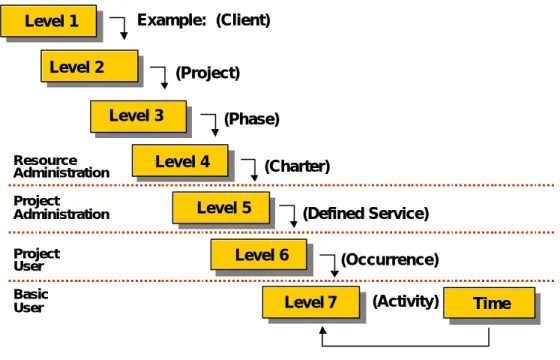
Prospective PSA buyers should look for PSA software that enables them to look at multiple facets of their business operations. The following model (Figure 2) is “what’s possible” in terms of creating reports using a powerful PSA suite with a solid decision support/query reporting capability:
Figure 2 – Data Drill-down to Seven Levels
Source: Aberdeen Group – October, 2001
When evaluating PSA suites, prospective buyers should ask themselves questions like:
a) Can time/expense/resource utilization/program management and other data be mixed- and-matched to create ad hoc reports for the management team?
b) Does the PSA supplier provide any “industry-specific” templates that would help a law firm, an accountancy, or an IT organization gain new insights into the efficiency of their respective organizations?
c) Does the PSA supplier provide easy-to-use “decision support” tools that make it possible for non-technical managers (not programmers or highly-skilled administrators) create their own custom reports?
Remember, all PSA applications capture data. A good PSA application suite will feature well integrated applications that allow for application capture and analysis across the entire product offering.
6. Access to Customization/Integration Services
Most professional services organizations, internal professional support organizations, and R&D organizations have their own desired flow of work, and usually have already established accounts receivable/payable and other business systems to which they must supply data.
Prospective PSA buyers who wish to tailor their PSA programs to match internal workflow and rules should not only examine how flexible a PSA suite is, but also:
a) Whether their PSA suite provider offers customization services that allow a PSA solution to be tailored to meet the existing business workflow conventions of the prospective buyer; as well as
b) Whether the PSA suite supplier offers business application integration services that enable the PSA suite to be integrated with the prospective buyer’s back-end run-the-business applications such as accounting, human resources, and sales.
Dave Hofferberth observes that “PSA solutions have become more generic in terms of overall functionality, the extensibility of the solution may provide the services organizations with a competitive advantage. Aberdeen's research has shown that very few PSA solutions have the extensibility to easily integrate with existing legacy or point solutions”. He suggest that prospective PSA buyers pay close attention to integration- and extensibility-related considerations when choosing a vendor for their PSA software portfolio.
7. Long-term Viability
There are over thirty vendors that currently offer PSA product suites. Mr. Hofferberth observes that 2002 will be a year of consolidation as well as some business failures for the smaller or less well-funded PSA suppliers. He therefore recommends that PSA buyers pay close attention to the financial well-being of their PSA supplier.
8. Access to Application Solution Provider (ASP) Services
Many professional services organizations do not have the time nor expertise needed to deploy PSA solutions, nor the staff needed to perform ongoing maintenance for PSA products. This is where Application Solution Providers come into the picture. For those professional services groups that do not wish to design, deploy, maintain, and manage a PSA solution suite, many PSA suppliers as well as ASPs offer hosting and integration services.
For prospective PSA suite or module buyers, buying ASP or hosted-by-the-PSA-vendor solutions may enable the buyer to realize the best of both worlds – gains in organizational efficiency without the need to install and manage PSA applications and systems.
With respect to PSA suppliers, Mr. Hofferberth states that “if using an ASP model, it is critical to make sure that you won the data, and also that if at a later time you decide to move the solution in house, that you can without extreme expenses”. In other words, be sure that you have access to the corporate data and any customization software that may have been created by your ASP solutions supplier – just in case any business failure should occur of should your circumstance change and you want to bring your PSA solution in –house.
9. Cost Justification
One point to consider is that some business case analysis reveals that the costs of ASP or vendor-hosted solutions versus the increased revenue stream (from better individual contributor utilization) as well as reduced administrative overhead actually enables some PSA programs to pay for themselves starting on day one. The logic of this argument looks something like this (see Figure 3):
Figure 3 – PSA Cost Justification (Time and Expense Module Only)
400 Individual Contributors
-- Use of time/expense/approval system
-- Billable hours saved per month through reduced administrative tasking and automated approvals
(400 ICs X 1hr/month x$75/hr.= $30,000)
-- Typical cost for PSA time/expense/approval model hosted by PSA supplier or ASP
(400 ICs x $20/head = $8000) -- Cost difference (+$22,000)
Although the above argues strongly in favor of using a PSA module and having it hosted by an ASP or PSA solution provider, prospective PSA solution buyers need to recognize that this model is an over-simplification of savings to be had using PSA products. Remember, for PSA programs to be really effective they may need to be modified and adapted to a particular business workflow model that exists within the buyer’s information infrastructure, or PSA programs may require additional integration work to be performed in order to unite captured PSA data with existing business applications and business systems.
Still, by streamlining workflow, and by enabling data that has been captured to be manipulated and analyzed in new and different ways, PSA products tend to pay for themselves in rapid fashion.
Finally, Dave Hofferberth advises that with respect to systems platforms that run PSA solutions, prospective PSA buyers should consider that “the platform decision is critical for long-term integration with existing applications and processes. Organization should choose a platform that they are most comfortable with”. Note that almost all leading contenders in the PSA marketplace offer software solutions that run on Microsoft’s Windows program, while others offer Unix versions.
MEASURING PAYBACK
All professional services entities – whether they be dedicated managem ent/IT consultancies, law firms, internal IT departments, architectural/-engineering firms, media publishing, research and development, or government organizations, or internal support groups or research and development organizations – base their businesses on providing or selling professional expertise. However, measuring payback on an investment in PSA software differs by the type of business entity that purchases a PSA solution -- take a closer look at two types of different services organization and you’ll note that the payback results are somewhat different:
§ For Professional Services organizations, “profit” is derived by subtracting the cost of doing business (salary, travel and expense, sales/general/administrative support, benefits) from the amount of billable time accrued on strategic or tactical consulting/development projects.
Any activity that reduces non-billable time or that reduces sales, general, and administrative (SG&A) costs increases the profitability of a PSO.
§ For Internal Professional Support Organizations, efficiencies gained using PSA software can result in faster time to market for internally developed products, or faster response time to customer needs, or the need to hire fewer workers (because existing workers are made more efficient).
But efficiency gains due to improved workflow are only one way to measure payback. Much harder to quantify is the fact that organizations can use PSA data to create reports that measure the health of an organization, its resource utilization, or dozens of other aspects of the professional services business. There is certainly payback in more efficient use of resources – but there is also hidden payback in the ability to better direct the utilization of resources within a company, or the ability to better satisfy a customer through better project management, or the ability to share information amongst employees such that employees no longer have to reinvent-the-wheel every time they take on a new engagement. Integrated reporting and collaboration tools may be the “hidden gems” in the use of PSA solution suites.
CLOSING STATEMENT
When evaluating PSA solutions look closely at the seven buying criteria mentioned in this report. All, or only a few may apply to your business needs – but all represent ways to get the biggest payback out of an investment in PSA solutions modules or suites.
Also, be aware that much of the benefit of PSA is manifest in the ability to streamline business operations, enabling PSOs to get more billable time out of existing professionals or enabling internal IPSOs to utilize resources more efficiently. But don’t forget that PSA software captures a lot of data pertinent to customers, operations, and individuals – and the better PSA packages allow organizations to “drill-down” into that data in order to make more informed business decisions. Efficiency improvement are one important element of PSA; but many organizations will likely find that the ability to do decision support and analytics is just as important.