219322
219322
Electronic Commerce
Engineering
Lecture 3
Laudon & Traver: Chapter 3 The Internet and World Wide Web: E-commerce Infrastructure
Web: E commerce Infrastructure
Papazoglou & Ribbers: Chapter 6 e-Business Technological Infrastructure
Copyright © 2007 Pearson Education, Inc. Slide 3-1
The Internet: Technology Background
Internet: An interconnected network of
th
d
f
t
k
d
illi
f
thousands of networks and millions of
computers, linking businesses, educational
i
tit ti
t
i
d
institutions, government agencies, and
individuals
World Wide Web (Web): One of the Internet’s
most popular services, providing access to
over 8 billion Web pages
The Evolution of the Internet 1961—The
Present
Present
History of Internet can be segmented into 3
h
phases:
Innovation Phase—fundamental building
bl
k
t
li
d
d
li
d
blocks conceptualized and realized
Institutionalization Phase—providing
f
di
d l
iti i
ti
f
I t
t
funding and legitimization for Internet
Commercialization Phase—private
ti
t k
d
d I t
t
corporations take over and expand Internet
backbone and services
Copyright © 2007 Pearson Education, Inc. Slide 3-4
The Internet: Key Technology Concepts
Federal Networking Council definition of
I t
t hi hli ht th
i
t
t
t
Internet highlights three important concepts
that are the basis for understanding the
I t
t
Internet:
Packet switching
TCP/IP communications protocol
Client/server computing
Client/server computing
Packet Switching
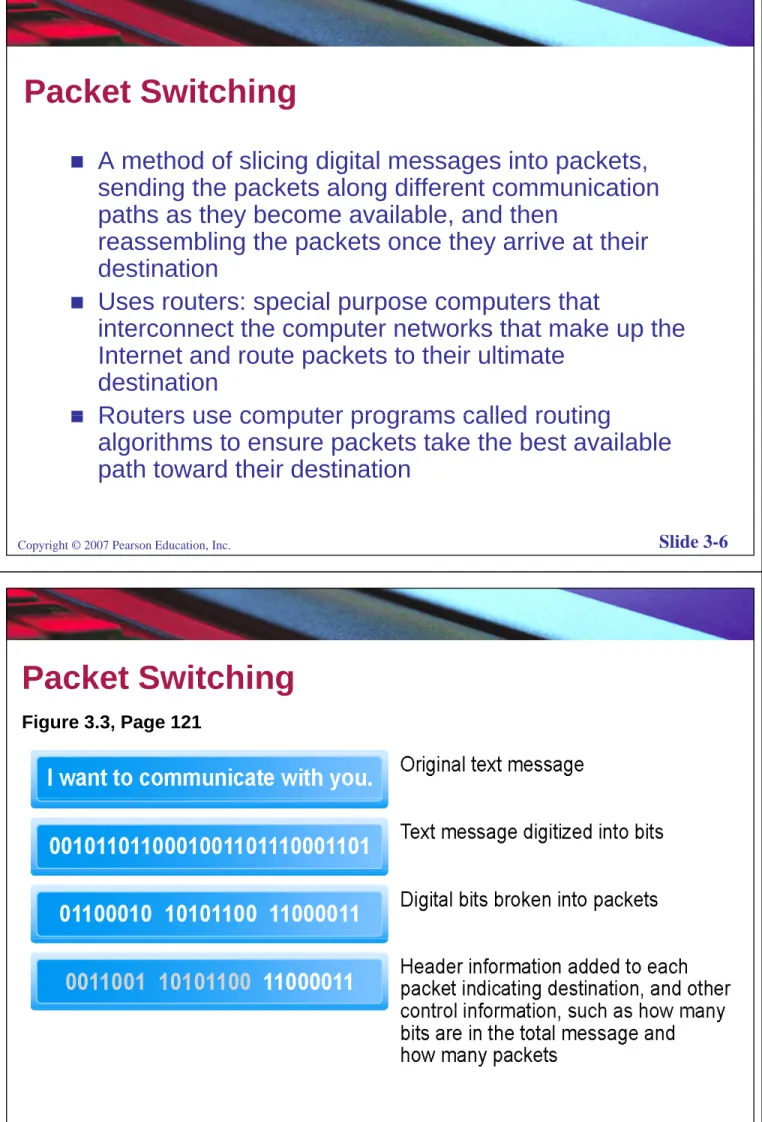
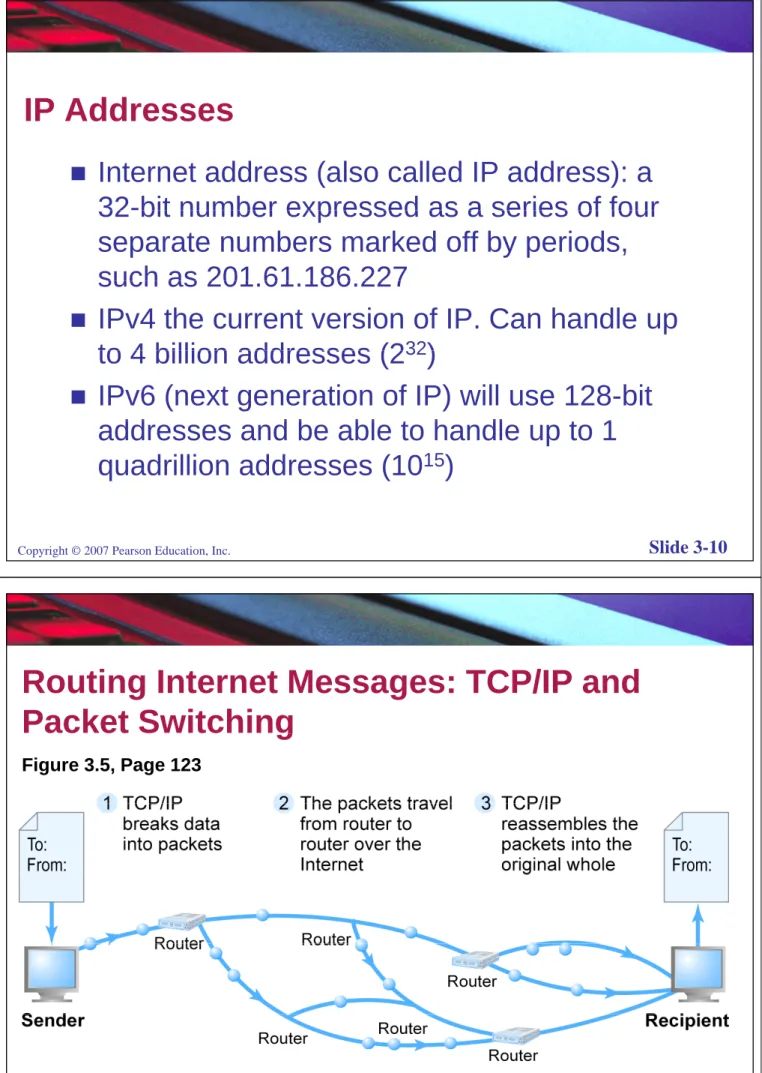
A method of slicing digital messages into packets, sending the packets along different communication paths as they become available, and then
reassembling the packets once they arrive at their destination
destination
Uses routers: special purpose computers that
interconnect the computer networks that make up the Internet and route packets to their ultimate
destination
Routers use computer programs called routing
Routers use computer programs called routing
algorithms to ensure packets take the best available path toward their destination
Copyright © 2007 Pearson Education, Inc. Slide 3-6
Packet Switching
Figure 3.3, Page 121 Figure 3.3, Page 121
TCP/IP (Transmission Control Protocol/
Internet Protocol))
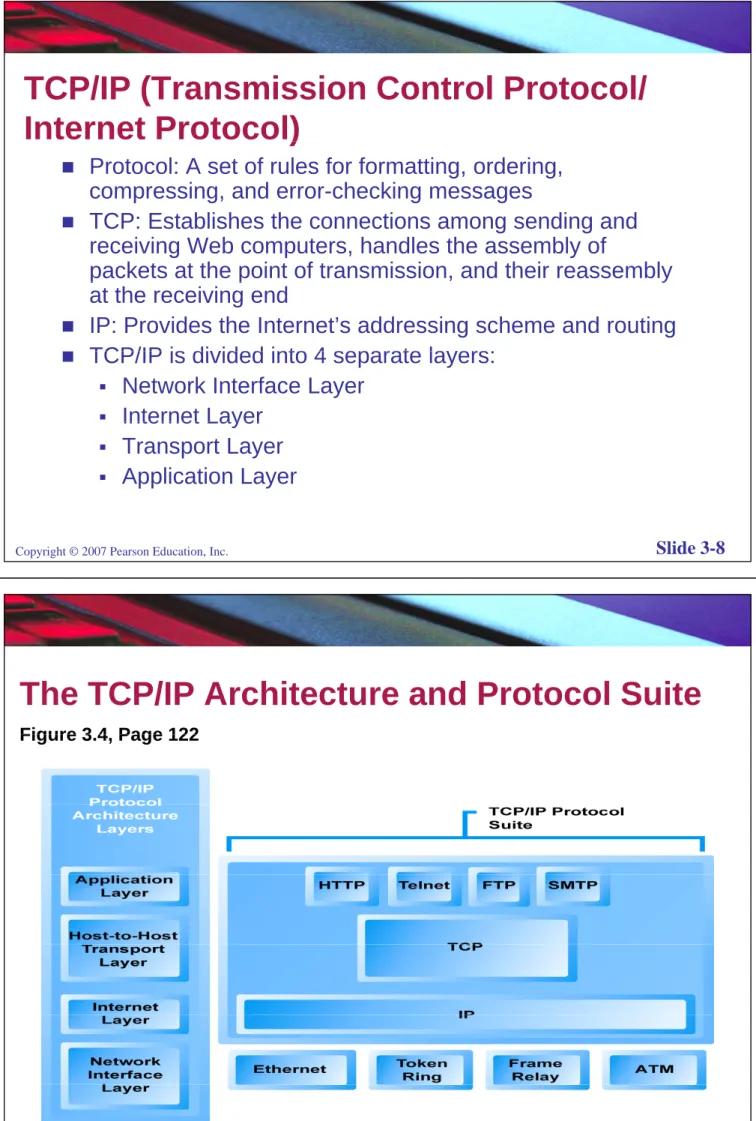
Protocol: A set of rules for formatting, ordering, compressing, and error-checking messages
TCP: Establishes the connections among sending and receiving Web computers, handles the assembly of
packets at the point of transmission, and their reassembly
p p y
at the receiving end
IP: Provides the Internet’s addressing scheme and routing
TCP/IP is divided into 4 separate layers:
TCP/IP is divided into 4 separate layers:
Network Interface Layer
Internet LayerInternet Layer
Transport Layer
Application Layer
Copyright © 2007 Pearson Education, Inc. Slide 3-8
The TCP/IP Architecture and Protocol Suite
Figure 3 4 Page 122 Figure 3.4, Page 122
IP Addresses
Internet address (also called IP address): a
32-bit number expressed as a series of four
32 bit number expressed as a series of four
separate numbers marked off by periods,
such as 201 61 186 227
such as 201.61.186.227
IPv4 the current version of IP. Can handle up
to 4 billion addresses (2
32)
to 4 billion addresses (2
32)
IPv6 (next generation of IP) will use 128-bit
dd
d b
bl t h
dl
t 1
addresses and be able to handle up to 1
quadrillion addresses (10
15)
Copyright © 2007 Pearson Education, Inc. Slide 3-10
Routing Internet Messages: TCP/IP and
Packet Switching
g
Figure 3.5, Page 123
Domain Names, DNS, and URLs
Domain name: IP address (158.108.216.5)
d i
t
l l
(
k
th)
expressed in natural language (www.ku.ac.th)
Domain name system (DNS): allows numeric
IP addresses to be expressed in natural
language
Uniform resource locator (URL): addresses
used by Web browsers to identify location of
y
y
content on the Web
Copyright © 2007 Pearson Education, Inc. Slide 3-12
Client/Server Computing
Model of computing in which very powerful
personal computers (clients) are connected in
personal computers (clients) are connected in
a network with one or more server computers
that perform common functions for the clients,
a pe o
co
o
u c o s o
e c e s,
such as storing files, software applications,
etc.
Basic Infrastructure:
Basic Infrastructure:
Client/Servers
Distributed computing is the classical paradigm in support of e-Business processes & applications.
Business processes & applications.
A form of distributed processing is client/server computing: it handles the need for both centralized data control and
widespread data accessibility widespread data accessibility.
Client/server is an architecture that involves client processes (service consumers) requesting service from server processes (service providers).
Client/server computing does not emphasize hardware distinctions; it rather focuses on the applications themselves distinctions; it rather focuses on the applications themselves. The client/server model provides a typical way to interconnect
programs that are distributed across different locations.
www.wiley.com/go/ebusiness
14
There are different ways in which processing tasks can be There are different ways in which processing tasks can be
divided between the client and the server. They range from:
Thin clients, with heavy servers
servers that only contain common data with all the processing executed at the level of the client.
Solutions chosen depend on specific application requirements,Solutions chosen depend on specific application requirements, e.g., local vs. central control, # of users, processing needs etc.
Client
Client ClientClient
Server Server request request r r Client
ClientClient ClientClient
ClientClient
Client ClientClientClientClient
Server Server request request request r r Server Server Server Server respo
nse response
Server
Server
Server
Server
respo
nse response
Service
Request #1Service Request #2Service Request #1 Request #2Service
Client/Server architecture
www.wiley.com/go/ebusiness
15
Features of Client/Server
Features of Client/Server
Architecture
The basic features of the client/server model are:
Clients and servers are functional modules with well defined Clients and servers are functional modules with well defined
interfaces. The functions of a client and a server can be implemented by a set of software modules, hardware components or any combination thereof
components, or any combination thereof.
Each client/server relationship is established between two functional modules, where one module, the client, initiates service requests and the other module the server responds service requests and the other module, the server, responds to these requests.
Information exchange between clients and servers, i.e., requests and responses are strictly through messages requests and responses, are strictly through messages. Message exchange is typically interactive.
Clients and servers may run on separate dedicated
hi t d th h t k
www.wiley.com/go/ebusiness
16
machines connected through a network.
Two tier Client/Server Architecture
Two-tier Client/Server Architecture
Client/server introduces a two-tier client/server architecture.
The tiers in a client/server application refer to the # of elements into which the application is partitioned, not the # of platforms where the executables are deployed.
The tiers into which an application is partitioned is known as the logical partitioning of an application as opposed to physical partitioning (# of platforms where the application executables are deployed).
Web & Application clients clients Internet / Private Network Database-server www.wiley.com/go/ebusiness 17 Client-Tier Server-Tier
Drawbacks of the Two tier
Drawbacks of the Two-tier
Client/Server Architecture
The client in such a two-tier system is known as “fat client” while the server is commonly referred to as the client while the server is commonly referred to as the database server. Conversations occur at the level of the server’s database language.
The two-tier architecture has several drawbacks, which are especially problematic for large and distributed applications:
distributed applications:
Scalability problems
Poor business logic sharing
Client reliance on the database structure Limited interoperability
High-maintenance costs
www.wiley.com/go/ebusiness
18
High maintenance costs
Three-tier Architecture
The three-tier architecture overcomes the limitations of the two tier architecture A middle tier is introduced of the two-tier architecture. A middle tier is introduced between the user system interface client environment and the database management server environment. g
The application is partitioned into 3 logical tiers:
– presentation tier: responsible for the graphical user interface (GUI) layer usually in the form of a web-browser
– processing tier (or middle-tier): contains the business logic & is responsible for the processing associated applications
supported.
– data tier: holds the permanent data associated with the applications supported e.g., modern and legacy application pp pp g g y pp databases, and transaction management applications. It interprets requests from a client and routes them to a suitable data resource.
www.wiley.com/go/ebusiness
Th i ti bl d l t i l t th
The processing tier enables developers to isolate the main part of an application that can change over time: data & relationships inherent in the data
data & relationships inherent in the data.
This tier has the effect of logically and physically decoupling business logic from the presentation and database functions. Here we can find business objects that correspond to entities in the business domain, e g sales orders in oices prod cts
e.g., sales orders, invoices, products ..
There are a variety of ways of implementing this middle tier such as transaction processing monitors middle tier, such as transaction processing monitors, message servers, or application servers.
www.wiley.com/go/ebusiness
20
Web & Application clients
Databases Legacy systems
Internet / Private Network
Presentation-tier Processing-tier Data-tier
Three-tier client/server architecture.
www.wiley.com/go/ebusiness
Other Internet Protocols
HTTP: Used to transfer Web pages
SMTP, POP, and IMAP: Used to send and
receive e-mail
FTP: Permits users to transfer files from
server to client and vice versa
Telnet: Program that enables a client to
emulate a mainframe computer terminal
SSL: Protocol that provides secure
communications between client and server
Copyright © 2007 Pearson Education, Inc. Slide 3-23
Utility Programs
Ping: Utility program that allows you to check
ti
b t
li
t
d
connection between client and server
Tracert: Utility program that allows you to
follow part of a message sent from a client to
a remote computer
Pathping: Utility program that combines
functionality of Ping and Tracert
y
g
The Internet Today
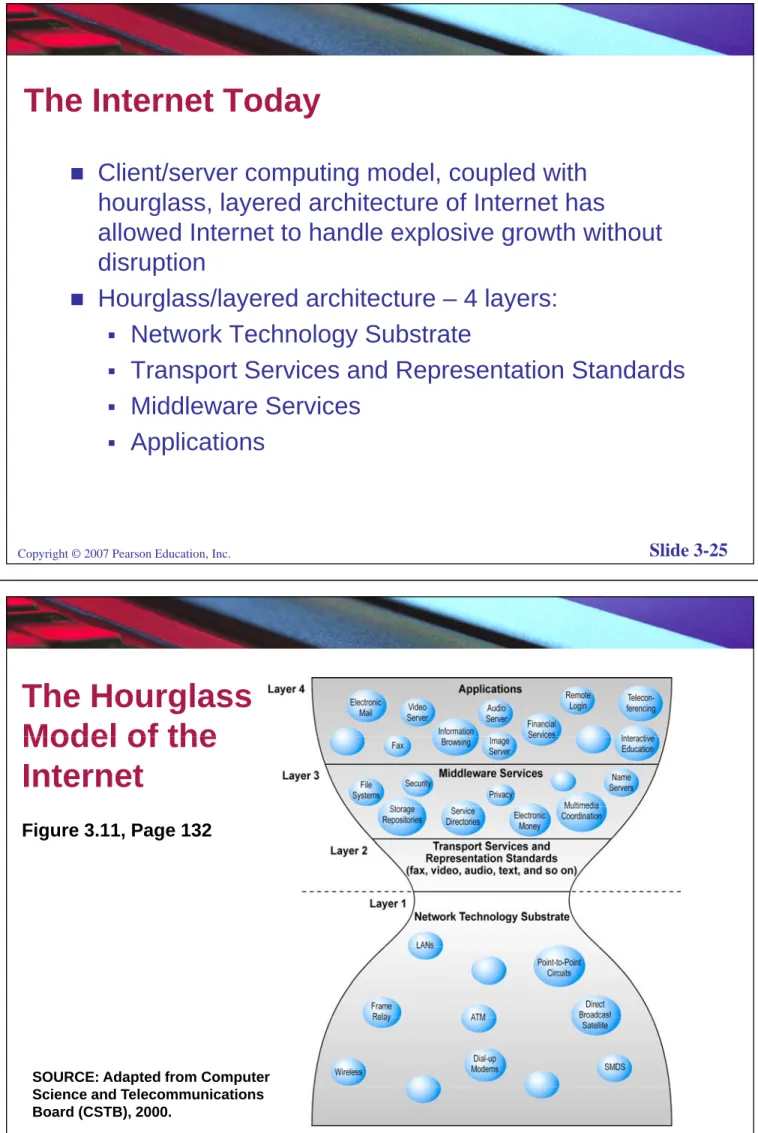
Client/server computing model, coupled with hourglass, layered architecture of Internet has g , y
allowed Internet to handle explosive growth without disruption
Hourglass/layered architecture – 4 layers:
Network Technology Substrate
Transport Services and Representation Standards
Middleware Services
Applications
Copyright © 2007 Pearson Education, Inc. Slide 3-25
The Hourglass
Model of the
Model of the
Internet
Figure 3.11, Page 132
SOURCE: Adapted from Computer
Copyright © 2007 Pearson Education, Inc. Slide 3-26
Science and Telecommunications Board (CSTB), 2000.
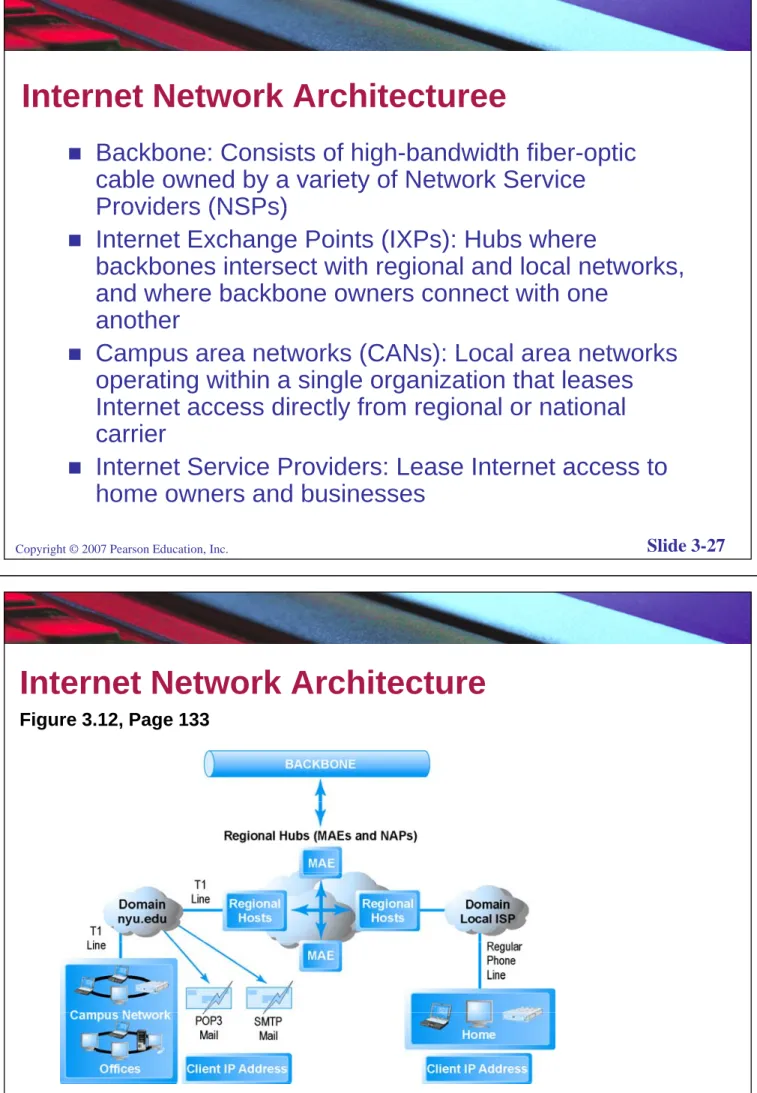
Internet Network Architecturee
Backbone: Consists of high-bandwidth fiber-optic cable owned by a variety of Network Service Providers (NSPs)
Providers (NSPs)
Internet Exchange Points (IXPs): Hubs where
backbones intersect with regional and local networks, g and where backbone owners connect with one
another
Campus area networks (CANs): Local area networks
Campus area networks (CANs): Local area networks operating within a single organization that leases Internet access directly from regional or national y g carrier
Internet Service Providers: Lease Internet access to home owners and businesses
Copyright © 2007 Pearson Education, Inc. Slide 3-27
home owners and businesses
Internet Network Architecture
Figure 3.12, Page 133
Internet Service Providers (ISPs)
Retail providers that deal with “last mile of
service”
service
Major national ISPs include AOL, MSN, and
AT&T WorldNet etc
AT&T WorldNet, etc.
Offer both narrowband (traditional telephone
d
ti
t 56 6 Kb
)
d
modem connection at 56.6 Kbps) and
broadband (service based on DSL, cable
d
T1
T3 t l
h
li
d
modem, T1 or T3 telephone lines, and
satellite)
Copyright © 2007 Pearson Education, Inc. Slide 3-29
Broadband Service Choices
Di it l S b
ib
Li
(DSL) T l
h
Digital Subscriber Line (DSL): Telephone
technology delivers high-speed access through
ordinary telephone lines
ordinary telephone lines
Cable modem: Cable television technology
piggybacks digital access to Internet on top of
piggybacks digital access to Internet on top of
analog video cable line
T1 and T3: International telephone standards
T1 and T3: International telephone standards
for digital communication that offer guaranteed
delivery rates
delivery rates
Satellite: high-speed downloads, but no upload
available
Copyright © 2007 Pearson Education, Inc. Slide 3-30
Intranets and Extranets
Intranet: TCP/IP network located within a
single organization for purposes of
single organization for purposes of
communication and information processing
Extranet: Formed when firms permit outsiders
Extranet: Formed when firms permit outsiders
to access their internal TCP/IP networks
Copyright © 2007 Pearson Education, Inc. Slide 3-31
Who Governs the Internet?
A number of different organizations that influence Internet and monitor its operations including:p g
Internet Architecture Board (IAB)
Internet Corporation for Assigned Names and p g
Numbers (ICANN)
Internet Engineering Steering Group (IESG) Internet Engineering Task Force (IETF) Internet Society (ISOC)y ( )
World Wide Web Consortium (W3C)
Insight on Society: Government
Regulation of the Internet
g
Class Discussion
Why should the government of France be permitted
Why should the government of France be permitted to censor the Web in France (or elsewhere)?
Does the Chinese government or the U S
Does the Chinese government, or the U.S.
government, have the right to censor content on the Web?
How is it possible for any government to “control” or censor the Web?
What would happen to e-commerce if the existing Web split into a different Web for each country?
Copyright © 2007 Pearson Education, Inc. Slide 3-33
Internet II: The Future Infrastructure
Internet II: The second era of the Internet that
is being built today by private corporations,
is being built today by private corporations,
universities, and government agencies
To appreciate benefits of Internet II you must
To appreciate benefits of Internet II, you must
understand limitations of the Internet’s current
infrastructure
infrastructure
Limitations of the Current Internet
Bandwidth limitations
Quality of service limitations
Quality of service limitations
Network architecture limitations
Language development limitations
Wired Internet limitations
Copyright © 2007 Pearson Education, Inc. Slide 3-35
The Internet2® Project
Internet2: Consortium of more than 200 universities, government agencies, and private businesses that are collaborating to find ways to make the Internet more efficient
Primary goals:
Primary goals:
Create a leading edge very-high speed network for national research communityy
Enable revolutionary Internet applications
Ensure the rapid transfer of new network services and applications to the broader Internet
community
Areas of Focus of Internet2
Advanced network infrastructure
New networking capabilities
g
p
Middleware
Advanced applications
Advanced applications
Copyright © 2007 Pearson Education, Inc. Slide 3-37
The Larger Internet II Technology
Environment: The First Mile and the Last Mile
GENI Initiative: Proposed by NSF to develop
f
ti
lit f
I t
t
new core functionality for Internet
Private initiatives in fiber optics and wireless
Internet services
Fiber Optics and the Bandwidth
Explosion in the First Mile
p
Fiber optics concerned with the “first mile” or
b
kb
I t
t
i
th t
b lk
backbone Internet services that carry bulk
traffic over long distances
Older transmission lines being replaced with
fiber-optic cable
Right now, much of fiber-optic cable laid in
United States is “dark”, but represents a vast
,
p
digital highway that can be utilized in the
future
Copyright © 2007 Pearson Education, Inc. Slide 3-39
Photonics Technologies
Photonics: Study of communicating with light waves
Technologies that will have impact on achieving
Internet II include
Dense Wavelength Division Multiplexing (DWDM)
Optical and fiber switches, and switching
components
Optical integrated circuits
Optical networks
Opt ca
et o s
Big Band: Next step in Internet access; will provide
bandwidth of 10 Gbps +
Copyright © 2007 Pearson Education, Inc. Slide 3-40
Th L
t Mil
M bil Wi
l
I t
t
The Last Mile: Mobile Wireless Internet
Access
Wireless Internet access concerned with the
“l
t
il ”
f
I t
t b
kb
t
’
“last mile”—from Internet backbone to user’s
computer, cell phone, PDA, etc.
Two different basic types of wireless Internet
access:
Telephone-based
Computer network-based
Computer network based
Copyright © 2007 Pearson Education, Inc. Slide 3-41
Telephone-based Wireless Internet Access
Diff
t t
d d
Different standards
Global System for Mobile Communications
(GSM)
d
i
il i E
(GSM): used primarily in Europe
Code Division Multiple Access (CDMA): used
i
il i U S
primarily in U.S.
Third generation (3G) cellular networks
Wireless Web protocols include:
Wireless Access Protocol (WAP)
iMode
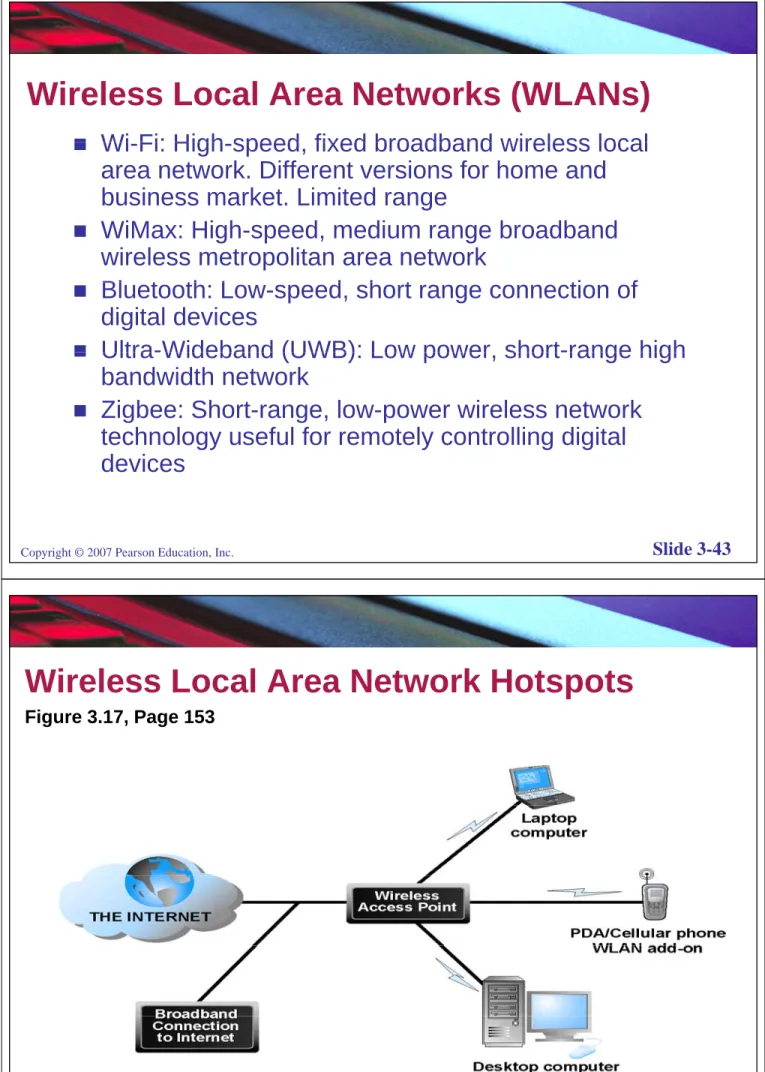
Wireless Local Area Networks (WLANs)
Wi Fi: High speed fixed broadband wireless local
Wi-Fi: High-speed, fixed broadband wireless local area network. Different versions for home and business market. Limited range
WiMax: High-speed, medium range broadband wireless metropolitan area network
Bl t th L d h t ti f
Bluetooth: Low-speed, short range connection of digital devices
Ultra-Wideband (UWB): Low power short-range high
Ultra-Wideband (UWB): Low power, short-range high bandwidth network
Zigbee: Short-range, low-power wireless network g g p technology useful for remotely controlling digital devices
Copyright © 2007 Pearson Education, Inc. Slide 3-43
Wireless Local Area Network Hotspots
Figure 3.17, Page 153
Benefits of Internet II Technologies
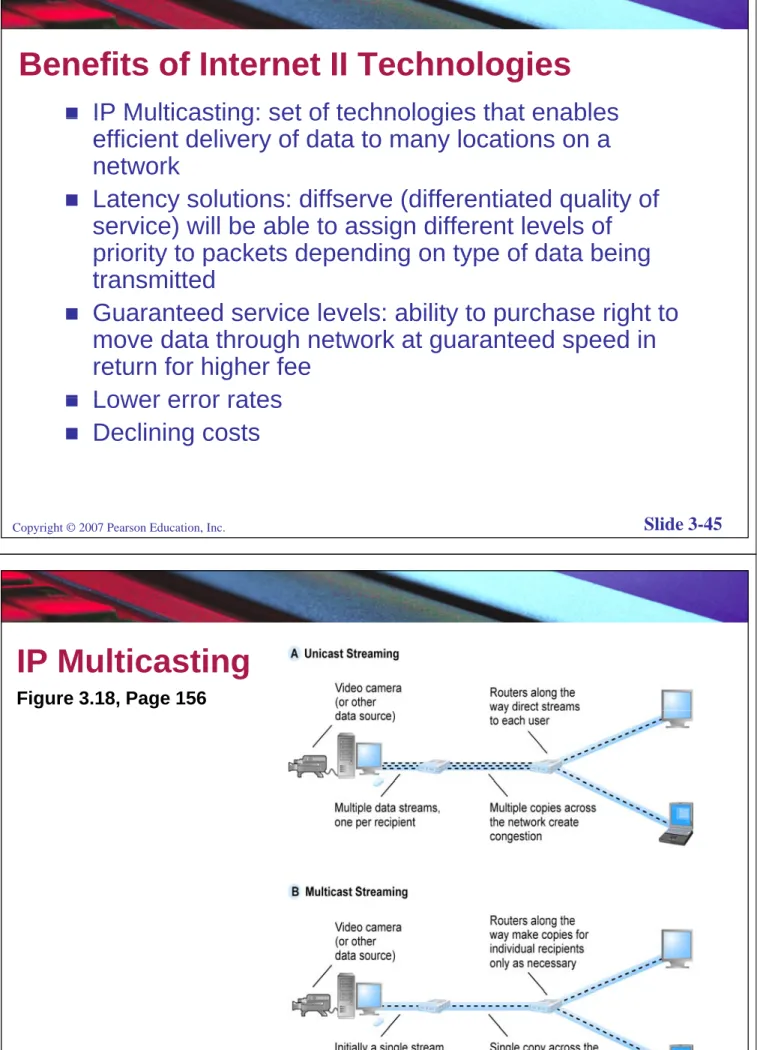
IP Multicasting: set of technologies that enables
IP Multicasting: set of technologies that enables efficient delivery of data to many locations on a network
Latency solutions: diffserve (differentiated quality of service) will be able to assign different levels of priority to packets depending on type of data being priority to packets depending on type of data being transmitted
Guaranteed service levels: ability to purchase right to move data through network at guaranteed speed in return for higher fee
Lower error rates
Lower error rates
Declining costs
Copyright © 2007 Pearson Education, Inc. Slide 3-45
IP Multicasting
Figure 3.18, Page 156
SOURCE: Adapted from Internet2 edu
Copyright © 2007 Pearson Education, Inc. Slide 3-46
SOURCE: Adapted from Internet2.edu, 2000; Cisco Systems, 2002.
Development of the Web
1989 1991 W b i t d b Ti B L t
1989–1991: Web invented by Tim Berners-Lee at European Particle Physics Laboratory (CERN)
1993: Marc Andreesen and others at NCSA create
1993: Marc Andreesen and others at NCSA create Mosaic, a Web browser with a graphical user
interface that could run on Windows, Macintosh, or
U i t
Unix computer
1994: Andreessen and Jim Clark found Netscape, and create first commercial Web browser Netscape and create first commercial Web browser, Netscape Navigator
August 1995: Microsoft introduces its version of Web g browser, Internet Explorer
Copyright © 2007 Pearson Education, Inc. Slide 3-47
Hypertext
A way of formatting pages with embedded
links that connect documents to one another
links that connect documents to one another,
and that also link pages to other objects such
as sound video or animation files
as sound, video, or animation files
Uses Hypertext Transfer Protocol (HTTP) and
URLs to locate resources on the Web
URLs to locate resources on the Web
Markup Languages
Generalized Markup Languages (GMLs) include:
Generalized Markup Languages (GMLs) include:
Standard Generalized Markup Language (SGML)—an
early GML early GML
Hypertext Markup Language (HTML)—a GML that is
relatively easy to use; provides fixed set of markup “tags” relatively easy to use; provides fixed set of markup tags used to format a Web page
eXtensible Markup Language (XML)—new markup p g g ( ) p
language specification developed by W3C that is designed to describe data and information; tags used are defined by user
Copyright © 2007 Pearson Education, Inc. Slide 3-49
Web Servers and Web Clients
Web server software: Enables a computer to
Web server software: Enables a computer to
deliver Web pages written in HTML or XML to
clients on network that request this service by
clients on network that request this service by
sending an HTTP request
Basic capabilities: Security services FTP
Basic capabilities: Security services, FTP,
search engine, data capture
Term Web server also used to refer to
Term Web server also used to refer to
physical computer that runs Web server
software
Web client: Any computing device attached to
the Internet that is capable of making HTTP
Copyright © 2007 Pearson Education, Inc. Slide 3-50
p
g
Web Browsers
Primary purpose to display Web pages
Internet Explorer (88%) and Firefox (9%)
Internet Explorer (88%) and Firefox (9%)
dominate the market
Other browsers include:
Other browsers include:
Netscape
Opera
Safari (for Apple Macintosh)
(
pp
)
Copyright © 2007 Pearson Education, Inc. Slide 3-51
The Internet and Web: Features
Internet and Web features on which the foundations of e-commerce are built include:
Instant messaging Search engines
Intelligent agents (bots) Online forums and chat Streaming media
Cookies
One of the most used applications of the Internet
Uses a series of protocols to enable messages
t i i t t i d id li t t b
containing text, images, sound, video clips, etc., to be transferred from one Internet user to another
Also allows attachments (files attached to the e mail
Also allows attachments (files attached to the e-mail message)
Can be an effective marketing tool
Can be an effective marketing tool
Spam: unsolicited e-mail. A worsening problem
Copyright © 2007 Pearson Education, Inc. Slide 3-53
Instant Messaging
One of fastest growing forms of online human
communication
communication
Displays words typed on a computer almost
instantly and recipients can then respond
instantly, and recipients can then respond
immediately in the same way
Diff
t
i t
t
ff
d b AOL
Different proprietary systems offered by AOL,
MSN, Yahoo, and Google
Search Engines
Identifies Web pages that appear to match
keywords (queries) entered by a user and
keywords (queries) entered by a user, and
provides list of best matches based on one or
more of a variety of techniques
more of a variety of techniques
No longer simply search engines, but also
shopping tools and advertising vehicles
shopping tools and advertising vehicles
(search engine marketing)
Copyright © 2007 Pearson Education, Inc. Slide 3-55
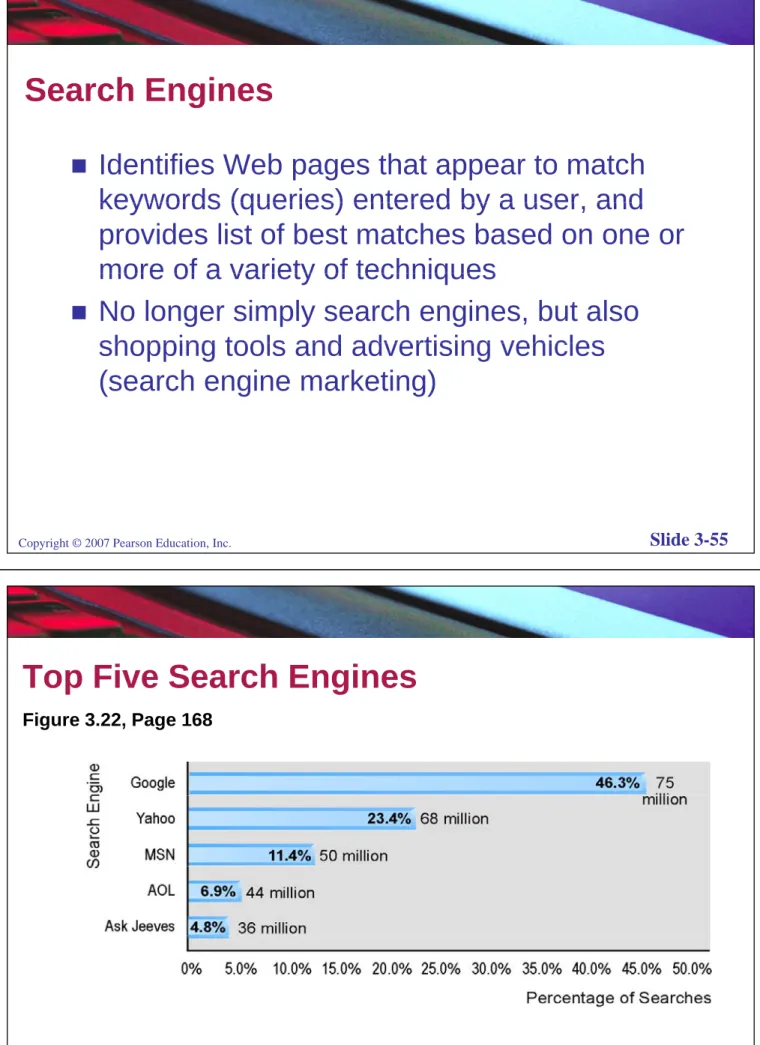
Top Five Search Engines
Figure 3.22, Page 168 Figure 3.22, Page 168
SOURCE: Based on data from Sullivan, 2006; Pew Internet & American Life Project, 2005c;
Copyright © 2007 Pearson Education, Inc. Slide 3-56
SOURCE: Based on data from Sullivan, 2006; Pew Internet & American Life Project, 2005c; comScore Networks, 2006.
How Google Works
Fi 3 23 P 169 Figure 3.23, Page 169
Copyright © 2007 Pearson Education, Inc. Slide 3-57
Intelligent Agents (Bots)
Software programs that gather and/or filter
information on a specific topic and then
information on a specific topic and then
provide a list of results
Types include search bot shopping bot
Types include search bot, shopping bot
(mysimon.com, nextag.com, orbitz.com,
shopper com shopzilla com) Web monitoring
shopper.com, shopzilla.com), Web monitoring
bot (websitewatcher.com, timely.com), news
bot (webclipping com sportspider net)
bot (webclipping.com, sportspider.net),
chatterbot (Anna, Ask Vic)
Insight on Technology: Chatterbots Get a
Job: Virtual Reps
p
Class Discussion
What are chatterbots? Why would any firm
What are chatterbots? Why would any firm
use them?
Have you experienced a chatterbot on the
Have you experienced a chatterbot on the
Web or telephone? Was this a useful or
helpful experience?
helpful experience?
What are vReps? Why would a business use
vReps?
vReps?
Verity is now owned by Autonomy
Corporation (autonomy com)
Copyright © 2007 Pearson Education, Inc. Slide 3-59
Corporation (autonomy.com)
Other Internet and Web Features Relevant to
E-commerce
Online forums and chat: Enables users to
communicate with each other via computer Online communicate with each other via computer. Online chat occurs in real time (simultaneously); used in e-commerce to help develop community
Streaming media: enables music, video and other large files to be sent to users in chunks so that when received and played file comes through
received and played, file comes through uninterrupted
Cookies: small text file stored on user’s computer with information about the user that can be accessed by Web site the next time user returns to the site
Internet II and E-commerce: Emerging
Features and Services
Weblogs (blogs): Personal Web page that
typically contains a series of chronological
typically contains a series of chronological
entries by its author, and links to related Web
pages
pages
Really Simple Syndication (RSS): Program
that allows users to have digital content
that allows users to have digital content
automatically sent to them; typically used for
news
Podcasting: Audio presentation stored as an
audio file and available for download from
Copyright © 2007 Pearson Education, Inc. Slide 3-61
Web
Internet II and E-commerce: Emerging
Features and Services (cont’d)
(
)
Wiki: Web application that allows a user to
il
dd
d dit
t
t
W b
easily add and edit content on a Web page
New music and Video services: Videocasts;
digital video on demand; videocasts
Internet Telephony: Technologies that use
p
y
g
Voice Over Internet Protocol (VOIP) and
Internet’s packet-switched network to transmit
p
voice and other forms of audio
communication over the Internet
Internet II and E-commerce: Emerging
Features and Services (cont’d)
(
)
Video conferencing
Online software and services: digital software
libraries, distributed storage
M-commerce applications
Copyright © 2007 Pearson Education, Inc. Slide 3-63
Web-Based Applications
Web sites provide the content that is accessed by Web
Web sites provide the content that is accessed by Web users. A Web site is a catalogue of info. for each content provider over the Web:
1. Web server,
2. content files (Web pages), and/or
3. gateways (programs that access non-Web content, e.g., databases).
A Web server is an application (technically a server
A Web server is an application (technically a server process) that receives calls from Web clients and
retrieves Web pages and/or receives information from p g gateways.
Web browsers are the clients that typically use graphical user interfaces to wander through the Web sites
www.wiley.com/go/ebusiness 64
Major elements involved in a Web
Major elements involved in a Web
application
Web clients (browsers but also Web applications)
Web clients (browsers but also Web applications) through which users communicate with Web
application servers. application servers.
Web application servers that administer the entire info. content intended for publication on the Web p and dispense files that contain Web pages,
images, sound and video clips and other media.
Infrastructure services, e.g., caching, directory & security.
External services: (non-Web) mission critical applications & data internal to an enterprise & external partner services e g financial payment external partner services, e.g., financial, payment, information services, etc.
www.wiley.com/go/ebusiness 65
Types of Web Applications
yp
pp
Web applications distinguish between: Static documents delivered from the file system of the
Static documents delivered from the file system of the Web server.
Dynamic documents that have an interactive and y usually time-sensitive nature. These require the server to generate the document on the fly.
St ti d t b d f i ti fil
Static documents can be read from an existing file, while dynamic documents may not exist on a disk at all, e.g., can be generated from databases, video a , e g , ca be ge e ated o databases, deo
capture systems and from scientific instruments such as weather monitoring systems.
www.wiley.com/go/ebusiness
Architectural Features of Web
Architectural Features of
Web-based Applications
pp
Web-enabled applications are a special case of client-server applications where the client is a pp standard Web browser, e.g., Netscape/Internet Explorer.
Modern Web-enabled applications leverage the
Modern Web-enabled applications leverage the three-tier architecture. The presentation tier of the three-tier architecture is subdivided into a client-tier and a new presentation-tier The needs of this new and a new presentation-tier. The needs of this new presentation-tier is addressed by an infrastructure known as a Web-server.
Th t ti ti i t f li t
The presentation-tier receives requests from client apps & generates HTML using the services provided by the business (processing) tier. This tier provides
f th i l ti b t th li ti l t d
www.wiley.com/go/ebusiness 67
further isolation between the application layout and the application logic.
Th li t ti i i l t d b b
The client-tier is implemented as a web browser
running on the user's client machine. It displays data & lets users & client applications enter/update data.
The presentation-tier generates Web pages in which it includes dynamic content. It supports different
types of clients, e.g., HTML & Java capable clients. A ypes o c e s, e g , & Ja a capab e c e s Web-server also finds the client application or user-entered data in Web pages coming back from the client & forwards it to the business logic-tier.
client & forwards it to the business logic tier.
Application logic is written in the processing or business logic-tier. This includes performing
calculations and validations managing workflow & all calculations and validations, managing workflow & all data access for the presentation-tier. An application-server supports the functions of business logic-tier.
Th d t ti i ibl f i th d t It
The data-tier is responsible for managing the data. It provides the business logic-tier with required data when needed & store data when requested.
www.wiley.com/go/ebusiness
Web & Application clients
WEB-SERVER APPLICATION-SERVER
DATABASES & LEGACY SYSYEMS Internet / Private Network Presentation -tier Processing -tier Data -tier Client -tier M l i i d hi f d l i W b b d li i Multi-tiered architecture for developing Web-based applications.
www.wiley.com/go/ebusiness