November 2010, Volume 37, Issue 6. http://www.jstatsoft.org/
US Census Spatial and Demographic Data in
R:
The
UScensus2000
Suite of Packages
Zack W. Almquist University of California, Irvine
Abstract
The US Decennial Census is arguably the most important data set for social science research in the United States. The UScensus2000suite of packages allows for convenient handling of the 2000 US Census spatial and demographic data. The goal of this article is to showcase the UScensus2000suite of packages forR, to describe the data contained within these packages, and to demonstrate the helper functions provided for handling this data. The UScensus2000 suite is comprised of spatial and demographic data for the 50 states and Washington DC at four different geographic levels (block, block group, tract, and census designated place). The UScensus2000 suite also contains a number of functions for selecting and aggregating specific geographies or demographic information such as metropolitan statistical areas, counties, etc. These packages rely heavily on the spatial tools developed by Bivand, Pebesma, and G´omez-Rubio (2008), i.e., the sp and
maptools packages. This article will provide the necessary background for working with this data set, helper functions, and finish with an applied spatial statistics example.
Keywords: spatial data, spatial analysis, spatial data handling, US Census, demography, R.
1. Introduction
The US Decennial Census is arguably the most important data set for social science research in the United States. The US conducts a census of the entire population every ten years to de-termine proper Congressional representation based on the population. Along with population counts, the US Census Bureau collects thousands of basic demographic characteristics and aggregates these into various geographical regions (represented as polygons). This paper will provide an overview of theUScensus2000suite of packages. The packages contain geographic representations of the 2000 US Census, a common set of demographic variables, and various helper functions. These packages also provide easy access to the US Census data forRusers, including: Improved accessibility, polygon/spatial data management, detailed meta-data and
conveniently sourced inbuilt documentation.
TheUScensus2000 suite of packages integrates seamlessly with thegeographical information system Bivandet al.(2008) built for theRprograming language (RDevelopment Core Team 2010). In their book GIS: A Computing Perspective,Worboys and Duckham (2004) explain that “[a]geographic information system (GIS) is a special type of computer-basedinformation systemtailored to store, process, and manipulategeospatialdata.” This type of geospatial data has proven to be extremely valuable to a diverse range of fields, from geology to economics; any scientist who wishes to display and analyze spatial data. Worboys and Duckham (2004) proceeds to write “[a]t the heart of any GIS is thedatabase, which organizes data in a form that is easy to store and retrieve.” That is to say, managing spatial data is a difficult task due to the large amount of mathematically complex polygon files and accompanying covariate information. Consequently, a competently built data management system for handling large scale geospatial data is an important enterprise, crucial to enabling the analyst to perform his or her task at optimal efficiency.
These packages represent a template for the managing of spatial and demographic cen-sus data, which might be used for other US Cencen-suses, and similar types of data world-wide (e.g., http://2010.census.gov/2010census/, https://international.ipums.org, http://epp.eurostat.ec.europa.eu/, etc.). Specifically, we take advantage of the rigid Census hierarchy of geographic scale and data attributes (e.g., administrative borders) to simplify common tasks in spatial analysis, such as data acquisition, plotting, map overlay functions, and statistical analysis. The US Census geography maintains a strict hierarchy such that states contain counties, counties contain tracts, tracts contain block groups, and block groups contain blocks. Strictly speaking there should be no overlap between each con-tainer level. The US Census data files are publicly available, but are maintained in a series of disparate flat text files which include the actual demographic information, shapefiles, and relevant accompanying documentation (explaining the organization of the files, definitions of variables, etc.). TheUScensus2000 suite provides an intuitive organization of these separate entities into a single coherent package that includes inbuilt documentation, help files, exam-ples, and a series of general helper functions for identifying and extracting important and useful subsets of the spatial and demographic data. These helper functions allow the user to extract and aggregate geographies, demographic characteristics, and also allow the user to add demographic data from the US Census Summary File 100 (SF1) percent files (US Census Bureau 2001).
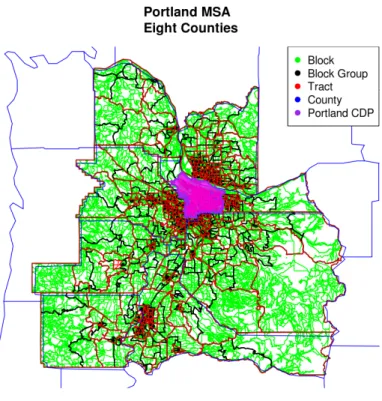
The US Census Bureau aggregates data at four basic geographic levels: county, tract, block group, and block. In addition, two other geographic conglomerations, metropolitan statistical areas (MSA) and census designated places (CDP), are defined. The first four geographic areas (county, tract, block group, and block) exist in a hierarchical system (US Census Bureau 2001, Figure 1). This is explained in great detail at either the US Census website (http://www. census.gov/) or the SF1 technical report (US Census Bureau 2001). MSAs are composed of counties, and census designated places are political entities defined by states and the US Census Bureau, e.g., incorporated and unincorporated cities, townships, etc. (US Census Bureau 2001).
The US Census Bureau provides polygon representations of the geographic data in a format known asshapefiles (or ESRI shapefiles) through the TIGER/LINE data repository (http:// www.census.gov/geo/www/tiger/) and provides access to demographic data through the US Census Bureau’s online data extractor,American FactFinder (http://factfinder.census.
Figure 1: Representation of block, block group, tract, and county hierarchy in US Census geography. Note that CDPs do not observe boundaries of the other polygons and that MSAs are composed of counties.
gov/). The shapefiles are meant for use in geographic information systems (GIS) software – such asGRASS and ArcGIS.
A myriad of reasons exist to want such data readily available in anRbased format, including simulation modeling, spatial statistics, GIS-style plotting and so forth; however, this data has not been imported into R on a large scale due to the complexity and size of the data set. Fortunately, a number of the basic tools necessary for this task have been implemented inR including themaptoolsand sppackages (Lewin-Koh and Bivand 2009;Pebesma and Bivand 2005). This article will concentrate on covering the relevant information needed to manipulate the 2000 US Census geographic and demographic data contained within the UScensus2000 suite. This article will introduce functions for acquiring specific conglomerations of census data: Counties, MSA, and cities (county, MSA and poly.clipper), as well as selecting de-mographics (demographics); and functions for adding data to these packages’ spatial objects (demographics.add). In addition to addressing examples of these functions and some stan-dard uses of these functions, a spatial statistics application using thespdp package (Bivand 2009) is demonstrated.
2. Data structure basics
The UScensus2000 suite is composed of six packages – four of which contain spatial and demographic data – each of which maintains the same basic nomenclature and data
struc-Package (e.g.,UScensus2000tract)
State (e.g.,california.tract)
data andpolygons
(e.g., california.tract@data orcalifornia.tract@polygons) ?
?
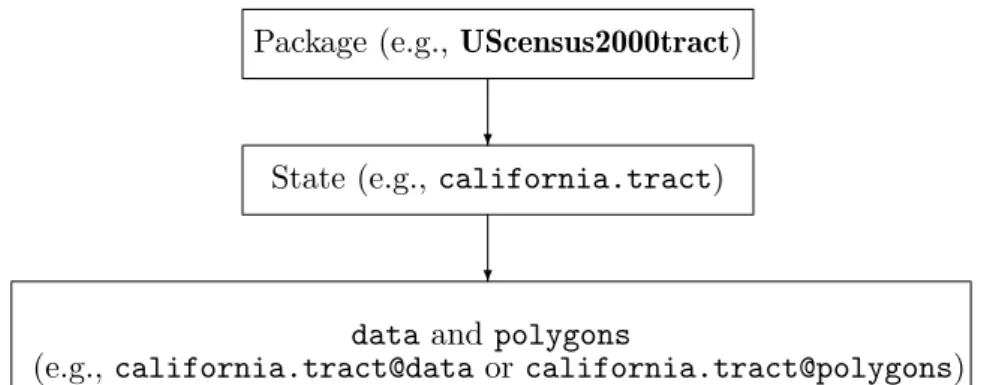
Figure 2: Representation of the data structure and nomenclature of theUScensus2000 suite of software.
ture. Breaking the UScensus2000 suite into smaller pieces is motivated by organizational requirements, however, this also has the added benefit of easier download and installa-tion for users. Addiinstalla-tionally, this organizainstalla-tion may be advantageous to the user in actual application; for example, this allows the suite to be broken up by the user if, say, they are interested in only a subset of levels of the US Census data. Each of the packages which contain spatial and demographic data (UScensus2000blk, UScensus2000blkgrp, US-census2000tract, and UScensus2000cdp) are composed of 51 SpatialPolygonsDataFrame objects. EachSpatialPolygonsDataFrame object is named state name (all lower case) dot (.) Census Bureau designation (e.g., california.blk; Figure2).
Following this section there will be a more detailed coverage of thespandmaptoolspackages (Section3). However, we will mention here that all demographics are stored as adata.frame object (e.g., califronia.tract@data) within a slot within each state. The demographics contained within thedataobject are stored as numeric vectors.
2.1. Installing the UScensus2000 suite
Installation of the UScensus2000 suite may be performed either directly from the Compre-hensive RArchive Network (CRAN, http://CRAN.R-project.org/) or from the command line using R CMD INSTALL after downloading from either CRAN or the Networks, Computa-tion, and Social Dynamics (NCASD) Lab website (http://www.ncasd.org/census2000/). Unfortunately, the UScensus2000blk package is not available through CRAN due to its size. One may, however, download it directly from NCASD website using the install.blk func-tion available in UScensus2000package. (Note for Windows users: UScensus2000blkrequires R 2.11.0 or greater to install.)
R> install.packages("UScensus2000", dependencies = TRUE) R> install.packages("UScensus2000add", dependencies = TRUE) R> library("UScensus2000")
R> install.blk("osx")
A general warning: TheUScensus2000blkis very large and should not be installed if one does not have a good internet connection. Also, for all systems the install is from source and may take a great deal of time.
3. The
sp
and
maptools
packages
The sp (Pebesma and Bivand 2005) and maptools (Lewin-Koh and Bivand 2009) packages provide the backbone of the UScensus2000suite of packages; to be fully conversant in spatial analysis and spatial data in R one should read Bivand et al. (2008)’s book Applied Spatial Data Analysis with R. All spatial data stored in the UScensus2000 suite are of the form SpatialPolygonsDataFrame(e.g., california.tract is a SpatialPolygonsDataFrame ob-ject). SpatialPolygonsDataFrame objects are a so-called S4 class object in R and con-tain detailed attribute data. In general, each SpatialPolygonsDataFrame object may be treated like a data.frame object – which means the standard data.frame methods apply, e.g.,oregon.tract$pop2000) – which is characterized by special attributes for spatial infor-mation. The two most important of these attributes are the bounding box and the coordinate reference system (CRS). The bounding box, which is used mostly for plotting, represents the minimum and maximum values of the spatial polygons. The CRS represents the projection of the data (commonly this is Longitude and Latitude). Thespand maptools packages also provide a number of routines so that Rknows how to perform many common tasks such as plot and summary.
There are two basic methods for directly accessing polygon and demographic data in SpatialPolygonsDataFrameobjects. The first is theslotmethod (accessed by eitherslot() or @-symbol). The second is through the standard method calls: [,],[[ ]] and$. Take for example theSpatialPolygonsDataFrameobjectoregon.tract:
R> library("UScensus2000tract") R> data("oregon.tract")
R> slotNames(oregon.tract)
[1] "data" "polygons" "plotOrder" "bbox" "proj4string" The function slotNames provides us the names of the five objects which comprise each SpatialPolygonsDataFrame. Excerpts describing each of these objects, pulled from their respective help files (Pebesma and Bivand 2005; Lewin-Koh and Bivand 2009), are shown below:
data: Object of class data.frame; the number of rows in data should equal the number of Polygonsclass objects (help("SpatialPolygonsDataFrame")).
polygons: Sets of spatial coordinates to create spatial data, or retrieve spatial coordinates (help("polygons")).
plotOrder: Object of class integer; integer array giving the order in which objects should be plotted (help("SpatialPolygons-class")).
bbox: Retrieves spatial bounding box from spatial data (help("bbox")).
proj4string: Sets or retrieves projection attributes on classes extending spatial data (help("proj4string")).
51 SpatialPolygonsDataFrame objects which are comprised, in part, of polygon and de-mographic data (see the example above). One may directly access the list of polygon data through the slot(*, "polygons") and the data.frame object of demographic data via slot(*, "data"). There are two types of information stored within the "data" slot of eachSpatialPolygonsDataFrame objects in the UScensus2000 suite: ID variables, which are stored as factors, and demographic variables, which are stored as numeric. All SF1 data is count data and representsX number of the given variable at a given geography (e.g., california.tract$white provides all counts of white individuals in each tract in Califor-nia, andcalifornia.tract$hh.unitsprovides all counts of household units in each tract in California).
Some useful functions provided in the sp package include summary, bbox, proj4string, plot/spplot, spRbind, unionSpatialPolygons and overlay. The summary function pro-vides a standard summary of the sp objects; proj4string provides for some manipula-tion of the CRS; the bbox function pulls out the bounding box of the entire object (e.g., bbox(california.tract)), where a bounding box is a rectangle of minimum and maximum coordinates of thespobject. spRbind allows for combining twosp objects of the same type with the same data.frame columns, and unionSpatialPolygons allows one to combine sp polygons into larger polygons. These functions are useful for summarizing, plotting and/or statistical techniques. Theoverlay function is a particularly useful command and performs a type of point-in-polygon procedure (i.e. overlay(points, polygons)).
It is always good practice to run a summary on the data; however, users should be aware that running summary directly on a SpatialPolygonsDataFrame results in both the sum-mary for data.frame information and the SpatialPolygons information. To generate the SpatialPolygonssummary information, one applies the following code:
R> summary(as(oregon.tract, "SpatialPolygons"))
Object of class SpatialPolygons Coordinates: min max r1 -124.55244 -116.4635 r2 41.99179 46.2710 Is projected: FALSE proj4string :
[+proj=longlat +datum=NAD83 +ellps=GRS80 +towgs84=0,0,0]
If one wants the bounding box information or the CRS information one may do the following:
R> bbox(oregon.tract)
min max
r1 -124.55244 -116.4635 r2 41.99179 46.2710
R> proj4string(oregon.tract)
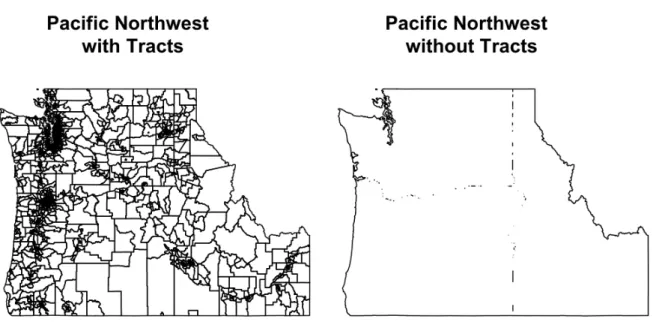
Figure 3: A plot of the Pacific Northwest.
Combining data is another common activity and is made straight forward through the sp package. There are two basic types of data integration: spRbind – for binding spatial data andunionSpatialPolygons– for aggregating spatial data.
Take for example the case of the Pacific Northwest (Oregon, Washington, and Idaho; Figure3). A user might want to have a single data object which contains all the spatial and demographic data of the Pacific Northwest, or one might want to simply have the border of the Pacific Northwest. The following example provides the necessary code:
R> data("washington.tract") R> data("idaho.tract")
R> pacificNW <- spRbind(oregon.tract, washington.tract) R> pacificNW <- spRbind(pacificNW, idaho.tract)
R> summary(as(pacificNW, "SpatialPolygons"))
Object of class SpatialPolygons Coordinates: min max x -124.73317 -111.04356 y 41.98806 49.00249 Is projected: FALSE proj4string :
[+proj=longlat +datum=NAD83 +ellps=GRS80 +towgs84=0,0,0]
R> gpclibPermit()
R> pacNWol <- unionSpatialPolygons(pacificNW, + rep("x", length(slot(pacificNW, "polygons"))))
R> plot(pacificNW)
R> title("Pacific Northwest \n with Tracts") R> plot(pacNWol)
R> title("Pacific Northwest \n without Tracts")
4. The
UScensus2000
packages
The UScensus2000 suite is comprised of six packages, which are organized in a hierarchal fashion with UScensus2000 and UScensus2000add at the top level and UScensus2000blk, UScensus2000blkgrp, UScensus2000tract, UScensus2000cdp at the bottom level. The US-census2000 suite of packages can stand as a general model for how to build large data set packages for R, especially other US Census data sets and equivalent data sets worldwide. UScensus2000addis a separate package due to future developments and because it requires a number of extraneous packages to operate.
UScensus2000: Contains a number of helper functions for managing of these rather large data sets, including functions to pull out county, MSA, and CDP level data.
UScensus2000add: Contains a function to download, add and attach one or more demo-graphic variables to the spobjects at any of the discussed geographic levels. A warning for users: This function accesses the US Census FTP site and must download a fair bit of data to work. This means it is only practical if the user has a lot of bandwidth. UScensus2000blk: Contains 51 spobjects representing the 50 states and Washington DC at
the block level.
UScensus2000bkgrp: Contains 51 spobjects representing the 50 states and Washington DC at the block group level.
UScensus2000tract: Contains 51 spobjects representing the 50 states and Washington DC at the tract level.
UScensus2000cdp: Contains 51spobjects representing the 50 states and Washington DC as a collection of CDP polygons.
The data contained within each of the various geographic levels are saved in 51 SpatialPolygonsDataFrame objects. Each state contains all the polygon files necessary to cover the state at a given level (block, block group, tract, CDP) and the corresponding demographic data. This data set comes with 86 standard demographic variables (population, race/ethnicity, age, household information, etc.) attached to each polygon (for more informa-tion use thehelp function on state and level of interest, e.g.,help("california.tract")).
5. The
UScensus2000
and
UScensus2000add
packages
TheUScensus2000 contains the following functions:
county: Allows the user to pull out one or more counties within a given state for any level (including CDPs, counties, and MSAs).
MSA: Allows the user to extract a single MSA from a given state at any level (block, block group, tract). This function handles three different types of inputs, the MSA FIPS code, the full MSA name (this must be exact e.g., "Abilene, TX MSA" and thestate argument should be left NULL), or an MSA city and one of the states in which it is contained (e.g., msaname = "Portland", state = "OR").
city: Allows the user to extract a single CDP from a given state.
poly.clipper: Allows the user to extract all the blocks, block groups, or tracts contained within a CDP, and compute the intersection of the CDP and any blocks, block groups, or tracts not fully contained within the CDP, including an estimate of demographic variables within that intersection using the proportion of the area contained within the CDP. This function makes use of the gpclib(Peng 2009) for performing the intersection between polygons.
demographics: Allows the user to select out specific demographic variables at any level. areaPoly: Selects out the area parameter contained within each SpatialPolygon object
within theSpatialPolygonDataFrame object and outputs a vector.
choropleth: Allows for convenient plotting of choropleth maps of the 2000 US Census. nameTofips: Allows the user to look an individual county or MSA FIPS code by name. install.blk: Allows for convenient installation of UScensus2000blkpackage.
Each of these functions results in the following class: county: SpatialPolygonsDataFrameobject. MSA:SpatialPolygonsDataFrameobject. city: SpatialPolygonsDataFrameobject. demographics: matrix object.
areaPoly: numeric vector. choropleth: Graphic. nameTofips: character.
install.blk: Installs UScensus2000blk.
The UScensus2000add contains the following function:
demographics.add: Allows the user to add arbitrary census demographic variables from the 100 percent Census data (SF1) at any level. This function takes in a list of desired variables from SF1 tech documentation list (US Census Bureau 2001) and attaches it to the desired level sp object. This function is based on the XMLpackage (Temple Lang 2009).
This function results in aSpatialPolygonsDataFrameobject.
6. Examples
This section explores the basics of the demographic data and demonstrates the capabilities of theUScensus2000 suite of packages. The last example is a statistical example applied to this data set.
6.1. Example 1: The basics and the county function
Let us first load theUScensus2000 package, which will also bring up the sp, maptools, US-census2000tractand UScensus2000cdppackages (one will need to loadUScensus2000blkand UScensus2000blkgrp separately, if desired). All examples here will use the tract and CDP level data. Next, load the data and check and see what demographics are available (names()).
R> library("UScensus2000") R> data("california.tract") R> names(california.tract)
[1] "state" "county" "tract" "pop2000" [5] "white" "black" "ameri.es" "asian" [9] "hawn.pi" "other" "mult.race" "hispanic" [13] "not.hispanic.t" "nh.white" "nh.black" "nh.ameri.es" [17] "nh.asian" "nh.hawn.pi" "nh.other" "hispanic.t" [21] "h.white" "h.black" "h.american.es" "h.asian" [25] "h.hawn.pi" "h.other" "males" "females" [29] "age.under5" "age.5.17" "age.18.21" "age.22.29" [33] "age.30.39" "age.40.49" "age.50.64" "age.65.up" [37] "med.age" "med.age.m" "med.age.f" "households" [41] "ave.hh.sz" "hsehld.1.m" "hsehld.1.f" "marhh.chd" [45] "marhh.no.c" "mhh.child" "fhh.child" "hh.units" [49] "hh.urban" "hh.rural" "hh.occupied" "hh.vacant" [53] "hh.owner" "hh.renter" "hh.1person" "hh.2person" [57] "hh.3person" "hh.4person" "hh.5person" "hh.6person" [61] "hh.7person" "hh.nh.white.1p" "hh.nh.white.2p" "hh.nh.white.3p" [65] "hh.nh.white.4p" "hh.nh.white.5p" "hh.nh.white.6p" "hh.nh.white.7p" [69] "hh.hisp.1p" "hh.hisp.2p" "hh.hisp.3p" "hh.hisp.4p" [73] "hh.hisp.5p" "hh.hisp.6p" "hh.hisp.7p" "hh.black.1p" [77] "hh.black.2p" "hh.black.3p" "hh.black.4p" "hh.black.5p" [81] "hh.black.6p" "hh.black.7p" "hh.asian.1p" "hh.asian.2p" [85] "hh.asian.3p" "hh.asian.4p" "hh.asian.5p" "hh.asian.6p" [89] "hh.asian.7p"
One thing to notice is that the first three variables in the above list are used for identification purposes: state is the two digit state Federal Information Processing Standards (FIPS); http://www.itl.nist.gov/fipspubs/) code, county is the three digit county FIPS code, andtractis the four or six digit FIPS code. Each level has its own distinct set of identification
codes, CDP has a five digit FIPS code, block group has all the identification characteristics as tracts plus a blkgrp FIPS code and the block level data contain a single identification variablefips that is a 13 digit FIPS code. Alternatively the user can use the helpfunction (e.g., help("california.tract")), which will bring up the user manual on that state and level which includes information on all the demographic and identification codes attached. A common aggregation used in the United States is that of the county. Counties typically have stable borders and represent the next lower level of aggregation after the state level. The county function allows the user to select one or more counties. The county function takes the following arguments:
fips: Character string, takes a string of three characters (i.e., a county FIPS code; e.g., "001").
name: Character string, this must be the name of an actual county in the state (e.g.,"Baker" county Oregon). This variable is insensitive to case.
state: Character string, can either be the full name (e.g.,"oregon"), the abbreviation (e.g., "or"), or the FIPS code (e.g.,"41")– note that if you are using the FIPS code you have to changestatefips toTRUE. This variable is insensitive to case.
level: Character string, takes in one of three values: "tract", "blk", or "blkgrp". This defines the geographic level of data for the county.
statefips: Logical, by defaultstatefips = FALSE, change to TRUEwhen providingstate with a FIPS code.
sp.object: SpatialPolygonsDataFrame, default NULL, allows the user to provide an sp object in which to perform this operation; primarily for use with demographics.add. proj: CRS class, takes a CRS object (e.g., CRS("+proj=utm +zone=10 +datum=NAD83")).
This is simply a wrapper for the spTransform function in rgdal . (Warning: Requires rgdal package.)
For example, if one wants to retrieve all the tracts in Orange County, one can apply the county function as follows:
R> orange.county <- county(name = "orange", state = "ca", level = "tract")
This will return a SpatialPolygonsDataFrame object which contains only the tracts in the desired county(s). Changing the level will result in all the block groups or blocks in the county. This might be desired for a number of reasons, for example plotting or statistical analysis. It is worth taking a moment to go over the basic argument nomenclature in this function, as it will be similar in nature to functions discussed in following subsections. The user can provide either a FIPS code for the county (where a FIPS code is the standard identification number used by the Census and other governmental agencies) in combination with the correct state (e.g., fips = "001", state = "41", statefips = TRUE or fips = "001", state = "OR", statefips = FALSE). The state and statefips arguments are to be used in tandem (see the above example). The sp.objectargument (not used in this example) allows the user to apply this function onto anotherSpatialPolygonsDataFrameobject; this is primarily for use
with thedemographics.add function discussed in section 6.6 (an example is also provided). The proj argument (not discussed in this article) allows the user to re-project the data using thespTransformfunction provided in thergdalpackage (Keitt, Bivand, Pebesma, and Rowlingson 2009).
6.2. Example 2: The demographics function
While these packages are meant to be primarily for use in spatial analysis, there are times when the user might want to access demographic information at various levels of aggregation. This might occur when applying simpler statistical models, analyzing demographic distributions, and so forth. All the data in the US Census is count data. This example demonstrates the use of the demographics function. The results obtained in the following examples are the same as those obtained from from US Census Bureau’s website (American Factfinder: http: //factfinder.census.gov/). The demographicsfunction takes the following arguments:
dem: Character string, takes one or more demographics (named as discussed in Section6.1). state: Character string, can either be the full name of a state (e.g.,"oregon"), the abbre-viation (e.g., "or"), or the FIPS code (e.g., "41")– note that if you are using the FIPS code you have to change statefipstoTRUE. This variable is insensitive to case. statefips: Logical, by default statefips = FALSE, set to TRUE if using the state FIPS
codes.
level: Character string, takes levels"tract","blk","blkgrp","cdp","msa"or"county". msaname: Logical (optional), if level = "msa", allows the use of the verbose MSA place
name.
R> laDem <- demographics(dem = c("pop2000", "white", "black"), "CA", + level = "msa", msaname = "Los Angeles")
R> laDem
pop2000 white black san bernardino county 1709434 1006960 155348 ventura county 753197 526721 14664 los angeles county 9519338 4637062 930957 riverside county 1545387 1013478 96421 orange county 2846289 1844652 47649
In the subsequent example using the "cdp"level, the reader might notice a CDP with popu-lation equal to zero. While there are not many of CDPs with zero popupopu-lation, it is possible. CDPs are incorporated and unincorporated cities, towns, CDPs, and so forth as defined by the US Census Bureau and local and state agencies; they are not required to have either a maxi-mum or minimaxi-mum population size (http://www.census.gov/geo/www/psapage.html#CDP). A few of the possible reasons why there might be areas with zero population include: Resort towns and corporate towns.
R> ca.cdp <- demographics(dem = c("pop2000", "white", "black", + "hh.units", "hh.vacant"), "CA", level = "cdp")
R> ca.cdp[order(rownames(ca.cdp))[1:10], ]
pop2000 white black hh.units hh.vacant
Acton 2390 2130 17 873 76 Adelanto 18130 9147 2377 5547 833 Agoura Hills 20537 17858 272 6993 119 Alameda 72259 41148 4488 31644 1418 Alamo 15626 14119 74 5497 91 Albany 16444 10078 675 7248 237 Alhambra 85804 25758 1437 30069 958 Aliso Viejo 40166 31395 828 16608 461 Almanor 0 0 0 74 74 Alondra Park 8622 3584 1088 2933 103
6.3. Example 3: Choropleth maps
A choropleth map, a common method used in GIS style analysis, is typically defined as a thematic map in which areas (or polygons) are shaded, or patterned, and displayed on a map in proportion to a measurement or outcome variable of interest; standard examples include population counts, population density, income, etc. This allows the analyst to perform a quick visual analysis of the spatial homogeneity or heterogeneity in his or her data set. Now, one may plot a choropleth map of California’s population. A helper function for per-forming this task is provided (this can also be done using theplotfunction, orRColorBrewer,
Neuwirth 2007, see help("california.tract"), or thespplot function; see Section 6.4for an example). The helper function choropleth handles the necessary details for matching the colors to the legend as well as the call to plot for the user. The output can be seen in Figure4. choroplethtakes the following arguments:
sp: SpatialPolygonsDataFrame, must be a SpatialPolygonsDataFrameobject.
dem: Character string, this must be the name of one of the data.frame objects contained within theSpatialPolygonsDataFrame (e.g. "pop2000").
cuts: List containingquantileand seqobject from 0 to 1.
color: List containing a function and list of arguments for the function to produce the requested color scheme. main a character string, this will be the title of the plot. sub: Character string, this will be the subtitle on the plot.
border: Character string, this selects the border color of the polygons.
legend: List containing first where to place the legend and second a title for the legend. type: Character string, can be either "plot" or"spplot".
Figure 4: A choropleth map of California.
The default choropleth map may be called in the following way:
R> choropleth(california.tract, main = "2000 US Census \n California Tracts", + border = "transparent")
and produces the graphic in Figure4.
6.4. Example 4: The MSA and city functions
Researchers often prefer to analyze standard metropolitan units (e.g., a census designated place, CDP, or metropolitan statistical area, MSA). Often cities or MSAs are of particular interest since most of the United States population live in urban centers.
For this example we examine the MSA of Los Angeles at the tract level (we could, of course, use any of the aforementioned levels); we perform this task by applying the functionMSAfrom theUScensus2000package. MSAtakes the following inputs:
msaname: Character string, this can either be in conjunction with the variablestateor not. Case 1: Full MSA name (state should be left NULL in this case, e.g., "Abilene, TX MSA"); this must be exact. Case 2: Takes one of the city names of the MSA and the one of the states which contain the MSA (e.g., msaname = "Albany" andstate = "NY"). state: Character string, can either be the full name (e.g.,"oregon"), the abbreviation (e.g.,
"or"), or the FIPS code (e.g., "41"). Note that if you are using the FIPS code you have to change statefipstoTRUE. This variable is insensitive to case. This is used in conjunction with msaname, see above for more details.
statefips: Logical, by defaultstatefips = FALSE, change to TRUEwhen providingstate with a FIPS code. msanamemust also be a FIPS code when using this mode.
level: Character string, takes in one of three values: "tract", "blk", or "blkgrp". This defines the geographic level of data for the MSA.
proj: CRS class, takes a CRS object (e.g., CRS("+proj=utm +zone=10 +datum=NAD83")). This is simply a wrapper for the spTransform function in rgdal. (Warning: Requires rgdal package.)
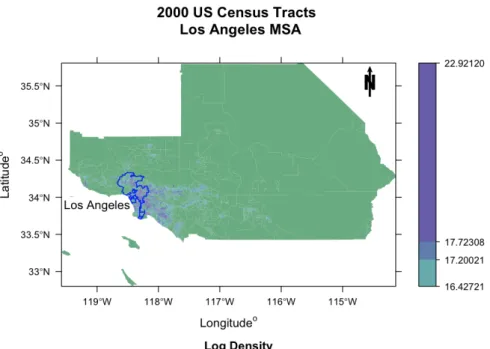
To plot the boundary of Los Angeles proper on top of this MSA area we will use the following function: city, also from the UScensus2000 package. The output can be seen in Figure 5. citytakes the following inputs:
name: Character string, takes the value of a string or string vector and has to be the exact name or names of CDP(s). (If you are unsure of the exact name a quick way to find it is to load the library("UScensus2000cdp") and pull out the list of names for the state you are interested in (see example below).
state: Character string, can either be the full name (e.g.,"oregon"), the abbreviation (e.g., "or"), or the FIPS code (e.g.,"41")– note that if you are using the FIPS code you have to changestatefips toTRUE. This variable is insensitive to case.
statefips: Logical, by defaultstatefips = FALSE, change to TRUEwhen providingstate with a FIPS code. namemust also be a FIPS code when using this mode.
sp.object: SpatialPolygonsDataFrame, default NULL, allows the user to provide an sp object in which to perform this operation; primarily for use with demographics.add function.
proj: CRS class, takes a CRS object (e.g., CRS("+proj=utm +zone=10 +datum=NAD83")). This is simply a wrapper for the spTransform function in rgdal. (Warning: Requires rgdal package.)
Let us breakdown these two functions. MSAhas three main ways of extracting a specified MSA: By using the five digit MSA FIPS code via the variablemsafips (not used in this example); by supplying the full MSA name tomsaname (e.g., "Portland-Salem, OR-WA CMSA"); or by providing the name of one of the cities from the full name of the MSA (e.g.,"Portland") and one of the state abbreviations from the full MSA name or one of the state FIPS codes (e.g., "OR") in the state argument. Thelevel argument specifies the geographical level and can
Figure 5: A choropleth map of the Los Angeles MSA.
Figure 6: A choropleth map of the Los Angeles MSA.
be set to "tract", "blkgrp", or "blk" (the last two require that the user has installed the UScensus2000blkgrp and UScensus2000blkpackages.
The example for generating the MSA for Los Angeles follows (note that MSA will produce a SpatialPolygonsDataFrame object):
R> losangeles.msa <- MSA(msaname = "Los Angeles", state = "CA", + level = "tract")
R> losangeles <- city(name = "los angeles", state = "ca")
The city function extracts a specified CDP from the entire list of CDPs for a given state. The user needs to provide two variables, the city/CDP desired (name) and the state (state). Now, we plot these two examples in a choropleth map of log population density applying thespplot mode in the choropleth function (see Figures 5 and 6). First, we calculate the log density as log (population/area), where we access the information about the area of each polygon using the function areaPoly. The choropleth function is based off the spplot function and accepts a number of arguments; for more detailed explanation ofspplot please seeBivand et al.(2008).
R> losangeles.msa <- MSA(msaname = "Los Angeles", state = "CA", + level = "tract")
R> losangeles <- city(name = "los angeles", state = "ca") R> losangeles.msa$lnden <- log(losangeles.msa$pop2000 / + areaPoly(losangeles.msa))
R> choropleth(losangeles.msa, "lnden",
+ main = "2000 US Census Tracts \n Los Angeles MSA", sub = "Log Density", + type = "spplot", object = list(
+ list("sp.polygons", losangeles, first = FALSE, col = "blue"), + list("sp.text", c(-119, 33.9), "Los Angeles")))
R> choropleth(losangeles.msa, "lnden",
+ main = "2000 US Census Tracts \n Los Angeles MSA", sub = "Log Density", + type = "spplot", object = list(
+ list("sp.polygons", losangeles, first = FALSE, col = "blue"), + list("sp.text", c(-118, 33.9), "Los Angeles")),
+ xlim = c(-119, -117), ylim = c(33.5, 34.5))
6.5. Example 5: The poly.clipper function
A common problem in applications of spatial analysis is the lack of a one-to-one mapping between polygon sets. One case of particular interest for those working with the US Census data is in identifying polygons which both fall within a boundary of interest (e.g., all the blocks contained within a given city), and which fail to align perfectly with the assigned boundary. That is, cases in which a single chosen polygon (e.g., a city boundary, school district border, zip code) are overlaid onto another level of geography (e.g., block, block group, tract), where the borders of the chosen polygon fail to line up with the chosen geographic level (for an example of this problem see Figure7). For a solution to this problem we perform a boolean intersection between polygons and eliminate the non-intersecting portion. As the area of interest is not only in the geographical unit (e.g., the blocks within a given city), but also the covariates associates with that unit (e.g., population counts, housing unites, etc.), the question then arises how one should impute the covariate of the “new” resulting polygon? While there are a number of ways to handle such a problem we have chosen to implement a very simple approach that should be sufficient for many purposes. We apply a simple proportion estimator by area, while assuming homogeneous allocation of covariates within
Figure 7: Demonstration of the intersection of tracts and a CDP (in this case Bend, OR).
the geography. This is reasonable approach in this particular case, as all covariates are count data; this would not be a practical approach if the covariates were proportions themselves (Warning: Assuming a homogenous allocation of covariates is often necessary, however, it is not always rational and can result in distortions in the data).
1. Given the selected level of geography, limit the possible intersecting units with the bounding box of the polygon of interest along with an -expansion term.
2. Perform boolean polygon intersection with selected level of geography and the polygon of interest.
3. Save all the polygons which are fully contained with their original state.
4. Save only the portion of the polygon which falls within the boundary of the polygon of interest.
5. Drop any polygons with no intersection.
6. Impute the covariates, where necessary, with a proportion estimator based on area: xk· Area(Geographyk∩Polygoni) Area(Geographyk) (1) (Note that we take the ceiling of this estimate. We perform this operation because this is count data and we want to maintain integer numbers.)
Figure 8: A map of the tracts within Los Angeles city.
7. Recombine all the polygon and covariate information into a new SpatialPolygonsDataFrame object.
Let us now focus on the usage of the poly.clipper function. This function accepts the following arguments:
name: Character string, this string must be the name of CDP for a given state.
state: Character string, can either be the full name of a state (e.g.,"oregon"), the abbre-viation (e.g., "or"), or the FIPS code (e.g., "41")– note that if you are using the FIPS code you have to change statefipstoTRUE. This variable is insensitive to case. statefips: Logical, by defaultstatefips = FALSE, change to TRUEwhen providingstate
level: Character string, takes in one of three values: "tract", "blk", or "blkgrp". This defines the geographic level of data for the county.
bb.epsilon: Numeric, by default bb.epsilon = 0.006, this value controls the number of blocks/block groups/tracts which are considered for clipping; if the function is not selecting all blocks/block groups/tracts consider choosing a larger value forbb.epsilon. sp.object: SpatialPolygonsDataFrame, default NULL, allows the user to provide an sp object in which to perform this operation; primarily for use with demographics.add function.
proj: CRS class, takes a CRS object (e.g.,CRS("+proj = utm + zone=10 +datum=NAD83")). This is simply a wrapper for the spTransform function in rgdal. (Warning: Requires rgdal package.)
Say we are interested in performing analysis on the CDP of Los Angeles, we would then enter the following R commands. A word of caution, the bb.epsilon is set particularly low, this works well with large cities such as Los Angeles, however it needs to be enlarged for smaller cities (e.g., Bend, OR). We recommend playing with this value some to see the different results, for Figure7we used abb.epsilon = 0.5.
R> losangeles.tract <- poly.clipper(name = "Los Angeles", state = "ca", + level = "tract")
R> plot(losangeles.tract)
R> title("2000 US Census Tracts \n Los Angeles")
The output can be seen in Figure8.
6.6. Example 6: The demographics.add function
While the UScensus2000 suite contains 86 different demographic variables there could be a situation where the user desires one or more demographic variables which are not readily available. For this, we have developed a functiondemographics.addwhich take in SF1 vari-able names and add the chosen varivari-ables to the desired geography and outputs asp-object. A word of caution, the following example requires access to the internet. Thedemographics.add function takes the following arguments:
dem: Character string, takes in a vector of one or more census variables as defined in SF1 tech report (US Census Bureau 2001).
state: Character string, can either be the full name of a state (e.g.,"oregon"), the abbre-viation (e.g., "or"), or the FIPS code (e.g., "41")– note that if you are using the FIPS code you have to change statefips toTRUE. This variable is insensitive to case.
statefips: Logical, by default statefips = FALSE, set to TRUE if using the state FIPS codes.
level: Character string, takes in one of three values: "tract", "blk", or "blkgrp". This defines the geographic level of data for the county.
This example is chosen so that it takes a relatively minimal amount of bandwidth; however it is still several megabytes of material to download. The reader may look up what variables are available with the SF1 technical manual (US Census Bureau 2001). For this example, the following three variables will be added to the tract level data ofrhode_island:
1. College dormitories (PCT016033) 2. Military quarters (PCT016034)
3. Population of two or more races (P005010)
R> library("UScensus2000add")
R> rhode_island <- demographics.add(dem =
+ c("PCT016033", "PCT016034", "P005010"), state = "ri", level = "tract") R> names(rhode_island)
[1] "state" "county" "tract" [4] "pop2000" "white" "black" [7] "ameri.es" "asian" "hawn.pi" [10] "other" "mult.race" "hispanic" [13] "not.hispanic.t" "nh.white" "nh.black" [16] "nh.ameri.es" "nh.asian" "nh.hawn.pi" [19] "nh.other" "hispanic.t" "h.white" [22] "h.black" "h.american.es" "h.asian" [25] "h.hawn.pi" "h.other" "males" [28] "females" "age.under5" "age.5.17" [31] "age.18.21" "age.22.29" "age.30.39" [34] "age.40.49" "age.50.64" "age.65.up" [37] "med.age" "med.age.m" "med.age.f" [40] "households" "ave.hh.sz" "hsehld.1.m" [43] "hsehld.1.f" "marhh.chd" "marhh.no.c" [46] "mhh.child" "fhh.child" "hh.units" [49] "hh.urban" "hh.rural" "hh.occupied" [52] "hh.vacant" "hh.owner" "hh.renter" [55] "hh.1person" "hh.2person" "hh.3person" [58] "hh.4person" "hh.5person" "hh.6person" [61] "hh.7person" "hh.nh.white.1p" "hh.nh.white.2p" [64] "hh.nh.white.3p" "hh.nh.white.4p" "hh.nh.white.5p" [67] "hh.nh.white.6p" "hh.nh.white.7p" "hh.hisp.1p" [70] "hh.hisp.2p" "hh.hisp.3p" "hh.hisp.4p" [73] "hh.hisp.5p" "hh.hisp.6p" "hh.hisp.7p" [76] "hh.black.1p" "hh.black.2p" "hh.black.3p" [79] "hh.black.4p" "hh.black.5p" "hh.black.6p" [82] "hh.black.7p" "hh.asian.1p" "hh.asian.2p" [85] "hh.asian.3p" "hh.asian.4p" "hh.asian.5p" [88] "hh.asian.6p" "hh.asian.7p" "PCT016033" [91] "PCT016034" "P005010"
Now that we have added the demographics: PCT016033, PCT016034, P005010, we can build anspobject of Providence, RI from this object with the following command
R> providence <- poly.clipper(name = "providence", state = "RI", + level = "tract", sp.object = rhode_island)
There is only a small difference between this code and that from Section6.5; thesp.object = rhode_island argument. The sp.object tells the poly.clipper function to use the rhode_island object for the base of the clipping; this has the added benefit of perform-ing the proportion estimator to the newly added demographics. A word of caution if one adds a covariate to thespobject which is not of a count type variable (e.g., a ratio), the resulting estimation performed should be ignored.
6.7. Example 7: A statistical application of the UScensus2000 suite
The last example is a statistical example based on the spdep package (Bivand 2009) and motivated by the example given inBivandet al. (2008, Section 10.2). It will walk the reader through using this data in performing a common model based approach for handling spatial autocorrelation.
There are many different possible models for spatial autocorrelation, however one of the most used in practice is that of thesimultaneous autoregressive(SAR) models (Bivandet al.2008). These are models of the formY =W Y +µ+e, where W is a weight matrix, µis estimated with the standard linear model (µ=X>β) andeis assumed to be distributedN(0, σ2). One way to think about this model is to assume that the observations arise from the equilibrium of a linear diffusion process with a weight matrixW and initial state vectorµ+e.
Say one is interested in modeling the percent of home owners in a given tract in Los Angeles. There is a long history of the study of segregation and inequality in neighborhoods (Massey and Fong 1990; Massey and Denton 1988a,b, 1993) much of which suggest the hypothesis that we will see lower home ownership rates in minority tracts. One might endeavor to model this hypothesis by adding covariates for race/ethnicity in the form of: Percent non-hispanic white, non-hispanic black, non-hispanic asian, and hispanic, where we would expect to see a positive effect for non-hispanic white (i.e., increase in home ownership) and a decrease for all minorities. Another potential hypothesis is that families with children are more likely to own houses, so we might propose the hypothesis that the percentage of married households with children should increase the likelihood of home ownership. We could test this by adding a covariate for the percent of married families with children. To confirm our hypothesis we should see a positive effect.
All the necessary data to perform this test is available in theUScensus2000suite, however a certain amount of preprocessing needs to occur. Since all the demographic data is stored as a character string it will be necessary to change the demographic values to numeric values. Another issue is that all covariates stored in theses packages are in raw counts. In our hypothesis we stated all variables in terms of percent X in a given tract, so we need to build the necessary percentage vectors to perform our analysis. In constructing a SAR model the losangeles.tract object (built in Section 6.5) will cause an error in the weight matrix function, this is due to a disconnected polygon that will have to be remove to perform this type of analysis. The code to perform these operations is contained below:
R> library("spdep") R> la.pop.tot <- losangeles.tract$pop2000 R> la.hh.tot <- losangeles.tract$households R> losangeles.tract$pctowner <- losangeles.tract$hh.owner/la.hh.tot R> losangeles.tract$pct.nh.white <- losangeles.tract$nh.white/la.pop.tot R> losangeles.tract$pct.nh.black <- losangeles.tract$nh.black/la.pop.tot R> losangeles.tract$pct.hispanic <- losangeles.tract$hispanic/la.pop.tot R> losangeles.tract$pct.nh.asian <- losangeles.tract$asian/la.pop.tot R> losangeles.tract$pct.marhh.chd <- losangeles.tract$marhh.chd/la.hh.tot R> losangeles.tract <- losangeles.tract[c(1:297, + 299:length(losangeles.tract@polygons)),]
To test our hypothesis a reasonable approach is to start by fitting a simple linear regression model with the aforementioned covariates. We notice that we can treat the SpatialPolygonDataFrameobjects just like the standard Rdata.frameobject.
R> la.lm <- lm(pctowner ~ pct.nh.white + pct.hispanic + pct.nh.black + + pct.nh.asian + pct.marhh.chd, data = losangeles.tract)
R> summary(la.lm)
Call:
lm(formula = pctowner ~ pct.nh.white + pct.hispanic + pct.nh.black + pct.nh.asian + pct.marhh.chd, data = losangeles.tract)
Residuals:
Min 1Q Median 3Q Max
-0.795045 -0.115970 -0.009655 0.106370 0.637660 Coefficients:
Estimate Std. Error t value Pr(>|t|) (Intercept) 0.33941 0.02598 13.064 <2e-16 *** pct.nh.white 0.04386 0.03791 1.157 0.248 pct.hispanic -0.80911 0.04686 -17.268 <2e-16 *** pct.nh.black -0.04052 0.03621 -1.119 0.263 pct.nh.asian -0.46423 0.04723 -9.830 <2e-16 *** pct.marhh.chd 1.87897 0.07207 26.071 <2e-16 *** ---Signif. codes: 0 *** 0.001 ** 0.01 * 0.05 . 0.1 1 Residual standard error: 0.1747 on 881 degrees of freedom
(1 observation deleted due to missingness)
Multiple R-squared: 0.5945, Adjusted R-squared: 0.5922 F-statistic: 258.3 on 5 and 881 DF, p-value: < 2.2e-16
Looking at this standard linear regression we see that our initial race/ethnicity hypothesis is partially confirmed (although, percentage non-hispanic white is not significant) and that our married household with children hypothesis is also confirmed.
Figure 9: A map of the tracts within Los Angeles city and queens distance weighting matrix.
However, we might suspect there to be spatial autocorrelation in this data. There are a num-ber of arguments as to why this might be the case; we propose the following: Direct zoning or development might create dependencies between home ownership in one area and other nearby areas, with high-ownership areas tending to encourage similar behavior nearby (e.g., by resisting efforts to create high-density rental housing in the vicinity) and low-ownership areas having a similar effect (e.g., by development pressure, erosion of ownership-based neigh-borhoods via pricing effects, etc.). This leads us to perform one of the omnibus tests for spatial autocorrelation, which could affect our model in ways that are non-intuitive. One of the most accepted of these tests for spatial correlation is the so-called Moran’s I test (Bivand et al.
2008). To perform a Moran’s I test on the linear model inR, we first need to build the spatial weights we will use in the SAR models. We will build our weight matrix based on the concept ofqueen weights, which is named for the ways in which a queen can move in chess (e.g., up, down, left, right and diagonally). spdep package contains functions for building the queens weight adjacency matrix, in which the polygons represent the nodes, and edges represent any shared edge by two polygons. We can also plot the the spatial network generated; this can be seen in Figure9.
R> losangeles.nb <- poly2nb(losangeles.tract) R> plot(losangeles.tract, border = "gray") R> coords <- coordinates(losangeles.tract)
R> plot.nb(losangeles.nb, coords = coordinates(losangeles.tract), + add = TRUE, cex = 0.5)
R> title("Tracts of Los Angeles, 2000 \n polygon generated queen weights") R> la.nbw <- nb2listw(losangeles.nb, style = "B")
R> lm.morantest(la.lm, la.nbw)
Global Moran's I for regression residuals data:
model: lm(formula = pctowner ~ pct.nh.white + pct.hispanic + pct.nh.black + pct.nh.asian + pct.marhh.chd, data =
losangeles.tract) weights: la.nbw
Moran I statistic standard deviate = 22.1729, p-value < 2.2e-16 alternative hypothesis: greater
sample estimates:
Observed Moran's I Expectation Variance 0.4210120096 -0.0042431905 0.0003678362
The results of the Moran’s I test suggest that a SAR model with spatial autocorrelation will fit the data better than a linear model without spatial autocorrelation taken into account. We can fit this model using the function spautolm in the spdep package. The code below performs this analysis:
R> la.sar <- spautolm(pctowner ~ pct.nh.white + pct.hispanic + pct.nh.black + + pct.nh.asian + pct.marhh.chd, data = losangeles.tract, listw = la.nbw) R> summary(la.sar)
Call:
spautolm(formula = pctowner ~ pct.nh.white + pct.hispanic + pct.nh.black + pct.nh.asian + pct.marhh.chd, data = losangeles.tract, listw = la.nbw) Residuals:
Min 1Q Median 3Q Max
-0.5175469 -0.0681585 0.0059096 0.0843405 0.4262356 Coefficients:
Estimate Std. Error z value Pr(>|z|) (Intercept) 0.292718 0.027362 10.6979 < 2.2e-16 pct.nh.white 0.284659 0.040294 7.0645 1.612e-12 pct.hispanic -0.655038 0.046395 -14.1187 < 2.2e-16
pct.nh.black -0.049928 0.043829 -1.1392 0.2546 pct.nh.asian -0.276466 0.051743 -5.3430 9.140e-08 pct.marhh.chd 1.320579 0.071883 18.3712 < 2.2e-16 Lambda: 0.12459 LR test value: 394.72 p-value: < 2.22e-16 Log likelihood: 489.1817
ML residual variance (sigma squared): 0.01688, (sigma: 0.12992) Number of observations: 887
Number of parameters estimated: 8 AIC: -962.36
Looking at this SAR model we see that our initial race/ethnicity hypothesis is again confirmed (although, percentage non-hispanic black is not significant) and that our married household with children hypothesis is confirmed again as well. It is worth noting that there is change in both what is significant (i.e., non-hispanic white goes from not significant to significant and non-hispanic black goes from significant to not significant) and there is a magnitude change (non-hispanic white goes from 0.04 to 0.28). Another aspect of this analysis that is worth noting is that the size of the effect for the percentage of non-hispanic white increases, and conversely decreases in the other minority groups and percentage married households with children.
This last model does not take into account the possibility of heterogeneous population within tracts. An alternative model we might propose is one which uses the inverse population as weights. The dependent variable, in this case a population mean, is expected to have an in-trinsic variance that scales inversely with population (i.e., we expect systematic heteroskedas-ticity). Since tracts vary in population, it would seem wise to correct for this issue. Weighting allows the model to avoid having low-population tracts exert an untoward influence, and/or to prevent accidental correlation of error variance with covariates from generating spurious effects. This process will appear very similar to the process outlined above, but will include theweightsvariable in lmand spautolm.
R> la.lmw <- lm(pctowner ~ pct.nh.white + pct.hispanic + pct.nh.black +
+ pct.nh.asian + pct.marhh.chd, data = losangeles.tract, weights = pop2000) R> summary(la.lmw)
Call:
lm(formula = pctowner ~ pct.nh.white + pct.hispanic + pct.nh.black +
pct.nh.asian + pct.marhh.chd, data = losangeles.tract, weights = pop2000) Residuals:
Min 1Q Median 3Q Max
-36.437 -6.718 -0.326 6.422 39.875 Coefficients:
Estimate Std. Error t value Pr(>|t|) (Intercept) -2.09347 0.39426 -5.310 1.39e-07 ***
pct.nh.white 2.51193 0.41695 6.025 2.49e-09 *** pct.hispanic 1.48667 0.40471 3.673 0.000254 *** pct.nh.black 2.45677 0.40878 6.010 2.71e-09 *** pct.nh.asian 2.03148 0.41617 4.881 1.25e-06 *** pct.marhh.chd 2.29162 0.07894 29.028 < 2e-16 *** ---Signif. codes: 0 *** 0.001 ** 0.01 * 0.05 . 0.1 1 Residual standard error: 10.62 on 881 degrees of freedom
(1 observation deleted due to missingness)
Multiple R-squared: 0.6107, Adjusted R-squared: 0.6085 F-statistic: 276.4 on 5 and 881 DF, p-value: < 2.2e-16
The linear model weighted by inverse population results in a very different picture than our first two regressions. Our race/ethnicity hypothesis is not confirmed (i.e., we see positive effects for both non-hispanic asian and black). In fact our hypothesis that race/ethnicity has any effect is brought into question since none of the race covariates are significant; on the other hand, our married household with children hypothesis is again confirmed.
This model, however does not take into account spatial autocorrelation. Just as before we can perform a Moran’s I test to see if any such spatial autocorrelation exists.
R> lm.morantest(la.lmw, la.nbw)
Global Moran's I for regression residuals data:
model: lm(formula = pctowner ~ pct.nh.white + pct.hispanic + pct.nh.black + pct.nh.asian + pct.marhh.chd, data =
losangeles.tract, weights = pop2000) weights: la.nbw
Moran I statistic standard deviate = 22.3887, p-value < 2.2e-16 alternative hypothesis: greater
sample estimates:
Observed Moran's I Expectation Variance 0.423094032 -0.004956330 0.000365538
Again, we see that the Moran’s I test is significant, and conclude that there is spatial auto-correlation. We can again use the spautolm function, this time also including the weights parameter.
R> la.sarw <- spautolm(pctowner ~ pct.nh.white + pct.hispanic +
+ pct.nh.black + pct.nh.asian + pct.marhh.chd, data = losangeles.tract, + listw = la.nbw, weights = pop2000)
R> summary(la.sarw)
Call:
pct.nh.asian + pct.marhh.chd, data = losangeles.tract, listw = la.nbw, weights = pop2000)
Residuals:
Min 1Q Median 3Q Max
-0.846746 -0.063808 0.012976 0.088940 0.491317 Coefficients:
Estimate Std. Error z value Pr(>|z|) (Intercept) 0.425640 0.070702 6.0202 1.742e-09 pct.nh.white 0.014744 0.081470 0.1810 0.85639 pct.hispanic -1.068973 0.085979 -12.4330 < 2.2e-16 pct.nh.black -0.164167 0.081185 -2.0221 0.04316 pct.nh.asian -0.580842 0.089983 -6.4550 1.082e-10 pct.marhh.chd 1.976906 0.091879 21.5164 < 2.2e-16 Lambda: 0.12303 LR test value: 347.23 p-value: < 2.22e-16 Log likelihood: 448.7812
ML residual variance (sigma squared): 66.111, (sigma: 8.1309) Number of observations: 887
Number of parameters estimated: 8 AIC: -881.56
The SAR model with population weights confirms our race/ethnicity hypothesis (i.e., all the minority coefficients are negative and significant and white is effectively zero and is not significant) and again our married household with children hypothesis is confirmed.
We now have four different models, none of which have the exact same results, and in fact some of which have contradictory results. What should we do? A natural approach is to compare the models using the Akaike information criterion (AIC,Akaike 1974). The AIC is a common method for comparing models, where we choose the model with the lowest AIC as the best fitting model. The code to perform this comparison follows:
R> aic.model <- c(AIC(la.lm), AIC(la.sar), AIC(la.lmw), AIC(la.sarw)) R> coef.model <- cbind(la.lm$coef, la.sar$fit$coef, la.lmw$coef, + la.sarw$fit$coef)
R> colnames(coef.model) <- c("LM", "SAR", "LMW", "SARW") R> model.aic.rank <- rbind(aic.model, coef.model)
R> model.aic.rank[, order(aic.model)] SAR SARW LM LMW aic.model -962.36330848 -881.56247395 -569.64381426 -536.330961 (Intercept) 0.29271752 0.42564032 0.33940945 -2.093474 pct.nh.white 0.28465945 0.01474367 0.04386037 2.511933 pct.hispanic -0.65503795 -1.06897327 -0.80910523 1.486667 pct.nh.black -0.04992822 -0.16416682 -0.04052084 2.456774
pct.nh.asian -0.27646646 -0.58084221 -0.46422631 2.031482 pct.marhh.chd 1.32057946 1.97690601 1.87896648 2.291624
We see that the SAR model fits the best based on its AIC score. The SAR model confirms both our race/ethnicity hypothesis and our married household with children hypothesis.
7. Summary
TheUScensus2000suite of packages represents a modern data management system for a large, multipurpose data set. The added experience provided by having a single, coherent series of packages (which the user may download, install and access on any platform) offers useful tools for both didactic and research-based endeavors within the social and statistical sciences. These packages bring important and influential data into a single, manageable system for use in simulation methods and models, statistical models, and statistical analysis.
There are a number of obvious extensions of these R packages either to additional US Cen-suses, or to similar data from other countries. This model for documenting and handling the census data can be applied to the 1990 and 1980 US Censuses (US Census Bureau 2010a,b), as well as the upcoming 2010 US Census (US Census Bureau 2010c). This model can also be applied to other countries which publicly release census and spatial data, e.g., Europe ( Euro-pean Commission 2010), Mexico (Instituto Nacional De Estad´ıstica Y Geografia 2010), China (CHGIS Data 2010), and the myriad other countries’ basic administrative and demographic information, directly available on IPUMS (Minnesota Population Center 2010). The helper functions can be directly applied to past and future US Censuses, and can be generalized to handle these other countries’ geographies.
Acknowledgments
This material is based on research supported in part by the National Science Foundation (NSF) under award BCS-0827027 and by the Office of Naval Research (ONR) under award N00014-08-1-1015. The author would like in particular to thank Carter T. Butts for his suggestions as well as the input of fellow lab members Ryan Acton, Lorien Jasney, Christopher Steven Marcum and Emma Spiro; I would also like thank Nicholas Nagle and John Hipp for their suggestions; and lastly, I would like to thank both of the anonymous reviewers for their comments and suggestions.
References
Akaike H (1974). “A New Look at the Statistical Model Identification.” IEEE Transactions on Automatic Control,19(6), 716–723.
Bivand R (2009). spdep: Spatial Dependence – Weighting Schemes, Statistics and Models. Rpackage version 0.4-52, URLhttp://CRAN.R-project.org/package=spdep.
Bivand RS, Pebesma EJ, G´omez-Rubio V (2008). Applied Spatial Data Analysis with R. Springer-Verlag, New York, NY.
CHGIS Data (2010). China DCW GIS Data. Harvard University. URL http://www.fas. harvard.edu/~chgis/data/dcw/.
European Commission (2010). Eurotat. URL http://epp.eurostat.ec.europa.eu/. Instituto Nacional De Estad´ıstica Y Geografia (2010). Statistical Yearbook of the United
Mexican States. URL http://www.inegi.org.mx/inegi/.
Keitt TH, Bivand R, Pebesma E, Rowlingson B (2009). rgdal: Bindings for the Geospatial Data Abstraction Library. Rpackage version 0.6-21, URL http://CRAN.R-project.org/ package=rgdal.
Lewin-Koh NJ, Bivand R (2009). maptools: Tools for Reading and Handling Spatial Objects. Rpackage version 0.7-25, URLhttp://CRAN.R-project.org/package=maptools.
Massey DS, Denton NA (1988a). “The Dimensions of Residential Segregation.”Social Forces,
67(2), 281–315.
Massey DS, Denton NA (1988b). “Suburbanization and Segregation in US Metropolitan Areas.”The American Journal of Sociology,94(3), 592–626.
Massey DS, Denton NA (1993). American Apartheid: Segregation and the Making of the Underclass. Harvard University Press, Cambridge.
Massey DS, Fong E (1990). “Segregation and Neighborhood Quality: Blacks, Hispanics, and Asians in the San Francisco Metropolitan Area.”Social Forces,69(1), 15–32.
Minnesota Population Center (2010). Integrated Public Use Microdata Series, International: Version 6.0. University of Minnesota. URLhttps://international.ipums.org/. Neuwirth E (2007). RColorBrewer: ColorBrewerPalettes. Rpackage version 1.0-2, URL
http://CRAN.R-project.org/package=RColorBrewer.
Pebesma EJ, Bivand RS (2005). “Classes and Methods for Spatial Data inR.”RNews,5(2), 9–13. URLhttp://CRAN.R-project.org/doc/Rnews/.
Peng RD (2009). gpclib: General Polygon Clipping Library for R. Rpackage version 1.4-4, URLhttp://CRAN.R-project.org/package=gpclib.
RDevelopment Core Team (2010).R: A Language and Environment for Statistical Computing. RFoundation for Statistical Computing, Vienna, Austria. ISBN 3-900051-07-0, URLhttp: //www.R-project.org/.
Temple Lang D (2009). XML: Tools for Parsing and Generating XML withinRandS-PLUS. Rpackage version 2.6-0, URL http://CRAN.R-project.org/package=XML.
US Census Bureau (2001). Census 2000 Summary File 1 United States – Prepared by the US Census Bureau. URL http://www.census.gov/prod/cen2000/doc/sf1.pdf.
US Census Bureau (2010a). United States Census 1980. URL http://www.census.gov/ prod/www/abs/decennial/1980.htm.
US Census Bureau (2010b). United States Census 1990. URL http://www.census.gov/ main/www/cen1990.html.
US Census Bureau (2010c). United States Census 2010. URL http://2010.census.gov/. Worboys M, Duckham M (2004). GIS: A Computing Perspective. 2nd edition. CRC Press,
Boca Raton, FL.
Affiliation: Zack W. Almquist Department of Sociology University of California, Irvine 3151 Social Science Plaza A
Irvine, CA 92697, United States of America E-mail: [email protected]
URL:http://www.socsci.uci.edu/~almquist/
Journal of Statistical Software
http://www.jstatsoft.org/published by the American Statistical Association http://www.amstat.org/
Volume 37, Issue 6 Submitted: 2010-01-29