Damian Chojna
A thesis submitted in part fulfilment of the degree of MSc Advanced Software Engineering in Computer Science with the supervision of
Dr. Joseph Kiniry and Dr. Vieri del Bianco.
School of Computer Science and Informatics University College Dublin
The UCD CASL SenseTile research project aims to build a large scale distributed sensor network producing vast amounts of streaming data. Data Stream Management Systems (DSMS) provide the necessary models and operators to enable management and querying of data streams, like the ones produced by SenseTile. Research into the development of DSMSs is still ongoing. One problem that has not been fully explored is that of integrating heterogeneous data stream sources and sinks. The problem of integrating heterogeneous enterprise systems has been successfully overcome in industry with Enterprise Application Integration (EAI) frameworks. This thesis describes a prototype implementation that takes Apache Camel, an EAI framework and extends it with a set of DSMS features. The approach is compared to an existing DSMS implementation.
Figure 1 Static DBMS vs. DSMS processing... 13
Figure 2 Abstract DSMS architecture ... 15
Figure 3 Node architecture ... 30
Figure 4 Conceptual representation of Composite Data Packet ... 33
Figure 5 Demultiplexer class diagram... 36
Figure 6 Example synchronization output from Demultiplexer ... 37
Figure 7 Synchronizing streams with encoded sync points... 38
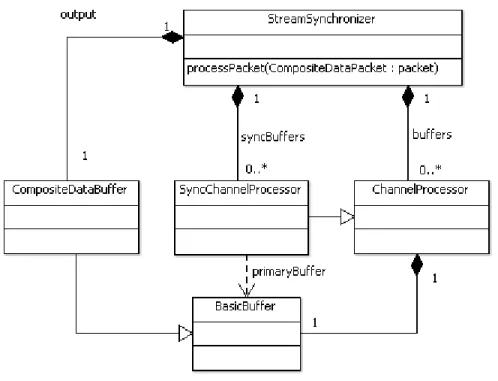
Figure 8 Synchronizer class diagram ... 39
Figure 9 Two history implementations... 41
Figure 10 Defining a timer in XML configuration... 42
Figure 11 ChangeRate class diagram ... 42
Table 1 DBMS vs DSMS requirements ... 14
Table 2 Selected DSMSs compared ... 19
Table 3 Comparison between object and array packet serialization... 32
Listing 1 SenseTileNode XML configuration ... 30
Listing 2 Object based test packet ... 31
Listing 3 Array based test packet ... 32
Listing 4 Composite Data Packet ... 33
Listing 5 BasicBuffer structure ... 34
1 Introduction ...9
2 Background...11
2.1 SenseTile ... 11
2.1.1 SenseTile packet ... 11
2.2 Data Stream Management Systems ... 12
2.2.1 DSMS vs. traditional DBMS... 13
2.2.2 Architecture of a typical DSMS... 14
2.2.3 DSMS data models... 15
2.2.4 Requirements for DSMS querying... 16
2.2.5 Stream query languages ... 17
2.2.6 Example DSMS systems ... 17
2.3 Enterprise application integration with messaging... 19
2.3.1 Messaging systems ... 20
2.4 Enterprise Integration Patterns ... 21
2.4.1 Messages ... 21 2.4.2 Channels... 22 2.4.3 Routing ... 22 2.4.4 Transformation... 22 2.4.5 Endpoints... 22 2.5 Apache Camel... 22 2.5.1 Camel architecture ... 23
2.5.2 Enterprise Integration Patterns... 24
3 DSMS features with Camel ...25
3.2.4 History... 27
3.2.5 Change stream nature ... 28
4 Design and implementation of prototypes...29
4.1 Overview ... 29
4.1.1 Heterogeneous system integration... 29
4.2 SenseTile node ... 30
4.2.1 Registry node... 31
4.3 Packet structure ... 31
4.4 Buffers and buffer processors... 33
4.4.1 Buffers ... 34
4.4.2 BufferDataListener... 35
4.4.3 ChannelProcessor ... 35
4.5 Use case implementation... 35
4.5.1 Decouple packet ... 36
4.5.2 Synchronize packets ... 38
4.5.3 History... 40
4.5.4 Change data stream nature... 41
4.6 Testing ... 43
4.6.1 Performance ... 43
4.6.2 Performance monitoring using JMX ... 44
5 Comparing the EAI approach to Borealis...45
6 Summary and future work ...47
6.1 Future work ... 47
References...49
Appendix A Producer XML configuration ...52
Appendix B Demultiplexer XML configuration...53
Appendix C Synchronizer XML configuration ...54
1 Introduction
Smart buildings are a fascinating merging of technology with our indoor environments. They sense their environments and respond appropriately to changing situations. One technology that enables the realization of smart buildings is sensor networks. The UCD CASL SenseTile system [1] is a research project that aims to build a sensor network intended to be deployed in buildings. The stated goal of SenseTile is to research large-scale, general-purpose and high performing Data Stream Management Systems. Data Stream Management Systems (DSMS) are technologies that enable collection and querying of data streams. Any system that generates sequential data values is a potential source of a data stream. Sensor networks such as SenseTile generate vast amounts of streaming data. A DSMS provides dedicated data models and query operators that act on streams in order to process their data. Researchers have proposed many different approaches to implementing DSMSs and this field continues to be actively researched today.
Due to the fact that DSMSs tend to have their own dedicated data models and operators, it is difficult to enable existing heterogeneous systems to work together. A class of technologies that can be helpful in this area is Enterprise Application Integration (EAI) frameworks. EAI frameworks are designed to enable enterprises to integrate their various heterogeneous information systems using well established integration patterns. There are various enterprise integration frameworks that exist in industry; one common group is message-based systems. Message-based systems decouple endpoints in the system by providing an intermediary messaging service with support for routing and mediation. EAI frameworks must provide translation strategies for different systems in order to support heterogeneous component integration. The goal of this project is to look at how an existing EAI framework could be leveraged to support heterogeneous data stream processing.
Since EAI frameworks do not have dedicated streaming operators, the chosen system will be extended with some DSMS features. This project looks at a number of different use cases and prototype implementations in order to explore how the EAI system can support data stream processing. The chosen enterprise integration framework is Apache Camel [2] which is a Java based messaging integration framework. Camel is based on industry standard Enterprise Integration Patterns (EIP) [3] in order to facilitate implementation of integration scenarios. Camel is designed with many extension points that make it a good choice for a prototyping environment.
This thesis is divided up into six chapters. Chapter 2 provides background information on DSMS, EAI and Apache Camel. Chapter 3 discusses the use cases selected for implementation. Chapter 4 looks at the implementation of the selected use cases. Chapter 5 compares the approach in Chapters 3 with Aurora and Borealis. Chapter 6 summarizes the project and provides future work that could be performed in this area.
2 Background
This chapter describes the important concepts and background information for this project. An introduction to the SenseTile project is provided. Later, Data Stream Management Systems are introduced and the rationale for using them is explained. Enterprise Application Integration strategies are discussed as well as the importance of using Enterprise Integration Patterns. Finally, an introduction to the key concepts of Apache Camel is provided and how it provides the features of a message-based EAI framework and implements EIPs.
2.1 SenseTile
The SenseTile system is a research project that aims to build a large-scale, general purpose sensor–based system with an emphasis on reconfiguration, heterogeneous sensor platform integration, performance and handling of multi-terabyte sensing data [1]. The system is planned to be sufficiently large and complex enough to support in-depth investigations of issues in large-scale sensor networks.
Many office environments today have “floating” or “false” ceilings made up of ceiling tiles. A SenseTile is effectively a specially-designed ceiling tile that is equipped with sensors and processing boards and is connected to wired or wireless networks.
Sensor boards read data from multiple sensors and produce a fixed-width packet stream of data that is sent to processing nodes over either a wired or wireless network. Processing nodes are small computational devices, such as netbooks, miniPCs, etc. These processing nodes process and manipulate the data streams from sensors and perform operations such as merging streams, transforming stream data, storing the data locally, sending the data to other processing nodes, or sending the data to the core server cluster for more intensive processing.
Server clusters are heavyweight server farms that can perform computationally heavy and complex operations on the data streams. The data stream processors available on the processing nodes are also available on the more powerful server clusters. This report will focus on prototyping functionality that can be deployed on both the processing nodes and server clusters.
2.1.1 SenseTile packet
The SenseTile processing boards produce a packet-based data stream of sensor readings. The packet structure has a fixed length of 1024 bytes (512 16-bit words) and
Rates are classified into three types:
1. Fast rate. Fast rate data is audio data that is either 48 KHz for standard audio or 96 KHz for ultrasonic audio.
2. Medium rate. Medium data rates are 5 KHz of Analogue-to-Digital Converter (ADC) readings.
3. Slow rate. Slow rate data is slower than 5 KHz and usually used for temperature, pressure, accelerometer, etc.
The packet itself is divided up into a head section and 82 frames. The head section contains meta-data for the packet as well as the readings for the slow rate data. Each of the 82 frames contains the high rate data and potentially the medium rate data. Headers in each frame provide the meta-data required to parse the packets accordingly.
2.2 Data Stream Management Systems
Sensor networks such as SenseTile generate vast amounts of continuous sensor data in the form of data streams. A data stream is defined as a sequence of potentially unbounded tuple data. Many different types of applications can be built on data streams which require processing in real or near-real time. One group of these applications is monitoring applications. Monitoring applications are applications that monitor continuous streams of data [5] and rely on filtering and triggers in order to detect unusual or interesting conditions. Some include:
• health monitoring systems [6]
• structure monitoring [7]
• environment and habitat monitoring [8]
• computer network traffic analysis [9]
• online analysis of financial systems [9]
• real-time analysis of transaction logs, e.g., phone call records and bank transactions etc. [9]
2.2.1 DSMS vs. traditional DBMS
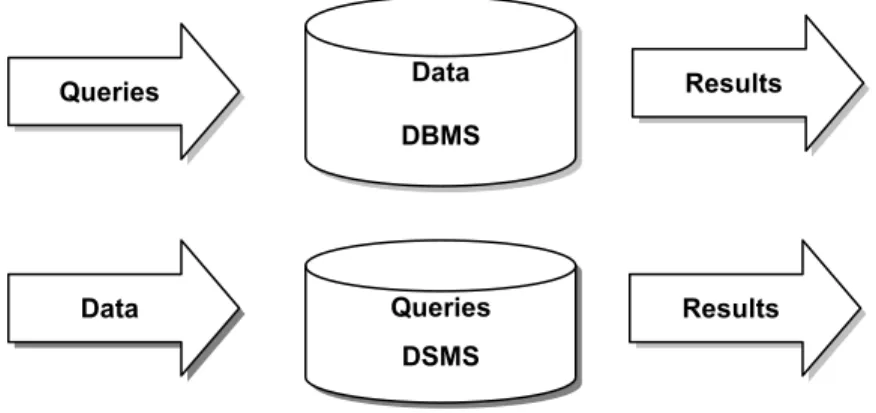
In order to build applications on top of sensor data, there needs to be a way to store, process and query such data in a reasonable manner. Streaming data brings with it new challenges that must be solved with systems dedicated to processing streams. When discussing the requirements on DSMSs, it is useful to compare them to DBMSs. The difference between DSMS and DBMS is a paradigm shift and very significant, illustrated in Figure 1.
Figure 1 Static DBMS vs. DSMS processing
Traditionally, DBMS have been used to manage large volumes of data and provide efficient querying and retrieval of this data. Applications based on DBMSs are referred to as Human-Active, Database-Passive systems [10]. This means that DBMSs are largely passive repositories storing large collections of static data on which humans initiate queries and transactions. Only current values in the state of the DBMS are considered important. Retrieving current values, e.g. an employee’s salary is simple. This data is also considered to be precise i.e. the employee’s salary is exactly the value retrieved. Retrieving previous or historical values is difficult because the system does not have first class history management. DBMSs provide fast and random access to data stored in the system and they are not limited to the size of the storage. Access plans are determined by the queries themselves and can be optimized accordingly. Finally, DBMSs do not have any real-time services or requirements.
Data DBMS Queries Queries DSMS Data Results Results
In contrast to DBMSs, DSMS are referred to as DBMS-Active, Human-Passive systems. DSMSs take their data from external sources, e.g. sensors and not from humans. The data is a continuous and transient stream and the role of the data storage system is to process the data actively. Queries are continuous and operate over windows of data that can be defined by criteria such as time or space. Access to data is not random-access like in DBMS but inherently sequential. Often DSMSs need to provide real-time services and responses. For DSMSs, historical data is important, e.g. a traffic monitoring system may need to track the movement of a car and may require knowing where the car was 5 minutes ago. The amount of data entering a DSMS at a time can be very large (multi-GB). Despite the large amounts of data, a DSMS is usually bound by memory and cannot store all the streaming data it receives. Stream data can be stale and imprecise when entering the system, contrasting with the precise nature of data in a DBMS. The arrival and processing of data is unpredictable and variable. Queries can not be planned in the same way like in DBMSs; they must be planned before the data is made available.
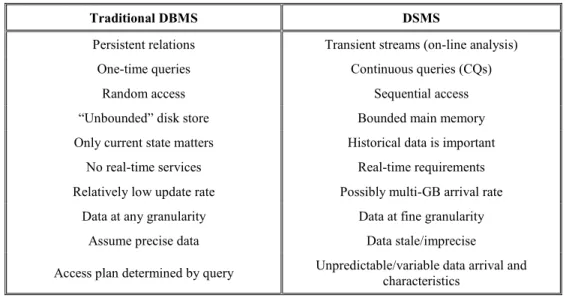
A summary of the differences between the attributes of a traditional DBMS and the requirements on a DSMS is listed in Table 1.
Traditional DBMS DSMS
Persistent relations Transient streams (on-line analysis)
One-time queries Continuous queries (CQs)
Random access Sequential access
“Unbounded” disk store Bounded main memory
Only current state matters Historical data is important
No real-time services Real-time requirements
Relatively low update rate Possibly multi-GB arrival rate
Data at any granularity Data at fine granularity
Assume precise data Data stale/imprecise
Access plan determined by query Unpredictable/variable data arrival and characteristics
Table 1 DBMS vs DSMS requirements
2.2.2 Architecture of a typical DSMS
In order to satisfy the requirements of a DSMS Golab [9] propose an abstract DSMS architecture. Figure 2 illustrates the fundamental elements of the abstract DSMS. An input monitor is used to monitor incoming streams and regulate rates, dropping packets if needed. Data is stored in a number of different storages:
• Working storage. A temporary working storage that can be used for window queries.
• Summary storage. Synopses are stored here and maintained during runtime.
• Static storage. Meta-data about the streams is stored here.
User queries, both long running and one-time are stored in a query repository. The query processor invokes the queries and has access to the system’s storage and input monitor. This allows the query processor to perform optimizations on the query plan e.g. when data rates change. Results are buffered or streamed to the user for further processing.
Figure 2 Abstract DSMS architecture
2.2.3 DSMS data models
Data streams are ordered sequences of data items. Two different models can be used to describe Data streams, relation-based models (e.g. STREAM [11]) or object models (e.g. COUGAR [12]). Relation-based items are transient tuples that are stored in virtual relations. Object models encapsulate data items in hierarchical data types with associated methods.
Due to physical constraints, only a subsequence of a stream can be processed at any given time, this raises the need for window models. Windows are views on the stream data that have some bounds in time or space. Window models are classified by the following criteria [9][13] :
• Direction of movement of endpoints. When the endpoints of a window are defined it is called a fixed window; the window does not change on execution. If the two endpoints are allowed to slide, this a sliding window; an example of a simple sliding window is the last 1000 samples in a stream. A landmark window has one fixed endpoint and the other sliding, either forward or backward.
• Physical vs. Logical. Physical windows are time-based and define the width of a window with a time interval, e.g. the samples in the last 30 seconds. Logical windows are count-based and define the window width in terms of sample or tuple count. Both logical and physical windows are implemented in the prototypes in chapter 4.
• Update interval. Two types of updates can be utilized for windows. When the window is updated on arrival of a new tuple data we call this eager re-evaluation. Lazy re-evaluation uses batching of updates and results in the window moving in large sections and is called a jumping window. When the update interval is larger than the windows size the window is called a tumbling window.
Data streams are time stamped either explicitly or implicitly. Explicit timestamps are injected at the data source and embedded within the data stream. Explicit timestamps can be used to re-order out of order (but only near-ordered) sequences with the use of small buffers [14]. Implicit timestamps are assigned to tuples as they enter the system. Implicit timestamps are based on arrival time and are well suited for use with sliding windows.
2.2.4 Requirements for DSMS querying
DSMS should provide a set of features in order to properly support querying data streams. These requirements are drawn from the needs of various stream-based applications such as the ones listed in 2.2:
• Selection. This can also be referred to as filtering and all streaming applications require support for complex filters on stream data. An example would be to pick samples from a stream that meet a given criteria and possibly discarding the rest.
• Nested Aggregation. The ability to build complex aggregates is needed to compute values such as trends in data. An example of this is the combination of simple aggregates in a chain-like fashion to form a more complex aggregate [15].
• Multiplexing and demultiplexing. This feature allows for the merging and decomposing of logical streams and is similar to group-by and union in DBMSs. In chapter 3 we implement a prototype component for each case.
• Frequent item queries. These queries are known as top-k or threshold queries [16].
• Joins. This is the ability for the system to perform multi-stream joins as well as joins with static data. Joins effectively allow for the combination of different data streams (including static data sources) in order to perform queries [17].
• Window queries. Queries that can be constrained to time-based and count-based windows. All of the above mentioned types of queries should be able to be performed using window models.
2.2.5 Stream query languages
The ability to perform query operations on data is a basic feature of any DSMS. Queries in DSMSs are continuous and often long running. The results of continuous queries can themselves be produced in a continuous fashion [11].
Stream query languages are the equivalent of SQL for data streams except that they support continuous queries. There are three broad paradigms for stream query languages; relation-based, object-based and procedural [9]. Both relation-based and object-based languages are declarative and can provide SQL-like syntax for building queries. Continuous Query Language (CQL) [11] found in STREAM is a good example of a relation-based query language that is very similar to SQL.
A procedural approach to queries is implemented in Aurora [10] where query plans are built up of processing nodes called boxes which are joined by arcs to form data flows. Data stream operators are invoked in the boxes and results are fed along the arcs to other boxes down the query plan. Aurora also provides a graphical user interface to build query plans using this box-arc model, although when the system is running it can re-organise itself to optimise the plans.
2.2.6 Example DSMS systems
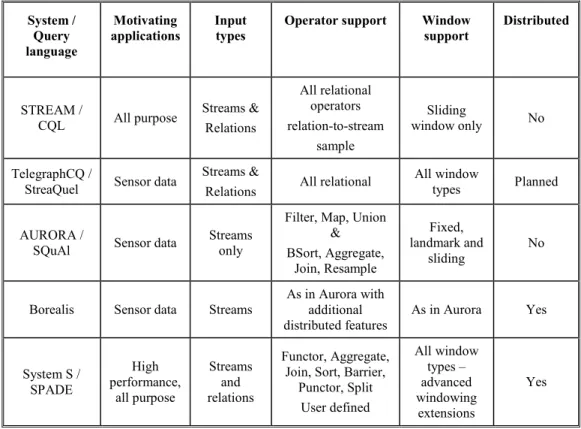
Over the past few years many different stream processing engines have appeared, a few interesting ones are listed here:
• STREAM [11]. A general purpose relation-based DSMS developed at Stanford. It focuses on memory management and approximate query answering. STREAM provides the CQL declarative query language that leverages the relation operations of SQL. Querying is centred on two key concepts, relations and streams. Streams are normal unbounded tuple data and relations are time-based or tuple-time-based sets of data that can be derived from streams and stream operations. Relations are used to materialize the contents of sliding windows or other derived relations.
• TelegraphCQ [18]. A sensor based DSMS developed by UC Berkeley. It is an implementation that heavily leverages the open source database PostgreSQL [19], specifically its query processing engine. It modifies PostgrSQL’s query processing engine to support CQL requirements. TelegraphCQ has extensive support for windows and supports all relational operators. Plans are in place to extend it with an integration framework called TAG [20] to support clustering and distributed processing.
• Aurora [10]. A work-flow oriented DSMS [10]. It utilizes a box and arc procedural query planning model. Aurora’s query algebra (SQuAl [21]) provides seven basic operators with both order-agnostic and ordered functions. Aurora implements a number of query optimizations, rearranging continuous queries when required. It also has a number of QoS features including the ability to shed load by dropping tuples.
• Borealis [4]. Borealis is a distributed stream processing engine that extends Aurora for stream processing and Medusa [22] for distributed services. Borealis introduces the idea of dynamic revisions of query results which allows for tuples to be revised and updated. Additional QoS and distributed dynamic query optimizations have been introduced apart from those already available in Aurora.
• IBM System S [23]. IBM’s System S stream processing middleware is designed to be highly performing with distributed and real-time processing capabilities. It provides infrastructure to address scalability and dynamic adaptability including; scheduling, load balancing and high availability. System S provides a broad array of input data modalities. SPADE [24] is System S’s query language intended for application developers. SPADE provides advanced support for user generated stream operators, flexible windowing schemes and list type data values.
System / Query language Motivating applications Input types
Operator support Window support Distributed STREAM / CQL All purpose Streams & Relations All relational operators relation-to-stream sample Sliding window only No TelegraphCQ /
StreaQuel Sensor data
Streams &
Relations All relational
All window
types Planned
AURORA /
SQuAl Sensor data
Streams only
Filter, Map, Union & BSort, Aggregate, Join, Resample Fixed, landmark and sliding No
Borealis Sensor data Streams
As in Aurora with additional distributed features As in Aurora Yes System S / SPADE High performance, all purpose Streams and relations Functor, Aggregate, Join, Sort, Barrier,
Punctor, Split User defined All window types – advanced windowing extensions Yes
Table 2 Selected DSMSs compared
2.3 Enterprise application integration with messaging
Enterprise Application Integration (EAI) is focused on providing software solutions to enable “the unrestricted sharing of data and business processes among connected applications and data sources in the enterprise” [25].
Large enterprises are usually segmented into business units that manage their own information systems. The segmented systems can potentially be written in different programming languages, use different databases and different data types. When an enterprise needs these systems to be integrated it will need an EAI strategy. It can become prohibitively costly for the enterprise to try to create point-to-point integration interfaces between each node with each other node in their segmented network of systems. The challenge for EAI is to integrate these segmented systems so that the systems can interoperate effectively.
There are two major topologies that EAI frameworks are built around; hub & spokes or bus [26]. The hub and spokes architecture relies on a central hub where all data is managed. The individual systems are integrated through the hub. Application Servers are a good example of the hub and spoke architecture. The bus architecture relies on an agreed message bus through which all communication is done. The bus doesn’t manage the data itself, but appropriately routes communication between senders and receivers. The bus architecture can also be referred to as a messaging system.
Hohpe and Woolf, the authors of the book “Enterprise Integration Patterns” [3] identified four different techniques commonly used to implement integration within an enterprise:
• File transfer. Applications share data by sending files with the common data.
• Shared database. Applications share a common database system.
• Remote procedure calls (RMI). Applications expose common RMI interfaces to be invoked by other applications in a point-to-point manner.
• Messaging. Applications send data to a common message channel asynchronously. Applications agree on the channel and a common message format. This is an example of the bus architecture.
Hohpe and Woolf focus on messaging in their book and provide a catalogue of patterns that can be used to implement EAI solutions using messaging. The patterns are called Enterprise Integration Patterns (EIP).
2.3.1 Messaging systems
Messaging systems allow applications that are being integrated to be completely independent of each other and only depend on the intermediary messaging system for operation. Messaging systems allow applications to reliably and remotely communicate and share data over a network infrastructure using the messaging system as a mediator.
The messaging system provides a means to translate messages between different platforms and languages. This provides support for decoupling between the different applications and their data types.
A key feature of any messaging system is asynchronous communication [3]. This feature alone provides a number of benefits to an integration system:
• Allows callers to send messages without needing to wait for a response. Results from any processing can be sent back to the caller with a secondary message. This feature allows applications to continue processing after sending their message and respond when appropriate,
• Greater thread management as the need to block when waiting for a response is removed
• Throttling of messages gives applications control over the number of requests they handle and reduces the potential for overload. This is contrasted with RMI which does not provide this feature.
Messaging systems normally provide a robust message delivery system that persists even when the system is restarted.
There are many commercial and open source messaging solutions. In the following section we will discuss Apache Camel [2] and how it facilitates the implementation of EIPs.
XML is used as a standard data exchange format for many EAI frameworks.
2.4 Enterprise Integration Patterns
The EIPs that Hohpe and Woolf introduced in their book have become generally accepted standard patterns for enterprise integration just like the Gang of Four [27] design patterns have for object oriented programming. The EIP book discusses solutions to common messaging problems. The EIP book introduces some fundamental concepts on which the patterns themselves are built and a discussion about the patterns is required.
2.4.1 Messages
The key concept in messaging system is the Message. Message is the encapsulation used to package data sent between a sender and a receiver. Messages consist of two parts, a header and a body. The header is used to store meta-information about the message which could include the originator, destination etc. The body is the actual payload of the message.
Messages can be sent in two ways, as a request-response or as an event message. Request-response refers to message exchanges that require both a sent message and reply. This kind of message could be a command invocation that returns a value to the sender. An event message is one which does not expect a response. It is an
2.4.2 Channels
Channels encapsulate the communication between senders and receivers of messages. They are provided as abstractions to hide the underlying protocols required to implement them. Point-to-Point channels describe a channel where only one receiver receives a message from the sender. The alternative to this is a publish-subscribe channel which allows multiple receivers to process the same message. We will see that both channel types are useful when looking at the DSMS prototypes.
2.4.3 Routing
Routing is concerned with the ability to configure pathways for messages to take. Messages can pass through different channels before reaching a destination. There are a few EIPs dedicated to routing that are interesting and that we will cover in more detail when discussing Camel’s implementation of the EIPs.
2.4.4 Transformation
Transformation is the ability to change the payload (body) of a message. This feature is what enables different data formats to be used in an EAI framework. A few EIPs discuss how interoperability between components can be achieved using message transformers.
The Canonical Data Model is an interesting concept that will appear again in our discussions on implementing our DSMS prototype in Camel, see Chapter 4.
2.4.5 Endpoints
Endpoints are the interfaces between components using the components of the framework. Endpoints are implemented for specific protocols and technologies. Endpoints are also where messages begin their existence within the EAI system.
2.5 Apache Camel
Apache Camel is an open source, lightweight, rule based integration framework [2]. Camel provides an easy way for developers to build complex routing and mediation rules that are based on known EIPs. Being lightweight, Camel can be integrated in different containers or run standalone. It was originally part of the Apache ActiveMQ [28] project but was promoted to a top level project in December 2008 [2]. It is currently embedded in a number of different open source enterprise containers
Camel is based on a very flexible architecture that allows for easy extensions to be added for any part of the system. This includes providing custom components to handle new protocols, data types and processors. The architecture relies on a POJO model; this makes it easy to configure and invoke custom Java Beans.
The routing engine is payload agnostic allowing for message bodies to contain any type of data required. Camel provides a number of automatic data type converters that it invokes on the fly.
Camel is considered to be a lightweight ESB as it provides smart routing, transformation, mediation, monitoring and orchestration [29]. It can also be embedded in complete ESB containers such as Apache ServiceMix [30]
The majority of documentation on Camel resides on the Camel website and associated forums and mailing lists. Outside this resource it is very difficult to find information on Camel. Recently a book titled “Camel in Action” published by Manning was announced on the Camel website which will be the first to cover Camel.
2.5.1 Camel architecture
Camel’s architecture is designed around the well known EIPs, encapsulating basic features in well known EIP concepts and terminology.
The highest level concept in a Camel runtime is the CamelContext. The CamelContext
class is a container for all the services that Camel provides. Usually an application will rely on one instance of CamelContext to be running in a JVM at a time, but there is no
real restriction to do so.
2.5.1.1 Messages, Endpoints and Exchanges
Messages, Endpoints and Exchanges are all concepts borrowed from EIP language. Endpoints are the services that send and receive messages; routes are configured between Endpoints. An Exchange describes the kind of communication that takes place between Endpoints and is based on the Message Exchange Pattern (MEP) [31]. Exchanges are either InOnly or InOut, the first being a message event the second a request-reply. In Camel, endpoints are addressed using URIs; this allows for the system to be agnostic with respect to underlying protocols and communication channel architecture.
2.5.1.2 Routes and routing
Routes and mediation rules can be built using any of three possible methods; Java Domain Specific Language (DSL), XML Configuration (using Spring Framework) or Scala DSL. Scala DSL is still under development and does not provide all the features that the two former methods do. Java DSL and Spring based XML Configuration files provide smart completion for developers within an IDE or XML editor, which is a valuable feature for developers.
2.5.1.3 Components
The current architecture has been designed to allow for easy extensions with custom processing components. The fundamental building blocks are at the disposal of a developer to put together an arbitrary component that takes an input stream, processes it and sends output to any number of output streams.
Camel provides approximately 70 Data Types and Protocols out of the box. The modular architecture of Camel allows developers to add support for new Data Types and Protocols effortlessly.
Camel has dedicated Spring Framework [32] integration support. This allows for Camel to be run within the context of a Spring container and to get the benefits of XML Configuration and Dependency injection.
Camel provides a dedicated component supporting Apache Mina [33]. Support is provided for creating endpoints to create and receive messages over a network. Mina handles the communication and marshalling and un-marshalling of packets.
2.5.2 Enterprise Integration Patterns
Camel comes with a number of predefined EIP implementations. For some implementations there are multiple methods to achieve the same functionality. Often developers can provide their own POJO implementation for a specific feature.
Camel provides different ways to operate on message bodies. The best supported format for message bodies is XML, which is an accepted standard data exchange format in EAI platforms. Patterns such as Content Based Router can be implemented using XPath [34] to query the content of a packet directly.
3 DSMS features with Camel
In the previous chapter important background information was provided on DSMS, EAI, EIP and Camel. In this chapter ideas from the previous chapter will be combined and description a set of DSMS features that were implemented on with Camel.
3.1 Requirements
Camel’s strength lies in providing a lightweight message-based integration platform with very flexible extension mechanisms and heterogeneous message support. Our goal is to explore how the strengths of Apache Camel can be utilized to add to it data stream processing by implementing DSMS features with it. When exploring data stream processing features we are sensitive to SenseTile requirements, e.g. that streams can contain very fast high rate audio and multimedia streams.
Camel’s messaging support functions as the base technology on which to build a number of DSMS data-centric features. Camel’s EAI implementation and features are leveraged where appropriate. Where Camel does not offer a solution or is inadequate a prototype implementation is proposed.
The proposed prototype architecture should provide a base platform to implement the chosen stream operators and features. The architecture needs to support:
• Flexible node configuration.
• Network connectivity and support for networked nodes
• A custom and flexible data stream packet model
Camel is used to demonstrate how heterogeneous data streams could be integrated. Integration is Camel’s strength and it provides extensive support for different data types and transport technologies. It will be shown that some desired features come “out of the box”.
3.2 Data-centric features
A number of DSMS related data-centric features have been identified to be explored and prototyped. These features provide the basic functionality of a DSMS by making available stream operators that can be used to facilitate query building on data streams.
The chosen data-centric features operate on an underling data packet structure. This introduces the need for a common and reusable data packet structure that is capable of encoding tuple data.
The features that were chosen to be prototyped in Camel include; Decouple packet,
Synchronize streams, History and Change stream nature. 3.2.1 Data packet
Stream data packets usually encode tuples of data which represent values from different streams or channels that are read at the same point in time. An example tuple structure is provided by Aurora which has a dedicated Tuple object that can take various data types for each stream. The SenseTile packet described in 2.1.1 identifies a number of different streams that are encoded in the sensor board packet structure. Logically the different streams are:
• 4 Audio channels. These are either 48 KHz or 96 KHz channels and have the fastest rate
• 8 ADC channels. These have a rate of 5 KHz
• At least 4 low rate sensor channel. These are the temperature, light level, pressure and accelerometer sensor readings and are considered.
In total there are at least 16 channels of data, discounting the separate values for x, y, z in the accelerometer and various meta-data in the packets.
A reusable data packet is required to encode stream data for processing by the prototype operators. This packet structure must be able to encode multiple data streams (i.e. tuples of data) to replicate the functionality provided by a SenseTile packet. Packets will need to support fast Java serialization for network communications.
3.2.2 Decouple packet
Decouple packet is a demultiplexing problem. Sensor boards in the SenseTile system produce packets of sensor data that are encoded with multiple data streams in one packet, see 3.2.1. The individual streams need to be decoupled from each other in order to allow them to be processed in different pipelines.
After decoupling the streams, it should be possible to recombine them at a later stage. In order to achieve this, the decoupling feature must provide an output that can be used to recombine decoupled streams.
3.2.3 Synchronize streams
This is a special join that is capable of synchronizing two streams from different sources that contain a dedicated sync stream. One interesting problem in sensor networks is the problem of keeping data streams synchronized that originate from physically different sensors in the environment. This is mainly due to difficulties in keeping timing devices synchronized accurately. One approach to keeping streams synchronized is to use physical signals to record events in the environment that all relevant sensors can detect [35]. An example might be a high frequency audio signal or an infrared flash given at specific intervals. These signals can be used to then align streams that are already loosely aligned. The synchronizing feature will require the support of a window operator to keep track of the separate streams until a synchronization point is found.
3.2.4 History
Histories can also be referred to as windowing. History support is a collection of features that create windows of stream data and guarantee the data availability for that window. Histories can be used to facilitate robustness in a system by providing a guaranteed window of the stream which can be queried in the event of a temporary failure or overloading of a node.
Histories can also be used by other stream processors, when a view on a slice of a data is required for processing, e.g., calculating an aggregate value on a window.
Both logical and physical windows are considered in this project. History components can be configured by setting one or both of:
• max storage (maximum amount of data stored)
Physical windows are defined with a maximum delay time period. In this project we look at defining physical sliding windows of the form “last n-milliseconds”. Windows can be stored in memory or on larger permanent storage. Memory-based windows are adequate for shorter term histories. Due to memory constraints in order to support windows with longer delays, the widows need to offload to a permanent storage, such as a file system or database.
3.2.5 Change stream nature
This is an example of an aggregation problem. Sensor data streams can often provide sample rates of readings much higher than client applications need. This can result in excessive processing on the stream. In order to make query operators more efficient it is desirable to limit unnecessary processing for them where appropriate. Often applications performing queries on sensor based data do not need to be updated with readings at the fastest rate that the sensors produce. For example, an application altering the air conditioning in a room does not need to react to every minute change in the ambient temperature; it might be sufficient for the application to be updated with an average of peak temperature values every 5 seconds.
Depending on the algorithm chosen, a processor that changes the rate of a stream will need to perform some aggregation on a window of the stream. Different strategies can be used to implement such an operator, e.g., maximum, minimum or average value in the stream over a period of time.
4 Design and implementation of prototypes
The previous chapter detailed the desired features of our prototype system. This chapter presents the design and implementation of these features using Camel.
4.1 Overview
There are two broad aspects to the design of this system. One is underlying component infrastructure required to integrate with the Camel runtime and enable simple data stream flows. This involves defining the underlying packet structure, buffer operators, communication channels and instance of the Camel runtime. Once this part of the system is defined we can then define the second part; the necessary processors that are required in order to implement our actual use cases.
Each of the use case prototypes is an implementation of a plain old Java object (POJO) Camel Processor. A POJO Processor is a Java bean that implements the Processor
interface provided by Camel. The key method in the Processor interface is the process(Exchange e) method. This is the simplest and most effective way to extend Camel functionality. Processors are called from route definitions.
Each of our own processors has its own configuration class that encapsulates all of the configuration parameters handled by that processor. The configuration class is referenced in the XML configuration.
4.1.1 Heterogeneous system integration
Two systems with different native data formats can be integrated with Camel by providing an appropriate message translator(s).
Where there are multiple systems needing integration, it may be feasible to provide one common data format that each system knows how to translate; this is the Canonical Data Model [36][25]. The data packet prototype described in this project can be considered a canonical data model for the system.
Systems wishing to provide their data to be processed by our prototype operators have to provide a message translator for their data format. The message translator can be an implementation of a Camel Processor that takes a message body and encodes it into the common data packet format.
4.2 SenseTile node
Our prototype system is based on a node architecture in a way similar to the Borealis node [4]. Each node loads a CamelContext and provides configuration settings to the
node through a Spring-based XML configuration file. Nodes are intended to be run standalone in one JVM. Nodes are enabled to communicate over a network using Mina integration support provided by Camel.
Figure 3 Node architecture
The current design includes two types of nodes, a basic SenseTileNode and a specialized SenseTileNode node that acts as a registry. When a SenseTile node is instantiated it will call the registry node to register itself using the configured URI for the registry node, registryURI.
<bean id="node" class="ie.ucd.sensetile.eia.node.SensetileNode"> <property name="nodeDefinition">
<bean class="ie.ucd.sensetile.eia.node.NodeDefinition">
<property name="homeURI" value="mina:tcp://localhost:7003"/> <property name="registryURI" value="mina:tcp://localhost:7000"/> </bean>
</property> </bean>
4.2.1 Registry node
The RegistryNode keeps track of the nodes in a network. As each node starts up it attempts to register itself with the registry node. A registry node is not required to be present for the system to function.
4.3 Packet structure
For the purpose of implementing our prototypes we have chosen to use a simple packet model to represent different streams in the packet. We represent each tuple as a list of integers. This allows our tuple to be of any length and keeps it simple; we also only need to deal with one data type. A packet is simply a list of tuples (or lists of integers). We gain two benefits using this approach:
1. Integers can represent most values and are easy to work with.
2. We can freely set the width of a tuple and the length of a packet allowing for the tweaking of parameters and experimentation without needing to modify the structure.
class ObjectPacket implements Serializable {
List<Tuple> tuples = new ArrayList<Tuple>(); }
class Tuple implements Serializable { List<Integer> data;
public Tuple() {
data = new ArrayList<Integer>(); }
}
Listing 2 Object based test packet
Our messaging approach requires that our packets need to be serialized; a short evaluation was done to determine whether to use primitive arrays or Java Lists and Integers. Lists give the flexibility of being easier to work with and more flexible. Primitive arrays are faster and have less serialization overhead.
The packet structure was implemented in both primitive arrays and Lists and a comparison was done on the performance of serializing the packets. The two structures
class ArrayPacket implements Serializable { int [][] data;
public Packet(int size) { data = new int[size][]; }
}
Listing 3 Array based test packet
Three sets of packets were created and compared to see how the default Java serialization faired when saving the packet to disk and sending it over a local loop-back network using sockets and standard Java object streaming. The tests were run on a ThinkPad T60p with a Core 2 T7400, 2.16GHz processor and a 5400RPM HDD. JVM heap was limited to 250MB. The results of the tests are listed in Table 3. Packet sizes of the packets are the payload size, i.e. the amount of bytes the integer data needs, not the size of the whole object.
1 KB Data Time in ms 234 KB Data Time in ms 2343 KB Data Time in ms Disk Network Disk Network Disk Network Object Packet 20 48 441 2718 4046 27344
Array Packet 7 15 17 80 172 750 Difference (array/object) 35% 31% 4% 3% 4% 3%
Table 3 Comparison between object and array packet serialization
The results indicate that using primitive integer arrays takes only about 4% the time to perform a write/read operation, compared to using fine grained objects with default Java serialization, when the size of the packet payload is in the hundred’s of kilobytes or more. As the sizes increases there appears to be a constant difference between the object and array implementations. The poor results for the object packet are not surprising since tens of thousands of smaller List objects are being serialized with an excessive amount of overhead.
The multiple streams in the packet need to be synchronized and aligned with each other. We achieve this by introducing the concept of one primary stream and multiple secondary streams. The primary stream contains the fastest rate data (audio/multimedia). The secondary streams are aligned with the primary stream and
public class CompositeDataPacket implements Serializable { private int [] primaryChannel = new int [0];
private int [][] secondaryChannels = new int [0][0]; private int syncData [][] = new int [0][0];
private int packetCountFromSource = 0; ...
}
Listing 4 Composite Data Packet
The design of CompositeDataPacket is useful for dealing with long streams that need to be processed individually. Tuple data (aligned values) can also be looked up quickly. Figure 4 demonstrates how the synchronization arrays are used to keep the separate streams aligned.
Figure 4 Conceptual representation of Composite Data Packet
4.4 Buffers and buffer processors
Buffers and buffer processors were developed in order to give stream operators windows of data to operate on.
Primary Stream
Secondary Stream 1 Sync Stream 1
Secondary Stream 2 Sync Stream 2
4.4.1 Buffers
Reusable buffer related components were developed to help with the processing of stream data. Most stream operators require access to a part of the stream in order to perform operations on the data. Since it is not possible to store a complete data stream and process it, windows of data (or buffers) are required to store a defined segment of the data stream. Buffers can be used either when reading data or preparing to send a set of data to a further process. In both cases, buffers need to be defined with a size. Buffers are utility classes that store temporary streams. They are defined as simple count-based windows on the stream data whose size is defined by sample count.
BasicBuffers are memory-based only and implemented as an array with an index and an event listener that is invoked when the buffer becomes full.
public class BasicBuffer implements Buffer { protected int size;
protected int [] data = null; protected int index = 0;
protected BufferDataListener dataProcessor = null; ...
public int writeData(int value) {...} }
Listing 5 BasicBuffer structure
BasicBuffer operates on one stream, to operate on tuple data the CompositeDataBuffer can be used to write whole tuples at once. When the buffer’s
writeData(int []) method is called, the order of the values will be preserved and
written to the respective primary and secondary arrays.
public class CompositeDataBuffer extends BasicBuffer { int [][] secondaryChannels = null;
...
public int writeData(int [] values) {...} ...
}
4.4.2 BufferDataListener
The BufferDataListener is responsible for reacting to the filling of a buffer. One implementation of this listener is the EndpointProducerBufferListener which takes the content of the buffer and wraps it in a CompositeDataPacket and sends it to an endpoint that it has been configured with. This listener based approach to the buffers works well as long as the buffer and listener are running on the same thread, which is normally the case. The EndpointProducerBufferListener can be created by the
processor that creates the original buffer. 4.4.3 ChannelProcessor
The ChannelProcessor aids with writing of packet data from a
CompositeDataPackets to a buffer as the packets come into a processor. ChannelProcessor ensures that synchronized streams in a CompositeDataPacket are written out to a buffer together. ChannelProcessors use a BasicBuffer to write their
data.
Each time that a new packet is processed by a processor, the ChannelProcessor is initialized with the new packet’s data. The ChannelProcessor references the array data from the CompositeDataPacket and works on it to fill a buffer, writing samples
one at a time. When a primary sample from a packet is written, the
handlePrimarySample(int index) method is called on it. This triggers the
ChannelProcessor to check if it has an aligned sample from a secondary stream that
matches the index in the primary stream. If a match is found, the secondary data from that stream is written to the ChannelProcessor buffer.
ChannelProcessor writes directly to its buffer but is only loosely coupled to it as it
does not need to know when the buffer becomes full. Reacting to full buffers is handled by the DataBufferListener. Buffer sizes can be of any length and could become filled many times during the processing of a single CompositeDataPacket or conversely might need several packets before it is filled.
4.5 Use case implementation
Camel provides various EIP implementations that work well at the Message level. Our prototypes need to deal with the content of messages (i.e. at the CompositeDataPacket
level) which is a level of abstraction below the Message. For this reason dedicated
processors are provided to operate on the packet structure. This solution cannot rely on Camel’s Message level EIP’s to properly support the requirements of our prototypes.
4.5.1 Decouple packet
The decouple operator or Demultiplexer component is designed to take in a
CompositeDataPacket and decouple the streams from each other and send the data to separate sinks. It provides a separate output stream for the re-synchronization of these packets. Demultiplexer can deal with any number of streams in a
CompositeDataPacket including the ability to ignore streams in the packet.
The current configuration parameters available on the Demultiplexer include: 1. Selection of channels in the packet to process.
2. Setting the size of buffers used for each of; primary stream, each secondary stream and sync buffers.
3. Assigning the endpoint to send the synchronization stream.
4. Setting the endpoints for the primary and secondary streams individually. The demultiplexer processes each primary sample at a time invoking the associated
ChannelProcessors as it goes along. A separate ChannelProcessor is needed for
each channel in the original packet that needs to be processed.
Each decoupled channel is fed to a different output buffer and the rates at which the output is ejected can be different between the different channels. In order to facilitate the re-synchronizing of the decoupled streams, the demultiplexer outputs a synchronization stream for each secondary stream that is processed. The output synchronization stream contains a tuple of four values:
1. Primary packet id, Primary Count (PC)
2. Index of sample in the primary packet, Primary Sample Index (PSI) 3. Secondary packet id, Secondary Count (SC)
4. Index of sample in the secondary packet, Secondary Sample Index (SSI)
Primary Output Stream n+2 n+1 n m+2 m+1 m
Secondary Output Stream 1 PC PSI SC SSI
m+2 56 n 80
m+2 80 n 543 Sync Output Stream
4.5.2 Synchronize packets
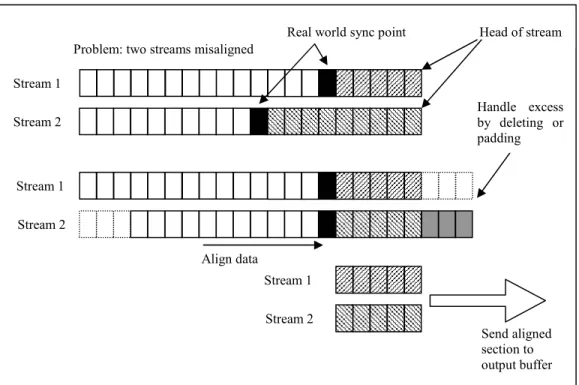
A simple synchronization mechanism is to use defined buffers to store windows on the streams being synchronized. When the relevant synchronization event is detected in both buffers, the values in the stream can be re-aligned and sent to an output buffer.
Figure 7 Synchronizing streams with encoded sync points
An implementation decision that needs to be made is what to do with samples that don’t align due to a different count of samples between the streams. Figure 7 provides an example of the synchronization algorithm and the decision that needs to be made when two streams are aligned. In our implementation the excess is discarded as invalid data, but it could also be equally relevant to pad out the shorter segment with null or default values. Another solution can be to send discarded samples to an “error” output stream, if the samples are still valuable in this form.
Align data Problem: two streams misaligned
Real world sync point Head of stream
Stream 1 Stream 2 Stream 1 Stream 2 Stream 1 Stream 2 Send aligned section to output buffer Handle excess by deleting or padding
Stream 1 and Stream 2 in Figure 7 are two separate CompositeDataPacket streams; each containing the same structure. The CompositeDataPacket needs to contain at least one secondary stream. The primary stream contains the data for some sensor readings and the secondary stream encodes the real-world synchronization events. When a segment of aligned data is found, the aligned streams are combined into one
CompositeDataPacket and sent to a CompositeDataBuffer for further processing or sending to an endpoint.
Figure 8 Synchronizer class diagram
StreamSynchronizer uses two ChannelProcessors, one to write the primary data to a window the other to write the secondary (synchronization) data to another window. Because the values in the synchronization window need to reference indices in the primary window, the ChannelProcessor needs to also reference the primary window buffer. This processor is called SyncChannelProcessor. SyncChannelProcessor is
4.5.3 History
The most common window used throughout this project is the logical, count-based
BasicBuffer.
Our time-based history utilizes two general threads for the control of a single window storage or buffer. One thread is responsible for appending data to the buffer; the other is responsible for purging out-of-date data from the buffer. This ensures that our history does not use more resources than is allocated to it. A lock mechanism is required to ensure reading of the storage does not occur during a purging cycle.
In order to provide greater overall flexibility to the system the history components store complete CompositeDataPackets as they arrive in the processor. The history
component is completely agnostic to the content of the CompositeDataPackets. This decision results in improved performance as no processing is done on the data.
Two approaches were implemented to store time-based windows:
1. Memory-based map. A SortedMap is used to store packets using the arrival timestamp as the key for the map. A sorted map like TreeMap is required in order to extract ranges of sequential values of timestamps for queries or purging actions. It is possible to process more than one packet in the same millisecond, so a List<CompositeDataPacket> is used as the value in the map. Called the MemoryBackedHistory.
2. File system. The file system is used to store the history of the stream. Packets are grouped into larger collections and the collection is stored on disk using the timestamp of the collection as the filename. Called the FileBackedHistory.
Figure 9 Two history implementations
In order to aggregate CompositeDataPackets before storing to disk, FileBackedHistory must use a small buffer (List) to keep track of the packets. When the buffer becomes full it is then written to file as one collection.
Each of the history processors utilizes a Java Timer in order to perform purging operations on the history storage. Access to the storage, either to the Map or File, must be synchronized to ensure that purging operations do not interfere with query operations or updates.
4.5.4 Change data stream nature
Changing the nature of a data stream is demonstrated with the implementation of an operator that slows a continuous stream down and turns it into an event based stream. We can achieve this behaviour in our system by utilizing a time-based window and a scheduled task that runs periodically and queries the window data. Once the basic feature is in place, it should be easy to change the algorithm of the component.
The implementation for this prototype operator relies on a processor called
ChangeRate and a Camel based timer. ChangeRate can be configured with a strategy
for determining the next value to send to its output buffer. The chosen strategy is provided with a window of CompositeDataPackets to perform its operation.
ChangeRate is decoupled from its history component allowing for each to be configured separately.
<route>
<from uri="timer://changeRate?fixedRate=true&period=3000" /> <to uri="bean:changeRate_1?method=processRateChange" /> </route>
Figure 10 Defining a timer in XML configuration
Adding new ChangeRateStrategy implementations is a matter of creating a new
POJO that implements the interface and associating it with the ChangeRate processor through the XML configuration.
4.6 Testing
Testing of the implementations was done by setting up node configurations with pre-defined routes and sending a stream of packets to the nodes.
The chosen use cases were tested in both a standalone single Camel instance and in a networked environment using remote Camel instances. Test-driven development was used for some complex aspects of the code.
A generator of data streams was implemented to feed the nodes with a well defined stream of data. This generator can be run from both a JUnit test or set up in an XML configuration to run as a dedicated source node (DataStreamSource).
Examples of XML configurations for the different use cases are provided in Appendix A-D.
4.6.1 Performance
Although performance of remote systems is difficult to measure accurately, some general measurements can be helpful in evaluating a system.
In order to get a raw performance measure of the nodes and their performance, a test case was prepared to measure the time required to send 20,000 packets at 37KB each to a remote node (on the same machine). The test node has a demultiplexer listening for incoming packets. The output buffers are all directed to internal Java beans and do not send their content further down the network or to a file.
The test was run on a ThinkPad T60p with a Core 2 T7400, 2.16GHz processor and a 5400RPM HDD. JVM is restricted to 250 MB.
Demultiplexer Size (samples)
Primary buffer 80000 (~312KB)
Sync. buffer 80000 (~312KB)
Secondary buffer 1 1000 (~ 3.9KB)
Secondary buffer 2 1000 (~ 3.9KB)
Table 4 Test parameters for Demultiplexer
Sending of all 20,000 packets took approximately 30 seconds. The sender was throttled to a maximum of 700 packets / second, which is approximately 25 MB/s. The total size sent in the whole 30 seconds is 730 MB which equates to approximately 24 MB/s
4.6.2 Performance monitoring using JMX
Camel’s support for JMX [37] integration was used for both performance monitoring and verification of the system. Correct running of routes and processors can be determined by inspecting the runtime values of the managed processes.
5 Comparing the EAI approach to Borealis
Design and implementation details for the prototype DSMS features were presented in the previous chapter. In this chapter we will look at the approach taken to implement a DSMS with an EAI framework compared to the approach taken in Borealis.
5.1 Overview
EAI frameworks and dedicated DSMS systems like Borealis exist to meet different technological challenges. EAI frameworks focus on enabling integration through common interfaces whereas DSMSs exist to process and manage data streams.
When we look to implement DSMS features on an EAI platform, we see that we gain some benefits in the realm of integration and heterogeneous data support. The benefit gained from using an EAI platform should be weighed against the additional cost of developing dedicated DSMS features that could otherwise be borrowed from an existing DSMS.
5.2 Distributed node architectures
Borealis extends Aurora’s data stream processing with extensive distributed processing support.
To gain the same feature set that Borealis provides requires additional development on the part of the Camel system. The basic foundation for distributed communication is available to Camel, but the management features of Borealis are not. Monitoring of Java applications like Camel could be achieved with the help of Java Management Extensions (JMX).
5.3 Query processing support
Borealis provides query operators and optimizations to queries that are not yet available in our prototype. The operator prototypes that have been implemented in Camel form a small part of a much larger set of query processing features.
5.4 Support for heterogeneous sources
Camel provides many translators for automatically converting data types and integrating new systems through common interfaces. Borealis does not provide this
5.5 Data format
A common approach between Borealis and an EAI framework with DSMS features is the need to have dedicated operators (or boxes in Borealis) that understand one underlying data format. As seen in the implementation of our prototype, data stream operators are tightly coupled to their data format.
Borealis provides its own Tuple structure on which all boxes can operate on. CompositeDataPacket served this role in our prototype.
The current implementation of CompositeDataPacket is limited to data types that fit
well into integer values. This means that supporting tuples with string values is not well supported at the moment. Supporting strings is not an immediate requirement in SenseTile. Borealis does support string values and has extensive support for data types and configuration of stream formats.
5.6 Route configuration
In Borealis and Aurora the configuration of routes between boxes and routes between distributed nodes is available through a graphical user interface (GUI). The routes are saved as XML structures by the GUI.
With our current prototype implementation routes can only be created in XML configuration files or directly through the Java DSL see, 2.5.1.2. Developing a GUI for the creation of routes would be an interesting future project.