
Elizabeth Mungai
Cloud Computing With Amazon S3 Using the
Zend Framework
Helsinki Metropolia University of Applied Sciences Bachelor of Engineering
Degree Programme in Information Technology Thesis
Author Title
Number of Pages Date
Elizabeth Mungai
Cloud Computing with Amazon S3 using Zend Framework 42
28th February 2011
Degree Programme Information Technology
Degree Bachelor’s Degree in Information Technology Supervisor Peeter Kitsnik, Principal Lecturer
The purpose of this thesis was to show how to use Zend Framework to connect PHP applications to the cloud.To find out how easy it is for developers with basic
knowledge of the Zend Framework, to incorporate cloud computing in their applications. In order to do this, a blog application was developed using the Zend Framework and the upload files functionality was connected to the cloud using the Zend_Service_Amazon_S3 class.
The development work was carried out on a personal computer. Notepad ++ was used as the editing software and Microsoft Word 2007 was used for documentation. Zend Framework 1.11.2 was the framework used for developing the blog application. Apache server was used for the web server. Amazon S3 web service was used to connect the application and for storage.
The upload files functionality was not practically tested due to time constraints but an extensive guide on how to connect to the cloud, was put together in this thesis.
Therefore any developer looking for instructions or reference on how to do this should be able to connect an application by following the steps described here.
Results of the thesis show that cloud computing is no longer a complicated buzz term reserved for the giant IT companies or elite computer specialists. The project shows that even a developer with basic skills can easily be able to develop and deploy applications to the cloud since resources are more available and open source. Keywords cloud computing, Zend Framework, Amazon S3, XAMPP,
Contents
Abstract...2
Abbreviations and Terms ... 5
1 Introduction ... 6
2 Cloud Computing ... 7
2.1 Overview ... 7
2.2 Cloud Computing Architecture ... 10
2.4 Processes Involved in Cloud Computing ... 13
3 Amazon Web Services ... 13
3.1 Overview ... 13
3.2 Buckets and Objects in S3... 15
4 Zend Framework ... 18
4.1 Overview ... 18
4.2 Features of the Zend Framework ... 18
4.2.1 Three-Tier Architecture ... 19
4.2.2 Model-View-Controller Architecture ... 20
4.3 Zend_Service_Amazon_s3 Class ... 22
5 Setting Up the Environment ... 23
5.1 Installing XAMPP ... 23
5.3 Installing Zend Framework ... 24
5.4 Developing the Blog Application ... 28
6 Connecting the Upload Function to the Cloud ... 33
6.1 Opening an S3 Account ... 33
6.2 Storing Credentials ... 33
6.3 Managing Buckets ... 35
6.4 Managing Objects ... 37
8 Discussion ... 42
9 Conclusion ... 43
Abbreviations and Terms
Cloud Computing
Internet computing whereby servers provide resources, software and data to computers and other services on demand.
Amazon Web Services (AWS)
A collection of web services that together make up a cloud computing platform.
Simple Storage Service (S3)
One of Amazon web services providing storage on the Internet. Zend Framework (ZF)
An open-source, object-oriented and PHP-based web application framework.
S3 Bucket
A named storage entity attached to a particular AWS account. S3 Object
A file containing data that can be stored within the buckets in S3. X [cross-platform]-Apache-MySQL-PHP/Perl (XAMPP)
A free and open-source cross-platform web server solution stack package. Region
A geographical area where Amazon S3 stores the buckets that users create.
1 Introduction
Cloud computing is currently the topic of conversation for many people ranging from companies, developers and users with a little programming knowledge. Due to cloud computing, companies no longer have to spend a fortune in hardware and software. Developers can use development tools on the Internet without downloading and users can use applications on the Internet from anywhere in the world. This is a wave that has and will continue fascinating many.
As cloud computing continues to evolve, new software is being developed that make it easier to connect to the cloud. The purpose of this purpose is to show how to connect an application to the cloud using the Amazon S3 service. This project will mainly deal with developing a blog application using the Zend Framework. The functionality of upload files will then be connected to the cloud.
This project is aimed at developers with a basic knowledge of PHP programming on the Zend Framework and will give an insight into the workings of a cloud computing
enabled application. The reason I chose this topic was due to the fact that am relatively new to the Zend Framework, which I find quite interesting. When I heard about cloud computing using Zend Framework and I thought it would be a great project that will help me gain a better understanding of the framework.
The scope of this project is limited to a description of setting up the environment required to develop the application and the guide to the actual connection of the application to the cloud. However it does not include the complete code of the application, just the snippets of the upload files functionality.
2 Cloud Computing 2.1 Overview
Cloud computing has had many definitions over the years but the most common understanding is that it is Internet computing whereby shared servers provide resources, software and data to computers and other devices on demand. The cloud itself is a set of hardware, networks, storage, services and interfaces that enable the delivery of computing as a service. Cloud services include the delivery of software, infrastructure and storage over the Internet based on user demand [1].
The underlying concept of cloud computing dates back to the 1960s where an idea of an ‘intergalactic computer network’ was introduced by J.C.R Licklider, who was responsible for enabling the development of ARPANET (Advanced Research Projects Agency Network) in 1969. Since then, cloud computing has developed along a number of lines [7].
Amazon played a key role in the development of cloud computing by initiating a new product development effort to provide cloud computing to external customers. They launched Amazon Web Services (AWS) on a utility computing basis in July 2002 which set the stage for the launch of Simple Storage Service (S3). In March 2006, Amazon launched the S3 which defined the model of ‘Pay-per-use’, which is now the standard for cloud pricing [7].
Since then, other companies have joined in the provision of cloud services. The major ones include Amazon, Google, Microsoft, Salesforce, Skytap and Rackspace Cloud.The world of cloud computing has different parties involved:
• The end user who does not really have to know anything about the underlying
technology.
• The business management who need to take responsibility for overall
governance of data or services living in a cloud.
• The cloud service provider is responsible for IT assets and maintenance [2].
Figure 1 below shows the different types of computing available in the past as well as at present. This comparison of computing gives a clear explanation of what cloud computing really is.
In mainframe computing, users shared powerful mainframes using dummy terminals. Stand-alone PCs became powerful enough to meet the needs of the users thus leading to PC computing. PCs, laptops and servers were connected through local networks to share resources and increase performance hereby creating network computing [2].
Internet computing was achieved by the connection of local networks to other local networks forming a global network such as the Internet to utilize remote applications and resources. Grid computing provided shared computing power and storage through a distributed computing system. Cloud computing hence provides shared resources on the Internet in a simple and scalable way. [2]
Mainframe computing and cloud computing might look similar but in reality have several differences. Mainframe computing offers finite computing power while cloud computing offers infinite power and capacity [2]. In mainframe computing, dummy terminals acted as the user interface devices while in cloud computing, powerful PCs provide local computing power and support.
There are basic features of the cloud:
• Elasticity and scalability means that the service needs to be available all the time and to be designed to scale upward for high periods of demand and downward for lighter ones. The application should be able to scale when additional users are added and when the application requirements change.
• Self-service provisioning should enable customers to easily get cloud services without going through a lengthy process.
• Application programming interfaces (APIs) need to be standardized for cloud services. These interfaces provide the instructions on how two
applications or data sources can communicate with each other. A standardized interface lets the customer link a cloud service with ease instead of resorting to custom programming.
• Billing and metering of services should be a built-in service that bills customers.
• Performance monitoring and
management
required service level for that organization.
• Security is a cri
application infrastructure to a cloud service provider requires making sure that the information cannot be compromised
2.2 Cloud Computing Architecture
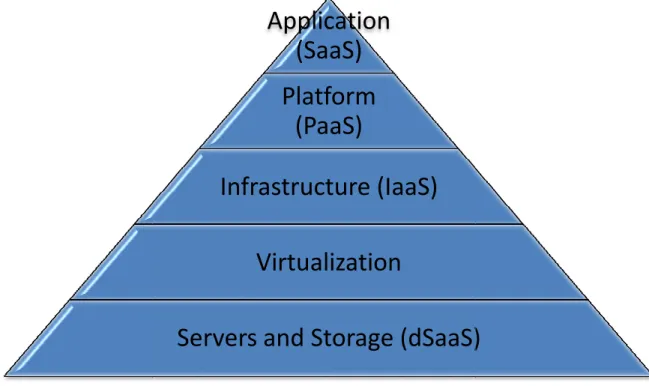
Cloud computing can be viewed as a collection of services which layered architecture,
Figure 2. Layered architecture of cloud computing.
Performance monitoring and measuring is a feature with
management that monitors and optimizes the service thus maintaining the required service level for that organization.
is a critical characteristic in a cloud. Turning over critical data or application infrastructure to a cloud service provider requires making sure that the information cannot be compromised [1].
2.2 Cloud Computing Architecture
Cloud computing can be viewed as a collection of services which are pres layered architecture, as shown in figure 2.
Layered architecture of cloud computing.
Application
(SaaS)
Platform
(PaaS)
Infrastructure (IaaS)
Virtualization
Servers and Storage (dSaaS)
is a feature with service monitors and optimizes the service thus maintaining the
Turning over critical data or application infrastructure to a cloud service provider requires making sure that
are presented in a
Cloud application services, also known as ‘Software as a Service’ deliver services over the Internet, allowing users to remotely access applications from the cloud [1]. They also eliminate the need to install and run the applications from the users’ own computers. A good example of application services is Yahoo mail or Gmail whereby all the users require is Internet to access their mail, regardless of the computer they are using.
Cloud platform services, also known as ‘Platform as a Service’ provide an integrated set of software that provides everything a developer needs to build an application for both software development and runtime [1]. It facilitates the deployment of
applications without the cost and hassle of buying and maintaining the hardware and software layers. Force.com and Google App Engine are good examples of platform services.
‘Infrastructure as a Service’, is the delivery of computing resources as a service [1]. These resources include virtualized computers with guaranteed processing power and reserved bandwidth for storage and Internet access. Virtualization separates computing functions and technology implementations from the physical hardware [1]. The ‘data Storage as a Service’ provides storage that the user requires including bandwidth requirements for the storage.
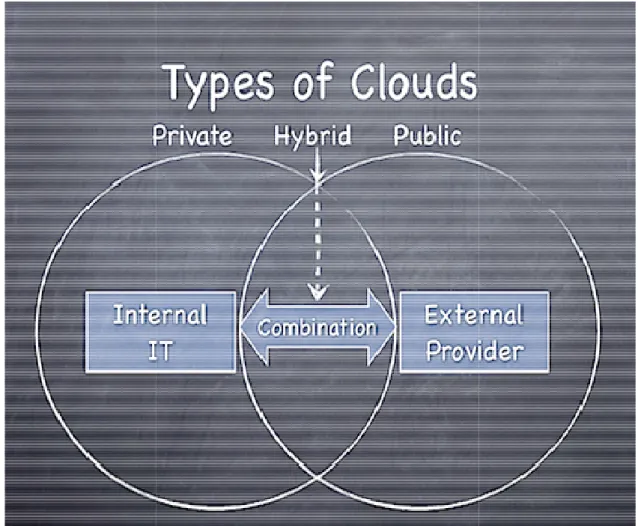
Cloud computing is offered in three forms as clearly shown in figure 3 below:
• Public cloud, whereby the computing resources are dynamically provisioned
over the Internet via web applications or web services from an off-site third party provider. Here applications from different customers are likely to be mixed together in the cloud’s servers, storage system and networks.
• Private cloud, also known as internal cloud refers to cloud computing on private networks. These private clouds are built for a specific client thus providing full control over data, security and quality of service. A private cloud can be built and managed by a company’s own IT organization or by a cloud provider.
• Hybrid cloud, combines multiple public and private cloud models. They
introduce the complexity of determining how to distribute applications across both public and private clouds [2].
Figure 3. The three types of cloud computing
Figure 3 above clearly shows the three types of clouds, how they exist independently and how they interact.
The three types of cloud computing [6].
Figure 3 above clearly shows the three types of clouds, how they exist independently and how they interact.
2.4 Processes Involved in Cloud Computing
When a user accesses content in the cloud by making web service requests, the cloud goes through a couple of steps to service the request:
• Accepts the request
• Confirms that user has permission rights to make the request • Validates the request against account limits
• Looks for suitable resources
• Attaches the resources to the user’s account
• Initializes the resources
• Returns identifiers for the resources to satisfy the request [6]
Once these steps are completed, the user application then has exclusive access to the resources for as long as needed. After the user is done and the application does not need the resources, the application is responsible for returning them to the cloud. Here they are prepared for reuse by being reformatted, erased or rebooted and then
marked as free [6].
3 Amazon Web Services 3.1 Overview
Amazon web services (AWS) are a collection of web services that together form a cloud computing platform. Though these services are designed to work independently, they also work well together by sharing a common naming convention and
authentication system. The web services are offered over the Internet by Amazon.com which was founded in 1994 and launched in 1995 [6].
While trying to achieve the scale needed to create a profitable online business, the Amazon company made investments in the world-scale Internet infrastructure that ensured reliability, efficiency, affordability and scalability. The company realized that developers everywhere could benefit from services that supported Amazon’s web site. Thus in early 2006, Amazon launched the Simple Storage Service (S3). They continued
on to provide a broad range of infrastructure, payment, workforce, merchant and web analysis services [6].
Every function in AWS can be accessed by making a web service call. Starting a server, creating a load balancer, allocating an IP address or attaching storage volume are all accomplished by making web service calls to AWS. These calls use either SOAP (Simple Object Access Protocol) or REST (Representational State Transfer) protocols. Figure 4 shows how the different blocks fit together to form AWS [11].
Figure 4. AWS layering [6].
The command line tools and visual tools communicate with AWS using the open published APIs. This enables the user to duplicate any tools in their applications. The strict layering of AWS gives all developers an equal footing.
The most common Amazon web services include:
• Amazon CloudFront is a web service that provides high performance and globally distributed content delivery.
• Amazon Elastic Compute Cloud (EC2) provides resizable compute capacity in the cloud.
• Amazon Simple Storage Service (S3) is used to store and retrieve large
amounts of data, at anytime, anywhere on the web.
• Amazon Relational Database Service (RDS) provides cost efficient and resizable capacity for MySQL deployments in the cloud.
• Amazon SimpleDB runs queries on structured data in real time.
• Amazon Simple Queue Service (SQS) is a secure querying system that reliably distributes work between application processes.
• Amazon Virtual Private Cloud (VPC) offers a secure seamless bridge between a company’s existing IT infrastructure and the AWS cloud [8]. This project focused on the S3 service. This gives any developer access to the same infrastructure that Amazon uses to run its own global network of web sites [8]. S3 aims to provide high scalability, reliability, security, speed and inexpensive
infrastructure. This service is usually used for web hosting, image hosting and back-up system. SmugMug, Dropbox, OpenSimulator and Ubuntu One are examples of the powerful applications that use the S3 service.
3.2 Buckets and Objects in S3
In order to use the S3 service, the user is required to open an AWS account on the Amazon.com website. S3 allows the user to store data in containers called buckets. A
bucket is a named storage entity attached to a particular AWS account. The user can create up to 100 buckets in a single AWS account making sure that the bucket names are globally unique [8].
Buckets are used to group any number of S3 objects, which can range in size from 1 byte to 5 terabytes. The largest object that can be uploaded in a single instance is 5 gigabytes. A bucket can be stored in one of several Regions. The currently available Regions are US Standard, EU (Ireland), US West (Northern California) and Asia Pacific
(Singapore) [8]. It is important to note that objects stored in a Region never leave the Region unless the user transfers them out.
S3 can be accessed using either one of the two APIs (Application Programming Interface). The SOAP API contains functions such as ListAllMyBuckets, CreateBucket and DeleteBucket. The other API is a REST-style HTTP interface which uses the standard HTTP verbs (GET,PUT,HEAD and DELETE) as the basis of all operations [8]. Every S3 object has a unique URL formed by concatenating the following components:
• Protocol (http:// or https://)
• Bucket name ending with “.”
• S3 endpoint (s3.amazonaws.com)
• Object key starting with “/” [4]
Access to each S3 bucket and object is regulated by an ACL (Access Control List), which contains a series of up to 100 grants. Each grant consisting of a grantee and permission will control access to specific users or to groups of users [4].
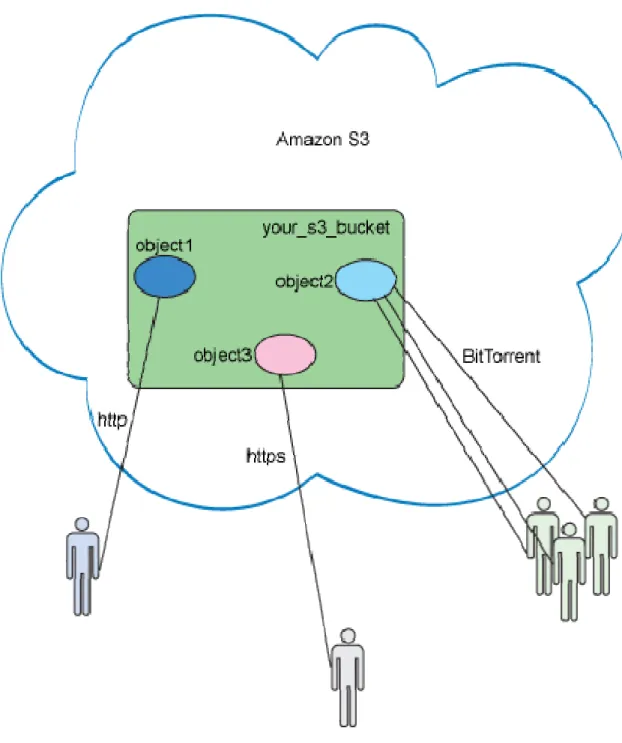
Figure 5 shows how a user interacts with the buckets and objects.
Figure 5. Conceptual view of S3 [17].
As shown in figure 5, a bucket can contain many objects. The objects can have different domain names and a single object can be accessed by many users.
4 Zend Framework 4.1 Overview
A web framework is a software framework or foundation specifically designed to help developers build web applications. These frameworks usually provide core functionality common to most web applications, thus alleviating the overhead associated with the activities performed in web development. Most of these frameworks provide libraries for database access, templating frameworks, session management and code reuse [11].
The Zend Framework (ZF) is a good example of a web framework that will be discussed here since it was used in this project. Around fifteen years ago, PHP
language was considered the most powerful and popular scripting language due to its ease of use. Another scripting language, Ruby, had been in existence for a while but not as many people were using it because it was not as fast, easy to learn or as convenient as PHP [9].
However the landscape changed when frameworks and toolkits specifically designed for easily building web-based applications were developed, led by the popular Ruby on Rails framework. These projects enabled users to create websites with virtually no effort. This inspired the development of the Zend Framework in 2005 by Zend Technologies [9].
4.2 Features of the Zend Framework
The main features of the Zend Framework are:
• Extensible MVC (Model, View, Controller) implementation supporting layouts.
• Fully object-oriented, PHP 5 and E_STRICT compliant components.
• An architecture allowing developers to use only what they need.
• Loosely coupled components with minimal interdependencies.
• Support for multiple database system and vendors, including MySQL and Oracle.
• Email composition and delivery, retrieval via mbox, POP3 and IMAP4.
4.2.1 Three-Tier Architecture
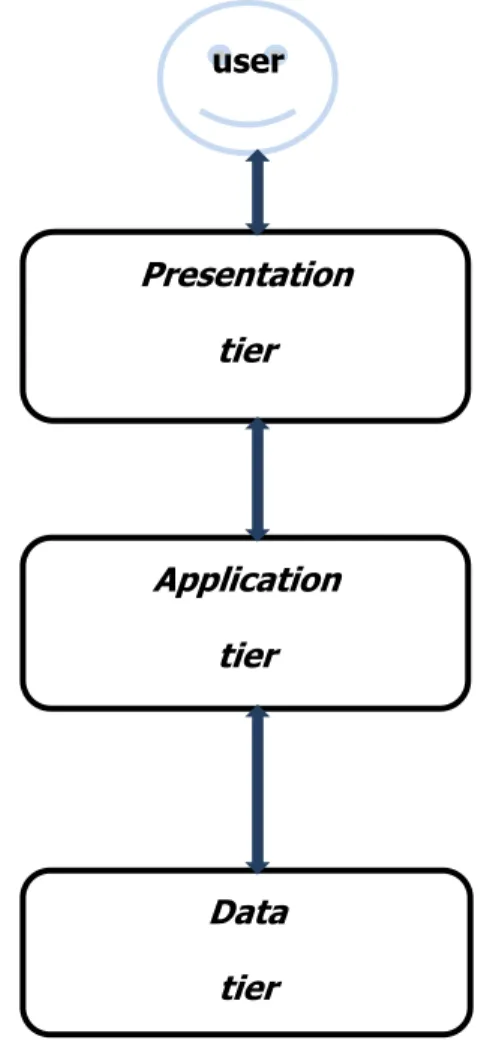
The Zend Framework is organized in a three-tier structure. Understanding this
architecture enables a developer to make better choices when building an application. The three-tier architecture focuses on defining responsibilities within the different parts of the application [11]. Figure 6 below shows the three tiers.
Figure 6. The three-tier architecture.
user Presentation tier Application tier Data tier
The Presentation tier is at the top-most level of the application. It represents the User Interface which translates the tasks and results into a user-friendly form. The
Application tier coordinates the application, processes commands, makes logical decisions and performs calculations. It also moves processed data between the two surrounding layers. The Data tier is used for storing and retrieving data from a database or file system [11].
4.2.2 Model-View-Controller Architecture
MVC paradigm is one of the essential features of the ZF. The MVC pattern divides a project into three manageable modules in the development process. These modules are Model, View and Controller. Figure 7 shows the lifecycle of the MVC architecture.
Figure 7. MVC in action [9].
The Model contains domain-specific instructions. It manages the behavior and data of the application domain, responds to a request about its state from the view and responds to instructions to change state from the controller.
The View is the user interface of the controller. Multiple views can exist for a single model for different purposes. It would usually contain HTML, CSS, JavaScript and images.
The Controller receives inputs from the user and instructs the model and viewport to perform actions based on that input. In ZF, each user event is represented by a request which is handed to an action that knows how to deal with it [9].
4.3 Zend_Service_Amazon_s3 Class
Also known as the Amazon S3 stream wrapper, Zend_Service_Amazon_S3 class is a component of ZF that is used to get and send files to Amazon S3. It sends HTTP requests to access Amazon S3 Web Services API in order to store and retrieve files just by using fopen('s3://...') calls and using regular fwrite and fread functions to send and retrieve file contents from Amazon S3 servers. This class can also create and delete files as well as list and delete directories [12].
The features of the Zend_Service_Amazon_S3 class include;
• A single point for configuring Amazon S3 authentication credentials. • Provides a proxy object that automatically creates requests.
• It has a response wrapper that parses each response body.
• Additional convenience methods for some of the more common operations [12].
5 Setting Up the Environment
In order to develop a PHP application in the cloud, the developer has to create an environment that will help in achieving this task. This project focused on developing a blog application using PHP, which was then connected to the cloud using Zend
Framework.
5.1 Installing XAMPP
XAMPP (X [platform]-Apache-MySQL-PHP/Perl) is a free and open-source cross-platform web server solution stack package [13]. Due its integration, XAMPP makes it possible to run anything from a personal homepage to a full featured production site. XAMPP is preferred by many developers due to the easy installation and setup, it contains a variety of useful packages and that it can be used on different platforms. The download of the latest version of XAMPP 1.7.3 is available at the URL:
http://www.apachefriends.org/en/xampp-windows.html . The package contains
• Apache 2.2.14 • MySQL 5.1.41 • PHP 5.3.1 • phpMyAdmin 3.2.4 • Perl 5.10.1 • FileZilla FTP server 0.9.33.
The downloaded EXE file will appear in the downloads folder. Double clicking on it will start installation in the C:\ drive. XAMPP will then extract the packages which might take some time depending on the speed of the computer.
Once the contents are extracted, the setup script will run automatically. The command prompt appears with questions as to whether to add shortcuts to the desktop and locate XAMPP paths correctly. Once installed, the XAMPP control panel appears where the user can click on the start button for both Apache and MySQL. In case the
button. To confirm whether the web server is running successfully, the user should open http://localhost in a web browser which brings up the XAMPP splash screen [13].
5.3 Installing Zend Framework
The first step is to download the latest version at the URL:http://framework.zend.com
where registration is required in order to download the full package. Despite the registration requirement, ZF is free of charge. Once installed, the developer should create a directory which will be used as the website’s home directory. In this project,
D:\xampp\htdocs\thesis was used as the home directory.
Inside this home directory, the developer creates another directory named application. This directory will house all the scripts created when building the website. Within the
application directory, the developer should create a directory named controllers and
another named views. Within the viewsdirectory, developer then creates a directory called scripts.
Inside the home directory thesis, the ZF folder contains a library directory. This library
directory should be moved out of the ZF directory, so that its path reads
D:\xampp\htdocs\thesis\library.Once again in the application directory, developer
creates a directory named publicwhich is used to store images, CSS (Cascading Style Sheets) files and JavaScript files. Within this public directory, three directories named
css, javascript and images, should be created.
At this point, the website directory structure should be similar to listing 1 below.
Listing 1.Website directory structure
/xampp /htdocs /thesis /application /controllers /views /scripts /library /public /css /images /javascript
Once this is done, the ZF is installed. However before using the ZF, it has to be configured to suit the needs of the developer. Three files have to be created that are necessary in the operation of the ZF. These files are .htaccess, bootstrap.php and
index.php.
The .htaccess file is an Apache directory specific configuration file that is used for tasks
such as password protection or redirection. Listing 2 below shows the code contained in the .htaccess file.
Listing 2. The .htaccess file
The developer creates a file named .htaccess and places the contents of listing 2 into it. This file should be saved within the publicdirectory.
The index.php file sets PHP’s include_path directive to include the ZF library directory,
enables the ZF classes to be called within scripts without having to include them, referencing the bootstrap.php file and jumpstarting Zend’s front controller. Listing 3 shows the index.php file.
RewriteEngine On
RewriteCond %{REQUEST_FILENAME} -s [OR] RewriteCond %{REQUEST_FILENAME} -l [OR] RewriteCond %{REQUEST_FILENAME} -d RewriteRule ^.*$ - [NC,L]
Listing 3. The index.php file [9].
The developer should then create a file named index.php and copy the contents of listing 3 and save it in the publicdirectory.
The bootstrap.php file invokes the front controller as well as other key parts of the
Listing 4. The bootstrap.php file [9].
The developer should create a file and name it the bootstrap.php file. Copy the code in listing 3 and save it within the application directory.
The last step to configuring the ZF is to point the Apache server to the public directory which now contains the three important files listed above. This is done by going to the
apache directory, into the confdirectory where the httpd file is located. This is the file
to edit the DocumentRoot directive which is set as DocumentRoot
“D:/xampp/htdocs/thesis”. This directive should be changed to read DocumentRoot
“D:/xampp/htdocs/thesis/public” , thus setting the directory public as the root, as
shown in listing 5 below.
Listing 5. Changing document root.
# DocumentRoot: The directory out of which you will serve your
# documents. By default, all requests are taken from this directory, but
# symbolic links and aliases may be used to point to other locations. #
Continuing half a page down, there is another directive named directory. The directory setting should be changed to read <Directory “D:/ xampp/htdocs/thesis/public”>. The developer saves the httpd.conf file and restarts Apache in order for the changes to take effect [5, 115-120]. That marks the end of the installation and configuration process.
To test if the ZF is working properly, the developer can open the
application/views/scripts/index/directory, write any php code and save it. Then the
developer should load the URL http://localhost/ on the web browser and it should show the results of the PHP code.
5.4 Developing the Blog Application
The blog application to be developed should enable the user to perform the basic functions of a blog, which are the following:
• Create a new blog
• Upload files (pictures, music, links and videos)
• Add a post to a blog
• Edit a post
• View a post
• Comment on a post
• Log in to account
• Log out of account
This blog application can take advantage of three AWS web services. The whole blog application can be uploaded to the Amazon EC2. The database can make use of the Amazon SimpleDB while the upload function will be used in Amazon S3. This project therefore concentrated on storing the information uploaded by the users in the cloud. The upload files feature will allow the user to include pictures, videos or links to go with the theme of the blog. This will not only make the blog interesting to read but also give the users a chance to personalize their blogs.
A preview of the blog is shown in figure 8 below.
From the figure 8 above, the user will be able to view all previous posts, create a new blog, upload files and comment on any of the posts. To achieve this using the Zend Framework, it is important to understand the nature of the MVC architecture in this context.Table 1 below shows how the application is separated into the distinct parts. Table 1. MVC parts of the application.
Controller Action
Homepage Index Index
Login Index Login
Logout Index Logout
Add post Posts Add
Edit post Posts Edit
View post Posts View
Add Comments Posts Add Comments
Upload file Posts Upload
According to table 1, this blog application has two controllers which will load up files, classes and the environment. To be able to build this application, it is always a good idea for the developer to install the Zend_Tool component. It is not compulsory but it allows developers to concentrate on coding instead of dealing with small unnecessary tasks that may slow down the progress [9].
The Zend_Tool helps the developer apply rapid application development thus accelerating time for product delivery. The Zend_Tool can create a project directory structure, controllers, actions and views. Thankfully, the Zend_Tool comes bundled with the latest release of the Zend Framework so there is no need to download it separately.
The developer should create the controllers and actions using Zend_Tool on the command line. The instructions are as follows:
• zf create project blog • zf create action view posts • zf create action add posts
• zf create action edit posts
• zf create action upload file
• zf create action login index
In order to see the full profile, the developer can enter the command # zf show profile which will give the results shown in listing 6.
A:\xampp\htdocs\realblog>zf show profile ProjectDirectory ProjectProfileFile ApplicationDirectory ConfigsDirectory ApplicationConfigFile ControllersDirectory ControllerFile ActionMethod ActionMethod ActionMethod ControllerFile ControllerFile ActionMethod ActionMethod ActionMethod ActionMethod ModelsDirectory ViewsDirectory ViewScriptsDirectory ViewControllerScriptsDirectory ViewScriptFile ViewControllerScriptsDirectory ViewScriptFile ViewControllerScriptsDirectory ViewScriptFile ViewControllerScriptsDirectory ViewScriptFile ViewControllerScriptsDirectory ViewScriptFile ViewControllerScriptsDirectory ViewScriptFile ViewControllerScriptsDirectory ViewScriptFile ViewControllerScriptsDirectory ViewScriptFile ViewControllerScriptsDirectory ViewScriptFile ViewHelpersDirectory BootstrapFile DocsDirectory file LibraryDirectory PublicDirectory PublicIndexFile HtaccessFile TestsDirectory TestPHPUnitConfigFile TestApplicationDirectory TestApplicationBootstrapFile TestApplicationControllerDirectory TestApplicationControllerFile TestLibraryDirectory TestLibraryBootstrapFile
Listing 6. Zend Framework directory structure.
The Listing 6 shows the directory structure created using the Zend_Tool. The developer can then create a database that will add the tables users, comments and posts. For purposes of this project, phpMyAdmin was the application used to handle the MySQL database. The developer then defines the classes and functions as
required. This thesis does not show the code that makes up the whole application but concentrates on the upload section that will be connected to the cloud.
The developer should create the bucket and object methods in posts controller.php
that enable a user to upload. These methods include:
• public function putbucket() • public function getbucket() • public function listbucket() • public function deletebucket() • public function putobject() • public function getobject()
• public function deleteobject() [15]
6 Connecting the Upload Function to the Cloud 6.1 Opening an S3 Account
The first step is to go to the website URL:http://aws.amazon.com/where the developer can open an AWS account. It is as simple as giving personal data and immediately receiving a verification email to one’s email address. After the account is verified, the developer can then choose what type of Amazon Web Service preferred. In this project, Simple Storage Service is the service of choice.
The pricing of the S3 is shown depending on the Region and the purpose (storage, reduced redundancy storage, data transfer and requests). Then developer can choose the preferred mode of payment which is by credit card and give details of the credit card to be used.
Once the sign-up process is complete, an email is sent to the developer that will give a link to the Access Identifiers which are necessary in order to make valid web service requests [8].
6.2 Storing Credentials
When the developer opens an S3 account, an AWS key and AWS secret key are
provided and are compulsory in the process of connecting to the Amazon cloud. These keys are private and should not be left to the public eye. However the developer will need to use these keys in implementing the methods. To be able to use these keys without risking their privacy as well as without constant repetition, the developer should store them in the PHP.ini file[4]. Listing 7 shows the credentials to be saved.
Listing 7. Storing credentials in a PHP.ini file
; Configuration file to hold secret keys, account numbers and other useful ; strings for Amazon and other cloud accounts.
[amazon]
accessKey=AKIAIV26TPLPQSGEYKBQ
Once the credentials have been stored in the .ini file, the developer should create a PHP class that will be able to retrieve the stored credentials. Listing 8 shows the class.
Listing 8. Credentials.php
The class in listing 8 uses the PHP parse_ini_file() function to read values in .ini format. Thus this Credentials class provides the getCredential () method to retrieve a value from the .ini file. So instead of the developer writing the access codes in every PHP file, the developer can start the files using the code shown in listing 9 below.
Listing 9. Credentials object
Though this process might seem long, once the code is set this way, it is defined at once and in one place. The developer will no longer need to define it in every PHP file.
<?php
// Simple class to retrieve credentials from an .ini file class Credentials
{
var $key_array;
function Credentials() {
$this->key_array = parse_ini_file("..\conf\cloud.ini", true); }
function getCredential($group, $key) { return $this->key_array[$group][$key]; } } ?> <?php require_once 'Credentials.php'; $creds = new Credentials;
$s3 = new Zend_Service_Amazon_S3($creds->getCredential('amazon', 'accessKey'),
$creds->getCredential('amazon', 'secretKey')); ?>
6.3 Managing Buckets
As mentioned in section 3.2, buckets are the fundamental building blocks when it comes to Amazon S3 services. A bucket can be accessed through a URL. For example, if a bucket name is trial, it can be addressed using the URL
http://trial.s3.amazonaws.com. This section will show the different bucket methods that can be used in managing buckets [15].
Creating buckets can be done using the createBucket () method. This method accepts the name of the bucket as its first argument. Listing 10 below shows how to create a new bucket.
Listing 10. Creating a bucket <?php
require_once('Zend/Service/Amazon/S3.php'); require_once 'Credentials.php';
$creds = new Credentials;
$s3 = new Zend_Service_Amazon_S3($creds->getCredential('amazon', 'accessKey'), $creds->getCredential('amazon', 'secretKey')); $bucketName = 'trialblog-bucket'; try { $buckets = $s3->getBuckets(); if (in_array($bucketName, $buckets)) {
throw new Exception('You already have this bucket'); }
$succ = $s3->createBucket($bucketName); if ($succ) {
echo "Bucket created!"; }
else {
echo "Unable to create bucket!"; }
}
catch (Exception $ex) { echo $ex->getMessage(); }
The code begins by specifying the name of the bucket to create in $bucketName. It then retrieves a list of buckets and checks to make sure that the bucket does not already exist. If so, an exception is thrown and handled at the bottom of the script. Retrieving a list of buckets is possible using the getBuckets ()method. The code in listing 11 shows the implementation of this method.
Listing 11. Retrieving list of buckets
The code in the listing above returns an array, with each entry being the name of the bucket.
Clearing a bucketinvolves removing all objects stored within a certain bucket. Buckets can be cleared using the cleanBucket () method. Listing 12 shows the implementation of this method.
Listing 12. Clearing a bucket
As seen from listing 12, the method accepts the name of the bucket as its only argument.
<?php
require_once('Zend/Service/Amazon/S3.php'); require_once 'Credentials.php';
$creds = new Credentials;
$s3 = new Zend_Service_Amazon_S3($creds->getCredential('amazon', 'accessKey'), $creds->getCredential('amazon', 'secretKey')); var_dump($s3->getBuckets()); ?> <?php require_once('Zend/Service/Amazon/S3.php'); require_once 'Credentials.php';
$creds = new Credentials;
$s3 = new Zend_Service_Amazon_S3($creds->getCredential('amazon', 'accessKey'), $creds->getCredential('amazon', 'secretKey')); $bucketName = 'trialblog-bucket'; $s3->cleanBucket($bucketName); ?>
Deleting a bucket can be done using the removeBucket () method. The implementation of this method is shown in listing 13 below.
Listing 13. Deleting a bucket
Like the clearBucket () method, this method also only accepts the bucket name as its only argument. It is important to note that a bucket cannot be deleted while it still contains objects. Therefore a bucket should be cleared before it is deleted.
6.4 Managing Objects
Objects contain the data that is stored within the buckets in S3. In this project, the objects were the files uploaded by the users. As in buckets, there are different methods that can be used to manage objects.
Creating Objects can be done using the PutObject () and putFile () methods that can be used to create and send an object to a bucket. The putObject () method is used when the file is already specified. The putFile () method is used to pass a filesystem path. In this project, the latter method was used since the file is not specified rather will vary depending on what the user decides to upload [15]. Listing 14 below shows how the method was implemented.
<?php
require_once('Zend/Service/Amazon/S3.php'); require_once 'Credentials.php';
$creds = new Credentials;
$s3 = new Zend_Service_Amazon_S3($creds->getCredential('amazon', 'accessKey'), $creds->getCredential('amazon', 'secretKey')); $bucketName = 'trialblog-bucket'; $s3->cleanBucket($bucketName); $s3->removeBucket($bucketName); ?>
Listing 14. Creating an object
The objects have to be made available for reading only. This can be done by setting the S3_ACL_HEADER parameter to S3_ACL_PUBLIC_READ. The putFile () method takes three arguments: the object method, object data and the parameters. Deleting Object can be done using the removeObject () method. This method takes only one argument, which is the name of the object, as shown in listing 15 below.
Listing 15. Deleting objects <?php
require_once('Zend/Service/Amazon/S3.php'); require_once 'Credentials.php';
$creds = new Credentials;
$s3 = new Zend_Service_Amazon_S3($creds->getCredential('amazon', 'accessKey'), $creds->getCredential('amazon', 'secretKey')); $bucketName = 'realblog-bucket'; $filename = $_FILES['theFile']['name']; $perms = array( Zend_Service_Amazon_S3::S3_ACL_HEADER => Zend_Service_Amazon_S3::S3_ACL_PUBLIC_READ ); $ret = $s3->putFile( $filename, $bucketName . '/' . $filename, $perms );
echo "upload Success: " . ($ret ? 'Yes' : 'No'); ?>
<?php
require_once('Zend/Service/Amazon/S3.php'); require_once 'Credentials.php';
$creds = new Credentials;
$s3 = new Zend_Service_Amazon_S3($creds->getCredential('amazon', 'accessKey'), $creds->getCredential('amazon', 'secretKey')); $bucketName = 'realblog-bucket'; $filename = $_FILES['theFile']['name']; $s3->removeObject($bucketName.'/'. $filename); ?>
Listing Objects is can be achieved with three methods:
• isObjectAvailable () method is used to determine if a particular object exists in
a bucket.
• getInfo () method is helpful in getting meta information about a particular
object.
• getObjectsByBucket () method enables one to retrieve a list of the objects in a
bucket.
Listing 16 below shows how the getObjectsByBuckets () method has been used to retrieve a list of objects.
Listing 16. Retrieving objects in a bucket.
The getObjectsByBuckets () method accepts the name of the bucket as its first
argument and optionally accepts an array of parameters as the second argument. <?php
require_once('Zend/Service/Amazon/S3.php'); require_once 'Credentials.php';
$creds = new Credentials;
$s3 = new Zend_Service_Amazon_S3($creds->getCredential('amazon', 'accessKey'), $creds->getCredential('amazon', 'secretKey')); $bucketName = 'realblog-bucket'; $ret = $s3->getObejctByBucket($bucketName); var_dump($ret); ?>
Reading Objects can be done using the getObject () and getObjectStream () methods.
The getObject () method is shown in listing 17 below.
Listing 17. Reading objects
In listing 17, the getInfo () and getObject () methods have been combined, so that the file information can be sent back to the end-user. It retrieves the information about the file first, so that it can determine the mime type and file size. The getObject () method accepts only the name of the object as an argument and returns the data found in the object [15].
Now that the bucket and the objects have been created, the end-users can access the files using the following domain names:
http://[bucketName].s3.amazonaws.com/[objectName] which in this case will be
http://realblog.s3.amazonaws.com/[objectName].
http://s3.amazonaws.com/[bucketName]/[objectName] which in this case will be
http://s3.amazonaws.com/realblog/[objectName].
It is important to remember that the permissions have to be publicly readable in order for the users to access the files.
<?php
require_once('Zend/Service/Amazon/S3.php'); require_once 'Credentials.php';
$creds = new Credentials;
$s3 = new Zend_Service_Amazon_S3($creds->getCredential('amazon', 'accessKey'),
$creds->getCredential('amazon', 'secretKey'));
$bucketName = 'realblog-bucket';
$objectName = $bucketName . '/'.$fileName'; $info = $s3->getInfo($objectName); if (is_array($info)) { header('Content-type: ' . $info['type']); header('Content-length: ' . $info['size']); echo $s3->getObject($objectName); } else {
header('HTTP/1.0 404 Not Found') }
7 Benefits and Drawbacks of the Used Software
This chapter will discuss the advantages and disadvantages of the software used in this project. The software in question was the Zend Framework to connect to the Amazon S3 web service.
Zend Framework itself has quite a few advantages, which include:
• Free for development and distribution.
• Fully object-oriented PHP class library.
• Extreme simplicity and a “use-at-will” architecture.
• MVC architecture which is an essential feature for building web applications.
• Authentication, authorization and session management.
• Supports data adapters for all major databases.
• AJAX support.
• Compatibility with many web services.
• RSS and Atom syndication support [10].
Despite the wide range of advantages that come with the Zend Framework, it also has a few disadvantages.
• Poor documentation for the beginners.
• Updating the framework should be done manually by the developer.
• Failure to update the security patches can lead to serious security risks [10].
The Amazon S3 web service has the following advantages:
• Scalability allows a developer to scale storage and bandwidth without any configuration changes.
• Elasticity ensures that availability, speed and capacity are not affected during peak times.
• The service offers unlimited storage.
• It is cost-effective thus providing a good option for startups.
As with everything else, the Amazon S3 also has some disadvantages. Security is probably the biggest issue. Measures to protect data and privacy have been
implemented, but as long as the data is stored in the cloud over the Internet, security is always an issue. The S3 service has had a few major outages that brought down sites like Twitter [3].It has also had some speed issues in the past.
Due to time limits, I was not able to complete the application to be a fully functional blog and test the functionality of the Zend Framework to connect to the cloud.
However, with to extensive research, I was able to compile a theoretical approach that should be able to work with a few errors.
The aim of this project was to find out if a developer with a basic knowledge of the Zend Framework could easily connect an application to the cloud. This was partially achieved since a blog application was developed, though the upload functionality, which was to be connected to the cloud, was not practically implemented.
The purpose was to connect the upload function to Amazon S3 so that the end-user could be able to upload pictures or links relevant to the blog being posted. The
connection to the cloud was made by the Zend_Service_Amazon_S3 class, which made it possible to create buckets and put objects into the buckets. This project required opening an Amazon S3 account, which was very easy and direct.
From the current blog application developed, an end-user will be able to create a new blog, login and logout, view and add posts. The comment and upload files
functionalities are still in development. This can be attributed to local server problems and file configuration issues.
There is inexhaustible research material on this subject of connecting PHP applications to the cloud. Trying to practically implement it has led me to strongly conclude that it is possible for beginner developers to be able to connect their applications to the cloud. This provides endless possibilities for them in terms of hosting, speed and reliability in their web applications for reasonable prices.
This project was aimed at finding out if a developer with a basic PHP knowledge could take advantage of the cloud services by connecting an application to the cloud using the Zend Framework and Amazon S3 services. The focus was on the upload files feature that was connected to a bucket in the Amazon S3 service.
The project showed that, while setting and opening an S3 account is fairly simple and direct, configuring the Zend Framework is quite brain-racking for a beginner. An
installer package will be a good improvement, so the developer does not have to worry about file locations. The Zend Framework also lacks clear concise documentation and therefore it takes time to learn and understand it.
The result of the project was a partially functional blog. The create a new blog, add post and view post functionalities were complete and in working order. Log in and log out functionalities were complete but had some errors. The upload files functionality, which was the main focus of this project, was not complete due to time constraints. Though the project did not complete a fully functional blog application, I was able to conclude that with a basic knowledge of PHP, a developer can take full advantage of the cloud services being offered. With limited resources, a developer can design and develop a web application that offers speed, scalability, security and is reliable.
References
1. Hurwitz J, Bloor R, Kaufman M, Halper F. Cloud Computing For Dummies. NJ: Wiley Publishing, Inc; 2010.
2. Borko Furht, Armando Escalante, editors. Handbook of Cloud Computing. London: Springer; 2010
3. Jonathan Strickland. How Cloud Computing Works [online]. 2008. URL:http://communication.howstuffworks.com/cloud-computing.htm. Accessed 8th January 2011.
4. Doug Tidwell. Cloud Computing with PHP, part 1: Using Amazon S3 with the
Zend Framework [online]. Developer Works; 22nd September 2009. URL: http://www.ibm.com/developerworks/opensource/library/os-php-cloud1/.
Accessed 9th January 2011.
5. Jason Gilmore W. Easy PHP Websites with the Zend Framework. 1373 Grandview Avenue, Columbus, Ohio: W.J Gilmore, LLC;2009.
6. Jeff Barr. Host Your Web Site in the Cloud: Amazon Web Services Made Easy. Seattle, USA: Amazon Web Services, LLC; 2010.
7. Arif Mohamed. A history of cloud computing [online]. ComputerWeekly.com;
27th September 2009. URL:
http://www.computerweekly.com/Articles/2009/06/10/235429/A-history-of-cloud-computing.htm. Accessed 14th December 2010
8. Amazon Simple Storage Service [online]. Amazon Web Service LLC. URL: http://aws.amazon.com/s3/. Accessed 8th January 2011
10.Nicholas C. Understanding the Zend Framework, part 1: The basics [online]. Developer Works; 27th June 2006.
URL:http://www.ibm.com/developerworks/opensource/library/os-php-zend1/index.html. Accessed 14th January 2011
11.Web Application Framework [online]. DocForge; 2008. URL: http://docforge.com/wiki/Web_application_framework. Accessed 15th
December 2010
12.Programmer’s Reference Guide [online]. Zend Framework. URL: http://framework.zend.com/manual/en/zend.service.amazon.s3.html. Accessed 15th January 2011.
13.Nils-Erik F. Install XAMPP for easy, integrated environment. Developer Works;
30th November 2004. URL:
http://www.ibm.com/developerworks/linux/library/l-xampp/. Accessed 14th December 2010
14.Jurgen V. How to use Amazon S3 and PHP to dynamically store and manage files with ease [online]. Nettuts+; 5th June 2008.
URL: http://net.tutsplus.com/tutorials/php/how-to-use-amazon-s3-php-to-dynamically-store-and-manage-files-with-ease/. Accessed 24th January 2011
15.Quentin Z. Zend Framework 101: Zend_Service_Amazon_S3 [online]. phpRiot; 6th March 2010.
URL: http://phpriot.com/articles/zend-service-amazon-s3. Accessed 24thJanuary 2011
16.Hari KT. Zend Framework Tutorial, build your blog [online]. Harikt.com; 9th December 2009.
URL: http://www.harikt.com/content/simple-blog-using-zend-framework-19. Accessed 24th January 2011
17.Prabhakar C. Cloud Computing with Amazon Web Services, Part 2: storage in the cloud with Amazon Simple Storage Service(S3) [online]. Developer Works; 19th August 2008.

![Figure 4. AWS layering [6].](https://thumb-us.123doks.com/thumbv2/123dok_us/847145.2607751/14.892.194.821.398.986/figure-aws-layering.webp)
![Figure 7. MVC in action [9].](https://thumb-us.123doks.com/thumbv2/123dok_us/847145.2607751/21.892.226.739.160.807/figure-mvc-in-action.webp)

