A
SSESSING USABLE
SECURITY OF MULTIFACTOR
AUTHENTICATION
M
AHA
M
OHAMMED
A
LTHOBAITI
A thesis submitted to the School of Computing Sciences of the
University of East Anglia for the fulfilment of the degree of Doctor
of Philosophy (PhD) in Computing Sciences
June 2016
© “ This copy of the thesis has been supplied on condition that anyone who consults it is understood to recognise that its copyright rests with the author and that use of any information
مسب
الله
نحمرلا
يمحرلا
لى ا
يلداو
ينيمركلا
دمحم
تييبثلا
هظفح
الله
هفيشر
تييبثلا
اهظفح
الله
For their infinite wisdom, this thesis is dedicated with much love to my parents, Mohammed Althobaiti Sharifa Althobaiti
اذه
نم
لضف
الله
An authentication mechanism is a security service that establishes the difference between authorised and unauthorised users. When used as part of certain website processes such as online banking, it provides users with greater safety and protection against service attacks and intruders. For an e-banking website to be considered effective, it should provide a usable and secure authentication mechanism. Despite existing research on usability and security domains, there is a lack of research on synthesising the contributions of usable security and evaluating multifactor authentication methods. Without understanding the usability and security of authentication mechanisms, the authenticating process is likely to become cumbersome and insecure. This negatively affects a goal of the authentication process, convenience for the user.
This thesis sought to investigate the usability and security of multifactor authentication and filled an important gap in the development of authenticating processes. It concentrated on users’ perspectives, which are crucial for the deployment of an authenticating process.
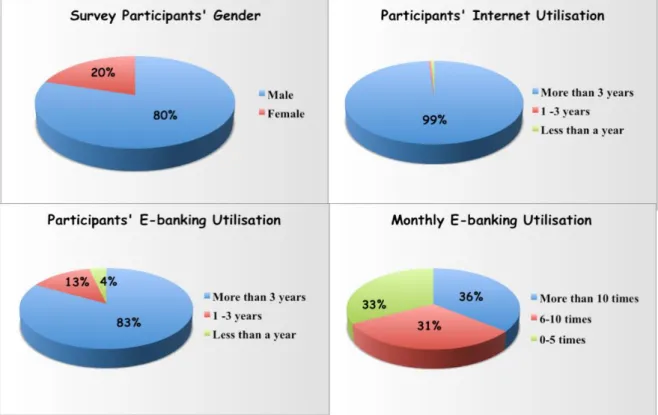
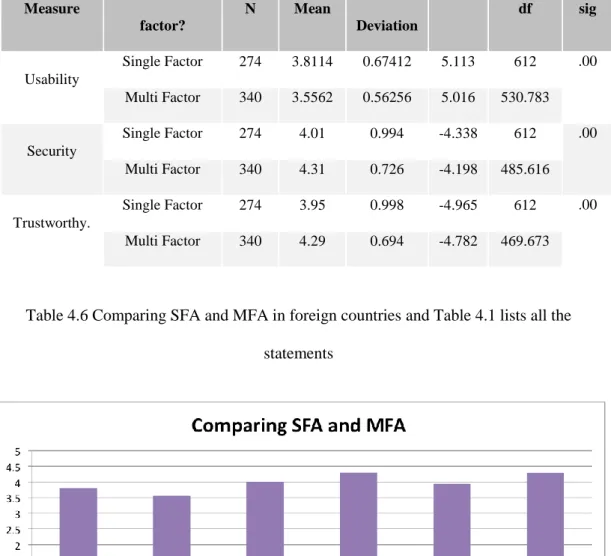
To achieve the thesis goal, a systematic series of three studies has been conducted. First, an exploratory study was used to investigate the current state of the art of using multifactor authentication and to evaluate the usability and security of these methods. The study involved a survey of 614 e-banking users, who were selected because they were likely long-term users of online banking and they had two different bank accounts, a Saudi account and a foreign account (most foreign accounts were British). The study indicated that multifactor authentication has been widely adopted in e-banking in Saudi Arabia and the United Kingdom, with high levels of security and trustworthiness as compared to single factor authentication.
The second study was a descriptive study of the most common authentication methods. This study aimed to learn more about commonly used methods that were identified in the previous study and sought to propose an appropriate combination of authentication methods to be evaluated in the third study. The third study was an experimental study with 100 users to evaluate the usable security of three different multifactor authentication methods: finger print, secure device and card reader. A web based system was designed specifically for this study to simulate an original UK e-banking website. One of the main contribution of this study was that the system allowed users to choose their preferred authentication method. Moreover, the study contributed to the field of usable security by proposing security evaluation criteria based on users’ awareness of security warnings. The key result obtained indicated that fingerprinting was the most usable and secure method. Additionally, the users’ level of understanding security warnings was very low, as shown by their reaction to the security indicators presented during the experiment.
A
CKNOWLEDGMENT
First and foremost, I would like to express my thanks and sincerest gratitude to Allah, my creator, who provided me with the time, health and ability to accomplish this work.
Next, I owe deep thanks and gratitude to my supervisor, Dr. Pam Mayhew, for kindly contributing her valuable time and effort in providing advice, enthusiastic encouragement and moral support at every step of this work. Dr. Pam’s advice helped me to gain a real sense of perspective and clarity.
I would also like to extend my gratitude to Dr. Joost Noppen and Dr. Dan Smith for their continuous help, valuable discussions and support throughout my studies at the University of East Anglia. I would also like to thank Prof. Raul Sanchez-Reillo (University Carlos III of Madrid) for comments and advice on earlier drafts of this thesis as it was being shaped.
I am indebted to my parents who encouraged me from the beginning to complete my higher education. Many thanks to both of them for giving me, throughout my life, their continuous and unconditional love, prayers, support, encouragement and guidance, without which I would not have been able to finish this work.
I would also like to extend my gratitude to my husband, Dr. Salem Alalwani, who has shared the journey with me to complete my higher education. Many thanks to my brothers, who encouraged me throughout my studies. Finally, special thanks to Waleed, Hazim and Dr. Asim Althobaiti for their continuous help and prayers.
Abstract………....III Acknowledgment………..…IV List of Figures……….X List of Tables………..……….XII Abbreviation………..XIV List of Publications………..XV Chapter1 Introduction
1.1 Research Overview and Motivation ... 17
1.2 Justification: Why Authentication and Usability? ... 19
1.3 Research Objectives ... 21
1.4 Research Questions ... 22
1.5 Contributions and Achievements... 22
1.6 Overview of the Thesis ... 24
Chapter 2 Literature Review 2.1 Human computer interaction ... 27
2.2 Usability ... 28
2.2.3 Methods for evaluating usability ... 32
2.2.4 Usability evaluation methods classification ... 33
2.3 Security ... 42
2.3.1 Security properties ... 43
2.4 Security warnings ... 45
2.8 Trust and online banking ... 53 2.9 Authentication mechanisms ... 54 2.9.1 Knowledge-based authentication ... 55 2.9.2 Token-based Authentication... 56 2.9.3 Biometric-based Authentication ... 57 2.10 Authentication classification ... 58
2.10.1 Single Factor Authentication (SFA) ... 58
2.10.2 Multi-factor authentication ... 60
2.11 Chapter Summary ... 65
Chapter3 Research Methodology 3.1 Research Paradigm ... 67
3.2 Research Approach ... 69
3.3 Research Strategy... 71
3.4 Research Design ... 75
3.5 Exploratory Research ... 76
3.5.1 Data Collection Instruments ... 78
3.6 Descriptive Research ... 85 3.7 Experimental Research ... 86 3.7.1 Experiment Hypotheses ... 87 3.7.2 Variables ... 87 3.7.3 Experiment Design ... 88 3.7.4 Measurements... 88
3.7.5 Data Collection Instruments ... 89
3.7.6 Piloting the Experiment ... 90
Chapter4 Exploratory Study
4.1 The Need for an Exploratory Study ... 93
4.2 The Study’s Objectives ... 94
4.3 Study Questions ... 95
4.4 Survey Design ... 95
4.5 The Pilot Study ... 99
4.6 Sample Size and Recruitment ... 99
4.7 Results and Discussion ... 101
4.7.1 Reliability of the Measures... 101
4.7.2 Overview of the Participants ... 102
4.7.3 Using SFA or MFA ... 104
4.7.4 Analysis by Authentication Factor ... 106
4.7.5 Analysis by Individual Usability Attributes ... 109
4.7.6 Analysis by Method ... 109
4.7.6 Analysis by Other Measures... 111
4.7.8 Analysis of the Qualitative Data ... 114
4.8 Chapter Summary ... 124
Chapter 5 Descriptive Research 5.1 Study Objectives ... 126
5.2 Authentication Methods ... 126
5.2.1 Knowledge-Based Authentication ... 127
5.2.2 Token-Based Authentication ... 128
5.2.6 Process-Based Authentication ... 135
5.2.7 Relationship-Based Authentication ... 136
5.3 Summary of the Descriptive study... 138
5.4 Proposed Methods for the Experimental Study ... 140
5.5 Chapter summary ... 141
Chapter 6 Experimental Research 6.1 The Need for the Experimental Study ... 144
6.2 Study Aim ... 147
6.3 Study Questions ... 147
6.4 Study Approach ... 147
6.5 System Design and Study Materials ... 149
6.6 Study Scenarios ... 152 6.7 Participants’ Recruitment ... 154 6.8 Study procedure ... 154 6.9 Assessment Methodology ... 156 6.9.1 Usability assessment ... 156 6.9.2 Security assessment ... 157 6.10 Data Collection ... 160 6.11 Pilot study ... 161
6.12 Results and Discussion ... 162
6.12.1 Respondents’ profile ... 162
6.12.2 Usability Results ... 164
6.12.3 Survey results ... 170
6.12.4 Security Results ... 188
7.2 Investigation of Usability and Security of MFA ... 197
7.3 Proposed MFA for the Experimental Study ... 199
7.4 Usable Security of MFA ... 201
7.5 Discussion Note ... 204
7.6 Researchers’ Recommendations ... 206
7.7. Chapter Summary ... 207
Chapter8 Research Conclusion 8.1 Research Conclusion ... 208
8.2 Contribution to the Body of Knowledge ... 210
8.3 Limitations and Future Work ... 212
8.4 Epilogue ... 214 Appendices ... Error! Bookmark not defined.
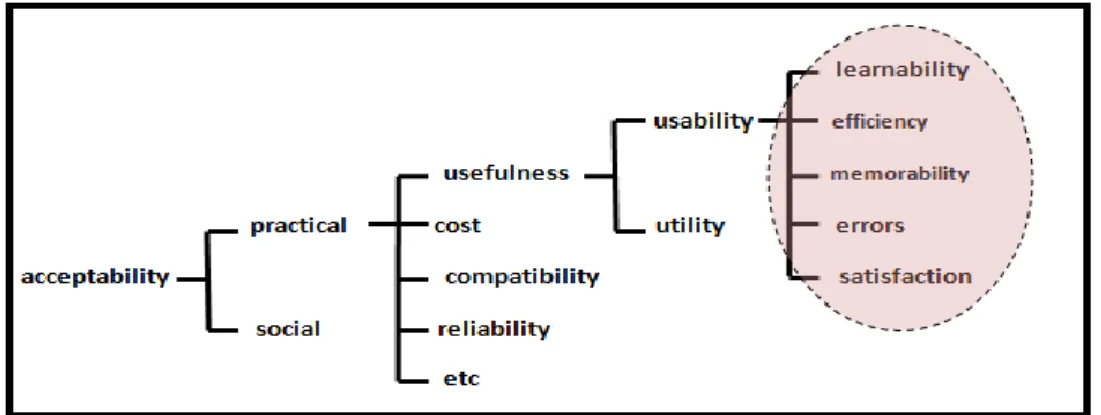
Figure 2.1 The definition of the usability according to Nielsen (1994) 29
Figure 2.2 CIA- triad items 44
Figure 2.3 Relationship between security and usability 51
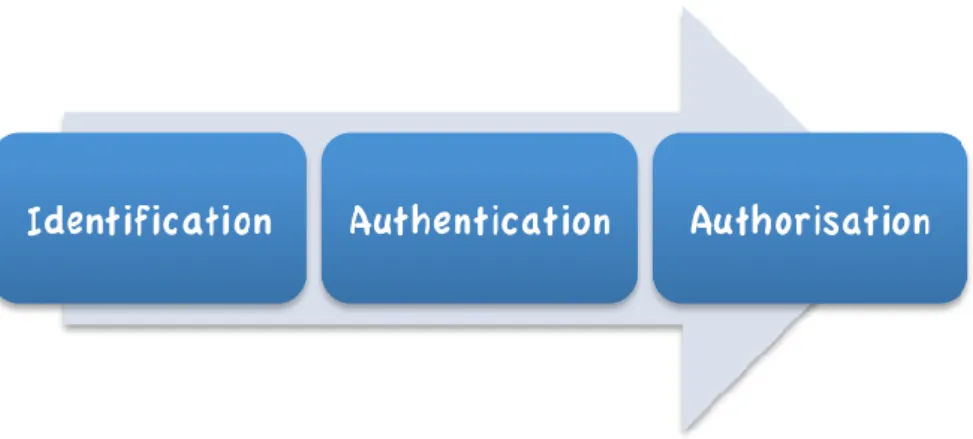
Figure 2.4 Phases of authentication process 55
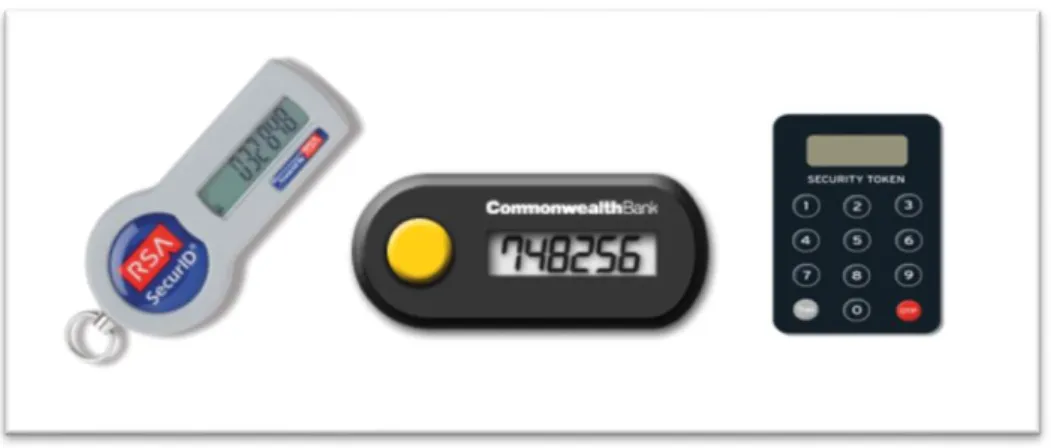
Figure 2.5 Example of Knowledge-based authentication 56 Figure 2.6 Examples of token-based authentication 57 Figure 2.7 Examples of biometrics-based authentication 58
Figure 2.8 Single factor authentication 59
Figure 2.11 Multi factor authentication 61
Figure 3.1 Deductive versus inductive research approaches 71 Figure 3.2 Relation of research designs (Churchill, 1999) 73 Figure 3.3 Conceptual view of research methodology 74
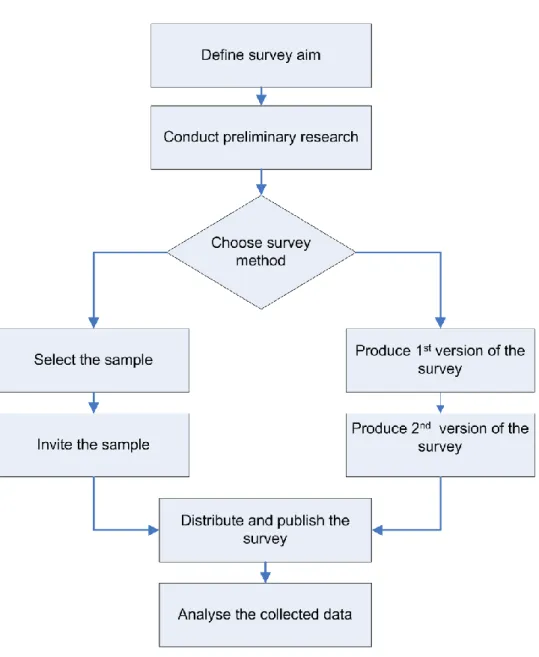
Figure 3.4 Steps of survey process 77
Figure 4.1 Survey design 96
Figure 4.2 Participants’ profiles 103
Figure 4.3 Authentication methods classification in UK and SA 105 Figure 4.4 Comparing SFA and MFA based on mean values 108
Figure 4.5 Mean differences by gender 111
Figure 4.6 Mean differences by e-banking usage 112
Figure 4.7 Mean differences by monthly visits 113
Figure 4.8 Mean differences among different education level 114
Figure 5.1 Graphical password 127
Figure 5.2 USB token 129
Figure 6.1 Proposed approach model 149
Figure 6.2 Home page for simulated system 150
Figure 6.3 The used devices in the experiment 151
Figure 6.4 Flowchart of the scenarios steps 155
Figure 6.5 Data collection methods for the main experiment 160
Figure 6.6 Surveys’ sections 161
Figure 6.7 Respondents’ profiles 163
Figure 6.8 Scanning finger process 165
Figure 6.9 Generating code with HSBC device (HSBC, 2016) 166
Figure 6.10 Generating code with card reader 166
Figure 6.11 Participants’ rating for fingerprint 173 Figure 6.12 Comparison between factors for fingerprint 175 Figure 6.13 Participants’ evaluation for secure device 178 Figure 6.14 Comparison between factors for secure device 180 Figure 6.15 Participants’ rating for card reader 182 Figure 6.16 Comparison between factors for card reader 184 Figure 6.17 Comparison between three methods among three factors 185
Figure 6.18 Results of ranking questions 186
Figure 6.19 Inserting email page in the simulated system 190 Figure 6.20 Warning message about invalid certificate 192
LIST OF TABLES
Table 2.1 Different definitions of usability according to different standards 29
Table 2.2 Overview of usability attributes 32
Table 2.3 Different approaches for evaluating system 33 Table 2.4 Overview of usability evaluation methods 34 Table 2.5 Comparison between studies in the area of assessing MFA 64 Table 4.1 Details of survey statements in Likert scale 98
Table 4.2 Item total statistics 102
Table 4.3 Participants’ characteristics 104
Table 4.4 SFA and MFA in different countries 106
Table 4.5 Normality test 107
Table 4.6 Comparing SFA and MFA in foreign countries 108 Table 4.7 Paired comparisons MFA in Two Bank Accounts 111
Table 4.8 List of Issues in Local bank account 116
Table 4.9 List of strength points in Local bank account 119 Table 4.10 List of issues in foreign bank account 120 Table 4.11 List of strength points in foreign bank account 123 Table 5.1 Differences between different approaches 139 Table 6.1 Devices order in three different scenarios 153
Table 6.2 Security measurements 158
Table 6.3 Participants characterises for main experiment 164
Table 6.4 Number of help for each device 167
Table 6.5 List of rating statements of the survey 169
Table 6.9 Descriptive statistics for rating secure device 178 Table 6.10 Friedman test results for evaluation secure device 179 Table 6.11 Descriptive statistics for rating card reader 182 Table 6.12 Friedman test results for card reader 183
Table 6.13 Contingency coefficient result 187
Table 6.14 Comments categories 187
Table 6.15 Users’ reaction toward warning message 193 Table 7.1 Comparison between studies in the area of assessing usable security of
MFA
ABBREVIATIONS
AM Authentication Method
BBA Biometrics Based Authentication
CIA Confidentiality, Integrity and Availability
HCI Human Computer Interaction
ISO International Standard Organisation
KBA Knowledge Based Authentication
MFA Multi Factor Authentication
MMI Man Machine Interaction
SDLC Software Development Life Cycle
SEC SECurity
SFA Single Factor Authentication
SPSS Statistical Package for the Social Science
TBA Token Based Authentication
UI User Interface
USA USAbility
USA-SEC USAble - SECurity
Conference:
Althobaiti, M.M., Mayhew, P., (2014). Security and usability of authenticating process of online banking: User experience study. In the Proceedings of the 48 Annual IEEE International Carnahan Conference on Security Technology, ICCST 2015, IEEE.
Althobaiti, M.M., Mayhew, P., (2015). Usable Security of Authentication Process: New Approach and Practical Assessment. In the Proceedings of 10th International Conference for Internet Technology and Secured Transactions, ICITST 2015 14 -16 Dec 2015.IEEE.
Althobaiti, M.M., Mayhew, P. (2016). “Usable Security of Authentication Process: Experimental Study”. 9th Scientific Saudi Conference (SSC9). 13-14
Feb 2016.
Journal:
Althobaiti, M.M., Mayhew, P., (2015). Assessing Usable Security of Multifactor Authentication. Journal of Internet Technology and Secured Transaction. 4 (4), pp 420- 426.
Althobaiti, M.M., Mayhew, P. (in press). Users’ Awareness of Visible Security Design Flaws. International Journal of Innovation, Management and
Technology. (Accepted).
The following publications stemmed from the author’s MSc thesis, which helped her to expand and build her knowledge in the field of Human Computer Interaction:
Althobaiti, M.M., Mayhew, P., (2016). Assessing the Usability of Learning Management System: User Experience Study. In the Proceedings of e-learning, E-education and Online Training – Second International Conference, eLEOT 2015. Springer Berlin Heidelberg.
Althobaiti, M.M., Mayhew, P., (2016). How Usable Are the Learning Management Systems? The Users Have Their Say. EAI Endorsed Transactions on e-Learning [Special Issue]. (Accepted).
Chapter
1
Introduction
Authentication mechanisms are considered the typical method to secure financial websites. Context authentication has become increasingly important in the arena of online banking. Multifactor authentication is the most commonly used method of strengthening the login process in e-banking. Despite existing research on usability and security domains, there is a lack of research on synthesising the contributions of usable security and evaluating multifactor authentication methods. Therefore, this thesis seeks to investigate the usability and security of multifactor authentication and fills an important gap in the development of authenticating processes.
The current chapter gives an overview of the current research and identifies the research gap that motivated this study. Then, the justification of the research is provided, followed by the research aims and objectives. A list of the proposed questions for the research is presented, and finally, an overview of the research structure and thesis organisation is given to conclude the chapter.
Recent advances in communication and computer technology have revolutionised the Internet and the field of information technology, which play an essential role in business and affect all other aspects of society. Financial institutions have been eager to establish their own websites and use the Internet to provide customers with virtual access replicating traditional services that take place in person at an institution’s building and are frequently associated with unnecessary standing in queues. The benefits of financial websites include user convenience, simplified transactions and 24-hour availability. The increasing number of Internet users has driven financial institutions to provide electronic services; according to the Office for National Statistics (2015), 86% of adults in the UK (44.7 million) use the Internet.
Financial websites deal with sensitive information, which makes security a priority. High-risk information, such as user names, passwords and credit card details, is sent from a website to a destination server and thus needs to be protected. Secure websites deploy protocols, such as secure socket layer (SSL) certificates, to encrypt sensitive information (Soghoian and Stamm, 2010).
Bank customers use electronic banking (e-banking) to conduct financial transactions. Authentication, the first step in account access, takes place when a user’s identity is verified. The level of website security depends upon the strength of the website’s authentication mechanisms.
process. At the same time, a good level of security is required to protect user information from attackers. Achieving high security depends not only on the system features provided by the financial organisation but also on user behaviour. A US Secret Service survey of 500 US business executives has shown the relationship between the security leaks that have occurred amongst major companies in the US and user practice (US Secret Service et al., 2014).
Several authentication methods are available in the market. For example, using a password to confirm user identity is one way that can be utilised during the authentication phase. Other methods, such as the use of tokens, cards and biometrics, can also be combined with a password to strengthen the authentication process. This technique is called multifactor authentication. Companies tend to improve authentication security and usability according to developers’ and experts’ recommendations. For example, the European Union Agency for Network and Information Security (2013) conducted a survey involving 100 professionals. The goals were to identify the authentication mechanisms used in financial and payment services and determine the risks associated with them. The results of the survey led to several recommendations, which promote the adequacy of the Electronic IDentity and Authentication Systems method for context and, specifically, the ‘proportionality of method and risk’ (ENISA, 2013). The recommendations included using two-factor (2F) authentication, such as utilising tokens and passwords for all operations, including low-risk ones, and improving the knowledge and behaviours of both customers and professionals, including those who improve e-finance security environments, e-finance application development and distribution security (ENISA, 2013). These recommendations underline the responsibility of e-banking in improving
the security level.
Little research has discussed the conflict between security and usability (Besnard and Arief, 2004; Furnell, 2005; Nodder, 2005). The challenge of integrating usability into security has motivated researchers to investigate numerous authentication methods, but considerable room exists for further research to find a satisfactory solution. The lack of proper assessment methods has created a gap that needs to be examined. This thesis aims to fill such a gap through an in-depth assessment of the usability and security of the most advanced authentication mechanisms widely available.
1.2 Justification: Why Authentication and Usability?
Without authentication, a computer system has no foundation to establish whether access should be granted. For online banking, proper and strong authentication is a major concern to determine if a user is eligible to access a specific system. In information technology, humans are considered the weakest link that can make a certain system vulnerable to attack (Vacca, 2013). Therefore, strong authentication is required to make access to e-services difficult to hack.
Prior research indicates that users’ typical behaviours with single-factor authentication, such as the use of passwords and PINs, reduce the security level of already-weak mechanisms (Carullo et al., 2012; Brostoff et al., 2010). Other research shows that multifactor authentication improves the security level against attacks because it asks users to provide more than one identifying entity (Bhivgade et al.,
low level of usability of multifactor authentication. These studies emphasise the conflict between usability and security in the provision of authentication mechanisms (Besnard and Arief, 2004; Furnell, 2005; Nodder, 2005). Considerable research has acknowledged that authentication methods as solutions can benefit from improvements in usability (Hafiz et al., 2008). However, robust literature reviews have revealed a limited amount of research related to evaluating the usability of multifactor authentication (Krol et al., 2015; Weir et al., 2009). The current study fills the gap in the area of assessing the usable security of multifactor authentication to offer guidance in the development of a new security technology and usable interface.
The research encompasses users’ perceptions and attitude towards authentication methods, which may lead to improvements in bank providers’ online security (Voice, 2005). In addition, the findings might reduce the use of low-cost methods that are associated with usability issues (Knight, 2008). The study will involve a non-Western context because previous studies focused only on developed countries. Saudi Arabia, which is considered the powerhouse of the Middle East and has an attractive potential market for e-commerce application (Png et al., 2001), is selected as the focus of the research.
In general, this research will extend previous work by
1. Investigating the current use of single and multifactor authentication, 2. Comparing each in terms of usability and security,
3. Studying the difference between developing and developed countries in their use of multifactor authentication,
each type of authentication,
6. Exploring user preferences for different types of multifactor authentication methods,
7. Examining the conflict between security and usability in different combinations of authentication,
8. Investigating users’ awareness of security warnings.
1.3 Research Objectives
The primary aim of this research is to explore the current state of using multifactor authentication methods and to experimentally determine the most usable and secure method. Multifactor authentication methods will be carefully selected for the study, and a list of recommendations based on the results will be produced.
The study will
1. Provide an understanding of the literature that addresses authentication and the usability and security offered by authentication,
2. Explore the current state of single and multifactor authentication methods, 3. Evaluate the usability of single and multifactor authentication techniques in
developing and developed countries from users’ perspectives,
4. Review the available authentication methods and propose suitable methods for the experimental study,
5. Experimentally assess the usability, security and trustworthiness of different multifactor authentication techniques,
7. Propose recommendations based on the research results and the researcher’s experiences.
1.4 Research Questions
The main research question involves identifying the most usable multifactor authentication method.
The specific research questions are as follows:
1. What are the authentication methods used by online banking websites? 2. What are users’ perceptions of the usability and security of these authentication
methods?
3. What is the most usable and secure multifactor authentication method for online banking usability?
4. To what extent does the security level affect the usability rate when different kinds of authentication techniques are used?
5. To what extent do security warnings affect users’ behaviour?
1.5 Contributions and Achievements
The key contributions of this thesis are as follows:
Identifying the research gap
Chapter Two reviewed studies related to the security and usability of authentication methods and identified the limitations in this field. Of these, only five papers focused on the usability of multifactor authentication, whereas none examined the methods that were explored in this thesis. The current literature lacks a focus on the security attributes to be measured during usable security evaluation. The current thesis
tasks of the authentication process to show the relationship between the two concepts.
Current state of authentication methods
A usability evaluation was conducted with a survey involving 614 respondents to investigate the current state of authentication. This survey included questions on security, trustworthiness and usability. To the best of our knowledge, this is the first study that focuses on Saudi customers of online banking. The sample was selected carefully; the participants were ensured to have a long experience with e-banking and have two different bank accounts from a developed and a developing country.
Analysis of the usability of single and multifactor authentication
The exploratory study in Chapter Four showed different authentication methods, including single factor authentication. An analysis to compare the usability and security between single and multifactor authentication was conducted, and the results provided a clear picture of the high security of multifactor authentication on the basis of the perceptions of users who have a long experience in using both methods.
Analysis of different authentication methods
A comprehensive and extensive analysis of seven popular authentication approaches was conducted objectively and in a way that guided the finding of a combination of the most appropriate methods that could be examined in the experimental stage of this thesis. The study found that a biometric method should be included to achieve new and logical evaluation results.
Novel approach to evaluating authentication methods
The experiment presented in Chapter Six was designed to evaluate the suggested authentication methods in terms of usability and security. The approach simulated online banking at the HSBC Bank because the participants were British, and many HSBC customers were expected to take part in the experiment. The approach included three different methods (card reader, secure device and fingerprint) for usability and security comparison, and it gave each participant the opportunity to have a real experience with each method so that the results are more accurate. To the best of our knowledge, no previous studies used the same assessment methods (Chapter Six).
Security analysis
The security analysis undertaken in Chapter Six focused on the proposed criteria related to users’ awareness of security warnings. The results revealed a clear picture of the low level of user awareness of security warnings.
1.6 Overview of the Thesis
The remainder of the thesis is organised as follows:
Chapter Two presents a comprehensive and extensive review of the concepts and previous research related to this thesis. It starts by reviewing system usability and the methods to evaluate usability. Then, it reviews the concepts of security, online banking, trust, usable security and security warning. Finally, the chapter ends with a review of the classification of authentication methods.
Chapter Three gives readers a clear picture of the three methodology strategies used in this thesis (exploratory, descriptive and experimental), followed by the ethical considerations and the data analysis strategy.
Chapter Four presents the exploratory study that investigates the usability and security of the methods used in different countries. This chapter also explains the data collection process and the results.
Chapter Five describes the advantages and disadvantages of different authentication approaches. The analysis includes biometrics authentication, and the chapter proposes a combination of different methods to be examined practically in the following chapter.
Chapter Six presents the experiment study that was designed to evaluate three different authentication methods in terms of usability and security. The experiment steps, starting from designing the platform to performing the experiment, are explained in detail, followed by an in-depth analysis of the collected data.
Chapter Seven discusses the interpretations of all study findings. In particular, the researcher intends to link the results from all studies with prior research
conducted in the field of usable security. This chapter also provides a list of the researcher’s recommendations.
Chapter Eight offers a summary of the research and identifies the key contributions made by this study to the field of usable security. This chapter also presents a discussion of the research limitations and addresses avenues for the expansion of future work.
Chapter
2
Literature Review
In this chapter, the state of the art of the evaluation of usable and secure authentication processes is reviewed. The chapter identifies common themes in the fields of human computer interaction (HCI) and security. Based on the scope of this thesis, the chapter involves several other themes: online banking, trust, authentication, and warnings, in order to set up the bases of all themes that are related to the thesis context.
The chapter also includes a review of the studies and research that have explored the usability of authentication methods. Finally, the chapter presents the scope of the thesis, and a conclusion to the chapter.
2.1 Human computer interaction
The terms HCI or man-machine interaction have been widely used since the early 1980s. According to Dix et al. (2004), they relate to the interaction between machines
and humans and the effect of the physical characteristics on user performance. Generally, HCI is subject to issues that interfere with the availability of functionality or the proper use of the system by the user, not the guarantee of a usable system. Rogers (2004) stated that HCI has been used to define the properties of an object that allow the user to know how to use them. The main two terms that HCI illuminates are usability and functionality (Te’eni et al., 2007). An effective system can be achieved when there is a balance between usability and functionality (Nielsen, 1993).
The HCI discipline helps us to understand the performance differences between software systems, and why there are ‘good’ and ‘bad’ systems. The definition of HCI according to Computer Science Curricula (2013) is ' Human Computer Interaction (HCI) is concerned with designing interactions between human activities and the computational systems that support them, and with constructing interfaces to afford those interactions.' (p.89)
2.2 Usability
Usability is easy to understand, but its practical, high-level application to a website can be more difficult. Nielsen’s (1996) definition of usability encapsulates five components: learnability, efficiency, memorability, few errors and user satisfaction (see Figure 2.1).
Three international standards have defined usability (Table 2.1). The literature makes it clear that usability reflects ease of use, one of the main goals of HCI, which in turn involves the study of the interactions between users and technology (Battleson et al., 2001). Usability also measures consumers’ subjective experiences with an application. Do they like it? Do they feel that they have painlessly achieved their objective(s)? For banking websites, the second question which we are talking about here is especially relevant.
Table 2.1 Different definitions of usability according to different standards
Standard Usability definition
(IEEE Std.610.12, 1990, p. 80)
“The ease with which a user can learn to operate, prepare inputs for, and interpret outputs of a system or component.”
(ISO9241-11, 1998) “The extent to which a product can be used by specified users to achieve specified goals with effectiveness, efficiency and satisfaction in a specified context of use.” (ISO/IEC 9126-1, 2000) “The capability of the software product to be understood, learned, used, and attractive to the user, when used under specified conditions.”
2.2.1 Benefits of Usability
Usability offers benefits, not merely for end users, but also for organisations that develop software and applications. Xerox (cited in Pieratti, 2005) stated that usability:
1. Provides a more efficient design for developing products, 2. Helps to orient the design toward the needs of real users, 3. Can reduce training and support development costs, 4. Satisfies customers by offering more usable products.
Several leading corporations, for example, Apple Inc., American Airlines and Microsoft Corporation, integrate usability engineering into their product development cycles (Pieratti, 2005).
2.2.2 Usability Attributes
As shown in Table 2.1, the ISO defines three primary factors of usability: effectiveness, efficiency and satisfaction. While Nielsen’s definition of usability consists of five attributes: learnability, efficiency, memorability, errors and satisfaction. Each is considered a base for achieving the usability of a website (Nielsen, 1993). Brief explanations of these attributes follow.
Learnability
The system should be easy to learn. Learnability can be measured by counting the number of correct steps when performing a particular task after the first time.
A system should be efficient. High productivity can be achieved if the system is easy to understand and the user can complete the task within an acceptable amount of time. The efficiency can be measured by calculating the time consumed to complete a task.
Memorability
The system functions should be easy to remember, so that a casual user can return to the system without relearning how to use it. Memorability can be measured by counting the number of steps remembered and performed by the user in the second usage.
Errors
A system should have a low error rate. The error rate can be measured by counting the number of errors made by the user while performing a specific task.
Satisfaction
The system should be pleasant to the user, which will be reflected in user satisfaction. Satisfaction can be assessed by subjective, qualitative inquiry into whether the user was happy with the system.
Nielsen’s attributes were applied in different studies, however, other standards and models have similar or different attributes, as summarised in Table 2.2 below:
Table 2.2 Overview of usability attributes
2.2.3 Methods for evaluating usability
The evaluation of usability refers to gathering information about the usability of a system in order to assess it. According to Fitzpatrick (1998, p.2), a usability evaluation method is a 'systematic procedure for recording data relating to end-user interaction with a software product or system'. The data gathered from the evaluation process is analysed and assessed to determine the usability level. There are three general goals of the assessment: evaluate users’ experience of the interaction with the system, identify the system's problems during a specific task and evaluate the system's functionality (Dix et al., 2004).
There are different approaches to evaluation. According to Faulkner (2000), evaluation is divided into two categories: formative and summative. Formative evaluation is conducted during the system development life cycle (SDLC) to advance and improve the system design. This process is repeated until the desired usability level is achieved. Standard Nielsen (1993) Shackel (1991) Preece et al. (1994) ISO 9241-11 (1998) Constantine & Lockwood (1999) Shneiderman (2005) Quesenbery (2010) Attribute
Learnability Learnability Learnability Effectiveness Learnability Time to learn Easy to learn
Efficiency Effectiveness Throughput Efficiency Efficiency Performance Efficient
Satisfaction Attitude Attitude Satisfaction Satisfaction Satisfaction
Effective error tolerant Errors Flexibility Reliability Errors Engaging
Memorability
Memorability
completed, to assess the usability and overall performance of the system. The system can also be compared with other systems.
According to Dix et al. (2004), evaluation can be categorised according to the location, for example, the normal, working environment or the laboratory. Lewis and Rieman (1994) divided the approach to evaluation according to whether the system was assessed with or without the user.
Table 2.3 below summarises different approaches to evaluating a system.
Faulkner (2000)
Dix et al. (2004)
Lewis & Rieman (1994) Category Formative Laboratory environment User involved Summative Natural environment Without user
Table 2.3 Different approaches for evaluating system
2.2.4 Usability evaluation methods classification
An important stage of usability evaluation is choosing one or more evaluation methods—depending on the assessment aim—to discover usability problems and to measure users’ performance in reaching the goals of a certain task. Several authors have identified a number of different evaluation methods (Preece, 1993; Shneiderman and Plaisant, 2005; Dix et al., 2004), some of which require the involvement of users, and others that require the involvement of experts in the field (Anandhan et al., 2006). Table 2.4 presents an overview of the various usability evaluation methods, followed
Method Evaluator Example of techniques Evaluators’ role
Model based Expert
GOMS , Web Metrics.
Use model to extract usability measure
Inspection Expert
Cognitive walkthrough, Heuristic evaluation.
Review the examined user interface to identify the problems.
Testing User
Thinking aloud, Co-discovery learning,
Remote testing
Observe users during using the system and analyse the collected data to identify problems
Inquiry User
Interviews, focus groups, questionnaire
Asked the users to get insights to define the problems.
Table 2.4 Overview of usability evaluation methods
2.2.4.1 Model based method
A model-based evaluation creates a model of how a user responds to a proposed system (Kieras, 2003). Different versions of the technique exist based on the goals, operators, methods, and selection (GOMS) procedure (CMN-GOMS, KLM, NGOMSL and CPM-GOMS), which is used to predict the time needed to complete a task and the most effective steps for completing a task (Preece et al., 2002). Although GOMS has proven effective in evaluating user interfaces (UIs), it is not widely used (John & Kieras, 1996). The most complex model from the GOMS family is CPM-GOMS, developed by Gray et al. (1993). In this method, the predicted execution time
cognitive processes.
All GOMS techniques produce quantitative results of how the user will use the system. However, these techniques are limited by their need for skilled users, as intermediate or beginner users may make errors that affect the data (Preece et al., 2002). Additionally, the GOMS model is considered a time-consuming method to evaluate the system (Lewis & Rieman, 1994). Kieras (2007) stated that several issues are associated with analysing the GOMS model: “The mental processes of the user are incredibly complex; trying to describe all of them would be hopeless” (p. 5). Owing to the complexity inherent in their implementation, the model-based evaluation methods will not be addressed in this thesis.
2.2.4.2 Inspection Method
The usability inspection method is an approach to assess system usability; it includes cognitive walkthrough and heuristic evaluation, and it requires human inspectors to identify usability problems. This method can usually be conducted in less time compared to other evaluation methods (Sears & Hess, 1999).
Cognitive walkthrough
Cognitive walkthrough originally developed from the code walkthrough familiar to software engineers (Blackmon et al., 2002). In this evaluation process, the evaluator walks through a systematic sequence of actions in the proposed system to uncover potential problems. To ensure the user can learn the system easily, the evaluator will try to answer the following questions:
- Will the user be able to perform the task?
- Will the user be able to access all the functionality of the system? - Will the user obtain feedback about each action, either correct or
incorrect? (Preece et al., 2002).
This method is considered fast and does not require prior training (Sears & Hess, 1999). However, Lewis and Rieman (1994) pointed out that this method does not test the real users, and the evaluators are required to discover the usability problems without having an optimal sequence of actions for the task that may be performed by the user.
Heuristic Evaluation
Heuristic evaluation, developed by Nielsen and Mohlich (1990), is a list of usability principles known as heuristics, which the authors recommend evaluators use to examine the UI. Preece et al. (2002) revised the heuristic list to include the following items:
1. Visibility of system status, 2. User control and freedom,
3. Match between system and the real world, 4. Error prevention,
5. Recognition rather than recall, 6. Consistency and standards, 7. Aesthetic and minimalist design, 8. Flexibility and efficiency of use, 9. Help and documentation,
While evaluators do not need prior training, their effectiveness in identifying the usability problems depends on the evaluators’ experience. The advantages of heuristic evaluation include its simplicity, speed, and low cost (Nielsen, 1992), and few evaluators are needed. Based on 19 practices of heuristic evaluation, Nielsen (1992) pointed out that, on average, each evaluator could discover 20%–60% of the usability problems.
In summary, as empirical studies (Nielsen, 1992; Desurvire et al., 1992; Jeffries et al., 1991) have shown that evaluators discover a low percentage of usability problems while using these inspection techniques, this thesis does not address methods that require a panel of expert evaluators to assess system usability.
2.2.4.3 Usability Testing
Usability testing is an adapted form of experiment designed to test the usability of a system (Preece, 1993). Usability engineering emphasises that a systems’ users should be observed directly by the evaluator to evaluate the usability (Karat, 1988). Usability testing observes and records the users’ behaviour to analyse the usability issues within the system. Other techniques can also be employed to supplement the usability testing, such as the thinking-aloud protocol, co-discovery learning, remote testing, and observation. Each of them will be discussed briefly below:
Thinking-aloud protocol
This protocol is a type of empirical research that asks users to perform a task and verbalise their thoughts during the task (Jaäskeläinen, 2001). According to Ericsson and Simon (1993), the thinking-aloud protocol is a valid method for analysing cognitive processes, as it accesses the users’ issues and thoughts arising in their short-term memory during the testing. This method is considered advantageous because it elicits data from short-term memory that is unaffected by users’ perceptions (Ericsson & Simon, 1993).
Nielsen (1994) stated that the thinking-aloud protocol could be used effectively with minimum training. However, problems arise when using the thinking-aloud protocol; Ericsson and Simon (1993) pointed out that users’ utterances are often incoherent, and Haak and Jong (2005) stated that users might not be able to express their thoughts freely. This problem was identified in practice when Branch (2000) found that the cognitive load of problem speaking was difficult for some users participating in her study.
Co-discovery learning
In this technique, two users are observed while helping each other to perform a specific task. This method is considered more natural than the thinking-aloud method as the thoughts shared while performing the task are between the two users, which is thus considered a normal, natural discussion (Zaphiris & Kurniawan, 2006). According to Nielsen (1993), it is preferable to pair two
issues; however, this requirement cannot always be achieved.
Remote testing
Remote usability testing allows the researcher to conduct the test with participants in a convenient remote location by employing screen-sharing software tools or other online services. The main challenge with this technique is the uncertainty that the researcher will achieve accurate results, as the participants may claim that they have completed the task successfully when they have not (Soucy, 2010).
Observation
In the observation method, data are collected from actual users while they interact with a system. This method can be applied in the laboratory or in a working environment (Preece, 1993). The investigator monitors users while they perform the task and the investigator take notes about their activities. The method is useful for obtaining qualitative data and can be combined with other query methods to achieve even more useful results. It is considered simple compared to other usability testing techniques, as it does not require additional software or tools.
Generally, three main factors should be considered for usability testing methods: the sample, the variables, and the hypothesis (Dix et al., 2004). An experiment tests a hypothesis to obtain knowledge. To conduct an experiment, the aim of the study should first be identified by developing the study question(s), and—for experiments involving people—the choice of participants should be planned. The
main challenge in recruiting participants is selecting the optimum number, which is recommended to be a minimum of ten (Dix et al., 2004). The experiment should measure numerous variables. The most common variables in a usability evaluation are the time needed to complete a task, the number of errors, and the quality of user performance (Dix et al., 2004).
From Alshamari and Mayhew’s (2008) perspective, various other factors affect usability testing, including the usability measures, the number of users, the tasks, the evaluator’s role, the usability problem report, the test environment, and other minor factors such as the type of system and the participants’ characteristics. Matera et al. (2006) identified five stages that need to be planned before starting usability testing: defining the goal of the test, selecting test participants, designing the task, establishing usability metrics, and preparing the test material and equipment. These key stages will be considered and carefully followed during the design of the experiment presented in Chapter 6.
2.2.4.4 Query Method
The query technique directly obtains users’ perceptions about what they like and dislike. It can also be used to find the users’ requirements and goals for a system. The technique includes questionnaires, focus groups, and interviews.
Questionnaires
Questionnaires, which are used to collect subjective usability information and people’s perceptions, have proven effective in the assessment of interactive
Nagamachi, 1996) and are considered highly appropriate for this purpose because they are inexpensive and easy to use (Feldstein, 2002; Zaharias, 2004). Questionnaires have also been applied to assess authentication methods. For example, De Cristofaro et al. (2014) conducted a survey with Mechanical Turk users to evaluate their perceptions of the usability of two-factor authentication.
Interviews
One of the most commonly used methods for eliciting data is speaking directly to respondents via a meeting or interview. According to Dix et al. (2004), an interview is a useful technique for gathering high-level information. Creswell (2009) laid out three interview models: the structured interview, the semi-structured interview, and the unsemi-structured interview. In the semi-structured interview, all questions are predetermined, and the researcher has full control for the duration of the interview. This type of interview is easy to conduct and analyse (Preece, 1993). In the semi-structured interview, the researcher prepares limited questions and adds more questions as the interview progresses. The interviewee is allowed the flexibility to shape the flow of information. Finally, in an unstructured interview, the interviewee guides the discussion issues based on the focus established by the researcher. The benefit associated with this model is the richness of the data collected; however, this makes the analysis phase difficult and time-consuming (Preece, 1993). Within the context of authentication methods, a study by Krol et al. (2015) used semi-structured interviews with 21 UK online banking customers to analyse the usability of two-factor authentication. The study revealed
cases where the study aims to elicit both quantitative and qualitative data from a large pool of users, the interview method is unacceptable and unsuitable for the exploratory study in this thesis.
Focus group
The focus group method is used to obtain qualitative information and is widely employed in various types of research, including product planning and usability studies (Rubin, 1994). It is considered a useful method for gaining insight and exploring the differences between the group members’ perspectives (Rabiee, 2004). However, recruiting participants for the focus group method and analysing the huge amount of qualitative data generated present significant challenges (Rabiee, 2004).
2.3 Security
The aim of security is to provide restricted and safe access to a system. In 2008, the International Standards Organisation (ISO) and the International Electrotechnical Commission (IEC) explained that information security “is achieved by implementing a suitable set of controls, including policies, processes, procedures, organisation structures and software and hardware functions” (ISO/IEC 27002, 2008, p. 11). The term security is defined as the “freedom of danger or risk of any sort” (Harcourt, 2010); consequently, only authorised users are allowed to access the requested data. Vijayasarathy (2004) defined security for online purchasing as, “the extent to which a consumer believes that making payments online is secure” (p. 751). However, Garfinkel (2005) pointed out that no system can be fully secured.
Each system has its weaknesses, whether in design, operation, or implementation. Security should be applied in the design phase, but often it is delayed until too late in the software cycle—during the development, deployment, and maintenance stages (Taterh et al., 2012). Including security planning in the software development cycle will lead to a high level of security by identifying the weaknesses that are prone to attack (Byers & Shahmehri, 2007). Each security system aims to achieve three properties: confidentiality, integrity, and availability (Pfleeger & Pfleeger, 2006).
The main problem with security is that users are unaware of how to recognise, understand, or respond to a security warning. The results from prior studies indicate that users ignore a warning because it did not convince them to respond or take action (Seifert et al., 2006; Wu et al., 2006). Meanwhile, the user may not care about maintaining security; for example, the user might write down a password, and either save it in a note on a PC or photograph their credit card. In other situations, the user might be forced to disable the security features in cases when the user switches off the firewall to use a local network printer, or has difficulty understanding the security applications (Weir & Zonidis, 2005). As a result, the user becomes the weakest link in the security system. Several studies, therefore, emphasise security aspects over usability (Sabzevar & Stavrou, 2008).
2.3.1 Security properties
The three core principles mentioned earlier (confidentiality, integrity, and availability) are known as the CIA triad (Andress, 2011; see Figure 2.2). Other experts add
accountability as the fourth principle (Feruza & Kim, 2007). The following are brief explanations of these principles.
Confidentiality
Confidentiality describes the ability of a security system to prevent the disclosure of data to an unauthorised user. It is designed to protect sensitive information from reaching the wrong people. One way confidentiality can be maintained is by encrypting data entered by the users, such as passwords.
Integrity
Integrity maintains the trustworthiness and accuracy of the data by preventing unauthorised alteration, which may otherwise produce mistakes in the data or infect the computer with a virus (Feruza & Kim, 2007).
Availability
Availability ensures that all requested hardware and software are available for the authorised users. Any required hardware repairs should be conducted immediately, and all software should be kept updated and upgraded.
Accountability refers to the ability to track users’ actions and processes by analysing their logs to identify and prevent a violation incident.
Applying the above fundamental principles to a computer system properly will ensure that the security of the system is achieved.
2.4 Security warnings
Most users encounter antivirus software on a daily basis. To understand how to deal with security tools, software, and functions, users need to be aware of security warnings. Wogalter (2006) defined warnings as a method of communication designed to inform users about threats or risks to be minimised or avoided. Tuchscheerer et al. (2010) provided a different definition: a warning is a way to draw users’ attention to an action that may result in harm to the user. User awareness of where their attention is being directed is considered one of the factors that can be measured during the execution of a security task (Kainda et al., 2010). Wogalter (2006) characterised the four functions of a security warning as providing users with safety information, encouraging users to behave safely, reducing potential problems and reminding users about expected danger.
Egelman et al. (2008) conducted an empirical study with 60 participants to investigate the effectiveness of phishing warnings by simulating a spear phishing attack (i.e., an email that appears to be from someone that they know; however, it is not). The results
messages, indicating that users’ awareness and understanding affect their responses to security messages.
Seifert et al. (2006) investigated the effectiveness of security warnings via a case study of Internet Explorer. The users (n=114) were asked to install an insecure ActiveX component. The study focused on whether security warnings would prevent users from insecure actions. The results showed that the warning indicator was successful at warning the users about an insecure installation but did not prevent it.
Sharek et al. (2008) reviewed differences in the visual design of warnings by sending three fake popup windows containing standard Windows XP error messages to the users. Each fake popup had a different design. The authors observed the participants’ responses to the fake messages, such as close, minimise, or OK. The results indicated that users did not understand the potential risks, as 73% responded incorrectly.Wu et al. (2006) conducted a study with 30 users to evaluate the effectiveness of three browser security toolbars and found that all three failed to prevent users from taking risks. Although the authors aimed to design a realistic scenario in which security was not the primary goal for the participants, the users were told that the study would test security indicators, which may have affected the results.
Whalen and Inkpen (2005) conducted a study with 16 participants to examine user attention to browser security, using an eye-movement tracker to gather data. They found that users failed to pay attention to Web security indicators. The authors suggested several improvements for the design of the certificate data so that it could be meaningful to users. Kolb et al. (2014) also used an eye tracker to examine user
was shown websites that used different colours for the security indicators. Most of the 29 participants focused longest on a red password field.
Falk et al. (2008) used an automated tool to analyse 214 American financial websites and detected that 76% had at least one flaw. These flaws included a break in the chain of trust, secure login options on insecure pages, contact information on insecure pages, inadequate policies for user passwords, and security information emailed insecurely.
Although the above studies focus either on improving the security indicators or examining the effectiveness of security indicators, they show that users’ awareness and reactions have an enormous impact on security issues. Thus, it could be said that users’ awareness and reactions can be used as a core measurement for security issues that involve users’ decisions or behaviour.
2.5 Usability of a secure website
Garfinkel and Spafford (1996) stated that a “computer is secure if you can depend on it and its software to behave as you expect.” This statement highlights the importance of involving users in the security process and supports the previous section, which clarified how users’ responses and reactions affect the systems’ security.
Websites that deal with sensitive information, such as credit card details, should be secured, and data transfers via these websites should be encrypted to prevent unauthorised access to personal data. In the United Kingdom, this requirement is
mandated by the UK Data Protection Act (DPA, 1998), which defines types of personal data and guidance and gives examples of how to apply it in practice.
In practice, secure websites use authentication mechanisms and encryption to protect sensitive information and transactions conducted via the Internet. The most secure websites use secure socket layer (SSL) technology to protect hypertext transfer protocol (HTTP) transactions, as well as Internet message access protocol (IMAP) and lightweight directory access protocol (LDAP) (Rouse, 2014). These protocols essentially work when a connection between two machines is established, such as the connection between the Web and mail server, and they start to secure the connection using public-key encryption to validate the certificate, which affirms that a server is the server it claims to be (Rouse, 2014).
Nevertheless, users should protect their information. Herzog and Shahmerdi (2007) summarised four usability requirements for a secure application:
1. Improve the users’ awareness regarding security tasks, 2. Help users to complete these tasks successfully, 3. Prevent users from making errors,
4. Provide users with a comfortable interface.
Whitten and Tygar (1999) conducted the first study that examined the usability of secure systems by performing a walkthrough analysis of user interactions using Pretty Good Privacy (PGP) software, version 5.0, which was widely used. They concluded that PGP 5.0 was not easily usable, although it had an attractive graphical UI (GUI). The researchers stated that a specific usability standard should be developed for
direction-based filtering, which is the capability of filtering based on a packet’s direction.
The above studies show that employing the usability concept into security applications and systems, which started in 1999, has proved to be important. The usability factors stated in Section 2.2 have been applied to evaluate the usability of secure systems, such as the study by Weir et al. (2009). While, to our knowledge, no scientific study identifies security measures that can be used to assess the security of secure systems, Section 2.4 showed how the role of users’ awareness and responses regarding security features can be used to identify security measures. Thus, Chapter 6 will provide a detailed list of proposed security measures that can be used to assess the secure systems based on users’ awareness of security design flaws and security indicators.
2.6 Usable security
Most people are familiar with computer technology, as they carry mobile phones, tablets, electronic pens, etc. They are also encouraged to conduct many tasks electronically, such as shopping and paying bills, and to take advantage of other e-services, such as filing tax returns. However, a concern remains regarding how to ensure that e-services are accessible and secure. In 2014, 55% of large businesses were attacked (Information Security Breaches Survey, 2014); thus, companies are under pressure to offer usable and secure web pages and authentication.
Oorschot, 2012) such as when information is stolen by breaching the system security or using a key logger attack that tracks users’ logs to find out everything typed by the users, including their passwords. Therefore, the challenge is to investigate whether the security methods and techniques are effective if used properly by the user (Mannan & Oorschot, 2008; Cuthbert, 2009; Sasse et al., 2001). Many authentication methods are hard to use or include lengthy instructions and are thus inconvenient to the user. In 2003, the Computing Research Association identified human computer interaction security (HCI-SEC) as one of the “four grand challenges in trustworthy computing.” Usability and security are both essential for any secure system or product, including authentication methods, and they should go hand in hand, as usability is concerned with easy access to a system, and security is concerned with secure access to a system. Whitten and Tygar (1999) defined usable security as that which increases users’ confidence in using the security system interface and enables them to avoid errors. Smetters and Grinter (2002) claimed that designing a usable security system means achieving a useful, secure application from the user’s perspective.
Flechais et al. (2007) applied Appropriate and Effective Guidance for Information Security (AEGIS) to the development of secure and usable systems. They treated usability as a requirement for a successful system (Flechais et al., 2007).
The experts’ views of usability and security can be divided into three groups: 1. A conflict exists between usability and security (Besnard & Arief, 2004;
Furnell, 2005; Nodder, 2005).
2. Security should be given priority over usability (Fleschais et al., 2007) 3. Security and usability should be treated equally and a balance made between
them (Dewitt & Kuljis, 2006).
As the above information shows, the nature of the relationship between usability and security is still not clear, and more effort is required to identify the acceptable
attributes of usable security.
2.7 Online banking
In the past two decades, e-banking has become an essential gateway for bank customers to conduct transactions. Most banks provide customers with the services they need electronically (Mockel, 2008). Shah and Clarke (2009) defined e-banking
as, “the provision of information about the bank and its services via a homepage on the World Wide Web (WWW)” (p. 21).
The number of e-banking users is large; for example, in the United Kingdom, approximately 25 million people use e-banking (Hyde, 2012). Banks focus on applying advanced security requirements and tools to their websites to encourage their customers to use e-banking instead of making in-person visits to bank branches. However, the security and usability of e-banking are major concerns for website owners, as e-banking security remains limited or altogether lacking (Moeckel, 2011). For example, in the United Kingdom, losses from fraud in 2012 amounted to £39.6 million (UK Cards Association, 2014). This huge loss motivated the investigation into the methods used by e-banking to authenticate users.
Mannan and Oorschot (2007, p.1) stated that online banking is “one of the most sensitive tasks performed by general Internet users”. The majority of banks today offer banking services online, and customers are strongly encouraged to use online banking with the guarantee of security. However, the fine print contained in the user agreement conditions indicates that this guarantee is based on specific user requirements. Mannan and Oorschot (2007) opened accounts at five of the largest Canadian banks and found that users faced difficulty following security requirements. The authors also conducted a survey of 123 technically advanced users from a university environment; the results confirm the importance of filling the gap between user behaviour when complying with security requirements and bank expectations (Mannan & Oorschot, 2007). This study, therefore, affirms the importance of applying the usability concept to secure systems.
2.8 Trust and online banking
The concept of trust is related to three dimensions of individual behaviours: integrity, benevolence, and competence (Ridings et al., 2002). Integrity is “the expectation that another will act in accordance with socially accepted standards of honesty” (Ridings et al., 2002), while competence refers to a group of skills that allow the party to have an impact within a specific domain (Mayer et al., 1995). Benevolence is the expectation that the trusted parties have the desirability to perform positive actions to the trustee (Ridings et al., 2002); therefore, the trust of the system is only met if all the three dimensions are achieved.
In the online banking context, and due to the sensitive nature of user information such as credit card details, trust is an essential factor required to com