The information contained in this document is proprietary and copyright and for the sole purpose of informing customers about the above service. The service is owned by Routo Telecommunications Ltd, 2nd Floor, Kingsgate House, 115 High Holborn, London, WC1V 6JJ, United Kingdom.
HTTP SMS GATEWAY
User guide
Preface:
Please register for SMS or MMS account for testing our messaging services and integration to our SMS, MMS APIs. The following features and services are available:
• Straightforward, SMS API and MMS API integration: - Send and receive SMS using HTTP or SMPP - Send MMS using HTTP or SMPP
• Free sample code on how to send and receive SMS • Free sample code on how to send MMS
• Status and the real time delivery reports of the messages you have sent • Free Support, manned and around the clock 24/7 to answer any questions • Minimal SMS and MMS development time
• Deploy with confidence; we have over ten years of experience in Mobile Messaging Integration
Table of contents:
1 CHANGE HISTORY ... 6
2 INTRODUCTION... 7
3 EXAMPLE OF SENDING MESSAGES USING ASP ... 8
3.1 Example of Sending SMS basics using ASP ... 8
3.2 Sending SMS using form POST method ASP ... 9
3.3 Sending Long SMS using ASP ... 9
3.4 Sending Unicode SMS using ASP ... 10
3.5 Sending Long Unicode SMS using ASP ... 11
3.6 Sending operator logo using ASP ... 12
3.7 Sending ring tone using ASP ... 13
3.8 Sending WAP bookmark using ASP ... 13
4 EXAMPLE OF SENDING MESSAGES ASP.NET AND C# CLASS ... 14
4.1 Sending SMS basics using ASP.NET and C# class ... 14
4.2 Sending an SMS using a form on an aspx page ... 15
4.3 Sending Long SMS using form on aspx page ... 16
4.4 Sending Unicode SMS using C# ... 18
4.5 Sending a Long Unicode SMS using C# ... 19
4.6 Sending operator logo using C# ... 19
4.7 Sending ring tones using C# ... 20
4.8 Sending vCard using C#... 20
4.9 Sending vCalendar using C# ... 21
4.10 Sending WAP bookmark using C#... 22
5 EXAMPLE OF SENDING MESSAGES USING PERL ... 23
5.1 Sending SMS basics using Perl ... 23
5.2 Sending Long SMS using Perl... 24
5.3 Sending Unicode SMS using Perl ... 24
5.4 Sending Long Unicode SMS using Perl ... 25
5.5 Sending operator logo using Perl ... 25
5.6 Sending ring tone using Perl ... 26
5.7 Sending vCard using Perl... 26
5.8 Sending vCalendar using Perl ... 27
5.9 Sending messages (full example) using Perl ... 27
5.10 Sending WAP bookmark using Perl... 30
6 EXAMPLE OF SENDING MESSAGES USING PHP ... 31
6.1 Sending SMS basics using PHP ... 31
6.2 Sending SMS using form POST method PHP ... 32
6.3 Sending Long SMS using form POST method PHP ... 33
6.4 Sending Unicode SMS using PHP ... 34
6.5 Sending Long Unicode SMS using PHP ... 34
6.6 Sending operator logo using PHP ... 35
6.7 Sending ring tones using PHP... 36
6.8 Sending vCard using PHP ... 37
6.9 Sending vCalendar using PHP ... 37
6.10 Sending WAP bookmark using PHP ... 38
7 EXAMPLE OF SENDING SMS USING JAVA ... 39
7.1 Sending SMS basics using Java and jsp page ... 39
7.2 Sending SMS using form POST method ... 40
7.3 Sending Long SMS using form POST method... 41
7.4 Sending Unicode SMS using Java class ... 42
7.5 Sending Long Unicode SMS using Java class... 42
7.6 Sending operator logo using Java class ... 43
7.7 Sending ring tones using Java class ... 44
7.8 Sending vCard using Java ... 45
7.10 Sending WAP bookmark using Java ... 46
8 EXAMPLE OF SENDING MESSAGES VIA VB.NET CLASS ... 47
8.1 Sending SMS basics using VB.NET class ... 47
8.2 Sending an SMS using a Windows Form ... 47
8.3 Sending a Long Unicode SMS using VB.NET ... 48
8.4 Sending operator logo using VB.NET... 48
8.5 Sending ring tones using VB.NET ... 49
8.6 Sending vCard using VB.NET ... 49
8.7 Sending vCalendar using VB.NET ... 50
8.8 Sending Wap Bookmark using VB.NET ... 50
9 ROUTOTELECOM ACTIVEX CONTROLS IN MS.NET PRODUCTS ... 51
10 APPENDIX A: SMS PARAMETER DESCRIPTION ... 53
11 APPENDIX B: REPLIES FROM OUR SMS GATEWAY ... 54
12 APPENDIX C: SMS HANDSET DELIVERY REPORTS ... 55
13 APPENDIX D: UNICODE SMS AND INTERNATIONAL CHARACTERS ... 57
14 APPENDIX E: SMS BINARY MESSAGES ... 58
List of code snippets: Snippet 1: Example of Sending SMS basics using ASP ... 8
Snippet 2: Index.html ... 9
Snippet 3: sendsms.asp ... 9
Snippet 4: Sending Long SMS using ASP ... 10
Snippet 5: Sending Unicode SMS using ASP ... 10
Snippet 6: Sending Long Unicode SMS using ASP ... 11
Snippet 7: Sending operator logo using ASP ... 12
Snippet 8: Sending ring tone using ASP ... 13
Snippet 9: Sending WAP bookmark using ASP ... 13
Snippet 10: Sending SMS basics using ASP.NET and C# class ... 14
Snippet 11: index.aspx ... 15
Snippet 12: Example of the code which is sent ... 15
Snippet 13: sendsms.aspx ... 16
Snippet 14: sendsms.aspx.cs ... 16
Snippet 15: index.aspx ... 17
Snippet 16: Example of the executed code ... 17
Snippet 17: the aspx file ... 17
Snippet 18: sendsms.aspx.cs file... 17
Snippet 19: sendsms.aspx.cs ... 18
Snippet 20: sendsms.aspx.cs ... 19
Snippet 21: Operator logo C# Example ... 20
Snippet 22: C# example for the ring tone ... 20
Snippet 23: C# vCard example ... 21
Snippet 24: C# vCalendar example ... 21
Snippet 25: C# WAP bookmark example ... 22
Snippet 26: Sending SMS basics using Perl ... 23
Snippet 27: Sending Long SMS using Perl ... 24
Snippet 28: Sending Unicode SMS using Perl ... 24
Snippet 29: Sending Long Unicode SMS using Perl... 25
Snippet 30: Sending operator logo using Perl ... 26
Snippet 31: Sending ring tone using Perl ... 26
Snippet 32: Sending vCard using Perl ... 26
Snippet 33: Sending vCalendar using Perl... 27
Snippet 34: sms.html ... 28
Snippet 35: testSMS.cgi ... 29
Snippet 36: Sending WAP bookmark using Perl ... 30
Snippet 37: Sending SMS basics using PHP ... 31
Snippet 38: index.html ... 32
Snippet 39: sendsms.php ... 33
Snippet 41: sendsms.php ... 33
Snippet 42: sendsms.php ... 34
Snippet 43: Sending SMS basics using Java and jsp page ... 39
Snippet 44: Index html file ... 40
Snippet 45: sendsms.jsp ... 41
Snippet 46: index.html ... 41
Snippet 47: sendsms.jsp ... 41
Snippet 48: Sending Unicode SMS using Java class ... 42
Snippet 49: Sending Long Unicode SMS using Java class ... 43
Snippet 50: Sending operator logo using Java class ... 44
Snippet 51: Sending ring tones using Java class ... 44
Snippet 52: Sending vCard using Java ... 45
Snippet 53: Sending vCalendar using Java ... 46
Snippet 54: WAP boomark Java example ... 46
Snippet 55: Sending SMS basics using VB.NET class ... 47
Snippet 56: Form1.vb ... 48
Snippet 57: VB.NET SMS... 48
Snippet 58: VB.NET Long Unicode... 48
Snippet 59: VB.NET Operator logo ... 49
Snippet 60: VB.NET Ring Tones ... 49
Snippet 61: VB.NET vCards ... 49
Snippet 62: VB.NET vCalendar ... 50
Snippet 63: VB.NET Wap Bookmark ... 50
Snippet 64: A simple example of sending the plain text sms by using the DLL ... 52
Snippet 65: Appendix D: Unicode SMS and international characters... 57
Snippet 66: Encoded ... 58
Snippet 67: URL encoded ... 58
List of tables: Table 1: Change history ... 6
Table 2: RoutoMessaging SMS methods ... 14
Table 3: RoutoMessaging SMS methods ... 32
Table 4: Parameters description ... 51
Table 5: Appendix A: SMS parameter description ... 53
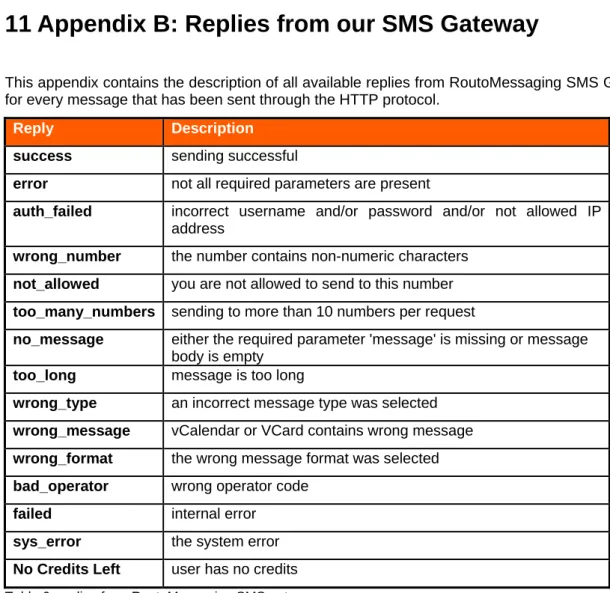
Table 6: Replies from RoutoMessaging SMS gateway ... 54
1 Change History
Date Changes Section
2008-02-09 Initial release All 2008-02-25 Update All 2009-03-23 Update All 2009-04-01 Update All
2009-08-12 Update ASP Examples 2009-10-06 Update Supported statuses 2010-05-04 Update VB.NET Examples Table 1: Change history
2 Introduction
This document contains detailed information about the methods for implementing RoutoMessaging services through HTTP protocol.
As the HTTP protocol can be implemented by using various programming languages, this document is designed both as a getting started guide and a reference document throughout your project.
For more details or examples not included in this user guide please contact us through email at
[email protected] or live chat available at www.routomessaging.com.
RoutoMessaging provides the following two servers for sending messages through HTTP protocol: • smsc5.routotelecom.com
• smsc6.routotelecom.com
A detailed description of the connection parameters is available in the document “Connecting to RoutoMessaging.pdf” at: http://www.routomessaging.com/http-sms.pmx
In order to send the SMS messages to the RoutoMessaging SMS Gateway the customer is required to have the following:
• an SMS account with RoutoMessaging
• available messaging credit on the SMS account with RoutoMessaging
Note: The servers are not limited to any platforms/languages. In this document we have provided typical examples for connecting to our SMS gateway and sending text messages using ASP, PHP, Perl and JAVA scripting languages in order to get you started.
3 Example of Sending messages using ASP
This section provides an explanation on how to send ASP programmed RoutoTelecom.Sender server object which is available for download as RoutoTelecom DLL source or RoutoTelecom DLL at: https://www.routomessaging.com/cust/
Since this is a server component, the customers will only be able to send SMS messages using ASP with RoutoTelecom.Sender server object registered on their servers.
3.1 Example of Sending SMS basics using ASP
The following snippet demonstrates sending SMS basics using ASP. <% ' creating object set Sms = Server.CreateObject("RoutoTelecom.Sender") ' setting parameters Sms.Username = "your_username" Sms.Password = "your_password" Sms.MobileNo = "44791232321" Sms.SMSType = "SMS"
Sms.Message = "Test Message" ' optional parameters
Sms.Owner = "4479987654321"
' sending SMS and printing result SmsResult = Sms.Send
Response.Write SmsResult set Sms = Nothing
%>
Snippet 1: Example of Sending SMS basics using ASP The SMS object is created in the first line of the code.
set Sms = Server.CreateObject("RoutoTelecom.Sender")
All other required properties are set in the subsequent lines of this example allowing the message to be sent.
Further available information:
Parameters description is explained in section 9 (Appendix A)
The SMS replies which the customer can receive from our SMS gateway are specified in section 11 (Appendix B)
3.2 Sending SMS using form POST method ASP
This section will demonstrate sending an SMS message by using an HTML form. You need to create two files.
The first file is index.html which implements the HTML form the users will use to input the phone number and message.
The second file is the sendsms.asp script which sends your SMS using the RoutoMessaging component.
<html> <body>
<form action='sendsms.asp' method='post'> Number: <input type='text' name='number'><br> Message: <input type='text' name='message'><br> <input type='submit' value='Send SMS'>
</form> </body> </html> Snippet 2: Index.html <% ' creating object set Sms = Server.CreateObject("RoutoTelecom.Sender")
' setting login parameters
Sms.Username = "your_username" Sms.Password = "your password" Sms.Owner = "Routo"
Sms.SMSType = "SMS"
' get values from FORM for number and message
Sms.MobileNo = Request("number") Sms.Message = Request("message")
' sending SMS and printing result
SmsResult = Sms.Send Response.Write SmsResult set Sms = Nothing
%>
Snippet 3: sendsms.asp
3.3 Sending Long SMS using ASP
The following snippet demonstrates sending of Long SMS by using ASP. <% ' creating object set Sms = Server.CreateObject("RoutoTelecom.Sender") ' setting parameters Sms.Username = "your_username" Sms.Password = "your_password" Sms.MobileNo = "44791232321" Sms.SMSType = "LongSMS" Sms.Message = "Test Message" ' optional parameters
Sms.Owner = "4479987654321"
SmsResult = Sms.Send Response.Write SmsResult set Sms = Nothing
%
Snippet 4: Sending Long SMS using ASP
Specify long SMS message by setting the SMSType property to LongSMS. The length of the single SMS message is 160 characters. A long SMS message is considered to be message longer than 160 characters.
In case of a long SMS message, our system will automatically divide it into several single messages. The divided messages then will be sent and delivered to the recipient’s phone as a single SMS.
3.4 Sending Unicode SMS using ASP
The following snippet demonstrates sending Unicode SMS by using ASP. <% ' creating object set Sms = Server.CreateObject("RoutoTelecom.Sender") ' setting parameters Sms.Username = "your_username" Sms.Password = "your_password" Sms.MobileNo = "44791232321" Sms.SMSType = "unicode" Sms.Message = "04220432043E04580435002004370435043B0435043D04350020043E044704 380020044104430020043C04380020043F0430043C043504420020043F043E 043C044304420438043B0435002E002E002E" ' optional parameters Sms.Owner = "4479987654321"
' sending SMS and printing result SmsResult = Sms.Send
Response.Write SmsResult set Sms = Nothing
%>
Snippet 5: Sending Unicode SMS using ASP
Specify the unicode SMS message type by setting the SMSType property to unicode. In case of Unicode type, the message will be 70 characters long and 2 bytes will be allocated for each character.
3.5 Sending Long Unicode SMS using ASP
The following snippet demonstrates sending of the Long Unicode SMS by using ASP. <% ' creating object set Sms = Server.CreateObject("RoutoTelecom.Sender") ' setting parameters Sms.Username = "your_username" Sms.Password = "your_password" Sms.MobileNo = "44791232321" Sms.SMSType = "longunicode" Sms.Message = "04220432043E04580435002004370435043B0435043D04350020043E04 4704380020044104430020043C04380020043F0430043C0435044200200 43F043E043C044304420438043B0435002E002E002E" ' optional parameters Sms.Owner = "4479987654321"
' sending SMS and printing result SmsResult = Sms.Send
Response.Write SmsResult set Sms = Nothing
%>
Snippet 6: Sending Long Unicode SMS using ASP
Specify the long unicode SMS message type by setting the SMSType property to longunicode. Long Unicode SMS message is a message consisting of over 70 characters.
In case of a long Unicode SMS, one message will be divided into several messages (70 characters per message) and delivered to the recipient's phone as a single unicode SMS. TheLong unicode SMS message can consist of a maximum of 4 parts/messages.
3.6 Sending operator logo using ASP
The RoutoMessaging SMS service allows you to send operator logos. The following are the image requirements:
dimensions:
o width: 72 pixels o height: 14 pixels format: grayscale GIF
Below is the operator logo ASP Example: <%
' creating object
set Sms = Server.CreateObject("RoutoTelecom.Sender")
' read Gif file and puts it into MIME encoded string
GifContent = Sms.GetFileMIMEEncoded("C:\InetPub\wwwroot\Routo\sms\lovema chine.gif") ' setting parameters Sms.Username = "username" Sms.Password = "password" Sms.MobileNo = "4479987654321" Sms.Owner = "4479987654321" Sms.Operator = "0263" Sms.SMSType = "OperatorLogo" Sms.Message = GifContent
' sending SMS and printing result
SmsResult = Sms.Send Response.Write SmsResult set Sms = Nothing
%>
Snippet 7: Sending operator logo using ASP
As you may see, the MIME encode is required for the GIF image. You can use the GetFileMIMEEncoded method of the SMS object, or a third party component.
The operator code needs to be specified, by using the Operator property. In addition, you should specify SMSType as OperatorLogo.
For full list of Operator Codes please contact our support team: live 24/7 on our Web Site or Email at [email protected]
3.7 Sending ring tone using ASP
The RoutoMessaging SMS service allows you to send ring tones in the RTTTL format, which can be sent to all supported mobile phones. Below is the ASP example for the ring tone.
<% ' creating object set Sms = Server.CreateObject("RoutoTelecom.Sender") ' setting parameters Sms.Username = "your_username" Sms.Password = "your_password" Sms.MobileNo = "44791232321" Sms.Owner = "4479987654321" Sms.SMSType = "RingTone" Sms.MobileModel = "nokia" Sms.Message = "Blue:d=4,o=5,b=120:8c6,8e,8a,8c6,8d6,8g,8b,c6,8a, 8c6,8e6,f6,8e6,8d6,c6,8a,8c6,8b,8e,8g,8a,2p,b"
' sending SMS and printing result
SmsResult = Sms.Send Response.Write SmsResult set Sms = Nothing
%>
Snippet 8: Sending ring tone using ASP
You can specify the manufacturer of the recipient phone by setting the MobileModel property. The SMSType property should be set as RingTone.
3.8 Sending WAP bookmark using ASP
To send a WAP bookmark you need to set the message type parameter to bookmark and format the message as follows:
Bookmark name\r\nURL
Below is the WAP boomark ASP example: <% ' creating object set Sms = Server.CreateObject("RoutoTelecom.Sender") ' setting parameters Sms.Username = "your_username" Sms.Password = "your_password" Sms.MobileNo = "44791232321" Sms.Owner = "44791232321" Sms.SMSType = "bookmark" Sms.Message="Routo Telecom\r\nhttp://www.routotelecom.com"
' sending SMS and printing result
SmsResult = Sms.Send Response.Write SmsResult set Sms = Nothing
%>
4 Example of Sending messages ASP.net and C# class
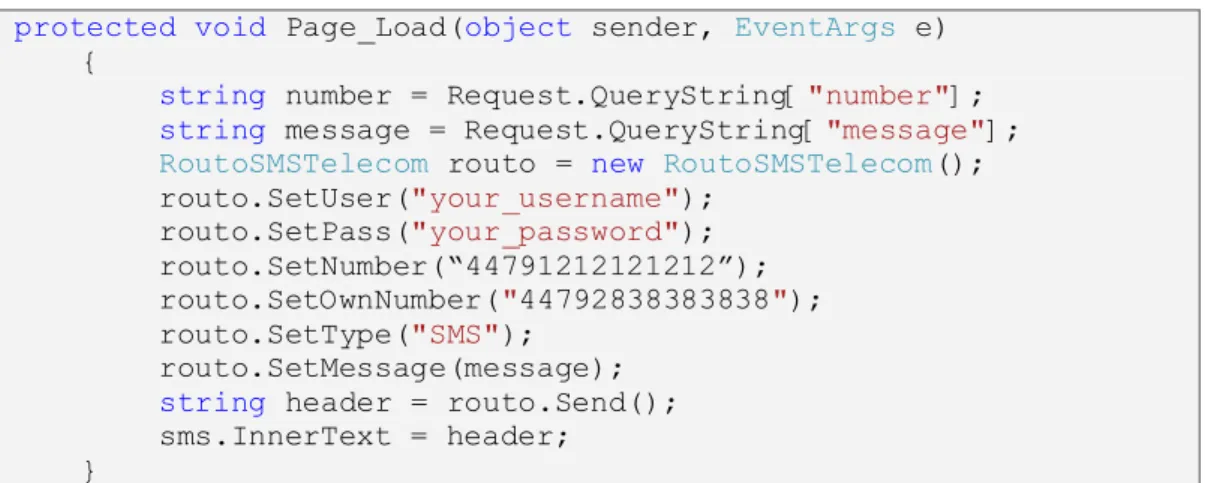
This section of the document will describe sending SMS by using the ASP.net and C# class. 4.1 Sending SMS basics using ASP.NET and C# classThis section will describe sending SMS basics using ASP.NET and C# class. Below is the snippet with a simple ASP.NET example.
protected void Page_Load(object sender, EventArgs e) {
string number = Request.QueryString["number"]; string message = Request.QueryString["message"]; RoutoSMSTelecom routo = new RoutoSMSTelecom(); routo.SetUser("your_username"); routo.SetPass("your_password"); routo.SetNumber(“44791212121212”); routo.SetOwnNumber("44792838383838"); routo.SetType("SMS"); routo.SetMessage(message); string header = routo.Send(); sms.InnerText = header;
}
Snippet 10: Sending SMS basics using ASP.NET and C# class
The first step is taking the number and the message from the index.aspx page. The second step is creating routo object from the RoutoSMSTelecom class.
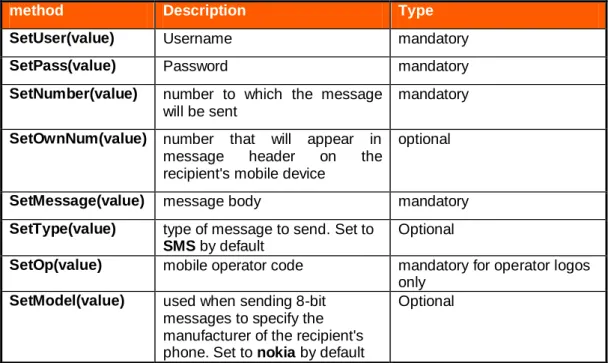
After these two initial steps all other required properties should be set allowing the message to be sent. This is done by using the following RoutoMessaging SMS methods:
method Description type
SetUser(value) Username mandatory SetPass(value) Password mandatory SetNumber(value) number to which the
message will be sent
mandatory SetOwnNum(value) number that will appear in
message header on the recipient's mobile device
optional
SetMessage(value) message body mandatory SetType(value) type of message to send.
Set to SMS by default
optional SetOp(value) mobile operator code mandatory for
operator logos only SetModel(value) used when sending 8-bit
messages to specify the manufacturer of the recipient's phone. Set to nokia by default
optional
Further available information
Parameters description is explained in section 8 (Appendix A)
The SMS replies which the customer can receive from our SMS gateway are specified in section 11 (Appendix B)
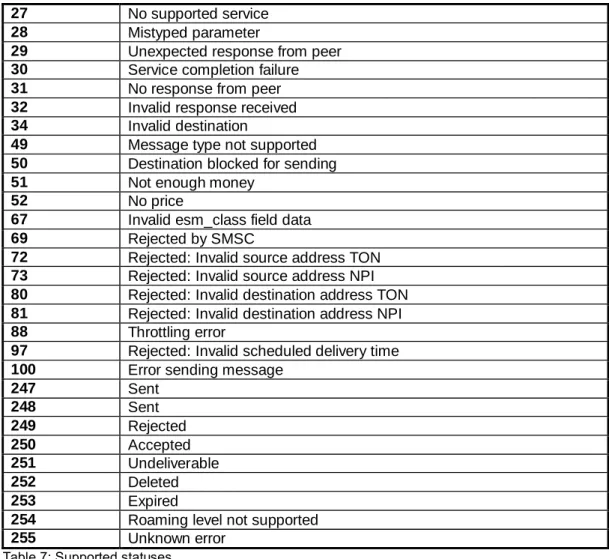
Detailed explanation of the delivery reports can be found in section 12 (Appendix C) 4.2 Sending an SMS using a form on an aspx page
This example will demonstrate how you can send an SMS message which is entered in an HTML form. You will need to create two files.
The first one is index.aspx which implements the HTML form for where the users will input the destination phone number and the message.
<%@ Page Language="C#" AutoEventWireup="true" CodeFile="index.aspx.cs" Inherits="_Default" %>
<!DOCTYPE html PUBLIC "-//W3C//DTD XHTML 1.0 Transitional//EN" "http://www.w3.org/TR/xhtml1/DTD/xhtml1-transitional.dtd"> <html xmlns="http://www.w3.org/1999/xhtml">
<head runat="server">
<title>Routo</title> </head>
<body>
<form id="form1" runat="server">
<div>
Number:
<asp:TextBox ID="txtNumber" runat="server"></asp:TextBox>
<br />
Message: <asp:TextBox ID="txtMessage" runat="server"></asp:TextBox>
<br />
<br />
<asp:Button ID="Button1" runat="server" onclick="Button1_Click" Text="Send" />
</div>
</form> </body> </html>
Snippet 11: index.aspx
Once the button is clicked, this page executes the following code in index.aspx.cs.
protected void Button1_Click(object sender, EventArgs e) {
Response.Redirect("sendsms.aspx?number=" + txtNumber.Text + "&message=" + txtMessage.Text); }
Snippet 12: Example of the code which is sent
The demonstrated code will send the number and the message to sendsms.aspx. The second file is the aspx scriptwhich sends your SMS using the RoutoMessaging component.
<%@ Page Language="C#" AutoEventWireup="true" CodeFile="sendsms.aspx.cs" Inherits="sendsms" %>
<!DOCTYPE html PUBLIC "-//W3C//DTD XHTML 1.0 Transitional//EN" "http://www.w3.org/TR/xhtml1/DTD/xhtml1-transitional.dtd"> <html xmlns="http://www.w3.org/1999/xhtml">
<head runat="server">
<title>Routo</title> </head>
<body>
<form id="form1" runat="server">
<div id="sms" runat="server">
</div>
</form> </body> </html
Snippet 13: sendsms.aspx
The C# code for this page is in the sendsms.aspx.cs file.
public partial class sendsms : System.Web.UI.Page {
protected void Page_Load(object sender, EventArgs e) {
string number = Request.QueryString["number"]; string message = Request.QueryString["message"]; RoutoSMSTelecom routo = new RoutoSMSTelecom(); routo.SetUser("your_username "); routo.SetPass("your_password"); routo.SetNumber(“44791212121212”); routo.SetOwnNumber("44792838383838"); routo.SetType("SMS"); routo.SetMessage(message); string header = routo.Send(); sms.InnerText = header;
} }
Snippet 14: sendsms.aspx.cs
4.3 Sending Long SMS using form on aspx page
The example in this section will demonstrate how you can send a Long SMS message which is entered in a HTML form. You will need to create two files.
The first one is index.aspx which implements the HTML form where the users will input the destination phone number and message.
<%@ Page Language="C#" AutoEventWireup="true" CodeFile="index.aspx.cs" Inherits="_Default" %>
<!DOCTYPE html PUBLIC "-//W3C//DTD XHTML 1.0 Transitional//EN" "http://www.w3.org/TR/xhtml1/DTD/xhtml1-transitional.dtd"> <html xmlns="http://www.w3.org/1999/xhtml">
<head runat="server">
<title>Routo</title> </head>
<body>
<form id="form1" runat="server">
<div>
Number: <asp:TextBox ID="txtNumber" runat="server"></asp:TextBox>
<br />
Message: <asp:TextBox ID="txtMessage" runat="server"></asp:TextBox>
<br />
<asp:Button ID="Button1" runat="server" onclick="Button1_Click" Text="Send" />
</div>
</form> </body> </html>
Snippet 15: index.aspx
Once the button for sending the message is clicked, the following code in index.aspx.cs will be executed.
protected void Button1_Click(object sender, EventArgs e) {
Response.Redirect("sendsms.aspx?number=" + txtNumber.Text + "&message=" + txtMessage.Text); }
Snippet 16: Example of the executed code
This code sends the number and the message to the sendsms.aspx. The second file is the aspx script which sends your Long SMS using the RoutoMessaging component.
<%@ Page Language="C#" AutoEventWireup="true" CodeFile="sendsms.aspx.cs" Inherits="sendsms" %>
<!DOCTYPE html PUBLIC "-//W3C//DTD XHTML 1.0 Transitional//EN" "http://www.w3.org/TR/xhtml1/DTD/xhtml1-transitional.dtd"> <html xmlns="http://www.w3.org/1999/xhtml">
<head runat="server">
<title>Routo</title> </head>
<body>
<form id="form1" runat="server">
<div id="sms" runat="server">
</div>
</form> </body> </html>
Snippet 17: the aspx file
The C# code for this page is located in the sendsms.aspx.cs file.
protected void Page_Load(object sender, EventArgs e) {
string number = Request.QueryString["number"]; string message = Request.QueryString["message"]; RoutoSMSTelecom routo = new RoutoSMSTelecom(); routo.SetUser("your_username"); routo.SetPass("your_password"); routo.SetNumber(“44791212121212”); routo.SetOwnNumber("44792838383838"); routo.SetType("LongSMS"); routo.SetMessage(message); string header = routo.Send(); sms.InnerText = header;
}
Specify the long SMS message by setting the Type property to LongSMS. The length of the single SMS message is 160 characters so any message longer than 160 characters is considered as long message.
In case of a long SMS message, our system will automatically divide the message to several single messages. The divided messages will then be sent to the recipient and delivered as a single SMS.
4.4 Sending Unicode SMS using C#
The example below demonstrates how you can send Unicode messages. You will need to create such file which is the class that sends the unicode message using the RoutoMessaging component.
Here we can see the Unicode SMS C# example:
public partial class sendsms : System.Web.UI.Page {
protected void Page_Load(object sender, EventArgs e) {
string number = Request.QueryString["number"]; RoutoSMSTelecom routo = new RoutoSMSTelecom(); routo.SetUser("your_username"); routo.SetPass("your_password"); routo.SetNumber(number); routo.SetOwnNumber("44792838383838"); routo.SetType("unicode"); routo.SetMessage("04220432043E04580435002004370435043B0435043D04 350020043E044704380020044104430020043C04380020043F0430043C043504 420020043F043E043C044304420438043B0435002E002E002E");
string header = routo.Send(); sms.InnerText = header;
} }
Snippet 19: sendsms.aspx.cs
Specify the Unicode SMS message by setting the Type property to “unicode”. The Unicode message is 70 characters long and 2 bytes are allocated for each character.
4.5 Sending a Long Unicode SMS using C#
This example will demonstrate how you can send the Long Unicode messages. You need to create file like the example presented below.
This is the class which sends long unicode message using the RoutoMessaging component
public partial class sendsms : System.Web.UI.Page {
protected void Page_Load(object sender, EventArgs e) {
string number = Request.QueryString["number"]; RoutoSMSTelecom routo = new RoutoSMSTelecom(); routo.SetUser("your_username"); routo.SetPass("your_password"); routo.SetNumber(number); routo.SetOwnNumber("44792838383838"); routo.SetType("longunicode"); routo.SetMessage("04220432043E04580435002004370435043B0435 043D04350020043E044704380020044104430020043C04380020043F0430043C04 3504420020043F043E043C044304420438043B0435002E002E002E");
string header = routo.Send(); sms.InnerText = header;
} }
Snippet 20: sendsms.aspx.cs
Specify the Long Unicode SMS message by setting the Type property to longunicode. A Long Unicode SMS message is a message with the length of over 70 characters.
In case of a long Unicode type, one SMS message is divided into several messages (70 characters per message) and delivered to the recipient's phone as a single unicode SMS.
Note: the Long unicode SMS message can consist of maximum 4 parts/messages.
4.6 Sending operator logo using C#
The RoutoMessaging SMS service allows you to send operator logos. The following are the image requirements:
dimensions:
o width: 72 pixels o height: 14 pixels format: grayscale GIF
Below is the operator logo C# Example:
public partial class sendsms : System.Web.UI.Page {
protected void Page_Load(object sender, EventArgs e) {
RoutoSMSTelecom routo = new RoutoSMSTelecom(); string message = routo.getImage("http://www.domain.com/some_logo.gif"); routo.SetUser("your_username"); routo.SetPass("your_password "); routo.SetNumber(“44791212121212”); routo.SetOwnNumber("44792838383838");
routo.SetOp("0263");
routo.SetType("OperatorLogo"); routo.SetMessage(message); string header = routo.Send(); sms.InnerText = header; }
}
Snippet 21: Operator logo C# Example
It is required that you specify the operator code for the network, by using SetOp, as well as set the type to Operator Logo.
routo.SetOp("0263");
routo.SetType("OperatorLogo"); 4.7 Sending ring tones using C#
The RoutoMessaging SMS service allows you to send ring tones in the RTTTL format which can be sent to all supported mobile phones. Below is the C# example for the ring tone.
public partial class sendsms : System.Web.UI.Page {
protected void Page_Load(object sender, EventArgs e) {
string number = Request.QueryString["number"]; RoutoSMSTelecom routo = new RoutoSMSTelecom(); routo.SetUser("your_username"); routo.SetPass("your_password "); routo.SetNumber(“44791212121212”); routo.SetOwnNumber("44792838383838"); routo.SetType("RingTone"); routo.SetModel("nokia"); routo.SetMessage("Blue:d=4,o=5,b=120:8c6,8e,8a,8c6,8d6,8g,8b,c6, 8a,8c6,8e6,f6,8e6,8d6,c6,8a,8c6,8b,8e,8g,8a,2p,b");
string header = routo.Send(); sms.InnerText = header;
} }
Snippet 22: C# example for the ring tone
Specify the make/manufacturer of the target phone by using the SetModel() method. In addition, you need to specify Ring Tone as the message type.
routo.SetType("RingTone"); routo.SetModel("nokia");
4.8 Sending vCard using C#
In order to send vCards you need to use the correct SMS type (vCard) and the following message format:
N:<name>\r\nTEL:<phonenumber> Below is the C# vCard example:
public partial class sendsms : System.Web.UI.Page {
protected void Page_Load(object sender, EventArgs e) {
RoutoSMSTelecom routo = new RoutoSMSTelecom(); routo.SetUser("your_username"); routo.SetPass(“your_password"); routo.SetNumber("44791212121212"); routo.SetType("vCard"); routo.SetMessage("N:John Smith\r\nTEL:+44783783923"); string header = routo.Send();
sms.InnerText = header; }
}
Snippet 23: C# vCard example
4.9 Sending vCalendar using C#
In order to send a vCalendar you need to use the correct SMS type (vCalendar) and the following message format:
DESCRIPTION:<description>\r\nDTSTART:<start date>\r\nDTEND:<end date> The start date and end date have to be in the following format:
yyyymmddThhmmss
Below is the C# vCalendar example.
public partial class sendsms : System.Web.UI.Page {
protected void Page_Load(object sender, EventArgs e) {
RoutoSMSTelecom routo = new RoutoSMSTelecom(); routo.SetUser("your_username"); routo.SetPass(“your_password"); routo.SetNumber("44791212121212"); routo.SetType("vCalendar"); routo.SetMessage("DESCRIPTION:Call Jeff\r\nDTSTART:20011215T130000\r\nDTEND:20011215T133000"); string header = routo.Send();
sms.InnerText = header; }
}
4.10 Sending WAP bookmark using C#
In order to send a WAP bookmark you need to set message type to bookmark and use the following format for the message:
Bookmark name\r\nURL
Below is the C# WAP bookmark example:
public partial class sendsms : System.Web.UI.Page {
protected void Page_Load(object sender, EventArgs e) {
RoutoSMSTelecom routo = new RoutoSMSTelecom(); routo.SetUser("your_username"); routo.SetPass(“your_password"); routo.SetNumber("44791212121212"); routo.SetType("bookmark"); routo.SetMessage("Routo Telecom\r\nhttp://www.routotelecom.com"); string header = routo.Send(); sms.InnerText = header;
} }
5 Example of Sending messages using Perl
This section of the document will describe sending text messages by using the Perl programming language.
5.1 Sending SMS basics using Perl
In order to send an SMS to RoutoMessaging SMS gateway, you will need to make a GET or POST HTTP request.
There are several Perl modules which you can use – examples here will be given with LWP::UserAgent used. LWP::UserAgent which is a part of standard Perl distribution
Below is the the simple Perl example: #!/usr/bin/perl use strict; use LWP::UserAgent; my $username = 'your_username'; my $password = 'your_password'; my $number = '123456789'; my $ua = LWP::UserAgent->new; $ua->timeout(10); my $response = $ua->post( 'http://smsc5.routotelecom.com/SMSsend', {
# see Appendix A for possible fields/values number => $number,
user => $username, pass => $password,
message => 'Test message' }
);
if ($response->is_success) {
# see Appendix B for possible responses print $response->decoded_content;
} else {
die $response->status_line; Snippet 26: Sending SMS basics using Perl Further available information:
Parameters description is explained in section 9 (Appendix A)
The SMS replies which the customer can receive from our SMS gateway are specified in section 11 (Appendix B).
5.2 Sending Long SMS using Perl
The snippet below demonstrates sending of the long SMS by using Perl. my $response = $ua->post( 'http://smsc5.routotelecom.com/SMSsend', { number => $number, user => $username, pass => $password, type => 'LongSMS',
message => "Test message" }
);
Snippet 27: Sending Long SMS using Perl
Specify the Long SMS message by setting the type property to LongSMS. The length of the single SMS message is 160 characters, so any message longer than 160 characters will be considered a Long message.
In case of a Long SMS message, our system will automatically divide that message to several single messages. The divided messages then will be sent to the recipient and delivered as a single SMS.
5.3 Sending Unicode SMS using Perl
The snippet below demonstrates the method for sending a Unicode SMS by using Perl. my $response = $ua->post( 'http://smsc5.routotelecom.com/SMSsend', { number => $number, user => $username, pass => $password, type => 'unicode', message => "04220432043E04580435002004370435043B0435043D04350020043E04 4704380020044104430020043C04380020043F0430043C0435044200200 43F043E043C044304420438043B0435002E002E002E" } );
Snippet 28: Sending Unicode SMS using Perl
Specify unicode SMS message by setting the type property to unicode. In case of Unicode the message is 70 characters long and 2 bytes are allocated for each character.
5.4 Sending Long Unicode SMS using Perl
The example below demonstrates the method for sending long Unicode messages by using Perl. my $response = $ua->post( 'http://smsc5.routotelecom.com/SMSsend', { number => $number, user => $username, pass => $password, type => 'longunicode', message => "04220432043E04580435002004370435043B0435043D04350020043E04 4704380020044104430020043C04380020043F0430043C0435044200200 43F043E043C044304420438043B0435002E002E002E" } );
Snippet 29: Sending Long Unicode SMS using Perl
Specify long unicode SMS message by setting the type property to longunicode. A Long Unicode SMS message is a message with the length of over 70 characters.
In case of a long Unicode type, one SMS message is divided into several messages (70 characters per message) and delivered to the recipient's phone as a single unicode SMS.
Note: the Long unicode SMS message can consist of maximum 4 parts/messages. 5.5 Sending operator logo using Perl
The RoutoMessaging SMS service allows you to send operator logos. The following are the image requirements:
dimensions:
o width: 72 pixels o height: 14 pixels format: grayscale GIF
You need to specify the operator code for the network by using the op parameter as well as the message type which should be set to OperatorLogo.
For full list of Operator Codes please contact our support team: live 24/7 on our Web Site or email at [email protected]
Below is the operator logo Perl example: open(F, "<".$ARGV[0]) or die($!); while(<F>){ s/(.{1})/sprintf("%02X", ord($1))/ges; $message .= $_; } close F; my $response = $ua->post( 'http://smsc5.routotelecom.com/SMSsend', { number => $number, user => $username, pass => $password,
type => 'OperatorLogo', op => '0263',
message => $message }
);
Snippet 30: Sending operator logo using Perl 5.6 Sending ring tone using Perl
The RoutoMessaging SMS service allows you to send ring tones in the RTTTL format which can be sent to all supported mobile phones.
Specify the make/manufacturer of the target phone by using the model parameter and set the type parameter to RingTone.
Below is the Perl example for the ring tone: # Ring Tone in RTTTL format $message = "Blue:d=4,o=5,b=120:8c6,8e,8a,8c6,8d6,8g,8b,c6,8a, 8c6,8e6,f6,8e6,8d6,c6,8a,8c6,8b,8e,8g,8a,2p,b"; my $response = $ua->post( 'http://smsc5.routotelecom.com/SMSsend', { number => $number, user => $username, pass => $password, type => 'RingTone', model => 'nokia', message => $message } );
Snippet 31: Sending ring tone using Perl 5.7 Sending vCard using Perl
In order to send a vCard entry, you should to use the corresponding SMS type (vCard) and the following message format:
N:<name>\nTEL:<phone number> Example:
N:John Smith
TEL:+123456789
Below is the vCard Perl example: my $response = $ua->post( 'http://smsc5.routotelecom.com/SMSsend', { number => $number, user => $username, pass => $password, type => 'vCard',
message => "N:John Smith\nTEL:+123456789" }
);
5.8 Sending vCalendar using Perl
In order to send a vCalendar entry, you need to use the corresponding SMS type (vCalendar) and the following message format:
DESCRIPTION:<description>\nDTSTART:<start date>\nDTEND:<end date> Start date and end date have to be in this format:
yyyymmddThhmmss Example:
DESCRIPTION:Call John DTSTART:20011215T130000 DTEND:20011215T133000
Below is the vCalendar Perl example: my $response = $ua->post( 'http://smsc5.routotelecom.com/SMSsend', { number => $number, user => $username, pass => $password, type => 'vCalendar', message => "DESCRIPTION:Something Happening\nDTSTART:20090323T150000\nDTEND:20090323T163000" } );
Snippet 33: Sending vCalendar using Perl
5.9 Sending messages (full example) using Perl
The following are the html page and perl script which you can use to send SMS messages, operator logos or ring tones.
<html> <head>
<title>SMS demo</title> <style>
<!--
p { font-family: Verdana, Arial, Helvetica, sans-serif; font-size: 10pt;
color: black }
h1 { font-family: Verdana, Arial, Helvetica, sans-serif; font-size: 14pt; font-style: bold; color: black } //--> </style> </head> <body bgcolor="#ffffff"> <h1>Send SMS</h1>
<form action="/cgi-bin/testSMS.cgi" method="POST"> <table border="0">
<tr>
<td width="150"><p>Number:</p></td><td><input type="text" name="number"></td>
<tr>
<td width="150"><p>Message:</p></td><td><input
type="text" name="message" size="50" maxlength="150"></td> </tr> <tr> <td width="150"><p>Own number:</p></td><td><input type="text" name="ownnum"></td></tr> <tr> <td></td>
<td><input type="submit" value="Send"></td> </tr>
</table> </form>
<h1>Send operator logo</h1>
<form action="/cgi-bin/testSMS.cgi" method="POST" ENCTYPE="multipart/form-data">
<input type="hidden" name="type" value="OperatorLogo"> <table border="0"> <tr> <td width="150"><p>Number:</p></td><td><input type="text" name="number"></td> </tr> <tr> <td width="150"><p>Logo (GIF format):</p></td><td><input type="file" name="message"></td> </tr> <tr> </tr> <tr> <td></td>
<td><input type="submit" value="Send"></td> </tr>
</table> </form>
<h1>Send ring tone</h1>
<form action="/cgi-bin/testSMS.cgi" method="POST"> <input type="hidden" name="type" value="RingTone"> <table border="0"> <tr> <td width="150"><p>Number:</p></td><td><input type="text" name="number"></td> </tr> <tr> <td width="150"><p>Ring tone:</p></td><td><input type="text" name="message" size="50"><br/>
<small>Ring Tone in RTTTL format</small> </td> </tr> <tr> <td width="150"></td><td><input type="submit" value="Send"></td> </tr> </table> </form> </body> </html> Snippet 34: sms.html
#!/usr/bin/perl use strict; use CGI; use LWP::UserAgent; my $query = CGI->new(); print $query->header(); my $form = $query->Vars(); my $username = 'your_username'; my $password = 'your_password'; my $number = '132465798'; my $ua = LWP::UserAgent->new; $ua->timeout(10); my $message_data = { number => $number, user => $username, pass => $password, }; if($form->{type} eq 'OperatorLogo'){ # OperatorLogo $message_data->{type} = 'mms-gif'; use MIME::Base64;
# get image from file
my $fh=$query->upload('message'); my $logo="";
while(<$fh>){ $logo.=$_; }
# MIME encode image
$logo=encode_base64($logo); $message_data->{message} = $logo; } elsif($form->{type} eq 'RingTone') { # RingTone $message_data->{type} = 'RingTone'; $message_data->{message} = $form->{message}; } else { # Ordinary message $message_data->{message} = $form->{message}; } if( length($form->{ownnum}) ){ if ($form->{ownnum} =~ /\D/){
print "Own number you entered is not an number."; die "Own number you entered is not an number."; } else { $message_data->{ownnum} = $form->{ownnum}; } } my $response = $ua->post( 'http://smsc5.routotelecom.com/SMSsend', $message_data ); if ($response->is_success) {
print $response->decoded_content; # or whatever }
else {
die $response->status_line; }
5.10 Sending WAP bookmark using Perl
In order to send a WAP bookmark you should set the message type to bookmark and format the message as follows:
Bookmark name\nURL
Below is the Perl example for WAP bookmark. my $response = $ua->post( 'http://smsc5.routotelecom.com/SMSsend', { number => $number, user => $username, pass => $password, type => 'bookmark', message => "Google\nhttp://www.google.com" } );
6 Example of Sending messages using PHP
This section of the document will explain how to send messages by using PHP i.e. RoutoTelecomSMS PHP class.
6.1 Sending SMS basics using PHP
The following snippet demonstrates a simple PHP example. <?php
// include RoutoSMS class
include("RoutoTelecomSMS.php"); // creating object $sms = new RoutoTelecomSMS; // setting SMS parameters $sms->SetUser("your_username"); $sms->SetPass("your_password"); $sms->SetNumber("44791212121212"); $sms->SetOwnNum("44792838383838"); // optional $sms->SetType("FlashSMS"); // optional $sms->SetMessage("message"); // send SMS and print result $smsresult = $sms->Send(); print $smsresult;
?>
Snippet 37: Sending SMS basics using PHP
As demonstrated in the snippet above, the first line is used to include the RoutoTelecomSMS.php file, adding the RoutoMessaging SMS class source code into our script.
include("RoutoTelecomSMS.php"); The next step is creating an instance of that class: $sms = new RoutoTelecomSMS;
After that the required properties for sending the messages should be set. We can do this by using the following RoutoMessaging SMS methods:
method Description Type
SetUser(value) Username mandatory SetPass(value) Password mandatory SetNumber(value) number to which the message
will be sent
mandatory SetOwnNum(value) number that will appear in
message header on the recipient's mobile device
optional
SetMessage(value) message body mandatory SetType(value) type of message to send. Set to
SMS by default
Optional
SetOp(value) mobile operator code mandatory for operator logos only
SetModel(value) used when sending 8-bit messages to specify the manufacturer of the recipient's phone. Set to nokia by default
Optional
Table 3: RoutoMessaging SMS methods Further available information:
Parameters description is explained in section 9 (Appendix A)
The SMS replies which the customer can receive from our SMS gateway are specified in section 11 (Appendix B).
Detailed explanation of the delivery reports can be found in section 12 (Appendix C) 6.2 Sending SMS using form POST method PHP
This example demonstrates how you can send an SMS message entered in a HTML form. You will need to create two files.
The first one is index.html which implements the HTML form for users to input the phone number and message.
<
html> <body><form action='sendsms.php' method='post'> Number: <input type='text' name='number'><br> Message: <input type='text' name='message'><br> <input type='submit' value='Send SMS'>
</form> </body> </html>
Snippet 38: index.html
The second file is the script that sends your SMS using the RoutoMessaging component. <?php
// include RoutoSMS class
include("RoutoTelecomSMS.php"); // creating object
// setting login parameters $sms->SetUser("your_username"); $sms->SetPass("your_password");
$sms->SetOwnNum("44792838383838"); // optional $sms->SetType("SMS"); // optional
// get values entered from FORM
$number = $_REQUEST['number']; $message = $_REQUEST['message']; $sms->SetNumber($number);
$sms->SetMessage($message); // send SMS and print result $smsresult = $sms->Send(); print $smsresult;
?>
Snippet 39: sendsms.php
6.3 Sending Long SMS using form POST method PHP
This example demonstrates how you can send Long SMS message entered in a HTML form. You need to create two files.
The first one is index.html which implements the HTML form for users to input the phone number and message.
<
html> <body><form action='sendsms.php' method='post'> Number: <input type='text' name='number'><br> Message: <input type='text' name='message'><br> <input type='submit' value='Send SMS'>
</form> </body> </html>
Snippet 40: index.html
The second file is the script that sends your Long SMS using the Routo Messaging component. <?php
// include RoutoSMS class
include("RoutoTelecomSMS.php"); // creating object
$sms = new RoutoTelecomSMS; // setting login parameters $sms->SetUser("your_username"); $sms->SetPass("your_password"); $sms->SetOwnNum("44792838383838"); $sms->SetType("LongSMS");
// get values entered from FORM $sms->SetNumber($number);
$sms->SetMessage($message); // send SMS and print result $smsresult = $sms->Send(); print $smsresult;
?>
Specify long SMS message by setting the Type property to LongSMS. The length of the single SMS message is 160 characters. Any message longer than 160 characters is considered a long message.
In case of a long SMS message, our system will automatically divide the message to several single messages. The divided messages will then be sent to the recipient and delivered phone as a single SMS.
6.4 Sending Unicode SMS using PHP
This example demonstrates how you can send Unicode messages. You need to create file like the example presented below. This is the script that sends unicode message using the
RoutoMessaging component.
Here we can see the Unicode SMS PHP example: sendsms.php:
<?php
// include RoutoSMS class
include("RoutoTelecomSMS.php"); // creating object
$sms = new RoutoTelecomSMS; // setting login parameters
$sms->SetUssms->SetOwnNum("44792838383838"); $sms->SetType("unicode");
// get values entered from FORM $sms->SetNumber($number);
$message="04220432043E04580435002004370435043B0435043D04350020043E0 44704380020044104430020043C04380020043F0430043C043504420020043F043E 043C044304420438043B0435002E002E002E";
$sms->SetMessage($message); // send SMS and print result $smsresult = $sms->Send(); print $smsresult;
?>
Snippet 42: sendsms.php
Specify Unicode SMS message by setting the Type property to unicode. In case of Unicode message, it is 70 characters long and 2 bytes are allocated for each character.
6.5 Sending Long Unicode SMS using PHP
This example demonstrates the method for sending Unicode messages. It is necessary that you create a file like the example below.
This is the script that sends unicode message using the RoutoMessaging component. Below is the Unicode SMS PHP example.
<?php
// include RoutoSMS class
include("RoutoTelecomSMS.php"); // creating object
$sms = new RoutoTelecomSMS; // setting login parameters $sms->SetUser("your_username"); $sms->SetPass("your_password");
$sms->SetOwnNum("44792838383838"); $sms->SetType("longunicode"); // get values entered from FORM $sms->SetNumber($number);
$message="04220432043E04580435002004370435043B0435043D04350 020043E044704380020044104430020043C04380020043F0430043C0435 04420020043F043E043C044304420438043B0435002E002E002E"; $sms->SetMessage($message);
// send SMS and print result $smsresult = $sms->Send(); print $smsresult;
?>
Snippet 43: Sending Long Unicode SMS using PHP
Specify the long unicode SMS message by setting the Type property to longunicode. Long Unicode SMS message is a message with the length of over 70 characters.
In case of a long unicode SMS, the message is divided into several messages (70 characters per message) and delivered to the recipient's phone as a single unicode SMS. Long unicode SMS message can consist of maximum 4 parts/messages.
6.6 Sending operator logo using PHP
The RoutoMessaging SMS service allows you to send operator logos. The following are the image requirements:
dimensions:
o width: 72 pixels o height: 14 pixels format: grayscale GIF
Below is the operator logo PHP Example: <?php
// URL of 72x14 GIF representing logo to be sent $imgurl = "http://www.domain.com/some_logo.gif"; // reads GIF using standard PHP file system functions $gifFile = fopen( $imgurl, "r" );
if (!$gifFile) exit; $gifContent = "";
while ( !feof($gifFile) ) {
$gifContent .= fread( $gifFile, 1024 ); }
fclose( $gifFile ); // MIME encode GIF data
$message = base64_encode($gifContent);
// including RoutoSMS class and seting parameters include("RoutoTelecomSMS.php"); $sms = new RoutoTelecomSMS; $sms->SetUser("your_username"); $sms->SetPass("your_password"); $sms->SetNumber("4479987654321"); $sms->SetOwnNum("447921312323"); $sms->SetOp("0263"); $sms->SetType("OperatorLogo"); $sms->SetMessage($message); // send message and print result
$smsresult = $sms->Send(); print $smsresult;
?>
Snippet 44: Sending operator logo using PHP
As you can see in the snippet above, you need to MIME encode the GIF using the base64_encode() PHP function before setting the message properly.
In addition, you need to specify the operator code for the network, by using the SetOp as well as OperatorLogo as the type.
$sms->SetType("OperatorLogo"); $sms->SetOp("0263");
6.7 Sending ring tones using PHP
The RoutoMessaging SMS service allows you to send ring tones in the RTTTL format which can be sent to all supported mobile phones. Below is the PHP example for the ring tone.
<?php
// Ring Tone in RTTTL format
$message =
"Blue:d=4,o=5,b=120:8c6,8e,8a,8c6,8d6,8g,8b,c6,8a, 8c6,8e6,f6,8e6,8d6,c6,8a,8c6,8b,8e,8g,8a,2p,b";
// including RoutoSMS class and seting parameters
include("RoutoTelecomSMS.php"); $sms = new RoutoTelecomSMS; $sms->SetUser("your_username"); $sms->SetPass("your_password"); $sms->SetNumber("44791212121323"); $sms->SetOwnNum("44792727272722"); $sms->SetType("RingTone"); $sms->SetModel("nokia"); $sms->SetMessage($message);
// send message and print result
$smsresult = $sms->Send(); print $smsresult;
?>
Snippet 45: Sending ring tones using PHP
Use the SetModel() method to specify the make/manufacturer of the target phone. In addition you should specify Ringtone as the SMS type.
$sms->SetType("RingTone"); $sms->SetModel("ericsson");
6.8 Sending vCard using PHP
In order to send a vCard you need to use the correct SMS type (vCard) and the following message format:
N:<name>\r\nTEL:<phonenumber> Below is the vCard PHP example. <?php
// including RoutoSMS class and seting parameters
include("RoutoTelecomSMS.php"); $sms = new RoutoTelecomSMS; $sms->SetUser("your_username"); $sms->SetPass("your_password"); $sms->SetNumber("44792727272722"); $sms->SetType("vCard"); $sms->SetMessage("N:John Smith\r\nTEL:+44783783923");
// send message and print result
$smsresult = $sms->Send(); print $smsresult;
?>
Snippet 46: Sending vCard using PHP
6.9 Sending vCalendar using PHP
In order to send a vCalendar you need to use the correct SMS type (vCalendar) and the following message format:
DESCRIPTION:<description>\r\nDTSTART:<start date>\r\nDTEND:<end date> Start date and end date have to be in this format:
yyyymmddThhmmss
Below is the vCalendar PHP example: <?php
// including RoutoSMS class and setting parameters
include("RoutoTelecomSMS.php"); $sms = new RoutoTelecomSMS; $sms->SetUser("your_username"); $sms->SetPass("your_password"); $sms->SetNumber("44792727272722"); $sms->SetType("vCalendar"); $sms->SetMessage("DESCRIPTION:Call Jeff\r\nDTSTART:20011215T130000\r\nDTEND:20011215T133000");
// send message and print result
$smsresult = $sms->Send(); print $smsresult;
?>
6.10 Sending WAP bookmark using PHP
In order to send a WAP bookmark you will need to set the message type to bookmark and format the message as follows:
Bookmark name\r\nURL
Below is the WAP boomark PHP example. <?php include("RoutoTelecomSMS.php"); $sms = new RoutoTelecomSMS; $sms->SetUser("your_username"); $sms->SetPass("your_password"); $sms->SetNumber("44792727272722"); $sms->SetType("bookmark"); $sms->SetMessage("Routo Telecom\r\nhttp://www.routotelecom.com");
// send message and print result
$smsresult = $sms->Send(); print $smsresult;
7 Example of sending SMS using Java
This section of the document will give examples for sending the SMS using Java. 7.1 Sending SMS basics using Java and jsp page
The following snippet demonstrates a simple Java example on .jsp page: <html> <head> <title>Routo</title> </head> <body> <h1>Routo Telecom</h1> <br/><br/>
<!-- Include Routo SMS class-->
<jsp:useBean id="sms" class="routosms.RoutoTelecomSMS" /> <!-- Setting SMS parameters-->
<% routosms.RoutoTelecomSMS routo = new
routosms.RoutoTelecomSMS();%><!--creating object--> <% routo.SetUser("your_username");%> <% routo.SetPass("your_password");%> <% routo.SetNumber("44791212121212");%> <% routo.SetOwnNumber("44792838383838");%><!—optional--> <% routo.SetType("SMS");%><!—optional--> <% routo.SetMessage(message);%> <!-- Send SMS and print result--> <%=routo.Send()%>
</body> </html>
Snippet 43: Sending SMS basics using Java and jsp page
In the first jsp line, we included the RoutoTelecomSMS class source code into our script.
<jsp:useBean id="sms" class="routosms.RoutoTelecomSMS" />
Next, we have to create an instance of that class:
<% routosms.RoutoTelecomSMS routo = new routosms.RoutoTelecomSMS();%> After that we have to set the required properties, allowing the message to be sent. We can do this by using the following RoutoMessaging SMS methods:
:
Method description Type
SetUser(value) username mandatory SetPass(value) password mandatory SetNumber(value) number to which the message will
be sent
mandatory SetOwnNum(value) number that will appear in
message header on the recipient's mobile device
optional
SetType(value) type of message to send. Set to SMS by default
optional
SetOp(value) mobile operator code mandatory for operator logos only
Table 4: RoutoMessaging SMS methods Further available information:
Parameters description is explained in section 9 (Appendix A)
The SMS replies which the customer can receive from our SMS gateway are specified in section 11 (Appendix B)
Detailed explanation of the delivery reports can be found in section 12 (Appendix C) 7.2 Sending SMS using form POST method
This example demonstrates how you can send SMS message entered in a HTML form. You need to create two files. The first one is index.html which implements the HTML form for users to input the phone number and message.
<html> <body>
<form action="sendsms.jsp" method='post'> Number: <input type='text' name='number'><br> Message: <input type='text' name='message'><br> <input type='submit' value='Send SMS'>
</form> </body> </html>
Snippet 44: Index html file
The second file is the script that sends your SMS using the RoutoMessaging component. <html> <head> <title>Routo</title> </head> <body> <h1>Routo Telecom</h1> <br/><br/>
<!-- Include Routo SMS class-->
<jsp:useBean id="sms" class="routosms.RoutoTelecomSMS" /> <!-- get values entered from FORM>
<% String number = request.getParameter("number"); %> <% String message = request.getParameter("message"); %> <!-- Setting SMS parameters-->
<% routosms.RoutoTelecomSMS routo = new
routosms.RoutoTelecomSMS();%> <!-- creating object--> <% routo.SetUser("your_username");%> <% routo.SetPass("your_password");%> <% routo.SetOwnNumber("44792838383838");%> <!—-optional--> <% routo.SetType("SMS");%> <!—-optional--> <% routo.SetNumber(number);%> <% routo.SetMessage(message);%> <!-- Send SMS and print result--> <%=routo.Send()%>
</body> </html>
Snippet 45: sendsms.jsp
7.3 Sending Long SMS using form POST method
This example demonstrates how you can send Long SMS message entered in a HTML form. You need to create two files.
The first one is index.html which implements the HTML form for users to input the phone number and message.
<html> <body>
<form action="sendsms.jsp" method='post'> Number: <input type='text' name='number'><br> Message: <input type='text' name='message'><br> <input type='submit' value='Send SMS'>
</form> </body> </html>
Snippet 46: index.html
The second file is the script which sends your Long SMS using the Routo Messaging component. <html> <head> <title>Routo</title> </head> <body> <h1>Routo Telecom</h1> <br/><br/>
<!-- Include Routo SMS class-->
<jsp:useBean id="sms" class="routosms.RoutoTelecomSMS" /> <!-- get values entered from FORM-->
<% String number = request.getParameter("number"); %> <% String message = request.getParameter("message"); %> <!-- Setting SMS parameters-->
<% routosms.RoutoTelecomSMS routo = new
routosms.RoutoTelecomSMS();%> <!-- creating object--> <% routo.SetUser("your_username");%> <% routo.SetPass("your_password");%> <% routo.SetOwnNumber("44792838383838");%> <!—-optional--> <% routo.SetType("LongSMS");%> <!--optional--> <% routo.SetNumber(number);%> <% routo.SetMessage(message);%> <!-- Send SMS and print result--> <%=routo.Send()%>
</body> </html>
Snippet 47: sendsms.jsp
Specify long SMS message by setting the Type property to LongSMS. The length of the single SMS message is 160 characters so any message longer than 160 characters is considered a long message.
In case of a long SMS message, our system will automatically divide the message to several single messages. The divided messages will then be sent to the recipient and delivered as a single SMS.
7.4 Sending Unicode SMS using Java class
This example demonstrates the method for sending Unicode messages. It is necessary that you create a file like the example below. This is the script which sends a unicode message using the RoutoMessaging component. <html> <head> <title>Routo</title> </head> <body> <h1>Routo Telecom</h1> <br/><br/>
<!-- Include Routo SMS class-->
<jsp:useBean id="sms" class="routosms.RoutoTelecomSMS" /> <!-- get values entered from FORM-->
<% String number = request.getParameter("number"); %> <!-- Setting SMS parameters-->
<% routosms.RoutoTelecomSMS routo = new
routosms.RoutoTelecomSMS();%> <!-- creating object--> <% routo.SetUser("your_username");%> <% routo.SetPass("your_password");%> <% routo.SetNumber(number);%> <% routo.SetOwnNumber("44792838383838");%> <!--optional--> <% routo.SetType("unicode");%> <!--ptional--> <% String message="04220432043E04580435002004370435043B0435043D04350020043E0 44 704380020044380020043F0430043C043504420020043F043E043C044304420438 043B0435002 E002E002E"; %> <% routo.SetMessage(message);%> <!-- Send SMS and print result--> <%=routo.Send()%>
</body> </html>
Snippet 48: Sending Unicode SMS using Java class
Specify the Unicode SMS message by setting the Type property to unicode. In case of Unicode the message is 70 characters long and 2 bytes are allocated for each character.
7.5 Sending Long Unicode SMS using Java class
This example demonstrates the method for sending long Unicode messages by using the Java class. It is necessary that you create a file like the example below.
This is the script that sends long unicode message using the RoutoMessaging component. Below is the Unicode SMS Java example.
<html> <head> <title>Routo</title> </head> <body> <h1>Routo Telecom</h1> <br/><br/>
<!-- Include Routo SMS class-->
<jsp:useBean id="sms" class="routosms.RoutoTelecomSMS" /> <!-- get values entered from FORM-->