2010
Extensible Problem Specific Tutor (xPST) : Easy
authoring of intelligent tutoring systems
Sateesh Kumar Kodavali
Iowa State University
Follow this and additional works at:https://lib.dr.iastate.edu/etd Part of theComputer Sciences Commons
This Thesis is brought to you for free and open access by the Iowa State University Capstones, Theses and Dissertations at Iowa State University Digital Repository. It has been accepted for inclusion in Graduate Theses and Dissertations by an authorized administrator of Iowa State University Digital Repository. For more information, please [email protected].
Recommended Citation
Kodavali, Sateesh Kumar, "Extensible Problem Specific Tutor (xPST) : Easy authoring of intelligent tutoring systems" (2010).
Graduate Theses and Dissertations. 11849. https://lib.dr.iastate.edu/etd/11849
Easy authoring of intelligent tutoring systems
by
Sateesh Kumar Kodavali
A thesis submitted to the graduate faculty
in partial fulfillment of the requirements for the degree of MASTER OF SCIENCE
Co-majors: Computer Science; Human Computer Interaction
Program of Study Committee: Vasant Honavar, Co-major Professor Stephen Gilbert, Co-major Professor
Alexander Stoytchev
Iowa State University Ames, Iowa
2010
DEDICATION
TABLE OF CONTENTS
LIST OF TABLES . . . vi
LIST OF FIGURES . . . viii
ACKNOWLEDGEMENTS . . . xi ABSTRACT . . . xiii CHAPTER 1. INTRODUCTION . . . 1 1.1 Anatomy of ITS . . . 1 1.2 Research Questions . . . 2 1.3 Thesis Organization . . . 3
CHAPTER 2. REVIEW OF LITERATURE . . . 5
2.1 Evolution of ITSs . . . 6
2.2 Effectiveness of ITSs in training/learning . . . 8
2.3 Parent Systems to xPST . . . 9
2.3.1 Cognitive Tutor Authoring Tools (CTAT) . . . 9
2.3.2 Cognitive Tutor SDK . . . 10
2.3.3 Comparison of the Parent Systems with xPST . . . 14
2.4 Emergence of Games in Tutoring . . . 17
CHAPTER 3. xPST AUTHORING SYSTEM . . . 21
3.1 xPST vs. CTAT . . . 21
3.2.1 Components of the xPST File . . . 23
3.3 xPST Authoring Tool . . . 25
CHAPTER 4. xPST AUTHORING STUDY . . . 28
4.1 Methods . . . 28 4.1.1 Participants . . . 28 4.1.2 Materials . . . 28 4.1.3 Procedures . . . 31 4.2 Results . . . 31 4.2.1 Model Analysis . . . 31 4.2.2 Timing Data . . . 32
4.2.3 Exit Questionnaire Data . . . 34
4.3 Discussion . . . 36
CHAPTER 5. TORQUE xPST DRIVER AND EXTENSIONS TO xPST . . . 39
5.1 Torque xPST Driver . . . 39
5.1.1 Torque Game Engine Advanced (TGEA) and TorqueScript . . . . 40
5.1.2 Components of Torque xPST Driver . . . 40
5.2 Extensions To The xPST Framework . . . 44
5.2.1 Generalizable Tutoring . . . 45
5.2.2 Proactive Feedback . . . 47
5.2.3 Additional Functional Checktypes . . . 48
CHAPTER 6. TORQUE xPST AUTHORING STUDY . . . 50
6.1 Methods . . . 50
6.1.1 Participants . . . 50
6.1.2 Materials . . . 51
6.2 Results . . . 53
6.2.1 Model Analysis . . . 53
6.2.2 Timing Data . . . 54
6.2.3 Exit Questionnaire Data . . . 57
6.3 Discussion . . . 57
CHAPTER 7. FRACTION ADDITION AUTHORING STUDY . . . 59
7.1 Methods . . . 59 7.1.1 Participants . . . 59 7.1.2 Materials . . . 60 7.1.3 Procedures . . . 61 7.2 Results . . . 61 7.2.1 Model Analysis . . . 62 7.2.2 Timing Data . . . 63
7.2.3 Exit Questionnaire Data . . . 66
7.3 Discussion . . . 66
CHAPTER 8. SUMMARY AND FUTURE WORK . . . 68
APPENDIX A. xPST AUTHORING STUDY - I . . . 71
APPENDIX B. xPST AUTHORING STUDY - II . . . 75
APPENDIX C. SAMPLE xPST FILE . . . 79
APPENDIX D. xPST AUTHORING STUDY - III . . . 81
LIST OF TABLES
Table 2.1 Comparison of CTAT, Cognitive Tutor SDK and xPST . . . 15
Table 4.1 Three tasks to be done along with their descriptions . . . 30
Table 4.2 How the cognitive models were scored . . . 32
Table 4.3 Time to complete model actions within a task (times in hours, with percent of total in parentheses). 21 models considered . . . 33
Table 4.4 Editing sessions to complete model actions within a task (percent of total in parentheses). 21 models considered . . . 33
Table 5.1 Fraction task related functional checktypes . . . 48
Table 6.1 How the cognitive models were scored . . . 53
Table 6.2 Time to complete model actions within a task (times in minutes, with percent of total in parentheses) . . . 54
Table 6.3 Editing sessions to complete model actions within a task (percent of total in parentheses) . . . 54
Table 6.4 Average Quintile data of the 18 models . . . 56
Table 7.1 How the cognitive models were scored . . . 62
Table 7.2 Ranks data from the Wilcoxon rank sum test . . . 62
Table 7.3 Time to complete model actions within a task (times in minutes, with percent of total in parentheses) . . . 63
Table B.1 Mappings provided for the two tasks, their description and the correct answer . . . 78
LIST OF FIGURES
Figure 1.1 A Pictorial representation of an Intelligent Tutoring System. . . 2
Figure 2.1 Screenshot of the Cognitive Tutor SDK showing the Type Hier-archy Inspector, Predicate Tree and the Instance Editor. . . 11
Figure 2.2 TutorLink Architecture. . . 13
Figure 2.3 Evolution of this work showing the relationship between xPST and its parent systems. . . 16
Figure 2.4 ITS on the top of Paint.NET application showing a JIT message. 17
Figure 2.5 A screenshot of the ITS prototype for the VANTH Web-based Authoring Tool. The tutor on the left side panel shows the initial problem statement to address and a hint. A JIT (just-in-time message) gives feedback on top of a partial screenshot of the Web-based Authoring Tool on the right. . . 18
Figure 3.1 The architecture of xPST. The Firefox plugin “eavesdrops” on the software interface or website that needs tutoring. The Pre-sentation Manager gives visual feedback using the software in-terface. The xPST file provides the feedback and goal structure needed for each task within the tutor. The Graphical Tutor Edi-tor enables teachers to create the xPST file without programming skills. . . 23
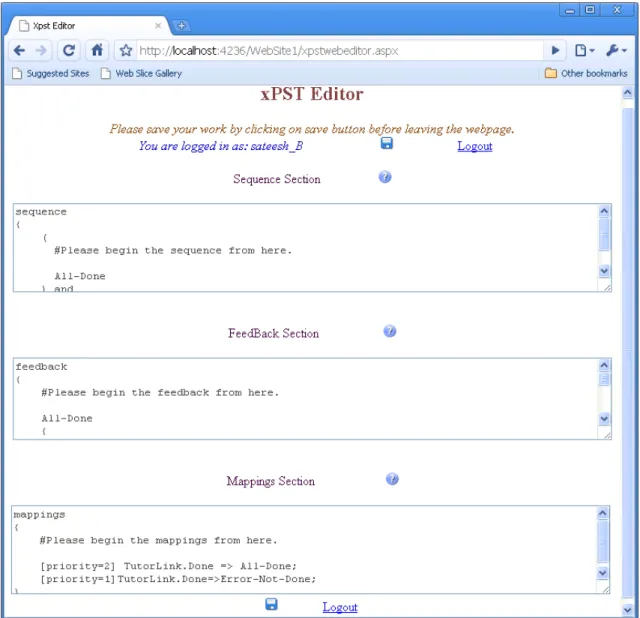
Figure 3.3 xPST Authoring Tool with its standard template. . . 27
Figure 4.1 Histogram showing Timing By Task and Participants. . . 34
Figure 4.2 Activity Graph of xPST Authoring Study - I . . . 35
Figure 4.3 A screenshot of a tutor in action on the ACM portal showing a Hint message for the user. . . 37
Figure 4.4 A screenshot of a tutor in action on the ACM portal showing a JIT message since the user did not enter the exact phrase intel-ligent tutoring in the query box. . . 38
Figure 5.1 Torque xPST Driver Architecture. . . 41
Figure 5.2 Torque xPST driver interface for communication events. . . 42
Figure 5.3 The xPST architecture along with the Torque Driver. . . 43
Figure 5.4 xPST snippet showing “Ans” checktype in action. . . 46
Figure 5.5 Example showing the proactive “OnComplete” feedback type. . . 47
Figure 5.6 xPST snippet showing “Lcm” functional checktype and the con-ditional JITs. . . 49
Figure 6.1 Histogram showing Timing By Task and Participants. . . 55
Figure 6.2 Activity Graph of xPST Authoring Study - II . . . 56
Figure 7.1 Fraction Addition User Interface for Task C. . . 61
Figure 7.2 Histogram showing Timing By Task and Participants. . . 64
Figure 7.3 Estimated Marginal Means vs BP and EP for three tasks. . . 65
Figure A.1 Exit Questionnaire data sheet of xPST Authoring Study - I . . . 74
Figure B.1 Email Advertisement of xPST Authoring Study - II . . . 75
Figure B.2 Pre-Survey Questionnaire of xPST Authoring Study - II . . . 76
Figure C.1 Sample xPST file of a DemoTask in a 3D game environment. . . 80
Figure D.1 Pre-Survey Questionnaire of xPST Authoring Study - III . . . . 81
Figure D.2 Exit Survey Questionnaire of xPST Authoring Study - III . . . . 82
Figure D.3 Email Advertisement of xPST Authoring Study - III . . . 83
Figure D.4 Screenshot 1 of xPST Authoring Study - III webpage . . . 84
Figure D.5 Screenshot 2 of xPST Authoring Study - III webpage . . . 85
ACKNOWLEDGEMENTS
This would not have been possible without the support of so many individuals who helped me shape this thesis into it’s final form. This thesis also reflects the relationships with many generous and inspiring people I have met and worked with since the beginning of my master’s program at Iowa State University. I would like to express my deep gratitude to my program of study committee, Dr. Stephen Gilbert, Dr. Vasant Honavar and Dr. Alexander Stoytchev for being very kind and generous towards me. I would like to specially thank my advisor Dr. Stephen Gilbert for guiding me through all the phases from the beginning to the end of my Master’s program, ensuring my academic success, involving me in fruitful research discussions and providing me with financial support.
I would like to thank Dr. Steve Blessing, assistant professor of psychology at the Uni-versity of Tampa for being instrumental in steering research ideas in the right direction. The development on xPST would not have been possible without the foundational efforts by Steven Ourada, the senior architect of xPST. I would also like to acknowledge the help from Mike Oren, Ross Bohner, Shrenik Devasani, Jay Roltgen, Wutthigrai Boonsuk for helping me with conducting studies and providing advice on various technical issues. I would like to extend my special thanks to Dr. Kasthurirangan Gopalakrishnan for his pure love and guidance all through out my master’s program at Iowa State University. I am grateful for the friendship of so many of the students and staff of the Hu-man Computer Interaction program, the Virtual Reality Applications Center and the Computer Science Department. I would also like to thank Pamela Shill, Linda Dutton, Karen Koppenhaver, Jean Bessman, and Lynette Sherer for their tireless efforts to make
opportunities possible for me.
My friend Sindhu provided me with unwavering moral support all through out, which helped me grow and concentrate even more. I would also like to thank my parents and friends, who have always encouraged me in any pursuit.
ABSTRACT
An Intelligent Tutoring System (ITS) is an artificially intelligent educational soft-ware application that teaches a user skills by giving personalized feedback as the user completes tasks within a problem domain. Despite their popularity, authoring these systems is a labor-intensive process, requiring many different skill sets. A major com-ponent of an ITS is the cognitive model. Historically its implementation has required not only cognitive science knowledge, but also programming knowledge as well. To ad-dress this challenge, the Extensible Problem Specific Tutor (xPST) was developed for easy authoring of ITSs for existing software and websites. This work develops an xPST authoring tool to simplify the process of xPST authoring by the end user and to help conduct research experiments. It also evaluates the xPST system in terms of the time taken by the users to author successful models. This work also extends xPST framework to enable the creation of generalized tutors in addition to problem specific tutors. To help non-technical military trainers create xPST tutors in game scenarios, this work de-velops a Torque xPST Driver plugin to enable xPST authoring in Torque 3D game and evaluates authoring in spatial environment scenarios like 3D games using the authoring tool. Finally, this work compares xPST and Cognitive Tutor SDK (another authoring framework) using a fraction addition study and shows that the ratio of training devel-opment time to training experience time using xPST is approximately 50% less that that of using Cognitive Tutor SDK. This thesis also shows that there is no significant difference between the “beginner programmer” and “experienced programmer” groups in terms of the time taken to author the tasks using xPST.
CHAPTER 1.
INTRODUCTION
“Learning by Doing” has proven to be a successful paradigm for educational training. An Intelligent Tutoring System (ITS) is a computer based training software system having an artificial intelligence (AI) component attached to it. This AI component can keep track of the students progress, give feedback and hints as required and can provide customized training to the student on a task. The key distinguishing factor of these systems comes from the fact that they are “intelligent” unlike the normal computer aided learning systems like audio lectures, presentations etc. Content models (also known as; cognitive models, knowledge bases, expert systems, or simulations) give ITSs depth so that students can “learn by doing” in realistic and meaningful contexts. Models allow for tutoring instruction to be generated in real time. Instructional models allow the computer tutor to more closely approach the benefits of individualized instruction by a competent tutor.
1.1
Anatomy of ITS
ITSs generally comprise of four modules: the interface module, the expert module, the student module and the tutor module. The student interacts with an ITS using the interface module, which is generally in the form of a GUI or a simulation. The expert module contains complete description of the knowledge or behaviors that represent ex-pertise in the subject-matter domain the ITS is teaching. The student module contains description of the knowledge or behaviors of the student including his/her misconceptions
and knowledge gaps. The tutor module is responsible for detecting the knowledge gaps and providing appropriate feedback or hints as required. Figure 1.1 shows a pictorial representation of a general ITS.
Figure 1.1 A Pictorial representation of an Intelligent Tutoring System.
1.2
Research Questions
The organization of this thesis is centered around answering the following research questions.
1. What learning curve, if any, exists when users use xPST to author tutors on existing web-interfaces?
2. What learning curve, if any, exists when users use xPST to author tutors on existing game interfaces?
3. Is there a difference between xPST and Cognitive Tutor SDK in terms of the training development to training experience time ratio?
4. Is there a significant difference between the “beginner programmer” and “experi-enced programmer” groups in terms of the time taken to author using xPST?
This thesis also studies how the extensions provided to xPST can support gener-alizable tutoring and how Torque xPST Driver can support xPST tutoring in game environments.
1.3
Thesis Organization
This chapter provided an overview of Intelligent Tutoring Systems, the various com-ponents of an ITS, and the research questions this thesis aims to answer. Chapter 2 goes through a careful literature review framing a background for answering the research questions. Chapter 3 gives the details of the xPST Authoring System, its architecture, the distinction between xPST and CTAT (a different ITS authoring system), the var-ious components of an xPST file and the xPST Authoring Tool. Chapter 4 tries to answer Research Question 1 by giving the details of the xPST authoring study con-ducted to understand the usability of the xPST system to author tutors on existing web interfaces. Chapter 5 presents the Torque xPST Driver to enable xPST tutoring in game environments, its various components, and the Torque Game Engine, which is used as the simulation environment. It also describes the extensions provided to the xPST framework to support generalizable tutoring apart from problem specific tutoring and the additional functional checktypes added to the framework. Chapter 6 tries to answer Research Question 2 by presenting a study in which participants author models
in game environments using xPST. Chapter 7 attempts to answer Research Questions 3 and 4 by describing the results of the fraction addition study which compares xPST with Cognitive Tutor SDK in terms of the training development to training experience time ratio and also compares the time differences between “beginner programmer” and “experienced programmer” groups. Chapter 8 provides a summary of this thesis focusing on my specific individual contribution.
CHAPTER 2.
REVIEW OF LITERATURE
The area of previous research that directly relate to this thesis is authoring tools for easy authoring of ITSs. More specifically this thesis explores two research areas. The first is easy authoring of ITSs on existing 2D interfaces. The second is easy authoring of ITSs in complex spatial environments like 3D games. There exists vast amount of literature on the main research topic and an extremely detailed analysis of the field is beyond the scope of this work. However, I will endeavor to summarize the main conclusions, and point out some particularly relevant studies.
The first research area deals with using an existing interface to build ITSs on top of it. Re-using an existing interface with a tutor reduces the time required to develop the tutor and any issues of learning transfer, a concern of past researchers [Corbett et al. (1997)]. If the ITS environment is the same as the non-ITS environment then such issues of transfer largely disappear. The second research area deals with how to easily author ITSs in complex spatial environments like 3D games. For learning to be effective it should be scaffolded or guided [Kirschner et al. (2006)]. During the last few decades, the very nature of teaching in modern universities has changed. Motivating students by setting challenges, goals and problems which are engaging is being seen as a key factor in the learning process [Laurillard (1993)]. Research has shown that students learn better and retain more when they actively engage in the learning process. Tutoring within games or tutoring using games provides these advantages compared to tutoring with traditional software. Pedagogy researchers have shown an increased interest in incorporating gaming principles into teaching and learning [Kirriemuir and
McFarlane (2004)]. Games manage to maintain the user’s attention with a background story, high-end graphics and the feeling of immersion within a simulated environment. Games can encourage active learning and motivate participation by giving rewards when students complete a task. An emerging model of games suggests that they excel by providing learners with situated experiences of activities, whereby they develop new ways of thinking, knowing, and being in worlds [Shaffer et al. (2005)]. In recent years, the research in this area is growing fast due to the interest of military to use ITSs in 3D games to carry out military training.
2.1
Evolution of ITSs
The evolution of Intelligent Tutoring Systems is fascinating, originating in the Ar-tificial Intelligence (AI) movement of the late 1950’s and early 1960’s. In 1958 Skinner reintroduced the idea of “Teaching Machines” [Skinner (1958)] based on the Verbal the-ory, highlighting the need and advantages of such machines for the future in comparison to the audio-visual aids. The first teaching machine was invented by Pressey in 1934. Teaching machines help the students in being active instead of passive receivers. The paper described and evaluated the working of few such types of machines to teach the students. This paper has been influential in orienting the research community to focus on such type of machines. “Programmed Instruction” [Kay (1968)], a method of pre-senting new subject matter to students in a graded sequence of controlled steps emerged making use of the teaching machines. Also the education system in United States dur-ing this period also provided encouragdur-ing support for the development of ITSs. In the 1960’s, researchers created a number of Computer Assisted Instructional (CAI) sys-tems that were generative [Uhr (1969)]. These syssys-tems were essentially automated flash card systems, designed to present the student with a problem, receive and record the student’s response, and tabulate the student’s overall performance on the task. These
programs generated sets of problems designed to enhance student performance in skill-based domains, primarily arithmetic and vocabulary recall. By the late 1960’s and early 1970’s, researchers had moved beyond merely presenting problems to learners while col-lecting and tabulating their responses, to considering the student a factor in the overall instructional system [Suppes (1967)]. Researchers developed systems that altered the presentation of new materials based on the history of a student’s responses. During that period there was crisis in AI since the researchers came to understand that the problems of AI were slightly intractable than the relatively straightforward challenges of building faster computers.
In 1982, Sleeman and Brown reviewed the state of the art in computer aided in-struction and first coined the term Intelligent Tutoring Systems (ITSs) to describe these evolving systems and distinguish them from the previous CAI systems [Sleeman and Brown (1982)]. During the 1980’s, computer scientists specializing in AI continued to focus on the problems of natural language, student models, and deduction. However, the field also attracted researchers from outside the computer science disciplines. Ander-son, who was working in cognitive science, developed the Adaptive Control of Thought (ACT*) theory of cognition [Anderson (1983)]. During mid 1980’s ITSs met Educational Psychology forming a discipline combining the work of researchers from AI, cognitive science and education moving towards a more “cognitively oriented form of software engineering.”
One of the biggest challenges for developing ITSs is that they are very hard to develop and require expertise in various areas. Ideally they require a team consisting of a software developer, domain experts, a teaching expert and usability engineers. To address this issue a number of authoring tools have been developed to date. In the last few years there has been significant progress in the development of ITS authoring tools and in the understanding of the key issues involved. The development efforts to date represent many diverse approaches, and it is still too early to get a sense for which
approaches will prove to be the most useful. A popular classification of authoring tools by category to better understand the state of art of the ITS authoring tools was given in [Murray (2003)].
At this point it would be useful to recall the research questions this thesis aims to answer. Out of the various ITS authoring tools available, xPST is the one that is discussed at length in this thesis. xPST, aimed to tutor on procedural tasks instead of conceptual tasks, tries to remove the need for expertise in various domains as stated above making it easier for the non-programmers to authors tutors by using the existing interfaces for tutoring.
2.2
Effectiveness of ITSs in training/learning
ITSs have been successfully used to tutor on a variety of domains such as mathemat-ics, geometry, and economics [Aleven et al. (2006),Arruarte et al. (1997) and Koedinger et al. (2004)]. Within the different types of ITSs, model-tracing tutors have been partic-ularly effective [Anderson et al. (1989),Koedinger et al. (1997),Ritter et al. (2007) and VanLehn et al. (2005)]. These tutors contain a cognitive model of the domain that the tutor uses to check most, if not all, student responses. For example, the Andes physics tutor by VanLehn [VanLehn et al. (2005)], and his colleagues contains a cognitive model of how to solve problems within physics. This model is referenced for each step in the problem solving process in order to make sure the student stays on path. The model can also be used to provide hints and other assistance to the student learning the material. This type of intense interaction and feedback has led to impressive student learn-ing gains. Students uslearn-ing the Andes physics tutors have demonstrated large gains in effect size over paper-and-pencil homework, on both standardized and more conceptual, experimenter-designed tests [VanLehn et al. (2005)]. Results from another model-tracing tutor that instructs students on how to program show that they can master the material
in a third less time [Corbett (2001)]. Carnegie Learning’s Cognitive Tutors for math is in use by over 1000 school districts by hundreds of thousands of students. Typical results indicate a 30% improvement on standardized tests such as the SATs, and double that on more targeted instruments, as well as significant learning time reductions [Franklin and Graesser (1996)].
2.3
Parent Systems to xPST
This section describes the two important parent systems to the xPST architecture presented in this work. They are the CTAT (Cognitive Tutor Authoring Tools) and Cog-nitive Tutor SDK. It also describes the TutorLink architecture which enables CogCog-nitive Tutor SDK to tutor on existing interfaces forming the basis for xPST system.
2.3.1 Cognitive Tutor Authoring Tools (CTAT)
CTAT [Aleven et al. (2006)] stands for Cognitive Tutor Authoring Tools which as of current day is the leading cognitive model authoring tool in the academic world. It is a collection of authoring tools developed at Carnegie Mellon University’s Learn Lab. This system has been initially called TDK (Tutor Development Kit). CTAT supports development of two types of tutors, Cognitive Tutors and Example-Tracing Tutors, which represent different trade-offs in terms of ease of authoring and generality. Cognitive Tutors rely on a rule-base cognitive model and have been successful in improving students math proficiency in American high schools [Koedinger et al. (1997)]. They can tutor on many facets of algebra and can tutor on as many examples of a given type of problem as you want, e.g., hundreds of y=ax+b problems. Example-Tracing Tutors on the other hand can only tutor on one kind of problem, and sometimes don’t even generalize as much as cognitive tutors. They do not require much programming compared to Cognitive Tutors [Koedinger et al. (2004)]. This is because they don’t attempt to solve the classic
problem in AI of generalizing from a knowledge structure that’s been manually encoded. The Cognitive Tutor Authoring Tools comprise three separate applications: an exter-nal GUI Builder (typically, NetBeans or Adobe Flash), a set of core tools for demonstration-based task analysis and for testing and debugging cognitive models, and an external editor for cognitive models (typically Eclipse).
In CTAT, the authoring of Example-Tracing Tutors and Cognitive Tutors is orga-nized around examples of demonstrated behavior. These examples include alternative strategies for solving problems and errors students are expected to make, and can be recorded conveniently with CTAT’s Behavior Recorder tool. They can be used as the basis for Example-Tracing Tutors to provide guidance to students. The examples can also be used as planning cases and semi-automatic test cases for cognitive models, if an author is developing a Cognitive Tutor.
2.3.2 Cognitive Tutor SDK
Cognitive Tutor SDK [Blessing et al. (2006)] is a set of cognitive ITS authoring tools build on an architecture called Tutor Runtime Engine (TRE) [Ritter et al. (2003)], which was inspired by TDK. The main idea behind Cognitive Tutor SDK is to come up with GUI representations that enable the cognitive model designer to do their work without any programming and with a clarity not offered by previous systems. As per Cognitive Tutor SDK design the two main components of a model-tracing ITS cognitive model are the object model and the rule hierarchy. The object model represents the pieces of the domain to be tutored (e.g. table cells in a worksheet, components of a graph, equations to solve and the terms within those equations), and this object model is used by the rules to provide the tutoring to the student. The plan behind the SDK is to apply concepts that have been successful in other aspects of computer applications, such as tree views, hierarchies, and point-and-click interfaces, to the design of model tracing ITSs. Development of such representations so they are usable by non-programmers in
this context is difficult, but critical to lowering the bar in terms of both time and money in the creation of such systems. As noted in [Blessing et al. (2006)] the Cognitive Tutor SDK has been successful in terms of being able to be used by cognitive scientists who are not professional programmers, but it still requires significant computational background and it not easy enough for, say, a high-school teacher to use.
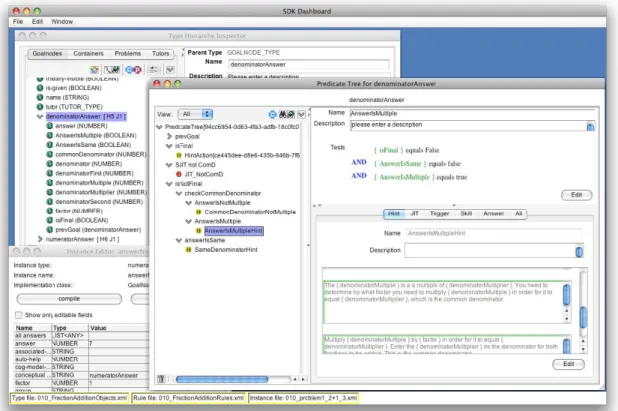
Figure 2.1 shows a screenshot of the Cognitive Tutor SDK. The Type Hierarchy Inspector can be seen in the upper left. The left pane of that window shows the current type hierarchy and the right pane shows information about the currently selected item in the left.
Figure 2.1 Screenshot of the Cognitive Tutor SDK showing the Type Hier-archy Inspector, Predicate Tree and the Instance Editor.
In the view of object model, the requirements for this particular tool are similar to other existing tools, in that the basic functionality is to display and edit objects consist-ing of attribute/value pairs. However, there are additional requirements for Cognitive Tutors that makes using any off-the-shelf or previously produced software problematic. In particular, pre-defined object types exist that have their own properties and behav-iors. For example, there is a goalnode object type (representing a students subgoal in the problem), that has a set of predefined properties, and attached to these goalnode types is a predicate tree inspector. In addition to the object model, the other main piece of a cognitive model specifies the goal-state behaviors, such as right answers, hints, and just-in-time (JIT) messages forming the backbone of a model-tracing tutor. Cognitive Tutor SDK has a non-code based (GUI) representational scheme for the rules using tools like Rule Editor and Tutorscript editor.
It is desirable to enable the construction of model-tracing ITSs around pre-existing software. This would eliminate or at least greatly diminish the time spent doing tra-ditional interface programming that is to develop a custom interface on which learners will be tutored. By allowing authors to create an ITSs for off-the-shelf software, this will lower the bar for creating such systems. One can imagine tutoring not only math or statistics using Microsoft Excel as the interface (or some other spreadsheet), but one could also tutor on Microsoft Excel itself (or any other application requiring training) [Ritter and Koedinger (1996)]. Such a scenario would be a boon to corporate training environments. What is needed is a way for the Tutor Runtime Engine, the tool that uses the cognitive model created by the SDK, to communicate with third-party software (that is, software that the authors creating the ITSs did not program). Even though the interfaces for the current Cognitive Tutors were developed essentially in tandem with their cognitive models, the code for the interfaces was separate from the tutoring code, with the two pieces communicating to each other through a messaging protocol. This separation allows to use Cognitive Tutor SDK described in the previous section, and
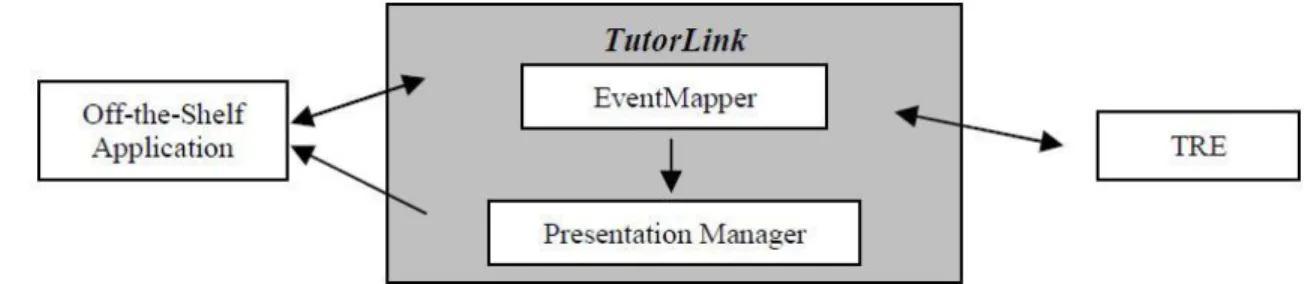
also allows for the possibility of third-party applications to be the student interface. TutorLink [Blessing et al. (2007)] came as the solution to this problem. TutorLink acts as a communication link between TRE and the off-the-shelf software. Figure 2.2 shows architecture of TutorLink.
Figure 2.2 TutorLink Architecture.
Once the user interacts with the interface, that interaction needs to be noted by Tu-torLink and sent to the TRE for the appropriate tutoring action. The part of TuTu-torLink that receives the interaction message from the interface is called the EventMapper. As its name implies, this part takes the incoming message and maps the event into something the TRE can understand (that is, a goalnode within the cognitive model). In the case, where the interface was built using tutorable widgets, this mapping is straightforward. In other cases, there needs to be a more structured mapping table that maps between interface widgets and goalnodes. This mapping has to be supplied by the author. Such a mapping application using AppleEvents has been described [Ritter and Blessing (1998)]. In general terms, the author starts a listening application, then begins to interact with the widgets in the interface in order to identify their names, and then maps those to goalnodes.
2.3.3 Comparison of the Parent Systems with xPST
The comparison between xPST and its parent systems shows a relationship between the “Ease of Use” vs “Power”. They seem to be inversely proportional to each other. The main idea behind CTAT is also to enable non-programmers or non-cognitive scientists to author ITSs. The key advantage of CTAT to the existed ITS authoring systems is that it requires no AI programming for example-tracing tutors (for Cognitive Tutors, one need to program rules in JESS). However, it is confined to a specific set of interfaces using CTAT-friendly widget libraries (e.g. certain Java beans or Flash actionscript libraries). It also uses quite complex tools like “GUI Builder,” “Behavior Recorder,” “Working Memory Editor,” “Conflict Tree,” etc which demand some level of programming knowl-edge to understand and use them effectively. The complex GUI interface might seem difficult to interact with for non-cognitive scientists. This way CTAT has still a deep learning curve. But it is very powerful to create generalizable tutors for repetitive tasks (e.g. do 30 math problems of this form). The Cognitive Tutor SDK has similar under-lying concepts from CTAT but had used TRE as its underunder-lying engine. The Cognitive Tutor SDK can produce much generalizable tutors than CTAT. It can make a tutor for all algebra problems and thus rules that apply generally can apply to any problem (e.g. “forgot the negative sign” rule can apply to y=ax+b but also to y=sin(x)+cos(x) or any other problem that might be appropriate). Also Tutorscript allows much more power with customizable programming. It also still uses some complex tools like “Rule Editor”, “TutorScript Editor” which again has some programming bent. TRE makes certain assumptions that are not helpful when tutoring on software (e.g. it assumes that the tutor author can fully control and track the state of the interface, graying out buttons as needed, etc). And like CTAT, Cognitive Tutor SDK also does not enable authoring of ITSs on existing interfaces. The xPST system has arisen to overcome these problems. xPST based its idea on completely removing such complex GUI’s as existed
in its parent systems and provides a simplex text file interface. This way the author breaks the task into a sequence of steps and writes them in a file. This made xPST more usable by non-programmers or non-cognitive scientists to author ITSs with very less effort. It also uses TutorLink architecture to be able to tutor on existing interfaces removing the need to create tutoring specific interfaces. However, xPST is more lim-ited in power. It could only author problem-specific tasks (and later game-based tasks) where repetition is not required. This works well for software-based learning and game based training where training is majorly task specific. Table 2.1 shows a comparison of CTAT, Cognitive Tutor SDK and xPST in view of various factors.
Table 2.1 Comparison of CTAT, Cognitive Tutor SDK and xPST
CTAT Cognitive Tutor SDK xPST
Ease of use Low Medium High
Power Medium High Low
Enable authoring on existing interfaces No No Yes
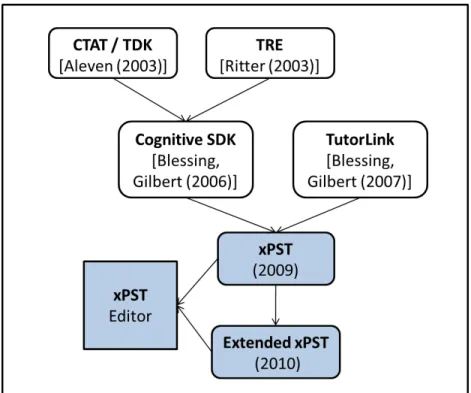
Figure 2.3 shows the history or evolution of this research.
In view of these systems and the comparison between them [Table 2.1] and the results [Blessing et al. (2009)] evaluating the programming knowledge needed to use the Cognitive Tutor SDK, we can predict that it will be easier for non-programmers to use xPST if xPST removes some of the complex data representations of the SDK, e.g. predicate rule hierarchies.
The Cognitive Tutor SDK enables the creation of cognitive models that contain ab-stracted instruction over instances. However, it seemed to be difficult to use in other situations. In two of the tutors built using Cognitive Tutor SDK, for example, the authors created a lot of declarative and procedural representations that ultimately re-ceived very little use. For example, [Hategekimana et al. (2008)] created a tutor for Paint.NET, software similar to Adobe Photoshop. One exercise taught users how to resize and scale an image. While one could imagine using this instruction in multiple
Figure 2.3 Evolution of this work showing the relationship between xPST and its parent systems.
image-manipulation instances, in the actual tutor it was used in only a couple of ex-ercises. The power of having a model-tracing tutor, in which the instruction could be abstracted over multiple instances, was lost. However, the author still spent much time creating the representations that contained the instruction.
Figure 2.4 shows a screenshot of ITS on the top of Paint.NET application showing a JIT message.
Likewise, the tutor for the CAPE web based Authoring Tool used at Vanderbilt Uni-versity as part of the VaNTH ERC [Roselli et al. (2008)], the authoring process contained similar issues. Ultimately, the tutored instruction centered over a set of eight problems. Much work went into the declarative and procedural structures of the tutor, but their re-use was not nearly as great as what one would see in a Carnegie Learning math tutor.
Figure 2.4 ITS on the top of Paint.NET application showing a JIT message.
Ultimately, the effort spent developing those representations seemed disproportionate to their usefulness in the completed model. What was desired for these situations was a more streamlined system where the tutoring could be developed without the need for as much underlying structure typical of model-tracing tutors. The Extensible Problem Specific Tutor (xPST) authoring system was designed to eliminate these problems.
Figure 2.5 shows a screenshot of the ITS prototype for the VANTH Web-based Authoring Tool.
2.4
Emergence of Games in Tutoring
ITS researchers have begun exploring how games and features that are found in games (e.g., embodied agents) can be used in intelligent tutors. For example, McQuiggan, et al. [McQuiggan et al. (2008)] have examined how topics in middle school science
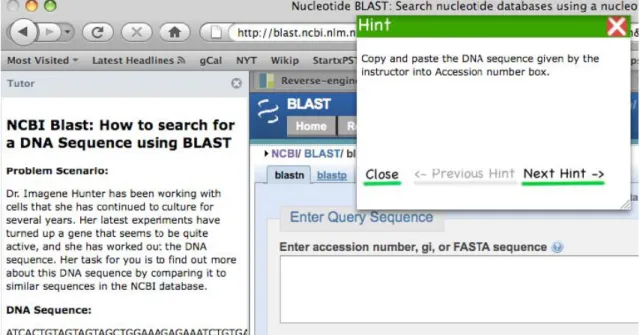
Figure 2.5 A screenshot of the ITS prototype for the VANTH Web-based Authoring Tool. The tutor on the left side panel shows the initial problem statement to address and a hint. A JIT (just-in-time message) gives feedback on top of a partial screenshot of the Web-based Authoring Tool on the right.
could be taught using a tutor built on a commercial 3D-game engine. Students search an island science post to find clues to solve a mystery. While interacting with non-player characters and making observations in the virtual world, students learn scientific principles. [Johnson (2009)] describes a tutor in which users learn cultural issues while interacting in a serious game (a game designed for a primary purpose other than pure entertainment). Gomez-Martin, et al. [Gomez-Martin et al. (2004)] have developed a system called JV2M which borrows ideas from games to teach programmers with Java knowledge the internal workings of the Java Virtual Machine. In some knowledge
domains, games may be the only possible means of simulating and practicing real world problems. In the military for instance, simulations have been used for teaching pilots to fly as well as for training of combat scenarios that would otherwise be too deadly or expensive to train in the field [Stottler (2000)]. [Livak et al. (2004)] presents a method to unify the computer generated forces community and the online training community, seemingly disparate areas, by using a single cognitive model to provide both tutoring and computer generated forces capability. While previous ITSs have been most effective for learning conceptual tasks like teaching physics [VanLehn et al. (2005)] and procedural tasks like teaching algebra [Aleven et al. (2006)], but little has been done to explore tutoring on procedural tasks in spatial environment scenarios like 3D games.
For some learning domains, games are a more natural way to learn than traditional classrooms. Crawford (1984) suggests that games are “the most ancient and time-honored vehicle for education. They are the original educational technology, the natural one, having received the seal of approval of natural selection. We don’t see mother lions lecturing cubs at the chalkboard; we don’t see senior lions writing their memories for posterity. Game-playing is a vital educational function for any creature capable of learning.” The optimal learning state is that of being in “flow” [Csikszentmihalyi (1990)]. It refers to a mental state of immersion and clarity. Athletes call it “being in the zone”, and the term has made its way into a number of fields including video games research.
It is important to understand the difference between various terms like educational simulations, virtual worlds and serious games as stated in [Aldrich (2009)]. Educational Simulations are structured environments, abstracted from some specific real-life activity, with stated levels and goals. They allow participants to practice real-world skills with appropriate feedback but without affecting real processes or people. Virtual Worlds are 3D environments where participants from different locations can meet with each other at the same time. These environments can capture and convey enough social cues, such as
body language, interactive props, and the look and feel of “real” surroundings to convince some part of the participant’s brains that they are physically in other world. Increasingly important, some virtual worlds also enable participants to build and otherwise change the environment. Second Life is a best-known example of a virtual world. Serious games are interactive experiences that are easy and fun to engage while building awareness of the real world context. Serious games usually require no coaching outside help and even spread through word of mouth, promoted by people who enjoy playing them.
CHAPTER 3.
xPST AUTHORING SYSTEM
Re-using an existing interface with a tutor reduces the time required to develop the tutor and any issues of learning transfer. With past ITSs, researchers have had concerns about whether skills being learned in the ITS will transfer to the non-ITS environment [Corbett et al. (1997)]. If the ITS environment is the same as the non-ITS environment (e.g., learning how to edit images in the context of Adobe Photoshop itself, rather than alternating between a tutorial video and the software), then such issues of learning largely disappear.
3.1
xPST vs. CTAT
xPST [Blessing et al. (2009)] stands for Extensible Problem Specific Tutor and CTAT stands for Cognitive Tutor Authoring Tools. xPST1was developed with software training
as the target application. Traditional software training often uses videos based on screen-recordings (e.g., from Adobe Captivate or TechSmith Camtasia Studio), but this passive technique to learning has been shown to be less effective than an ITS [Hategekimana et al. (2008)]. In form, xPST is similar to the CTAT [Aleven et al. (2006)]. CTAT and xPST both allow the author to quickly create a model for a particular problem instance by writing hints and other tutoring aspects while the author manipulates the interface. xPST differs from CTAT in that CTAT requires the authors to use either a Java or Flash interface built using specific CTAT widgets and xPST does not.
1The xPST Authoring System is open source and it is available on Google code repository at http: //code.google.com/p/xpst/.
3.2
xPST Architecture
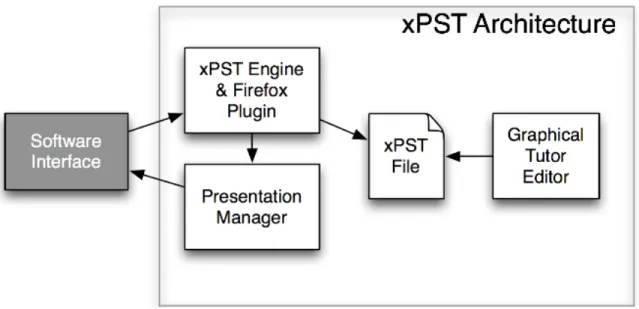
The xPST architecture (see Figure 3.1) is an instantiation of the architecture of plug-in tutor agents described in [Ritter and Koedinger (1996)]. The xPST file, which contains information that allows for instruction akin to a model-tracing tutor, includes information describing the objects within the learning domain and rules that determine which feedback the student will receive at any given moment. Every interface element of the application for which one needs learning instruction is mapped to an object and has one or more rules associated with it. The rules contain the instructional feedback. The Plugin or Listener (Firefox Plugin for Web interfaces) eavesdrops on user actions in the third-party software and sends them to the xPST Tutoring Engine, which checks them with the xPST file. Feedback is mapped back to the client UI control and displayed on the interface, e.g., via coachmark-style graphics [Hewes et al. (1994)]. Note that while ITSs for academic topics like math typically require a more complex cognitive model, so that learners can receive high-quality personalized feedback across a large number of similar math problems, software training does not require such repetitive tasks, and the cognitive models are typically simpler and thus problem specific.
The third-party software can be a stand-alone application or a website. If the task is tutoring on a stand-alone application, then the system can listen for user events in three ways by using: 1) widgets that automatically send the needed events (the method used in [Ritter and Koedinger (1996)] with AppleEvents); 2) accessibility hooks built into the software (used frequently by screen readers like JAWS and software like Adobe Captivate); and 3) low-level OS events. xPST enables tutoring on any website viewable in Firefox that can be monitored via the Document Object Model (DOM) or on any stand-alone application in which you can insert a “listener” function to eavesdrop on user events. The xPST Engine runs on its own server or locally and communicates with the other components via TCP/IP, allowing the tutored application and the tutor to
Figure 3.1 The architecture of xPST. The Firefox plugin “eavesdrops” on the software interface or website that needs tutoring. The Pre-sentation Manager gives visual feedback using the software in-terface. The xPST file provides the feedback and goal structure needed for each task within the tutor. The Graphical Tutor Ed-itor enables teachers to create the xPST file without program-ming skills.
run on different servers.
3.2.1 Components of the xPST File
The xPST file (a sample is provided in Appendix C) is a text file written using a syntax that is designed to be easy to read and write for an inexperienced cognitive modeler. The file contains three sections: Sequence, Mappings, and Feedback. The sequence identifies a path of steps the user takes through the problem space to achieve the goal specified in the task. The mappings section maps interface identifiers to the steps noted in the sequence that the user takes. Finally, the feedback section provides
hints and error messages for each step within the sequence. Because of this relatively simple syntax, the authoring tool for xPST can be a text editor. An online text editor for creating web-based tutors where authors can immediately jump to their target website and test the current xPST file has been created.
For example, one tutor built teaches AP Biology students in high school how to use the NCBI Bioinformatics tools that are available online. For one task, learning how to search for a DNA sequence using the BLAST tool, the sequence contains steps like Click-Nucleotide-BLAST-Link, then Enter-DNA-Sequence, etc. In sequences, steps can be separated by then, and, or, and until. Until is used when there is a set of UI controls that are all submitted to the system at once, typically by a button like Search or Go or Submit or OK in a dialog panel. These conjunctions can be used in any combination and grouping to allow for much flexibility in how the tutoring can progress, much more so than the typical screen-capture movie. The Mappings section for the above steps contains mappings that match the less understandable labels that NCBI’s site uses to name that link internally, e.g. “homeBlastn:click” to the more friendly step name in the sequence. Whenever that link is clicked, the xPST tutor passes along the message to that particular tutor step.
The Feedback section specifies the desired answer and any hints or JITs (just-in-time error messages). JIT error syntax allows several variations, e.g. the tutor author can decide whether to allow a mistaken keystroke or click to reach the target software (and presumably lead to unwanted to results) or to block the learner’s action so that the error message can appear without allowing the potentially damaging action to take place. Also, JITs can occur based on a variety of tests such as “If learner’s input is less than 5, give this JIT.” Finally, as in other tutor APIs, xPST supports variable replacement within hints and JITs, so that if an incorrect answer were assigned to the variable “almost”, an error message might say: “You chose{almost}, which is close, but its{answer}.”
It has been confirmed that the xPST approach can be used to develop real tutors rapidly; one of the most extensive efforts is described in [Roselli et al. (2008)], in which the tutor taught university faculty how to use a complex web-based homework authoring tool. Other smaller efforts include tutoring on the NCBI site (see Figure 3.2) and on Slashdot Journals.
Figure 3.2 Tutor on NCBI WebSite.
3.3
xPST Authoring Tool
The xPST Authoring Tool is an online web-based tool to author xPST files. It is designed to serve two purposes: 1) To provide an easy to use graphical user interface (GUI) to author xPST files without installing any software on the client computer 2) To provide a tool to log the amount of time spent by the author in each of the Mappings,
Feedback and Sequence sections of the xPST file, which helps in conducting research experiments involving xPST authoring. The logs and the xPST files generated by the author are automatically stored on the server of the researcher without any work required from the author.
The xPST Authoring Tool provides an Integrated Development Environment (IDE) for authoring xPST files. It accomplishes all the background work like creating the properties file, the scenario file, the linking html file and appropriately ties them up with the xpst file taking off a bunch of housekeeping work from the author allowing him to focus on the cognitive model alone. It provides the feature of syntax checking and informs the author of any errors as he is editing the file. This feature greatly helps the non-programmers in easing the authoring process as it has been found that most of the errors encountered by the author initially during the xPST authoring process are simple syntax errors. It also provides a starting standard template for the authors and the authors can add their cognitive model into the standard template seamlessly. In-place help is provided for each section of the file. The xPST Authoring Tool also provides auto save functionality similar to Google docs. Figure 3.3 shows the xPST Authoring Tool with its standard template.
CHAPTER 4.
xPST AUTHORING STUDY
We tested the ability of novice users of xPST to create models using the xPST Au-thoring Tool. Our approach is based upon a study conducted previously which examined another authoring tool described in Blessing and Gilbert (2008). Our purpose with this study1 is to ensure that the xPST authoring approach is useful to people with different backgrounds and to examine the learning curve in the time course of learning to author.
4.1
Methods
4.1.1 Participants
We conducted the study during Fall 2008 in an introductory HCI graduate class at Iowa State University. The class had 48 first-year students in the HCI program from a variety of different departments. An extra credit assignment was presented to the class. Students could elect to do the assignment or not, and then they could elect to make their data available for analysis or not. Eighteen students made some attempt at doing the assignment, and 10 agreed to participate in the study.
4.1.2 Materials
The assignment was composed of three main parts: 1) information about intelligent tutoring systems in general; 2) a worked example of creating a model using the xPST
1The research described in this chapter has been published in the Proceedings of the 14th
authoring system; and 3) the assignment itself. The information concerning intelligent tutoring in general was very brief: a web page (http://www.hci.iastate.edu/HCI521/ bin/view/Main/CogModelActivity)that contained roughly two pages of text that dis-cussed tutoring at a very high level (e.g., needing to think about a student’s goals, what help messages to provide, etc.), and a 5-minute screen movie which demonstrated the VaNTH xPST tutor, designed for a Vanderbilt University web application [Roselli et al. (2008)].
The worked example was much more in-depth, and composed of four parts: 1) a 44-minute screen movie showing someone creating the model while annotating their actions; 2) the resulting commented xPST file; 3) a six-page web document containing the technical information portrayed in the video; and 4) a website where the student could try the example portrayed in the movie for him or herself. This worked example involved a web page (http://xpst.vrac.iastate.edu/WebxPST/employmentappmenu. html) one might use to apply for a job, which asked for such information as name, education history, and major. The page used a variety of different entry widgets in order to illustrate the various features of xPST-based models. Finally, the assignment consisted of designing an xPST tutor for three different tasks (as described in Table4.1
below), all centered on the issue of searching a particular library database (the ACM Portal, http://portal.acm.org/dl.cfm?coll=portal&dl=ACM).
Each task specified different parameters that needed to be used in the search and ended with the user sorting the found results in a particular manner or showing the reference in ACM reference notation. For example, Task A asked the user to find a full-text article about intelligent tutors (but not a math one) by someone from MIT. The student had to find the paper with the most downloads that met those criteria. These tasks were chosen because they are real-world tasks in which students not experienced with such database searches might benefit from having a tutor. All three tasks were similar in scope. They were not intended to vary in difficulty, but that was not calibrated
Table 4.1 Three tasks to be done along with their descriptions
Task Name Task Description
Task A: Search by University Use the Advanced Search to find articles from authors at MIT on intelligent tutoring that are not about math and where you have full text available. Sort the list of hits to see
which one has had the most downloads over the past 6 weeks. How many articles are there, and what’s the name of the paper with the most downloads?
Task B: Search Proceedings Do a search to find articles from the CHI conference proceedings (but not the extended abstracts) on multitouch that have full-text available in ACM Portal. How many total CHI articles on multitouch are there? Which one has the most citations? Note that the official name of the CHI conference is the Conference on Human Factors in Computing Systems.
Task C: Find Reference You can remember an important article by Ritter and one other person from 1996. Find the article and the exact ACM Reference Citation format for it.
separately. Task A and Task C has 6 goalnodes (refer Chapter 2 for definition). Task B has 7 goalnodes and requires some good thought from the participant to sequence them correctly. For more elaborate description of the tasks see “Your deliverables section of the study” in Appendix A.
In order to complete the assignment, the students had available to them the on-line xPST Authoring Tool as described above. The xPST Authoring Tool allowed us to track progress in creating the models, including the ability to know how long and how often students worked on each of the three major sections of an xPST file (mappings, se-quence and feedback). Lastly, participants filled out an exit questionnaire that asked for demographic information and the participants reflections on using the xPST Authoring Tool.
4.1.3 Procedures
The class instructor briefly presented the assignment to the students. If they elected to do the assignment, then the students had three weeks to complete it. All materials were available via a web page, and students were free to work on the assignment at any time or place until its due date. The materials suggested that it will take 5 - 10 hours to do the assignment.
4.2
Results
We divide the results into three parts: 1) qualitative and quantitative measurements of the models produced; 2) timing data concerning model creation; and 3) analysis of the end-of-task questionnaire.
4.2.1 Model Analysis
As stated above, 10 students gave permission to analyze their models. As a group, these 10 participants produced 26 models: one participant produced only one task model, two participants produced two task models, and the other seven participants completed all three task models. When it is sensible we will use all data in the analyses, but at other times we will use data only from the seven participants that completed all the assignments. We will make clear which set of data we are using.
Blessing and Gilbert (2008) classified the models produced by the participants in the SDK Authoring Tool into one of five categories (other researchers have used similar scales [Martin et al. (2007)]). We did the same thing with these models produced with the xPST Authoring Tool. The scores were based on actually running the model. The scores are reflective of the models behavior. Due to the direct mapping between how an xPST model behaves to how the model looks, the scores would be similar if not identical if based on the model’s structure. As can be seen in Table 4.2, all the
participants performed quite adequately at producing models, with only one model not being sufficient, and majority of participants (18 out of 26, 69%) received a score of either 4 or 5.
Table 4.2 How the cognitive models were scored
Score Description Models
5 A model that produces behaviors close to an ideal 6 model, in terms of hints and just-in-time messages
4 A very good model that is beyond just being 12 sufficient
3 A sufficient model where the student can complete 7 the task
2 Model provides hints, but does not provide enough 1 guidance for a novice
1 Model runs but produces nonsensical help 0
The three participants who did not complete all three tasks created the poorer cog-nitive models. Of the five models produced by these three people, the model that scored a 2 came from that group. One model scored a 4, but the other three models scored 3s. Of the seven people who completed all three tasks, one person scored all 3s, another scored one 3 and two 4s, and the remaining participants and models scored a mixture of 4s and 5s.
4.2.2 Timing Data
The xPST Authoring Tool kept track of how long participants spent working on the three parts of an xPST model and how many edits were made to each part. Table 4.3
displays the average time participants spent on various parts of the models, split by the three different tasks. Table4.4displays number of editing sessions. Note that these data represent the participants that completed all 3 tasks and for which we have valid times (7 participants completed all 3 tasks).
Table 4.3 Time to complete model actions within a task (times in hours, with percent of total in parentheses). 21 models considered
Task A Task B Task C
Sequence 1.30 (35.0%) 1.02 (40.3%) 0.58 (33.5%) Mappings 1.06 (28.6%) 0.58 (22.9%) 0.40 (23.1%) Feedback 1.35 (36.4%) 0.93 (36.8%) 0.75 (43.4%) Total 3.71 (100%) 2.53 (100%) 1.73 (100%)
Table 4.4 Editing sessions to complete model actions within a task (percent of total in parentheses). 21 models considered
Task A Task B Task C
Sequence 37.67 (24.5%) 16.83 (26.0%) 12.67 (19.5%) Mappings 46.33 (30.1%) 22.67 (35.1%) 24.17 (37.3%) Feedback 70.00 (45.5%) 25.17 (38.9%) 28.00 (43.2%) Total 154.00 (100%) 64.67 (100%) 64.84 (100%)
1.70 and 1.00 respectively. Figure 4.1 shows the histogram of timing data by tasks and participants for the 7 participants who completed all the three tasks. We can observe the learning curve as these participants move from task to task. Participants were not required to work on the tasks in order, but all did so, as evident from their log files. As noted above, the 3 tasks are similar in scope. Participants got more proficient in using the tool and creating these models. The histogram shows that all the participants have the expected learning curve.
Figure4.2 shows what the average participant was doing while working through the task model. We analyzed the data for each participant by dividing progress in writing the model into quintiles. Within each quintile we calculated what percentage of the time was spent on sequence actions, mapping actions, and feedback actions. This particular graph is based on all available data (26 task models), though all graphs are very similar to one another regardless of how the data are sliced. Much of the sequencing work was done first, and the mapping and feedback work was then done in tandem. This was the way the worked example movie showed during training went through the process of
Figure 4.1 Histogram showing Timing By Task and Participants.
model creation, and it appears that most of the participants adopted that path.
4.2.3 Exit Questionnaire Data
Participants completed a short questionnaire after they were done with the assign-ment (see Figure A.1 in Appendix A). The questionnaire asked for demographic in-formation (sex, home department, number of undergraduate programming courses and self-rated “techie” score) and contained four questions asking them to reflect on their experiences.
Of the 10 participants, all but one were male, and five of them came from engineering departments (two were undecided, one computer science, and one veterinary medicine major). All but two had taken more than five computer science courses as an under-graduate; the remaining two had taken only one course. They self-rated themselves as
Figure 4.2 Activity Graph of xPST Authoring Study - I
at least moderately technologically sophisticated, with two 5s, three 4s, and the rest 3s. Given the small sample size and somewhat homogeneous group, it is hard to make conclusions concerning who may have produced better models based on demographic information. A previous study [Blessing and Gilbert (2008)] found that the number of computer courses was a good predictor of cognitive model success. Examining the two people who had only taken one programming course apiece, one of them wrote uninspired models that scored a 3, but the other wrote among the best models (two 5s and a 4). One of the two people who had taken more than 10 courses also wrote uninspired models (all 3s). The other person who had taken more than 10 courses wrote excellent models (a 5 and two 4s). In our small sample we have examples of all possible combinations of programming courses and model rating.
In the free response questions (there were four total, asking them to reflect on this particular experience, the task in general, what was challenging, and other uses of xPST), five participants explicitly said that they liked the approach that xPST took with regards to providing training on existing websites. Three people were neutral, one person thought the process was too complex, and another made the point that if the website were designed correctly, no training would be needed. Two people pointed out that the usefulness of such an approach increased with the site’s complexity. Four users took the current implementation to task, citing weaknesses such as the training materials, the limited functionality of the editor, and the inability to circle or highlight items in the interface as the system provides feedback (not implemented within xPST for this particular study).
4.3
Discussion
There are two main items we would like to note from the study. First, people were able to use the xPST Authoring Tool. Everyone who attempted to start the task produced at least one working model. The instruction provided was minimal, about an hour, but with that instruction a mix of people created a model of a particular task. The second item to notice is the the presence of a learning curve as the participants moved from task to task. There was a spread in terms of time to create the models, but all users reduced their times upon successive models. By the third model most participants were able to complete their model in just over 1.5 hours. After another model or two, that time would be close to 1 hour (the developers of xPST could probably produce such models in 30-45 minutes). That 1 hour would provide around 10 minutes worth of instruction. So this study tries to answer our first research question that there exists a learning curve when users use xPST to author tutors on existing web-interfaces, but we cannot prove its significance since the study does not have enough number of participants. A
better study with more participants is conducted later, which is described in Chapter 7. The small up-front cost of training coupled with a small time in producing the training could make the xPST approach attractive to those who want to provide model-tracing feedback to existing interfaces.
Figure4.3shows a screenshot of a tutor in action on the ACM portal showing a Hint message for the user. Figure 4.4 shows a screenshot of a tutor in action on the ACM portal showing a JIT message since the user did not enter the exact phrase intelligent tutoring in the query box.
Figure 4.3 A screenshot of a tutor in action on the ACM portal showing a Hint message for the user.
Figure 4.4 A screenshot of a tutor in action on the ACM portal showing a JIT message since the user did not enter the exact phrase intelligent tutoring in the query box.
CHAPTER 5.
TORQUE xPST DRIVER AND
EXTENSIONS TO xPST
This chapter describes the Torque xPST driver and the extensions provided to the xPST framework. Torque xPST driver acts as a bridge between the Torque game engine and the xPST engine to enable xPST tutoring in games. The extensions provided to the xPST framework allow for the creation of generalizable tutors and to give proactive feedback. Additional functional checktypes are also added to the xPST framework to enable tutoring on math problems.
5.1
Torque xPST Driver
Torque xPST driver serves the job of the Firefox plugin (see Chapter 3) when tutoring on web based interfaces. The driver eavesdrops on the events happening in the game and sends them to the xPST engine. It also receives the appropriate feedback from the xPST engine and sends it to the game.
We have participated in a series of direct interactions with the military trainers at the Camp Dodge-Iowa National Guard and took their feedback on authoring tutors in games. Based on that, we understood that the authoring of tutors in games seemed hard for the non-technical military trainers due to the inherent domain complexity of the 3D environment and the lack of programming knowledge. In the hope of giving them a tool to author problem specific military tutors we developed this driver so that they can use the easy to use xPST framework to develop tutors in games.
5.1.1 Torque Game Engine Advanced (TGEA) and TorqueScript
Before describing the Torque xPST driver, it is worth mentioning the simulation engine we have used. We have used Torque Game Engine Advanced (TGEA) as our simulation engine. It is a commercial off-the-shelf game engine from GarageGames. It provides various core functionalities required for game development like the rendering engine, physics engine, 3D graphs, collision detection etc. Instead of starting from scratch, using an off-the-shelf game engine drastically reduces the game development time and helps the author concentrate more on the tutoring task.
TGEA supports scripting using TorqueScript. TorqueScript is similar in syntax to JavaScript and allows the developer to create modifications (mods) of the existing games. The Torque xPST driver is written completely in TorqueScript.
5.1.2 Components of Torque xPST Driver
The Torque xPST driver comprises of two components: the “Listener module” and the “Presentation module”. The Listener module listens to the events happening in the game and sends them to the xPST engine over the network. It also receives the feedback from the xPST engine and sends it to the Presentation module. The Presenta-tion module is responsible for presenting the received feedback to the user. The xPST Torque driver communicates with the xPST engine and the game engine using a mes-sage format called “Dormin mesmes-sage.” It is essentially a long string in a specific format containing the various attributes informing the current state of the task, the message to be communicated and the action verb which determines what to do with the message.
Figure 5.1 shows the pictorial representation of the Torque xPST Driver.
The xPST Torque driver also provides an interface to communicate between various entities in the game and to register location based events in the game.
Figure 5.1 Torque xPST Driver Architecture.
5.1.2.1 Communication Events
Unlike traditional GUI software or websites, many of the tasks in games require the player to be able to communicate with other entities in the game. A special goalnode starttalk has been introduced to provide feedback related to invoking the communication with other entities. The driver also provides an interface (see Figure 5.2) that allows the player to choose the entity with which to communicate and the message that will be communicated. This approach facilitates tutoring on the protocol of communication and on the type of the communication messages that should be used, a common training task in the military, where communication is frequently highly-structured.
For example, if the player is supposed to choose the Evacuate command for the task, but he chooses a different command, say, the Fire command, a JIT can be launched saying “You used Fire command on this occupant. That’s not something you need to do right now.” This multiple-choice user interface for tutoring on communication is designed to tutor on communication protocol and procedure: what to say and when and
Figure 5.2 Torque xPST driver interface for communication events.
how to say it. Future research will evaluate its effectiveness within military scenarios.
5.1.2.2 Location Events
Location events facilitate tutoring on the navigational aspects of the player’s perfor-mance. Unlike the traditional GUI software or websites, almost every task in a game requires the player to move within the virtual environment. To register a location based event the author places a trigger at the appropriate location and assigns it an identifier (entity-id). The author can use the entityid-enter goalnode to tutor on when the player enters a particular designated location in the game.
For example, the goalnode b1-enter is triggered when the player enters building1 (b1). Figure5.5 shows the b1-enter goalnode along with the appropriate feedback given