Server drive technology
Technology brief, 6th editionIntroduction ... 2
Categories of server drives ... 2
Characteristics of drives ... 3
Small form factor and large form factor drives ... 3
Drive capacity ... 3
Disk drive performance ... 3
Reliability ... 4
Drive qualification process ... 5
Interconnect technology ... 5
Serial ATA ... 6
Serial Attached SCSI ... 6
Interoperability ... 7
Interconnect bandwidths and drive throughput ... 7
Improved performance and reliability with RAID ... 7
Advanced controllers ... 8
Solid state drives ... 9
Value, mainstream, and performance SSDs ... 9
SSD performance ... 10
Performance comparison ... 10
Conclusion ... 11
For more information ... 12
Introduction
Innovative strategies in drive and drive controller design dramatically increase capacity, performance, and availability. This technology brief reviews these aspects of drive technology:
• Categories of server drives
• Key factors determining capacity, performance, and reliability in single drives • Options available to connect drives to the system
• RAID to further increase performance and reliability • Solid state drives
Categories of server drives
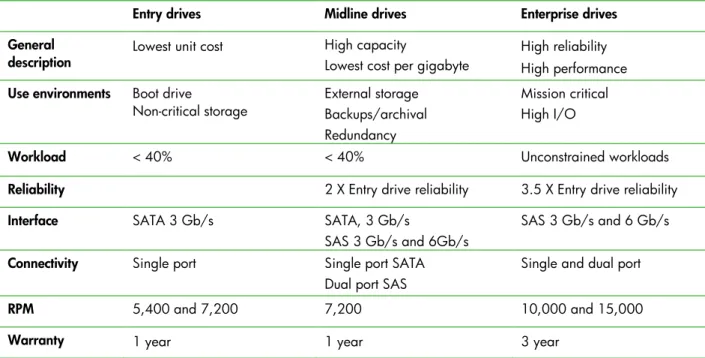
At HP, we have refined and expanded our drive family to three distinct categories: Entry, Midline, and Enterprise. These categories meet the needs of different environments for performance, reliability, and cost/capacity. Table 1 lists characteristics of these categories.
HP Entry drives have the lowest unit cost and give you a basic level of reliability and performance. They are best suited for non-mission-critical environments where I/O workloads are 40 percent or less. They are typically best suited for internal/archival storage or as boot drives for entry-level servers. Entry drives are only available with a Serial ATA (SATA) interface.
HP Midline drives give you larger capacity and greater reliability than Entry drives. Midline drives are more resistant to rotational and operational vibration, so they are better suited for use in multi-drive configurations. Midline drives are available with both SATA and Serial Attached SCSI (SAS) interfaces. HP Midline drives are for high-capacity applications such as external storage that may require increased reliability. Like Entry drives, however, Midline drives are for use in moderate workload environments. We do not recommend Entry or Midline drives for mission-critical applications.
HP Enterprise drives give you maximum reliability, highest performance, scalability, and error management under the most demanding conditions. They are the only HP drives designed for use at unconstrained I/O workloads. They are for mission-critical applications such as large databases, e-mail servers, and back-office.
Table 1. Characteristics of HP server drive categories
Entry drives Midline drives Enterprise drives General
description Lowest unit cost High capacity Lowest cost per gigabyte High reliability High performance Use environments Boot drive
Non-critical storage External storage Backups/archival Redundancy
Mission critical High I/O
Workload < 40% < 40% Unconstrained workloads
Reliability 2 X Entry drive reliability 3.5 X Entry drive reliability
Interface SATA 3 Gb/s SATA, 3 Gb/s
SAS 3 Gb/s and 6Gb/s
SAS 3 Gb/s and 6 Gb/s
Connectivity Single port Single port SATA Dual port SAS
Single and dual port
Characteristics of drives
The basic characteristics of industry standard drives and factors that affect them are form factor, drive capacity, performance, and reliability.
Small form factor and large form factor drives
HP drives for servers are available in both 2.5-inch small form factor (SFF) and 3.5-inch large form factor (LFF). In general, SFF drives give you greater power and space savings. SFF drives can require as little as half the power and generate significantly less heat than LFF drives. LFF drives are better suited for
implementations that require large, single drive capacities and lower cost per gigabyte.
SFF drives are now the primary storage form factor because of their increased data densities, better reliability, lower power requirements, and smaller size. By the end of 2010, all new Enterprise class drives and all new 10k and 15k RPM drives will be SFF. We expect to continue developing LFF Midline and Entry class drives.
HP provides universal carriers for both drive form factors. These carriers allow any hot-pluggable drive to fit mechanically and electrically in HP ProLiant servers or storage products. A common family of hard drives can support mixed HP enterprise solutions because the drives are mechanically compatible with most SAS-based StorageWorks and HP Integrity server products.
Drive capacity
Three factors determine drive capacity: • Number of platters the drive contains • Surface area of each platter
• Number of bits that can be stored per unit area called areal density
Drive capacities comply with the International System of Units (SI) prefixes, for example K, M, G, or T, and define a gigabyte as exactly 1,000,000,000 bytes. Some software and operating systems incorrectly use SI prefixes for power-of-two based binary numbers and assume that a gigabyte contains 230, or 1,073,741,824 bytes. Thus, the operating system may report that a drive with 100 actual gigabytes of storage has only 93 gigabytes. Some software and operating systems have begun using proper decimal numbers with SI units, and use new binary prefixes, for example Ki, Mi, Gi, or Ti, when using binary numbers.
Disk drive performance
Several factors determine disk drive performance: the rotational speed of the platters, seek performance, mechanical latency, read/write bandwidth, queuing strategies, and interface technologies.
The drive head must move to the position above the correct track and then wait for the target segment to pass under the head when reading. This mechanical delay, called the latency or seek time, is 4 to 10 ms. Disk drive manufacturers have developed strategies to directly or indirectly reduce seek time and
Table 2. Strategies to improve single disk drive capacity, performance, and reliability
Mechanical Magnetic Drive I/O
Increase platter
rotation speed Increase bit density per unit of track Uses a write cache to buffer data to be written to the disk Increase areal density
of data Queues read operations Reduce platter size Queues write operations
Decrease seek times Enables read-ahead caching
Reorders read and write operations to execute the next operation physically available on drive
One of two factors usually characterizes drive performance: continuous data transfer rate of the media or random I/O operations per second (IOPs). Continuous data transfer occurs when reading or writing relatively large blocks of data to sequential disk sectors. It sets the upper performance boundary for the drive. However, the maximum continuous data rate is valid only for the outermost tracks on the drive. This rate can be up to 50 percent lower on the inner tracks because they have smaller diameters and force the head to change disk sectors more often.
Random I/O operations occur when reading or writing relatively small blocks of data to sectors that are scattered across the disk. The speed of the actuator and the spindle determines performance and sets the lower performance boundary for the drive.
The real performance of a disk drive depends heavily on the nature of the task. Performance varies when accessing large blocks of sequential data or small blocks of unrelated data. As a disk drive fills up, it writes large blocks to non-sequential segments or nonadjacent tracks. This fragmentation can significantly degrade performance.
Reliability
We measure drive reliability in terms of Annual Failure Rates (AFR). The AFR is the percentage of drive failures occurring in a large population of drives operating for one year. With an AFR of 1.5 percent, 100,000 drives would experience approximately 1,500 failures per year. An AFR calculated from a small number of drives is subject to large statistical variations that make it unreliable.
The drive duty cycle and the I/O workload are two major factors in determining drive reliability. Duty cycle (power-on time) is the number of hours that the drive is on, divided by the number of calendar hours. I/O workload (drive working time) is calculated as the number of hours that the drive is actively reading and writing data, divided by the number of calendar hours.
HP designs Enterprise drives for continuous I/O activity. We design Midline and Entry drives for low I/O workloads. If you have any doubt about the expected workload and if reliability is a priority, you should choose Enterprise drives.
Drives are subject to mechanical problems from shock, vibration, environmental extremes, and thermal effects. These problems may degrade performance or reliability, cause data loss, or even result in
catastrophic drive failures. Enterprise drives are the most resistant to vibration effects. Midline drives have a lower tolerance to vibration than Enterprise drives. Enterprise and Midline drives have internal sensors that detect operational/rotational vibration and reduce the impact from various vibration sources. Entry class drives do not have these sensors so operating in high vibration environments will degrade their performance.
Multiple drives in a single enclosure may interact to create coupled vibration problems. This can occur if you use Entry or Midline drives with Enterprise class I/O workloads. In fact, some external storage solutions do not support Entry drives.
Operating drives at temperatures above the operating temperature range identified in the product QuickSpecs may reduce drive reliability.
Drive qualification process
Our best-in-class qualification and quality control processes ensure that the drives we ship are reliable and integrate smoothly into HP server and storage systems. We refine our processes continuously to ensure on-going improvement in both current and future products.
The qualification process consists of four specific steps: • Selection evaluation
• Development verification
• Supplier production qualification
• Continuous improvement/performance monitoring
HP engineers work closely with drive suppliers to determine testing procedures and metrics that a drive must meet. We use approximately 1,000 unique drives to evaluate a product family during the selection evaluation and development verification steps. These two steps require approximately 2 million drive test hours.
The supplier production qualification phase includes a thorough analysis of the supplier’s capabilities. The analysis reviews the supplier’s process controls, closed-loop corrective action processes, and overall quality control system. The final stage analyzes product quality performance through the HP configuration pilot.
Drive products that pass the HP qualification process move into the HP drive performance-monitoring phase during volume production where continuous improvement is possible.
This phase includes three focus areas:
• Validate that volume production is in process control • Measure, analyze, and react to product quality data • Deliver continuous product improvements
HP and the drive suppliers work as a team during the volume production phase of a product. The team monitors each product’s performance through quality control methods at the supplier’s factory and at HP option kitting configuration sites. We review product quality data on a daily, weekly, and monthly basis.
Interconnect technology
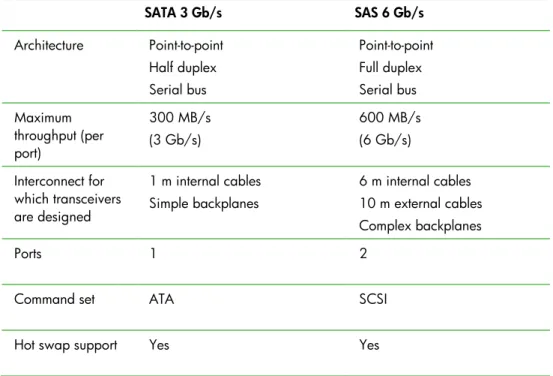
Technology to connect one or more drives to a computer system has transitioned from parallel bus data interfaces (ATA, IDE, and the original SCSI interface) to SATA and SAS serial interfaces. Each drive with a SATA or SAS interface has its own high-speed serial communication channel to the controller. Table 3 lists basic characteristics of SATA and SAS interfaces.
Table 3.Comparison of SAS and SATA drive interfaces for industry-standard servers SATA 3 Gb/s SAS 6 Gb/s Architecture Point-to-point Half duplex Serial bus Point-to-point Full duplex Serial bus Maximum throughput (per port) 300 MB/s (3 Gb/s) 600 MB/s (6 Gb/s) Interconnect for which transceivers are designed 1 m internal cables Simple backplanes 6 m internal cables 10 m external cables Complex backplanes Ports 1 2
Command set ATA SCSI
Hot swap support Yes Yes
Certain capabilities have traditionally been inherent in SAS or SATA, but this is changing. The benefits and constraints of these two interfaces may become blurred.
Serial ATA
SATA uses a half-duplex, serial connection to the devices rather than the original parallel connection of ATA. SATA uses the ATA command set, which is simpler but provides less robust functionality than the SCSI interface used with SAS. The SATA interface has gone through three major generations:
• 1.5 Gb/s targeted at replacing ATA in the desktop and consumer markets.
• 1.5 Gb/s with extensions targeted for workstations and low-end servers. This generation added native command queuing.
• 3 Gb/s targeted for workstations and low-end servers. This generation increased the data transfer rate. SATA is the best solution for price-sensitive, low I/O workload applications and dominates the desktop market due to low cost and the lighter workloads of desktops.
Serial Attached SCSI
SAS uses a point-to-point, full duplex serial connection and the SCSI command set, which has more performance and reliability features than the ATA command set. For example, SAS devices can be dual port. This allows the device to access the full bandwidth of a SAS link. These additional features come at a cost, however. SAS devices are more expensive than SATA devices for the equivalent storage capacity. First generation SAS supported a link speed of 3 Gb/s. The current generation supports a link speed of up to 6 Gb/s, or 600 MB/s, in each direction.
Interoperability
SAS shares physical characteristics with SATA. This means that you can use SATA drives with SAS controllers operating at the SATA link speed. In fact, you can mix SATA and SAS drives in a single enclosure, but you cannot use SAS devices with SATA controllers.
Interconnect bandwidths and drive throughput
When overall performance is a consideration, it is important to understand the interaction of interconnect bandwidths and drive throughput.
The SAS interface has an effective maximum theoretical bandwidth of 600 MB/s when operating at 6 Gb/s. Current SAS disk drives are capable of a maximum sustained throughput of about 200 MB/s, which is less than one-third the bandwidth of the 6 Gb/s link. The 6 Gb/s SAS interface and SAS 6 Gb/s drives provide little or no performance advantage over 3 Gb/s SAS used in configurations with single disk drives connected directly to SAS controllers. In these cases, the performance limiter is the disk drive throughput, not the SAS link speeds.
The performance benefits of 6 Gb/s SAS become important when constructing SAS fabrics and larger drive arrays using SAS expanders that support the 6 Gb/s link. These configurations combine the I/O load of multiple drives onto a single SAS 6 Gb/s link to take full advantage of the additional SAS 6 Gb/s bandwidth.
The improved bandwidths of SATA 3 Gb/s and SAS 6 Gb/s are also important when considering the emerging category of solid state drives (SSDs). Second generation server SSDs using the SATA interface can deliver 230 MB/s of sustained throughput, which almost equals the bandwidth of a SATA 3 Gb/s link. Third generation SAS SSDs scheduled for 2011 are expected to support 500 to 600 MB/s throughput and will be capable of consuming the entire bandwidth of a single SAS 6 Gb/s link.
Improved performance and reliability with RAID
Storing data on a singledrive creates the risk of data loss. We recommend using some form of fault-tolerant RAID across multiple drives because multiple drives perform better than single drives.
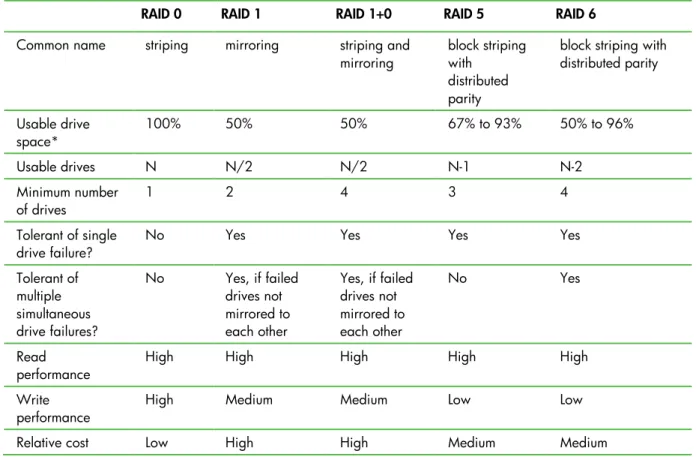
RAID strategies vary in how they achieve data reliability, how many drives they require, and how efficient they are at data storage. Table 4 shows the characteristics of different RAID levels.
Table 4. RAID level characteristics
RAID 0 RAID 1 RAID 1+0 RAID 5 RAID 6
Common name striping mirroring striping and
mirroring block striping with distributed parity
block striping with distributed parity Usable drive space* 100% 50% 50% 67% to 93% 50% to 96% Usable drives N N/2 N/2 N-1 N-2 Minimum number of drives 1 2 4 3 4 Tolerant of single
drive failure? No Yes Yes Yes Yes Tolerant of multiple simultaneous drive failures? No Yes, if failed drives not mirrored to each other Yes, if failed drives not mirrored to each other No Yes Read
performance High High High High High Write
performance High Medium Medium Low Low Relative cost Low High High Medium Medium
Advanced controllers
HP was the first company to introduce RAID subsystems in the network server marketplace. Today, RAID is an industry-standard technology used for most online network data storage. Our Smart Array controllers support RAID levels 0, 1, 1+0, 5, 6, 50, and 60.
HP engineers continue to enhance Smart Array performance, expansion, migration, and data availability capabilities. We provide Smart Array configuration, storage management, and diagnostics tools that make it easy to use Smart Array products. We also make interfaces and feature sets consistent between generations of products. Consistent features sets ensure that you can move data between servers and external storage enclosures, and between models of Smart Array controllers.
HP Smart Array controllers are powerful I/O solutions for today’s most demanding storage requirements. Our controllers provide solutions for all four primary data storage requirements:
• Capacity growth • High performance • Data availability • Manageability
HP is the only server provider with a seamless storage solution set that spans the range from embedded Smart Array controllers in servers to plug-in PCI Smart Array controllers to SAN-attached MSA storage. The tools used for managing and configuring storage are the same in all of those environments. Data sets are compatible across all of these environments.
Solid state drives
Not all SSDs are the same. HP uses several different technologies and design requirements so that our server SSDs can meet the reliability and endurance requirements of server storage.
Wear leveling and over-provisioning
HP SSDs incorporate wear leveling and over-provisioning to meet the endurance requirements for enterprise environments. These technologies increase the lifespan of an SSD drive in an enterprise environment.
Over-provisioning distributes the total number of writes and erases across a larger number of blocks and pages over time. On Enterprise SSDs, the over-provisioning can reach as high as 25 percent above the stated storage capacity.
Wear leveling uses sophisticated algorithms that re-map logical SCSI blocks receiving frequent writes to different physical pages. It evenly distributes erasures and rewrites across the medium to maximize endurance. A pointer array on the SSD controller contains the logical-to-physical map. SSDs can recover or rebuild the map quickly after a power loss.
Power loss protection
HP ProLiant SSDs have power loss protection. It ensures that if the drive loses power (including hot plug removal), it can be ready in a short time. Power loss protection also ensures that user data in write cache writes to the drive. HP SSDs can sustain a power loss without requiring the lengthy metadata rebuild process required for SSDs without power-loss protection.
Value, mainstream, and performance SSDs
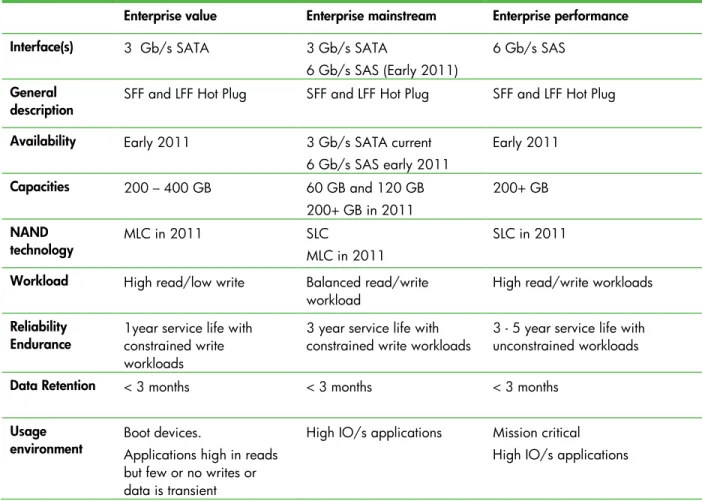
HP supports three SSD Enterprise classes (Table 5) to meet the requirements of different application environments: value, mainstream, and performance SSDs. They all deliver I/O performance comparable to Enterprise spinning media drives. SSDs differ from spinning media drives primarily by the read/write workload levels they can support and their expected service life.
• Enterprise value SSDs provide relatively large storage capacities at low costs, but they do not have the endurance of the mainstream or performance SSDs.
• Enterprise mainstream SSDs have smaller capacities but greater endurance than value SSDs. • Enterprise performance SSDs from HP have similar capacities to mainstream SSDs but have even
Table 5. Characteristics of HP solid state drive categories
Enterprise value Enterprise mainstream Enterprise performance Interface(s) 3 Gb/s SATA 3 Gb/s SATA
6 Gb/s SAS (Early 2011)
6 Gb/s SAS
General
description SFF and LFF Hot Plug SFF and LFF Hot Plug SFF and LFF Hot Plug Availability Early 2011 3 Gb/s SATA current
6 Gb/s SAS early 2011 Early 2011 Capacities 200 – 400 GB 60 GB and 120 GB 200+ GB in 2011 200+ GB NAND technology MLC in 2011 SLC MLC in 2011 SLC in 2011 Workload High read/low write Balanced read/write
workload High read/write workloads
Reliability
Endurance 1year service life with constrained write workloads
3 year service life with
constrained write workloads 3 - 5 year service life with unconstrained workloads
Data Retention < 3 months < 3 months < 3 months
Usage
environment Boot devices. Applications high in reads
but few or no writes or data is transient
High IO/s applications Mission critical
High IO/s applications
SSD performance
All SSDs can operate in environments unsuitable for spinning media drives: • Environments subject to high shock and vibration, up to 1000G
• Environments subject to higher operating temperatures, depending on the SSD
Based on published workloads, we expect HP SSDs to last the typical service life for a new server. The lifespan of NAND memory in SSDs is determined by the number of write/erase cycles it experiences. SSD endurance is different from disk drive endurance. A server SSD reaching the end of its service life is likely to start failing once it exceeds the NAND endurance limit. A SAS disk drive may continue operating for several years beyond its stated service life.
An SSD removed from a system without power may not be readable after a short time, but most spinning media drives will retain their data for a decade or more. SSDs are unsuitable for use as archival storage because they do not have great data retention characteristics.
Performance comparison
Second generation HP SSDs perform significantly better than the first generation from 2008. Table 6 shows that second generation midline SSD performance is comparable to Enterprise SAS drive performance. SSDs excel at random read operations, where their performance can be over 100 times better than that of spinning media drives.
Table 6. Performance comparison of SATA/SAS drives with SSDs for servers
SFF SAS disk drives (15K RPM)
Value SSDs Mainstream SSDs SAS SSDs
Class Enterprise Enterprise
value Enterprise mainstream Enterprise performance Interconnects 6 Gb/s SAS 3/6 Gb/s SATA
MLC NAND 3/6 Gb/s SATA MLC/SLC NAND 6 Gb/s SAS MLC NAND 6 Gb/s SAS SLC NAND Dual Port Sequential writes (64 KiB)
160 MiB/s 100 MiB/s SATA MLC 225 MB/s SAS MLC 120 MB/s 300+ MB/s Random writes (4 KiB, 16 commands outstanding)
300 IOPS 300 IOPS ~10,000 IOPS ~15,000 IOPS
Sequential reads (64 KiB) 160 MiB/s 200 MiB/s 230 MB/s 400 MB/s Random reads (4 KiB, 16 commands outstanding)
380 IOPS 30,000 IOPS 30,000 + IOPS 40,000 IOPS
Conclusion
Because of the advancements in storage technology, you now can choose from a broad spectrum of drives, each with unique performance and reliability characteristics. When considering which technology to choose for your implementation, you need to consider these requirements:
• Capacity needed • Expected I/O load • Desired lifecycle • Required reliability
HP has industry-leading drive technologies to handle all of your storage requirements. Our storage products are rigorously tested and certified for their targeted applications.
© Copyright 2010, 2011 Hewlett-Packard Development Company, L.P. The information contained herein is subject to change without notice. The only warranties for HP products and services are set forth in the express warranty statements accompanying such products and services. Nothing herein should be construed as constituting an additional warranty. HP shall not be liable for
For more information
Resource description Web address
Serial ATA Technology
Serial Attached SCSI storage
technology
Solid state storage technology for ProLiant servers
HP Serial ATA Drives overview
HP Disk Drives for ProLiant Servers
HP solid state Web site http:/
Performance factors for HP ProLiant Serial Attached Storage (SAS)
HP Smart Array Controllers and basic RAID performance factors
HP Smart Array Controller technology