Tie
Onyx 2, 3, 4 & VS
Section 1
Features
.
Table of Contents
Introduction. . . l - l Before Reading This Section . . . l - l Using This Section . . . . User-Programmable Features (VS Only) . . . l - l Modular and Non-Modular . . . . How to Use this Section With Section 2 . . . 1-2 Account Code Capability . . . , . . . , . . . , . . . 1-14
Enter an Account Code to classify your outside call.
Alphanumeric Display . . . , . , . . . , . . The display telephone has an alphanumeric display for feature status
messages.
Alternate Attendant. . . , . . . The attendant can forward calls to another
Alternate Attendant, Attendant Console (ONYX IV) . . , , . . . The attendant with an Attendant Console can forward calls to an Alternate Attendant group.
Analog Station Interface . . . , . . . I’ Have standard 2500 set DTMF service at any extension port.
Attendant Console (ONYX IV) . . . , . . . To speed call processing, the attendant can use a special Attendant Console. Attendant Positions . . . , . . .
Attendants have some unique features. Automated Attendant
Refer to the Operator Assistance and Voice Mail Compatibility features. Automatic Answer (ONYX IV) . . .
Attendants with can have Automatic Answer -just like attendants with Attendant Consoles.
Automatic Call Distribution . . . ACD distributes incoming calls among ACD group members.
Automatic Call Distribution (ONYX IV) . . . ONYX IV provides enhanced Automatic Call Distribution.
Automatic Fault Reporting (With Remote Maintenance/Programming) . . l-33 The system automatically reports faults if they occur.
Automatic Handsfree . . . Place or answer a call by just pressing a key.
Automatic (ONYX IV) . . . An or ESL extension can automatically a programmed destination when the user lifts the handset.
Automatic Route Selection . . . ARS routes calls according to the digits a user dials.
Background Music . . . , . . . , . . . and ESL sets can broadcast music through their speakers.
Battery Backup. . . , . . . , . . . l-42 T’he system can operate normally during a power failure.
Call Coverage Keys . . . , , . . . l-43 Simplify extension coverage with Call Coverage Keys.
Call Forwarding . . . , . . . . . . Redirect calls to another extension.
Call Forwarding Cancel . . . , , . . . l-48 Cancel all Call Forwards in the system (attendants only).
Call Parking. . . , . . . l-49 Place an outside call in a waiting state, so it can be picked up from another
phone.
Table of Contents (Cont’d) Call Timer. . . .
Time outside calls (display . . . . . Call Waiting (Camp-On). . . . . 1-53
Wait in line for a busy extension without hanging up. Callback . . . , . . . .
Leave a request for a return call at a busy extension.’ . . l-55 Central Office Calls, Answering . . . l-57
Answer outside calls.
Central Office Calls, Placing . . . , . . . Place outside calls.
Centralized Attendant Service . . , . . . . An attendant in a hub system can systems. 1-61
Compatible Feature Keys . . . .
Customize programmable keys with l-64 Class of Service . . . .
Sets various features and dialing options for . .l-65 trunks.
Conference . . . . . . . . . . . S-67 Data. . . .
The system provides l-69 DP and DTMF Compatibility . . . .
The system works with Dial Pulse and tone . ..l-71 Pulse to Tone Conversion.
Dialing Number Preview . . . .
Dial, review and correct your number the’ . l-72 Direct Inward Dialing (DID) . . . , l-73
Outside callers can directly dial extensions.
Direct Inward Line (DIL) . . . A trunk can ring an extension directly.
Direct Inward System Access (DISA) . . . , . . . .l-78 Outside callers can directly access system features.
Direct Station Selection, DSS Console . .
A DSS Console has 80 keys for one-button . features.
Direct Station Selection, Extension . . . 1-83 From your 30-button have simplified extension calling and Transfer.
Direct Trunk Access . . . .
Seize an individual 1-85 Directed Call Pickup . . . , . . . l-86
Intercept a call ringing another extension.
Directory Dialing , . . . , . . . , . . . Use Speed Dial or Intercom by selecting a name instead of dialing.
Directory Dialing (ONYX IV). . . , . . . An Attendant Console or user can have a specially programmed key for Intercom Directory Dialing.
Distinctive Ringing, Tones and Flash Patterns . . . Each extension provides audible and visual call status signals.
Do Not Disturb. . . .
Your extension can block Page, ringing and .
. . . . l-90 announcements.
Dual Line Appearance (ONYX IV) . . . Have two line appearance keys for placing and answering calls.
Equal Access Compatibility . . . , . . . The system is compatible with Equal Access dialing, has it.
Extended Ringing. . . .l-94 Unanswered calls can ring 15 times before the system reroutes them.
Extension Hunting . , . . . , , . . . Hunting routes calls to a predefined group of extensions.
Table of Contents (Cont’d)
External Alerting Devices. . . . , . . . l-100 can customer-provided alerting devices.
Flash . . . . .
Flash a trunk access l-102
Flexible Numbering Plan . . .
The administrator can change the digits users dial to access features.
Forced Trunk Disconnect . . . , . . . l-105
Group Group Group
Disconnect another extension’s active outside call.
Call Pickup. . . l-107
Answer a call ringing an extension in a pickup group.
Listen . .
Talk on the .
telephone speaker.
Ring (Ring Groups) . . . , . . . l-l 10
Extensions can be in Ring Groups for answering calls.
Handsfree (Speakerphone) and Monitor . . . , . . . l-l 12
Use the speaker and microphone in the telephone (instead of the handset).
Headset Compatibility . . . 14
Use a customer-provided headset instead of the handset. Put a call in a temporary waiting state.
Hotline. . . , . , . , . , , . , , . . . Get one-button calling and Transfer to another extension.
Intercept of Calls. . . The system may intercept (prevent) certain types of calls.
Intercom. . . l-122 Call any other extension in the system.
Intrusion (Barge-In). . . , . . . J-125 Break into another user’s conversation.
Last Number Redial . . . , . . . , . . . J-127
Quickly the last number you dialed.
Least Cost Routing (Hybrid) . . . LCR routes and restricts calls user’s dial.
Line (Trunk) Queuing. . . , . . . l-132 Wait in line for a busy trunk or trunk group to become free.
Line (Trunk) Rotaries (Hybrid) . . . l-134 Place a call over a trunk in a group, rather than a specific trunk.
Loop Keys. . . . . .
Loop keys simplify placing and answering trunk calls.
Meet-Me Conference. . . , . . . Set up a Conference with two other inside parties.
Message Waiting. . . .
Leave an indication
. . 1-139
Microphone Mute . . . . , . . .
Turn off your phone’s Handsfree microphone at any time.
Multiple Directory Numbers (ONYX IV) , . . . You can have more than one extension number for answering calls.
Music On Hold. . . , . . . , . . . , . . , . . . l-142 Have music play to calls on Hold.
Night Answer (Off-Hours Ringing) . . .
The attendant can put the system in the night mode. This can activate
Assigned Night Answer or Universal Night Answer.
Non-Blocking Architecture . . . 1-146 All extensions and trunks can be on calls simultaneously, without blocking.
Off-Hook Signaling . . . , . . . . , . . . .l-147 Send an off-hook signal to a busy
Off-Premise Extension . . . , , . . . , . . . l-150
The system provides connections for Off-Premise Extensions.
Table of Contents
Operator Assistance (OPA) . . . , . . . l-163 OPA answers calls and provides dialing options to callers [not available in
Paging. . . J-167 Broadcast announcements to other extensions external speakers.
Compatibility. . . The system can connect to lines.
Personal Greeting. . . l-173 Record a Personal Greeting for incoming callers (not available in VS).
Prime Line Selection . . . . . . l-175 Place or answer an outside call by just lifting the handset.
Privacy. . . , . . . , . . . l-177 Privacy blocks incoming Intrusion attempts.
Privacy Groups . . . , . . . l-178 Easily join another Privacy Group member’s outside call.
Private Line. . . , . . . , . . . l-180 Have a Private Line for placing and answering calls.
Programmable Keys, . . . l-182 Programmable keys simplify placing and answering calls and using certain
features.
Release Key. . . , . . . l-184 Disconnect a call by pressing the Release key, rather than hanging up.
Removing Trunks and Extensions From Service . . . The attendant can remove problem trunks and extensions from service. Reverse Voice Over (ONYX IV). . . , , . . .
While on a call, make a private Intercom call to an idle co-worker.
Ringing Line . . . , . . . . . . Answer a ringing call by just lifting the handset.
Save. , . . . . , . . . , . . . .l-189 Save your last outside number and easily redial it later on.
Selectable Display Messages. . . , . . . l-191 Select a preprogrammed display message for your phone that your
incoming callers see.
Silent Monitor. . . l-193 Listen to the conversation at a busy extension.
Special Services and OCC Compatibility. . . , . . . . l-195 The system is compatible with special long distance services such as MCI
or GTE Sprint.
Special Trunk Interface . . . , , . . . l-197 The Special Trunk Interface provides circuits for connecting OPX, DID and
tie trunks (except in VS).
Speed Dial. . . , . . . , . . . , . . . , . l-198 Get quick access to frequently dialed numbers.
Split. . . , . . . , . . . , . . . Alternate between your current call and a new call.
Station Message Detail Recording, . . . , . . . l-208 SMDR provides a record of the system’s calls.
System Identification . . . For Automatic Fault Reporting, a four-line text field contains site
identification information.
System Programming Password Protection . . . , . , . . . l-213 The system administrator must enter a password before programming.
System Reports, Diagnostics and Maintenance Utilities . . . Reports. diagnostics and utilities help a technician troubleshoot the system from the programming terminal.
System Timers . , . . . , , . . . The system administrator can change the settings for the System Timers.
Tandem Calls (Tandem . . . , . . . 1-219 Join two outside calls in a trunk-to-trunk Conference.
Table of Contents (Cont’d)
Tenant Service. . . . The system administrator divide the system into different Tie Lines. . . .
The system provides connection . . . . . l-224 Time and Date Setting. . . , . . . l-228
Time and Date appears on display and various reports. Toll Restriction . . . .
Toll Restriction limits the . .
l-230 Management Reporting . . . l-233
The TMS report provides a record of call activity.
Traffic Management Reporting (ONYX IV) . . . l-235A ONYX IV offers enhanced TMS reports.
Transfer. .
Send . . . l-236 Voice Mail Compatibility . . . 1-239
The system is fully compatible with Integrated Voice Messaging
Voice Prompting Messages. . . l-244 Voice messages announce your call status (not available in VS).
Volume Controls. . . .
Adjust the speaker volume at . .
. l-246 Class of Service. . . l-248 emporarily override Class of Service Dialing restrictions.
List of Illustrations
Figure l-l, Multibutton Telephones. . . .l-3 Figure l-2, Attendant Telephone (P/N 88254) l-4 Figure l-3, DSS Console.
. . . . . . . . Figure l-4, Console (ONYX IV)
Figure l-5, Electronic Single Line Telephone . . . -1-6 Figure l-6, Analog Station Interface . . . l-7
List of
Table l-l, System Flash Rates . . . l-8 Table l-2, System Ring Rates . . . . Table l-3, System Tones . . . l-10 Table System Number Plan. . . l-11 Table l-5, Attendant Displays. . . 1-17 Table l-6, ACD Supervisor Displays . . . . Table l-7, Telephone Displays . . . l-19
Feature Cross Reference (Page 1 of 5)
Account Code Capability
I V C o m m e n t s
400 codes in VS. 601 in-others IV has additional option
Alphanumeric Display
i ,
V S h a s p h o n e d i s p l a y s Alternate Attendant
Alternate Attendant, Attendant Console (ONYX
Analog Station Interface Attendant Console (ONYX IV)
IV att. console Console only
Only 89749 in VS
Attendant Positions
Automatic Distribution (ONYX IV) Automatic Fault Reporting (With Remote Automatic Handsfree
Automatic (ONYX IV) Automatic Route Selection
Background Music Battery Backup Call Coverage Keys
Call Forwarding Call Fotwarding Cancel Call Parking
Call Timer
i
IV has and/or consoles
VS sup. display needs
IV has many additional options
Not in key systems
64 codes in VS, 184 in others Requires AUX in
Different connections in VS Different unit for VS
Interacts with DSS prog in VS cck needs VS AUX VS user-programmable
Feature Cross Reference (Page 2 of 5)
v s 3 2 x 6 0 I V C o m m e n t s
Call Waiting (Camp-On) Callback
Central Office Calls, Answering ! Different capacities VS user-programmable Central Office Calls, Placing Different capacities Centralized Attendant Service Future module in VS
Compatible Feature Keys 41 total in VS, 565 in others Class of Service Additional option in IV Conference
Data Requires AUX in VS
DP and DTMF Compatibility Dialing Number Preview
Direct Inward Dialing (DID) Future module required in VS Different Camp-On in IV Direct Inward Line
Direct Inward System Access (DISA) Future module required in VS VS supervised loop only Direct Station Selection, DSS Console 4 blocks in VS, 20 in others Direct Station Selection, Extension
Direct Trunk Access Directed Call Pickup
Directory Dialing Full Dir. Dial. needs VS AUX Directory Dialing (ONYX Uses special key Distinctive Ringing, Tones and
Flash Patterns
Do Not Disturb reminder in VS
Dual Line Appearance (ONYX IV) Equal Access Compatibility
Feature Cross Reference (Page 3 of 5)
56x120
v s 1 2 x 3 6 3 2 x 6 0 7 2 x 1 8 0 I V C o m m e n t s . Extended Ringing
Extension Hunting No UCD announcement in VS External Alerting Devices Two relays in VS, 4 in others Flash
Flexible Numbering Plan Requires AUX in VS ,
Forced Trunk Disconnect
Group Call Pickup VS user-programmable Group Listen
Group Ring (Ring Groups) Different group numbers H a n d s f r e e ( S p e a k e r p h o n e ) a n d M o n i t o r
. Headset Compatibility VS user-programmable Hold
Hotline VS user-programmable
Intercept of Calls
I
Intercom Different capacities
VS user-programmable Intrusion (Barge-In)
Last Number Redial
Least Cost Routing (Hybrid) Not in VS or key systems Line (Trunk) Queuing
Line (Trunk) Rotaries (Hybrid) Not in key systems
Loop Keys Key systems incoming only Meet-Me Conference
Message Waiting reminder in VS
mutes handset Multiple Directory Numbers I V )
Feature Cross Reference (Page 4 of 5)
Music On Hold
Night Answer (Off-Hours Ringing)
VS 1 2 x 3 6 3 2 x 6 0 I V C o m m e n t s Different connections in VS
Different UNA prog. in VS IV has
VS user-programmable Non-Blocking Architecture
Off-Hook Signaling Off-Premise Extension Operator Assistance (OPA) Paging
Voice over VS user-prog. , Requires future module in VS
I Not in VS
2 ext zones in VS, 4 in others Different prog in VS
No page relays in VS Auto Page only in IV VS user-programmable Compatibility
Personal Greeting Not in VS
Prime Line Selection VS user-programmable Privacy
Privacy Groups
Private Line Different capacities
Programmable Keys Different options VS and IV
Release Key DSS Console only
Removing Trunks and Extensions From Service
Reverse Voice Over (ONYX IV) Ringing Line Preference
I VS user-programmable Save
Selectable Display Messages 16 in VS, 64 in others 16 preset in VS without Silent Monitor
Special Services and OCC Compatibility
Feature Cross Reference (Page 5 of 5)
Special Trunk Interface Speed Dial
56x120
1 2 x 3 6 3 2 x 6 0 I V C o m m e n t s Not in VS
Different number of blocks Names in VS needs AUX VS user-programmable
Split Split key in IV
Station Message Detail Recording No separate modem port in VS Requires AUX in VS
System Identification VS uses first line only
System Programming Password Protection
Different passwords System Reports, Diagnostics and
Maintenance Utilities
System Timers Additional timer in
Tandem Calls (Tandem Needs disconnect supervision Tenant Service
I Different prog in VS Tie Lines VS requires future module Time and Date Setting No voice time in VS
VS user-programmable t
Toll Restriction No voice prompt in VS Traffic Management Reporting No modem in VS
Requires in VS Management Reporting (ONYX Different options in IV Transfer
Voice Mail Compatibility Additional option in IV Voice Prompting Messages Not in VS
Volume Controls Walking Class of Service
B e f o r e R e a d i n g . This Section
! This section provides detailed information on the system’s features. If youdon’t know what the various features are, review the feature provided as part of this section’s Table of Contents. After reviewing the feature summary, turn back to this section for the specifics.
Using This Section
The features in this section are in alphabetical order, like a dictionary. This section subdivides each feature definition into headings as follows:
Description tells what the feature is and describes its benefits. Along with the Description are the Conditions and Default Configuration. Conditions provides the feature’s operational limits (if any). Default Configuration outlines how the feature works with the default programming. When initially installed, the system uses the default configuration.
Programming explains the system programming that lets you customize the feature. Some features require programming; others don’t. You must customize the Required Programming to make the feature work. Other
Programming lists additional programs you should consider when setting
up the feature. If you decide to customize a feature, use Section 2 to: Enter the change in the system
Record the change on the Program Record Form (PRF)
Refer to the System Programmable Options chart at the end of this manual for a handy Feature-to-Program troubleshooting reference.
Related Features presents the feature interaction.
Feature Operation consists of instructions on how to use each feature. The instructions also show the various flash and ring rates and system tones (Tables through l-3). This tells the user what to expect before and after each instruction step. For example:
Look for: Line key On (red/green) Listen for: Dial tone
indicates that both red and green in the line key are on and the user listens to dial tone. If a user has an Electronic Single Line (ESL) set, the
Look for instructions do not apply.
VS User-Program-mable Features
With the correct access level, a user can customize selected features from the telephone. The user-programmable features are abbreviated in this manual:
+ + Line key + Y(es) or N(o) + SAVE
and press Press line key Press SAVE
User-programmable features include (refer to the system Administrator’s Guide for the specifics):
Call Coverage Keys Off-Hook Signaling Central Office Calls, Answering Paging
Intercom Prime Line Selection Group Call Pickup
Headset Compatibility
Ringing Line Preference Hotline
Speed Dial
Time and Date Setting Night Answer
Modular and
Modular
Your system may have modular and/or non-modular Modular have red and green non-modular have only red Some feature operations have different LED flash rates for modular modular For other features, the rate applies to both Note that the color green only applies to modular
For example, if you see:
Look for: On(green)
you know that the LED on a non-modular is On (red).
to Use This
Section With
Section 2
Section 1, Features, works closely with Section 2, Software Configuration (see the Illustration below).
If a feature has a required program, go to Section 2 for the details on the -program.
The Feature Reference heading in Section 2 lists all the features for which
that program is required.
If a feature has more than one required program, the Programming
heading in Section 2 lists these options. While learning about one
program, this shows you the other programs you have to consider to get the feature to work.
The program references the feature here.
If the feature has other required
L
programming here... The program shows it as relatedprogramming here.
Display
Programmable Keys
Programmable Feature Keys
Hold,
Background Music
C o n f e r e n c e
Automatic Answer (ONYX IV Attendant)
Last Number Redial Volume Up Volume Down Feature, Flash
Programming Mode
-Message Waiting Handsfree
(Attendant’s Intercom Loop Key) “Do Not Disturb,
Microphone Mute
(Attendant’s Night Answer Key)
Issue 1-O
Figure l-l MULTIBUTTON TELEPHONES
Programmable Feature Keys
\ Volume Controls
, Last Number
Unassigned (No Function)
Intercom Conference
Message Waiting,
Automatic Answer (ONYX IV Attendant)
Figure 1-2 ATTENDANT TELEPHONE (P/N
Issue 1-O
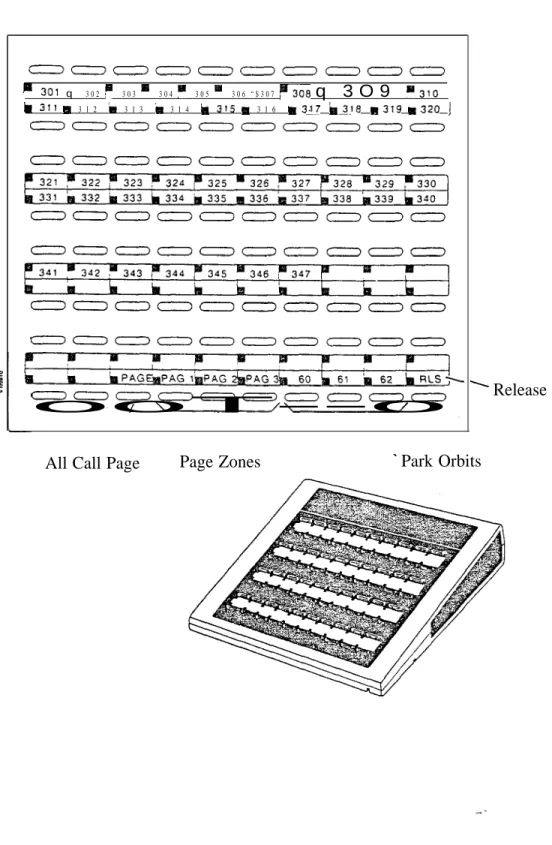
Release
All Call Page Page Zones Park Orbits
(P/N 88255)
Figure 1-3 DSS CONSOLE
WITH ONYX II/III/IV KEY (Page 1 of 4)
q 3 0 2 3 0 3 3 0 4 3 0 5 3 0 6 “ $ 3 0 7 q 3 O 9
3 1 2 3 1 3 3 1 4 3 1 6
Release
All Call Page Page Zones Park Orbits
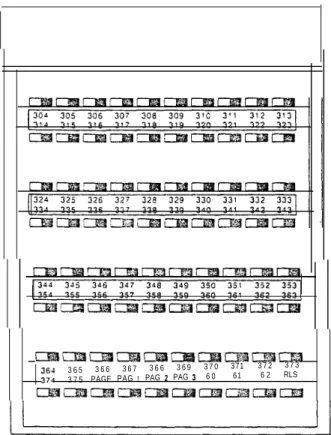
(P/N 88255)
Figure 1-3 DSS CONSOLE
WITH ONYX VS KEY (Page 2 of 4)
3 6 5 3 6 6 3 6 7 3 6 6 3 6 9 3 7 0 371 3 7 2 3 7 3 3 7 5 PAGE PAG PAG PAG 6 0 61 6 2 RLS
Figure 1-3 DSS CONSOLE
WITH ONYX II/III/IV KEY (Page 3 of 4)
3 0 2 3 0 3 3 0 6 3 0 7 3 0 9 3 ’ 3 3 1 8 3 1 9 3 2 0
3 2 2 3 2 3 3 2 5 3 2 7 3 2 8 3 2 9 3 3 1 3 3 2 3 3 3 3 3 4 3 3 5 3 3 6 3 3 7 3 3 9
341 3 4 6 I
PAGE I PPG 2 6 2 RLS
(P/N 88555)
Figure 1-3 DSS CONSOLE
WITH ONYX VS KEY (Page 4 of 4)
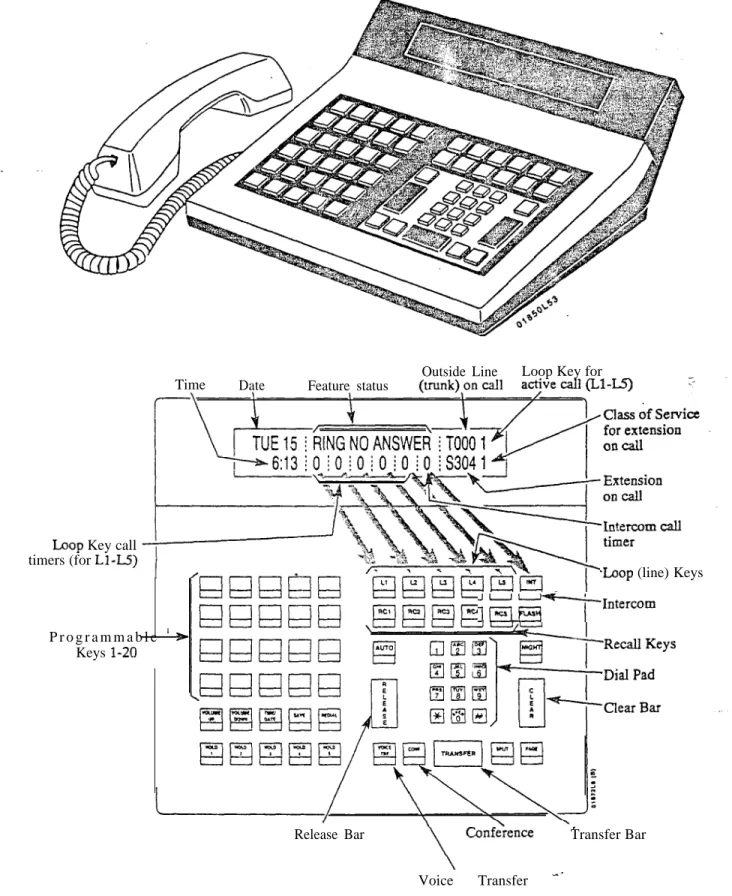
Key call timers (for
P r o g r a m m a b l e Keys
Time Date Feature status
Outside Line Loop Key for
(line) Keys
Release Bar Transfer Bar Voice Transfer
Note: For additional information on the Attendant Console’s keys, refer to the Attendant Console (ONYX IV) feature.
Issue 1-O
Figure ATTENDANT CONSOLE (ONYX IV Only)
Message Waiting LED
Transfer
Volume Down
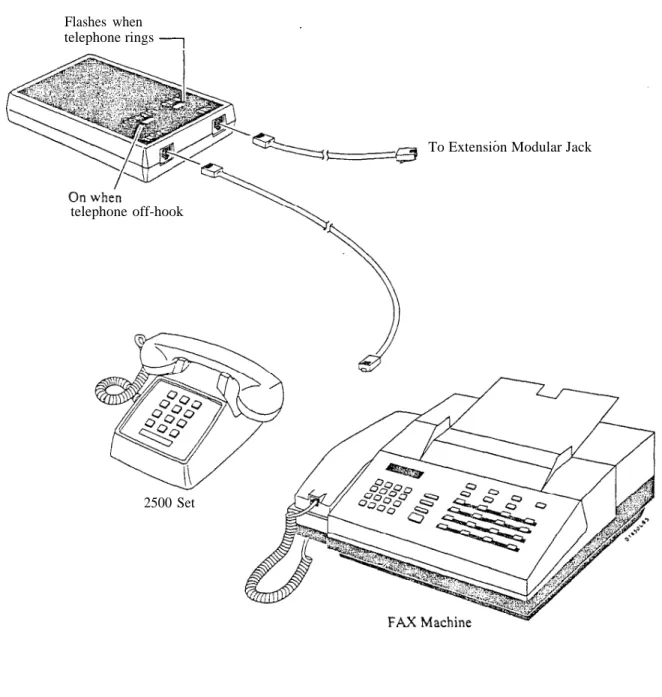
Flashes when telephone rings
To Extension Modular Jack
telephone off-hook
2500 Set
Figure
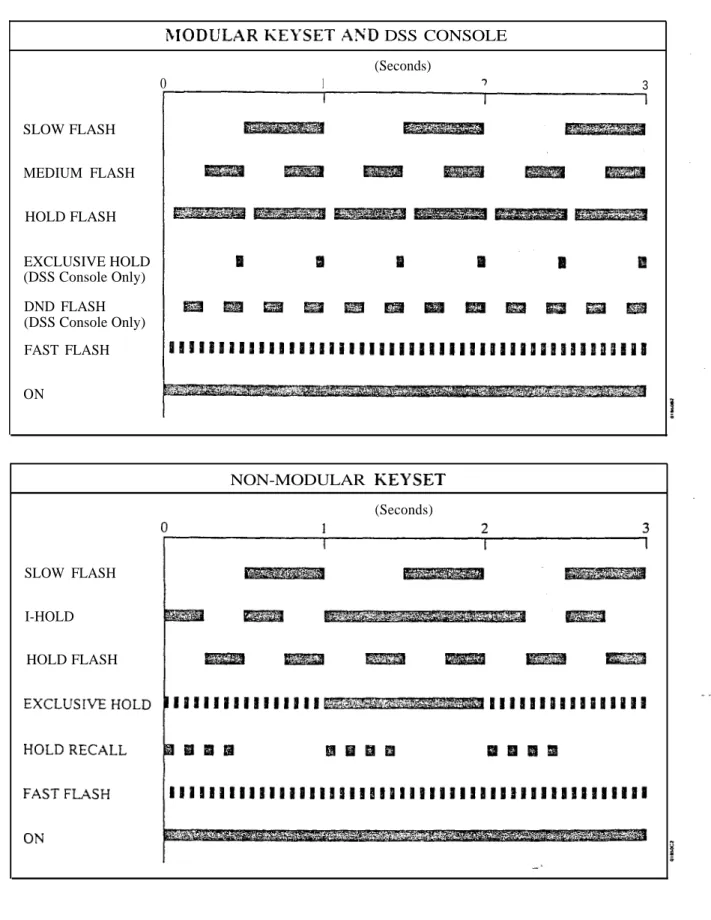
1-6 ANALOG STATION INTERFACETable l-l FLASH RATES (Page of 2)
DSS CONSOLE
(Seconds)
0 1 3
SLOW FLASH MEDIUM FLASH
HOLD FLASH EXCLUSIVE HOLD (DSS Console Only) DND FLASH (DSS Console Only) FAST FLASH ON
NON-MODULAR
(Seconds)
SLOW FLASH I-HOLD HOLD FLASH
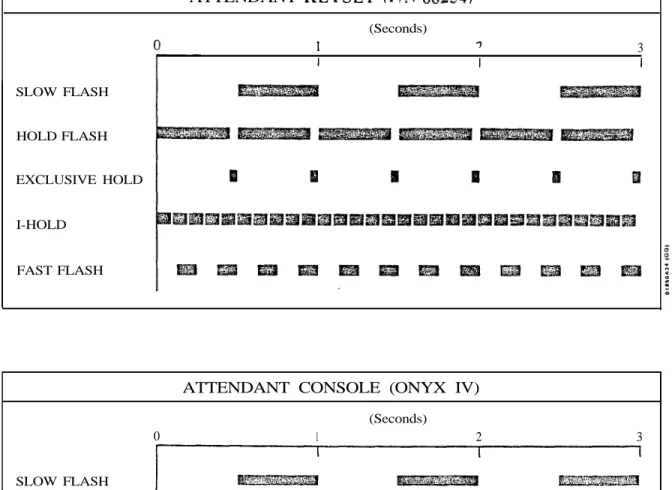
Table FLASH RATES (Page 2 of 2)
ATTENDANT
SLOW FLASH
HOLD FLASH
EXCLUSIVE HOLD
I-HOLD
FAST FLASH
(Seconds)
3
ATTENDANT CONSOLE (ONYX IV)
(Seconds)
0 1 2 3
SLOW FLASH
I-HOLD (HOLD KEY)
(LINE KEY)
HOLD RECALL KEY)
Table 1-Z RING
(Seconds)
ICM
CALLBACK
Note: Each group of four extensions rings with different tones. This is called Distinctive Ringing. For example, extension 300 rings differently than extension 301. Extension 301 rings differently than extension 302.
Every fourth extension, the Distinctive Ringing pattern repeats. For example, extension 300 rings the same as extension 304. Extension 301 rings the same as extension 305, and so on.
Table 1-3 SYSTEM TONES
BEEPS
(Seconds)
1 2 3
BUSY TONE
FAST BUSY
RING BUSY
DIAL TONE
Table SYSTEM NUMBER PLAN (Page 1 of 3)
Note: All the functions below are from Intercom dial tone (except where noted).
Code Function
Account Codes dig. Account Code number
Call Distribution ACD agent puts self back in service ACD agent removes self service
or 6 Erase messages (dial 9) or abort procedure (dial 6) #+DSS Con.+4 ACD supervisor puts agent back in service
#+DSS Con.+7 ACD supervisor removes agent from service Call Forwarding
# Cancel Call Forwarding calls to main attendant
1 Call Forwarding option 1 (ring no answer)
Call Forwarding option 2 (ring no answer and busy) Call Forwarding option 3 (all calls)
Call Parking Park Orbits
At transfer call to Park Orbits 60-69 Call Timer
Call Timer Call Waiting
Call Waiting (answering a waiting call from an ESL set) Callback
2 When hearing busy/ring busy, dial 2 and hang up to leave Callback Cancel Callback left at own
Cancel all Callbacks at own extension
Central Calls (Trunk Numbers and Access Codes) 348-363 VS trunk numbers
12x36 trunk numbers 396-427 32x60 trunk numbers
1 trunk numbers 801-816 VS trunk access codes 801-812 12x36 trunk access codes 801-832 trunk access code-s
801-872 access codes 9 Single digit access to group 1 (90) 90-98 Trunk group access (groups l-9)
Conference
Meet-Me Conference
Retrieve Conference from Hold at Dialing Number Preview
While idle, dial * or to activate Dialing Number Preview Directed Call Pickup
VS Directed Call Pickup codes
Directed Call Pickup codes 56x 120/72x 180 Directed Call Pickup codes
Table l-4 SYSTEM NUMBER PLAN (Page 2 of 3)
Note: All the functions below are from Intercom dial tone (except where noted). Code
3 37
Function Directory Dialing
While idle, dial 3 to activate Directory Dialing
While idle, dial 32 to access the Company-Wide Directory While idle, dial 34 to access the Directory
While idle, dial 37 to access the Personal Speed Dial directory #
Forced Line Disconnect
hearing busy, dial to disconnect trunk Flash
Flash the trunk Group Call Pickup Group Call Pickup
From idle, assign delayed ringing to pickup key From idle, assign lamp-only (no ringing) to pickup key From idle, assign immediate ringing to pickup key Group Ring
364-371 VS Ring Groups 428-435
548-555 .
Ring Groups 556-563
180 Ring Groups (when programming Ring Groups (for transfer and calling)
+ ext 300-347 300-395 300-479
VS retrieve trunk call from Hold 12x36 retrieve trunk call from Hold
retrieve call from Hold
retrieve trunk call from Hold Intercom
Intercom call, forced ringing VS extension numbers
extension numbers 120/72x180 extension numbers Your attendant
Attendants 1-4
While idle, incoming Voice Announce off While idle, incoming Voice Announce on 4
Intrusion
When hearing busy/ring busy, dial 4 to intrude Last Number Redial
Last Number Redial
From idle, redial last number dialed Message Waiting
While hearing busy tone at set, dial 6 to send message Retrieve Message Waiting
Cancel all Messages Waiting left at own extension Night Answer
Pick up night mode call ringing External Paging
Pick up night mode call ringing operator (ONYX IV only)
or 6
Operator Assistance Record OPA message 02-07
Listen to previously recorded message 02-07
Erase messages (dial 9) or abort procedure (dial 6)
Table NUXIBER PLAN (Page 3 of 3)
Note: All the functions below are from Intercom dial tone (except where
Code Function
,
2’
7’
DIAL SAVE
6 20-29 70-7999
6 8
Issue 1-O
Paging All Call Paging Page Zone Page Zone 2 Page Zone 3 Page Zone 4 Page Zone 5 Page Zone 6 Page Zone 7
Removing Lines and Extensions from Service Remove extension from service
Save
Steps for saving the last number dialed or dialing a saved number Selectable Display Messages
VS select messages 600-6 15 Select messages 600-663 Silent Monitor
Activate Silent Monitor for extension dialed
When busy/ring busy, dial 6 to activate Silent Monitor Speed Dial
Personal Speed Dial bins (second 10 bins) Personal Speed Dial bins (first 10 bins) System Speed Dial bins
Program Personal Speed Dial (second 10 bins)
Program Personal Speed Dial (first 10 bins not available on 56x120 and 72x180 systems)) Program System Speed dial bins
From idle, program One-Touch Speed Dial key From idle, dial Speed Dial number stored under key Split
Retrieve second call Time and Date Set Time Set Date
While idle. dial 6 to hear the extension number While idle, dial 8 to hear the time
Walking Class of Service
Digits dialed before Walking Class of Service code Miscellaneous
From attendant, set baud rate of COM ports (see page 2-2)
After attendant dials dial 1 to program modem baud rate or 2 to set local baud rate (see page 2-2) After attendant dials or sets baud rate (see page 2-2)
Description
r o g r a m m i n g
FEATURES
Account Codes are user-dialed codes associated with trunk calls. An extension user may enter an Account Code while placing a call or any time while on a call. The system administrator uses Account Codes to restrict and classify trunk calls. The Account Codes print along with the other call data on the SMDR record after the call completes. Account Codes can be up to 10 digits long, using the digits O-9.
There are two modes of Account Code Operation: Mandatory
Verifiable
With Mandatory Account Codes, a user must enter an Account Code when placing a trunk call. If the user fails to enter the code, the system cuts off the call.
With Verifiable Account Codes, a user must enter an Account Code from the Verifiable Account Code list when placing a trunk call. If the user fails to enter the code enters a code not on the list), the system cuts off the call. The system administrator can enter up to 601 Verifiable Account Codes into system memory. A Verifiable Account Code must be at least two digits long. In VS, you must have an AUX Module to have Verifiable Account
Also, the VS Account Code list holds 400 codes. (The larger systems have
601 codes).
Conditions
a. Users can enter Account Codes for incoming calls. However, the system cannot make these codes Mandatory or Verifiable.
b. The system never requires a user to enter an Account Code for a 911 call.
Default Configuration
Mandatory and Verifiable Account Codes disabled. Users can optionally enter unverified Account Codes.
Required Programming
QI- Verifiable Account Code List Enter up to 601 codes into the Verifiable Account Code List. The codes must be at least two digits long.
QL- Codes, Mandatory Account Codes Enable/disable Mandatory Account Codes.
QL- Codes, Verifiable Account Codes Enable/disable Verifiable Account Codes.
QL- Codes, Account Codes for Toil Calls Only Enable/disable Mandatory Account Codes for all outside calls or just for toll
calls.
QL- Codes, Minimum COS for Mandatory Account Codes Set the minimum COS number that requires Mandatory Account Codes. For example, if you enter 00, 00-27 must enter Account Codes.
Other Programming
E- Extensions, Class of Service Assign a of Service to each extension. See QL-LCR/ARS/Account Codes, Minimum COS for Mandatory Account Codes.
Suppress When Speed Dialing For ONYX IV, enter Y(es) to allow users to enter Account Codes without interrupting their call (see Feature Operation below).
Related Features
Feature Operation
Step 1 Step 2
Step 3 Step 4
Step 1
Step 2
Step 3 Step 4 Step Step 6
Step 1
Step 2 Step 3 Step 4
Automatic Route Selection
The system can Account Codes and ARS Authorization Codes for the same call. If you want to use Account Codes with ARS, make sure you
Account Codes in the QL option. Speed Dial
A extension user can have One-Touch Speed Dial keys for simplified Account Code entry. However, the user cannot then implement Last Number Redial or Save redial the call.
To enter an Account Code when placing an outside call:
If you use a One-Touch Speed Dial key instead of the procedure below, the system will reverify your account code (if verification is applicable).
Place call.
If you have the Account Code in a One-Touch Speed Dial key, you can press the key instead of using steps 2-4.
Press PGM# immediately after dialing the number. Enter Account Code.
Press PGM# again.
Entering # again, additional digits and another # may change your Code. To enter an Account Code for the call you are on:
If you use a One-Touch Speed Dial key instead of the procedure below, the system will reverify your account code (if verification is applicable).
Do not hang up. Press INTERCOM.
If you have ESL Set, press HLD instead. Look for: INTERCOM On
(Modular) -- HOLD Fast Flash (green), Slow Flash (red) (Non-Modular) -- HOLD Exclusive Hold
Listen for: Dial tone Press
Listen for: Dial tone stops Enter Account Code.
Press again. Press
INTERCOM and HOLD go out Line key On (red/green) Listen for: You return to the call
To enter an Account Code without interrupting the you are on (ONYX IV only):
Place call.
Look for: Line key On
Listen for: Conversation with caller
You must wait at least six seconds (from the last digit dialed) for the call to go through.
Dial
You can continue to converse while entering the code. Enter the Account Code.
Dial
Description
Each Multibutton Display Telephone has a alphanumeric display that provides various feature status messages. These messages (Tables through l-7) help the display telephone user process calls, identify callers and customize features. Note that Time and Date always display when the
extension is idle.
There are four categories of Alphanumeric Displays:
Attendant Displays (Table which can occur only at attendant extensions
ACD Supervisor Displays (Table which can occur only at the ACD supervisor extensions
Other Telephone Displays (Table which can occur at any display telephone
Telephone programming displays (VS only). Refer to the Administrator’s Guide for the specifics.
Non-Modular display users can adjust the brightness of their telephone’s display (see Feature Operation).
Conditions
None
Default Configuration
Table l-5 DISPLAYS
This display... Appears when using...
Terminal Programming Terminal Programming 300 -1200 Terminal Programming 2400 Terminal Programming Terminal Programming Terminal Programming 9600 Terminal Programming
19200 ABORTED
Terminal Programming Selectable Messages ALT OPR ASSIGNED
CANCEL ALT OPR
Alternate Operator Alternate Operator
COMPLETED Selectable Display Messages DELETE ALL MSG ?
EXPD KSU FAILED Automatic Fault Reporting LINE nnn FAILED
LINECRD nn FAILED MAJOR ALARM MAJOR/MINOR ALRM MINOR ALARM NIGHT MODE OFF
Automatic Fault Reporting Automatic Fault Reporting Automatic Fault Reporting Automatic Fault Reporting Automatic Fault Reporting Night Answer
NIGHT MODE ON PARKED IN nn STA nnn FAILED
Night Answer Park
Automatic Fault Reporting
And shows...
Attendant has dialed INTERCOM, 0, selected port to program (1 or and system is asking for port speed entry Attendant has dialed INTERCOM. 0 and is asking for port selection (1 or 2)
Port speed of 300 baud selected Port speed of 1200 baud selected Port speed of 2400 baud selected Port speed of 4800 baud selected Port speed of 9600 baud selected Port speed of 19,200 baud selected Attendant has dialed N to abort the procedure which cancels all Selectable Display Message selections
Attendant just enabled Alternate Operator Attendant pressed to cancel Alternate Operator
Attendant has dialed Y to cancel all Selectable Display Message selections
dialed INTERCOM to cancel all messages
In VS, shows attendant that expansion KSU has failed
Trunk circuit nnn failed Trunk/Line PCB failed
Major alarm(s) has occurred in system Both major and minor alarms have occurred in system
Minor alarm(s) has occurred in system Attendant pressed to disable Night Mode operation
Attendant pressed to enable Night Mode operation
Attendant parked call in orbit Extension nnn failed
Table 1-6 ACD SUPERVISOR DISPLAYS
This x-304 01 L-01 I
-ABORTED
Appears when using... Automatic Call Distribution Automatic Call Distribution Automatic Call Distribution
Selectable Display Messages COMPLETED
DELETE ALL MSG ? I
Selectable Display Messages Selectable Display Messages
And shows...
Two calls are waiting and extension 304
has the longest waiting call (1 minute. 23 seconds)
Line 01 has one call waiting for
ACD Supervisor dialed INTERCOM and pressed DSS Console key for member extension
ACD supervisor has dialed N to abort the procedure which cancels all Selectable Display Message selections
ACD supervisor has dialed Y to cancel all Selectable Display Message selections ACD supervisor
to cancel Selectable Display Messages selected by extension users
Table 1-7 DISPLAYS (Page of 3)
This display...
K E Y
A-Y O=SPACE Z
ACCESS DENIED
AUTHORIZATION NO
AUTO TIMER ON AUTO TIMER OFF
B Assigned name
BUSY RECALL nnn
CALL FROM nnn
CALL FROM Lnn CALL FROM ORBIT CALL WAITING Callers name
FROM nnn COMPANY WIDE DIR
CONFERENCE CALL
COST Date and Time
DIAL PREVIEW
Digits
DIRECTORY
OFF DND ON
DO NOT DISTURB DSS FIELD
?
Appears when using...
Intercom. Speed Dial Speed Dial Directory Dialing Directory Dialing ARS Call Timer Call Timer Transfer Transfer
Call Waiting, Intercom, Hotline. Station Cal! Coverage Central Office Calls, Answ. Park
Call Waiting
Call Waiting, Intercom, Hotline, Station Call Coverage,
Central Office Calls Call Forwarding Directory Dialing Conference, Privacy Least Cost Routing Time and Date Setting Station Call Coverage Dialing Number Preview Central Office Calls, Last Number Redial, Save, Speed Dial
Directory Dialing Do Not Disturb Do Not Disturb Intercom, Station Call Coverage
Intercom, Direct Station Selection
Call DSS, Selectable Display Messages
shows...
Options when programming Intercom Voice Announce. Group Call Pickup ringing and One-Touch Speed Dial keys
In the Speed Dial programming mode. user has dialed Y to program Speed Dial names After dialing P or C for Directory Dialing. user dials for options
User tries to use company-wide directory (System Speed Dial) from a restricted phone
User places an outside call and ARS requests an Authorization Code
activates Call Timer User deactivates Call Timer
User answered Trunk recalling from busy extension (with indicated name) after an incomplete Transfer
User answered Trunk recalling from busy extension nnn after an incomplete Transfer Intercom call from extension nnn
User presses a line key to answer a trunk without an assigned name
retrieved from Orbit
Caller (with programmed name) waiting Call from extension or trunk
with indicated name
Call forwarded from extension nnn User dialed C for company-wide directory User established Conference or joined a call using Privacy Release
Cost of current outside call
The current date and time (while the extension is idle)
User is programming ringing options for a Call Coverage key
User dialed to activate Dialing Number Preview
Digits as trunk call dials out
User dials D when extension is on hook to view Directory Dialing options
User disabled DND User enabled DND
User called extension in DND
User pressed INTERCOM and enabled DSS keys
User dialed INTERCOM and system shows selection options
Table 1-7 TELEPHONE DISPLAYS (Page 2 of 3) This display... Appears when using...
ENTER A/C CODE L C R ENTER BIN Speed Dial ENTER FEAT. CODE Speed Dial EXT Call Forwarding
Selectable Display Messages F Assigned name
TO nnn GROUP-R PICK-UP
CIRCUIT BUSY
HOLD RECALL Lnn HOLD RECALL nnn HOLD/WAIT
ICM ANNOUNCE ON ICM ANNOUNCE OFF
DIRECTORY LINE
MIKE MUTED MSG. FRM. Name
NO INSTALLED NO SPEED DIAL NO. OF
NUMBER SAVED
Call Forwarding, Intercom Group Ring Intercom Hold Hold Transfer Intercom Intercom Directory Dialing Speed Dial
Central Office Calls Microphone Mute Message Waiting Central Office Calls, Intercom, Hotline, Message Waiting, Station Call Coverage Directory Dialing Speed Dial
Voice Mail Compatibility SAVE
And shows...
User places an outside call and LCR requests an Account Code
User is programming Speed Dial bins User is programming Intercom Feature in a Speed bin (or under a One-Touch Speed Dial key)
User (with DSS suppressed) dials
INTERCOM and system shows selection options
User placed Intercom call to extension forwarded to extension nnn
User answered an outside call ringing a Ring Group (of which the user’s extension is not a member)
User places an Intercom call to a dual channel Data Set that has both channels busy. Also occurs if user tries to use Handsfree and no system Speakerphone circuits are available
Tie line has a trunk on Hold
User picks up a call abandoned on Hold by extension nnn
User is Transferring a to a busy extension that has xx on Hold and calls camped-on (waiting)
User dialed to allow incoming Intercom voice announcements
User dialed to block incoming Intercom Voice announcements
User dialed I (or pressed D key in ONYX IV) for Intercom directory
User is programming a Speed Dial bin or One-Touch Speed dial key, and system is asking for a trunk number
User placing an outside has seized trunk nn
User pressed to mute the phone’s mic
User is viewing messages, and has Message Waiting from extension nnn User is placing a call, answering a call, or viewing a message for an extension with a programmed name
User trying to use Directory Dialing in a system with a MEM-A PCB or a VS without an Aux Module
User is trying to enter the users Personal Directory with no Speed blocks assigned in programming
User pressed MSG to check the number of Voice Mail messages waiting
Table 1-7 TELEPHONE DISPLAYS (Page 3 of 3) This display...
ORBIT RECALL nnn P Assigned name PARKED IN nn PERSONAL DIR. FROM nnn PRIVACY PRIVATE CALL PROGM NAME PROG MESSAGE R Assigned name
RELEASE PRIVACY RING NO ANS nnn
SELECTED IDLE LINE SET DATE MMDDW SET TIME HHMMSS SPEED DIAL BINS Speed Dial name TEL NUMBER? UNLISTED NAME V Assigned name VACANT NO nnn VACANT NUMBER WELCOME
Appears when using...
Park
Directed Call Pickup. Group Pickup Park
Directory Dialing Group Call Pickup Privacy Groups Privacy Groups Speed Dial Personal Greeting Hold, Park, Transfer DID
Privacy
Hold, Park, Transfer DID
Dialing Number Preview Time and Date Setting Time and Date Setting S p e e d d i a l Speed Dial
Speed Dial Directory Dialing DID
DID
Direct Station Selection
And shows...
Call user parked is recalling user extension (nnn)
User has picked up a call from extension with assigned name User Parks call in orbit
User dialed P for personal directory User picked up a call ringing
nnn
User presses line key to have privacy User pressed line key for trunk that has Privacy enabled by Hotline partner. Trunk normally must have Privacy released. User is programming Speed Dial and system is asking for a name entry User is programming a Personal Greeting User answered recalling trunk call from extension with assigned name
User answered call routed from extension with Assigned name via DID RNA
Intercept
User pressed a line key to release privacy on a call where privacy was previously
established
User answered trunk call recalling from extension nnn
User answered call routed from extension nnn via DID RNA Intercept
After entering number, user pressed DIAL to place call
User is setting system date User is setting system time
User presses DIAL to program or use Speed dial
User dialing out a Speed Dial with a stored name
User is programming Speed Dial and the system is requesting a number
User tries to access Directory Dialing, and the system has no names programmed User answered call routed from extension with assigned name via DID Vacant Number Intercept
User answered call routed from extension nnn via DID Vacant Number Intercept User has pressed an undefined DSS Console key
Initial message after system start-up or reset
Programming
l
Related Features
Operation
Step
Required Programming
E- Extensions. Circuit Type Assign circuit type 02 to each Multibutton . Display Telephone.
Other Programming None
Refer to the features indicated in Tables through 1-7. Refer to the features indicated in Tables 1-5 through 1-7.
To adjust the brightness of telephone’s display (if you have a modular
Press VOL UP A or VOL DN while telephone is idle.
Your phone must be idle (not ringing), with Background Music off.
Description
Alternate Attendant lets the attendant forward calls to another
extension. This is useful when the attendant must temporarily leave the phone but does not want calls to go unanswered. After activating Alternate
Attendant, outside calls that ring the attendant also ring the alternate.
Intercom calls to the attendant normally ring only at the Alternate Attendant. If the alternate is busy, however. Intercom calls ring the attendant. After activating Alternate Attendant. the attendant may still place calls and use other attendant features.
Conditions
For maximum performance, the Alternate Attendant should be a 30-button telephone with display.
Default Configuration
Alternate Attendant allowed.
Programming
Required Programming
P
CP- Inhibit Call Forwarding
Enable or disable Call Forwardingcapability. To Alternate Attendant, this bit should always be 0 in COS 00.
Other Programming
Extensions,
Circuit Type
The Alternate Attendant must by a (type 01-04).Related Features
Attendant Positions
The Alternate Attendant cannot be another attendant. Automatic Fault Reporting
Attendant alarm indications do not display at the Alternate Attendant. Call Forwarding
The system cancels Call Forwarding at the extension the attendant designates as the alternate. In addition, the alternate cannot forward calls once designated as the alternate.
Do Not Disturb
The cancels Do Not Disturb at the extension the attendant designates as the alternate. If an Alternate Attendant enables Do Not Disturb, the system cancels the Alternate Attendant assignment.
Removing Trunks and Extension From Service
The Attendant cannot remove trunks and extensions from service. Speed Dial
The attendant can have a One-Touch Speed Dial key or Personal Speed Dial bin for the Alternate Attendant code.
Feature Operation
S t e p l
step 2 l
Step 3 l
Step l
Step Step 6
Step step
To reroute calls to the Alternate Attendant: Lift handset.
can press a One-Touch Speed Dial key instead of using Steps Press INTERCOM.
Look for: INTERCOM On Listen for: Dial tone Dial
Listen for: Dial tone stops Dial the alternate’s extension number. Dial 3.
Look for: MSG Slow Flash (green) Flash (red) Hang up.
Look for: INTERCOM Off
To cancel the Alternate Attendant routing (and return pour calls to you): Do not lift handset.
Press DND/MIC
MSG and go out.
Description
Programming
Related Features
An attendant with an Attendant Console can forward calls to an Alternate Attendant group. This is helpful when the attendant must temporarily leave the console but does not want calls to go unanswered. The attendant presses a specially programmed Alternate Attendant group key to activate and
deactivate Alternate Attendant. After activating Alternate Attendant, calls that ring the Attendant Console also ring the Alternate Attendant group. calls ring the group like Group Ring calls: an Alternate Attendant group member just lifts the handset to answer. Alternate Attendant Group members can be any telephone type.
This feature is only available in ONYX IV and requires an Attendant Console (P/-N 89055A).
Conditions None
Default Configuration
No Alternate Attendant groups programmed. Attendant Console key 20 is undefined.
Required Programming
Extensions, EE- Ring Group For each Alternate enter the Alternate Attendant group number (Al-A4).
QC- Operator Programming, DSS Enter the console’s own extensoin number to enable Alternate Attendant at the Attendant Console.
Other Programming
E- Extensions, Circuit Type Assign the Attendant Console circuit type 06. Refer to the Attendant Console feature for addition programming.
Attendant Console/Attendant Position
The Alternate Attendant cannot be another attendant. Automatic Fault Reporting
Attendant alarm indications do not display at the Alternate Attendant. Group Ring (Ring Groups)
A phone in an Alternate Attendant group cannot also be in a Ring Group. Removing Trunks and Extension From Service
The Alternate Attendant cannot remove and extensions from service.
Feature Operation
Step 1
Step 1
Step 1 l
To enable Alternate Attendant at an Attendant Console:
Press Alternate Attendant kev. . Look for: Attendant On
You cannot use the Alternate procedure (i.e., + ext. + 3) instead.
To disable Alternate Attendant at an Attendant Console: Press Alternate Attendant key.
Look for: Alternate Attendant key Off To answer an Alternate Attendant group call:
Listen for: Lift handset.
Look for: INTERCOM Fast Flash (if an Intercom call) Line key On (red/green) if an outside call Listen for: Conversation with caller
AS1 Modules
The Analog Station Interface module provides standard 2500 set service at any extension port. Install the AS1 when the site requires-a limited number of analog interfaces -- without reducing the number of Line/Trunk ports. This lets the installer easily connect auxiliary equipment such as Integrated Voice Messaging without using Special Trunk Interface ports. The AS1 module can also support on-premise 2500 type telephones. The system requires an AS1 module for each 2500 type port.
There are two types of AS1 modules: P/N 89748 (without a DTMF receiver) and P/N 89749 (with an integral DTMF receiver). AS1 P/N 89748 requires
detection (i.e., a system DTMF receiver) for outgoing calls. When the number of exceeds the number of DTMF receivers available in the system, the may “contend” for a receiver. When a receiver is available, the system passes dial tone to the AS1 on a first served basis. To limit contention, use the following table to determine the maximum number of
allowable. Note that other features (e.g., DISA and OPX) may also require DTMF receivers, which reduces the total available to the
Dialing DTMF R e c e i v e r s
Light 2 10
24
Medium 8
4 20
Heavy 2 6
4 14
To have DTMF receivers, the large systems must have either a VAU or PCB. Each of these provides two receivers, and replaces four trunk circuits. Heavy may require the installation of the and VAU or The VS must have a PCU Module (not currently available).
AS1 89749 does not require a system receiver for outgoing calls. PCB
The 8SLU PCB (P/N 88122) provides eight ports. It plugs into a Station PCB slot in the large system CEU and replaces 12 extensions. The 8SLU PCB provides all the capabilities of AS1 P/N 89748, plus: .
Multiple ports (up to eight connected devices) 500 (Dial Pulse) service
Two integral DTMF receivers (shared by the eight ports)
If the SLU ports have heavy outgoing traffic, the SLU may require the use of a system DTMF receiver. Keep this in mind when allocating
receivers. Also, the 8SLU PCB requires an external power supply/ring generator. Refer to the system hardware manual for the specifics.
Description (Cont’d)
P r o g r a m m i n g
Related Features
Feature Operation
Conditions
a. modules do not support Dial Pulse (500 type) telephones.
b. The device connected to the must meet the FCC Part 68 requirements . for Type ringers (with a REN of 1 or less). For outdialing, the device connected must provide standard DTMF signals. Do not connect a telephone with an electro-mechanical ringer.
c. Do not install a telephone connected to an off-premise. Wiring from the system to the modular jack should not exceed 2500 feet using 22 AWG two-pair twisted wire. Wiring from the modular jack to the analog device should not exceed 100 feet using 22 AWG two-pair twisted wire. d. Analog devices which use automated should incorporate dial tone
detection, particularly in applications with heavy dialing traffic.
e. The system dedicates a DTMF receiver to a P/N 89748 AS1 for six seconds after the user dials a digit (or until dial tone times out). After that interval, the receiver becomes available to other users.
Default Configuration
None
Required Programming
(AS1 extensions use E- Extension programming for features, not E- Trunk programming.)
E- Extensions, Et- Circuit Type Assign type 05 for AS1 P/N 89748 and the ports. Assign type 51 for P/N 89749.
Other Programming
IT- Activate/Deactivate Decoders Activate or deactivate the system DTMF
decoders (receivers). A service technician may have to do this during troubleshooting to isolate a faulty receiver.
Off-Premise Extension (OPX)
A 2500 set connected to an offers the same features as an Off-Premise Extension. Refer to the Off-Premise Extension feature for more details. Voice Mail Compatibility
can provide the DTMF interface for Voice Messaging.
Refer to the Off-Premise Extension feature.
For Your Notes
Description
The ONYX IV system allows up to four Attendant Consoles. The Attendant Console offers unique features that streamline call processing for operators. These features include:
Special function keys that simplify placing and answering calls, transferring calls and putting calls on Hold.
Feature keys for speeding up other common attendant functions
20 programmable keys for one button access to extensions and selected features
A 40-character, two-row alphanumeric display for comprehensive call status messages
The following paragraphs summarize the features and related benefits available with the Attendant Console. For complete details on all the
Attendant Console features, refer to the Attendant Console Feature Handbook (P/N
Note: You can mix any combination of Attendant Consoles and attendant the same system.
Attendant Console Special Function Keys
The Attendant Console has oversized, easy-to-use keys for the most frequently-used functions.
This key... Lets the attendant...
RELEASE Disconnect a clear alarms or get Intercom dial tone (to place Intercom calls). Press this key also to clear the display (while not on a call).
CLEAR Display (remember to write them down before pressing Release to clear them). Press this key also to clear the display without releasing. active call.
TRANSFER Initiate a screened Transfer (TRANSFER + ext.) or Handsfree Transfer (TRANSFER + ext. VOICE For an unscreened Transfer of an incoming call, just dial the destination extension number while on a call.
Description
(Cont’d)
Attendant Console Special Function
Dial Pad
Description
Attendant Console Loop. Recall and Hold
The five loop keys are for placing and outside (trunk) calls. In programming. assign a loop to incoming trunks and outgoing trunk groups. each loop a dual function: Press it idle to place a trunk-group call or press it flashing to answer a trunk call. Since each trunk an assigned key. that attendant can tell the type of trunk by the key it rings. Refer to Programming Loop Keys below.
The Attendant Console has Recall keys for calls that have been Parked, Transferred or placed on Hold and then not picked up. These calls eventually recall to their assigned incoming loop key. This lets the attendant identify the type of recalling trunk call before answering it.
When the attendant places a call on Hold, it waits on one of the five Hold keys. The calls remain on the Hold keys until picked up or until they recall the appropriate RC (recall) key. By having separate keys for each call on Hold, the attendant can visually keep track of the held calls.
This key... HOLD (1-I)
(Loop Keys
(Recall
Lets the attendant...
Put a call on Hold (five maximum). The console does not
Hold. calls left on Hold too long recall to the
key. Trunk calls left on Hold too long recall to their respective RC (recall) keys.
Place and answer trunk calls. For answering calls, you assign each trunk to a specific loop key. For placing calls, you assign each key to a trunk group.
Retrieve unanswered trunk calls previously placed on Hold,
Transferred or Parked. Trunks ring the recall key that corresponds to their incoming loop key. For example, if a trunk would normally ring
it recalls RCI .
If a loop key is busy, additional incoming calls queue (stack up) on the busy loop key. The system processes the calls on a first-come, first-served basis when the key becomes idle.
Description
Attendant Console Loop. Recall and Hold Keys
Hold Keys
(line) Keys
-Recall Keys
D e s c r i p t i o n (Cont’d)
Attendant Console Feature
The Attendant Console has dedicated feature keys. Some of thess-feature keys. like SAVE and CONF. and are the same as those on the Others, like AUTO and INT. have functions unique to the console.
This key...
UP DOWN SAVE REDIAL AUTO
TRF CONF SPLIT PAGE FLASH NIGHT
Lets the attendant...
Set the handset and incoming ringing volume. Also use these to set the display contrast and select from the Intercom Directory list.
Change the system time + HHMMSS RELEASE) or date twice + MMDDYY + RELEASE)
Save an outside number (press SAVE after placing call) or redial a Saved Number (press SAVE while idle). The display shows, “NUMBER SAVED.”
Redial an outside number (press REDIAL while idle) Enable or disable Automatic Answer.
Make a Handsfree Transfer (TRANSFER ext. + VOICE Set up a Conference (first call + CONF + second call + CONF) Alternate between two calls (first call + SPLIT to get newest waiting call)
Make an All Call Page
Answer incoming Intercom calls or Intercom recalls
Flash a trunk (place or answer call FLASH) or respond to a Voice Messaging System Message Waiting
Enable or disable the Night Mode
Description (Cont’d)
Aitendant Console Feature
Intercom
Description
(Cont’d)
Attendant Console Programmable
The 20 programmable keys on the Attendant Console give the operator one-button access to estensions and selected features. The programmable keys are similar to those on the DSS Console. that they are on the
attendant’s phone. can program the keys with the following options: Alternate Attendant Group (key 20 only). See Alternate Attendant in this
supplement. Call Parking orbits
Central Office Calls. line keys
Directory Dialing (ICM Directory). See Directory Dialing in this supplement.
Hotline Paging
Speed Dial, Personal and System
Many of the options are the same as those available to DSS Consoles. However, the Alternate Attendant Group key is unique to the Attendant Console programmable keys.
Description (Cont’d)
Programmable Keys
Issue 1-O
Attendant Console Programmable
aaaaa
aaaaa
Each Attendant Console can have up to three SO-Button DSS Consoles for additional programmable keys. You use and program these consoles the same way as in the ONYX systems. For more information, refer to Direct Station Selection, DSS Console.
Description (Cont’d)
Alphanumeric
The 40-character two-row alphanumeric display shows at a glance information about the Attendant Console’s active call:
This display... Shows the attendant... Date
Time
Feature Status Loop
Call Timers
intercom Call Timer Outside Call Loop Key Extension Class of Service
Date \ Time
The current date (date and day of week only) The current time (2-l hour clock)
The status of the current (active) call. For a complete list of the messages. refer the Feature and Programming Manual.
How many seconds the call has been ringing the loop key. The timer clears when the call is answered. There is one timer for each loop key. If a second call is ringing a busy loop key, this timer shows how long the second call has been ringing. The maximum time is 99 seconds.
How many seconds a-call has been ringing the key. The call can be an Intercom call or an unassigned trunk call (no loop number and no 0 loop key). The maximum time is 99 seconds.
The trunk number for an active outside call (e.g., 001 for trunk 801) The loop key used for the current (active) call
The extension number for an active Intercom call
The Class of Service of the extension on an active Intercom call_
Alphanumeric Display
Feature status
Loop Key call timers (for
Intercom call
timer
Outside Line
Loop Key for active call Class of Service for
extension on call
‘Extension on call :
Description (Cont’d)
P r o g r a m m i n g
Parallel and Independent Operation
In a system with more than one Attendant Console, you can program the consoles for Parallel Operation or Independent Operation. With Parallel Operation, the programming and operation of the consoles is the same. For example, if trunk 801 rings on console it rings on console 2 as well. This is helpful if both attendants should cover the same calls.
With Independent Operation. the programming and operation is unique to each console. For example, trunks ring on console 1, while trunks 805-810 ring on console 2. Independent operation is appropriate when the attendant coverage should not overlap.
Conditions
When installing an Attendant Console with a separate power supply (P/N Plug the power supply into the console
Plug the console into a dedicated 120 V AC receptacle
Assign the console circuit type 06 in Circuit Type (see programming below)
Designate the console extension as an operator in QC- Operator Programming (see programming below)
Plug the console line cord into the console and the console’s modular jack
Default Configuration
No Attendant Consoles programmed.
All incoming loop keys are loop 0 (in QC- Loop Keys).
All outgoing loop keys have no rotaries assigned (in QC- Keys). The console’s 20 DSS keys are undefined (in QC- DSS Key
All trunks have no loop number (in EL- Loop Number).
Required Programming
To program loop keys...
E- Trunks, EL- Loop Number Assign trunks to one of four loop numbers. Trunks ring the Attendant Console according to the trunk loop number and the
l o o p key loop number (see LOOP KEYS) below.
QC- Operator Programming, Loop Keys Assign each console loop key a loop number (l-4). Trunks ring their associated loop key. For example, if you enter 1 for QC- LOOP KEY and EL- LOOP NUMBER for trunk I, trunk.1 rings loop key 1. All trunks without a loop number ring the 0 loop key, if there is one. If there is no 0 loop key, the trunks without a loop number ring the INT key.
QC- Operator Programming, Keys For outgoing calls, correlate each loop key to a trunk group. This option assigns a trunk group to each of the five loop keys. Refer to the Line (Trunk) Rotaries feature when programming trunk groups.
Programming
l
l
l
Related Features
Feature Operation
Required Programming (Cont’d)
To
program
the Attendant Console Programmable Keys...QC- Operator Programming, DSS KEY Program the DSS Console programmable keys with any of the functions listed below.
For this function... . Enter this code... Alternate Attendant
Group . . . (for key 20 only) Hotline . . . Extension number ICM Directory . . . . D
Orbit . . . 60-69 Page. . . PO-P7 Personal Speed Dial .
System Speed Dial . . 7 Bin (usually 00-99) Trunks . . . Trunk number (801-872) To set additional Attendant Console programming...
E- Extensions, Circuit Type Assign the Attendant Console circuit type 06. You must do this for each console -- the console doesn’t auto-ID.
QC- Operator Programming, Operator Extensions Designate the console extension as an attendant.
Other Programming
E- Extensions, ED- Trunk Control Calls ring the console according the console’s ED programming.
Direct Station Selection, DSS Console
An Attendant Console can have a DSS Console. Headset Compatibility
An Attendant Console can use a customer-provided headset. The following features do not apply to the Attendant Console:
Call Coverage (Station Call Coverage keys) Call Forwarding
Call Timer Do Not Disturb Monitor
Paging (receiving Pages and placing an Auto-Page) Personal Greeting
4 Prime Line Selection
Refer to the Attendant Console Feature Handbook (P/N
Description
Programming
The attendant is the focal point for call processing within the svstem. The system can have up to four attendants. To maximize call handling efficiency, the attendant should have a display telephone and a DSS Console. (Refer also to the Direct Station Selection. Console feature.)
In addition to the features of a standard the attendant also has several unique features (see below). Go to the feature descriptions for the specifics. o Automatic Answer (ONYX IV)
Automatic Fault Reporting (i.e.. viewing and clearing alarms) Automatic Hold (refer to the Hold feature)
o Alternate Attendant Forced Trunk Disconnect
Removing Trunks and Extensions from Service The following features are not available to attendants:
Automatic Call Distribution (member) Call Forwarding
Callback Do Not Disturb Group Listen
Handsfree and Monitor Line (Trunk) Queuing o Message Waiting
Off-Hook Signaling
o Paging (Receive and Auto-Page) o Personal Greeting
Conditions
The system’s main attendant should be port 00 (usually extension 300).
Default Configuration
The system has one attendant, located at port 00 (extension 300).
Required Programming
QC- Operator Programming Designate additional attendant extensions (other than port 300).
Other Programming
E- Extensions, Circuit Type Assign circuit type 04 to Attendant Telephone 88254.
E- Extensions, ES- Line Access Options, Off-Hook Ringing Allow
Off-Hook Ringing for each attendant.
E- Extensions, Attendant (Operator) Assignment Assign the attendant reached when the extension user dials 0.