DOI: http://dx.doi.org/10.26483/ijarcs.v8i7.4212
Volume 8, No. 7, July – August 2017
International Journal of Advanced Research in Computer Science
RESEARCH PAPER
Available Online at www.ijarcs.info
ISSN No. 0976-5697
SCRUTINIZING PERMISSION BASED ATTACK ON ANDROID OS PLATFORM
DEVICES
Faiz Mohammad Faqiry
Department of Computer Science andEngineering,
Maulana Azad National Institute of Technology,
Bhopal, India
Rizwanur Rahman
Department of Computer Science and Engineering,
Maulana Azad National Institute of Technology,
Bhopal, India
Deepak Singh Tomar
Department of Computer Science andEngineering,
Maulana Azad National Institute of Technology,
Bhopal, India
Abstract:The smart phones usage has been increased rapidly over the last decade. Because of their mobility and connectivity, smart phones are growing thrice as compared to Personnel Computers. Android is a mobile device operating system platform for smart phones, which is growing very fast. There are many security concerns in the Android smart phones related to permissions in Apps. Android is having some negative gaps regarding security. One of the main security related gap is its Permission level through which Apps are gaining access to the devices hardware and software. The Apps access can sometimes make a security issue, which is not acceptable for the end-users and this security issue tends users’ information leakage. Most of the time users are granting permissions while installing Apps but do not know about the permission requested by the Apps, which is a gap itself and this may lead for misusing user’s personal information. In this paper, a number of vulnerabilities are explored in Android permission level and provide an approach for better security in Android Platform. An Attack Scenario is developed successfully for permission-based attacks in the android platform and provides the countermeasures for it.
Keywords:Android Security; Permission Level; Attacks; Privileges and Smartphone.
I. INTRODUCTION
Android is an open source Operating System Platform for mobile devices like smartphones, Tablets, Wearable devices and nowadays Android TVs too [12]. Android Open Source characteristic attracts all programmers and app developers to work and develop apps on Android. This attraction makes developers very incentive for Android app developing; Android itself is a very popular and useful OS Platform in Mobile OS market. Due to this achievement, about 88% percent of smartphones in the market is Android, which is a very huge and unbelievable achievement for the company (Google) [13].
Technology has cleared everything about Smartphones; its functions and featureslike accessing internet, GPS, Digital Camera, Gaming and many more features that are unbelievable, like using third party apps, which is a multi-purpose achievement for users. These apps run in the devices with the help of an operating system like Google’sAndroid OS, Apple iOS, Microsoft’s Windowsetc. Android OS is the common one and is having the highest share in the market as of recent statistics by Strategy Analytics. The Market share is shown in the figure (Figure 1) [14] for better comprehensionas on third quarter of 2016.
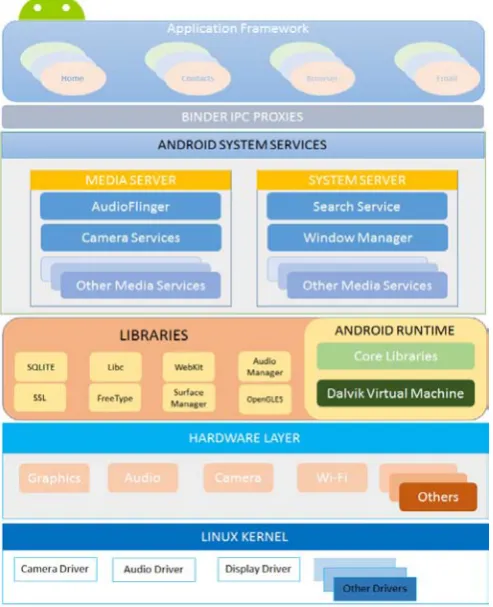
[image:1.595.316.562.392.546.2]There are many programmers developing apps for Android. These apps are the computer programs coded in JAVA and executed by Dalvik Virtual machine. These third party apps are installed in the top level of the Android OS, as there are some preinstalled apps from the OS itself. To understand better about Android Platform and apps in the OS let us consider Androids’ Architecture in Figure (Figure 2).
Figure 1: Global Smartphone market share, by Operating System [14].
Android is used more in the smart phones’ market and this causes some issues related to security. One of the cause can be the available threats in Android OS platform, which are experienced by the users. These threats degrading the platform and causes security issues and attacks. The attacks on Android are classified in three main types.
1. SQL Injection Attack 2. Permission-Based Attack 3. Dynamic Code Loading Attack.
information breach. Android OS Platform provides security for these apps and its users. There are two main security mechanism like App Sandbox and permission based security framework. Sandbox apps are protected from interacting with outside apps or any other irrelative process.Android is using Linux Kernel authentication management where, each Application is managed as a separate user and is having its own process environment and cannot interrupt or use any other process running in the OS.
Figure 2: Android Architecture.
II. RELATED WORK
In this section, work related to permission-based attack is presented. As Alexandra Bartel et al. study on [1] showing that apps can be granted more permissions than they are required; the approach is through a static analysis by using their prototype on two datasets of Android applications. They have found out that from 94/742 and 35/679 apps; of Android Application Stores suffer Permission-based attacks. KhodorHamandi et al. approach on [2] showing that; text messaging Apps misusing permissions granted to and are luring the users, cause the leakage and misuse of the senders and receivers’ data while communicating via SMS. The approach is through an application mitigating this kind of information leakage of both parties.
Lucas Davi et al. on [3] shows; a program code is restricted within the boundaries of application sandbox, which permits apps execution on its own boundary and does not allow it to interfere to any other apps processing era or data. Yuan Zhang et al. on [4] shows that; some of Android apps are accessing restricted portion of Android devices after granting permissions while installations. They used their own method of dynamic analysis named (VetDroid) to reconstruct misbehavior of the apps in the devices; applied
their prototype on more than 1,249 Google play’s apps and was proved more successful in mitigating permission-based privileges leakages.
Zarni Aung and Win Zawon [5] stated; a framework of detecting malware of Android apps for reducing permission-based malwares. They made a machine-learning detection system for Android to detect and make security and privacy of the Android users safe, secure and used machine classifier to classify where the App is a goodware or a malware. David Barrera et al. on [6] showing; a methodology is proposed for the security concerned of the empirical analysis for permission based security models and tested android strength and weaknesses through an analysis. Self-Organized Map (SOM) algorithm is applied for investigation and analyzed about 1,100 real-world data set applications. Approach resulted that a small subset of permissions are used very frequently where large subset used very few.
Zheran Fang et al. on [7] found six issues in Android security, coarse granularity of permissions, incompetent permission administrators, insufficient permission documentation, over-claim of permissions, permission escalation attack and TOCTOU attack. The first three are indirect issues to android and the rest three are direct issues that may cause information and privacy leakage.
Wook Shin et al. on [8] showing that, there is no good naming rule or permission declaration applied for a new permission of Android apps. Once a permission is granted to an app that permission never being revoked again through lifetime of that app once installed; two different permissions can be in utilize having the same name which results a security flaw. A study on [9] shows; a permission-based security analysis has been analyzed in two methods, network virtualization techniques and clustering algorithms; they found out several phenomena that verify past research and new possibilities for permission-based security models and provide more security to users.
Ryan Johnson et al. on [10] developed an architecture that automatically searches and downloads Android apps from the Application Stores and created a detailed mapping of android Application programming interface (API) calling to the needed permissions. They found out through an analyzing of 141,372 Apps, Which the majority of the app developers are not using the accurate permission setand they either over-specify or under specify their security requirements.
III. ANDROID PERMISSION SYSTEM
processes, by the root level permission. Apps must explicitly request access to resources and data outside their sandbox. If the apps need for any additional permission, they request for access from the system, which is not provided by basic sandbox permission level.
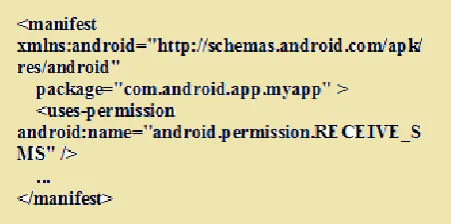
[image:3.595.46.272.239.351.2]Based on the sensitivity and area of the requested permission the system whether grant the permission to the apps or simply put it for approval or reject from the user. Basically Android apps do not have any kind of permission to do anything in the system, in order to have some permission in the system to do some basic operation, the apps Developers must include (user-permission) in the app manifest file. For example, if an app needs to monitor incoming SMS must include the following user-permission code in its manifest file[12] as of Figure 3.
Figure 3: Shows Permission declaration in Manifest file.
If the App lists Normal permission in its manifest files like (ACCESS_WI-FI_STATE, WAKE_LOCK, INTERNET and VIBRATE) that do not interrupt any other services in the system. Android will automatically grant the permission for it, but if the app lists some dangerous permissions like (WRITE_CALENDAR, WRITE_CONTACTS, READ_CALL_LOG, WRITE_CALL_LOG and SEND_SMS) that interrupt other processes in the system, android will hand over the permission approval or reject to users.
For instance if the devices using Android 5.0 (API Level 22) or lower, and the apps (targetSDKVersion) is 22 or lower, the system asks the user to grant the permission to the app while installation. Adding a new permission to the app or updating the app, the systems asks the user while updating the app for permission. Once the user grant the permission for that app, the only way for revoking the permission is to uninstall that app.
Provided permissions by Android system can be found at (manifest.permission) file. Apps can also define its own permissions; therefore, (manifest.permission) file is not a list of comprehensive possible permissions.
IV. PERMISSION BASED ATTACK
Android uses Linux Kernel (User ID and Group ID) principles for authentication purpose of applications running in Android devices. It means that each app in an Android device is like a user and the files related to that app is its era of access and privileges that can have in the system. When a user is going to install an app in his/her smartphone, that user has option whether to install the app from an unknown resource app provider or going for a valid App Store. As there are many Application Store for Android devices, one
of those is Amazon Application Store but Android OS Platform has one official App Store that is leaded by Google and named as Play Store.
The selection of the app to install is to the user, whether the user downloads the app from Play Store or any other App Stores. Once the user selects the app and download, before installing the app in the device, the app asks the user for some permission which is listed in the app’s manifest file already by the developer. In this scenario, the option for granting or rejecting the permission is on the users’ hand, whether to grant permission and let the app gets install or simply reject and cancel the installation. Once the user grant the permission for the app, the app will have all the requested resources access and will be installed in the device. The app may prompt for update after a while; this update will be automatically installed in the device from the internet without asking any kind of permission from the user, of course if the device is running API Level 22 and lower Android OS version.
If a device is running API Level 23 or higher the update procedure differs in some points, that is, while updating if there is an extra permission request to be accessed by the app. Android OS will give the permission authority to the user at run time whether to allow or revoke the request, this shows a security update from API Level 22 onwards.
Certain applications are designed for single purpose and request access for multiple permissions. There are some apps used to book Taxi from the internet and they need the customer number and GPS to be on for their service. However, they are asking for multiple permissions that leads information leakage of the users unfortunately.
Access to the listed permissions granted by the end-user to the app, as most of the users are not knowing anything about the security, device privileges and own properties in the device. This kind of permission request and having access to almost all the properties of the smartphone and user is a kind of attack itself. This kind of attack is called Based Attack.To demonstrate the Permission-Based Attack very deep and comprehensive an Attack Scenario is developed.
V. ATTACK SCENARIO
An attack scenario is the number of processes of the targeted device or victim’s attack, which is going to be happened in order to put some damages or misuse on the targeted device or network.In another definition, an attack is an action that put a potential violation in the system or victim’s device. An attackcan be classified according to the way of performance, whether this performance is done by a person or a software. The person who executes such type of actions is known as an attacker. The aim or intention of an attacker is to misuse the vulnerabilities of an organization or a device, which can be a smartphone, running Android OS, etc. An attack [11] situation describes here the actors of an information system, their secure capabilities as well as possible attackers and their goals.
hardware, middleware and software frameworks. These apps are putting a bunch of request permissions in their manifest files and asking the end-user while installation.
The user who knows or does not know anything-about device or personal information security, simply grant the permission otherwise apps installation will be canceled which is the users’ unwanted action.The user has only two options either grant the permission or simply cancel the installation, which is not good from the app side.
Having access to almost all the device and user’s privileges.
• Possible Attackers: Attacker who is the App developer knows that the user either should install or simply cancel the installation.
• Possible Vulnerabilities: Having access to almost all the device properties and end user’s data.
• Resources Affected: Android Device, Android Device’s Network, Android User’s data and so.
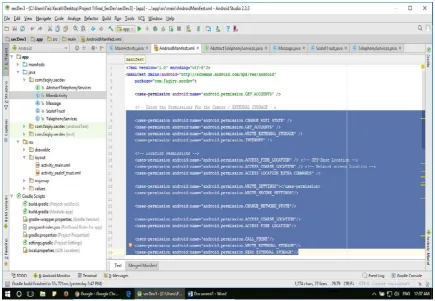
[image:4.595.70.506.184.485.2]1- The Developers develop an app and upload it to an Application Store.
Figure 4: Application development phase declaring Permissions in (Manifest.xml) file.
2- The user downloads the App in an Android Device from the App Store.
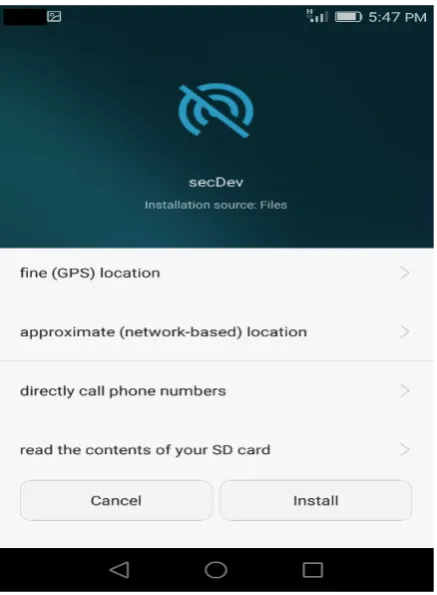
Figure 5 (a): List Of permission request from the user.
Figure 5 (b): List Of permission request from the user.
4- The user has two options, either grant the requested permission or simply cancel the installation, no other choice.
5- The user simply grants the requested permission either understands the permissions or unknowingly,proceeding the installation.
6- Once the installation is completed, the App Developers have full access to that Android device and its data as of figure 6 (a,b).
Figure 6 (a): Application Access to the device after installation.
Fig- 6 (b): Application Access to the device after installation.
[image:5.595.36.258.55.340.2] [image:5.595.313.534.90.387.2] [image:5.595.37.256.368.666.2] [image:5.595.316.534.417.701.2]done. This is nothing but a common attack to the device and user’s privileges, whichis called Permission-Based Attack.
VI. COUNTER MEASURES
Preventing permission is the main goal in this Paper. There are number of ways to prevent permissions theoretically, Apps installation without asking permissions causes to installation of malware or tracking software in the device. Even though Google Play Store tries too much to manage the Apps it hosts, but there are still many apps to be truly effective. The responsibilities left to the end-users to protect the device. There are couple of ways to protect an Android device from malicious software that taking over the Android device.
The users can be requested to stop automatic updates in Android. Although automatic updates are useful in general, but there might be a time that is going in the background without end-users knowledge and can install malicious codes in the device.
The second way to prevent permission is to stop unsigned Application installing. Users can have the choice of installing apps either from Google Play Store or from any other Application Stores like Amazon Store. Android developers recommend using Play Store for installing any app in any Android device, because it is secure and reliable than any other Application Stores.
VII.CONCLUSION AND FUTURE WORK
This Paper reviews a Permission-Based Attack and a developed Attack Scenario to inspect and demonstrate Permission-Based Attack on devices running Android operating system platform. The prompt ion of the attack and attack scenario presented in this paper is the result of a permission-based attack on Android devices.Systematically scenario is figured out in the paper for better comprehension. There are few advancement in this paper that might be considered in the future regarding Permission-Based Attacks. First is the app developers consideration through requesting permission as required for the app. Next is the Android management to do not allowthe users to install unrelated apps installation in an Android device. The snapshots indicate the user’s data and device privileges that are accessed by the installed app and developer.
VIII. ACKNOWLEDGMENT
The research demonstrated in this paper is carried out in cyber cell of Maulana Azad National Institute of Technology (MANIT), Bhopal M.P India under the guidance of Deepak Singh Tomar. I wish to thank all other people who were involved in this research in the Institute.
IX. REFFERENCES
[1]. Alexandre Bartel, Jacques Klein, Martin Monperrus, Yves Le Traon, Automated Software Engineering (ASE), Essen, Germany, 2012.
[2]. KhodorHamandi, et.al “Android SMS Malware: Vulnerability and Mitigation” 2013 27th International Conference on Advanced Information Networking and Applications Workshops 2013.
[3]. Lucas Davi, et .al “Privilege escalation attacks on android” In Proceedings of the 13th International Conference on Information Security, Boca Raton, FL, USA ,October 25 - 28, 2010.
[4]. Yuan Zhang, et .al “Vetting Undesirable Behaviors in Android Apps with Permission Use Analysis”, Proceedings of the 2013 ACM SIGSAC conference on Computer & communications security, Berlin, Germany, November 04 - 08, 2013
[5]. Zarni Aung and Win Zaw, “Permission-Based Android Malware Detection” international journal of scientific & technology research volume 2, issue 3, march 2013 issn 2277-8616, 2013.
[6]. David Barrera et .al “A Methodology for Empirical Analysis of Permission-Based Security Models and its Application to Android”, Proceedings of the 17th ACM Conference on Computer and Communications Security, CCS 2010, Chicago, Illinois, USA, October 4-8, 2010.
[7]. Zheran Fang, Weili Han and Yingjiu Li, “Permission based Android security: Issues and countermeasures” computers & security 43 (2014) 205-218.
[8]. Wook Shin, SanghoonKwak, ShinsakuKiyomoto and Toshiaki Tabaka, “A Small but Non-negligible Flaw in the Android Permission Scheme” 2010 IEEE International Symposium on Policies for Distributed Systems and Networks, Fairfax, VA, USA, 21-23 July 2010.
[9]. I. Rassameeroj and Y. Tanahashi, "Various approaches in analyzing Android applications with its permission-based security models," 2011 IEEE International Conference on Electro/Information Technology, Mankato, MN, 2011, pp. 1-6.
[10]. Ryan Johnson, Zhaohui Wang, Corey Gagnon, AngelosStavrou, “Analysis of Android Applications’ Permissions” 2012 IEEE Sixth International Conference on Software Security and Reliability Companion 2012.
[11]. Eric Cole et .al “Constructing Attack Scenarios for Attacker Profiling and Identification”, [Online]. Available: “http://www.securityhaven.com /docs/ Constructing Attack Scenarios for Attacker Profiling and Identificationv6. pdf, Jun 2010.
[12]. Android Developer (2017, April 10) [Online] Available: https:// developer. android. com/guide /index.html.
[13]. Android Market Share (2017, May 15) [Online] Available: /826672/android-goog-just-hit-a-record-88-market-share-of-all-smartphones/.
![Figure 1: Global Smartphone market share, by Operating System [14].](https://thumb-us.123doks.com/thumbv2/123dok_us/683572.1075710/1.595.316.562.392.546/figure-global-smartphone-market-share-by-operating-system.webp)