© 2018, IJCSMC All Rights Reserved 92 Available Online atwww.ijcsmc.com
International Journal of Computer Science and Mobile Computing
A Monthly Journal of Computer Science and Information Technology
ISSN 2320–088X
IMPACT FACTOR: 6.017IJCSMC, Vol. 7, Issue. 11, November 2018, pg.92 – 104
A WEB-BASED APPLICATION for LEAVE and
EMPLOYEE PERFORMANCE APPRAISAL
(CASE STUDY: PT. DUA EMPAT TUJUH)
Tegar Nugroho Milan Putra
1, Ade Eka Asukma
2, Pupung Andreas
3, Riad Sahara
41
Faculty of Computer Science, Universitas Mercu Buana, Jakarta, Indonesia
2
Faculty of Computer Science, Universitas Mercu Buana, Jakarta, Indonesia
3
Faculty of Computer Science, Universitas Mercu Buana, Jakarta, Indonesia
4
Faculty of Computer Science, Universitas Mercu Buana, Jakarta, Indonesia
1
[email protected]; 2 [email protected];
3
[email protected]; 4 [email protected]
Abstract— This research was conducted at PT. DUA EMPAT TUJUH to overcome the problems associated with the submission of leave and the performance appraisal of employees who are still conventional. The application created to overcome these problems is a web-based application using the PHP programming language. The purpose of this research is 1) to make it easier for employees to submission of leave and know the balance of leave quickly and precisely; 2) facilitate for HR to manage employee leave; 3) facilitate HR and Manager / Supervisor in evaluating employee performance appraisal to determine adjustment of salary increase for each employee; 4) facilitate H R performance to manage employee performance appraisal results; 5) replacing the old conventional leave system into a new computerized system. Data collection techniques used in this research are observation, interviews, and case studies. The results of this research are 1) employees can submit leave and manage their leave easily; 2) HR can manage employee leave easily; 3) HR and Manager can monitor employee leave easily; 4) HR can determine adjustment of salary increase quickly and accurately; 5) HR can easily manage the results of employee performance appraisal; 6) Manager / Supervisor can easily evaluate employee performance appraisal.
Keywords— Leave, Appraisal, Employee, HR, Web
I. INTRODUCTION
Technology development in the current era of globalization is increasing rapidly. This also affects the progress of the information system, so that the information obtained is more effective and efficient. This is used by companies to complete work such as data processing and decision making. Therefore, humans can complete their work quickly and practically, both on a small and large scale.
One company that will change the old system to a new system is PT. DUA EMPAT TUJUH. The company still uses conventional leave submission systems, so the submission process is less effective. Employees who will apply for leave must go through many channels and take a lot of time. In addition, the drawback of this conventional system is that it is difficult to know the balance of leave. Another obstacle was experienced by HR in filing and recap of employee leave data.
© 2018, IJCSMC All Rights Reserved 93
assessment. After that HR still has to sort the assessment results document again as a material for salary increase adjustment considerations.
Based on existing problems, PT. DUA EMPAT TUJUH is used as an object of research to create a system that can meet needs, such as the process of filing leave and the employee appraisal process. The system that will be created, is expected to provide solutions in the process of filing leave, as well as the assessment process of employees who were previously still conventional to be faster, more precise, and more informative. So, employees do not need to fill out leave forms on paper and ask for the signature of a superior. And for supervisor, can see the track record of employee leave as a material consideration of leave approval. As for employee appraisal, the existence of this system can facilitate HR functions and managers in determining employee salary increases each year.
II. FUNDAMENTAL THEORIES
A. Leave
According to Government Regulation Number 24 of 1976 quoted from the journal Arif Setiyanto. Leave is a condition of non-work permitted within a certain period of time. Leave consists of annual leave, leave, sick leave, maternity leave, leave for important reasons. [1]
B. Performance Employee
Quoted from the journal examined by Ririvega Kasenda, Mangkunegara (2010: 67) defines employee performance (Work Achievement) is the result of quality and quantity achieved by an employee in carrying out his duties in accordance with the responsibilities given to him. [2]
C. System Development Methods (RAD)
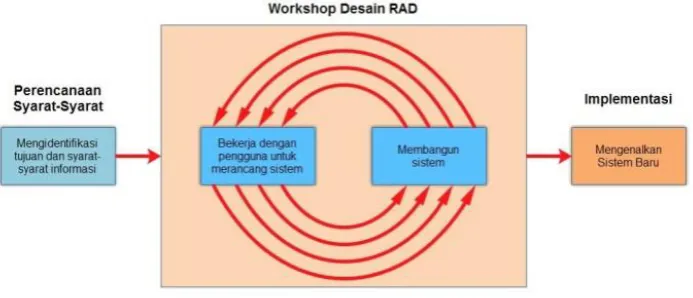
The system development method that researchers use is the Rapid Application Development (RAD) method. According to Britton & Doake 2001, which was quoted from the journal studied by Dede Kurniadi and Asri Mulyani. Rapid Application Development (RAD) System Development Method emphasizes short and fast development cycles (Pressman, 2005). Short time is an important limitation for this model. [3]
Meanwhile, according to the journal from Ariefah Rachmawati RAD is a model of software system development process that is incremental, especially for short processing times. [4] There are three phases in this method:
Fig 1. RAD Phase (source : Kendall, 2010)
1. Requirements Planning
Is a process of collecting material or data that is in accordance with the research to be developed. Inputs from this stage are similar literature or reports about applications in previous studies, as well as questionnaires to determine the response to the development of the application. Results or output of this process is in the form of research reports from previous application development. So that the requirements phase process will process data from the results of the questionnaire distributed.
2. User Design
© 2018, IJCSMC All Rights Reserved 94
3. Construction dan Cutover
Is the stage of the application building process by implementing the results of the stages of User Design Phase into the programming language used. While Cutover Phase is the stage of the application testing process that has been built, which in this study the testing process uses black box testing techniques. [5]
D. Identification of Problems (Fishbone)
Fishbone Diagram (also known as the Cause and Effect Diagram or Ishikawa Diagram) was first introduced by the originator, Kaoru Ishikawa (1915-1989), a Japanese citizen. According to Kang and Kvam (2011) fishbone diagram is an illustration that is used to explore potential or real causes of quality problems. Ishikawa (in Juran, 1999) adds that fishbone diagrams are to organize and display the interrelationships of various theories of root cause of a problem. While Doty (1996) explained that fishbone diagram is just to show the interrelationship. [6]
E. System Testing (Black Box Testing)
Black Box Testing focuses on functional specifications of software. The tester can define a set of input conditions and test the program's functional specifications. Black Box Testing is not an alternative solution to White Box Testing but is more of a complement to testing things that are not covered by White Box Testing. [7]
F. Literature Review
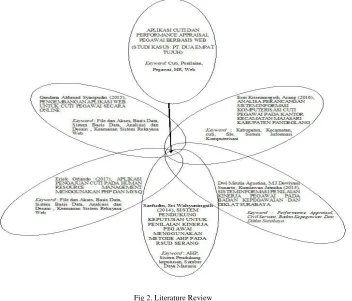
Several related studies that have been carried out before that become the main reference of researchers are the research made by Gandana Akhmad Syaripudin, Rinda Cahyana (2015) in research “Pengembangan Aplikasi Web Untuk Pengajuan Cuti Pegawai Secara Online”. Erni Krisnaningsih, Acang (2016) in research “Analisa Perancangan Sistem Informasi Komputerisasi Cuti Pegawai Pada Kantor Kecamatan Majasari Kabupaten Pandeglang”. Eriek Orlando (2017) in research “Aplikasi Pengajuan Cuti Pada Human Resource Management Menggunakan PHP dan MYSQL”. Dwi Meutia Agustina, M.J.Dewiyani Sunarto, dan Kurniawan Jatmika (2013) in research “Sistem Informasi Penilaian Kinerja Pegawai Pada Badan Kepegawaian dan Diklat Surabaya”. Also Saefudin, Sri Wahyuningsih (2014) in research “Sistem Pendukung Keputusan Untuk Penilaian Kinerja Pegawai Menggunakan Metode Analytical Hierarchy Process (AHP) pada RSUD Serang”.
Fig 2. Literature Review
© 2018, IJCSMC All Rights Reserved 95
used is the Unified Software Development Process. The results of this study are web applications with features for filing leave and viewing balances online. [8]
Erni Krisnaningsih, Acang (2016) in research “Analisa Perancangan Sistem Informasi Komputerisasi Cuti Pegawai Pada Kantor Kecamatan Majasari Kabupaten Pandeglang”. The problem that arises is the process of leave and recording is still conventional. The methodology used in this study is library research, observation, and interviews. After the system is implemented it can optimize the current system. [9]
Eriek Orlando (2017) in research “Aplikasi Pengajuan Cuti Pada Human Resource Management Menggunakan PHP dan MYSQL”. The problem that arises in this study is the absence of a system that can overcome the recording of employee leave. Methods used in literature, observation, interviews, and analysis. This application is useful to facilitate the filing of leave and prevent the issue of leave so that human resources are more efficient and effective. [10]
Dwi Meutia Agustina, M.J.Dewiyani Sunarto, dan Kurniawan Jatmika (2013) in research “Sistem Informasi Penilaian Kinerja Pegawai Pada Badan Kepegawaian dan Diklat Surabaya”. The problem that arises in this study is the absence of a system that accommodates the assessment of employee performance in the personnel and education and training bodies in Surabaya. The method used in this research is block diagram. The results obtained in this study, among others, can help assessing officials in assessing their employees. [11]
Saefudin, Sri Wahyuningsih (2014) in research “Sistem Pendukung Keputusan Untuk Penilaian Kinerja Pegawai Menggunakan Metode Analytical Hierarchy Process (AHP) pada RSUD Serang”. Problems that occur in Serang District Hospital are that the assessment process is carried out using conventional methods. Researchers designed the system using the AHP method. By making a decision support system, it can make an employee's performance assessment faster in an objective decision-making process. [12]
Based on literature studies from related studies, researchers intend to make research that is broadly similar to the third and fifth studies. But researchers will develop a number of things in this study such as the work handover feature, leave dashboard, notification email, and also the function of assessing employee performance for salary increase adjustments each year.
III.RESEARCH METHODOLOGY
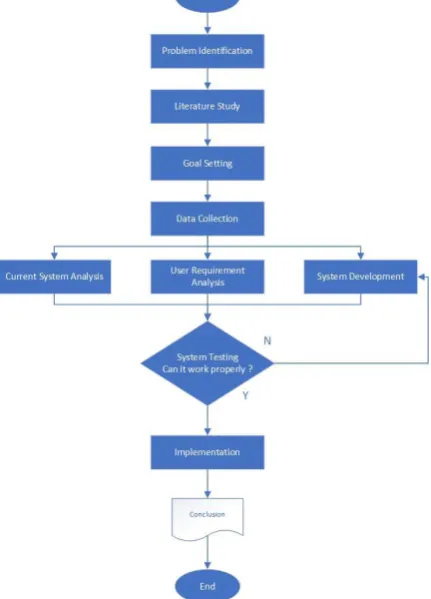
Based on figure 3 there are 10 core stages that will be carried out in this study. Starting from problem identification, literature study, goal setting, data collection, etc.
© 2018, IJCSMC All Rights Reserved 96
1. Problem Identification
This stage is to find out the problems regarding the process of filing leave, leave approval, and employee performance appraisal at the research case study site.
2. Literature Study
This step is to find references that will later be used to solve existing problems. 3. Goal Setting
This stage determines what will be done next to solve existing problems. 4. Data Collection
Stages to collect data from observations and interviews at the research case study site. 5. Current System Analysis
The stages in which the current system is analyzed can identify problems that arise in more detail. 6. User Requirements Analysis
Stages to adjust from the stage of determining the goal is in accordance with what the user wants. 7. System Development
The stage where you start to design the system and start making applications. 8. System Testing
Stages where the system is tested before it can be used live. 9. Implementation
The stage where the system has been tested and can be used immediately by the user. 10. Conclusion
The stage when the system has been successfully implemented, then concluded whether the application is as expected or not.
IV.DISCUSSION
A. Current System Problem Identification
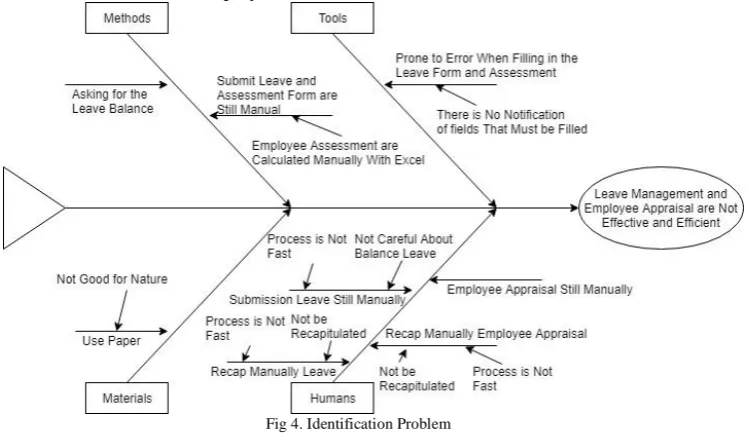
In this study the identification of problems using the fishbone diagram method, with the main problem found is the management of leave and assessment of employees who are still conventional so that it is not effective and efficient.
Fig 4. Identification Problem
Above is a fishbone diagram to identify and organize the causes that arise, there are four factors that are the main causes of problems, namely, methods, tools, materials, and humans, as well as some secondary causes that affect the main causes.
B. Use Case Diagram
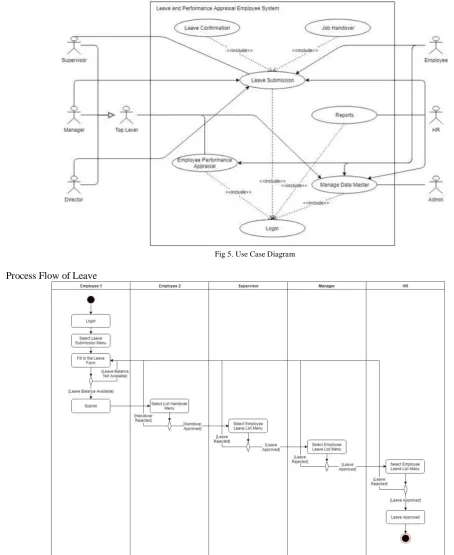
The results of this study are described in the form of Unified Modeling Language (UML) and User Interface (UI) design. In the use case diagram illustrated activities that can be carried out by users of the system in the application, including:
© 2018, IJCSMC All Rights Reserved 97
2. Leave submission, employees submit leave according to the remaining leave balance, and the type of leave. If the user is employee and supervisor it is necessary to fill in the job handover. For leave confirmation, it can only be done by Top Level and HR.
3. Reports, HR can manage reports on employee leave submissions and employee performance assessments.
4. Employee performance Appraisal, Top Level can assess employee performance as a reference for employee salary adjustment.
5. Manage data master, admin manages application master data, such as employee name, position, division, assessment aspect, etc.
Fig 5. Use Case Diagram
C. Process Flow of Leave
© 2018, IJCSMC All Rights Reserved 98
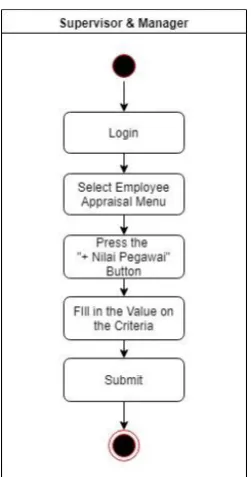
D. Process Flow of Appraisal
Fig 7. Process Flow of Appraisal
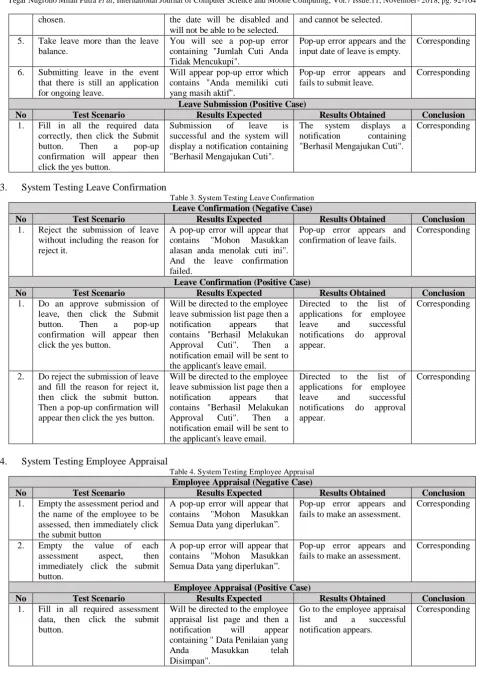
E. System Testing
1. System Testing Login
Table 1. System Testing Login
Login (Negative Case)
No Test Scenario Results Expected Results Obtained Conclusion
1. Empty your username and password, then immediately click the Login button.
There is an error message that requires you to fill in your username and password.
An error message appears and cannot login.
Corresponding
2. Fill in the username that has not been registered and fill in the password randomly, then click the Login button.
There is an error message that contains "Gagal Login, Cek Username dan Password".
An error message appears and cannot login.
Corresponding
3. Fill in the username that has been deleted by the admin, then click the Login button.
There is an error message that contains "Gagal Login, User Sudah Tidak Aktif ".
An error message appears and cannot login.
Corresponding
Login (Positive Case)
No Test Scenario Results Expected Results Obtained Conclusion
1. Enter username and password correctly, then click the Login button.
Login is successful and the user is directed to the main page according to the role of the user.
Login successful and the main page appears.
Corresponding
2. System Testing Leave Submission
Table 2. System Testing Leave Submission
Leave Submission (Negative Case)
No Test Scenario Results Expected Results Obtained Conclusion
1. Empty all leave forms, and immediately click the submit button.
A pop-up error will appear that contains "Mohon Isi Semua Data yang diperlukan".
Leave submission was unsuccessful and pop-up error appeared.
Corresponding
2. Choose the type of leave for big leave when you don't have a big leave.
Will appear pop-up error which contains "Anda tidak memiliki cuti besar".
Pop-up error appears. Corresponding
3. Choose leave end date without selecting leave start date first.
You will see a pop-up error that contains "Mohon Pilih Tanggal Mulai Terlebih Dahulu".
Pop-up error appears. Corresponding
4. Choose leave end date less than the leave start date that has been
Users will not be able to choose the date of the retreat because
Dates that are less than leave start date become disabled
© 2018, IJCSMC All Rights Reserved 99
chosen. the date will be disabled and
will not be able to be selected.
and cannot be selected.
5. Take leave more than the leave balance.
You will see a pop-up error containing "Jumlah Cuti Anda Tidak Mencukupi".
Pop-up error appears and the input date of leave is empty.
Corresponding
6. Submitting leave in the event that there is still an application for ongoing leave.
Will appear pop-up error which contains "Anda memiliki cuti yang masih aktif".
Pop-up error appears and fails to submit leave.
Corresponding
Leave Submission (Positive Case)
No Test Scenario Results Expected Results Obtained Conclusion
1. Fill in all the required data correctly, then click the Submit button. Then a pop-up confirmation will appear then click the yes button.
Submission of leave is successful and the system will display a notification containing "Berhasil Mengajukan Cuti".
The system displays a notification containing "Berhasil Mengajukan Cuti".
Corresponding
3. System Testing Leave Confirmation
Table 3. System Testing Leave Confirmation
Leave Confirmation (Negative Case)
No Test Scenario Results Expected Results Obtained Conclusion
1. Reject the submission of leave without including the reason for reject it.
A pop-up error will appear that contains "Mohon Masukkan alasan anda menolak cuti ini". And the leave confirmation failed.
Pop-up error appears and confirmation of leave fails.
Corresponding
Leave Confirmation (Positive Case)
No Test Scenario Results Expected Results Obtained Conclusion
1. Do an approve submission of leave, then click the Submit button. Then a pop-up confirmation will appear then click the yes button.
Will be directed to the employee leave submission list page then a notification appears that contains "Berhasil Melakukan Approval Cuti". Then a notification email will be sent to the applicant's leave email.
Directed to the list of applications for employee leave and successful notifications do approval appear.
Corresponding
2. Do reject the submission of leave and fill the reason for reject it, then click the submit button. Then a pop-up confirmation will appear then click the yes button.
Will be directed to the employee leave submission list page then a notification appears that contains "Berhasil Melakukan Approval Cuti". Then a notification email will be sent to the applicant's leave email.
Directed to the list of applications for employee leave and successful notifications do approval appear.
Corresponding
4. System Testing Employee Appraisal
Table 4. System Testing Employee Appraisal
Employee Appraisal (Negative Case)
No Test Scenario Results Expected Results Obtained Conclusion
1. Empty the assessment period and the name of the employee to be assessed, then immediately click the submit button
A pop-up error will appear that contains "Mohon Masukkan Semua Data yang diperlukan”.
Pop-up error appears and fails to make an assessment.
Corresponding
2. Empty the value of each assessment aspect, then immediately click the submit button.
A pop-up error will appear that contains "Mohon Masukkan Semua Data yang diperlukan”.
Pop-up error appears and fails to make an assessment.
Corresponding
Employee Appraisal (Positive Case)
No Test Scenario Results Expected Results Obtained Conclusion
1. Fill in all required assessment data, then click the submit button.
Will be directed to the employee appraisal list page and then a notification will appear containing "Data Penilaian yang
Anda Masukkan telah
Disimpan".
Go to the employee appraisal list and a successful notification appears.
© 2018, IJCSMC All Rights Reserved 100
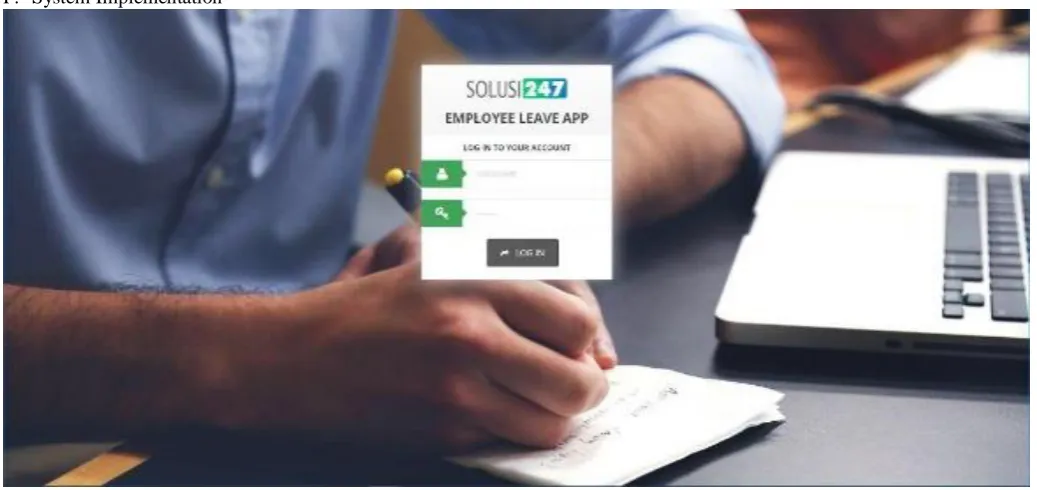
F. System Implementation
Fig 8. Screenshot Login
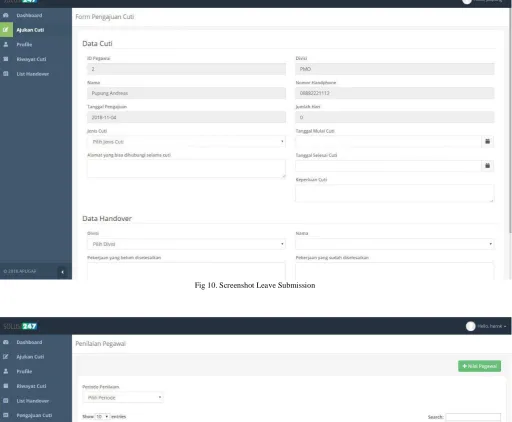
© 2018, IJCSMC All Rights Reserved 101 Fig 10. Screenshot Leave Submission
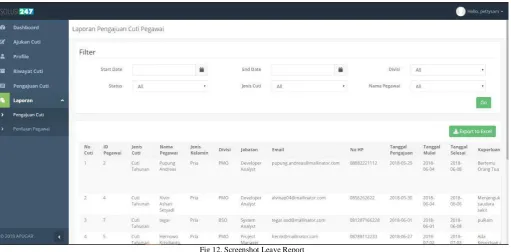
© 2018, IJCSMC All Rights Reserved 102 Fig 12. Screenshot Leave Report
© 2018, IJCSMC All Rights Reserved 103 Fig 14. Leave Status Email Notification
© 2018, IJCSMC All Rights Reserved 104
V. CONCLUSION
After being described application, the application for submission of leave and employee performance appraisal can be concluded:
1. This application makes it easy for employees to submit and manage their leave. 2. This application facilitate HR performance in managing employee leave.
3. This application facilitate Supervisors, Managers and HR to monitor employee leave.
4. This application facilitate the work of Managers and Supervisors in evaluating employee performance.
REFERENCES
[1] A. Setiyanto, F. Samopa and A. , "Pembuatan Sistem Informasi Cuti pada Kantor Pelayanan Perbendaharaan Negara dengan Menggunakan PHP dan MySQL," Jurnal Teknik Pomits, vol. 2, p. 1, 2013.
[2] K. Ririvega, "Kompensasi dan Motivasi Pengaruhnya Terhadap Kinerja Karyawan Pada PT. BANGUN BEVERAGES COMPANY Mandao," Jurnal EMBA, vol. 1, p. 3, 2013.
[3] D. Kurniadi and A. Mulyanti, "Implementasi Pengembangan Student Information Terminal (S-IT) Untuk Pelayanan Akademik Mahasiswa," Jurnal Algoritma Sekolah Tinggi Teknologi Garut, vol. 13, p. 3, 2016.
[4] A. Rachmawati, "Membangun Informasi Layanan Umum Rumah Kos Melalui Aplikasi Berbasis Web," Jurnal Ilmiah Fifo, vol. 2, p. 9, 2017.
[5] A. Muharom, R. Cahyana and H. Bunyamin, "Pengembangan Aplikasi Sunda Berbasis Android Menggunakan Metode Rapid Application De velopment (RAD)," Jurnal Algoritma Sekolah Tinggi Teknologi Garut, vol. 10, p. 3, 2013.
[6] C. E. T. Widyahening, "Penggunaan Teknik Pembelajaran Fishbone Diagram Dalam Meningkatkan Keterampilan Membaca Siswa," Jurnal Algoritma Sekolah Tinggi Teknologi Garut, vol. 2, p. 5, 2018.
[7] M. S. Mustaqbal, R. F. Firdaus and H. Rahmadi, "Pengujian Aplikasi Menggunakan Black Box Testing Boundary Value Analysis," Jurnal Ilmiah Teknologi Informasi Terapan, vol. 1, p. 4, 2015.
[8] G. A. Syaripudin and R. Cahyana, "Pengembangan Aplikasi Web Untuk Pengajuan Cuti Pegawai Secara Online," Jurnal Algoritma Sekolah Tinggi Teknologi Garut, vol. 3, p. 13, 2015.
[9] E. Krisnaningsih and Acang, "Analisa Perancangan Sistem Informasi Komputerisasi Cuti Pegawai Pada Kantor Kecamatan Majasari Kabupaten Pandeglang," Jurnal Sistem Informasi, vol. 3, 2016.
[10] E. Orlando, "Aplikasi Pengajuan Cuti Pada Human Resource Management Menggunakan PHP dan MYSQL (Studi Kasus Pada PT. INTILOKA)," Jurnal Ilmiah Komputasi, vol. 16, 2017.
[11] D. M. Agustina, M. D. Sunarto and K. Jatmika, "Sistem Informasi Penilaian Kinerja Pegawai Pada Badan Kepegawaian dan Diklat Surabaya," Jurnal Sistem Informasi, vol. 2, 2013.