Scholarship@Western
Scholarship@Western
Electronic Thesis and Dissertation Repository
4-12-2013 12:00 AM
A Framework for Measuring the Usability Issues and Criteria of
A Framework for Measuring the Usability Issues and Criteria of
Mobile Learning Applications
Mobile Learning Applications
Abdalha A. Ali
The University of Western Ontario
Supervisor Abdelkader Ouda
The University of Western Ontario Joint Supervisor Luiz Fernando Capretz
The University of Western Ontario
Graduate Program in Electrical and Computer Engineering
A thesis submitted in partial fulfillment of the requirements for the degree in Master of Engineering Science
© Abdalha A. Ali 2013
Follow this and additional works at: https://ir.lib.uwo.ca/etd
Part of the Other Electrical and Computer Engineering Commons
Recommended Citation Recommended Citation
Ali, Abdalha A., "A Framework for Measuring the Usability Issues and Criteria of Mobile Learning Applications" (2013). Electronic Thesis and Dissertation Repository. 1184.
https://ir.lib.uwo.ca/etd/1184
This Dissertation/Thesis is brought to you for free and open access by Scholarship@Western. It has been accepted for inclusion in Electronic Thesis and Dissertation Repository by an authorized administrator of
ISSUES AND CRITERIA OF MOBILE LEARNING
APPLICATIONS
by
Abdalha Ali
Graduate Program in Engineering Science Department of Electrical and Computer Engineering
A thesis submitted in partial fulfillment of the requirements for the degree of
Master of Engineering Science
The School of Graduate and Postdoctoral Studies Western University
London, Ontario, Canada
ii
Abstract
With the continuing growth of mobile devices outpacing that of desktops and laptops,
mobile devices have become the new personal computer. These devices have become
increasingly sophisticated and extremely powerful in the last few years. Substantial work
has been done to measure mobile applications’ level of quality; many researchers have
attempted to figure out why certain applications fail and others succeed.
In this thesis, a conceptual framework for measuring the quality aspects and criteria of
m-learning is produced. Furthermore, a software prototype application for smartphones to
assess usability issues of m-learning applications has been designed and implemented.
This prototype application is developed using Java language and the Android Software
development Kit, such that the recommended guidelines of the proposed framework are
maintained. A questionnaire survey was conducted at Western University with
approximately 96 undergraduate software engineering students. Five identical
smartphones are used to evaluate the developed prototype in terms of ease of use, user
satisfaction, attractiveness and learnability.
Keywords: Electronic Learning, Mobile Learning, Mobile Applications, Quality
Issues, Usability Issue, User Interface, User-Centered Design, Android Software
iii
“Say: Though the sea became ink for the Words of my Lord, verily the sea would be used up before the words of my Lord were exhausted, even though we brought the like thereof to help” (Quran: Chapter 18, Verse No:109)
“There is no substitute for hard work”
Thomas Edison
“The only place success comes before work is in the dictionary”
Vincent Lombardi
“Arriving at one goal is the starting point to another”
John Dewey
“Anyone who has never made a mistake has never tried anything new”
iv
Acknowledgments
I thank Allah, the Holy, the Creator, the most Gracious, the most Merciful, and the Wise,
whose help and support are unbounded who gave me the patience and ability to reach this
stage of knowledge.
I acknowledge, with great appreciation, the full funding provided by the Ministry of
Higher Education in Libya.
I would also like to express my thankfulness and gratitude to professors Abdelkader
Ouda and Luiz Fernando Capretz for a wonderful journey and experience. Your patience,
encouragement, and endless support are all appreciated beyond the limits of words—
they’ve helped me carry this work to its current stage.
I would like to thank my parents, my wife, my daughter, and my siblings, who
continuously support and encourage me. You have given me so much, and I can never
pay you back. I will owe you gratitude and thankfulness forever.
I would like to acknowledge the help and support that I have received from my friends. Also,
I would like to thank the Electrical and Computer Engineering Department staff at Western
University, including Melissa and Chris.
Finally, I would like to thank the examination committee members for their valuable remarks
and considerable recommendations.
v
Table of Contents
Abstract ... ii
Acknowledgments... iv
List of Tables ... viii
List of Figures ... ix
List of Appendices ... xi
List of Abbreviations ... xii
List of Terms ... xiv
Chapter 1 ... 1
Introduction ... 1
1.1 Motivation ... 3
1.2 Research Questions ... 3
1.3 Methodology ... 5
1.4 Contribution ... 7
1.5 Thesis Organization ... 7
Chapter 2 ... 9
Literature Review and Related Work ... 9
2.1 Literature Review... 9
2.2 Related Work ... 11
2.3 Summary ... 14
Chapter 3 ... 16
Mobile Learning and Technologies ... 16
3.1 The Concept of Mobile Learning ... 16
vi
3.2.1 Learning Style ... 19
3.2.2 Mobile Application ... 23
3.2.3 Learning Content ... 24
3.3 Features of Mobile Learning ... 25
3.4 Classification of Mobile Technology... 27
3.5 Mobile Devices ... 29
3.6.1 Evolution of Smartphones... 30
3.6 Summary ... 32
Chapter 4 ... 33
A conceptual Framework for Assessment of Quality of Mobile Learning ... 33
4.1 Technical Quality Aspects of Mobile Learning ... 34
4.2 Non-Technical Quality Aspects of Mobile Learning... 35
4.3 A Conceptual Framework for Assessment of Quality of Mobile Learning ... 37
4.3.1 Analysis and Discussion of the Proposed Framework ... 39
4.4 Design of the Prototype Application... 42
4.5 Developing and Implementation of the Prototype Application ... 45
4.6 Testing of the Developed Prototype Application... 47
4.7 Summary ... 49
Chapter 5 ... 51
An Empirical Comparison of the Models ... 51
5.1 Purpose of the Analysis ... 51
5.2 Preliminary Data Analysis ... 51
5.3.1 Ease of Use ... 52
5.3.2 User Satisfaction ... 54
vii
5.3.4 Learnability ... 57
5.3.5 General Case ... 59
5.4 Reliability and Validity ... 59
5.4.1 Ease of Use ... 60
5.4.2 User Satisfaction ... 61
5.4.3 Attractiveness ... 62
5.4.4 Learnability ... 62
5.4.5 General Validation ... 63
5.5 Association Analysis ... 64
5.6 Analysis and Discussion ... 66
Chapter 6 ... 68
Limitations, Future Work and Conclusion... 68
6.1 Limitations and Future Work ... 68
6.2 Conclusion ... 69
References ... 71
viii
List of Tables
Table 3.1: The Four Dimensions and its Characteristics based on Felder & Silverman
Model. ... 21
Table 4.1: Analysis of the Busuu project based on our framework ... 41
Table 5.1: Statistical analysis of the data ... 52
Table 5.2: Hypothesis for the usability sections ... 60
Table 5.3: Analysis of the data using T-Test and F-Test ... 60
Table 5.4: Analysis of the data using Pearson and Spearman Correlation Coefficient Methods... 64
ix
List of Figures
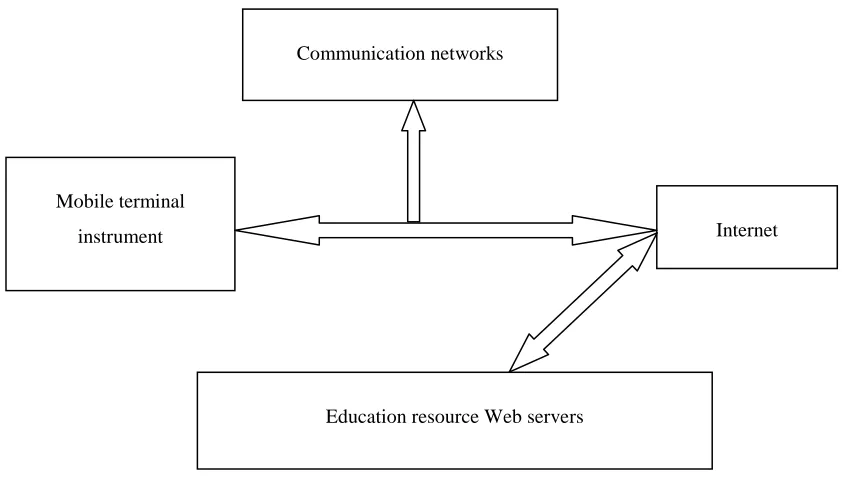
Figure 1.1 The structure of mobile learning systems ... 2
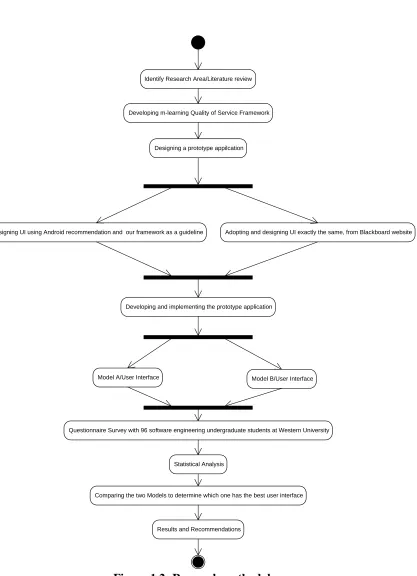
Figure 1.2 Research methodolgy………..5
Figure 3.1: Distance learning and its subsets [9] ... 17
Figure 3.2: Three Pillarsfor m-learning ... 19
Figure 3.3: Learning styles according to Felder and Silverman model ... 22
Figure 3.4: Classification of m-learning applications ... 24
Figure 3.5: Classification of mobile learning technologies ... 27
Figure 4.1: A conceptual framework for measuring the quality aspects for mobile learning ... 38
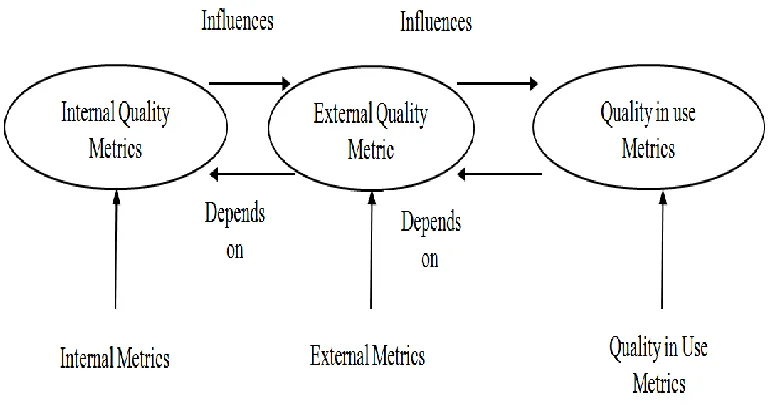
Figure 4.2: The relationships between the quality metrics based on ISO/IE ... 40
Figure 4.3: Android emulator ... 43
Figure 4.4: Main menu of the prototype application ... 44
Figure 4.5: Model A based on Blackboard website ... 45
Figure 4.6: Model B based on Android recommendations and our framework as a guideline ... 45
Figure 4.7: XML-based notation for rendering Android based format ... 46
Figure 4.8: User interface for blog's icon in Model A ... 48
Figure 4.9: User interface for blog's icon in Model B ... 48
x
Figure 4.11: User interface for announcement's Icon in Model B ... 49
Figure 5.1: Score average of Model A and Model B in ease of use sub-characteristic .... 53
Figure 5.2: Score average of Model A and Model B in user satisfaction sub-characteristic
... 54
Figure 5.3: Score average of Model A and Model B in attractiveness sub-characteristic 56
Figure 5.4: Score average of Model A and Model B in learnability sub-characteristic ... 57
Figure 5.5: Score average of Model A and Model B in general case ... 59
B2.1: Android architecture [70] ... 80
xi
List of Appendices
Appendix A: Questionnaire Survey ... 78
xii
List of Abbreviations
Bb Blackboard
CPU Central Processing Unit
CSS Cascading Style Sheets
d-learning Distance Learning
Eclipse IDE Eclipse Integrated Development Environment
e-Learning Electronic Learning
GPS Global Positioning System
HTC Hit the Cell
HTML HyperText Markup Language
HTTP Hypertext Transfer Protocol
IBM International Business Machines
ICT Information and Communication Technology
ISO/IEC International Organization for Standardization and
the International Electrotechnical Commission
m-learning Mobile Learning
MOSAD Mobile System Analysis and Design
PCs Personal Computers
PDA Personal Digital Assistance
PIM Personal Information Management
RIM Blackberry Research In Motion. Ltd, Blackberry
SAD System Analysis and Design
SDK Software Development Kit
SMS Shot Message Service
xiii
URL Uniform Resource Locator
xiv
List of Terms
Android “It is a Linux-based operating system designed primarily for
touch-screen mobile devices such as smartphones and tablet computers. Initially developed by Android, Inc., which Google backed financially and later purchased in 2005” [70].
Distance Learning (d-learning)
Defined as "a process to create and provide access to learning when the source of information and the learners are separated by time, distance, or both" [9].
Educational Resources Can be defined as all types of resources that are useful for learning, teaching, education, and research purposes [34].
Electronic Learning (e-learning)
All forms of teaching and learning that utilize educational technologies, communication technologies and information— whether networked learning or not—serving as a specific media outlet to implement the learning process [7] [8] [9] [10] [11].
Formal Learning “Formal learning takes place in education and training
institutions, leading to recognized diplomas and qualifications” [34].
Informal Learning Informal Learning is a natural accompaniment to everyday life.
Unlike intentional learning, it is often not recognized as contributing to individuals’ knowledge and skills—even by people themselves [34].
Learning Content A type of information that has to be delivered to learners for them to obtain knowledge [7] [44] [46].
Learning Style “Refers to an individual's characteristics and consistent
approach to perceiving, organizing, and processing
information” [41].
Mobile Devices Also known as handheld devices, handheld computers or
simply handheld, mobile devices are small,
hand-held computing devices, typically with a display screen, with touch input and/or a miniature keyboard [1] [9] [12] [13] [27].
Mobile Learning (m-learning)
xv
the user is not at a predetermined location, and they are taking advantage of the learning opportunities offered by mobile technologies [9] [12] [14] [15] [35] [36] [37] [38].
One-Handed Devices Users interact with these devices with one hand, because they have small screen sizes and always have standard keypads for inputting data [34].
Pearson Correlation Coefficient
“It is a measure of the correlation (linear dependence) between two variables X and Y, giving a value between +1 and −1 inclusive. It is widely used in the sciences as a measure of the strength of linear dependence between two variables”.
Personal Computers (PC)
General-purpose computers that have an expansive size and capabilities which makes them powerful and useful tool for users. They’re intended to be used directly by an end-user
Short Message Service.
A means of sending short messages to and from mobile phones [20].
Spearman Correlation Coefficient
“It is a non-parametric measure of statistical dependence between two variables. It assesses how well the relationship between two variables can be described using a monotonic function. If there are no repeated data values, a perfect Spearman correlation of +1 or −1 occurs when each of the variables is a perfect monotone function of the other”.
Stylus Devices Have screen sizes that are much larger than the previous
models; users interact with them through a touch screen [34].
Two-Handed Devices Two-handed devices have small keyboards and large screen
sizes compared with one-handed devices. Generally, they require the user to hold the device with one hand and operate it with the other. It is possible to be operated with one hand as well [34].
Ubiquity Means that the learner, with the support of wireless
xvi
Usability The ease of use, learnability, understandability, attractiveness,
and user satisfaction of a human-made object. These objects include software applications, tools, websites, processes, or anything that a user interacts with.
User Interface The space where interaction between users and devices occurs.
Chapter 1
Introduction
Since the arrival of mobile phones in the 1980s, they have become widely used among
all ages. In fact, they are becoming the new personal computers (PCs) as users are
increasingly utilizing mobile phones instead of desktops to access material and services
[1] [2] [3]. Mobile phones are not just communication devices simply used for
communicating and interacting between people; they are also personal and portable [4].
Due to the significant diffusion of mobile technologies, most students today already have
their own mobile devices. These devices have a possible advantage for applying
technology in the educational field, as they are cheaper than desktops and laptops [5].
Wang et al. [6] reported that mobile phones can be used to deliver on-line courses to
university students. Whereas Prensky in [4] asked, why not take advantage of these
devices for educational purposes? He emphasized that students will be able to learn
“anything, if developers designed it right.”
With the advancement of technology, new possibilities have been introduced in education
systems; for example, the way to access and control a knowledge base, which consists of
on-line courses, learning resources, has greatly changed since the advent of the Internet.
A dynamic approach for learning has been introduced—called electronic learning (or
e-learning for short). This approach can be either collaborative or individual [7] [8] [9]
[10]. The collaborative approach enables people to share and exchange learning materials
with each other; for example, e-learning enables learners to connect with colleagues,
professionals, and expert peers within the scope of e-learning systems [11]. Additionally,
e-learning enables individuals to select material and activities based on their background
[11].
On the other hand, the demand for learning anytime and anywhere has specified the need
for a new type of electronic learning called mobile learning (or m-learning for short),
acknowledging the use of mobile devices (mobile laptop, personal device assistant,
depicts the structure of m-learning systems [12]. Users can utilize the mobile
communication terminals to help them to learn, and with the support of the Internet and
wireless connectivity, they can obtain educational resources [9] [12] [13]. Furthermore,
Figure 1 shows that users can obtain the information he/she needs, using mobile devices,
only with the availability of the communication network and the Internet.
Figure 1.1 The structure of mobile learning systems
Brevern [14] explained the organization of the learning content. He emphasized that it
should enable a human-like interactive learning experience, which relies on many factors,
such as how knowledge is represented, structured and introduced, and also user
behaviour. The use of educational mobile phone applications has increased significantly
in recent years largely due to the accessibility and availability of wireless networks, and
the specific capabilities they have (e.g. touch-screen, camera, and GPS receiver). These
applications must be robust and of high quality so that they’re accepted by a wide
audience (i.e. students, instructors, etc.). Furthermore, research has emphasized that there
are some design issues that must be taken into consideration when developing mobile
applications. In addition, there are only a few studies targeting quality issues in
m-Communication networks
Mobile terminal
instrument Internet
learning applications, and there is a lack of research about the usability of mobile devices
for learning.
1.1 Motivation
In designing desktop applications, many usability guidelines are used. However, these
guidelines cannot be utilized to design and develop m-learning applications, simply
because they do not address the issues related to mobile phones and their current
limitations. There are a lack of good-quality usability guidelines for designing and
developing mobile applications with user-friendly interfaces.
Furthermore, literature has shown that usability and its related issues have been a key
area of research for electronic learning in general, and m-learning in particular [1] [15]
[16]. Usability has previously been less extensively covered than the technological
aspects of the m-learning. Studies have also revealed that usability issues have a great
impact on the success of mobile phone applications; however, there is a lack of research
about learnability, understandability, ease of use, effectiveness, and efficiency of mobile
applications—all aspects of usability [1] [3] [7] [15] [16].
Additionally, research has emphasized that there are some design issues that must be
taken into consideration when developing mobile applications. However, as previously
mentioned, there are only a few studies targeting quality issues in m-learning
applications, and there is a lack of work regarding the usability of m-learning in general
[15] [16].
1.2
Research Questions
With the continuing growth of mobile phones outpacing that of machine desktops, mobile
phones are considered the new personal computer. These mobile phones have started to
become increasingly sophisticated and extremely powerful. In addition to making phone
calls, they have capabilities to perform a variety functions—including for use as a
The experience of end users has a profound impact on the success of m-learning; thus,
usability and its related issues has been a key area of research in the context of
m-learning [16]. Therefore, a mobile phone application must be designed and developed
with respect to different technological skills, learning capacities, and language
proficiencies. These considerations will increase the usability and acceptance level of
mobile applications by a wide range of individuals (e.g. students, instructors).
In order to precisely identify where improvement is required, assessment needs to be
conducted. Therefore, the main purpose of this research study is to find answers to a
series of formulated research questions—in order to fill the research gap in the area of
m-learning usability assessment.
1- How can we design smartphone applications with a high level of usability?
2- How can we improve the quality of the mobile applications’ user interface?
3- Can the proposed framework be used as a guideline when designing and
developing mobile applications?
To answer these questions we have developed a framework for measuring the quality
aspects of m-learning, and then designed, implemented, and tested a prototype m-learning
application for smartphones. This prototype consists of two user interfaces named Model
A and Model B. The first user interface (Model A) was designed and developed based on
a user interface adopted from the Blackboard1 (Bb) website; while the other user interface
was developed following the Android SDK recommendation and our framework as a
guideline.
1
1.3 Methodology
This thesis describes a novel framework for measuring major quality aspects of
m-learning and proposes a user interface prototype to support the proposal measuring
factors recommended by this framework. This support is provided in a form of technical
survey that has been conducted by 2nd and 3rd year software engineering students at
Western University.
The m-learning user interface (UI) prototype has used heuristic evaluation as a technique
to measure usability factors. Heuristic evaluation is an engineering method for easy,
quick, and cheap evaluation of a user interface design [15]. It is known as one of the most
popular usability inspection methods, and it is done as a systematic inspection of user
interface design for usability [15]. As mentioned, a usability questionnaire was conducted
to evaluate the usability issues of the prototype application among 96 students.
However, using this technique and by giving the participants real mobile devices,
participants could use this application to share opinions regarding their experiences while
interacting with the real prototype application. Participants rated each question from 1 to
5 on a Likert scale (1=very easy, 5=very difficult), see Appendix A.
Upon collecting the data, we investigated the level of usability by evaluating the
application’s user interfaces, which include ease of use, user satisfaction, and
attractiveness and learnability. A comparison has been done to determine the most
user-friendly interface that our prototype consists of (see chapter 6).
In addition to the developed prototype, we have created a framework for measuring the
quality aspects of m-learning, which we have used as a guideline while designing and
developing our Prototype application (presented and discussed in chapter 4).
Figure 1.2 shows our research plan we have used to design, develop, implement, test and
evaluate our prototype application for smartphones. We will answer the questions
Developing m-learning Quality of Service Framework
Designing a prototype appilcation
Designing UI using Android recommendation and our framework as a guideline Adopting and designing UI exactly the same, from Blackboard website
Developing and implementing the prototype application
Model A/User Interface Model B/User Interface
Questionnaire Survey with 96 software engineering undergraduate students at Western University
Statistical Analysis
Comparing the two Models to determine which one has the best user interface
Results and Recommendations Identify Research Area/Literature review
1.4 Contribution
The assessment of usability factors in regards to m-learning devices is an important area
of research. In fact, much work needs to be done to create a guideline for designing and
developing mobile applications—to increase the acceptance level of those applications by
different users. Accordingly, this research contributes to this field in the following ways:
1. Creating a framework for measuring the quality aspects of m-learning.
2. Designing, developing, implementing a prototype application for smartphones,
this will be tested and evaluated by users with smartphones.
3. Empirical evaluation, validation, and comparison of usability issues of the
developed prototype application.
1.5 Thesis Organization
The organization of this thesis is based on two articles that have been published and one
article still in preparation in software engineering conferences.
In chapter 2, we provide a literature review regarding the quality issues of m-learning
application; we also provide a related research that deals with the usability issues of
m-learning applications.
Chapter 3 introduces a widespread literature review that presents the concepts of
m-learning. Also, it discusses three factors related to m-learning including, learning style,
mobile application, and learning content. Furthermore, the features of m-learning are
introduced as the classification of mobile technologies. Finally, a brief literature review
on mobile devices is presented, and the evolution of smartphones is introduced.
In chapter 4, the technical and non-technical quality issues of m-learning are explained,
and a conceptual framework for measuring the quality aspects of m-leaning is introduced.
A detailed analysis and discussion on the Busuu project; which is an online social
skills, are presented based on the proposed framework. Also, the design, development,
implementation, and testing stages of the developed prototype application for
smartphones are presented.
Chapter 5 presents an empirical investigation for studying the usability issues of
m-learning, based on the developed prototype and our framework. The study conducted and
reported in this chapter can enhance the understanding of m-learning concepts, especially
while designing and developing smartphone applications.
Chapter 6 concludes the thesis by highlighting and summarizing this research and the
research contributions of this dissertation. It also suggests and discusses future research
Chapter 2
Literature Review and Related Work
This chapter presents a literature review about quality issues related to m-learning in
general, and usability issues in particular. It also presents a related work that deals with
usability issues, and user interface concerns of mobile applications.
2.1 Literature Review
Mobile and wireless technologies are the future of m-learning. M-learning has been
widely accepted by younger generations who have grown up with mobile devices in their
hands. Therefore, software developers have been trying to design m-learning applications
that will be embraced and accepted by these generations. M-learning, nowadays, provides
a variety of methods that people use to learn, stay connected with their colleagues, and
access instructional resources [15].
Mobile technologies have become widespread. As such, professors and learners will
become increasingly mobile as time goes on, and will utilize more mobile devices as
illustrated in [16]. The proliferation of several m-learning systems depicts the importance
of developing mobile and wireless learning applications [17] [18] [19]. However, mobile
applications can be developed for many different purposes. One such purpose is as a tool
for helping learners to review their lectures. In this section we analyze and summarize a
selection of the most relevant literature that addresses different ways of supporting the
learning process in the context of m-learning.
In 2003, Seppala and Alamaki [20] introduced an m-learning application which was
designed to aid in teacher training. The application utilized simple technologies, digital
pictures, and short messages in the form of (SMS), to enable learners to build a digital
portfolio in a central database. Text messaging was utilized to enable the participants to
collaborate, communicate and share their learning experiences with each other. Feedback
received from the participants showed that messages and pictures could be shared with
by the participants in the shred database. In this application text messaging was used for
communicating information, while images were utilized to give insights into the
classroom.
In 2004, a project called Ambient Wood project [21] was initialized to design an
application to enable students to share their learning experiences from a field trip within
the context of a classroom—with the support of mobile devices. The main research goals
of this project were to determine which kind of digital material was needed, how much to
offer, when to offer/deliver it, and how much control and interaction students should have
with the material.
The results indicate that students were able to share and display information from a field
trip onto their mobile devices. Learners also obtained desired information when they
were detected in a particular location. Most importantly, the project was effectively
designed—in a manner that avoided overloading students with too much digital
information at once—which might distract them from their interactions with each other,
and explorations of the physical world. Finally, the project showed that mobile
applications can enable novel interactions and collaboration between students, in terms of
their ability to pass/obtain information in real time and over a distance.
In 2007, the Personal Learning Organizer project was introduced [22]. It was established
as a guide for gathering some requirements in a system to provide location aware as a
support for universities students. They have started gathering information based on an
interview with ten university students in order to specify what types of learning context,
material, tasks and design features that would be suitable to be delivered in this context.
The result of this work identified that students had different needs in their m-learning
content based on their university level. This enabled a system to be developed in a way
that could provide different needs for different student interests.
In 2008, Evans [23] conducted a study investigating the effectiveness of m-learning using
Podcast revision lectures. Podcasting is the process of providing a series of video or
audio files that can be reviewed over and over again. After completing a course at the
London, UK, as preparation for the final examination, 200 undergraduate students were
provided with a revision Podcast of the course. The results of the study indicate that
students believed that Podcasts are a great way to help students in their educational
process by giving them an opportunity to review and revise their lecture materials.
In 2011, Bitesize [24] [25] launched a Java m-learning application tool for review and
revision of course material. The application was designed in a way to enable the learner
to use it either on-line or of-line: on-line users could access learning material through a
certain URL, and off-line users accessed content via an application that had been installed
in their mobile devices. This application mainly covers three subject areas: science,
english, and mathematics. Learners can use this application to review their lectures before
taking their final examinations.
2.2 Related Work
In this section we discuss literature that deals with the usability of mobile applications,
and we summarize a selection of the most relevant findings. To start, in the ISO 9241-11
(1997) standard, usability is defined as “the extent to which a product can be used by
specified users to achieve specified goals with effectiveness, efficiency and satisfaction in
a specified context of use”. However, ISO/IEC 9126-1 (2001), states that usability is “the
capability of the software product to be understood, learned, used and attractive to the
user, when used underspecified conditions.” Zhang and Adipat [26], on the other hand,
emphasize that there is much literature available addressing usability, user interface
design, and related topics for mobile devices, in particular for smartphones. They show
that mobile devices have limited features that pose a number of challenges for assessing
usability; for instance, small screen size, and connectivity. That is, a mobile application
must be developed and designed with respect to all users’ technological ability, skills,
and language proficiency. This forces developers to be very careful with design issues in
order to maximize the level of usability with all its sub-characteristics.
Ziefle and Bay [27] demonstrate that awareness of the user interface structure is one of
the most important issues in regards to cell phones. On the other hand, a vast number of
unclear naming and location of some functions, as well as unclear design of the keys—
reducing the level of the usability.
In 2007, Jarvela et. al. [28] studied how to help users to participate in collaborative
learning using smartphones. The researchers utilized a mobile lecture interaction tool to
encourage higher education students to participate in a class discussion. This tool enabled
participants to ask and answer questions, as well as to rate classmates’ questions. The
main purpose of this survey was to get students’ feedback on the usability of the tool. The
feedback showed that participants were satisfied with, and more active in answering
questions when using this tool. Also, the participants proved that mobile tools with a high
level of usability will definitely increase their engagement in valuable discussions. The
mobile technology allows the users to communicate instantly; this characteristic plays a
vital role for a successful m-learning environment. However, usability issues are found to
be important factors learners’ high satisfaction level with cooperative learning available
with use of the system. For instance, if the user did not receive the message and/or
comment within a specific timeframe, he/she would likely not feel satisfied with the
system; thus, resulting in less engagement in system. However, this kind of problems has
already been solved by using Short Message Service (SMS). This type of service increase
interactions between users, and allows them to build their positive and desirable social
network.
In 2008, Shen et. al. [29] developed a system for a blended classroom where a traditional
class and real-time class, in a different location, communicate and interact with each
other using mobile phones. Basically, this system helps instructors to track and monitor
their online students, so the instructors are aware of their activities. This system offers
many educational functions such as exchanges of information through text messages, and
real-time interactions between instructors and their students. This new type of learning is
very helpful for both students and instructors. For instance, this two-way communication
In 2009, Huang et al [30] developed a mobile blogging system. Their study included
approximately 40 undergraduate students from the Department of Engineering Science,
National Cheng Kung University in Taiwan. The students were placed in five different
groups, and each group was required to participate in a discussion based on a specific
topic. Therefore, there were five different topics on the developed system. The topics
were introduced in a classroom, so students could study the topic in two different
formats: as a lecture or they can use the system to take the same topic. However, when
two-month have passed since they have started to use the developed system, an online
survey was conducted in order to measure the effectiveness of the system. Finally, the
result depicted that the students ranked this mobile system as a helpful tool to increase
their knowledge.
In 2010, an m-learning application for sciences was introduced [32]. It was designed to
provide learners with notes and exercises to review during their spare time. The
developers used familiar terminologies, which can be found in most mobile applications,
including, “Main Menu”, “Delete”, “Back”, “More”, “Select”, “Option”, “OK”,
“Cancel”. After students tested the application, they reported that they were satisfied with
the interface and the content of the application overall. However, they gave some
suggestions that could improve the performance and capabilities of the application. Most
of these suggestions were mainly pointing to some weakness in the design. Many of the
participants stated that some of the words and phrases were not clear enough; for
instance, ”Read Notes” was confusing and they suggested that it would be clearer and
more simple if ”Notes” was used instead. They also suggested that it would be helpful if
the “Back Button” were displayed on every single page in order to improve the
navigation process. Also, using numbers instead of letters was reported as another key
component that would improve the application. Fill-in-the-blank exercises are an
additional problem that needs to be resolved, since students have been asked to enter their
answers in different pages, which make it difficult to remember what the initial question
was. Furthermore, participants stated that the “Get Help” function was easy to use, but
they suggested that adding graphics on each individual page, which would enhance the
In 2011, the mobile System Analysis and Design (MOSAD) application was introduced
[24]. It is a mobile application used as a revision tool for the System Analysis and Design
(SAD) course at University Technology PETRONAS. The researchers’ main goal was to
design an m-learning application that allows students to review, and read notes during
their spare time—but more importantly, to evaluate this application by considering some
design issues that could be modified to improve its usability. After the application was
designed, a heuristic evaluation was completed to measure its level of usability. Many
tests were conducted, and the purpose of those tests was to receive feedback from
participants to determine the level of the usability of this application. The results indicate
that adding some features to the design will be useful, and improve the overall usability
of the application. For instance, adding shortcut keys on every page increases
participants’ understanding of the application; therefore, speeding up the learning
process. Also, participants indicated that improving the font size and type, and the text
colour would help them differentiate the text from the background colour. Additionally,
they suggested to include links such as references pointing them to further reading
material. Another helpful suggestion the students made was to differentiate the levels or
importance of the content via different text sizes and colours. Furthermore, adding some
buttons, such as “next” and “back” buttons would be helpful, improving the usability of
the application, in addition to the number key-pressed navigation mechanism.
Additionally, appropriate pictures or images should also be included in the design, and
some colours of text should be changed since they are difficult to read.
2.3 Summary
In this chapter, we have reviewed 18 research articles. Most of these articles deal with
existing and established projects, from which we have gained an excellent foundation to
build up our own knowledge. As presented, a detailed literature review has been
introduced regarding m-learning. Additionally, related work, beginning from 2007 to
2011, has been covered, dealing mainly with mobile applications.
Although much work has been done to assess the quality of mobile applications, many
applications fail. However, m-learning is still in the initial stages of development, and
there are many issues that need to be resolved to reach a high level of usability—in terms
of ease of use, learnability, understandability, and attractiveness. With a significant
increase in the use of m-learning by individuals, the level of usability and its related
issues must be addressed thoroughly. Nevertheless, the usability aspects of m-learning
cannot be improved unless there are ways to test and measure those aspects.
Typically, people usually carry their mobile devices (e.g. laptop, PDA, Cell-Phones,
smartphones, etc.) with them and frequently check their text messages and emails.
Therefore, the fact that individuals are so connected to their mobile devices can also be a
factor that increases the interaction between students and teachers— which can in turn
increase the quality of the learning experience for both instructors and students. This
forces us to pay a lot more attention to the usability issues of m-learning.
Chapter 3
Mobile Learning and Technologies
This chapter starts with a literature review on the concepts of m-learning in section 3.2.
Three factors regarding m-learning are discussed in detail in section 3.3: learning style,
mobile application, and learning content. Furthermore, the features of m-learning are
presented and discussed in section 3.4. Additionally, a possible classification of mobile
technologies is illustrated in section 3.5. Finally, a brief literature review on mobile
devices is introduced in section 3.6, and the evolution of smartphones is presented in
section 3.6.1.
3.1
The Concept of Mobile Learning
The use of electronic learning has increased significantly in recent years, largely due to
the accessibility and availability of the Internet. Also, the demand for learning anywhere
and anytime has specified the need for a new type of electronic learning called
m-learning (m-m-learning)—to take advantages of the mobile devices (i.e. mobile Laptops,
personal device assistants, mobile phones, etc. ) which are becoming more and more
popular [9] [12]. M-learning is one of the education modes in which students can use
mobile communication terminals to assist them in learning [9] [12] [13]. M-learning is a
subset of Electronic learning (e-learning), which in turn, is a subset of Distance learning
(d-learning) as illustrated in figure 3.1.
D-learning has been defined as "a process to create and provide access to learning when
the source of information and the learners are separated by time or distance, or both" [9].
In the past, the disadvantages of d-learning were many, including time and location
restrictions, climate factors, and the fact that learners were unable to take lessons again,
since lessons were mainly delivered via satellite—so if they missed the lesson, they
missed it. Additionally, learners were unable to interact and communicate with their
teachers [13]. Nowadays, Distance Learning relies heavily on the advancement of
communication technologies, and makes the process of delivering educational content
climate [13]. E-learning is a product of the advancement of communication technologies,
and has been defined as "the delivery of education content using some electronic media;
for instance, Internet, audio/video tapes, TV and CD-ROM" [27]. Conceptually,
e-learning environments can be divided into either on-line e-learning (wired), or m-e-learning
(wireless).
Figure 3.1: Distance learning and its subsets [9]
Mobile learning, through the use of wireless mobile technologies, allows anyone to
obtain learning content from anywhere and at anytime [34]. Therefore, learners have
control over when they learn, and from which location they use their mobile devices to
learn. There is no time or location restriction anymore; learners have the ability to learn
whenever and wherever they want [15]. Also, pupils do not have to only learn what is
initially introduced to them [35], but they have the ability to use wireless mobile
technology for formal and informal learning—where they can access additional and
personalized learning content from the Internet—and choose whatever they want to learn
about [15] [36]. On the other hand, workers on the job can use mobile technology to
access training materials and information when they need it for just-in-time training,
away. In fact, educators and trainers are further empowered since they can use the mobile
technology to communicate with people from anywhere and at anytime. Meanwhile,
educators and trainers can also access learning resources from anytime and anywhere to
plan and deliver their lessons [34].
In the literature, m-learning has been defined in different ways. For instance, Parsons and
Ryu [35] define it as an approach to electronic learning, or just another channel to de-
liver the same content. Jin [12] defines it as the “rudiments of ubiquitous learning” which
means that the learners can obtain the information that he/she needs based on their
interests—wherever and anytime by using wireless connectivity. Yuan et al [37] define
and classify m-learning as the “fourth wave of learning” using the Internet, while desktop
computers and mainframe computers represent the third, second, and first waves,
respectively. Meanwhile, Ting [15] defines m-learning as a new method of education,
utilizing mobile devices as tools, enhancing digital channels, obtaining educational
information, resources and services anywhere and at anytime. Cavus and Ibrahim [38], on
the other hand, define it as a special kind of electronic learning, bound by a different
number of special characteristics and the capabilities, including bandwidth and other
properties of the network technology being utilized. Another possible definition could be
introduced from a more geographical viewpoint. In fact, learning from a predetermined
location and by combining all the previous definitions together can be seen as a starting
point for another definition: "Learning that happens when the learner is not at a fixed,
predetermined location or learning that happens when the learner takes advantage of the
learning opportunities offered by mobile technologies" [36].
3.2
Three Pillars for Mobile Learning
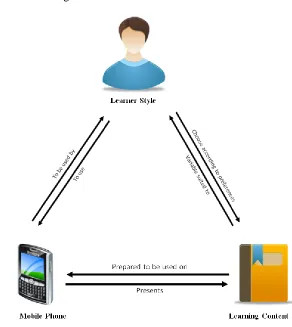
There are three important factors which need to be put into consideration when dealing
with m-learning systems; thus, ensuring that these systems have the desirable level of
quality [39] [40].
These three pillars are:
The mobile device/applications.
The learning content
Figure 3.2: Three Pillars for m-learning
As depicted in Figure 3.2, each pillarsof the m-learning system environment depends on,
or is influences by the other pillarslisted above [39] [40].
3.2.1
Learning Style
Capretz [41] describes learning style as "a term that refers to an individual's
characteristics and consistent approach to perceiving, organizing and processing
information." Every individual has his or her own learning style, and in order to
understand these styles the learning process itself must be understood. Learning in its
natural, structured manner involves a two-step process: reception and processing of
information [41] [42]. In the first step, external information, which is observable through
step, processing of information, is based on the availability of learning material. Learners
will choose and utilize learning material that they are able to process and skip the rest of
it.
According to the definitions listed above, learning styles group students based on the way
they handle, receive, and process information. These learning styles must be analyzed in
order to determine which preferences should be catered to and supported by m-learning,
and which preferences should be overlooked. We have chosen the Felder and Silverman
Model, which was introduced in [42], to classify these learning preferences. Basically,
this Model was developed for engineering classes only; however, results obtained
indicate that this model can be applied to many different classes—not only for
engineering classes as originally intended. This model defines four different dimensions
of learning. Each one of these dimensions has two characteristics that differentiate it from
the other dimensions, determining the users own particular learning style. Table 3.1
illustrates and defines the four dimensions of learning [42].
Learners have the following preferences:
1- Understanding Dimension. The understanding dimension includes two
characteristics: global and sequential. Globally, pupils learn using one of the more
popular techniques utilized by students: skimming and scanning the information.
In doing so, they often “get” the material quickly, grasping its meaning suddenly
and with little strain. However, they may not be able to explain how they
comprehended the material, or solved the problem at hand [42]. Whereas, on the
other hand, Sequential learners follow a logical step-by-step process to learn the
desired material, and they can work with the learning material if they understood
Table 3.1: The four dimensions of learning & their characteristics (based on Felder
& Silverman Model) [42]
Preferred Learning Style
Understanding
Global
Sequential
Input
Visual
Verbal
Perception
Sensing
Intuitive
Processing
Active
Reflective
2- Input Dimension. The input dimension includes two characteristics: visual and
verbal. With the visual characteristic learners prefer to use presentations,
flowchart, pictures, and diagrams to learn from [42]. They may struggle to
remember what has been said to them, and if they would like to remember
something they will probably visualize a diagram, picture, etc. Whereas, verbal
learners prefer to learn from formal dialogue and conversation, using both the
written and spoken word [42]. They also prefer to talk a lot and they learn most
effectively by explaining concepts to others.
3- Perception Dimension. The perception dimension includes two characteristics:
intuitive and sensing. The intuitive learners like innovation and prefer to discover
novel relationships and possibilities independently [42]. These learners do not
enjoy detailed material; however, they prefer to work with complicated problems
and they are good at grasping and understanding new concepts. Intuitive learners,
even though they tend to complete their work very quickly, are careless and do
not like repetitions [42]. Sensing learners, on the other hand, prefer to work with
hard data, facts, experimentation, and they like problem solving [42]. These
learners prefer to work with detailed material, and are good at memorizing facts.
slowly. They also tend to dislike surprises, and do not welcome complicated
problems.
4- Processing Dimension. Finally, this dimension has two characteristics: active and
reflective. The active type likes to discuss topics and to understand them well
enough to explain concepts to other learners [42]. Active learners do not learn
well by being alone, and they like to work and discuss topics in groups and in
teams [42]. Active learners have also been classified as experimentalists [42].
Alternatively, reflective types like to reflect on topics in a quiet manner, and they
prefer to work individually [42]. These learners do not learn very well in
situations where there was no chance to think about the material provided
beforehand.
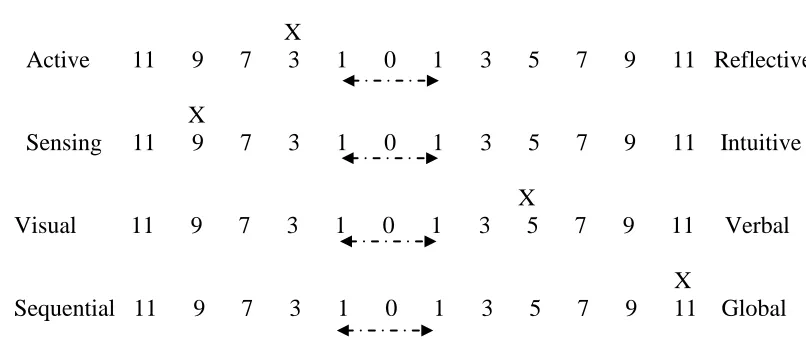
An online questionnaire was developed by Felder and Silverman to determine learners’
preferences [43], Figure 3.3 shows some results that were obtained. These results indicate
that learners may have the following learning style modes, as shown by the X character in
the four rows.
Result for: Student
X
Active 11 9 7 3 1 0 1 3 5 7 9 11 Reflective
X
Sensing 11 9 7 3 1 0 1 3 5 7 9 11 Intuitive
X
Visual 11 9 7 3 1 0 1 3 5 7 9 11 Verbal
X
Sequential 11 9 7 3 1 0 1 3 5 7 9 11 Global
Figure 3.3: Learning styles according to Felder and Silverman model
By analyzing all the previous learning dimensions we figured out that m-learning has no
characteristics rely on the way the learners use the information provided to understand
the material provided. For example, global learners learn in a big step using one of the
most popular techniques for instance skimming and scanning and they can get it suddenly
while sequential learners like to go through the material, so the material presented by
m-learning will absolutely satisfy both types of m-learning styles. Secondly, for the Input
dimensions, m-learning supports visual learning by enabling them to see a visualization
of the topic, for instance tower, bridge while they are learning the topic. Today, most of
the m-learning applications consist of pictures and diagrams. Since visual learners prefer
this type of information, it will be easy for them to use the application, which will in turn
improve the usability of the m-learning device. On the other hand, m-learning supports
verbal learners too, since they can read text on the mobile devices. Also, there some
applications that have the ability to read text to the learner, which will also ease the
process of learning for these individuals.
In regards to the perception dimension, m-learning supports sensing learning by enabling
learners to review the learning material anywhere and anytime. Additionally, m-learning
could be an advantage for the intuitive learners. Finally, the active and reflective learners
will get benefits from learning as well. Active learners have the ability to utilize
m-learning to communicate with other learners, for example, using the discussion board on
WebCT to exchange information. In addition, reflective learners can utilize mobile
devices to receive specific information about any topic while studying alone, for instance,
or when reading about topics uploaded by the instructor or reading some blogs.
3.2.2
Mobile Application
Mobile applications are just as important as learning style. They’re the cornerstone of
m-learning environments. M-m-learning environments need a robust application to deliver
learning content in an efficient way to meet learners' needs. These applications are either
pre-installed on phones during the manufacturing process, downloaded by users from
different mobile software distribution platforms, or through web applications obtained
over HTTP; for instance, JavaScript. However, these applications could include office
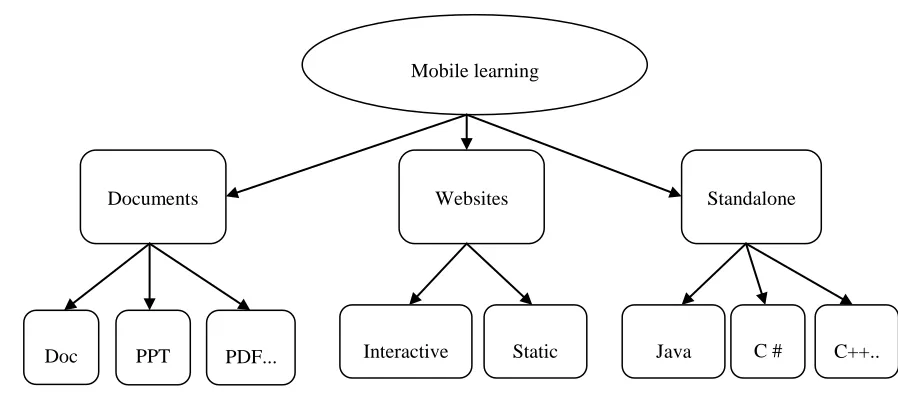
classifications of these applications are numerous: Figure 3.4 illustrates one possible
classification.
In general, m-learning applications are classified into three groups. First of all, the
“documents” application group, which contains (DOC, PPT, PDF, etc) files. Secondly,
website applications are classified into two groups: interactive websites, which may
consist of JavaScript functionality, or static sites that consist of CSS and HTML formats.
The final group: stand-alone applications. For instance, applications developed using one
of the programming languages, such as Java, C #, C++, etc.
Figure 3.4: Classification of m-learning applications
3.2.3
Learning Content
Learning content is the type of information that has to be delivered to the learners for
them to obtain knowledge [44]. This knowledge could be gained by reading or surveying
the content. In order for the learners to obtain knowledge the learning content should be
new, and not be introduced before.
Typically, there is a strong relationship between learning style, learning content, and
mobile applications—any mismatch between these three important factors will lead to
lack of motivation to utilize m-learning—which will, in turn, cause some usability
Mobile learning Application
Documents Websites Standalone
issues.; for instance, lack of learnability or understandability [46]. As a result, learning
content in itself should be prepared in different versions or formats; that way the learner
is free to choose which version of the learning content they prefer. On the other hand,
mobile devices have more varied capabilities than desktop machines. This forces
software developers to structure learning content in a way that will be compatible and
work in different kinds of devices, because not all the learners prefer to use the same
types of devices. In fact, some learners prefer to use laptops or smartphones, and others
prefer PDA. Software developers can use the Extensible Markup Language (XML) to
provide learners with the same content that will work across a range of platforms. The
learning content, in this case, can be dynamically transferred to different mobile devices
[7].
To briefly conclude, it is important that software developers understand different learning
styles, and design robust applications, providing learning content in varied formats that
will be compatible with these learning styles and work in different devices at the same
time. By doing so, the quality aspects of m-learning devices will be at the desirable level,
which will in turn help learners reach even higher levels of knowledge.
3.3
Features of Mobile Learning
With the help of m-learning students can learn anywhere and anytime [12]. m-learning,
which has been defined as a subset of e-learning, is a new kind of e-learning that heavily
relies on wireless technology to utilize mobile devices. And, in turn, these devices obtain
learning material and educational resources for students [15] [36] [38]. With these
wireless technologies, mobile learners can personalize the learning platforms to suit their
needs. Here, learners are not just students but also include instructors, workers, and
others. Under the concept of lifelong education, older generations can enjoy learning—
not only new generations. Therefore, m-learning has wireless mobility features,
extensive, interactive, high portability and sharing [47].
However, m-learning has many features compares with the traditional methods. The
features of m-learning are unaccountable and some of it can be listed as being ubiquity,
learner, with the support of wireless connectivity, can access and use the learning content
at any place, regardless of location [7]. Location awareness in m-learning can be
supported by many technologies, for instance with Global Positioning System (GPS). So,
localization is another key component of mobile devices since services can now be
offered to the learner anywhere they may be. Convenience is accomplished by the
non-stop availability of mobile devices for use [7]. In addition, instructors and learners have
the ability to create virtual classrooms, which will establish a dynamic and virtual
relationship between the instructor and learners [15]. Additionally, personalization is a
specific strength of mobile devices. The small screen size and the challenges of
navigation that users face, it means that it is really important for developers to be careful
with the content of mobile applications and that they should target the learning material
as much as possible.
In particular, the main pedagogical difference between e-learning and m-learning is that
the former occurs in a classroom, in front of a computer, or in Internet labs—during a
prefixed time and location—while the latter occurs at anytime and in any location using
mobile devices [12] [48]. M-learning can be utilized to enrich, add, or enliven different
lessons and courses, and m-learning facilitates both individual and collaborative learning
experiences [38]. Also, it helps disconnected or unfocused learners to stay more focused
for longer periods of time [15] [48].
Furthermore, one of the most important features of m-learning is always having access to
the latest information [48]. This information might range from breaking news delivered
on-line, to stock and share prices, other business information, or the latest weather
forecasts in your area. As such, having up-to-date information helps you to make the right
decisions with all the correct information at hand. Another practical use of mobile
technologies is to find information regarding the area around you. For example, you
might want to find the nearest hotel, restaurant, or bar and your mobile phone could tell
you this information quickly. You could also get certain recommendations and find a
map. Most of the smartphones today come set up with a GPS system, which utilizes
location. This means the information you obtain using mobile phones is personalized for
you; thus, it’s often more useful.
3.4
Classification of Mobile Technology
A variety of technologies can be classified as "mobile." The word mobile in itself means
movable and portable, and is associated with the meaning of personal as opposed to
shared use [49]. Mobile devices are often described as both "mobile" and "personal;"
however, a device could be one without being the other. In general, mobile technologies
can be classified using the two dimensions suggested: [49], personal vs. shared, and
portable vs. static, as illustrated in Figure 3.5.
Figure 3.5: Classification of mobile learning technologies Personal
Shared
Static Portable
Mobile phones
PDAs Tablet PCs
Game consoles Laptops
Classroom response Systems
kiosks
Videoconferencing
Electronic whiteboards
1
2
3
The first quarter of the diagram encompasses devices that are considered both personal
and portable at the same time. Many devices can be listed under this category; for
example, mobile phones, PDAs, tablet PCs and laptops. Handheld video game consoles
are also included under this category. Since a single user utilizes these devices, they are
classified to be personal. Although these devices themselves are portable and personal,
the information and the learning material on them can be shared, in an easy manner, with
other learners. Also, these devices are portable because they can be carried from place to
place; hence, they can be used in many locations. Even though, under this category, there
are some technologies that are less portable than mobile phones and tablet PCs, they all
have the ability to provide the learner with personal interaction with. For instance, a
classroom response system, depicted in the second quarter of the diagram, an individual
learning device that can be used to respond to answers to questions administrated by
another learner on the central database. As in the third-quarter, there are some examples
of these technologies that have the ability to provide learning experiences; however, the
devices themselves are physically unmovable; for instance, street kiosks. The large size
of this type of devices means that are more suitable for multiple-learner interaction and
they can be classified as being shared portable technologies.
The devices themselves, to be shareable, the interactions must be larger and less portable.
For instance, videoconferencing and whiteboards, as illustrated in fourth quarter, are not
considered to be mobile technologies, but we have included it to illustrate the complete
space of possibilities within this classification.
In the literature, there are many classifications of mobile devices. For example, Riggs and
Vandenbrink [34] classified mobile phones into three separate categories based on the
type of device, and how users interact with them. The three categories are one-handed,
two-handed, and stylus. One-handed devices are usually utilized with one hand, because
these devices have small screen sizes and always have standard keypads as the input
method. Two-handed devices have small keyboards and a larger screen size compared
with the first type. Generally, this type of devices requires the user to hold the device
![Figure 3.1: Distance learning and its subsets [9]](https://thumb-us.123doks.com/thumbv2/123dok_us/7788155.1289297/34.612.179.468.210.434/figure-distance-learning-subsets.webp)