Design and Implementation of Improved
System for College Automation and
Management
Mohitha H V1, Anandu Mohan2, Jeys Reji3, Bency S Babu4, Tintumol M G5
Assistant Professor, Department of Computer Science & Engineering, Yenepoya Institute of Technology,
Mangalore, India1
Student, Department of Computer Science & Engineering, Yenepoya Institute of Technology, Mangalore, India2,3,4,5
ABSTRACT: College Management system is an android and web based application which is helpful for students as well as the colleges. In the existing system all the activities are done manually. It is very costly and time consuming. In our proposed system, students can view results, attendance percentage, internal marks, and download notes using Android phones. The data will be stored in the college server. The faculty can login into their college account through the web based app itself and update the academic result as well as notes every day and perform a variety of tasks required by them for efficient college management. In this system, students have easy access for viewing the marks, notes and send request to faculty for upload notes and they are not permitted to change/update the marks. The proposed work has five modules: 1.Student 2.Admin 3.DEO 4.HOD 5.Faculty. In the student’s module, Students can login there admission number and date of birth into app. After login he can view internal marks, attendance details, notes uploaded by faculty, view attendance percentage, receive warning of attendance shortage, and also students can request notes to faculties. The main module in this project is administrator. All the administration works by done in this module. Admin can maintain staffs and faculties. The administrator adds data entry operator and faculties. Admin is the principal of college. The next module is Data entry operator (DEO). The functions of DEO are to add student’s details into application. Registering a new student is to add all the information’s into application. The next module is Head of the Department (HOD). The function of HOD is to manage staffs under their department. He can assign staffs for class schedule and view staff details under their department. HOD can view students under their department. The main function of HOD is to add subjects under each semester, view or approve internal marks and also view student’s attendance details of their own department and he can add academic calendar and syllabus into web application.
KEYWORDS: Android, College Automation System, SQL, JSP, HTML, Servlets
I. INTRODUCTION
record generation process in an educational institution. There is an increasing trend for higher education institutions to be expected to monitor student records. Online Attendance and Feedback System is software developed for daily student attendance in schools, colleges and institutes. If facilitates to access the information of a particular student in a particular class. There is another part which is feedback, the student can give the feedback at anytime from anywhere to faculty. This feedback can be reviewed by the admin or the management committee of the institute through which the confidentiality of the feedback of the faculty can be maintained. This application is developed for daily student management in colleges and institutes. It can also be useful in an organization or company at a certain limit not the whole application.
II. EXISTING SYSTEM
The system which is used nowadays has some drawbacks which need to be improved for better performance. The existing system which we use in our college is traditional process that includes a complete manual process. Now-a-days, education is playing very significant role in the society. Day-by-day, the percentage of illiterates are decreasing and the percentage of literates is increasing. Education will change the society in all the aspects and everyone wants to study higher professional degrees. Admissions are increasing day by day so there by ratio of establishment of new colleges are also increasing. But the actual challenge is starting from now. Most of the colleges are maintaining student information in records. When the number of records increased, it is difficult to maintain the information of each student in the old manual system. Maintaining the records manually leads to error prone and required more man power and it consumes more time for processing the records. The current system has no application to give the communication between faculty and student by the mobile for a specific college as well as for managing the faculty and students and there is no application developed for communication by giving system predefined methods. For attendance management in the present system all work is done on paper. The whole session attendance is stored in register and each of the session’s reports are generated. We are not interested in generating report in the middle of the session or as per the requirement because it takes more time in calculation. At each of session the students who don’t have 75% attendance get a notice.
III. DRAWBACKS OF EXISTING SYSTEM
1. The existing system less user friendly because the retrieval of data is very slow and data is not maintained efficiently. The use of the some technology can be time consuming. 2. It have a lots of manual work (Manual system does not mean that we are working with pen and paper, it also include working on spread sheets and other simple software's). All calculations to generate report is done manually so there is greater chance of errors. 3. Here the faculty has to suffer a lot through the calculation and if there is a loss of some report then it may cause a lot of problem. 4. This is time consuming also due to exaggerating calculation. Even after that there is some miscalculation which is very frustrating for the faculty. These calculations also effects the marks of the students which will finally led to their percentage. 5. It was limited to a single system. 6. The present system was very less secure.
IV. PROPOSED SYSTEM
The proposed system has an android OS, a web services, a database server and the user as its components. The user can login to the application through an android smart phone. The development of the new system contains the following activities, which try to automate the entire process keeping in view of the database integration approach.
User friendliness is provided in the application with various controls. The system makes the overall project management much easier and flexible. It can be accessed over the Internet.
Various classes have been used to provide file upload and mail features.
There is no risk of data mismanagement at any level while the project development is under process. It provides high level of security using different protocols like https etc.
SYSTEM ARCHITECTURE:A system architecture is a conceptual model that defines the structure, behaviour, and more views of a system. An architecture description is a formal description and representation of a system, organized in a way that supports reasoning about the structures and behaviours of the system. Fig shows the web application and the android application access data from a common Database server through the internet.
Fig 1: System Architecture Diagram
MODULES:
1 User Module: In this module we are authenticating the users by providing username and password. If username and password is valid then they will be taken to their screens. To identify user we are using unique IMEI number of android device with the number stored at server. When they get matched with each other system checks the status of that device and transfer the control to respective user-interface. 2 Attendance Module: The purpose of Attendance Entry Module is to enter the attendance. In this module Lecturer takes the attendance and they select the branch, semester and year. After this session he enters into attendance page. Here staff makes a mark on the absentees. Lecturers are only allowed to take attendance during their lecture time. 3 Marks Entry Module: The marks scored by the students are stored in the database through this module. The exam cell will login, select the type of the exam e.g., unit test, model exam and then the year, section and subject in the application which displays the students list. Now, the marks for each student is entered and submitted to store in the database. 4 Report Generation Module: This module allows the HOD and Lecturer to generate various reports on the student attendance and marks data. To generate reports, the user must login through app and ensures that internet is on. In this module, application generates PDF file dynamically using java program. 5 Auto Calculation Module: Automatically calculate the total internal marks and attendance percentage.
WORKFLOW:
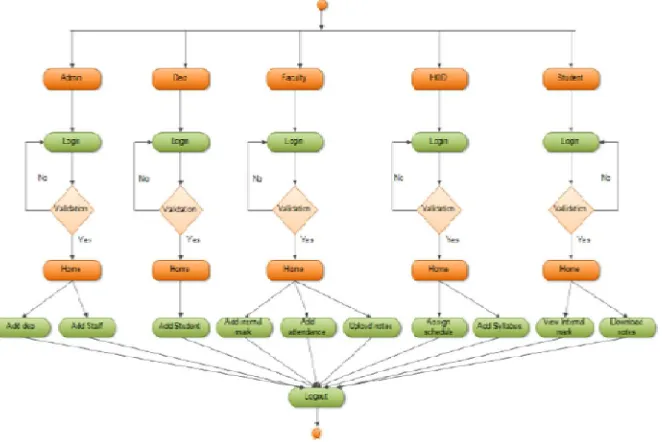
The detailed workflow of this application is as follows: The application is divided into 5 sub-groups. 1. Admin:
Admin will maintain the entire administration like Authorization, Authentication, permissions, history tracking, troubleshooting etc.
2. DEO:
Faculty can view syllabus, time table, schedules, student details etc. They can view and add internal marks and attendance.
Can send e-mail notifications to students and parents.
Faculty will access all the four year student information and go through her/his Time table as their daily activities as scheduled.
She/he can send or receive any kind of information by using Notification tab.
Teachers can also upload notes and question papers to the application branch wise & subject wise. 4. HOD:
HOD can view faculty, assign subjects, view internal marks, view attendance, add class details etc. 5. Students:
The Student will access all information (Subjects, Faculty, and Schedule) and maintain a good relation with faculty and his/her classmates as well.
He/she can send or receive any kind of information (Clarification, Queries, Notice) by using Notification tab.
Students can download the notes and question papers of all subjects of engineering branch wise.
V. BENEFITS OF PROPOSED SYSTEM
1. The application will greatly simplify and speed up the result preparation and management process. 2. It overcomes the limitations of the web based system as our proposed system is developed on Android OS. 3. As the current system is manual it does not require any sophisticated training for the User of the system. 4. This project will cater facilities to all the existing versions of android devices. 5. Students do not have to visit the college notice board every time. 6. No chance of the mistake as calculations for attendance will be automated.
VI. RESULTS
The experimental results and analysis of the application can be explained in terms of snapshots.
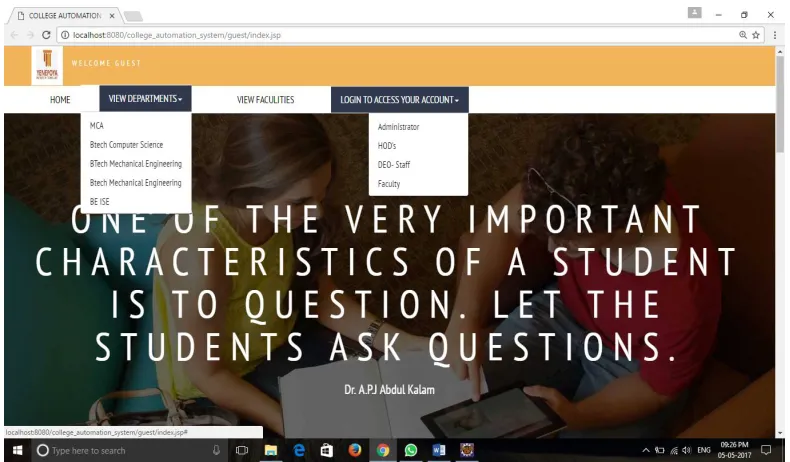
Fig 2 shows the first screen that is available to every users who opens our system. Various basic information about the college along with the department details is provided to the guest user. User can browse through each department as well as faculty details by clicking on the necessary tabs. The guest page provides the option for the core users of the system i.e. Administrator, HOD’s, DEO and faculty to login to their account using their own respective username and password.
Fig 3: Admin Home Page
Fig 3 shows the admin home page where the admin can perform various activities such as staff and department management. The staff management includes the management of staffs in the organization like adding the Data Entry Operator who is responsible for adding and editing the student details and add, edit, modify as well as deletion of faculties. The admin is also responsible for the creation, modification and deletion of departments as well as assigning the HOD for each department.
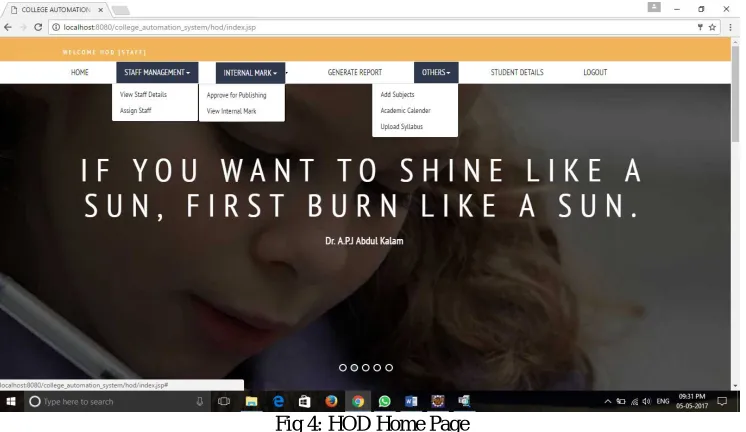
Fig 4: HOD Home Page
add subjects, assign staff to each semester and subject, uploading academic calendar and syllabus, viewing the student details etc.
Fig 5: Faculty Home Page
Fig 5 shows the faculty home page where the faculty can perform various activities such as taking attendance real time, adding the internal marks as well as viewing the internal marks, class schedule, requests made by the students etc. The requests are sent by the students from the android application and the faculty can take action accordingly on the basis of the request made. There are options available for the faculty to upload notes and question papers, viewing the syllabus, academic calendar, time table, student information etc.
Fig 6 shows the login window for the students where the student has to enter his username and password. If the user id and password entered belongs to the student then the student home page is displayed. If the entered user id and password is invalid then an error message is displayed.
Fig 6: Login Screen for students in android application
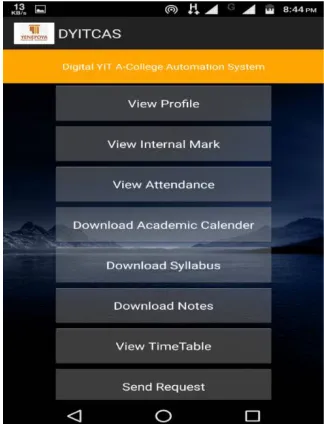
Fig 7 shows the list of activities available for the user. The activities includes view profile, view internal marks, view attendance, download academic calendar, download syllabus, notes, view time table, send and receive request from faculty. The user need to select the required section from this list.
VII. CONCLUSION
An Android and web based application for College Management System is presented. The application offers reliability, time savings and easy control. It can be used as a base for creating and enhancing applications for viewing results, tracking attendance for colleges or any workplace. Students and their parents will also view results, attendance and curriculum details using this application. Also students can view details, notifications anywhere and anytime. The application will greatly simplify and speed up the result preparation and management process. It provides high security and a system that reduces the work and resources required in traditional process. The proposed system provides the new way of computing and displaying an operation with responsive and attractive user-interface.
REFERENCES
[1] Wei Huei-Chuan, PengHsinyi, Chou Chien, Can More Interactivity Improve Learning Achievement in an Online Course Effects of College Students' Perception and Actual Use of a Course- Management System on Their Learning Achievement, Computers & Education, 2015, 83: 10-21.
[2] P.Jessenth Ebenezer, M R Muralidharan, S Srikanth, E Ramesh, Mr. S Prabhu, “ANDROID APPLICATION FOR STUDENT ACTIVITY REGISTER” vol 2 issues 2 April – May 2014.
[3] AmitaDhale, Madhav Mistry, TusharZore, “A survey on “SMART CONNECT” an android and web based application for College Management System Vol 3 issues 11 November 2014.
[4] Raghu Ramakrishnan and Johannes Grhrke: Database Management System, 3rd Edition, McGraw-Hill, 2003.
[5] Zhi-gang YUE, You-wei JIN, “The development and design of the student management system based on the network environment”, 2010 International Conference on Multimedia Communications, 978-0-7695-4136- 5/10 2010 IEEE.
[6] TANG Yu-fang, ZHANG Yong-sheng, ,“Design and implementation of college student information management system based on the web services”. Natural Science Foundation of Shandong Province(Y2008G22), 978-1-4244-3930-0/09 2009 IEEE
[7] M.A. Norasiah and A. Norhayati. “Intelligent student information system”. 4th International conference on telecommunication technology proceedings, Shah Alam, Malaysia, 0-7803-7773-7/03 2003 IEEE.
[8] Jin Mei-shan1 Qiu Chang-li 2 Li Jing 3. “The Designment of student information management system based on B/S architecture”. 978-1-4577-1415-3/12 2012 IEEE.
BIOGRAPHY
Ms. MOHITHA H Vis an Assistant Professor in Dept. Of Computer Science & Engineering, Yenepoya Institute of Technology, Mangalore, Karnataka, India.
ANANDU MOHAN is an Under Graduate student, pursuing his B.E. Degree in Computer Science and Engineering at Yenepoya Institute of Technology, Mangalore, Karnataka, India.
JEYS REJI is an Under Graduate student, pursuing his B.E. Degree in Computer Science and Engineering atYenepoya Institute of Technology, Mangalore, Karnataka, India.
BENCY S BABU is an Under Graduate student, pursuing her B.E. Degree in Computer Science and Engineering at Yenepoya Institute of Technology, Mangalore, Karnataka, India.