CERNBox: the CERN cloud storage hub
Hugo González Labrador1,∗,Georgios Alexandropoulos1, EnricoBocchi1, DiogoCastro1, Belinda Chan1, Cristian Contescu1, Massimo Lamanna1, Giuseppe Lo Presti1, Luca Mascetti1,JakubMoscicki1,PaulMusset1,EdwardKaravakis1,RemyPelletier1and Roberto Valverde1
1CERN, 1 Esplanade des Particules, Meyrin, Switzerland
Abstract.CERNBox is the CERN cloud storage hub. It allows synchronizing and sharing files on all major desktop and mobile platforms (Linux, Windows, MacOSX, Android, iOS) aiming to provide universal access and offline
avail-ability to any data stored in the CERN EOS infrastructure. With more than 16000 users registered in the system, CERNBox has responded to the high de-mand in our diverse community to an easily and accessible cloud storage so-lution that also provides integration with other CERN services for big science: visualization tools, interactive data analysis and real-time collaborative editing. Collaborative authoring of documents is now becoming standard practice with public cloud services, and within CERNBox we are looking into several op-tions: from the collaborative editing of shared office documents with different
solutions (Microsoft, OnlyOffice, Collabora) to integrating mark-down as well
as LaTeX editors, to exploring the evolution of Jupyter Notebooks towards col-laborative editing, where the latter leverages on the existing SWAN Physics analysis service. We report on our experience managing this technology and applicable use-cases, also in a broader scientific and research context and its fu-ture evolution with highlights on the current development status and fufu-ture road map. In particular we will highlight the future move to an architecture based on micro services to easily adapt and evolve the service to the technology and usage evolution, notably to unify CERN home directory services.
1 Introduction
The CERN IT Storage group is responsible for ensuring a coherent development and opera-tion of the storage services at CERN for all aspects of physics data. The group supports the data requirements for the experiments at CERN and as well as supporting storage services for the whole CERN users community (CERNBox, AFS and EOS).
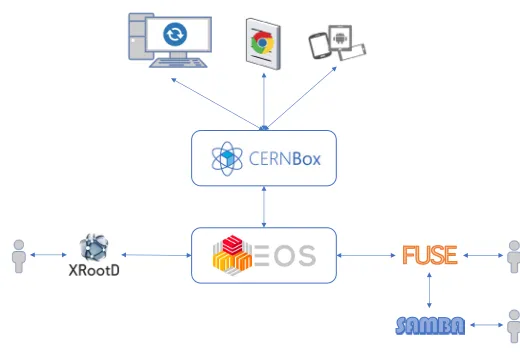
CERNBox[3][4] is a project initiative launched by the IT Storage Group in 2014 to ad-dress the necessity of offering an easy and convenient way to access and share the physics data. The core of CERNBox is a synchronization and sharing system based on components provided by the ownCloud[1] open source software stack. CERNBox provides a service layer on top of the EOS open source storage solution[5][6]. EOS allows CERNBox to store all the data and metadata from the users and provide a performant access to it. Figure 1 shows an overview of the different access methods to CERNBox:
∗e-mail: [email protected]
EPJ Web of Conferences 214, 04038 (2019) https://doi.org/10.1051/epjconf/201921404038
Figure 1.Access methods to CERNBox
• FUSE access: the storage can be mounted as a local file-system. This is very important for computers inside the computer centre that do not have graphical interfaces but perform batch job processing. It it also important as a good amount of analysis tools are not adapted to work with remote storage systems in a client-server fashion.
• WebDAV: the storage is accessible through WebDAV enabled clients like Finder for OSX, Windows Network Drives for Windows or third-party tools like CyberDuck, which brings a user-friendly access methods to end-users.
• XROOTD: the storage can also be accessed by using the xrootd high performance, scalable and fault tolerant access protocol.
• Synchronization client: this is a component, integrated in the user desktop environment, which keeps one (or more) local folders in synchronization with the central storage server. Users can work on their devices without connectivity and the synchronization client rec-onciles changes when the network connectivity is restored. This component is the one that enables access to offline data with eventual consistency.
• Web access: via any web browser the user can manipulate files and share them with other users. Some extensions (available as application plugins in the ownCloud server) provide added functionality such as easing the access to certain types of files (e.g. image viewers, office files ...).
• Mobile devices: CERNBox provides mobile and tablet applications for Android and iOS to access the data.
2 Service Numbers
The CERNBox service has been running since 2014 and its usage has increased rapidly over the last years thanks to the improvements in the service and the ongoing initiative to make this service a hub for collaboration and the future home directory for CERN users.
The user community (including physicists, engineers and administrative staff) is growing
at a fast pace as shown in Figure 2.
Figure 1.Access methods to CERNBox
• FUSE access: the storage can be mounted as a local file-system. This is very important for computers inside the computer centre that do not have graphical interfaces but perform batch job processing. It it also important as a good amount of analysis tools are not adapted to work with remote storage systems in a client-server fashion.
• WebDAV: the storage is accessible through WebDAV enabled clients like Finder for OSX, Windows Network Drives for Windows or third-party tools like CyberDuck, which brings a user-friendly access methods to end-users.
• XROOTD: the storage can also be accessed by using the xrootd high performance, scalable and fault tolerant access protocol.
• Synchronization client: this is a component, integrated in the user desktop environment, which keeps one (or more) local folders in synchronization with the central storage server. Users can work on their devices without connectivity and the synchronization client rec-onciles changes when the network connectivity is restored. This component is the one that enables access to offline data with eventual consistency.
• Web access: via any web browser the user can manipulate files and share them with other users. Some extensions (available as application plugins in the ownCloud server) provide added functionality such as easing the access to certain types of files (e.g. image viewers, office files ...).
• Mobile devices: CERNBox provides mobile and tablet applications for Android and iOS to access the data.
2 Service Numbers
The CERNBox service has been running since 2014 and its usage has increased rapidly over the last years thanks to the improvements in the service and the ongoing initiative to make this service a hub for collaboration and the future home directory for CERN users.
The user community (including physicists, engineers and administrative staff) is growing
at a fast pace as shown in Figure 2.
2
The platform also allows users for easy sharing between colleagues and external collabo-rators. This feature of the service is being used extensively (as shown in Figure 3) and shows the potential of CERNBox to continue expanding its capabilities towards a collaborative hub.
715 1652 2276 3148 7105 0 2000 4000 6000
2014 2015 2016 2017 2018
Year
Number of users
Figure 2.Number of new users every year
992 2310 17431 39247 0 10000 20000 30000 40000
2015 2016 2017 2018
Year
Number of shares
Figure 3.Number of new shares every year
In October 2018, the CERNBox service hit a record for storing 1 billion files. Figure 4 shows the evolution in number of files of the service and Figure 5 shows the increase in the raw volume used to store this amount of files.
This increased usage of the service implied a change in the infrastructure required to accommodate all these data. Section 3 describes the current challenges of the service.
3 Challenges
CERNBox is currently addressing the challenge of increasing its reliability and availability (see Section 3.1), being an integrator of different services to become a collaboration hub (see
Section 3.2) and being the home directory service for all CERN users (see Section 3.3).
3.1 Scaling-up storage
Figure 6 shows the original architecture of the EOS instance used by CERNBox. In this model, all users are connected to the same management node (MGM), which holds the meta data in memory and user data is spread across the same pool of disk servers. In this deploy-ment, the in-memory namespace is a single point of failure and when is down, all users are impacted. When this node crashes, the recovery time to have the instance up and running again can last up to two hours (the restart time is directly connected to the number of files
3
EPJ Web of Conferences 214, 04038 (2019) https://doi.org/10.1051/epjconf/201921404038
55
176
470
1035
0 250 500 750 1000 1250
Jan 2016 Jan 2017 Jan 2018 Oct 2018
Time
Number of files in millions (10E06)
Figure 4.Total number of files by year
208
806
2500
5950
0 2000 4000 6000
Jan 2016 Jan 2017 Jan 2018 Oct 2018
Time
Used v
olume in T
er
ab
ytes (10^12)
Figure 5.Total used raw volume by year
to be loaded in memory), which is not acceptable for a service that users depend on it seven days a week, twenty four hours a day (an improvement to reduce the impact was to leave the service in read only mode until the master node recovered).
The new model brings various improvement over the previous one (refer to Figure 7). The first improvement is that users are sharded by their account name across different autonomous instances. The current deployment model consists of five instances each one accommodating five different letters (if a letter is congested it can be further split into smaller instances). This sharded approach allows the contention of failures to a subset of users.
Another improvement in the model is to replace the old in-memory namespace for a disk-based high available and reliable cluster, so in case the instance crashes the recovery time is minimum as metadata do not need to be loaded in memory before serving the connected clients. The disk-based cluster uses RocksDB as the technology for persisting the data in the local disk and uses the RAFT consensus algorithm[7] to ensure high availability in case of a node failure.
The migration of users from the old to the new architecture is done gradually. The first step consists in replicating the data from the old system to the new one; this step is run using rsync[2] over two fuse-mounted local directories. The next step is to gracefully close the connection for the user to perform a final rsync (final delta) to ensure the data on both system is identical. Once this step is completed, the user account is stored on an internal database (that keeps track of the migration status for all the users of the system) and the user access is restored into the new system.
55 176 470 1035 0 250 500 750 1000 1250
Jan 2016 Jan 2017 Jan 2018 Oct 2018
Time
Number of files in millions (10E06)
Figure 4.Total number of files by year
208 806 2500 5950 0 2000 4000 6000
Jan 2016 Jan 2017 Jan 2018 Oct 2018
Time
Used v
olume in T
er
ab
ytes (10^12)
Figure 5.Total used raw volume by year
to be loaded in memory), which is not acceptable for a service that users depend on it seven days a week, twenty four hours a day (an improvement to reduce the impact was to leave the service in read only mode until the master node recovered).
The new model brings various improvement over the previous one (refer to Figure 7). The first improvement is that users are sharded by their account name across different autonomous
instances. The current deployment model consists of five instances each one accommodating five different letters (if a letter is congested it can be further split into smaller instances). This
sharded approach allows the contention of failures to a subset of users.
Another improvement in the model is to replace the old in-memory namespace for a disk-based high available and reliable cluster, so in case the instance crashes the recovery time is minimum as metadata do not need to be loaded in memory before serving the connected clients. The disk-based cluster uses RocksDB as the technology for persisting the data in the local disk and uses the RAFT consensus algorithm[7] to ensure high availability in case of a node failure.
The migration of users from the old to the new architecture is done gradually. The first step consists in replicating the data from the old system to the new one; this step is run using rsync[2] over two fuse-mounted local directories. The next step is to gracefully close the connection for the user to perform a final rsync (final delta) to ensure the data on both system is identical. Once this step is completed, the user account is stored on an internal database (that keeps track of the migration status for all the users of the system) and the user access is restored into the new system.
4
23/10/2018 Preview
1/2 In-memory
namespace ServersDisk All
users
Figure 6.Original EOSUSER architecture
23/10/2018 Preview 1/1 users A-D users E-L users U-Z ... In-memory cache Disk Servers Disk-based namespace Text
Figure 7.New EOSUSER architecture, code named EOSHOME
3.2 Collaborative platform
CERNBox started to integrate different services to become a collaboration hub. The vision
for CERNBox is to become the main application for CERN users to perform their daily work. For achieving this goal the integration with existing work flows and services is necessary.
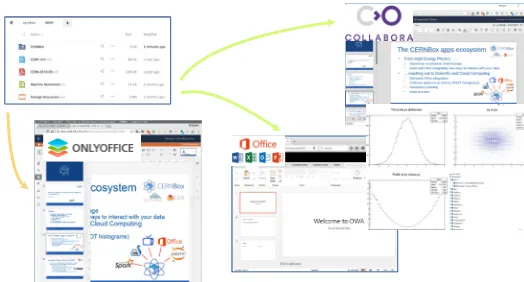
Figure 8 shows and overview of the different Office-like services that CERNBox has
integrated to facilitate the work for many users. The integration with Office 365 to provide
users editing capabilities to Microsoft Office files (word, excel, powerpoint...) has been in
production since May 2017. The integration with alternative back-ends like OnlyOffice and
5
EPJ Web of Conferences 214, 04038 (2019) https://doi.org/10.1051/epjconf/201921404038
Figure 8.Integration of CERNBox with Office-like services
Figure 9.Integration of CERNBox with the SWAN service
Collabora has been prototyped and the OnlyOffice integration will be ready to beta testers
before end of the year 2018.
CERNBox does not only integrate with office editing services like the ones described
before but also with very powerful services like SWAN[8][9]. SWAN (Service for Web-based ANalysis) is a CERN service that allows users to perform interactive data analysis in the cloud, in a “software as a service” model. The integration between CERNBox and SWAN (see Figure 9) is bidirectional. On one hand, CERNBox users can open their notebooks into SWAN without effort and have their changes synchronized back to their local computers
using the CERNBox synchronization client. On the other hand, SWAN users have access to all their data stored in CERNBox and since recent times sharing of notebooks from the SWAN interface is also possible thanks to the sharing capabilities built in CERNBox.
3.3 Unified home directory service
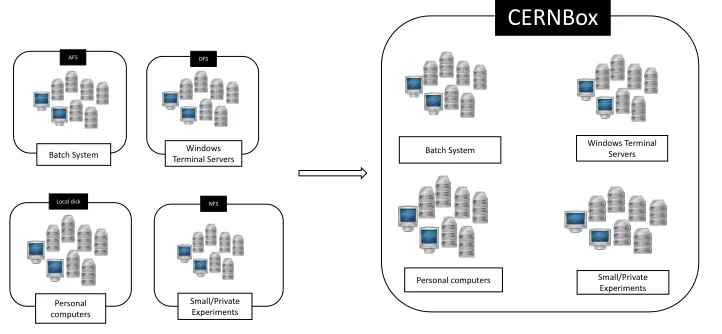
Figure 10 shows the variety of storage solutions for a home directory at CERN. For example, the batch system uses AFS for the home directory of the users, the Windows Terminal Servers
Figure 8.Integration of CERNBox with Office-like services
Figure 9.Integration of CERNBox with the SWAN service
Collabora has been prototyped and the OnlyOffice integration will be ready to beta testers
before end of the year 2018.
CERNBox does not only integrate with office editing services like the ones described
before but also with very powerful services like SWAN[8][9]. SWAN (Service for Web-based ANalysis) is a CERN service that allows users to perform interactive data analysis in the cloud, in a “software as a service” model. The integration between CERNBox and SWAN (see Figure 9) is bidirectional. On one hand, CERNBox users can open their notebooks into SWAN without effort and have their changes synchronized back to their local computers
using the CERNBox synchronization client. On the other hand, SWAN users have access to all their data stored in CERNBox and since recent times sharing of notebooks from the SWAN interface is also possible thanks to the sharing capabilities built in CERNBox.
3.3 Unified home directory service
Figure 10 shows the variety of storage solutions for a home directory at CERN. For example, the batch system uses AFS for the home directory of the users, the Windows Terminal Servers
6
CERNBox
AFSLocal disk
Batch System
Personal computers
DFS
Windows Terminal Servers
NFS
Small/Private Experiments
Batch System
Personal computers
Windows Terminal Servers
Small/Private Experiments
Figure 10.Consolidated view for a home directory service using CERNBox
use DFS, small and private experiments can have their own NFS deployment and personal computers usually use a local disk for storing the users data. The goal with CERNBox is to consolidate all these different home directory use cases into only one service that can
be accessed from any platform satisfying most of the requirements of the systems currently running. The migration from DFS is being tested for a subset of users and the migration from AFS is planned for beginning of 2019.
4 Conclusion
CERNBox plays a key role into the future home directory of CERN and its increase usage over the last years shows that the service has been well adopted by the users, becoming essential in everyday working routing. This usage is also a consequence of the integrations made with other services and it is an area to be further explored in the future.
References
[1] ownCloud, https://owncloud.com [access time: 01/12/2018]
[2] Tridgell, Andrew and Mackerras, Paul and others,The rsync algorithm(The Australian National University, 1996)
[3] Mascetti, Luca and Labrador, H Gonzalez and Lamanna, M and Mo´scicki, JT and Peters, AJ,CERNBox+EOS: end-user storage for science, Journal of Physics: Conference Series 664, 062037 (2015)
[4] H. G. Labrador,CERNBox: Petabyte-Scale Cloud Synchronisation and Sharing Platform
(University of Vigo, Ourense, 2015) EI15/16-02
[5] Peters, AJ and Sindrilaru, EA and Adde, G,EOS as the present and future solution for data storage at CERN, Journal of Physics: Conference Series664, 062037 (2015) [6] Peters, Andreas J and Janyst, Lukasz,Exabyte scale storage at CERN, Journal of Physics:
Conference Series331, 052015 (2011). 7
EPJ Web of Conferences 214, 04038 (2019) https://doi.org/10.1051/epjconf/201921404038
[7] Ongaro, Diego and Ousterhout, John K, D. Ongaro et al,In search of an understandable consensus algorithm, USENIX Annual Technical Conference,pp. 305-319, (2014) [8] E. Tejedor et al, (these proceedings)Facilitating Collaborative Analysis in SWAN, 23rd
International Conference on High Energy and Nuclear Physics,these proceedings(2018) [9] D. Piparo et al,SWAN: A service for interactive analysis in the cloud, Future Generation
Computer Systems Volume 78,1071-1078(2018)