references clearer we shall use D in front of numbers referring to the design window and P in front of numbers referring to the prompt window
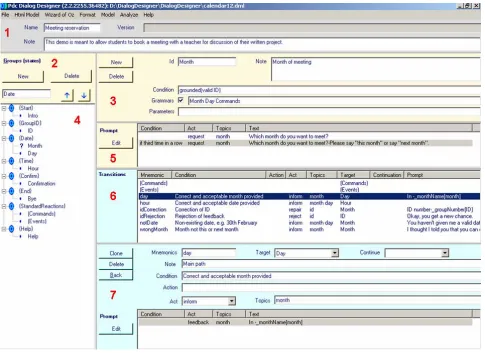
The pane at D1 is for administrative information. At D2 groups are added and named. A group consists of one or more dialogue states which conceptually belong together and are described by the group. New states are
added at D3. If there are certain conditions for entering a state the condition field should be filled. A condition on the state “hour” could e.g. be that you must have agreed on a date before you can negotiate a particular time slot for a meeting. At D4 the hierarchy of defined groups and states is shown.
Figure 1. The designer window. Red numbers are used for reference in the text.
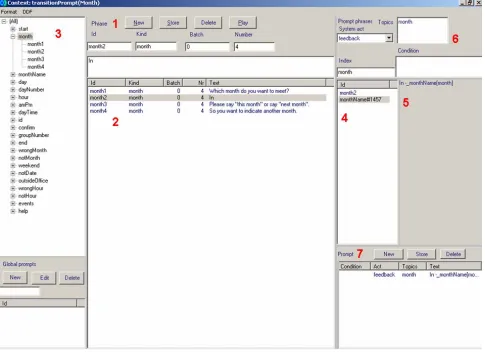
Prompts are entered at D5 via the “Edit” button which opens a new window, cf. Figure 2. In this window new phrases are entered at P1 and shown at P2. The “kind” is used for grouping phrases together. At P3 the defined kinds are shown. Each kind subsumes one or more ids. Composition of a new prompt is initiated at P7. A prompt is then composed by double clicking the relevant phrase at P2. The id of the selected phrase will be shown at P4 and the actual phrase is shown at P5. Prompts may be composed from several phrases. Each new selected phrase will be appended to the previous one(s) at P4 and P5. If, instead of a phrase a kind name at P3 is selected, a variable will be added to the prompt that may take several values, e.g. any of the twelve month names as illustrated in Figure 2. For each prompt phrase it is possible to indicate a system act and one or more topics at P6. Indication of acts and topics for each prompt is mandatory for most of the automatic analyses to work, cf. Section 4. A state may have several conditioned output prompts, cf. D5 in Figure 1.
When the prompt window is closed the entered prompt is shown at D5 in Figure 1 along with any specified condition, act and topic(s).
For each state there will very often be several possible transitions. These are entered at D7 and displayed at D6 in Figure 1. Among the information that may be entered for each transition is the act and topic(s) of the user’s input which are a precondition for choosing this transition. The prompt field at the bottom of the window at D7 works in the same way as the prompt field at D5, including indication of acts and topics. It is used to indicate e.g. feedback given when moving from the current state to the target state.
Figure 2. The prompt window. Red numbers are used for reference in the text.
4.
Act-Topic Annotation
As explained above, each system prompt and each user input utterance is described in terms of a dialogue act and one or more topics addressed. We have previously [Dybkjær and Dybkjær 2004] proposed to annotate transcribed dialogues with acts and topics to automatically identify transaction success and dialogue smoothness. Hastie et al. [2002] use annotated system utterances, but disregard user utterances, as a basis for automatic annotation of task-completion which is not necessarily the same as task success. Once we neglect user utterances, the dialogues by definition follow the dialogue model.
The approach we take in DialogDesigner builds on ideas from [Dybkjær and Dybkjær 2004] but does not use transcriptions or recognised dialogues as its basis. Rather we use the dialogue model itself as point of departure. To exploit the automatic analysis functionality in the extended DialogDesigner each prompt and each transition in the dialogue model must be annotated with speech acts and topics.
Speech acts are frequently used in SDS research. Nevertheless there is far from any agreement on a standard set of speech acts. Some use fairly few acts while others use many, and the set of speech acts used may vary considerably even when the number of speech acts is more or less the same. We believe that it is generally acknowledged that for SDS research there is normally a need for something more fine-grained than e.g. Searle’s five speech acts [Searle 1969, 1979]. We also believe that
some degree of reuse of speech acts across applications may be possible.
Speech act
Explanation
accept Speaker A accepts an offer or a check made by speaker B.
check Speaker A checks if the understanding of what was just heard is correct.
clarify Speaker A asks for disambiguation.
feedback Speaker A provides feedback on what speaker B just said.
hangup Speaker A leaves the dialogue.
inform Speaker A provides information to speaker B. offer Speaker A offers information to speaker B. other Speaker A makes unclear or null action. pause No ínput was recorded.
reject Speaker A rejects an offer, information or feedback from speaker B.
repair Speaker A corrects information, feedback or other action from speaker B.
repeat Speaker A asks for repetition of what speaker B said.
request Speaker A asks for information from speaker B. select Speaker A selects a topic offered by speaker B.
Figure 3. Dialogue acts in DialogDesigner. Note that speaker A may be the system as well as the user. The
However, no standard set of speech acts exists and hardly can exist. What is an appropriate set of speech acts is highly dependent on the sort of analysis one wants to perform. Therefore, we need to allow changes to the default set of speech acts provided by DialogDesigner. DialogDesigner version 2 comes by default with the speech acts shown and explained in Figure 3, but may be configured to other sets.
Topics are highly domain and task dependent. Therefore the user of DialogDesigner has to define his own set of topics for any dialogue model.
5.
Automatic Analyses
The “Analyze” menu point (Figure 1) is an addition in DialogDesigner version 2. When “Analyze” is selected a new window will open that provides access to a number of automatic analyses, cf. Figure 4.
The window in Figure 4 supports a “Health” check of the dialogue model via the Health button, and it supports the specification of rule patterns and subsequent analysis of whether the dialogue model conforms to the patterns, see Figure 5.
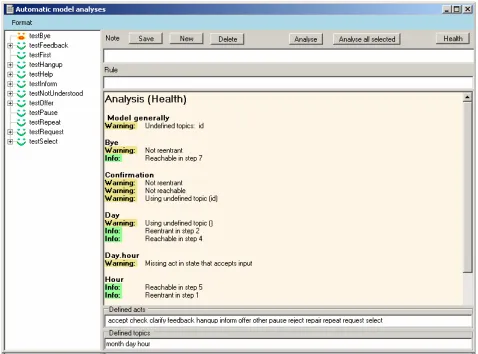
Figure 4. Results from an automatic analysis of whether it is possible to (1) reach each state in the dialogue model, (2) return to each state in the dialogue model, and (3) if there are prompts and transitions with no dialogue act indicated.
5.1. Health Analysis
“Health” currently performs four kinds of analysis on the dialogue model as described in the following.
One analysis concerns reachability. It is a check of whether it is at all possible from the initial state to reach any other state defined in the dialogue model. For each state the output is either a warning that the state cannot be reached or information about how many steps it as a minimum takes to reach the state, cf. Figure 4.
The second analysis is a check of whether one can get back to each state in a finite number of steps, i.e. is the state “re-entrant”. To prevent self-transitions from making a state re-entrant, the analysis of whether a given state is re-entrant only looks at whether there are transitions back to the state in question from any of the subsequent states. The analysis either gives a warning that a state is not
re-entrant or it informs about how many steps it as a minimum takes to get back to the state, cf. Figure 4.
Note that the two “Health” analyses just described are not based on act-topic annotation but they do provide information regarding the well-formedness of the analysed dialogue model.
The third analysis checks each prompt and each transi-tion to see if a speech act has been indicated and if it is one of the defined acts. Whenever a prompt or a transition without a speech act is found, the analysis issues a warn-ing. The speech acts are those listed near the bottom of Figure 4. The list of defined acts appears automatically.
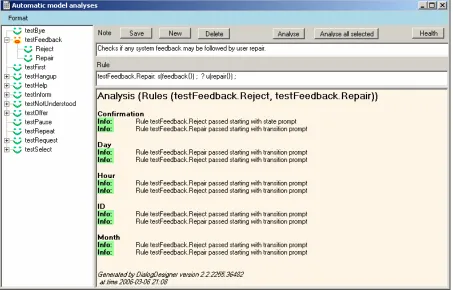
Figure 5. Analysis results from applying the selected rules to the dialogue model.
5.2. Analysis Using Act-Topic Patterns
Figure 5 shows the same window as Figure 4 but focus is now on act-topic patterns, also called rule patterns. They are entered in the “Rule” field. An explanation of what the rule does may be entered in the “Note” field. The set of defined rules is listed in the tree structure to the left.
The “Analyse” button analyses the current rule in the Rule field. If a rule or group of rules to the left is selected and you subsequently click “Analyse selected”, the analysis result will be shown in the large pane at the bottom to the right. Figure 5 shows the results of analysing two different rule patterns in one go, i.e. those subsumed under testFeedback.
5.2.1. Writing Act-Topic Patterns
Rules are simply act-topics sequences written on the following form:
RULE = NAME: CONDITION ‘?’ TURN* CONDITION = [‘^’] TURN*
TURN = WHO ‘(‘ ACTTOPICS+ ‘)’ ‘;’ WHO = ‘s’ | ‘u’ | ‘_’
ACTTOPICS = ACT ‘{‘ TOPIC* ‘}’ ACT = ‘_’ | ACTNAME
An example is
testFeedback.Repair:
s(feedback{}) ; ? u(repair{}) ;
The “s” (system) and “u” (user) are used to indicate who performs which act. Feedback and repair are speech acts. The “{}” indicates any topic(s), i.e. in the example we don’t care which topic(s) the user and the system are addressing. The example rule will cause the analysis to check if user repair is possible whenever there is system feedback.
Another example is
testHelp:
s(_{}) ; u(request{help}) ; ? s(inform{help});
The “_” indicates any speech act. Thus the rule means that whenever the system has performed an act and the model allows the user to make a request for help, it must be possible for the system to provide help.
We could make the following very similar rule instead in which only the first speech act is the condition:
testHelp:
s(_{}) ; ? u(request{help}) ; s(inform{help});
The meaning of this rule is that whenever the system has performed some speech act it must be possible for the user to ask for help and get help.
The rule matches are existential only: The analysis will succeed for a state if just one match with the rule patterns is found. The analysis does not check if there are several matches for the same state. Also, the analysis is an ab-straction in the sense that it relies on the act-topic annota-tion without computing the condiannota-tion fields of the model. In principle the act-topic annotation must be coherent with the conditions. However, in practice it means that al-though the analysis shows that a path is possible, the ac-tual runtime conditions may turn out to not allow the path.
5.2.2. Using Act-Topic Patterns
By applying the specified rule patterns and the act-topic annotated dialogue model we can check if the dialogue model is well-formed in various ways, i.e. if it follows the specified rule patterns. We have specified act-topic patterns to perform the following analyses: