The WaveSurfer Automatic Speech Recognition Plugin
Giampiero Salvi and Niklas Vanhainen
KTH, School of Computer Science and Communication, Department of Speech Music and Hearing, Stockholm, Sweden{giampi, niklasva}@kth.se
Abstract
This paper presents a plugin that adds automatic speech recognition (ASR) functionality to the WaveSurfer sound manipulation and visualisation program. The plugin allows the user to run continuous speech recognition on spoken utterances, or to align an already available orthographic transcription to the spoken material. The plugin is distributed as free software and is based on free resources, namely the Julius speech recognition engine and a number of freely available ASR resources for different languages. Among these are the acoustic and language models we have created for Swedish using the NST database.
Keywords:Automatic Speech Recognition, Free Software, WaveSurfer
1.
Introduction
Automatic Speech Recognition (ASR) is becoming an im-portant part of our lives, both as a viable alternative for humans-computer interaction, but also as a tool for linguis-tics and speech research. In many cases, however, it is trou-blesome, even in the language and speech communities, to have easy access to ASR resources. On the one hand, com-mercial systems are often too expensive and not flexible enough for researchers. On the other hand, free ASR soft-ware often lacks high quality resources such as acoustic and language models for the specific languages and requires ex-pertise that linguists and speech researchers cannot afford.
In this paper we describe a plugin for the popular sound manipulation and visualisation program WaveSurfer1
(Sj¨olander and Beskow, 2000) that attempts to solve the above problems. Firstly, the plugin, as the WaveSurfer pro-gram, is free software. We chose to release the plugin un-der the GPL License. Secondly, it makes the functionality of the Julius2 recognition engine available to the user in a
simple way, without the need to learn how Julius works. Finally, we use ASR resources that are freely available, and we promote the development of such resources for lan-guages with a relatively small number of speakers, such as Scandinavian languages.
To support this effort, we created an ASR dedicated web-site3where we will collect all the resources that we develop or that become available to us. We recently trained acoustic and language models for large vocabulary speech recogni-tion in Swedish (Vanhainen and Salvi, 2014) that are avail-able for download at that site and that are included in the plugin.
Although still in a early stage of development, this plugin should enable linguists and speech researchers to take ad-vantage of the possibilities offered by speech recognition. It should, e.g., simplify the task of annotating speech material as well as provide a useful tool for educational purposes.
1
http://www.speech.kth.se/wavesurfer/ 2
http://julius.sourceforge.jp/ 3http://www.speech.kth.se/asr
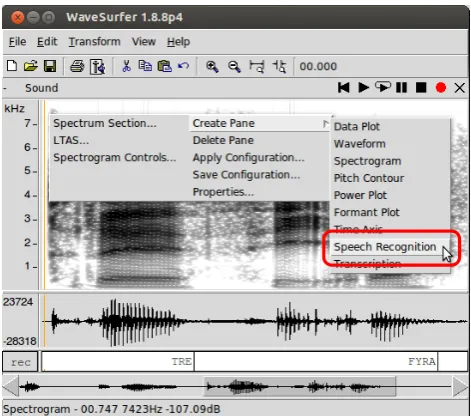
Figure 1: The Speech Recognition plugin adds an entry in theCreate Panemenu.
1.1.
Related Work
Many free software packages are available that implement general ASR functionality. The most popular, besides the already mentioned Julius, are CMU Sphinx4(Lamere et al., 2003), and Kaldi5 (Povey et al., 2011). Although these provide the fundamental building blocks to perform speech recognition, they usually require a certain degree of exper-tise from the user for setting up and running.
A few software packages provide tools for speech an-notation and speech analysis in a user friendly manner. Probably the best known are Praat6(Boersma, 2002), and
WaveSurfer. However, at the time of writing, we are not aware of any ASR functionality implemented for neither of these software packages.
Recently, Bigi (2012) developed a tool for phonetic seg-mentation of speech that is available on Linux, Mac OSX and MS Windows7. The tool, as our plugin, is dependent
4
http://cmusphinx.sourceforge.net/ 5
http://kaldi.sourceforge.net/ 6http://www.fon.hum.uva.nl/praat/ 7
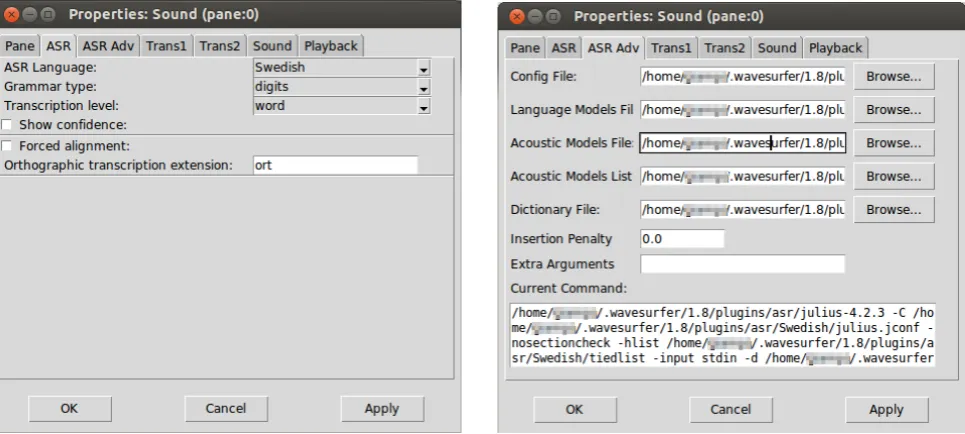
Figure 2: The properties window for the automatic speech recognition plugin. Left: basic properties, right: advanced properties.
on the Julius speech recogniser and is used to facilitate the annotation of speech material at the phonetic level. The goal of our plugin is to provide user-friendly, but highly configurable speech recognition functionality in a software package that is already equipped with many other speech related functions. In this way, the user can take advantage of the power and flexibility of popular software packages, all integrated in the same tool.
2.
The Plugin
WaveSurfer’s functionality is organised inpanes. For each sound object, the user can add different panes with the de-sired functions, ranging from waveform display, to spectro-gram, multiple transcriptions, and so forth.
Once installed, the Speech Recognition plugin adds an entry called Speech Recognition in the Create Panemenu (see Figure 1).
The Speech Recognition pane is a transcription pane with embedded ASR functionality. If we choose to create a Speech Recognition pane, the plugin will use the default settings to attempt to recognise the content of the current sound object and will display the results in the transcrip-tion.
2.1.
Options and Functionality
By right clicking on this special transcription pane, and se-lecting Properties, the user has access to the recog-nition parameters (see Figure 2). Two tabs are added to WaveSurfer property window. The first, entitledASR (Fig-ure 2 left), contains basic settings for the recogniser. The second, entitled ASR Adv(Figure 2 right), contains ad-vanced settings.
The first option in the basic settings allow the user to se-lect among the installed languages. The plugin has been designed in a modular way, so every time a new language is installed, a new entry will automatically be created in the ASR Languageselector.
The Grammar typeoption lets the user choose among few example grammars that were provided by the language package. Examples can bedigits,1kwordsfor 1000 word grammar, and so on. These examples are provided as a starting point to test the recogniser. Depending on the recogniser performance in the specific language, it may be necessary to constrain the recognition grammar to the spe-cific task the user is interested in. At the moment of writing, defining new grammars is not possible through the plugin, but we release scripts that may help users achieving this of-fline and then using the custom grammar files with the help of the advanced options.
TheTranscription leveloption lets the user select if the recognition output should be displayed at the word or phoneme level.
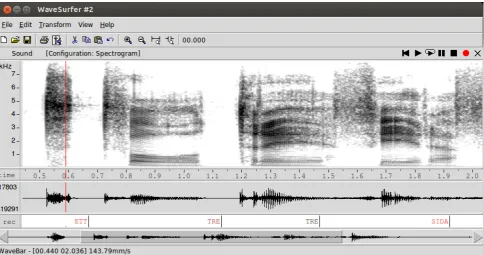
If theShow confidencecheckbox is activated, the plu-gin will display the confidence of the recognizer for each word by varying the font colour. Black fonts correspond to high confidence, whereas red fonts to low confidence. This options is based on the normalised confidence measure called “cmscore1” in Julius and is therefore only available for word-level transcriptions. An example of words recog-nised with different levels of confidence is shown in Fig-ure 3.
Figure 3: Example of automatically generated transcription for a speech utterance in Swedish. The confidence for each word is expressed by font colour in the labels. Black font corresponds to high confidence, red font to low confidence.
5.1.
Installation
Although the plugin installation is fairly easy, it would be beneficial to take advantage preexisting software packaging systems available in some architectures. In Debian-derived GNU Linux distributions, for example, software can be conveniently packaged intodebpackages with the possi-bility to define dependencies. The plugin package could be made dependent on the already existing Julius package, and the language specific files could be distributed as stan-dard language packages for Julius. This would not only greatly simplify the installation process, but it would make sure that those resources are not duplicated on the computer disk and can be used for other applications as well as this specific plugin.
5.2.
Language Models
Whereas acoustic models can usually be applied to different speech recognition tasks without modification, it is critical for an application such as this to allow the user to define the recognition grammar for the current task. Large vocabulary speech recognition without specific context has a level of performance that is not adequate for most applications. In the current version, changing the recognition grammar can be done through the advance options of the plugin, and with the help of some scripts that we provide. This however requires knowledge of the details of how Julius works, and is not accessible to all users. A user-friendly interface to introduce constraints to the list of words to be recognised, for example, would be beneficial.
5.3.
Forced Alignment
The forced alignment option in the plugin is at the moment rudimentary. Two areas that are fundamental for forced alignment to work properly are:
1. handling out-of-vocabulary words
2. handling reduction and assimilation within and be-tween words
Both these functions require language dependent knowl-edge that should be included in future releases of the plugin.
5.4.
Adaptation
As with many tools that make use of speech technology, it is very important to adapt the recognition models to the situation they are applied to. In order to make this possible with minimum effort from the user, it would be beneficial to develop a number of extensions to the plugin.
Firstly it should be possible to easily add words and their pronunciations to the lexicon. It should be possible to cor-rect recognition errors from the transcription pane, and at the same time inspect and correct the cause of these errors, e.g., by adding alternative pronunciations in the lexicon. It should be possible to adapt the acoustic models to the cur-rent data, based on the corrected transcriptions. The user should finally be able to upload the modifications to the models to our web site, making them available for future versions of the plugin.
6.
Conclusion
ef-fort of transcribing speech material, and hopefully enable a wide range of possibilities in speech research.
7.
References
Bigi, B. (2012). Sppas: a tool for the phonetic segmenta-tion of speech. In Calzolari, N., Choukri, K., Declerck, T., Dogan, M. U., Maegaard, B., Mariani, J., Odijk, J., and Piperidis, S., editors,LREC, pages 1748–1755. Eu-ropean Language Resources Association (ELRA). Boersma, P. (2002). Praat, a system for doing phonetics by
computer. Glot international, 5(9/10):341–345.
Lamere, P., Kwok, P., Gouvea, E., Raj, B., Singh, R., Walker, W., Warmuth, M., and Wolf, P. (2003). The cmu sphinx-4 speech recognition system. InIEEE Intl. Conf. on Acoustics, Speech and Signal Processing (ICASSP 2003), Hong Kong, pages 2–5. Citeseer.
Povey, D., Ghoshal, A., Boulianne, G., Burget, L., Glem-bek, O., Goel, N., Hannemann, M., Motlicek, P., Qian, Y., Schwarz, P., et al. (2011). The kaldi speech recogni-tion toolkit. InProc. ASRU, pages 1–4.
Sj¨olander, K. and Beskow, J. (2000). Wavesurfer - an open source speech tool. InProc. of Interspeech, pages 464– 467.