IMS Learning Design and
Lifelong Competence
Development Infrastructures
Proceedings of the
3rd
TENCompetence Open Workshop
Barcelona, Spain, 2
1
st
and
2
2
nd
J
une
2007
Current Research on IMS Learning Design and
Lifelong Competence Development Infrastructures
Proceedings of the 3rd TENCompetence Open Workshop Barcelona, Spain, 21st and 22nd June 2007
Edited by Toni Navarrete, Josep Blat and Rob Koper
Published by Universitat Pompeu Fabra, Grup de Tecnologies Interactives, 2008
ISBN: 978-84-88042-62-0
These proceedings are licensed under a Creative Commons Attribution-Noncommercial-No Derivative Works 2.5 Spain License.
Members of the Programme Committee
Wolfgang Greller, AustriaGilbert Paquette, Canada Griff Richards, Canada George Bekiaridis, Greece Ignacio Aedo, Spain Paloma Díaz, Spain Juan Manuel Dodero, Spain Baltasar Fernandez-Manjon, Spain Alfredo Fernandez-Valmayor, Spain Rocío García, Spain
Fabien Girardin, Spain Davinia Hdez Leo, Spain Ayman Moghnie, Spain Toni Navarrete, Spain Sergio Sayago, Spain
Judith Schoonenboom, The Netherlands Graham Attwellin, UK
Lester Gilbert, UK Dai Griffiths, UK Steve Lay, UK Patrick Mcandrew, UK
Antonio Gómez-Skarmeta, Spain
Members of the Local Organising Committee
Josep BlatToni Navarrete Ayman Moghnieh Fabien Girardin
Introduction
These proceedings consist of the papers presented at the Third TENCompetence Open Workshop which were accepted after peer reviewing. The workshop theme was Current Research on IMS Learning Design and Lifelong Competence Development Infrastructures. The workshop took place at the Universitat Pompeu Fabra, Barcelona, Spain, on the 21st and 22nd of June 2007.
TENCompetence is an Integrated Project funded by the EU 6th Framework Programme, which runs for four years from December 2005. The aims of the project are to develop a European, open-source infrastructure that will support the lifelong development of competences. More specifically the infrastructure will enable individuals, teams and organisations to:
1. Create formal and informal Learning Networks in different professions and domains of knowledge.
2. Assess and manage the competences that are acquired at any stage in life by the participants of the Learning Network, taking into account that people have learned from many different formal and informal learning sources.
3. Stimulate the reflection on the current competences to support the formulation of new learning goals.
4. Search for adequate formal and informal learning resources to build new competences or to update existing competences in a profession or domain of knowledge.
5. Provide the actual learning environment that is needed to perform the learning activities.
6. Provide effective and efficient support to learners. 7. Support the sharing of learning resources.
To meet these needs the project has developed a domain model for Lifelong Competence Development. This has been implemented in a client-server system called the Personal Competence Manager (PCM) which enables individuals, groups and organisations to manage the whole range of their lifelong competence development activities. The system integrates a number of existing open-source applications, together with the outcomes of research and development work carried out by the project into models and tools for:
• Knowledge resource sharing and management
• Learning and assessment activities
• Competence development programmes
• Networks for lifelong competence development
A key part of the strategy adopted by the project is the use of open-source licenses for all software which is adapted or developed for inclusion in the TENCompetence system, and publication of all models and other relevant documentation under Creative Commons licenses. To make this strategy effective, the project promotes public engagement with the research which it undertakes through a series of public workshops. These are of two
types. Firstly, the project organises its own open workshops, each with a theme related to the research being undertaken by the project. The first of these was held in Sofia, Bulgaria, in March 2006, and the second was in Manchester in January 2007, while the third one in Barcelona led to the production of these proceedings. Secondly, the project collaborates with other organisations to set up workshops which address related issues, as was the case with the joint PROLEARN – TENCompetence workshop at EC-TEL 2006, at ICALT 2006, and at e-Portfolio 2007.
The project also organises an annual winter school, where PhD students are invited to become part of the TENCompetence research community. The proceedings of all these events are available from the TENCompetence public Web site1.
The area of Lifelong Competence Development is extremely wide, as it includes (among other aspects) informal learning, professional development, higher education, competence based approaches, assessment models, learning design and IMS Learning Design (LD), and personal development activities of all sorts. As might be expected, the issues raised by the provision of a technical infrastructure to support this wide field are also wide ranging, including Service Oriented Architectures, programming frameworks, open-source organisational models, interoperability specifications, domain models, Personal Learning Environments, competence frameworks.
Within this wider context the theme chosen for the Barcelona workshop was Current Research on IMS Learning Design and Lifelong Competence Development Infrastructures. UPF, the local organiser, had been coordinating the UNFOLD project2, supporting the uptake of IMS Learning Design, which set up an international community all over the world around it. Thus, the workshop aimed at providing an overview on current research on IMS Learning Design (LD) in relation to competence development. The workshop call asked for papers on:
• Development of LD tools and architectures, eg, editors, content management systems, runtime engines
• Advanced applications of LD (eg, in gaming, collaborative learning, competence development, ePortfolios)
• Research and technology development to support users in creating an adequate learning design (e.g. software agents or design aids)
• Research to evaluate the ability of the LD specification to integrate the following criteria: completeness, pedagogical flexibility, personalization, re usability, formalization, etc.
• Evaluation of the use of LD in practice, including the integration of a variety of specifications in a learning environment
• Positioning LD in the wider context of learning, training and instruction, or definition of the current state-of-the-art in LD
• LD for formal and informal Lifelong Learning and Competence
Development
Due to the growing relevance of Social software and Web 2.0 services, the call mentioned that this could be an approach underlying those specific issues.
1
http:// www.tencompetence.org
2
sections which were established for the programme of presentations at the workshop. Two sections had the largest number of papers, namely Learning Design and Assessment and monitoring, while the sections Pilots, Repositories and Metadata, and Learning paths and competence frameworks had less papers accepted. On the whole, 12 papers which made a very interesting workshop for the attendees; most contributors came from Spain, as might have been reasonable to expect.
The Editors: Toni Navarrete Josep Blat Rob Koper
Contents
LEARNING DESIGN __________________________________________________ 1
Extending IMS Learning Design services using Widgets: Initial findings and proposed architecture. ___________________________________________________________ 3
Scott Wilson, Paul Sharples, Dai Griffiths
Design Principles for LAMS Version 2 and the LAMS “Tools Contract” ___________ 13
Ernie Ghiglione and James Dalziel
Some Findings from the Evaluation of the Collage Authoring Tool _______________ 27
Davinia Hernández-Leo, Eloy D. Villasclaras-Fernández, Juan I. Asensio-Pérez, Yannis Dimitriadis
Experiences with GRAIL: Learning Design support in .LRN ____________________ 33
Luis de la Fuente Valentín, Abelardo Pardo, Carlos Delgado Kloos
PILOTS, REPOSITORIES AND METADATA ____________________________ 41
Pilot evaluation in TENCompetence: a theory-driven model _____________________ 43
Judith Schoonenboom, Henk Sligte, Ayman Moghnieh, Marcus Specht, Christian Glahn, Krassen Stefanov
Pedagogically informed metadata content and structure for learning and teaching ____ 51
Lester Gilbert, Onjira Sitthisak
ASSESSMENT AND MONITORING ____________________________________ 61
Enhancing IMS QTI Assessment with Web Maps _____________________________ 63
José Bouzo, Helena Batlle, Toni Navarrete, Josep Blat
A support model for question-answering ____________________________________ 75
Van Rosmalen, P., Brouns, F., Sloep, P., Kester, L., Berlanga, A., Bitter, M. Koper, R.
A Domain-specific Modeling Approach to the Development of Online Peer Assessment ____________________________________________________________________ 81
Yongwu Miao, Rob Koper
Requirements for Flexible Learner Monitoring _______________________________ 89
Christian Glahn, Marcus Specht, Rob Koper
LEARNING PATHS AND COMPETENCE FRAMEWORKS________________ 97
Towards a practitioner-centred approach to the design of e-learning competence editors ____________________________________________________________________ 99
Fabien Girardin, Ayman Moghnieh, Josep Bla
Dependency Matrix and Duration in Time Based Composition of Learning Paths ___ 105
Extending IMS Learning Design services using
Widgets: Initial findings and proposed architecture
Scott Wilson, Paul Sharples, Dai Griffiths
University of Bolton
E-mail: [email protected], [email protected], [email protected]
Abstract: IMS Learning Designs provide a specification for the activities undertaken by learners within an environment; currently the definition of the environment is typically a set of web resources and files, with the potential to add two basic types of tool: conferencing and mail. In this paper we describe our initial findings on using a lightweight approach to the addition of small applications (‘widgets’) to the palette of options available for Learning Design environments.
1 Introduction
IMS Learning Design is a specification aimed at supporting a wide range of pedagogical scenarios, whereby a teacher or designer specifies a set of activities and the environment in which they take place. The environment involves content, such as web pages and documents, but also what the specification calls services. Services are intended to designate interactive tools in an environment that support a particular activity.
At the time the specification was developed it was imagined that such services would be provided as part of a single integrated system that ‘ran’ the learning design. For example, a Learning Management System with an integrated forum and chat system.
However, the emerging concepts of distributed eLearning systems, such as personal learning environments [1] suggest that instead the services supporting an activity may be relatively autonomous small applications. Also, the range of services defined within the specification is very limited and would benefit from being extended to support a much more diverse set of tools.
Two possible architectures can be envisaged that allow for the use of a richer, less closely bound toolset. Firstly, there is the model of using a local framework for the instantiation of tools within a managed environment. Second, there is the use of a wider framework to incorporate tools distributed across the web.
2 Local tool frameworks
The LAMS [2] system offers a much richer tool environment than conventional Learning Design-compliant systems. This uses standard Java deployment conventions to provision
the tools in the environment, and a local API to integrate the tools with the runtime behaviours and also the authoring environment as a single system.
Widget engines such as Apple Dashboard [3], Windows Vista Sidebar [4], and Yahoo! Widgets [5] employ a similar approach with a tool packaging format, local API, and a deployment environment. These technologies are the focus of new standardisation efforts by the World Wide Web Consortium [6].
Advantages of local frameworks:
• Conventions make it easier to develop new tools
• Consistent deployment and management for administrators
• Obviate the need for an identity framework – tools are able to use the local security context to acquire any user information which policy allows
• Tools tend to be smaller and focussed on a single purpose rather than larger with lots of overlapping features, making them easier to fit to role within a learning design activity
Disadvantages:
• Tools must be deployed and managed in a single location
• Tools tend to be restricted to a particular programming language; in the case of LAMS this is Java; in widget engines it tends to be JavaScript
• Tools are generally limited in size and complexity; usually this is a benefit but can be a disadvantage where complex functionality is needed
3 Remote tool frameworks
Remote tool frameworks are very much dependent on the identity architecture that enables tools to obtain information about users and launch context across the network in a manner that respects privacy concerns and does not expose the system to unauthorized snooping. Currently, Shibboleth [7] provides one such framework, as does OpenID.
Overall, the authors have so far not identified an existing working system, although several developments are underway, such as the IMS Learning Tools Interoperability specification [8].
Advantages of remote frameworks:
• Tools can be developed using any programming language
• Tools can be much larger than a simple “widget” Disadvantages:
• Distributed security and privacy issues need to be tackled
• Tools will generally need to be larger and more complex, as fewer concerns are delegated to the framework
• Tools will tend to offer more features, but by doing so create issues of overlapping functionality, making them less easily repurposed within learning designs
Given this state-of-the-art, the authors decided to investigate the use of the widget engine approach for learning design tools.
4 Widgets
Widgets can be described as a type of single-purpose application, which rather than operate in a completely standalone fashion instead is deployed within a framework that handles basic functions and services. Today, there are two distinct types of “Widgets” in common usage.
Widgets on the desktop
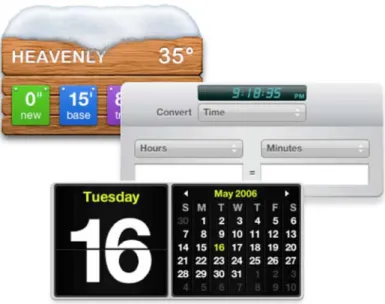
The term “widget” for this type of application was initially used in relation to the Konfabulator platform for Mac OS X and Windows operating systems, originally conceived by Arlo Rose in 1998 and released in 2003 [9]. Konfabulator provided a layer within which lightweight applications could float over the users desktop. Unlike traditional applications, Konfabulator “Widgets” were very easy to write, having more in common with “skins” over Internet services than full desktop applications, and a very large base of third-party widgets quickly sprang up. Typical widgets included News aggregators, clocks, calculators, calendars, desktop notes and weather forecasts (see Figure 1).
In 2005 Yahoo! acquired Konfabulator. Around the same time, Apple released Dashboard, a Widget engine built into Mac OS X [3]. Microsoft in 2007 released SideBar, a Widget engine for Windows Vista [4].
Each of these Widget platforms had certain common features:
• Widgets typically have a user interface defined using HTML and CSS, just like a web page (Yahoo! Widgets uses a proprietary XML format very similar to HTML)
• Widgets have business logic written in JavaScript
• Widgets are packaged with a metadata manifest that describes how they should be instantiated by the Widget engine
• The Widget engine offers an Application Programming Interface (API) for enabling Widgets to store and retrieve user preferences, make use of network facilities and, in some cases, operating system facilities such as the command shell [10]
• The Widget engine renders Widgets and handles Widget interactions, typically as a layer associated with the user desktop
These characteristics make developing Widgets relatively simple for the developer, and a very large number of Widgets have been developed. At the time of writing, 2960 different Widgets have been written for Apple Dashboard [11].
As the number of Widget engines has increased, interoperability of Widgets across different engines has emerged as a problem; for example, Widgets written for Apple Dashboard will not work on Windows SideBar as the two Widget engines use very different APIs for accessing the framework. In response to this, the World Wide Web Consortium (W3C) began work on a standard for Widgets. At the time of writing an initial requirements draft has been produced [12] which sets out the general direction of the group, and in particular identifies aspects of Widgets that might be standardised:
• The packaging format used to encapsulate and distribute Widgets
• The media type used for Widgets
• The structure of the manifest used to describe Widgets
• The scripting interface (API) used by Widgets to communicate with the Widget engine
Web widgets
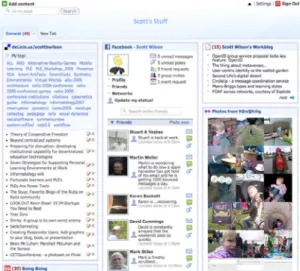
While Widgets on the desktop have attracted the most attention initially, there has also been a parallel development of Widgets for the web. Typically this means small chunks of web functionality that have the facility to be embedded in other web applications; for example, adding an instant messaging tool to a weblog to enable live interaction with visitors. As with desktop Widgets, a number of Widget engines have emerged to provide a platform for multiple Widgets to be coordinated; these include Netvibes [13] and PageFlakes [14], and just like their Desktop counterparts offer an API for interacting with the framework (see Figure 2.)
Figure 2. Netvibes, a Web widget engine.
Overall the development of Widgets on both the desktop and the web has been part of a trend towards the convergence of web and desktop application architecture.
Collaboration widgets
Desktop Widgets and their supporting engines have been developed in response to the need from users to access discrete chunks of functionality in a simple and fun way, but exclusively from a single-user viewpoint. While there are “chat” widgets, these operate by providing a façade onto a complete desktop communication tool such as iChat [15]. Widget engines are very much personal rather than shared infrastructure, and there are no mechanisms to share a dashboard or a sidebar amongst users.
Web Widgets have followed largely the same route, however the Widget context – whether engines like PageFlakes or individual blogs – is a public space, and so there is more scope for collaboration. A number of collaborative web widgets have been developed, such as the chat tools Gabbly [16] and 3Bubbles [17].
Widgets and Learning Designs
Widgets have a number of properties that make them of interest in extending Learning Design. First, the large number of existing Widgets and their ease of development offer a potentially effective way to enrich a Learning Design platform with new functionality. Second, while there are relatively few collaborative Widgets today, a Learning Design framework offers a context where such Widgets may be usefully developed. Finally, Widgets provide a very attractive and interactive user interface that could improve engagement with Learning Design-based systems. The authors feel that Widgets offer an interesting new take on adding interactive features to learning designs, and one which could be implemented in a relatively straightforward fashion building on existing tools and conventions.
5 Proposed architecture
The approach investigated by the authors uses a Widget engine (the Widget Server) as an add-on to an existing Learning Design runtime system, in this case the CopperCore engine [18] combined with the SleD rendering layer [19]. The Widget Server, like a desktop or web Widget engine, offers a scripting API for widgets, and is responsible for instantiating Widgets required by users within the presentation context (See Figure 3.)
The overall design follows the initial work of the W3C Widgets specification combined with aspects of the Apple Dashboard Widget API, but is applied within a web context rather than a desktop context. This has some particular implications for the design, as described later in this section.
Widget Invocation
The flow of events begins with the rendering by SleD of an environment for a user. SleD invokes the CopperCore Service Integration component to obtain the rendering of the environment. In addition to the existing handlers, a special WidgetHandler is included that is responsible for handling Services of the “Widget” type. This handler invokes the Widget Service and requests a new Widget instance URL from the engine that can be loaded into an iFrame by SLeD. The URL contains launch context information in the form of an opaque hashcode, and an API key that identifies the Widget when it calls the API.
Note that, unlike in LAMS, where tools are explicitly defined within the learning design during authoring, in this architecture the designer only indicates the types of Widgets needed within parts of a design using an extension to the Learning Design Environment construct, similar to the existing “service” element. The actual Widget implementation used is dynamically determined when the design is run. Any dynamically extended system – including both LAMS and a Widget-based application - have to gracefully handle the absence of a specified tool in a given instance; we propose using simple widget type descriptors (“chat”, “voting”) rather than specific widget identifiers in the design itself as a way of enabling the implementation to locate an appropriate widget. This is especially important where the design is authored in one environment and deployed in another.
Widgets obtain their initial state via calls to the Widget API (q.v.), which can include requests for particular learning design properties, which might include Widget-related settings. This represents a "late binding" approach in contrast with the LAMS "early binding" approach1.
Widget API
As the user interacts with the Widget in their browser, the Widget’s JavaScript logic is able to interact with the Widget API, which is provided to the Widget as a JavaScript library. This API offers a range of capabilities, including callback events for responding to external events (e.g. the Widget being locked, or shared state updated by another user), accessing and saving user preferences, shared states, and global properties.
Each of these capabilities is utilised by accessing the Widget JavaScript object. As all interactions between a Widget and the Widget Service via the API are made using AJAX, the architecture is entirely asynchronous. This means that Widgets must be constructed using event callback handlers.
Installing Widgets
The Widget Server offers a facility for installing new Widgets so they are made available for use in learning designs. This could make use of a number of import routines, for example to enable the installation of Widgets that conform to the W3C Widget Specification (when it becomes available) or in other conventional formats such as Apple Dashboard Widgets, Windows SideBar Gadgets, and Yahoo! Widgets. These must be
categorized when registered with the server so that Widget requests from CCSI can be matched with an appropriate Widget.
Widget Proxy Service
Modern browsers enforce a same origin policy [20] to prevent cross-site scripting attacks taking place, whereby information within one browser context is communicated to a different website without the user’s knowledge or permission. This has the side effect of making calls from a Widget to a remote data source, such as an RSS feed, impossible. To get around this restriction we place a server-side proxy within the same domain as the Widget Server that Widgets can call instead. The proxy routes requests from valid Widgets to remote sites and passes through their responses. This routing can be supported with filtering rules such as blacklists and whitelists.
Locking and unlocking Widgets
One of the key differences between the proposed solution and the standard Widget engines is the ability for a Widget to be locked. A locked Widget is no longer able to set any preferences, shared data, or learning design properties. This is important when, for example, a learning design involves a collaboration session where the outcomes are used for assessment; the teacher needs to be able to freeze the content of the tool (e.g. chat, discussion, whiteboard session) so that it can be used for the assessment activity. This is supported in the architecture at two points: within the Widget API, so that it can be invoked from a Widget itself, and in the Widget Service, so that it can be invoked from CCSI in response to evaluating the state of the learning design itself. In the latter case this would most likely be where a Widget is locked after a user has completed the activity it is involved in.
Security and privacy
The use of an opaque hashcode for contextualisation obviates any need for the transmission of user information across the network; likewise the use of an iFrame for placing the Widget within the browser prevents cross-site scripting attacks, and the Widget Proxy Service enables the server administrator to prevent loading of remote malicious code. By locking Widgets after their activities are completed, the possibility of brute-force attacks on Widget instance hashes is also minimized. Overall the solution seems to fit well with modern approaches to privacy and security.
6 Initial experiments and future work
Current implementation
Our initial work has focussed on testing individual aspects of the architecture, such as the API callback methods, and server structure. Initial implementation work has begun using a Java servlet for implementing the Widget Service with a number of test widgets being developed including Chat, Voting, and Discussion Topics.
Additionally we will be trialling the use of existing Widgets from other engines, such as Apple Dashboard, within the system to support learning designs. This opens up some interesting possibilities; for example, adding Widgets such as unit conversion, RSS aggregators, calculators, and searchable dictionaries to support learning activities.
Monitoring and intervention
One of the special requirements of Widgets within a learning design context is the need to monitor both the individual shared state of multiple instances of a Widget within a single context – for example, the progression within a simulator Widget, or the content of a group chat. Linked to this is the requirement to support moderation and intervention, such as inserting a hint, or deleting unpleasant contributions. Currently we envisage this type of monitoring and intervention as occurring in one of two ways: either specifically incorporated within a Widget, and activated using the method for requesting LD properties (e.g. display the monitoring controls when the user’s role is teacher or moderator), or directly through an interface onto the Widget Server itself. The latter is much simpler in architectural terms, although the concept of a single user interface for monitoring very different types of Widget activities may be difficult in practice.
7 Conclusions
While this work is still at an early stage we feel that there are many possibilities offered by this approach that could enrich the capabilities of Learning Design systems. The architecture being developed has been able to leverage much of the work of W3C in its specification efforts, and also the implementations of Apple, Microsoft and others provide a set of reusable conventions that have assisted in the development of the framework. However, we have also identified from LAMS and other work the areas where the framework needs to go beyond the conventions of current widget engines to offer the functionality required to support learning designs, such as collaboration, monitoring, and intervention. We hope to demonstrate in the near future a complete working system that uses single-user widgets developed for existing widget engines alongside new collaborative widgets within a learning design environment.
References
[1] Wilson, S., Liber, O., Johnson, M., Beauvoir, P., Sharples, P., and Milligan, C., (2006). Personal Learning Environments: Challenging the Dominant Design of Educational Systems. Proceedings of the first Joint International Workshop on Professional Learning, Competence Development and Knowledge Management - LOKMOL and L3NCD, Crete 2006.
[2] LAMS: Learning Activity Management System. http://www.lamsinternational.com/ [3] Apple Dashboard: http://www.apple.com/macosx/features/dashboard/
[4] Windows Sidebar: http://www.microsoft.com/windows/products/windowsvista/features/details/sidebargadgets.ms
px
[5] Yahoo! Widgets: http://widgets.yahoo.com/
[7] Shibboleth project: http://shibboleth.internet2.edu/
[8] IMS Tools Interoperability Guidelines: http://www.imsglobal.org/ti/index.html
[9] Rose & Brosgol, (2005). Konfabulator: The Beginning. Retrieved from http://www.konfabulator.com/cartoon/partOne.html
[10] See the “System” method in the API reference documentation, http://developer.apple.com/documentation/AppleApplications/Reference/Dashboard_Ref/inde x.html
[11] http://www.apple.com/downloads/dashboard/
[12] W3C Widgets 1.0 Requirements, W3C Working Draft 9 February 2007: http://www.w3.org/TR/widgets-reqs/
[13] Netvibes: http://www.netvibes.com [14] Pageflakes: http://www.pageflakes.com
[15] iChat widget: http://www.rocksandpaper.com/index.php/2005/05/03/ichatter [16] Gabbly: http://gabbly.com
[17] 3Bubbles: http://3bubbles.com/index.php [18] CopperCore: http://coppercore.sourceforge.net/ [19] SLED: http://www.elframework.org/projects/sled
Design Principles for LAMS Version 2 and the LAMS
“Tools Contract”
Ernie Ghiglione, James Dalziel
Macquarie E-Learning Centre Of Excellence (MELCOE) Macquarie University, Sydney, Australia
E-mail: [email protected], [email protected]
Abstract: In this paper we discuss the design and implementation of LAMS Version 2. We start by giving an historical perspective and introduce the requirements that were gathered by the users of previous versions of LAMS. The requirements collected focused on improving pedagogical support and reusability; enhancing collaboration among educators; improving the user interface and overall user experience; and to providing greater robustness, scalability and reliability
Based on these requirements, we present the proposed LAMS 2 Architecture and introduce the LAMS Tools Contract, which shows a way to integrate modules or tools within the LAMS Core “Workflow engine”.
In addition we explain the steps required to implement the LAMS Tools Contract for new activity tools as well as integration of external tools via a “tools wrapper” so they could be integrated with the LAMS framework. The LAMS Tools Contract also provides a set of innovative functionalities that could inform the next generation of interfaces between e-learning platforms and activity tools.
1 Background and Introduction
LAMS (the Learning Activity Management System) is a system for educators to author learning designs using a drag and drop interface, as well as run these designs with learners and monitor learner progress. Initial LAMS development began in 2002, and a live prototype was first demonstrated at the Valkenburg group meeting in Vancouver in February 2003 (Dalziel, 2003a). It was subsequently trialed in a range of university and school contexts in 2003 and 2004, with the Version 1 release in December 2004 (LAMS Foundation, 2004), followed by the release of LAMS as open source software in early 2005 (LAMS Foundation, 2005a).
While LAMS was “inspired” by Educational Modelling Language (EML) and IMS Learning Design (IMS LD), its initial focus was on activity tools for learning design, not as a reference implementation of EML or IMS LD. Although the initial development of LAMS attempted to implement IMS LD, a series of challenges meant that this was not achieved in the first version (Dalziel, 2003a; 2003b).
A number of formal evaluations of LAMS have been conducted, such as the JISC (Joint Information Systems Committee) trial of LAMS in UK higher and further education (Masterman & Lee, 2005) and the BECTA (British Educational Communications and Technology Agency) evaluation of the UK Specialist Schools Trust trial of LAMS (Russell, Varga-Atkins & Roberts, 2005), as well as other research and evaluations (for example, see the list at LAMS Foundation, 2005b).
Complementing the LAMS software is the “LAMS Community” (LAMS Foundation, 2005c), an online community of practice for LAMS users to discuss the use of LAMS and share LAMS learning designs through a repository (Dalziel, 2006). In addition to the advice from formal evaluations such as those described above, LAMS users have provided extensive feedback through the LAMS Community forums and through personal contact with LAMS developers.
While many educators and learners have used the first version of LAMS to create impressive learning designs and experience rich online learning environments, their use has encouraged them to request further features and improvements.
Additionally, as the LAMS application was originally created as a proof-of-concept, the system lacked a clear specification or blue-print. Moreover, due to the high demand for new features in LAMS, the early development team started to increase the code base without a sufficiently robust architecture that could scale to handle hundreds of simultaneous users.
Most importantly, the experience of using LAMS led educators to request fundamental new features, such as: the ability to edit a lesson (or unit of learning) while it was running with learners; an activity tool “plug-in” architecture that supported easy development and installation of new tools; branching within learning designs; use of media types other than just text (videos, audio, etc); the ability for learners (and educators) to export a comprehensive record of learning (“portfolio export”) out of LAMS, internationalisation to support languages other than English, etc. The combination of a need for a scalable architecture together with support for a wide range of fundamental new features made it clear that a new version of LAMS was needed.
2 Requirements for a new LAMS
While the educational concept of LAMS was sound, key areas for improvements were identified based on numerous consultations and feedback from educators and users.
These areas can be summarised as:
• Pedagogical support and reusability
• Collaboration
• Usability and interface
• Technical improvements
Each of these areas is described in detail below.
Pedagogical support and reusability
As part of improving LAMS’ pedagogical support and reusability, educators required a variety of new features related to enable greater flexibility in modifying running learning designs. Educators wanted LAMS to behave in a similar fashion to a real face-to-face class where a educator is able to modify the activities “on-the-fly” while giving a lesson.
Their rationale was that in real classroom environments, it is not uncommon for educators, while delivering a lesson, to change the activities they had planned to convey to the learners due to unforseen circumstances. For example, when a educator realizes that the learners’ knowledge of the subject she is teaching is greater than she expected. In face-to-face environments, educators can opt to change the activities as they have planned to better suit their learners. This ability to adapt a lesson “on-the-fly” was a key feature that educators wanted replicated in LAMS.
Another important requirement was branching within learning designs. Educators wanted to group learners within a class based on criteria of their choice and let each group do separate sets of activities according to their criteria. In previous versions of LAMS, educators who wanted to use different pedagogical methodologies were limited to the “Optional” tool which allowed learners to choose from a set of activity tools, but this was limited to a selection from a single set (not a selection of several sequences of activities, ie: different branches). Educators wanted a richer set of branching approaches, including learner-selected branches, educator-allocated branches and automated system allocation to branches (based on prior activity tool data such as learners who have attained a certain score in a quiz activity or posted a specific number of postings in a forum).
Another requirement was the ability for learners (and also educators) to export a comprehensive record of activities conducted with LAMS to be stored outside the system (such as in an e-portfolio or Personal Learning Environment). This export output should be a static set of files that does not require any connection back to the original LAMS server (so that the record can be kept indefinitely, regardless of when a LAMS server may be shut down).
In LAMS Version 1, grouping activities allowed educators to set the number of groups into which learners would be allocated by the system in random order. Although this was helpful in certain educational scenarios, educators requested the additional feature of allowing learners to select their groups or the ability for the educator to allocate learners into groups at runtime. Educators also wanted to be able to set a number of learners per group (not just a number of groups).
Given improvements in bandwidth and storage, the need to use richer multimedia objects in online lessons is greater than at the time of initial development. Educators now expect that all learning design activity tools to support video, audio, images and other types of rich media.
Many educators who had used the LAMS Version 1 authoring had incorporated “Noticeboard” (ie, plain text) activities into which they described an “offline” activity that learners would conduct at that point in a sequence. This approach allowed a single learning design to capture a flow of both online and offline tasks. Educators asked that this potential use of LAMS (as a record of offline tasks) be formalised as an optional setting for any activity tool. To extend this feature, an “Instructions” area was provided to allow for further instructions (either to educators or learners) about how to run either online or offline activities. A file upload facility was added for both the online and offline instructions area to allow storage of related materials such as printed learner worksheets, advice sheets for educators, background articles, etc. This set of features adds a new dimension to LAMS in that it is no longer just an e-learning system, but rather it becomes a generalised lesson planning environment in which “e- delivery” of any given task is an option.
Educational research supports the concept that learner learning benefits from self- reflection as part of the learning process (eg, Laurillard, 2001). In LAMS Version 1, selected tools included writing a reflective comment in a notebook as part of the overall activity. Following feedback on the potential benefits of including this step in all tools, it was added as an optional setting for all LAMS 2 activity tools.
In support of system interoperability, LAMS 2 includes an export option for LAMS sequences using the bindings proposed in Level A of the IMS Learning Design specification.
Collaboration
Educators wanted more flexible ways to create learning designs collaboratively with other educators. This request included the ability to provide multiple shared areas for designs for different groups of educators, including a shared area for each course (rather than only one shared area for educators as in LAMS V1).
Additionally greater collaboration among educators also means sharing the workload of monitoring learners in a lesson so tutors or other teaching assistants can collaboratively assist and monitor learners along side each other and a course convenor. A course convenor can now have monitoring access of all classes, whereas tutors can be assigned only to monitor their own classes.
Usability and Interface
One of the most important requirements was the internationalisation of LAMS so that it could support languages other than English. As LAMS Version 1 only supported the English character set, LAMS 2 was built to support a wide range of character sets including double-byte characters (such as Chinese and Japanese) as well as Arabic and Hebrew (including right to left text placement).
Another important aspect of the LAMS interface is the look-and-feel. Since LAMS is integrated within other learning environments, it was important that the look-and-feel could be tailored to match that of the integrated learning environment, therefore making the user experience seamless across both systems. To support easy changes to look-and-feel, LAMS 2 uses a well-specified set of Cascading Style Sheets (CSS) throughout the system.
Educators also wanted to use rich-text editors to create rich web content for their activities. This included the ability to change font sizes and colours, and include images, flash movies, create tables, etc.
In addition to making the LAMS interface more intuitive and user friendly, accessibility requirements (W3C Level A) were implemented to assist learners with specific disabilities.
Technical improvements
Robustness, scalability and performance were the key concerns of technical teams planning to implement LAMS at educational institutions with 35,000+ learners. LAMS 2 needed to support a large number of total and concurrent users and incorporate technical features to assist this, such as database and application server clustering.
3 LAMS version 2 Architecture
Once the requirements outlined above were assessed and analysed, the planning phase started to create the specifications for LAMS 2. Given the requirements, the LAMS 2 Architecture was designed to accommodate these requirements and provide a foundation for future features and improvements.
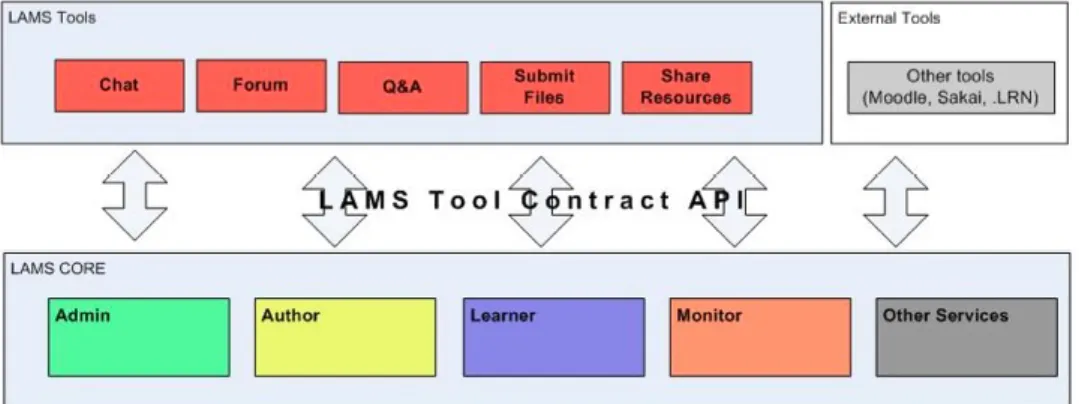
To support simple development and installation of new activity tools, LAMS 2 implements a modular architecture where activity tools can be added on-the-fly to a LAMS 2 server. In order to provide such modularity, LAMS 2 implements a Tools Contract. As it name indicates, the Tools Contract is “contract” between LAMS Core and each tool to communicate with each other. The LAMS Core has modules for Authoring, Monitor, Administration and Learner.
The new architecture proposes a clear and defined separation between tools and core service responsibilities/functionalities.
Figure 1: LAMS 2 Architecture
The LAMS 2 Architecture abstracts the interface for communication between the LAMS Core and the activity tools.
Activity tools in LAMS 2 are almost completely independent web applications that interact with LAMS Core modules and services through the Tools Contract. This contract establishes the expected behaviours and APIs that each tool needs to implement to be instantiated as a LAMS activity tool.
By following this Tool Contract, not only can a LAMS activity tool be used within the LAMS system but also external tools that implement it can become LAMS Tools.
In this way we intented to foster a community of tool developers who might already have activity tools that they would like to use in the context of LAMS and will not be required to learn all technical aspects of LAMS. By implementing the Tool Contract, they can use their tools within sequences in LAMS.
LAMS 2 Tool Contract
In formal terms, the LAMS Tool Contract is a set of expected behaviours, registered URLs and API calls that a LAMS Tool has to implement to communicate with the LAMS Core.
An activity tool interacts with the LAMS Core via URL calls and direct Java calls. It implements interfaces defined in the LAMS core, and makes use of known LAMS services supplied by the Core. Native LAMS tools are written so they use the Spring Framework (Spring Framework, 2006) to allow the LAMS Core to be able to communicate with the tool. However, external tools that might not be written in the same languages as LAMS can also be used as Native LAMS tools with an external wrapper that permits the external tool to behave in the way that the LAMS Core expects.
Each tool interacts with the following LAMS Core modules.
• Author
Calls the tool to create/update or delete tool content. Uses the tool's authoring screens.
• Monitor
Uses the tool's monitoring screens.
• Administration
Uses the tool's admin screen, which may be used to configure the tool.
• Learner
Calls the tool to copy tool content and set up tool sessions. Uses the tool's learner and export portfolio screens.
Figure 2: LAMS 2 Tool Contract
In this following section we describe in detail the LAMS 2 Tools Contract and its requirements.
Author Contract
In this section we describe the expected APIs and behaviours that an activity tool must fulfil to communicate with the LAMS Authoring module.
Authoring URL
The tool must supply an authoring module, which is called to create new content or edit existing content. This authoring module is accessed by a URL that the tool registers with the LAMS Core when it is deployed, so when an Author double clicks on the activity tool this URL will be called to author content for this activity.
Tool Icon
The tool needs to supply a tool icon so it can be displayed in the Author and Monitor interfaces.
Default content
The default content is the initial data that will be displayed when the tools are authored for the first time.
Authoring UI requirements
Authoring UI (User Interface) data consists of general activity data fields that depend on the activity purpose and the Tool specific data fields.
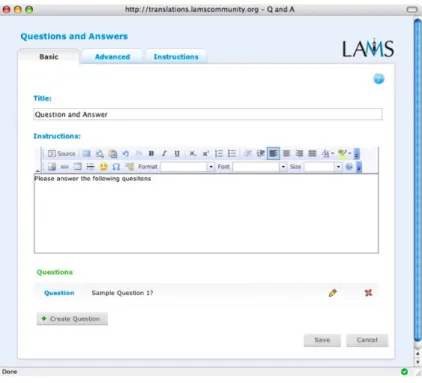
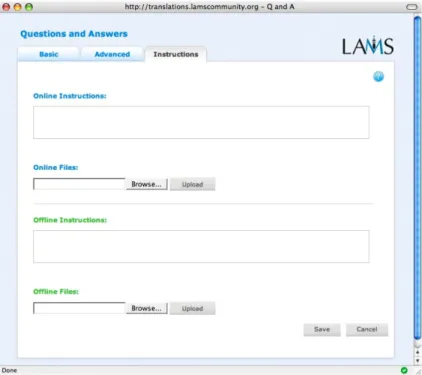
The LAMS authoring interface for tools have three tabs: Basic, Advanced and Instructions. Each of these tabs contains certain mandatory fields as well as the tool’s specific fields according to the purpose it serves. The Basic tab displays the basic set of fields that are needed for the tool. Additionally, LAMS requires two mandatory fields (mainly for consistency purposes): Title and Instructions. The Advanced tab displays the extra fields that would be used by experienced LAMS users to set the behaviour of the tool at runtime. Finally the Instructions tab displays the "instructions" fields for educators, where the author can specify the accompanying directions or advice for educators on how to perform or deliver this particular activity. These instructions can be of two types: Online instructions and/or Offline instructions.
Preview
The tool must be able to show the specified content as if it was running in a lesson (Preview mode). During Preview, the author steps through the design as if she were a learner. In Preview, tools normally act exactly the same as they would do in the regular learner interface. The exceptions to this are tools that require interaction between users or would take a long time (e.g. a week) to complete. For example, if a tool requires two people to complete and activity before either of them could finish, then that would have to work differently in Preview, as there is only one person in preview.
Export tool content
Additionally, the tool must be able to export its tool content as part of the overall learning design export. The format of the serialization for export is XML.
Figure 3: Tool Authoring - Basic tab
Figure 5: Tool Authoring - Instructions tab
Contextual Help
The tool should supply help information page(s) which enables the educators or learners to find useful information about authoring or working with this tool.
Data Exchange
Tools must register the type of inputs and outputs they can handle with the LAMS Core. The idea is that a tool can pass data to another tool that requires it. These are simple data types as string, text, integer, float, etc. For example, a quiz tool may pass each learner’s quiz score to a later branching tool, and then the branching tool decides which branch each learner goes to according to their overall quiz score.
Monitor Contract
Learner Progress URL
The learner progress URL allows the educator to monitor the contribution of a particular learner to a particular activity.
Monitor URL
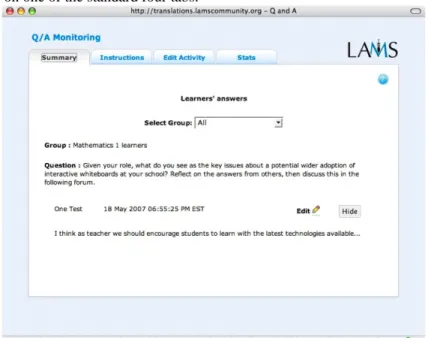
The screen provided by the Monitor URL is the main monitoring screen for the tool. As with the authoring screen, there are a series of tabs which allow the educator to select from various functions.
The Monitoring screen has the following tabs:
• Summary: displays a summary of all the learners’ responses and allows learner entries to be modified or hidden.
• Instructions: displays the online and offline instructions, entered during authoring to provide directions for tutors or teaching assistants on how to run or use this activity with learners.
• Edit Activity: allows a educator to set or modify the tool content.
• Statistics: displays usage statistics for a tool e.g. the number of users completed, the percentage of correct answers, etc.
Note that a tool may include other tabs if it is required to display anything else that does not fit on one of the standard four tabs.
Figure 6: Tool Monitor - Summary tab
Export Portfolio URL
This screen allows the user to export in plain HTML the contribution of one or all participating learners. The concept is to record what the learner has seen on her screen. The portfolio may be for an individual learner, or may be for the whole class (this is accessible only by the educator).
Modifying Tool Content
At runtime, educators might need to change the content of an activity. Therefore the tools must provide an interface to change its content while the activity is running.
Learner Contract
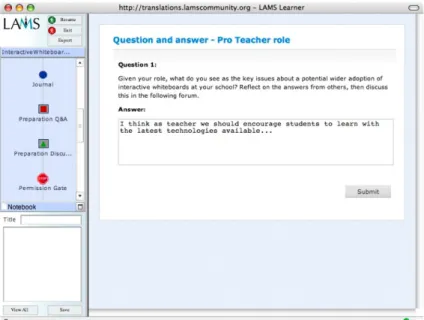
Learner URL
This is the URL that “plays” the content to learners and is responsible for tracking and recording the progress of the user. When the user has completed the activity tool then the tool notifies the progress engine.
Figure 7: Tool Learner's page
Export Portfolio URL
This screen allows the learner to export in plain HTML the contributions of all learners in this learner's groups – that is, a record of each screen seen by this learner during the sequence of activities.
Admin Contract
Administration URL
All tools define some technical metadata on installation. Tools must also supply a URL, which may be used for updating this information, along with any tool specific configuration details.
The administration URL should also allow access to any administrative tasks e.g. reviewing a tool log, runtime stop/start of the chat server, or a monitor method which shows which Chat rooms, are active.
External Tool Wrappers
LAMS Version 1 has been integrated with a number of open source and proprietary learning management systems. After we released these integrations, educators have pointed out that they would like to use the LAMS tools together with the tools from their own learning management system within a LAMS learning design.
Thus in LAMS 2, we have conceptualised external tool wrappers for different learning management systems that could allow their tools to be “LAMS enabled”.
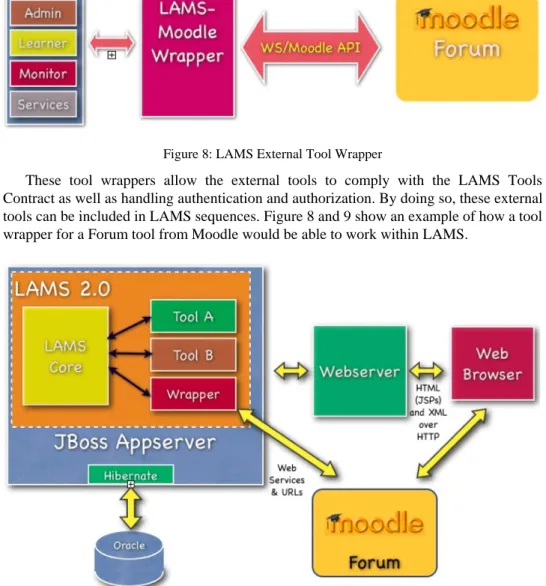
Figure 8: LAMS External Tool Wrapper
These tool wrappers allow the external tools to comply with the LAMS Tools Contract as well as handling authentication and authorization. By doing so, these external tools can be included in LAMS sequences. Figure 8 and 9 show an example of how a tool wrapper for a Forum tool from Moodle would be able to work within LAMS.
4 Conclusion
The design of LAMS 2 was based on extensive user feedback as well as the outcomes of formal evaluations of LAMS version 1 implementations. New and improved features were incorporated into LAMS 2 to: improve pedagogical support and re-use; enhance collaboration among educators (as both authors and monitors); improve the user interface and overall user experience; and to provide greater robustness, scalability and reliability. Key features supported by LAMS 2 include: edit-on-the-fly, branching, rich multimedia; “offline” activity information; optional reflections for all tools; a wider range of grouping options; “portfolio export” and support for languages other than English.
One of the key architectural improvements of LAMS 2 was the introduction of the “LAMS Tools Contract” – a set of expected behaviours about how an activity tool interacts with the LAMS Core “workflow engine” in terms of four areas: Author, Monitor, Learner and Administration. The Tools Contract fosters easier creation and integration of new activity tools into the LAMS framework, as well as integration of external tools via a “tools wrapper”. The LAMS Tools Contract also provides a set of innovative functionalities that could inform the next generation of interfaces between e-learning platforms and activity tools.
References
Dalziel, J. R. (2003a). Introducing LAMS: An EML/LD “inspired” system. Presentation for the Valkenburg group meeting, Vancourver, Canada, February 23rd, 2003.
Dalziel, J. R. (2003b). Implementing learning design: The Learning Activity Management System (LAMS). Author, A. & Writer B. (2003). In G.Crisp, D.Thiele, I.Scholten, S.Barker and J.Baron (Eds), Interact, Integrate, Impact: Proceedings of the 20th Annual Conference of the Australasian Society for Computers in Learning in Tertiary Education. Adelaide, 7-10
December 2003. [Online] http://www.ascilite.org.au/conferences/adelaide03/docs/pdf/593.pdf
Dalziel, J. R. (2006). The design and development of the LAMS Community. [Online] http://lamscommunity.org/dotlrn/clubs/educationalcommunity/lamsresearchdevelopm ent/forums/attach/go-to-attachment?object_id=311748&attachment_id=311750
LAMS Foundation (2004). Trans-Tasman e-learning first: New Zealand hosts global LAMS launch. [Online] http://www.lamsfoundation.org/news/index.html#3
LAMS Foundation (2005a). Innovative e-learning system to be launched as open source software this week. [Online] http://www.lamsfoundation.org/news/index.html#4
LAMS Foundation (2005b). Articles/Reports/Research on LAMS. [Online] http://www.lamsinternational.com/CD/html/resources.html#ArticlesResearchLAMS
LAMS Foundation (2005c). LAMS launches the LAMS Community: the birth of "open source teaching." [Online] http://www.lamsfoundation.org/news/index.html#6
LAMS Foundation (2006). LAMS 2.0 Feature List. [Online] http://wiki.lamsfoundation.org/display/lams/LAMS+2.0+Feature+List
Laurillard, D. (2001). Rethinking University Teaching: A Conversational Framework for the Effective Use of Learning Technologies. London: Routledge.
Masterman, L. & Lee, S. D. (2005). Evaluation of the Practitioner Trial of LAMS: Final Report. [Online] http://www.jisc.ac.uk/uploaded_documents/LAMS%20Final%20Report.pdf Russell. T., Varga-Atkins, T. & Roberts, D. (2005). Learning Activity Management System
Specialist Schools Trust pilot . [Online] http://partners.becta.org.uk/page_documents/research/lams.pdf
Some Findings from the Evaluation of the Collage
Authoring Tool
Davinia Hernández-Leo, Eloy D.
Villasclaras-Fernández, Juan I. Asensio-Pérez, Yannis
Dimitriadis
GSIC/EMIC group, Department of Signal Theory and Telematics Engineering, University of Valladolid, Campus Miguel Delibes, 47011 Valladolid, Spain
E-mail: {davher@, evilfer@ulises., juaase@, yannis@}tel.uva.es
Abstract: The design process implemented in Collage authoring tool enables the creation of collaborative IMS Learning Design (IMS LD) compliant Units of Learning (UoLs) by starting from templates based on patterns. In this paper, we present some findings from the evaluation of Collage in a case study that includes several workshops devoted mainly to the ultimate target audience: teachers with interest in applying Computer-Supported Collaborative Learning (CSCL) designs in their educational practice but who are not familiar with IMS LD. The findings are organised around two main topics: the pattern-based design process and the use of Collage.
Keywords: IMS LD, CSCL, scripts, authoring tool, patterns, templates, case study
1 Introduction
Collage is an authoring tool which implements a design process that facilitates the participation of teachers in the creation of potentially effective CSCL scripts (designs based on generalizations of documented good practices) represented with IMS LD (Hernández-Leo et al., 2006). With this purpose, Collage provides teachers with a set of graphical IMS LD (Koper & Olivier, 2004) templates that can be assembled and refined according to the needs of each educational situation (Hernández-Leo, Harrer, Dodero, Asensio-Pérez, & Burgos, 2006). The templates are based on patterns (called Collaborative Learning Flow Patterns, CLFP) that formulate the core of common solutions when designing flows of (collaborative) learning activities. Therefore, Collage aims at fostering the reuse of broadly accepted collaborative learning structures in such a way that they can be used in many different situations, with different content and disciplines; thus adopting the pattern-based design approach already exploited in Architecture (Alexander et al., 1977), Software Engineering (Gamma, Helm, Johnson, & Vlissides, 1995) and also Educational Design (Goodyear, 2005).
In this paper, we describe part of the evaluation that we have completed to illuminate the value of Collage and its associated design process. Particularly, we focus on a case
Juan I. Asensio-Pérez, Yannis Dimitriadis
study (Zelkowitz & Wallace, 1998; Stake, 1995) that involves four workshops in which different audiences (mainly the target users) create UoLs based on CLFPs using Collage. Therefore, the paper is organised as follows. Section 2 first describes the case study. Then, Section 3 presents the evaluation results. Finally, Section 4 concludes this paper indicating further work accomplished to complement this evaluation.
2 Description of the case study
The case study is designed according to the guidelines proposed by Stake (1995). Table 1 summarizes the four experiences (workshops) considered in the case study. The different experiences form a single case study since they all analyze the same functioning, “creating collaborative LDs using Collage”, and share the same conceptual structure. This conceptual structure includes an issue, representing the general research question, the topics on which the study is focused and the particularization of the topics into more concrete information questions that guides the data analysis (Stake, 1995). In this case, the issue is: does the design process implemented in Collage facilitate the reuse of CLFPs in the creation of particularized IMS LD-represented CSCL scripts? The topics discussed in this paper are “the pattern-based design process”, and “the use of Collage”.
Table 1. Summary of the experiences involved in the case study
Name of the workshop
(chronological order)
Interviewees
(type of audience) (number of persons that complete the questionnaires)
Deployment
Data sources (and labels used in the text to quote
them) GSIC/EMIC
(May 2005)
Five members of the GSIC/EMIC research group: CSCL practitioners without deep knowledge on IMS LD - Free deployment (with assistants) - Final questionnaire [GSIC/EMIC] - Created scripts UNFOLD
(October 2005)
Seven (official
and invited)
members of the
UNFOLD
project:
educational
technologists
(some of them
experts on IMS
LD)
-Familiarization (presentation), -guided creation of a CSCL script - Final questionnaire [UNFOLD] UVA (March 2006)Five teachers of the University of Valladolid (Spain) with interest in technology and
collaborative learning and without knowledge on IMS LD -Familiarization (presentation), -guided creation of a CSCL script - free deployment (optional, with assistants) - Initial (before familiarization) [UVA-quest-initial] and final
questionnaire [UVA-quest-final]
- Observations [UVA-observers] - Discussion group
UCA (March 2006)
14 teachers of the University of Cádiz (Spain) that use a virtual campus without deep knowledge on IMS LD - (Previous sessions about LD) -familiarization (presentation), -guided creation of a CSCL script, - free deployment (optional) - Initial (before familiarization) [UCA-quest-initial] and final
questionnaire [UCA-quest-final]
- Discussion group [UCA-discussion]
The most relevant experiences are UVA and UCA since the involved interviewees (participants) are the target audience, teachers (from the University of Valladolid and from the University of Cádiz, both in Spain) with interest in applying collaborative learning and educational technology but without deep knowledge on IMS LD. Both experiences consist of four-hour workshops (or “hands-on” sessions) in which, after a presentation of Collage, the participants create proposed CSCL scripts (UoLs) following the design process implemented in Collage. The case study is enriched with two embedded mini-cases (UNFOLDand GSIC/EMIC) accomplished as (shorter) workshops in which educational technologists and researchers (members of the UNFOLD project) and CSCL practitioners (members of the GSIC/EMIC group) participate.
For the collection of the evaluation data, we employ an adaptation of a mixed evaluation method (Martínez-Monés, 2003) combining quantitative and qualitative data gathering techniques. Quantitative data are considered useful for showing trends. The emphasis is on the qualitative results, which are used to confirm or reject those trends as well as to understand them and identify emergent features in the particular representative situation (Denzin & Lincoln, 2005). The data sources include: questionnaires, web-based questionnaires completed before and after the experiences; observations, observers note down interactions, attitudes and incidents that occurred during the workshops and elaborate a report; and discussion groups, a debate with the participants after the workshops is recorded and transcribed. Using a qualitative analysis tool (SQR, 1997), the full amount of data is aggregated and comparatively analyzed (triangulated) (Guba, 1981) according to a set of categories that derived from the information questions associated with the topics of study. These information questions guide the presentation of the evaluation results.
3 Some evaluation results
Table 2 collects the evaluation results referring to the information questions that derived from two of the topics under study (“the pattern-based design process” and “the use of Collage”) together with the data source that support them. Due to space restrictions, this section disscuses only some of these results illustrating how qualitative and quantitave data found the conclusions.
We claim as our working hypothesis that our approach facilitates the reuse of CLFPs when teachers create their own UoLs instead of starting from scratch. The results related to the two first information questions (Table 2) indicate some evidence of this. For example, according to the interviewees the “selection of patterns” phase in Collage is critical and promotes the understanding of the patterns. (Note that the conclusions of the analysis are underlined.) As one of them mentions “… a minimum formation on patterns
Juan I. Asensio-Pérez, Yannis Dimitriadis
is necessary, for which Collage is helpful [UVA-discussion].” In fact, many participants provide arguments that agree with this declaration of a UCA teacher “Collage systematizes the selection of patterns [UCA-quest-final].” Another conclusion is that the possibility of combining patterns provides design flexibility. The utility of the combination of CLFPs is rated (in the range of 1 (it is not useful) to 5 (it is very useful)) with an average of 4.21 by the UCA participants and 4.20 by the UVA teachers. As one of them affirms “I think that the combination of patterns allows a better adaptation of the activity to the problems and methods that we want to develop, making the activity more complete [UCA-quest-final].” This result is also shared by the UNFOLD interviewees; “… it would be nice if other patterns could be added! However, as patterns can be combined, these already offer quite a lot of flexibility [UNFOLD].”
Table 2. Some conclusions offered by the evaluation of the Collage workshops Information
questions
Evaluation results Main support data source
- The selection phase is critical and promotes the understanding of the patterns
[UCA-quest-final], [UVA-quest-final], [GSIC/EMIC], [UCA-discussion], [UVA-discussion]
- The CLFPs are significant but there are other well-known strategies (e.g., for assessment)
[UCA-quest-final], [UVA-quest-final], [GSIC/EMIC] Is the selection of the CLFP-based IMS LD templates and their representation useful?
- The interviewees’ ideas of the CLFPs coincide with what is presented in Collage
[UCA-quest-final], [UVA-quest-final], [GSIC/EMIC], [UVA-discussion] - The combination of patterns provides design
flexibility
[UVA-observers], [UNFOLD], [UCA-quest-final], [UVA-quest-final], [UVA-discussion] - Pattern based templates are probably more
useful in the process of customizing a new situation than ready-to-run exemplars, but complete examples are also useful
[UCA-discussion], [UVA-discussion]
Does it achieve a satisfactory trade-off between the reuse of CLFPs and the creation of scripts contextualized according to the
situational needs? - Satisfactory trade-off between flexibility, keeping the essence captured in the CLFPs, hiding IMS LD-specific technological details and providing a clear (but limited) set of design options
[UCA-quest-final], [UVA-quest-final], [UVA-discussion]
- Most of the participants find Collage user-friendly and intuitive and are able to create partially completed examples during the workshops
[UCA-quest-final], [UVA-quest-final], [UNFOLD], [UVA-discussion] - Very few problems appear but the participants
indicate the importance of applying the designs in real situations
[UCA-quest-final], [UVA-quest-final], [GSIC/EMIC] Can the teachers
use successfully Collage?
- Collage is easier to use, specific to collaborative learning and it is the first IMS LD editor providing pattern-based templates
[UNFOLD]
- Incorporating more CLFPs and other types of patterns (also non-pattern based elements), which would provide more flexible design options
[UCA-quest-final], [UVA-quest-final], [UNFOLD], [GSIC/EMIC], [UVA-discussion]
- Level B and C of IMS LD [UNFOLD] How can Collage
be improved?
- “Preliminary view” of the LD quest-final], [UVA-discussion]