A Sample
ACM
SIG Proceedings Paper in LaTeX Format
∗[Extended Abstract]
†Ben Trovato
‡ Institute for Clarity inDocumentation 1932 Wallamaloo Lane Wallamaloo, New Zealand
[email protected]
G.K.M. Tobin
§ Institute for Clarity inDocumentation P.O. Box 1212 Dublin, Ohio 43017-6221
[email protected]
Lars Thørväld
¶ The Thørväld Group 1 Thørväld Circle Hekla, Iceland[email protected]
Lawrence P. Leipuner
Brookhaven Laboratories Brookhaven National LabP.O. Box 5000
[email protected]
Sean Fogarty
NASA Ames Research CenterMoffett Field California 94035
[email protected]
Charles Palmer
Palmer Research Laboratories8600 Datapoint Drive San Antonio, Texas 78229
[email protected]
ABSTRACT
This paper provides a sample of a LATEX document which
conforms to the formatting guidelines for ACM SIG Pro-ceedings. It complements the documentAuthor’s Guide to Preparing ACM SIG Proceedings Using LATEX2and BibTEX.
This source file has been written with the intention of being compiled under LATEX2and BibTeX.
The developers have tried to include every imaginable sort of “bells and whistles", such as a subtitle, footnotes on ti-tle, subtitle and authors, as well as in the text, and every optional component (e.g. Acknowledgments, Additional Au-thors, Appendices), not to mention examples of equations, theorems, tables and figures.
To make best use of this sample document, run it through LATEX and BibTeX, and compare this source code with the
printed output produced by the dvi file.
∗(Does NOT produce the permission block, copyright
information nor page numbering). For use with ACM_PROC_ARTICLE-SP.CLS. Supported by ACM.
†A full version of this paper is available asAuthor’s Guide to Preparing ACM SIG Proceedings Using LATEX2and BibTeX
atwww.acm.org/eaddress.htm
‡Dr. Trovato insisted his name be first.
§The secretary disavows any knowledge of this author’s
ac-tions.
¶This author is the one who did all the really hard work.
Categories and Subject Descriptors
H.4 [Information Systems Applications]: Miscellaneous; D.2.8 [Software Engineering]: Metrics—complexity mea-sures, performance measures
General Terms
TheoryKeywords
ACM proceedings, LATEX, text tagging
1.
INTRODUCTION
Theproceedingsare the records of a conference. ACM seeks to give these conference by-products a uniform, high-quality appearance. To do this, ACM has some rigid requirements for the format of the proceedings documents: there is a spec-ified format (balanced double columns), a specspec-ified set of fonts (Arial or Helvetica and Times Roman) in certain spec-ified sizes (for instance, 9 point for body copy), a specspec-ified live area (18×23.5 cm [7"×9.25"]) centered on the page, specified size of margins (1.9 cm [0.75"]) top, (2.54 cm [1"]) bottom and (1.9 cm [.75"]) left and right; specified column width (8.45 cm [3.33"]) and gutter size (.83 cm [.33"]).
The good news is, with only a handful of manual settings1, the LATEX document class file handles all of this for you.
The remainder of this document is concerned with showing, in the context of an “actual” document, the LATEX commands
specifically available for denoting the structure of a proceed-ings paper, rather than with giving rigorous descriptions or explanations of such commands.
1
Two of these, the \numberofauthors and \alignauthor
commands, you have already used; another,
\balancecolumns, will be used in your very last run of LATEX to ensure balanced column heights on the last
2.
THE
BODY
OF THE PAPER
Typically, the body of a paper is organized into a hierar-chical structure, with numbered or unnumbered headings for sections, subsections, sub-subsections, and even smaller sections. The command\sectionthat precedes this para-graph is part of such a hierarchy.2 LATEX handles the
num-bering and placement of these headings for you, when you use the appropriate heading commands around the titles of the headings. If you want a sub-subsection or smaller part to be unnumbered in your output, simply append an aster-isk to the command name. Examples of both numbered and unnumbered headings will appear throughout the balance of this sample document.
Because the entire article is contained in the document
environment, you can indicate the start of a new paragraph with a blank line in your input file; that is why this sentence forms a separate paragraph.
2.1
Type Changes and
Special
Characters
We have already seen several typeface changes in this sam-ple. You can indicate italicized words or phrases in your text with the command\textit; emboldening with the com-mand\textbf and typewriter-style (for instance, for com-puter code) with\texttt. But remember, you do not have to indicate typestyle changes when such changes are part of thestructural elements of your article; for instance, the heading of this subsection will be in a sans serif3 typeface, but that is handled by the document class file. Take care with the use of4 the curly braces in typeface changes; they mark the beginning and end of the text that is to be in the different typeface.You can use whatever symbols, accented characters, or non-English characters you need anywhere in your document; you can find a complete list of what is available in theLATEX
User’s Guide[5].
2.2
Math Equations
You may want to display math equations in three distinct styles: inline, numbered or non-numbered display. Each of the three are discussed in the next sections.
2.2.1
Inline (In-text) Equations
A formula that appears in the running text is called an inline or in-text formula. It is produced by themathenvironment, which can be invoked with the usual \begin. . .\end
construction or with the short form$. . .$. You can use any of the symbols and structures, from αto ω, available in LATEX[5]; this section will simply show a few examples
of in-text equations in context. Notice how this equation:
limn→∞x= 0, set here in in-line math style, looks slightly different when set in display style. (See next section).
2.2.2
Display Equations
2
This is the second footnote. It starts a series of three foot-notes that add nothing informational, but just give an idea of how footnotes work and look. It is a wordy one, just so you see how a longish one plays out.
3
A third footnote, here. Let’s make this a rather short one to see how it looks.
4
A fourth, and last, footnote.
A numbered display equation – one set off by vertical space from the text and centered horizontally – is produced by the
equationenvironment. An unnumbered display equation is produced by thedisplaymathenvironment.
Again, in either environment, you can use any of the symbols and structures available in LATEX; this section will just give
a couple of examples of display equations in context. First, consider the equation, shown as an inline equation above:
lim
n→∞x= 0 (1)
Notice how it is formatted somewhat differently in the dis-playmath environment. Now, we’ll enter an unnumbered equation:
∞
X
i=0
x+ 1
and follow it with another numbered equation: ∞ X i=0 xi= Z π+2 0 f (2)
just to demonstrate LATEX’s able handling of numbering.
2.3
Citations
Citations to articles [1, 3, 2, 4], conference proceedings [3] or books [6, 5] listed in the Bibliography section of your article will occur throughout the text of your article. You should use BibTeX to automatically produce this bibliography; you simply need to insert one of several citation commands with a key of the item cited in the proper location in the .tex
file [5]. The key is a short reference you invent to uniquely identify each work; in this sample document, the key is the first author’s surname and a word from the title. This iden-tifying key is included with each item in the .bib file for your article.
The details of the construction of the.bib file are beyond the scope of this sample document, but more information can be found in theAuthor’s Guide, and exhaustive details in theLATEX User’s Guide[5].
This article shows only the plainest form of the citation com-mand, using \cite. This is what is stipulated in the SIGS style specifications. No other citation format is endorsed.
2.4
Tables
Because tables cannot be split across pages, the best place-ment for them is typically the top of the page nearest their initial cite. To ensure this proper “floating” placement of tables, use the environmenttableto enclose the table’s con-tents and the table caption. The concon-tents of the table itself must go in thetabularenvironment, to be aligned properly in rows and columns, with the desired horizontal and verti-cal rules. Again, detailed instructions ontabularmaterial is found in theLATEX User’s Guide.
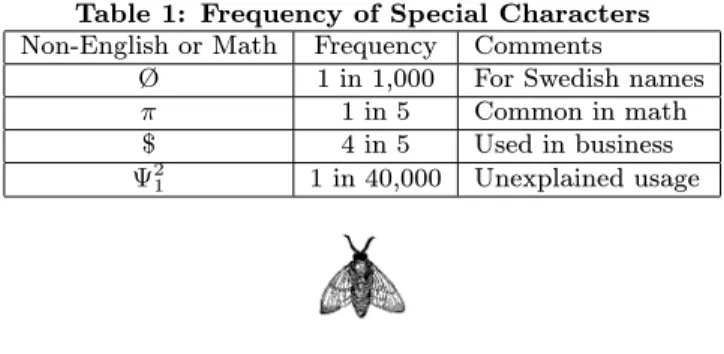
Immediately following this sentence is the point at which Table 1 is included in the input file; compare the placement of the table here with the table in the printed dvi output of this document.
Table 1: Frequency of Special Characters
Non-English or Math Frequency Comments
Ø 1 in 1,000 For Swedish names
π 1 in 5 Common in math $ 4 in 5 Used in business
Ψ2
1 1 in 40,000 Unexplained usage
Figure 1: A sample black and white graphic (.eps format).
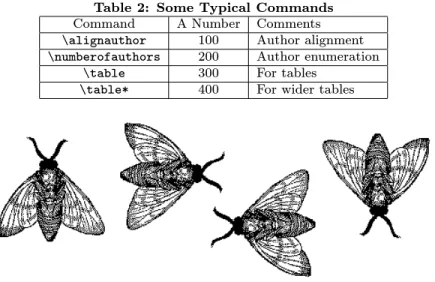
To set a wider table, which takes up the whole width of the page’s live area, use the environment table* to en-close the table’s contents and the table caption. As with a single-column table, this wide table will “float" to a lo-cation deemed more desirable. Immediately following this sentence is the point at which Table 2 is included in the in-put file; again, it is instructive to compare the placement of the table here with the table in the printed dvi output of this document.
2.5
Figures
Like tables, figures cannot be split across pages; the best placement for them is typically the top or the bottom of the page nearest their initial cite. To ensure this proper “floating” placement of figures, use the environmentfigure
to enclose the figure and its caption.
This sample document contains examples of.eps and .ps
files to be displayable with LATEX. More details on each of
these is found in theAuthor’s Guide.
As was the case with tables, you may want a figure that spans two columns. To do this, and still to ensure proper “floating” placement of tables, use the environmentfigure*
to enclose the figure and its caption.
Note that either.psor.epsformats are used; use the\epsfig
or \psfig commands as appropriate for the different file types.
2.6
Theorem-like Constructs
Other common constructs that may occur in your article are the forms for logical constructs like theorems, axioms, corollaries and proofs. There are two forms, one produced by
Figure 2: A sample black and white graphic (.eps format) that has been resized with theepsfig com-mand.
Figure 3: A sample black and white graphic (.ps for-mat) that has been resized with thepsfigcommand.
the command\newtheoremand the other by the command
\newdef; perhaps the clearest and easiest way to distinguish them is to compare the two in the output of this sample document:
This uses the theorem environment, created by the
\newtheoremcommand:
Theorem 1. Let f be continuous on [a, b]. If G is an
antiderivative forf on[a, b], then
Z b
a
f(t)dt=G(b)−G(a).
The other uses thedefinitionenvironment, created by the
\newdefcommand:
Definition 1. If z is irrational, then by ez we mean the
unique number which has logarithmz:
logez=z
Two lists of constructs that use one of these forms is given in theAuthor’s Guidelines.
and don’t forget to end the environment with figure*, not figure!
There is one other similar construct environment, which is already set up for you; i.e. you must not use a\newdef
command to create it: the proof environment. Here is a example of its use:
Proof. Suppose on the contrary there exists a real
num-berLsuch that
lim x→∞ f(x) g(x) =L. Then l= lim x→cf(x) = limx→c gx·f(x) g(x) = lim x→cg(x)·xlim→c f(x) g(x) = 0·L= 0,
which contradicts our assumption thatl6= 0.
Complete rules about using these environments and using the two different creation commands are in the Author’s Guide; please consult it for more detailed instructions. If you need to use another construct, not listed therein, which you want to have the same formatting as the Theorem or the Definition[6] shown above, use the\newtheoremor the
Table 2: Some Typical Commands
Command A Number Comments
\alignauthor 100 Author alignment
\numberofauthors 200 Author enumeration
\table 300 For tables
\table* 400 For wider tables
Figure 4: A sample black and white graphic (.eps format) that needs to span two columns of text.
A
Caveat
for the TEX Expert
Because you have just been given permission to use the
\newdef command to create a new form, you might think you can use TEX’s\def to create a new command: Please refrain from doing this! Remember that your LATEX source
code is primarily intended to create camera-ready copy, but may be converted to other forms – e.g. HTML. If you in-advertently omit some or all of the\defs recompilation will be, to say the least, problematic.
3.
CONCLUSIONS
This paragraph will end the body of this sample document. Remember that you might still have Acknowledgments or Appendices; brief samples of these follow. There is still the Bibliography to deal with; and we will make a disclaimer about that here: with the exception of the reference to the LATEX book, the citations in this paper are to articles which
have nothing to do with the present subject and are used as examples only.
4.
ACKNOWLEDGMENTS
This section is optional; it is a location for you to acknowl-edge grants, funding, editing assistance and what have you. In the present case, for example, the authors would like to thank Gerald Murray of ACM for his help in codifying this
Author’s Guideand the.clsand.texfiles that it describes.
5.
ADDITIONAL AUTHORS
Additional authors: John Smith (The Thørväld Group, email:
[email protected]) and Julius P. Kumquat (The Kumquat Consortium, email: [email protected]).
6.
REFERENCES
[1] M. Bowman, S. K. Debray, and L. L. Peterson. Reasoning about naming systems.ACM Trans. Program. Lang. Syst., 15(5):795–825, November 1993. [2] J. Braams. Babel, a multilingual style-option system
for use with latex’s standard document styles.
TUGboat, 12(2):291–301, June 1991.
[3] M. Clark. Post congress tristesse. InTeX90 Conference Proceedings, pages 84–89. TeX Users Group, March 1991.
[4] M. Herlihy. A methodology for implementing highly concurrent data objects.ACM Trans. Program. Lang. Syst., 15(5):745–770, November 1993.
[5] L. Lamport.LaTeX User’s Guide and Document Reference Manual. Addison-Wesley Publishing Company, Reading, Massachusetts, 1986. [6] S. Salas and E. Hille.Calculus: One and Several
Variable. John Wiley and Sons, New York, 1978.
APPENDIX
A.
HEADINGS IN APPENDICES
The rules about hierarchical headings discussed above for the body of the article are different in the appendices. In theappendixenvironment, the command sectionis used to indicate the start of each Appendix, with alphabetic order designation (i.e. the first is A, the second B, etc.) and a title (if you include one). So, if you need hierarchical structure
within an Appendix, start with subsectionas the highest level. Here is an outline of the body of this document in Appendix-appropriate form:
A.1
Introduction
A.2
The Body of the Paper
A.2.1
Type Changes and Special Characters
A.2.2
Math Equations
Inline (In-text) Equations
Display Equations
A.2.3
Citations
A.2.4
Tables
A.2.5
Figures
A.2.6
Theorem-like Constructs
A Caveat for the TEX Expert
A.3
Conclusions
A.4
Acknowledgments
A.5
Additional Authors
This section is inserted by LATEX; you do not insert it. You
just add the names and information in the\additionalauthors
command at the start of the document.
A.6
References
Generated by bibtex from your .bib file. Run latex, then bibtex, then latex twice (to resolve references) to create the .bbl file. Insert that .bbl file into the .tex source file and comment out the command\thebibliography.
B.
MORE HELP FOR THE HARDY
The acm_proc_article-sp document class file itself is chock-full of succinct and helpful comments. If you consider your-self a moderately experienced to expert user of LATEX, you
may find reading it useful but please remember not to change it.