Visualizing the Execution of Java Programs
Wim De Pauw, Erik Jensen, Nick Mitchell, Gary Sevitsky, John Vlissides, Jeaha Yang
IBM T.J. Watson Research Center 30 Saw Mill River Road, Route 9A
Hawthorne, NY 10532 USA
{wim,erikj,nickm,sevitsky,vlis,jeaha}@us.ibm.com
Introduction
Jinsight is a tool for exploring a program’s run-time behavior visually. It is helpful for performance analysis, debugging, and any task in which you need to better understand what your Java program is really doing.
Jinsight is designed specifically with object-oriented and multithreaded programs in mind. It exposes many facets of program behavior that elude conventional tools. It reveals object lifetimes and communication, and attendant performance bottlenecks. It shows thread interactions, deadlocks, and garbage collector activity. It can also help you find and fix memory leaks, which remain a hazard despite garbage collection.
A user explores program execution through one or more views. Jinsight offers sev-eral types of views, each geared toward distinct aspects of object-oriented and multithreaded program behavior. The user has several different perspectives from which to discern performance problems, unexpected behavior, or bugs small and large. Moreover, the views are linked to each other in many ways, allowing naviga-tion from one view to another. Naviganaviga-tion makes the collecnaviga-tion of views far more powerful than the sum of their individual strengths.
Object population in the Histogram view
The Histogram view is a basic visualization of resource consumption (CPU and memory) in terms of classes, instances, and methods. It gives an overview of hot spots in a program’s execution.
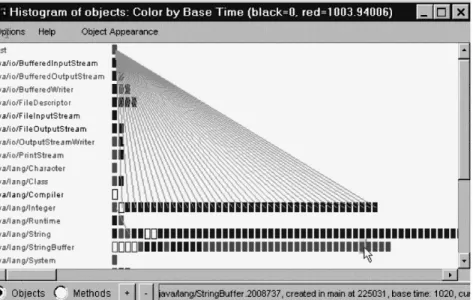
The Histogram view arranges information by class. In Fig. 1, each row shows the name of a class followed by colored rectangles representing the instances of that class. Colors for instances and classes can depict various criteria:
• time spent in methods relating to that instance or class
• number of calls
• amount of memory consumed
• number of threads in which the instance or class participates
Hot spots and patterns of resource usage are immediately visible in this view. You can get more detailed information about individual elements by clicking on them or merely positioning the mouse cursor over them. The view also gives you a good idea
of when objects are created and garbage collected. (A rectangle turns into an outline when the object has been collected.) This can help you spot memory leaks, as we explain later.
The lines in the view represent relationships among objects. For example, Fig. 1 shows all the method calls on objects of class java/lang/Integer. You can tell the view to indicate how each object calls, creates, or refers to other objects. Seeing connec-tions among objects is useful for detailed investigation of calling and reference relationships. However, the combinatorial nature of these relationships will make any program larger than “Hello world” hard to examine.
Fig. 1. Histogram view
Pattern extraction in the Reference Pattern view
Complexity is indeed a challenge when visualizing the execution of object-oriented programs. We deal with complexity in a number of ways. First, a good visualization makes it much easier to interpret complicated behavior than poring through textual data. In this section we discuss another technique, pattern extraction, that can sim-plify visualizations by eliminating extraneous detail. Later in this paper we discuss yet another approach to handling complexity, employing database techniques to structure the information.
Instead of displaying every nuance of the execution, the pattern extractor analyzes execution data for recurrences in the calling and reference relationships.
Visualiza-tions can display consolidaVisualiza-tions of these recurrences, thereby revealing the essential behavior.
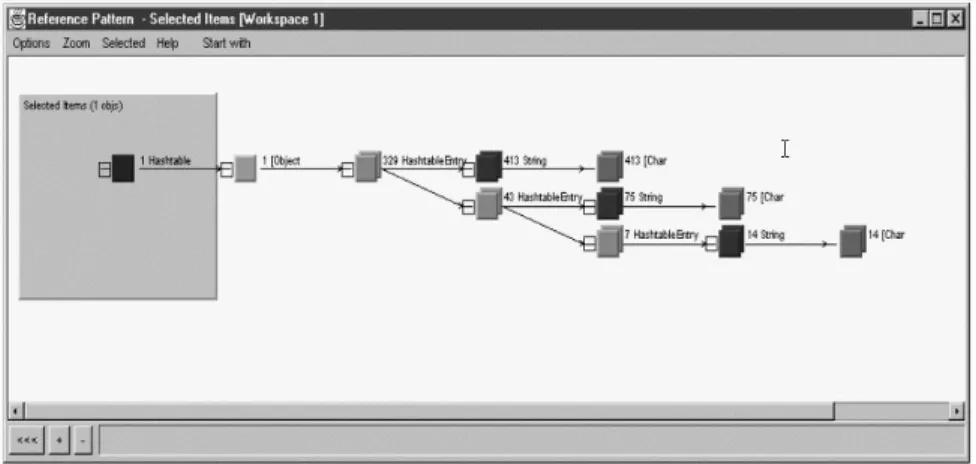
Fig. 2. Reference Pattern view
Fig. 2 shows the result of selecting a Hashtable object in the Histogram view and then examining its current structure in the Reference Pattern view. Instead of showing individual instances, the Reference Pattern view groups them by type and reference, twin squares denoting collections of objects. In the figure we see a square represent-ing the Hashtable object (far left) that points to an array of Object instances—more precisely, 329 HashtableEntry objects. These objects contain 413 references to String objects, which in turn refer to 413 arrays of characters. The original 329 HashtableEn-try objects themselves refer to 43 others containing references to yet seven others, along with 75 String instances—and so on. The complete data structure contains more than 1000 elements, making it difficult to visualize when fully expanded. Visualizing the pattern of references lets you view and understand this data structure efficiently.
Memory leak analysis
We use the same pattern extraction technique to detect memory leaks. The process for finding most memory leaks assumes a simple but common scenario. A user-level operation (for example, the display of a dialog box) creates temporary objects. When the operation completes (the dialog box is closed), we expect all of the temporary objects to be released—but some are not.
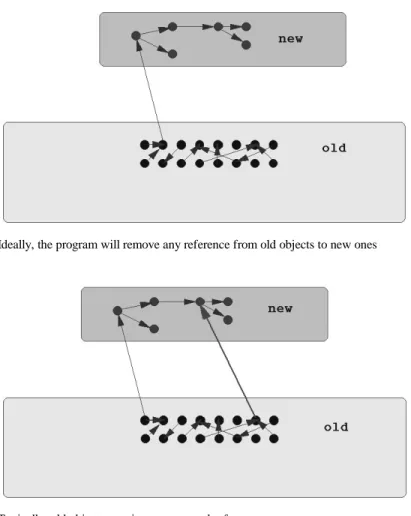
Fig. 3 illustrates this scenario schematically. The program has reached a stable state; its object population is shown in the lower area. The user of the program per-forms an operation that creates temporaries, which appear in the upper area. When the operation terminates, the program should nullify any reference from the old objects (lower) to the new objects (upper). As a result, the new objects become garbage to be
collected. Often, however, old objects unexpectedly obtain additional references to new objects (Fig. 4).
Fig. 3. Ideally, the program will remove any reference from old objects to new ones
Fig. 4. Typically, old objects acquire unaccounted references
A typical case is a registry that acquires a reference to a new object (as shown by the long arrow on the right in Fig. 4). The programmer may not be aware of this refer-ence and hrefer-ence may fail to set this referrefer-ence to null at the end of the operation. Thus the garbage collector will not reclaim the new objects.
To debug such a scenario with Jinsight, the programmer identifies a span of execu-tion that subsumes the lifetime of the temporary objects (for example, the beginning and end of a user operation). The goal is to identify temporary objects, and any refer-ences to them, that persist beyond this period.
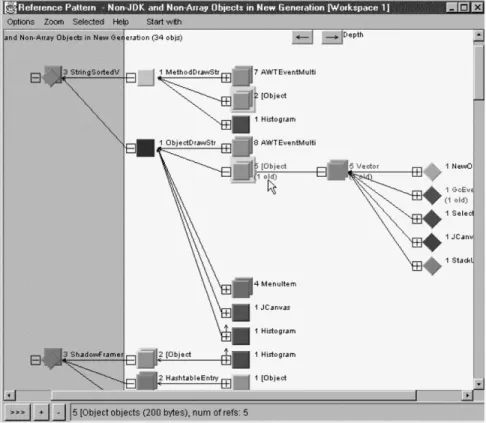
Fig. 5. Reference Pattern view again
The Reference Pattern view (Fig. 5) helps you identify such objects; they appear in the gray area of the view. These are the temporary objects that are no longer needed but cannot be reclaimed due to outstanding references. The white area on the right contains objects that refer, either directly or indirectly, to the unreclaimed objects. There are a few common sources of outstanding references to look for:
• References from old-generation objects (sometimes indirectly through other new-generation objects). Look for names labeled “old” in the white area, which identify old-generation objects.
•
References from static data members. Look for diamonds in the white area, which represent class objects.Performance analysis by visualizing event sequences
So far, we have focused on object profiling and memory leaks. Making a program run faster also requires understanding the structure and sequence of operations in the program. Performance analysis used to mean finding the hottest method in the
pro-gram, but in most programs that approach would merely return one of Java’s String methods. Knowing the sequence of calls in a program is far more helpful.
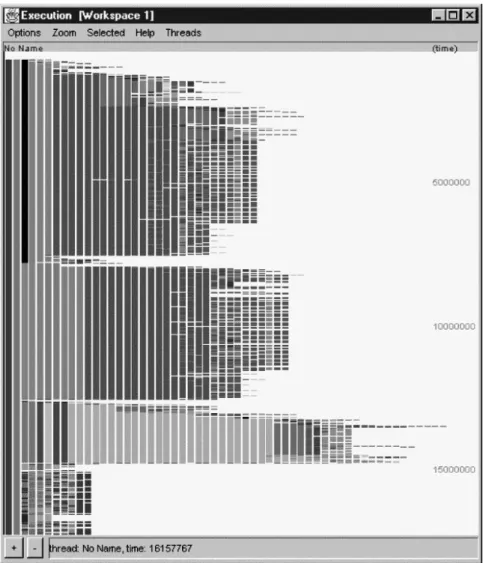
Consider a sample program from the SQLJ package that retrieves data from a DB2 database. The program executes more slowly than desired. A better understanding of this program’s execution can be had by examining it in Jinsight’s Execution view (Fig. 6).
Fig. 6. Execution view
In this view, time proceeds from top to bottom. Each colored stripe represents the execution of a method on an object. Moving from left to right takes you deeper into the execution stack. The stripes are color-coded by class. A set (or “lane”) of such
stripes is displayed for each thread in a program. Lanes are arranged left-to-right. (Only one lane appears in Fig. 6.)
The length of each stripe (reflecting the time spent in each method), the number of stripes (corresponding to the stack depth), and the colors (denoting classes) character-ize the behavior of each thread. We can also see the relative timing of events across threads by comparing lanes.
Four distinct phases are visible in Fig. 6. Passing the mouse cursor over each phase, the status line at the bottom of the view reveals the methods being invoked:
1. Loading the driver (Class.forName).
2. Making the connection to the database (DriverManager.getConnection). 3. Getting the primary key (sample02_SJProfileKeys.getKey).
4. Getting the results from the database.
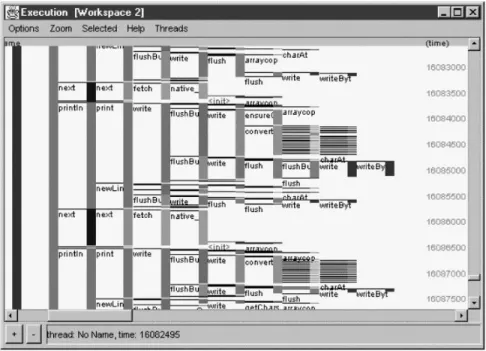
Zooming into the final phase reveals a sequence of next and println method invoca-tions, as shown in Fig. 7.
Fig. 7. Portion of final execution phase
Note that the println invocations (second stripe from left) are significantly taller than the intervening next invocations. This suggests that retrieving results from the database takes relatively little time. Substantially more time is spent printing them.
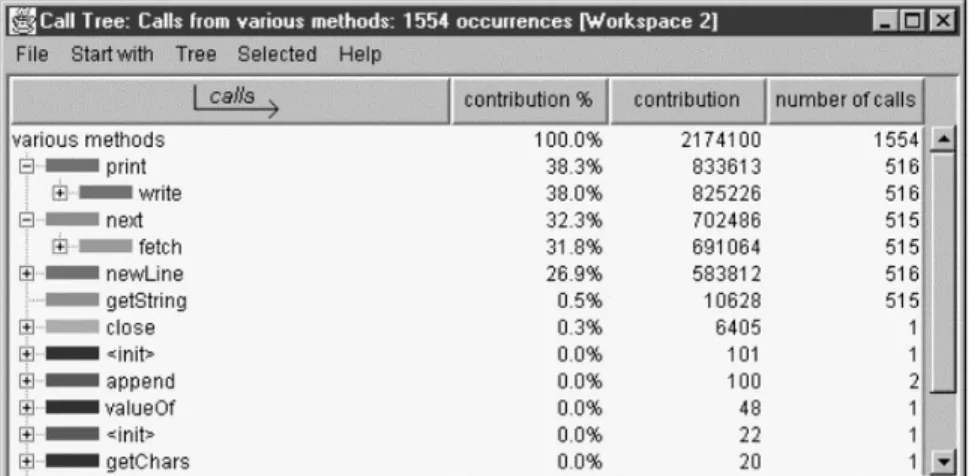
The Call Tree view can give us more precise numerical measurements. Fig. 8 shows that in the final phase of the program, 38% of the time is spent printing results, and 26% is spent printing newlines. Only 32% goes to retrieving the results.
Fig. 8. Call Tree view
This analysis leads to two conclusions:
1. Initialization takes a lot of time (loading the driver, making the connection, etc.). It is beneficial therefore to pool database connections.
2. The retrieval times were much shorter than expected, thanks to being skewed by
printstatements.
Information exploration techniques
A common problem when analyzing program behavior is that information of interest is scattered, or mingled with unimportant information, making it hard to discern. The problem can show up as skewed numerical summaries or as visual overload in graphi-cal views. In any case, key information may be hidden without the right organization.
Fortunately, the user often has valuable knowledge that can help. Jinsight lets users apply their knowledge to structure the information for visualization and measurement purposes [2]. Jinsight’s capabilities in this vein are loosely inspired by techniques commonly found in tools such as OLAP systems for exploring complex databases in other application domains.
The user can select just a few items of interest (for example, certain unusual-looking invocations of a method) and navigate to other views to study the detailed or aggregate behavior of a particular activity. Users may also define their own analysis units, known as execution slices, to group related activities together, or to exclude activity that is outside the scope of study. Execution slices may be used in subsequent visualizations, for example, as a basis for measurement against other summary units such as threads, methods, individual invocations, and so forth There are many ways to define execution slices, ranging from a simple point-and-click in a given view to a full query capability based on static and dynamic attributes of trace data.
Tracing
Jinsight’s visualizations are based on execution traces. To collect a trace, the user runs the target program with either a specially instrumented Java virtual machine (for pre-Java2 platforms) or with a profiling agent and a standard JVM (for pre-Java2 platforms). The generated trace contains the details of the program’s execution for a user-specified period of time. Jinsight users have successfully diagnosed numerous prob-lems on large commercial applications with this approach.
Nevertheless, we have also encountered situations where this approach fell short. For example, when analyzing high-volume, Web-based applications in vivo, traces were often too large to visualize feasibly, and the overhead of generating the traces made the application deviate from its normal behavior. It was necessary to collect trace information more selectively.
One approach summarizes activity using aggregate statistics: histograms of heap consumption, tables of method invocation counts and average duration, and aggregate call graphs. But we found that statistics do not reveal enough of a program’s dynamic structure (such as the sequence and context of method invocations) to support analy-ses for which Jinsight had already proven useful. Another approach is to filter broadly, limiting the trace to invocations of a particular method or class. However, broad filtering does not scale well, because the filtering criteria are not context-sensitive. For example, we are likely to be interested not in every String instantiation but only those driven by a particular type of transaction.
Jinsight supports task-oriented tracing, which can trace details of a program task selectively. Task-orientation admits only relevant details while retaining important contextual and sequencing information. Consider for example a high-volume transac-tion processing system. While analyzing database activity associated with a certain type of transaction, you can limit tracing to a few exemplary transactions and the activity they caused.
Related work
Many systems present program execution information graphically. The work of Zel-ler, et al. [10, 11], is representative, focusing on the visualization of data structures and memory. Although the Reference Pattern view presents much the same informa-tion, Jinsight’s focus is on the combination of control flow and data.
Zeller, et al., also support generalized graph layout for data structure visualization, within its inherent limitations. Others restrict their visualizations to standardized vis-ual syntaxes. Mehner [12], for example, employs UML interaction diagrams to reveal concurrency problems in Java programs. The main limitation of such approaches lies in their scalability. UML and its competitors were designed in part to be easy for humans to draw, an irrelevant and limiting constraint in the context of execution visu-alization.
Still other visualization systems emphasize flexibility. BLOOM [8] has facilities for static and dynamic data collection and a wide range of data analyses, plus a visual query language for specifying the data to explore using a variety of 2D and 3D
visu-alizations. Its scripting capabilities promote experimentation with new visuvisu-alizations. Stasko, et al. [9], offer similar flexibility for experimenting with visualizations.
Systems like these are well suited to experimentation. In practice, however, it is more important to have a small number of visualizations optimized for particular tasks. For example, Jinsight helps reveal memory leaks through a simple process applied through a specialized visualization, the Reference Pattern view. Admittedly, it is impractical to expect a predefined view for every conceivable problem. But it is equally impractical to expect end-users to create effective views on their own, no matter how flexible the visualization environment. The key to this quandary is to foster synergies among predefined views, as Jinsight’s navigation and slicing tech-niques afford. A small number of visualizations may thus address a combinatorial number of problems.
All this is predicated on visual abstractions that can deal with the glut of execution information. Various organizing abstractions have been used to filter execution in-formation or group it into larger units. Sefika, et al. [13], use large architectural units, and Walker, et al. [14], introduce additional structural units as organizing principles. Dynamic relationships too are frequently used to organize information, for example, into call trees as in OptimizeIt [15]. Several systems also use queries of execution information to let the user filter out extraneous information and focus on an aspect of interest. The Desert system [16] provides a powerful query capability against static and dynamic information for various types of program understanding applications, as Hy+/GraphLog [17] does for analyzing distributed and parallel programs. Snod-grass [18] allows queries to be used for analyzing operating system behavior, and Lencenvicius [19] uses queries to debug live programs.
Our approach differs significantly from pure query-based systems. While powerful, those systems depend on their user to be sophisticated enough to set up meaningful visualizations and summary computations. By providing a query capability in the context of higher-level, domain-specific analysis units, Jinsight can introduce task-oriented specification, visualization, and summarization techniques that hide query language complexity from the user. Execution slicing coupled with view navigation offers proven scalability as well, having been employed successfully on production systems comprising over 5000 classes.
Future work
Jinsight currently assumes the visualized application runs on a single JVM. Yet large production systems typically employ multiple JVMs, often across a network. Tracing and visualizing distributed Java programs presents new challenges: events have to be collected from different machines, timestamps might not be uniform, the system may have partial failures and concurrency problems, and many more. We are currently building a distributed version of Jinsight that will permit visualization across JVMs.
Real distributed systems are also heterogeneous, with middleware such as data-bases, HTTP servers, and message queuing systems in addition to Java components. We plan to extend our visualization environment to collect trace information from
these non-Java sources. Our intent is to provide integrated visualizations for end-to-end transaction processing.
Creating Jinsight in an industrial research setting has given us the freedom to ex-plore while having access to real customers who can put our prototypes through their paces. Indeed, fieldwork has driven our research. It reveals the problems developers are struggling with, and it helps us identify future problems and opportunities. Early customer trials are also invaluable for validating features. Some features may prove inadequate or irrelevant, while those crucial to solving certain problems prove lack-ing.
We exploit these characteristics through a three-stage development cycle lasting up to twelve months. First we exercise each new prototype ourselves on a difficult cus-tomer case, tweaking the prototype as needed. Then we release the prototype on the IBM Intranet for our colleagues’ use, carefully noting their feedback. Finally, we release a version for general consumption onwww.alphaWorks.ibm.com. Underused features, however intriguing, tend to be weeded out through this process, thus avoid-ing feature creep and ensuravoid-ing the remainder has proven worth.
Conclusion
Jinsight offers unique capabilities for managing the information overload typical of performance analysis. Through a combination of visualization, pattern extraction, interactive navigation, database techniques, and task-oriented tracing, vast amounts of execution information may be analyzed intensively, making it easier to understand, debug, and tune programs of realistic size and running time.
Acknowledgements
We thank our colleagues Olivier Gruber, Ravi Konuru, Harini Srinivasan, and Mark Wegman for their contributions to Jinsight’s development and for many valuable discussions. We are also grateful to our interns and to our users for their help and feedback.
References
[1] De Pauw, W., Mitchell, N., Robillard, M., Sevitsky, G., Srinivasan, H. Drive-by analysis of running programs. Proceedings for Workshop on Software Visualization, International
Conference on Software Engineering, Toronto, Ontario, May 2001.
[2] Sevitsky, G., De Pauw, W., Konuru, R. An information exploration tool for performance analysis of Java programs. Proceedings of Technology of Object-Oriented Languages
and Systems (TOOLS Europe), Zürich, Switzerland, March 2001, pp. 85-101.
[3] De Pauw, W., Sevitsky, G. Visualizing reference patterns for solving memory leaks in Java. Concurrency: Practice and Experience (2000) 12:1431–1454.
[4] De Pauw, W., Sevitsky, G. Visualizing reference patterns for solving memory leaks in Java. ECOOP ’99, Lisbon, Portugal, June 1999. Lecture Notes in Computer Science
Vol. 1628, Springer Verlag, pp. 116–134.
[5] De Pauw, W., Lorenz, D., Vlissides, J., Wegman, M. Execution patterns in object-oriented visualization. Proceedings of the Fourth Conference on Object-object-oriented
Tech-nologies and Systems (COOTS), Santa Fe, New Mexico, April 1998, pp. 219–234.
[6] De Pauw, W., Kimelman, D., Vlissides, J. Modeling object-oriented program execution. ECOOP ’94, Bologna, Italy, July 1994. Lecture Notes in Computer Science Vol. 821, Springer Verlag, pp. 163–182.
[7] De Pauw, W., Helm, R., Kimelman, D., Vlissides, J. Visualizing the behavior of object-oriented Systems, OOPSLA ’93 Conference Proceedings, Washington, D.C., September 1993, pp. 326–337.
[8] Reiss, S. An overview of BLOOM. Proceedings of Program Analysis for Software Tools
and Engineering (PASTE ’01), Snowbird, Utah, June 2001, pp. 2–5.
[9] Jerding, D. and Stasko, J. The information mural: A technique for displaying and navi-gating large information spaces. IEEE Transactions on Visualization and Computer
Graphics, July–September 1998, 4(3):257–271.
[10] Zimmermann, T. and Zeller, T. Visualizing memory graphs (this volume).
[11] Zeller, A., Lütkehaus, D. DDD—A free graphical front-end for UNIX debuggers. ACM
SIGPLAN Notices, January 1996, 31(1):22–27.
[12] Mehner, K. JaVis: A UML-based visualization and debugging environment for concur-rent Java programs (this volume).
[13] Sefika, M., Sane, A., Campbell, R. Architecture-oriented visualization. OOPSLA ’96
Conference Proceedings. San Jose, California, October 1996. Published as SIGPLAN No-tices, 31(10):389–405.
[14] Walker, R. J., Murphy, G., Freeman-Benson, B., Wright, D., Swanson, D., Isaak, J. Visualizing dynamic software system information through high-level models.
OOPSLA ’98 Conference Proceedings, Vancouver, British Columbia, October 1998.
Published as SIGPLAN Notices, 33(10):271–283.
[15] OptimizeIt Web Site, http://www.optimizeit.com/oproductinfo.html.
[16] Reiss, S. Software Visualization in the desert environment. Proceedings of Program
Analysis for Software Tools and Engineering (PASTE ’98), Montreal, Quebec,
June 1998. pp. 59–66.
[17] Consens, M., Hasan, M., Mendelzon, A. Visualizing and querying distributed event traces with Hy+. Lecture Notes in Computer Science, Vol. 819, Springer Verlag, 1994, pp. 123–141.
[18] Snodgrass, R. A relational approach to monitoring complex systems. ACM Transactions
on Computer Systems, May 1988, 6(2):157–196.
[19] Lencenvicius R., Hoelzle, U., Singh, A. K. Dynamic query–based debugging. ECOOP ’99, June 1999, Lisbon, Portugal. Lecture Notes in Computer Science, Vol. 1628, Springer Verlag, pp. 135–160.