Edith Cowan University Edith Cowan University
Research Online
Research Online
ECU Publications 2011 1-1-2011Web scale discovery: the user experience
Web scale discovery: the user experience
Julia GrossEdith Cowan University
Lutie Sheridan
Edith Cowan University
Follow this and additional works at: https://ro.ecu.edu.au/ecuworks2011
Part of the Library and Information Science Commons
10.1108/03074801111136275
This is an Author's Accepted Manuscript of: Gross, J. M., & Sheridan, L. L. (2011). Web scale discovery: the user experience. New Library World: charting new developments, 112(5/6), 236-247. Available here
This Journal Article is posted at Research Online. https://ro.ecu.edu.au/ecuworks2011/31
1
Web scale discovery: the user experience
AbstractPurpose
This study looks at how a small group of university students used the new library web scale search discovery tool, Summon, and whether they encountered any difficulties pertaining to navigation, ease of use and the quality of the search results.
Design/methodology/approach
Researchers conducted a series of usability studies in which students were observed as they conducted some typical library resource searches using the new discovery search platform.
Findings
The paper analyses the data, describes and reports the findings of the usability tests. The study found that the new homepage design of providing a single search box was an effective interface for users. The students found a single search box discovery solution was simple to use, and seemed to deliver satisfactory results on a selection of typical library search tasks. The study confirms some of the promise for web scale discovery, but points to new lines of enquiry in relation to the nature of assistance students will need in the future, particularly in relation to their need to evaluate information.
Originality/value
Web scale discovery searching is an innovation in the online searching of library collections. The study revealed how a small sample of end-users experienced the new type of searching and, serendipitously identified a new issue that warrants further investigation.
Article Type: Research paper
Keyword(s): Usability studies, Web scale discovery, Discovery searching, Academic libraries, University libraries, Library websites.
2
Introduction
During the last decade, increased complexity in the information landscape has brought changes to the way libraries operate. New electronic formats have proliferated and now exist alongside the library’s traditional collections. In addition much quality information is now found outside library collections, on the Internet.
Recently, web scale discovery products are being hailed as the panacea that will provide Google-type searching of library collections. However, there is, as yet, a dearth of end-user studies to confirm this promise.
It is well documented by Head and Eisenberg (2009) and others (Lippincott 2005; OCLC 2005) that many students find the research process difficult and often choose Google or Google Scholar as their first research port of call. Head and Eisenberg’s 2009 report, which was part of the Project Information Literacy longitudinal study found that:
students reported being challenged, confused and frustrated by the research process … having particular difficulty traversing a vast and ever-changing information landscape. (Head &
Eisenberg 2009, p. 13)
This finding corresponds with the experiences of many librarians who in deal with students in information literacy classes and in reference enquiry contact time in the academic library setting. It is not difficult to see why the simplicity of “googling” has instant appeal.
Burke (2010) points to signs that libraries are in danger of being cut out of their role as intermediaries in the information supply chain. The Ithaka survey of faculty also cautions that the “academic library is increasingly being disintermediated [left out] from the discovery process, risking irrelevance in one of its core areas”…that is the core area of research (Schonfeld & Housewright 2010). And whereas students place high value on the library “brand” (OCLC 2005 part 3), they are increasingly overwhelmed by the complex navigation of library websites that present multiple pathways to searching across many different formats.
Lauridsen and Stone have recognised that the shift from print to online library collections has made it imperative that libraries find ways to organise and manage this “virtual cornucopia of e-books, journal articles, text and images” (2009, p. 41). Library systems developers have grappled with the resource discovery dilemma for almost a decade and have arrived at various system solutions: database subject lists, A-Z database title lists, federated
3
the above. The ultimate aim of all these solutions has been to maximise resource usage, relieve user frustration, and enable smooth navigation to library resources.
Library resource discovery
The new web scale discovery approach moves beyond enhanced library catalogues and discovery layer approaches combining access to both library catalogue and journal database content in one search tool. The term “web scale discovery” arises from a series of seminars entitled Returning the Researcher to the Library: Defining Web-Scale Discovery: The Promise of a Unified Search Index for Libraries, sponsored by Serials Solutions and the Library Journal (Infomotions Inc. 2009). It should be noted that the terminology is evolving in this area of library system development. As Marshall Breeding (2010b) states: “initially, these new tools were called nextgeneration library catalogs, but now I prefer to call them discovery interfaces”. Breeding (2010) describes web scale discovery as a library discovery system solution that “exploits the full depth and breadth of library collections [goes] beyond the bounds of the local library’s collection [and] targets the universe of objective, vetted library content” (Breeding 2010a slide 70).
Several commercial discovery products have appeared on the market in recent years:
Encore from Innovative Interfaces, Primo Central from Ex Libris, Serials Solutions’ Summon, EBSCO Discovery Service and others. Marshall Breeding’s Library Technology Guides website is tracking developments in this fast growing field (Breeding 2010b). In his 2010 Discovery State of the Art report Breeding made a call to arms for libraries to adopt and evaluate these new web scale discovery tools:
While the concepts seem quite attractive, it will only be through the experience of library users that these products will either prove themselves or not. (Breeding 2010c, p. 34)
Serials Solutions’ Summon
In January 2010 Edith Cowan University (ECU)Library introduced Serials Solutions’
Summon, which was re-branded as ECU Library One Search. The decision to adopt
Summon was compelling for ECU Library as the library already had its online serials records managed by Serials Solutions. Also, beta testing of Summon in other libraries had provided promising results (Law 2009). During the Summon implementation phase, the library’s homepage was redesigned, and the multiple search options of catalogue, reserve collection and database search options were replaced with a single Library One Search box. Library One Search searches all catalogue records and journal records in a single search, thus alleviating the searching “silo effect” of previous resource discovery solutions described by Nagy and Garrison (2009). Early indications pointed to a positive reception of Library One
4 Search by ECU students, but the library needed to understand more fully how students actually behaved when searching for specific information on the new platform. It was therefore decided to undertake a usability study of the new library homepage incorporating an analysis of Library One Search searching.
The research project leaders are information service librarians in an academic library, who work with university students to assist them to locate suitable resources in their discipline areas. The experience of the researchers was that, although students are provided with library skills sessions, many of them still struggle with the complex interfaces and myriad choices the library website provides. The web scale discovery platform was recently
introduced in the library to help to reduce this complexity. The purpose of the research was to investigate whether the resource discovery tool that has been implemented, provides students with easier access to the library’s information resources. The starting premise of the research was that if students cannot discover the richness of the library-provided
content, they are being short changed in their education. Also, in times of shrinking finances, the library needed to evaluate the effectiveness of the new library collection discovery tools. The paper describes and reports the findings of the usability study conducted during
semester one 2010 with a group of first year undergraduate students. Specifically, the researchers investigate how a group of students used the new discovery system and how they performed some typical library searches.
The study focussed on three main questions:
• Did the students find the discovery searching platform easy to use? • Did the new website provide smooth navigation?
• Did students obtain satisfactory results across a range of typical search topics?
Methodology
In separate studies Steve Krug (2000) and Jakob Nielson (2000), claim that if a website is difficult to use, people will not use it, and that as far as possible a website’s use should be obvious and self-explanatory. Nielson (2003) defines the usability of a website as the “quality attribute that assesses how easy user interfaces are to use”. The most basic and useful way of studying a site’s usability is to do user testing. Nielson tells us that user testing comprises three basic steps:
• get hold of some representative users
5
• observe what the users do, where they succeed and where they have difficulties with the user interface.
ECU’s new library website, with its single Library One Search box, had been designed to make the site more easily accessible to students. The usability study was designed to investigate how students used the new site, and whether it enabled them to get results. Once the research had been approved by the university’s research ethics department (see participants’ information sheet and ethics consent form in Appendices 1 and 2), the
researchers recruited students from the core unit CSG 1132 Communication in an IT
Environment. This is a unitwhich istaken by all first year students in the School of Computer and Information Sciences, some of whom are Computer Science students and the others Library and Information Science students. The lecturer for the unit explained the purpose of the research to all students taking the unit, and later on provided the researchers with a list of students who would be interested in participating. Five student participants were chosen on the basis of their availability. The students were not differentiated on the basis of subjects or units studied, or ability. These five students will be referred to below as “Student A”, “Student B”, “Student C”, “Student D”, and “Student E”. All students had attended a first semester library skills lecture. Two of the students in the study group were majoring in Computer Science (both male) and three were talking Library and Information Science majors (one male and two females). All participants were aged in their early to mid 20s. They were given a $30 gift voucher from a supplier of their choice as a small recompense for their participation.
The study was designing so that the number of search topic questions was kept to a minimum to avoid students becoming tired or frustrated. The questions reflected actual searches the average student might do in the course of their studies however they were not particularly in subjects related to Computer Science or Library and Information Science (see Table 1 for the list of topics): 1) was a topic or subject search that asked the students to find a resource to help prepare a given essay topic; 2) was a “known item” search that asked the students to find a particular journal article citation; 3) was a “known item” search for a
particular book citation; 4) asked students to find an item on a given unit’s reserve reading list. The details follow in Table 1.
6
Table 1 Search
question
Testing area Search topic script given to students
question one
general subject search You’ve been asked to write an essay on the following:
With the advent of social networking sites cyber-bullying has been a serious issue in Australian schools. Discuss the issues of duty of care and school liability in relation to cyber-bullying.
Find a book or journal article you think will help you prepare your answer.
question two
known item, journal citation
You have been asked to read the article: The “Jewish War”: Gobbels and the Antisemitic campaigns of the Nazi Propaganda Ministry. It was written by Jeffrey Herf, and is in Vol 19, issue 1, of the Journal
Holocaust and Genocide Studies, from 04/2005. The article starts on page 51 and ends on page 80. Please find and download a copy of this article. question
three
known item, book citation
You have been given the reference:
Gregory, E., & Gregory, E. (2008). Learning to read in a new language: making sense of words and worlds. London: SAGE.
Please find the call number (shelf number) of this item
question four
known item, electronic reserve
You are studying ACS4101 and your lecturer has told you that a chapter of the book Prehistory of Australia
by Derek John Mulvaney has been put on electronic reserve and is available for download. Using the library site (www.ecu.edu.au/library) find and download a copy of this chapter.
The usability study was conducted in a seminar room at one of the ECU libraries. Following the client-centred usability studies advice of Clancy and Watson (2010), researchers
endeavoured to make the students comfortable. Students were asked to come in one at a time in one hour intervals and were greeted in a friendly manner.One of the researchers explained the usability study process, gave them the explanation sheets, and asked them to
7
sign the consent forms. Students were reminded that the website navigation and search tools were being tested, not their abilities. The other researcher set up the recording process and readied the computer so that Internet Explorer was open at the ECU library homepage. Students were given the question sheet with the four searches and asked to work through the questions at their own pace.
TechSmith’s Camtasia 6 software, a webcam and a microphone headset were used to follow each student’s actions, mouse clicks and any verbal comments. As well as being recorded by Camtasia, each student’s use of the computer was projected onto a large screen so that the researchers could observe and make notes while the students searched. The Camtasia video provided a back-up for the researchers to examine later.
As stated above, the studies were done singly in one-hour intervals, though no student took longer than 25 minutes to finish the study. Students were given as much time as they wanted and no one was rushed. They were told that they could give up on a question and move on to the next question at any time.
All the students were novice library users, but, as stated above, they had received a library education session with the faculty librarian earlier in the semester. The library education session was a basic one-hour lecture within the unit lecture time covering: Introduction to the search process, analysing the topic, main concepts and keywords, Boolean operators; library catalogue; library databases IEEE and ACM; and Library One Search (the library’s new discovery tool being tested in this study).
Library homepage redesign
The January 2010 redesign was timed to coincide with the introduction of the new Library One Search (Summon). The researchers felt that the library homepage redesign would have a major influence on the navigation path the students chose on the site. ECU library had conducted a series of usability studies during 2005 and 2006 (Gross & Leslie 2006), but nothing more recently. Since 2006 there had been a number of library website redesigns, but no comprehensive usability testing.
8
Old Library Homepage 2009
As can be seen in the illustration above, the 2009 library homepage had three search options down the centre of screen: the library catalogue search at the top (entitled Books, CDs and more), the Reserve Readings search (of the library catalogue) and the Metaquest (Library Databases) search using the library’s Ex-Libris federated search product.
New Library Homepage 2010
The 2010 revamped library homepage has clearly placed Library One Search centre screen where it cannot be missed. Five previously well-usedlinks to finding resources are now
9
prominently placed below it: Library catalogue, the Reserve collection, My library record, A-Z databases and Subject guides; these links no longer have an accompanying search box or descriptive text.
Findings
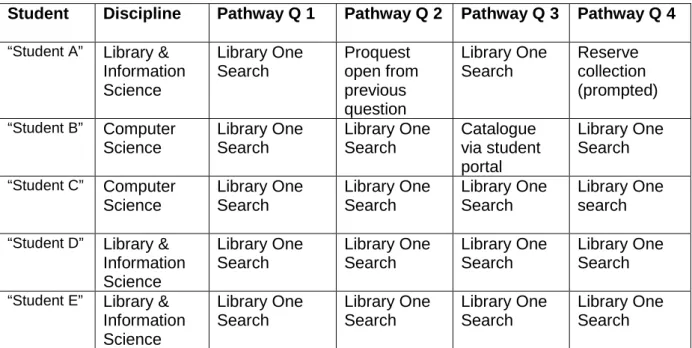
The research aimed to investigate whether the redesign of the library homepage would result in students taking the single Library One Search pathway. Results for all five students are below and show clearly that Library One Search was by far the preferred navigation path.
Table 2 Pathway Chosen for Conducting Search Questions
Student Discipline Pathway Q 1 Pathway Q 2 Pathway Q 3 Pathway Q 4
“Student A” Library & Information Science Library One Search Proquest open from previous question Library One Search Reserve collection (prompted) “Student B” Computer Science Library One Search Library One Search Catalogue via student portal Library One Search “Student C” Computer Science Library One Search Library One Search Library One Search Library One search “Student D” Library &
Information Science Library One Search Library One Search Library One Search Library One Search “Student E” Library &
Information Science Library One Search Library One Search Library One Search Library One Search
One objective of the research was to ascertain whether a single search discovery solution was simple to use. Our findings indicate that the redesign of the Library homepage and the centre screen prominence of the Library One Search box has achieved the aim of simplifying navigation and steering students in one direction. Previously students had three possible search pathways with accompanying search boxes: library catalogue, reserve readings and federated search of databases (called MetaQuest at ECU). Students in this study had no problems getting started with the search. All chose Library One Search, despite the fact that some of the searches were specifically designed to be quickly done via the library catalogue search. However, most students struggled with what should have been a very
straightforward search for the electronic reserve reading. In the old 2009 homepage version this was a specific search option and was placed in the centre of the screen. The electronic reserve items in the Library One Search results display list are called “web resource”, which
10
students found misleading, and most students did not realise this was an electronic document held in the library e-reserve. Even when the electronic reserve item came up in their results list, they did not realise this is what they were looking for.
There were some navigation issues arising from the research data which are outside the control of the library. For example, the Student Portal is the main entry point to the ECU website for many ECU students and the library links provided here are limited and, for various reasons, still point to the library federated search option, which is being phased out. One student in the usability study got caught in a roundabout in the Student Portal and could not find his way back to the library homepage.
Many commentators of web scale discovery laud the idea of having a single search box to retrieve items from all sources because of its clarity and ease of use, and most libraries are proceeding this way. It came as no surprise that our study confirmed that a simplified, uncluttered page smoothes the navigation for students.
Once into Library One Search, most students did not encounter difficulties, and they stayed in this environment to answer all subsequent search questions in the study. However, it was obvious from observing them that they did have trouble interpreting the screen results and understanding the differences between different formats. For example, in the Library One Search results list display, students were confused between the record of a book, and the record of a book review.
Another objective of the research was to discover whether a single search discovery solution delivers satisfactory results. Of course simplicity of the searching interface does not solve the problem of complexity of content – resources still have to be evaluated and this is especially problematic when there is an enormous amount of information yielded. Students in the usability study were confident with the user interface, but somewhat perplexed by the search results. This corresponds with Combes (2008), whose research highlighted that first-year students’ “information-seeking behaviour is [often] unsophisticated ... this generation’s lack of understanding of how the Web works coupled with high levels of confidence, means they often fail to realise they don’t know” (Combes 2008, p. 15). In this study researchers found that students did not seem to understand the differences between the various formats of information they found -- for example whether the item was a journal article or a
newspaper article. This suggests that the students can find huge amounts of information without the help of a librarian – but can they find useful information? Researchers found that most students in our group used vague keyword searching; in other words, their ability to analyse the question and come up with useful keywords was not strong.
11
Discussion
All five students in the study group were first year students who volunteered to participate in the usability study. All were studying either Computer Science or Library and Information Science. One should use caution in extrapolating the findings across a wider range of
students – to students in other disciplines and studying at other levels. This study has shown that all students in this small cohort were able to find information relatively quickly, but they had little concept of the format of the material. Some researchers have questioned whether this matters because formats are blurring and converging and students will be satisfied if any relevant information is retrieved, regardless of format. For example, Burke states:
What libraries often fail to realise is that end-users see most information objects as equal. A relevant article on a topic is as good as, if not better than, an entire book. While libraries count databases, those databases represent millions of objects to which end-users want, and need, simple access. (Burke 2010, p. 5)
The students in this study approached the search tasks with confidence. However, the researchers question whether or not they really understood what they were finding. Along the way the research gave rise to a number of questions:
• Has Library One Search with its single results list masked the differences between formats?
• If so, does this really matter to the end user?
• Does the Library One Search solution pose dilemmas for librarians and academic programs?
• Should the librarian rethink what they cover in library skills sessions?
• Would the research findings be different with a larger cohort of students across a wider range of disciplines?
Conclusion
In the study the participants chose Library One Search in 80% of cases, although other pathways had been covered in their library education session. Once they had chosen Library One Search the students stayed with it even when an alternative pathway may have proved more fruitful. This poses the question: Does the single search box limit students’ willingness to explore other options? Another unanswered question is: What sort of content should be included in library education sessions? There is no doubt that the students found the Library One Search an easy way to get results and probably easier than the various options they
12
were previously faced with; however, it appeared that the students were not able to fully understand the results they obtained, or where those results were coming from. As in the Burke (2010) study, the students seemed to see all information as being of equal value, and did not seem to be able to differentiate between the sources of the information. One of the advantages of Library One Search is that it will search through all materials available
through the library, including non-academic journals and newspapers, and present them in a single list. However, this puts the onus back on the user to understand and evaluate where the information is coming from, and use the various Library One Search limiting facets to make sure they are getting the information from appropriate sources. Thus the simplicity of the new interface may be doubled edged. On the one hand it gives students confidence. But, on the other hand, this does not mean they have any great understanding of information seeking or evaluation of resources. Only one of our five participants used the Library One Search advanced search and limiting facets as a standard part of her searching technique. It would seem that as librarians, our role in helping students understand how to use the
interface to find data may be diminishing; but conversely, our role in helping them develop search strategies and evaluate what is useful information becomes even more important. The research was limited in scope to observing a small, homogenous group of students. Nevertheless, it makes a contribution to the growing area of usability and web scale discovery, and has unearthed several unanswered questions that would be worth further exploration: What is the relationship between the students’ approaches to the search tasks and the library information literacy training they have received? What content should be covered in library information literacy classes in the future? These research results suggest that a greater information literacy focus on evaluation of information is required.
13
References
Breeding, M. 2010a, 'Blending evolution with revolution: a new cycle of library automation spins on', paper presented to the VALA2010: connections, content, conversations. 15th biennial conference and exhibition, Melbourne, Australia, 9-11 February 2010. Breeding, M. 2010b, Library technology guides: key resources in the field of library
automation accessed 6th April
Breeding, M. 2010c, 'The State of the art in library discovery 2010', Computers in libraries, vol. 30, no. 1,pp. 31-34.
Burke, J. 2010, 'Discovery versus Disintermediation: the new reality driven by today’s end-user', paper presented to the VALA2010: connections, content, conversations. 15th biennial conference and exhibition Melbourne, Victoria.
Clancy, K. & Watson, M. 2010, 'Usability testing: a client-centred approach to innovation', paper presented to the VALA2010: connections, content, conversations. 15th biennial conference and exhibition, Melbourne: Victoria, 9-11 February 2010. Combes, B. 2008, 'The Net Generation: Tech-savvy or lost in virtual space?', paper
presented to the IASL Conference: World Class Learning and Literacy through School Libraries, Berkeley, California, 3-7 August 2008.
Gross, J. & Leslie, L. 2006, 'Website Usability: A Window into a Learning Environment', paper presented to the Transforming Information and Learning Conference (TILC), Perth, Western Australia, 29 - 30 September 2006
Head, A.J. & Eisenberg, M.B. 2009, Lessons learned: How college students seek information in the digital age, University of Washington, The Information School. Infomotions Inc. 2009, Web-scale discovery indexes and "next generation" library catalogs
accessed 30 August 201
Krug, S. 2000, Don't make me think! : a common sense approach to Web usability, New Riders : Que, Indianapolis, Ind.
Lauridsen, H. & Stone, G. 2009, 'The 21st-century library: a whole new ball game?', Serials: the journal for the serials community vol. 22, no. 2,pp. 141-145.
Law, J. 2009, Helping your library be the best partner for research, National Federation of Advanced Information Services (NFAIS), Philadelphia, PA.
Lippincott, J. 2005, 'Net generation students and libraries', in D. Oblinger & J.L. Oblinger (eds), Educating the net generation, EDUCAUSE, Boulder, CO.
Nagy, A. & Garrison, S. 2009, Next-Gen Catalogs Are Only Half Part of the Solution,
accessed 24 May
Nielsen, J. 2000, Why You Only Need to Test With 5 Users, accessed 25 March 2010
Nielsen, J. 2003, Usability 101: Introduction to Usability, accessed 25 March 2010
OCLC 2005, Perceptions of libraries and information resources, accessed 27 April 2010
Schonfeld, R.C. & Housewright, R. 2010, Faculty survey 2009: key strategic insights for libraries, publishers, and societies, Ithaka S+R, New York.
14
Acknowledgements
This research has been approved by the ECU Human Research Ethics Committee. We gratefully acknowledge the support of Barbara Combes of the School of Computer and Security Science and the students of Edith Cowan University in completing this study. The help of John Hall in providing critical feedback on this paper is also thankfully acknowledged.
15
Appendix 1
Participant Information Sheet. ECU Library Website Usability Research
Description: The aim of this project is to understand the online experiences and behaviours of Edith Cowan University (ECU) students by observing them as they conduct searches on the Library’s website.
Participation: ECU Library has recently upgraded its library website and would like student input on the changes. As a student you are able to provide unique and critical insights which will help the university library; hence the research team is inviting you to participate.
Your participation is entirely voluntary and, of course, you are free to withdraw at any time without comment or penalty. Your decision to participate will in no way impact upon your current or future relationship with ECU. The purpose of the research is to obtain information from students to help the library better understand their online experiences and needs. Should you agree to participate you will be asked to undertake several searches on the library website. Your online searches will be captured using screen capture technology, and also, if you agree will be videoed. If you choose you may opt out of the video component and just agree to the screen capture.
As an incentive for volunteering to participate, on completion of the usability exercise you will receive an iTunes voucher or Bookshop voucher to the value of $30, whichever you prefer. The usability study is scheduled for 6-30th April 2010.
Expected benefits: The outcome of the project will inform the redesign of search
functionality of future library websites and contribute to developing an easier, more student-friendly online space. Findings will have significant bearing on the character of ECU library website online space in the future. It is expected that the project will benefit both yourself and future students by improving searching on the university library website so we can better service your needs.
Risks: There are no risks beyond normal day-to-day living associated with your participation in this project.
16
Confidentiality: All associated videos of screen captures will be treated confidentially. Participants will not be identified by name in any reporting of findings. Records will be securely stored and accessed only by the Project Team. Screen capture video records and comments will not be used for any purpose other than the research project.
Consent to Participate: In order to participate in this project you are required to complete and sign the associated consent form.
Questions/further information about the project: Please contact the researchers named above, if you have any questions or seek further information about the project.
Concerns/complaints regarding the conduct of the project: ECU is committed to researcher integrity and the ethical conduct of research projects. However if you do have any concerns or complaints about the ethical conduct of the project you may contact the ECU Research Ethics Officer. The Research Ethics Officer is not connected with the research project and can facilitate a resolution to your concern in an impartial manner.
17
Appendix 2
Consent Form. ECU Library Website Usability Research.
Aim of the research
To understandthe online experiences and behavioursof Edith Cowan University students by observing them as they conduct searches on the Library’s website.
Consent
I _______________________________ agree/disagree to participate in the study being conducted by librarians at Edith Cowan University library
I understand that my participation is entirely voluntary.
I understand that I am free to stop my participation in the study at any time without penalty. I understand that the personal information supplied by me during the study will be kept confidential and that I will remain anonymous. Within these restrictions, results of the study will be made available by my request.
I understand that the information contained in this research will be stored safely for five years, and after that time the information will be destroyed. I understand that the information will not be given to any other researcher or agency without my written permission.
I understand that, if I want it, I can receive additional explanation of the study at any time. I understand that the results of this study may be presented at a national/international conference.
I understand that the results of this study may be submitted for publication to a national/international journal.
_____________________________________________ Signature
I also agree/disagree to being videoed by librarians at Edith Cowan University library _____________________________________________ Signature ______________Date