OY1110
LoRaWAN Temperature and humidity sensor
User manual
Version 1.0
January 2019OY1110 LoRaWAN Temperature and humidity sensor, User manual, Version 1.0 2 Table of Contents 1 Disclaimer ... 3 1.1 Technical support ... 3 1.2 EU Declaration of conformity ... 3 2 Warnings ... 4 3 Environmental ... 5 4 Product Description ... 6
5 Installation and activation ... 7
5.1 LoRaWAN Configuration ... 8
5.2 Sensor states and state check ... 8
5.2.1 Re-join functionality ... 9
6 Specification ... 10
7 Product life length ... 12
8 Security ... 12
9 Protocol ... 12
9.1 LoRaWAN standard commands ... 12
9.2 Unsolicited uplink status commands ... 13
9.3 Periodic measurement reports ... 13
9.3.1 Periodic single measurement report ... 13
9.3.2 Periodic grouped measurement report ... 13
9.3.3 Measurement value ... 14
9.3.4 Grouping header ... 15
9.3.5 Example: Single measurement report ... 15
9.3.6 Example: Grouped measurement report ... 15
9.4 Downlink commands and queries ... 16
9.5 Commands ... 17
9.5.1 Measurement interval ... 18
9.5.2 TX group size ... 18
9.5.3 Reset device ... 18
9.6 Uplink query response ... 19
OY1110 LoRaWAN Temperature and humidity sensor, User manual, Version 1.0 3
1
Disclaimer
This document represents information on products at the time of publication and is subject to change without prior notice due to product improvements or other reasons. Talkpool makes no warranties based on the accuracy or completeness of the contents of this document and reserves the right to make changes to specifications and product descriptions at any time without notice. Talkpool reserves all rights to this document and the information contained herein.
1.1 Technical support
Please visit www.talkpool.io for additional information, or contact [email protected]
1.2 EU Declaration of conformity
ECDECLARATION OF CONFORMITY certify that the design and manufacturing of this product
WIRELESS TEMPERATURE SENSOR / FUNK-TEMPERATURSENSOR / TRÅDLÖS TEMPERATUR SENSOR /
TRÅDØS TEMPERATUR SENSOR / DRAADLOZE TEMPERATUURSENSOR
OY1110 EU868
conforms to the following directives and standards The Radio Equipment Directive (2014/53/EU),
EN 300 220-1 V2.4.1, EN 300220-2 V2.4.1, EN 301 489-1 V1.9.2, EN 301 489-3 V1.6.1,
EN 60950-1:2006+A11+A1+A12+A2 RoHS Directive 2011/65/EU This product was CE marked in year -18
2018-12-01 ___________________ Managing Director Stefan Lindgren
OY1110 LoRaWAN Temperature and humidity sensor, User manual, Version 1.0 4
2
Warnings
The following safety precautions must be observed during all phases of the operation, usage, service or repair of this Talkpool product.
• Read the product manual. • Do not modify the product.
• The product should not be exposed to extreme heat or open flame. • The device must not be exposed to harsh chemical agents or solvents.
OY1110 LoRaWAN Temperature and humidity sensor, User manual, Version 1.0 5
3
Environmental
This symbol on the product or on its packaging indicates that this product must not be disposed of with your other household waste. Instead, it is your responsibility to dispose of your waste by taking it to a collection point designated for the recycling of electrical and electronic appliances. Separate collection and recycling of your waste at the time of disposal will contribute to conserving natural resources and guarantee recycling that respects the environment and human health. For further information concerning your nearest recycling center, please contact your nearest local authority/town hall offices, your household waste collection company or the shop where you bought the product.
OY1110 LoRaWAN Temperature and humidity sensor, User manual, Version 1.0 6
4
Product Description
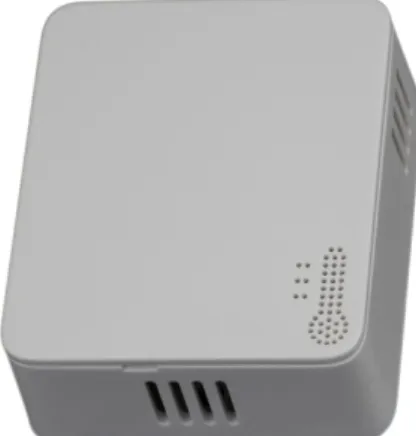
Figure 1: OY1110 Temperature and humidity sensor
The OY1110 LoRaWAN Temperature and humidity sensor is designed to measure
temperature and humidity in indoor environments. The sensor is intended for climate control, energy optimization, and damage preventions in attics and basements. It is optimized for reliable and secure measurements with more than 10 years life length.
The standard measurement and reporting interval is 15 minutes, other reporting intervals can be configured over the air.
OY1110 LoRaWAN Temperature and humidity sensor, User manual, Version 1.0 7
5
Installation and activation
The sensor consists of a bottom piece, to be mounted on the wall, and a top piece with the active parts.
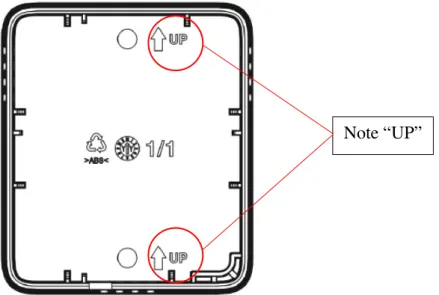
Figure 2: Mounting information
The bottom piece is mounted on the wall with the “UP” arrow upwards. It can be mounted either with screws or adhesive tape.
Figure 3: Push button and LED
The top piece contains all active components. The unit is shipped in sleep mode, i.e. with all functions, including radio, deactivated. The sensor is activated by pressing the push button for 3 seconds until the red LED makes two short flashes, make sure to not hold longer than 5 seconds. When the device has successfully joined the LoRaWAN network there will be a long (2s) flash.
OY1110 LoRaWAN Temperature and humidity sensor, User manual, Version 1.0 8
5.1 LoRaWAN Configuration
Configuration on the network server is done with AppEUI: 70-B3-D5-D7-2F-F8-16-00 (a.k.a. JoinEUI)
It is possible to order a batch of devices configured with a customer unique AppEUI from the Talkpool OUI range.
The device is configured with device unique DevEUI and AppKey
The device is default configured for OTA provisioning. Contact the Talkpool team for ABP configuration. The device follows the LoRaWAN standard related Join configuration parameters, such as RX1 and RX2 windows, RX2 downlink frequency etc.
The default setting is ADR enabled.
5.2 Sensor states and state check
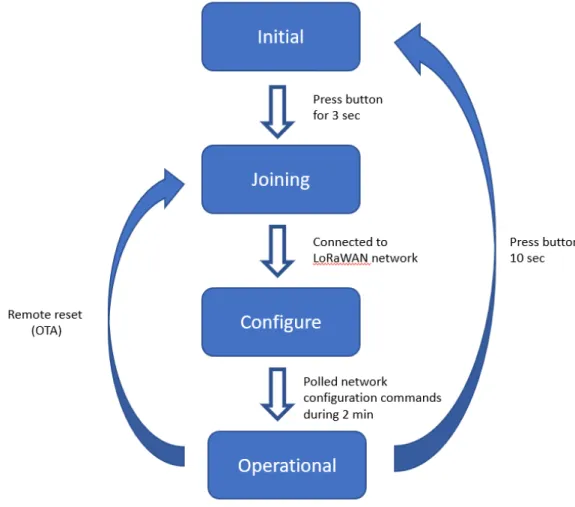
The sensor has four states: Initial, Joining, Configure and Operational state.
OY1110 LoRaWAN Temperature and humidity sensor, User manual, Version 1.0 9 To check the device state, press the button and hold it pressed until the red LED starts
flashing after 0.5s.
State Description LED response
Initial Low power state during transport. Radio not active. 1 short flash (0.5 sec) Joining Trying to join a LoRaWAN network. The device
will remain in this state until successfully joined a LoRaWAN network
2 short flash (0.5 sec)
Configure Enables quick over-the-air configuration, by polling server after configuration commands during 2 minutes. This is done by sending uplink status command (0x20).
1 long flash (2 sec)
Operational Joined to a LoRaWAN network, measures
temperature and humidity periodically, and sends measurement reports toward a LoRAWAN network.
1 long flash (2 sec)
5.2.1 Re-join functionality
The device supervises its connectivity to the network, by monitoring that periodic downlink messages are received.
The device tries to re-join the network if it has not heard anything from the network for 288 uplinks (3 days @ 15-minute message interval). The device requests and normally gets a downlink ever 64th uplink due to the ADRAckReq functionality.
OY1110 LoRaWAN Temperature and humidity sensor, User manual, Version 1.0 10
6
Specification
Accuracy and range
Temperature accuracy ± 0,2 °C (conditions 0 °C to +50 °C) Temperature range -20 °C to +60 °C
Humidity accuracy ± 2% (conditions 10-90% RH)
Humidity range 0% to 100% non-condensing
Accuracy of ± 0,1 °C and ± 1,5% humidity available upon request
Connectivity
Network LoRaWAN
Frequency bands 868 MHz
Provisioning Over the air & personalization
Security
Algorithms AES-128
Hardware Cryptographic co-processor
Features Secure boot
Secure firmware upgrade Hardware based ultra-secure key storage
Battery life
Battery life length 10 years (at 5-minute intervals, SF7)
Primary cell Lithium-thionyl 3.6V
Capacity 3.6 Ah
Size & Weight
Size 65 x 75 x 28 mm
Weight 75g
Configuration
Measurement intervals 1 minute – 1 week* Transmission intervals 1 minute – 12 weeks* *Default 15 minutes, configurable over the air
OY1110 LoRaWAN Temperature and humidity sensor, User manual, Version 1.0 11 Unique App EUI available upon request
Enclosure IP30 Certifications RoHS compliant CE LoRaWAN
OY1110 LoRaWAN Temperature and humidity sensor, User manual, Version 1.0 12
7
Product life length
The OY1110 LoRaWAN Temperature and Humidity sensor is design for 10+ years of maintenance-free operation. The product has high quality, high capacity batteries which support 15 min interval transmission at SF10 for 10 years. The product has soldered battery to prevent problems with corrosion and oxidation on the battery terminals, which is a common problem for batteries in field.
The protocol support also over the air adjustable measurement interval, and grouping function, which enables flexible usage to optimize the product for fine time resolution or extended life length.
8
Security
The OY1110 is based on the Talkpool LoRaWAN platform, with state-of-art security solution. The device has secure boot, to ensuring the firmware integrity, prevents malware injection and modification. The encrypted firmware prevents from any backwards engineering to engineer attack vectors.
The security keys are generated and stored in an ultra-secure cryptographic co-processor and cannot be extracted from the device.
The device is locked down in full security state, to keep the integrity and privacy of the customer data.
9
Protocol
The protocol consists of different types of data - LoRaWAN v.1.0.4 standard commands
- Unsolicited uplink status commands during configure state - Periodic measurement reports
- Downlink commands and queries - Uplink query response
Note 0x denotation means hexadecimal encoded.
9.1 LoRaWAN standard commands
All standard LoRaWAN v 1.0.4 are supported. Please refer to the LoRaWAN standard for the protocol definition.
OY1110 LoRaWAN Temperature and humidity sensor, User manual, Version 1.0 13
9.2 Unsolicited uplink status commands
The sensor polls the server for configuration parameters the during the Configure state. This is done by sending unsolicited uplink status report (0x20). This is gives quick feedback to the installer that the installation has been successful and enables downlink configuration
commands to be sent. After approximately 2 minutes the device changes to Operational
state. Port: Port 1 Payload 0x01 20 00 0x01: Data type 0x20: Status command 0x00: Normal startup
The expected behavior is 0x01 20 00. If not contact Talkpool support.
9.3 Periodic measurement reports
The sensors transmit periodic unsolicited measurement reports, either from a single measurement or grouping several measurements to one transmission to conserve energy.
9.3.1 Periodic single measurement report
The default configuration is that temperature and humidity is measured and transmitted every 15th minute and transmitted. The data is compressed to conserve energy and minimizing interference.
Port: Port 2
Payload: Measurement value (see chap 9.3.3)
Size: 3 Bytes
9.3.2 Periodic grouped measurement report
To optimize the time granularity or extend the battery life length, several measurements can be grouped into a single transmission.
Port: Port 3
Payload: Grouping header, Measurement value (T=0), Measurement value (T=-dT), Measurement value (T=-2 x dT), ….
OY1110 LoRaWAN Temperature and humidity sensor, User manual, Version 1.0 14 Size: 1 Byte (Grouping header) + n x 3 Byte (Measurement value) where n = number of grouped measurements
The latest measurement performed right before the transmission is sent first in the report. To decode the number of measurements in a grouped measurement report the payload length must be used. The time between the measurements (dT) are described in the Grouping header. The data format is further explained in chapter 9.3.3 Measurement value and chapter 9.3.4 Grouping header.
9.3.3 Measurement value
The measurement value for each measurement is sent as two unsigned 12-bit values coded in three bytes.
Byte 0: Temperature, bit 11 – bit 4 Byte 1: Relative humidity, bit 11 – bit4 Byte 2:
bit 7-4: Temperature, bit 3 – bit 0 bit 3-0: Relative humidity, bit 3 – bit 0
Figure 5: Measurment value encoding
9.3.3.1 Temperature conversion
The temperature measurement is transmitted using an unsigned 12-bit value. The scaling is 1/10 °C and the offset is 80 °C, which means the received value should be subtracted by 800 and then divided with 10 to get it in °C.
OY1110 LoRaWAN Temperature and humidity sensor, User manual, Version 1.0 15 9.3.3.2 Relative humidity conversion
The relative humidity (rH) measurement is transmitted using an unsigned 12-bit value. The scaling is 1/10 % rH and the offset is 25 % rH, which means the received value should be subtracted by 250 and then divided with 10 to get it in % rH.
See example in 9.3.5
9.3.4 Grouping header
A periodic grouped measurement report starts with a grouping header, with information of time between the measurements, dT. The dT is coded using an 8-bit unsigned value. If bit7 (the most significant bit) is cleared (=0) the other 7 bits (bit0-bit6) indicates the number of minutes between two measurements. If bit7 (the most significant bit) is set (=1) the other 7 bits (bit0-bit6) indicates the number of hours between two measurements.
9.3.5 Example: Single measurement report
Data with single measurement when TxGroupsSiz = 1 sent on LoRaWAN port 2 3E 44 1d
3E1: 993 => 19.3 gradC 44D: 1101 => 85.1 % Rh
9.3.6 Example: Grouped measurement report
Data with multiple measurements when TxGroupsSize = 3 and MeasurementInterval = 15 sent on LoRaWAN port 3
0F 2E 3C CD 33 38 D2 39 31 F5
Total length = 10 bytes. Header = 1 bytes, each measurement = 3 bytes. Then number of measurements is (10-1)/3=3, i.e. 3 measurements
OY1110 LoRaWAN Temperature and humidity sensor, User manual, Version 1.0 16 0F: Delta time. bit7 = 0 => minutes
bit6-0 = 0F => 15 minutes 2EC: 748 => -5.2 °C now 3CD: 973 => 72.3 % Rh now 33D: 829 => 2.9 °C 15 minutes ago 382: 898 => 64.8 % Rh 15 minutes ago 39F: 927 => 12.7 °C 30 minutes ago 315: 789 => 53.9 % Rh 30 minutes ago
9.4 Downlink commands and queries
To control the sensor application, in-band commands and queries can be sent from the server application. Contact your LoRaWAN network provider for in-band application API.
All downlink application communication is done on LoRaWAN port 1.
Downlink command network => device
Field Bytes Value Description Note
Type 1 xx 0x01: Set
0x02: Query 0x03: Action
Index 1 xx Command Index
OY1110 LoRaWAN Temperature and humidity sensor, User manual, Version 1.0 17 9.5 Commands
Port Index Description Uplink
Datatype response
Encoding Valid range Access Unsolicited Description Note
1 0x03 FW build hash 6 x Uint8 Query No Unique number that identifies the
firmware version
1 0x05 Device reset Action No Reset of device
1 0x06 CPU voltage Uint8 25mV/
LSB 0-3.6V Query No Read CPU voltage. Max/min ranges depend on battery chemistry.
1 0x0A CPU temperature Uint16
Big endian
50C - 0.01C / LSB
-50- +125 C Query No Temperature from CPU sensor with 50
°C offset. Approximately 5 °C accuracy.
1 0x20 Status Uint8 Bitfield Query Yes For Talkpool support troubleshooting Cleared through
reset
1 0x23 Measurement
interval Uint16 Big endian Minutes 1-10080 Query Set No Measurement interval in minutes Setting measurement
interval resets the measurement timer.
1 0x24 Tx group size Uint8 - 1-12 Query
Set
No Number of measurements to group in
each transmission.
2 - Data [ Uint12,
Uint12 ] (°C + 80)*10(% Rh +25)*10 0 – 38000 - 1500 - Yes Current temperature and humidity. Sent if TxGroupSize = 1 See Ch 6.3
3 - Grouped data Uint8,
TxGroupSize * [ Uint12, Uint12 ] min / hours (°C + 80)*10 (% Rh +25)*10 1 min – 126 h 0 – 3800 0 - 1500
- Yes Groups of temperature and humidity
measurements. Sent if TxGroupSize >1. Current measurement is sent first.
OY1110 LoRaWAN Temperature and humidity sensor, User manual, Version 1.0 18
9.5.1 Measurement interval
The measurements are done periodically. The interval time is controlled by the configuration parameter Measurement Interval. The default setting is 15 minutes.
The measurement interval can be set between 1 and 10080 minutes (~1 week). It is also possible to order a batch of OY1110 with a different default setting.
Example
Set measurement interval to 5 minutes: Port 1: 01230005
Set measurement interval to 15 minutes: Port 1: 0123000F
Note: For larger intervals than 2 hours, only full hours are supported. Maximal interval is 168 hours, i.e. 7 days.
9.5.2 TX group size
Several measurements can be grouped into a group measurement report to save battery. The TX group command defines how many measurements that should be included in each measurement report. The default setting is that every measurement as sent in a measurement report, i.e. TX group size = 1.
Example:
Group three measurements in one measurement report: Port 1: 012403
Group one measurements in one measurement report: Port 1: 012401
Note: Only full hours are supported for measurement intervals longer than 2 hours. The maximum interval is 168 hours, i.e. 7 days.
9.5.3 Reset device
The device can be remotely reset and forced into Joining state. All settings are back to factory default.
OY1110 LoRaWAN Temperature and humidity sensor, User manual, Version 1.0 19
9.6 Uplink query response
When communication on LoRaWAN port 1 the following header is used:
Uplink command device => network
Field Bytes Value Description Note
Type 1 xx 0x01: Data
0x02: Command NACK
Index 1 xx Command Index
Data As defined for Command Index (only for Type: Data)
9.6.1 Uplink status report
The uplink status report is sent unsolicited during Configure state and queried in Operational state.
Example: Port 1: 01 20 00
01: Data type 20: Status command 00: Normal startup
For non-zero data, an error has occurred. Provide the error code in contacts with Talkpool support.