Media That Alert or Direct You to Objects and Locations Anywhere
Around the Body: Tests of general purpose search and navigation
aids for mobile augmented reality
Introduction
Background
With the evolution of mobile computer systems there is a tighter and more ubiquitous integration of the virtual information space with physical space. For example, the use of databases marked by geospatial data or Radio Frequency Identification (RFID) tagging and mobile displays enable potential integration of virtual information and physical assets - the two are dynamically linked. Locations such as buildings or rooms and objects such as packages, vehicles, or tools are often linked to arrays of information in databases. But interfaces are still emerging that allow mobile users to efficiently and fully use this information on site for navigation, team coordination, object location, and object retrieval. Of current interfaces, the most suited to mobile geospatial information display is augmented reality (AR). AR systems allow users to be aware of perfectly spatial registered information from simple 2D labels to 3D labels or virtual markers.
These AR systems sense the spatial location and movement of the user using hybrid tracking systems that may include information from GPS (Hofmann-Wellenhof, Lichtenegger, & Collins, 2004), inertial tracking systems (Foxlin, Harrington, & Pfeifer, 1998), visual markers (Kato & Billinghurst, 1999) or RFID tags (Haehnel, Burgard, Fox, Fishkin, & Philipose, 2004). Geospatial location and body movement are integrated to present a modified view of the
environment either through a head-mounted display (HMD) that directly augments the visual field, or via video see-through systems that add information to a camera captured image.
A potentially fruitful application of this technology is to assist users in locating objects or locations quickly by guiding their attention directly to their target. This application capitalizes on the strength of mobile AR systems – they allow users to interact with the whole environment, rather than a subspace limited by a computer screen. A mobile AR interface allows interaction with the environment during search, object acquisition and use, and navigation. For example, in emergency services or military settings, an augmented reality cue can alert users to danger, obstacles or situations requiring immediate attention, even guiding attention to locations beyond the user‟s visual field (and beyond the field of view of the display devices in use). To deal with the array of potential application scenarios, a general purpose interface is required to guide attention to information in a potentially cluttered physical environment. The basic research question under investigation here is how a mobile interface can guide visual attention to environmental locations quickly, with a minimum of ambiguity or indeterminacy, even for objects and locations outside the visual field.
Example scenarios where visuo-spatial cueing can support user search and
navigation
Telecollaborative spatial cueing. An emergency paramedic wears a head-mounted camera (HMD) and an AR HMD while collaborating with a remote physician during a medical
emergency. The remote physician is viewing the scene through the camera and needs to „point” to a piece of equipment that the technician must use next. What is the quickest way to direct the technician‟s attention to the correct tool among a large and cluttered set of alternatives,
especially if the tool tray is outside the technician‟s visual field and he/she doesn‟t know the subtle difference between a Schroeder and a Pozzi tenaculum forcep?
Object search. A warehouse worker uses a mobile-AR information system to manage inventory, and is searching for a specific box in an aisle stocked with dozens of virtually identical boxes. Based on inventory records of the information systems integrated into the warehouse, the box is stored on a shelf behind the user. What is the most efficient way to signal the location to the user?
Procedural cueing during training. A trainee repair technician uses an AR system to learn a sequence of procedural steps where parts and tools are used to repair complex manufacturing equipment. How can the computer best indicate which tool and part to select next in the procedural sequence, especially when the parts and tools may be distributed throughout a large workspace?
Attention Cueing in Existing Information Interfaces
Users and interface designers have evolved various ways to direct visual attention in interpersonal interaction, architectural settings, and standard interfaces.
Attention cueing during interpersonal interaction. In interpersonal interaction, there are various sets of cues that are labeled indexical cues (Burgoon, Buller, & Woodall, 1996). The phrase comes from the most obvious cue to visual attention, the pointing of an index finger directing the eyes to “look there.” Similarly, we learn very early in life to monitor movement of other people‟s gaze, “drawing” a mental vector to the spatial location of the person‟s visual attention. These virtual vectors create an implicit cue of “look there.” Gestures, eye movement and various other linguistic cues help disambiguate otherwise confusing spatial terms in languages such as “this,” “that,” “over there” and vague descriptive references to objects or locations in space.
Spatial linguistic cues can be the most ambiguous spatial cues. The meaning of spatial language (e.g., “left,” “here,” “in front of”) varies with respect to the spatial reference frame of the speaker, listener and the environment. For areas that need accuracy (e.g. boating, theater), conventions are used (e.g. stage left, dolly in, port, starboard) to partially resolve this ambiguity problem, but the language in common usage does not include this level of specialization.
The ambiguity of spatial language creates major communication problems when an information system needs to communicate spatial content to a user, or when another person communicates to the user remotely through an AR or other collaborative system. Neither natural language nor non-verbal interactions in current interfaces are sufficient for complex and remote interactions.
of the screen. Visual cues such as flashing cursors, pointers, radiating circles, jumping centered windows, color contrast, or content cues are used to direct visual attention to spatial locations on the screen surface. The integration of audio with visual cues helps draw attention even when vision is not directed to the screen.
Of course, these systems work within the confines of a very limited physical area, an area so small that most users can scan it very quickly. These techniques cannot easily cue objects in the 3D environment around a mobile user, for example pointing at a tool, building, or team member located behind a user equipped with a PDA. Spatial cueing techniques used in interpersonal communication, WIMP interfaces, and architectural environments are not easily transferred to mobile systems, be they PDAs, tablet PCs, or mobile AR systems.
In mobile AR environments, attention is shared and spread across many tasks in the physical and virtual environment. Tasks in the virtual space may not be the primary user task. This is very different from typical computer tasks such as word processing in standard WIMP interfaces. For example, individuals may be walking freely in the environment, working with physical tools and objects, and interacting with others while processing virtual information. The user may not be at the correct location in the scene, or looking at the correct spatial location or information needed to accomplish a task.
When communicating with remote users, the indexical cues of interpersonal communication are not available or are presented in a decreased modality, so finger pointing and eye gaze are useless and linguistic references to “this,” “that” and “over there” are even more ambiguous than in direct communication.
the volume of information is potentially vast and omnidirectional. AR environments have the capacity to display large amounts of informational cues to physical objects in the environment.
Responsiveness is important for mobile multitasking computing environments. In a mobile multitasking setting, a user's ability to detect specific virtual or physical information at the appropriate time is limited. Visual attention is even more limited, since the system may have information about objects anywhere in an omnidirectional working environment around the user. Visual attention is limited to the field of view of human eyes (<2000), and this limitation is often further narrowed by the field of view of HMDs (< 80o).
Methods for directing spatial attention in augmented reality systems To place the development of the attention funnel in context, we provide a review of alternative approaches to the same, common, problem.
Simple and spatial audio cueing. In collaborative applications of mobile phones, the simplest
and most common technique for cueing the location of objects is language, i.e., “The red box should be on our left.” The ambiguity and limitations of this method have been discussed, and are especially limiting when response time is a factor or the language cannot be presented in an interrogatory setting, where uses can ask questions that help to resolve ambiguities.
An alternative audio cuing method for mobile systems is the use of stereo spatial audio to produce directional audio cues. These have been used for guidance in the blind and sighted (Loomis, Golledge, & Klatzky, 1998; Marston, Loomis, Klatzky, Golledge, & Smith, 2006). Spatial audio and the human auditory system do not have the spatial resolution to inform spatial location precisely (Shinn-Cunningham, 2001) and localization can be slow, especially in a noisy auditory field (Middlebrooks & Green, 1991).
WIMP cursor and highlighting techniques. Many AR systems adopt WIMP cursor techniques
Seligmann, 1993), (Mann, 2000)). Pointers in space appear over the object of attention or the object is outlined as a wire diagram. These techniques may not be effective for mobile AR systems. Highlighting techniques, such as highlighting a whole building, assumes that a detailed virtual model of the object, building, or tool is known. AR systems often need to direct attention to real world objects, and virtual models generally do not exist even if a GPS or RFID location is known. Also, cues such as highlighting or cursors assume that the user is looking in the direction of the cued object (i.e., that it is on the screen or in the display). The cued objects may be off to the side or behind the user.
Maps. In mobile systems maps are sometimes used to cue the GPS or spatial location of
buildings, etc. Maps may be adequate for very large objects like buildings, but become
ambiguous when cueing the location of small objects such as tools (for example one of several emergency medical tools such as a scalpel). When maps are utilized, users must spatially correlate the map image with the surroundings, mentally transferring the marked location to the real world, a sometimes daunting task.
Other screen based approaches. Proposed methods include projecting light into the
environment (Bonanni, Lee, & Selker, 2005), or displaying virtual signage or lines (Schmalstieg & Wagner, 2005) to denote important locations. Most require detection of a cue within the visual field.
The omnidirectional attention funnel
AR system must be able to cue visual attention to any physical or virtual object in the immediate vicinity of the user, even if that object is completely out of both the augmented and normal range of vision. Hence, it had to be completely omnidirectional, allowing for cueing not only in front of the user, but also to the sides, behind, or even above and below. Also, the cueing system must make minimum demands on cognitive processes. The mental workload and attention demands during search, as well as the potential for interference with attention to tasks, objects, or
navigation, needed to be controlled and minimized.
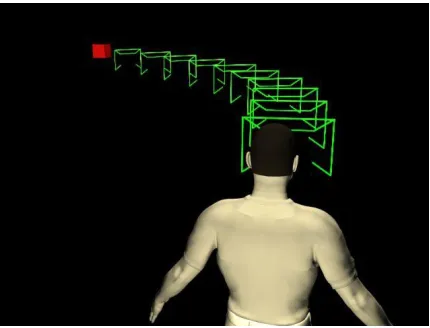
The basic components of the attention funnel are illustrated in Figure 1. The attention funnel presents a 3D set of patterns that visually links a head-centered coordinate space directly to an object-centered coordinate space, funneling focal spatial attention of the user to the cued object. The attention funnel takes advantage of spatial cueing techniques impossible in the real world, and AR‟s ability to dynamically overlay 3D virtual information onto the physical environment. Like many AR components, the AR funnel paradigm consists of: 1) a display technique, the attention funnel, combined with 2) methods for tracking and detecting the location of objects to be cued.
--- Insert Figure 1 about here ---
Components of the attention funnel
placed that are repeated in space and normal to the line. We refer to the repeated patterns on the linking path as an attention funnel.
The path is defined using cubic curve segments. The curve follows a path from a starting point located at a specified distance in front of the origin in a frame defined to be the viewpoint of the user (the center of projection for a single viewpoint or average of two viewpoints for stereo viewers). The terminus of the curve is located at the object and the curve end tangent is defined by a vector from the user to the object. The net result is a smoothly curving attention funnel path the begins in front of the user, extending forward, then curves gently in the direction of the target.
A single cubic curve segment creates a smoothly flowing path from the user‟s viewpoint to the target in a near field setting. Larger environments that include occlusions and require complex navigation are realized using a sequential set of cubic curve segments. The join points of the curve segments are specified by a navigation computation that takes into account paths and occlusions. As an example, a larger outdoor navigation system under development uses the Mappoint commercial map management software to compute waypoints on a navigation path that then serve as the curve join points for the attention funnel path. The key design element is the smooth curvature of the path that allows for the funneling of attention in the desired target direction.
The orientation of each pattern along the visual path is spherically interpolated so as to allow the pattern to be upright relative to the user at the starting point and upright in the world at the terminus. The computational cost of this method is very small, involving the solution of the cubic curve equation (three cubic polynomials), the spherical interpolation solution, and
dwarfed by the rendering costs for even this low-bandwidth graphical object. The attention funnel is implemented with dynamic fading. When the user view direction approaches the direction of the target, the funnel intensity is attenuated so as to decrease visual clutter and distraction.
Evaluation
As we mentioned above, the attention funnel is a general solution for all functions of what might be called an omnidirectional “3D cursor:” Does the attention funnel truly direct user attention more efficiently than the most common techniques used in current AR interfaces? The attention funnel has been subjected to user studies so as to validate the effectiveness of the approach relative to existing methods. In one initial study, participants performed a task in which their search for target objects was aided by either the attention funnel, by an auditory cue (e.g., “Please find and grab the [sunglasses] as quickly as possible”), or by a virtual bounding box spatially registered at the location of the target object1. Both the funnel and auditory cue led to much shorter search times than the bounding box condition, with the funnel enabling the fastest performance overall. Search time was, on average, 22% faster in the funnel condition than in the bounding box condition.
Although the attention funnel reduces search time relative to audio cues (which are commonly employed in conversation) and the bounding box (i.e., basically, no search aid), additional study is required to assess the extent to which the attention funnel constitutes the best general search and navigation aid. The funnel used in the previous study may or may not be the definitive answer to this problem.
The current research examines some modifications that may improve AR‟s ability to direct attention toward a target. In experiment 1, we test a very simple pointing technique for comparison with the funnel – whether the gaze direction guided from users‟ eyes to the target by the series of planes comprising the attention funnel could be accomplished just as well by a simpler mechanism. This was compared to a simple 3D arrow pointing in the direction of a bounding box over the target object. In addition, Experiment 1 examines the possibility of improving the performance of the attention funnel by making the funnel fade from view to reduce the visual clutter occurring when a user‟s head is pointed directly at the target object, a design evolution not included in the initial experimentation. In Experiment 2, we compare the funnel and arrow pointing techniques, but the search is conducted in a considerably expanded vertical range relative to previous studies. In addition, we consider the possibility of combining the arrow and funnel pointers to see whether their (possibly) unique contributions to search performance are complementary.
Experiment 1: Funnel vs. Arrow
In Experiment 1, we compared search time performance across four conditions in which search was guided by a different visual cue: 1) a virtual bounding box, 2) the attention funnel presented in previous work, 3) a “fading” version of the attention funnel that gradually
disappeared from view as the user‟s gaze approached the target, and 4) a 3D virtual arrow that pointed to the target object. One aim was to determine whether a simple aid such as the arrow could improve search speed on par with the attention funnel. Another aim, addressed by the fading funnel condition, was to determine whether the visual clutter appearing in the field of view as the funnel aligns with the target is detrimental to performance. We expected
Method
Participants
Twenty three participants were recruited. The participants were all college-age students. The experiment lasted for approximately one hour and participants were paid for their
involvement.
Stimulus Materials
The search aids tested in Experiment 1 are illustrated in Figure 2. --- Insert Figure 2 about here ---
Bounding-box condition. In the bounding-box condition, the location of the target object was denoted by a 3D bounding box that was spatially registered to surround the object. In this condition, the participant received essentially no guidance as to the location of the target object, but only an indication of the target‟s location once inside the HMD‟s field of view.
Attention funnel condition. In the attention funnel condition, a series of linked rectangles dynamically draws a path from the user‟s eyes to the target location. At least some portion of the funnel always remains in the wearer‟s field of view, indicating the direction they should turn in order to find the end of the funnel terminating at the target object.
Fading funnel condition. In the fading funnel condition, the attention funnel fades gradually from view to reduce visual clutter as the direction of the user‟s head approaches the target location. Although the funnel planes gradually disappeared as the participant‟s view approached the target (starting at 10 degrees from target), the target object was signified by the 3D bounding box.
around. In addition to the arrow, the target object is surrounded by the computer-generated box used in the bounding-box condition.
Mental Workload
The level of mental workload involved in each search condition was measured by a standard measure in interface design, the computer-administered NASA TLX questionnaire (see Hart & Staveland, 1988 for details). After each experimental condition, the participant rated the search task along dimensions of physical and temporal demand, performance satisfaction, effort level, and frustration, in addition to performing a series of paired comparisons for each
combination of these dimensions. Apparatus and test environment
A 360-degree omnidirectional workspace was created using four tables as shown in Figure 3. Forty-eight objects were utilized for the search task (i.e., 12 objects on each table). Centered on each table was a small, 3-level shelving unit, upon which rested six primitive shape objects of various colors (e.g., red box, black sphere). To the right of each shelving unit, six common objects (e.g., stapler, notebook) were arrayed.
The experiment was implemented in the ImageTclAR augmented reality environment. Visual cues were displayed in stereo using a Sony Glasstron LDI-100B head-mounted display. Head motion was tracked by an Intersense IS-900 ultrasonic/inertia hybrid tracking system. Stereo graphics were rendered in real time based on the data from the tracker. A pressure sensor was attached to the thumb of a glove to capture the reaction time when the subject grasped the target object.
Procedure
Participants were told that they would be performing a series of search tasks utilizing various search aids rendered in an augmented reality system. They were informed that they would wear a head-mounted display allowing them to see the objects in the environment along with computer-generated additions to the environment that would aid in their search. They were instructed to listen for a tone indicating the start of each trial during which their task was to locate the target object, which could be in front, behind or to either side of them, and grasp it as quickly as possible while wearing a special glove designed to terminate the trial upon grasping the object (see Figure 3.)
The participant then donned the HMD and glove, and was subjected to a few practice trials for each of the 4 experiment conditions. These practice trials acclimated participants to wearing and moving in the equipment, in addition to improving understanding of the
experimental conditions. Ensuring understanding was essential in this experiment because of the response time task. After this acclimation phase, the participant performed a baseline search task, where they were seated in the testing room and faced 6 of the target objects on the table. They completed 24 trials from the baseline condition (bounding box condition) as quickly as possible, providing data for factoring out individual differences when analyzing the response time data from the experimental conditions. Upon hearing the tone, the participant‟s task was to find and grasp the target object as quickly as possible, then return to the starting position.
condition, any practice gained during the baseline trials was expected to be negligible with respect to the experimental conditions.
Following the baseline trials, the participant began the experimental conditions, whose order was counterbalanced across participants. The participant was always informed of the condition they were about to complete. They were asked to face toward one of the tables before each trial began (i.e., this starting point was used on all trials and all conditions to facilitate comparison of pointing devices at different degrees of target search – i.e., front, back, left, right). The start of each trial was signaled by a tone, and each trial was terminated when the participant grasped the target object with the pinch glove. Response time was recorded, as well as any errors in grasping the wrong object. (Target-grasping errors were so rare that they could provide no useful information for comparing performance across conditions, and thus will not be
discussed further.)
After the participant completed all trials in a search condition, they removed the AR equipment and were led to a computer where they completed the mental workload (NASA TLX) questionnaire to assess mental workload. After completing the questionnaire, the participant was brought back into the testing area, re-fitted with the AR gear, and began the next experimental condition [again followed by the mental workload (NASA TLX)]. This process was repeated for all four experimental conditions.
Results
Response times
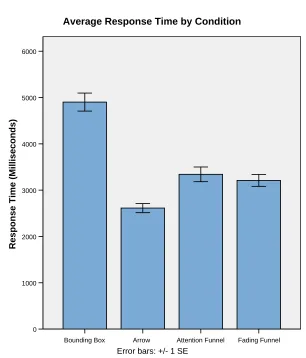
condition, F(3, 60)=4.480, p<0.01, due primarily to the inferiority of the bounding box compared to the funnel conditions and the arrow condition.
Table 1 displays the average response time differences between conditions. Post hoc analysis revealed a significant advantage (at =.05) for the arrow over the (non-fading) funnel and the fading funnel (see Table 1 for details). There was no reliable difference between the two funnel conditions. Apparently, the fading attribute neither helped nor hurt performance relative to the non-fading funnel. As the table shows, the arrow and both funnel conditions reduced response time over the bounding box by at least 32%.
--- Insert Figure 4 and Table 1 about here ---
We examined the spatial aspect of our results (depicted in Figure 5) by conducting a 2 (Location: front vs. back) x 2 (Condition: arrow vs. funnel) ANOVA. Again, search was reliably faster in the arrow condition than in the funnel condition [F(1,21)=46.461, p<.001], and, not surprisingly, search was reliably faster for the targets located in front of the participant than those in the rear [F(1,21)=234.417, p<.001]. The interaction between condition and location was also significant, F(1,21)=29.710, p<.001; the advantage of arrow over funnel was amplified when search targets were behind the user.
--- Insert Figure 5 about here ---
Mental Workload
were reliably lower for the arrow condition than either funnel condition (p<.005), but the difference between funnel conditions was not significant (p=.88)
Discussion
In Experiment 1, we compared speeded search performance aided by the attention funnel to performance aided by a 3D arrow that moved dynamically to point at search targets. We compared these conditions to a bounding box condition, which provided essentially no guidance to the location of the target object, but merely indicated which item was the target when the participant‟s head moved into the target‟s spatial range. The final condition examined was a variant of the attention funnel that faded from sight as the participant‟s gaze converged on the target location, thus eliminating the visual clutter created by the full complement of funnel panes aligned with the target.
As in previous work, the attention funnel significantly outperformed the bounding box. Inasmuch as the bounding box condition reflects the reality of searching for target objects surrounded by distracters (i.e., search with no guidance at all), it‟s clear that the attention funnel constitutes a vast improvement for searching under time pressure. The fact that there was no reliable difference between the fading and non-fading versions of the funnel suggests that any “visual clutter” in the field of view created by the funnel is a non-issue.
Experiment 2, we examined search performance in perhaps a more realistic search environment – one with more distant objects and an expanded vertical range.
Experiment 2: Expanded vertical range
One potential reason that the funnel didn‟t outperform the arrow condition in Experiment 1 could be the limited vertical range of targets and distracters in the search task. All items were either on a table (30 inches high) or on shelves which rested upon the tables (objects that sat on shelves were 5 or 12 inches above the tabletops). Although the visual range of the head-mounted display is limited, the entire vertical range of the stimulus set fell within a single fixation of the head. By merely orienting the head in the proper direction, the entire vertical range of potential search targets (for that direction) fell within the region of vision. In the natural environment, the search space could extend all around the user. Experiment 2 was designed to compare the various search methods in a wider, more realistic search range.
A more compelling reason for Experiment 2 is the assumption that the funnel‟s potential expands beyond near space. This could be very important when orienting attention and/or navigation through a very large space (even open areas). Expanding the range of visual search in Experiment 2 will move us a step closer to understanding the possibilities for these orienting methods. (Future studies will expand this research to a mobile augmented-reality system to examine outdoor navigation.) We suspect the slight advantage for the arrow in the previous experiment will diminish, if not disappear, with the larger expanded range in Experiment 2, and we suspect that for even larger spaces the arrow will prove wholly insufficient (as determined by future experiments with the mobile system). Our overall goal is to determine the best general search and navigation aid for mobile augmented reality. Although not clearly superior in some conditions (as in Experiment 1), across a variety of conditions the funnel may prove to be an excellent tool.
The current experiment was designed to test the performance of the attention funnel in an expanded vertical range (relative to previous attention funnel experiments), as this is a more realistic search scenario in general. The experiment pits the funnel against the arrow condition in this more general search task. In addition, we tested a hybrid search aid composed of both the arrow and the attention funnel to see if distinctive early and late contributions to search speed of each might be combined (see Figure 6). Each participant completed 4 experimental conditions: 1) bounding box (i.e., no search aid), 2) attention funnel, 3) 3D arrow, and 4) arrow + funnel combined.
Method
Design
As in Experiment 1, a within-subjects design was used. Each participant completed the following four conditions: the bounding box condition, the attention funnel condition (the fading version from Experiment 1), the arrow condition, and a new condition utilizing a composite of the attention funnel and the 3D arrow. The order of conditions was randomized across
participants. Participants
Seven participants were recruited from the university student community. They were paid $10 for their participation, which lasted approximately one hour.
Stimuli
This study made use of the same search objects and augmented reality search aids as in Experiment 1. We used the same stimuli as in previous experiments, although the participants didn‟t physically touch the stimuli in this experiment (since they were too far away). Rather than placing the objects on tables and shelves around the user as in previous studies, all items were arrayed on four 5-level shelving units (one on each side of the participant) each 72.5 inches tall (see Figure 7).
--- Insert Figure 7 about here ---
Procedure
measure of the participant‟s response speed when they knew where the target object was, and was designed to neutralize the effect of individual differences in pointing speed.
The experimental conditions proceeded much like those in Experiment 1. Rather than reaching for and grasping the target object, however, participants pointed to the object as quickly as possible with a pointing wand, pressing a trigger on the wand to terminate the trial (which once again was initiated by a tone). Participants were instructed to return to the same starting position after each trial. Following each condition, participants completed the NASA TLX to gauge mental workload for the search task. The same augmented-reality display was used as in Experiment 1.
Results
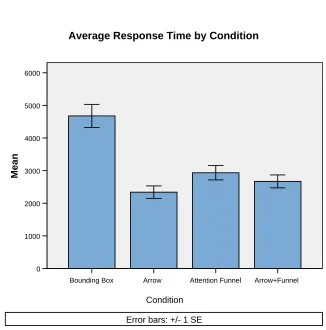
Figure 8 displays the average response time for each of the four experimental conditions. An analysis of covariance (ANCOVA; using the baseline trials described above as a covariate) indicates a significant effect of condition, F(3,15)=3.481, p<.05 (the effect of covariate was non-significant). Response time in the bounding box condition (M=4677ms, SD=937) was
significantly slower (=.05) than in the arrow, funnel, and arrow+funnel conditions. As in Experiment 1, the arrow (M=2340ms, SD=507) search aid led to faster response times than the attention funnel (M=2934ms, SD=582; p=.05). The arrow alone was also faster than the arrow+funnel (M=2670ms, SD=525; p<.005). There was no reliable difference between performance in the funnel condition and the arrow+funnel condition. Stated another way, the arrow, funnel, and arrow+funnel conditions resulted in at least 37% faster response times than the bounding box condition. Performance in the arrow condition was 25% faster than in the funnel condition (average difference = 594ms), and 14% faster than in the arrow+funnel condition (average difference = 330ms). See Table 2 for additional comparisons.
Effect of search direction
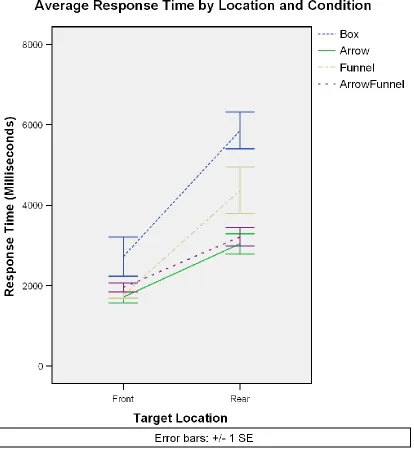
We again compared performance in the four experimental conditions based on the spatial location of target objects – front or rear. A 4 (search aid) x 2 (location: front/rear) ANOVA indicated a significant effect of location, F(1,6)=102.330, p<0.001, as well as a significant effect of condition, F(3,18)=19.901, p<0.001. Targets in front were, naturally, found faster than in the rear, and the bounding box led to response times that were reliably slower than the other 3 conditions (p<0.01 in all cases). The arrow was again faster than the funnel (p<0.05), and there was no reliable difference between the arrow and arrow+funnel conditions. Finally, there was a significant interaction between location and search aid, F(3,18)=5.644, p<0.01. Figure 9
displays the response times for each condition by location. The role of location was essentially indistinguishable for the arrow and arrow+funnel conditions. As in Experiment 1, the difference between the funnel and arrow condition is amplified for rear targets.
--- Insert Figure 9 about here ---
Mental Workload
Based on scores from the NASA TLX workload measure, there was a statistically significant difference in perceived difficulty across the conditions, F(3,18)=5.651, p<.01. Both the arrow condition (Mean score = 18.43) and the arrow+funnel condition (M = 21.57) were perceived to require less work than the bounding-box condition (M = 41.14). The arrow condition was perceived to require less effort than the funnel condition (M=34.38).
Discussion
Finally, because of the arrow‟s good performance in Experiment 1, we included a hybrid search aid composed of the funnel and the arrow.
The Experiment 2 search task also differed from Experiment 1. Rather than sitting within a ring of tables surrounded by graspable objects, the participant stood in the center of the room and pointed at objects from several feet away. Furthermore, the vertical search range was expanded in Experiment 2 beyond the visual range of the HMD, requiring the participant to scan a greater, possibly more representative, expanse of space.
The results were similar to Experiment 1. The attention funnel, arrow, and combination arrow/funnel all led to reliably shorter response times than the bounding box condition. Adding the arrow to the funnel condition didn‟t appreciably change performance from the standard funnel, although the arrow alone performed better than either funnel condition. Again, the advantage of the arrow was more pronounced for items located to the rear of the participant than for those in front. Finally, the mental workload measure indicated that participants found the 3D arrow to be easier to work with than the other search aids. The funnel and arrow+funnel both required less effort than the bounding box, but didn‟t differ significantly from one another.
General Discussion
target location. It moves along with the user‟s head in order to maintain a constant connection between the user‟s eyes and the target object. In previous work, as well as here, this approach leads to a marked improvement in search speed over the ambiguity inherent in unaided searches which are the norm today.
The simpler approach of the 3D arrow has emerged as a serious challenger to the attention funnel in the limited domain of search time in near space. Like the funnel, the arrow produces a marked improvement in search time over a simple bounding box that marks the target – i.e., essentially no search guidance. From a standpoint of statistical reliability, the arrow performed consistently better than the attention funnel in these studies producing a consistent 1/3 second difference with a hybrid version of the funnel. Whether these increases in speed are more than negligible from a practical standpoint remains to be determined. Across the two
experiments reported here, average response times were approximately half a second faster for the arrow than for the funnel condition.
One possible explanation for the arrow‟s advantage over the funnel is likely its
simplicity. Anecdotally, participants often seemed to struggle with orienting themselves to the funnel when the target object appeared to the rear. The combination of arrow and bounding box likely gained an advantage in search time in the early portions of the search. During the arrow trials, the more-easily interpretable arrow simply points the user to the general target vicinity. Once facing that direction, the user merely does a quick visual scan of the environment to find the bounding box.
delay in early orientation may result in slower overall search times, although the funnel could actually possess an advantage once the user is facing the target direction since it leads the user‟s eyes directly to the target. Additional work will be required to explore this possibility. The early and late epochs of the search data will need to be examined separately to see if they lend
credence to this hypothesis.
In future work, we will continue to expand the search range to examine these search aids. We suspect that pitting the attention funnel against the arrow could yield opposite results in a wide open area (e.g., outside), or possibly in an area with more cluttered object locations leading to greater confusability of targets and distracters. The indeterminacy of the arrow may erode the slight advantage displayed in the current studies. In future studies, we will test the search aids using a mobile augmented reality system capable of moving to outdoor environments. This will also allow us to examine the attention funnel as a navigation aid capable of pointing out specific locations far in the distance and even around corners and obstacles. Although the tasks
References
Azuma, R. (1997). A survey of augmented reality. Presence: Teleoperators and Virtual Environments, 6(4), 355 - 385.
Bonanni, L., Lee, C., & Selker, T. (2005, April 2 - 7, 2005). Attention-based design of augmented reality interfaces. Paper presented at the ACM CHI 2005, Portland, OR. Burgoon, J., Buller, D., & Woodall, W. (1996). Nonverbal communication: the unspoken dialogue: McGraw-Hill Companies, Inc.
Feiner, S., MacIntyre, B., & Seligmann, D. (1993). Knowledge-based augmented reality. Communication of the ACM, 36(7), 52 - 62.
Foxlin, E., Harrington, M., & Pfeifer, G. (1998). Constellation: a wide-range wireless motion-tracking system for augmented reality and virtual set applications. Paper presented at the ACM SIGGRAPH 1998.
Haehnel, D., Burgard, W., Fox, D., Fishkin, K., & Philipose, M. (2004). Mapping and localization with RFID technology. Paper presented at the IEEE International Conference on Robotics and Automation.
Hart, S., & Staveland, L. (1988). Development of NASA-TLX (Task Load Index): results of empirical and theoretical research. In P. Hancock & N. Meshkati (Eds.), Human Mental Workload (pp. 139 - 183). Amsterdam, The Netherlands: North-Holland.
Hearn, D., & Baker, M. P. (1996). Computer Graphics, C Version: Prentice Hall.
Hofmann-Wellenhof, B., Lichtenegger, H., & Collins, J. (2004). Global positioning system: theory and practice: Springer.
Kato, H., & Billinghurst, M. (1999). Marker tracking and HMD Calibration for a video-based augmented reality conferencing system. Paper presented at the 2nd International Workshop on Augmented Reality, San Francisco, CA.
Loomis, J., Golledge, R., & Klatzky, R. (1998). Navigation system for the blind: Auditory display modes and guidance. Presence: Teleoperators and Virtual Environments, 7, 193 - 203. Mann, S. (2000). Telepointer: Hands-Free Completely Self Contained Wearable Visual
Augmented Reality without Headwear and without any Infrastructural Reliance. Paper presented at the Fourth International Symposium on Wearable Computers.
Marston, J., Loomis, J., Klatzky, R., Golledge, R., & Smith, E. (2006). Evaluation of spatial displays for navigation without sight. ACM Transactions on Applied Perception, 3(2), 110 - 124. Middlebrooks, J., & Green, D. (1991). Sound localization by human listeners. Annual Review of Psychology, 42, 135 - 159.
Owen, C., Tang, A., & Xiao, F. (2003, October 7, 2003). ImageTclAR: a blended script and compiled code development system for augmented reality. Paper presented at the STARS2003, The International Workshop on Software Technology for Augmented Reality Systems, Tokyo, Japan.
Schmalstieg, D., & Wagner, D. (2005, June 28 - 30, 2005). A handheld augmented reality
museum guide. Paper presented at the IADIS International Conference on Mobile Learning 2005, Qawra, Malta.
Shinn-Cunningham, B. (2001, May 26 - 29, 2001). Localizing sounds in rooms. Paper presented at the ACM SIGGRAPH and EUROGRAPHICS Campfire: Acoustic Rendering for Virtual Environments, Snowbird, UT.
Wagner, D., Pintaric, T., Ledermann, F., & Schmalstieg, D. (2005, May 8 - 13, 2005). Towards massively multi-user augmented reality on handheld devices. Paper presented at the Third International Conference on Pervasive Computing, Munich, Germany.
Table 1. Pair-wise response-time comparisons for each condition from Experiment 1 %
Difference
Mean Latency Difference (ms)
Significance
Arrow < Bounding Box 47% 2302 p<.001
Funnel < Bounding Box 32% 1563 p<.001
Fading Funnel < Bounding Box 35% 1704 p<.001
Arrow < Funnel 28% 739 p<.001
Arrow < Fading Funnel 23% 598 p<.001
Fading Funnel < Funnel 4% 142 p>.05
Table 2. Pairwise response time comparisons for each condition from Experiment 2. % Difference Mean Latency
Difference (ms)
Significance
Arrow < Bounding Box 50% 2337 p<.001
Funnel < Bounding Box 37% 1743 p<.005
Arrow+Funnel < bounding Box 43% 2007 p<.001
Arrow < Funnel 25% 594 p=.05
Arrow < Arrow+Funnel 14% 330 p<.01
Arrow+Funnel < Funnel 9% 264 p=.217
Figure 2. Search aids used in Experiment 1: bounding box (left panel), 3D arrow and bounding box (center), and attention funnel (right panel).
Fading Funnel Attention Funnel
Arrow Bounding Box
6000
5000
4000
3000
2000
1000
0
Respon
se Time (
Mill
isecond
s)
Average Response Time by Condition
Error bars: +/- 1 SE
Rear Front
Direction
5000
4000
3000
2000
1000
0
Respon
se Time (
Mill
isecond
s)
Error bars: +/- 1 SE
Funnel Arrow
Average Response Time by Direction and Condition
Figure 6. Hybrid Arrow+Funnel search aid used in Experiment 2.
Arrow+Funnel Attention Funnel
Arrow Bounding Box
6000
5000
4000
3000
2000
1000
0
Mean
Average Response Time by Condition
Condition
Error bars: +/- 1 SE