Perceptions About Data Security
For Portable Storage Devices
Cynthia L. Knott, Marymount University, USA G. Steube, USA
ABSTRACT
The importance of securing data and information is a critical issue in today’s world. These are no longer stored on a central system that is easy to protect and secure. Now everyone carries around small storage devices, which make guaranteeing that the information is guarded is much more complex and uncertain. This paper builds on the previous research of Knott & Steube’s in the paper Encryption and Portable Data Storage, to be published in the Spring of 2011. In the previous work we identified the potential security issues that arise from using a portable storage device such as a USB flash drive. TrueCrypt software was introduced as an option that allows users to encrypt and hide data. The TrueCrypt software, which is publically available, is particularly useful for safeguarding data on USB flash drives that are easily compromised. A survey of undergraduate students was administered which focused on their practices and attitudes about security. It was found that there were strong associations between the use of flash drives, security, and the use of passwords.
Keywords: Encryption; Security; Data Storage; Perceptions
INTRODUCTION
his research adds another group of interest, the faculty at Marymount University. Again, their practices and attitudes about security were gathered in a survey. The major difference in this research is that, as opposed to the previous study, the faculty group was first given an informational session and tutorial about encryption and data storage before they were asked to fill out the survey. After they were given the tutorial about the encryption process, their responses were gathered. This paper includes the results and analysis of the faculty survey that determined what habits and practices they followed with respect to securing their personal data and files. Some of the questions included in the analysis are the following:
Do you encrypt your USB flash drive?
Do you use any type of security for your USB flash drive?
How important do you think security is for a flash drive?
Do you use passwords to protect your USB flash drive?
Do you think it is important to use security when using a USB flash drive?
Do you backup your work?
Do you use a flash drive while teaching in the classroom or other presentations?
So you use a flash drive for transporting data?
After seeing how to use the encryption software, are you more likely to use it to secure your USB flash drive?
The findings indicate that faculty members are concerned about their private data. They also indicated that after seeing the tutorial on the TrueCrypt software that they are more likely to encrypt their USB flash drives. We have also found that many of the faculty members have followed up with inquiries about how to ensure that their private data is secure. This paper also includes an exploratory use of discriminant analysis to determine if the questions from the survey could be used to successfully distinguish membership in the faculty and student groups based on the answers to the first six questions of the instrument. Further research could be performed to determine if
the answers to the six questions from another group such as technology professionals could be used to distinguish among the faculty, student and professional groups.
The growing use of portable data storage devices is an accepted reality in today's society (GFI Software, 2010). One type of portable data storage device in common use today is the USB flash drive or thumb drive or memory stick (PCTechGuide, 2009). Because these drives can hold an increasing amount of data and are easily ported from one location to another, many businesses consider them to be their greatest security threat (EzineArticles.com, 2010). McAfee Labs (2010) in its 2010 threats report state:
One of the most active categories of malware this quarter was AutoRun worms (malware found on removable storage, mainly USB drives). Due to the widespread adoption of USB drives by both consumer and enterprise users around the world, this infection vector continues to be a leading source of pain. (p. 11)
This paper builds on the previous research of Knott & Steube’s in the paper Encryption and Portable Data Storage, to be published in the Spring of 2011. In the previous work we identified the potential security issues that arise from using a portable storage device such as a USB flash drive. TrueCrypt software was introduced as an option that allows users to encrypt and hide data. The TrueCrypt software, which is publically available, is particularly useful for safeguarding data on USB flash drives that are easily compromised. A survey of undergraduate students was administered which focused on their practices and attitudes about security. It was found that there were strong associations between the use of flash drives, security, and the use of passwords.
This research adds another group of interest, the faculty at Marymount University. Again, their practices and attitudes about security were gathered in a survey. The first two sections of this paper summarizes the work that was initially conducted. The third section of this report presents faculty responses about security and encryption and the fourth section compares student and faculty attitudes as expressed in the questionnaire.
USING ENCRYPTION TO SECURE A USB FLASH DRIVE
Typically flash drives are missing important encryption and authentication safeguards to protect the data (IronKey, 2007). The methods recommended in this report provide encryption and authentication through the use of a password. The solution suggested is the open source software provided by TrueCrypt Foundation (2010b); TrueCrypt's website (www.truecrypt.org) provides complete documentation for the process.
TrueCrypt software has the following advantages:
Creates a virtual encrypted disk within a file and mounts it as a real disk
Encrypts anentire partition or storage device such as USB flash drive or hard drive
Encrypts a partition or drive where Windows is installed
Encryption is automatic, real-time and transparent
Parallelization and pipelining allow data to be read and written as fast as if the drive was not encrypted
Encryption can be hardware-accelerated on modern processors
Provides plausible deniability, in case an adversary forces you to reveal the password (TrueCrypt Foundation, 2010b)
The step by step procedure for creating an on-the-fly TrueCrypt disk is fully described on their website in the documentation section (TrueCrypt Foundation, 2010a). It is worth noting that this approach can also be used on non-USB disk drives to secure other portable and non-portable devices. As an open source solution, the software is free and readily available for download and use. After encrypting a folder on the USB flash, the existence of this folder is not visible and requires a password to mount and unhide the device. If the USB flash drive with TrueCrypt software were lost or stolen, the drive with the secured data would not be visible. The folder with the hidden information can only become visible by mounting the information through a password.
such devices. In addition, this software is regularly updated to ensure its currency and usability. TrueCrypt is a reasonable answer to both individuals who wish to secure their information as well as organizations that provide portable storage devices to their employees.
The following section of this report provides data about the perceptions of users of portable storage devices in today's world. Although the risks in using unprotected portable storage devices are manifestly clear and a solution through TrueCrypt readily available it is useful to examine behaviors and attitudes toward securing portable storage units because it is these behaviors and attitudes that will ultimately determine the actions that people will take to protect their data.
STUDENT PERCEPTIONS AND ATTITUDES TOWARDS PROTECTING PORTABLE STORAGE DEVICES
To investigate current attitudes toward protecting portable data devices, a survey was administered to 63 undergraduate students in business courses at Marymount University in the Fall 2010 semester. A copy of this instrument is available in Appendix A. The overall results of the survey have been tabulated by question are in Appendix B.
The relationships among the questions used in the survey were analyzed using contingency tables with a phi coefficient to indicate the relationship among the categorical data. Phi is a chi-square based measure of association; the chi-square coefficient depends on the strength of the relationship and sample size. Since phi has a known sampling distribution it is possible to compute its standard error and significance (Howell, 2002). The PASW 19 package was used for the significance level of the computed phi value. Questions 3 and 5 had no variation in response and were not included in the phi analysis. Question 3 indicated that all participants thought that security was extremely important for a flash drive and Question 5 revealed that all participants backup their work. Consequently contingency tables were developed for Questions 1, 2, 4, and 6. Each of these questions can be represented by the variable labels listed in Table 1.
Table 1 Questions and Labels
Question Number Corresponding Variable Label
1 Use Flash
2 Use Security
4 Use Passwords
6 Attitude Toward Security
For this analysis the strength of the association will be assessed through a rule of thumb which provides a range of values for Phi and verbal assessment. Strong negative and strong positive associations are represented by Phi values between -1.0 to.-7 and .7 to 1.0, respectively. Weak negative and positive associations are between -.7 to .-3 and .3 to .7, respectively. Values of Phi indicating little or no association are between -.3 to .3 (Simon, 2005).
USE FLASH BY USE SECURITY
Figure 1. Use Flash by Use Security
USE FLASH BY USE PASSWORDS
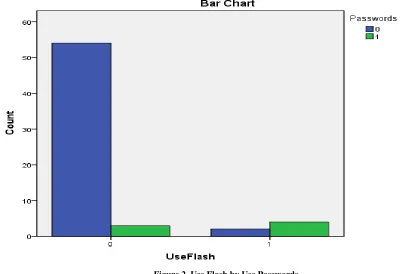
The association between using flash and using passwords is presented in Figure 2. The Phi value was .574 and significant and the p=.05 level. The use of flash is strongly related to the use of passwords.
USE FLASH BY ATTITUDE TOWARD SECURITY
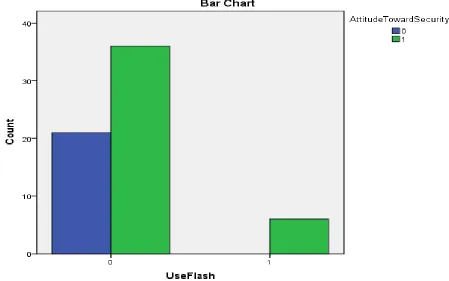
The relationship between using flash and attitude toward security is presented in
Figure 3. The Phi coefficient was .229 and not significant at the p=.05. The relationship between using flash drive and the attitude toward security is a weak association.
Figure 3. Use Flash and Attitude Toward Security
USE SECURITY BY USE PASSWORDS
Figure 4. Use Security and Use Passwords
USE SECURITY AND ATTITUDE TOWARD SECURITY
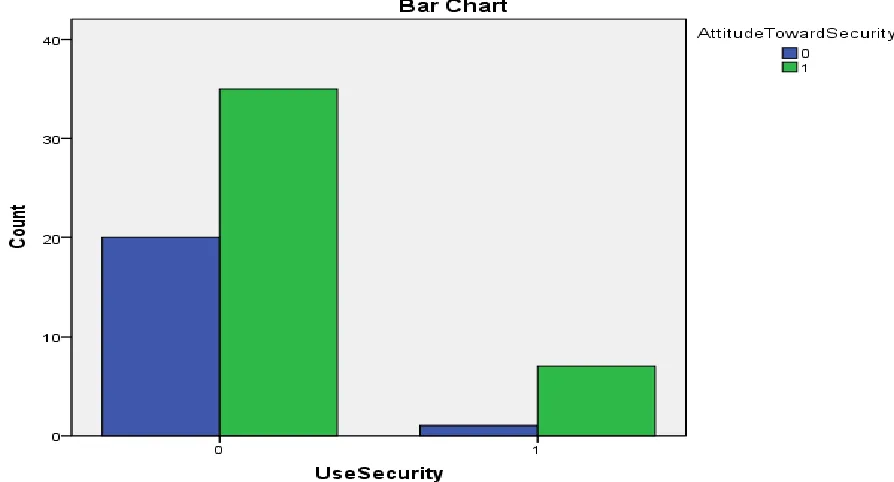
The association between using security and attitude toward security is presented in Figure 5. The Phi coefficient was .169 and not significant at the p=.05 level. The use of security is only weakly related to attitude toward security.
USE PASSWORDS AND ATTITUDE TOWARD SECURITY
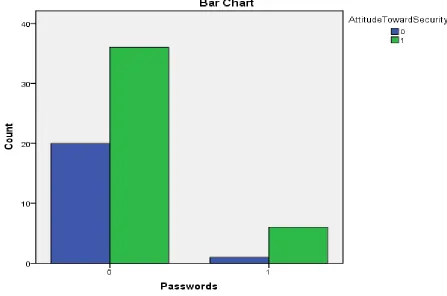
The association between using passwords and attitude toward security is provided in Figure 6. The Phi coefficient was .143 and not significant at the p=.05 level. Using passwords is weakly associated with attitude toward security.
Figure 6. Use Passwords and Attitude Toward Security
SUMMARY OF PHI COEFFICIENTS
The associations for all the variables are summarized in Table 2.
Table 2
Summary of Phi Coefficients
Use Flash (UF)
Use Security (US)
Use Passwords (UP)
Attitudes Toward Security
(ATS)
UF .668* .574* .229
US .624* .624* .169
UP .574* .624* .143
ATS .229 .169 .143
* = significance at the .05 level
FACULTY PERCEPTIONS AND ATTITUDES TOWARD PROTECTING PORTABLE STORAGE DEVICES
securing their USB flash drives before they completed the survey. Many of the questions used in this survey were the same as the questions posed in the student survey. The faculty survey is included in Appendix C and the results of the survey are available in Appendix D.
The first six questions in the faculty survey were the same as the first six questions in the student survey. The analysis of these questions was also performed using a descriptive summary of the results because the number of respondents was 13. There was no variation in responses for questions 1 and 2. None of the participants used encryption or any other method to secure their flash drives. The importance of security for flash drives (Question 3) is available in Table 3. About 36% felt that security was either extremely or somewhat important. Only two (15.3%) of participants used passwords to protect their flash drives as indicated in question 4. Question 5 revealed that 12 (92.3%) of the respondents back up their flash drives. Responses to question 6 indicated that 10 (76.9%) participants believed that security for their USB drive was important.
Table 3
Question 3: How important do you think security is for a flash drive?
Importance Number of Responses Percent of the Total
Extremely important 4 30.8%
Somewhat important 2 15.4%
Neutral 4 30.8%
Not very important 2 15.4%
Not important at all 1 7.7%
The remaining questions in the survey were unique to the faculty participants. Table 4 displays the distribution of faculty based on their school of association in the university based on the data from question 7. The responses to question 8 showed that eleven (84.6%) use a flash drive for classroom teaching. All respondents indicated in question 9 that they transport data with a USB device. All participants agreed that they are more likely to encrypt their portable drive after viewing the presentation on TrueCrypt.
FACULTY AND STUDENT PERCEPTIONS AND ATTITUDES TOWARD PROTECTING STORAGE DEVICES
This section compares student and faculty perceptions with regard to security for their flash drives. The comparison is done in two ways: a descriptive approach and a predictive method. The descriptive analysis examines the responses of faculty and students to the first six questions in the survey that were identical for both groups. The predictive assessment explores using discriminant analysis to investigate if the responses to questions one thru six could be used to indicate whether the respondent belongs to the faculty or student group. Can the responses be used to predict group membership?
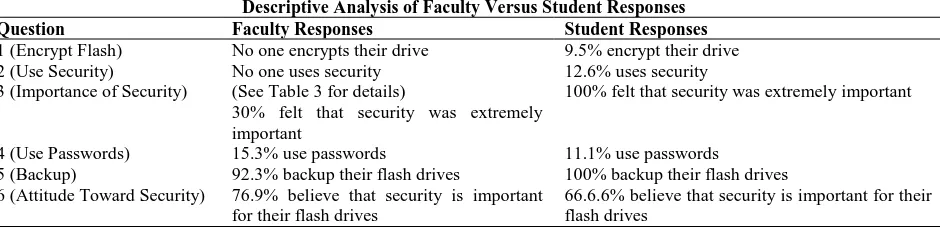
Table 4 provides the descriptive analysis for the first six questions for both faculty and student groups. Many of the questions in this table indicate differences in attitude and practice between faculty and students. Whether this divergence is sufficiently large enough to distinguish between faculty and student group membership based on the responses is explored in the next section that explores the use of discriminant analysis.
Table 4
Descriptive Analysis of Faculty Versus Student Responses
Question Faculty Responses Student Responses
1 (Encrypt Flash) No one encrypts their drive 9.5% encrypt their drive 2 (Use Security) No one uses security 12.6% uses security 3 (Importance of Security) (See Table 3 for details)
30% felt that security was extremely important
100% felt that security was extremely important
4 (Use Passwords) 15.3% use passwords 11.1% use passwords
5 (Backup) 92.3% backup their flash drives 100% backup their flash drives 6 (Attitude Toward Security) 76.9% believe that security is important
for their flash drives
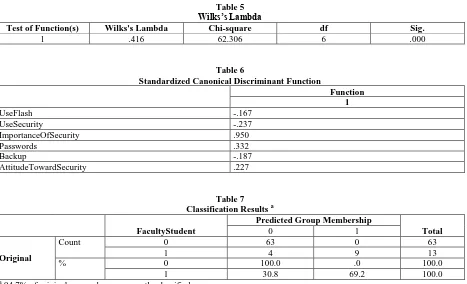
The purpose of discriminant analysis is to predict group membership based on predictor variables (Tabachnick & Fidell, 2007). Discriminant analysis is used to predict membership in naturally occurring groups rather than groups developed through random assignment. The use of faculty and student groups fit this requirement. In addition, the fact that these groups differ in size is not an issue for the analysis (Tabachnick & Fidell). In this analysis one classification function was used that included responses to questions one thru six on both the faculty and student questionnaires. The PASW 19 statistical package used to conduct the analysis. Table 5 reveals that the Wilks’s Lambda was statistically significant and the function was useful in discriminating the faculty and student group membership. Table 6 identifies the standardized discriminant function coefficients. These standardized discriminant function coefficients are equivalent to the standardized betas in regression analysis (Field, 2009); the higher the value of these coefficients the greater is their contribution to separating the groups. In this case question three contributed the most in separating the two groups. Finally the overall success in using the function to distinguish between faculty and student responses can be seen in Table 7. This table shows that the six questions were successfully in 94.7% of the cases. The cases that were classified incorrectly can be found in Appendix E shows how every instance from the 63 student and 13 faculty replies to the questions were classified.
Table 5 Wilks’s Lambda
Test of Function(s) Wilks's Lambda Chi-square df Sig.
1 .416 62.306 6 .000
Table 6
Standardized Canonical Discriminant Function
Function 1
UseFlash -.167
UseSecurity -.237
ImportanceOfSecurity .950
Passwords .332
Backup -.187
AttitudeTowardSecurity .227
Table 7 Classification Results a
FacultyStudent
Predicted Group Membership
Total
0 1
Original
Count 0 63 0 63
1 4 9 13
% 0 100.0 .0 100.0
1 30.8 69.2 100.0
a
94.7% of original grouped cases correctly classified.
CONCLUSION
drives. All students backup their drives but only 92.3% of faculty performs this action. It was also found that the first six questions in the questionnaire were useful for predicting group membership. The faculty received a presentation on how to encrypt their USB drives using TrueCrypt. Faculty in this sample unanimously agreed that they would be likely to encrypt their drives after having been shown TrueCrypt. The six questions used in both surveys appear to successfully discriminate between faculty and student responses. One suggestion for further research to administer the six questions to another group such as technology professionals to determine if these questions would useful in distinguishing among faculty, student, and professional groups.
AUTHOR INFORMATION
Dr. Cynthia Knott has been a member of the Marymount faculty since 2005. Dr. Knott teaches undergraduate and graduate courses in information systems, operations management, statistical analysis, and decision making. Dr. Knott holds an MBA and a Ph.D from The George Washington University in Washington, DC. Dr. Knott has presented her research internationally, including conferences in Chile, Turkey, Japan, and Switzerland. She has also been published in the Journal of the Operations Research Society, the Journal of the International Federation of Operational Research Societies (ITOR-IFORS), and the Journal of Applied Business and Economics. Her current research interests include quantitative methods and their application to education, business, and society. Specifically, Dr. Knott is investigating innovative ways to teach and engage students in operations research and statistical methods as well as in the area of encryption and portable data storage. She is also working in the area of health care, information technology, and marketing. She collaborates extensively with other Marymount faculty members and presents her research with these colleagues at professional conferences around the world. E-mail: [email protected]. Corresponding author.
Dr. Gerard Steube has conducted research in a wide variety of areas including health, defense, and education. He has expertise in Information Technology and Management Science. He has participated in presentations on software complexity at major computer science conferences and conducted research that profiles computer hackers. In addition, he has provided consulting services for federal, state, and private organizations in developing information technology policies, software management plans, and outsourcing strategies. Dr. Steube provided statistical examination of Medicare and Medicaid data for the state of Maryland. He has worked on federal grants for investigating software complexity and networking and has developed software in C++, COBOL, FORTRAN, Perl, PHP, SQL, and Java. In industry he has held positions including the director of information technology, chief computer scientist, executive director of technology, director of software research, and research statistician. He was awarded the CCP (Certified Computer Professional) designation from the Institute for the Certification of Computer Professionals (ICCP) and is certified for Institutional Research Board work by the Collaborative Institutional Training Initiative. Dr. Steube is a member of MENSA and a certified MENSA test proctor; he has served as the editor for the MENSA International Journal. He serves as a reviewer and editorial board member for the Journal of Information Systems Education (JISE). Dr. Steube is a voting member in the American Psychological Association, the Mathematical Association of America, the Association for Computing Machinery, and the American Statistical Association. He is a published restoration photographer and a Web site designer. E-mail: [email protected].
REFERENCES
1. EzineArticles.com. (2010). Usb drives a security threat? Retrieved November 1, 2010, from http://ezinearticles.com/?USB-Flash-Drives-a-Security-Threat?&id=1375217
2. Field, A. (2009). Discovering statistics using spss (3rd ed.). Thousand Oaks, CA: SAGE Publications. 3. GFI Software. (2010). The threats posed by portable storage devices. Retrieved November 1, 2010, from
http://www.gfi.com/whitepapers/threat-posed-by-portable-storage-devices.pdf
4. Howell, D. C. (2002). Statistical methods for psychology (5th ed.). Pacific Grove, CA: Duxbury/Thomson Learning.
5. IronKey, Inc. (2007). Benefits of secure usb flash drives. Retrieved November 1, 2010, from
6. McAfee Labs. (2010). Mcafee threats report: First quarter 2010. Retrieved November 1, 2010, from http://www.mcafee.com/us/local_content/reports/2010q1_threats_report.pdf
7. PCTechGuide. (2009). Definition of usb flash drive. Retrieved November 1, 2010, from
http://www.pctechguide.com/glossary/WordFind.php?wordInput=USB+Flash+Drive&input=Look+it+up% 21&searchType=MatchWord
8. Simon, S. (2005). What is a phi coefficient? Retrieved November 2, 2010, from http://www.childrens-mercy.org/stats/definitions/phi.htm
9. Tabachnick, B. G., & Fidell, L. S. (2007). Using multivariate statistics (5th ed.). Boston: Pearson/Allyn & Bacon.
10. TrueCrypt Foundation. (2010a). Introduction. Retrieved October 1, 2010, from http://www.truecrypt.org/docs/
11. TrueCrypt Foundation. (2010b). Truecrypt. Retrieved October 1, 2010, from http://www.truecrypt.org/ 12. EzineArticles.com. (2010). Usb drives a security threat? Retrieved November 1, 2010, from
http://ezinearticles.com/?USB-Flash-Drives-a-Security-Threat?&id=1375217
13. GFI Software. (2010). The threats posed by portable storage devices. Retrieved November 1, 2010, from http://www.gfi.com/whitepapers/threat-posed-by-portable-storage-devices.pdf
14. Howell, D. C. (2002). Statistical methods for psychology (5th ed.). Pacific Grove, CA: Duxbury/Thomson Learning.
15. IronKey, Inc. (2007). Benefits of secure usb flash drives. Retrieved November 1, 2010, from
http://www.discovery.net.au/content/downld/IronKey%20Whitepaper%20-%20Benefits%20of%20Secure%20USB%20Flash%20Drives.pdf
16. McAfee Labs. (2010). Mcafee threats report: First quarter 2010. Retrieved November 1, 2010, from http://www.mcafee.com/us/local_content/reports/2010q1_threats_report.pdf
17. PCTechGuide. (2009). Definition of usb flash drive. Retrieved November 1, 2010, from
http://www.pctechguide.com/glossary/WordFind.php?wordInput=USB+Flash+Drive&input=Look+it+up% 21&searchType=MatchWord
18. Simon, S. (2005). What is a phi coefficient? Retrieved November 2, 2010, from http://www.childrens-mercy.org/stats/definitions/phi.htm
19. TrueCrypt Foundation. (2010a). Introduction. Retrieved October 1, 2010, from http://www.truecrypt.org/docs/
APPENDIX A
Survey About Encryption and Portable Data Storage
1. Do you encrypt your USB flash drive? Yes No
2. Do you use any type of security for your USB flash drive? Yes No
3. How important do you think security is for a flash drive? 1 2 3 4 5
(1-extremely important, 2-somewhat important, 3-neutral, 4-not very important, 5-not important at all)
4. Do you use passwords to protect your USB flash drive? Yes No
5. Do you backup your work?
Yes No
6. Do you think it is important to use security when using a USB flash drive? Yes No
APPENDIX B
Student Survey Results
Q1 Q2 Q3 Q4 Q5 Q6 Q7
0 0 1 0 1 1 3
0 0 1 0 1 1 4
0 0 1 0 1 1 4
0 0 1 0 1 1 2
0 0 1 0 1 0 4
0 0 1 0 1 0 4
0 0 1 0 1 1 4
0 0 1 0 1 1 3
0 0 1 0 1 1 4
1 0 1 0 1 1 3
0 0 1 0 1 1 4
0 1 1 1 1 1 3
0 0 1 0 1 1 3
0 0 1 0 1 0 2
0 0 1 0 1 0 4
0 0 1 0 1 0 3
0 0 1 0 1 0 4
0 0 1 0 1 0 3
0 0 1 0 1 1 1
0 0 1 0 1 1 4
0 0 1 0 1 0 4
0 0 1 0 1 1 4
1 1 1 1 1 1 2
1 1 1 1 1 1 2
1 1 1 0 1 1 1
0 0 1 0 1 0 2
0 0 1 1 1 1 4
0 0 1 0 1 1 3
0 0 1 0 1 1 3
0 0 1 0 1 1 3
0 0 1 0 1 1 3
0 0 1 0 1 0 2
1 1 1 1 1 1 2
0 0 1 0 1 1 2
0 0 1 0 1 1 3
0 0 1 0 1 1 3
0 0 1 0 1 1 3
0 0 1 0 1 1 3
0 0 1 0 1 1 3
0 0 1 0 1 1 3
0 0 1 0 1 0 3
0 0 1 0 1 1 3
0 0 1 0 1 1 3
0 0 1 0 1 0 3
0 0 1 0 1 1 4
0 1 1 0 1 1 3
0 0 1 0 1 1 4
0 0 1 0 1 0 3
APPENDIX B (Continued)
Q1 Q2 Q3 Q4 Q5 Q6 Q7
0 1 1 0 1 0 3
0 0 1 0 1 1 3
0 0 1 0 1 0 4
0 0 1 0 1 0 4
0 0 1 0 1 1 2
0 0 1 0 1 1 4
0 0 1 0 1 1 3
1 1 1 1 1 1 4
0 0 1 0 1 0 3
0 0 1 0 1 1 3
0 0 1 0 1 1 3
0 0 1 0 1 0 3
0 0 1 0 1 0 3
APPENDIX C
Faculty Survey About Encryption and Portable Data Storage
1. Do you encrypt your USB flash drive? Yes No
2. Do you use any type of security for your USB flash drive? Yes No
3. How important do you think security is for a flash drive? 1 2 3 4 5
(1-extremely important, 2-somewhat important, 3-neutral, 4-not very important, 5-not important at all) 4. Do you use passwords to protect your USB flash drive?
Yes No 5. Do you backup your work?
Yes No
6. Do you think it is important to use security when using a USB flash drive? Yes No
7. What school are you in?
Arts & Science Business Health Professions Library
8. Do you use a USB flash drive while teaching in the classroom or other presentations? Yes No
9. Do you use a USB flash drive for transporting data? Yes No
10. After seeing how to use the encryption software, are you more likely to use it to secure your USB flash drive?
APPENDIX D
Faculty Survey Results
Q1 Q2 Q3 Q4 Q5 Q6 Q7 Q8 Q9 Q10
APPENDIX E
Classification Statistics
Casewise Statistics (0= student and 1= faculty)
Case Actual Group Predicted Group
1 0 0
2 0 0
3 0 0
4 0 0
5 0 0
6 0 0
7 0 0
8 0 0
9 0 0
10 0 0
11 0 0
12 0 0
13 0 0
14 0 0
15 0 0
16 0 0
17 0 0
18 0 0
19 0 0
20 0 0
21 0 0
22 0 0
23 0 0
24 0 0
25 0 0
26 0 0
27 0 0
28 0 0
29 0 0
30 0 0
31 0 0
32 0 0
33 0 0
34 0 0
35 0 0
36 0 0
37 0 0
38 0 0
39 0 0
40 0 0
41 0 0
42 0 0
43 0 0
44 0 0
45 0 0
46 0 0
47 0 0
48 0 0
49 0 0
APPENDIX E Continued
Case Actual Group Predicted Group
51 0 0
52 0 0
53 0 0
54 0 0
55 0 0
56 0 0
57 0 0
58 0 0
59 0 0
60 0 0
61 0 0
62 0 0
63 0 0
64 1 0**
65 1 0**
66 1 0**
67 1 1
68 1 1
69 1 1
70 1 1
71 1 1
72 1 1
73 1 1
74 1 0**
75 1 1
76 1 1