Research Article
Remote training of programming of PLC with embedded
web server
Victor V. Goman
1,*, Sergey A. Fedoreev
21,2 Department of information technologies, Ural Federal University, Mira str. 19, Yekaterinburg, Russia, 620002
Abstract
The paper considers a system for remote teaching of PLC programming using virtual controlled objects and controller-embedded web server. The study describes the architecture and capacities of the system and demonstrates examples of virtual lab workbenches. The system can be used to train students and staff.
Keywords: electrical engineering, embedded web server, industrial automation, mechatronics, programmable logic controller, remote training.
Received on 04 November 2017, accepted on 05 March 2018, published on 10 July 2018
Copyright © 2018Victor V. Goman and Sergey A. Fedoreev, licensed to EAI. This is an open access article distributed under the terms of the Creative Commons Attribution licence (http://creativecommons.org/licenses/by/3.0/), which permits unlimited use, distribution and reproduction in any medium so long as the original work is properly cited.
doi: 10.4108/eai.10-7-2018.155042
*Corresponding author. Email: [email protected]
1. Introduction
Production automation systems of all kinds find a wide use in today’s industry. Most controlling devices in industrial automation systems are represented by programmable logic controllers (PLCs). Therefore, the skill of controller programming is of great importance for specialists in charge of automation, mechatronics, and electrical engineering. As any other skill, this one can be mastered only through some practical activities.
2. Remote and virtual labs - state of the art
Most universities and professional advancement centers teach to program and maintain PLCs with training workbenches including PLCs and real controlled objects or their physical models. Ural Federal University is no exception. In teaching mechatronics, electrical engineering, and industrial automation, the authors have been using training workbenches based on Simatic S7-300 and S7-1200 PLCs. The workbenches include electric drives, pneumatic drives, hydraulic drives, various analog and digital sensors, and physical models of production
mechanisms (such as CNC-machine, distribution conveyor, rotary transfer mechanism, pump station etc.)
In terms of teaching quality, it is surely the best option since many even most minute details of equipment can be perceived only through practice. Students also learn installation, commissioning, and diagnostics of automation equipment.
However, such workbenches require considerable costs and room. Some controlled objects there may get depreciated by frequent use or damaged by a wrong control program. Beginning students often have insufficient understanding how certain controlled objects operate, so they may often make critical errors. Every faulty controlled object has to be replaced, since even one invalid element may often prevent starting the entire workbench and proceeding with the lesson.
The fact that maintenance staff have to check the equipment and replace faulty parts means extra costs. The result is extremely high price of training on real equipment. Thus a typical course of PLC programming at a Siemens-authorized training center costs about €1000 excluding travel costs. On top of it is limited throughput capacity of a single workbench and weak opportunities for remote teaching.
principal advantages: training needs nothing but a properly-licensed controller programming environment (for Simatic, it is Step 7 or TIA Portal); both classroom and remote trainings are possible. However, in this case, the controlled object exists only in a student’s mind which is to compare the input/output values of the simulator to the real parameters of the process. A beginning programmer often has trouble deriving such a correlation, especially when a student has no experience in working at a real industrial facility. PLC simulator is rather a tool of an experience developer who prefers creating a program while sitting in a comfortable conditions without having to spend much time at the facility when they have to commission the system stooping over a laptop. Of course, simulator is not a real PLC, so many aspects related, for example, to PLC cycle timing will be omitted.
Mixed architecture of training workbench is also available:
- a PLC simulator combined with real or virtual controlled objects [8];
- a real PLC combined with virtual controlled objects [9, 10, 11].
The first option features almost the same advantages and drawbacks as a sole simulator, except that a program running is visualized due to a real or virtual controlled object. As for real controlled objects, they show the disadvantages of the classic training workbenches as mentioned above. The second option deals with a real PLC and all its properties. Training is instructive and allows remote access.
Therefore, remote training complexes including virtual models of controlled objects and real PLCs provide great reduction of costs: there is no need to purchase and maintain lab workbenches or organize remote access [11]. As a result, teaching of PLC programming becomes more affordable for people.
Of course, it is nothing new. In particular, the authors have had experience of teaching with some Russian solutions (SAU-MAKS [9] and Cosim [10]) that bound a real PLC to a virtual controlled object. However, both complexes were not quite suitable for remote teaching, since they required some software installed on a local PC which had to be connected to the PLC through COM port. Purchasing these complexes is feasible only as an extra option to automation training kits.
Proceeding from the available experience and the analysis of possible options, we set the goal of the project – to create a training complex suitable for remote training with the highest possible realism.
web browser.
3. Implementation
The test model of the system was based on a Siemens S7-1200 PLC that we had in stock.
All Siemens S7-1200 PLCs, v2.0 and higher, have an embedded web server with its own interface capable of remote diagnosing of PLCs by means of a regular web browser. Web server supports both standard and user-configured pages.
Standard html pages allow access to:
information about the available PLC modules;
information about network addresses, physical properties of communication interfaces, network statistics;
diagnosing message buffer;
data registration files saved to the CPU memory or a memory card;
the update center of the OSs and embedded software of the modules.
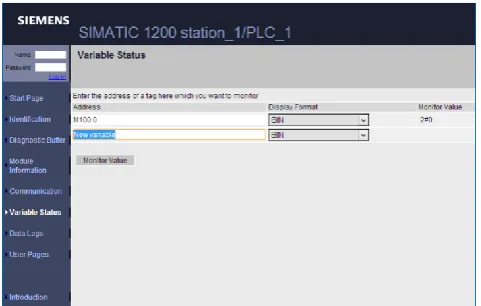
Fig. 1 shows an example of the standard web interface html-page.
The embedded interface allows to read and edit PLC variables. This function is of great value because a mindlessly edited variable may cause an equipment breakdown. For security reasons, unauthorized users are not allowed to edit variables. Standard web interface is displayed on tablets and smartphones with no problem.
To handle tasks not supported by standard pages, custom pages can be added. HTML, JavaScript, CSS are all supported. On custom pages, a user can read and even edit PLC variables.
In CPU Settings, enable web server and add calling WWW-function to the project. WWW-function is shown in Fig. 2. The tutorial [12] describes how to set up S7-1200 PLC web server.
After that, a user can call PLC variables with special commands.
Figure 1. Standard web interface of PLC
In developing a remote training system, we set the following goals:
to create logic models of actuators and sensors;
to create animated films showing changes in the state of the created models;
to create virtual training workbenches based on the created logic models and animation films;
to connect the created virtual training workbenches to PLC via the embedded web server;
to create tasks to the virtual models and teaching guidelines to them.
Each virtual training workbench consists of multiple virtual objects (button switches, toggles, drives, sensors, signal lamps etc.) interacting with each other and the PLC. The behavior model of a virtual controlled object, being similar to that of a real processing object, gets animated to monitor changes. The virtual workbench reads PLC output signals and, proceeding from the readings, changes the state of the virtual objects. Virtual objects can change the PLC output signal values, so the PLC can detect when the virtual sensors are triggered.
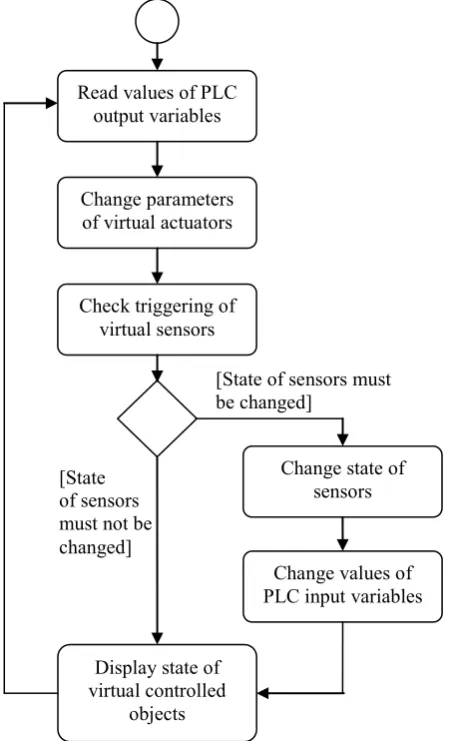
Virtual models use the following algorithm: in infinite cycle, PLC output variables are read with a certain periodicity; then, depending on those readings, the system changes the parameters indicating the state of the virtual actuators; the system checks if the virtual sensors have been triggered; if necessary, their state is changed and the new outputs are overwritten to the output PLC variables; then the new states of the virtual controlled objects are displayed. The flow diagram of this process is given in Fig. 3.
The system has been developed in html, javascript, and CSS and with the use of jQuery. A file of minified/normal jQuery version is too big to be downloaded to the PLC, so we used a special packed version of this library. Virtual objects were visualized with HTML5 canvas that redrew an object every 40 ms to afford smooth animation.
A web page with training workbench downloaded to the PLC has access to the values of the PLC output/input variables.
Figure 2. WWW function
Since virtual workbenches involve only such memory segments as process-input image and process-output image, the physical PLC inputs/outputs are not involved. Therefore, the web server and the entire system need only PLC CPU module, no extension signal modules. A cheapest CPU, like 1211 C, is enough for that. This feature can be used to build sophisticated virtual workbenches requiring many input/output channels.
To edit variables through web page, a user needs to log in to the web server. Output PLC variables cannot be changed directly. To do it, the system needs to create intermediate variables and change their values using web interface. After that, the values of these variables are assigned to the values of the PLC output variables. In our project, intermediate variables are stored in a special data block (named "WD").
For update of variable values without page reloaded, each variable should have its own page from which its values will be read with Ajax technology.
The functions assigning values to input variables and the WWW-function linking the web page to the PLC are detached to a separate function block, WWW-BLOCK. WD and WWW_BLOCK are protected with password, so a student will not change them, either voluntary or accidentally.
On each workbench, a virtual PLC reads, with a certain periodicity, values of the output variables of a real PLC and records them as its own properties. At a high reader frequency, the PLC receives too many calls; it fails to process them and consequently enqueues them. Then data is delayed, and such a delay gets longer with each new reading iteration. The numerous features introduced when developing the program reduced undelayed reading periodicity from 1 s to 70 ms. The project used a reading periodicity of 80 ms that was quite appropriate.
The following virtual training lab workbenches were created
pneumatic drives;
carriage with reversible electric drive; rotary workbench;
pump station;
tank with level sensor; distribution station; mechanic arm;
press with auxiliary mechanisms; sorting conveyor;
Figure 3. Flow diagram of virtual model of controlled object
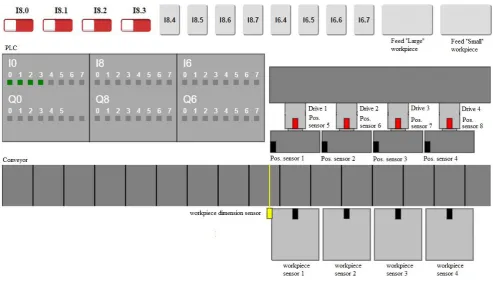
Fig, 4 show example of virtual lab workbench. It should be noted that image zoom and quality is considerably limited by the PLC memory which downloads the web page and the user project. For the available PLC, the memory was just 1 MB.
The idea of the training workbench in Fig. 4 is a sorting conveyer. This workbench uses two monostable pneumatic drives of the pushers, two bistable pneumatic drives of the pushers, and one non-reversible electric drive of the conveyer. The workbench is equipped with digital sensors at the end points of each pusher, an analog sensor of part dimensions, part proximity sensors for each of the four positions, toggles and buttons. On the conveyer, a user can feed parts of various dimensions. The task is to write a program for coordinated control of the pushers and the conveyer resulting in sorting of parts by a predefined parameter (for example, sorting out by dimensions, or sorting out every Xth part).
position; toggles and buttons. A user can feed a part to the initial position. The task is to write a program for coordinated control of the pushers, the rotary table, the press, and the drilling machine to provide sequential processing of parts.
4. Application
A student works in a preconfigured TIA Portal project containing web pages of training workbenches and blocks required for interaction with them. A student has to supplement the existing project with a program to operate a selected virtual controlled object and to upload this project to the PLC. A user’s PC can be directly connected to the PLC if in the institute lab or if a user has access to their own PLC (as often happens when factory staff is trained)
For remote training, a student accesses the PC with TIA Portal installed via the Internet. However, if a user has their own software, the program can be downloaded from a user’s PC to the PLC directly.
To evaluate the program output, a student (either from PC or with remote access) uses a web browser to connect the PLC web server with static IP. Then they log in, open the page of the necessary training workbench and watch the results of their program running.
Now, we are testing the teaching system and collecting feedback from our students. Even now, it can be preliminarily concluded that a remote access system is a good option because that students can access real equipment only for limited time.
5. Conclusions
The proposed remote training system based on Simatic S7-1200 PLC and virtual controlled objects can be used to teach specialists in industrial automation, mechatronics and electrical engineering. Among the prospects for further development, we regard:
- creation the editor for teacher to make virtual workbenches of standard components without participation of the system developers;
- development of procedures for automated check of task completion on virtual workbenches.
The product has been developed according to the CDIO project education technologies at Nizhny Tagil Technological Institute of Ural Federal University.
Change values of PLC input variables Change parameters
of virtual actuators
Check triggering of virtual sensors
Change state of sensors
Display state of virtual controlled
objects
[State of sensors must be changed]
Figure 4. Virtual lab workbench: Sorting Conveyer
References
[1] HSIEH, S.-J.T. (2017) Design of remotely accessible
automated systems to enhance Industrial automation education Conference Proceedings on ASEE Annual
Conference and Exposition, Volume 2017-June,
https://peer.asee.org/27878
[2] COLAK, I., EFE, A. (2011) Design and implementation of
a remote access PLC training set. International Aegean
Conference on Electrical Machines and Power
Electronics, ACEMP-2011, 425-429,
DOI: 10.1109/ACEMP.2011.6490636
[3] BELLMUNT, O.G., MIRACLE, D.M., ARELLANO,
S.G., SUMPER, A., ANDREU, A.S. (2006) A distance PLC
programming course employing a remote laboratory based on a flexible manufacturing cell. IEEE Transactions on Education, 49 (2), 278-284. doi: 10.1109/TE.2006.873982 [4] SHYR, W.-J. SU, T.-J LIN, C.-M. (2013) Development of
remote monitoring and a control system based on PLC and web access for learning mechatronics. International
Journal of Advanced Robotic Systems, 10 (5).
DOI: 10.5772/55363
[5] MENDES, M. J.G.C., MARTINS, L. (2014) An internet
remote laboratory to teach Industrial Automation. In Proceedings of 7th International Conference on Human
System Interactions (HSI), 144-149,
DOI: 10.1109/HSI.2014.6860464.
[6] PALMA, L.B., BRITO, V. , ROSAS, J. (2017) WEB PLC
simulator for ST programming. In Proceedings of 4th
Experiment at International Conference: Online
Experimentation, 303-308.
DOI: 10.1109/EXPAT.2017.7984410
[7] SIMATIC S7-PLCSIM V5.4.
http://w3.siemens.com/mcms/simatic-controller-software/en/step7/simatic-s7-plcsim/Pages/Default.aspx
(accessed on 24 October 2017)
[8] SHYR, W.-J. (2010) Enhancement of PLC programming
learning based on a virtual laboratory. World Transactions on Engineering and Technology Education, 8 (2), 196-202. [9] Standard training kit: Automation and Control Tools,
http://labstand.ru/catalog/sistemy_avtomatizatsii_i_upravle niya_sau/tipovoy_komplekt_uchebnogo_oborudovaniya_sr edstva_avtomatizatsii_i_upravleniya_ispolnenie_nastolnoe __1457 (accessed on 24 October 2017)
[10] ZAO Ecoinvent. http://www.ecoinvent.ru/products/
(accessed on 24 October 2017).
[11] PERDUKOVA,D.FEDOR P.(2013) Virtual laboratory for the
study of technological process automation. International Journal of Engineering Education. 29 (1), 230-238. [12] Siemens S7-1200 Web server Tutorial.
https://www.dmcinfo.com/latest- thinking/blog/id/8567/siemens-s7-1200-web-server-tutorial--from-getting-started-to-html5-user-defined-pages