One
Office
™3000
know everything
Sales Order Processing operates seamlessly with purchasing, batch and serial number tracking, credit card handling and provides extensive support for telesales operations. And with e-commerce a key factor for more and more businesses, it offers the opportunity to trade electronically with customers and suppliers via EDI networks or the Internet.
Most businesses today recognise the benefits of packaged software, but at the same time want core business systems to reflect closely their own particular way of working. OneOffice 3000 Sales Order Processing is highly configurable. Over 100 parameters can be set to tailor the software to your precise requirements. For
example, you can suppress the display of product costs and/or customer account balances, allow or disallow part invoicing and allow or disallow part deliveries.
Today’s customer-focused marketing demands responsive software. OneOffice 3000 Sales Order Processing offers comprehensive facilities to assist in direct selling to your customers. The order entry dialogue can be tailored to suit telesales operations, with relevant enquiries available at every point. Credit checking can be enabled or disabled as required, and if enabled can permit operator discretion as appropriate. Credit card handling facilities include automatic downloading of authorisation and payment
OneOffice 3000 Sales Order Processing offers efficient multi-location
handling of sales ordering, from entry of quotations and orders through
picking and delivery to invoicing.
Key Features at a Glance
• Enables effective and effi-cient order management
• Helps sales people to remain in control of each sales op-portunity
• Supports up-sell and cross-sell to maximise the margin in each opportunity
• Supports full order life-cycle
• Extensive range of discount types
• Supports a wide range of pricing models
• Can take full advantage of Active Intelligence™
• Support for accessory lists
• Credit card handling
• Serial number, batch and expiry date handling
Benefits
Sales Order Processing
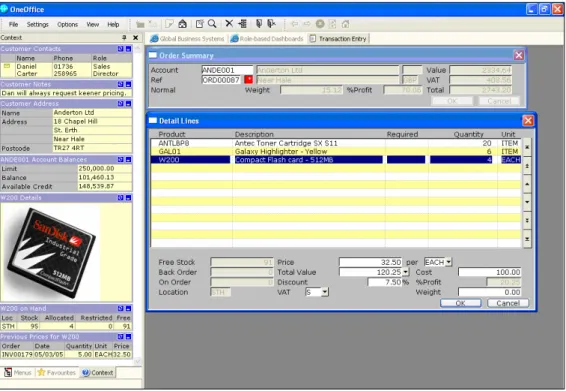
Figure 1. Using Active Intelligence™ alongside Sales Order Processing helps users to get the most out of each opportunity. For example here a salesperson is entering an order for a “W200” and is being shown product details, the price the customer recently paid, stock on hand and information about the customer relationship.
One
Office
™3000
know everything
know everything
integrates closely with Purchase Order Processing, Stock Control and Landed Costs to help you minimise stock on the shelf, maximise your purchasing power and manage stock on a flexible ‘just in time’ basis. You can define appropriate stock strategies on a product by product basis, while keeping the freedom to choose the right tactical approach for a specific order line.Other features include Global’s ability to multi-task on every screen. OneOffice 3000 Sales Order Processing combines functional sophistication, productivity and ease of use - offering competitive advantage in a competitive environment. requests, a voice referral option and
multiple credit card details recorded per order.
Flexible pricing and discounting is another area where OneOffice 3000 Sales Order Processing offers you competitive advantage. General price lists and special offers can be supplemented by customer specific ones. The default pricing offered is for the sales unit for a product, but you can substitute the purchasing or stock unit if this is preferable. You can examine all possible selling prices for a product, and re-price all the lines in an order to reflect current pricing. At the same time, any changes to standard pricing are logged for security in an override audit report. Distribution is all about matching supply and demand profitably, and today that means keeping stock levels down while delivering goods when the customer wants them. Using a ‘stock queue’ methodology, OneOffice 3000 Sales Order Processing
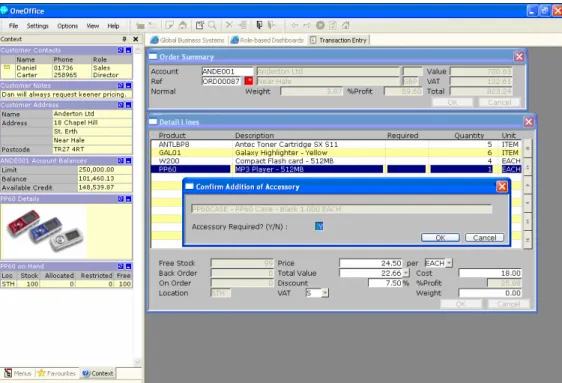
Figure 2. Users can make the most out of sales opportunities by using the using Accessory List function within OneOffice 3000 Sales Order Processing. After entering an
One
Office
™3000
know everything
Prices and Discounts• Multiple price lists per customer, with option to use different price lists on each order line
• Customer-specific special offers • Foreign currency price lists
• Bulk price changes and the ability to set up new prices in advance of the required date
• Quantity discounts and trade discounts. • Discounts apply to each line in the order • All products on price lists and special
deals and offers can have special descriptions, for example to provide foreign-language product descriptions on foreign currency price lists • Prices and discounts automatically
calculated with overrides logged in audit report
• Previous pricing enquiry options • Up to 12 prices per product, and up to
12 quantity breaks per quantity discount scheme
• Trade discount schemes, with discount level for a customer determined via Debtors Ledger
• Selling price for a product can be expressed in any unit in the associated unit group
• Option to reprice all the lines of an order to reflect current rules, either to remove unwanted manual price and discount overrides or to apply current prices to a pre-existing order
• 2-6 decimal places for unit prices
Tax Handling
• Tax calculated automatically
• Tax value displayed to facilitate cash sales
• Zero rating for ‘export’ customers can be overidden for home deliveries
Specification
Integration
Sales Order Processing integrates with: • OneOffice 3000 Debtors Ledger • OneOffice 3000 Stock Control • OneOffice 3000 Purchase Order
Processing
• OneOffice 3000 Landed Costs • OneOffice 3000 e=-Commerce • Global Sales Analysis
Order Types
• Normal orders • Repeating orders • Scheduled orders • Call-off orders • Back-to-back orders • Direct orders • Quotations • Invoices • Credit notes
The use of quotations can be disabled.
EDI and the Internet
Optional integration with OneOffice 3000 e-Commerce enables you to trade electronically via EDI networks or the Internet. Your customers can send you sales orders and you can send them acknowledgements and invoices. For more information see the OneOffice 3000 e-Commerce data sheet.
Telesales Facilities
• Instant customer account creation • Flexible order entry sequence • Comprehensive enquiries within order
entry
• Orders converted to quotations and vice versa
• Profit margin checking by product group • Credit checking before and after order
know everything
Settlement Discounts• Applied to specified accounts and invoices
• Products can be marked as ineligible and order lines for them excluded
• Settlement discount applies to net value of discountable lines, and tax optionally reduced in line
• Settlement discounts/credit surcharges are applied in the same way to credit notes, so net and tax amounts match in Debtors Ledger
Credit Card Payments
• Multiple credit card details recorded per order
• Authorisation requests may be batched for downloading
• Incoming response and authorisation/ rejection codes recorded, with despatch of goods held until authorisation • Authorisation time limits honoured • Voice referral option
• Payment submission batches automatically transmitted to issuers, with invoice and allocated payment posted to Debtors Ledger
Enquiries
Enquiries available during order entry include:
• Orders for the customer • Order lines for the customer
• Stock levels for a product at different locations
• Purchase orders for the product • Price lists, from special deals for the
customer and product through standard prices to discount deals and trade discounts
• Back orders • Product details • Order Book
• Stock queue entries
Credit Checking
• A parameter can be set to disable credit checking altogether, to allow operator discretion or to permit the explicit or ‘silent’ entry of held orders for overdue accounts
• Checking at beginning and end of order entry
• Credit limit can be checked against account balance, optionally including value of current order and any outstanding uninvoiced orders • Debtors Ledger account stop status
prevents new orders being entered and places existing ones on hold
• Hold status may be applied or removed automatically
Supply and Demand Management
The OneOffice 3000 distribution suite incorporates a powerful but easy to use stock management system. Users can define product-specific stock allocation strategies which ensure responsive service to customers, reduced purchasing costs and minimised stock on the floor. This provides flexible ‘just in time’ stock management which reflects commercial realities.
For each product a default is established as to whether stock is allocated to sales order lines from ‘pooled’ (i.e. shelf) stock or managed via what is termed the stock queue (the default can be overridden for a given order line). In the latter case, from within order entry goods can be reserved against an incoming purchase order or a new request added to the queue and, optionally, consolidated with other requests to maximise purchasing power. With pooled stock, the system can even be configured to allow free stock to go negative (useful in fast-moving environments).
Importers have the further option, via Landed Costs, to allocate (and deallocate) purchased goods in transit to specific sales order lines.
One
Office
™3000
know everything
Enquiries available at other points include: • Customer enquiries• Product enquiries • Order enquiries • Back ordered products
Reports
• Sales order report can show all orders, all new orders or just transactions of a certain type, with multiple selection criteria
• Back orders report can show all back ordered stock or just products with stock available to allocate and details of orders awaiting stock or just a summary for each product
• Payment Submission Reconciliation Report
Help
On-screen help is available at a number of different levels. The help function displays program-and field-level help at every point. Where data entry options are restricted (e.g. to validate supplier codes), standard pop-up windows enable the user to select the one required.
know everything
Regatta Place, Marlow Road, Bourne End, Buckinghamshire SL8 5TD. United Kingdom T: +44 (0)1628 532565 F: +44 (0)1628 551490 E: [email protected]