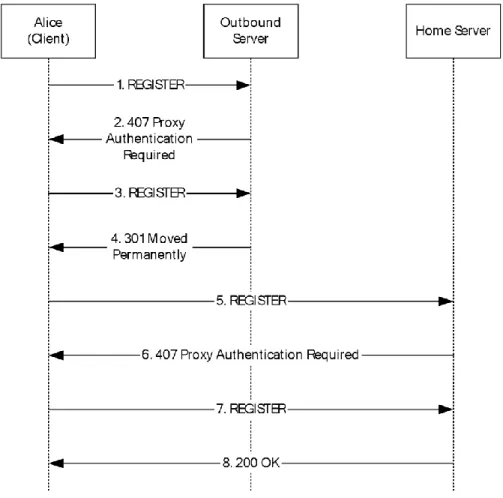
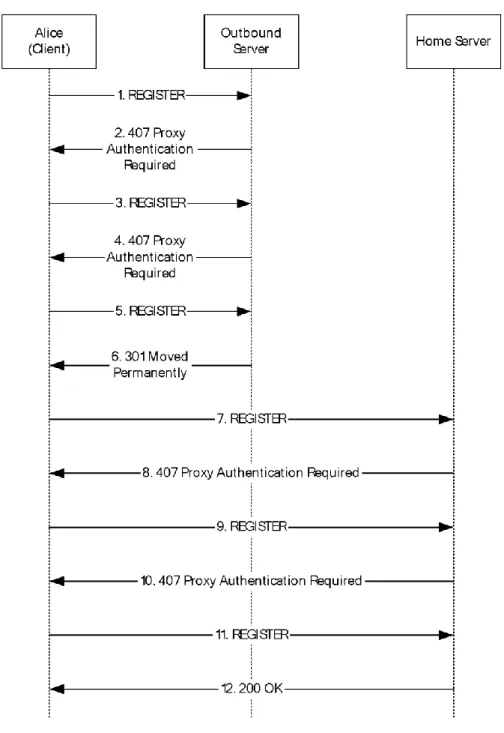
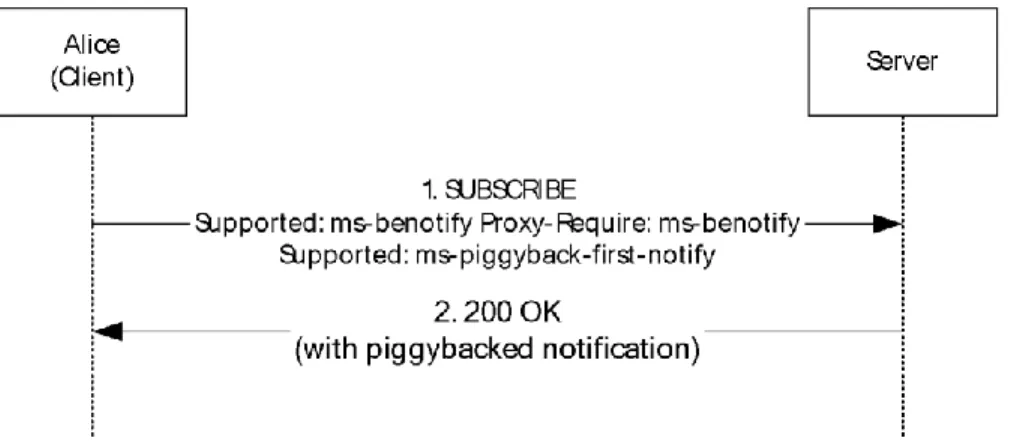
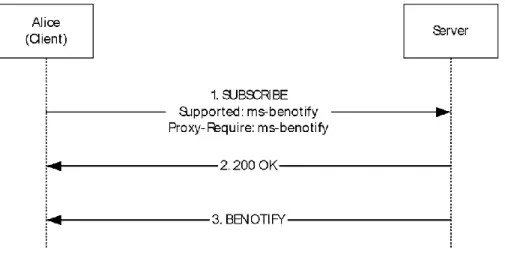
[MS-SIP]:
Session Initiation Protocol Extensions
Intellectual Property Rights Notice for Open Specifications Documentation
Technical Documentation. Microsoft publishes Open Specifications documentation for protocols, file formats, languages, standards as well as overviews of the interaction among each of these technologies.
Copyrights. This documentation is covered by Microsoft copyrights. Regardless of any other terms that are contained in the terms of use for the Microsoft website that hosts this
documentation, you may make copies of it in order to develop implementations of the technologies described in the Open Specifications and may distribute portions of it in your implementations using these technologies or your documentation as necessary to properly document the implementation. You may also distribute in your implementation, with or without modification, any schema, IDL's, or code samples that are included in the documentation. This permission also applies to any documents that are referenced in the Open Specifications. No Trade Secrets. Microsoft does not claim any trade secret rights in this documentation. Patents. Microsoft has patents that may cover your implementations of the technologies
described in the Open Specifications. Neither this notice nor Microsoft's delivery of the
documentation grants any licenses under those or any other Microsoft patents. However, a given Open Specification may be covered by Microsoft Open Specification Promise or the Community Promise. If you would prefer a written license, or if the technologies described in the Open Specifications are not covered by the Open Specifications Promise or Community Promise, as applicable, patent licenses are available by contacting [email protected].
Trademarks. The names of companies and products contained in this documentation may be covered by trademarks or similar intellectual property rights. This notice does not grant any licenses under those rights. For a list of Microsoft trademarks, visit
www.microsoft.com/trademarks.
Fictitious Names. The example companies, organizations, products, domain names, e-mail addresses, logos, people, places, and events depicted in this documentation are fictitious. No association with any real company, organization, product, domain name, email address, logo, person, place, or event is intended or should be inferred.
Reservation of Rights. All other rights are reserved, and this notice does not grant any rights other than specifically described above, whether by implication, estoppel, or otherwise.
Tools. The Open Specifications do not require the use of Microsoft programming tools or programming environments in order for you to develop an implementation. If you have access to Microsoft
programming tools and environments you are free to take advantage of them. Certain Open Specifications are intended for use in conjunction with publicly available standard specifications and network programming art, and assumes that the reader either is familiar with the aforementioned material or has immediate access to it.
Revision Summary
Date Revision History Revision Class Comments
5/11/2007 0.1 Version 0.1 release
8/10/2007 0.2 Minor Clarified the meaning of the technical content. 9/28/2007 0.3 Minor Clarified the meaning of the technical content. 10/23/2007 0.4 Minor Clarified the meaning of the technical content. 11/30/2007 1.0 Major Updated and revised the technical content.
1/25/2008 1.0.1 Editorial Changed language and formatting in the technical content. 3/14/2008 1.0.2 Editorial Changed language and formatting in the technical content. 5/16/2008 1.0.3 Editorial Changed language and formatting in the technical content. 6/20/2008 2.0 Major Updated and revised the technical content.
7/25/2008 2.0.1 Editorial Changed language and formatting in the technical content. 8/29/2008 2.0.2 Editorial Changed language and formatting in the technical content. 10/24/2008 2.1 Minor Clarified the meaning of the technical content.
12/5/2008 3.0 Major Updated and revised the technical content. 1/16/2009 4.0 Major Updated and revised the technical content. 2/27/2009 5.0 Major Updated and revised the technical content.
4/10/2009 5.0.1 Editorial Changed language and formatting in the technical content. 5/22/2009 5.0.2 Editorial Changed language and formatting in the technical content. 7/2/2009 5.0.3 Editorial Changed language and formatting in the technical content. 8/14/2009 5.0.4 Editorial Changed language and formatting in the technical content. 9/25/2009 5.1 Minor Clarified the meaning of the technical content.
11/6/2009 5.1.1 Editorial Changed language and formatting in the technical content. 12/18/2009 5.1.2 Editorial Changed language and formatting in the technical content. 1/29/2010 6.0 Major Updated and revised the technical content.
3/12/2010 6.0.1 Editorial Changed language and formatting in the technical content. 4/23/2010 6.0.2 Editorial Changed language and formatting in the technical content. 6/4/2010 6.0.3 Editorial Changed language and formatting in the technical content. 7/16/2010 6.0.3 None No changes to the meaning, language, or formatting of the
technical content.
8/27/2010 6.0.3 None No changes to the meaning, language, or formatting of the technical content.
10/8/2010 6.0.3 None No changes to the meaning, language, or formatting of the technical content.
Date Revision History Revision Class Comments
11/19/2010 6.0.3 None No changes to the meaning, language, or formatting of the technical content.
1/7/2011 6.0.3 None No changes to the meaning, language, or formatting of the technical content.
2/11/2011 6.0.3 None No changes to the meaning, language, or formatting of the technical content.
3/25/2011 6.0.3 None No changes to the meaning, language, or formatting of the technical content.
5/6/2011 6.1 Minor Clarified the meaning of the technical content. 6/17/2011 6.2 Minor Clarified the meaning of the technical content.
9/23/2011 6.2 None No changes to the meaning, language, or formatting of the technical content.
12/16/2011 6.2 None No changes to the meaning, language, or formatting of the technical content.
3/30/2012 7.0 Major Updated and revised the technical content.
7/12/2012 7.0 None No changes to the meaning, language, or formatting of the technical content.
10/25/2012 7.0 None No changes to the meaning, language, or formatting of the technical content.
1/31/2013 7.0 None No changes to the meaning, language, or formatting of the technical content.
8/8/2013 7.0 None No changes to the meaning, language, or formatting of the technical content.
11/14/2013 7.0 None No changes to the meaning, language, or formatting of the technical content.
2/13/2014 7.0 None No changes to the meaning, language, or formatting of the technical content.
5/15/2014 8.0 Major Updated and revised the technical content.
6/30/2015 8.0 No Change No changes to the meaning, language, or formatting of the technical content.
10/16/2015 8.0 No Change No changes to the meaning, language, or formatting of the technical content.
Table of Contents
1 Introduction ... 7
1.1 Glossary ... 7
1.2 References ... 10
1.2.1 Normative References ... 10
1.2.2 Informative References ... 11
1.3 Overview ... 11
1.4 Relationship to Other Protocols ... 12
1.5 Prerequisites/Preconditions ... 12
1.6 Applicability Statement ... 12
1.7 Versioning and Capability Negotiation ... 12
1.8 Vendor-Extensible Fields ... 13
1.9 Standards Assignments ... 13
2 Messages ... 14
2.1 Transport ... 14
2.2 Message Syntax ... 14
2.2.1 text/xml+msrtc.pidf Presence Document Format ... 14
2.2.2 SIP Extensions to XPIDF Presence Document Format ... 16
2.2.3 application/vnd-microsoft-roaming-acls+xml Document Format ... 16
2.2.4 Contacts/Groups Document Formats ... 17
2.2.4.1 application/vnd-microsoft-roaming-contacts+xml Document Format ... 17
2.2.4.2 Contacts/Groups Management Document Formats ... 18
2.3 Directory Service Schema Elements ... 19
3 Protocol Details ... 20
3.1 NTLM/Kerberos Authentication Extensions Details ... 20
3.1.1 Abstract Data Model ... 21
3.1.2 Timers ... 21
3.1.3 Initialization ... 21
3.1.4 Higher-Layer Triggered Events ... 21
3.1.4.1 Initiating the Login Sequence ... 21
3.1.4.2 Sending a SIP Message ... 21
3.1.5 Message Processing Events and Sequencing Rules ... 23
3.1.5.1 Overview of Authentication Protocol Elements ... 23
3.1.5.2 Verifying Message Signature for Incoming Messages ... 25
3.1.5.3 proxy=replace Extension for Firewall Traversal ... 25
3.1.6 Timer Events ... 25
3.1.7 Other Local Events ... 25
3.2 Presence Extensions Details ... 25
3.2.1 Abstract Data Model ... 26
3.2.2 Timers ... 27
3.2.3 Initialization ... 27
3.2.4 Higher-Layer Triggered Events ... 27
3.2.4.1 Indicating Support for Presence Extensions ... 27
3.2.4.2 Setting Presence for Self User (setPresence SERVICE Request) ... 27
3.2.4.3 Subscribing to a User's Presence Information ... 28
3.2.4.4 Getting Presence Information of Another User (getPresence SERVICE Request) ... 28
3.2.5 Message Processing Events and Sequencing Rules ... 29
3.2.5.1 Processing Response to a getPresence SERVICE Request ... 29
3.2.6 Timer Events ... 29
3.2.7 Other Local Events ... 29
3.3 Batched SUBSCRIBE and NOTIFY Extension Details ... 29
3.3.1 Abstract Data Model ... 30
3.3.3 Initialization ... 30
3.3.4 Higher-Layer Triggered Events ... 30
3.3.4.1 Sending a Batched SUBSCRIBE Request ... 30
3.3.5 Message Processing Events and Sequencing Rules ... 33
3.3.5.1 Receiving a NOTIFY Response to a Batched SUBSCRIBE Request ... 33
3.3.5.2 Receiving a Failure Response to a Batched SUBSCRIBE Request ... 35
3.3.6 Timer Events ... 35
3.3.7 Other Local Events ... 35
3.4 Piggyback Notification in 200 OK Response Details ... 35
3.4.1 Abstract Data Model ... 36
3.4.2 Timers ... 36
3.4.3 Initialization ... 36
3.4.4 Higher-Layer Triggered Events ... 36
3.4.4.1 Indicating Support for Piggyback Notification ... 36
3.4.5 Message Processing Events and Sequencing Rules ... 36
3.4.5.1 Receiving a Piggyback Notification in a 200 OK ... 37
3.4.6 Timer Events ... 37
3.4.7 Other Local Events ... 37
3.5 Best Effort NOTIFY (BENOTIFY) Extension Details ... 37
3.5.1 Abstract Data Model ... 37
3.5.1.1 Indicating Support for BENOTIFY ... 38
3.5.2 Timers ... 38
3.5.3 Initialization ... 38
3.5.4 Higher-Layer Triggered Events ... 38
3.5.5 Message Processing Events and Sequencing Rules ... 38
3.5.5.1 Receiving a Failure Response to SUBSCRIBE ... 38
3.5.5.2 Receiving a Success Response to SUBSCRIBE ... 38
3.5.5.3 Receiving a BENOTIFY Request ... 39
3.5.6 Timer Events ... 39
3.5.7 Other Local Events ... 39
3.6 Auto-Extension of Subscriptions Details ... 39
3.6.1 Abstract Data Model ... 39
3.6.2 Timers ... 39
3.6.3 Initialization ... 40
3.6.4 Higher-Layer Triggered Events ... 40
3.6.4.1 Indicating Support for Auto-Extension of Subscriptions ... 40
3.6.5 Message Processing Events and Sequencing Rules ... 40
3.6.5.1 Receiving a 200 OK Response to SUBSCRIBE ... 40
3.6.5.2 Receiving a NOTIFY Request ... 40
3.6.6 Timer Events ... 41
3.6.7 Other Local Events ... 41
3.7 Contact Management Extensions Details ... 41
3.7.1 Abstract Data Model ... 42
3.7.2 Timers ... 42
3.7.3 Initialization ... 43
3.7.4 Higher-Layer Triggered Events ... 43
3.7.4.1 Subscribing to the Contact/Group List ... 43
3.7.4.2 Subscribing for the ACL ... 43
3.7.4.3 Add/Modify/Delete Contact ... 44
3.7.4.4 Add/Modify/Delete Group ... 44
3.7.5 Message Processing Events and Sequencing Rules ... 44
3.7.5.1 Setting ACEs for a Contact ... 44
3.7.5.2 Receiving the Contact List from the Server ... 44
3.7.5.3 Receiving the ACL from the Server ... 45
3.7.6 Timer Events ... 45
3.7.7 Other Local Events ... 45
4.1 Registration with Kerberos ... 46
4.2 Registration with NTLM ... 50
4.3 Batched SUBSCRIBE and Piggybacked NOTIFY Example ... 55
4.4 Best Effort NOTIFY Example ... 57
4.5 setPresence Example ... 58
4.6 AddContact Example ... 60
4.7 DeleteContact Example ... 61
4.8 AddGroup Example ... 62
4.9 DeleteGroup Example ... 63
4.10 setACE Example ... 65
4.11 P2P Subscription and XPIDF Presence Format Example ... 66
5 Security ... 68
5.1 Security Considerations for Implementers ... 68
5.2 Index of Security Parameters ... 68
6 Appendix A: Full text/xml+msrtc.pidf Presence Document Format ... 69
7 Appendix B: XPIDF Presence Document Format ... 74
8 Appendix C: ACL XML Schema ... 78
9 Appendix D: Contact Management Schema ... 80
9.1 Contact Schema ... 80
9.2 SetContact Schema ... 84
9.3 ModifyGroup Schema ... 84
9.4 DeleteContact Schema ... 85
9.5 DeleteGroup Schema ... 86
10 Appendix E: common.xsd ... 87
11 Appendix F: Product Behavior ... 89
12 Change Tracking ... 90
1
Introduction
This document describes Microsoft extensions to the Session Initiation Protocol (SIP). SIP is used by terminals to establish, modify, and terminate multimedia sessions or calls. SIP is specified in [RFC3261], [RFC3262], [RFC3263], and [RFC3863].
Microsoft has added extensions for NTLM/Kerberos Authentication, for presence, for optimization of
subscriptions, and for notifications and contact management. These extensions are used by
Windows Messenger and the Real-Time Communications (RTC) Client API.
Sections 1.8, 2, and 3 of this specification are normative and can contain the terms MAY, SHOULD, MUST, MUST NOT, and SHOULD NOT as defined in [RFC2119]. Sections 1.5 and 1.9 are also normative but do not contain those terms. All other sections and examples in this specification are informative.
1.1 Glossary
The following terms are specific to this document:
200 OK: A response to indicate that the request has succeeded.
403 Forbidden: A response that indicates that a protocol server understood but denies a request. access control entry (ACE): An entry in an access control list (ACL) that contains a set of user
rights and a security identifier (SID) that identifies a principal for whom the rights are allowed, denied, or audited.
access control list (ACL): A list of access control entries (ACEs) that collectively describe the security rules for authorizing access to some resource; for example, an object or set of objects. Best Effort NOTIFY (BENOTIFY): A Session Initiation Protocol (SIP) method that is used to
send notifications to a subscriber, as described in [MS-SIP]. Unlike the NOTIFY method, the BENOTIFY method does not require the recipient of the request to send a SIP response. client: A computer on which the remote procedure call (RPC) client is executing.
dialog: A peer-to-peer Session Initiation Protocol (SIP) relationship that exists between two
user agents and persists for a period of time. A dialog is established by SIP messages, such
as a 2xx response to an INVITE request, and is identified by a call identifier, a local tag, and a remote tag.
directory service (DS): A service that stores and organizes information about a computer network's users and network shares, and that allows network administrators to manage users' access to the shares. See also Active Directory.
domain: A set of users and computers sharing a common namespace and management
infrastructure. At least one computer member of the set must act as a domain controller (DC) and host a member list that identifies all members of the domain, as well as optionally hosting the Active Directory service. The domain controller provides authentication (2) of members, creating a unit of trust for its members. Each domain has an identifier that is shared among its members. For more information, see [MS-AUTHSOD] section 1.1.1.5 and [MS-ADTS].
endpoint: A participant that uses the Microsoft Groove Dynamics Protocol, as described in [MS-GRVDYNM], to synchronize with a shared space. An endpoint is identified by the combination of an identity URL and a client device URL. Each endpoint maintains a copy of the data in a shared space.
event package: A specification that defines a set of state information to be reported by a notifying
further syntax and semantics based on the framework that is required to convey such state information.
fully qualified domain name (FQDN): An unambiguous domain name (2) that gives an absolute location in the Domain Name System's (DNS) hierarchy tree, as defined in [RFC1035] section 3.1 and [RFC2181] section 11.
INVITE: A Session Initiation Protocol (SIP) method that is used to invite a user or a service to participate in a session.
Kerberos: An authentication (2) system that enables two parties to exchange private information across an otherwise open network by assigning a unique key (called a ticket) to each user that logs on to the network and then embedding these tickets into messages sent by the users. For more information, see [MS-KILE].
notification: The act of a notifier sending a NOTIFY message to a subscriber to inform the subscriber of the state of a resource.
NOTIFY: A method that is used to notify a Session Initiation Protocol (SIP) client that an event requested by an earlier SUBSCRIBE method has occurred. The notification optionally provides details about the event.
NT LAN Manager (NTLM) Authentication Protocol: A protocol using a challenge-response mechanism for authentication (2) in which clients are able to verify their identities without sending a password to the server. It consists of three messages, commonly referred to as Type 1 (negotiation), Type 2 (challenge) and Type 3 (authentication). For more information, see [MS-NLMP].
peer to peer (P2P): An Internet-based networking option in which two or more computers connect directly to each other to communicate and share files without use of a central server. peer-to-peer (P2P): An Internet-based networking option in which two or more computers
connect directly to each other in order to communicate.
Presence Information Data Format (PIDF): A common data format defined in [RFC3863] to exchange presence information.
presentity: An entity that provides presence information to a presence service.
proxy: A network node that accepts network traffic originating from one network agent and transmits it to another network agent.
REGISTER: A Session Initiation Protocol (SIP) method that is used by an SIP client to register the client address with an SIP server.
salt: An additional random quantity, specified as input to an encryption function that is used to increase the strength of the encryption.
security association (SA): A simplex "connection" that provides security services to the traffic carried by it. See [RFC4301] for more information.
server: A computer on which the remote procedure call (RPC) server is executing.
SERVICE: A method that is defined by Session Initiation Protocol (SIP) extensions and is used by an SIP client to request a service from a server.
service principal name (SPN): The name a client uses to identify a service for mutual
authentication. (For more information, see [RFC1964] section 2.1.1.) An SPN consists of either two parts or three parts, each separated by a forward slash ('/'). The first part is the service class, the second part is the instance name, and the third part (if present) is the service name. For example, "ldap/dc-01.fabrikam.com/fabrikam.com" is a three-part SPN where "ldap" is the
service class name, "dc-01.fabrikam.com" is the instance name, and "fabrikam.com" is the service name. See [SPNNAMES] for more information about SPN format and composing a unique SPN.
Session Initiation Protocol (SIP): An application-layer control (signaling) protocol for creating, modifying, and terminating sessions with one or more participants. SIP is defined in [RFC3261]. SIP client (client): Any network client that sends SIP requests and receives SIP responses.
Clients may or may not interact directly with a human user. User agent clients (UACs) and
proxies are clients.
SIP header: A component of a SIP message that conveys information about the SIP message. It is structured as a sequence of header fields.
SIP message: The data that is exchanged between Session Initiation Protocol (SIP) elements as part of the protocol. An SIP message is either a request or a response.
SIP method: The primary function that an SIP request is meant to call on a server. This method is carried in the request message itself. Example methods are INVITE and BYE.
SIP request: A Session Initiation Protocol (SIP) message that is sent from a user agent client (UAC) to a user agent server (UAS) to call a specific operation.
SIP response: A Session Initiation Protocol (SIP) message that is sent from a user agent server (UAS) to a user agent client (UAC) to indicate the status of a request from the UAC to the UAS.
SIP transaction: A SIP transaction occurs between a UAC and a UAS. The SIP transaction comprises all messages from the first request sent from the UAC to the UAS up to a final response (non-1xx) sent from the UAS to the UAC. If the request is INVITE, and the final response is a non-2xx, the SIP transaction also includes an ACK to the response. The ACK for a 2xx response to an INVITE request is a separate SIP transaction.
SOAP: A lightweight protocol for exchanging structured information in a decentralized, distributed environment. SOAP uses XML technologies to define an extensible messaging framework, which provides a message construct that can be exchanged over a variety of underlying protocols. The framework has been designed to be independent of any particular programming model and other implementation-specific semantics. SOAP 1.2 supersedes SOAP 1.1. See [SOAP1.2-1/2003].
SOAP envelope: A container for SOAP message information and the root element of a SOAP document. See [SOAP1.2-1/2007] section 5.1 for more information.
SUBSCRIBE: A Session Initiation Protocol (SIP) method that is used to request asynchronous notification of an event or a set of events at a later time.
subscription: The end result of an act of a SIP element sending a SUBSCRIBE request. Transmission Control Protocol (TCP): A protocol used with the Internet Protocol (IP) to send
data in the form of message units between computers over the Internet. TCP handles keeping track of the individual units of data (called packets) that a message is divided into for efficient routing through the Internet.
Transport Layer Security (TLS): A security protocol that supports confidentiality and integrity of messages in client and server applications communicating over open networks. TLS supports server and, optionally, client authentication by using X.509 certificates (as specified in [X509]). TLS is standardized in the IETF TLS working group. See [RFC4346].
Uniform Resource Identifier (URI): A string that identifies a resource. The URI is an addressing mechanism defined in Internet Engineering Task Force (IETF) Uniform Resource Identifier (URI): Generic Syntax [RFC3986].
user agent: An HTTP user agent, as specified in [RFC2616].
User Datagram Protocol (UDP): The connectionless protocol within TCP/IP that corresponds to the transport layer in the ISO/OSI reference model.
watcher: An entity that requests presence information on a presentity from the presence service. XPIDF: A data format for presence using XML (for more information, see [DATAFORMATXML]). MAY, SHOULD, MUST, SHOULD NOT, MUST NOT: These terms (in all caps) are used as defined
in [RFC2119]. All statements of optional behavior use either MAY, SHOULD, or SHOULD NOT.
1.2 References
Links to a document in the Microsoft Open Specifications library point to the correct section in the most recently published version of the referenced document. However, because individual documents in the library are not updated at the same time, the section numbers in the documents may not match. You can confirm the correct section numbering by checking the Errata.
1.2.1 Normative References
We conduct frequent surveys of the normative references to assure their continued availability. If you have any issue with finding a normative reference, please contact [email protected]. We will assist you in finding the relevant information.
[MS-ADA1] Microsoft Corporation, "Active Directory Schema Attributes A-L". [MS-ADA2] Microsoft Corporation, "Active Directory Schema Attributes M". [MS-ADA3] Microsoft Corporation, "Active Directory Schema Attributes N-Z". [MS-ADSC] Microsoft Corporation, "Active Directory Schema Classes". [MS-KILE] Microsoft Corporation, "Kerberos Protocol Extensions".
[MS-NLMP] Microsoft Corporation, "NT LAN Manager (NTLM) Authentication Protocol". [RFC1964] Linn, J., "The Kerberos Version 5 GSS-API Mechanism", RFC 1964, June 1996, http://www.rfc-editor.org/rfc/rfc1964.txt
[RFC2119] Bradner, S., "Key words for use in RFCs to Indicate Requirement Levels", BCP 14, RFC 2119, March 1997, http://www.rfc-editor.org/rfc/rfc2119.txt
[RFC3261] Rosenberg, J., Schulzrinne, H., Camarillo, G., Johnston, A., Peterson, J., Sparks, R., Handley, M., and Schooler, E., "SIP: Session Initiation Protocol", RFC 3261, June 2002,
http://www.ietf.org/rfc/rfc3261.txt
[RFC3262] Rosenberg, J., and Schulzrinne, H., "Reliability of Provisional Responses in the Session Initiation Protocol (SIP)", RFC 3262, June 2002, http://www.ietf.org/rfc/rfc3262.txt
[RFC3263] Rosenberg, J., and Schulzrinne, H., "Session Initiation Protocol (SIP): Locating SIP Servers", RFC 3263, June 2002, http://www.ietf.org/rfc/rfc3263.txt
[RFC3265] Roach, A. B., "Session Initiation Protocol (SIP)-Specific Event Notification", RFC 3265, June 2002, http://www.ietf.org/rfc/rfc3265.txt
[RFC3863] Sugano, H., Fujimoto, S., Klyne, G., et al., "Presence Information Data Format (PIDF)", RFC 3863, August 2004, http://www.ietf.org/rfc/rfc3863.txt
[XML10] World Wide Web Consortium, "Extensible Markup Language (XML) 1.0 (Third Edition)", February 2004, http://www.w3.org/TR/2004/REC-xml-20040204/
[XMLNS-2ED] World Wide Web Consortium, "Namespaces in XML 1.0 (Second Edition)", August 2006, http://www.w3.org/TR/2006/REC-xml-names-20060816/
[XMLSCHEMA] World Wide Web Consortium, "XML Schema", September 2005, http://www.w3.org/2001/XMLSchema
1.2.2 Informative References
[RFC1341] Borenstein, N., and Freed, N., "MIME (Multipurpose Internet Mail Extensions): Mechanisms for Specifying and Describing the Format of Internet Message Bodies", RFC 1341, June 1992,
http://www.rfc-editor.org/rfc/rfc1341.txt
[SOAP1.1] Box, D., Ehnebuske, D., Kakivaya, G., et al., "Simple Object Access Protocol (SOAP) 1.1", May 2000, http://www.w3.org/TR/2000/NOTE-SOAP-20000508/
[SOAP1.2-1/2007] Gudgin, M., Hadley, M., Mendelsohn, N., et al., "SOAP Version 1.2 Part 1: Messaging Framework (Second Edition)", W3C Recommendation 27, April 2007,
http://www.w3.org/TR/2007/REC-soap12-part1-20070427/
[SOAP1.2-2/2007] Gudgin, M., Hadley, M., Mendelsohn, N., et al., "SOAP Version 1.2 Part 2: Adjuncts (Second Edition)", W3C Recommendation, April 2007, http://www.w3.org/TR/2007/REC-soap12-part2-20070427
1.3 Overview
Session Initiation Protocol Extensions is an extension of the original Session Initiation Protocol (SIP), as specified in [RFC3261].
Session Initiation Protocol Extensions defines NTLM/Kerberos authentication extensions to support client/server authentication and message signatures. See NTLM/Kerberos Authentication Extensions Details (section 3.1).
Session Initiation Protocol Extensions also adds a number of extensions to SIMPLE-based presence, as specified in [RFC3261], [RFC3265], and [RFC3863]. These extensions are briefly described below and are defined further in section 3.
Many of the extensions have been designed to reduce the number of subscription and notification messages exchanged between the client and the server. One such extension is the capability to subscribe for the presence of a number of contacts in a single subscription. The client can send a batched SUBSCRIBE request to create such a subscription. The server sends the presence information of all the contacts in the batched subscription in a single NOTIFY request. This is useful when a client needs to subscribe for presence of all the contacts in the user's contact list.
Another extension that helps reduce the number of messages between the server and client is the piggyback notification. The server can send the presence information immediately in the final response to the SUBSCRIBE request, thus obviating the need to send a separate NOTIFY. Any further changes are conveyed using a NOTIFY.
A BENOTIFY request is similar to a NOTIFY request and is used by the server to send updates about
any changes to the presence state. The only difference is that the client does not need to send a SIP response to a BENOTIFY request. Because the server does not need to wait for a response, the load on the server can be reduced.
Auto-Extension of subscriptions is an extension defined to reduce the frequency of the client refreshing a subscription. The client refreshes a subscription after an interval negotiated with the server. With this extension, any notification sent by the server to the client resets the subscription refresh timer. After a notification, the client needs to wait for the negotiated interval before it can refresh the subscription. Another notification during this time can again reset the timer. This extension reduces the number of SUBSCRIBE requests sent by the client to refresh a subscription.
Microsoft also has made extensions to the Presence Information Data Format (PIDF). The enhanced format is called msrtc.pidf and is documented in text/xml+msrtc.pidf Presence Document Format (section 2.2.1). The msrtc.pidf format is used only in the client/server mode. The client uses a setPresence SOAP request carried in the body of a SERVICE request to set or update its own presence information. For more information on the SOAP protocol, see [SOAP1.1], [SOAP1.2-1/2007], and [SOAP1.2-2/2007]. The counterpart to the setPresence SOAP request is a getPresence SOAP request. This acts as a means to poll for presence rather than subscribing to presence. It is meant as a
lightweight alternative to a presence SUBSCRIBE request when only presence for a single entity is needed and only that presence information for a one-time immediate purpose is needed.
Session Initiation Protocol Extensions uses the XPIDF format to exchange presence information when
the endpoints are acting in peer-to-peer (P2P) mode. The XPIDF format was introduced in an IETF
draft but was never standardized as an RFC. The details of the format and the schema are included in Appendix B: XPIDF Presence Document Format (section 7). Session Initiation Protocol Extensions also has made some extensions to the XPIDF format (see section 2.2.2).
Finally, Session Initiation Protocol Extensions includes protocol enhancements for contact
management operations such as adding or deleting a contact or a group, and setting access control
lists (ACLs) for viewing and establishing communication with a presence. All of these operations can
be done by sending SOAP requests carried within the body of a SERVICE request.
1.4 Relationship to Other Protocols
Session Initiation Protocol Extensions is dependent on SIP. Session Initiation Protocol Extensions defines additional SIP primitives and XML schema to support various extensions specified in this document. In addition, Session Initiation Protocol Extensions defines some authentication extensions that make use of NT LAN Manager (NTLM) Authentication Protocol, specified in [MS-NLMP] and
Kerberos protocols. For more information on XML, see [XML10], [XMLNS-2ED], and [XMLSCHEMA].
Session Initiation Protocol Extensions is invoked as an extension of SIP and is dependent on all the protocols on which the SIP specification depends.
1.5 Prerequisites/Preconditions
The Session Initiation Protocol Extensions assumes that both the SIP clients and the server support SIP. The prerequisites for Session Initiation Protocol Extensions are the same as the prerequisites for SIP.
1.6 Applicability Statement
The Session Initiation Protocol Extensions is applicable when both the SIP clients and the server support SIP and want to utilize one or more of the enhancements offered by Session Initiation Protocol Extensions.
1.7 Versioning and Capability Negotiation
There is no protocol versioning in the Session Initiation Protocol Extensions. Instead, explicit capability negotiation is done as specified in this section by using the Supported header to indicate support of various features. Using the Supported header is the standard SIP mechanism of doing capability negotiation.
1.8 Vendor-Extensible Fields
There are no vendor-extensible fields specific to the Session Initiation Protocol Extensions. Standard extension mechanisms of the SIP MAY be used by vendors as needed.
1.9 Standards Assignments
2
Messages
The following sections specify how Session Initiation Protocol Extensions messages are transported and the message syntax.
2.1 Transport
Microsoft extensions to SIP do not introduce a new transport to exchange messages but these extensions can be used with any transport that is used by SIP. SIP messages can be transported over User Datagram Protocol (UDP), Transmission Control Protocol (TCP), or Transport
Layer Security (TLS).
2.2 Message Syntax
Microsoft extensions to SIP do not introduce a new message format. They rely on the SIP message format, as specified in [RFC3261] section 7. The Session Initiation Protocol Extensions does define a new format for the Presence Document (see section 2.2.1).
2.2.1 text/xml+msrtc.pidf Presence Document Format
These extensions support a nonstandard Presence Document Format that has a number of
enhancements, such as the capability to carry device capabilities and the capability to support multiple devices for a single user. A user can log on by using multiple devices. Each device presents its
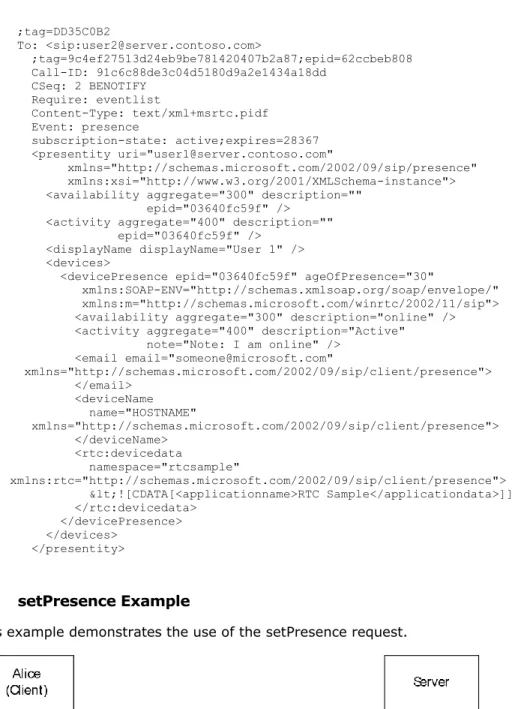
presence information to the server. The XML instance containing presence information submitted to the server is called the Presence Document. When retrieving presence information for a user, the server not only returns the Presence Document from every device, but it also determines the overall presence of the user. This XML instance returned by the server is called the Aggregated Presence Document.
Some of the key elements and attributes are defined as follows: presentity
The element contains the overall aggregated availability and activity of a user, as well as the availability and activity of all endpoints of the user. The uri attribute specifies the sip entity that this element is describing.
epid
This attribute can appear in the availability element, the activity element, or a devicePresence element. When used in the availability and activity elements inside the presentity element, the epid identifies the availability and activity for the most active endpoint. When used in the
devicePresence element, the epid advertises the availability and identifies the activity for a specific endpoint. This value is a hexadecimal string no longer than 16 bytes in length. This epid value is the same endpoint identifier value used to identify a specific SIP endpoint.
ageOfPresence
The ageOfPresence attribute appears in a devicePresence element. This is the number of seconds since the device last updated its presence information.
availability
Availability indicates whether the user can receive a call. The availability element has an
aggregate attribute that represents the availability of a user on a device. The aggregate attribute is processed by the server as being within a range that has a span of 100 (the class code). Note
that within the XML sent by the client, the client does not specify the class code, but rather, the actual value. The server interprets the values as being within the following classes.
Class
code Server interpretation
000-099 The user cannot receive calls.
100-199 The user may be online; however, availability is unknown until a call is attempted. A cell phone gateway typically uses this setting.
200-299 The user has a device that is currently connected and it can receive calls. 300-399 The user is in proximity of a device that can receive calls.
Rather than a hard-coded enumeration, a numeric value is used. This makes it easy to compare the availability that is sent by two different user agents. For example, the higher the availability, the more available the user.
activity
The purpose of activity is not to indicate if a user can receive a call, but rather, to indicate to
watchers how likely the user is to want to be disturbed. The activity element has an attribute
aggregate that contains a numeric value that defines the activity of the user. Activity code Server interpretation
000-099 There is no information about the activity of the user. 100-149 The user is away.
150-199 The user is out to lunch. 200-299 The user is idle.
300-399 The user will be right back. 400-499 The user is active.
500-599 The user is already participating in a communications session. 600-699 The user is busy.
700-799 The user is away. 800-999 The user is active.
Rather than a hard-coded enumeration, a numeric value is used. This makes it easy to compare the availability sent by two different user agents.
note
This attribute in the activity element can be used by the client to store a string that indicates the user's status on the device.
userInfo
This element is used for storing persisted presence information for a user. This information is stored by the server and is available regardless of the device to which a user is logged on or even whether the user is logged on at all. Any valid XML can be stored on the server. The server enforces a limit of 1,024 characters on the size of the element body, where the entire element body is treated as a single string.
The Presence Document is described by the XML schema in Appendix A: Full text/xml+msrtc.pidf Presence Document Format (section 6).
Note that the schema defines two different versions of the Presence Document: A version that is published by the client using a setPresence request.
A version that is generated by the server and sent in a NOTIFY or BENOTIFY request to the watcher containing the aggregation of the various presence information published by the 1+ devices of the user.
The aggregated Presence Document describes a user's availability on all its devices as well as an overall aggregated presence. This is the document published by the server to anyone obtaining the presence of a particular user. The availability and activity elements in the aggregated Presence Document indicate the availability and activity information from the most available device of the user. The server MAY also include the displayName, email, and phoneNumber of the user in the aggregated Presence Document.
2.2.2 SIP Extensions to XPIDF Presence Document Format
SIP allows the SIP endpoints to communicate in a P2P mode without requiring an SIP server. The endpoints can also subscribe for presence information and send notifications carrying such information in a P2P manner. Session Initiation Protocol Extensions uses the XPIDF format to exchange presence information when the endpoints are acting in P2P mode.
The XPIDF format was introduced in an IETF draft but was never standardized as an RFC. The details of the format and the schema are included in Appendix B: XPIDF Presence Document
Format (section 7).
Session Initiation Protocol Extensions introduces the following extensions to the XPIDF presence document format:
A new element, "display", is defined as a subelement of a presence element. The display element has the attribute name that is a suggested name to identify a contact from other contacts in the client's contact list.
A new element, "msnsubstatus", is defined as a subelement of the address element. This element indicates the availability of the user. The msnsubstatus element has the attribute substatus that can have the following values: unknown, away, online, idle, busy, berightback, onthephone, or outtolunch. The interpretation of these values is as follows:
msnsubstatus Server interpretation
unknown There is no information about the activity of the user. away User is away.
online User is active and available for communication. idle User is idle.
busy User is busy.
berightback User will be right back. onthephone User is on the phone. outtolunch User is out to lunch.
2.2.3 application/vnd-microsoft-roaming-acls+xml Document Format
Session Initiation Protocol Extensions support retrieving the ACL from the server in the form of an XML document. The ACL document contains a list of access control entries (ACEs). An ACE is a set of three attributes:
Type: Type defines what the ACE applies to. A type value of ALL indicates that the ACE applies to all users. A type value of DOMAIN indicates that the ACE applies to all users on a domain. The domain is specified by the mask field. For example, if type is DOMAIN, and mask is "contoso.com", the ACE applies to "sip:[email protected]" and "sip:[email protected]" but not to
"sip:[email protected]". A type value of USER implies that the ACE applies to a specific user specified by the mask field.
Mask: A user URI or DNSdomain to which the ACE applies.
Rights: The rights associated with this ACE. This is represented as a list of characters. Each position in the list represents a right. The character in that position represents the value of that right. Four values are defined.
Value Right A Allow D Deny P Prompt
B Block (Polite blocking)
Session Initiation Protocol Extensions uses two characters for the Rights field. The first one specifies the right to view the presence of a user, and the second one defines the right to communicate with a user. The client MUST enforce the right to communicate. The server MUST enforce the right to view presence information.
An example NOTIFY message for the roaming ACL data follows. <ACLlist deltaNum="282" >
<userACL>
<ace type="USER" mask="sip:[email protected]" rights="AA"/> <ace type="USER" mask="sip:[email protected]" rights="BA"/> <ace type="USER" mask="sip:[email protected]" rights="PA"/> <ace type="USER" mask="sip:[email protected]" rights="AA"/> <ace type="USER" mask="sip:[email protected]" rights="AA"/> </userACL>
</ACLlist>
Note The deltaNum attribute in the ACLlist element is a monotonically increasing sequence number provided by the server that the client uses to ensure that its local copy is in sync with the server. The initial value MUST be nonzero and is generally one.
2.2.4 Contacts/Groups Document Formats
2.2.4.1 application/vnd-microsoft-roaming-contacts+xml Document Format
Session Initiation Protocol Extensions supports retrieving the contact list from the server in the form of an XML document. The server can return the full contact list, or a partial contact list. Both lists use basic building blocks of contact and group elements.
1. group
The group element contains three attributes:
id: A nonnegative integer that uniquely identifies the group. name: The name of the group.
externalURI: A URI pointing to auxiliary resources for the group. For example, the externalURI can point to an LDAP URI that contains the list of contacts.
2. contact
uri: The SIP URI of the contact. name: The name of the contact.
groups: A space-separated string of IDs for the groups to which this contact belongs.
subscribed: A Boolean indicating whether this contact is merely stored as an offline contact, or whether the client should subscribe to its presence.
externalURI: A URI pointing to auxiliary resources for the group. For example, the externalURI can point to an LDAP URI that contains the list of contacts.
The contact element can also contain an optional contactExtension element. The contactExtension element can be any generic XML.
3. contactDelta
The contactDelta element represents a partial contact list containing only the changes in
contacts and groups information from the last contact list notification. The contactDelta element contains a choice of six elements:
addedGroup: Takes the same form as the group element. This element shows the group that was added.
modifiedGroup: : Takes the same form as the group element. This element shows the group that was modified.
deletedGroup: Contains only a required id attribute. The id attribute identifies the group that was deleted.
addedContact: Takes the same form as the contact element. This element shows the contact that was added.
modifiedContact: Takes the same form as the contact element. This element shows the contact that was modified.
deletedContact: Contains only a required uri attribute. The uri attribute identifies the contact that was deleted.
The contactDelta element also contains two required attributes. The deltaNum nonnegative integer attribute is the updated sequence number for the contact list after the changes take place. The prevDeltaNum nonnegative integer attribute is the previous sequence number for the contact list before the changes take place.
2.2.4.2 Contacts/Groups Management Document Formats
Session Initiation Protocol Extensions support modification to the contact list. These primitives are defined as SOAP elements and are sent to the server by using a SERVICE request. Session Initiation Protocol Extensions supports the following primitives:
1. setContact
The setContact primitive is used for adding a new contact or modifying an existing contact. It contains the following elements:
uri: The SIP URI of the contact.
displayName: The name of the contact.
subscribed: A Boolean that indicates whether this contact is merely stored as an offline contact or whether the client needs to subscribe to its presence.
externalURI: A URI that points to auxiliary information for this contact. For example, the externalURI can point to an LDAP URI that contains the information for this contact. This element is optional.
contactExtension: This element can be any generic XML. This element can be used to store any additional application extension information about a contact. This element is optional.
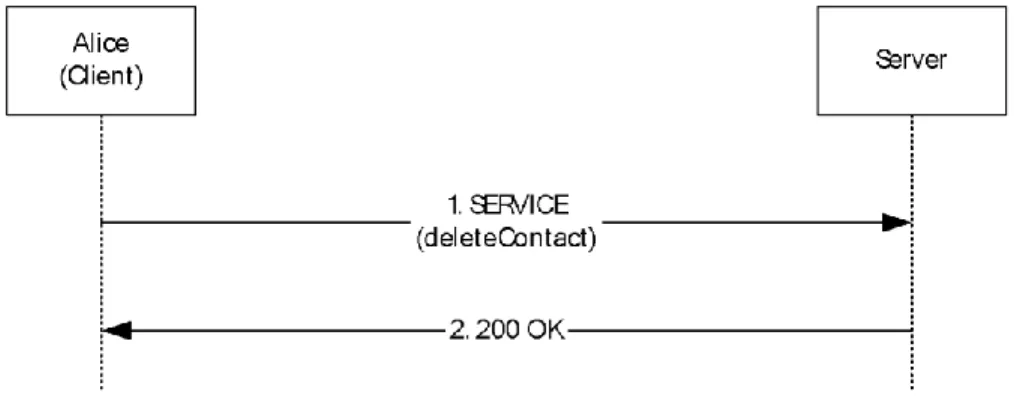
2. deleteContact
The deleteContact primitive is used for deleting an existing contact. It contains the URI element, which identifies the sip URI of the contact to be deleted.
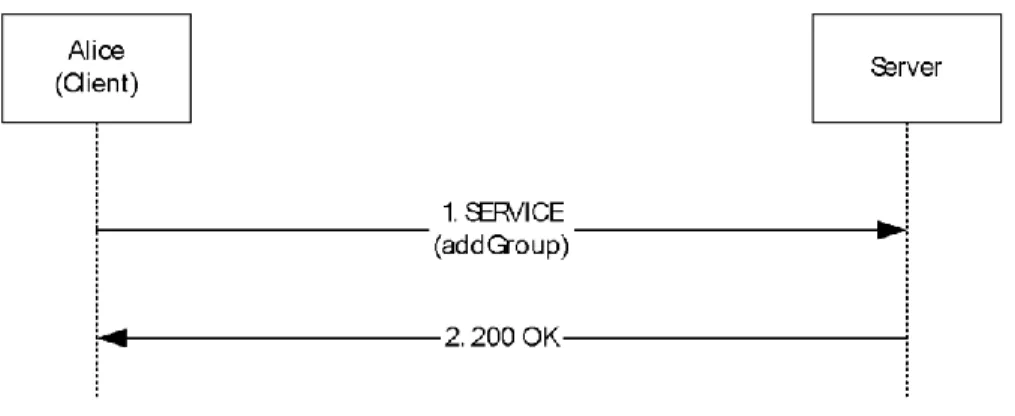
3. addGroup/modifyGroup
The addGroup primitive is used to add a new group. The modifyGroup primitive is used to modify an existing group. These primitives contain the following elements:
groupID: A nonnegative integer that is used as the identifier of the group. name: The name of the group.
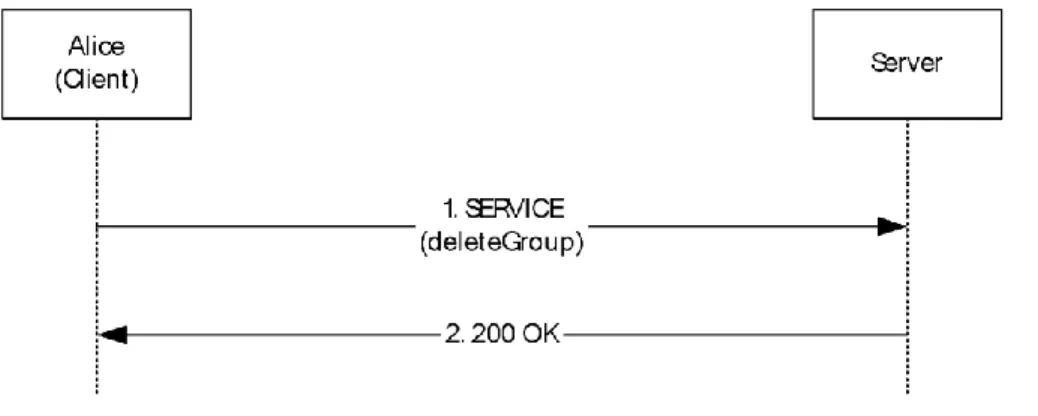
externalURI: A URI that points to auxiliary information about the group. This element is optional. 4. deleteGroup
The deleteGroup primitive is used for deleting an existing group. It contains the groupID of the group to be deleted.
Each primitive must also include the deltaNum element. This nonnegative integer element is used as a sequence number for the contact/group management view, and each primitive must include the deltaNum equal to the current sequence number.
2.3 Directory Service Schema Elements
This protocol MAY access the directory service schema class and attributes listed in the following table and include them in the presence document. For the syntactic specifications of the following class or class/attribute pairs, refer to Active Directory Domain Services (AD DS) in [MS-ADA1], [MS-ADA2], [MS-ADA3], and [MS-ADSC].
Class Attribute User displayName
3
Protocol Details
The following sections specify details of Session Initiation Protocol Extensions, including abstract data models, message processing rules, and the SIP client and server roles.
3.1 NTLM/Kerberos Authentication Extensions Details
Session Initiation Protocol Extensions implements a proprietary Kerberos and NTLM Authentication Protocol authentication mechanism that is used by the client for client-to-server authentication and signing of messages. For more information on Kerberos, see [MS-KILE]. Encryption (privacy) is provided by TLS and is not explicitly covered by this authentication mechanism.
Authentication is broken down into two phases. In the first phase, a security association (SA) is established between the client and the server. In the second phase, the client and server use the existing SA to sign messages that they send and to verify the messages they receive. Unauthenticated messages from a client SHOULD NOT be accepted by the server. The exact message exchange in the first phase differs depending on whether NTLM or Kerberos authentication is used.
During the NTLM SA establishment phase, a three-way handshake occurs between the client and the server:
1. The client sends a request with no credential or authentication information. The server responds to that request with a 401 or 407, indicating that it supports NTLM and Kerberos and requires
authentication.
2. The client reissues the request, indicating its preference for NTLM authentication. The server responds with an appropriate challenge in a 401 or 407.
3. The client reissues the request with a response to the server's challenge. The server processes the request and responds (including its signature for the response).
4. The SA is now established on both the client and server, and subsequent messages between the client and server are signed.
During the Kerberos SA establishment phase, a two-way handshake occurs between the client and the server:
1. The client sends a request with no credential or authentication information. The server responds to that request with a 401 or 407, indicating that it supports NTLM and Kerberos and requires
authentication.
2. The client requests a Kerberos ticket for the server, and reissues the request with this encoded Kerberos ticket information.
3. The server processes the request and responds (including its signature for the response). 4. The SA is now established on both the client and server, and subsequent messages between the
client and server are signed.
The primary distinction between NTLM and Kerberos is the need for connectivity to the domain controller. In Kerberos, the client must request a Kerberos ticket from the Key Distribution Center (KDC), which is a process that resides on the domain controller. In NTLM, the server verifies the client's NTLM credentials by contacting the domain controller. This difference allows clients that do not have connectivity to the domain controller to authenticate with the server using NTLM authentication, and it is the main reason for supporting NTLM in addition to the more secure and standard Kerberos authentication.
3.1.1 Abstract Data Model
This section describes a conceptual model of possible data organization that an implementation maintains to participate in this protocol. The described organization is provided to facilitate the explanation of how the protocol behaves. This specification does not mandate that implementations adhere to this model as long as their external behavior is consistent with what is described in this specification.
The client can use a LastSnumReceived integer parameter for each SA to store the value of the last snum received from the server. This is used to provide replay protection.
The client can also use two integer parameters, SnumWindowLow and SnumWindowHigh, to mark the upper and lower values for the sliding window used by the client to allow pipelining of requests while providing replay protection. SnumWindowLow and SnumWindowHigh can be initialized to 1 and 256, respectively, for a 256-size sliding window.
Note The preceding conceptual data can be implemented by using a variety of techniques. An implementation is at liberty to implement such data in any way convenient.
3.1.2 Timers
No timers are required other than the timers specified in [RFC3261].
3.1.3 Initialization
No initialization is required beyond the initialization that is specified in [RFC3261].
3.1.4 Higher-Layer Triggered Events
Except as specified in the following sections, the rules for message processing are as specified in [RFC3261].
3.1.4.1 Initiating the Login Sequence
The client initiates the login sequence by sending a REGISTER request without any credentials, as suggested in [RFC3261]. If the REGISTER request is challenged by a server request for NTLM
Authentication Protocol or Kerberos authentication, the client then resends the REGISTER request with credentials. This step also establishes an SA between the client and the server that is used to sign any future messages.
3.1.4.2 Sending a SIP Message
Before sending a message, the sender MUST generate a message signature or checksum that it will send with the message so that the receiver can authenticate the message. The client and the server SHOULD use the same algorithm to generate message signatures. The Microsoft implementation uses the GSS_GetMIC() and GSS_VerifyMIC() implementations of the NTLM or Kerberos security service provider interface to compute and verify a signature. For more information on NTLM GSS_GetMIC() and GSS_VerifyMIC(), see [MS-NLMP] section 3.1.4. For more information on Kerberos GSS_GetMIC() and GSS_VerifyMIC implementation, see [RFC1964] section 1.2.
The client MUST use the following values in order and enclosed by angle brackets to construct a secure buffer that is then used to compute the message signature:
1. Authentication method (for example, NTLM or Kerberos) 2. crand for client or srand for server
3. cnum for client or snum for server 4. realm
5. targetname 6. Call ID 7. CSeq# 8. CSeq method 9. From URL 10.From tag 11.To tag
12.Expires (optional)
13.Response code (responses only)
The only difference from the client signature is the use of a server-generated salt (srand) and
sequence number (snum) rather than the client-generated salt (crand) and sequence number (cnum). Note Even though some parameter values are case-insensitive, these values MUST be used as they appear in the message when performing the signature computation.
For optional fields, such as Expires, an empty set of angle brackets (<>) is included in the buffer to signal when those headers do not exist in the SIP message.
The response code is only part of the signature computation for responses and is not part of the signature for requests. An empty set of angle brackets (<>) is not included in the buffer to sign for requests.
The client places the message signature in the response parameter of the Proxy-Authorization: header. The server places the signature in the rspauth parameter of the Proxy-Authentication-Info: header.
As an example, the following message,
SUBSCRIBE sip:[email protected] SIP/2.0 Via: SIP/2.0/TCP 172.24.34.1:16577
Max-Forwards: 70
From: <sip:[email protected]>; tag=82249b57436d4aa39ec38afa968fa994;
epid=bd0238d966
To: <sip:[email protected]> Call-ID: 72558074992e4f2cafb48c6e44b90a0c
CSeq: 1 SUBSCRIBE Contact:
<sip:[email protected]:16577; maddr=172.24.34.1;transport=tcp>;
proxy=replace User-Agent: RTC/1.3
Event: vnd-microsoft-roaming-contacts
Accept: application/vnd-microsoft-roaming-contacts+xml Supported: com.microsoft.autoextend
Supported: ms-benotify Proxy-Require: ms-benotify
Supported: ms-piggyback-first-notify Proxy-Authorization:
NTLM qop="auth",
opaque="9C55D687", crand="009139df", cnum="1",
targetname="pstn.pstntest.rtmp.selfhost.corp.microsoft.com", response="0100000039623537c854b2e8ca6a203e"
Content-Length: 0
would result in the following signature buffer (line breaks not included). <NTLM>
<009139df > <1>
< SIP Communications Service>
< pstn.pstntest.rtmp.selfhost.corp.microsoft.com > <72558074992e4f2cafb48c6e44b90a0c >
<1>
<SUBSCRIBE>
< sip:[email protected] > <82249b57436d4aa39ec38afa968fa994>
Note The signature computed for the preceding example is "0100000039623537c854b2e8ca6a203e", which is included in the response parameter of the Proxy-Authorization header.
For Kerberos, the buffer for signature computation is formed in a manner similar to what is shown in the preceding NTLM example. The only differences are that the first element in the signature buffer is <Kerberos> instead of <NTLM> and that Kerberos GSS-GetMIC() is used to compute the signature.
3.1.5 Message Processing Events and Sequencing Rules
Except as specified in the following section, the rules for message processing are as specified in [RFC3261] and [RFC3265].
3.1.5.1 Overview of Authentication Protocol Elements
The server issues an authentication challenge by using either a 401 or 407 response to a SIP
request. The client SHOULD be capable of processing either response. The server uses the following
SIP headers as part of this authentication scheme.
SIP header Purpose Where used
Date Indicates current server time. Used by the client to detect clock skew, which can cause authentication to fail. Client and server clocks must be synchronized to within 15 minutes for the NTLM Authentication Protocol and to within 5 minutes for Kerberos.
401 or 407 response
Proxy-Authenticate Carries the challenge issued by a scheme (NTLM and Kerberos) that the proxy supports. proxy. One for each authentication 407 response
Proxy- Authentication-Info
Carries the proxy signature for a message. Authenticated SIP message
Proxy-Authorization Allows the client to identify itself (or its user) to a proxy that requires authentication. Carries the client response to challenge as well as the signature for the message.
SIP message
WWW-Authenticate Carries the challenge issued by a server. One for each authentication scheme (NTLM and Kerberos) that the server supports. 401 response
SIP header Purpose Where used Authorization Allows the client to identify itself (or its user) to a server that requires
authentication. Carries the client response to challenge as well as the signature for the message. One for each SA that the client has established with the server.
SIP message
The protocol information that is used during the SA establishment phase differs from the information that is used after an SA is established. During the establishment phase, the gssapi-data parameter carries the bulk of the credential information. The realm parameter provides additional context information.
After an SA is established, the srand, crand, cnum, snum, and opaque parameters are used in the signing of requests and responses. Those signatures are carried in the response and rspauth parameters. Parameter values are never escaped, and parameter names are case-insensitive. The order of parameters in a header is not significant.
The following table gives an overview of the parameters used in Authenticate, Proxy-Authorization, and Proxy-Authentication-Info headers in the SIP messages. The "When" column indicates the phase in which the parameter is used: Establishment or Signing.
Parameter Where Creator When Used for
realm Authenticate Authorization Auth Info
Server ES Identifies which set of credentials the user should supply. Also used by the client to determine which SA is used to sign a message. The realm value is case-sensitive. The default value is "SIP Communications Service". epid From Client ES Identifies a unique endpoint for the user. Used by the
server to determine the correct SA to use for signing an outgoing response. An epid MUST be present.
epid To Server ES Identifies a unique endpoint for the user. Used by the server to determine the correct SA to use for signing an outgoing request. An epid MUST be present.
targetname Authenticate Authorization Auth Info
Server ES Identifies the server for this SA. Contains the FQDN of the server for NTLM and the service principal name (SPN) of the server for Kerberos.
opaque Authenticate Authorization Auth Info
Server ES Identifies the SA on the server.
qop Authenticate Authorization Auth Info
Client
Server ES Quality of Protection (auth only, no integrity protection). crand Authorization Client S Identifies the salt that is used in the signature. An
8-character hexadecimal digit string.
crum Authorization Client S Identifies the sequence number that is used in the
signature for replay protection. A 32-bit unsigned value that starts at 1.
srand Auth Info Server S Identifies the salt that is used in the signature. An 8-character hexadecimal digit string.
snum Auth Info Server S Identifies the sequence number that is used in the signature for replay protection. A 32-bit unsigned number that starts at 1.
gssapi-data Authenticate
Authorization Client Server E Exchanges credential information for establishing an SA. response Authorization Client S Carries the client signature.
rspauth Auth Info Server S Carries the server signature.
For each SA, the client MUST keep track of the snum values that are used by the server when signing messages with this SA. The client also tracks the last snum value that is received for this SA. The client MUST maintain a sliding window to track the snum values that are used by the server for this
SA. The initial range of this window is 1 to 256, and is adjusted as messages are received. (The size of this window is 256.) This means that the server can issue as many as 256 simultaneous requests before waiting for a response from the client. The purpose of maintaining this sliding window is to provide replay protection while allowing pipelining of requests for performance reasons.
When a signed message arrives at the client, the client MUST validate the signature and extract the snum value:
If the snum value is higher than the last snum received, the client shifts the window up so that the window now spans from [snum – 256 to snum]. The client also marks this snum as having been used. If the snum value is lower than the last snum received and is within the active window, the client checks whether this value has been seen before. Previously seen values are rejected as a replay. Replayed requests and responses are dropped. New values are marked as having been used. If the snum value is lower than the last snum received and is outside the active window, the client MUST drop the message.
3.1.5.2 Verifying Message Signature for Incoming Messages
After receiving a SIP message, the receiver MUST verify the message signature by using GSS_VerifyMIC(). If the signature verification fails, the message MUST be discarded.
3.1.5.3 proxy=replace Extension for Firewall Traversal
Session Initiation Protocol Extensions introduces a new header parameter, proxy=replace, to enable firewall traversal for the SIP channel. This parameter tells the outbound proxy to replace the contact information in the contact header with its own, enabling other clients/servers to reach the client using the proxy's IP address, even if the client is behind a firewall. The client SHOULD include a header parameter proxy=replace in the "Contact" header if it wants to enable this extension. The client SHOULD also include a maddr URI parameter containing its IP address. The outbound proxy SHOULD replace the IP address in the maddr parameter with its own IP address if the proxy=replace header parameter is present. Any entity receiving this contact header SHOULD send any new requests to the new IP address in the maddr parameter, which is the IP address of the proxy. The proxy SHOULD then route this request to the client.
3.1.6 Timer Events
None.
3.1.7 Other Local Events
None.
3.2 Presence Extensions Details
Session Initiation Protocol Extensions introduces several extensions to enhance presence. These include the new Presence Document Format, msrtc.pidf (see text/xml+msrtc.pidf Presence Document Format (section 2.2.1), SIP Extensions to XPIDF Presence Document Format (section 2.2.2), a new
SIP method, SERVICE, to set and get presence information, and the setPresence and getPresence
SOAP requests.
SIP allows SIP endpoints to communicate in a P2P mode without requiring a SIP server. The endpoints can also subscribe for presence information and send notifications carrying such information in a P2P manner. Session Initiation Protocol (SIP) extensions use the XPIDF format to exchange presence information when the endpoints are acting in P2P mode. The msrtc.pidf format is used in the client/server mode.
The client can publish its presence to the server by sending a setPresence SOAP request inside the body of a SERVICE method. The client can use the setPresence request only to set the logged in user's presence. A user cannot publish presence on behalf of another user. The server sends a 200 OKSIP
response to indicate that the setPresence request was successful.
There are two ways for the client to obtain another user's presence information. If the client just needs a one-time snapshot of the presence information, it SHOULD send a getPresence SOAP request to the server to do so. This can be useful for web pages that need to show the presence state of a user on a transient basis. The advantage of using a getPresence request is that it does not consume a lot of resources on the server.
If the client wants to continue getting updates when the presence information changes, it SHOULD subscribe for it by sending a SUBSCRIBE request to the server. The SUBSCRIBE request creates a
dialog, and as long as the dialog is kept alive, the server MUST send presence updates in NOTIFY or
BENOTIFY requests. This mode of operation can be useful for getting presence information of the users in the client's contact list.
In the P2P mode, no server is used to exchange presence information, and clients can directly create subscriptions between themselves. The setPresence and getPresence requests are not valid in P2P mode. The client can send a SUBSCRIBE request to the user it wants to subscribe to create a subscription. The other client can send NOTIFY with Presence Documents in XPIDF format to send initial presence information and any updates.
SIP Proxies and Registrars should send an immediate 200 response status code to any SUBSCRIBE messages before forwarding the message, and should not forward responses to any SUBSCRIBE messages. The 200 status code MUST only indicate successful receipt of the request, instead of acceptance of the subscription. The response MUST be sent immediately to ensure that no state information about a SIP client can be derived from any delays in the process. A SUBSCRIBE request SHOULD then be sent to the requested client for processing.
If a SIP client is offline, the SIP Proxy or Registrar MUST immediately send a 200 status code in response and queue the SUBSCRIBE request for a suitable time-out period. A recommended value of this time-out is 180 seconds. Further SUBSCRIBE requests SHOULD update the time-out value. If the end node comes online before the time-out period expires, then the SUBSCRIBE request should be forwarded to it.
A SIP Proxy or Registrar must never send a 600 status code in response to a SUBSCRIBE request. When a SIP client receives a SUBSCRIBE request, it MUST immediately respond with a 200 status code that only indicates successful receipt of the request, not any presence information. If the request is accepted, then a NOTIFY transaction should be created and sent. Otherwise, no message should be sent in response.
These extensions are optional. An implementation may support them.
3.2.1 Abstract Data Model
This section describes a conceptual model of possible data organization that an implementation maintains to participate in this protocol. The described organization is provided to facilitate the explanation of how the protocol behaves. This specification does not mandate that implementations adhere to this model as long as their external behavior is consistent with what is described in this specification.
The server MAY use a BOOLEAN flag, MSRTCPresenceSupported, for each registering client to track whether the client supports the presence extensions described in this section.
Note The preceding conceptual data can be implemented using a variety of techniques. An implementation is at liberty to implement such data in any way convenient.