Operating Instructions
Single Loop Controller
EC48 & EC96
Rev. 1.00.00 03/2010
Table of Contents
1 Introduction... 3
1.1 Typographical Conventions ... 4
2 General Information... 5
2.1 Warranty Conditions... 5
2.2 Installation and safety references... 5
3 Equipment Implementation ... 6
3.1 Type designation... 6
3.2 Scope of Delivery ... 6
4 Device construction... 7
4.1 Dimensions... 7
4.2 Connection overview... 7
5 Installation/Dismantling ... 8
6 Electrical connection and operational startup... 9
6.1 Connection type ... 9
6.2 Connector assignment and basic configuration ... 9
6.2.1 Power Supply ... 9
6.2.2 Measurement inputs ... 10
6.2.3 Control outputs ... 11
6.2.4 Digital outputs... 11
6.2.5 Connection of Current Transformer ... 11
7 Status displays/Diagnostics... 12
8 Display and Operation... 13
8.1 Display ... 13
8.1.1 Immediately after Switch ON ... 14
8.1.2 Base Display... 14
8.1.3 Alternating Display AMP/OP1 (only EC48)... 14
8.1.4 Alternating Display OP1/OP2 (only EC96) ... 14
8.2 Operation ... 15
8.2.1 Keys ... 15
8.2.2 Function Call by Keys ... 16
9 Change Controller Settings... 17
9.1 Operation of Parameters ... 17
9.1.1 Change of numeral value... 17
9.1.2 Select from List of Value ... 18
9.2 Operation Levels ... 19
9.2.1 Level 1 – Standard ... 20
9.2.2 Level 2 - Control ... 21
9.3 Level 3 – Outputs ... 22
9.4 Level 4 – Inputs ... 23
9.5 Level 5 – Information... 24
10 Functions... 25
10.1 Set Setpoint Value... 25
10.2 Activating / Deactivating of Manual Mode... 26
10.3 Set output percentage... 27
10.4 Display of Heating Current (only EC48)... 28
10.5 Activating / Deactivating of Soft Start Function... 29
2
Introduction
Right to technical changes reserved Rev. 1.00.00
11 Appendix ... 32
11.1 Trouble Shooting... 32
11.1.1 No Display for All Controllers... 32
11.1.2 No Display for One Controllers... 32
11.1.3 Temperature Does Not Rise... 32
11.1.4 Temperature Too High... 33
11.1.5 Temperature Not Stable ... 33
11.1.6 Difference in Temperature Display... 33
11.1.7 Temperature Display ... 33
11.1.8 Temperature Display ... 34
11.2 Value Tables... 34
11.2.1 Alarm Mode Table... 34
11.2.2 Sensor Types ... 34
11.3 Cooling Output... 35
1 Introduction
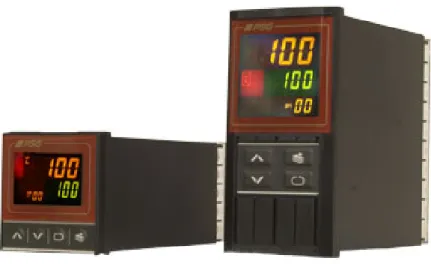
The one zone temperature controller is available as controller model EC48 in format 48x48 mm controller model EC96 in format 48x96 mm vor.
Illustration EC48 Illustration EC96
A wide range of applications (hot runners, plastic processing, packaging industry, furnaces and ovens, food processing, dryers, etc.) as well as good price performance ratio characterize this one zone temperature controller.
By the two four-digit seven-segment displays the actual value, setpoint value as well as alarm and status messages are directly readable.
The simple operation by only four keys of the membrane keypad leads the user through clearly structured levels, where the parameters can be individually stipulated.
Not only the power supply of 100 … 240 VAC, 50/60 Hz is for universal use, but also the measurement inputs can be equipped with different types of thermo couples and resistance thermometers configurable in the controller.
According to the equipment implementation the control outputs are of type relay or 24 VDC.
One alarm output (relay type) offers a complete monitoring of the control process (control of a band, of absolute/relative alarm limits, sensor break).
The PID Auto Tuning Function calculates the control parameters (self optimization).
Two and/or three-point operation, manual mode are important functions available for the control zone. The robust pluggable plastic casing is easy to mount.
4
Introduction
Right to technical changes reserved Rev. 1.00.00
1.1 Typographical Conventions
Symbols and conventions are used in this manual for faster orientation for you.
Caution With this symbol, references and information are displayed which are decisive for the operation of the device.
In case of non-compliance with or inaccurate compliance there can result damage to the device or injuries to persons.
Note The symbol refers to additional information and declarations, which serve for improved understanding.
Example With the symbol, a function is explained by means of an example. Reference With this symbol, information in another document is referred to. FAQ Here FAQ (Frequently Asked Questions) are answered.
2 General
Information
2.1 Warranty Conditions
This product is subject to the legal warranty time periods for faults or deficiencies in manufacture.
Content of Warranty
If a malfunction relatively occurs through the manufacture, the supplier repairs or replaces the nonconforming product, according to their own discretion.
The following repairs do not fall under the warranty and are liable to costs: Malfunctions after the legal notice periods have expired.
Malfunctions caused through operating error of the user (if the device is not operated as described in the manual).
Malfunctions caused through other devices.
Changes or damage to the device which do not originate from the manufacturer. If you wish to use services within the framework of this warranty, please refer to the supplier.
2.2 Installation and safety references
Before installation, handling or operation of the device, please read through this operating instructions completely and carefully.
Service and repair
This device is maintenance free.
If the device should indicate a fault, you please contact the manufacturer. Customer repairs are not permissible.
Cleaning
Employ no water or cleaning agents based on water for the cleaning of the device stick-on labels. You can clean the surface of the devices with a mild soap solution.
Storage
If you should not put the device into operation immediately after unpacking, protect it against moisture and coarse dirt.
Personnel
The installation of the device may by carried out by qualified personnel only.
Wiring
The wiring system must be implemented correctly according to the specifications in this operating manual. All feeds and connecting terminals must be dimensioned for the corresponding amperage. Furthermore, all connections are to be carried out according to the valid VDE Specification and/or the respective national specifications.
Ensure in particular that the AC power supply is not connected with the logic output or the low-voltage input.
Overload protection
Secure the power supply of the device and the relay output with a fuse protection or a power circuit-breaker. This protects the printed circuit boards against overcurrent.
Environment
Conducting contamination must not reach the proximity of the device connecting terminals in the control cabinet. In order to achieve suitable ambient air conditions, install an air filter in the air inlet of the control cabinet. If the device should be in a condensing environment (low temperatures), install a thermostat-controlled heating unit in the control cabinet.
6
Equipment Implementation
Right to technical changes reserved Rev. 1.00.00
3 Equipment
Implementation
3.1 Type designation
The equipment of the device is stipulated with the order. The exact specification can be read off on the type designation plate, which is on the casing.
The following equipment implementations are available: EC48 HTS with current
transformer
Relay output Heating: electronic switching output EC96 HTS Relay output Heating: electronic switching output EC96 HSR Relay output Heating: relay output/closer
EC96 HTS KSR Relay output Heating: electronic switching output Relay output Cooling: relay output/closer
EC96 HSR KSR Relay output Heating: relay output/closer Relay output Cooling: relay output/closer
3.2 Scope of Delivery
1 temperature controller EC** (dependent on equipment implementation) 1 CD-ROM with data sheet and operating instructions EC48 & EC96
4 Device
construction
4.1 Dimensions
Controller type EC48 Controller type EC96
A 48 48
B 48 96
C 8 8
D 91.2 91.5
E 45 90
a 45+0.5 45+0.5 b 45+0.5 93+0.5
c 72 120
A B E C D c b a d
d 60 60
All specifications in mm.
4.2 Connection overview
The connection overview here indicates all possible connection variants.
The actual connection overview depends on the Equipment Implementation (see chapter 3.1), which is stipulated with the order.
Controller type EC48 Controller type EC96
HSR Relay output Heating: relay output/closer
KSR Relay output Cooling: relay output/closer
HTS Relay output Heating: electronic switching output TC Thermocouple TC Pt100 Resistance thermometer
Pt100 11 12 1 2 3 4
5 13 14
6 7 8 9 10 90-264VAC HTS + -+ A B B TC -Pt100 Alarm 1 I-I+ + 90-264VAC HSR HTS A B B TC 1 2 3 4 5 6 7 8 9 10 11 12 13 14 15 16 17 18 19 20 Alarm 1 KSR -Pt100 + -NC NO C
8
Installation/Dismantling
Right to technical changes reserved Rev. 1.00.00
5 Installation/Dismantling
Unpacking The device is packed fully-mounted in a robust carton.
Check the packaging and then the device for identifiable damage incurred during transit. If damage is identified, then please get in touch with the transportation company.
In the case of damage the device may not be brought into operation.
Ensuring voltage-free state Before beginning and during all installation/dismantling
work, attention is to be paid that the system, as well as the devices, are de-energized
Installation location A device of the protection type IP20 is to be installed in a
closed control cabinet.
Securing The device has a securing mechanism for installation in a
control panel cut out.
Device exchange Only controllers of similar type may be exchanged. In case
of replacement, it is absolutely necessary to adopt the setting adjustments of the replaced controller.
6
Electrical connection and operational startup
The controller may be installed and put into operation by specialist personnel only.
Before switch-on of the control zones it is to be ensured that the controller is configured for the application. An incorrect configuration can lead to damage to the control section or to injuries to persons.
6.1 Connection type
The device is equipped with screwed terminals. The terminals existing on the device are to be taken from the Type designation
The wiring system is implemented on the screwed terminals with the appropriate cable lugs. Cables with a cross section of 0.5 to 1.5mm2 can be employed.
6.2 Connector assignment and basic configuration
The overview here indicates all possible device variants.The actual assignment depends on the Equipment Implementation (see chapter 3.1), which is stipulated with the order.
6.2.1 Power Supply
Controller Type EC48 EC96
Power Supply 230 VAC
50/60 Hz
230 VAC 50/60 Hz
Range 100 … 240 VAC ±10% 100 … 240 VAC ±10%
1 2
1 2
10
Electrical connection and operational startup
Right to technical changes reserved Rev. 1.00.00
6.2.2 Measurement inputs
A thermo couple TC or a resistance thermometer Pt100 can be connected to the measurement input.
Controller Type EC48 EC96
Thermocouple TC 9
10
9 10
-+
Controller Type EC48 EC96
Resistance
thermometer Pt100 2-wire
8 9
10
8 9
10
J
Resistance
thermometer Pt100 3-wire
8 9
10
8 9
10
J
Configuration on operational startup
Arrange sensor type for the measurement input.
6.2.3 Control outputs
The control outputs are stipulated by the Equipment Implementation.
Controller Type EC48 EC96
HTS
Relay output Heating:
electronic switching output +
- 3
4 +
- 3
4 Activation of SSR (solid state relay) DC 24 V / 20 mA
Controller Type EC48 EC96
HSR
Relay output Heating: relay output/closer
n.a.
NC NO C
3 4 5 KSR
Relay output Cooling: relay output/closer
n.a. 6
7 Rated output current 5 A
Rated voltage 250 VAC (ohmic load)
6.2.4 Digital outputs
The digital outputs are realized with relay/closer. The device is designed with 1 alarm output.
Controller Type EC48 EC96
Alarm 1 6
7
11 12 Rated output current 5 A
Rated voltage 250 VAC (ohmic load)
Configuration on operational startup
Stipulate alarm output 1 See Chapter9.3
6.2.5 Connection of Current Transformer
The output current can be registered by a current transformer and be used to display the heating current (see chapter 10.4).
Controller Type EC48 EC96
Connection of Current
12
Status displays/Diagnostics
Right to technical changes reserved Rev. 1.00.00
7 Status
displays/Diagnostics
For special operating conditions of the controller a text instead of the actual value is displayed, to point out a probable error.
Display Probable Reason Fault Correction
Input signal below low limit value
Set a lower value for low limit value Input signal above high limit
value
Set a higher value for high limit value
Sensor break
Sensor not connected
Replace sensor
Check the sensor is connected correctly Check the sensor connection is
not interchanged
Check sensor connection + and –
At start the controller can show in parameter the following error codes:
Display Meaning Fault Correction
0 No error
1 Memory error Send controller back to supplier 8 Check the sensor connection is not
interchanged
Check sensor connection + and –
16 Sensor break Replace sensor
8
Display and Operation
8.1 Display
The overview here indicates all possible device variants.
The actual assignment depends on the Equipment Implementation (see chapter 3.1), which is stipulated with the order.
EC48
AL1 Indicator Alarm 1
Unit
AL2 Actual value
AL3
ST Indicator Auto Tuning Setpoint value
RMC IN1 IN2
OP1 Output Heating Active
Position indication on value change
OP2 Value display (for AMP, OP1
alternatively) AMP OP1 ST RMC IN1 IN2 OP1 OP2 AL1 AL2 AL3
Keys see chapter 8.2.1.
EC96
AL1 Indicator Alarm 1
Actual value
AL2
AL3 Unit
ST Indicator Auto Tuning
HB Setpoint value
RMC IN1 IN2
Position indication on value change
OP1 Output Heating Active OP2 Output Cooling Active
Value display (for OP1, OP2 alternatively) OP1 ST RMC IN1 IN2 OP1 OP2 AL1 AL2 AL3 HB OP2
14
Display and Operation
Right to technical changes reserved Rev. 1.00.00
8.1.1 Immediately after Switch ON
Immediately after switch ON, all segments of the display are light. That identifies that all displays are intact. The following displays appear
Parameter Current controller program version (PSGI)
Parameter J (standard configuration) sensor type measurement input Parameter 1 (standard configuration) cycle time Heating
Parameter Error status controller (0 = no error; see chapter 7, 9.5) The display changes to base display.
8.1.2 Base Display
In base display the preset unit
actual value and setpoint value (and/or output percentage in manual mode) in the two four-digit seven-segment LED displays
display in the two-digit seven-segment LED display alternatively for o EC48 - current (AMP) and/or display of output percentage (OP1)
o EC96 - display of output percentage 1 (OP1) and/or display of output percentage 2 (OP2) (dependent on to equipment implementation)
are shown.
8.1.3 Alternating Display AMP/OP1 (only EC48)
The display down left alternates all 3 seconds between output percentage and heating current.
OP1
Display output percentage
for OP1 AMP
Display heating current for AMP
8.1.4 Alternating Display OP1/OP2 (only EC96)
The display down right alternates all 3 seconds between output percentage 1 OP1 and output percentage 2 OP2 (dependent on equipment implementation)
OP1
Display output percentage 1 for OP1
OP2
Display output percentage 2 for OP2
8.2 Operation
The setpoint value can be changed directly in the base display ( ). To change the setting of a parameter, choose first the parameter and/or the adequate operation level and the parameter then.
8.2.1 Keys
The following key symbols are employed:
Increment key
Level mode: Change to parameter mode Parameter mode: Change to previous parameter Setting mode: Increment setting value
Decrement key
Level mode: Change to parameter mode Parameter mode: Change to next parameter Setting mode: Decrement setting value
Setting key
Enable setting value Change to previous level
Parameter mode: Enable setting value Change and store of setting values
Level selection key
Change to level mode and selection of a level Parameter mode: Leave mode
Setting mode: Press key, to store data and change to base display
In all modes: Keep key pressed for 2 seconds.
16
Display and Operation
Right to technical changes reserved Rev. 1.00.00
8.2.2 Function Call by Keys
Auto Tuning Function
Press both keys for at least 2 seconds.
Activate and/or deactivate Auto Tuning Function (see chapter 10.6)
Manual Mode
Press both keys for at least 2 seconds.
Change between manual mode and control mode (automatic) (see chapter 10.2)
Check setting for output percentage!
Soft Start Function
Press both keys for at least 2 seconds.
Activate and/or deactivate Soft Start Function (see chapter 10.5) Press key for at least 8 seconds
Change to parameter (see chapter 9.5) Press key for at least 10 seconds
9
Change Controller Settings
9.1 Operation of Parameters
After selection of the adequate operation level, the parameter can be changed as follows.
9.1.1 Change of numeral value
1) For selected parameter, press setting key to enter setting mode.
Below value display the position indication appears, signalizing by flashing (ones column, see above of , flashing), which position of the number gets changed.
a) On the first position from the right, the set value is incremented consecutively, when the key is kept pressed.
If the entered value for the column exceeds 9, the next column left is incremented (limits of value range are kept).
b) On the first position from the right, the set value is decremented consecutively, when the key is kept pressed.
2) By pressing the setting key, the position indication can be moved from the right to the left.
Tens column (position indication, see above , flashing) Functioning method see a) and/or b)
Hundreds column (position indication, see above , flashing) Functioning method see a) and/or b)
Thousands column (position indication, see above , flashing) Functioning method see a) and/or b)
On thousands column positioned, finish entry.
18
Change Controller Settings
Right to technical changes reserved Rev. 1.00.00
9.1.2 Select from List of Value
For selected parameter, press setting key to enter setting mode.
Below value display all position indications flash (see above of , flashing).
a) On the display scroll forwards through the list of value consecutively.
b) On the display scroll backwards through the list of value consecutively.
Finish entry
9.2 Operation Levels
Operation level
Actual value
Setpoint value
Standard
Control
Outputs
Inputs
Information
If there is no operation for at least one minute, the display of the controller returns to base display of actual value/setpoint value.
Parameters, that could not be changed, but only be displayed (RO), are displayed in gray. The standard setting is highlighted in green. Parameters, that are changed by the control process, are highlighted orange).
20
Change Controller Settings
Right to technical changes reserved Rev. 1.00.00
9.2.1 Level 1 – Standard
Level 1 Standard
°C
10
Actual value alarm
Value range: -1999…9999°C/°F
°C
10 Alarm 1
Value range: -1999…9999°C/°F
P
(RO)
0
Output percentage 1 Value range: 0…100%
P
(RO)
0
Output percentage 2* Value range: 0…100%
A
(RO)
0.0
Current output* Value range: 0…99
9.2.2 Level 2 - Control
Level 2 Control
Control mode 1 P
ON/OFF control PID control
30
Soft Start Function – Output percentage
Value range: 0…100%
°C M
350
Proportional band 1 P proportion
Value range: 1…600°C/°F 0
Soft Start Timer Value range: 0…99min
S
30
Integral time 1 I proportion
Value range: 0…1000sec
PID Auto Tuning Function None
Execute once Execute every time
S
S 200
Derivative time 1 D proportion
Value range: 0…1000sec 0
Delay time Cooling* #) Value range: 0…600sec
S Control mode 2*
None
ON/OFF control PID control
0
Cooling On time* #) Value range: 0…600sec
°C
P
50
Proportional band 2 P proportion
Value range: 1…800°C/°F 100
Maximum output percentage 1 Value range: 0…100%
S
50
Integral time 2 I proportion*
Value range: 0…200sec 100
Maximum output percentage 2* Value range: 0…100%
S
50
Derivative time 2 D proportion*
Value range: 0…600sec 0
Without function
#) See Chapter11.3
22
Change Controller Settings
Right to technical changes reserved Rev. 1.00.00
9.3 Level 3 – Outputs
Level 3 – Outputs
Control output 1 Heating Cooling
S
1
Cycle time control output 1 Value range: 0…60sec
Control output 2 Heating Cooling
20
Cycle time control output 2 Value range: 0…60sec
LoHI
Alarm 1 Mode
Value range: see chapter 11.2.1
Alarm 1 Standby Function Active
Deactive
°C
2
Alarm 1 Hysteresis Value range: 0…500°C/°F
LoHI
Actual value alarm mode Value range: see chapter 11.2.1
P
0
Output percentage in manual mode Value range: 0…100%
Manual Mode Manual Auto
9.4 Level 4 – Inputs
Level 4 Inputs Level 4 Inputs
J Sensor type for measurement input
Value range: see chapter 11.2.2
0
Linear input low limit
Value range: 0… Scale
0 Decimal point 0 0.0 10
Linear input high limit
Value range: …20 Scale
C Unit C °Celsius F °Fahrenheit
- Not any
0
Display of low limit Value range: -1999…
S
0 Digital filter time
Value range: 0…60sec 100
Display of high limit
Value range: …9999
°C
0
Lower Set Point Limit
Value range: 0…800 0
Analog output low limit Value range: 0…200
°C
800
Upper Set Point Limit
Value range: 0…1000 200
Analog output high limit Value range: 0…250
°C
0 Input offset
Value range: -999…999°C/°F
24
Change Controller Settings
Right to technical changes reserved Rev. 1.00.00
9.5 Level 5 – Information
Level 5 Information
PSGI
Program version of controller
0 Error code
0 no error
1 Memory error
8 Sensor input reverse 16 Sensor break
2
Level activation
2 Display level 1…2 3 Display level 1…3 4 Display level 1…4 5 Display level 1…5 others Display level 1
188 Data locked
166 Setpoint value changeable
168 Setpoint value and level 1
changeable 188 All parameters changeable
others All parameters locked
Starts check Ends check
Default value
All parameters are set
to default
No
10 Functions
10.1 Set Setpoint Value
The setpoint value can be changed directly in the base display.
Prerequisite Not any
Press button
The flashing position indication is shown below the value display.
On the first position from the right, the set value is incremented consecutively, when the key is kept pressed (limits of value range are kept).
On the first position from the right, the set value is decremented
consecutively, when the key is kept pressed (limits of value range are kept).
OP1
OP1
Example: Setpoint value = 120
(arrangement of display for EC96 see chapter 8.1)
Finish entry
Entry of single positions see chapter 9.1.1 section 2)
If there is no operation for at least one minute, the display of the controller returns to base display of actual value/setpoint value. An already entered value for setpoint value is taken over.
26
Functions
Right to technical changes reserved Rev. 1.00.00
10.2 Activating / Deactivating of Manual Mode
In manual mode the setpoint value instead of output percentage is displayed. As long as the controller is in manual mode, the display of output percentage flashes.
The value of output percentage can be changed directly in the base display (see chapter 10.3).
Activating of Manual Mode
Prerequisite Controller is in control mode.
Press both keys for at least 2 seconds. Manual Mode is activated.
OP1 OP1
As soon as the manual mode is activated, the display flashes, to signalize that the output percentage is displayed now and no longer the setpoint value. The current output percentage in parameter is displayed.
(arrangement of display for EC96 see chapter 8.1) Setting of output percentage see chapter 10.3.
Deactivating of Manual Mode
Prerequisite Controller is in manual mode.
Press both keys for at least 2 seconds. Manual Mode is deactivated.
OP1
OP1
As soon as the control mode is running again, the last set setpoint value is displayed. The display stops flashing to signalize, that now the setpoint value is displayed.
10.3
Set output percentage
The output percentage can be changed directly in the base display. How to change to manual mode, see chapter 10.2.
Set output percentage
Prerequisite Controller is in manual mode (see chapter 10.2)
OP1 OP1
The display flashes to signalize, that now the output percentage is displayed and not the setpoint value.
(arrangement of display for EC96 see chapter 8.1)
Press button
The flashing position indication is shown below the value display.
On the first position from the right, the set value is incremented consecutively, when the key is kept pressed (limits of value range are kept).
On the first position from the right, the set value is decremented
consecutively, when the key is kept pressed (limits of value range are kept).
OP1 OP1 OP2
Example: output percentage = 30
(arrangement of display for EC96 see chapter 8.1)
Finish entry
OP1 OP1
The new adjusted value (30) is taken for output percentage display as well as display in OP1.
(arrangement of display for EC96 see chapter 8.1) Entry of single positions see chapter 9.1.1 section 2)
If there is no operation for at least one minute, the display of the controller returns to base display of actual value/output percentage. An already entered value for output percentage is rejected.
28
Functions
Right to technical changes reserved Rev. 1.00.00
10.4
Display of Heating Current (only EC48)
The output current is measured by a current transformer. The heating current is displayed as 0...20A in the display (without decimal place) next to AMP
in level 1 (one decimal place) see parameter (see chapter 9.2.1) are shown.
The heating current is displayed proportional to the output percentage, i.e. at 100% output percentage the maximum heating current is displayed, at 50% output percentage 50% of the maximum heating current is displayed.
Example:
For a heating cartridge (1000W/230V) at 100% output percentage a heating current of ~4.35A is displayed; at 50% output percentage a heating current of ~2.18A.
Prerequisite Not any
AMP
OP1
The heating current (example: 3.5A) is displayed in the base display next to AMP without decimal place.
AMP
ST OP1
The heating current (example: 3.5 A) is displayed in the operation level in parameter with one decimal place.
10.5
Activating / Deactivating of Soft Start Function
The Soft Start Function is employed for careful warming of zones (baking out the moisture). When the Soft Start Function is activated, the set value in parameter is output for the output percentage for the set time in parameter .
The controller returns to control mode, as soon as parameter = 0 or the actual value > 120°C.
Activate Soft Start Function
Prerequisite Controller is in control mode
Parameter = (see chapter 9.2.1) Parameter 0 (see chapter 9.2.1) Parameter 0 (see chapter 9.2.1) Actual value < Setpoint value
Press both keys for at least 2 seconds. Soft Start Function is activated.
OP1
OP1
To signalize, that the Soft Start Function is running, the unit flashes. In the display OP1 the output percentage, set for Soft Start Function in parameter (example: 30 %), is displayed.
The set time in parameter (example: 1 minute) elapses.
The controller returns to control mode, as soon as parameter = 0 or the actual value > 120°C.
(arrangement of display for EC96 see chapter 8.1)
When the Soft Start Function reaches the end, parameter = 0 is set.
The Soft Start Function can not be activated, as long as Parameter = 0
Parameter
For parameter consider settings for PID Auto Tuning Function (see chapter 10.6).
30
Functions
Right to technical changes reserved Rev. 1.00.00
Deactivate Soft Start Function
Prerequisite The Soft Start Function is running.
OP1
OP1
To signalize, that the Soft Start Function is running, the unit flashes.
(arrangement of display for EC96 see chapter 8.1)
Press both keys for at least 2 seconds. Soft Start Function is deactivated.
Is the Soft Start Function deactivated before the normal end, the set value remains in the parameter .
10.6
PID Auto Tuning Function
By standard setting ( = ) of the controller, the PID parameters , , are calculated automatically by the Auto Tuning Function after start of the controller, when actual value is 80°C less than setpoint value. While the Auto Tuning Function is running (< 60 seconds), the indicator „ST“ flashes in display.
OP1
OP1 ST
(arrangement of display for EC96 see chapter 8.1)
Manual Start of PID Auto Tuning Function
Prerequisite Parameter = )
Actual value is 80°C less than setpoint value
Controller is running
Press both keys for at least 2 seconds. Activate Auto Tuning Function
After end of Auto Tuning Function the parameter (see chapter 9.2.1) is set to .
To have the same starting conditions for the next start of the controller, set parameter to (see chapter 9.2.1).
32
Appendix
Right to technical changes reserved Rev. 1.00.00
11 Appendix
11.1 Trouble Shooting
Maintenance and repair work may be carried out by authorized persons only. Only skilled and on the risks trained persons may use the device. The relevant accidental regulations as well as other general approved safety-relevant, occupational-medical norms have to be obeyed.
11.1.1 No Display for All Controllers
Reason Trouble Shooting
Power supply missing Check control fuse (rear side of hot runner controller) Check supply of all phases
11.1.2 No Display for One Controllers
Reason Trouble Shooting
Controller defective Exchange 2 controllers against each other and check, whether the error on the alleged defective controller is still remaining.
If so, exchange controller.
Wiring error Exchange 2 controllers against each other and check, whether the error on the alleged defective controller is still remaining.
If so, check wiring.
11.1.3 Temperature Does Not Rise
Reason Trouble Shooting
Fuse of zone defective Prerequisite: setpoint value > actual value Check, current flow.
If not so, check fuse of zone
Heating too low Prerequisite: setpoint value > actual value Check, current flow.
If so, the heating power is too low, i.e. install heating with more heating power.
Allocation of sensor/heating permuted
Check allocation of sensor/heating.
Sensor defective, a too high temperature value is measured
Exchange 2 controllers against each other and check, whether the error on the zone is still remaining.
If so, check connecting cable and sensor and exchange defective parts. Sensor input of controller
defective
Exchange 2 controllers against each other and check, whether the error on the alleged defective controller is still remaining.
If so, replace controller, otherwise check sensors.
Reason Trouble Shooting
Wiring error Prerequisite: setpoint value > actual value Check, current flow.
If not so, wiring error possible. Let the wiring of heating be checked by an electrician.
11.1.4 Temperature Too High
Reason Trouble Shooting
Allocation of sensor/heating permuted
Check allocation of sensor/heating.
SSR defective Prerequisite: setpoint value < actual value
If temperature still rises, check SSR and exchange it.
11.1.5 Temperature Not Stable
Reason Trouble Shooting
Incorrect PID Auto Tuning or PID Auto Tuning not
executed
Let the zones cool down, see 10.6.
11.1.6 Difference in Temperature Display
Reason Trouble Shooting
Wrong connecting cable Check of the used thermocouples in the connecting cable. If not FeCuNi Type J, exchange connecting cable. Incompatible thermocouples Check of the used thermocouples in the mold.
If not FeCuNi Type J, exchange sensor in the mold or contact supplier. Controller defective Exchange controller.
11.1.7 Temperature Display
Reason Trouble Shooting
Sensor input of controller defective
Exchange 2 controllers against each other and check, whether the error on the alleged defective controller is still remaining.
If so, replace controller, otherwise check sensors. Sensor break;
Sensor not connected
Check the connected sensors
Remove connecting cable of hot runner controller Check sensor input
If display of ambient temperature, check connecting cable or sensor and exchange them
34
Appendix
Right to technical changes reserved Rev. 1.00.00
11.1.8 Temperature Display
Reason Trouble Shooting
Check the sensor connection is not interchanged
Check the pin assignment of connecting cable and of mold.
11.2 Value Tables
11.2.1 Alarm Mode Table
Setting Reaction
LoHI High and low alarm
HI High alarm
Lo Low alarm
r-AS Absolute alarm
r-LH High and low alarm INVERTED
r-HI Low alarm INVERTED
r-Lo High alarm INVERTED
AbS Absolute alarm INVERTED
CuLo Current output low limit
nIL No Alarm
Setpoint Value
11.2.2 Sensor Types
Setting Type Thermo combination Range in °C Range in °F
J J Fe-CuNi Iron|copper-nickel 0…1000 0…1900
K K NiCr-NiAl Nickel-chromium|nickel-aluminum 0…1200 0…2450
t T Cu-CuNi Copper|copper-nickel 0…400 0…730
S S Pt10Rh-Pt Platinum-10% Rhodium|Platinum 0…1700 0…3200
r R Pt13Rh-Pt Platinum-13% Rhodium|Platinum 0…1700 0…3200
E E NiCr-CuNi Nickel-chromium|copper-nickel 0…800 0…1300
dIn Pt100 ITS 200…600 200…1000
JIS Pt100 JTS 200…600 200…1000
The standard setting is highlighted in green.
11.3 Cooling Output
To protect the cooling output (type KSR) and in case a mechanic relay is connected, before changing between status ON after status OFF, wait a short time.
By the parameter for the minimal OFF time and the minimal ON time the cooling output can be configured.
Recommended setting = 1
36
Appendix
Right to technical changes reserved Rev. 1.00.00
11.4 Version History
Version Date Changes
1.00.00 03-31-2010 First edition
PSG Plastic Service GmbH Pirnaer Straße 12-16 68309 Mannheim Germany
Tel. +49 621 7162 0 Fax +49 621 7162 162 ww.psg-online.de [email protected]