SPSS Modeler Integration with IBM DB2 Analytics
Accelerator
Markus Nentwig
Agenda
1 Motivation
2 Basics
IBM SPSS Modeler
IBM DB2 Analytics Accelerator (IDAA)
3 My Work
Task Overview
Fraud Prediction for Banking Scenario
New information out of old transactions!?
Example: retail business website:
Customers who bought book A also bought book X and Y
→
Market Basket Analysis Questions:How does it work? What are the problems?
Possible solution to Market Basket Analysis
IBM SPSS Modeler
Data Mining workbench to discover knowledge in databases
Tool for Data Mining: IBM SPSS Modeler Scan all transactions made in past
→
find associations, propose them to new customers Market Basket Analysis example:IBM DB2 Analytics Accelerator (IDAA)
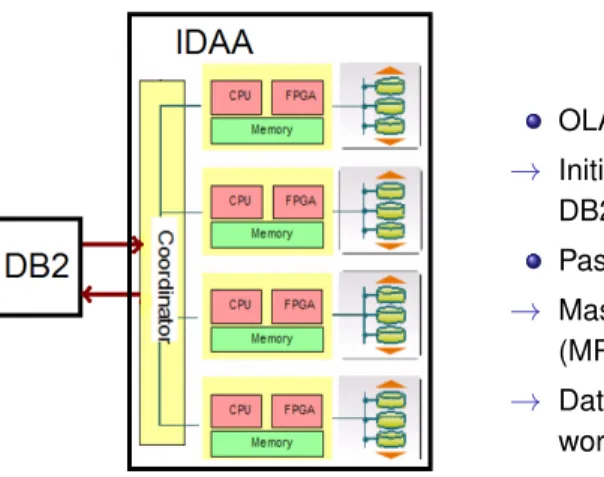
Data Warehouse appliance powered by Netezza technology
System z196 connected to IDAA Accelerate specific (often analytic) queries Appliance makes it easy to install / operate
Figure from Redbook: Optimizing DB2 Queries with IBM DB2
IBM DB2 Analytics Accelerator (IDAA)
Computation with new approach on IDAA
Figure from Redbook: Optimizing DB2 Queries with IBM DB2 Analytics Accelerator for z/OS
OLAP-type access to data
→
Initial data loadoncefrom DB2Pass query to IDAA
→
Massive Parallel Processing (MPP) on Snippet Blades→
Data Mining on IDAA, less work on DB2IBM DB2 Analytics Accelerator (IDAA)
Results with new IDAA approach
Iterate about whole data base
→
find associations
→
Netezza-based MPP architecture well suitedUse of IDAA ensures integration with DB2
→
transparent for customer Multiple Terabyte TransactionTable not moved anymoreSmall resulting table (red) back to DB2
Task Overview
Subjects I worked on
Describe model build on IBM SPSS Modeler and possible new approach with IDAA
Find real scenarios and map them to both approaches Preparation tasks for performance test
Fraud Prediction for Banking Scenario
Real world business scenario
Prediction of possible credit card transaction fraud Examples:
Big transactions in abnormal time
Multiple purchases from different vendors in short time High risk country origin
1 Model Training: Check old transactions for fraudulent patterns
Fraud Prediction for Banking Scenario
Example: algorithm mapped to IDAA
Algorithm RFM-Analysis in IBM SPSS Modeler:
→
One node calculates valuesNo algorithm equivalent on IDAA side
→
Map RFM-Analysis to IDAAResults
Model build accelerated using Netezza technology Business scenarios mapped to new architecture Performance measurement in progress
Related presentation on IOD:
IBM Software InformationOnDemand 2012 October 21-25 IDW-1626A zOLAP - Accelerate SPSS Modeling and Data Mining Using IDAA on z
Thank you!
Thank you for listening. Any questions?
IBM, the IBM logo, ibm.com and DB2 Analytics Accelerator are trademarks or registered trademarks of International Business Machines Corporation in the United States, other countries, or both. Other company, product, or service names may be trademarks or service marks of others.
Preparation for performance test (1)
Data preparation
Data extraction out of the given complex scheme
→
We only need some tables for the model creation Adaption to the needs of DB2 / IDAA→
Table creation, change of data type, date formatEnlargement of data basis (from less than 100 MB to GB-TB)
Preparation for performance test (2)
Load to DB2 and also to IDAA
DB2 LOAD utility used within a JCL script on the host Accelerate (Copy) tables to IDAA with IDAA Studio \\
LOAD
EXEC PGM=DSNUTILB,PARM=DBNI
. . .
LOAD DATA INDDN INPUTD
REPLACE
LOG NO
ENFORCE NO
FORMAT DELIMITED
INTO TABLE NENTWIG.TABLE_NAME (
PARAM TYPE,
. . .)
Preparation for performance test (4)
Implement applied algorithms on Netezza
Much pre-defined functionality with IBM SPSS In-Database Analytics like
Discretization, normalization Decision trees, association rules Different clustering algorithms and so on Exploit and adapt to work like in SPSS Modeler Example discretization: