What’s New in Microsoft Dynamics AX 2012 for Developers
Microsoft Corporation
Microsoft Dynamics is a line of integrated, adaptable business management solutions that enables you
and your people to make business decisions with greater confidence. Microsoft Dynamics works like
and with familiar Microsoft software, automating and streamlining financial, customer relationship and
supply chain processes in a way that helps you drive business success.
U.S. and Canada Toll Free 1-888-477-7989
Worldwide +1-701-281-6500
www.microsoft.com/dynamics
This document is provided “as-is”. Information and views expressed in this document, including URL
and other Internet Web site references, may change without notice. You bear the risk of using it.
Some examples depicted herein are provided for illustration only and are fictitious. No real association
or connection is intended or should be inferred.
This document does not provide you with any legal rights to any intellectual property in any Microsoft
product. You may copy and use this document for your internal, reference purposes. You may modify
this document for your internal, reference purposes.
© 2011 Microsoft Corporation. All rights reserved.
Microsoft, Microsoft Dynamics, Active Directory, Excel, Hyper-V, Internet Explorer, Outlook, SharePoint,
SQL Server, Visual Studio, Windows, Windows PowerShell, Windows Server, and Windows Vista are
trademarks of the Microsoft group of companies. All other trademarks are property of their respective
owners.
What's New in Microsoft Dynamics AX 2012 for Developers ...4 ...
What's New: Analytics for Developers in Microsoft Dynamics AX 2012 ... 8
What's New: AOS and Database for Developers in Microsoft Dynamics AX 2012 ... 11
What's New: Best Practices for Developers in Microsoft Dynamics AX 2012 ... 16
What's New: Client for Developers in Microsoft Dynamics AX 2012 ... 27
What's New: Enterprise Portal for Developers in Microsoft Dynamics AX 2012... 33
What's New: Help System for Developers in Microsoft Dynamics AX 2012 ... 38
What's New: MorphX Development for Developers in Microsoft Dynamics AX 2012 ... 41
What's New: MorphX Tools for Developers in Microsoft Dynamics AX 2012 ... 46
What's New: Reporting for Developers in Microsoft Dynamics AX 2012 ... 52
What's New: Security for Developers in Microsoft Dynamics AX 2012 ... 59
What's New: Services & AIF for Developers in Microsoft Dynamics AX 2012 ... 62
What's New: Visual Studio Tools for Developers in Microsoft Dynamics AX 2012 ... 70
What's New: Workflow for Developers in Microsoft Dynamics AX 2012... 75
What's New in Microsoft Dynamics AX 2012 for Developers
This document describes the new and enhanced features for developers that are available in Microsoft Dynamics AX 2012. Updated and additional developer documentation for Microsoft Dynamics AX can be found at theMicrosoft Dynamics AX Developer Center
on the Microsoft Developer Network (MSDN). For information on the new, changed, and deprecated features in Microsoft Dynamics AX 2012, see the New, Changed, and Deprecated Features for Microsoft Dynamics AX 2012 document. The following feature areas are described in this document:Title Description
What's New: Analytics for Developers in Microsoft Dynamics AX 2012
The Analysis Services project wizard makes it easier to create, update, configure, and deploy Analysis Services projects. The wizard performs many of the tasks that you would otherwise have to perform manually in Microsoft Business Intelligence Development Studio (BIDS).
You can use Microsoft Dynamics AX views to model data in perspectives.
You can create Gregorian calendars to use as date dimensions in your Analysis Services project. What's New: AOS and Database for Developers in
Microsoft Dynamics AX 2012
The following Application Object Server (AOS) features provide functionality for advanced applications or make it easier to write applications:
· Valid time state tables that contain date effective data.
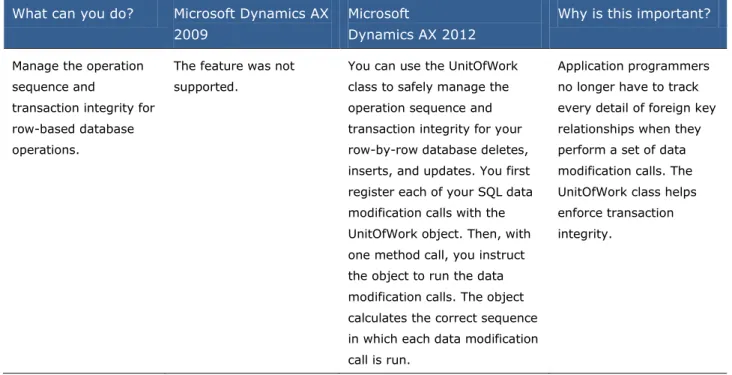
· The UnitOfWork class to simplify database transaction management.
· Inheritance among tables, similar to class inheritance.
· Full text index support to quickly query words that are embedded in the middle of a string field of a table.
· TempDb tables are a second type of temporary table, in addition to the legacy InMemory
temporary table. TempDb tables can be joined to regular tables in a query.
· Computed columns in a view.
· Filters on queries that perform an outer join. · Disabled tables can be retained in the underlying
database for access by external applications. What's New: Best Practices for Developers in Microsoft
Dynamics AX 2012
Best practice compiler-enforced checks are updated to reflect new features added for this release. Emphasis is on security and evaluating existing rules that generate warnings. Warnings that require action have been promoted to errors. Minor warnings that are typically ignored have been removed.
A form style checker tool is integrated into the Best Practice tool.
What's New: Client for Developers in Microsoft Dynamics AX 2012
New forms, controls, and data source features are added to help you customize the Microsoft
Dynamics AX 2012Windows client. What's New: Debugging for Developers in Microsoft
Dynamics 2012
For more information about debugging scenarios in Microsoft Dynamics AX 2012, see Debugging in Microsoft Dynamics AX 2012.
What's New: Enterprise Portal for Developers in Microsoft Dynamics AX 2012
Enterprise Portal is now based on Microsoft SharePoint 2010. New user controls and support for Microsoft Dynamics AX 2012 features significantly enhance the usability. The developer experience has been improved. What's New: Help System for Developers in Microsoft
Dynamics AX 2012
You can create and publish new Help documentation. The new Help server simplifies how you update and customize Help documentation.
What's New: MorphX Development for Developers in Microsoft Dynamics AX 2012
New and enhanced features are available in the MorphX development environment. This topic describes: · Models and the model store
· Object IDs
· The AxUtil command line utility · The new development environment · Installation-specific IDs
What's New: MorphX Tools for Developers in Microsoft Dynamics AX 2012
New and enhanced development tools are available in the MorphX Integrated Development Environment (IDE).
What's New: Organization Model for Developers in Microsoft Dynamics AX 2012
You can extend organization model to support ISV or partner customization or configuration scenarios. You can define new custom operating unit types.
What's New: Reporting for Developers in Microsoft Dynamics AX 2012
SQL Server Reporting Services is now the primary reporting platform for Microsoft Dynamics AX 2012. The reporting tools for Microsoft Dynamics AX enable you to
define reports for the Reporting Services platform. Reporting Services includes a complete set of tools that help you manage and define reports.
Reporting Services tools work in the Microsoft Visual Studio environment and integrate with SQL Server tools and components.
What's New: Security for Developers in Microsoft Dynamics AX 2012
The security keys of earlier versions are gone from Microsoft Dynamics AX 2012. The record level security (RLS) feature will be removed from a future version of the product.
The new role-based security system makes security design and administration easier.
Responsibilities are shared between the system administrator and the developer. The developer works with the new Security node in the AOT.
What's New: Services & AIF for Developers in Microsoft Dynamics AX 2012
New features are available in Services and Application Integration Framework. Services enable integration with Microsoft Dynamics AX, and AIF is the services
framework. What's New: Visual Studio Tools for Developers in
Microsoft Dynamics AX 2012
New features in Visual Studio Tools enable integrated development with Visual Studio.
What's New: Workflow for Developers in Microsoft Dynamics AX 2012
New and enhanced features for Workflow include a new Workflow Editor with advanced controls, line item workflows, and automated workflows.
What's New: X++ for Developers in Microsoft Dynamics AX 2012
Microsoft.NET Framework is integrated with Microsoft Dynamics AX in the following ways:
· X++ code can now be compiled into the common intermediate language (CIL) of Microsoft.NET Framework. This enables services and batch jobs to run faster.
· .NET interop to X++ is now supported. Microsoft Visual Studio can now generate C# (or Visual Basic) code for proxy classes that wrap X++ classes and tables.
· Events are now supported in X++. The AOT provides useful nodes that make implementation easier. Events can be used to reduce the need to change custom code when you upgrade to newer versions of Microsoft Dynamics AX. Event handler methods can be written in X++ or in any
Microsoft.NET Framework language.
· Attribute classes can be used to add metadata to classes, tables, and methods.
· The X++ language has the new keywords as and is. You can use the is keyword to test for inheritance relationships during run time. You can use the as
keyword to verify the correctness of your downcast assignments during run time.
What's New: Analytics for Developers in Microsoft
Dynamics AX 2012
This section describes the changes to the Online Analytical Processing (OLAP) framework in Microsoft Dynamics AX 2012.
Analytics
Microsoft Dynamics AX provides a model driven approach for developing Business Intelligence (BI) applications that use the SQL Server Business Intelligence Development Studio (BIDS) development environment. Microsoft SQL Server Analysis Services provides OLAP functionality.
What is New or Changed?
You can use Microsoft Dynamics AX views to model data in perspectives.
The Analysis Services project wizard is introduced to make it easier to create, update, configure, and deploy Analysis Services projects. The wizard performs many of the tasks that you would otherwise need to perform manually in BIDS.
You can create Gregorian calendars to use as date dimensions in your Analysis Services project.
Microsoft Dynamics AX View Support in Perspectives
What can you do? Microsoft Dynamics AX 2009 Microsoft Dynamics AX 2012 Why is this important? Model data in perspectives.
Use tables to model data in perspectives. Use custom query definitions to perform the following tasks:
Join tables with complex join conditions.
Reduce the scope of tables.
Create measures or dimension attributes using calculated fields.
Use tables and views to model data in perspectives.
Modeling data using views and tables makes it easier to customize cubes.
Analysis Services Project Wizard
What can you do? Microsoft Dynamics AX 2009
Microsoft
Dynamics AX 2012
Why is this important?
Deploy default cubes. Initially deploy the default cubes by using the Setup wizard.
Use the Analysis Services project wizard to deploy an existing Analysis Services project. Choose the default cubes from the AOT.
It is easier to deploy the default cubes.
Configure an Analysis Services project after you change the Microsoft Dynamics AX
configuration.
Manually update your Analysis Services project in BIDS to remove measures, dimensions, and KPIs that you do not have access to according to the license and configuration keys in Microsoft Dynamics AX.
Use the Analysis Services project wizard to remove measures, dimensions, and KPIs that you do not have access to according to the license and configuration keys in Microsoft Dynamics AX.
It is easier to update Analysis Services
projects after you change the Microsoft
Dynamics AX configuration.
Update an existing Analysis Services project.
Use the Update a Business Intelligence project form.
Use the Analysis Services project wizard to update an Analysis Services project to do the following:
Add or remove dimensions.
Add, remove, or update calendars to use as Date dimensions.
Add or remove label translations.
Add or remove currency conversion.
It is easier to update an existing Analysis Services project.
Create a new Analysis Services project.
Use the Update a Business Intelligence project form.
Use the Analysis Services project wizard to create an AnalysisServices project.
It is easier to create a new Analysis Services project.
What can you do? Microsoft Dynamics AX 2009
Microsoft
Dynamics AX 2012
Why is this important?
Add date dimensions to cubes.
Date dimensions are not available in Microsoft Dynamics AX 2009. Use a system time dimension instead.
Define Gregorian calendars in the Calendar builder form in Microsoft Dynamics AX that you can use as Date dimensions in your Analysis Services project.
The limitations of using the server time dimension in Microsoft Dynamics AX 2009 are as follows: By default, only one
Gregorian calendar can be included in the Analysis Services project. Date attributes cannot be translated to Microsoft Dynamics AX languages. You can only use
attributes from SQL Server Analysis Services.
Null dates (1/1/1900) are not available.
What's New: AOS and Database for Developers in
Microsoft Dynamics AX 2012
This section describes the new and enhanced features that are planned to be available for Application Object Server (AOS) in Microsoft Dynamics AX 2012.
What is new or changed?
The following improvements were made in AOS:
Valid Time State Tables
UnitOfWork Class
Inheritance Among Tables
Full Text Index
TempDB Temporary Tables
Computed Columns in Views
Filters in Outer Join
Add a Having Clause to a Query in the AOT
Effect of Disabling a TableValid Time State Tables
What can youdo?
Microsoft Dynamics AX 2009
Microsoft Dynamics AX 2012 Why is this
important?
Let the system manage data relationships that are valid only during a specified date range.
The feature was not supported.
You can set the ValidTimeStateFieldType
property on a table to make the table a valid time state table. The system then adds the ValidFrom
and ValidTo columns that track a date range in each row. The system guarantees that the values in these date fields remain valid by preventing overlap among date ranges, based on the primary key value. The X++ select statement has the
validTimeState keyword to filter rows by date or date range. The Query class has properties that provide a filter by date range, such as the
ValidTimeStateAsOfDateTimeRange property.
The program code that manages data relationships over date ranges is complex. Now, Microsoft Dynamics AX can manage these relationships for you.
UnitOfWork Class
What can you do? Microsoft Dynamics AX 2009
Microsoft
Dynamics AX 2012
Why is this important?
Manage the operation sequence and
transaction integrity for row-based database operations.
The feature was not supported.
You can use the UnitOfWork class to safely manage the operation sequence and transaction integrity for your row-by-row database deletes, inserts, and updates. You first register each of your SQL data modification calls with the UnitOfWork object. Then, with one method call, you instruct the object to run the data modification calls. The object calculates the correct sequence in which each data modification call is run.
Application programmers no longer have to track every detail of foreign key relationships when they perform a set of data modification calls. The UnitOfWork class helps enforce transaction integrity.
Inheritance Among Tables
What can you do? MicrosoftDynamics AX 2009
Microsoft Dynamics AX 2012 Why is this important?
Let a table inherit fields, methods, and
relationships from another table.
The feature was not supported.
Just as an X++ class could inherit from another X++ class in Microsoft Dynamics AX 2009, a table can inherit from another table in Microsoft
Dynamics AX 2012. As in earlier releases, the Common table is still the base table of every table.
A table that inherits from a base table is called a derived table. The terms parent table and child table describe foreign key relationships, not inheritance.
Table inheritance can improve your design of data models and reuse of schema components.
What can you do? Microsoft Dynamics AX 2009
Microsoft Dynamics AX 2012 Why is this important?
Create a full text index on a table.
The feature was not supported.
A full text index has a separate entry for each significant word in a string field. The QueryRange class can enable an instance of the Query class to benefit from a full text index.
This feature supports full text queries. Full text queries improve the performance of SQL statements that have a
where clause condition that is directed at a word that is embedded in the middle of a string field.
TempDB Temporary Tables
What can you do? Microsoft Dynamics AX 2009
Microsoft Dynamics AX 2012 Why is this important?
Have a temporary table of the TempDB
type.
Only temporary tables of the InMemory type were supported.
In the properties for a table in the Application Object Tree (AOT), the TableType property is now an enum property. The enum value InMemory is the legacy type of temporary table that is hosted in the client. The enum value TempDb is the new type of temporary table that is hosted in the TempDb database of the underlying Microsoft SQL Server. TempDB
temporary tables can be joined with regular tables on the database tier. Joining TempDB
temporary tables with regular tables often improves
performance and simplifies the programming model.
TempDB temporary tables can be joined with regular tables on the database tier. Joining
TempDB temporary tables with regular tables often improves
performance and simplifies the programming model.
What can you do? Microsoft Dynamics AX 2009
Microsoft Dynamics AX 2012 Why is this important?
Have a computed column in a view.
The feature was not supported.
A computed column is the output of a computation that uses a regular column as input.
Using a computed column can simplify application development. Various parts of the client code can all rely on the computed column that is processed by the server in one location.
Filters in Outer Join
What can you do? Microsoft Dynamics AX 2009
Microsoft Dynamics AX 2012 Why is this important?
Implement filtering of the result set from an outer join.
The feature was not supported.
You can use the new QueryFilter class to filter the result set from an outer join. The QueryFilter class can produce different results than the
QueryBuildRange class in outer joins. The QueryFilter class filters later in the process for internal queries, and can prevent rows that have null values from appearing in the result set.
Filtering the result set from an outer join can reduce the number of rows that the database server must scan.
Add a Having Clause to a Query in the AOT
What can you do? Microsoft Dynamics AX2009
Microsoft Dynamics AX 2012 Why is this important?
Use the AOT to add a having clause on the data source for a query.
The feature was not supported.
The AOT now has a Having node under Queries > MyQuery >
Data Sources. This node corresponds to the having clause in standard SQL.
In a query, you can now specify a filter condition for an aggregate value.
Effect of Disabling a Table
What can you do? Microsoft Dynamics AX 2009
Microsoft
Dynamics AX 2012
Why is this important?
Retain the table in the underlying Microsoft SQL Server database when the table is disabled in Microsoft Dynamics AX.
The underlying table was dropped at the moment that it was disabled.
When you disable the configuration key for a table that is listed in the AOT, the corresponding table in the underlying database management system is not dropped. When you modify a configuration key to disable a table, you must decide whether you want to manually delete the data that is in the table.
External programs and Microsoft SQL Server cubes no longer fail when you disable a table. The programs and cubes can continue to read the data from the table, because they bypass Application Object Server (AOS). You must decide whether you want external processes to continue to read from the disabled table.
What's New: Best Practices for Developers in
Microsoft Dynamics AX 2012
The best practice checks that are enforced by the X++ compiler were updated to reflect new features added for this release. In addition, focus was put on security, and the existing rules that generated warnings were evaluated.
New Best Practice Checks
The following table describes the new best practice rules. The message that occurs for a best practice informational, warning, or error violation will occur when you check best practices.
Message Description
RecID field cannot be part of the ReplacementKey index.
A RecID field was set as the replacement key.
Best practice rule that supports relational application design. The following properties were added to define a model:
The dbTableMapNode property was added to the Table node. The dbReferenceNode property was added to the Relation
node.
The dbIndexNode property was added to the Index node. This best practice check requires unique names in the inheritance hierarchy. When you create a new field in a table, the best practice logic iterates through the inheritance hierarchy to ensure the RecID and ReplacementKey index are unique.
Class is packing element IDs instead of element names.
You used an element ID in your pack and unpack methods. Examples of element IDs are ClassId, TableId, and FieldId. Use the element name in your pack and unpack methods.
The form must include a grid that contains ValidFrom and ValidTo fields when that form has a data source with
ValidTimeStateAutoQuery set to DateRange.
If a form has a data source with ValidTimeStateAutoQuery
property set to DateRange, the form must include a grid that contains valid from and to fields.
Table is using CreatedDateTime or
ModifiedDateTime, RecId index needs to be created.
When a table uses CreatedDateTime or ModifiedDateTime then it must have a RecID field created for the table.
The class %1 is obsolete. Instead, use the class %2.
You tried to use a class that is obsolete.
a switch statement. be removed. Do not use the <syntax> tag in XML
documentation. The syntax is derived from the method declaration, and must not be explicitly provided.
You have a <syntax> tag in XML documentation that must be removed.
Line item workflow '%1' event handler does not reference a valid class implementing the '%2' interface
Best practice rule for event handling that is now supported for approvals and tasks.
Line item workflow relation '%1' not found on workflow document query '%2’
Best practice rule for event handling that is now supported for approvals and tasks.
Line item workflow relation '%1' is invalid. Relation must be configured with a fetch mode of 1:n on workflow document query '%2'
Best practice rule to support event handling that is now supported for approvals and tasks.
Line item workflow relation not defined Best practice rule to support event handling that is now supported for approvals and tasks.
Line item workflow type '%1' not found Best practice rule to support event handling that is now supported for approvals and tasks.
Workflow document query not found on line item workflow type '%1'
Best practice rule to support event handling that is now supported for approvals and tasks.
Line item workflow relation '%1' does not match root datasource on line item workflow type document query '%2'
Best practice rule to support event handling that is now supported for approvals and tasks.
Line item workflow must have at least one line item workflow type
Best practice rule to support event handling that is now supported for approvals and tasks.
The Company association type cannot be used for this workflow type because the table for the primary data source used by the workflow type is not configured to 'Save Data Per Company'.
Choose an alternative association type. This best practice rule was added to support organizational model types in workflow.
The Global and Other association types cannot be used for this workflow type because the table for the primary data source used by the workflow type is configured to 'Save Data Per Company'.
Best practice rule to support organizational model types in workflow.
An association type relation must be selected when the association type is Other
Best practice rule to support organizational model types in workflow.
class must not have any member variables. SysTableExtension. Use the SysTableExtension class to override the table data defaults.
The node's path exceeds the maximum length of 400 characters. Reduce number of nesting levels or rename nodes.
Best practice rule to report tree node paths that exceed a string size of 400.
Another interface already defines %1. Best practice rule added to check that there are no method conflicts between the interfaces. For example, a class cannot implement two interfaces that both define a method with the same name.
The class %1 does not implement methods %2
Best practice rule that checks that the implementation in a class implementing an interface contains the methods specified in the interface profile.
The base type of the return type of method %1 is different from the base type of the corresponding field.
Best practice rule to check that the implementation in a class implementing an interface has the return type that is specified in the parameter profile.
The expected parameter count does not match the actual parameter count.
Best practice rule to check that the implementation in a class implementing an interface has the same number of parameters that is specified in the parameter profile.
The parameter %5 must be optional on both methods %1.%2 and %3.%4, or be non-optional on both.
Best practice rule that checks that the parameter is either optional on both methods or required on both methods.
The parameter %5 must be of the same type on both methods %1.%2 and %3.%4.
Best practice rule that checks that the parameter has the same type on both methods.
The upgrade script is missing required attribute %1.
Best practice rule that checks that the upgrade script has the required Description attribute.
The upgrade script is missing required attribute %1.
Best practice rule that checks that the upgrade script has the required Type attribute.
The upgrade script is missing required attribute %1.
Best practice rule that checks that the upgrade script has the required Stage attribute.
The upgrade script is missing required attribute %1.
Best practice rule that checks that the upgrade script has the required Table attribute.
The upgrade script method cannot be static. Best practice rule that checks that the upgrade script is a non-static method.
The upgrade script method cannot accept parameters.
Best practice rule that checks that the upgrade script method has no parameters.
Table %1 specified in the
UpgradeScriptTableAttribute is not valid.
Best practice rule that checks that the table stated in the attribute of an upgrade script exists in the AOT.
valid. attribute of an upgrade script exists in the AOT. Class %1 specified in the
UpgradeDependsOnModuleAttribute is not valid.
Best practice rule that checks that the class name stated in the attribute of an upgrade script exists in the AOT.
Method %1 in class %2 specified in the UpgradeDependsOnModuleAttribute is not valid.
Best practice rule that checks that the method name stated in the attribute of an upgrade script exists in the AOT.
The upgrade script does not have a valid version defined
[#define.version(sysReleasedVersion)] in the class declaration.
Best practice rule that checks that the script version stated in the attribute of an upgrade script exists in the AOT.
Return type covariance: Return values must both be either tables or maps (%1.%2).
Best practice rule that checks that the return values must both be either tables or maps.
@Return type covariance: Methods must return the same map (%1.%2).
Best practice rule that checks that the methods must return the same map.
The %1 relation to the %2 table does not have an upgrade script assigned. You must assign an upgrade script or exclude it from upgrade validation.
The unit of measure table is now global. At upgrade, company-specific units will be merged using user-defined mapping. This requires that existing tables that have relations to the unit of measure also apply the mapping. This best practice checks for relations to unit of measure and confirms that the relation to unit of measure is registered with an upgrade script or that the table is marked to be excluded from the upgrade.
The following code illustrates how to register a unit of measure upgrade job:
UnitOfMeasureUpgradeExecutor::registerUpgradeJobs()
The following code illustrates how to exclude a unit of measure table: UnitOfMeasureUpgradeValidator::registerExcludedRelations()
For information on pre-upgrade tasks regarding units of measure see the following topics, Units, Unit conversions, Fixed units, and Unit texts.
A non-surrogate key primary index is not valid for a company-specific table
Best practice rule that checks that the primary key for a company-specific table must be a surrogate key.
Use of labels for developer documentation Best practice rule that checks that tables have a description of the table specified in the DeveloperDocumentation property. Framework classes must have a disclaimer
in the ClassDeclaration to discourage customizations.
Best practice rule that checks that the framework classes providing platform functionality have a message on them to discourage developers from customizing them. Customizing and extending classes that provide platform functionality may cause problems with future upgrades.
The framework class disclaimer must be placed after the XML documentation.
Framework classes have a disclaimer to discourage developers from customizing them. Customizing and extending classes providing platform functionality may cause problems with future upgrades. Best practice rule that checks that the disclaimer is placed after the XML documentation, meaning after the /// comments.
Each perspective entity (table or view) must have at most 1 parent.
Best practice rule that checks that the perspective entity (table or view) has at most one parent.
Each perspective entity (table or view) must have at most 1 child.
Best practice rule that checks that the perspective entity (table or view) has at most one child.
Each perspective entity (table or view) must have a corresponding child for each parent.
Best practice rule that checks that the perspective entity (table or view) has a corresponding child for each parent.
Each perspective entity (table or view) must
have a corresponding parent for each child. Best practice rule that checks that the perspective entity (table or
view) has a corresponding parent for each child. In each perspective entity the parent type
should be the same as the child type if present.
Best practice rule that checks that in a perspective entity, the parent type is the same as the child type if one exists.
Perspectives where
SharedDimensionContainer=Yes cannot have fields where AnalysisUsage is Measure or Both. Perspective %1, table or view %2, field %3.
When a perspective has the SharedDimensionContainer property set to True, the AnalysisUsage property for fields should not be marked as Measure or Both. Setting the SharedDimensionContainer property to True indicates that the perspective will be used to create
dimensions only. The perspective will not be used to create a cube, measure group, or measure.
%1 or %2 must not be used in the sys layer.
Best practice rule that checks that the
UpgradeModuleDependsOnMeAttribute attribute and
UpgradeTaskDependsOnMeAttribute attribute are not used in the SYS layer.
Inconsistent usage of AOSAuthorization property for a table in chain of inheritance. Ensure that both tables %1 and %2 have authorization either enabled or disabled.
Best practice rule that checks that all the tables in the inheritance hierarchy have the same value for authorization: either enabled or disabled.
Allowed CacheLookUp values for this TableGroup is %1
Best practice rule that checks that the cache lookup is valid for the table group.
Service group must have a valid description Best practice rule that checks that the Description property for a service group is provided. The description value must be a valid label.
Service must have a valid Namespace property
Best practice rule that checks that the Namespace property for a service is set to a valid namespace. You may not use the default URI, for example http://tempuri.org.
Entry point is not in any privilege Best practice rule that checks that the entry point is in a privilege. Menu item points to a class that is not a
RunBase class; it should probably have a linked permission object
Best practice rule that checks that the menu item has a linked permission.
All duties should be part of a role Best practice rule that checks that a duty is part of a role.
All duties should be part of a process cycle Best practice security rule that checks that a duty is part of a process cycle.
A form that is not associated with other forms should be linked to at least one menu item
Best practice security rule that checks that a form is linked to a menu item.
Non-system-managed %1 resource with incorrect managed by value %2
Best practice security check that a non-system-managed resource has Managed By value set to Manual.
Privilege is not in any duty. Best practice security rule that checks that the privilege is set to a valid duty.
Missing SysEntryPointAttribute on service operation
Best practice rule that checks that the SysEntryPointAttribute attribute on the service operation because it is exposed externally. Missing processReport method Best practice rule that checks that the report has a processReport
method. Missing SysEntryPointAttribute on SSRS
RDP class
Best practice rule that checks that the SQL Server Reporting Services report data provider class has a processReport method defined with a SysEntryPointAttributeSysEntryPointAttribute attribute specified. Info part not linked to menu items Best practice security rule that checks that an Info Part is linked to a
menu item. An Info Part is a collection of related data fields you can associate with a record in a form. You use Info Parts to create a FactBox for a form or the preview pane for a list page. To add an Info Part to a form, you use a menu item that links to the Info Part. DeveloperDocumentation label should not
be marked to be translated.
Best practice rule that checks that the DeveloperDocumentation
property should not be translated. The DeveloperDocumentation
property should have the {Locked} keyword in the comment for the label used in the DeveloperDocumentation property.
The help provider class isn't specified for this online documentation set
The HelpProviderClass property must be set if the
ContentLocation property is set to Online for a Help Document Set. Query %1 can not be made searchable
because it has zero or more that one data sources.
Best practice rule that checks that the searchable query has a data source. You will get a best practice violation if no data source is specified or if more than one data source is specified.
Query %1 cannot be made searchable because it does not have the
searchlinkrefname property or formref
Best practice rule that checks that the searchable query must have the SearchLinkRefName property or the FormRef property set on the root table.
property set on the root table %2. Query %1 is searchable but it does not have the searchlinkrefname property set to a url menu item on the root table %2. The search resuls in wll not appear in Enterprise Portal.
Best practice rule that checks that the searchable query must have the SearchLinkRefName property set to a URL menu item on the root table or the search results will not appear in Enterprise Portal.
Query %1 is searchable but it does not have the formref property set to a form on the root table %2. The search results in wll not appear in AX client.
Best practice rule that checks that the searchable query must have the FormRef property set to a form on the root table or the search results will not appear in the Microsoft Dynamics AX client.
Query %1 can not be made searchable because it does not have the titlefield1 or titlefield2 set on the root table %2.
Best practice rule that checks that the valid searchable query must have the TitleField1 or the TitleField2 fields set on the root table.
Update permissions for search crawler role from searchable queries.
Best practice rule that checks that the search crawler role has permissions for the table that was used in the query.
Query %1 can not be made searchable because it has has a root table that is a transaction table with no index on the modifieddatetime field.
Best practice rule that checks that the searchable query must have a root table that is a transaction table with an index on the
ModifiedDateTime field.
Element has changed name since previous release. If the rename is intentional then suppress this violation; otherwise, update the LegacyID. Old name was: %1
Best practice rule that checks that the element has the same name as the previous release. If the change was intentional then suppress the violation. This best practice check is not new, the message has been updated. This check has been modified due to the changes regarding installation specific IDs.
The element has an origin value that is different from the origin value in a previous version of Microsoft Dynamics AX.
Best practice rule that checks that the same origin value occurs in the earlier version of Microsoft Dynamics AX. This check was added due to the changes regarding installation specific IDs.
Element has no LegacyID assigned and was shipped in a previous version. All ID-based elements already shipped must have a LegacyID. Set Legacy ID to %1.
Best practice rule that checks that the element has a LegacyID
property assigned because the element was shipped in an earlier version of Microsoft Dynamics AX. This check was added due to the changes regarding installation specific IDs.
Element has a different LegacyID than previous shipped version. Please update LegacyID, old LegacyId was %1.
Best practice rule that checks that the value specified in the
LegacyID property occurs in the earlier version of Microsoft Dynamics AX. If a violation of this best practice occurs, update the
LegacyID property. This check was added due to the changes regarding installation specific IDs.
The element does not have an origin value. This element must have a non-null origin value.
Best practice rule that checks that the element has an origin value. This element must have an origin value that is not NULL. This check was added due to the changes regarding installation specific IDs.
Do not use a deprecated field as title field. Please select another title field.
Best practice rule that checks that the deprecated field is not used as a title field.
Do not use deprecated field %1 in non-deprecated index %2. Please remove the field or deprecate the index.
Best practice rule that checks that the deprecated field is not used as an index. Remove the deprecated field or deprecate the index.
Do not use deprecated field %1 in field group %2. Please remove the field from the field group.
Best practice rule that checks that the deprecated field is not used in a field group. Remove the deprecated field from the field group.
Best Practice Checks Updated for Container Controls
The best practice checks that were updated for client forms verify the name and position for container controls. The following table describes the changes that were made.
Message Description
Control %1 bound to table field group has name that does not match default name of %2, consequently the control requires storage and cannot be optimized
Best practice rule that checks for when a Group or Grid control has the DataGroup property set but the child control cannot be created when the form is loaded. This is because the name bound to the table field group does not match the default name. The control must be saved as metadata. This requires storage and the control cannot be optimized.
The form group and table group have different fields at position %1: '%2' != '%3', consequently the control requires storage and cannot be optimized
Best practice rule that checks that the Group or Grid control has the DataGroup property set but the child control cannot be created when the form is loaded. This is because the controls in the form group must match the position in the table field group. If the position does not match, the position must be saved as metadata. This requires storage and the position cannot be optimized.
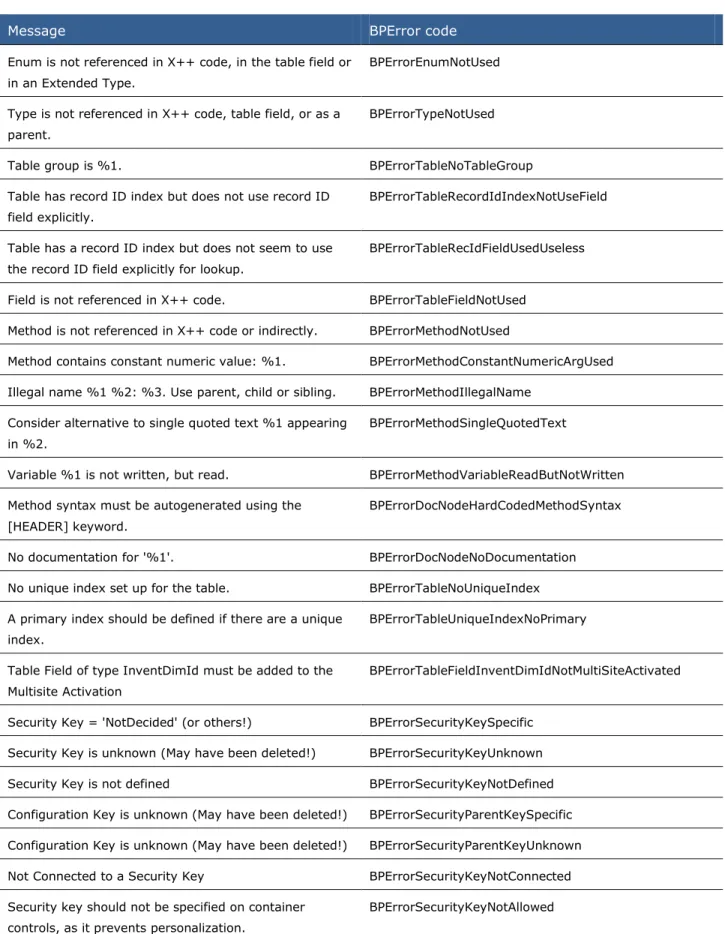
The best practice rule changes for container controls resulted in best practices that have been removed. The following table lists the best practice checks that were removed.
Message BPError code
Group control bound to Table group has %1 auto-declaration(s), consequently it cannot be AOS optimized
BPErrorFormCannotBeAOSoptimizedAD
Group control bound to Table group has some other properties changed from default, consequently it cannot
be AOS optimized
Form group (%1) and table group (%2) have different number of fields, consequently they cannot be AOS optimized
BPErrorFormGroupControlDifNumOfFields
Best Practice Checks Updated for Workflow Approval on the Web
When you create workflows for use only on the Web, only thin client menu items are required. Best practice rules were updated to account for this.The following table describes the messages that were updated so that they now apply to Web menu items in addition to action menu items.
Label text BPError code and label
The action menu item is not defined. The action menu item or the action Web menu item must be defined.
BPErrorWorkflowNoActionMenuItem BPErrorWorkflowNoWebActionMenuItem @SYS108556
The document menu item is not defined. The document menu item or the document Web menu item must be defined.
BPErrorWorkflowNoDisplayMenuItem BPErrorWorkflowNoWebURLMenuItem @SYS108559
The element outcome '%1' action menu item property is not defined. The action menu item or the action Web menu item must be defined.
BPErrorWorkflowElementOutcomeNoActionMI BPErrorWorkflowElementOutcomeNoActionWMI @SYS108547
Best Practice Checks Changed from Warnings to Errors
Many of the existing rules that generate warnings were evaluated for the value they provide. When the best practice warning violations should be addressed, the warnings were changed to errors. The following table provides information about best practice rules that were changed from warning messages to error messages. Violations to these rules must now be fixed.
Message BPError code and label
Display and edit methods must use a base enum or an extended data type as their return type.
BPErrorTableNoExtendedReturnType @SYS72489
The table %1 has no fields in the AutoReport field group. BPErrorTableMissingGroupAutoReport @SYS55415
record ID field explicitly in relation in %2. @SYS60524 Tables with only one index must have it defined as a
cluster index. Set the ClusterIndex property for the %1 table.
BPErrorTableOneIndexNotCluster @SYS68395
The table %1 has no record ID index but uses it %2 times.
BPErrorTableNoRecordIdIndexButUsed @SYS60522
A display or edit method and a field cannot have the same name. Rename either the %1 field or the display or edit method.
BPErrorTableFieldHasSameNameAsMethod @SYS97063
The method %1%2%3 is obsolete. Instead, use the method %4.
BPErrorMethodDiscontinuedInLaterVers @SYS68910
The method %1 is empty and must be deleted. BPErrorMethodIsEmpty @SYS68904
Do not put parentheses around the case values in a switch statement. Remove the parentheses from %1.
BPErrorMethodParenthesisRoundCaseConst @SYS55397
Only use braces around code blocks. BPErrorMethodNonNeededBlockStyleUsed @SYS152538
Use double-quotation marks when referring to labels, instead of using single-quotation marks.
BPErrorMethodLabelInSingleQuotes @SYS55395
%1 and other variable names should not start with an underscore. Only parameter names are required to start with an underscore.
BPErrorMethodVariableWithUnderscore @SYS60113
Use a field list in the select statement of %1, because only %2% of the record data is referenced.
BPErrorSelectUsingFieldList @SYS91289
All tables must have a primary index. Set the PrimaryIndex property for the table %1.
BPErrorTableNoPrimaryIndex @SYS107156
Removed Best Practice Checks
Many of the existing rules that generate warnings were evaluated for the value they provide. When the best practice warning rules held little value and were being ignored, the best practice warning rules were removed. Removing these warning rules helps to focus on the best practice warnings that should be considered.
The following table provides information about best practice rules that were removed because they are obsolete or were evaluated to be of low value.
Message BPError code
Enum is not referenced in X++ code, in the table field or in an Extended Type.
BPErrorEnumNotUsed
Type is not referenced in X++ code, table field, or as a parent.
BPErrorTypeNotUsed
Table group is %1. BPErrorTableNoTableGroup Table has record ID index but does not use record ID
field explicitly.
BPErrorTableRecordIdIndexNotUseField
Table has a record ID index but does not seem to use the record ID field explicitly for lookup.
BPErrorTableRecIdFieldUsedUseless
Field is not referenced in X++ code. BPErrorTableFieldNotUsed Method is not referenced in X++ code or indirectly. BPErrorMethodNotUsed
Method contains constant numeric value: %1. BPErrorMethodConstantNumericArgUsed Illegal name %1 %2: %3. Use parent, child or sibling. BPErrorMethodIllegalName
Consider alternative to single quoted text %1 appearing in %2.
BPErrorMethodSingleQuotedText
Variable %1 is not written, but read. BPErrorMethodVariableReadButNotWritten Method syntax must be autogenerated using the
[HEADER] keyword.
BPErrorDocNodeHardCodedMethodSyntax
No documentation for '%1'. BPErrorDocNodeNoDocumentation No unique index set up for the table. BPErrorTableNoUniqueIndex A primary index should be defined if there are a unique
index.
BPErrorTableUniqueIndexNoPrimary
Table Field of type InventDimId must be added to the Multisite Activation
BPErrorTableFieldInventDimIdNotMultiSiteActivated
Security Key = 'NotDecided' (or others!) BPErrorSecurityKeySpecific Security Key is unknown (May have been deleted!) BPErrorSecurityKeyUnknown Security Key is not defined BPErrorSecurityKeyNotDefined Configuration Key is unknown (May have been deleted!) BPErrorSecurityParentKeySpecific Configuration Key is unknown (May have been deleted!) BPErrorSecurityParentKeyUnknown Not Connected to a Security Key BPErrorSecurityKeyNotConnected Security key should not be specified on container
controls, as it prevents personalization.
SecurityKey AnalysisVisibility property should not be Auto if there is no parent security key
BPErrorSecurityKeyAnalysisVisibilityAuto
No self relation set up for the Table. BPErrorTableNoSelfRelation TwC: Validate access to return value from display/edit
method.
BPErrorTwCDisplayEditMethod
Do not use TypeId() BPErrorDoNotUseTypeId Object has changed ID since previous release. Old ID =
%1.
BPErrorObjectIdConflict
Set the property AutoDeclaration to Yes for the form control, instead of manually declaring the form control %1.
BPErrorMethodNotAutoDeclared @SYS68393
What's New: Client for Developers in Microsoft
Dynamics AX 2012
The client is the Windows application that you use to view, update, and create data in Microsoft Dynamics AX 2012. This section describes the changes and new features that affect how you use forms, controls, and data sources to customize the client.
What is new or changed?
To customize the client in Microsoft Dynamics AX 2012, you can use the changes and new features in the following areas:
Forms
Controls
Data Sources
Parts
SearchForms
What can you do? Microsoft Dynamics AX 2009
Microsoft
Dynamics AX 2012
Why is this important?
Set the Style property of a form.
Feature not available. Specify the type of form that you want to create.
After you set the Style property, several form properties are updated to use the values required for the specified form.
Create a Table of Contents form.
Feature not available. Use the table of contents pattern for small forms that display data on one or more tabs.
The Table of Contents form is a useful design pattern that you can use to create a form that sets parameter values. For example, the Accounts receivable parameter form uses the table of contents pattern.
Use metadata to create a list page that appears in both the Microsoft Dynamics AX client and Enterprise Portal for Microsoft Dynamics AX.
If you want the same list to appear in the client and Enterprise Portal, you had to create two separate list pages.
The list page that you create can appear in both the client and Enterprise Portal.
A single list page saves development time, and ensures that the same list is viewed in both the client and Enterprise Portal.
Add an action pane to a form.
Action panes were limited to list pages and content pages.
You can add an action pane to a details form.
Action panes improve access to actions that were previously available on the menu or toolbar of the form.
Specify that a form opens in read-only document view mode.
When you view a form that has editable controls, you could accidentally change a field value.
To quickly view data values, you use forms that are in read-only mode.
To reduce the risk of accidental changes, you can specify that the form show a read-only version of the form.
Add enhanced previews for foreign key fields or controls.
When you rest the pointer on a record in a list, a tooltip appears that shows one or two preview fields for that record.
When you rest the pointer on a record, the preview shows the data fields that are specified by a FactBox.
The use of a FactBox gives you the option to include more data fields in the preview.
Specify how a form opens.
You use a form property to specify the mode for a form.
You use the OpenMode property of menu items and menu item buttons to specify how the form opens in the client.
You specify whether the form opens to create a new record, update an existing record, or view an existing record in read-only mode.
Add FactBoxes to a form.
To supply additional information about the selected record in a list, you add a preview pane to the bottom of the list
You use FactBoxes and a preview pane to provide a variety of additional
information that is related to the selected record in a form.
You can add several Factboxes that show various types of information. A FactBox uses a part object that
page. appears in the FactBox. You can create new parts, and use them as
FactBoxes or a preview pane.
Specify whether the query from the parent form is copied to a child form.
Feature not available. You can use the
CopyCallerQuery property of menu items and menu item buttons to specify that the query of the parent form is used in the child form.
By copying the query from the parent form to a child form, you ensure that the forms display a consistent set of data.
Changes to form controls and methods are stored to your customization layer.
Customizations were stored at the main type level or the Concept level. Forms and tables are examples of main types.
Customizations to controls and methods are stored at the child level or the Element level. An individual control in a form is an example of an Element.
The additional granularity reduces the risk of conflicts with other customizations.
Controls
What can you do? Microsoft
Dynamics AX 2009
Microsoft
Dynamics AX 2012
Why is this important?
Use a DropDialogButton control.
Feature not available. You click a button to open a dialog box where you can complete an action.
You can complete actions without opening another form.
Add an action pane strip to a form.
Feature not available. You can add an action pane strip that provides access to the actions that are
associated with the form.
You use an action pane strip when the form does not have enough actions for a full action pane. In addition, an action pane strip enables you to put actions close to the records and data fields that they relate to.
Add FastTabs to a form. Tabs were arranged horizontally across the top of the form.
A FastTab is a new vertical presentation style that replaces the existing tabs for forms.
FastTabs let you display large amounts of information in a single form.
Use the ReferenceGroup control.
Feature not available. You can replace a surrogate foreign key with one or more
You use the
data fields. forms and lookup forms that contain a surrogate key. The ReferenceGroup control provides data values that are understandable to the user.
Use the segmented entry control.
Feature not available. You use the segmented entry control to enter an account number and associated dimensions.
The task of entering complex combinations of accounts and dimensions is simplified.
Use the managed host control to add a .NET control to a form.
Feature not available. You can add and use .NET controls in forms.
You can add and use Windows Presentation Foundation (WPF) or managed form controls. Use the MSChart control. To display data in a
chart, you had to use the ChartFX ActiveX control.
To display data in a chart, you use the MSChart .NET control.
MSChart replaces ChartFX, and provides new
capabilities to create and save a chart.
Disable or hide controls that are not used in a specified country or region.
Feature not available. The form shows unique controls and navigation elements to users in a specified country or region. In addition, users from other countries or regions cannot access these controls and navigation elements.
You can target controls and navigation elements to users in specific countries or regions. The targeted controls and navigation elements are disabled or hidden when the form is viewed by users from other countries or regions. Set the Style property of
a control.
Feature not available. Specify the type of control that you want to create.
After you set the Style property, several control properties are updated so that they use the values that are required for the specified control.
Data Sources
What can you do? Microsoft Dynamics AX 2009
Microsoft
Dynamics AX 2012
Why is this important?
from a table. framework for displaying date effective data.
from dates and to dates for data records.
data for fields that support date effective data. You can reference a table that contains date effective dates, and specify query and update behavior. Use a modeled query
with a menu item.
Feature not available. You use a menu item to specify the query that is used for a Cue or a secondary list page.
The development and maintenance of Cues and secondary list pages is simplified.
Replace a surrogate foreign key with specified data fields.
Tables and lookup forms used replacement keys to identify a related record.
Tables and lookup forms use a surrogate key to identify a related record.
A form or lookup form that uses a surrogate key shows values that are
understandable to the user, instead of the value of the surrogate foreign key. Defer the loading of
replacement values for surrogate foreign keys.
Feature not available. The replacement fields are not loaded until they are visible.
Performance is improved, because joined data is not retrieved until it is needed. Use a derived data
source to access data from tables in an inheritance hierarchy for tables.
Feature not available. Controls can be bound to fields from the derived tables in an inheritance hierarchy.
The derived data source lets you use data from a table in an inheritance hierarchy.
Specify updates to several tables as a single unit of work.
When an update occurred, each table was updated in a separate trip to Application Object Server (AOS). In addition, each trip was a separate transaction.
When you save a record that changes multiple tables, the changes are combined into a single transaction that is initiated by AOS.
The single transaction provides a more efficient and consistent framework for completing data changes.
Specify how optional records in outer joined tables are created or deleted.
Optional records were always created and saved.
The optional record is only created if you enter data for an outer joined table.
You can specify the behavior of optional records. You can choose to always create, implicitly create, or explicitly create the optional record. Filter on the fields in all
joined tables.
Filtering on outer joined fields was disabled.
The Filter-by-Grid, Filter-by-Field, Filter-by-Value,
Filter-by-Selection, and
Advanced Filter dialog boxes support filtering on
You can sort and filter on the fields in all of the joined tables.
outer joined fields.
Parts
What can you do? Microsoft Dynamics AX 2009
Microsoft Dynamics AX 2012 Why is this important?
Create or update a FactBox.
Feature not available. You can create or update a FactBox that appears on a list page or in a form.
Info parts enable you to specify the data that appears in a FactBox. Use an existing form as
a FactBox.
Feature not available. You can use a form as a FactBox that provides additional information about the current record.
You have more options to customize the types of controls that appear in the FactBox. Create a Cue in the
Application Object Tree (AOT) that uses an existing query.
Cues used copies of the list page query and could break if the list page query was later changed.
You use the AOT to create a Cue that uses an existing query.
Changes to the list page query no longer affect the Cue.
Create a Cue group that you can use as a FactBox.
Feature not available. A Cue group includes references to one or more Cues.
You use a Cue group as a FactBox that provides summary information that is related to the current record.
Search
What can you do? Microsoft Dynamics AX 2009
Microsoft Dynamics AX 2012 Why is this important? Make all forms and
reports available from Search.
Feature not available. To make a form or report appear in search results, you create a menu item, and add the search terms that you want to associate with the specified form or report.
You can use Search to find the forms and reports that are associated with a task.
What's New: Enterprise Portal for Developers in
Microsoft Dynamics AX 2012
This section describes the new and enhanced features of Enterprise Portal for Microsoft
Dynamics AX 2012. Enterprise Portal provides a web-based application framework that allows for users to interact with data in Microsoft Dynamics AX through a web browser.
What is new or changed?
The following improvements have been made for this release of Enterprise Portal:
Microsoft SharePoint 2010
Microsoft Visual Studio 2010
Support for Microsoft Dynamics AX 2012 Features
User Interface and Usability Improvements
List Page Framework
Services Framework
Search
Pluggable Authentication
Proxy Support
Cross-reference SupportMicrosoft SharePoint 2010
What can you do? Microsoft Dynamics AX 2009
Microsoft Dynamics AX 2012 Why is this important?
Microsoft SharePoint 2010 provides core features that are used by Enterprise Portal, such as document libraries that store Enterprise Portal pages.
Enterprise Portal uses Windows SharePoint Services (WSS) 3.0 or Microsoft Office
SharePoint Server 2007.
Enterprise Portal uses
SharePoint Foundation 2010 or SharePoint Server 2010.
SharePoint 2010 provides features, such as the SharePoint Ribbon, that improve the functionality and user experience for Enterprise Portal.
What can you do? Microsoft
Dynamics AX 2009
Microsoft
Dynamics AX 2012
Why is this important?
You use Visual Studio 2010 to develop Enterprise Portal integrations.
Enterprise Portal integrations are developed with Visual Studio 2008.
Enterprise Portal integrations are developed with Visual Studio 2010.
Visual Studio 2010 is a standard development tool for Microsoft Dynamics AX 2012.
Support for Microsoft Dynamics AX 2012 Features
What can you do? Microsoft Dynamics AX2009
Microsoft
Dynamics AX 2012
Why is this important?
Enterprise Portal supports tables that are structured into a table hierarchy.
Feature not available. In Enterprise Portal, you can use tables that are structured in a hierarchy.
Allows for a more efficient database structure.
Enterprise Portal supports tables that use surrogate keys.
Tables typically displayed the key values.
Tables can have surrogate keys that are not displayed to the user.
Provides a user interface that is more user-friendly.
Enterprise Portal uses the new security model.
The security model was less flexible.
The security model is much more flexible and configurable.
System administrators have better control over security settings.
User Interface and Usability Improvements
What can you do? Microsoft Dynamics AX2009
Microsoft
Dynamics AX 2012
Why is this important?
Pages can be opened as modal windows.
Pages always opened in-line, replacing the previous page that was displayed.
Pages can open as modal windows. This allows the previous page to remain.
Context is preserved when the user performs actions in Enterprise Portal.
Enterprise Portal has new User Control components.
The User Control components for Enterprise Portal pages limited the layout possibilities.
New user control components, such as AXColumn and AxMultiColumn, allow for more flexible layout. Improved visual appearance of pages in Enterprise Portal improves user productivity. Enterprise Portal can use
optimized lookups.
Lookups load data at the time that they are
Lookups can be configured to load data at the time the page
The user experience is improved, because users
displayed. loads. do not have to wait for the lookup to load.
List Page Framework
What can you do? Microsoft Dynamics AX 2009
Microsoft Dynamics AX 2012 Why is this important?
Create list pages for use in Enterprise Portal.
Separate list pages are created for Enterprise Portal.
A list page can be created and used in both the Microsoft Dynamics AX client and Enterprise Portal.
Saves development time when you are creating lists.
Services Framework
What can you do? Microsoft Dynamics AX 2009
Microsoft
Dynamics AX 2012
Why is this important?
Enterprise Portal uses Microsoft Dynamics AX services to access data and metadata.
Enterprise Portal used the .NET Business Connector to access data and metadata.
Enterprise Portal uses the Microsoft Dynamics AX services to access data and metadata.
Allows for more flexible deployment of
Enterprise Portal.
Search
What can you do? Microsoft Dynamics AX 2009
Microsoft Dynamics AX 2012 Why is this important? Search for data in
Microsoft Dynamics AX.
Data Crawler is used to implement search.
The SharePoint search infrastructure is used.
By using the search infrastructure of SharePoint, you can choose the appropriate
search tool for your organization, such as Search Server Express or SharePoint Search Server 2010.
Pluggable Authentication
What can you do? MicrosoftDynamics AX 2009
Microsoft
Dynamics AX 2012
Why is this important?
Enterprise Portal can use Windows Live ID to provide authentication for external-facing pages.
You must use Active Directory accounts for external users.
You can use Windows Live ID accounts for external users.
You do not have to have external users added to the Active Directory for your organization.
Proxy Support
What can you do? Microsoft
Dynamics AX 2009
Microsoft
Dynamics AX 2012
Why is this important?
Code for Enterprise Portal can use the new proxy implementation.
Proxies are limited to Enterprise Portal and not easy to set up.
Proxies can be used throughout Microsoft Dynamics AX. This includes Enterprise Portal.
Proxies are easier to set up and use. They enable Enterprise Portal code to access Microsoft
Dynamics AX resources, such as X++ classes.
Cross-reference Support
What can you do? Microsoft Dynamics AX 2009
Microsoft Dynamics AX 2012 Why is this important?
You can use the cross-reference tool in the MorphX IDE to see how resources for Enterprise Portal are used.
The cross-reference tool does not support Enterprise Portal resources.
The cross-reference tool supports Enterprise Portal resources.
It is now easier to see how resources are used in Enterprise Portal.
Are there any special considerations?
If you have created User Controls for Enterprise Portal pages in Microsoft Dynamics AX 2009, you will need to update them for use in Enterprise Portal for Microsoft Dynamics AX 2012.