Cloud Training Portal
Trainings
Process Guide
October 2012
ECPG-3
Version 1.2Content
Content ... 2
1. PREFACE ... 3
1.1. About this Guide ... 3
1.2. Trainers and Contacts ... 3
1.3. Audience ... 3
1.4. Typographic Conventions ... 3
1.5. Documentation Feedback ... 3
2. OVERVIEW ... 4
3. TRAINING CONCEPT ... 5
1. CLOUD COMPUTING IN GENERAL ... 6
1.1. Cloud Computing. Five Essential Characteristics ... 6
1.2. Cloud Computing. Service Models ... 6
1.3. Cloud Computing. Deployment Models ... 7
1.4. DevOps/Self-Service approach ... 8
1.5. Virtual Hosting vs. Cloud Computing ... 8
1.6. Auto-configuration in Cloud ... 9
1.7. Continuous Delivery / Continuous Integration ... 9
1.8. Architecture of infrastructure in Cloud ... 10
1.9. Self-service in EPAM Private Cloud ... 11
2. WINDOWS AZURE ... 12
2.1. Starting with Windows Azure ... 12
2.2. SQL Azure ... 12
2.3. Windows Azure Storage Services ... 13
2.4. Windows Azure Drive ... 14
2.5. Windows Azure Service Bus ... 14
2.6. Windows Azure Caching ... 15
2.7. IaaS: Virtual Machines ... 15
2.8. Access Control Service ... 16
3. AMAZON WEB SERVICES ... 17
3.1. Creation of AWS simple Stack trough Cloud Formation and User-Data script... 17
TABLES ... 18
Cloud Training Portal – Trainings
1.
Preface
1.1.
About this Guide
Trainings document provides vision and gives ability to get familiar with existing training material on Cloud Training Portal.
1.2.
Trainers and Contacts
Please contact [email protected] to request one or more trainings from this guide. You can specify details on delivery format. Escalate your questions to [email protected] (Consulting & Development Team Leader).
1.3.
Audience
This guide is designed for people, interested in Cloud Computing, interested in advancing their skill level and expanding existing knowledge. It is also made to get people comfortable with current Cloud Training Portal content.
1.4.
Typographic Conventions
Several typographic conventions are used to call attention to specific words and phrases. These conventions, and the circumstances they apply to, are as follows:
All views and buttons are highlighted bold.
Specific terminology and brand names are highlighted italics.
Most of the screenshots throughout this document contain areas, highlighted in green. Interacting with these objects moves you to a next step.
All warnings and notices are marked with the icon
All of the documents mentioned herein are available online. The paths to those documents are marked with the icon. The icon is clickable and contains a hyperlink to the Documents section at EPAM Cloud Website. The section is updated regularly and contains latest versions of all our documents. You can reach it at
http://cloud.epam.com/site/learn/documentation at any time.
Each step of the wizards, described herein contains a brief help section. In order to access this help, click the icon, available on every screen.
1.5.
Documentation Feedback
Please email your comments and feedback to EPAM Cloud Consulting at
[email protected] to help us provide you with documentation that is as clear, correct and readable as possible.
Cloud Training Portal – Trainings
2.
Overview
Trainings document gives one interested an ability to get familiar with existing training material on Cloud Training Portal, introduced levels, content, purpose, overall vision and auditory coverage. This document explains in-depth rules of sectioning and leveling and is useful for anyone, interested in training delivery as well as training attendance.
If you require assistance with terminology issues, see ‘EPAM Cloud Orchestrator Terms and Concepts’ paper.
NB: Due to constant development of training materials, updates of this document will be introduced through versioning.
Cloud Training Portal – Trainings
3.
Training Concept
‘Trainings’ is designed for Managers and Team Leaders, interested in progressive technological trends, like Cloud Computing and wishing to achieve knowledge acquisition for their project teams in the most effective way.
One interested can make a selection of interesting Topics and verify training format for delivery.
Document is designed in form of brochure, for convenience and quickness of topics recognition and selection.
Currently there are four sections of trainings: General Concepts of Cloud Computing,
Amazon Web Services, Windows Azure, Private Cloud for Developers.
Each section is split into 3 Knowledge Levels. Each knowledge level is given 1 rating star, e.g. 3rd Level Topic has stars on margins next to Topic name.
All presentations, which include sign next to Topic, are marked to include practical part or need to be hosted in form of Labs.
Cloud Training Portal – Trainings
1.
Cloud Computing in General
1.1.
Cloud Computing. Five Essential Characteristics
When talking about clouds, engineers mean different things. The presentation tells about five essential characteristics of a cloud according to NIST and defines Cloud Computing. Attendees will have the following knowledge after training delivery:
What cloud computing is
What every characteristic of a cloud means Reasons of cloud platforms popularity The most popular cloud platform providers Prerequisites:
Have an idea about infrastructure and application hosting
Goal: Clear the basic terms of cloud computing, what it is and what it's not. Basis of this presentation is a definition of cloud by National Institute of Standard and Technology.
Target Audience: Engineers who are interested in cloud computing domain
Duration: 1h
Language: English, Russian
Group Size: 10-100 attendees
Table 1 - Cloud Computing. Five Essential Characteristics
1.2.
Cloud Computing. Service Models
When talking about clouds, engineers mean different things. The presentation tells about possible service models (IaaS/PaaS/SaaS) of Clouds according to NIST and defines Cloud Computing.
Attendees will have the following knowledge after training delivery: Definition of IaaS / PaaS / SaaS terms
Distinction of different cloud providers by the layer they are working on Pros and cons of hosting your application using on one of the layers Prerequisites:
Have an idea about infrastructure and application hosting Attend 'Cloud Computing. Five essential characteristics' training
Cloud Training Portal – Trainings
Goal: Make clear the basic terms of cloud computing. Basis of this presentation is a definition of cloud by National Institute of Standard and Technology from the IaaS/PaaS/SaaS point of view.
Target Audience: Engineers who are interested in cloud computing domain
Duration: 1h
Language: English, Russian
Group Size: 10-100 persons
Table 2 - Cloud Computing. Service Models
1.3.
Cloud Computing. Deployment Models
When talking about clouds, engineers mean different things. The presentation tells about available deployment models (private / public or hybrid) of Clouds according to NIST and defines Cloud Computing.
Attendees will have the following knowledge after training delivery: Differences between private, public and hybrid clouds
Examples of the most popular providers of public/private/hybrid cloud decisions Target audience to use each of the models
Pros and cons of using each of the models Prerequisites:
Attend ‘Cloud Computing. Five Essential Characteristics’
Attend ‘Cloud Computing. Service Models’
Goal: Understand purpose of different models of cloud, become aware of reasons for different types of applications to choose specific model (private / public or hybrid)
Target Audience: Software and system engineers, who want to be aware of basic cloud concepts
Duration: 1h
Language: English, Russian
Group Size: 10-100 attendees
Cloud Training Portal – Trainings
1.4.
DevOps/Self-Service approach
DevOps is more than yet another software development method. It's also culture movement that helps to achieve goals more efficiently, save resources and make really good software. This presentation will help attendees to understand why DevOps methods should be used and what needs change in order to advance with Self-service model.
Attendees will have the following knowledge after training delivery:
What is the current infrastructure of Private Cloud for Developers? What disadvantages does current model have?
What is DevOps and why is it interesting and progressive? What can be improved?
New process model details
What is templates and how it will help to provide self-service model?
Goal: To provide information about DevOps methodology, especially about self-service approach.
Target Audience: Maintenance, software, testing engineers, managers.
Duration: 1h
Language: Russian or English (upon request)
Group Size: 20 attendees
Table 4 – DevOps/Self-Service approach
1.5.
Virtual Hosting vs. Cloud Computing
This presentation tells about key differences between Virtual Hosting and Cloud Computing. It's important to understand these differences in order to deliver Cloud decisions of high quality.
Attendees will have the following knowledge after training delivery: What is virtual hosting
What is cloud computing
Essential differences between virtual hosting and cloud computing
Problems that can occur in case if you declare virtual hosting to be cloud computing Means to shift from virtual hosting to cloud computing
Cloud Training Portal – Trainings
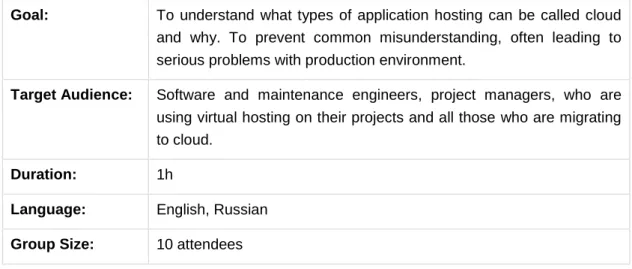
Goal: To understand what types of application hosting can be called cloud and why. To prevent common misunderstanding, often leading to serious problems with production environment.
Target Audience: Software and maintenance engineers, project managers, who are using virtual hosting on their projects and all those who are migrating to cloud.
Duration: 1h
Language: English, Russian
Group Size: 10 attendees
Table 5 – Virtual Hosting vs. Cloud Computing
1.6.
Auto-configuration in Cloud
A training on auto-configuration general concepts, popular auto-configuration frameworks, scenarios and approaches.
Attendees will have the following knowledge after training delivery: Automation pros and cons;
The most popular things to automate;
The means: scripting languages and frameworks; Simple scenarios of automation in practice; Complicated scenarios
Prerequisites:
Attend ‘Cloud Computing. Five Essential Characteristics’
Attend ‘Cloud Computing. IaaS, PaaS, Saas layers’
Goal: To make engineers think on improvement of their routine work, teach them what and how exactly to automate.
Target Audience:
Developers and operations who take part or want to design architecture for their application development and hosting in cloud
Duration: 4h
Language: English, Russian
Group Size: 10-20 attendees
Table 6 – Auto-configuration in Cloud
1.7.
Continuous Delivery / Continuous Integration
A presentation about continuous delivery and continuous integration practices. How cloud is useful and applied to these practices.
Cloud Training Portal – Trainings
Attendees will have the following knowledge after training delivery: What do CI / CD terms mean, history
Relationship of CI/CD with other technologies, methodologies (DevOps, Agile, Lean etc.)
What Cloud can do for CI/CD and why (auto-configuration, automation, infrastructure)
Prerequisites:
Attend ‘Cloud Computing. Five Essential Characteristics’ Attend ‘Cloud Computing. IaaS, PaaS, Saas layers’
Goal: Teach CI/CD terms and show Cloud Services appliance in CI/CD
Target Audience:
Engineers interested in improvement and optimization of their delivery process
Duration: 1h
Language: English, Russian
Group Size: 5-14 attendees
Table 7 – Continuous Delivery / Continuous Integration
1.8.
Architecture of infrastructure in Cloud
When building infrastructure in cloud, an engineer should keep in mind the specifics and features of cloud services. Presentation tells about best practices and techniques used for efficient application architecture.
Attendees will have the following knowledge after training delivery:
Key cloud specifics to keep in mind while designing architecture of your application in cloud;
Different patterns of application infrastructure in cloud;
Capacity planning - developing a strategy that guarantees your infrastructure can support the resource demands placed on it;
Disaster recovery planning - how to deal with catastrophic failures; Prerequisites:
Attend ‘Cloud Computing. Five Essential Characteristics’ Attend ‘Cloud Computing. IaaS, PaaS, Saas layers’
Cloud Training Portal – Trainings
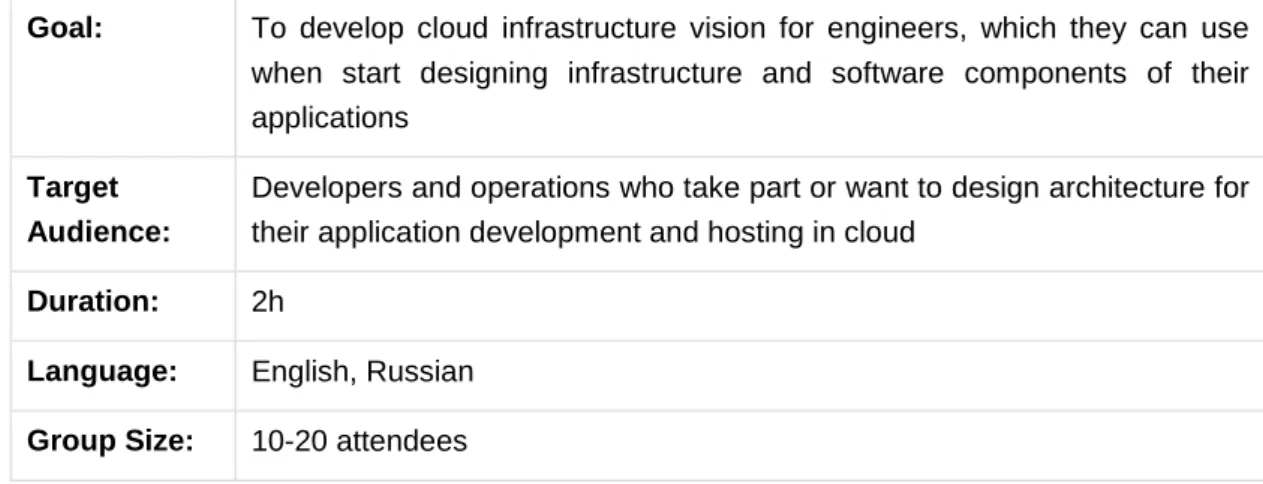
Goal: To develop cloud infrastructure vision for engineers, which they can use when start designing infrastructure and software components of their applications
Target Audience:
Developers and operations who take part or want to design architecture for their application development and hosting in cloud
Duration: 2h
Language: English, Russian
Group Size: 10-20 attendees
Table 8 – Architecture of infrastructure in Cloud
1.9.
Self-service in EPAM Private Cloud
EPAM is shifting to a self-service model for optimization of software development and hosting processes. This training will help attendees to understand the self-service model and to create/manage infrastructure without assistance.
Attendees will have the following knowledge after training delivery: Why is EPAM shifting to a self-service model in private cloud? What are the benefits of this model?
What is DevOps and why is it progressive?
What is the current infrastructure of Private Cloud for Developers? How to launch/stop a virtual machine without assistance?
What are quotas and why they are important? How to attach virtual storage?
Where to find out information about more complicated operations? What are other interesting subjects worth studying?
Goal: Help EPAM engineers to understand reasons and benefits of EPAM private cloud self-service model usage.
Target Audience:
Maintenance, software, testing engineers, managers who are familiar with cloud computing concepts. Top priority is engineers, who are already using virtualization services.
Duration: 3h
Language: Russian or English (upon request)
Group Size: 14 attendees
Cloud Training Portal – Trainings
2.
Windows Azure
2.1.
Starting with Windows Azure
The presentation tells about basic Windows Azure concepts and features. We will publish the first Windows Azure project via Visual Studio and Eclipse IDEs.
Prerequisites:
Have an idea of infrastructure and application hosting. Windows Azure SDK;
Subscription to Windows Azure. .Net:
Visual Studio 2010 SP1; Java:
JDK 1.6; Eclipse Indigo;
Windows Azure Plugin
Attendees will have the following knowledge after training delivery: What is Windows Azure;
What services Windows Azure consists of;
Differences between cloud application execution models; Basic knowledge about data management services.
Goal: Take a quick look at all Windows Azure services. Discover cloud application execution models and data management services. Understand the basic concepts of project publishing. Develop application for cloud.
Target audience: .NET and Java engineers who are interested in cloud computing.
Duration: 1h
Language: Russian
Group size: 10-30 attendees
Table 10 – Windows Azure Fundamentals
2.2.
SQL Azure
xPenses is a well working on-premise application. Let’s try to migrate it to cloud. Prerequisites:
Attend ‘Windows Azure Fundamentals’ training; Attend ‘Hello Windows Azure’ training.
Cloud Training Portal – Trainings
Attendees will have the following knowledge after training delivery:
General differences between on-premise SQL Server and SQL Azure. Different ways of migration on-premise database to cloud.
Goal: Take a look at general SQL Azure concepts, differences between on-premise SQL Server and SQL Azure. Migrate an existing application to the cloud environment.
Target audience: DBAs, .NET and Java engineers who are interested in cloud computing.
Duration: 1h
Language: Russian
Group size: 10-30 attendees
Table 11 – SQL Azure
2.3.
Windows Azure Storage Services
Windows Azure provides different ways of storing application data. In the previous lecture we've discovered SQL Azure. Let’s take a look at non-relational Windows Azure data management services.
Prerequisites:
Attend ‘Windows Azure Fundamentals’ training; Attend ‘Hello Windows Azure’ training.
Attend ‘SQL Azure’ training.
Attendees will have the following knowledge after training delivery: Windows Azure Storage Services types;
Windows Azure Storage Services interaction workflow. Roles of Tables, Queues and Blobs.
Goal: Take a look at Windows Azure data management services. Discover the way of interaction with Windows Azure Storage Services. See the differences between storage emulator and real services.
Target audience: .NET engineers who are interested in cloud computing.
Duration: 1h
Language: Russian
Group size: 10-30 attendees
Cloud Training Portal – Trainings
2.4.
Windows Azure Drive
Windows Azure Drive is a way of using legacy I/O operation in cloud application. Let’s investigate it.
Prerequisites:
Attend ‘Windows Azure Fundamentals’ training; Attend ‘Hello Windows Azure’ training;
Attend ‘Windows Azure Storage Services’ training.
Attendees will have the following knowledge after training delivery: Windows Azure Drive back-end infrastructure;
Windows Azure Drive mount modes; Windows Azure Drive workflow.
Goal: Show the simplicity of using Windows Azure Drive in cloud applications which use legacy I/O operations.
Target audience: .NET engineers who are interested in cloud computing.
Duration: 1h
Language: Russian
Group size: 10-30 attendees
Table 13 – Windows Azure Drive
2.5.
Windows Azure Service Bus
Windows Azure Service Bus is a technology for brokered messages application communication. It also supports publish/subscribe pattern and relay features for WCF services. All of them will be discovered.
Prerequisites:
Attend ‘Windows Azure Fundamentals’ training; Attend ‘Hello Windows Azure’ training.
Attend ‘Windows Azure Storage Services’ training.
Attendees will have the following knowledge after training delivery:
Differences between Windows Azure Queues and Service Bus Queues; Service Bus workflow;
Cloud Training Portal – Trainings
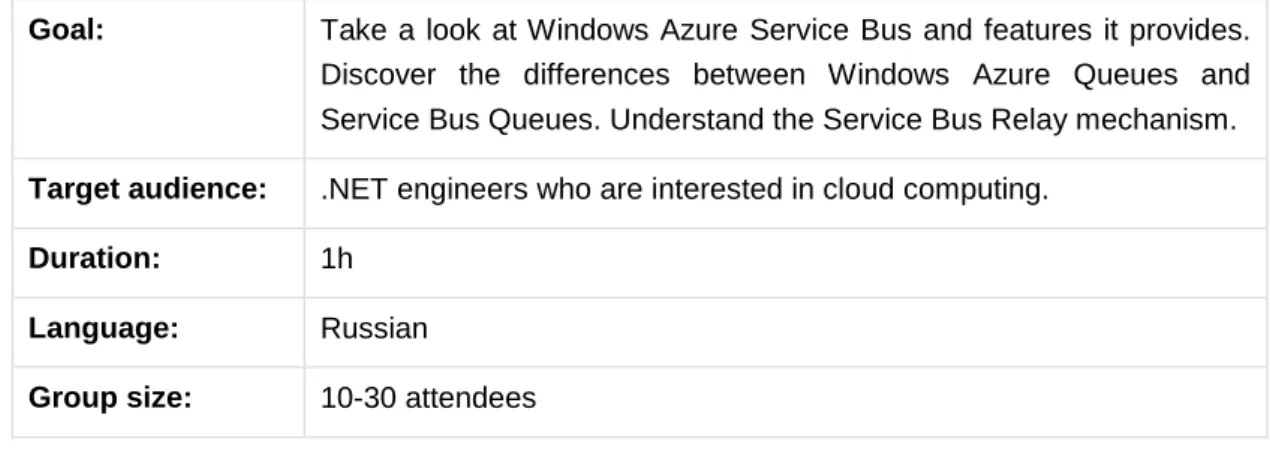
Goal: Take a look at Windows Azure Service Bus and features it provides. Discover the differences between Windows Azure Queues and Service Bus Queues. Understand the Service Bus Relay mechanism.
Target audience: .NET engineers who are interested in cloud computing.
Duration: 1h
Language: Russian
Group size: 10-30 attendees
Table 14 – Windows Azure Service Bus
2.6.
Windows Azure Caching
Windows Azure provides several technologies related to caching. All of them are easy to use. We will discover how to setup CDN for Storage Services and two ways of configuring cache cluster via worker role.
Prerequisites:
Attend ‘Windows Azure Fundamentals’ training; Attend ‘Hello Windows Azure’ training.
Attendees will have the following knowledge after training delivery: Windows Azure Caching services types;
CDN setup workflow;
Two ways of configuring cache cluster: co-located role and dedicated role.
Goal: Overview of the Windows Azure caching services: CDN and Caching.
Target audience: .NET engineers who are interested in cloud computing.
Duration: 1h
Language: Russian
Group size: 10-30 attendees
Table 15 – Windows Azure Caching
2.7.
IaaS: Virtual Machines
Windows Azure Virtual Machines overview. Basic operations with Infrastructure. Prerequisites:
Cloud Training Portal – Trainings
Attendees will have the following knowledge after training delivery:
How to create virtual machines using Windows Azure Management Portal.
Goal: Understand basic concepts of Windows Azure Virtual Machines. Create first Virtual Machine.
Target audience:
IT specialists and .NET engineers who are interested in cloud computing.
Duration: 1h
Language: Russian
Group size: 10-30 persons
Table 16 – IaaS: Virtual Machines
2.8.
Access Control Service
Discover Windows Azure authorization mechanism using Access Control Service. Prerequisites:
Attend ‘Windows Azure Fundamentals’ training; Attend ‘Hello Windows Azure’ training.
Attendees will have the following knowledge after training delivery: Windows Azure authorization using tokens basic principles; Security Token Services interaction.
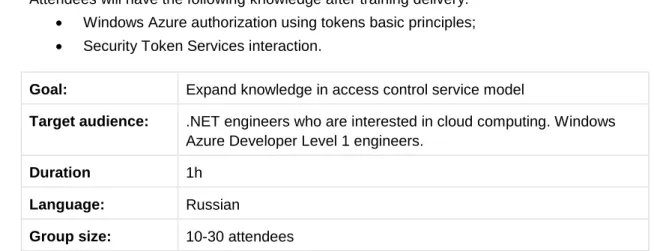
Goal: Expand knowledge in access control service model
Target audience: .NET engineers who are interested in cloud computing. Windows Azure Developer Level 1 engineers.
Duration 1h
Language: Russian
Group size: 10-30 attendees
Cloud Training Portal – Trainings
3.
Amazon Web Services
3.1.
Creation of AWS simple Stack trough Cloud Formation
and User-Data script
Presentation tells about possibilities and benefits of using AWS Cloud Formation and shows a simple way to launch infrastructure in only 1 simple CLI command.
Prerequisites:
Read & investigate ‘Exploring AWS. Basics’
Read & investigate ‘Simple Infrastructure with only 3 commands’
Attendees will have the following knowledge after training delivery: Get familiar with Cloud Formation;
Knowledge on AWS templates and their utilization How to create simple stack using Cloud Formation
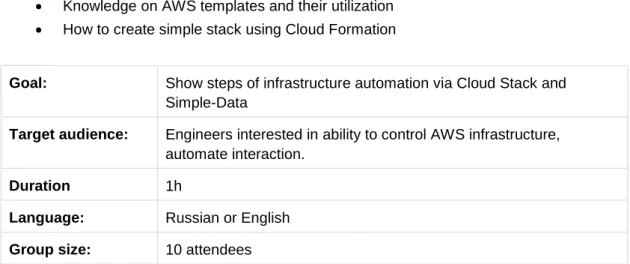
Goal: Show steps of infrastructure automation via Cloud Stack and Simple-Data
Target audience: Engineers interested in ability to control AWS infrastructure, automate interaction.
Duration 1h
Language: Russian or English
Group size: 10 attendees
Cloud Training Portal – Trainings
Tables
Table 1 - Cloud Computing. Five Essential Characteristics... 6
Table 2 - Cloud Computing. Service Models ... 7
Table 3 - Cloud Computing. Deployment Models ... 7
Table 4 – DevOps/Self-Service approach ... 8
Table 5 – Virtual Hosting vs. Cloud Computing ... 9
Table 6 – Auto-configuration in Cloud... 9
Table 7 – Continuous Delivery / Continuous Integration ... 10
Table 8 – Architecture of infrastructure in Cloud ... 11
Table 9 – Self-service in EPAM Private Cloud ... 11
Table 10 – Windows Azure Fundamentals ... 12
Table 11 – SQL Azure ... 13
Table 12 – Windows Azure Storage Services ... 13
Table 13 – Windows Azure Drive ... 14
Table 14 – Windows Azure Service Bus ... 15
Table 15 – Windows Azure Caching ... 15
Table 16 – IaaS: Virtual Machines ... 16
Table 17 – Access Control Service ... 16
Table 18 – Creation of AWS simple Stack trough Cloud Formation and User-Data script .. 17
Version history
Version Date Summary
1.0 September 13, 2012 The initial version is published
1.1 September 17, 2012 Fixed spelling and increased readability, added Lab markup.
1.2 October 2, 2012 Added new trainings. Expanded sections, introduced AWS trainings
Global
41 University Drive Suite 202, Newtown (PA), 18940, USA
Phone: +1-267-759-9000 Fax: +1-267-759-8989
EU
Corvin Offices I. Futó st 47-53 Budapest, H-1082, Hungary Phone: +36-1-327-7400 Fax: +36-1-577-2384