CMDB in 5 Steps
A Project Guideline for
Implementing a Configuration
Management Database
Authors:
Klaus Dettmer, Product Manager, iET Solutions Andy Watson, Presales Consultant, iET Solutions
external Contributors:
Table of contents
1 The Significance of the Configuration Management Database for
IT Service Management 3
1.1 The CMDB as Basis for Cost Savings and Process Optimisation 4
1.2 The Way to a Successful Project 5
1.3 Requirements of ISO 20000 “IT Service Management“ 7
2 Building a CMDB in Five Steps 7
2.1 Step 1: Defining the Objectives 7
2.2 Step 2: Assignment of Responsibilities and Staff Motivation 8 2.3 Step 3: “Bottom-up” or “Top-down”: The Right Approach 9
2.4 Step 4: Defining Contents 10
2.4.1 Definition: Configuration Item 10
2.4.2 Content of the CMDB 10
2.4.3 Examples of Attributes for a Hard-/Software CI 11 2.4.4 Examples of Attributes for a Hardware Component 11 2.4.5 Four Rules for Selecting the Appropriate Level of Detail 11
2.5 Step 5: Filling the CMDB with Data 12
3 Tool Support with iET ITSM and iET CMDB Discovery & Intelligence 13
3.1 Structure of the CMDB in iET ITSM 14
3.2 Products, Components and their Attributes 15 3.3 Configuration Items and their Attributes 16 3.4 Filling the Inventory Staging Area with CIs 16
3.5 Creating Links: Data Mapping 17
3.6 Filling the CMDB 18
3.7 Variance Comparison when Using the CMDB 18 3.8 Summary: Building and Filling the CMDB 20
1. The Significance of the Configuration Management Database for IT Service Management
Organisations adopting ITIL based standards and processes frequently start with the implementa-tion of Incident Management, followed by Problem Management. This stands to reason, since both processes are extensions of the original helpdesk which usually already exists and can be enhanced and extended. In this way quick results can be achieved with regards to improved customer service. Now attention is turning towards Change and Release Management and organi-sations have realised that they need a Configuration Management Database (CMDB) moving for-ward. But the implementation of a CMDB presents many challenges, both technical and organisa-tional.
In line with ITIL Best Practices, the Configuration Management Database is the central database of IT Service Management and thus the foundation for high quality customer service, stable sys-tems and applications as well as a controlled IT infrastructure. All ITIL processes concerning Service Support and Service Delivery, but also processes such as IT Security Management, depend on the Configuration Management Database and can only function seamlessly if the data-base provides current and accurate data. While Configuration Management is the discipline responsible for the CMDB, Change Management according to ITIL is the process that controls the changes in the CMDB. In addition, ISO 20000 “IT Service Management” puts Configuration and Change Management as control processes clearly in the centre of its requirements.
1.1 The CMDB as Basis for Cost Savings and Process Optimisation
About 70 % of the costs associated with the Y2K-changes were spent on identifying the IT infrastructure and its components as well as on locating the
Configuration Items. The majority of these costs could have been saved if more accurate information had been available at the time. Today, legal requirements such as the Sarbanes-Oxley-Act (SOX), Basel II or software audits again demand a detailed knowledge of the IT infrastructure, which can only be gained with a CMDB. In addition organisations can assess potential risks of changes in advance and thus minimise negative effects on the business operations with the help of a CMDB. ITIL describes Configuration Management as follows:
“Configuration Management creates a logical model of the infrastructure and the available ser-vices. This happens by identifying, controlling, maintaining and verifying the versions of all existing Configuration Items (CIs). The objectives of the Configuration Management are:
nProvide information about all IT components and configurations within the enterprise and its
services.
nMake available information about configuration and its documentation for support of all other
IT Service Management processes.
nProvide a solid base for Incident, Problem, Change and Release Management.
nVerify the configuration documentation as compared to the infrastructure and address deviations
if applicable.“
The ITIL Best Practices describe the CMDB as “a database that contains all relevant details for each Configuration Item (CI) as well as details concerning the important relationships between the CIs.“ With regards to information depth and degree of detail in the CMDB, ITIL simply states “everything you wish to keep under control.”
“Configuration Management creates a logical model of the infrastructure and the available services. This happens by identi-fying, controlling, maintaining and verifying the versions of all exis-ting Configuration Items (CIs).”
1.2 The Way to a Successful Project
Many organisations try hard to show their entire IT infrastructure including all detail information in the CMDB. This flood of information can lead to significant delays and may result in a failure to achieve the original objectives within the agreed time, quality and cost constraints.
According to analysts like Gartner and Forrester:
nA Return on Investment (ROI) can be achieved within 12-18 months.
(Forrester, 2005: IT Asset Management, ITIL, and the CMDB )
nSavings of up to 25 % of Total Cost of Ownership are possible, if 3 % of the operational
IT Budget can be invested in an asset (configuration) management solution. (Gartner: Predicts 2005: IT Asset Management Adds Value)
The concept of Total Cost of Ownership was developed by the Gartner Group and looks at the costs of a service or Configuration Item across its entire lifecycle. In addition to the actual expen-ses such as purchase price, the costs of incidents, problems, changes, maintenance, etc. are also considered and added to the cost assessment.
The quote above refers to the TCO, which is estimated for the sum of Configuration Items and services, and can be reduced by 25 % when using a Configuration Management solution.
Whether or not financial improvements as mentioned above can be realised depends on the initial situation and the objectives of the individual organisation. Independent of ROI and cost savings, the CMDB can lead to improvements in virtually all IT processes and can support organisations in their compliance efforts with regards to legal requirements. For instance, SOX states, “the compa-ny management is personally liable for violations of license agreements.” Up to 5 years imprison-ment or significant fines are possible for commercial copyright violations. The CMDB can help meet these legal requirements as installed software instances are also maintained as CIs in the CMDB.
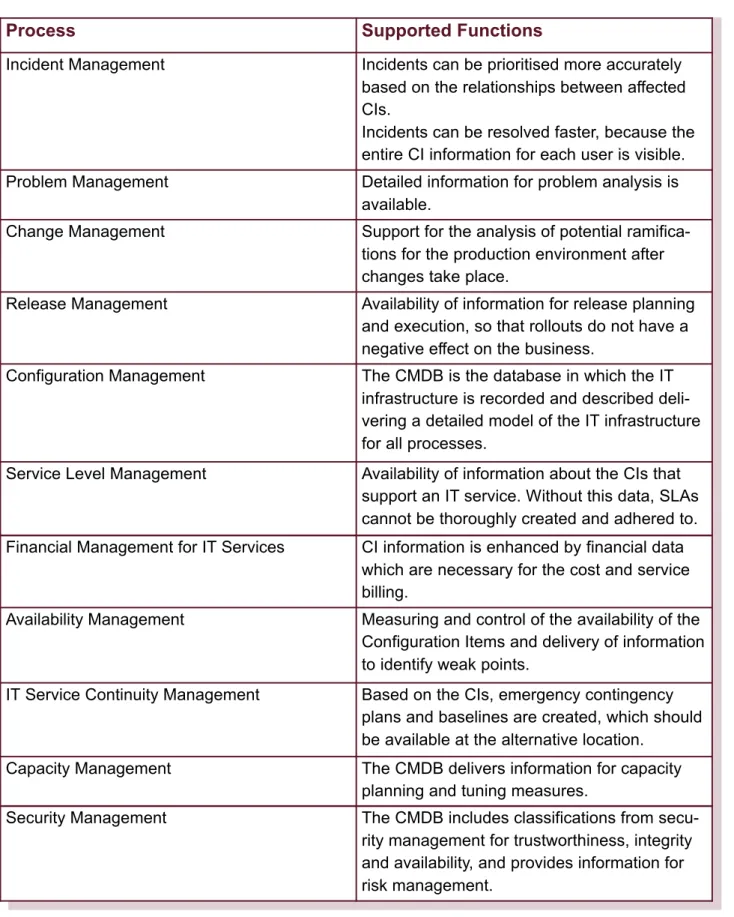
Table 1 on the next page shows which functions are supported by the CMDB in the relevant IT Service Management processes
.
Table 1: Functions supported by the CMDB
Process Supported Functions
Incident Management Incidents can be prioritised more accurately based on the relationships between affected CIs.
Incidents can be resolved faster, because the entire CI information for each user is visible. Problem Management Detailed information for problem analysis is
available.
Change Management Support for the analysis of potential ramifica-tions for the production environment after changes take place.
Release Management Availability of information for release planning and execution, so that rollouts do not have a negative effect on the business.
Configuration Management The CMDB is the database in which the IT infrastructure is recorded and described deli-vering a detailed model of the IT infrastructure for all processes.
Service Level Management Availability of information about the CIs that support an IT service. Without this data, SLAs cannot be thoroughly created and adhered to. Financial Management for IT Services CI information is enhanced by financial data
which are necessary for the cost and service billing.
Availability Management Measuring and control of the availability of the Configuration Items and delivery of information to identify weak points.
IT Service Continuity Management Based on the CIs, emergency contingency plans and baselines are created, which should be available at the alternative location.
Capacity Management The CMDB delivers information for capacity planning and tuning measures.
Security Management The CMDB includes classifications from secu-rity management for trustworthiness, integsecu-rity and availability, and provides information for risk management.
1.3 Requirements of ISO 20000 “IT Service Management”
While the ITIL Best Practices only represent recommendations, an international standard has existed since December 2005 which specifies the minimum requirements for IT Service
Management. Among other things ISO 20000 demands “All CIs must be uniquely identifiable and recorded in the CMDB, ( … ) for a CI the related changes and problems must be available.” ISO 20000 is a relatively new evolution of ITIL Best Practices, but Gartner assumes that by the end of 2008 at least 60 % of the relevant procurement projects in the public sector and at least 30 % in the private sector in developed economies will require an ISO 20000 certification (Gartner, 2006: ISO/IEC 20000 Has an Important Role in Sourcing Management).
2. Building a CMDB in Five Steps
A multitude of sources delivers data to the CMDB. This will include information which is redun-dant, as in not necessary, and also because it duplicates or contradicts other information sources. IT organisations need to define a process which determines the necessary data, the handling of data storage and data updates and which sources are deemed reliable. Furthermore, objectives must be defined and process responsibilities must be
clearly assigned.
Requirements for a successful implementation are:
nDefinition of objectives from a business perspective nAcceptance and support from users and management nReasonable project duration with measurable
successes and swift integration into the daily business
2.1 Step 1: Defining the Objectives
A formalised process and additional tools to implement Configuration Management and a suppor-ting CMDB should be introduced in order to deliver specific business benefits. Ideally there will be reliable information on the current status and performance of the IT organisation. From this infor-mation, and knowledge of the organisation, goals can be defined that are desirable, measurable and achievable. Questions to be addressed include:
nWhich current difficulties, bottlenecks, etc. are the trigger for this project? nWhich benefits do you expect? Which services shall be improved?
nWho will use the CMDB? What kind of information will the system users search for? What
expectations do they have?
nWhat are your measurable criteria for success?
The reasons for building a CMDB vary and can provide important pointers towards the most use-ful implementation procedures (see chapter 2.3).
CMDB in 5 Steps
n1. Defining goals
n2. Assignment of responsibility n3. The right approach
n4. Defining CMDB contents n5. Filling the CMDB with data
2.2 Step 2: Assignment of Responsibility and Staff Motivation
Change is uncomfortable and results in additional work. Make sure all employees are brought on board from the start and put together an interdisciplinary team. The team needs to participate in defining goals relevant to the CMDB project and to divide the project into phases to deliver demonstrable short-term success.
Be clear about responsibilities. There must be a process owner for Configuration Management. By clearly assigning responsibility you can ensure the success of the project and ensure that the CMDB delivers powerful and correct information. Also responsibility should be assigned for the various information sources for the CMDB, to ensure that interfaces are correctly implemented and maintained.
Configuration Management has to go hand in hand with the establishment of Change Manage-ment and the designation of a Change Manager. As soon as the CIs are recorded, the maintenan-ce promaintenan-cess has to be in plamaintenan-ce. Otherwise, the accuracy of the CMDB cannot be ensured and the investment may be wasted.
Employees in the following departments are ideal candidates for the project team:
nAdministrator of the IT infrastructure (often described as asset management or inventory
management)
nApplication management
nStaff members from all processes, especially Incident, Problem and Change Management.
Communication is an important element for success. Intranet sites are a proven tool where project goals and achievements can regularly be communicated. Reports in employee newsletters, round table discussions and information events enhance awareness among employees of the signifi-cance of the project and keep the team motivated.
2.3 Step 3: “Bottom-up” or “Top-down”: The Right Approach
“Bottom-up” or “Top-down” – the best procedure strongly depends on the size of the organisation, number of Configuration Items and overall objectives. With a bottom-up approach one has to be careful not to lose sight of the goal. Usually many “local CMDBs“ already exist in the form of MS Excel files, MS Access databases, etc. which need to be consolidated. The challenge here is to successfully consolidate the administration of these local CMDBs whilst meeting the dual objectives of providing sufficient detail for specialist users without the CMDB becoming too large and unwieldy to be an effective tool. Replacing local tactical information sources maintained by individuals can be politically sensitive as it can be construed as a reduction in their responsibili-ties.
Furthermore, you will be swamped with data, which for the most part is not necessary. When com-bining information from software distribution solutions and user administration, several thousand relationships can occur in organisations with 1000 PC workstations and 30 applications, and they will all need to be maintained in the CMDB. The danger exists that you would establish a central database with a vast number of IT assets which will never fulfil the characteristics of a CMDB such as accurate relationships or restriction to important Configuration Items.
Therefore, iET Solutions recommends the “Top-down“ approach. Instead of recording every Configuration Item with all configurations, focus should be on the elements that have the greatest impact on the delivery of the IT services. Check your goals: What benefits are expected? Which services shall be enhanced?
In reality a scan of the IT infrastructure will be performed with the help of a discovery solution. The amount of discovered information will be reviewed according to which Configuration Items are supporting enterprise-critical services and which ones shall be recorded in the CMDB. It is not desirable to record every CI with every configuration attribute in minute detail. A frequent success-ful approach is to start with two or three of the most important services and then gradually expand the CMDB. Often the product catalogue of an organisation will be used as a guideline for building the CMDB.
The requirements of ISO 20000 provide tips for the size and level of detail of a CMDB: “( … ) it must be assured that the degree of control is appropriate for the business requirements, error risks and criticality of the service.” Here you can also see the reference to the top-down approach. Organisations should take a look at their defined IT services and analyse which components and systems are necessary for performing the services and which detailed information is required. The challenge lies in the critical review of the necessary components, but this review also provides the opportunity to limit the size from the start in order to quickly use the CMDB in a production setting.
2.4 Step 4: Defining Contents
Within Configuration Management the CIs, their relationships and their relevant attributes are defined. The main question here is “Which information do we need to successfully deliver our IT services?”
2.4.1 Definition: Configuration Item
According to ITIL a Configuration Item is “a part of the infrastructure that is required for the deli-very of systems, applications and services.” The depth of information is virtually unlimited. For instance, a laptop can be recorded as one CI, or each of its components can become a single CI (processor, RAM, network card, drive . . .). Decisions on the level of granularity, and the level of detail at each level of CI must be taken based upon what information the process participants definitely need for delivery of the services and to comply with existing legal requirements.
For example if desktop PCs are leased for a fixed period and covered by an external support and maintenance agreement there may be no need to record child CIs or components. On the other hand if IT staff frequently swap components and upgrade systems during their lifetime then addi-tional detail would be justified.
2.4.2 Content of the CMDB
The content of the CMDB is structured as follows: 1. Configuration Items (CI)
Elements of the IT infrastructure, which support a service, such as hard- and software.
nHardware: PCs, laptops, printers, servers nNetwork: Cables, switches, router, hubs nSoftware: Operating systems, applications nDocumentation and contracts
2. Components
Elements of the IT infrastructure, which should not be recorded as CIs to reduce the data volume of the CMDB and to simplify the maintenance:
nGraphic or network cards
3. Attributes:
Technical and economic data which describe a Configuration Item or a component in more detail, such as:
nPhysical attributes, delivered by the discovery solution, e.g. manufacturer, model and serial
number
nLogical attributes which are recorded manually or by connecting to another system such as
cost centre, purchase price, etc. 4. Relationships
This refers to CI relationships as well as relations to services:
nService to CI relationship nCI to CI relationship
2.4.3 Examples of Attributes for a Hard-/Software CI nCI-name / name of component (= unique identifier)
nType
nSerial number (hardware) or license number (software) nModel number (hardware) or version number (software)
nEnd date of warranty (hardware), end date of maintenance (software) nLocation (hardware)
nOwner / user nSource / Provider nInstallation date
nCurrent status (e.g. for hardware ordered, received, in use, archived, not used, in stock, in
repair)
nNotes
2.4.4 Examples of Attributes for a Hardware Component nName of the component (= unique identifier)
nType
nSerial number nModel number nEnd date of warranty nSource / Provider nInstallation date
nCurrent status (ordered, received, in use, archived, not used, in stock, in repair)
2.4.5 Four Rules for Selecting the Appropriate Level of Detail nRecord all that will be needed (also in the future)!
nDon’t record what will not be needed! nOnly record what can be measured!
nWatch the effort regarding data maintenance!
2.5 Step 5: Filling the CMDB with Data
An organisation will hardly enter all information manually in the CMDB. This is not manageable considering the complexity of today’s IT environments. Moreover, the data would not be complete and accurate at any one point in time. Inventory discovery solutions allow the gathering of most of the Configuration Items by scanning the IT infrastructure and deliver the data for the initial popula-tion of the CMDB and the subsequent reconciliapopula-tion with the CMDB.
The quality of the CMDB increases if the following is done:
nDetermine the “leading systems”, from where data shall be imported, e.g. user administration,
employee personnel data from HR systems.
nAutomate data import and synchronisation.
nDefine the maintenance process and use tools to implement it.
nReduce the number of interfaces to easily support administration and maintenance.
The CMDB always represents the nominal inventory and also contains regulatory compliance information such as software licenses in use. Therefore, any changes to the CMDB must be made in a controlled fashion, and be authorized and verified by Change Management. As a result, the database of an inventory discovery solution never represents the CMDB, but only the actual inventory. Variances between nominal and actual inventory should be automatically marked, but a potentially necessary change in the CMDB must be performed manually and in a controlled way. An inventory discovery solution must never change the nominal inventory without verification. Just because the solution finds games like “Solitare.exe” that come automatically with some programs, they do not represent CIs and do not belong in the CMDB.
Increasingly stringent regulations such as the Sarbanes-Oxley Act (SOX) and higher penalties associated with licensing infringements, are another factor that makes it more critical than ever before to maintain accurate and in-depth information on Configuration Items. SOX, and others appear at first glance to focus on accounting and auditing. But data management in general and financial reporting in particular is almost completely reliant on the performance of the IT infra-structure such as networks, software, servers, and desktops.
SOX and other regulations require documented controls and processes for the IT hardware and software used in the financial reporting system and, where Configuration Items are material to financial statements, for those CIs themselves. Most companies have a huge number of CIs in-volved in financial reporting, ranging all the way from the computers used to track inventory in a plant to the ones used to prepare the income statement. Knowing where all those are, what safe-guards are in place to prevent unauthorized access, and ensuring that you will be able to detect any change, is key. To manage authorisation processes and provide an audit trail to track changes with the help of the CMDB and Change Management is especially important when adopting SOX and other legal requirements.
3. Tool Support with iET ITSM and iET CMDB Discovery & Intelligence
The Configuration Management Database is part of iET ITSM, the IT Service Management offe-ring from iET Solutions. In addition to the CMDB, iET ITSM includes applications for Incident, Problem, Change, Release, Configuration as well as Service Level Management. A special feature of iET Solutions’ iET ITSM focuses on the relationships between the Configuration Items as well as on the graphical representation of the related incidents, problems, changes and releases. With its additional modules, iET CMDB Discovery & Intelligence, iET Solutions offers enhance-ments to iET ITSM, which provide additional automation in support of the Change and Configura-tion Management processes. The CMDB is initially filled with data via iET CMDB Discovery & Intelligence and then kept current moving forward. The automated variance comparison between the actual inventory found by the inventory discovery solution and the nominal inventory in the CMDB allows for the detection and control of authorised as well as non-authorised changes and, if necessary, the initiation of corrective measures.
The agentless discovery solution iET CMDB Discovery scans the IT infrastructure. With the help of the intelligent interface iET CMDB Intelligence the desired data can be transfered to the CMDB in a controlled fashion. The control happens via mapping and filtering of the data as described in the following sections.
In addition to iET CMDB Discovery, iET CMDB Intelligence supports a number of third-party sys-tems out of the box. Other solutions can be connected via the iET Solutions XML interface or via ODBC.
3.1 Structure of the CMDB in iET ITSM
3.2 Products, Components and their Attributes
iET Solutions understands a product as a template, which serves as the base for the recording of CIs. Products are based on the product catalogue that already exists in many IT organisations. A decision must be made as to which products should be administered in the CMDB. This can be the entire product catalogue or a subset of products.
The use of products simplifies the recording of CIs. By creating a product you create a template that defines general attributes, and default values for those attributes where required. Those attri-butes can be matched with values which are identical for each CI. Attriattri-butes and values are auto-matically inherited for each CI that is assigned to the product. For instance, you do not need to enter for each laptop the value “Toshiba” as the attribute “Manufacturer”.
iET ITSM allows for the definition of components. Components are elements of a product which are not listed as CIs to keep the process simple and to avoid excessive maintenance efforts. The use of components is optional. Depending on need and objectives, you can also define the ele-ments as CIs instead of components. The higher maintenance effort, however, needs to be care-fully assessed in advance.
The definition of products and components is the most important part when building a CMDB. In this phase, you decide which CIs will be administered later in the CMDB and how deep a level of detail will be recorded. Depending on the size of the organisation and the number of existing IT assets, this process can take a big part of the project.
Example for a product:
Example for a component:
Component Graphic card “Nvidia“
Product Toshiba Laptop Satellite Pro 4600
Attribute, which is relevant for each CI, with a predefined value
Attribute: Manufacturer
Predefined value: Toshiba Laptop Satellite Pro 4600
will be automatically be inherited at CI level Attribute, which is relevant for each CI,
without a predefined value
Serial number
The actual value,i.e. the serial number itself, will be recorded at CI level.
Relationships To services and components
3.3 Configuration Items and their Attributes
Unlike products which only serve as templates, or definitions of objects, the CIs represent actual instances of hardware and software as well as documentation (e.g. contracts). Attributes and com-ponents are inherited from the product as well as component attributes. These are populated with actual values when the CI is created. As mentioned above the most efficient way of creating and describing the CI will be with the help of the inventory discovery tool and iET CMDB Intelligence. Example:
For software CIs iET Solutions offers the ability to use the so-called Gathered CIs. With a Gathered CI a particular type of software such as Microsoft Windows Word 2000 will only be recorded once with all its details. All computers that have Microsoft Windows Word 2000 installed will be displayed via the CI relationships. This significantly reduces the quantity of CIs that are administered in the CMDB. On the other hand, specific data such as different serial numbers can no longer be maintained. The use of Gathered CIs does not comply with the guidelines of ITIL and has to be carefully assessed prior to implementation. The decision to use this feature will depend on data volume and the objectives of the CMDB implementation at a specific organisation.
3.4 Filling the Inventory Staging Area with CIs
XML files are created with the help of the inventory discovery solution containing all detected Configuration Items and their detail information. These XML files are written to the inventory sta-ging area via the iET Import Server. Alternatively, the data can be called via ODBC from the data-base of the inventory discovery solution. The inventory staging area serves as the datadata-base for the actual inventory. iET Solutions considers Configuration Items in the inventory staging area as “Inventory CIs.” These are administered in the inventory staging area – separately from the nomi-nal CIs which are administered in the CMDB.
Usually during the first import, also called initial import, all data is written to the inventory staging area. Afterwards the information is reviewed and those pieces of information that shall not be administered in the CMDB are filtered out. The decision is made for products, Configuration Items, components and their attributes. Setting filters reduces the amount of data. Filters can be set to prevent data from being written to the inventory staging area in the first place and/or to exclude data from the import into the CMDB.
CI Toshiba Laptop Satellite Pro 4600
Attribute - Serial Number Value = 4711
Component – Graphic Card Value = GeForce Go 7900 GTX Attribute RAM for the component
graphic card
Value = 128 MB
Relationships to services and contracts Will be inherited from the product
Relationships to CIs nTo software CIs, e.g. installed software
“Microsoft Windows 2000”
Once a filter is set, it is also valid for updates and new imports. For instance, filters allow the exclusion of data relating to detailed BIOS information or executable program files, e.g. Windows Live Update, that come with the operating system.
Image 3: The actual inventory is saved in the Inventory Staging Area before the import into the CMDB takes place. 3.5 Creating Links: Data Mapping
iET Solutions defines mapping as the linking of products and their attributes as well as compo-nents and their attributes with their equivalents in the CMDB. The benefits of mapping are:
nIdentical products may have different labels in the staging area because information has come
from more than one source. They can be mapped to one product in the CMDB.
nDetailing of products, components and attributes can be controlled.
nDescriptions can be unified: for instance, different inventory discovery solutions show the labels
RAM and Ram-Element, which can be combined as RAM in the CMDB. Example of mapping:
Mapping is possible at product, component and attribute level. The following example illustrates the mapping of a product:
nThe inventory discovery solution finds the product “Microsoft Word” under three different labels,
since it was sometimes purchased from an OEM provider and sometimes directly from the manufacturer. The labels are: “OEM”-Word, WinWord, Microsoft Word.
nIn the CMDB all three products shall be combined under the same product with the label
“Microsoft Word.”
3.6 Filling the CMDB
If the CMDB already contains data, then the inventory CIs and CMDB CIs have to be mapped once. These mappings are maintained for later updates.
After mapping and filtering, the replication takes place. During replication, the desired inventory CIs are written into the CMDB taking into account the defined filters and established mappings. You can replicate the entire inventory of the inventory staging area or individual inventory CIs, which have been newly added or updated, i.e. full or incremental replication.
3.7 Variance Comparison when Using CMDB
During variance comparison any differences between the actual inventory (= Inventory Staging Area) and the nominal inventory (= CMDB) will be displayed. This variance comparison allows the following:
nto avoid duplication of Configuration Items (CI).
nto analyse and compare the actual IT inventory with the assets stored in the CMDB. nto detect non-authorised changes and initiate the appropriate measures.
nto identify authorised, but flawed or non-executed changes.
The variance comparison can be enabled or disabled all the way down to the attribute level, i.e. differences that are not relevant for the IT operation can be excluded from the analysis.
IP addresses are a good example. A DHCP server regularly assigns new IP addresses to laptops and PCs. The different IP addresses would be flagged as differences with each variance compari-son. But since they have no ramifications for the IT operation, they are considered irrelevant and should not be analysed. iET Solutions provides the ability to specify the following:
nto excludethe IP addresses from the CMDB update and not to record the difference or nto automatically overwritethe IP address and not to record the difference.
This control ability allows organisations to reduce the administrative effort and to focus on the analysis of important changes only.
Image 4: The variance comparison shows the differences at CI level as shown here, but also at the product, component and attribute level.
3.8 Summary: Building and Filling the CMDB
Here is a summary of the steps for building a CMDB in iET ITSM:
nVerification of the actual current position: Scanning the IT infrastructure and reviewing the data.
Information is recorded in the inventory staging area.
nCreating products in the CMDB:
nDecision is based on the product catalogue, which products shall be administered in the
CMDB.
nDetermining the detail information, i.e. defining attributes and components. nCreating filters for
nProducts nComponents nAttributes
nConfiguration Items (only in case a CMDB already exists and needs to be updated) nMapping of the actual inventory of the inventory staging area to the nominal inventory of the
CMDB for
nProducts nComponents nAttributes
nConfiguration items (only in case a CMDB already exists and needs to be updated) nReplication: Saving the inventory CIs from the inventory staging area as CMDB CIs in the
CMDB after applying filtering and mapping. This process is performed at the initial filling and then every time new CIs are automatically found by the inventory discovery solution. The following automatically occurs in this case:
nMapping of CIs to products
nFilling the attribute lists that are inherited from the product with values nFilling components that are inherited from the product with values
nCreating relationships to other CIs as well as services and contracts if these are not inherited
from the product. iET CMDB Intelligence automatically creates the relationship between installed software and relevant hardware CI. Insofar as the appropriate inventory discovery tool supports it, the iET CMDB Intelligence also establishes the relationship between hardware CIs, e.g. PCs to printers and monitors.
nVariance comparison
If the CMDB already contains data, then the automatic variance comparison shows the diffe-rences between the inventory staging area and the CMDB. This variance comparison allows the control of the Change and Configuration Management.
4 Glossary
Definition of Asset / Inventory / Configuration Management: Asset Management
Asset management administers the assets from a business perspective. Values and costs hereby play a role.
Inventory Management
Inventory management includes the procedures for detection and administration of the inventory of IT assets. Mostly the technical features are maintained here.
Configuration Management
Configuration Management does not replace the inventory or asset management, but compli-ments it. Configuration Management includes information about dependencies and configuration relationships between IT components and documents in the nominal inventory via the CMDB. Baseline
At a certain point in time all Configuration Items including their characteristics are recorded and documented. The starting inventory is saved and cannot be changed. A baseline can be used as follows:
nas a starting point for further expansion and for verification of new configurations. nas a fall-back position, in case new configurations (after changes) cause problems. nas a standard for the delivery of configurations to the user.
Relationships
Relationships of Configuration Items among each other as well as to documentation (e.g. contracts) and to other ITIL processes, in particular to Incident, Problem, Change and Release Management. Relationships can be of many different types, either defined in the standard ITSM soluti-on, or as defined by customers.
OLA, Operational Level Agreement
Service Agreement with internal departments providing a supporting service, e.g. network, application support.
SLA, Service Level Agreement
Service agreements with with end user organisations, internal or external. UC, Underpinning Contract
Contracts with partners, external service providers, etc.
Subsidiaries Worldwide Headquarters iET Solutions, LLC 959 Concord Street Framingham, MA 01701, USA Phone: +1/508-416-9010 Fax: +1/508-416-9008 [email protected] www.iet-solutions.com EMEA Headquarters iET Solutions GmbH Boschetsrieder Straße 67 81379 Munich, Germany Phone: +49/89-74-85-89-00 Fax: +49/89-74-85-89-20 [email protected] www.iet-solutions.de UK Headquarters iET Solutions Ltd No. 1 Liverpool Street London, EC2M 7QD