MICROMD PM
VERSION 11.0
U P D A T E G U I D E
TABLE OF CONTENTS
ENHANCEMENTS
Enhanced Demographic Plan update function to include superbill and appointment updates ... 2
Slide Override has been added to Service Categories and Procedures ... 2
Organization has been added to the Plan level ... 5
Primary and Secondary phone numbers in the PM and EMR ... 6
Parent/Legal Guardian/Caregiver/Grandparent contact types added to PM ... 7
New option button on the Verify Plan Set Pop-up ... 8
Appointment Notes section increased ... 8
ENHANCEMENTS
Enhanced Demographic Plan update function to include superbill and appointment updates
When adding or updating plan information within the patient demographics plan window, and after Save is selected, the system will update any current and future appointments with the proper plan set and within the appointment and plan date ranges.
When editing an appointment, if the plan set is changed, the necessary Superbill tables will be updated
appropriately. Re-printing a mail merge charge slip and superbill will include the updated and accurate information based on the updated appointment plan info.
Slide Override has been added to Service Categories and Procedures
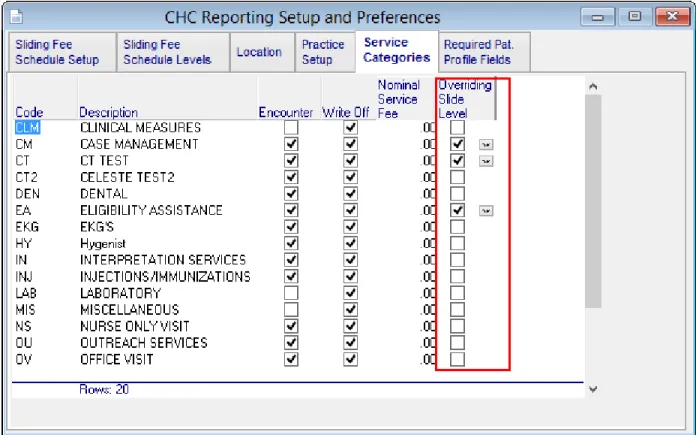
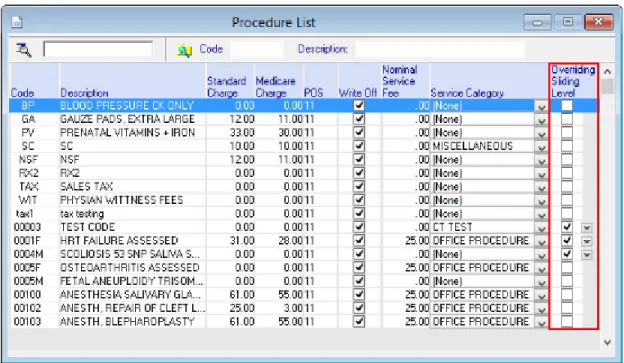
A Slide Override column has been added to Service Categories within the CHC reporting and preferences setup. It has also been added to Procedures. If a check box under this column is checked, the override would be used, and the sliding fee schedule levels associated or linked to an item setup with this particular Service Category will be followed. When checked, the override level setup windows will open to be completed with override details. When an override level has been added, a document edit icon is shown next to checkbox to reopen override level setup window for editing.
MicroMD EMR Update Guide Version 11.0 Enhancements
Figure 1-2 Sliding Level Override on the Procedure List setup window
When an override has been added to a procedure, it can be edited by clicking the small document edit icon next to the checkbox. This will open the Override Levels window as shown below.
Slide Override has been added to Service Categories and Procedures
For more information on adjusting sliding fee schedules, please refer to the MicroMD PM Users Reference Manual, Chapter 30 MicroMD CHC.
MicroMD EMR Update Guide Version 11.0 Enhancements
Organization has been added to the Plan level
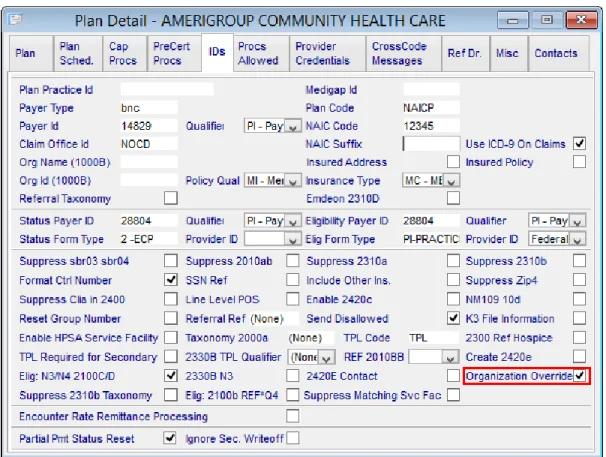
Because some insurances require the sending of organization details in claim data, an Organization Override has been added to the Plan Detail > ID window.
Primary and Secondary phone numbers in the PM and EMR
Primary and Secondary phone numbers in the PM and EMR
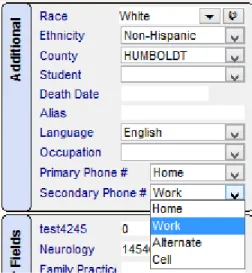
Fields have been added to identify which phone numbers will be used as primary and secondary for a patient on the PM Patient Detail window in the Additional area.
Figure 1-5 Primary and Secondary Phone # fields in in the Patient Detail window
The system will default all patient details to Home as the Primary Phone number and Work as the Secondary Phone number within the PM/EMR.
Patient defaults on the General Preferences tab of the Practice Preferences window now include Primary and Secondary phone settings.
MicroMD EMR Update Guide Version 11.0 Enhancements
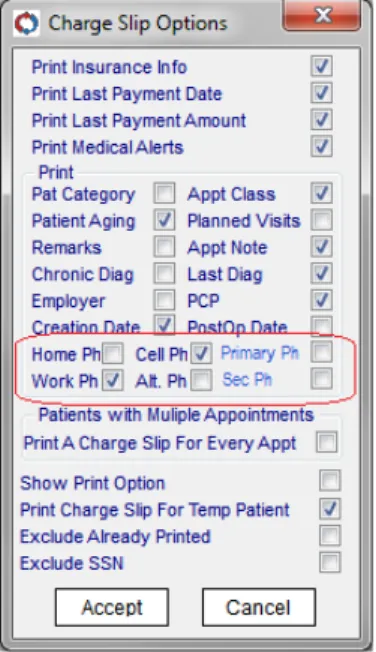
Primary and Secondary Phone numbers have also been added to Charge Slip options as shown below.
Figure 1-7 Primary and Secondary Phone numbers in the Charge Slip Options window.
Primary and Secondary Phone numbers have also been added to the Patient Detail window, the Appointments view windows, the clipboard and upon Check In/Check Out.
Parent/Legal Guardian/Caregiver/Grandparent contact types added to PM
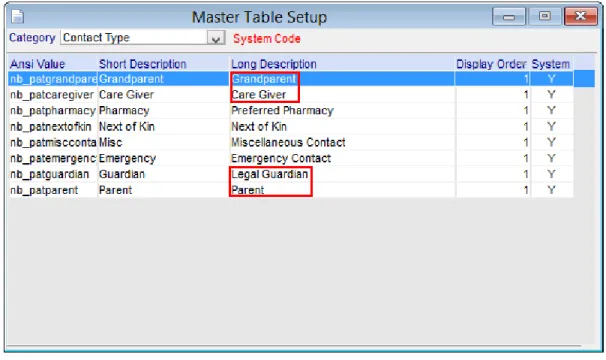
Fields Contact types have been added for Parent, Legal Guardian, Caregiver, and Grandparent have been added as contact types. This information will be recorded and passed to the MicroMD EMR when necessary. These new contact types are also now part of the current contact mail merge fields.
New option button on the Verify Plan Set Pop-up
Figure 1-8 New Contact Types in the Master Table Setup
New option button on the Verify Plan Set Pop-up
A new option selection for the “Verify Plan Set” pop-up has been added within PM Appt. General setup. The options are “N/A” (not currently used), “Arrival” and “Check-In.” The Verify Plan Set pop-up will open based on the Appointment General Setup choice when the user is in checkin/checkout.
Figure 1-9 New options for the Verify Plan Set pop-up
Appointment Notes section increased
The Appointment Note field will now accommodate a maximum of 250 characters. All characters up to the 250 limit will be displayed on hover. The text will also be displayed on hover on appointment reports and superbills.
New option to choose default Plan Set when there are more than one
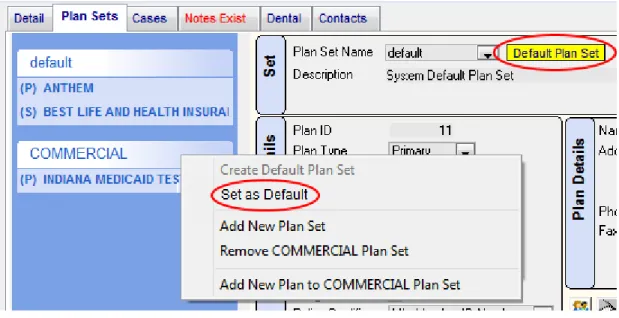
When the patient has multiple plans sets, the default plan set can now be designated easily. When the default is changed, the system will automatically designate the plan that was chosen as the default with the appropriate label. The system will also prompt the user to update all future appointments and subaccounts with the updated plan information if either of those exist.
MicroMD EMR Update Guide Version 11.0 Enhancements