Cisco Implements Enterprise Digital Signage Program
Cisco teams collaborated to deliver fresh, useful global and regional content on
digital signage.
Cisco IT Case Study / Content Delivery / Enterprise Digital Signage: This case study describes how Cisco IT, Workplace Resources (WPR), Corporate Communications’ Collaboration Business Technologies, and Employee Communications teams
collaborated to deliver compelling rich-media content to digital signs. WPR provisions the digital signs globally; IT provides the network infrastructure and troubleshooting; Collaboration Business Technologies manages the engagement; and Employee Communications manages the creation and distribution of global content. Cisco customers can draw on Cisco IT’s real-world experience in this area to plan their own digital signage programs. Customers can also engage Cisco Services to deliver the deployment and content services, which includes lessons learned from Cisco’s experience.
Background
The Cisco® Digital Media System (DMS) is a suite of applications for digital signage, desktop video, and Enterprise TV. All three applications share a single web-based management interface, reducing management overhead. To use digital signage for employee communications, you need four components:
Cisco Professional Series LCD Displays or similar professional-grade LCD displays •
Cisco Digital Media Manager (DMM) for centralized management and publishing of digital •
signage content
Cisco Digital Media Player (DMP) for displaying high-definition video, flash animation, •
graphics, and web content on a digital display Content to feature on the display
•
Challenge
Cisco regards digital signage as a valuable new medium to reach its more than 67,000 global employees. Digital signs complement the Cisco intranet, which provides in-depth articles, by providing short, eye-catching messages with global, regional, or site-specific news. In January 2007, Cisco Workplace Resources (WPR) began deploying digital signage in all new and renovated facilities and accepting requests for digital signs from global field sales offices. Initially, Cisco did not have a content strategy or formal standards for content, displays, or support. Digital signage was not as effective as it could be, for the following reasons:
“We created Cisco Now as a new way to reach and engage employees worldwide. Employees can conveniently view communications in employee areas, such as cafeterias, company fitness centers, break rooms, or elevator waiting areas.”
—Deena Delville, Program
Manager for Collaboration Business Technologies, Cisco
Lack of fresh, relevant content:
• Content was left up too long and became out of date. In some locations, screens were blank for part of the day.
Inefficient troubleshooting and support:
• IT staff were not familiar with all of the display types in different locations, which
complicated troubleshooting. What’s more, displays in different locations had different aspect ratios, which meant that content might be cut off at the sides.
Long waits for provisioning:
• Field sales offices sometimes waited weeks for a digital sign, and then had to wait longer for content. Noncompliance with Cisco branding guidelines:
• Cisco teams created their own content, some of which did not adhere to Cisco brand requirements for look and feel or was inappropriate for external audiences.
“Treating each sign as a separate silo was inefficient,” says Deena Delville, program manager, collaboration business technologies. “We needed a collaborative effort from Cisco IT, WPR, and Corporate Communications. Specifically, we needed policies and processes to produce and display content that is suited for high-definition displays and that conveys the appropriate messaging.”
Solution
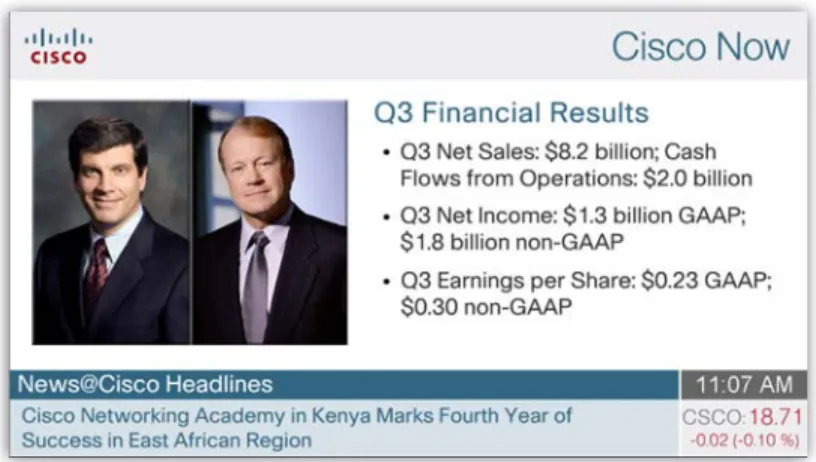
Cisco is achieving its objectives with Cisco Now, a corporate-branded, all-employee news and information system that dynamically delivers global and site-based news and information on high-definition, flat-panel displays (Figure 1). “The content strategy was the missing link in our enterprise digital signage program,” says Ihor Pacholuk, program manager for Workplace Resources. Objectives of the Cisco Now program are to:
Provide relevant global, regional, and local news and information in a brief and visually stimulating format •
Increase employee awareness and involvement with both global and local events and initiatives •
Deploy Cisco technology in a new way that will improve employee awareness of and experience with Cisco technology solutions •
and serve as an example to customers
Figure 1. Cisco Now Content Appears on Digital Signs in Employee Areas and in Some Building Lobbies
The Cisco enterprise digital signage program includes infrastructure as well as the Cisco Now content strategy and process. Cisco Digital Media Creative Services, part of Cisco Advanced Services, collaborated with the teams to develop standards for infrastructure and content, and shares lessons learned with Cisco customers through the Digital Media Creative Service.
Infrastructure: Cisco Digital Media System
“The current content and rich-media style of Cisco Now places very little load on the network, so we didn’t have to make any changes to our infrastructure,” says Phani Bhaskar, IT project manager. Even though it is not required, Cisco uses the Cisco Application and Content Networking System (ACNS) Software on Cisco Wide Area Engines to distribute and stream digital media content to digital signs. Cisco ACNS prepositioning and caching capabilities will reduce WAN bandwidth requirements when Cisco begins streaming
Cisco supports the entire enterprise digital signage deployment with two Cisco Digital Media Manager systems in active-active mode, in Mountain View, California and Bangalore, India (Figure 2). Each can support up to 1000 Cisco Digital Media players and take over for the other if it fails. Failover requires that both Cisco Digital Media Managers have the identical templates, Digital Media Player registration, licenses, and monitoring through the Cisco Enterprise Management (EMAN) system.
Figure 2. Cisco Enterprise Digital Signage Architecture
Provisioning Digital Signs
WPR installs digital signs in all new Cisco facilities and during renovation. Groups in other buildings can submit a request for digital signs. The request must include a local employee to serve as the contact. “If we receive a call that a sign is not operating, we call that person to confirm that it’s plugged in,” says Pacholuk. In the future, Cisco might use video surveillance cameras in lobbies or break rooms for troubleshooting.
WPR contracts with a third-party audio-visual (AV) integrator to perform the installation. After the sign is installed, Cisco IT performs a quick test to help ensure that the network connection is operational.
Figure 3 shows the location of Cisco offices that have digital signs.
Creating Content
Members of the Cisco Now team attended the Cisco Academy of Digital Signage, a two-day course that teaches media professionals how to create and optimize media content for digital signage. Some of the tips appear in the “Lessons Learned” section at the end of this case study.
The content for the digital signs comes from one of two sources: Cisco Employee Communications or employees themselves. Cisco Employee Communications creates rich-media content that supports corporate news, events, and priorities. “Each week we publish content that supports a different Cisco business priority or initiative, such as globalization or collaboration,” says Heather Goodwin-Yu, employee communications manager with Cisco Corporate Communications.
Cisco employees can submit their own content for: Company announcements and reminders ·
Major corporate initiatives and priorities ·
Company facts ·
Customer spotlights and wins ·
Business success metrics ·
External awards and recognition ·
Volunteerism and donation opportunities ·
Crisis communications ·
Content that is not appropriate for Cisco Now includes: job postings, classified ads, personal milestones, and PowerPoint slide presentations.
Submitting Content
Cisco IT did not want large numbers of employees to have administrative access to Cisco Digital Media Manager. Doing so would impose a training burden and also introduce the risk that someone would inadvertently turn off digital signs or Cisco Digital Media Players, or publish content not appropriate for broad viewing.
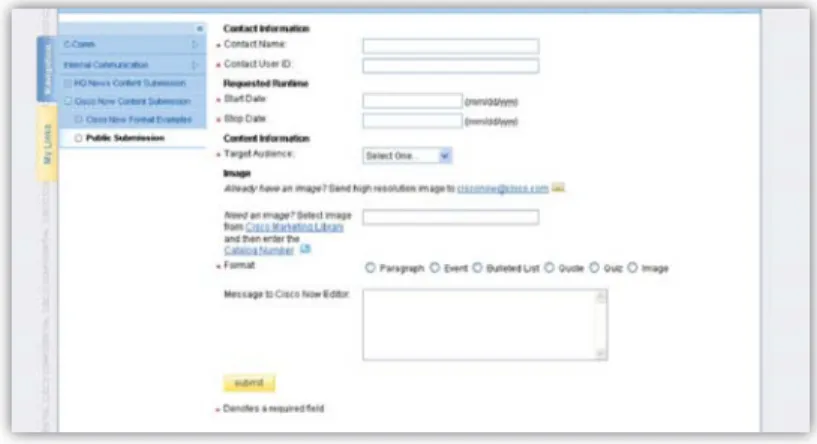
Therefore, the Employee Communications team collaborated with Cisco IT to develop an easy-to-use web-based tool for content submission and publishing. To submit content, employees simply fill in the fields on a web-based form (Figure 4). The form asks for:
User ID ·
Start and end date. The corporate editor approves the date after checking ·
the editorial content calendar. “I make sure the content is relevant and not overlapping with similar content from another group,” says Goodwin-Yu. Content type. Allowed types include corporate news and events, corporate ·
priorities, technology, and others.
Location. The submitter can specify public areas, like lobbies, or nonpublic areas, ·
like cafeterias.
Target audience. The audience can be global or limited to a certain geographical ·
area or building.
Template type: paragraph, bullet list, event, image, quiz, or quote. Depending ·
on the template type, the employee is prompted to provide different types of information. The paragraph type, for example, includes a title, subtitle, body
About the Content Submission Tool
Jon Leonhardt, web project manager with Cisco Corporate Communications, developed the content management tool with input from Cisco IT. He wrote the interface using Perl. An Oracle back-end created by Cisco IT stores the digital sign locations and IP addresses. Now Cisco IT is porting the application to Java. “The web-based content management tool is a separate layer on top of Cisco Digital Media Manager that does not interact with it directly,” Leonhardt says. Rather, the Cisco Digital Media Manager connects to the template where the web-based tool schedules the content for each sign, based on the IP address of the sign’s Cisco Digital Media Player.
Had Leonhardt developed the content management tool today, he would have used the new API for Digital Media Manager. This tool, available to customers, eliminates the need to create an Oracle database of digital signs and IP addresses
Figure 4. Employees Submit Content for Cisco Now Using an Online Form
Cisco Employee Communications currently receives three to five new content submissions each week from organizations across the company. The editor receives an email notification and then views the request in the inbox of the Content Management Tool. The editor can approve, edit, modify the start and end dates, reject, or publish the content. When content is approved, the tool publishes it automatically on the specified date and time. When the content expires, it is automatically archived. The Cisco Now editor adds two to four pieces of content each week from Employee Communications to supplement the submissions from other Cisco organizations. Goodwin-Yu spends a little less than half her time managing the global feed and San Jose feed. Other regions have their own local editors, who approve local news and information that appears only on their site’s digital signs.
Creating Templates for the Content
Corporate Communications worked with the Cisco Corporate Branding group and Cisco Digital Media Creative Services to develop templates that are consistent around the world and align with company brand. All templates are optimized for viewing on a cinematic display (Figure 5).
Figure 5. Templates Use Bold, Eye-Catching Images and Brief Text to Capture Viewer Attention
Cisco Digital Media Creative Services advised on making the templates suitable for a global audience. “We are familiar with cultural norms, such as screen color,” says Dos Dosanjh, customer solutions manager for Digital Media Creative Services.
Scheduling Content
The Employee Communications team uses Cisco Digital Media Manager to schedule screens to turn on and off and to schedule the Cisco Digital Media Players to play the content:
At any time, 12 to 15 content articles rotate on the global playlist. ·
Each article appears on the display for about 20 seconds. ·
Content is updated three to four times a week and typically stays on Cisco Now for five to fourteen days. ·
Supporting the Signs
If a sign is blank or otherwise not working properly, the local digital signage contact or Lobby Ambassador calls the Cisco Global
Technical Response Center (GTRC). GTRC alerts the IT support team, which performs tests to determine if the problem is the digital sign or the network connection. “We usually know the source of the problem within five minutes,” says Wilson.
Cisco Digital Media Creative Services
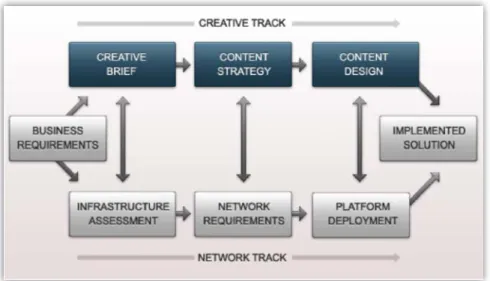
Cisco Digital Media Creative Services collaborated with the Cisco Now team to develop a content strategy, making the following contributions: Recommending the optimal mix of text, static images, and animation, depending on the digital sign’s location and audience.
·
Advising on the use of external information sources, such as Really-Simple Syndication (RSS) feeds, stock prices, and news sites. ·
Providing a Site Survey and Service Needs Assessment. “Some Cisco offices in the United States and Europe had independently ·
deployed digital signage solutions,” says Dosanjh. “We visited these offices to understand their display capabilities, planograms, power, network capabilities, and regulatory requirements.” In California, for example, the Office of Statewide Health Planning and Development (OSHPD) required adherence to healthcare building standards when Cisco mounted displays In the Cisco LifeConnections Health Center in San Jose.
Advising on best practices for a global employment. Cisco Digital Media Creative Services advisors explained the value and process of ·
developing different content channels. One channel might be played during lunch breaks, for example.
Results
Between February and April 2009, 100 global content articles and 35 San Jose content articles were published on Cisco Now. Benefits of the Cisco Now program include:
Consistent global communications plus local news •
Operational efficiencies and lower risk to the network •
Improved security and safety •
Plentiful and relevant content •
Reduced costs of paper signage •
Stronger brand. “If you see Cisco Now digital signage, you know you’re in a Cisco building,” Delville says. •
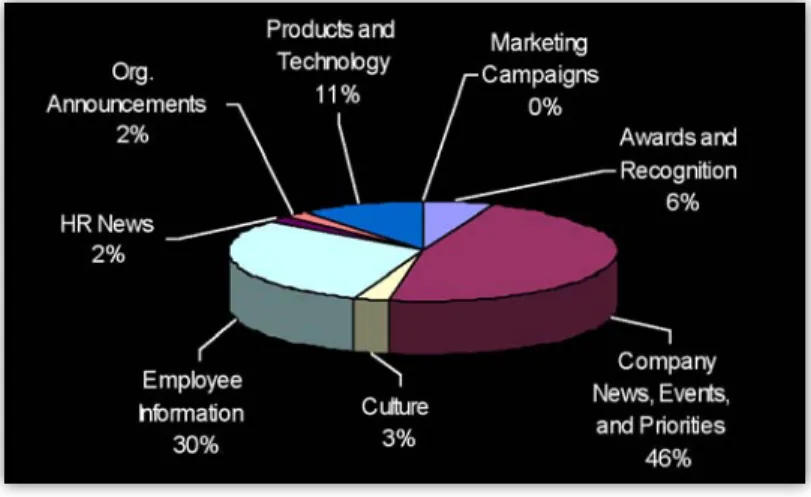
Figure 6. Popular Items on Cisco Now Include Corporate News, Events and Priorities, Employee Information, and Awards and Recognition
Effective, Timely Employee Communications
“We created Cisco Now as a new way to reach and engage employees worldwide,” Delville says. “Employees can conveniently view communications in employee areas, such as cafeterias, company fitness centers, break rooms, or elevator waiting areas.”
The Cisco Corporate Communications organization is taking advantage of enterprise digital signage to better serve its clients. “Every Cisco organization wants to get its message out to employees who are spread around the world,” says Maureen Kasper, senior director, Corporate Communications. “Cisco Now enables that to happen in a dynamic environment that capitalizes on the power of the network. Employees don’t have to run around placing message tents on tables or taping up posters anymore. Messages are easy to create and to customize for different geographic locations. And they’re just as easy to remove when a promotion is over or information is outdated.” Digital signage complements Cisco’s intranet. “In addition to in-depth coverage available on the Cisco intranet, Cisco employees need access to relevant and useful news that is accessible at a glance, in short form, in a venue where they have a few minutes to take in the information,“ says Abby Smith, director of Employee Communications.
Positive Employee Response
Cisco measured employee reaction to Cisco Now in an employee survey, administered in July 2008 in Bangalore and San Jose. The survey revealed that Cisco Now meets major objectives:
Provides useful news:
• Thirty-nine percent of employees surveyed said they learned something new on Cisco Now. Almost one third looked at Cisco Now daily or a few times a week. Another 16 percent watched it once a week. About one-fifth of employees surveyed during the pilot said they have followed up on information they first saw on a Cisco Now screen.
Increases employee awareness and involvement with global and local events and initiatives:
• After the first five months, 47
percent of employees in Bangalore and 44 percent of employees in San Jose were familiar with Cisco Now. Global content for the San Jose and Bangalore screens includes corporate news and events (21 percent); employee information (21 percent); corporate priorities (16 percent); culture (15 percent); awards (10 percent); organization announcements (8 percent); products and technology (5 percent); marketing campaigns (3 percent); HR news (1 percent). Almost half of employees want the screens to feature local campus-based events. Employees said they would also like to use digital signage for company facts (43 percent), corporate announcements (42 percent), and product launches (44 percent). More than 25 percent of employees requested quizzes, quotes, and awards announcements.
Improved Visitor Services
Cisco is beginning to use digital signs in lobbies to communicate with customers and other visitors. For example, when employees and their family members visit Cisco’s LifeConnections Health Center in San Jose, they view information about healthcare specialists and their philosophy on a digital sign instead of requesting a brochure. They get answers to their questions more quickly than they might if they had to wait for a Lobby Ambassador to finish a phone call, and Cisco saves paper.
Low Support Requirements
Cisco IT supports the global digital signage deployment remotely, with only two full-time employees. “We can support the Cisco digital signage solution with so few resources because we have a partnership with WPR, we use the network as the platform, and we are already familiar with content delivery because of our experience with Cisco TV,” says Bhaskar.
Other benefits of the Cisco Digital Media System to Cisco IT include:
Reliable operation because the network platform is protected by Cisco security solutions •
Scalability: each Cisco Digital Media System supports up to 1000 Digital Media Players and signs •
Ease of use and deployment •
Robust video networking through integration with Cisco ACNS and WAE •
Lessons Learned
The teams involved in Cisco Now share the following lessons learned:
Establish a partnership between IT, WPR, and your communications or marketing organization:
• All members of the Cisco
team attribute the success of the program to close collaboration. Educate employees about what digital signage is and is not:
• “Some groups used the digital signs to deliver cable TV,” Delville
says. “We educated them that their current purpose is to deliver employee communications and select customer communications.” Assign someone to manage content submission:
• “Initially, many Cisco engineers and account managers planned to
self-administer content to the signs in their areas,” says Pacholuk. “They quickly found that it required more time than they wanted to spend. A centrally managed content submission program is very beneficial.” Consider appointing a communications professional or someone in your organization to produce content.
Establish standards for digital sign placement:
• The standards should help ensure that the signs are readable, comply with the Cisco brand, and can be serviced easily.
Understand the business need:
• Address content needs at the same time as networking and hardware. You can use the Digital Media Creative Service from Cisco Services for guidance. Leonhardt adds: “The creative goals and media requirements will
influence the infrastructure and deployment decisions. Had we known that we would eventually distribute video as well as rich media, we would have made different decisions.”
Provide employees with best practices for content submission:
• Cisco, for example, provides the following guidelines:
Images: Use bold, eye-catching images. –
Keywords: Keywords are often easier to remember than a website address. –
Easy-to-remember URLs: An example: www.cisco.com/go/dms. –
Watch your words: Strengthen message by avoiding acronyms and jargon. –
Cisco Digital Media Creative Services shares lessons learned with other organizations that want to develop a digital signage content strategy, helping them address issues such as:
Who are the stakeholders? •
Who should manage the content? •
Who makes the policies that dictate digital sign locations? •
How does digital signage complement the corporate mission statement? •
Next Steps
Cisco is currently conducting proof-of-concept and pilots for multiple other uses of digital signage that will increase the return on investment from the Cisco Digital Media System:
Scheduling meeting rooms:
• Employees can schedule a meeting room using a touch-screen display outside the meeting room. This application requires integration with the Microsoft Exchange server used for room scheduling (Figure 7).
Figure 7. Cisco Plans to Use Digital Signs for Reserving Meeting Rooms
Reserving office space in flexible workplaces:
• In some Cisco facilities, employees choose an appropriate office space each day depending on their tasks for the day, such as meeting with a customer or working without interruption. Now they can select their space for the day with a touch screen digital sign that shows available spaces. This application eliminates time spent looking for an available cubicle.
Displaying contact center metrics:
• Digital signs will display metrics such as queue length and average wait time. Currently, contact center managers and agents view this information on a web interface.
Adding video:
• Cisco plans to extend Cisco Now to display recorded and live video. Digital signs in cafeterias might display video on physical safety and security or new product introductions. To stream live content, Cisco IT will integrate the Cisco DMS with Scientific Atlanta encoders and Cisco Wide Area Application Services. Cisco IT plans to use H.264 instead of the MPEG-2 video format, because it uses approximately 50 percent less bandwidth. That is, a video file that would need 10 to 15 Mbps bandwidth in MPEG-2 format needs just 4 to 6 Mbps in H.264 format.
Adding Enterprise TV:
• Another suite in the Cisco Digital Media Systems suite, Enterprise TV lets employees use a remote control to select content.
Emergency wayfinding:
• During emergencies, Cisco can interrupt normal programming on digital signs to show evacuation routes, with flashing arrows. “We’ve also successfully tested displaying updates as a scrolling message across the screens in labs in common areas,” says Lawrence Ingraham, technology manager for the Cisco Security Facilities Operations Center.
Cisco has more than 200 offices worldwide. Addresses, phone numbers, and fax numbers are listed on the Cisco Website at www.cisco.com/go/offices. CCVP, the Cisco logo, and Welcome to the Human Network are trademarks of Cisco Systems, Inc.; Changing the Way We Work, Live, Play, and Learn is a service mark of Cisco Systems, Inc.; and Access Registrar, Aironet, Catalyst, CCDA, CCDP, CCIE, CCIP, CCNA, CCNP, CCSP, Cisco, the Cisco Certified Internetwork Expert logo, Cisco IOS, Cisco Press, Cisco Systems, Cisco Systems Capital, the Cisco Systems logo, Cisco Unity, Enterprise/Solver, EtherChannel, EtherFast, EtherSwitch, Fast Step, Follow Me Browsing, FormShare, GigaDrive, HomeLink, Internet Quotient, IOS, iPhone, IP/TV, iQ Expertise, the iQ logo, iQ Net Readiness Scorecard, iQuick Study, LightStream, Linksys, MeetingPlace, MGX, Networkers, Networking Academy, Network Registrar, PIX, ProConnect, ScriptShare, SMARTnet, StackWise, The Fastest Way to Increase Your Internet Quotient, and TransPath are registered trademarks of Cisco Systems, Inc. and/or its affiliates in the United States and certain other countries.
All other trademarks mentioned in this document or Website are the property of their respective owners. The use of the word partner does not imply a partnership relationship between Cisco and any other company. (0711R)
Cisco has more than 200 offices worldwide. Addresses, phone numbers, and fax numbers are listed on the Cisco Website at www.cisco.com/go/offices. CCVP, the Cisco logo, and Welcome to the Human Network are trademarks of Cisco Systems, Inc.; Changing the Way We Work, Live, Play, and Learn is a service mark of Cisco Systems, Inc.; and Access Registrar, Aironet, Catalyst, CCDA, CCDP, CCIE, CCIP, CCNA, CCNP, CCSP, Cisco, the Cisco Certified Internetwork Expert logo, Cisco IOS, Cisco Press, Cisco Systems, Cisco Systems Capital, the Cisco Systems logo, Cisco Unity, Enterprise/Solver, EtherChannel, EtherFast, EtherSwitch, Fast Step, Follow Me Browsing, FormShare, GigaDrive, HomeLink, Internet Quotient, IOS, iPhone, IP/TV, iQ Expertise, the iQ logo, iQ Net Readiness Scorecard, iQuick Study, LightStream, Linksys, MeetingPlace, MGX, Networkers, Networking Academy, Network Registrar, PIX, ProConnect, ScriptShare, SMARTnet, StackWise, The Fastest Way to Increase Your Internet Quotient, and TransPath
Americas Headquarters
Cisco Systems, Inc. 170 West Tasman Drive San Jose, CA 95134-1706 USA www.cisco.com Tel: 408 526-4000 800 553-NETS (6387) Fax: 408 527-0883
Asia Pacific Headquarters
Cisco Systems (USA) Pte. Ltd. 168 Robinson Road #28-01 Capital Tower Singapore 068912 www.cisco.com Tel: +65 6317 7777 Fax: +65 6317 7799 Europe Headquarters
Cisco Systems International BV Haarlerbergpark Haarlerbergweg 13-19 1101 CH Amsterdam The Netherlands www-europe.cisco.com Tel: +31 0 800 020 0791 Fax: +31 0 20 357 1100 Americas Headquarters
Cisco Systems, Inc. 170 West Tasman Drive San Jose, CA 95134-1706 USA www.cisco.com Tel: 408 526-4000 800 553-NETS (6387) Fax: 408 527-0883
Asia Pacific Headquarters
Cisco Systems (USA) Pte. Ltd. 168 Robinson Road #28-01 Capital Tower Singapore 068912 www.cisco.com Tel: +65 6317 7777 Fax: +65 6317 7799 Europe Headquarters
Cisco Systems International BV Haarlerbergpark Haarlerbergweg 13-19 1101 CH Amsterdam The Netherlands www-europe.cisco.com Tel: +31 0 800 020 0791 Fax: +31 0 20 357 1100
For More Information
To read more about Cisco Digital Media System, visit: www.cisco.com/go/dms.
To learn about Cisco Services for Digital Media, visit: www.cisco.com/go/services/digitalmedia.
To learn about using Digital Media Creative Services for help developing a comprehensive content strategy, visit: www.cisco.com/go/dmcs. Included services appear in Figure 8.
Figure 8. Cisco Shares Lessons Learned Through its Digital Media Creative Service
For additional Cisco IT case studies on a variety of business solutions, visit Cisco on Cisco: Inside Cisco IT www.cisco.com/go/ciscoit
Note
This publication describes how Cisco has benefited from the deployment of its own products. Many factors may have contributed to the results and benefits described; Cisco does not guarantee comparable results elsewhere.
CISCO PROVIDES THIS PUBLICATION AS IS WITHOUT WARRANTY OF ANY KIND, EITHER EXPRESS OR IMPLIED, INCLUDING THE IMPLIED WARRANTIES OF MERCHANTABILITY OR FITNESS FOR A PARTICULAR PURPOSE.