White Paper
Three Approaches to
Managing Database Growth
You can reduce the size of your data, get rid of data altogether, or retire
applications and archive their data—but you can’t ignore the challenge of
database growth. A guide to choosing the right solution.
This document contains Confidential, Proprietary and Trade Secret Information (“Confidential Information”) of Informatica Corporation and may not be copied, distributed, duplicated, or otherwise reproduced in any manner without the prior written consent of Informatica.
While every attempt has been made to ensure that the information in this document is accurate and complete, some typographical errors or technical inaccuracies may exist. Informatica does not accept responsibility for any kind of loss resulting from the use of information contained in this document. The information contained in this document is subject to change without notice.
The incorporation of the product attributes discussed in these materials into any release or upgrade of any Informatica software product—as well as the timing of any such release or upgrade—is at the sole discretion of Informatica.
Protected by one or more of the following U.S. Patents: 6,032,158; 5,794,246; 6,014,670; 6,339,775; 6,044,374; 6,208,990; 6,208,990; 6,850,947; 6,895,471; or by the following pending U.S. Patents: 09/644,280; 10/966,046; 10/727,700.
White Paper
Table of Contents
Introduction . . . . 2
Partitioning and Compression to Reduce Storage Needs . . . . 3
Archiving and Tiering to Reduce Data . . . . 4
Third-Party Database Tiering Solutions . . . 6
Application Retirement Solutions . . . . 7
Test Data Management Solutions . . . 8
2
Introduction
It’s no secret that data is growing rapidly. Experts now point to a 4300% increase in annual data generation by the year 2020.1 By the end of 2011, the amount of digital information created and shared in the world had increased nine-fold in just five years—to almost two zettabytes. By 2015, data creation and sharing is expected to almost quadruple.2
Staggering numbers, but they don’t tell the whole story. Business demand for data within organizations is rising. And a multiplier to this growth is the fact that data is duplicated across organizations three or more times.3 Adding to the challenge is that it’s getting more difficult to dispose of data—40% of the respondents to an Oracle user group survey keep data well beyond the seven-year legal requirement to meet compliance mandates and maintain data in the event of litigation.4
Given this explosion of data, it’s no surprise that data stores are expanding at a rate greater than 20% each year.5 Unchecked database growth degrades performance and limits the availability of mission-critical applications and data. Database applications, unlike email applications or file-sharing systems, require multiple copies of production databases to support activities such as testing, development, and reporting. Whenever data multiplies in a production system, so, too, does your cost.
As data continues exploding, database growth management strategies become more critical. You need to maintain application performance in production databases and all associated copies—otherwise, database query response times deteriorate. Not only that, without a sound database growth management plan, database maintenance (cloning, backing up, and patching) takes longer to complete. Test cycles during application upgrades also lengthen.
But blindly purchasing more hardware to keep up with data growth is not a sustainable long-term strategy-- you spend more money on a less efficient solution without addressing the root cause of the problem. It’s akin to building an addition to your house because you ran out of room in the garage, attic, and basement for storing items that you haven’t seen, touched, or used in many years.
Rather than throwing more hardware at the data explosion problem, it’s much smarter to invest in solutions that either reduce data’s footprint and its storage requirements, delete or archive data, or retire or
consolidate applications.
This guide explores and evaluates the pros and cons of database data growth management options to help you choose the best approach for your enterprise.
Zettabytes 2005 0 2 4 6 8 2007 2009 2011 2013E 2015E
A Digital Data Explosion Global digital information created and shared
techandinnovationdaily.com Source: KPCB, IDC 1 http://assets1.csc.com/insights/downloads/CSC_Infographic_Big_Data.pdf 2 http://www.techandinnovationdaily.com/2013/05/31/six-tech-statistics-mary-meeker/ 3 http://www.ioug.org/d/do/3556 4 ibid 5 http://collaborate14.ioug.org/p/bl/et/blogaid=237
Partitioning and Compression to Reduce Storage Needs
Database vendors provide common features—partitioning and compression—that assist you as a database administrator (DBA) in maintaining application performance and controlling the total storage footprint as data volumes grow. Deploying either at the database level requires in-depth knowledge of the application, so DBAs should work closely with the application development team to ensure the appropriate strategy is deployed without negatively impacting the production application performance or functionality.
Database partitioning allows you to use business logic to physically separate data residing in database tables by partitions. To the application, the data looks as if it resides in a single logical table. To the file system, the data is stored in individual files based on the partition logic. By physically separating segments of data, queries can be optimized to only seek and access a portion of data on disk based on what is requested in the query (as opposed to scanning the entire database table to find the small range of data requested).
Pros: If logic is aligned with retention requirements, you can cleanly manage and move database partitions without impacting the overall application. You can move partitions to less expensive storage media or you can compress, delete, or take them offline.
Cons: However, when you apply partition logic for performance purposes without aligning it cleanly with retention policy logic, database partitioning can have a detrimental impact on performance. Worse, if you cannot make the partition logic consistent with respect to a complete business object (i.e. a business transaction spans across multiple tables that may have different partitioning logic applied), data relational integrity could be completely destroyed if a partition is taken offline irrespective of inter-table dependencies.
Database compression features allow you to shrink the data footprint (and storage capacity requirements) by executing a variety of algorithms on data residing in a table. The compression ratios will vary by data composition and whether your database vendor supports different compression algorithms. Similar to
partitioning, if you deploy compression without regard to the application data model, application performance can be significantly impacted.
Pros: Data footprints can shrink storage capacity requirements while giving complete access to all database data. Compression is highly recommended when the tool’s performance has been proven to not impact production performance or CPU utilization.
Cons: Performance can be significantly impacted depending on how compression is deployed. Add-on license fees may apply when using compression features.
4
Archiving and Tiering to Reduce Data
Reducing data volumes involves removing or deleting data from the production database or from
non-production copies. In this approach, you must understand the application data model to ensure that, when you remove data, you can maintain data relational integrity and the application continues to function properly. But deleting data may not be an option for organizations that need to keep data available for extended retention periods. When your data model is complex or if it comes from a third-party packaged application ISV, managing the process manually becomes costly, difficult, and risky. In this case, it’s smarter to use a third-party solution that allows you to separate data based on policy while providing end-user access and maintaining third-party ISV support. The two solutions we’ll discuss in this guide include database archiving and tiering.
Third-party database archiving solutions have emerged in response to the need for managing database data growth amidst the limitations of database and application vendor offerings. These solutions allow you to selectively identify, tier, archive, or delete database data in context to the business application. You can relocate or archive eligible data to a separate database schema, archive database, or archive repository while maintaining end-user access to the data via either the native application or a comparable separate user interface.
Pros: Because these solutions remove data from the production database, performance is maintained and in many cases improved. Data is made available to the end user through native interfaces with minor modifications to the application.
Cons: The process of selecting eligible data and moving it to another repository can introduce production performance considerations that need to be clearly understood when choosing a database archiving architecture. Depending on the application and the deployment configuration, managing and accessing data in a separate repository may introduce additional maintenance tasks and processes.
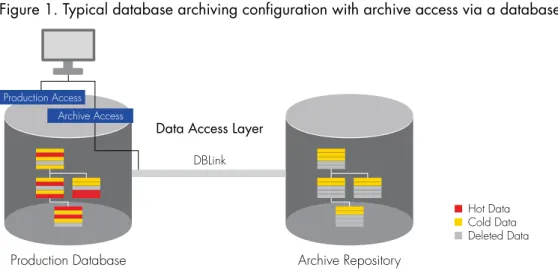
Production Database Archive Repository
Data Access Layer
DBLink Hot Data Cold Data Deleted Data Production Access Archive Access
Figure 1. Typical database archiving configuration with archive access via a database link
A common archiving approach is to archive aged or inactive data from the production database to a separate online database or archive file while providing access to the archive repository using a database link connection.
A database archiving solution commonly comprises four key components: application metadata, a policy engine, an archive repository, and a data access layer.
• Application metadata: This component contains information that is used to define what tables will participate in a database partition, relocation, or archiving activity. It stores the relationships between those tables, including database or application-level constraints and any criteria that need to be considered when selecting data to be archived. The metadata for packaged applications like Oracle E-Business Suite, PeopleSoft, or SAP can usually be purchased in prepopulated repositories to speed implementation times. Application metadata is critical in making sure that when an archive policy is applied, data referential integrity is maintained and business logic is respected.
• Policy engine: This component is where business users define retention policies in terms of time durations and other business-related rules. The policy engine is also responsible for executing the policy within the database, and moving data to a target area. This involves translating the policy and metadata into structured query language that the database understands (SELECT * from TABLE A where COLUMN 1 > 2 years and COLUMN 2 = “Closed” / swap partition / etc.). Depending on the skillset in your organization and your interest in controlling the process during execution, this will be an important component to understand and can be a good topic during technical discussions and demonstrations.
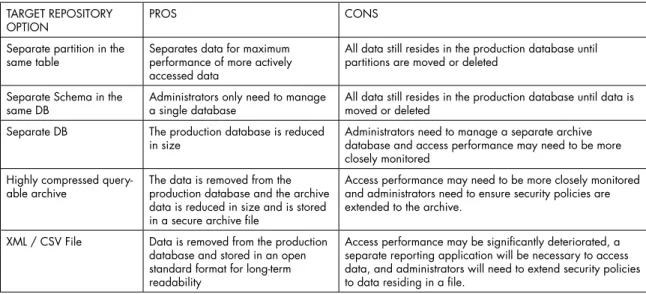
• Target repository: This stores the database data that has been partitioned, migrated, or archived. The choices for the repository vary and will be determined based on a number of factors typically driven from end-user archive access requirements. Some of these choices include dedicated database partitions within the same database, another dedicated database, or highly compressed archives that can be queried. There is always the option to export data into an open format, such as CSV or XML. This is a critical architectural decision. The major considerations of each type of target are reviewed in Table 1.
TARGET REPOSITORY
OPTION PROS CONS
Separate partition in the
same table Separates data for maximum performance of more actively accessed data
All data still resides in the production database until partitions are moved or deleted
Separate Schema in the
same DB Administrators only need to manage a single database All data still resides in the production database until data is moved or deleted Separate DB The production database is reduced
in size Administrators need to manage a separate archive database and access performance may need to be more closely monitored
Highly compressed
query-able archive The data is removed from the production database and the archive data is reduced in size and is stored in a secure archive file
Access performance may need to be more closely monitored and administrators need to ensure security policies are extended to the archive.
XML / CSV File Data is removed from the production database and stored in an open standard format for long-term readability
Access performance may be significantly deteriorated, a separate reporting application will be necessary to access data, and administrators will need to extend security policies to data residing in a file.
6
• Data access layer: This is the mechanism that makes the partitioned, migrated, or archived database data accessible to a native application, a standard business reporting tool, or a data discovery portal. Again, these options vary and will be determined based on your end-user access requirements and the technology standards in your data center. Providing a data access layer is critical for end-users who need access to data through the native or native-like application. When users access archive data using a view that is deployed using a database link, query response performance may be slower.
Third-Party Database Tiering Solutions
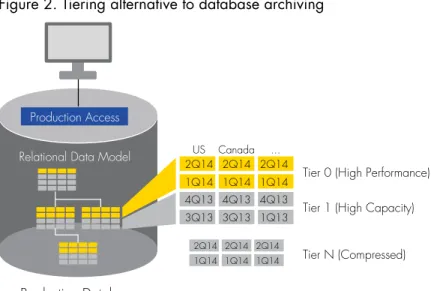
Database tiering solutions provide complementary solutions to existing database partitioning features in that data can be isolated as either active or inactive automatically within the database depending on a specific business policy. The classification drives placement of data within the same database leveraging what has been termed as “application-aware segmentation.” Segmentation, or partitioning, of database data within the same database instance physically separates data without impacting the logical representation to the native application.
Production Database
Tier 0 (High Performance)
US Canada ...
Tier 1 (High Capacity) Tier N (Compressed) Production Access
Relational Data Model 2Q14 2Q14 2Q14
1Q14 1Q14 1Q14
2Q14 2Q14 2Q14 1Q14 1Q14 1Q14 4Q13 4Q13 4Q13 3Q13 3Q13 1Q13
Figure 2. Tiering alternative to database archiving
By using a segmentation approach, data can be compressed, taken offline or deleted with minimal impact to the production application performance. Additionally, organizations can optimize the placement of partitions on the appropriate class of storage media aligned with the performance requirements necessary to meet business needs.
Application Retirement Solutions
Most organizations with a proliferation of legacy applications consuming costly data center resources are assessing and rationalizing the need to keep those applications online. If the data in the inactive repositories needs to be retained for compliance or regulatory reasons, application retirement solutions offer the ability to retain the required data sets for extended periods of time while maintaining business context and allowing IT to shut down the originating source system for good. Read “10 Things You Need to Know Before Modernizing Your Applications” for more on application retirement.
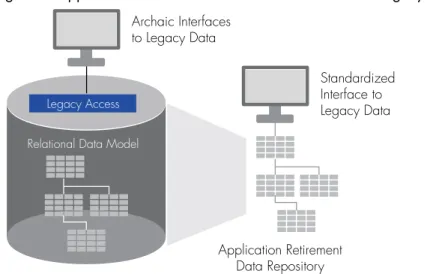
In the case where an entire database application is no longer used for supporting current business processes or operational needs, yet contains data that has a legal or regulatory retention requirement, application retirement solutions offer a cost-effective way to migrate data from archaic or unsupported formats to a supported format while maintaining business context and some level of end-user access. These solutions are similar to database archiving in that they have options for how the database data is stored in an archive, but differ in that the original application is replaced by a comparable separate user interface and can be completely retired. Figure 3 illustrates an example of migrating legacy data to an application retirement repository that is accessible by modern, open interfaces, eliminating the need for archaic and outdated technology stacks.
Legacy Application Database
Application Retirement Data Repository
Legacy Access Relational Data Model
Archaic Interfaces to Legacy Data
Standardized Interface to Legacy Data
Figure 3. Application retirement solutions eliminate archaic legacy technology
The data is stored in an online accessible, secure archive file that may offer significant storage reduction through high data compression rates.
8
Test Data Management Solutions
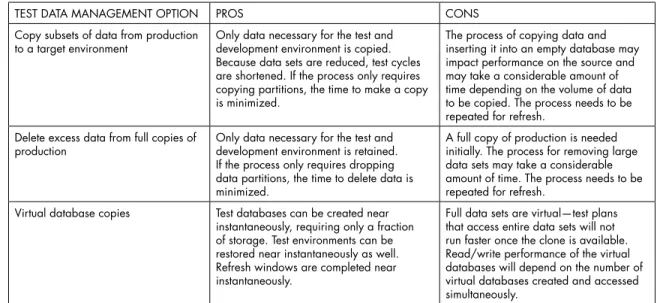
Test data management (TDM) is the process of creating and working with a data set that’s representative of that used by enterprise applications. A TDM solution can save hours in test data creation, build efficiency into your test process, ensure you avoid risk of exposed sensitive data, and ultimately reduce costs associated with testing. Test data management solutions can reduce storage requirements because they cut the size of test data sets. For more information, read “Why You Need Test Data Management.”
TEST DATA MANAGEMENT OPTION PROS CONS
Copy subsets of data from production
to a target environment Only data necessary for the test and development environment is copied. Because data sets are reduced, test cycles are shortened. If the process only requires copying partitions, the time to make a copy is minimized.
The process of copying data and inserting it into an empty database may impact performance on the source and may take a considerable amount of time depending on the volume of data to be copied. The process needs to be repeated for refresh.
Delete excess data from full copies of
production Only data necessary for the test and development environment is retained. If the process only requires dropping data partitions, the time to delete data is minimized.
A full copy of production is needed initially. The process for removing large data sets may take a considerable amount of time. The process needs to be repeated for refresh.
Virtual database copies Test databases can be created near instantaneously, requiring only a fraction of storage. Test environments can be restored near instantaneously as well. Refresh windows are completed near instantaneously.
Full data sets are virtual—test plans that access entire data sets will not run faster once the clone is available. Read/write performance of the virtual databases will depend on the number of virtual databases created and accessed simultaneously.
Table 2. Pros and Cons of Test Data Management Solution Options
Making an Educated Investment
By assessing business needs for access to application data and how those requirements change as data ages, you can deploy a data growth management strategy that lets you make more informed decisions on where to invest. For data that needs to be accessed on a regular basis, premier IT services apply (high performance, high availability). For the most part, however, access requirements drop as data ages. By mapping out requirements for business users’ access needs over time, legal or records management retention schedules, and operational support needs, you’re is in a much better position to proactively plan infrastructure and technology purchases in context of controlling data growth.
By obtaining answers to some key questions on end-user access needs and weighing the economic impact of technology options, you can architect a solution that optimizes investment dollars.
• How long does the database data need to be retained and why—to support the business process, to meet legal requirements, and to support operational processes? The longer the retention period, the more the solution architecture needs to account for potentially significant data volumes and technology upgrades or obsolescence. This will determine cost factors of keeping data online in a database or in an archive and media options such as online, nearline, or offline.
• Does the data need to be accessed in the context of the original business application? If data has to be kept for an extended period of time, does the data need to be accessed in context of the original application? Consider the implications if the application is retired or upgraded. Will the data still need to be viewed? If so, this may have an impact on whether archiving the data to a non-database format is an option.
• How often will data be accessed over time, and what are the performance expectations?
Migrating or archiving less frequently accessed database data to lower cost infrastructure for storage is an excellent option for reducing the overall cost of managing the data. If the number of users and the frequency of accessing the archive data will be relatively high, I/O will need to be factored in when selecting the target architecture for the archive data. It is typical to limit access to the archive data to a smaller set of super users or administrators. If few users will be accessing the data, and the number of times the data will be accessed is limited, it is a good candidate for lower cost storage with lower performance characteristics. Even if access is expected to be minimal to none, with practically no users, the data may still need to be accessed by auditors or legal during eDiscovery—online access or searchability may drive the target architecture.
Aside from architecting a software solution that drives cost out of managing database growth, server and storage options can offer significant benefits. The answers to the questions above should provide a good basis for system architects to deliver cost effective designs.
Classifying and categorizing database data based on retention requirements and end-user access patterns enables IT organizations to employ a strategy that introduces significant cost savings through reduced storage and server compute requirements. Being smart about where data is stored and eliminating redundant copies of data allows IT to do more with less. “Spring cleaning” opens up real estate that can accommodate future capacity requirements.
Leveraging features within your database or provided by the application vendor may suffice if your database data model is straightforward and the process is a one-time cleanup job. But if your data model is complex, spanning several tables with complex business logic, consider Informatica® Data Archive—highly scalable, full-featured smart partitioning and data archiving software. It helps your IT organization significantly improve application performance and cost-effectively manage data growth in a range of enterprise business applications while lowering cost and risk. With Informatica Data Archive, you can segment data based on business value, safely archive inactive application data, and deliver seamless access to archived data for the business.
About Informatica
Informatica Corporation (Nasdaq:INFA) is the world’s number one independent provider of data integration software. Organizations around the world rely on Informatica to realize their information potential and drive top business imperatives. Informatica Vibe, the industry’s first and only embeddable virtual data machine (VDM), powers the unique “Map Once. Deploy Anywhere.” capabilities of the Informatica Platform. Worldwide, over 5,000 enterprises depend on Informatica to fully leverage their information assets from devices to mobile to social to big data residing on-premise, in the Cloud and across social networks. For more information, call +1 650-385-5000 (1-800-653-3871 in the U.S.), or visit www.informatica.com.
Worldwide Headquarters, 100 Cardinal Way, Redwood City, CA 94063, USA Phone: 650.385.5000 Fax: 650.385.5500 Toll-free in the US: 1.800.653.3871 informatica.com linkedin.com/company/informatica twitter.com/InformaticaCorp
© 2014 Informatica Corporation. All rights reserved. Informatica® and Put potential to work™ are trademarks or registered trademarks of Informatica Corporation in the United States and in jurisdictions throughout the world. All other company and product names may be trade names or trademarks.