DOI: 10.15575/join.v5i1.578
97
Virtual Reality Headset Implementation on Parsec Cloud
Gaming Platform
M. Fadhil Rahadiansyah1, Ridha Muldina N.2, Sussi3
1,2,3 Jurusan Teknik Telekomunikasi, Fakultas Teknik Elektro Universitas Telkom Bandung, Jawa Barat
Article Info ABSTRACT
Article history:
Received May 15, 2020 Revised June 30, 2020 Accepted July 14, 2020 Published July 15, 2020
Virtual reality (VR) based games are a type of game that provides immersive gaming experience, allowing players to dive into the virtual world of the game being played. VR-based games require a high minimum computer specification, so thin clients cannot play VR-based games properly. This research aims to see how to enable thin computers to play VR-based games by utilizing cloud gaming technology. Using a high specification computer as a server, an android device as a VR headset, this Final Project implements a VR headset device so that it can be used in conjunction with cloud gaming services to be able to play VR-based games on thin computers and see how well the implementation by seeing the result from computer resources used and the Quality of Services. With Parsec cloud gaming services, the application carried out in this Final Project can run well on computers with low specifications. CPU usage on the client computer when the service is running is high at 91% usage, with 2818 MB RAM usage. Quality of Service is obtained when setting the highest quality preset, with a throughput of 16MB with a delay of about 2 ms. VR games that are played can run well with a minimum bandwidth of 15 Mbps selected from the Frame per Second (FPS) results obtained to reach 56 FPS with medium quality settings.
Keywords:
Cloud gaming Implementation Parsec
Virtual reality
Corresponding Author:
M. Fadhil Rahadiansyah
Jurusan Telemunikasi, Fakultas Teknik Elektro Universitas Telkom Bandung, Jawa Barat
Jl. Telekomunikasi Jl. Terusan Buah Batu, Sukapura, Kec. Dayeuhkolot, Bandung, Jawa Barat 40257 Email: [email protected]
1. INTRODUCTION
The game, as a means of modern entertainment today, continues to grow to meet the needs and desires of its players. Modern games are often identified as having near-real graphic quality and complex game patterns. As a result, many modern games require hardware such as multi-core CPUs and high-end graphics cards to get good performance when playing games with high levels of computing [1]. This makes it difficult for players to play the latest games, for players must continue to improve the performance of their computer devices in accordance with the minimum requirements of the game players want to play [2].
Virtual Reality (VR) technology is widely used in various professional fields. Along with the development of technology, VR devices are increasing their affordability and are starting to penetrate into the entertainment world, such as video games. To enjoy VR-based games, you need a Head-mounted Display (HMD) device or VR headsets like Oculus Rift and HTC Vive. These devices allow players to do VR gaming, which will give players an immersive experience in a virtual world and exercise a more free form of control to interact with things in the game of the virtual world [3].
Virtual Reality Headset Implementation on Parsec Cloud Gaming Platform (M. Fadhil Rahadiansyah1, Ridha Muldina N.2, Sussi3)
98 Cloud gaming technology helps players with this problem because cloud gaming does not use computer devices in general, a variety of complex computing is not done on personal computers, any complicated processes when playing games performed by a computer on the servers located in the cloud [2][6]. This feat is possible because cloud gaming works by accepting inputs from players who are then transferred to the server computer to be processed. The computer server will compute and produce output in the form of video and audio frames that will be streamed back to the player. The paradigm of this cloud gaming system allows games with higher specification requirements, so it can be used on low-end computers that have computer hardware components with specifications that are not too high. This modeling paradigm then becomes one of the highly developed paradigm models in the gaming industry [7].
Several studies related to cloud gaming with computer devices that use unusual inputs, such as sound [8][9], as input actions that will be processed by cloud gaming server computers. The VR-based game itself uses a VR headset device as one of the player's input action tools to engage with objects in the game rather than using the common game controller. The idea of using cloud gaming as a solution for playing VR-based games on low specification computer devices [3] can be put into consideration. However, the cloud gaming service itself still does not provide a direct implementation for using cloud gaming to play VR-based games.
2. METHOD
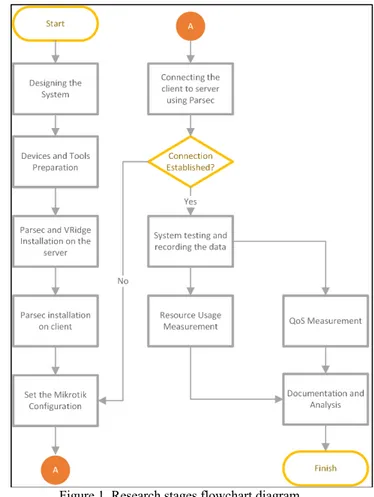
Several methods can be used to implement a VR headset for use on cloud gaming services. The first thing to look for is how cloud gaming works and what needs that will be needed to use cloud gaming services and how to implement VR headsets on cloud gaming services.
Then the next preparation is done by designing a topology that makes the VR headset device can be implemented on cloud gaming services. The first thing to note is the type of VR headset that will be used and how VR headsets are used in general on computers with adequate specifications.
The VR headset used is a type of Google Cardboard, in which this particular type of VR headset has an affordable price and is easy to use by beginners [10]. This type of VR headset uses an android smartphone as an output display that will display video streams of VR-based games which are played by players.
99 In contrast to other web-based cloud gaming service platforms such as Emago [11][12], the use of Parsec as a cloud gaming service was chosen because Parsec provides the freedom to use any computer to be used as a cloud gaming server [13]. Parsec uses an application that can capture desktop frames from the host computer, which is then streamed back to the client computer. So that computers on the local network can also be used as a server connected to Parsec’s gaming cloud service.
Due to infrastructure limitations and topology testing that have not been done before, cloud networks are done using CloudFog [7], where the data center that is used as a server is closer to the client. The freedom to make any computer device as a cloud gaming server makes Parsec is the best tool to be used in this research. In this case, the features provided Parsec cloud gaming application works and took a concept like the way GamingAnywhere works [14][15].
Further steps, the topology of the services they will be built.
Figure 2. System topology
The following topology is used by connecting the client with the server as the host that runs the Parsec gaming cloud service.
The device on the client-side consists of a laptop or computer that has lower specifications and a VR headset. Both devices are connected to the local network using a dual-band wireless access point. Because the main display that will be seen by the player is the screen of the VR headset, the VR headset requires a better network path so that a band with 5 GHz frequency is used where the band with 5 GHz frequency is usually applied to devices that prioritize the speed and stability of data flow [16].
The device on the server-side consists of computer devices with specifications that meet the minimum requirements as a Parsec host that serves to provide cloud gaming services[17]. The host computer is connected using an ethernet cable to the switch that will be routed to the router device on the local network.
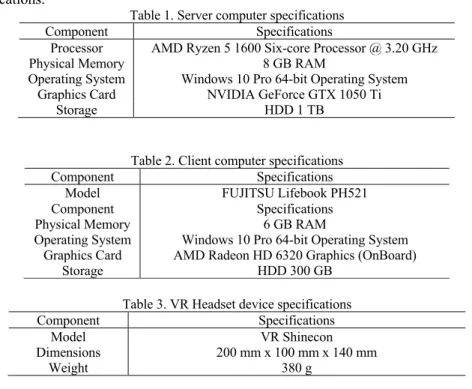
The devices used in this study, as listed in the topology image as in Figure 2, have the following detailed specifications.
Table 1. Server computer specifications
Component Specifications
Processor AMD Ryzen 5 1600 Six-core Processor @ 3.20 GHz
Physical Memory 8 GB RAM
Operating System Windows 10 Pro 64-bit Operating System Graphics Card NVIDIA GeForce GTX 1050 Ti
Storage HDD 1 TB
Table 2. Client computer specifications
Component Specifications
Model FUJITSU Lifebook PH521
Component Specifications
Physical Memory 6 GB RAM
Operating System Windows 10 Pro 64-bit Operating System Graphics Card AMD Radeon HD 6320 Graphics (OnBoard)
Storage HDD 300 GB
Table 3. VR Headset device specifications
Component Specifications
Model VR Shinecon
Dimensions 200 mm x 100 mm x 140 mm
Virtual Reality Headset Implementation on Parsec Cloud Gaming Platform (M. Fadhil Rahadiansyah1, Ridha Muldina N.2, Sussi3)
100 Table 4. VR Smartphone device specifications
Component Specifications
Model Nokia 6.1 Plus
Dimensions 147.2 mm x 71 mm x 8 mm
Weight 151 g
Display IPS LCD capacitive touchscreen, 16M colors
Resolution 1080 x 2280 px, 19:9 ratio
Chipset Qualcomm SDM636 Snapdragon 636 Octa-core 1.8 GHz Kryo 260
Memory 64 GB 4GB RAM
The study was conducted on two VR based testing games. Some arrangements are made to get the minimum bandwidth needed to play VR-based games using cloud gaming services. For this reason, the available bandwidth on client devices will be limited according to the quality settings of Parsec.
Table 5. Measurement Scenario Bandwidth
Limit on Client
Parsec Settings VRidge
Settings Display
Resolution
Bandwidth Limit
Quality Preset
10 Mbps 1280x720 10 Mbps Low
15 Mbps 1366x768 15 Mbps Medium
20 Mbps 1920x1080 20 Mbps High
The research was tested on two VR based games, namely PinballVR and WarRobotsVR. PinballVR has game characteristics with fewer virtual actions and particles. In contrast, WarRobotsVR has more complex game characteristics with more elements of action performed by players and various visual particles in the game.
3. RESULTS AND DISCUSSION
After the measurement is done, the following is the result of the measurement seen from the use of resources consisting of CPU usage, RAM usage, GPU usage, and Frame per Second (FPS). Also, from the network performance side, seen from throughput and delay.
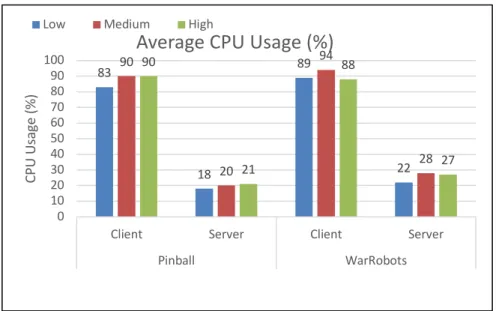
Figure 3. Average CPU Usage to Settings Quality Presets Graphs
CPU usage on the client-side is fairly high at around 80% - 90% and tends to be the same in every quality preset setting. This shows that all the quality preset settings do not significantly affect the CPU usage client, both when playing Pinball and WarRobots.
Although, in theory, the use of cloud gaming services can overload CPU usage, hence the reduced performance on client computers, because all computing processes are carried out by the server, the result in this measurement is not the case. This is because the processor used on the client computer has obsolete and only has a relatively small number of processor cores (dual cores) with a low clock speed, which causes the CPU usage on the client to be very high. The process that causes CPU usage so high is because of the process in the Parsec application, where the application performs continuous video decoding and rendering rather than from processing the VR game itself.
Client Server Client Server
Pinball WarRobots
Low 2865 4502 2928 4557
Medium 2838 4287 2826 4810
High 2706 4270 2650 4587
0 1000 2000 3000 4000 5000 6000
RA
M
U
sa
ge
(%
)
Average RAM Usage (MBytes)
101
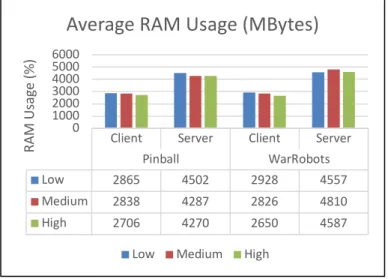
Figure 4. Average RAM Usage against Quality Preset Settings Graphs
RAM usage on the client side ranges from 2690 Megabytes to 2841 Megabytes. The RAM usage measured in each preset quality setting differs from one another and is not in order.
This RAM usage measurement result reveals that the preset quality settings have no effect on RAM usage and have more impact on the application process that is running at the time the measurement is made rather than from quality settings. RAM usage indicates that on client computers, the use of the Parsec application, also with background applications that are running, uses up to 2 Gigabytes of RAM usage.
While on the server-side, RAM usage is quite high, which is in the range of 4 Gigabytes. This is caused by applications running on servers more and heavier than applications running on client computers. Several applications, such as Parsec, VRidge, Steam VR, and VR game applications that run on the server, use RAM that is quite high compared to the usage on client computers that only run Parsec applications.
RAM usage is affected by the game being played, seen from the server that directly runs the game. When playing the WarRobots game, RAM usage is higher than when playing the Pinball game, because the WarRobots game shows visual content such as smoke particles or bullet attacks that are not found in the Pinball game.
Figure 5. GPU Usage against Quality Preset Settings Graphs
GPU usage on the client computer and servers is significantly different. GPU usage on the client is 0%, which indicates no computational activity by the GPU when using cloud gaming services.
This is because the GPU on the client computer does not have physical hardware but rather integrates (on-board) with the processor chipset. This also causes CPU usage on client computers to tend to be close to 100% due to the CPU and GPU resources are used to compute the video decoding and rendering process.
This can be seen in the existence of computing activity by the GPU on the server, where the server has a GPU with physical hardware and is not integrated with the chipset processor. The computation process by the GPU increases when the measurements with high-quality preset settings are made compared to low or medium settings. High-quality preset settings affect GPU usage because the screen resolution used by the high
83 18 89 22 90 20 94 28 90 21 88 27 0 10 20 30 40 50 60 70 80 90 100
Client Server Client Server
Pinball WarRobots CPU U sage (% )
Average CPU Usage (%)
Low Medium High
0 23 0 39 0 34 0 56 0 33 0 48 0 20 40 60 80 100
Client Server Client Server
Pinball WarRobots GPU U sa ge (% )
Average GPU Usage (%)
Virtual Reality Headset Implementation on Parsec Cloud Gaming Platform (M. Fadhil Rahadiansyah1, Ridha Muldina N.2, Sussi3)
102 preset quality uses 1080p resolution or equivalent to 1920x1080 px, so the encoding process carried out by the server is heavier.
Figure 6. Average throughput to bandwidth limit graphs
The average throughput on client computing devices is in the range of 3 to 4 Mbps, where the throughput at the time the bandwidth setting values are not much different from each other. This shows that the use of cloud gaming services with Parsec when playing VR games does not pass a lot of data packages to the client computer.
Unlike the throughput on a computer, the performance on the VR headset device has a throughput value that rises significantly in each bandwidth allocation. The higher the bandwidth limit, the higher the bitrate of data sent by the server. A high bitrate will affect the visual quality displayed on the VR headset display.
This makes the value of throughput when setting the bandwidth limit is 20 Mbps, has a high value of 16 Mbps. So it can be concluded that the visual quality provided is directly proportional to the obtained throughput.
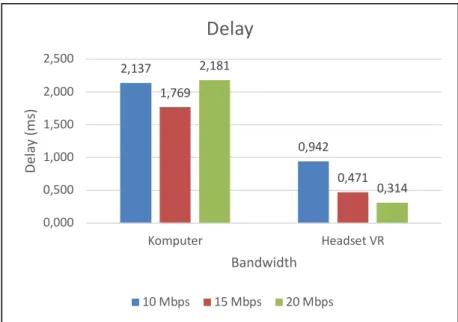
Figure 7. Average Delay to Bandwidth graphs
The delay value obtained is the smallest is around 0.3 ms and the highest at 2.1 ms.
Overall the average delay obtained, the delay value on the computer is higher than the delay on the VR headset. This is due to the use of a VR headset connected to the server wirelessly using WiFi with the 5 GHz band, which gives higher data rates compared to computers connected to the 2.4 GHz band, which have
3,169 3,850 3,743
6,293
10
16
0,000 2,000 4,000 6,000 8,000 10,000 12,000 14,000 16,000 18,000
10 Mbps 15 Mbps 20 Mbps
Throug
hput
(M
bps)
Bandwidth
Throughput
Komputer Headset VR
2,137
0,942 1,769
0,471 2,181
0,314
0,000 0,500 1,000 1,500 2,000 2,500
Komputer Headset VR
De
la
y
(m
s)
Bandwidth
Delay
103 lower data rates. This also causes delay measured on computers is rather high, regardless of the given bandwidth limit.
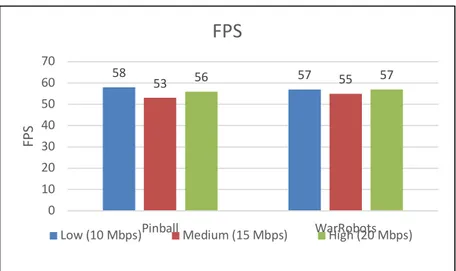
Figure 8. FPS Value of Quality Presets and Bandwidth Limit graphs
The FPS value varies with different bandwidth availability and quality preset settings. Scenarios used to measure the average FPS are adjusted with bandwidth limit settings and quality preset settings. For testing with preset low-quality settings, it is done by setting a bandwidth limit of 10 Mbps, a medium quality preset with a bandwidth limit of 15 Mbps, and a high-quality preset high with a bandwidth limit of 20 Mbps. This is done because the preset quality settings are low, the bitrate given by the server is 10Mbps and has a low resolution, and so on the other preset quality settings in sequence. The FPS value can be seen from the frame rate displayed on the VR headset.
The FPS obtained for both PinballVR and WarRobots games is fairly high, with an average value above 50 FPS in each preset quality setting. This shows that VR games must be run by looking at the availability of bandwidth owned by the client.
The preset low-quality setting has a higher average FPS of 58 FPS for PinballVR games and 57 FPS for WarRobots games. Even though it has a high FPS, the preset low-quality setting provides poor image quality, so the graphics on lower preset quality settings can cause motion sickness faster than the higher preset quality setting.
4. CONCLUSION
From the results of measurements and analysis of resource usage and QoS on the implementation of VR headsets for their use with cloud gaming services, several conclusions can be drawn:
1. The use of a VR headset to play VR games using a computer with low specifications can be implemented using Parsec’s cloud gaming service.
2. One of the parameters taken from Resource Usage is the CPU usage, which used by client computers, is very high, with an average usage value of 90% for PinballVR games and 94% for WarRobotsVR games.
3. RAM usage on client computers tends to be stable with the lowest usage value of 2650 Megabytes and the highest usage value of 2928 Megabytes in the average overall quality preset setting.
4. Disk Usage on client computers is only as high as the value of 1%. This shows the use of Parsec cloud gaming services does not overload the client’s computer hard drive’s resource usage.
5. GPU Usage on client computers is very small, close to 0% at the time of implementation. That small value is obtained because the GPU on the client computer is integrated with the processor chipset. This causes the burden to process video frames sent by the server will be more charged to the CPU resulting in very high CPU usage values.
6. The value of throughput on computers is relatively small, with the largest throughput value of 3,850 Mbps. Whereas the value of throughput on a VR headset device has a high value in accordance with the preset quality settings and bandwidth availability, where the highest throughput value obtained is 16 Mbps.
7. The value of delay and jitter is fairly small, with the highest delay value of only 2 ms, and the jitter value has very small value approaches zero indicates that the network device used for implementation is functioning properly.
8. For the convenience of playing VR games, it requires a high and stable Frame per Second value. Seeing these needs, the required bandwidth is at least 15 Mbps to run VR games with medium quality, seen from the FPS value obtained with minimum bandwidth and medium preset quality reaching 55 FPS.
58 53 56 57 55 57
0 10 20 30 40 50 60 70
Pinball WarRobots
FP
S
FPS
Virtual Reality Headset Implementation on Parsec Cloud Gaming Platform (M. Fadhil Rahadiansyah1, Ridha Muldina N.2, Sussi3)
104 5. REFERENCES(10 PT)
[1] K. Haneesha H, C. Naikodi, H. Lakshmi, and Sunil, “Performance Evaluation of CPU-GPU with CUDA Architecture,” Int. Conf. Commun. Comput., no. March, 2015.
[2] Z. Li, H. Melvin, R. Bruzgiene, P. Pocta, L. Skorin-Kapov, and A. Zgank, Lag compensation for first-person shooter games in cloud gaming, vol. 10768 LNCS. Springer International Publishing, 2018.
[3] K. L. Chan, K. Ichikawa, Y. Watashiba, and H. Iida, “Cloud-Based VR Gaming: Our Vision on Improving the Accessibility of VR Gaming,” Proc. - 2017 Int. Symp. Ubiquitous Virtual Reality, ISUVR 2017, pp. 24–25, 2017. [4] J. de Guzman, “Why Cloud Gaming Will Popularize Virtual Reality | TechCrunch,” 2016. [Online]. Available:
https://techcrunch.com/2016/01/27/why-cloud-gaming-will-popularize-virtual-reality/. [Accessed: 15-Oct-2019]. [5] W. Zhang, J. Chen, Y. Zhang, and D. Raychaudhuri, “Towards Efficient Edge Cloud Augmentation for Virtual
Reality MMOGs.”
[6] C. Y. Huang, K. T. Chen, D. Y. Chen, H. J. Hsu, and C. H. Hsu, “GamingAnywhere: The first open source cloud gaming system,” ACM Trans. Multimed. Comput. Commun. Appl., vol. 10, no. 1 SUPPL, pp. 1–25, 2014.
[7] Y. Lin and H. Shen, “Leveraging Fog to Extend Cloud Gaming for Thin-Client MMOG with High Quality of Experience,” Proc. - Int. Conf. Distrib. Comput. Syst., vol. 2015-July, pp. 734–735, 2015.
[8] Sussi, R. Munadi, N. Fitriyanti, P. Sutejo, and I. Perdana, “The Quality of Services (Qos) of Gaminganywhere on a Game With Speech Recognition System As Command Input,” J. Elektro dan Telekomun. Terap., vol. 5, no. 2, p. 682, 2019.
[9] Sussi, R. Munadi, N. Fitriyanti, I. Perdana, and P. Sutejo, “CPU Usage dari Penggunaan Cloud GamingAnywhere pada Game dengan Speech Recognition System sebagai Command Input,” vol. 4, no. 1, pp. 40–45, 2019.
[10] W. Powell, V. Powell, P. Brown, M. Cook, and J. Uddin, “Getting around in google cardboard - Exploring navigation preferences with low-cost mobile VR,” 2016 IEEE 2nd Work. Everyday Virtual Reality, WEVR 2016, pp. 5–8, 2017. [11] Y. I. Putri, R. M. Negara, and S. Si, “Quality of Service pada Perangkat Client Menggunakan Platform Cloud Gaming
Emago,” e-Proceeding Eng., vol. 5, no. 3, pp. 5476–5482, 2018.
[12] Y. I. Putri, R. M. Negara, and S. Si, “Resource Usage pada Perangkat Client Menggunakan Platform Cloud Gaming Emago,” e-Proceeding Eng., vol. 5, no. 3, pp. 5476–5482, 2018.
[13] Parsec, “Parsec - Play Games with Friends.” [Online]. Available: https://parsecgaming.com. [Accessed: 15-Oct-2019].
[14] C. Y. Huang, C. H. Hsu, Y. C. Chang, and K. T. Chen, “GamingAnywhere: An open cloud gaming system,” Proc. 4th ACM Multimed. Syst. Conf. MMSys 2013, pp. 36–47, 2013.
[15] C. Y. Huang, D. Y. Chen, C. H. Hsu, and K. T. Chen, “Gaminganywhere: An open-source cloud gaming testbed,”
MM 2013 - Proc. 2013 ACM Multimed. Conf., pp. 827–830, 2013.
[16] G. Naik, J. Liu, and J. M. J. Park, “Coexistence of wireless technologies in the 5GHz bands: A survey of existing solutions and a roadmap for future research,” IEEE Commun. Surv. Tutorials, vol. 20, no. 3, pp. 1777–1798, 2018. [17] “Hardware Requirements For Hosting A Gaming Session On Parsec – Parsec.” [Online]. Available: