ForceWare Graphics Drivers
Release 163 Notes
Version
163.75
For Windows Vista 32-bit and Windows Vista 64-bit
NVIDIA Corporation
October 8, 2007
2701 San Tomas Expressway Santa Clara, CA 95050 Notice
ALL NVIDIA DESIGN SPECIFICATIONS, REFERENCE BOARDS, FILES, DRAWINGS, DIAGNOSTICS, LISTS, AND OTHER DOCUMENTS (TOGETHER AND SEPARATELY, “MATERIALS”) ARE BEING PROVIDED “AS IS.” NVIDIA MAKES NO WARRANTIES,
EXPRESSED, IMPLIED, STATUTORY, OR OTHERWISE WITH RESPECT TO THE MATERIALS, AND EXPRESSLY DISCLAIMS ALL IMPLIED WARRANTIES OF NONINFRINGEMENT, MERCHANTABILITY, AND FITNESS FOR A PARTICULAR PURPOSE.
Information furnished is believed to be accurate and reliable. However, NVIDIA Corporation assumes no responsibility for the consequences of use of such information or for any infringement of patents or other rights of third parties that may result from its use. No license is granted by implication or otherwise under any patent or patent rights of NVIDIA Corporation. Specifications mentioned in this publication are subject to change without notice. This publication supersedes and replaces all information previously supplied. NVIDIA Corporation products are not authorized for use as critical components in life support devices or systems without express written approval of NVIDIA Corporation.
Trademarks
NVIDIA, the NVIDIA logo, 3DFX, 3DFX INTERACTIVE, the 3dfx Logo, STB, STB Systems and Design, the STB Logo, the StarBox Logo, NVIDIA nForce, GeForce, NVIDIA Quadro, NVDVD, NVIDIA Personal Cinema, NVIDIA Soundstorm, Vanta, TNT2, TNT, RIVA, RIVA TNT, VOODOO, VOODOO GRAPHICS, WAVEBAY, Accuview Antialiasing, the Audio & Nth Superscript Design Logo, CineFX, the Communications & Nth Superscript Design Logo, Detonator, Digital Vibrance Control, DualNet, FlowFX, ForceWare, GIGADUDE, Glide, GOFORCE, the Graphics & Nth Superscript Design Logo, Intellisample, M-BUFFER, nfiniteFX, NV, NVChess, nView, NVKeystone, NVOptimizer, NVPinball, NVRotate, NVSensor, NVSync, the Platform & Nth Superscript Design Logo, PowerMizer, Quincunx Antialiasing, Sceneshare, See What You've Been Missing, StreamThru, SuperStability, T-BUFFER, The Way It's Meant to be Played Logo, TwinBank, TwinView and the Video & Nth Superscript Design Logo are registered trademarks or trademarks of NVIDIA Corporation in the United States and/or other countries. Other company and product names may be trademarks or registered trademarks of the respective owners with which they are associated.
Intel, Indeo, and Pentium are registered trademarks of Intel Corporation.Microsoft, Windows, Windows NT, Windows Vista, Direct3D, DirectDraw, and DirectX are trademarks or registered trademarks of Microsoft Corporation. OpenGL is a registered trademark of Silicon Graphics Inc. PCI Express, PCI-SIG, and the PCI-SIG design marks are registered trademarks and/or service marks of PCI-SIG.
Other company and product names may be trademarks or registered trademarks of the respective owners with which they are associated.
Copyright
1. Introduction to
Release 163
Notes
Structure of the Document . . . . 1
Changes in this Edition . . . . 1
2. Release 163 Driver Changes
Version 163.75 Highlights . . . . 3What’s New in Release 163 . . . . 3
What’s New in Version 163.75 . . . . 4
Limitations in This Release. . . . 5
Changes in Version 163.75 . . . . 6
Fixed Issues–Windows Vista 32-bit . . . . 6
Changes in Version 163.71 . . . . 7
Fixed Issues–Windows Vista 32-bit . . . . 7
Changes in Version 163.69 . . . . 8
Fixed Issues–Windows Vista 32-bit . . . . 8
Fixed Issues–Windows Vista 64-bit . . . 11
Open Issues in Version 163.75 . . . 13
Windows Vista 32-bit Issues . . . 13
Windows Vista 64-bit Issues . . . 16
Not NVIDIA Issues . . . 17
Windows Vista Limitations . . . 17
Unsupported Features . . . 17
OpenGL Application Issues . . . 19
Application Issues . . . 20
Operating System Issues . . . 24
Known Product Limitations . . . 25
GeForce 6 and 7 Series Cards Cannot Output Interlaced Signals in SLI Mode . . . 25
Driver Reports 256 MB Memory on NVIDIA Quadro FX 330 Cards . . . 25
Gigabyte GA-6BX Motherboard . . . 26
3. The Release 163 Driver
Hardware and Software Support . . . 27Supported Operating Systems. . . 27
Supported NVIDIA Products . . . 28
Supported Languages . . . 30
Driver Installation . . . 31
Minimum Hard Disk Space. . . 31
Before You Begin. . . 31
Installation Instructions. . . 31
NVIDIA Driver History . . . 32
A. Mode Support for Windows
General Mode Support Information. . . 35Default Modes Supported by GPU . . . 36
Understanding the Mode Format . . . 36
GeForce 7 Series and GeForce 6 Series GPUs. 37 GeForce 8 Series GPUs. . . 40
Modes Supported by DACs and TV Encoders . 43 External DAC Mode Support . . . 43
TV-Out Mode Support . . . 44
Table of Contents
Table 3.1 Supported NVIDIA Products . . . 28
Table 3.1 NVIDIA Drivers for Windows Vista . . . 32
Table A.1 Modes Supported for High Resolution Displays . . . 35
Table A.2 Non-standard Modes Supported . . . 35
Table A.3 External DAC Modes (Fairchild FMS3815). . . 43
Table A.4 External DAC Modes (Analog Devices ADV-7123). . . 43
Table A.5 Mode Support for S-Video and Composite Out . . . 44
Table A.6 Mode Support for Component YPrPb Out and DVI Out . . . 44
List of Tables
C
H A P T E R
I
NTRODUCTION
TO
R
ELEASE
163 N
OTES
This edition of Release 163 Notes describes the Release 163 ForceWare Graphics Drivers for Microsoft® Windows® Vista. NVIDIA provides these notes to describe
performance improvements and bug fixes in each documented version of the driver.
Structure of the Document
This document is organized in the following sections:
• “Release 163 Driver Changes” on page 2 gives a summary of changes, and fixed and open issues in this version.
• “The Release 163 Driver” on page 27 describes the NVIDIA products and languages supported by this driver, the system requirements, and how to install the driver. • “Mode Support for Windows” on page 34 lists the default resolutions supported by
the driver.
Changes in this Edition
This edition of the Release 163 Notes for Windows Vista includes information about NVIDIA ForceWare graphics driver version 163.75, and lists changes made to the driver since version 162.22. These changes are discussed beginning with the chapter
C
H A P T E R
R
ELEASE
163 D
RIVER
C
HANGES
This chapter describes open issues for version 163.75, and resolved issues and driver enhancements for versions of the Release 163 driver up to version 163.75. The chapter contains these sections:
•
“Version
163.75
Highlights”
on
page 3
•
“Changes
in
Version
163.75”
on
page 6
•
“Changes
in
Version
163.71”
on
page 7
•
“Changes
in
Version
163.69”
on
page 8
•
“Open
Issues
in
Version
163.75”
on
page 13
•
“Not
NVIDIA
Issues”
on
page 17
Version 163.75 Highlights
This section provides highlights of version 163.75 of the NVIDIA Release 163 Driver for Windows Vista.
•
What’s
New
in
Version
163.75
•
Limitations
in
This
Release
What’s New in Release 163
• Improved
compatibility
and
performance
for
NVIDIA
SLI™
technology
on
Microsoft®
DirectX®
9,
DirectX
10,
and
OpenGL®
applications.
• Improved
compatibility
for
The
Way
It’s
Meant
To
Be
Played™
game
titles:
BioShock,
Crysis,
Enemy
Territory:
Quake
Wars,
Hellgate:
London,
and
World
in
Conflict.
• Added
HD
video
post
‐
processing
for
H.264,
VC
‐
1
and
MPEG
‐
2
HD
content
on
the
GeForce
8500
and
8600
series
GPUs.
• Improved
performance
of
the
graphics
memory
manager
on
GeForce
8
series
GPUs
running
DirectX
9
applications
in
single
‐
GPU
configurations.
These improvements solve cases of reported performance slowdowns in some 3D applications
with high graphics settings and resolutions.
• Improved
compatibility
with
PT
Boats:
Knights
of
the
Sea
What’s New in Version 163.75
New Features
•
Added
product
support
for:
• GeForce 7150 / NVIDIA nForce 630i
• GeForce 7100 / NVIDIA nForce 630i
• GeForce 7050 / NVIDIA nForce 630i
• GeForce 7050 / NVIDIA nForce 610i
• GeForce 7100 / NVIDIA nForce 620i
• Improved
compatibility
for
Half
‐
Life
2:
Episode
2
• Added
NVIDIA
SLI
profiles
for
Half
‐
Life
2:Episode
2,
Portal,
Clive
Barker
ʹ
s
Jericho,
SEGA
Rally
Revo,
NHL
08,
and
European
Street
Racing
Resolved Issues
Limitations in This Release
The following are features that are not currently supported or have limited support in this driver release:
• NVIDIA
Quad
SLI
Technology
• NVIDIA
SLI
Antialiasing
• NVIDIA
SLI
Mode
for
GeForce
6800
Ultra
and
GeForce
6800
GT
• Refresh
Rate
Precision
The current driver programs the hardware timing for a 59.94 Hz refresh rate to be the same as the timing used for a 60 Hz refresh rate.
• Pan
&
Scan
‐
the
process
of
panning
across
the
desktop
in
order
to
display
a
desktop
on
a
monitor
with
lower
resolution
• INF
Support
for
Restricted
Timings
This driver version does not support the use of Restricted Timing settings (R&T strings) in the INF to control mode validation and/or mode setting for custom mode/adapter/monitor combinations. This capability is planned for a later driver release.
• Advanced
Timings,
Custom
Resolutions
This driver does not support adding arbitrary resolutions and timings.
• Mode
Filtering
for
Custom
Policies
This driver does not support defining advanced timings and resolution settings.
NVIDIA Control Panel Pages that are Not Yet Available
Support for the following control panel features is under development and not yet available under Windows Vista:
• Display
Category
• Run display optimization wizard
• Move CRT screen position
• Manage custom timings
• Run multiple display wizard
• Video
&
Television
Category
• Adjust television color settingsChanges in Version 163.75
The following sections list the changes made and issues resolved since driver version 162.71.
• “Fixed Issues–Windows Vista 32‐bit” on page 6
The NVIDIA bug number and driver module are provided for reference.
Fixed Issues–Windows Vista 32-bit
Single GPU Issues
• GeForce 7600 GT: Inverse Telecine not turned OFF by default. [336873]
SLI Mode Issues
• [SLI]: DirectX 10 SLI application profiles become deactivated after editing any profile using the NVIDIA Control Panel. [354613]
Changes in Version 163.71
The following sections list the changes made and issues resolved since driver version 162.69.
• “Fixed Issues–Windows Vista 32‐bit” on page 7
The NVIDIA bug number and driver module are provided for reference.
Fixed Issues–Windows Vista 32-bit
Fixed SLI Mode Issues
GeForce
8
Series
GPUs
• [SLI], GeForce 8600: 3DMark06–the screen goes blank after running all the tests using the default settings, requiring a hard reboot. [348065]
Changes in Version 163.69
The following sections list the changes made and issues resolved since driver version 162.22.
• “Fixed Issues–Windows Vista 32‐bit” on page 8 • “Fixed Issues–Windows Vista 64‐bit” on page 11
The NVIDIA bug number and driver module are provided for reference.
Fixed Issues–Windows Vista 32-bit
Fixed Single-GPU Issues
All
GPUs
• Enabling inverse telecine results in an increase in dropped frames on high bit‐rate 1080p VC‐1 titles.[302992]
• The NVIDIA Control Panel may take up to one minute to open when accessed the first time after restarting the system. [329376]
In subsequent uses of the NVIDIA Control Panel, it will open immediately.
• Custom application profiles and changes to the default application profile settings are not saved across system reboots. [331330]
• The display is corrupt or there is no display upon resume from sleep mode. [296199/326914]
This issue is system and monitor specific, and currently affects only a minority of systems.
System BIOS updates can correct this issue. Please contact your motherboard or system
manufacturer for the latest system BIOS.
• Company of Heroes (DirectX 10) ‐ ʺout‐of‐memoryʺ errors may occur at high resolutions and high antialiasing levels.
GeForce
8
Series
GPUs
• GeForce 8 Series: Lost Planet (DirectX 10)– ”Driver stopped responding” error occurs when running the game in DirectX 10 mode. [331029]
• GeForce 8800 GTX: Digital Vibrance turns off after entering or exiting a Direct3D application. [328274]
• GeForce 8800 GTX: With the DVI cable connected to Port 1, changing the format from 720p to 1080p while playing an HD DVD in IVI application results in a corrupted display. [301872]
• GeForce 8800 GTS: NVIDIA Smoke demo–the screen splits and then flickers if the full‐screen option is enabled. [322523]
• GeForce 8800 GTX: Two of the options on the Change Flat Panel Scaling page are grayed out. [297974]
• GeForce 8800 GTX: After uninstalling the NVIDIA display driver (from add/remove programs), some installation files are left on the system. [273426]
• GeForce 8800 GTX: The NVIDIA Control Panel retains the last set HD format regardless of the display connected. [279710]
• GeForce 8800 GTX: Star Wars: Republic Commando–there is texture corruption on some of the game models. [300610]
• GeForce 8800 GTX, GeForce 8600: Supreme Commander–the game crashes when played with the highest settings.[306352]
• GeForce 8600 GTS: The Microsoft DirectX SDK Blob demo–the screen turns blank when changing the multisample type while in full‐screen mode. [322023]
• GeForce 8600: Battlefield 2–the game crashes to the desktop when set to 1920x1440 resolution and 8x antialiasing. [322008]
• GeForce 8600: “Driver stopped responding” error occurs when moving the mouse cursor over the Start‐>All Programs‐>Media Center name. [325328]
• GeForce 8600 GT, GeForce 6600: The NVIDIA Control Panel is unable to switch the HD resolution from 1080p to 1080i. [326335]
GeForce
7
Series
GPUs
• GeForce 7900 GTX: The NVIDIA Control Panel Resize HDTV Desktop page becomes corrupted after cancelling a change to the HDTV desktop size. [320493] • GeForce 7900 GTX: Quake 4–the sky and other objects are rendered black. [305011] • GeForce 7800 GTX: There is no output on the HDTV. [296699]
• GeForce 7300 GT: The CRT goes out of sync after resuming from hibernate in Clone mode (HDTV component+CRT). [285859]
GeForce
6
Series
GPUs
• GeForce 6800 GT: Far Cry–the display occasionally turns blank after switching to high resolution.[304310]
• GeForce 6600: The user cannot change HDTV formats after a first time switch to HDTV from the DVI or VGA display. [301293]
Fixed SLI Mode Issues
• [SLI]: The display blinks a short time after enabling or disabling ʺSLI Visual indicatorsʺ from the NVIDIA Control Panel. [318694]
• [SLI]: S.T.A.L.K.E.R.: Shadow of Chernobyl–game performance with SLI mode enabled may be lower than under single‐GPU mode in some areas. [321749]
GeForce
8
Series
GPUs
• [SLI], GeForce 8 series: Call of Juarez (DirectX 10)–the intro video flickers. [328988] • [SLI], GeForce 8800 GTX: NVIDIA Control Panel RGB Gamma values slider does
not work properly. [330746]
• [SLI], GeForce 8800 GTX: Fable the Lost Chapter–blue‐screen crash occurs when loasding or quitting the game. [328023]
• [SLI], GeForce 8800 GTX: The system hangs when changing the HDTV signal format. [290780]
• [SLI], GeForce 8800: Company of Heroes (DirectX 10)–there is corruption in the performance test. [319443]
• [SLI], GeForce 8800 GTX: The system hangs with a blank screen after enabling SLI with a composite output. [300960]
This issue does not occur when using Component Y Pr Pb output.
• [Quad SLI], GeForce 8800 GTX/GeForce 7950 GX2: The NVIDIA Control Panel crashes when the user attempts to ʺIdentify Displaysʺ. [303702]
• [SLI], GeForce 8600: ʺDisplay Driver Stopped Respondingʺ error occurs when using web browsers. [337208]
• [SLI], GeForce 8600: Age of Empires 3–blue‐screen crash or blank screen occurs after exiting the game. [322085]
• [SLI], GeForce 8600: 3DMark06–ʺGT2‐Firefly Forestʺ shows massive corruption at 1600x1200 resolution with 8xAA enabled. [321355]
• [SLI], GeForce 8500/8400/8300: The desktop resolution resets to 800x600 after switching between SLI‐mode enable and SLI‐mode disable. [327233]
• [SLI], GeForce 8500/8400/8300: Company of Heroes (DirectX 10)–the game crashes when using high in‐game settings. [328397]
• [SLI], GeForce 8500/8400/8300: Serious Sam II–the desktop goes blank when the game is minimized. [327249]
GeForce
7
Series
GPUs
• [SLI], GeForce 7900 GTX: Direct3D applications have rolling/flickering corruption with SLI enabled on component/composite/S‐Video out. [301608]
This issue did not occur when using DVI output.
• [SLI] GeForce 7600 GS: 3DMark05–crashes when the following settings are used: 1920x1200, 4x AA, and 16x AF. [300962]
• [SLI], GeForce 7300 GT: 3DMark05–the application crashes at 1920x1200 resolution, with 4x AA and 16 AF settings enabled. [322719]
• [SLI], GeForce 7300 GT: 3D Mark 05–the system hangs while running any test after enabling SLI mode. [324365]
• [SLI], GeForce 7300 GT: Tiger Woods PGA Tour 07–the screen is blank with the default settings after enabling SLI mode. [321347]
Fixed Issues–Windows Vista 64-bit
Fixed Single-GPU Issues
• The NVIDIA Control Panel may take up to one minute to open when accessed the first time after restarting the system. [329376]
In subsequent uses of the NVIDIA Control Panel, it will open immediately.
• Custom application profiles and changes to the default application profile settings are not saved across system reboots. [331330]
• The display is corrupt or there is no display upon resume from sleep mode. [296199]
GeForce
8
Series
GPUs
• GeForce 8 Series: Lost Planet (DirectX 10)– ”Driver stopped responding” error occurs when running the game in DirectX 10 mode. [331029]
• GeForce 8800 GTX: The NVIDIA Control Panel retains the last set HD format regardless of the display connected. [279710]
• GeForce 8800 GTX: The NVIDIA Control Panel stops responding when the user clicks “Change the signal or HD format” under CRT+S‐Video Clone mode. [301322]
• GeForce 8600: “Driver stopped responding” error occurs when moving the mouse cursor over the Start‐>All Programs‐>Media Center name. [325328]
GeForce
7
Series
GPUs
• GeForce 7900 GTX: The NVIDIA Control Panel Resize HDTV Desktop page becomes corrupted after cancelling a change to the HDTV desktop size. [320493] • GeForce 7900 GTX: The video flickers with bleeding when playing a Blu‐ray disc
using WinDVD on 1080i component‐out. [323994]
• GeForce 7300 GT: The CRT goes out of sync after resuming from hibernate in Clone mode (HDTV component+CRT). [285859]
• GeForce 7300 LE: HDTV connected via S‐Video does not work properly: the NVIDIA Control Panel reports it as HDTV instead of TV, the display is black and
white when set to TV via the control panel, and corruption occurs when right‐ clickingthe desktop. [313546]
• GeForce 6800 GT: Battlefield 2142–the game hangs when starting at the cerbere landing map. [312383]
• GeForce 6600: The user cannot change HDTV formats after a first time switch to HDTV from the DVI or VGA display. [301293]
Fixed SLI Mode Issues
• [SLI], GeForce 8800 GTX: The system hangs when changing the HDTV signal format. [290780]
• [SLI], GeForce 8800 GTX: Frame drops occur while playing an MPEG2 HD DVD. [320832]
• [SLI], GeForce 8500/8400/8300: When playing an HD DVD with SLI mode enabled, WinDVD show no video. [324323]
• [SLI], GeForce 8500/8400/8300: The system automatically restarts when SLI is either enabled or disabled with UAC enabled. [332104]
Open Issues in Version 163.75
As with every released driver, version 163.75 of the Release 163 driver has open issues and enhancement requests associated with it. This section includes lists of issues that are either not fixed or not implemented in this version. Some problems listed may not have been thoroughly investigated and, in fact, may not be NVIDIA issues. Others may have workaround solutions.
• “Windows Vista 32‐bit Issues” on page 13 • “Windows Vista 64‐bit Issues” on page 16
Windows Vista 32-bit Issues
Single GPU Issues
All
GPUs
• The graphics driver installer sometimes displays an ‘incorrect operating system’ error message when trying to install on a GPU that not supported by the driver. [310188]
• Blu‐ray disc titles over component‐out do not play at 576p.[304186]
GeForce
8
Series
GPUs
• GeForce 8 Series: The Help topic for Antialiasing inaccurately states to use override when turning off in‐game AA. [308859]
The override option should be used only if your application does not have built‐in
antialiasing control.
• GeForce 8800 GTX: Desktop text is blurry on the Westinghouse LVM37W3 display at native 1920x1080 resolution. [328301]
• GeForce 8800 GTX: The DVI display cannot be set to an HD format if it is the secondary Clone mode display. [327255]
• GeForce 8800 GTX: The incorrect image is shown for standard settings on the NVIDIA Control Panel ʺResize HDTV Desktopʺ page. [327187]
• GeForce 8800 GTX: When playing a DVD using the component HDTV output at 480p, the screen switches repeately to black screen and back. [346159]
• GeForce 8800 GTX: Call Of Duty2–blue screen crash occurs when 16xQ Enhance AA is enabled at the default game resolution. [342689]
• GeForce 8800 GTX: Battlefield2–the desktop doesn’t refresh when exiting the game at 2048x1536 with 8xAA enabled. [293351]
• GeForce 8600: Tiger Woods PGA Tour 2007–the game hangs with the default settings while loading the screen [333405].
• GeForce 8600: Serious Sam 2–performance drop at 1280x1024 with HDR and antialiasing enabled. [340691]
GeForce
7
Series
GPUs
• GeForce 7 Series: With TMM enabled, the driver does not detect a hot‐plugged VGA (dongle) or DVI connection.[250354 273864]
• Dual GeForce 7950 GX2: NVIDIA Control Panel menu item does not appear in the context menu when right‐clicking the desktop.[304844]
• GeForce 7900 GTX: Half‐Life 2–performance drops by 50% at resolution 2048x1536 and 1920x1440 compared to 2560x1600.[304298]
• GeForce 7300 LE: Battlefield 2–the intro video flickers when the in‐game resolution is set to 1280x960, antialiasing is set to 4x, and Lighting is set to High. [319585/ 258002]
GeForce
6
Series
GPUs
• GeForce 6800: Star Wars Empire at War – the application crashes to the desktop after displaying the logo ʹpetroglyphʹ during launch. [344182]
• GeForce 6600: The Elder Scrolls 4:Oblivion – the display turns blank when the game is played at 1920x1200 resolution.[289525]
• GeForce 6600: Stars Wars Battlefront2–blue‐screen crash occurs when High settings are used.[302213]
SLI Mode Issues
GeForce
8
Series
GPUs
• [SLI], GeForce 8 series: Company of Heroes–performance is more choppy with SLI mode than with single‐GPU mode. [334068]
• [SLI], GeForce 8 Series, GeForce 7 Series: Everquest2–part of the desktop is visible during the intro movie when the game resolution is the same as the desktop resolution. [297754]
• [SLI], GeForce 8800 GTX: When SLI mode is enabled, the NVIDIA Control panel lists the same display twice. [291140]
• [SLI], GeForce 8800 GTX: Everquest2–there is a brief flicker when entering the water with 8xAA enabled. [306973]
• [SLI], GeForce 8800 GTX: Far Cry–there is flickering/shifting sky in the Research level when SLI mode is enabled. [265091]
• [SLI], GeForce 8800 GTX: Test Drive Unlimited–the intro cut scene pauses during transitions when SLI mode is enabled. [301655]
• [SLI], GeForce 8600 GT: Elder Scrolls IV: Oblivion–the game crashes to the desktop when antialiasing is set to 8x (Enhance) from the NVIDIA Control Panel. [308931] • [SLI], GeForce 8600 GT/GTS: 3D games such as Battlefield 2, Age of Empire 3,
Battlefield 2142, Far Cry, and Chronicles of Reddick behave erratically when played while the NVIDIA Control Panel is open.[303662]
• [SLI], GeForce 8600: Warhammer 40k Mark of Chaos–the ground has flickering patches when using SLI mode. [332353]
• [SLI], GeForce 8500/8400/8300: Dungeon Siege 2–the system crashes after enabling SLI and Override AA set to any value (from the NVIDIA Control Panel). [330815] • [SLI], GeForce 8500/8400/8300: Command & Conquer 3: Tiberium Wars–corruption
and flickering occurs in the game after pressing the ESC key. [328823]
• [SLI], GeForce 8500/8400/8300: Elder Scrolls IV : Oblivion–there is flickering and corruption on the player selection screen and in the game. [328013]
GeForce
7
Series
GPUs
• [SLI], GeForce 7900 GTX: Gothic 3–the mountain reflections in the water flicker after enabling SLI mode.[340574]
GeForce
6
Series
GPUs
• [SLI], GeForce 6600/6200: The ʺResize Desktopʺ tab does not work on the NVIDIA Control Panel‐>Resize HDTV Desktop page. [349389]
Windows Vista 64-bit Issues
Single GPU Issues
• GeForce 8800 GTX: Battlefield2–the desktop doesn’t refresh when exiting the game at 2048x1536 with 8xAA enabled. [293351]
• GeForce 8600: F.E.A.R.–after loading or saving a game, the performance drops for 5—10 seconds before returning to normal. [340874]
• GeForce 8600: Serious Sam 2–performance drop at 1280x1024 with HDR and antialiasing enabled. [340691]
• GeForce 7 Series: With TMM enabled, the driver does not detect a hot‐plugged VGA (dongle) or DVI connection.[250354 273864]
• GeForce 7800 GTX: “Display Driver is not responding “ messages appear when playing HD files using WinDVD with hardware accelerator enabled. [309218/ 319789]
• GeForce 6800: Frame drops occur when playing MPEG2 video files using Windows Media Player 11. [284346/336873]
SLI Mode Issues
• [SLI], GeForce 7900: With SLI mode enabled, the screen goes blank after attempting to disable SLI mode (selecting ʹDo not use SLI technologyʹ) and the user must reboot the system. [350872]
• [SLI], GeForce 6600/6200: The ʺResize Desktopʺ tab does not work on the NVIDIA Control Panel‐>Resize HDTV Desktop page. [349389]
Not NVIDIA Issues
This section lists issues that are not due to the NVIDIA driver as well as features that are not meant to be supported by the NVIDIA driver for Windows Vista.
• “Windows Vista Limitations” on page 17 • “Unsupported Features” on page 17 • “OpenGL Application Issues” on page 19 • “Application Issues” on page 20
• “Operating System Issues” on page 24
Windows Vista Limitations
These are behaviors that may be different from Windows XP and are related directly to the Windows Vista operating system.
• NVIDIA TurboCache
Windows Vista now controls the allocation of system memory to the GPU for TurboCache functions. The Windows Vista Display Properties pages show the shared system memory (SSM), or how much memory is allocated for NVIDIA GPUs to use for TurboCache.
For more information on graphics memory reporting under Windows Vista, visit
http://www.microsoft.com/whdc/device/display/graphicsmemory.mspx.
Unsupported Features
The following are features and functionality that were available in driver releases supporting Windows XP, but are not–and will not be–available in driver releases for Windows Vista:
• High resolution scaling desktop (HRSD)
• MultiView Display Mode (for NVIDIA Quadro NVS graphics cards) • NVKeystone
• Unified back buffer (UBB) controls • Video Overlays
This is an operating system limitation.
Vista window manager features will provide new ways of accomplishing overlays, but will require application porting.
GPU overclocking is no longer supported in the default GPU driver control panel. This feature is available in the NVIDIA nTune 5.05 software, which you can download from NVIDIA.com.
• GPU Temperature Monitoring
Temperature monitoring is no longer supported in the default GPU driver control panel. This feature is available in the NVIDIA nTune 5.05 software, which you can download from NVIDIA.com.
• AGP Settings Adjustment • Full‐screen Video Mirror • Video Zoom
• Per‐display Video Color Setting Adjustment
Video color setting adjustments through the NVIDIA Control Panel can only be made across all displays in a system, and not on a per‐display basis.
• nView Horizontal and Vertical Span Modes
Due to architectural changes in the new Windows Vista Window Display Driver Model (WDDM), span mode cannot be supported in NVIDIA graphics drivers. NVIDIA recommends using the built‐in Windows Vista multi‐display modes. • Edge Blending
• Display/Connection Wizard (such as was provided with Windows Media Center Edition)
• DVD/MPEG Extensions (such as was provided with Windows Media Center Edition)
• Audio Extensions (such as was provided with Windows Media Center Edition) • Windowed quad‐buffered stereo
This is an operating system limitation. • Video & Television Category
• Run television setup wizard • NVIDIA nView Desktop Manager
OpenGL Application Issues
The following are known compatibility issues for OpenGL applications developed under Windows XP:
• Mixed GDI and OpenGL rendering does not work.
A number of applications use GDI to render UI components and object highlighting. This is not supported in the Windows Vista driver model. NVIDIA recommends converting GDI rendering to OpenGL.
The following are some applications that are known to have this issue:
• Maya 7.01
• OneSpace Designer Modeling
• Applications, Tools, and Benchmarks not Supported Under Windows Vista
• GLperf
• 3ds max 8 (later releases may be supported)
• CATIA V5R15 (V5R16 is supported)
• PTC’s CDRS 2001
• Front buffered rendering may be slow, especially when DWM is enabled. Flushing the rendering queue while rendering to the front buffer may cause the window manager to recomposite. Applications should therefore minimize the frequency with which they flush the rendering queue.
Application Issues
• General Antialiasing Problem with Top Games
We have found that some games running under Windows Vista enable 16x coverage sampling antialiasing (CSAA) when 4xAA is selected in the game menu, resulting in deflated performance on GeForce 8800 cards.
The problem occurs with NVIDIA Vista drivers 100.54 and later. The same effect will occur in future ʺRelease 100ʺ Windows XP drivers. Affected applications found to date include:
• Battlefield 2
• Battlefield 2142
• Sin Episodes
• Half‐Life 2
• Half‐Life 2 Lost Coast
To set standard 4xAA in these applications, please set 4xAA in the game, and also enable “Enhance the application” antialiasing mode with a 4x antialiasing setting in the NVIDIA graphics driver control panel.
We are working with developers to implement better in‐game CSAA support. You can see CSAA menu selections in Half‐Life 2: Episode One and Supreme
Commander.
• Tiger Woods PGA Tour 2007–Fly‐by shot before each hole blacks‐out textures. [274697]
NVIDIA is working with the developer to resolve this issue.
• City of Heroes–The mouse cursor does not display. [259256]
This is an application issue that can be worked around in full‐screen mode by adding
“compatiblecursors 1” to the City of Heroes desktop shortcut.
NVIDIA is pursuing a fix with the application developer.
• Sims 2–“Smooth Edges (AA)” option is not available with Release 100 drivers. [272477]
This occurs because of an incorrect driver version check in the application.
NVIDIA has worked around this issue in the operating system by changing the way the
driver version is reported to this application.
• Warhammer 40k Dawn of War (all versions) does not run with Release 100 drivers. [273154]
NVIDIA has worked around this issue in the operating system by changing the way the
driver version is reported to this application.
• Need for Speed Carbon–After upgrading with patch 1.3, the game crashes when launched. [290506]
This is an issue with the application patch under Windows Vista.
• Nascar Simracing–the game crashes when launched. [270792]
This is an issue with the application under Windows Vista.
• Call of Duty 2–Only solid colors render during game play when 4xAA is enabled. [257454]
The application is not applying antialiasing properly. Please try selecting 2x AA, disabling
antialiasing, or using NVIDIA Enhanced application or Override antialiasing modes.
NVIDIA is pursuing a fix with the application developer
• Age of Empires III–the game has rendering artifacts, such as textured squares for smoke. [258036]
• Flight Simulator X–pressing Alt+Tab to switch to the desktop does not work. [293729]
• Everquest 2– with NVIDIA driver versions 100.xx, the following error message appears: [273346]
ʺYou currently have a (7.15.11.120) video card installed. We recommend that you download version 7772 drivers before playing Everquest.ʺ
This occurs because the application is not checking the driver version correctly, but this does
not affect game play. Please select ʺContinue Anywayʺ to launch the game. The problem
does not occur with a previous Release 95 driver (xx.xx format).
NVIDIA is pursuing a fix with the application developer.
• GeForce 8 Series: Quake 4–there are white flashing artifacts. [273476] • GeForce 8800: City of Heroes–there are corrupted textures in certain
missions.[290659]
This has been fixed with the latest patch for the game.
• GeForce 8800: Ghost Recon ‐ Advanced Warfighter–the gadget side bar bleeds through on the right side of the screen during game play. [281304]
• GeForce 8800 GTX: Star Wars Battle front 2–screen corruption occurs at 2560x1600 resolution. [325457]
• GeForce 8800 GTX, GeForce 7900 GTX: Neverwinter Nights 2–the mini map loses its background when the resolution is changed. [273788]
• GeForce 8800 GTX: Civilization 4–setting in‐game 16x antialiasing AA disables all antialiasing.[303283]
• GeForce 8800 GTX: Flight Simulator–the terrain changes to low resolution when switching from Air Traffic‐controlled to player‐controlled airplane.[304840] • GeForce 8800 GTX: Scarface–corruption during the game.[290007]
• GeForce 8800 GTX: Neverwinter Nights 2–only overlays render when switching to 2560x1600 using 8xAA. [302061, 314148]
• GeForce 8800 GTX: Command & Conquer:Tiberium Wars–the game crashes at 2560x1600 resolution, with 8x antialiasing enabled, and when in‐game settings are set to the highest levels. [308248]
• GeForce 7900: Flight Simulator X – rendering becomes corrupted after pressing the Windows key. [293727 296232]
• GeForce 7600: Rainbow Six Vegas – antialiasing is not applied when setting antialiasing override mode in the NVIDIA Control Panel. [294215]
Antialiasing is supported in this application only on GeForce 8 series and higher GPUs.
• GeForce 8500/8400/8300: Corruption occurs while running MicroSoft SDK Basic HLSL sample application. [302209]
• GeForce 8500/8400/8300: Dark Messiah of Might and Magic–an application error occurs when quitting the game. [300980]
This is an issue with the application.
• GeForce 8500/8400/8300: Elder Scrolls IV: Oblivion–the game crashes after restoring from minimization. [296725]
• GeForce 7900 GTX: CPU usage is extremely high during H.264 playback of Blu‐ray disc, resulting in dropped frames. [304480]
• GeForce 7300GS: Rainbow Six Vegas–the display turns black at 1600x1200 resolution.[302319]
• GeForce 7300 GT: Far Cry–geometry is corrupted during rendering of blood.[304348]
• GeForce 7300 GT: Company Of Heroes–the shadows are corrupt at the default game settings with SLI mode enabled. [346746]
This is an issue with the application.
• 322008 GeForce 8600 GT: Battlefield 2–the game crashes to desktop when set to 1900x1440 resolution 8x antialiasing.
This problem occurs only when you have FRAPS 2.6.4 installed. It does not occur with
FRAPS 2.8.2
• 316403 GeForce 8 Series, GeForce 7 Series: NV SDK 9.5
Mandelbrot
set fails to render fractal.This is an issue with the NV SDK and will be fixed in a newer build.
• GeForce 8 Series: Prince of Persia–half the screen turns black and the other half turns white during resolution changes. [299484]
This is an issue with the application.
• GeForce 8800 GTX: Company of Heroes (DirectX 10)–the game crashes when the maximum settings are applied at 2560x1600 with 8xAA enabled. [321631]
This is an issue with the application.
• GeForce 7950 GX2: Flight SimX – water has artifacts. [292168]
• GeForce 6100/6150: Gothic–there is flickering with a white screen when using the default settings.[303552]
Application Issues Under SLI Mode
• [SLI]: NVIDIA SLI scaling on some applications under Windows Vista may not be as much as under Windows XP. Some applications include ʺS.T.A.L.K.E.R., Half‐ Life 2: Lost Coast, Company of Heroes, Battlefield 2142, Call of Duty 2, Hitman: Blood Money, and Far Cry. [302534 290803]
This is an application issue which has been resolved with the latest Steam patch.
• [SLI], GeForce 8800 GTX, GeForce 8600, GeForce 6 Series: Company of Heroes–there is corruption in the ground textures. [294118]
This is an application issue, and has been fixed with the latest patch for the game.
• [SLI], GeForce 8800 GTX: Battlefield 2 and Battlefield 2142–the games crash when exiting back to the menu after being played at 2048x1536 using 8xAA or higher. [301985]
This is an issue with the application.
• [SLI], GeForce 7900 GTX: Chess Titans–with Aero‐glass enabled, there is blanking when resizing the game window. [346775]
This is an issue with the application.
• [SLI], GeForce 8800: While uninstalling driver the driver, the error message ʺWindows host process (Rundll32) has stopped workingʺ appears. [294219 280920] • [SLI], GeForce 8800: Splinter Cell Double Agent – the game crashes when
minimized and then invoked again. [294205]
• [SLI], GeForce 8800: Battlefield 2142 – 8xAA cannot be set from the game control panel.[294231]
• [SLI], GeForce 7900:Microsoft Flight simulator X – corruption and flickering occur while flying close to land objects. [293882]
Operating System Issues
• World of Warcraft – there is a 60% drop in performance when running the game in windowed mode with SLI or multi‐GPU mode enabled. [289427]
This is due to a limitation of the Windows Vista operating system and affects all multi‐GPU
systems. NVIDIA is investigating a workaround for this performance problem.
• GeForce 8800 GTS 320MB: The driver reports incorrect video memory (256 MB) in the Windows Vista Display Properties panel. [290811]
However, the NVIDIA Control Panel properly reports the dedicated video memory as 320
MB.
• GeForce 8800 GTX, GeForce 7900 GTX: Company of Heroes crashes when trying to load the Cherbourg level.[284273]
This is an issue with the operating system. A QFE (software patch) from Microsoft is being
worked on to fix this issue.
• GeForce 7300 GT: Windows Vista desktop gadgets are blank (only outline visible) after changing the primary display while playing an HD DVD or Blu‐ray
disc.[303482]
This is an issue with the operating system.
• GeForce 6200: Foxbear–there is corruption on the Dualview secondary display.[302709]
This is an issue with the operating system.
• [SLI], GeForce 8800 GTX: While installing the graphics driver, the message ʺIncompatible display adapter has been disabledʺ appears and the display turns blank. [318173]
This is an issue with the operating system.
• When S‐video and DVI displays are set up in Clone mode and rotated 90 degrees, the screen turns black.[304267, 283546]
This is an issue with the operating system.
• GeForce 8800 GTX: DreamScene–running the application results in a “Display driver has stopped responding” error message. [295017]
This is an issue with the OS.
• GeForce 8300 GS: With Aero‐glass enabled, the screen flickers after rotating the display 90 degrees with S‐Video as the primary display. [317347]
Known Product Limitations
This section describes problems that will not be fixed. Usually, the source of the problem is beyond the control of NVIDIA. Following is the list of problems and where they are discussed in this document:
•
“GeForce
6
and
7
Series
Cards
Cannot
Output
Interlaced
Signals
in
SLI
Mode”
on
page 25
•
“Driver
Reports
256
MB
Memory
on
NVIDIA
Quadro
FX
330
Cards”
on
page 25
•
“Gigabyte
GA
‐
6BX
Motherboard”
on
page 26
GeForce 6 and 7 Series Cards Cannot Output Interlaced
Signals in SLI Mode
• Problem
Rendering problems and instability occur when outputting interlaced modes (480i, 576i and 1080i) over the Y Pr Pb component and DVI outputs.
• Explanation
This is a hardware limitation in SLI mode only and cannot be fixed via a driver update.
• Resolution
Due to this issue, starting in driver version 162.22 in Windows Vista, the driver will automatically disable SLI mode when using the 480i, 576i and 1080i modes over all connectors on the GeForce 6 and 7 series GPUs.
To re‐enable SLI mode, you must choose a non‐interlaced output mode and reboot your computer.
• GeForce 8 series GPUs do not have this hardware limitation and you can output all HDTV interlaced and progressive scan outputs in SLI mode.
• The 480p, 576p, 720p, and 1080p progressive scan modes do not have this issue in SLI mode and are not affected by this change.
Driver Reports 256 MB Memory on NVIDIA Quadro FX 330
Cards
• Problem
When a 64 MB NVIDIA Quadro FX 330 card is installed, the driver reports that the card needs 256 MB, causing 256 MB of address space to be consumed.
• Explanation
This is not a bug but a product limitation.
The NVIDIA Quadro FX 330 GPU has some limitations that prevent the card from addressing less than 256 MB of system memory.
Gigabyte GA-6BX Motherboard
This motherboard uses a LinFinity regulator on the 3.3‐V rail that is rated to only 5 A— less than the AGP specification, which requires 6 A. When diagnostics or applications are running, the temperature of the regulator rises, causing the voltage to the NVIDIA chip to drop as low as 2.2 V. Under these circumstances, the regulator cannot supply the current on the 3.3‐V rail that the NVIDIA chip requires.
This problem does not occur when the graphics board has a switching regulator or when an external power supply is connected to the 3.3‐V rail.
C
H A P T E R
T
HE
R
ELEASE
163 D
RIVER
This chapter covers the following main topics:
•
“Hardware
and
Software
Support”
on
page 27
•
“Driver
Installation”
on
page 31
•
“NVIDIA
Driver
History”
on
page 32
Hardware and Software Support
Supported Operating Systems
The Release 163 driver, version 163.75, has been tested with Microsoft Windows® Vista RTM OS builds version 6000 or higher, and supports both 32‐bit and 64‐bit versions of Windows Vista Editions:
• Windows
Vista
Home
Basic
• Windows
Vista
Home
Premium
• Windows
Vista
Business
• Windows
Vista
Enterprise
Edition
Supported NVIDIA Products
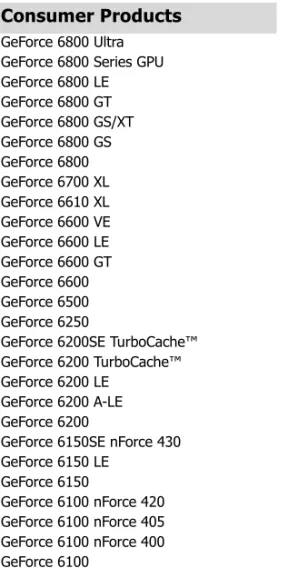
Table 3.1 lists the NVIDIA products supported by the Release 163 driver, version163.75
Table 3.1 Supported NVIDIA Products
Consumer Products GeForce 8800 Ultra GeForce 8800 GTX GeForce 8800 GTS GeForce 8600 GTS GeForce 8600 GT GeForce 8600 GS GeForce 8500 GT GeForce 8400 GS GeForce 8400 SE GeForce 8300 GS GeForce 7950 GX2 GeForce 7950 GT GeForce 7900 GTX GeForce 7900 GT/GTO GeForce 7900 GS GeForce 7800 SLI GeForce 7800 GTX GeForce 7800 GT GeForce 7800 GS GeForce 7650 GS GeForce 7600 GT GeForce 7600 GS GeForce 7600 LE GeForce 7500 LE GeForce 7350 LE GeForce 7300 SE GeForce 7300 LE GeForce 7300 GT GeForce 7300 GS GeForce 7200 GS GeForce 7100 GS
GeForce 7150 / NVIDIA nForce 630i GeForce 7100 / NVIDIA nForce 630i GeForce 7050 / NVIDIA nForce 630i GeForce 7050 / NVIDIA nForce 610i GeForce 7100 / NVIDIA nForce 620i GeForce 7050 PV / NVIDIA nForce 630a GeForce 7050 PV / NVIDIA nForce 630a GeForce 7025 / NVIDIA nForce 630a GeForce 6800 XT
GeForce 6800 Ultra GeForce 6800 Series GPU GeForce 6800 LE GeForce 6800 GT GeForce 6800 GS/XT GeForce 6800 GS GeForce 6800 GeForce 6700 XL GeForce 6610 XL GeForce 6600 VE GeForce 6600 LE GeForce 6600 GT GeForce 6600 GeForce 6500 GeForce 6250
GeForce 6200SE TurboCache™ GeForce 6200 TurboCache™ GeForce 6200 LE
GeForce 6200 A-LE GeForce 6200
GeForce 6150SE nForce 430 GeForce 6150 LE GeForce 6150 GeForce 6100 nForce 420 GeForce 6100 nForce 405 GeForce 6100 nForce 400 GeForce 6100
Table 3.1 Supported NVIDIA Products
Supported Languages
The Release 163 ForceWare Graphics Drivers supports the following languages in the main driver Control Panel:
English (USA) German Portuguese (Euro/Iberian)
English (UK) Greek Russian
Arabic Hebrew Slovak
Chinese (Simplified) Hungarian Slovenian Chinese (Traditional) Italian Spanish
Czech Japanese Spanish (Latin America)
Danish Korean Swedish
Dutch Norwegian Thai
Finnish Polish Turkish
Driver Installation
Minimum Hard Disk Space
The hard disk space requirement is minimum 33 MB for English‐only, and 56 MB for International.
Before You Begin
If you have previously installed NVIDIA nTune, NVIDIA recommends that you uninstall nTune before installing this driver. After the driver install is complete, you can reinstall NVIDIA nTune.
Installation Instructions
1 Follow the instructions on the NVIDIA .com Web site driver download page to locate the appropriate driver to download, based on your hardware and operating system.
2 Click the driver download link.
3 The license agreement dialog box appears.
4 Click Accept if you accept the terms of the agreement, then either open the file or save the file to your PC and open it later.
5 Extract the zip files to a temporary folder on your PC.
6 Open the NVIDIA driver installation .EXE file to launch the NVIDIA InstallShield Wizard.
7 Follow the instructions in the NVIDIA InstallShield Wizard to complete the installation.
Note: After the driver installation, Windows may default to 16‐bpp color and disable the Desktop Window Manager (DWM). To work around this issue, set the color to 32‐bpp and then reboot the PC.
NVIDIA Driver History
Release 163 is the latest NVIDIA driver available. Table 3.1 contains a summary of some previous driver releases and the versions associated with them. Some versions listed may not have been released outside of NVIDIA.
Table 3.1 NVIDIA Drivers for Windows Vista
Windows Vista Build NVIDIA ForceWare Driver
RTM OS Builds 6000 or higher Release 163: Version 163.11, 163.44, 163.67, 163.69, 163.71, 163.75 RTM OS Builds 6000 or higher Release 162: Version
162.22
RTM OS Builds 6000 or higher Release 158: Version 158.14, 158.18, 158.24, 158.42, 158.43, 158.45 RTM OS Builds 6000 or higher Release 100: Version 100.53, 100.54, 100.59, 100.64, 100.65, 101.41 Release 95: Version 97.46 RC2 OS Builds 5744 or higher Release 95: Version 96.85 RC1 OS Builds 5520.RC1_16384.060812‐2235 or higher Release 95: Version 96.33 Build 5472.WinMain_idx01_5.060713‐1900 or higher Release 95: Versions
95.60–96.00
Windows Vista Beta2 NVIDIA Driver version 88.61
February 06 CTP build 5308.FebCTP_Final.060217‐2200 or
higher NVIDIA87.45 Drivers 87.15,
July 05 Vista Beta1 NVIDIA Driver included ‘in the box’.
December 05 CTP build 5270.Winmain.051214‐1910 NVIDIA Driver included ‘in the box’.
A
P P E N D I X
M
ODE
S
UPPORT
FOR
W
INDOWS
This chapter details the Windows modes supported by the Release 163 driver for NVIDIA products. It contains these sections:
•
“General
Mode
Support
Information”
on
page 35
•
“Default
Modes
Supported
by
GPU”
on
page 36
General Mode Support Information
The NVIDIA graphics driver includes a standard list of display modes that are supported by default. These modes are listed in the section “Default Modes Supported by GPU” on page 36.
The actual modes available depend on the capabilities of the display. In addition, the NVIDIA graphics driver has a “dynamic EDID detection” capability and will make available additional modes that are listed in the display EDID, provided the graphics hardware can support it.
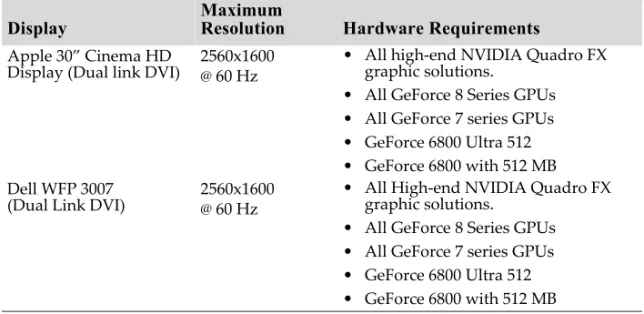
The NVIDIA graphics driver also supports the high resolutions available with the displays listed in Table A.1 as well as the non‐standard modes listed in Table A.2.
Table A.1 Modes Supported for High Resolution Displays
Display Maximum Resolution Hardware Requirements
Apple 30” Cinema HD
Display (Dual link DVI) 2560x1600@ 60 Hz
• All high‐end NVIDIA Quadro FX graphic solutions.
• All GeForce 8 Series GPUs • All GeForce 7 series GPUs • GeForce 6800 Ultra 512 • GeForce 6800 with 512 MB Dell WFP 3007
(Dual Link DVI) 2560x1600@ 60 Hz • Allgraphic High solutions.‐end NVIDIA Quadro FX • All GeForce 8 Series GPUs • All GeForce 7 series GPUs • GeForce 6800 Ultra 512 • GeForce 6800 with 512 MB
Table A.2 Non-standard Modes Supported Resolution
1680 x 1050 1366 x 768
Default Modes Supported by GPU
This section lists the modes that are included by default in the driver INF for the following product families:
•
“GeForce
7
Series
and
GeForce
6
Series
GPUs”
on
page 37
•
“GeForce
8
Series
GPUs”
on
page 40
Understanding the Mode Format
Figure A.1 gives an example of how to read the mode information presented in this section.
Figure A.1 Mode Format
Note:
• Horizontal spanning modes of 3840x1080 and above, and vertical spanning modes of 1920x2160 and above generally require at least 32 MB of video memory at 32 bpp.
• An “i” next to the refresh rate indicates an interlaced refresh rate. Resolution Example entry: 1024 x 768 32 60 70 72 75 85 100 120 140 144 150 170 200 Meaning: Resolution: 1024 x 768 Color depth: 32 bpp Refresh rates: 60 Hz, 70 Hz, 72 Hz, 75 Hz, 85 Hz, 100 Hz, 120 Hz,
140 Hz, 144 Hz, 150 Hz, 170 Hz, and 200 Hz
GeForce 7 Series and GeForce 6 Series GPUs
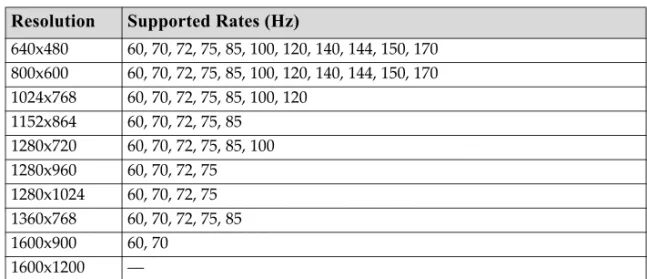
This sections lists the supported display resolutions, color depths, and refresh rates for the following products: