Automating Risk Management with Rational RequisitePro Cindy Van Epps , Rational Software
Software development is inherently a risky business. In his book Assessment and Control of Software Risks, Capers Jones writes, "Software has long been regarded as one of the most risk-prone of all engineering activities." Yet risk as a concept is universal, and it has long been acknowledged that (to quote Theodore Roosevelt), "Risk is like fire: If controlled it will help you; if uncontrolled it will rise up and destroy you."
My experience working with software projects for more than 20 years indicates that most projects don't follow through on effective risk management. Creating a list of risks at the start of the project isn't enough; if you don't do more than that, you've simply defined candidates for the "Top Ten Reasons My Project Failed" for the team T-shirts upon departure. As elaborated in the Software Development Magazine article
"Keep Your Project on Track," risk management is a critical activity in creating project success. In fact,
failure to acknowledge risk management as a critical activity in project management can be the biggest risk to your project.
So, what's a multitasking, fire-fighting, priority-juggling manager to do? First and foremost, it's important to realize that risk management is everyone's business, not just that of the manager, project manager, or some tech lead. Everyone must get involved, from the project manager to the tech leads and developers. Furthermore, they should have a repeatable process to follow, to ensure well-defined roles and
responsibilities and high-quality execution of the related tasks. This focus on people and process means we can use the Rational Unified Process (RUP) roles, artifacts, and workflows (particularly the project management workflow). Finally, automating risk management can help this onerous activity become mainstream to project management. This article (which assumes you're already familiar with the RUP and Rational RequisitePro) will look at some automation opportunities in the context of the RUP, using
examples excerpted from real projects.
The Risk Management Process Defined
The automation proposed in this article is based on the Identify and Assess Risks activity of the RUP and is currently in use as a standard process within a large hardware manufacturing company. You can add detail as appropriate for your situation; for example, you may want to add more risk types or use different values for measuring their criticality. The more detail you add, the more you'll appreciate having the process automated.
The RUP defines the steps of the Identify and Assess Risks activity as follows: 1. Identify potential risks.
2. Analyze and prioritize risks. 3. Identify risk avoidance strategies. 4. Identify risk mitigation strategies. 5. Identify risk contingency strategies. 6. Revisit risks during the iteration. 7. Revisit risks at the end of the iteration.
The activity diagram in Figure 1 shows these steps in the context of the iterative development aspect of the RUP.
Figure 1: The steps of the Identify and Assess Risks activity
Automation of the Process
Automating the risk management process not only simplifies its execution but also helps ensure accountability for following the process, and gives you the leverage to apply your risk management activities to other projects.
While some of the automation capabilities can be implemented in Microsoft Excel or Word, the full power of risk management automation can best be implemented using Rational RequisitePro. In this section, we'll look at how RequisitePro can support automation of risk management by enabling you to do the following:
● Manage risks and related information.
● Trace avoidance and mitigation strategies and contingency actions to risks. ● Link from risks to project requirements.
● Link to activities in the project schedule. ● Graph metrics related to risks.
● Trace risks to multiple projects.
● Keep an organization-wide risks history.
Manage Risks and Related Information
An effective way to simplify the enactment of risk management is to facilitate the collection and viewing of risks and related information. This includes capturing the list of risks, the values of their attributes (such as impact and likelihood of occurrence), and related information (such as the avoidance or mitigation strategy, or the contingency action and owner. Automating sorting and searching via a spreadsheet, for instance, becomes increasingly valuable as the amount of risk information being managed increases. As the state of a risk moves from "identified" to "incorporated in project plans" to "mitigated," the ability to focus on a particular context becomes useful. For example, you may want to see all of the risks with a high impact that are not mitigated, and plan activities in the next iteration of the project based on a ranking of the risks still not addressed.
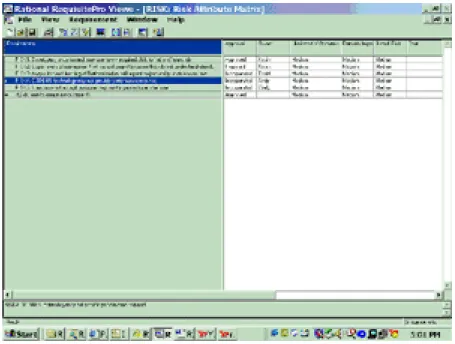
In RequisitePro, you can establish software requirement types for Feature, Use Case, Supplementary requirements, and more. For risk management, we establish the requirement types Risk, Risk Avoidance, Risk Mitigation, and Contingency Action, along with attributes for each that will help us manage the risks. For the Risk requirement type, we suggest the following minimum set of attributes (as illustrated in Figure 2):
● Approval, with a value of Proposed, Approved, Scheduled, Rejected, or Incorporated ● Owner
● The following three attributes, each with a value of High, Medium, or Low: ❍ Likelihood of Occurrence
❍ Potential Impact
❍ Overall Risk (derived from Likelihood of Occurrence and Potential Impact) ● Cost (which in general may be in dollars or in other currencies)
● Notes
Figure 2: Risk attributes
For the Risk Avoidance, Risk Mitigation, and Contingency Action requirement types, we use the following minimum set of attributes:
● Approval, with a value of Proposed, Approved, Scheduled, Rejected, or Incorporated ● Owner
● Cost ● Notes
Contingency Action has an additional attribute, called Indicator, which describes the specific condition or event that determines whether a risk has become a reality.
Trace Strategies and Contingency Actions to Risks
The ability to trace strategies and actions to the risks they're associated with helps ensure accountability for following the risk management process. For each risk, you can easily see whether any strategies (and if so, which ones) are being considered for reducing or eliminating that risk. Since contingency actions define what's to be done if a risk becomes a reality, and it's important to be prepared to react to high-impact risks, identifying contingency actions associated with risks is critical to planning and preparation. Even more valuable is the ability to associate the same strategy or action with multiple risks. This enables the project manager to apply effort and resources as efficiently and effectively as possible.
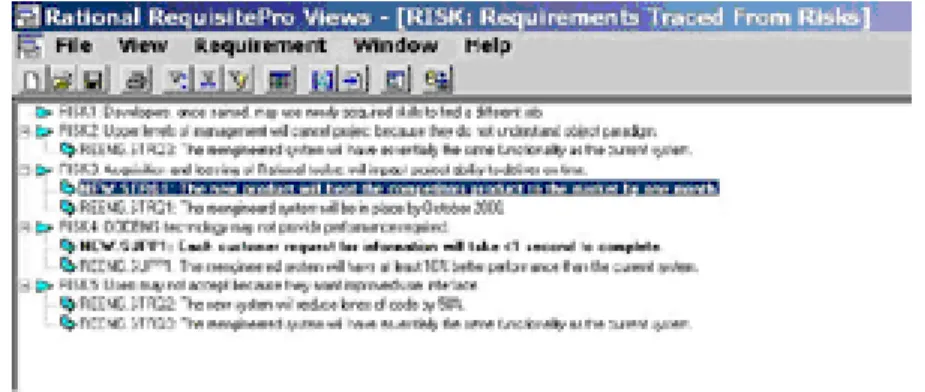
RequisitePro provides an easy way to trace strategies and actions to risks. You can add avoidance or mitigation strategies or contingency actions associated with a risk and see all the strategies and actions
for that risk (as illustrated in Figure 3). Taking the opposite view — looking at all the risks associated with a particular strategy or action — is just as easy.
Figure 3: Strategies and actions traced to risks
Link to Requirements
Since we're using RequisitePro, a requirements management tool, for risk management automation, we could just extend our RequisitePro project for requirements management to include the risk-related elements. That would be one way to work risk management into the automated software development process and (as shown in Figure 4) to trace risks to requirements in the same way that we traced risks to strategies and actions. However, consider that some risks may be of a sensitive nature, such that you won't want them visible to all team members. The risk of staff attrition and the proposed contingency action, for instance, would be sensitive information. For this reason, we recommend keeping the risks in a separate RequisitePro project from the one used for requirements management. RequisitePro's cross-project tracing capability allows tracing from the risks in the risk cross-project to the requirements in another RequisitePro project.
Figure 4: Requirements traced from risks
Key to accountability in the risk management process is clearly defining and executing the risk
management activities. This means more than identifying risks and related strategies: it means doing something about them.
We can schedule the risk management activities in our iteration plans as indicated in the RUP. This may involve anything from simply revisiting the acceptance strategy at the end of the iteration to actually setting aside time and effort to work on risk mitigation or avoidance. A clear path from the risk
management activities to the project schedule can be achieved through RequisitePro's integration with Microsoft Project. Selected avoidance and mitigation strategies and contingency actions can be inserted into a project schedule. The synchronization between RequisitePro and Microsoft Project helps the project manager understand the risk management activities as they progress through each iteration, and the project team members understand their risk management responsibilities.
Graph Metrics Related to Risks
Two kinds of metrics help simplify the enactment of the risk management process:
● Snapshot metrics give a perspective of the risks facing the project at a particular point in time. ● Trend metrics show how the project is proceeding with respect to risks over time.
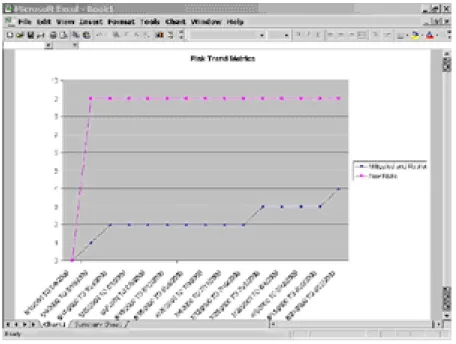
The project's condition with respect to risk is a critical element in the RUP. One of the criteria for transition from the elaboration phase to the construction phase is that the risks be sufficiently mitigated so that you can predictably determine the cost and schedule for completing development. This type of evaluation requires some quantifiable analysis, including which risks have been addressed, the severity of the risks remaining, and the amount of change in risks over the life of the project.
RequisitePro contains a metrics-generation capability that allows a project manager to graphically depict these kinds of metrics. Figure 5 shows an example of trend metrics as displayed by RequisitePro.
Trace Risks to Multiple Projects
The same concept we saw in linking risks to requirements can be used to help with applying the risk management activities more broadly than just to the project itself. We can apply these activities across multiple projects using RequisitePro. Risks, avoidance and mitigation strategies, and contingency actions can be traced from one central risk management project to requirements management projects for
various software development projects in the same organization. Because development projects within an organization very often use similar technologies, the risks associated with those projects are often the same, or at least closely related. The activity of addressing risks is quite often elevated to a higher level than the project itself. Therefore, the resources to address risks (either authoritatively or financially) tend to come from outside the project. Cross-project risk management allows an organization to prioritize and address risks across the organization, making more efficient use of risk management resources.
The example used earlier in Figure 4 shows two projects: a new development project whose requirements are tagged "NEW" and a re-engineering project whose requirements are tagged "REENG." We can see that both projects have a performance risk with the chosen database technology. The risk mitigation, then, is to create a task-specific team consisting of members from both projects who will test and suggest optimization of the database technology to meet the more stringent requirement.
Keep an Organization-Wide Risks History
Within an organization striving to mature by applying the experiences of projects and individuals to other projects, the goal would be to learn from the failures and "speed bumps" encountered by projects. The lessons learned would help project managers of new projects avoid the same pitfalls. Although many books on techniques and much consulting expertise can help with avoiding problems that plague software development in general, the true nature of risk to a project lies in the unique combination of management, technology, politics, and skills applied in a particular domain.
Management of risks at the organizational level as discussed in the previous section, then, becomes a powerful tool for collecting historical information and ideas for risk management for new projects. For example, a post-mortem analysis of the risks that manifested themselves on a canceled project could reveal a particular set of risks that contributed to the failure. Alternatively, the chosen risk avoidance or contingency actions could be shown to have been ineffective. This assessment information would be documented in the Notes attributes of the risks and actions.
Summary
Risk management is critical to successful project management, yet for many organizations, projects, and project managers and teams, it's an activity that's never methodically or completely addressed. We've looked at several ways in which risk management automation can bring this process into the mainstream of project management, including support for managing the risks and associated information about strategies and actions, linking to the project schedule, and managing risks across several projects. With Rational RequisitePro, you can easily automate the process by using a RequisitePro project configured to include risk requirement types and attributes, traceability, and metrics.
References
● Assessment and Control of Software Risks by Capers Jones (Yourdon Press Computing, 1994) ● "Keep Your Project on Track" by Neil Potter and Mary Sakry (Software Development Magazine,
April 2001)
About the Authors
Cindy Van Epps Cindy Van Epps worked for Rational Software as a software engineering specialist.