4283 ISSN: 2278 – 7798 All Rights Reserved © 2015 IJSETR
Design and Implementation of TCP/IP web server on
Raspberry Pi
Aniket Deshpande1, Prof. Anil Wanare 1
E&TC, University of Pune, 2
E&TC, BDCOE, sevagram, wardha, RTMNV, Nagpur
Abstract:As internet enabled device use is growing
widely to acquire and control data, the use of Ethernet connectivity is also increasing, so the design challenges are adding great functionality and reduce cost and size of the product. This paper introduces methodology for developing embedded web server system which uses SOC platform that can remotely acquire and control data for the those people having the disabilities like elderlies, visually impaired, hearing impaired. This paper uses hardware as Raspberry and TCP/IP, which provides high bandwidth, economy and compatibility.
Key words: Raspberry pi, TCP/IP. I. INTRODUCTION
Autonomy of the peoples over the age of 65 getting reduces. The people over the age of 65 have disabilities like elderlies, visually impaired, hearing impaired, people with motor impairment and cognitive disabilities which are common. Considering these disabilities independence of people needs to improve .This paper provides solution for the independency of people which includes great role of internet promoting independence and wellbeing of people .This paper provides cost effective solution, which meets the needs of disabled person like elderlies, visually impaired, hearing impaired, people with motor impairment and cognitive disabilities including touch screen icons, high speed, bandwidth, economy, compatibility.
Needs of high speed, bandwidth, economy, compatibility, are satisfied by the Web server system using TCP/IP. For this, interface design is the main issue, web pages provide the interface to the embedded server system.HTML (hypertext-markup-language) pages and web server software is the need of embedded system [1].
At the front end we can use HTML page for use interface which provides connectivity. The webpages are files or blocks of text that use a form of encoding called hypertext markup language (HTML). The HTML encoding specifies the formatting of text and images on the page, including text size and fonts and the positioning of text and other elements on the page. The HTML code may include links to images that appear on the page, as well as links to other pages or resources. In serving a webpage with dynamic content, the
software must have a way of inserting the dynamic content as the page is being served [1].
TCP/IP allows the different computing devices to access the web page which provides greater
security, the user can browse web page from different area using the home area network/internet. The purposed system provides control over,
Control of home appliances.
Measuring of sensors data
Monitoring of live status of devices.
II. RELATED WORK
It is noticed that, works on home automation for people disabilities are specific, usually on single type. This wok focuses on elderlies, visually impaired people, hearing impaired, people with motor impairment & cognitive disabilities [2].
The project assistive housing focuses on elderly comfort uses television set and remote for home automation. To improve legibility& accessibility large icons along with captions were used. In that numbers are used as a shortcuts to interact with user & navigation is avoided [2]&[8].There are also two projects but that doesn’t represent any interface design [3] & [4].
Another paper provides solution for upper and lower limbs by combining touch screen and voice control [5].Also a gesture based home automation system was developed [6].
III. PROPOSED METHODOLOGY A: HardwareDetails
In this methodology, we are configuring Raspberry as a web server toacquire and control data. Here we are implementing it as an embedded web server. The raspberry is small CPU it has BCM2835 SoC which is 700 MHz Low Power ARM1176JZFS Applications Processor with dual core video core IV®multimedia co-Processor provides open GLES 2.0, Hardware accelerated open VG and 1080p30H.264high profile decode, Capable of 1Gpixel/s or 24GFLOPS with texture filtering and DMA infrastructure .It has 512MB SDRAM, havingLinux operating system boots from microSD card uses micro USB socket 5v, 2A
4284 ISSN: 2278 – 7798 All Rights Reserved © 2015 IJSETR
.Also it has 10/100BaseT Ethernet socket. Video output can be taken from HDMI (rev1.3&1.4) with composite RCA (NTSC&PAL).It also provides audio output using 3.5mm jack,HDMI.Provides 4 USB2.0 connectors for USB connection. It has GPIO connectorides 40 GPIO pins also has camera connector and JTAG .Display connector with for display serial interface 15 way flat flex cable connector with two data lanes and click lane .It also contains timers, interrupt controllers,I2C master,I2C SPI slave UART. In this proposed methodology Html pages are imported at the Ethernet port through browser .These pages are decoded at processor then according to that processor will send command to turn it on and load is controlled .Also sensors data is acquired .firstly it is converted from analog to digital and then exported to Ethernet port on web pages.
Fig1: Raspberry Board Details
Here we are using different sensors like Humidity and temperature.
a: Relays
A relay is an electrically controllable switch widely used in industrial controls, automobiles and appliances. The relay allows the isolation of two separate sections of a system with two different voltage sources i.e., a small amount of voltage/current on one side can handle a large amount of voltage/current on the other side but there is no chance that these two voltages mix up.
b: LM35
The LM35 series are precision integrated-circuit temperature sensors, whose output voltage is linearly proportional to the Celsius (Centigrade) temperature. The LM35 thus has
an advantage over linear temperature sensors calibrated in ° Kelvin, as the user is not required to subtract a large constant voltage from its output to obtain convenient Centigrade scaling. The LM35 does not require any external calibration or trimming to provide typical accuracies of ±1⁄4°C at room temperature and ±3⁄4°cover a full −55 to +150°C temperature range. Low cost is assured by trimming and calibration at the wafer level. The
LM35’s low output impedance, linear output, and precise inherent calibration make interfacing to readout or control circuitry especially easy. It can be used with single power supplies, or with plus and minus supplies. As it draws only 60 μA from its supply, it has very low self-heating, less than 0.1°C in still air. The LM35 is rated to operate over a −55° to +150°C temperature range.
B:Software Details
Here we are using Linux platform. Using. Micro SD card OS is installed. Also we are using Qt creator .Qt Creator is a cross-platform C++, JavaScript and QML integrated development environment which is part of the SDK for the Qt GUI Application development framework. It includes a visual debugger and an integrated GUI layout and forms designer. The editor's features include syntax highlighting and autocompletion, but purposely nottabs (although plug-ins are available). Qt Creator uses the C++compiler from the GNU Compiler Collection on Linux and FreeBSD. On Windows it can use MinGW or MSVC with the default install and can also use cdb when compiled from source code. Clang is also supported. One of the major advantages of Qt Creator is that it allows a team of developers to share a project across different development platforms (Microsoft Windows®, Mac OS X®, and Linux®) with a common tool for development and debugging.
The main goal for Qt Creator is meeting the development needs of Qt developers who are looking for simplicity, usability, productivity, extendibility and openness, while aiming to lower the barrier of entry for newcomers to Qt.
IV. WORKDONE
The first need is to install OS on Raspberry model which provides Linux platform. Raspbian is the recommended operating system for normal use on a Raspberry Pi.
Raspbian is a free operating system based on Debian, optimized for the Raspberry Pi hardware. Raspbian comes with over 35,000 packages; precompiled software bundled in a nice format for easy installation on your Raspberry Pi.Raspbian is a community project under active development, with an emphasis on improving the stability and performance of as many Debian packages as possible. Official images for recommended Operating Systems are available to download from the Raspberry Pi.
Website: raspberrypi.org/downloads.
Then building QT 5 for raspberry and deploying QT apps using QT creator you can downloadit from http://www.raspberrypi.org/downloads.
http://swap.tsmt.eu/gcc-4.7-linaro-rpi-gnueabihf.tbz. Working tool chain for Raspberry pi. Download the image from a mirror or torrent.
4285 ISSN: 2278 – 7798 All Rights Reserved © 2015 IJSETR
Extract the image by double clicking on the download file.
Connect the SD card reader with the SD card inside; note: must be formatted in FAT32!
From the Apple () menu, choose About This Mac, then click on More info...; if you are using Mac OS X 10.8.x Mountain Lion then click on System report.
Click on USB (or Card Reader if using an in-built SD card reader) then search for your SD card in the upper right section of the window; click it, then search for BSD name in the lower right section: must be something like diskn where n is a number (for example, disk4). Note this number.
Unmounts the partition so that you will be allowed to overwrite the disk by opening Disk Utility and unmounting it (do not eject it, or you have to reconnect it). Note: On Mac OS X 10.8.x Mountain Lion, "Verify Disk" (before unmounting) will display the BSD name as "/dev/disk1s1" (or similar), allowing you to skip the previous two steps.
From the Terminal run:
sudo dd if=path_of_your_image.img
of=/dev/diskn bs=1M
Remember to replace n with the number that you noted before!
Wait a LONG time! (or see the note above about using /dev/rdisk#...) To see the current status, send SIGINFO signal by pressing Ctrl+T.
After that we have installed QT using QT creator
Start Qt Creator Start a new project
File -> New File or Project...
Select Qt Console Application
Name the project. I chose “raspberrytest” Check Qt 5.0 Raspberry Pi as a project type and uncheck all other types.
Develop a Qt application as you normally would. In my case, I used the following files (borrowed from a Raspberry Qt example).
main.cpp
#include <QGuiApplication> #include <QtQml>
#include <QQuickView> int main(intargc, char *argv) {
QGuiApplication a(argc, argv); QQuickView v; v.setResizeMode(QQuickView::SizeRootObjec tToView); v.setSource(QUrl("qrc:///main.qml")); v.showFullScreen(); return a.exec(); } main.qml import QtQuick 2.0 Rectangle { color: "green" } main.qrc <RCC> <qresource prefix="/"> <file>main.qml</file> </qresource> </RCC>
Set up raspberrytest.pro to correctly deploy. Change the QT variable to be “core guiqml
quick”
Add an install target target.path = /home/pi INSTALLS += target
V. RESULT AND DISCUSSION
Here we had implemented TCP/IP web server by using Raspberry Pi. The Raspberry pi is interfaced with the MCP 3208 which is 8 channel ADC. Here we are using various sensors such as PH,TDS,PIR,TEMP., IR & HUMIDITY Sensors. These sensors sense the various data in environmnent and forward required data to Raspberry.This data is available on our handheld devices and dekstop pc’s in real time by using TCP/IP.Thus this data which is readily available on devices is very usefull for the future actions.For the controlling this data we can use various types of loads.
By performing various test we are getting following various results as our output.Follwing are the important results which we are getting as depicteed.
4286 ISSN: 2278 – 7798 All Rights Reserved © 2015 IJSETR
Fig 3: Hardware with various samples Table I: Pre-recorded values of sensors +Date Time Ye ar TDS PH Temp Humidit y PIR IR Thu Sep 24 23:54: 01 20 15 TDS= 0 pH =0 Temp =22 Humidit y:2 PIR=N O IR= NO Thu Sep 24 23:54: 03 20 15 TDS= 0 pH =0 Temp =22 Humidit y:2 PIR=N O IR= NO Thu Sep 24 23:54: 05 20 15 TDS= 12 pH =0 Temp =23 Humidit y:2 PIR=N O IR= NO Thu Sep 24 23:54: 07 20 15 TDS= 0 pH =0 Temp =23 Humidit y:2 PIR=N O IR= NO Thu Sep 24 23:54: 09 20 15 TDS= 5 pH =0 Temp =23 Humidit y:2 PIR=N O IR= NO Thu Sep 24 23:54: 11 20 15 TDS= 1 pH =0 Temp =23 Humidit y:2 PIR=N O IR= NO Thu Sep 24 23:54: 13 20 15 TDS= 0 pH =0 Temp =23 Humidit y:2 PIR=N O IR= NO Thu Sep 24 23:54: 15 20 15 TDS= 0 pH =0 Temp =23 Humidit y:2 PIR=N O IR= NO Thu Sep 24 23:54: 17 20 15 TDS= 5 pH =0 Temp =23 Humidit y:2 PIR=Y ES IR= NO Thu Sep 24 23:54: 19 20 15 TDS= 5 pH =0 Temp =23 Humidit y:2 PIR=Y ES IR= NO Thu Sep 24 23:54: 21 20 15 TDS= 2 pH =0 Temp =23 Humidit y:2 PIR=Y ES IR= NO Thu Sep 24 23:54: 23 20 15 TDS= 5 pH =0 Temp =23 Humidit y:2 PIR=Y ES IR= NO Thu Sep 24 23:54: 25 20 15 TDS= 0 pH =0 Temp =23 Humidit y:2 PIR=Y ES IR= NO Thu Sep 24 23:54: 27 20 15 TDS= 5 pH =0 Temp =22 Humidit y:2 PIR=N O IR= NO Thu Sep 24 23:54: 29 20 15 TDS= 5 pH =0 Temp =22 Humidit y:2 PIR=N O IR= NO Thu Sep 24 23:54: 31 20 15 TDS= 5 pH =0 Temp =22 Humidit y:2 PIR=N O IR= NO Thu Sep 24 23:54: 33 20 15 TDS= 5 pH =0 Temp =22 Humidit y:2 PIR=N O IR= NO
Fig4: Output for sample A
Fig5: Output for sample B
Fig 6: Output for sample C
4287 ISSN: 2278 – 7798 All Rights Reserved © 2015 IJSETR
Fig8: Output result on Smart phone
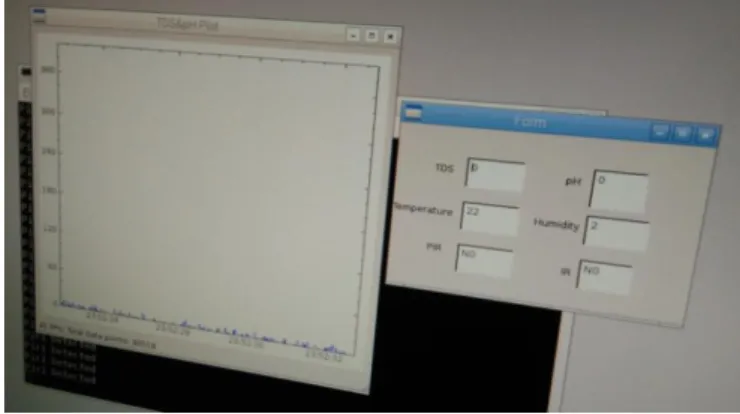
We are measuring the amount of dissolved salt in the water and PH of the water, we are using crystal wire which is deepen into the water sample and readings are taken on raspberry pi .all the electrical voltages are converted into digital through MCP3208.Table1 shows the values of sensors that are stored on raspberry pi also we had plotted the graph of TDS and PH. For Sample A which is mineral water as we go through test TDS and PH values are TDS=0,PH=-0 as in fig4. For sample B which is municipal water for which TDS and PH values are TDS= 4, PH=0 as in fig5.For sample C is mixture of soil and salt has TDS=5 and PH=0 as in fig6.As the TDS goes on increases which shows the dissolved salts in water are increasing.
V. CONCLUSION
As working with different kinds of group users with their different needs of data acquisition and control and interface, system suitable to them achieved. Our system provides single portal which readily contributed to acquire and control the real time data.
As we go through the different test using different sensors gives the cost effective solution for real time data acquisition and control.
Whole system has low-cost, good openness and portability, and is easy to maintain and upgrade. It is possible to interface different kind of Sensors with these modules and makevarious applications. So it can monitor embedded system operation state through home area network, achieving network monitoring purposes. This work can further be extended with usage of high end embedded servers along with wireless sensor networks with increase in parameters and increase in sensor nodes.
As the next steps to this are the improvements of the interface with the interviewees’ feedback, to integrate the new explore-by-touch features available in the new tablets’ operating systems libraries and the repetition of the described experiments with larger groups of users.
REFERENCES:
[1] A. S. Tanenbaum. "Computer Networks, Fourth Edition", Prentice Hall, Inc., 2008.
[2] L. C. P. Costa, N. S. Almeida, M. K. Zuffo, “Accessible display design to control home area networks.” IEEE International Conf. in Consumer Electron. Proceed., pp.426-427, Jan. 2013.
[3] X. H. B. Le, M. D. Mascolo, A. Gouin, N. Noury, “Health smart home -towards an assistant tool for automatic assessment of the dependence of elders.” Proc. of the Annual International Conf. of the IEEE Eng. in Medicine and Bio. Soc., pp. 3806-3809, Aug. 2007.
[4] A. Sleman, M. Alafandi, R. Moeller, “Integration of wireless fieldbus and wired fieldbus for health monitoring.” IEEE International Conf. on Consumer Electron. pp. 1-2, Jan. 2009.
[5] M. Valles, F. Manso, M. T. Arredondo, F. Del Pozo, “Multimodal environmental control system for elderly and disabled people.” 18th Annual International Conf. of the IEEE in Eng. in Medicine and Biology Society, pp. 516-517, Oct.-Nov., 1996. [6] J. Zhu, X. Gao, Y. Yang, H. Li, Z. Ai. X. Cui,
“Developing a voice control system for zigbee-based home automation networks.” IEEE 2nd International Conf. on Network Infrastructure and Digital Content, pp. 737-741, Sep. 2010.
[7] “Implementation of a Embedded Web Controller based on TCP/IP Protocol for Home Automation System” Chao- Huang Wei1 Bui Quang Hoa2 Yu-Ning Wang3Department of Electrical Engineering, Southern Taiwan University No. 1, Nan-Tai St., Yung-Kang/Tainan, Taiwan 710, R.O.C.
[8] M. Ghorbel, F. Arab, M. Monhtari, “Assistive housing: case study in a residence for elderly people.” IEEE Second International Conf. on Pervasive Computing Technologies for Healthcare, pp.140-143, Jan.- Feb. 2008.
[9] H.B. Lee, L.J. Park, S.W. Park, T.Y. Chung, and J.H. Moon, Interactive Remote Control of Legacy Home Appliances through a Virtually Wired Sensor Network, IEEE Transactions on Consumer Electronics, Vol. 56, No. 4, pp. 2214-2248, Nov. 2010.
[10] Sensation SHT11 Sensor Module Precision Temperature and Humidity Measurement, Parallax, Inc. Jul. 2003.