An Evaluation of iPad
Implementation Across A
Network of Primary Schools in
Cardiff
Professor Gary Beauchamp
Emily Hillier
School of Education
1 | P a g e
Acknowledgements:
This report was undertaken for Cardiff Local Authority.
We would like to thank the head teachers, teachers, pupils and parents of the participating schools who generously gave their time to participate in the study.
Hywel Dda Primary School Mount Stuart Primary School Severn Primary School Bryn Deri Primary School Peter Lea Primary School Thornhill Primary School
We would also like to thank Richard Clement, e-learning Manager (Cardiff Schools‟ Service) and Network Specialist for Emerging Technologies for Central South
Consortium, both for instigating the project and his on-going support throughout all phases of the research process.
Finally, we are also grateful to Dr Kevin Burden and the team from University of Hull for permission to use research instruments developed for their iPad evaluation
project in Scotland.
School of Education
Cardiff Metropolitan University Cyncoed Road,
Cardiff. CF24 3 FQ Contact:
Professor Gary Beauchamp
2 | P a g e
Foreword
It is clear that over the past three years the iPad has captured the imagination of both teachers and learners in a way that no previous technology has. Spend an hour in any school that has embedded the use of iPads into their teaching and learning and the enthusiasm is plain to see. Anecdotally, the impact has been huge, but where is the real evidence for their impact on engagement, motivation and, of course, standards in our schools?
A conversation between Professor Beauchamp and I quickly led us to the conclusion that, apart from the two studies referred to in this research, there is very little out there. That gap in hard evidence, allied to fact that in my strategic ICT role within the local authority I was constantly being asked to give advice relating to the use of iPads and their beneficial effect on learning, led to us launching this research project as a joint Cardiff Council/Cardiff Met University venture in early 2013.
Yes, we are aware that there are other tablets available, but the overwhelming majority of schools use the iPad as their chosen device. Not because it is necessarily the best piece of hardware, but because the educational app environment developed by and for Apple is currently far better than the equivalent android market. As a result, it was sensible to restrict this particular research project to iPads only. From a strategic point of view at the local authority level, the brand of device is irrelevant. The ICT strategy for Cardiff Schools focuses on the integration of ICT into all curriculum areas and across all age groups wherever it can enhance the teaching and learning experience. Now, and in the immediate future, tablet technology is a key feature in fulfilling this aim.
I would like to thank Professor Beauchamp for his eagerness to become involved in the project, and Emily Hillier for the sensitive way in which the research was carried out in the primary schools. And also, the head teachers, staff, children and parents for allowing their schools to take part in the project, and for expressing their views openly and honestly when interviewed.
Lastly, we have tried, in section 7 of the report, to introduce a practical element to help schools who are interested in adopting the use of integrated technology in general, and iPads in particular. As with any good research, the paper raises as many questions as it provides answers, but both Cardiff LA and the Central South
Consortium can give practical advice and support to any school wishing to invest in, and develop their use of, this technology.
Richard Clement (MA)
e-learning Manager (Cardiff Schools’ Service) and Network Specialist for Emerging Technologies for Central South Consortium
3 | P a g e
Table of Contents
Foreword ... 2 Executive summary ... 4 1. Introduction ... 5 2. Context ... 8 2.1 Existing research ... 8 2.2 References ... 10 3. Methods ... 113.1 Online surveys - parents ... 11
3.2 Online surveys - classroom practitioners ... 12
3.3 Interviews ... 15
Summary ... 16
4. Research Findings... 17
4.1 Use of iPads in School ... 17
4.1.1 Introduction and Training ... 17
4.1.2 Implementation ... 20
4.1.3 Impact ... 25
4.2 Use of Technology at Home ... 28
5. Conclusions ... 35
6. Recommendations ... 37
4 | P a g e
Executive summary
Keywords:ipads, primary school, mobile technology, training, motivation, independence, assessment, parents, pupils, teachers.
This report evaluates the implementation of iPads in six primary schools with varied catchment areas across Cardiff. The main focus of the study was to explore how the iPads were introduced and implemented, as well as assess the impact they had on the attitudes and motivations of teachers, parents and pupils.
Data was collected via surveys and interviews. Online surveys were completed by 52 parents from four schools and 70 teachers from five of the schools. In addition, small group interviews were conducted with 120 pupils from years 1, 3, 5 and 6 and 23 teachers from all six schools.
Data was analysed to identify several key themes including: the importance of both informal and formal methods of iPad training; high levels of teacher, pupil and parent enthusiasm and motivation; ease of use; enhancement of pupil independence; and how the iPad supports various methods of assessment. In addition, all teachers reacted positively to the pupils assisting them with the iPads and in many cases encouraged them to support other pupils in the class as well.
Conclusions and recommendations are offered to enhance teaching and learning with the iPad as well as provide the Local Authority with evidence to support the strategic development of ICT use in Cardiff schools.
5 | P a g e
1.
Introduction
The genesis of this research project was an existing informal network of six primary schools who were working with Cardiff Local Authority (LA) in developing the use of iPads. Some of the schools had been using iPads for at least a year and were
considering buying more, while others had just purchased iPads and were
introducing them into school. There was a belief in the group that the introduction and use of iPads would be a positive experience for both teachers and pupils, but that a more objective evidence base would be useful not only to the schools but to others in the LA and beyond.
At the same time a wider debate in Wales was taking place about the importance of ICT in teaching and learning, including Welsh Government reports (such as the Find it, make it, use it, share it: learning in digital Wales.Digital Classroom Teaching Task and Finish Group), the establishment of a National Digital Learning Council and a growing awareness of the importance of digital literacy.
The introduction of the iPad by Apple in 2010 provided a tablet which allowed pupils to make high quality sound and video recordings, take high-definition photographs, research on the Internet, type up the reports and presentations and much more, all in one device which could be connected both to a network and to a classroom
projector. It had always been possible to do these things, but in the past it required a range of different devices (with associated cables) and methods of downloading data. Now, the iPad (and indeed other tablets) can act as a multimodal1 mobile „hub‟ to replace all these devices and could be used with a very large, and ever-increasing, number of educational „apps‟2.
In undertaking and monitoring training requests, the e-learning manager for Cardiff had noted a particularly large uptake of these devices in the primary sector. As such, and given the very limited research evidence available (see below), it seemed timely to undertake a research study into the use of iPads in primary schools.
The fact that all six schools in this study were at different stages in the use of iPads was considered a strength of the study as it allowed a variety of perspectives to be
1Multimodal refers to the ability of the iPad to use a variety of modes (the form of the content, such as image,
writing or talk).
2App is an abbreviation of application. It is a “self-contained program or piece of software designed to fulfil a
6 | P a g e
considered, particularly from those who were new to using the device. After initial meetings between Professor Gary Beauchamp (Cardiff Metropolitan University School of Education), Richard Clement (e-learning Manager)and the headteachers, Cardiff LA was able to provide small-scale funding to undertake the research project which is reported below.
It is important to note from the outset, that this research was undertaken as a
collaborative venture with the research being done with, rather than to, the schools. As such, the headteachers and the local authority e-learning manager worked closely with the research team in identifying areas to be researched and also supporting the research team throughout the study.
Scope and purpose of the study
In deciding the scope and the purpose of the study, it was decided at an early stage that it would not be possible to assess the impact of the iPad on learning and attainment (however useful this may have been), as it was impossible to isolate the impact of iPads from a range of other factors which may have impacted on
attainment - including the increased motivation provided to both staff and pupils by the acquisition of new equipment and any changes in pedagogic practice which may have resulted. In addition, the timescale of the study also prevented an effective longitudinal study which may have been required to make such a judgement. Therefore, the main focus of the study was to assess the impact of the iPad on the attitudes and motivations of teachers and pupils in the primary schools, as well as to contextualise this by assessing parental attitudes to the use of mobile technologies in schools.
The main purpose of the study was to provide evidence to enhance teaching and learning with the iPad and ensure that this linked to the use of mobile technologies in general outside of school. Also the findings would provide the LA with evidence to inform the strategic development of ICT use in Cardiff schools.
In the report below, we concentrate on themes supported by high levels of pupil, teacher or parental support in the data.
7 | P a g e
Limitations and disclaimers
As some schools had only just started to use the iPad and others were much more experienced, this study does not seek to establish a standardised baseline or attempt to measure „success‟ or make judgements about attainment in their use. We also make no attempt to draw comparisons between schools or make judgements about the use of technology in individual schools. The sample in this study is relatively small, but does represent a cross-section of schools from varied socio-economic backgrounds and stages of development in the use of iPads.
Although the use of an Internet-based survey enabled easy data collection from teachers, it proved more problematic for some schools in providing the link for the parental survey, resulting in a relatively small sample of parents with some schools not represented. In addition, only those parents with access to the Internet were able to complete the survey, which potentially limited the sample size.
As such, we must treat findings in the research as individual case studies (with each school having its own demographic, ethos, infrastructure and leadership) and be careful not to generalise the findings to a wider group of schools. In addition, as schools were keen to develop the research project it may be assumed that they have an inherently positive attitude to the iPad - particularly if they have invested
significant sums of money in purchasing them - which might influence their judgements. Having said this, however, we believe that important lessons can be learned which will be valuable to other schools as they seek to introduce and develop the use of the iPad.
In the near future, a larger longitudinal study would be useful in exploring the experience of other primary, and indeed secondary, schools as they begin or travel further along their learning journey with iPads.
8 | P a g e
2.
Context
2.1 Existing research
Although there is existing research on a range of mobile technologies in education, there is a limited amount of objective academic research into the use of iPads, particularly within the United Kingdom (UK). The main academic study undertaken in the UK to date was by a team from Hull University looking at the adoption and use of iPads in eight Scottish primary and secondary schools (365 pupils, aged 7-14)3. This research was undertaken between March and summer 2012 and reported on three approaches: the use of class sets of iPads retained in schools; the allocation of machines to individual students to use across lessons within school; and a more personalised approach where students were given the device for the duration of the pilot could be used both in school and at home4.
Research data was drawn from:
Initial (baseline) and exit surveys of parents and students;
Interviews with the lead teachers and senior managers in each school; Interviews with advisers and senior leaders in each of the Local Authorities; Focus group meetings with students in each school,
Lesson observations by the research team; and Teacher reflective journals and pupil video dairies.
The key findings of the study (Burden et al., 2012, pp.9-10) were that:
1. Use of tablet devices such as the iPad was found to facilitate the achievement of many of the core elements required within the Curriculum for Excellence5 framework and could be further developed in order to achieve these
aspirations.
2. The adoption of a personalised device such as an iPad significantly
transforms access to and use of technology inside the classroom with many attendant benefits.
3The final report can be downloaded at http://tinyurl.com/bnjcxa2
4In the schools in the Cardiff study no students were allocated individual iPads and none were allowed to take
iPads home.
5 The curriculum for schools in Scotland
9 | P a g e
3. Personal ‘ownership’ of the device is seen as the single most important factor for successful use of this technology.
4. The individual possession of and early familiarisation with the iPad by teachers was seen as being responsible for the significant ‘buy in’ and low level of resistance from teachers.
5. As a result of the pilot initiative schools are reconsidering their existing technology deployments with a view to more mobile provision.
6. The device is bringing about significant changes in the way teachers
approach their professional role as educators and is changing the way they see themselves and their pedagogy.
7. Parents also appear to become more engaged with the school and their child’s learning when the iPad travels home with the student.
Another study undertaken in the UK (Heinrich, 2012) around the same time, looked at the instruction of iPads into a large (970 pupil) Academy for 11-18 years. It
concluded that since "the majority of pupils at the school now having iPads there has been a significant and very positive impact on learning together with further
significant and still developing changes in pedagogy”. (p.4) It also noted that
students were more motivated when using iPads, both staff and students found iPads easy to use and the „overwhelming majority‟ of teachers regularly used iPads in their teaching.
Outside of the UK, particularly in America, other studies have looked at the use of iPads in a variety of settings but many are small-scale studies and very specific to their context (for example, Pegrum, Howitt and Striepe (2013) examining the use of iPads by pre-service teachers in Australia). Such studies are generally positive about the use of iPads, and with an iPad „the idea that students can work anywhere in a classroom, in a school, or at home with this tool makes it a compelling choice for many.‟ (Hutchison, Beschorner and Schmidt-Crawford, 2012, p.23) These studies also contain some useful caveats, particularly the suggestion that „simply allowing them [pupils] to use their iPads, or providing them with classroom sets of iPods, does not implicitly mean they will be learning educationally beneficial material‟ (Peluso, 2012, p.E127) In common with the research reported below, few studies have attempted to measure attainment for the reasons outlined above, but one study on American 5th grade students found that „The data suggests the iPad intervention did
10 | P a g e
not have a statistically significant impact on students‟ mathematics achievement.‟ (Carr, 2012, p278)
2.2 References
Burden, K., Hopkins, P., Male, T., Martin, S., Trala, C. (2012) iPad Scotland Evaluation. The University of Hull: Faculty of Education.
Carr, J.M. (2012) 'Does Math Achievement h'APP'en when iPads and Game-Based Learning are Incorporated into Fifth-Grade Mathematics Instruction?', Journal Of Information Technology Education, 11, pp. 269-286.
Heinrich, P. (2012) The Ipad As A Tool For Education: A Study Of The Introduction Of Ipads At Longfield Academy, Kent. Nottingham: NAACE.
Hutchison, A., Beschorner, B., & Schmidt-Crawford, D. (2012) 'Exploring the Use of the iPad for Literacy Learning', Reading Teacher, 66, 1, pp. 15-23
Peluso, D.C. (2012) 'The fast-paced iPad revolution: Can educators stay up to date and relevant about these ubiquitous devices?', British Journal Of Educational Technology, 43, 4, pp. E125-E127
Riley, P. (2013) 'Teaching, Learning, and Living with iPads', Music Educators Journal, 100, 1, pp. 81-86.
Saine, P. (2012) 'iPods, iPads, and the SMARTBoard: Transforming literacy
instruction and student learning', New England Reading Association Journal, 47, 2, pp. 74-79
Pegrum, M., Howitt, C. and Striepe, M. (2013) „Learning to take the tablet: How pre-service teachers use iPads to facilitate their learning‟, Australasian Journal of Educational Technology, 29(4), pp.464-479
11 | P a g e
3.
Methods
This study used a mixed-methods research design consisting of quantitative data collection from online surveys and qualitative data gained from interviews. The data was analysed to provide descriptive statistics from the surveys, as well as detailed narratives from the interviews. Prior to any research being undertaken, informed consent was gained from all pupils, staff and parents involved in the project for anonymous use of data.
3.1 Online surveys - parents
The separate online surveys of teachers and parents used the same survey
instruments (with permission) as the iPad evaluation project undertaken in Scotland by Hull University. A hyperlink to the surveys was provided by the schools to both teachers and parents. This linked to a confidential and secure online survey tool hosted by Cardiff Metropolitan University. Although this worked well with teachers, not all schools were able to circulate the link electronically (as not all schools had an electronic mailing list) resulting in parents from only four schools being able to complete the parental survey, with a total of 52 parents from four schools
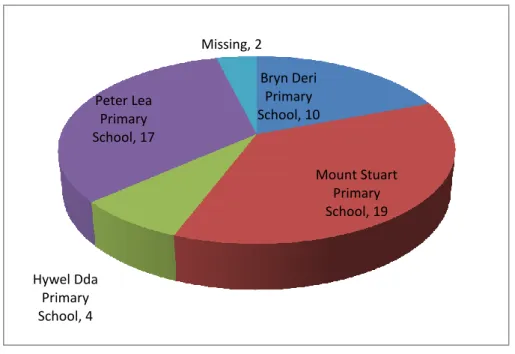
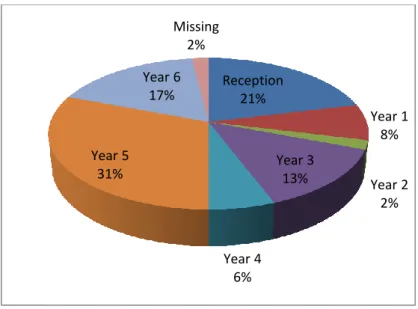
responding. Figures 3.1 and 3.2 below show the breakdown by school and age group of child for the parents who completed the survey.
Figure 3.1 Parental survey: What school does your child attend?
Bryn Deri Primary School, 10 Mount Stuart Primary School, 19 Hywel Dda Primary School, 4 Peter Lea Primary School, 17 Missing, 2
12 | P a g e
Figure 3.2 Parental survey: What year group is your child in?
These figures show that the majority of schools are represented and parents of children in all age groups took part in the survey. After analysis, there were no significant differences between the responses from parents of different age groups and different schools, so the results below are presented for all the parents who replied to the survey as one group.
3.2 Online surveys - classroom practitioners
Although the vast majority of school-based respondents (81%) in the survey were classroom teachers (see figure 3.3 below), the survey link was also provided to other classroom practitioners and headteachers as each could provide a unique
perspective. However, as all respondents were familiar with working in the classroom and as there no significant difference between the groups, all responses were used to compile the figures and tables below.
Reception 21% Year 1 8% Year 2 2% Year 3 13% Year 4 6% Year 5 31% Year 6 17% Missing 2%
13 | P a g e
Figure 3.3 Teacher survey: Role of practitioners in each school
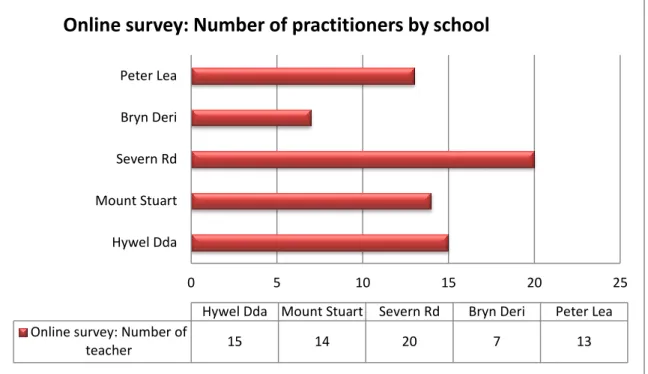
The survey was completed by 70 staff from five of the six schools, and the breakdown of practitioners by school is shown in Figure 3.4 below (one teacher did not indicate school).
Head teacher
3% Deputy Head teacher 4%
Classroom teacher 81% SENCo 2% Other 4% administrator 2% EMTAS Teacher 2% teacher PPA 1% TLR 1%
14 | P a g e
Figure 3.4 Teacher survey: Number of practitioners from each school
It is also worth noting that the sample was representative of teachers of all ages as shown in figure 3.5 below.
Figure 3.5 Teacher survey: Age range of teachers
The data from the survey revealed no significant difference between school and age of teacher, so again findings are presented below for the whole sample – although schools were able to access their individual data if required.
0 5 10 15 20 25 Hywel Dda Mount Stuart Severn Rd Bryn Deri Peter Lea
Hywel Dda Mount Stuart Severn Rd Bryn Deri Peter Lea Online survey: Number of
teacher 15 14 20 7 13
Online survey: Number of practitioners by school
20-30
31-40 41-50
51-60 Missing
15 | P a g e 3.3 Interviews
The interviews with a subset of teachers and groups of pupils were conducted in all six schools on the school premises at a time convenient to staff and pupils. The support of the headteachers ensured that all planned interviews were undertaken. One researcher undertook all of the interviews with both pupils and teachers to ensure consistency.
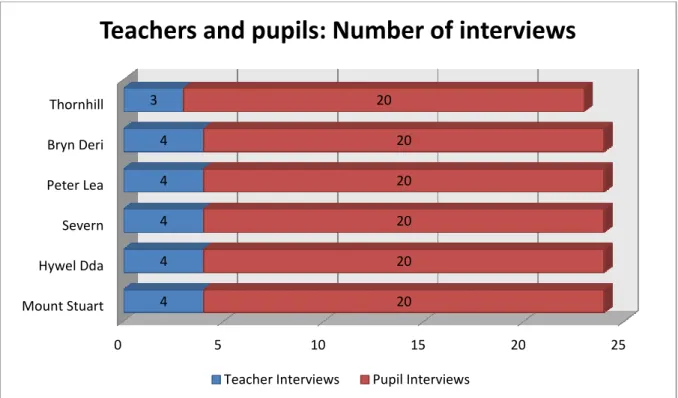
At the start of the project it was decided by the schools and the research team that pupils from year 1, 3, 5 and 6 would be interviewed in small groups of five pupils per age group, making a total of 20 pupils interviewed for each school, and 120 pupils overall. Members of the groups were chosen by the teachers and consisted of both boys and girls. Classroom teachers from the each of these age groups were also interviewed in one group of three or four in each school (a total of 23 teachers
altogether) to provide a range of perspectives and also to stimulate discussion based on responses to each other and the interviewer.
Each interview was semi-structured to ensure the same questions were asked, but also allowed participants to add extra information. Separate sets of questions were developed by the research team for teachers and pupils, with particular regard to ensuring that pupils could understand what they are being asked. All interviews were recorded for later analysis by the research team.
Figure 3.5 below shows the number of teachers and pupils who took part in the interviews.
16 | P a g e
Figure 3.5 Teachers and pupils by school Summary
Numerical information was collected using an online survey from 52 parents from four schools and 70 teachers from five schools. This numerical data was
supplemented by small group interviews with 120 pupils from years 1, 3, 5 and 6 in six schools and 23 teachers of these age groups in six schools. All data was then analysed by the research team and the results are presented in the following section. 0 5 10 15 20 25 Mount Stuart Hywel Dda Severn Peter Lea Bryn Deri Thornhill 4 4 4 4 4 3 20 20 20 20 20 20
Teachers and pupils: Number of interviews
17 | P a g e
4. Research Findings
4.1 Use of iPads in School
4.1.1 Introduction and Training
Data from the teacher focus groups revealed two types of iPad training had been used: formal and informal. Each of the six schools received formal training during INSET days and prior to implementation. Five out of the six schools reported the Local Authority provided the training and two schools received training from an external provider (one school received both Local Authority and external training).
Overall the training sessions were deemed necessary and useful, particularly for teachers with little or no iPad, or other tablet, knowledge and skills. Teachers also felt that subsequent to more formalised training, the ability to take iPads home during school holidays to explore and „play‟ with it was particularly beneficial. There were, however, some concerns from about the effective of training from teachers who regarded themselves as fairly confident iPad and/or tablet users. Focus groups of teachers from five schools regarded the training as predominately „technical‟ including how to use certain functions and Apps. This was regarded an important early stage of training, particularly for those with little or no iPad experience, but more limiting for those teachers with pre-existing basic knowledge and skills.
„‟I think if you didn‟t know anything about iPads [the training] was very good. I already had an iPad so I knew most of the functions but I think if you didn‟t it was useful for showing you the basics.‟‟ (School D)
Teachers from one school discussed a training day that allowed them to watch other teachers and children using iPads in a school context across different year groups. This was regarded as a valuable training experience and allowed teachers to observe and analyse ways in which the iPad could be used as a pedagogical tool. Another school who had been using the iPads for about 18 months reported holding similar open day sessions, where staff from other schools were invited to see not only how the iPads were being implemented in classroom contexts, but to share their initial implementation experiences:
„‟We have been carrying out a few open mornings … we have set out our iPad journey to share where we went wrong, and what we have done, so we can share.‟‟ (School D)
Such practical-based training was not only highly regarded by the school who received such an experience, but also by the school offering open day sessions. The potential of this approach was also identified by other schools who regarded their training as heavily
18 | P a g e
„technical.‟ When asked about additional training needs, four out of the six school focus groups identified the need to observe how iPads could be practically applied in their year group settings:
„It would be great … to go in a classroom and see how they are being used by other classes in your own year.‟‟ (School F)
Teachers from one school also discussed the nature of the training as standardised and generic in relation to its delivery:
“The training was from County and you knew it was being rolled out across school and that was the training that was given which was fine, but it could have been useful for us to [say] as a school these are our aims, this is why we have them and so on.‟‟ (School B)
The generic nature of training was evident during the teacher focus groups as particular Apps were discussed throughout interviews:
Hairy Letters Book Creator KeyNote Puppet Pals Popplet
Being provided with training on several Apps was regarded useful as they provided activities for a variety of ages and abilities, but some teachers seemed overwhelmed by the variety of Apps that were available to them:
“There is so much … on the iPad you could literally have training every Monday and still not have much idea.‟‟ (School E)
Despite the varying implementation phases, teacher focus groups from only two schools discussed the need for further training to allow greater exploration of additional Apps, particularly in the older years (Year 5 and 6), where it was felt that the initial Apps introduced had been exhausted. Focus groups from the four other schools discussed the need for independent, experiential learning and exploration. This experiential approach to learning how to use and apply the features of the iPad to their teaching was especially beneficial when teachers were allowed to take them home during school half terms
“I think [teachers] definitely need some training to get them started but I think they need to take it home and just play with the iPad.‟‟ (School A)
19 | P a g e
In addition to the formalised training received from either the Local Authority or a local company, teacher focus groups from all six schools highlighted the usefulness of more informal in-class training received from the pupils themselves. The majority of the teachers recognised that during the introductory periods of implementation most of the pupils in all schools (from all catchments areas) had either directly used an iPad or had a similar device that allowed them to adopt transferable skills already learned. Teachers gave instances of pupils assisting the teacher with the functionality of the iPad during lessons and highlighted how they discovered the affordances6 of the iPad with the pupils. All teachers reacted
positively to the pupils assisting them with the iPads and in many cases encouraged them to support other pupils in the class as well.
“All my pupils had used one and were better at using them than me… They [the pupils] explained it to me in words I could understand so it was brilliant… One of my pupils said they had used [an iPad] at home so I said great now you can show the other children how to use it … so it helps me.‟‟ (School A)
Despite the varied confidence levels amongst the teachers, they valued the knowledge and skills of the pupils and not only used, but also encouraged, this informal training from their pupils to develop their knowledge and skills. Furthermore the pupil knowledge and skill of tablet devices encouraged the teachers to positively engage in iPad implementation as they felt this was an inevitable development in education:
„‟There is this natural intuition that [the pupils] seem to have … this generation are almost born with a digital device in their hand … That‟s why it‟s important for staff to have a go as the children are always two steps ahead of us.‟‟ (School A)
Pupils also expressed their willingness to support teachers‟ use of iPads in the classroom and suggested that it empowered them and eradicated teacher „v‟ pupil relationship.
“It‟s funny because if [they] don‟t know something and you do, it‟s like you are the teacher and they have been downgraded as a student. It makes me feel good that I know something that a teacher doesn‟t.” (Year 5)
In terms of training pupils to use the iPads, the majority of pupils (across the year groups) had either used an iPad or similar device that allowed them to transfer their technical knowledge and skills to the functionality of the iPad. Those pupils that had not used an
6Affordances refer to the things that the iPad can do. Some of these are obvious (such as it can take pictures),
others are less so (such as the ability to mirror the iPad on the interactive whiteboard or share files by Airplay in recent versions of the software). It is only when these affordances are „seen‟ (either by self-exploration or shown by others) that they can be exploited to enhance learning. Different teachers may „see‟ different affordances based on their experience and pedagogic imagination.
20 | P a g e
iPad/tablet device prior to its introduction in school reported that minimal teacher instruction and their own experimentation was the most effective method of learning how to use it.
Regardless of the various training methods discussed above, the teacher survey revealed that 84.3% of teachers stated they felt either „very confident‟ (27.1%) or „fairly confident‟ (57.1%) about using iPads for teaching purposes:
Figure 4.1: How confident do you feel using the iPad for teaching purposes? 4.1.2 Implementation
As mentioned above, teachers in all six schools utilised a range of age-appropriate Apps. These Apps were deemed as applicable across the curriculum by focus groups of teachers from five schools, although there were some concerns about use in literacy and numeracy. Whilst teachers in Year 1 discussed the particular benefits of using Apps such as Hairy Letters to support letter formation in literacy, other teachers, in particular those teaching year 5 and Year 6, were cautious of the potential drawback of using iPads (and other technology) to improve spelling and handwriting. Therefore there was a divide across different year groups
27.1% 57.1% 14.3% 1.4% Very Confident Fairly Confident Nervous Very Nervous
21 | P a g e
in terms of the benefits of iPad use in literacy and relating to different literacy skills, but the benefits included:
“We use it a lot for letter formations and it‟s brilliant … [the App] shows them what to do first and then they can copy it … it‟s easier because they can use their finger … and it‟s better than the interactive whiteboard because the iPad technology is more precise.‟‟ (School C: Year 1 teacher)
Teachers from one school mentioned their concern about how the iPad and its Apps could be integrated into the current „Big Maths‟ scheme, but also suggested that it was not necessary a case that the iPad was not suitable but they had not yet spent time exploring its possibilities to support the scheme.
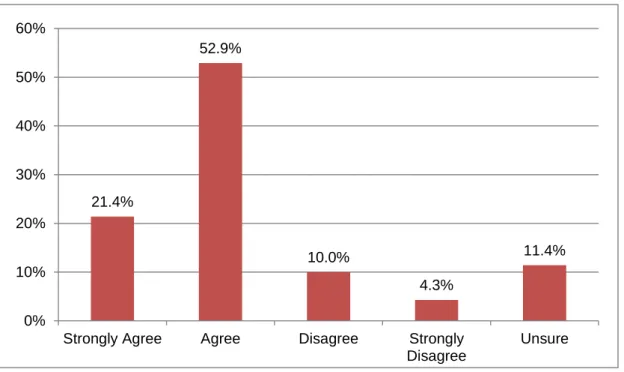
Aside from using a range of Apps to support teaching, teachers from all six schools also discussed other ways in which the iPad could be utilised. The capability for pupils to conduct independent research using the Internet was another main activity that teachers discussed during the focus groups. Opportunities for pupils to conduct their own research were regarded as beneficial in promoting independent learning and student collaboration. This was not only mentioned as a theme within the teacher focus groups, but also identified within the survey data of all teachers in the schools. 76.8% of all teachers either „strongly agree‟ or „agree‟ with the statement: „I anticipate students will become more independent and responsible for their own learning‟ and similarly 74.3% of teachers „strongly agree‟ or „agree‟ with the statement: „I expect there will be more collaboration taking place between students when using mobile technology.‟
22 | P a g e
Figure 4.2: I anticipate students will become more independent and responsible for their own learning.
Figure 4.3: I expect there will be more collaboration taking place between students when using mobile technology
21.7% 55.1% 1.4% 10.1% 11.6% Strongly Agree Agree Disagree Strongly Disagree Unsure 21.4% 52.9% 10.0% 4.3% 11.4% 0% 10% 20% 30% 40% 50% 60%
Strongly Agree Agree Disagree Strongly
Disagree
23 | P a g e
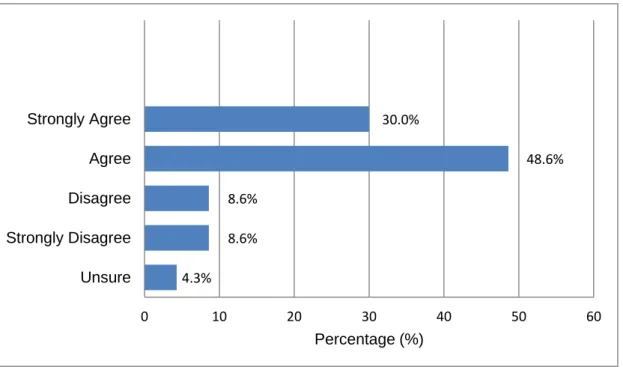
From a logistical perspective it was also reported to be much easier for pupils to conduct their own research as the iPad could be used in the classroom and avoided the need to book an ICT suite or the use of the limited number of desktops or laptops within the classroom. However, focus groups of teachers from five out of the six schools mentioned that the ability to plan independent research activities was reliant on the use of Wi-Fi, which was either awaiting full installation at the time of the research or was regarded as unreliable around the school. Despite discussions about the unreliability of the Wi-Fi for research-based activities, the survey data identified that 74.3% of teachers either „strongly agree‟ or „agree‟ that the tablet device would be reliable for school use. Furthermore, reflecting the findings of the Scottish study discussed above, overall teachers are not concerned that the iPads would be damaged either intentionally or accidentally with 64.3% of teachers either „strongly agree‟ or „agree‟ that the tablet device would not be damaged by students.
Figure 4.4: The device would be reliable for use in school
Other iPad features used for teaching and learning included the use of the camera and iMovie to record videos both in class and other areas around the school. Not only was the portability of the iPad a positive feature, but teachers also argued that it was easier to have a variety of features on one device. Whilst the teacher focus groups focused on the various ways the iPad could be used to support teaching and learning, the teacher survey data of all teachers illustrated a degree of parity with 78.6% of teachers either stating that they either
33.3,% 42% 11.6% 1.4% 11.6% Strongly Agree Agree Disagree Strongly Disagree Unsure
24 | P a g e
„strongly agree‟ or „agree‟ that mobile technologies will enable them to adopt a wider range of teaching and learning approaches:
Figure 4.5: Mobile technologies will enable them to adopt a wider range of teaching and learning approaches.
In relation to how the iPad was distributed in a classroom setting, focus groups from all 6 schools mentioned that iPad activities were usually organised around independent carousel group and/or pair work which supports the above comments about increasing independent learning and pupil collaboration. Due to the pupils‟ technical skills and knowledge using the iPad the teachers valued the ability to be able to set a group of pupils an iPad-related task which they could complete with minimal, if any, teacher assistance. This allowed the classroom teacher time to spend with other groups:
“They [The iPads] work well as a carousel or group work as you can leave them work independently on an iPad task and deal with other groups … the iPad frees us up because they almost don‟t need you … it‟s like having another teaching assistant in the class that can keep them on-task and working together.‟‟ (School B)
Therefore not only do iPad tasks have the potential to promote independent learning and pupil collaboration, but they can also be used as a tool to support the teachers with classroom management. The majority of pupils expressed enjoyment of collaborative activities on the iPad as it meant they could take ownership of their learning and support each other according to different strengths and weaknesses:
4.3% 8.6% 8.6% 48.6% 30.0% 0 10 20 30 40 50 60 Unsure Strongly Disagree Disagree Agree Strongly Agree Percentage (%)
25 | P a g e
“I like working in pairs because we can share what we are good at. So if one person is good at IT but the other person is not, then we could help each other. And if we were doing research in RE and the other person was good at RE then that person could help the person who is good at IT.” (Year 6)
Whilst the majority of pupils agreed that pupil collaboration was useful, there were some isolated instances where successful collaboration was dependent on positive inter-peer relationships. Some pupils reported occasions where either work was not equally completed by both partners or length of time sharing the iPad was not always fairly managed.
4.1.3 Impact
Whilst teachers did not mention any positive correlation between iPad use and academic attainment there were three main areas that were mentioned in terms of perceived positive impact: supports assessment for learning; encourages engagement and motivation; provides access to the curriculum for different learning styles. Focus groups from all six schools mentioned that the iPads helped motivate and engage all learners during activities that allowed them to remain „on-task‟:
“The children are more focused and … I think it excites them more so they are more engaged. You get a different response compared to when you teach them without the iPads.” (School F) This was supported by the teacher survey data which indicated 94.3% of teachers either „strongly agree‟ (54.3%) or „agree‟ (40.0%) with the following statement: I expect students to be more engaged and motivated when using a tablet device:
Figure 4.6: I expect students to be more engaged and motivated when using a tablet device.
Pupils also acknowledged that using the iPad, regardless of the activity, held their concentration levels 0% 10% 20% 30% 40% 50% 60% Strongly Agree
Agree Disagree Strongly
Disagree
26 | P a g e
“It‟s so handy because most of us children get distracted a lot, but with the iPads we won‟t get distracted by anything around us because we are concentrating on the iPad.” (Year 3)
Whilst it could be argued that this was due to the novelty effect as some of the schools have had the iPads for a relatively short period of time and do not use them all the time, the majority of teachers (four out of six focus groups) felt that this was not the case as the majority of the pupils had already experienced the iPad and/or tablet device at home. Instead it was suggested that because the pupils often played with iPads or similar devices at home, they would make associations with play which disguised their learning.
“…children who are reluctant to learn their times tables will be quite happy to play a timetables game as they don‟t see it as learning as much. They don‟t see it as a maths lesson … so they are more willing to give it a go.” (School C)
This was supported by the pupils themselves, who also made the association of education-based games and learning. Pupils also expressed an additional reason for remaining „on-task‟ which differentiates the iPad from laptops and PCs. They stated that the multimodal capacity of the iPad increased their levels of engagement and disguised learning as something that could be described as „fun‟:
“It is so fun because you can do everything on [the iPad] … you can read books, play games, get images, record videos all on one piece of technology.” (Year 5)
Not only did the teachers feel that using iPads as an educational tool allowed pupils to remain on-task, but the engagement and motivation to complete iPad-related activities often led to increased levels of confidence and self-esteem.
Five out of the six teacher focus groups indicated that the positive impact resulting from increased engagement, and consequential increased confidence levels, was particularly true of lower ability groups in their classes. The teachers perceived that the iPads allowed pupils with lower abilities access to complete particular activities. They gave example case studies of particular pupils who were able to partake in class activities alongside other pupils:
“I have a few [pupils in my class] that can only just about manage to write the WALT but using the iPad they managed to create a Popplet [using the App]. OK it didn‟t have as many boxes and links as my brighter [pupils] but they were able to produce and complete the assigned activity and they were so pleased with themselves.” (School E)
27 | P a g e
Therefore using the iPads for class activities not only increased engagement and motivation for all pupils, but this was particularly so for lower ability groups who were able to participate in the same activities and present similar work.
In addition to the iPad providing the lower ability groups access to the same activities as other pupils, two teacher focus groups with high levels of EAL (English as an Additional Language) pupils in their school, claimed that the iPad provided access to those pupils and even parents as the iPad provided a means of communication:
“[The iPad] is great as we are a high EAL school and I have this one pupils who speaks Bengali and I found a translation App which I now use to communicate with her. Before she used to use signs to try and communicate, but now it is much easier. For me to be able to communicate with her using this App reduces the barriers and it‟s also useful for parents‟ evening.” (School D)
Whilst it was suggested by the teachers that you can use resources such as Google translate on other devices such as laptops and PCs, it was argued that the iPad is more portable and discrete. Therefore it is important to identify that the iPad is not only perceived as an adaptable learning tool, but can also be used as a communication tool for pupils (and indeed parents) with EAL.
Additionally another key theme that emerged from the teacher focus groups related to how the iPad could, and was, being used in a variety of different ways as an assessment tool to support assessment for learning (AfL). For pupils with different learning styles, and more specifically those with motor skill difficulties that struggled to complete written work, the iPad allowed them to create work using either by presenting typed work or using alternative methods such as diagrams to illustrate their work used for evidence of assessment. Furthermore, teachers reported that the iPad is becoming increasingly supportive of the teacher as a new Incerts App had been created as a way of collecting evidence in the classroom that facilitates the process of using alternative materials for assessment. The main advantage of this App and way of collecting evidence was reported to be that it is „instant‟ and „easier‟.
“There are now more Apps with teachers in mind such as Incerts … and they have realised the importance of this support … you can instantly assess children by ticking a box whereas previously you would have to make written notes and go back to the computer … it‟s instant and we can take photos of evidence.” (School B)
Not only was it reported that the iPad was useful for teachers to assess pupil progress, but pupil self-evaluation was another key issue mentioned across the different teacher focus
28 | P a g e
groups. Two different types of self-evaluation were discussed. The first type of evaluation was related directly to the educational Apps designed to allow progression to different stages:
“It‟s fab because it shows them how to do it first, then they have to copy it and it won‟t let them go onto the next letter unless they do it correctly. That‟s good because when you try and do it in a group you can‟t watch everybody so this program does it for you.” (School A)
Some teachers also mentioned that whilst this is useful for them as a teacher, it is also useful for the pupils because not only are they working and evaluating their progress independently, but they appear to prefer feedback from the iPad as they perceive it as less authoritative.
Audio and video recording was the second type of pupil self-evaluation recognised by the teachers (four out of six focus groups). Using additional tool such as iMovie and the camera was used across different subject areas to record work which could then be instantly played back to the whole class to evaluate their own work, which was deemed effective by the teachers.
“With recording dance for example they are actually watching themselves back because otherwise they can‟t see what they are doing. It does help their speaking and listening as well because they are listening to the words they are using.” (School F)
Whilst teachers acknowledged that recordings could be taken using separate cameras and video cameras, they argued again that it was convenient to access to such features on one piece of equipment i.e. the iPad, as well as allowing evidence to be stored for assessment using the Incerts App and less connections were required to project onto a larger screen. Teachers from one school mentioned that the Apple TV7 facilitated this as the iPads could be
used wirelessly connected to the TV for instant evaluation. Teachers from another two schools recognised this potential, although had no experience of using Apple TVs at this stage.
4.2 Use of Technology at Home
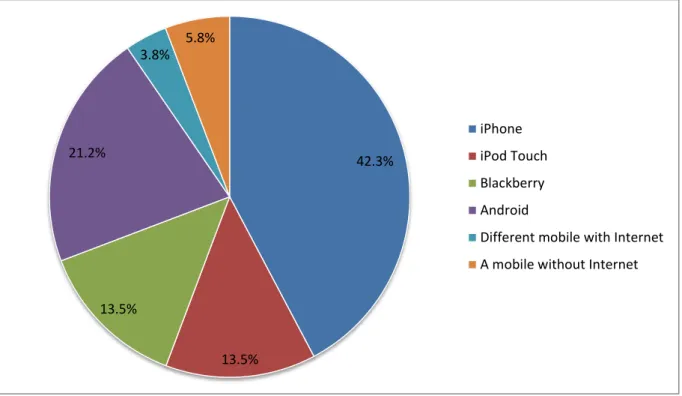
The parental survey revealed that there were high levels of technology ownership and confidence in using technology. All parents owned at least one mobile device with only 6% of the sample (from across a range of catchment areas) having a mobile
7Apple TV is a device which wirelessly mirrors the content of any Apple iOS device, such as the iPad or iPod,
through the classroom projector or a TV screen so that the whole class can see it – for instance to show a picture, video, picture or piece of writing.
29 | P a g e
device without Internet capability as shown in Figure 7. 55.8% of parents stated that the mobile device that they owned was an Apple iOS8 based device, which has the same operating platform as the iPad. This suggests that even if parents did not own an iPad, they would be familiar with its functionality and features.
Figure 7: Which mobile device do you use at home?
In terms of proficiency levels, only a small percentage of parents perceived themselves to be „below average‟ users of technology (7.7%). 75% of parents
described their use of technology as at least „average‟, however only 17.3% claimed that they were „expert‟ users (see Figure 8 below). Whilst this does not necessarily give us an indication of their actual skills, it does offer some insight on their
perceived use of technology.
8iOS is the Apple interface (Operating System) used by iPhone, iPad and iPod to allow users to operate the
device. 42.3% 13.5% 13.5% 21.2% 3.8% 5.8% iPhone iPod Touch Blackberry Android
Different mobile with Internet A mobile without Internet
30 | P a g e
Figure 8: How would you describe your own use of technology?
When asked about their children‟s use of technology at home, the majority of parents (92.3%) stated that they allowed their child to use a mobile device at home, which was just as high as when they were asked if their child was allowed to use a desktop computer at home (92.3%). However, when asked the reason for such use there was a far more varied response from parents. The most popular reason was „For
entertainment‟ (38.5%), followed by „It lets children get comfortable using
technology‟ (28.8%). Only 19.2% of parents stated the reason they allowed their child to use mobile technology at home was „for learning.‟
Figure 9: Do you allow your child to use a mobile device at home?
0% 5% 10% 15% 20% 25% 30% 35% 40% Expert User
Confident but not expert Average User Below Average 17% 38.5% 36.5% 7.7% 0.0% 20.0% 40.0% 60.0% 80.0% 100.0% yes no
31 | P a g e
Whilst the majority of parents stated children were able to use mobile technology at home for various reasons, 80.8% of parents stated that they did limit the amount of time their child could use technology at home (see Figure 10 below). When
specifically asked about rules put in place to monitor the amount of time spent on technology, 67.3% considered technology use on a „case by case basis‟ and a further 17.3% stated there were „strict rules‟ in place. As before, reasons for having rules at home varied across the sample, but included being bad for health (34.6%) and preventing children from getting physical exercise (17.3%). Therefore whilst the majority of children were allowed technology in the home, overall its use was monitored and regulated, but for a variety of reasons.
Figure 10: Do you limit the amount of time you allow your child to use technology in the home?
Parental perspectives on technology use in school
In addition to collecting data related to personal use of technology at home, parents were also asked their opinions of the use of technology in school. Not only did the majority of parents (78.8%) state that they did think children should be able to use a mobile device in school (see Figure 11), but 96.1% of parents also believed that children should be allowed to play or use a mobile device before entering secondary education (see Figure 12: 36.5% preschool age; 59.6% primary age). The data suggests that not only do the majority of parents believe children should be able to
80.8% 15.4%
yes no
32 | P a g e
use technology in an educational setting, but that it should be implemented during the earlier stages of their educational careers.
Figure 11: Do you think children should be able to use a mobile device in school?
Figure 12: What is the youngest age at which you think children should be allowed to play or use a mobile device?
Additionally, there were two predominant reasons that emerged from the survey data as to why parents felt technology in general should be used in school. The majority of parents (82.7%) either „strongly agreed‟ (42.3%) or „agreed‟ (40.4%) that
technology is important to their child's success in school (see Figure 13).
Furthermore, a slightly higher percentage of parents (86.5%) either „strongly agreed‟ or „agreed‟ that technology is important for their child‟s future career choices. These
78.8% 9.6% yes no 36.5% 59.6% 1.9% 0.0% 10.0% 20.0% 30.0% 40.0% 50.0% 60.0% 70.0%
33 | P a g e
results indicate that many parents not only feel that technology should be integrated into educational settings at an early stage, but also believe that the importance of technology is not only limited to school success, but more long-term future career choices.
Figure 13: I believe that technology in general is important to my child’s success in school / future Career choices
This view of the importance of technology use for their child‟s success in schools is further supported by parents‟ potential willingness to receive training and support relating to how to use the iPad, specifically to support their child‟s learning. 75% of parents (see Figure 14) said that they would participate in such training if freely available, with 23.1% of parents saying they would not. In the absence of parental interviews, it is difficult to establish whether this is because parents felt they were generally confident users or whether they did not see the value in this. Nevertheless, the overall positive response regarding training and support for training suggests that parents feel that both the teacher and they could support their child‟s learning through the use of iPads.
success in school future career choices Strongly Disagree 3.8% 3.8% Disagree 7.7% 3.8% Agree 40.4% 42.3% Strongly Agree 42.3% 44.2% 0.0% 10.0% 20.0% 30.0% 40.0% 50.0% 60.0% 70.0% 80.0% 90.0% 100.0% Strongly Disagree Disagree Agree Strongly Agree
34 | P a g e
Figure 14: If support and training were freely available for you to learn more about how to
use the iPad to support your child’s learning, would you be interested in taking this up?
Of those parents who stated that they would be interested in iPad-specific support and training, the majority of parents opted for weekday workshops around school times, with 28.8% expressing a preference for a parent/child workshop during the school day and a further 30.8% preferring a workshop immediately after school (see Figure 15 below). Only 11.5% of parents opted for an evening session and 5.8% preferred a Saturday morning workshop. This data does not necessarily suggest that parents would not attend a particular session because it was not either during or immediately after school, but is useful for gauging not only if parents would attend training and support, but also when would be most convenient.
75.0% 23.1%
yes no
35 | P a g e
Figure 15: If you answered yes, which would be your preferred time to have such training and support?
5. Conclusions
This study has shown that iPads have the potential to motivate both pupils and teachers. Their use in school, along with other technology, is valued by parents and seen as beneficial for pupils‟ future prospects. The small sample of parents in this study were confident in using technology and also keen to learn for themselves how it can be used in education.
Teachers reported that although initial formal training on the basics of operation can be useful, the iPad was intuitive to use and easy to learn– particularly if allowed to take the device home and „play‟ with it. In nearly all cases, teachers suggested that they were willing not only to learn from pupils, but also to allow them to become expert advisors (for example as digital leaders) for other staff and pupils. This change in role of the teacher to learner and, given greater pupil autonomy, facilitator is different from adoption models of other forms of classroom technology, such as the interactive whiteboard, where the teacher acquires a level of competence (and indeed confidence) with the device before use with pupils (Beauchamp, 2004)
The dominant pupil use of iPads reported by teachers was in conducting research, but it was also used a device to support learning in a range of areas of learning /
28.8% 30.8% 11.5% 5.8% 0% 5% 10% 15% 20% 25% 30% 35% Parent/child workshop during school day (e.g. 1.5
hours)
Immediately after school workshop (e.g.
3.30-5.00pm) Evening session/workshop (6.00-7.30pm) Saturday morning workshop (e.g. 9.30-12.00)
36 | P a g e
subjects using both Apps and other multimodal tools on the iPad. Teachers also reported using the iPad as an assessment tool and described ways in which the features of the iPad (such as sound and video recording) can be used in both summative and formative assessment, by both teachers and pupils. Teachers reported that evidence of learning and assessments can be easily shared within the classroom (for example with Apple TV) and beyond (for example emailing files, storing on school network or Cloud-based systems, such as Dropbox). This should become easier with recent advances in the speed and availability of wi-fi networks in Cardiff schools. Teachers were confident that iPads were reliable and did not worry that they would be damaged in use. All of these factors should reassure schools thinking of introducing iPads. Having said this, however, evidence from the LA suggests that not all schools plan the introduction of these devices sufficiently and it should be remembered that, even given the positive evidence from this research, the iPad is merely a tool and it is how pupils and teachers use it that matters. In an adaption of Somekh and Davies (1991) we should remember that „iPads, of themselves, are not transforming‟.
References
BEAUCHAMP, G. (2004) „Teacher use of the interactive whiteboard (IWB) in
primary schools – towards an effective transition framework‟, Technology, Pedagogy and Education Volume 13 (3) 2004, pp. 327 – 348
Somekh, B. & Davies, R. (1991) 'Towards a Pedagogy for Information Technology',
37 | P a g e
6. Recommendations
Based on the evidence from this study we would suggest that the following ideas are considered by primary schools from the early stages of use. This list is not exhaustive and to support these recommendations we have added a checklist in section 7 for those considering purchasing iPads (or indeed other tablets) which is based on responses from this study.
Prior to purchase (see also section 7 below):
We would suggest that prior to purchasing iPads schools plan carefully how they will be stored, charged, loaded with software, timetabled and their impact monitored. (See section 7 below)
When iPads are introduced:
Perhaps most importantly, consider if the iPad is actually the best resource to use to achieve the learning outcome, and whether it should be used for all or part of the taught session or activity.
Master the generic features of the iPad such as camera (still and video), Internet, searching the iPad and so on before loading with Apps;
Allow teachers to take home iPads and „play‟ – particularly at early stages of use (for instance purchasing just before a school half term or holiday);
Allow pupils (of all ages) to train teachers and other pupils. Many schools use this as an opportunity to recognise higher levels of achievement (more able and talented) in ICT in the same way as they do for other areas of the curriculum and call these pupils digital leaders or similar titles;
Consider how teachers can be provided with opportunities to witness use in other classes (school-based observation), as this type of training was highly valued as means of training.
When iPads are being used:
Encourage pupils to move beyond research in independent work and use all of the features of the iPad;
introduce Apps slowly and choose carefully to match age group and learning outcomes;
38 | P a g e
Plan how work will be organised, saved and named: for example, using a folder hierarchy to group Apps and work according to subject and/or age group or class;
Explore how the features of iPads (such as sound, pictures, video and particular Apps) can be used for teacher assessment and pupil self-assessment;
Investigate the use of mirroring systems (such as Apple TV) to allow pupils and teachers to share work with the whole class;
Consider ways in which parents can learn more about how iPads (or other technology) are being used school.
The use of iPads will never replace effective teaching, or indeed other forms of technology. The iPads has particular strengths and these should be identified and exploited, but they should complement rather than replace other forms of
technology and teaching styles– they should be built in, not bolted on. In
addition, although iPads can help facilitate independent learning, pupils will still need to be supported (by an adult or another pupil) in using them to their full potential.
A particular feature of iPads highlighted in this research is that, although the pedagogic skills and imagination of the teacher remain central to effective use, they also provide an opportunity to develop a classroom practice where pupils not only learn from teachers, but also learn with teachers.
39 | P a g e
7. Checklist of things to consider before investing in iPads
Although Governing bodies were not formally interviewed about the introduction of iPads, evidence from this research, informal discussions with governors and
questions asked at the launch event for this research project suggest that the
following questions may be an appropriate starting point (but not an exhaustive list) for both staff, governors, and indeed school councils, to ask when considering the investing in iPads, or indeed any other mobile technologies:
Who What Where When How
Who is going to use them? (Staff, pupils, in what order?) What areas of learning / subjects / age groups will we focus on – if any – when first introduced or when more iPads bought?
Where are they going to be used (what years; locations – on site and off site)
When are they going to be used (timetables or ad hoc)
How are they going to be used?
What other resources will you / we need? (e.g. infrastructure or hardware, such as covers or leads)
When will you / we need additional infrastructure (e.g. Apple TV or charging trolleys)? [Budget planning cycle]
How does this relate to our School Improvement Plan (SIP)? What do iPads do
better than our existing resources?
How will they improve our provision? Who will monitor
use of iPads?
What difference do you / we feel9
they will make?
Where shall we look for impact?
When do we get feedback / check if we need more iPads?
How will we get feedback on effectiveness? Who is going to How will we
9It should be remembered that this study, and others, have found no robust evidence of iPads raising attainment,
but it is suggested that the increased motivation found in this study on the part of both teachers and pupils is unlikely to lessen attainment, so staff and pupil opinions are important measures.
40 | P a g e provide training (LA, outside agency, members of staff or pupils) measure the impact? (e.g. Teacher, pupils and parent survey; governor visits?)
Who will charge, store and book out iPads if needed?
What equipment will we need to add Apps and charge iPads?
Where are they going to be charged and stored?
When are they going to be charged?
Who will add
Apps?
What budget are we going to use? (Devolved to a certain amount?)
How are we going to pay for Apps? Who is going to
provide training / feedback / support to parents?
What training are we going to provide training / feedback / support to parents?
Where are going to provide training / feedback / support to parents? When are we going to provide training / feedback / support to parents?
How are we going to inform and involve parents? Who will
formulate „rules‟ (including safe use online and around the school) of use?
What (positive) rules if any will we introduce?
Where will „rules‟ be displayed – if at all?
When will we introduce „rules‟?
How will rules be formulated? (Bottom up or top down?)
Who will amend relevant policies / home-school agreements?
How will this impact on other ICT resources (such as ICT suites or fixed PCs)