A Display Wall Management System
to Support Multiple User Interaction
Wendel B. SilvaPolytechnic Institute of NYU [email protected]
Huy Vo
Polytechnic Institute of NYU [email protected]
Daniel K. Osmari
Polytechnic Institute of NYU [email protected]
Cl´audio T. Silva
Polytechnic Institute of NYU [email protected]
(a)
Display Wall
(b)
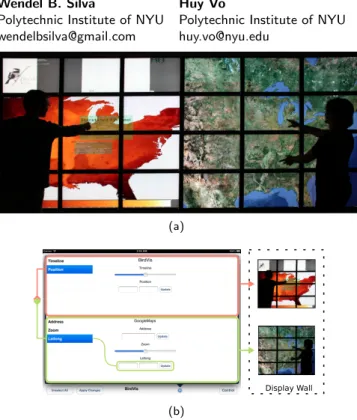
Figure 1: BirdVis and Google Maps synced (Top) and its interaction interface on an iPad (Bottom).
Copyright is held by the author/owner(s).
CHI 2013 Extended Abstracts, April 27May 2, 2013, Paris, France. ACM 978-1-4503-1952-2/13/04.
Abstract
Large high-resolution displays are becoming more affordable and popular for visualization tasks, but managing these displays in an efficient way is still a challenge. Although there are some systems that focus on this issue, they are usually bound to one specific rendering techniques (i.e., pixel streaming, distributed rendering). In addition, display walls are commonly used as a large output device instead of a high-resolution display, and their interaction is limited to a direct mapping between the input devices and mouse and keyboard events. In this paper we presents CloudView, a display wall management system that allows different applications to be executed in a large display. Our solution aims at enabling multiple user interaction and collaboration. Moreover, we propose a parameter-based approach that not only allows the user to interact directly with parameters of applications, but also supports arbitrary synchronization between them. To show the full capabilities of CloudView, we present four high-resolution applications .
Author Keywords
Tiled Display Wall, Management System, Interaction
ACM Classification Keywords
H.5.m [Information interfaces and presentation (e.g., HCI)]: Miscellaneous.
Introduction
Large displays have been commonly used as visualization tools. As the cost of hardware has decreased significantly in the past years, it becomes attractive to build wall-sized displays by tiling and aligning multiple monitors to form a single virtual image. One of the key advantages of display walls is that they have much higher resolution when compared to desktop-scale displays. This can substantially increase the amount of information that a visualization may deliver on screen, thus greatly facilitating the data exploration process. The high resolution also allows comparative visualization to be simultaneously explored even by multiple users. However, the challenge of how to efficiently manage and utilize the high resolution, especially for multiple user collaboration, is still far from being complete.
This paper presentsCloudView , a display wall management system that supports collaborative
interactions in a multiple users environment. In particular, CloudView includes a middleware system that allows users to share data across any stage of the visualization pipeline. In addition, this middleware is capable of handling
multiple data requests, and it is not restricted to a specific data type. Moreover, CloudView windows manager enable the user to select and synchronize parameters between different instances and/or applications. To show the full capability of our proposed solution, we present four different high-resolution applications being handled by the system and controlled using an iPad.
Related Work
Middleware SystemsThere has already been alot of work regarding display wall middleware systems [6, 12, 9, 14]. Chromium [6],
ClusterGL [12] and Equalizer [4] provide a powerful
solution for developing multi-machine OpenGL applications that can be displayed on the display wall without making changes to the applications. However, this is restricted to only OpenGL commands, and thus, only OpenGL portion of the application can be transferred to the display wall. The SAGE system [9], on the other hand, relies heavily on pushing pixels through a high-speed, ultra low-latency network. This maximizes flexibility but at a cost of expensive network equipments, e.g. fiber switches.
CloudView, our proposed middleware, aims to fill the gap of the above systems by providing a client-server protocol that is really simple, yet highly efficient, for applications to share data across display nodes. This infrastructure leverage the previous approaches to enable both pixel distribution and direct rendering applications.
Display Wall Management Systems
Since Chromium, ClusterGL and Equalizer do not support multiple applications simultaneously [8], they do not have a window management system. The SAGE system includes a desktop-like user interface that allows users to graphically manage and manipulate windows in the large display environment [7]. Multiple user interaction is supported through the use of multiple input devices. However, each user can only interact independently without any coordination or synchronization. The main goal of our management system is to enable the
interaction across applications on the display wall instead of just treating it as a desktop environment.
Middleware Design
One of the main goals of CloudView is to allow users to synchronize data betweenclients, i.e., application instances running in the display wall. The idea is that,
when a user uploads data to a server, all clients that are registered to watch this data will also receive the update. On top of that, the system should also support server-side queries to allow clients to query only a subset of the actual data to be sent as an update. This will be useful for performing sort-first rendering as well as data compression.
Management System Design
User InteractionCurrently, our implementation supports different devices, such as a keyboard and mouse, Nintendo Wiimote, Microsoft Kinect and Apple iPad. After using each of them, and considering our centralized solution, we have chosen the iPad. This tablet has the important feature of being an input and output device. Furthermore, since it is small and lightweight, it does not limit the mobility of the user. The iPad also presents distinct ways to receive input events (e.g., it has a gyroscope, accelerometer and a multi-touch screen), and well-known gesture recognition, such as panning, rotation and swiping. We developed our approach on the iPad taking in consideration all these positive aspects mentioned before.
Window Manager
To manipulate multiple applications and their user interface, we implemented a window manager for CloudView. Our solution presents all basic functionalities of any usual window manager, such as: starting, moving, snapping, resizing and closing applications.
User Interface
We propose a parameter-based approach, bringing to the user the parameters of the application through the iPad. Consequently, the user does not need to navigate in a large display to change these parameters, which solves the
low resolution interaction problem. Additionally, by moving the interaction widgets to the iPad, we increase the visualization area on the display wall.
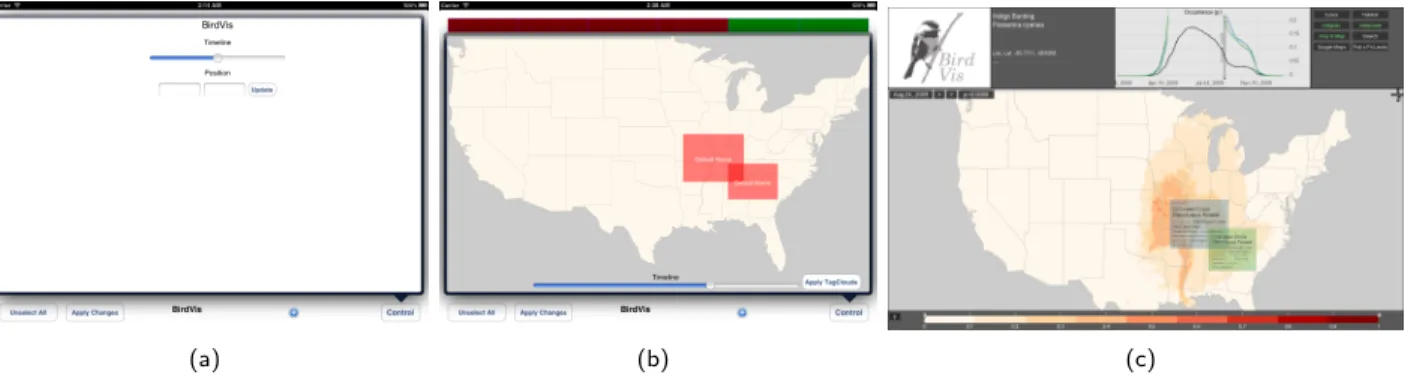
Parameter-based Interaction. During its initialization, the application sends a list of available parameters to CloudView. After receiving the description, the window manager parses it and automatically creates the respective widget and link to its parameter. Some applications may need a better interaction using specific widgets (see Figure2(b)for an example). Thus, it is possible to develop and easily add new specialized widgets to our window manager. To facilitate the implementation, the user may choose to adapt existing ones.
Synchronization of Applications. Another benefit of our approach is the ability to enable synchronization of applications. By synchronization, we mean that
application instances will run with the same parameters, having their corresponding internal state updated simultaneously. Since the window manager is responsible to synchronize parameters between instances, applications themselves do not need to internally support that. Instances of different applications can also be synchronized. Figure1(b)shows an example of this feature. In this example, the user wants to synchronize BirdVis and Google Maps.
Pixel-based Interaction. The window manager also presents a pixel-based interaction window for applications running over CloudView that choose not to use our parameter-based approach. Since applications usually support interactions through mouse and keyboard, we implemented our pixel-based interaction window to simulate these devices.
(a) (b) (c)
Figure 2: The interaction window controlling the BirdVis application; (a) the default generic automatically generated widgets to control time and position; (b) a specialized widget created to handle position, time and tag cloud lenses; (c) the BirdVis application after receiving the parameter updates from (b).
Applications
In this section, we describe how we ported 4 different applications to the display wall using our architecture.
BirdVis - Collaborative Vis
BirdVis [5] is an application to analyze the spatio-temporal distribution of bird populations. It supports coordinated multiple views to allow comparative visualizations, a characteristic that directly benefits from higher resolution displays. One of its main components is the use of tag cloud lenses to interactively explore spatial data in maps. We modified BirdVis’s sources to handle notifications about tile viewports, so each tile is rendered correctly. application state. During startup BirdVis notifies CloudView about its various parameters, such as latitude/longitude, zoom factor and time instant; an auxiliary thread runs in parallel to receive parameter updates and feed them into the existing visualization pipeline. Figure3 show a collaborative session of BirdVis.
Figure 3: An interactive session with exploratory views of BirdVis on our display wall.
We implemented a specialized widget, shown in Figure
2(b), having a more natural presentation of parameters.
Exploring High Resolution Aerial Satellite Maps
In this example, we experiments with one of the most common applications for display walls, exploring high resolution aerial satellite maps. Each rendering node
instantiate a browser with an additional input specifying what portion of the map it is displaying. In addition, each of them is responsible to fetch the map using Google Maps Javascript API (Figure4). All interaction are synchronized using CloudView. Please check out our supplementary video to see the application in action.
Figure 4: A hybrid satellite view of Manhattan, New York from Google Maps using 96MP display area.
OpenGL application
Celestia [11] is an open source astronomical visualization application, written in C++ with OpenGL, that uses a variety of GUI front-ends to handle basic user input and basic window management. We modified the source code to support a distributed rendering approach, with each node of the display wall running its own instance of Celestia, synchronizing their internal states through CloudView. Figure 5shows a snapshot of Celestia running on our display wall.
Qt Web Browser
In this experiment, we are showing how one could take a general Qt application and make it run on a display wall at full resolution. Similar to the Google Maps application, Qt graphical user interface is not based on OpenGL, thus, it would not be supported by OpenGL-based middleware
systems such as Equalizer and Chromium. Fortunately, since version 4.4, Qt has provided the
QGraphicsProxyWidgetclass for embedding any widget (a subclassed ofQWidget) in aQGraphicsScene, that can be drawn on to anyQGraphicsViewsurface. Since
QGraphicsViewallows showing only a portion of its canvas, a Qt application could be ported to the display wall by adjusting the rendering viewport.
Figure 5: Celestia, an OpenGL real-time 3D space simulation featuring a database of over 100000 stars, is running at full size on our display wall.
Discussion
It should be pointed out that the main goal of the middleware system in CloudView is the flexibility in design to support different types of rendering techniques. This is achieved by a simple client-server protocol that allows synchronization not only among clients but also among multiple input devices. CloudView is different than the others middleware systems because it can be used to manipulate the data flow of a pipeline at all stage, including user interactions data, and let the user choose where the division line should be. Nevertheless, this flexibility does come at a cost. It requires users to select where to perform the distribution of their data depending
on the application. However, we strongly believe that providing users with more options would be more beneficial in a collaborative environment that needs support for many types of visualization.
Conclusion and Future Work
In this work we presented CloudView, a display wall management system for user interaction and
collaboration. It allows users to share data across any stage of visualization pipeline and supports multiple types of data. In addition to the traditional pixel-based
approach, we also proposed and used a parameter-based one where users directly interact with the parameters of the application instead of having to map input to events. Furthermore, it enables synchronization of parameters between different instance of applications. We show that the synchronization is not limited to the same application by synchronizing BirdVis and GoogleMaps. Finally, we use a centralize interface that do not overload the user with different inputs for different tasks.
In the future, we would like to improve the usability of our display. While we move some of the widgets from the display wall to the iPad, there are still others left unhandled on the large display. We also would like to study different ways to adapt and reorganize the information on the screen.
References
[1] iOS Human Interface Guidelines.
http://developer.apple.com/library/ios/ #DOCUMENTATION/UserExperience/Conceptual/
MobileHIG/Introduction/Introduction.html, 2012.
Accessed: 03/31/2012.
[2] Bavoil, L., Callahan, S., Crossno, P., Freire, J., Scheidegger, C., Silva, C., and Vo, H. Vistrails:
Enabling interactive, multiple-view visualizations. In
Proceedings of IEEE Visualization 2005, C. Silva, H. Rushmeier, and E. Gr¨oller, Eds., IEEE Press (2005), 135–142.
[3] Bezerianos, A., and Balakrishnan, R. View and space management on large displays. IEEE Comput. Graph. Appl. 25, 4 (July 2005), 34–43.
[4] Eilemann, S., Makhinya, M., and Pajarola, R. Equalizer: A scalable parallel rendering framework.
IEEE Transactions on Visualization and Computer Graphics 15 (2009), 436–452.
[5] Ferreira, N., Lins, L., Fink, D., Kelling, S., Wood, C., Freire, J., and Silva, C. Birdvis: Visualizing and understanding bird populations. IEEE Transactions on Visualization and Computer Graphics 17, 12 (Dec. 2011), 2374–2383.
[6] Humphreys, G., Houston, M., Ng, R., Frank, R., Ahern, S., Kirchner, P. D., and Klosowski, J. T. Chromium: a stream-processing framework for interactive rendering on clusters. ACM Trans. Graph. 21, 3 (2002), 693–702.
[7] Jagodic, R., Renambot, L., Johnson, A., Leigh, J., and Deshpande, S. Enabling multi-user interaction in large high-resolution distributed environments.
Future Gener. Comput. Syst. 27, 7 (July 2011), 914–923.
[8] Jeong, B., Leigh, J., Johnson, A., Renambot, L., Brown, M., Jagodic, R., Nam, S., and Hur, H. Ultrascale collaborative visualization using a display-rich global cyberinfrastructure. Computer Graphics and Applications, IEEE 30, 3 (may-june 2010), 71 –83.
[9] Jeong, B., Renambot, L., Jagodic, R., Singh, R., Aguilera, J., Johnson, A., and Leigh, J.
High-performance dynamic graphics streaming for scalable adaptive graphics environment. In
Proceedings of the 2006 ACM/IEEE conference on Supercomputing, SC ’06, ACM (New York, NY, USA, 2006).
[10] Jeong, B., Renambot, L., Jagodic, R., Singh, R., Aguilera, J., Johnson, A., and Leigh, J.
High-performance dynamic graphics streaming for scalable adaptive graphics environment. InSC 2006 Conference, Proceedings of the ACM/IEEE(nov. 2006), 24.
[11] Laurel, C. Celestia.
http://www.shatters.net/celestia/.
[12] Neal, B., Hunkin, P., and McGregor, A. Distributed opengl rendering in network bandwidth constrained environments. InEGPGV (2011), 21–29.
[13] Robertson, G., Czerwinski, M., Baudisch, P., Meyers, B., Robbins, D., Smith, G., and Tan, D. The large-display user experience. IEEE Comput. Graph. Appl. 25, 4 (July 2005), 44–51.
[14] Scheidegger, L., Vo, H. T., Comba, J., Kruger, J., and Silva, C. Parallel large-data visualization with display walls. InVisualization and Data Analysis