Bachelor’s Thesis
The Name of the Thesis
Author
Degree Programme
Year
THESIS WRITING INSTRUCTIONS
The instructions given in this guide are followed in the degree
programmes of Information Technology (Turku) and Electronics.
TURKU
UNIVERSITY
OF
ABSTRACT
APPLIED
SCIENCES
OF
THESIS
Degree Programme: Author(s):
Title:
Specialization line: Instructor(s):
Date: Total number of pages:
An essential part of an engineer’s education is a final project, i.e. a thesis work. The thesis project aims to develop the student’s skills and ability to work independently and report the results of the work in a professional manner.
In this report some general guidelines are given for writing a good paper. The style used in this report closely imitates the form of the thesis report. Its suggestions to writers about style, convention, and form are presented as editorial choices rather than mechanical prescriptions.
The common standards of technical writing are presented, e.g. issues like embedding figures, tables, mathematical equations, program source code in the text, as well as references are included. Moreover, certain frequently occurring problems connected to the features of text processing software are handled.
Please note that several variations of the layout rules and standards exist even in the area scientific writing. The guidelines given in this document follow the common practice within electronics and computer science. Even other layout policies than those presented here can be selected, if there are good motivations behind the decision and the supervisor of the thesis has accepted the exception. However, whatever the selected standard is, it shall be followed systematically in the whole thesis report.
Note that the Abstract is located after the Cover page. The abstract must fit into one page only. The font size in the body text is 12 and line spacing single.
The structure of the abstract is discussed in more detail in the actual text part of this guide.
Keywords:
TURUN
OPINNÄYTETYÖN
AMMATTIKORKEAKOULU
TIIVISTELMÄ
Koulutusohjelma: Tekijä(t): Työn nimi: Suuntautumisvaihtoehto: Ohjaaja(t): Aika: Sivumäärä:Insinööritutkintoon kuuluu olennaisena osana opinnäytetyö, jossa tarkoituksena on kehittää opiskelijan kykyä itsenäiseen työskentelyyn ja siitä raportointiin.
Tässä oppaassa esitetään insinöörin opinnäytetyön rakennetta ja annetaan ohjeita työn yleisiin muotoseikkoihin teknistieteelliseltä kannalta. Myös oppaan tyylissä ja rakenteessa on pyritty noudattamaan näitä ohjeita, siltä osin kun se on mahdollista, jotta se muistuttaisi ulkoasualtaan tyypillistä opinnäytetyötä.
...
Please note that an additional Finnish/Swedish abstract shall be included only if the author is a native speaker of Finnish/Swedish, and he/she has written the thesis itself in English. If the author has another language as a mother tongue, only the English abstract is given. If you are preparing your thesis in Finnish, please study the Finnish version of this document instead.
Mikäli suomen- tai ruotsinkielinen opiskelija kirjoittaa opinnäytetyönsä englanniksi, hänen tulee liittää työhönsä äidinkielellä kirjoitettu tiivistelmä.
Huomaa, että suomenkielisen tiivistelmän ei tarvitse eikä yleensä tule olla sanatarkka käännös englanninkielisestä versiosta.
Hakusanat:
Foreword
This document follows the layout of a typical thesis report written in the degree programmes of Electronics and Information Technology (Turku) in Turku University of Applied Sciences. The goal of this guide is to help the student in editorial issues and to give practical tips on how a thesis report shall be structured and which questions shall be answered in the main parts of the report.
Turku, June 30th 2006
Signature
A Foreword typically contains background information on the project, and it is the correct place to thank people that have helped the author along the path. The author can decide whether to include a foreword into the thesis report or not.
Revision history:
30.9.1998 First version of this document (LaTEX); TT 14.4.2000 Updated using Word 97; TT
10.11.2003 The new format of the cover page and abstract included; TT
9.3.2004 A thorough update (pdf-format); modifications and additions in all chapters, instructions on program code layout, Internet-based references and technical details added; TT, JPP, JR
5.10.2004 Translated to “engineering” English; JR, TT 28.2.2006 Minor updates; JR
28.6.2006 Updated according to the new Finnish version (TT); JR
Contents
Abstract ... ii Tiivistelmä ... iii Foreword ... iv Contents ...v Notation... vi0. Bachelor’s Thesis Project, a Process View ...0
1. Introduction...1
2. Bachelor’s Thesis and its Typical Structure...3
2.1 Bachelor’s Thesis Project ...3
2.2 Selection of Thesis Name and Language & Confidentiality ...5
2.3 Structure...6
2.4 Abstract and Tiivistelmä...8
2.5 Introduction...10
2.4 Main Chapters...11
2.6 Discussion...12
3. Formal Issues ...14
3.1 General Layout ...14
3.2 Figures and Tables ...15
3.3 Equations ...18
3.4 Program Source Code ...19
3.5 References...20
4. Technical Details...26
4.1 Usage of Certain Symbols ...26
4.2 Utilizing Special Characters in Microsoft Word ...27
5. Discussion ...29
References...30
Appendices...32 Note that the References and Appendices are included in the Table of Contents but they are not numbered as chapters! The page numbering is started from the Introduction. The preceding pages are numbered using Roman numbers or they are not numbered at all. The clarity of the table of contents can be improved by spelling the main headings using capital letters.
Notation
a acceleration
dBc decibels in relation to the power of the carrier wave
F force
f frequency
fIF intermediate frequency
fLO frequency of the local oscillator
I currency
Is saturation current
k Boltzmann constant (1 38 10, ⋅ −23 J/K) L length of MOSFET channel
m mass
÷N frequency divider ratio
S junction area t time γ grading coefficient Γ reflection coefficient φo built-in voltage ℜ real part parallel coupling DAC digital/analogue-converter DSB double sideband
DSP digital signal processing IF intermediate frequency
Java object-oriented programming language created by Sun Microsystems URL string of characters conforming to a standardized format, which refers to a
resource on the Internet by its location (Uniform Resource Locator)
The recommended structure of the notation list is as follows 1. Roman letters in alphabetical order,
2. thereafter, Greek letters and other special symbols,
3. if the same letter is used both as case and lower-case character, the upper-case letter is given first,
4. finally, the abbreviations and terms are described. If an abbreviation origins from a foreign language, the translation of the original format shall be included. The abbreviations can be explained using free text, too (see URL above).
The most common symbols and abbreviations need not necessarily to be listed, if the length of the notation grows (for instance f, I and t above).
Common units, such as A,s or Hz, need not to be listed either. However, more seldom used ones are good to be included (for instance dBc above).
Note:
– The thesis report does not need to be finally completed and accepted before you can submit the abstracts for inspection and write the maturity exam.
– The oral seminar presentation can be held even during the first weeks of the thesis project (agree with your supervisor)
– The thesis will be inspected by the supervisor(s) (content) and language teachers (Abstracts). The time required to the inspection of your work depends of the current workload of these inspectors. During the most popular graduation seasons you must plan your schedule considering the fact that there usually is a significant queue to the inspections.
– The language inspection concerning English is limited to the Abstract only. That is, if you write the whole thesis in English, you must take care of the quality of the language by yourself.
Research and development work,
preparation of the thesis report Final inspection and acceptance of the report (takes typically 1-3 weeks)
Intermediate check of the report draft (1–3 weeks)
Inspection and acceptance (1–3 weeks)
Maturity exam
Preparation of Abstract Inspection and acceptance (1–3 weeks)
Thesis seminar presentation
Preparation of ”Tiivis-telmä” (Finnish abstract)
Inspection and acceptance (1–3 weeks)
Degree programme
1. Introduction
The most important part of the thesis is the report that documents the performed research and development work and its results in detail. The completed and accepted thesis report is bound to a book according to the formal guidelines of the university. Several students seem to find the preparation of the thesis report as a difficult and time-consuming process. Challenges exist especially in the details concerning the content of the report as well as in fulfilling the layout related guidelines.
The topic of the thesis project determines, naturally, to a great extent how the content of the report shall be structured. That is, there is no systematic method that can be directly applied to, for instance, reports in both the areas of Electronics and Multimedia. The overall structure in all thesis reports follows, however, some general guidelines. For instance, each report shall contain an Introduction, a Discussion and an Abstract. The goal is to assist the author especially in these issues.
The scientific communities have defined several significantly differing standards and style guides dealing, for instance, with handling of references, mathematical equations, and even formatting the page numbers. In the universities that provide education in many fields, from healthcare to computer science and arts, it is neither feasible nor reasonable to give general rules on how the details of the thesis reports shall be set. The guidelines given in this document focus on the common practice usually applied in Electronics and Computer Science, and they shall be followed in the reports written within the degree programmes of Electronics and Information Technology (Turku) at Turku University of Applied Sciences. This document lists many such details than can be implemented according to another policy if so agreed with the thesis supervisor. Note that certain general rules on the university level, such as the colour of the report covers and the layout of the cover page and the abstracts, shall be followed in every thesis report.
The layout of this document imitates the format of a standard thesis report. Chapter 2 discusses the routines connected to the thesis project as well as the content of a typical thesis report in general. Chapter 3 focuses on the details of the layout related issues, such as formatting of the body text, embedding figures and source code into the document,
presentation of mathematical equations, and references. Chapter 4 contains tips is such issues that have traditionally caused problems to the authors. This document contains also a Chapter 0 that presents the process of the thesis project as a graphical illustration (a thesis report shall, naturally, not contain a chapter numbered zero).
2. Bachelor’s Thesis and its Typical Structure
This chapter studies the routines connected to a Bachelor’s Thesis project as well as the typical content and structure of a typical thesis report. A set of editorial tips concerning the main parts of the report, i.e. the Introduction, Discussion and Abstract, are given.
2.1 Bachelor’s Thesis Project
A thesis project forms a major part of the final phase of studies towards the Bachelor of Engineering degree. The extent of the thesis is 18 ECTS credits that correspond to three months of full time work. In practice, the completion of a thesis project (including the inspection process) partly simultaneously with other studies usually takes a somewhat longer period of time.
Supervisor and instructor
Typically, the students attempt to find the topic of the thesis from the industry since a good industrial project usually boosts the future employment possibilities significantly. If no industrial projects are available, a suitable topic can usually be found from the university projects, too.
A thesis project always has a supervisor that usually is the principal lecturer responsible of
the specialization line of the student. If the main supervisor is not a principal lecturer by himself, one of the principal lecturers of the university will be appointed as a second supervisor to the thesis. The thesis project may also have an instructor that usually is the
student’s main superior or an experienced project colleague who has completed a B.Eng. thesis or higher by him/herself.
The instructor’s task is to guide and support the student on the daily problems that occur during the project. The supervisor’s main task is to guide and evaluate the goals, structure and contents of the thesis on a more general level. The supervisor(s) together with the language teachers also make sure that the thesis fulfils the requirements set to the thesis reports as publications.
Please not that the general thesis instructions usually only use the term instructor (Finnish: ohjaaja) (see e.g. the Abstract template) meaning both the project instructor and the supervisor of the university. In this document the terms are used separately just to clarify the partly different roles of the instructor and the supervisor.
The topic of the thesis & meetings with the supervisor
When selecting the topic of the thesis project, it is recommended to discuss the potential topics with the specialization line manager. He/She also shall accept the topic that is finally selected to proceed with. Discuss also the goals and, if necessary, the constraints of the project with him/her in order to ensure that the project is possible to be performed and documented within a feasible schedule.
Agree with the supervisor how you work together during the project. It is advisable to plan a suitable amount of regular meetings as well as to discuss the steps in the inspection process well beforehand. Both the supervisor and the language teacher can have several thesis reports in inspection simultaneously. That is, remember to reserve enough time for the inspection process, especially during April-June. If several inspection iterations are required, it is polite to attach the earlier commented version to the submission so that the inspector can easily evaluate the progress of the work and recalls his/hers earlier remarks. Maturity exam
In the final phase of the thesis project, a so called maturity exam takes place. The exam is an essay that shall be written without any support material on a topic close to the content thesis project given by the supervisor. With the exam it is guaranteed that the student masters his/her mother tongue (international students write the exam in English) and has written the thesis report by him/herself.
Oral presentation
Before the acceptance of the thesis, the student must give a general presentation (approx. 20 min) on the project and its results. Agree with the supervisor where and when the presentation will be held.
Evaluation of the thesis
According to the examination rules of the university, the B.Eng. thesis will be evaluated using a scale from 0 (failed) to 5 (excellent). The evaluation will be mainly based on the thesis report. The report shall document the project as a whole, including goals, methods
and decision made during the project with their motivations. A thesis report is not just a user manual or a product handbook, i.e. it is not enough just to describe the features of the designed device, software or related result.
The goal is a logically structured and fluently proceeding text. Typical features of good scientific writing are accuracy and clarity. The whole report shall have a common storyline that attracts the reader to continue. The thesis report shall be written using a scientific style using passive voice. That is, do not write using “I” or “you” style.
2.2 Selection of Thesis Name and Language & Confidentiality
Name of the Thesis
The name of the thesis shall be short and informative. The name shall also be such that even a person who is not a subject expert can determine the field of the thesis. The usage of abbreviations in the name shall be avoided. Even this requirement may sound hard in the field of ICT that is full of all kinds of abbreviations, an abbreviation in a thesis name is acceptable only, if the abbreviation in question is truly a widely known term. Furthermore, the name of the thesis must not begin with an abbreviation, a number or any special character. The name is neither a correct place for a company name or a trade mark.
Language
The thesis report is usually written in one of the official languages of Finland, in Finnish or Swedish. Recently, it has become common to use a foreign language, typically English, too. The both ways have their challenges. The student that chooses to use Finnish needs to find out the correct terms and meanings to use. Most of the professional terms in the field of Electronics and Computer Science are originally English, but they shall be presented in Finnish in the thesis report.
On the other hand, the student writing his/her thesis in English usually notices that using a foreign language in a formal context is surprisingly difficult and time consuming. If the quality of the outcome is poor, the student must be prepared to let the report to be properly language checked (and to take care of the expenses) even before the supervisor agrees to read the report in the first place. The language teachers of the university have no resources to check the language of the entire thesis. An English Abstract must be included in every thesis report and, thus, it can (and must) be inspected and approved by an English teacher.
Confidentiality and copyrights
The national Act on the Openness of Government Activities requires that a document, also a thesis report, becomes public when is processed by a governmental authority (in this case the university of applied sciences). That is, the thesis report cannot be classified as confidential even if the student or the stakeholder of the project so preferred. The content of the report must be defined from the very beginning of the project so that any confidential or business critical information is excluded from the report. Usually it is well feasible to write a thesis on most of the topics in such a way that it is no problem to publish the report.
The copyright of the thesis is held by the author. That is, the publication of the entire
report in an electronic format, e.g. on the Internet, requires a permission of the student. However, the Abstract(s) of the thesis can be published e.g. in the library data bases.
The copyright issues may concern a thesis report even from a different perspective. The information required to perform the work is usually searched from many different sources. According to good scientific practice, these sources must be properly referenced in the report, unless the information cannot be considered as a commonly known fact. The Copyright Act allows quotes of reasonable length from sources relevant to the study. Using images and figures produced by others is more problematic and, for example, it is prohibited to publish photographs without a permission of the copyright owner. See also Chapter 3.5.
2.3 Structure
A thesis report written in English shall contain the following parts in the given order: 1. Cover page
2. Abstract
3. Finnish Abstract (tiivistelmä), 4. Foreword (optional)
5. Table of contents 6. Notation (optional)
7. The actual body chapters of the report 8. Appendices (optional)
The cover page and the abstracts shall be prepared according to the format given in the general layout rules of Turku University of Applied Sciences. These rules and a template document can be found on the Internet site of the university. In order to maintain a common layout even in the thesis archives, the report copies (3 pcs) provided to the university shall be bound by the author into dark blue covers.
The author may include a Foreword in the beginning of the report. The Foreword is a short story in which the author can, for example, acknowledge the efforts of the persons that have contributed to the project in some way. The Foreword can contain also some background information on the company for which the thesis project has been done. The Foreword is usually dated and signed by the author.
The table of contents (denoted Contents in the section heading) lists the above-mentioned
parts and all the chapters of the report body, and contains the numbers of the pages on which the chapters begin. The table of contents shall, naturally, follow exactly same spelling than the chapter names within the text. The level of details in the chapter structure shall, however, be thought carefully. It is not recommended to use too many subsequent chapter levels (three levels are usually well enough); a chapter should definitely contain more than one paragraph of text. Instead, if a chapter contains sections that must for some reason be highlighted, so-called guiding headings can be used. That is, the subheadings are not numbered as independent chapters but underlined or written using boldface or italic style (see examples, for example, in Chapter 2.2 and 4.1). These guiding headings are not listed in the table of contents.
A Notation is required in almost every thesis report. The notation shall contain all the
symbols and abbreviations that appear in the report. If the length of the list grows, the most common symbols for a typical reader of the document can be excluded. An example and writing guidelines of the Contents and Notation are given in the beginning of this document.
The body of the report begins always with an Introduction. The introduction chapter is
then followed by the actual content chapters whose structure depends strongly upon the research area and goal of the thesis project. Finally, the report is concluded by a Discussion, that presents the main results of the study and the conclusions that can be drawn based on the results. The references are listed after the Discussion and, if necessary,
any additional information included into the thesis report is added as appendices in the end of the document.
While preparing a thesis report, or any other technical paper, it shall be kept in mind that the different parts of the document have a priority order for an average reader. If the parts of a thesis reports shall be listed in an order of mutual importance, the list is as follows:
1. Abstract / Tiivistelmä 2. Discussion
3. Introduction 4. The body chapters
A person that frequently reads scientific publications usually focuses on the Abstract first. That is to find out what the report actually contains and which are the main results achieved. Accordingly, if the quality of the Abstract is poor, the probability that the reader never even opens the following pages of the report is minimal. Instead, if the reader gets interested enough to take a look also into the Discussion and the Introduction, there might be a chance that she might read the whole report.
It is recommended not to write the Abstract and the Discussion, and sometimes not even the Introduction, before the other parts of the report are ready, and the final content of the document is clear and available. On the other hand, if the author has difficulties in getting started with writing in the first place, it might be useful to begin with a preliminary version of the Introduction.
2.4 Abstract and Tiivistelmä
The Abstract of a thesis report, and any scientific publication, is important also because it
is often archived in the library database a separate document. Thus, it shall be readable and understandable independently. The main purpose of the Abstract is to make the readers interested enough to fetch and open the report itself. On the other hand, if the content of the thesis appears not to be what the reader was looking for, it is enough just to scan through the Abstract. The Abstract shall give a clear and objective picture on the topic and results of the thesis project. Do neither overestimate nor underestimate your contribution!
In other words, the Abstract shall be prepared with care. The time and effort used for writing the Abstract should be a multiple of the one used for creating a piece of body text of the same length. A good Abstract is short, no longer that 150 words, and it always contains at least:
1. A short description of the problem studied, if necessary. 2. What has been done?
3. How the study has been performed; which main methods have been used? 4. Which are the (main) results achieved?
5. What is the level of importance of the results?
However, the Abstract shall be a systematic description of the completed study, not just a list of issues discussed in the report. Use complete but clear and short clauses that are connected to each other. An Abstract shall not contain any references to the body chapters of the report of any other related report or publication; it must be understandable without any other material.
An example of an Abstract of a thesis report [1]:
Ultrasonic transmission exceeds other methods such as radio wave or light wave transmission in underwater communication. This work describes the design, construction and tests of an ultrasonic phone for scuba diving suitable of communicating over a distance of 20 meters. In the design emphasis is placed on economy, simplicity and reliability of operation.
It is an easy-to-use apparatus consisting of a separate transmitter and receiver. The modulation used in transmission is a narrowband frequency modulation and the operation of the transmitter is controlled by speech. Piezoelectric transducers are used to convert electric energy into mechanical energy and vice versa. The receiver is equipped with squelch in order to prevent unnecessary noise.
According to the measurements performed in an anechoic chamber the ultrasonic phone works perfectly being capable of transmitting and receiving speech in the frequency range from 300 to 2800 hertz.
The length of the example Abstract is approx. 140 words. The first paragraph discusses the item number two, i.e. what has been done in the thesis project. The following paragraph
answers mainly the question asked in the third item, i.e. how the problem has been solved.
As the final part mainly presents the results of the work, it can be concluded that the items one and five have not been handled in the text. It is recommended to include even these aspects in the abstract.
The Finnish version of the Abstract follows the same guidelines. Note, however, that a direct translation is seldom the best way to proceed. That policy does not necessarily
generate too good Finnish. Although the text should answer to the same questions than the English one, the structure of Tiivistelmä often differs significantly from the original one. This is illustrated in the Finnish version of the abstract presented above [1]:
Tässä työssä suunniteltiin, rakennettiin ja testattiin urheilusukelluskäyttöön soveltuva ultraääni-puhelin. Suunnittelun lähtökohtana oli ymmärrettävän puheen siirto noin 20 m:n etäisyyteen asti. Lisäksi laitteen piti olla mahdollisimman yksinkertainen, jotta se olisi kaupallisesti toteutettavissa. Modulaatiomenetelmäksi on valittu 200 kHz:n kantoaaltotaajuudella toimiva kapeakaistainen taajuus-modulaatio. Lähettimen kantoaallon taajuus on lukittu kideoskillaattorilla muodostettuun referenssi-taajuuteen vaihelukitun silmukan avulla. Lähettimessä käytetään pietsosähköiseen ilmiöön perustuvaa anturia, joka muuttaa sähköisen signaalin ääneksi. Jännitelähteenä on käytetty kahta 9 V:n akkua, joilla saavutetaan riittävä toiminta-aika ja -varmuus. Lähettimessä käytetään kondensaattorimikro-fonia, joka on koteloitu vesitiiviiksi ja painetta kestäväksi. Lähetin käynnistyy automaattisesti puhuttaessa.
Vastaanottimessa on samanlainen anturi kuin lähettimessä. Vastaanottimen ilmaisin on toteutettu vaihelukitulla silmukalla, joka ohjaa myös kohinasalpaa. Kohinasalvalla estetään vastaanottimen tarpeeton päällä olo. Vastaanottimen jännitelähteenä on yksi 9 V:n akku.
Kaiuttomassa altaassa tehtyjen mittausten perusteella laite toimii moitteettomasti ja kykenee siirtämään signaalin taajuusalueella 300...2800 Hz, joka on riittävä puheen siirrossa.
2.5 Introduction
The page numbering starts always from the chapter Introduction. The Introduction shall
provide a general description of the thesis project to the reader; guide him/her into the topics and problems studied in the work. Actually, the Introduction contains answers at least to of the questions 1−3 listed for the Abstract (see Chapter 2.4), just in a more detailed manner. A good Introduction briefly discusses (on 1−2 pages) the following issues:
1. What is the background of the work?
2. Have any related studies been made and reported earlier? 3. Which are the goals set to the project?
4. Has the focus been set particularly on some specific part of the problem area, or have some parts been excluded from the scope of the project?
5. Which part of the work is truly the author’s own contribution (important especially if the project has been performed jointly with others)?
Answer all the questions! In addition, the Introduction can contain a brief description of the structure of the report and the contents of the main chapters.
A common mistake while preparing the Introduction is to include a detailed description of the company for which the work has been done. This does normally not belong into a scientific report. If the author wants to present this type of background issues, a correct way to do it is to place the information in the Foreword.
2.4 Main Chapters
The following chapters form the main body of the report. These chapters are usually further divided into several subchapters. Typically, every thesis report should contain a description of:
1. The theoretical background of the work and definition of all important concepts. 2. The implementation of the work, for instance, the design and functionality of a
device or software.
3. The experimental part containing, for instance, the measurements or test results. 4. The conclusions that present, for instance, the verification of a device or software,
and compare them with the goals given in the introduction.
The detailed structure of the report depends, naturally, highly on the characteristics of the assignment. Product development related tasks differ to some extent from pure research-oriented projects and, thus, they require a slightly different way of reporting, too. Research reports most often first focus on the theory and a literature review studying earlier related publication and results. Instead, the starting point in a product development project can be a requirement specification, i.e. a detailed list of issues that the product shall fulfil, if possible. Moreover, a significant impact on the structure of the thesis report is caused on the problem area itself. A report that describes a thesis project focused on hardware-design obviously differs from the one dealing with software engineering or multimedia. Thus, this guide does not present any formal structure that must always be followed. However, a general rule is that a subject expert should be able to perform the same work again based of the information in the report if he/she, for instance, wants to verify the results achieved. The author shall keep in mind that his/her task is to provide information to the reader as clearly and promptly as possible. While preparing the thesis, many issues connected to the topic become self-evident to the author. However, including even these types of descriptions into the report may be important for readers who are not so familiar with the
subject. Even colleagues working in the same subject area usually value clear and well-structured reporting discipline. To ensure an understandable way of reporting, it is recommended to let even other persons than the instructors to review the thesis draft. Note also that terms originating from different languages should be replaced with equivalents of the reporting language.
Traditionally efficient methods to ruin the clarity of a thesis report are, for example: Long detailed specifications within the body text, complex listings of the component or device features, unnecessary source code samples, and data sheets. The report, and especially the body text, must be readable. If the author prefers, for some motivated reason, to include the mentioned items or other related information into the report, those can be added as appendices.
After reporting any results of the work performed, conclusions based on the results must be included. The significance, precision, reliability and importance connected to the goals of the thesis shall always be discussed in an analytical and objective manner. However, trivial or even naive statements as well as handling of irrelevant topics shall, naturally, be avoided. These discussions and conclusion shall then be summarised in the final part of the report.
2.6 Discussion
The final chapter of the report, the Discussion, concludes all the main results and findings
achieved during the project. What is the main contribution of the project and the author, and how these are connected to the theoretical background and previous studies? For an external reader the chapter is often the most important part of the report and, thus, it shall be prepared with care. It is of great importance even concerning the final evaluation of the thesis that the author is able to critically study the performed work and its results.
The Discussion should answer to the following questions:
1. What the project dealt with and which conclusions were made based on the results? 2. What is the importance of the results?
3. Do the results have any specific benefits, constraints or limitations? 4. How and where the results can be applied?
Please answer as many of the questions as applicable; at least the first two ones. Note also, that the Discussion shall be rather short. Focus only on the most significant results of the project. If the length of the Discussion exceeds one page, it is probable that some part of it has already been written in an unnecessary detailed fashion.
3. Formal Issues
The layout of a thesis report shall be clean, distinguished and well finalized. In this chapter, the most important formal issues related the preparation of a thesis report are discussed. To maintain a common layout in the reports these guidelines shall usually be followed. However, since many layout related issues are more or less matters of taste, some exceptions from the rules can be allowed for motivated reasons. Note, however, that the selected style must be systematically followed in the entire report. This document partly breaks the principle due to the fact that the goal is to present different layout styles.
3.1 General Layout
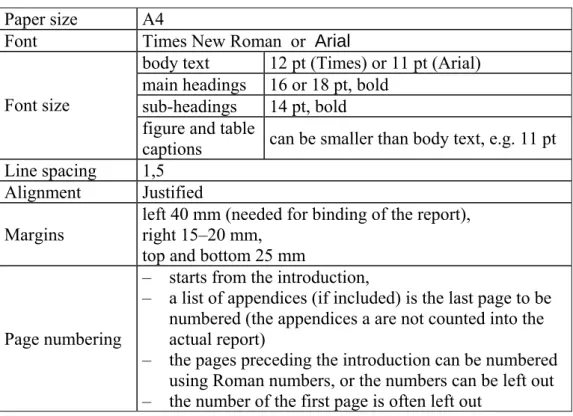
The general layout related rules and recommendations are presented in Table 1.
Table 1. General layout related rules of a thesis report.
Paper size A4
Font Times New Roman or Arial
body text 12 pt (Times) or 11 pt (Arial) main headings 16 or 18 pt, bold
sub-headings 14 pt, bold Font size
figure and table
captions can be smaller than body text, e.g. 11 pt Line spacing 1,5
Alignment Justified
Margins left 40 mm (needed for binding of the report), right 15–20 mm, top and bottom 25 mm
Page numbering
– starts from the introduction,
– a list of appendices (if included) is the last page to be numbered (the appendices a are not counted into the actual report)
– the pages preceding the introduction can be numbered using Roman numbers, or the numbers can be left out – the number of the first page is often left out
The most suitable fonts to be used in the report are Times New Roman or Arial but even some other font types are possible. Please note, that the selected font determines the appropriate font size. When using Times New Roman a correct font size to use is 12 pt. Arial appears like this with the font size 11 pt, i.e. about the same size than the 12 pt
Times New Roman. The font sizes listed in Table 1 are valid for Times New Roman. If you choose to use Arial or some other font, scale the font sizes of headings etc. accordingly to guarantee a well-balanced layout.
Other layout issues that shall be kept in mind: – No logotypes of any company shall be included
– The paragraphs shall not be indented. Instead, they shall be separated from each other by leaving empty space between them. This can be established, for instance, in Microsoft Word by adjusting the style settings (addition of extra line breaks disturbs at least Word’s paging logic). Get familiar with the features of your word processor! – The selected font shall be used systematically throughout the report. Certain exceptions
(usually italics or bold) can be made if there is a need to emphasize some part of the
text, or in the picture or table captions.
– The headings and sub-headings shall be highlighted by adjusting the size of the selected font, not by changing the font. In order to improve the readability, the picture and table captions can be written with somewhat smaller font size (e.g. 11 pt Times New Roman) than the normal body text.
– The final version of the thesis report must be printed with a laser or related printer device that produces permanent quality. Ink jets must not be used.
3.2 Figures and Tables
The clarity of the thesis report can be improved by using figures and tables. A graphical illustration is recommended to be used always when it is possible since a good picture or figure usually nicely summarizes the results. Sometimes it may even be advisable to present the same information both in table format and as a graphical illustration. A table contains detailed data whereas another type of illustration clarifies the overview and mutual relationships of the results. Remember, however, that it is not enough just to present the results as a figure or table. Textual analysis and interpretation is always required as well.
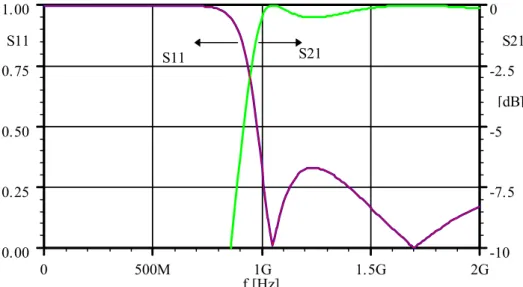
Figure 3.1 contains an example of a graphical illustration and its caption. The numbering of the figures can be organized either as a running index throughout the report or, as in this example, separately for each chapter. Please note, that the caption shall always be placed beneath the figure. The size of the caption text can be somewhat smaller that the main
body text in order to improve the readability of the report. In addition, the “name of the figure” (e.g. “Figure 3.1”) is usually written with bold style. All the figures shall always be referenced in the text and, naturally, the picture shall be placed as near the related text as possible. The caption shall be formulated in such a way that the reader understands the main purpose of the figure without being forced to read the related part in the body text.
0 500M 1G 1.5G 2G 0.00 0.25 0.50 0.75 1.00 -10 -7.5 -5 -2.5 0 S11 f [Hz] S21 [dB] S11 S21
Figure 3.1 This is an example of a graphical illustration added into the report body. Do not forget
to describe the meaning of the curves so that the reader understands the contents of the graph. Different dash styles and colours can be utilized as well in order to improve the quality of the figure.
Drawing or copying of figures is a rather straightforward task with modern tools. If there is a need to use scanned pictures, special attention shall be paid to the quality of the picture. Unclear pictures do not only make the report look unprofessional but can cause serious misunderstandings. The most common problem with the figures has been poor resolution of the pictures. In addition to the scanned pictures, also those downloaded from the Internet (e.g. data sheets in pdf-format) often have a very low quality for printing purposes. Note that even the smallest details in the picture must be clear and understandable for the reader. When adding scanned or downloaded information into the figures, please remember also to add proper references into the figure caption. Any form of plagiarism is strictly forbidden in a thesis report.
When describing the structure of a computer program using graphical illustrations (e.g. UML diagrams) the readability of the figure shall be maintained. With a proper modelling
tool it is easy to generate complex figures that are very difficult to read, especially due to a very small-sized format. The figures embedded in a thesis report shall fit without major shrinking into the body text. This means in practice that the maximal size of a picture can be approx. A5. Too detailed illustrations shall be avoided in general and, instead, one should focus on simplified figures describing the architecture on rather high level. It is seldom necessary to include detailed models in the report even as appendices. The Figure 3.2 contains an example of a UML class diagram of a software application.
CCarPoolView CCarPoolYear Edit orDl g CCarPoolDriverSelect or CCarPoolAppUi MCarPoolSched uleCmdHandler CCarPoolEngine CCarPoolScheduler
CCarPoolW eek TCarP oolRide 0..*
0..* CCarPoolW eekBrowserView CCarPoolW eekView
Figure 3.2 This is an example of a UML class diagram [2] describing the architecture of a
software. Much more detailed illustrations are seldom necessary to be included in the text body; or even into the appendices.
While preparing graphical illustrations it is allowed to consider also the artistic side of the whole. A figure shall look nice! You might find some of the following guidelines useful when drawing your illustrations:
– The size of the text embedded into the figure itself should be approximately the same than the one used in the caption.
– The gridlines and scales of the graphs are usually drawn with a thinner line style than the actual curves. This improves the readability significantly. Please note, that most of the drawing applications do not perform this automatically but the user must change the configuration. In the figures automatically generated by different analyser or measurement tools it is seldom possible to adjust the style of presentation.
– The readability of the scale is very important. The used scale selection shall be planned with care as well in order to avoid incorrect conclusions based on the figure.
– Do not make the figure look like comics by adding frames around them!
The tables can be numbered the same way as the figures, i.e. using Arabic numbers (e.g. “Table 1”). Both a running index (as in this document) and chapter specific numbering are possible. The table caption shall, however, be always place above table, not below as in the case of figures.
3.3 Equations
The mathematical and physical parameters, variables and component tags (e.g. R2, IC12or
CO) included into the text shall be written using the same font as in the body text but using italic style. The same font and style shall be applied to the equations as well, for example,
〈v t 〉 =
∫
+ =∫
T t v t dt T v t dt t T T ( ) 1 ( ) 1 ( ) 0 1 0 1 0 0 . (1)However, mathematical operations, such as sin, log, arc tan etc., are names of the operations and, thus, they shall not be written with italics. That is, the correct style to use is, for example, x = Acosω t not x = Acosω t. The most equation editors recognise the
function names automatically.
In the SI system a value is described using a number and a unit symbol separated with a space (e.g. p = 5 kPa, RLOAD= 82 Ω, a = 73 m/s2). Furthermore, it shall be kept in mind that
the unit symbols are not parameters or variables and they shall not be written with italics either. Note also that there shall be a space between the number and the unit. If necessary, use a binding space (see Table 4.1) in order to avoid a line break to occur between the
number and the unit. In MS Word a binding space can be established by typing spacebar keeping the Ctrl and Shift keys simultaneously pressed. The correct usage of subtraction and multiplication characters is discussed in Chapter 4.1
Please consider the following issues when writing your equations:
– If the number of equations is large, or the text contains references to them, the equations shall be numbered. The numbering can be done either in a running manner or separately for each chapter. If the report contains just a few equations, the numbering is
usually not necessary. The equation number is placed in parenthesis as shown in Eq. (1).
– The equations can be indented or centred, if it improves the readability. Remember to work systematically even in this issue.
– The equations are often a part of a sentence and, thus, the normal grammatical rules apply for them as well. Period marks and commas are common after the equations. – When a symbol or abbreviation is used in the text first time, it shall be described. The
symbol shall, naturally, be included into the notation as well.
As a concluding example, a thesis report could contain the following description: In the forward region the i-v relationship is closely approximated by
. exp kT qv I i s η =
In this equation Is denotes the saturation current, q the magnitude of the electronic charge
(1.6⋅10−19As) and the constant η has a value between 1 and 2, depending on the material and the physical structure of the diode. The symbol k stands for the Boltzmann constant
(1.38⋅10−23J/K) and
T denotes absolute temperature.
3.4 Program Source Code
There is no reason to include a complete software source code listing in the thesis report and not as an appendix either. However, in some cases it can be motivated to highlight the implementation of certain complex details and then, naturally, the selected part of the code can be added into the report body.
The source code embedded into the report is layout-wise handled as a table: The numbering is organised with Arabic numbers (e.g. Program 3), and the caption is placed always above the code because the length of the code can, in theory, be more than just one page.
The code shall be written using the Courier-font of size 8 or 10. If a code line exceeds
the length allowed by the style for one line, the code shall be restructured into a clearly readable format still considering the syntax rules of the programming language. If it is
necessary to mention, for instance, some class or attribute names within the body text, they shall be written using Courier-font or the font of the body text with italic style.
3.5 References
References to earlier reports and publications dealing with the research area or other relevant information sources are an important part of a thesis report. By using a wide range of well-selected references, the author can show that he/she masters the topic, is familiar with the central literature of the field, and is aware of the former studies dealing with the issue. However, it shall be kept in mind that all references shall be significant for the thesis, and they shall indeed be referenced in the text as well. The amount of references varies, naturally, depending on the topic of the thesis assignment. However, if the number of references is very low or if most of the references are based on Internet-sources, it is probable that the author has gained only a limited knowledge of the field.
The references show the origin of a statement or the source of information. The supervisor of the thesis, and other readers of the report too, must be able to separate which part of the text is truly the author’s own contribution and which is borrowed from others. If the author uses text of specific information from an external source without adding a reference, it is a matter of plagiarism. Note also that the references should not be chained, i.e. one should always refer to the original source of the information, not to others that have borrowed the information themselves. This way also the risk of interpretation and printing errors is minimized.
In general, the copyright rules and other property rights shall be kept in mind always when preparing a report. With the modern technologies it is almost too easy to copy text or other material from various electronic sources. It is allowed to quote content even from the Internet, if a proper reference is added into the report. However, the source shall not be referred by copying the original directly (so called copy-paste procedure) but, instead, be the author’s own synthesis on the information presented in the source. If it, for some reason, is necessary to use a direct citation of the source, the part is highlighted with “quotation marks”.
The Copyright Act allows using citations from other publications in a reasonable extent. The author and publication of the source shall be given using a proper reference according to the good praxis of scientific writing. There are no specific regulations on the maximal length of the citation; it shall be determined depending on the case in question. In practice, in scientific context it might be allowed to use longer citations than in other type of use. The citation right is not limited to any specific type of publication. However, it is usually not allowed to use a picture found on a www-site without proper authorisation. Separate simple tables, technical drawings etc. are not protected so their limited usage in a thesis report with a proper reference can be possible. Photographs are always fully protected by copyright, i.e. they must not be published in a thesis report without permission of the owner of the rights.
There are several traditional systems on to add the references into the report. The most commonly used ones are the Harvard notation (or the name-year system), the endnote
system, and the footnote system1. The Harvard notation usually points to the references
using the author(s) name(s) and the year of publication, e.g. (Huhtinen, 1992). The endnote system uses the number of the reference as ordered in the list of references, e.g. [1]. Even a combination of these two systems can be used, and it suits well to engineering reports. In this system the pointing to a reference is done by the three first letters of the name of the first author together with the two last digits of the publication year, e.g. [Huh93]. This “hybrid” system is easy to use, and the reader usually recognises the reference without needing to check it from the end of the report every time. However, the system works poorly, if the report contains many Internet-references.
Generally speaking, the different scientific fields use one of the presented referencing systems. For instance, in natural and technical sciences the endnote system is commonly used; in the fields of arts, business and medical sciences the Harvard notation dominates, and the practitioners of law usually select the footnote system. Furthermore, the referencing traditions of different disciplines can differ from each other also in the way of building the list of references and in the order the bibliographical information is displayed
1 In the footnote system the reference is given in the footer of the page. The footnotes can also be used to give an additional explanation or clarification to an issue or term discussed in the body text. It is not so common to use footnotes in engineering reports.
in the list. For example, technical and natural sciences often use a slightly different standard despite the fact that they both use the endnote system.
The endnote system is widely used in the international literature of Electronics Engineering and Computer Science. In this system, the reference tag is written as a number that is placed in square parenthesis after the text that discussed the referred information, for example [1]. The exact location of the referred piece of information in the source publication is usually not shown, but it is possible to add the related page numbers inside the parenthesis, e.g. [1, pp. 6–8]. If the part of the report handles several references simultaneously, it can be shown in several ways, e.g. [2], [5], [9] or alternatively [2, 5, 9]; or if the references follow each other, e.g. [3]–[6] or alternatively [3–6].
The location of the reference tag shows the part in the text that contains quoted information. If the reference deals with
− a single word, the tag is place immediately after the word, e.g. “…IE3D-software [6]…” or “…in the report [7] it is stated that…”.
− a whole sentence, the tag is placed at the end of the sentence before the period mark [6].
− a whole paragraph, the tag is placed after the concluding period mark of the paragraph. [6]
− a whole sub-chapter, the tag is located after the name of the sub-chapter.
The number links the tag to the list of references that is placed at the end of the report (before the eventual appendices). The tags are numbered in the order they appear within the text body. If a reference is used more than once, the same number is, naturally, used throughout the report. Accordingly, the list of references is sorted in numerical order. The reference list of this document contains examples originating from thesis reports [1, 2], a book [3], journal [4], conference paper [5], patent[6], standard [7], software application [8], CD-ROM [9], and an interview [10].
The structure of the list of reference is as follows (note the style used in the example below and compare with those in the end of this document):
Book
[3] Author(s), Name of the publication. Place of publication: publisher, year of printing,
Note that the modern policy is to include the place of publication (using the name according to the original language), not the place of printing.
Journal article
[4] Author(s), “Name of the article” Name of the publication, edition, number, pages,
month year.
Conference publication
[5] Author(s), “Name of the article” Name of the publication, (conference identification),
publisher, pages. Patent
[6] Author(s), “Name of the Patent” Patent authority, patent identification and the date the patent has been granted.
Standard
[7] Identification of the standard, Name of the Standard. The Standardization body, place
of publication, year. Data sheet
[8] “Name of the data sheet,”producer, address of the producer. Computer Software
[9] Name and version of the software, author or producer, address. CD-ROM
A CD-ROM or a DVD-ROM can contain, for example, a book in which case the references follow the format of a book reference:
[10] Author(s), Name of the publication. CD-ROM, Publisher, year of publication.
In addition to the type of references presented above, it is common to refer to a personal discussion or an interview with a subject expert. This is shown in the list of references as follows:
[11] Name of the person, the way the discussion took place (personal discussion, e-mail, interview), date.
Internet-sources
During the past few years, it has become more and more common to use the Internet as a source of information. In general, a thesis author should be very critical to any Internet based information. This is because the “everyday knowledge” and scientific information easily become mixed in the Internet and, thus, the facts and reasoning behind the information may be very difficult to evaluate. Public organisations, associations and international companies usually provide rather reliable data even on the Internet. Instead, various home pages may provide information that can be incorrect or even illegally copied. Thus, these types of sources should be avoided.
However, standards or data sheets are often an important source of information in the field of applied sciences. The only feasible way to get access to this type of data may be the Internet.
An Internet-reference shall contain information on the author, the name of the publication, the type of the document in square parenthesis, the URL-address, and the date of publication or the date the source was referred to.
[x] Author(s), “Name of publication”, [document type]. Available at: URL. (Referred: date).
The name of the author of an HTML-document can usually be found by studying the source code of the document (view page source via the browser). If the name cannot be
found, the publishing organisation can be used as the author.
The URLs of Internet-based information sources can change anytime. In addition, the electronic documents can be updated or removed without any further notice. If the original address has been changed, it may, however, still be possible to track the document itself using the Internet search machines. In any case, do not forget to print the Internet
sources you have used or save a local copy for future use. The supervisor of your thesis may want to see the source data!
The references [12–16] used in this document are typical Internet-based information sources in a thesis report. The format of an Internet-reference can in some cases be simplified; e.g. to contain only the document type and the main URL, if the purpose is to refer to the data provided on the site in general. For example: “…new technologies, such as UNIBOND™ [12]…”
The standardisation bodies (especially the de facto ones) have often their Internet sites as
well. In that case it is possible to write, for example, “…Bluetooth-devices [13]…”, or “…ATA, that defines the interface between a mass storage device and a PC [14]”. In the case of data sheets [15] or thesis reports available on the Internet [16] the reference listing follows usually the general format. For example, if there is a need to refer to a thesis report available in electronic format in the Internet, the author, the name of the thesis and the place of publication must be given in the reference. Just displaying the URL is not enough. The URL strings can be very long and, thus, they must almost always be divided into two or even more rows; see for example the references [14] and [15]. The following guidelines shall be followed when dividing the address:
− divide the address only after a backslash ( / ) or a dot (.),
− do not divide in the middle of a double backslash (//),
− do not divide after a hyphen (-), tilde (~) or other symbol that is a part of the address,
− do not hyphenate (by adding a hyphen into the address), and not allow your word processor to do so either,
− do not divide in such a way that the file type identifier (extension) placed at the end of the address, e.g. html, ends up on a separate row.
The clarity of the URL can be further improved by using brackets, e.g. <address>. Note also, that the protocol, e.g. http:// or ftp://, shall be included too, although the browsers can open normal addresses event without it.
4. Technical Details
This chapter discusses some layout related details whose correct usage can improve the look and feel of a thesis report significantly.
4.1 Usage of Certain Symbols
If a standard word processor is used without care, certain special characters or symbols may be automatically embedded into text in a faulty fashion. This may be caused, for instance, by an incorrect language setting that can usually be fixed rather easily. This does not, however, solve all the problems, and in some cases it may be difficult to find the correct symbol from the keyboard in the first place. This section lists some special characters that tend to cause problems in many thesis reports.
Multiplication sign
The multiplication (times) sign got from the keyboard is actually a star symbol or asterisk (*). The asterisk shall not be used as a multiplication sign in a thesis report (excluding source code samples in which the asterisk is a part of the syntax). Instead, the correct symbols to use are either × or · . These are used depending on the context, e.g. 2 × 6 = 12, 4.2 m × 6.5 m or 2.0·10–2 A. In equations a separate multiplication sign is seldom required (e.g. NO = kTB).
Hyphen, minus sign and dash
The length of the line makes a difference. The hyphen (-) is the only line a word processor
can produce directly from the keyboard. The hyphen is used in hyphenation and compounds, e.g. sequence-dependent. The minus sign or subtraction mark (prefix or operator) shall be longer (–), e.g. 8 – 20 + 6 = –6 or 2.0·10–2. Note also, that in mathematical equations there shall be an empty space on both sides of an operator as well as of an equality symbol (=).
The length of the minus sign equals to a dash, or so called n-line. The dash is used also in
bulleted lists, and as a separator (e.g. 10–12 pcs, Dallas Stars–Anaheim Mighty Ducks). A long dash or the m-line (—) exists, too, but is seldom used in scientific writing. A rule of
thumb when preparing a thesis report is to use the dash always when a hyphen is not the correct alternative.
Exponents
Several different ways to display the exponent can be found in thesis reports and other documents. Many of these formats are adopted from programming languages or calculators, such as 10**5, 10^5 or 1E5. These are all understandable for most of the readers but, still, they become easily unclear especially if the exponent is negative (e.g. 3.2*10**-5). Thus, it is recommended to always use superscript, e.g. 3.2·10–5. If the number is connected to a unit symbol, it is recommended to use a prefix defined by the SI system to present the scale of the number, e.g. 32 µA.
Quotation marks
The correct way to handle quotation marks when writing text in Finnish is to use ”equal opening and closing tags”. Instead, if you are using “English with US style”, the opening tag is different from the closing tag.
Three dots (ellipsis)
In scientific writing, it is possible to use an ellipsis (…) instead of a dash between the extreme values of an interval. This format is especially useful, if the usage of a dash could lead to misunderstandings, e.g. if the extreme values are negative (−2…+5 °C, compare with −2−+5 °C).
4.2 Utilizing Special Characters in Microsoft Word
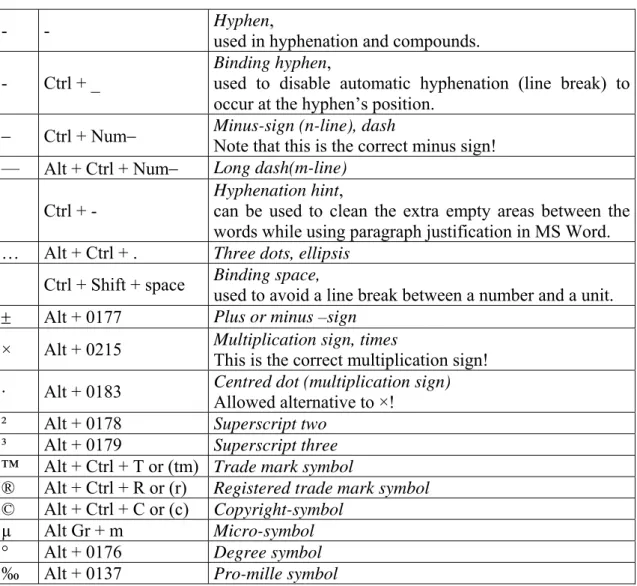
A set of commonly used special characters is presented in Table 2. The listed characters are included into the symbol menu of MS Word. They can be fetched either by selecting them separately via Insert Æ Symbol menu or, directly, by typing a given sequence on the
keyboard.
In Table 2 the + symbol denotes simultaneous pressing of the given keys, e.g. a binding space can be written by first pressing Ctrl- and Shift-keys down and then pressing space without releasing the others in-between. The Alt + 0183 combination produces a centred dot (·), if the user first presses the Alt-button down where after the sequence 0183 is typed on the separate numerical keyboard keeping Alt pressed throughout the sequence.
Table 2: The most common special characters and their short cuts in Microsoft Word.
- - Hyphen,
used in hyphenation and compounds. - Ctrl + _
Binding hyphen,
used to disable automatic hyphenation (line break) to occur at the hyphen’s position.
− Ctrl + Num− Minus-sign (n-line), dashNote that this is the correct minus sign!
— Alt + Ctrl + Num− Long dash(m-line)
Ctrl + -
Hyphenation hint,
can be used to clean the extra empty areas between the words while using paragraph justification in MS Word. … Alt + Ctrl + . Three dots, ellipsis
Ctrl + Shift + space Binding space, used to avoid a line break between a number and a unit.
± Alt + 0177 Plus or minus –sign
× Alt + 0215 Multiplication sign, times This is the correct multiplication sign!
· Alt + 0183 Centred dot (multiplication sign) Allowed alternative to ×! ² Alt + 0178 Superscript two
³ Alt + 0179 Superscript three
™ Alt + Ctrl + T or (tm) Trade mark symbol
® Alt + Ctrl + R or (r) Registered trade mark symbol
© Alt + Ctrl + C or (c) Copyright-symbol
µ Alt Gr + m Micro-symbol
° Alt + 0176 Degree symbol
‰ Alt + 0137 Pro-mille symbol
MS Word tends to automatically change certain characters or character combinations to others. A typical change leading into an error in the Finnish language occurs, when Word replaces the hyphen used a prefix (-) with a dash (–), e.g. “virta-jännite –riippuvuus” (correct style: “virta-jännite -riippuvuus”). Compare with the usage in English: “master– slave, D-type, flip-flop”.
The automatic replacing feature can be customized or disabled by the user, which is recommended if they cause continuous problems. On the other hand, an advanced used can rather easily make own replacement rules and define short cuts. It might be useful, for instance, to define a proper short-cut for the multiplication sign (×) or the centred dot (·), e.g. Alt Gr + Num * and Ctrl + . . Study the features of your word processor!
5. Discussion
This guide studied the structure and layout related issues of a Bachelor’s Thesis report especially considering the fields of electronics and information technology. The document focused on the central parts of a thesis report, such as the Abstract, Discussion and Introduction, and gave detailed instructions on how the author can prepare them with high quality in terms of both content and style. In addition, the general layout related rules dealing, for instance, with figure, tables, equations and references were discussed in detail. The Bachelor’s Thesis projects differ from each other significantly depending on the selected topic. Thus, it is neither possible nor required to present a generally valid guideline that could cover all the different alternatives. Thus, variations and exceptions from the guidelines given in this document can be made, expecting that they are motivated and implemented with good taste following some generally accepted standard. Moreover, the selected style shall be followed systematically throughout the report.
References
[1] Huhtinen, V., Ultraäänipuhelin, Bachelor’s Thesis, Turku Polytechnic, 1993, 62 p.
[2] Suominen, M., Car Pool Application for Symbian OS, Bachelor’s Thesis, Turku
Polytechnic, 2003, 60 p.
[3] Abramowitz, M. and Stegun, I.A., Handbook of Mathematical Functions. New York:
Dover, 1972, 1027 p.
[4] Lowe, A.W., “The diagonal horn antenna”, Microwave J., vol. V, pp. 117–122, 1962.
[5] Weiser, M. “Program Slicing”, Proc. 14th Int’l Conf. Data Eng. (ICDE 98), IEEE
CS Press, pp. 439–449.
[6] Osaka, H., “Fast data transfer bus”, U.S. Patent 5 638 402, June 10, 1997.
[7] IEEE Std 1596–1992, Scalable Coherent Interference, IEEE, Piscataway, N.J., 1992.
[8] “Allegro ATS622 Data Sheet”, Allegro MicroSystems, Inc., Worchester, MA. [9] IE3D Version 8.2, Zeland Software, Inc., Fremont, CA.
[10] Newman, W.M. and Sproull, R.F., Principles of Interactive Computer Graphics,
CD-ROM, McGraw-Hill, 1979.
[11] Maas, S., personal discussion, 28.8.1999.
[12] [www-document]. Available at: http://www.soitec.com [13] [www-document]. Available at: http://www.bluetooth.com
[14] ATA/ATA-6 Specification (2001). [www-document]. Available at: http://www. t13.org
[15] Maxim Integrated Products, Inc. MAX1958/MAX1959 Power Amplifier Power-management IC (2000). [pdf-document]. Available at: http://pdfserv.maxim-ic.com/
en/ds/MAX1958-MAX1959.pdf
[16] Wennström, M., Smart antenna implementation issues for wireless communications,
Technical Licentiate Thesis, Uppsala University, Sweden, [www-document]. Available at: http://www.signal.uu.se/Publications/abstracts/1991.html (referred 4.7. 2001).
Appendices
In general, such information that is mentioned in the body text, but not mandatory in order
to understand the content of the report, shall be attached into the report as appendices. Typically, the appendices contain, for example, source code listings, complex diagrams, measurement results, user manuals, derivation of mathematical equations, and data sheets. However, in case of data sheets it is often well enough to include a simple reference. Accordingly, complete source code listings are very seldom required to be included into the thesis report in the first place.
If the appendix is not your personal contribution, a proper reference shall be attached into the appendix as well. Moreover, each appendix shall be given a number and a title. If there are several appendices, it may be useful to add a separate list of appendices at the beginning of the appendix section. In any case, the appendices shall be listed in the table of contents.
Normally, the pages in the appendices is neither numbered into the report body nor counted into the total number of pages indicated in the abstracts. The last page that is numbered is the possible list of appendices (this page).
![Figure 3.2 This is an example of a UML class diagram [2] describing the architecture of a software](https://thumb-us.123doks.com/thumbv2/123dok_us/1803749.2758978/24.892.173.764.354.659/figure-example-uml-class-diagram-describing-architecture-software.webp)