VERSION 3.0
REMARKS
Documentation rev 01. November 2010 CREATOR
Douglas J. Robar, Percipient Studios LICENSE
MIT License COPYRIGHT
2
OVERVIEW
XSLTsearch is the easy search solution for umbraco web sites. It is fast, completely self-contained, and extremely configurable.
With XSLTsearch you can search for words, phrases, portions of words, and portions of phrases in all document properties and attributes (even custom properties). Search results are automatically sorted by relevance with search terms highlighted in the results. To search for exact phrases, simply enclose the search term in single or double quotes.
Multi-lingual websites can use the same search page throughout the site with with pre-defined dictionary keys for all translatable search output.
XSLTsearch is self-maintaining, you never have create or update an index. XSLTsearch works well in medium-trust, hosted web environments, nor will it interfere with an already- or Lucene-based search engine.
Hidden pages are never shown in search results, and protected pages are only returned if the website visitor has access to that protected content, ensuring the safety of your private and protected content. With XSLTsearch, you have complete control to customize searching behavior and output formatting. In most cases, the supplied macro parameters provide all the customization you need. Semantic markup is used throughout, making it easy to style XSLTsearch to match the look-and-feel of your site. Sample CSS code is provided.
You are free to modify the source code for your umbraco site, but please honor the copyright notice and let me know of any improvements so I can incorporate them for the benefit of others.
DONATIONS
If you find XSLTsearch useful, please support its development by sending money via PayPal (www.paypal.com) to [email protected]. A $20 donation is recommended.
INSTALLATION
XSLTsearch is safe to install as Runway Module as well as in your own website.
In the Developer section of the Umbraco administration interface, expand the Packages tree. Select either the Runway Modules (if you have installed Runway) or the Umbraco Package Repository (for sites not using Runway). Browse to find XSLTsearch and click the install or download link.
Include <form> tags
Please note that XSLTsearch does not create a <form> tag. Instead, you must ensure that you have a <form action="?"> or <form runat="server"> tag surrounding the macro call itself, or in a higher-level or master template as is the case with the Umbraco Runway foundation. Misconfigured or missing <form> tags are the most likely cause of problems.
Upgrading from an Earlier Version of XSLTsearch
Do not attempt to install XSLTsearch twice; the installation will fail. Instead, install the upgrade package for XSLTsearch.
Note: Any modifications you have made to the XSLTsearch.xslt file will be lost by upgrading. Be sure to save a copy of your modified file before upgrading so that you can re-apply your changes if necessary.
4
CUSTOMIZING XSLTSEARCH
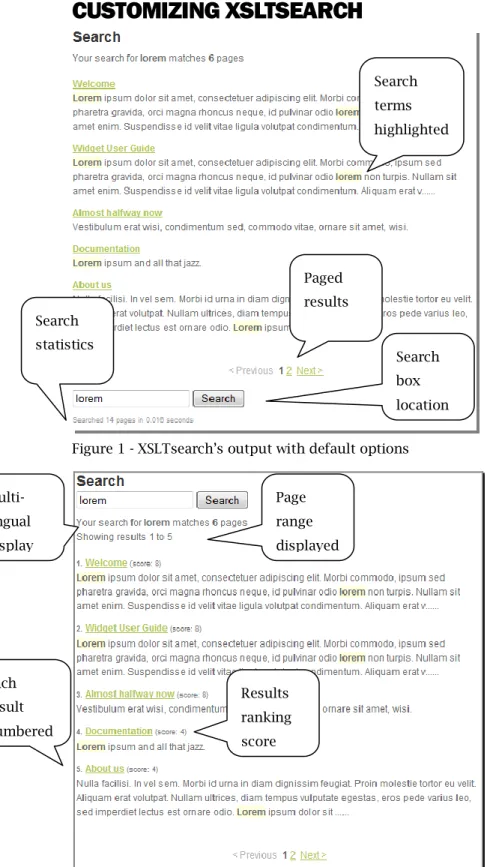
Figure 1 - XSLTsearch‟s output with default options
Figure 2 - XSLTsearch‟s output with all options enableds Search box location Multi-lingual display Page range displayed Results ranking score Search terms highlighted Paged results Search statistics Each result numbered
XSLTsearch Macro Parameters
source The parent NodeID within which to look for the search term(s). Behavior: The source node and all its descendants are searched. Default Value: -1 (the entire site)
searchFields The document properties to search
Behavior: A comma-separated list of fields. The order of the search fields affects the search score and order of the search results! Place the more important fields first, with bodyText or its equivalent last. The reason is that if a search term appears in the page's title, there is a greater likelihood that page discusses the search term at length, than it simply being mentioned somewhere in the bodyText.
Examples: @nodeName,bodyText
Default Value: @nodeName,metaKeywords,metaDescription,bodyText
Note: Field names are case-sensitive. Document properties and attributes (preceded by @) are supported.
previewFields The document properties to display in the search results
Behavior: A comma-separated list of fields. The order of the preview fields is from most preferred to least preferred. Put the most appropriate fields first (typically, bodyText). The first field that contains text will be shown as the preview information for each search result.
Default Value: bodyText,metaDescription
Note: Field names are case-sensitive. Only document properties are supported (not
attributes). Typically, previewFields will contain the same field list as searchFields, but in the reverse order, and without any @ properties.
resultsPerPage The number of search results to display on each page of search results. Default Value: 5
previewChars The maximum number of search characters to display in the preview for each search result.
Default Value: 255
previewType The format of the preview information to display.
Behavior: The preview text for each search result includes hit highlighting for search terms. You can select either a conventional display with the first words of the document shown (which may or may not contain the search term(s)), or you can display the context of as many hits as fits within the previewChars character count.
Options: BEGINNING
CONTEXT
6
Example: BEGINNING
CONTEXT
Note: If you select CONTEXT, you set the previewFields parameter to be the same as
searchFields (without any @ attributes). Otherwise, some of your searches may have no context to display.
searchBoxLocation Place a search box and button above, below, or both above and below the search results.
Options: BOTTOM
TOP BOTH NONE
Default Value: BOTTOM
Note: If BOTH is set, only one search box will appear if nothing has been searched yet.
showPageRange Show the summary text at the top of the search results page, “Showing results X of Y” Behavior: This can be useful when many results are returned, especially if showOrdinals is set
to false.
Default Value: 0 (FALSE)
showOrdinals Show the number before each search result, such as 1. 2. 3. 4. etc.
Default Value: 0 (FALSE)
showScores Show the total score calculated for the search term within each document.
Default Value: 0 (FALSE)
showStats Show the summary text at the bottom of the search results page, “Search X pages in Y seconds.”
Default Value: 0 (FALSE)
showDebug Show the version of XSLTsearch
Behavior: Set automatically when ?umbDebugShowTrace=true is appended to the URL‟s
querystring. The output will include the version of XSLTsearch along with the typical umbraco debugging output.
Note: This parameter is not, strictly speaking, a macro parameter since its behavior is independent of the macro properties.
Sample CSS
Ample markup is provided by XSLTsearch to allow you to customize the look to match your site‟s design, while also working well in a CSS-disabled environment. Below is a sample CSS definition for XSLTsearch to use as a starting point for your own CSS.
#xsltsearch {margin: 0; padding-bottom: 20px;} #xsltsearch_navigation {text-align: center;}
#xsltsearch_navigation .disabled {color: #AAA;}
#xsltsearch_stats {font-size: 75%; color: #999;} #xsltsearch_results {padding-bottom: 20px;} #xsltsearch h2 {font-size: 150%;} .xsltsearch_result p {margin: 0; padding: 0;} .xsltsearch_result:hover {background: #fcfcfc;}
.xsltsearch_ordinal {font-weight: bold; font-size: 75%;} .xsltsearch_title {font-weight: bold;}
.xsltsearch_score {font-size: 75%;} p.xsltsearch_result_description {padding-bottom: 10px;}
.xsltsearch_description strong {background: #FFD;} /* search term highlighting */
How to Improve Search Performance
If you find the performance of XSLTsearch sluggish in your environment, you can improve performance in various ways. Obviously, faster servers will help but you can also improve the performance of XSLTsearch with your existing hardware with careful planning.
Because the responsiveness of XSLTsearch is largely determined by the number of items being searched, searching only a portion of your site will greatly improve performance. Consider creating multiple search pages for different purposes or sections of your site. Each would include the XSLTsearch macro, but with differing source and searchFields parameters to create specialized search pages for the entire site, only blog entries, or technical support documents, for instance.
Searching only within the most important document type properties (via the searchFields macro parameter) rather than every possible property will improve search speed. The fewer searchFields, the faster XSLTsearch will respond.
8
CHANGE HISTORY
Version Date Comments
3.0 November, 2010 Added multi-lingual support with dictionary keys Added support for medium-trust
Bug fixes, including:
Multi-word searches now return proper results
Searching for the letter „s‟ no longer breaks html markup in results
Contextual results display improved in many cases 2.8.1 June, 2010 Update of 2.8 for use with Umbraco 4.5‟s new XML schema 2.8 January, 2009 Updated for umbraco v4. Changed license to MIT. Created Runway
Module
Last version to support Umbraco 3.0, 4.0, and legacy XML schema 2.7 January, 2008 Bug fix.
searchBoxLocation="top" now shows the search box even if nothing has been searched yet… reliably
2.6 October, 2007 Changed the default value of the “source” parameter to search the entire site if the source parameter‟s value is not specified.
First release for the umbraco Package Repository. 2.5 September, 2007 Bug fix and improved error checking.
searchBoxLocation="top" now shows the search box even if nothing has been searched yet
Only nodes with an @id are searched
Added NONE option to searchBoxLocation parameter 2.4 August, 2007 Bug fix.
Now returns protected pages, but only if the user has access to the page. Previously, protected pages were never returned
2.3 August, 2007 Bug fixes.
Highighted terms in search results now retain their case properly.
Corrected layout bug that appeared in umbraco v3 when no results were returned
2.2 June, 2007 Improved error handling with CONTEXT searches when searchFields and displayFields parameters do not coincide properly.
2.1 June, 2007 Important bug fix.
Boolean macro parameters should be specified as '1' or '0' rather than 'true' or 'false', in keeping with the way umbraco v3 creates Boolean values when inserting macros.
2.0 May, 2007 Major update.
Supports umbraco v2.1 through v3.
Documentation completed.
Added phrase searching when enclosed in single or double quotes (default is „and‟ searching of all terms).
All configuration parameters given defaults and passed in via macro
Output is semantic XHTML for easy CSS styling
1.4 March, 2007 JavaScript functions converted to C# for umbraco v3. Not released. 1.3
beta 5
October, 2006 Major update.
Now more than 20X faster than pervious versions!
Numerous configuration options added or expanded.
Improved results paging for large sites.
Extensive commenting of XSLT code.
Can also search within document attributes (such as @nodeName)
Added displayFields for easy customization of output (defaults to bodyText (if present) then resorts to description (if present))
Added simple boolean search (all search words are now searched using AND rather than as an implicit exact phrase). This is the first step to providing advanced search syntax capabilities.
Installation and usage documentation provided (not yet completed). 1.2 September, 2006 Copyright and terms of use notice added. Not released.
1.1 January, 2006 Minor update. Not released. 1.0 January, 2006 Initial release.