Baghdad Science Journal
Vol.16 (Special Issue) 2019
DOI:http://dx.doi.org/10.21123/bsj.2019.16.2(SI).0462
Design and Development of Smart List: A Mobile App for Creating and
Managing Grocery Lists
Norliza Katuk
*Tamilarasi Jayasangar
**Yuhanis Yusof
***Received 14/9/2018, Accepted 11/11/2018, Published 20/6/2019
This work is licensed under a Creative Commons Attribution 4.0 International License.
Abstract:
Research in consumer science has proven that grocery shopping is a complex and distressing process. Further, the task of generating the grocery lists for the grocery shopping is always undervalued as the effort and time took to create and manage the grocery lists are unseen and unrecognized. Even though grocery lists represent consumers’ purchase intention, research pertaining the grocery lists does not get much attention from researchers; therefore, limited studies about the topic are found in the literature. Hence, this study aims at bridging the gap by designing and developing a mobile app (application) for creating and managing grocery lists using modern smartphones. Smartphones are pervasive and become a necessity for everyone today. Hence, a smartphone app that can facilitate the process of creating and managing grocery lists for busy and working people is beneficial. The design and development of the app followed the rapid application development methodology. First, the functional requirements were gathered through interviews and content analysis. Then, a prototype named SMART LIST has been developed based on the gathered requirements, and a field study was carried out to evaluate the usability of the prototype. The results of the evaluation suggested that SMART LIST is useful and easy to use. The respondents also satisfied with the functions for managing grocery lists offered by SMART LIST. The study contributes towards an understanding the system requirements and user interface of a mobile app for managing grocery list. It can be a reference model for developers and researchers in the area to develop similar apps or enhancing the capabilities in creating and managing grocery lists.
Key words: Consumer science, Grocery shopping, Grocery shopping list, Reminder systems.
Introduction:
Grocery shopping is one of the fundamental human activities performed regularly at a constant interval such as weekly, fortnightly or monthly (1). Research in consumer science has reported that a correlation exists between grocery shopping behaviour and sales (2). Further, grocery shopping is considered a complex life skill that involves a person to learn and experience the few steps including planning, do the shopping, and evaluate the post-shopping activities. Before the grocery shopping takes place at the grocery stores, one should identify the grocery items to purchase. Universiti Utara Malaysia, Malaysia.
Corresponding authors: *[email protected] **[email protected] ***[email protected]
It is an essential step during the planning where consumers will create a grocery list, either a physical or mental list. The grocery lists act as a memory aid that facilitates the grocery shopping process. Further, it can assist consumers in locating grocery items at the grocery store aisle and controlling users from making impulsive purchases. Consequently, helping in maintaining the household expenditure, thus saving money.
Special Issue on the 7th International Conference on Computing and informatics (ICOCI2019) from 27-29
enough to facilitate grocery shopping. For example, the hand-written grocery list could be lost, contaminated by water or dirt, and unable to cater expended list when the paper is too small. On the other hand, the mental list could be forgotten because human memory is limited in its space and time to remember a long list. Hence, consumers will most likely not to purchase essential grocery items for the household which may need to repeat a trip to the grocery store, or even changing the whole meal plan for the household. It requires more time to re-plan the trip or the meal re-plan which consequently may lead to unorganized life activities and a distressing situation. Research on grocery lists has not received much attention from researchers as people regarded that the lists and the efforts of creating the tasks are not relevant; although the piece of papers provide information on consumer purchase intention and a tool that makes people be more organized in managing their daily life and expenditure (3).
Due to this problem, there is an urgent need for mechanisms that can create and manage grocery lists efficiently. The emergence of smartphone technology in human life may open an opportunity towards providing an effective way of creating and managing grocery lists. As the smartphone became pervasive and integrated into our lives (4,5); hence, a mobile application (app) could be a useful tool for facilitating the creation and maintenance of grocery lists. Therefore, this paper bridges the gap by investigating the potential of smartphone as a tool for creating and managing grocery list electronically. This study aims to design and develop a mobile app for managing grocery list. As a result, SMART LIST, a prototype of a mobile app for managing grocery lists was developed and evaluated. The study contributes towards an understanding the system requirements for such apps and could be a reference model for developers and researchers to improve an electronic process for creating and managing grocery lists. The next section describes the background and related studies. Next, the section describes the design and development of SMART LIST. The subsequent section explains the usability evaluation of SMART LIST. The last section in this paper concludes the study and lists the future works.
Background and Related Studies:
This section describes the background of grocery lists and related studies investigating the effects of grocery lists for grocery shopping from the perspective of consumer science research. Later, this section discusses the role of information
technology in facilitating the creation and management of a grocery list. Although consumers found that grocery shopping is a regular task, however, it is considered a stressful and challenging task for many people. The grocery shopping involves a few steps that consumers must perform including generating and maintaining a grocery list. The grocery lists play a central role in managing the grocery shopping process and controlling the household expenditure (1). Further, the roles of grocery list expend towards maintaining a healthy food intake for the household that is consequently keeping the household in good health. However, the process of creating and managing a grocery list is always unseen, unrecognized and undervalued. Consumers usually have a physical list where they write the grocery items on a piece of paper or a mental list where the grocery items are simply remembered. The modern way of creating a grocery list could make use of smartphones where users use mobile apps for generating a grocery list. The detail discussion of the concept and related studies are presented in the following paragraphs of this section.
main steps that are writing a grocery list, locating items on a list in the grocery store aisles, and purchasing the grocery items. The first step in grocery shopping is planning where consumers will identify grocery items needed for the household and prepare a grocery list. Planning is a crucial step in managing grocery shopping as it will affect one’s expenditure, time spent in the grocery store, and unplanned purchases (14). The planning phase in grocery shopping requires an individual to prepare grocery lists in the process using paper, electronic device or mentally managed (8). Identifying the list
of grocery items including food to purchase before going to the grocery store can be a strategy to maintain good health (15). The consumers adopted the planning stage as a self-control strategy to avoid impulsive purchases at the grocery store (16). Research has reported that the majority of consumers plan for their grocery shopping the time they arrived at the grocery store; nevertheless less than 15% of consumers come into a grocery store with no purchase plan (13).
Figure 1. Grocery shopping process (13).
The consumer science studies reported that most consumers used a grocery list on their shopping trip (14), either written or mental grocery lists (11). The grocery list is an aid for grocery shopping at both planning and fulfilment stages. The grocery list provides a degree of comfort to the consumers in a way that it ensures the requirements are obtained and hence avoid the need for impulsive purchases (10). Researchers have little interest to study grocery list as an object of investigation (14). Consumers who use a grocery list are more engaged in more effective shopping than consumers without a list (14). A grocery list is prepared either by a person responsible for the household management or collaboratively with other members of the household (8). In preparing the grocery list, the person must have knowledge of family and household inventory as well as the knowledge about the grocery store (14). Although a grocery list does not represent the consumer’s accomplished purchase behaviour, it is valuable to show the consumers’ purchase intentions (17). A grocery list can be defined as a tangible note written on a piece of paper (e.g., sticky note, bill, envelope, and napkin) or a mental note where the grocery items are being memorized, or a digital note or app which records household items to be purchased (6). A grocery list; either physical or mental, could reduce the stress or pressure that consumers frequently experience in managing their daily life activities (13). It has resulted in an investigation into ways to increase human efficiency, including how we undertake routine activities including grocery
shopping. However, limited studies on the use of grocery lists exist in the literature (10) which shows the gap in consumer science research and other multidisciplinary areas such as information technology.
The grocery lists have many roles in the whole process of the grocery shopping. The written grocery lists serve as an external memory aid and a way to communicate the grocery needs to other household members where they are hand over to the person who does the actual shopping (8). Apart from being used as memory aids, grocery lists act as a tool for budgeting to organize routine shopping visits efficiently (7). Thomas and Garland (10) highlighted three essential roles of the grocery list in grocery shopping; 1. ensure the household requirements 2. controls the grocery shopping process, and 3. controls shopping expenditure. A consumer with a grocery list is seen as being more efficient than consumers without a grocery list when they are at the grocery store (14). A grocery list serves as a tool to keep track of the items to be purchased in physical stores, consequently has been a subject for scientific studies (18). Studies have shown that the existence of a written grocery list increases the probability of purchasing the planned grocery items (16).
Research on consumer science reported that the use of grocery lists while grocery shopping correlates with a lower body mass index (BMI) (19). In addition, past studies using various designs and measures provide evidence on the link between the grocery list and improved dietary quality (20).
Planning
- identifying items to be purchased
-Preparing a grocery list
Fuilfilment
- Locating items in the grocery store - Paying the items
Post-purchase
Special Issue on the 7th International Conference on Computing and informatics (ICOCI2019) from 27-29
Dubowitz et al. (20) analysed households that used a grocery list for shopping were more likely to meet daily recommended American dietary guidelines. Further, consumers who shopped according to the grocery list were associated with a lower BMI of 1 unit. The findings of Dubowitz et al.’s study also found that respondents who always use a grocery list during shopping had better dietary quality and lower body weight. Grocery lists act as a shield against the availability of unhealthy foods and could limit impulsive choices. Their finding of the study may also be interpreted in the other way in which the respondents with healthy eating habits and weight used grocery lists for their shopping.
Studies have reported that women are the primary creators of a grocery list as they are mostly responsible for grocery shopping (13). Further, research has also proven that women prepare and use a grocery list more than men (14). Previous research has been conducted into the use of grocery lists in various countries including New Zealand, the USA, Denmark, and Canada which suggested a widespread development of lists in grocery shopping (13). Heinrichs et al. (8) highlighted that creating and managing grocery lists is an essential aspect of grocery shopping; however, the lists do
not show the consumers’ activities that are incorporated, unseen and unrecognized during its’ creation. Simple techniques are used in creating a shopping list where consumers are taking note of the items to be purchased on a piece of paper or on the type the grocery items on the mobile device or creating a mental list (2). A mental list is stored in human memory, while a physical list is a written paper or typed on the smartphone apps (13). Jain (9) suggested steps in preparing a grocery list. Consumers usually start with checking the grocery inventory available in their fridge or pantry, then planning meals for a few days or weeks. The meal plan and ingredients will be the basis for creating a grocery. Consumers will also look for deals or offers at their grocery stores nearby. Berndt et al. (13) proposed four factors that influence customers in preparing their grocery list as illustrated in Fig. 2. These factors are product and brand decision, list design, sales leaflets, and grocery store knowledge. The steps in creating a grocery list can be repetitive and involve manual effort which needs a considerable amount of time to carry out effectively. The creation of a grocery list is difficult to accomplish when considering the current busy modern lifestyle (9).
Figure 2. The factors influencing the creation of a grocery list (13).
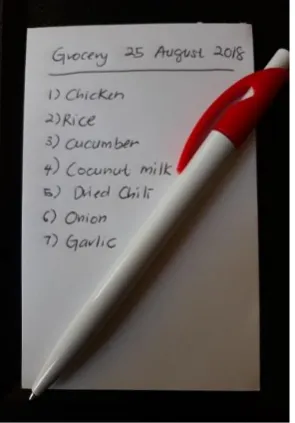
The grocery list, either physical or mental, shows undertaken activities that are undervalued as those activities are unseen (14). The common grocery lists are mostly handwritten on a piece of paper, sticky note, envelope, or napkin as shown in Fig. 3. Water or dirt could contaminate the handwritten grocery list. In the case of collaborative grocery shopping, the grocery list could be difficult or impossible to read due to messy hand-written (17). Ludford, Frankowski, Reily, Wilms, and Terveen (21) argued that handwritten lists are easily lost due to small paper size. Further, the small paper limits the number of
items that can be listed. As lists expand, consumers tend to mess up the list and write the grocery items in any available space. Ludford et al.’s study on a handwritten grocery list found that the respondents cross out purchased items and make a list messy in which unpurchased items may not be noticed. The respondents of the study also reported that handwritten grocery lists cause a frequent problem where they can only be used in one place at a time. Shopping list
development (creation)
Products and brands decisions
List design
Sales leaflets (flyers)
Figure 3. An example of a hand-written grocery list.
The emergence of digital devices such as handphone and computer tablets have shed light on a more flexible and easier way of generating grocery lists. Digital grocery lists gain much attention as the devices are penetrating every aspect of daily human life (3). Many people are now creating grocery lists on their smartphones or tablets by typing the grocery items they plan to purchase. Figure 4 shows an example of a grocery list created using ColorNote on Samsung smartphone. Some mobile apps allow users to select grocery items they want to purchase from a database of a predefined list. Recent studies also reported that smartphone users create a grocery list on their smart devices using Notes app on iPhones or other similar apps such as myShopi, Wunderlist, OneNote, Grocery IQ, and OurGroceries (3). Managing grocery lists digitally offers many advantages for example; a digital grocery list can be shared via e-mail (8). Schopfer and Keller (18) highlighted that many mobile apps offer different functionality and available in most of the smartphone platform. However, a fundamental function of a grocery list is the ability to list grocery items which can be displayed and modified by the users according to one of the states that are to be purchased, purchased or deleted from the list as rendered in Fig. 5. Purchased grocery items are represented by 0, grocery items deleted from the list are marked as -1 and new grocery items to be purchased and included in the list are marked as 1. These three states of grocery lists are the fundamental of developing related mobile apps.
Figure 4. An example of a grocery list created using ColorNote App.
Figure 5. The states of grocery list for mobile apps (18).
Special Issue on the 7th International Conference on Computing and informatics (ICOCI2019) from 27-29
Table 1. List of apps for creating grocery list found in academic databases.
Related
Studies Description
Smart Grocer (9)
Smart Grocer provides a personalized grocery list system by collecting users’ purchase history and budget and keeping grocery inventory information including
items that will expire soon and items on sale at the preferred grocery store. The
system can generate a grocery list automatically based on the recipe that users’ chose after creating a weekly meal
plan.
MyNutriCart (23)
MyNutriCart is a system that aims at improving food purchased at the grocery
stores by considering the user’s budget while achieving a healthy diet recommended by the Dietary Guidelines for Americans. The system can generate a grocery list of healthy foods that meet the
users’ and family members’ health condition.
The Smart Shopping List
(19)
The Smart Shopping List facilitates the creation of a grocery list by proving the basic functionality of adding, removing or
crossing items from a grocery list. It also works as a recommender system that suggested to the users the grocery store that could have the best offers based on the
grocery items listed in the list. It is also providing a reminder of possible missing
or forgotten items.
AR-Assisted Mobile Grocery
Shopping (24)
AR-Assisted Mobile Grocery Shopping app provides users with navigation support
while moving around at the grocery store aisle. The augmented reality technology is used to label foods at the aisle with color
tagging to show healthy and unhealthy food. The app reduces the users’ time in finding healthy and unhealthy food during
grocery shopping.
Although many apps are available at the App Store and Google Play Store; there is little research on the use of electronic shopping lists (6). Arnaud et al. (6) found that young generation consumers are comfortable with using the electronic grocery list because the electronic list can be easily generated using their smartphones in which the devices are always with them. Over the past decades, the central role of grocery lists has been widely recognized in the consumer science research; nevertheless, little attention has been paid to facilitating grocery list creation and management (11). There is an opportunity to improve the overall process of creating and managing grocery lists using smartphones and mobile apps; thus, bridging
the existing gap presence in the consumer science research. Therefore, there is a need for research and development of automation in creating the grocery list that could minimize the effort and time especially for busy and working consumers (9). The study presented in this paper aims at designing and developing a mobile app that could facilitate the users in creating and managing grocery lists.
Methodology of the Study:
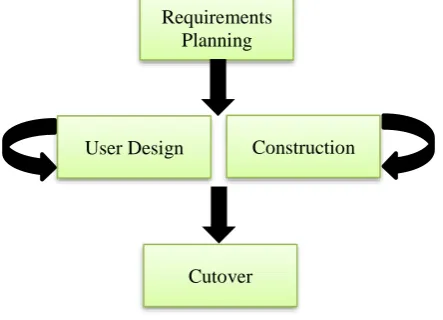
The study was conducted following the Rapid Application Development (RAD) methodology proposed by Martin (25). RAD is an adaptive software development approach which involves prototyping in gathering the requirements for the systems of apps. Although software development methodology transformed continuously (26), RAD is still relevant and being used widely by software developers. It consists of four main phases namely requirements planning, user design, construction, and cutover. The flow of the phases is illustrated in Fig. 6.
Figure 6. The phases of RAD.
The requirements planning phase involves acquiring the requirements of a mobile app for managing grocery lists. The requirements are documented and visualized using Unified Modelling Language (UML) diagrams including the use case, activity and class diagrams. UML diagrams are commonly used to presents the requirements of a system as found in Adediran and Al-Bazi (27) and Hussain, Mutalib, and Yasin (28). The user design and construction phases are performed concurrently where the user interface of the mobile app is designed. Users are involved during the design and construction process where they provide feedback for improving the user interface and information flow of the mobile app for managing grocery list. Finally, during the cutover phase, an evaluation is conducted to measure the
Requirements Planning
User Design Construction
usability of the mobile app. The detail implementation of the phases is explained in the following sections. The requirements planning, user design, and construction phases are covered in the Design and Development of SMART LIST section, while the cutover phase is explained in Evaluation of SMART LIST section.
Design and Development of Smart List:
This section describes the design and development of a mobile app for creating and managing grocery lists following the first three phases of RAD. The section is divided into two sub-sections; first, the requirements of the mobile app for creating and managing grocery lists and second, the prototype development of SMART LIST; a mobile app developed to demonstrate the gathered requirements.
The Requirements of The Mobile App for Creating and Managing Grocery Lists
A requirement gathering process was carried out using two methods that are, interviewing selected women who performed grocery shopping in a regular basis, and analysing documents and apps from the Internet that are related to grocery shopping and grocery list. The interview was conducted informal on five working women at the authors’ and the respondents’ convenient. Most of them were the authors’ colleagues and relatives. They were asked a few open-ended questions
primarily on the features of the mobile app. The example of the questions are; what are the features of a mobile app for grocery list management that you would like to have, how would you like to have the list rendered in your smartphone, how would you like to choose the grocery items from the list?, how would you like to add new items in the existing lists, do you think that a reminder and notification is necessary. Their opinion was recorded, and the requirements were elicited. The respondents actively involved during the construction (development) phase where the interface of the prototype was shown to them to get their feedback and comments.
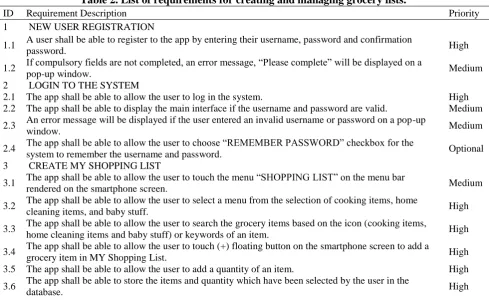
For the secondary requirements gathering process, the documents were searched using Google searching engine by providing keywords primarily “grocery list,” “grocery shopping list,” “shopping list,” “grocery management,” “household management,” “fridge management,” and “pantry management.” The documents were analysed to elicit the requirements for a mobile app that can create and manage grocery lists. Table 2 lists four significant requirements (and their priority) produced from the requirements gathering process. The requirements include new user registration, login to the app, manage the shopping (grocery list), and manage reminder for an item running out-of-stock.
Table 2. List of requirements for creating and managing grocery lists.
ID Requirement Description Priority
1 NEW USER REGISTRATION
1.1 A user shall be able to register to the app by entering their username, password and confirmation
password. High
1.2 If compulsory fields are not completed, an error message, “Please complete” will be displayed on a
pop-up window. Medium
2 LOGIN TO THE SYSTEM
2.1 The app shall be able to allow the user to log in the system. High 2.2 The app shall be able to display the main interface if the username and password are valid. Medium
2.3 An error message will be displayed if the user entered an invalid username or password on a pop-up
window. Medium
2.4 The app shall be able to allow the user to choose “REMEMBER PASSWORD” checkbox for the
system to remember the username and password. Optional
3 CREATE MY SHOPPING LIST
3.1 The app shall be able to allow the user to touch the menu “SHOPPING LIST” on the menu bar
rendered on the smartphone screen. Medium
3.2 The app shall be able to allow the user to select a menu from the selection of cooking items, home
cleaning items, and baby stuff. High
3.3 The app shall be able to allow the user to search the grocery items based on the icon (cooking items,
home cleaning items and baby stuff) or keywords of an item. High
3.4 The app shall be able to allow the user to touch (+) floating button on the smartphone screen to add a
grocery item in MY Shopping List. High
3.5 The app shall be able to allow the user to add a quantity of an item. High
3.6 The app shall be able to store the items and quantity which have been selected by the user in the
Special Issue on the 7th International Conference on Computing and informatics (ICOCI2019) from 27-29 3.7 The app shall be able to allow the user to view the items in MY Shopping List. Medium
3.8 A user shall be allowed to select an item and touch “DELETE” button to remove an item from MY
Shopping List. High
3.9 The app shall be able to remove the items selected by the user from MY Shopping List. High
4 MANAGE REMINDER FOR AN ITEM RUNNING OUT OF STOCK
4.1 The user shall be able to set a reminder for grocery items that are almost running out of stock. High
4.2 The app shall be able to allow the user to touch the menu “SET REMINDER” on the menu bar
rendered on the smartphone screen. Medium
4.3 The user shall be able to select the date and time from the date picker. Medium
4.4 The app shall be able to store the date and time set for the reminder of grocery items that are almost
running out of stock. Medium
4.5 The app shall be able to activate smartphone alarm for the date reminder set by the user. Medium
The requirements presented in Table 2 were translated into the computer system functionality. The next process is visualizing and modelling the requirements of the app using the appropriate modelling method and tools. In this work, the Unified Modelling Language (UML) was used to visualize and model the requirements. The models used in this work are two behavioural diagrams namely use case and activity diagrams, and a class diagram that represents the structural components of the app. The diagrams were drawn using
Microsoft Visio. Fig. 7 illustrates the use case diagram and the communications between the use cases and the actor for a mobile app that can be used to create and manage grocery lists. Four major use cases are register, login, manage My Shopping List, and Manage Reminder. The use case of Manage My Shopping List allows users to perform subfunctions including “Search Grocery Items,” “Delete items,” “Add Grocery Items,” and “Add the Quantity of a Grocery Items.” The Manage Reminder allows users to “Add Date.”
Figure 7. The use case diagram of a mobile app for creating and managing grocery lists.
The use case diagram is detailed out to show the dynamic behaviour of the app. Hence, the operations involved in using the mobile app for creating and managing grocery lists are illustrated
Figure 8. The activity diagram of a mobile app for creating and managing grocery lists.
The structural components of a mobile app for creating and managing grocery lists are represented in a class diagram as illustrated in Fig. 9. The class diagram in Fig. 8 shows the attributes and operations of the app. In this work, four main classes were identified namely user, grocery items,
Special Issue on the 7th International Conference on Computing and informatics (ICOCI2019) from 27-29 march
Figure 9. The class diagram of a mobile app for creating and managing grocery lists.
The SMART LIST Prototype Development A prototype of a mobile app for creating and managing grocery list named SMART LIST was developed. It represents the requirements explained in the previous subsection. Software prototyping is a standard way of demonstrating the software requirements so that further comments and suggestions could be obtained from the users based on their experience in interacting with the
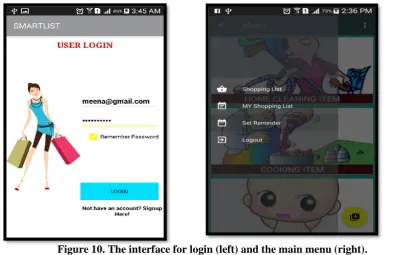
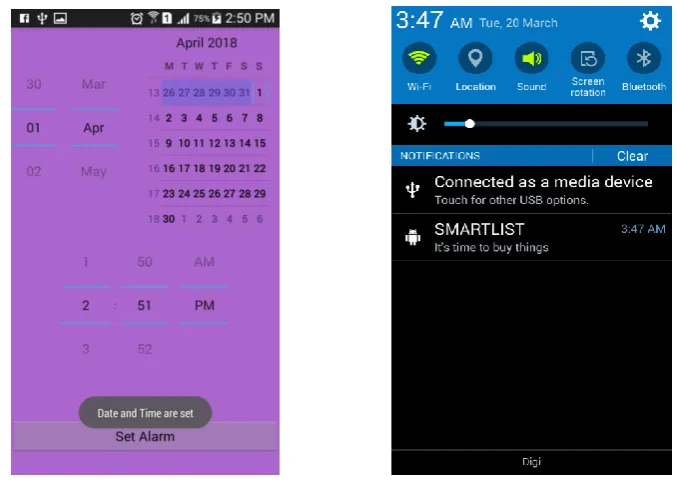
prototype. The Android Studio was used as the main integrated development environment (IDE) tool. Further, the Firebase development platform was used to facilitate crucial functions like user authentication, and database for data storage. Screenshots in Fig. 10, 11, and 12 show the selected interfaces of SMART LIST.
Figure 11. The interface for searching (left) and add grocery item (right).
Figure 12. The interface for setting a reminder (left) and the triggered reminder (right).
Evaluation of Smart List: The Evaluation Setting
A usability evaluation was conducted on 30 respondents, consist of working mothers in a north district in Malaysia. The respondents were approached randomly at the supermarkets and participated in the study on a voluntary basis. The instruments used for the evaluation were the SMART LIST app and a post-task questionnaire.
Special Issue on the 7th International Conference on Computing and informatics (ICOCI2019) from 27-29 march
and signed a consent form; 2. interacted with SMART LIST app as stated in the experiment procedure, and 3. answered the post-task questionnaire.
The Respondents’ Demographic Information Analysis of the respondents’ demographic information revealed that 73% of them aged between 30 and 50. 43% of them completed high school, 17% had college certificates, 20% held a bachelor’s degree, and 20% possessed a master’s degree. 17% among them were single, 6% were separated (divorced), and 77% were married. Regarding household members, 64% of the respondents had 4 to 7 people in their household. Only 3% had more than 8 people in their household; while the rest had less than 4 people. The respondents also reported that 26% of them were employed, 17% were self-employed, 27% (8 were fulltime housewife, and 30% were students. In terms of grocery shopping behaviour, 37% of the respondents do grocery shopping fortnightly. Only 23% had grocery shopping once a week; while the rest had it once a month. 54% of the respondents reported that they bought their
grocery from the supermarket and hypermarket, 23% bought them from the local fresh markets, 20% bought their grocery from the nearby retail shops, and only 3% had online grocery shopping. Most of the respondents (i.e., 90%) did not install any app on their mobile phone; while the rest had apps installed on their mobile phone for managing grocery. 33% of them listed the grocery items on a paper, 30% kept a list in their smartphone notepad, 7% bought things using grocery shopping pamphlet, and 30% had not prepared a list at all.
The Usability of SMART LIST
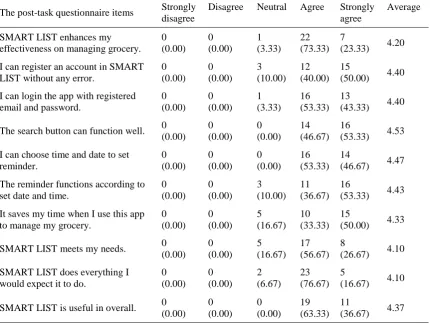
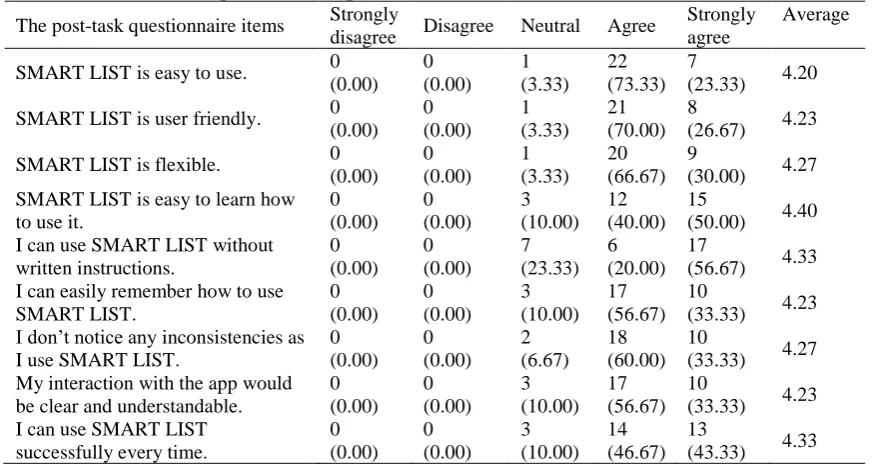
An analysis was conducted on the respondents’ responses in Section B of the post-task questionnaire. The section measures the respondents’ perception towards SMART LIST usefulness and ease of use. It also measured the respondents’ satisfaction towards SMART LIST. Tables 3, 4, and 5 reported the frequency and average of the responses. The respondents rated four or five of the post-task scales for the three aspects of the usability. None of the respondents rated one or two. Only a few rated neutral.
Table 3. The respondents’ responses on the USEFULNESS OF SMART LIST.
The post-task questionnaire items Strongly disagree
Disagree Neutral Agree Strongly agree
Average
SMART LIST enhances my effectiveness on managing grocery.
0 (0.00) 0 (0.00) 1 (3.33) 22 (73.33) 7 (23.33) 4.20
I can register an account in SMART LIST without any error.
0 (0.00) 0 (0.00) 3 (10.00) 12 (40.00) 15 (50.00) 4.40
I can login the app with registered email and password.
0 (0.00) 0 (0.00) 1 (3.33) 16 (53.33) 13 (43.33) 4.40
The search button can function well. 0 (0.00) 0 (0.00) 0 (0.00) 14 (46.67) 16 (53.33) 4.53
I can choose time and date to set reminder. 0 (0.00) 0 (0.00) 0 (0.00) 16 (53.33) 14 (46.67) 4.47
The reminder functions according to set date and time.
0 (0.00) 0 (0.00) 3 (10.00) 11 (36.67) 16 (53.33) 4.43
It saves my time when I use this app to manage my grocery.
0 (0.00) 0 (0.00) 5 (16.67) 10 (33.33) 15 (50.00) 4.33
SMART LIST meets my needs. 0 (0.00) 0 (0.00) 5 (16.67) 17 (56.67) 8 (26.67) 4.10
SMART LIST does everything I would expect it to do.
0 (0.00) 0 (0.00) 2 (6.67) 23 (76.67) 5 (16.67) 4.10
Table 4. The respondents’ responses on the EASE OF USE OF SMART LIST.
The post-task questionnaire items Strongly
disagree Disagree Neutral Agree
Strongly agree
Average
SMART LIST is easy to use. 0 (0.00) 0 (0.00) 1 (3.33) 22 (73.33) 7 (23.33) 4.20
SMART LIST is user friendly. 0 (0.00) 0 (0.00) 1 (3.33) 21 (70.00) 8 (26.67) 4.23
SMART LIST is flexible. 0 (0.00) 0 (0.00) 1 (3.33) 20 (66.67) 9 (30.00) 4.27 SMART LIST is easy to learn how
to use it.
0 (0.00) 0 (0.00) 3 (10.00) 12 (40.00) 15 (50.00) 4.40 I can use SMART LIST without
written instructions. 0 (0.00) 0 (0.00) 7 (23.33) 6 (20.00) 17 (56.67) 4.33 I can easily remember how to use
SMART LIST. 0 (0.00) 0 (0.00) 3 (10.00) 17 (56.67) 10 (33.33) 4.23 I don’t notice any inconsistencies as
I use SMART LIST.
0 (0.00) 0 (0.00) 2 (6.67) 18 (60.00) 10 (33.33) 4.27 My interaction with the app would
be clear and understandable.
0 (0.00) 0 (0.00) 3 (10.00) 17 (56.67) 10 (33.33) 4.23 I can use SMART LIST
successfully every time.
0 (0.00) 0 (0.00) 3 (10.00) 14 (46.67) 13 (43.33) 4.33
Table 5. The respondents’ responses on their SATISFACTION OF SMART LIST.
The post-task questionnaire items Strongly
disagree Disagree Neutral Agree
Strongly agree
Average
I am satisfied with SMART LIST. 0 (0.00) 0 (0.00) 3 (10.00) 22 (73.33) 5 (16.67) 4.07 I would recommend SMART LIST
to my friends.
0 (0.00) 0 (0.00) 3 (10.00) 19 (63.33) 8 (26.67) 4.17 SMART LIST works the way I want
it to work.
0 (0.00) 0 (0.00) 1 (3.33) 17 (56.67) 12 (40.00) 4.37 I feel I need to have SMART LIST
app in my smartphone.
0 (0.00) 0 (0.00) 1 (3.33) 10 (33.33) 19 (63.33) 4.60 SMART LIST is wonderful and
pleasant to use.
0 (0.00) 0 (0.00) 1 (3.33) 13 (43.33) 16 (53.33) 4.50
The outcomes of the evaluation suggested that SMART LIST is useful and easy to use. Further, the respondents reported they were satisfied with the feature of the app that facilitates them in creating and managing grocery lists. Analysis of the respondents’ feedback about the specific features offered by SMART LIST shows that most of the respondents agree that the registration, login, search, and reminder setting processes were straightforward and useful. They also perceived that SMART LIST could help them in creating and managing grocery lists in a more effective way and met the way that they wanted to have in creating and managing grocery lists. In terms of the user interface, the respondents reported that SMART LIST was easy to use without the need for written instruction and they can easily remember the way of the using the mobile app. Further, the respondents satisfied with the appearance of the mobile app and intended to recommend the apps to other.
Conclusion and Future Work:
Special Issue on the 7th International Conference on Computing and informatics (ICOCI2019) from 27-29 march
from photos and automatically transform into text for keeping the information in the apps’ repository. There are also other potential studies could be carried out to enhance the process of creating and managing the grocery list. An automatic grocery item inventory could be interesting and useful in creating a grocery list. The internet of things could be integrated into the apps where sensors are embedded in the fridge or pantry and send a signal to the apps to notify grocery items that are almost running out of stock. The use of sensors can indicate that the grocery items are almost run out of stock and require purchase. The use of barcode scanning facility for a similar purpose could also be done. It could be extended into a recommender system which could suggest the users with healthy recipes and generate the grocery lists automatically based on the ingredients of the recipes.
Acknowledgment:
The research is funded by Ministry of Higher Education, Malaysia under the Trans-Disciplinary Research Grant Scheme (Ref: TRGS/2/2014/ UUM/01/3/4, UUM S/O Code:13170).
Conflicts of Interest: None.
References:
1. Bhattacharya S, Floréen P, Forsblom A, Hemminki S, Myllymäki P, Nurmi P,et.al.. Ma $$ iv--An Intelligent Mobile Grocery Assistant. International Conference on Intelligent Environments , 2012 Jun 26: 165-172.
2. Jayawilal WH, Premeratne S. The smart shopping list: An effective mobile solution for grocery list-creation process. Malaysia International Conference on Communications (MICC), 2017 Nov 28 :124-129.
3. Huang Y, Yang, Z. Write or Type? How a Paper versus a Digital Shopping List Influences the Way Consumers Plan and Shop. JACR. 2018 Jul 1; 3(3):396-409.
4. Ahmed NN, Haqul AM. Freephony: Minimalistic Interface developed for t visually impaired and the elderly community in Bangladesh. JICT. 2017 Jun 1;16(1):175-91.
5. Wang D, Xiang Z, Fesenmaier DR. Smartphone use in everyday life and travel. J Travel Res . 2016 Jan; 55(1), 52-63.
6. Arnaud A, Kollmann A, Berndt, A. Generation Y: the development and use of shopping lists. Advances in Social Sciences Research Journal. 2015 Sep 16; 2(9).
7. Forsblom A, Nurmi P, Floréen P, Peltonen P, Saarikko P. Ma ive─ An Intelligent Shopping Assistant. In PMPC@ UMAP, 2009
8. Heinrichs F, Schreiber D, Schöning J. The hybrid shopping list: Bridging the gap between physical and digital shopping lists. In Proceedings of the 13th
international conference on Human computer interaction with mobile devices and services 2011 Aug 30: 251-254. ACM.
9. Jain R. SmartGrocer: a context-aware personalized
grocery system (Doctoral dissertation), 2018.
10. Thomas A, Garland R. Grocery shopping: list and non-list usage. Marketing Intelligence & Planning.2014 Oct 1; 22(6):623-635.
11. Nurmi P, Forsblom A, Floréen P, Peltonen P, Saarikko P. Predictive text input in a mobile shopping assistant: methods and interface design. In Proceedings of the 14th international conference on Intelligent user interfaces 2009 Feb 8 : 435-438. ACM.
12. Douglas KH, Uphold NM, Steffen S, Kroesch AM. Promoting Literacy With Self-Created Grocery Lists on Mobile Devices. J. Spec. Educ. . 2018 Feb;51(4):201-10.
13. Berndt A, Angstmann K, Strauch AK. The Development And Use Of Shopping Lists In Grocery Shopping In Sweden. ASSRJ. 2017 Nov 29;4(22).
14. Bassett R, Beagan B, Chapman GE. Grocery lists: connecting family, household and grocery store.Br Food J. . 2008 Feb 15;110(2):206-17.
15. Au N, Marsden G, Mortimer D, Lorgelly PK. The cost-effectiveness of shopping to a predetermined grocery list to reduce overweight and obesity. Nutr Diabetes. 2013 Jun;3(6):e77.
16. Bellini S, Cardinali MG, Grandi B. Does shopping preparation influence consumer buying decisions?. International Business Research. 2016 Sep 23;9(10):201.
17. Schmidt M. Retail shopping lists: Reassessment and new insights. J. Retail. Consum. Serv. . 2012 Jan 1;19(1):36-44.
18. Schopfer S, Keller, T. Long Term Recommender Benchmarking for Mobile Shopping List Applications using Markov Chains; 2014.
19. DeSimone DM. Relationship of Grocery Shopping Habits to Body Mass Index of Adults in Western New York (Doctoral dissertation, D'Youville College); 2018.
20. Dubowitz T, Cohen DA, Huang CY, Beckman RA, Collins RL. Using a grocery list is associated with a healthier diet and lower BMI among very high-risk adults. J Nutr Educ Behav. . 2015 May 1;47(3):259-64.
21. Ludford PJ, Frankowski D, Reily K, Wilms K, Terveen L. Because I carry my cell phone anyway: functional location-based reminder applications. InProceedings of the SIGCHI conference on Human Factors in computing systems 2006 Apr 22 :889-898. ACM.
22. Bellini S, Aiolfi S. The impact of mobile device use on shopper behaviour in store: An empirical research on grocery retailing. Int. Bus. Res . 2017 Mar 8;10(4):58.
and healthy choices in grocery shopping. Healthc Inform Res . 2017 Jan 1;23(1):16-24..
24. Ahn J, Williamson J, Gartrell M, Han R, Lv Q, Mishra S. Supporting healthy grocery shopping via mobile augmented reality. ACM Transactions on Multimedia Computing, Communications, and Applications (TOMM). 2015 Oct 21;12(1s):16. 25. Martin, J. Rapid application development:
Macmillan Publishing Co., Inc; 1992 Jan 3.
26. Jnr BA, Majid MA, Romli A. An Empirical Study On Predictors Of Green Sustainable Software
Practices In Malaysian Electronic Industries. Journal of ICT. 2018 Apr 18(2): 347-391.
27. Adediran TV, Al-Bazi A. Developing Agent-Based Heuristic Optimisation System For Complex Flow Shops With Customer-Imposed Production Disruptions. JICT . 2018 Apr;18(2):291-322.
28. Hussain A, Mutalib NA, Yasin A. JFakih: Modelling mobile learning game. 2014 Int Conf Comput Inf Sci ICCOINS 2014 - A Conf World Eng Sci Technol Congr ESTCON 2014 - Proc. 2014;
29. Lund AM. Measuring usability with the use questionnaire12. Usability interface. 2001;8(2):3-6.
اهترادإو ةلاقبلا مئاوق ءاشنلإ لاوج قيبطت :ةيكذلا ةمئاقلا ريوطتو ميمصت
كتاك ازيلرون
راجناسايج يسارلايمات
فسوي سيناهوي
ايزيلام ،اراتوا ةعماج
ةصلاخلا
:
ةلاقبلا مئاوق ءاشنإ ةمهم ريدقت اًمئاد متي ، كلذ ىلع ةولاع .ةنزحمو ةدقعم ةيلمع ةلاقبلا يف قوستلا نأ كلهتسملا ملع يف ثحبلا تبثأقرغتسملا تقولاو لوذبملا دهجلا نلأ ةلاقبلا قوستب ةصاخلا مئاوق نأ نم مغرلا ىلع .هب فرتعم ريغو يئرم ريغ اهترادإو ةلاقبلا مئاوق ءاشنلإ
تاسارد دجوت ،كلذل ؛ نيثحابلا نم ريبك مامتهاب ىظحت لا ةلاقبلا مئاوقب ةقلعتملا ثاحبلأا نأ لاإ ،نيكلهتسملا ءارش ةين لثمت ةلاقبلا لوح ةدودحم
ساردلا هذه فدهت ،يلاتلابو .بدلأا يف عوضوملا ةرادإو ءاشنلإ لومحملا فتاهلل )قيبطت( قيبطت ريوطتو ميمصت للاخ نم ةوجفلا دس ىلإ ة
ذلا فتاهلا قيبطت نإف ،يلاتلابو .مويلا عيمجلل ةرورض حبصتو ةرشتنم ةيكذلا فتاوهلا .ةثيدحلا ةيكذلا فتاوهلا مادختساب ةلاقبلا مئاوق يذلا يك
اقبلا مئاوق ةرادإو ءاشنإ ةيلمع لهسي نأ نكمي قيبطتلا ريوطت ةيجهنم قيبطتلا ريوطتو ميمصت عبتي .ديفم نيلماعلاو نيلوغشملا صاخشلأل ةل
مساب يلوأ جذومن ريوطت مت ،كلذ دعب .ىوتحملا ليلحتو تلاباقملا للاخ نم ةيفيظولا تابلطتملا عمج مت ، ًلاوأ .عيرسلا SMART LIST
ًءانب
ةسارد ءارجإ متو ،ةعمجملا تابلطتملا ىلع ةمئاق نأ ىلإ مييقتلا جئاتن ريشت .يلولأا جذومنلا مادختسا ةيلباق مييقتل ةيناديم
SMART LIST
اهمدقت يتلا ةلاقبلا مئاوق ةرادإ فئاظو نع اًضيأ نوضار .مادختسلاا ةلهسو ةديفم SMART LIST.
ماظنلا تابلطتم مهف يف ةساردلا مهاست
ةمئاق ةرادلإ لاوجلا قيبطتل مدختسملا ةهجاوو ةلثامم تاقيبطت ريوطتل ةقطنملا يف نيثحابلاو نيروطملل اًيعجرم اًجذومن نوكي نأ نكمي .ةلاقبلا
اهترادإو ةلاقبلا مئاوق ءاشنإ يف تاردقلا زيزعت وأ .